1
Compute (Bridgend) Ltd
CBLi Reference and User Guide
8 Merthyr Mawr Road, Bridgend, Wales UK CF31 3NH
Tel: +44 (1656) 65 2222
Fax: +44 (1656) 65 2227
CBL Web Site - http://www.cbl.com
This document may be downloaded from http://www.cbl.com/cblidoc.html
CBL Ref: c:\nbj\htmldoc\td\CBLi_Reference_and_User_Guide_FrontPage.html
- 2009/03/04 17:56:37 -
CBL Interactive (CBLi)
Contents
Documentation Notes..............................................................................................................................................................1
About CBL Interactive (CBLi).............................................................................................................................................................1
System Environment...............................................................................................................................................................2
Getting started with CBLi...................................................................................................................................................................2
Starting the CBLi program.......................................................................................................................................................2
Window Concepts...................................................................................................................................................................2
Window types..........................................................................................................................................................................3
Screen Sizes...........................................................................................................................................................................3
Manipulating Windows............................................................................................................................................................4
Window layout.........................................................................................................................................................................4
Pressing buttons.....................................................................................................................................................................4
Window Focus.........................................................................................................................................................................5
Window Names.......................................................................................................................................................................5
Window Class.........................................................................................................................................................................5
Window List.............................................................................................................................................................................6
Function Keys.........................................................................................................................................................................6
CBLi Main Window..................................................................................................................................................................7
System Menu..........................................................................................................................................................................7
Function Keys Window............................................................................................................................................................9
CBLi Main Menu....................................................................................................................................................................10
Storage Display Window.......................................................................................................................................................11
Security Considerations........................................................................................................................................................12
CBLi Clipboard......................................................................................................................................................................13
Executing SELCOPY.........................................................................................................................................................................13
Invoking SELCOPY Interactive.............................................................................................................................................15
Load Library Search Chain...................................................................................................................................................15
SELCOPY Loop Break-in......................................................................................................................................................16
SELCOPY Interactive Windows............................................................................................................................................16
SELCOPY Interactive Main window......................................................................................................................................17
SYSIN Window......................................................................................................................................................................18
SYSPRINT Window..............................................................................................................................................................18
SQL Log Window..................................................................................................................................................................19
WTO Log Window.................................................................................................................................................................19
Work Area/Current Input Record Window.............................................................................................................................20
POS Expression Window......................................................................................................................................................21
@ Pointer Window................................................................................................................................................................21
Equates Window...................................................................................................................................................................22
PCB Window.........................................................................................................................................................................22
TRACE Window....................................................................................................................................................................23
Point-and-Shoot Popup Menu...............................................................................................................................................24
SELCOPY Interactive Commands........................................................................................................................................25
BREAKPOINT.......................................................................................................................................................................25
EOJ.......................................................................................................................................................................................25
GO.........................................................................................................................................................................................26
RERUN.................................................................................................................................................................................26
STEPINTO............................................................................................................................................................................26
STEPOVER...........................................................................................................................................................................27
TRACK..................................................................................................................................................................................28
WINDOW..............................................................................................................................................................................28
SELCOPY Interactive Function Keys....................................................................................................................................30
Executing CBLVCAT.........................................................................................................................................................................30
CBLVCAT Interactive Window..............................................................................................................................................33
Raw Data Window.................................................................................................................................................................37
DB2 Dynamic SQL.............................................................................................................................................................................40
Executing IDCAMS............................................................................................................................................................................40
Prefix Commands..................................................................................................................................................................41
New File Definition............................................................................................................................................................................41
Allocate NonVSAM................................................................................................................................................................41
Define VSAM Elements.........................................................................................................................................................43
Execute POWER................................................................................................................................................................................43
Prefix Commands..................................................................................................................................................................46
Create ALIAS......................................................................................................................................................................................47
Execute IEBCOPY..............................................................................................................................................................................49
List Windows.....................................................................................................................................................................................49
The List Window Menu..........................................................................................................................................................49
View List Display...................................................................................................................................................................49
2009/07/20 16:03:29
i
CBL Interactive (CBLi)
Contents
List Windows
Field Descriptor Block (FDB).................................................................................................................................................50
Edit View...............................................................................................................................................................................51
Selecting, Sorting and Filtering.............................................................................................................................................51
The Select Clause.................................................................................................................................................................52
The Where Clause................................................................................................................................................................54
The Sort (Order By) Clause..................................................................................................................................................54
Sorting with the Cursor..........................................................................................................................................................54
List Entry Location.................................................................................................................................................................55
FIND Command....................................................................................................................................................................55
LOCATE Command..............................................................................................................................................................56
S Command..........................................................................................................................................................................56
Prefix Commands..................................................................................................................................................................59
List DASD Volumes...............................................................................................................................................................61
List Catalog Entries...............................................................................................................................................................65
List CMS Files.......................................................................................................................................................................66
List Dataset Details...............................................................................................................................................................69
List VTOC Files.....................................................................................................................................................................71
List VTOC Extents.................................................................................................................................................................73
List MVS Allocated Files.......................................................................................................................................................74
List VSE Standard Labels.....................................................................................................................................................76
List Library Members.............................................................................................................................................................80
List MVS Enqueues...............................................................................................................................................................81
List MVS Job Enqueues........................................................................................................................................................82
List HFS Path........................................................................................................................................................................86
Utility Windows..................................................................................................................................................................................86
Calculator Window................................................................................................................................................................86
Calendar Window..................................................................................................................................................................87
FAV - Favourites Datasets/Commands Window...................................................................................................................88
File Search Window..............................................................................................................................................................90
File Search & Update Utility..................................................................................................................................................90
FSU - File Search/Update Window.......................................................................................................................................97
File Search & Update Output..............................................................................................................................................101
FSUUNDO..........................................................................................................................................................................108
System Windows.............................................................................................................................................................................108
Operating System Window..................................................................................................................................................108
LPA Modules Window.........................................................................................................................................................109
Link List Window.................................................................................................................................................................110
APF List Window.................................................................................................................................................................111
Task List Window................................................................................................................................................................111
Allocated Storage Windows................................................................................................................................................112
Loaded Programs Window..................................................................................................................................................113
CBLi Storage Statistics Window..........................................................................................................................................114
CBLi Module List Window...................................................................................................................................................114
CBLVCAT SVC window......................................................................................................................................................115
CBLNAME Window.............................................................................................................................................................116
CBLi Interactive Help......................................................................................................................................................................118
CBLi Command Line Interface.......................................................................................................................................................120
ALIAS..................................................................................................................................................................................120
AMS....................................................................................................................................................................................121
APE.....................................................................................................................................................................................121
BACKWARD.......................................................................................................................................................................122
BOTTOM.............................................................................................................................................................................122
BROWSE............................................................................................................................................................................122
CALENDAR.........................................................................................................................................................................123
CALC...................................................................................................................................................................................123
CBLI....................................................................................................................................................................................123
CBLICANCEL......................................................................................................................................................................124
CBLNAME...........................................................................................................................................................................124
CLOSE................................................................................................................................................................................124
CMDTEXT...........................................................................................................................................................................126
COMMANDLINE.................................................................................................................................................................127
CURSORSELECT...............................................................................................................................................................127
DOWN.................................................................................................................................................................................128
DRAGBORDERMINUS.......................................................................................................................................................128
DRAGBORDERPLUS.........................................................................................................................................................129
EDIT....................................................................................................................................................................................130
EO.......................................................................................................................................................................................131
ERASE................................................................................................................................................................................132
FAV.....................................................................................................................................................................................132
FORWARD..........................................................................................................................................................................132
FS........................................................................................................................................................................................133
FSU.....................................................................................................................................................................................137
2009/07/20 16:03:29
ii
CBL Interactive (CBLi)
Contents
CBLi Command Line Interface
HELP...................................................................................................................................................................................138
HOME.................................................................................................................................................................................138
IEBCOPYDIALOG...............................................................................................................................................................138
ISPF....................................................................................................................................................................................139
ISPFUTIL............................................................................................................................................................................139
KEYS...................................................................................................................................................................................140
LA........................................................................................................................................................................................140
LC........................................................................................................................................................................................143
LD........................................................................................................................................................................................144
LEFT...................................................................................................................................................................................145
LJQ......................................................................................................................................................................................146
LL........................................................................................................................................................................................147
LP........................................................................................................................................................................................147
LQ.......................................................................................................................................................................................148
LV........................................................................................................................................................................................149
LVOL...................................................................................................................................................................................149
LVR.....................................................................................................................................................................................150
LX........................................................................................................................................................................................150
MAXIMISE...........................................................................................................................................................................151
MDINEXT............................................................................................................................................................................151
MDIPREV............................................................................................................................................................................151
MINIMISE............................................................................................................................................................................152
MOVEWINDOW..................................................................................................................................................................153
NEXTMAINWINDOW..........................................................................................................................................................153
NEXTWINDOW...................................................................................................................................................................153
POWER...............................................................................................................................................................................154
PREVMAINWINDOW..........................................................................................................................................................154
PREVWINDOW...................................................................................................................................................................154
QUIT....................................................................................................................................................................................155
RENAME.............................................................................................................................................................................156
RESTORE...........................................................................................................................................................................156
RETRIEVE..........................................................................................................................................................................156
RIGHT.................................................................................................................................................................................157
SDATA................................................................................................................................................................................158
SDE.....................................................................................................................................................................................158
SDSF...................................................................................................................................................................................158
SELCOPY...........................................................................................................................................................................160
SETCOLOUR......................................................................................................................................................................161
SETFOCUS.........................................................................................................................................................................161
SHOWPOPUPMENU..........................................................................................................................................................162
SHOWWATTR....................................................................................................................................................................163
SIZEWINDOW....................................................................................................................................................................164
SQL.....................................................................................................................................................................................165
SVC.....................................................................................................................................................................................165
SYSAPF..............................................................................................................................................................................165
SYSCOMMAND..................................................................................................................................................................166
SYSI....................................................................................................................................................................................166
SYSLL.................................................................................................................................................................................166
SYSLPA..............................................................................................................................................................................166
SYSMENU..........................................................................................................................................................................167
SYSPGM.............................................................................................................................................................................167
SYSSTOR...........................................................................................................................................................................167
SYSTASK............................................................................................................................................................................167
TASK...................................................................................................................................................................................168
TOP.....................................................................................................................................................................................168
UP.......................................................................................................................................................................................169
VCAT...................................................................................................................................................................................170
VIEW...................................................................................................................................................................................171
VOLSTATS.........................................................................................................................................................................172
WINDOWLIST.....................................................................................................................................................................172
WINDOWNAMES................................................................................................................................................................173
USS commands...............................................................................................................................................................................173
USS CHDIR........................................................................................................................................................................173
USS GETCWD....................................................................................................................................................................174
USS LINK............................................................................................................................................................................174
USS MKDIR........................................................................................................................................................................174
USS REALPATH.................................................................................................................................................................175
USS RENAME....................................................................................................................................................................175
USS RMDIR........................................................................................................................................................................175
USS STAT...........................................................................................................................................................................176
USS UNLINK.......................................................................................................................................................................177
CBLIVTAM commands....................................................................................................................................................................177
MESSAGE..........................................................................................................................................................................177
QUERY...............................................................................................................................................................................178
2009/07/20 16:03:29
iii
CBL Interactive (CBLi)
Contents
CBLIVTAM commands
STOP..................................................................................................................................................................................179
CBLi Dump Files..............................................................................................................................................................................180
CBLIINI control file..........................................................................................................................................................................180
SYSTEM CBLIINI................................................................................................................................................................180
USER CBLIINI.....................................................................................................................................................................180
CBLIINI Variable Format.....................................................................................................................................................181
Assign CBLIINI Variables....................................................................................................................................................181
Display CBLIINI Fileids and Variables................................................................................................................................182
CBLIINI Standard Variables................................................................................................................................................191
Glossary...........................................................................................................................................................................................title
2009/07/20 16:03:29
iv
About CBL Interactive (CBLi)
System Environment
CBL Interactive (CBLi) is a full screen 3270 application which runs in the following environments:
• Under TSO/E in MVS, OS/390 and z/OS.
• Under ISPF in MVS, OS/390 and z/OS.
• As a VTAM application in MVS, OS/390 and z/OS. (See Disaster Recovery below)
• As a VTAM application in VSE/ESA.
• Under CMS in VM/ESA and z/VM.
Disaster Recovery
CBLi has the same functionality when executing as a VTAM application as it does when running under TSO. Therefore, the
CBLIVTAM module and VTAM applid may be installed on a recovery volume to perform data editing, data set allocation and
system navigation if ISPF is unavailable.
Couple this with SELCOPY, which is usually installed in the same load library as CBLi, the systems programmer is provided with a
powerful set of tools to aid the data recovery process.
General Functionality
CBLi allows the user to generate, operate on and manipulate data within windows that may contain:
• DASD Volume lists.
• VTOC, Data set and member lists.
• Interactive SELCOPY execution.
• Interactive CBLVCAT execution.
• CBLe windowed text editor.
• DB2 SQL interface.
• Sequential file or VSAM object definition.
CBLi Environment
CBLi provides a full screen 3270 interface which supports the following windows style features:
• Drop down and popup menus.
• Resizable and movable windows.
• Multiple overlapped views of file and volume lists.
• Multiple overlapped Interactive SELCOPY execution windows.
• Multiple overlapped Interactive CBLVCAT execution windows.
• Access to services such as job submission and the ISPF or CMS editor.
2009/07/20 16:03:29
CBL Interactive (CBLi)
1
Getting started with CBLi
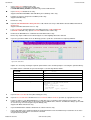
1. Starting the CBLi program
2. Window Concepts
3. CBLi Main Window
4. Security Considerations
5. CBLi Clipboard
Starting the CBLi program
Before you start CBLi you need a mainframe 3270 terminal session. Most people now use a 3270 emulation program from a
workstation rather than a real 3270 terminal.
If you are using 3270 emulation we strongly recommend using the largest possible screen size. Screen sizes up to 62x160 for TSO
ISPF (this appears to be the maximum permitted for ISPF) and up to 86x190 for TSO without ISPF, CMS and VTAM (MVS and
VSE) are possible.
How CBLi is started depends on the environment in which it is to be run:
O/S
Environment
Command
TSO/E
Enter the command CBLI at the READY prompt.
ISPF
Enter TSO CBLiI on the ISPF command line.
ISPF screen management is used and so CBLi must have first been defined as an ISPF application by
your systems programmer (as described in the CBL Interative installation Guide.) Otherwise enter TSO
CBLi to execute using TSO 3270 screen management.
MVS
VTAM
Enter LOGON APPLID(CBLIVTAM) on a VTAM USS screen.
Your installation may have other ways of invoking a VTAM application. Refer to the CBL Interative
installation Guide.
Note: The CBLi VTAM session controller program (CBLIVTAM) must be running and the CBLi VTAM
applid must be active.
VSE
VTAM
Enter LOGON APPLID(CBLIVTAM) on a VTAM USS screen.
Your installation may have other ways of invoking a VTAM application. Refer to the CBL Interative
installation Guide.
Note: The CBLi VTAM session controller program (CBLIVTAM) must be running and the CBLi VTAM
applid must be active.
VM
CMS
Enter the command CBLI on the CMS command line.
Window Concepts
Window types
All windows exist in a hierarchy. At the top of the hierarchy is the desktop window which is automatically created during
initialisation. The desktop window covers the whole screeen and cannot be moved, resized or destroyed. All other windows,
including the CBLi application (main) window, are dependents of the desktop.
When an application creates a window the new window has to be dependent on an existing window, the parent or owning window.
If the application does not supply an existing window then the desktop window is used by default. This dependency relationship has
2 forms:
• Child window. The dependent window is a child of the existing window which is called its parent. The child window can
only exist within the rectangle defined by its parent's client area. Typically, child windows are used for low level entities
such as buttons and input fields.
• Owned window. The dependent window is owned by the existing window which is called its owner. The owned window
can be moved all over the display surface but is always infront of (cannot be obscured by) its owner. Typically owned
windows are used for more complex entities such as dialog boxes and help windows.
When a window is destroyed, so are all of its dependent owned and child windows.
2009/07/20 16:03:29
CBL Interactive (CBLi)
2
Getting started with CBLi
Screen Sizes
Screen Sizes
The CBL 3270 screen manager can handle any 3270 screen size up to a total area of 16384 (16K) with a maximum width or depth
of 255. This 16K area limit is imposed by the 14 bit address format of the 3270 data stream used by CBLi. The 255 width or depth
limit is the result of some components using just 1 byte to store these dimensions.
Most 3270 emulation software packages allow the user to configure a 3270 session to emulate hardware terminal models 2/3/4/5
having rows x columns screen sizes of 24x80, 32x80, 43x80 and 27x132 respectively.
Some 3270 emulators also support the ability to define non-standard terminal sizes (IBM-DYNAMIC TN3270 terminals) that allow
users to obtain 3270 screen sizes with dimensions much larger than the standard hardware models.
Note: To configure non-standard screen sizes, IBM-DYNAMIC TN3270 terminal definitions must first be defined to VTAM and then
made available to users via the TN3270 server.
Whenever possible, users should use the largest screen size available to take full advantage of CBLi's ablility to display multiple
overlapping windows containing a variety of data. At CBL, screen sizes of 62x160 are regularly used for TSO (maximum supported
by ISPF) and screen sizes of up to 86x190 for CMS and VTAM (MVS or VSE).
A selection of popular 3270 emulator packages have been installed at CBL to determine whether support is included for
IBM-DYNAMIC terminals as well as some other additional features considered useful for use with CBLi execution (Keyboard
macros, etc.) The following link opens a page on the CBL web site that contains the results for each emulator tested to date.
http://www.cbl.com/cbli3270.html
Emulator configuration files and macros that are applicable to individual 3270 emulator packages, have been generated and
published on the CBL web pages for use with CBLi. Please see the following:
http://www.cbl.com/cblidl.html
Manipulating Windows
Moving a window
If a window has a title bar it can be moved with the following procedure:
1. Place the cursor in the title bar of the window.
2. Press the enter key. The window border will be highlighted.
3. Move the cursor to a new position.
4. Press the enter key. The window will move by an amount equal to the displacement of the cursor.
Also see CBLi command MOVEWINDOW and CBLe command SET WINPOS.
Resizing a window
If a window has a border it can be resized with the following procedure:
1. Place the cursor in the border of the window. If the cursor is in the top or bottom border, the window will have its
depth changed. If the cursor is in the left or right border it will have its width changed. If the cursor is in a corner
of the border it will have its width and depth changed.
2. Press the enter key. The window border will be highlighted.
3. Move the cursor to a new position.
4. Press the enter key. The window will be resized by an amount equal to the displacement of the cursor.
Also see CBLi commands SIZEWINDOW, DRAGBORDERMINUS, DRAGBORDERPLUS and CBLe command SET
WINSIZE.
Maximising a window
If a window has a maximise button it can be maximised by moving the cursor to the maximise button and pressing the
enter key. The window will then take up the whole of the 3270 screen. The maximise button will change from a plus sign to
a solid vertical bar (representing restore).
Also see CBLi command MAXIMISE and CBLe command WINDOW MAX.
Minimising a window
If a window has a minimise button it can be minimised by moving the cursor to the minimise button and pressing the enter
key. The window will then be removed from the display and replaced by a small iconic window showing just a portion of its
title bar near the botton of the CBLi main window. The minimise button will change from a minus sign to a solid vertical bar
(representing restore ).
Also see CBLi command MINIMISE CBLe command WINDOW MIN.
Restoring a window
When a window has been maximised or minimised, it can be restored to its former position and size by moving the cursor
to the maximise button or the minimise button (which will now contain a solid vertical bar representing restore) and
pressing the enter key.
Also see CBLi command RESTORE CBLe command WINDOW REST.
Closing a window
A window can be closed by moving the cursor to the close button and pressing the enter key.
Also see CBLi command CLOSE. CBLe command WINDOW CLOSE.
2009/07/20 16:03:29
CBL Interactive (CBLi)
3
Getting started with CBLi
Window layout
Window layout
CBLi windows have a standard layout which consists of the following components. Not all windows have all these components, but
where present they occupy the same relative position in the window and have the same function.
The Title Bar
The title bar contains the title of the window.
The System Menu Button
The system menu button is at the left end of the title bar. If pressed the options of the system menu are displayed in a
popup menu.
The Minimise Button
The minimise button is at the right end of the title bar. It is represented as a single minus sign in white reverse video. If the
window is minimised then the minus sign is replaced by a solid vertical bar representing restore.
The Restore Button
The Restore button is displayed in place of the Minimise or Maximise button when a window is in a minimised or
maximised state respectively. It is represented by a solid vertical bar in white reverse video.
The Maximise Button
The maximise button is at the right end of the title bar. It is represented as a single plus sign in white reverse video. If the
window is maximised then the plus sign is replaced by a solid vertical bar representing restore.
The Close Button
The close button is at the right end of the title bar. It is represented as an x in red reverse video.
The Menu Bar
The menu bar occupies one or more lines below the title bar. It contains optional functions which can be invoked by
moving the cursor to the menu item and pressing enter. Some menu items when activated display popup submenus. The
menu items have the 3270 unprotected attribute so they can be selected by the tab key (which tabs to enterable fields).
Any data entered into a menu item is ignored.
Menu items may be enabled or disabled. When enabled they are displayed in white. When disabled they are displayed in
blue and selecting them will have no effect.
The Client Area
The client area of a window is the main body of the window and its contents vary depending on the class of the window.
The Command Line
The command line is an area of the window into which text commands may be entered. Most menu items have a
command line equivalent text command.
Pressing buttons
The 3270 architecture is such that the host is only informed of user input when a certain class of key is pressed on the keyboard.
These keys are those with attention identifiers and typically consist of the function keys, the enter key, the Program Attention (PA)
keys and a few other specialised keys. Even when operating under the control of a workstation 3270 emulator, the 3270 host
application is not sensitive to mouse movements (except in the case when the emulator allows the user to assign a particular 3270
function to the mouse buttons).
Because of this, 3270 window buttons cannot be "pressed" in the same way as work station window buttons. 3270 window buttons
are "pressed" by:
1. Moving the cursor to the button and
2. Pressing the enter key.
Window Focus
The focus window is the window which contains the cursor when the 3270 screen is displayed. If the window has a title bar then the
fact that it is the focus window is indicated by colouring the title bar area with blue reverse video. All other windows have a white
reverse video caption bar.
Input fields
The focus window defines the input rectangle which is the only area of the screen where input is enabled. When the focus window
is not a child window the input rectangle is the window itself.
When the focus window is a child window the input rectangle is that defined by its parent. Any input fields outside of the input
rectangle are temporarily disabled. Each field in the input rectangle can be visited by using the cursor tab key (shift+cursor tab key
to reverse the direction).
2009/07/20 16:03:29
CBL Interactive (CBLi)
4
Getting started with CBLi
Window Focus
Changing the focus window
The user can change the focus window in the following ways:
• By placing the cursor in a window and pressing enter. This sets the focus to the window containing the cursor.
• By using the PREVWINDOW, NEXTWINDOW, MDIPREV or MDINEXT commands. These commands cycle through all
windows in creation sequence. By default, PF9 is assigned to MDINext in MDI applications such as CBLe and SELCOPY
Interactive, and Nextwindow elsewhere.
• By using the Window item of the CBLi main menu or the WINDOWLIST command to open the Window List window and
then selecting a window by moving the cursor to the relevant entry and pressing enter. The selected window becomes the
focus window.
• By using the SETFOCUS command to explicitly name the focus window.
Window Names
All the windows defined by a CBL3270 application have a name. The name is supplied by the application when the window is
created and may be changed later during the window's life.
If the name is not supplied by the application then a default name is supplied by CBL3270 made up of the window class name
suffixed with a three digit number which is incremented by 1 for each window of the class created during the CBL3270 session.
The main use of window names is to allow commands entered on the command line of a window to refer to other windows which
are currently part of the application.
Viewing Window Names
The window name associated with each non-MDI window in the CBLi session may be displayed in that window's title bar (and
subsequently hidden from view) via the following:
• Select 'Display/Hide Window Names' from the system menu belonging to any open window.
• Enter the CBLi command WINDOWNAMES on the command line of any window.
Either of these operations will display or hide the window names for all open windows in the CBLi session.
Display of all MDI window names (e.g. CBLe text editor window names) has been suppressed to avoid overcrowding the title bar.
Alternatively, the Window List window may be used to obtain a window's associated window name. The window list displays all
open windows and their associated window names (including MDI window names.)
Window Class
All the windows defined by a CBL3270 application are members of a window class. A window class represents a set of windows
with the same behaviour and appearance. Window classes are identified by a 1 to 8 character name.
CBL3270 uses the window class name to associate a processing module (called the Window Procedure ) with the window.
All windows in the same class are managed by the same window procedure. The window procedure is called by CBL3270
whenever an event occurs which affects the window. It is the window procedure's responsibility to:
1. Paint the window client area.
2. Process any data entered into the window.
3. Respond to any commands issued from the window's menu or command line.
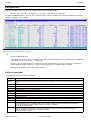
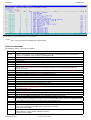
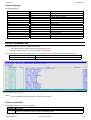
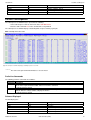
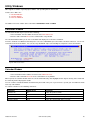
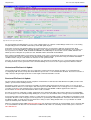
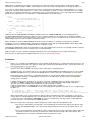
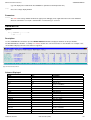
Window List
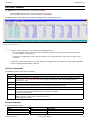
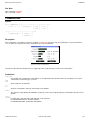
The Window List window may be opened via the following:
• Select 'Window' from the CBLi Main Menu.
• Enter the CBLi command WINDOWLIST on the command line of any window.
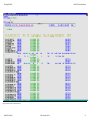
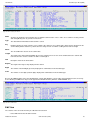
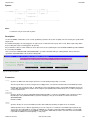
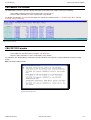
The Window List window displays all open windows and their associated window names and allows the user to place focus on a
specific window. The ENTER key should be pressed with the cursor on the line containing the required window.
The hierarchy of parent/child windows is illustrated by indentation of the entries in the list.
2009/07/20 16:03:29
CBL Interactive (CBLi)
5
Getting started with CBLi
Window List
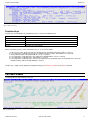
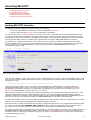
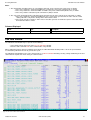
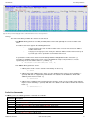
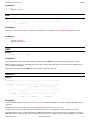
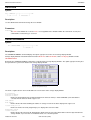
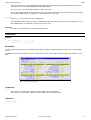
Figure 1. Window List window.
Function Keys
Function key command tables are maintained for keys F1-F24 at the following levels:
Window
For each window instance.
Class
For each window class.
Caption
One table for the caption area (title bar) of all windows.
Border
One table for the border area of all windows.
Default
One table of system defaults.
When a function key is pressed the command to process is selected as follows:
1. If the cursor is in the caption or border of a window then the appropriate function key table is searched.
2. If no command is assigned to the key then no command is processed (the default table is not searched).
3. The function key table of the window with the cursor is searched.
4. If no command is assigned then the class table for the window with the cursor is searched.
5. If no command is assigned then the default table is searched.
6. If no command is assigned then the search is repeated for the parent window of the cursor window and so on up the
window hierarchy until the desktop window is reached.
Function keys settings may be displayed and updated using the Function Keys window or the KEYS command.
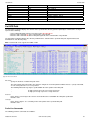
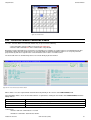
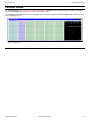
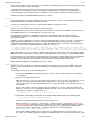
CBLi Main Window
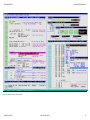
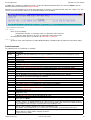
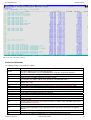
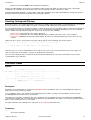
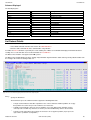
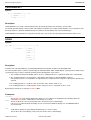
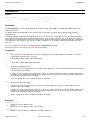
On starting CBLi the main window is openend.
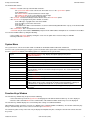
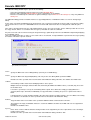
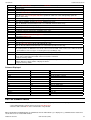
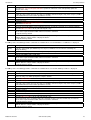
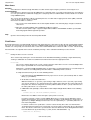
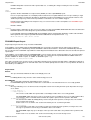
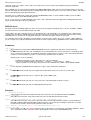
Figure 2. CBLi Main Window.
2009/07/20 16:03:29
CBL Interactive (CBLi)
6
Getting started with CBLi
CBLi Main Window
The main window contains:
• A title bar. Located at the top of the window, it includes:
♦ A system menu button at the extreme left. This button accesses the system menu options.
♦ The window name.
♦ A minimise button as the third character from the right.
♦ A maximise button as the second character from the right.
♦ A close button as the first character from the right.
• The menu bar. Located immediately below the title bar, it lists the main menu options.
• The client area. Occupying the body of the window, it contains:
♦ The CBLi logo, copyright notice and contact details.
♦ The operating system name and version.
♦ The user id.
♦ The build level of CBLi. This information is useful for communicating with CBL when a query is raised about CBLi
features or problems.
• The command line. This is the bottom line of the window.
Commands may be entered at the Command> prompt to invoke CBLi facilities that duplicate or extend the menu facilities.
You can launch CBLi facilities by doing the following:
• Select a CBLi main menu option by moving the cursor over the option in the menu bar and press ENTER.
• Entering a CBLi line command.
System Menu
The system menu is a menu of functions which is available on all windows within a CBL3270 environment.
You access the system menu by pressing the system menu button at the top left of the main window (or any subordinate window
that has a system menu button). The following options are available from the system menu:
Layout
Storage Display Windows only, displays the options popup menu. (As for
SHOWPOPUPMENU.)
Restore
Restore a maximised or miminised window to its original size and position.
Minimise
Minimise the window with the system menu.
Maximise
Maximise the window with the system menu.
Close
Close the window with the system menu.
Quit
Quit the application.
Window List
Open a window showing the current list of windows. You can select a window from this
list by placing the cursor on a list element and pressing enter. The selected window will
be given the focus.
Next window
Give the focus to the next window in the hierarchy of open windows.
Prev window
Give the focus to the previous window in the hierarchy of open windows.
Command line
Open the command line dialog.
Function keys
Open the functions keys dialog.
Show/Hide window names Toggle the status of the window names display. Window names are unique window
identifiers which can be used in commands to identify a particular window. If displayed,
the window name is displayed in the title bar as a prefix to the window caption.
Use ISPF/TSO
When running under TSO/ISPF, this menu command toggles the display from ISPF to
TSO format.
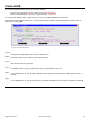
Function Keys Window
The Function Keys window may be opened via the following:
• Select 'Function Keys' from the System menu belonging to the window for which function keys are to be displayed.
• Enter the CBLi command KEYS on the command line of the window for which function keys are to be displayed.
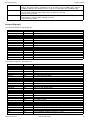
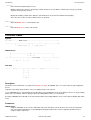
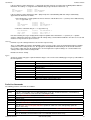
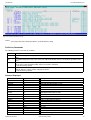
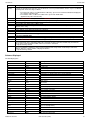
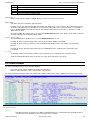
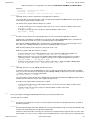
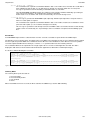
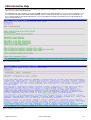
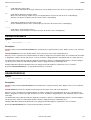
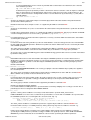
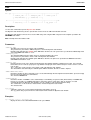
The Function Keys window displays the current PFKey table settings for a CBL3270 window.
CBLi maintains function key tables at 5 levels (i.e. Window, Class, Default, TitleBars and Borders). The function actioned by any
PFkey is determined by these levels as discussed in the topic Function Keys.
The function key table for any of the levels may be displayed and updated by first selecting the desired level from the Function
Keys menu.
2009/07/20 16:03:29
CBL Interactive (CBLi)
7
Getting started with CBLi
Function Keys Window
All the displayed fields, other than the Key field, are enterable. Changes made to the table are only obeyed once the user has
confirmed (saved) the changes on exit of the Function Keys window.
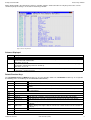
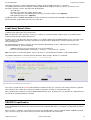
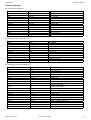
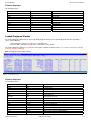
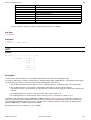
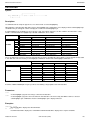
Figure 3. Function Keys Window.
Columns Displayed
Name
KEY
DELAY
Description
PFKeys 01-24 (Non-enterable field)
Determine whether the associated command is executed immediately when the function key is hit or merely
placed on the local command line.
Valid entries are Y or N.
BEFORE Determine whether the associated command is executed before or after any other CBL3270 screen input. (e.g. a
command line command or prefix area command.)
Valid entries are Y or N.
untitled The command(s) associated with the PFKey. For CBLe, a number of commands may be issued if separated by
an appropriate separator character.
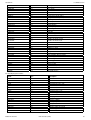
Default Function Keys
The CBLi Window, Class and Borders function keys are unassigned by default. The CBLi Default function keys are assigned to
the following (unless overridden by the SYSTEM/USER CBLi INIFILE):
PF1
PF2
PF3
Top
Bottom
Close
PF4
CmdText
PF5
PF6
PF7
PF8
PF9
PF10
Up Cursor
Down Cursor
NextMainWindow
Left Cursor
PF11
Right Cursor
PF12
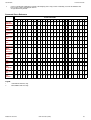
PF13
PF14
Retrieve -
2009/07/20 16:03:29
Display data at the top of a scrollable window.
Display data at the bottom of a scrollable window.
Close the window in which the cursor is positioned. (N.B. not necessarily the current focus
window)
Issue command at the cursor position if prefixed by "<" (less than), otherwise place text on
the command line.
Scroll up the file so that the current focus line becomes the last line of the display.
Scroll down the file so that the current focus line becomes the first line of the display.
Place focus on the next main window in the CBLi window list.
Scroll the display to the left so that the current focus column becomes the last column of
the display.
Scroll the display to the right so that the current focus column becomes the first column of
the display.
Retrieve the last command issued and place it at the command line.
CBL Interactive (CBLi)
8
Getting started with CBLi
PF15
PF16
PF17
PF18
PF19
PF20
PF21
PF22
PF23
PF24
CBLi Main Menu
CmdText Edit
Issue command at the cursor position if not prefixed by "<" (less than), otherwise place
text on the command line.
PrevMainWindow
Place focus on the previous main window in the CBLi window list.
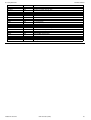
The CBLi TitleBars function keys are assigned to the following:
PF1
PF2
PF3
PF4
PF5
PF6
PF7
PF8
PF9
PF10
PF11
PF12
PF13
PF14
PF15
PF16
PF17
PF18
PF19
PF20
PF21
PF22
PF23
PF24
MoveWindow by y=-1
MoveWindow by y=+1
Reposition window up 1 line
Reposition window down 1 line.
MoveWindow by x=-1
MoveWindow by x=+1
Reposition window left 1 column.
Reposition window right 1 column.
CBLi Main Menu
The CBLi main menu is listed in the menu bar at the top of the CBLi main window. You select a menu item by tabbing the cursor to
the menu item and pressing the enter key. Menu items can also be activated with commands entered on the command line.
The main menu consists of the following items:
File
Execute SELCOPY
debug
Open the Execute SELCOPY debug window.
Execute CBLVCAT
Open the Execute CBLVCAT (VCI) window.
Edit
Open the CBLe text edit window.
DB2 Dynamic SQL
Open the DB2 Dynamic SQL window.
Allocate NonVSAM
Open the Allocate NonVSAM dialog.
Execute IDCAMS
Open the IDCAMS Command window.
Define KSDS
Open the Define KSDS dialog.
Define ESDS
Open the Define ESDS dialog.
Define RRDS
Open the Define RRDS dialog.
2009/07/20 16:03:29
CBL Interactive (CBLi)
9
Getting started with CBLi
List
Utilites
System
Storage Display Window
Define LDS
Open the Define LDS dialog.
Define AIX
Open the Define AIX dialog. - Not yet enabled
Define Path
Open the Define Path dialog. - Not yet enabled
Define Alias
Open the Define Alias dialog. - Not yet enabled
Define Catalog
Open the Define Catalog dialog. - Not yet enabled
Execute POWER
Open the POWER Command Output window.
DASD Volumes
Open the DASD Volumes list window.
Cataloged files
Open the Cataloged files list window.
Dataset details
Open the Dataset details list window.
VTOC files
Open the VTOC files list window.
VTOC extents
Open the VTOC extents list window.
Allocated files
Open the Allocated files list window.
Library members
Open the Library members list window.
Enqueues
Open the Enqueues list window.
Job Enqueues
Open the Job Enqueues list window.
File Search
Open the File Search window.
Calendar
Open the Calendar window.
Calculator
Open the Calculator window.
SDSF
Under TSO or ISPF, call the SDSF JES2 spool access program.
ISPF Dataset Utilities
Under ISPF, call the ISPF dataset utilities menu panel.
Operating System
Open the Operating System window.
CBLi storage stats
Open the CBLi Stoarge statistics Block window.
CBLi module list
Open the CBLi Module List window.
CBLi SVC
Open the CBLi CBLVCAT SVC information window.
CBLNAME
Open the CBLNAME storage display window.
Window
Open the Window List window.
SwapList
Displayed only if ISPF is the 3270 screen manager. Execute ISPF SWAPLIST
command.
Help
Open the help top level window.
Storage Display Window
Storage display windows provide a view of an area of storage in dump format.
Supported items that utilise storage diaplay windows are:
• CBLNAME Window.
• SELCOPY Interactive Workarea windows.
• SELCOPY Interactive POS windows.
• CBLe HEX Windows.
Window Display Format
The length of storage data displayed may be restricted by the type of window opened. e.g. The amount of data displayed in a CBLe
HEX window is restricted to be the length of the focus line.
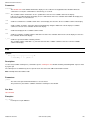
Each row of a storage display window has the following format:
Field Width
Type
Description
8
Hex
Address in storage of the displayed data.
6
UInt
Displacement from the start address of the displayed data.
8,16,32 or 64
Hex
Data in storage in hexadecimal format.
(4, 8, 16 or 32 bytes depending upon window size).
4,8 ,16 or 32
Char
Data in storage in character format.
(Field width adjusts automatically to match hexadecimal display width.)
2009/07/20 16:03:29
CBL Interactive (CBLi)
10
Getting started with CBLi
Storage Display Window
The format of the display may be updated using the options popup menu which may be opened using the SHOWPOPUPMENU
command or via the system menu button of the storage display window. By default, the SHOWPOPUPMENU command is
assigned to PF5 in storage display windows.
Window Sizing
User resizing of a storage display window's width will always be adjusted by CBLi to display one of the valid data display widths. i.e.
1, 2, 4 or 8 words of hexadecimal data plus its equivalent character representation if required.
If the window's width is increased or decreased by one column, the window's width is rounded up or down respectively to equal the
next valid display width. e.g. When using DRAGBORDERPLUS and DRAGBORDERMINUS (assigned to PF8/PF11 and PF7/PF10
respectively) on either of the window's vertical borders.
If the window's width is increased or decreased by more than one column, the window's width is always rounded down to equal the
next valid display width.
Navigating Data
The displacement field in the first row of a storage display window is an enterable field (highlighted in red by default.) This field may
be overwritten with a displacement, from the start address, of the byte that should be displayed first in the storage window's display
area.
CBLi commands UP CURSOR and DOWN CURSOR may be used to navigate the storage display window. By default, UP
CURSOR is assigned to PF7 and DOWN CURSOR is assigned to PF8.
Manipulating Data
Some storage display window invocations allow the data to be updated simply by overtyping the existing character or hexadecimal
representation and then, to commit the change, hitting <Enter>.
Security Considerations
VSE Systems
By default, the SYSTEM CBLiINI file has the System variable VSESMLogon=YES. This activates CBLi's VSE Security Manager
(BSM or ESM) logon and resource checking.
In order to operate successfully with VSESMLogon=Yes, the VSE system must be running a security manager and the CBLi startup
job submitted so that it provides the CBLi program with maximum user privilages. At CBL, the job that starts CBLi contains a JECL
* $$ JOB statement with SEC=(SYSA,...).
Any user wishing to login to CBLi must have a logon id defined in the security manager's data base. Once logged in, CBLi will
interrogate the security manager to establish the user's access privilage prior to performing any action on potentially protected
resources. e.g. listing LIBR library contents and editing LIBR members. CBLi will then permit or restrict the user's access to the
resource.
If VSESMLogon=OFF, then no logon password or security manager resource checking is performed.
With VSESMLogon=ON in effect, editing of VSE Power queue entries is possible if either the TO or FROM values match the
current user's userids. However, if VSESMLogon=OFF a user may only edit a Power queue entry if it is password protected and
the password is known to the user.
MVS Systems
On MVS systems, users login to CBLi using their RACF, or equivalent security package, login id. Under TSO, no CBLi login is
performed as the user's TSO login id is used instead.
Thereafter, the user's access privilage is verified prior to performing any action on potentially protected resources. e.g. listing
PDS(E) library contents and editing data sets.
In addition to this, the security administrator can restrict users' access to the following CBLi features using RACF profiles.
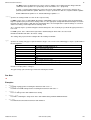
Resource Name CBLi Feature
System
Access to the 'Operating System' information available via the 'System' menu item on the main desktop
or via the commands: SysI, SysLPA, SysLL, SysAPF, SysTask, SysStor, SysPgm and CBLNAME.
UserTSO
Log on to CBLi under TSO and ISPF.
UserVTAM
Log on to CBLi as VTAM application.
SELCOPY
Use of the SELCOPY Interactive application.
CBLVCAT
Use of the CBLVCAT Interactive application.
DB2
Use of the DB2/SQL Interactive application.
2009/07/20 16:03:29
CBL Interactive (CBLi)
11
Getting started with CBLi
Security Considerations
Restrictions are implemented via options in the CBLi SYSTEM (site wide) CBLiINI file, and cannot be overridden by an individual's
USER CBLiINI file. These options must be entered in the (RACF) section of the CBLiINI file and are as follow:
CBLiINI Variable
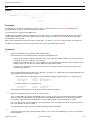
Description
ResourceCheck=NO|YES
Use RACF for CBLi resource access checking (default NO).
ResourceClass=ClassName
RACF general resource class (default FACILITY).
SuppressWTO=NO|YES
Suppress access failure WTO messages (default NO).
System=ResourceName
System commands resource name (default CBLI.SYSTEM)
UserTSO=ResourceName
TSO user access resource name (default CBLI.USER.TSO)
UserVTAM=ResourceName
VTAM user access resource name (default CBLI.USER.VTAM)
SELCOPY=ResourceName
Interactive SELCOPY resource name (default CBLI.SELCOPY)
CBLVCAT=ResourceName
Interactive CBLVCAT resource name (default CBLI.CBLVCAT)
DB2=ResourceName
Interactive SQL resource name (default CBLI.DB2)
With RACF.ResourceCheck=YES in effect, users without a minimum of READ access to the specific resource will be rejected.
In addition to these CBLiINI options, RACF, or an equivalent security package, must be active and a RACF profile must exist that
includes the resource name. The resource name may be generic; for example the profile CBLI.** with UACC(READ) would permit
all users access to all resources.
Note that MVS system symbols may be used in the resource names These will be resolved when reading the system CBLiINI file.
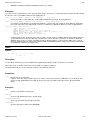
e.g.
(RACF)
DB2=CBLI.&SYSNAME..DB2
* Interactive SQL resource name
Please see the distributed CMX file &PREFIX..CBLI.CMX(RACF) for samples of commands useful in administering CBLi RACF
resource restrictions.
CBLi Clipboard
CBLi supports a clipboard facility to allow users to Copy, Cut and Paste data between windows running in the CBLi environment
that support clip board functions.
At this time, clipboard facilities are only supported in CBLe and SDE edit and browse views. e.g. Data copied to the clipboard from
an edit view in the SELCOPY Interactive application may be pasted to an edit view in the CBLe text edit application.
Note that the CBLi clipboard is not associated with any other clipboard facility offered by the system.
2009/07/20 16:03:29
CBL Interactive (CBLi)
12
Executing SELCOPY
1. Invoking SELCOPY Interactive
2. Load Library Search Chain
3. SELCOPY Interactive Windows
4. SELCOPY Interactive Commands
5. SELCOPY Interactive Function Keys
Invoking SELCOPY Interactive
The SELCOPY Interactive application window is started via the following:
• Select 'Execute SELCOPY' from the File menu in the CBLi window main menu.
• Enter the CBLi command SELCOPY on the command line of any window.
See also the CBLe macro, JCLCMX , which is a pre-processor tool used to convert MVS JCL decks containing SELCOPY steps
into a format suitable for input to SELCOPY Interactive. Simply edit the JCL deck using CBLe, then key in JCLCMX from the edit
command line to generate command files containing ALLOC commands that correspond to the DD statements; CALL commands
that correspond to EXEC statements; and SELCOPY commands that correspond to EXEC PGM=SELCOPY statements.
A control file name containing the SELCOPY source statements must be provided as SYSIN/SYSIPT input to the SELCOPY
Interactive window either as a parameter on the SELCOPY command or via the "Run SELCOPY" dialog window. The control file
may be specified as a complete fileid (DSN) or as a previously allocated filename (DD/FILEDEF/DLBL) which may be a
concatenation of data sets. e.g.
selcopy
-ctl cbl.ssc.ctl(ssdemo01)
Figure 4. Run SELCOPY Dialog Window.
If the specified control file is empty or does not yet exist, then SELCOPY Interactive opens an empty SYSIN/SYSIPT CBLe text edit
view and, on performing its initial control statement analysis, reports ERROR 14 "NO INPUT FILE" in the SYSPRINT/SYSLST view
with pop-up message:
SDB002E SELCOPY has ended with control card errors. Return Code 52.
Having selected OK to continue, the user may proceed by adding SELCOPY control statement records to the control file
SYSIN/SYSIPT window. When complete, the changes to the control file should be saved before executing RERUN to begin
debugging the new SELCOPY statements. If the SELCOPY control fileid does not already exist, then for MVS systems, the
Allocate NonVSAM dialog will be opened before the save is actioned.
When SELCOPY Interactive starts, the Execute SELCOPY main window is opened together with a CBLe edit view for the control
statement SYSIN/SYSIPT input. If the SYSIN/SYSIPT file name was specified as an explicit fileid (DSN) which is not locked
(ENQ'd) by another process and the user has sufficient authority, the file is edited Read/Write. Where the SYSIN/SYSIPT input file
name was specified as a previously allocated filename (DD/FILEDEF/DLBL), then the data is edited Read/Only.
The SELCOPY program is then executed and stopped following control statement analysis but before actioning the first executable
statement. The user may then begin debugging and stepping through the statements.
Note that interactive execution of SELCOPY using statement stepping and/or break points is not supported if the SELCOPY control
file contains the SELCOPY option NOPRINT, NOP or NOPCTL to suppress print of the SELCOPY control statements. If any of
these options are specified prior to the first control statement, then the job will run to completion without stopping.
Any required SELCOPY input or output files must be allocated before execution of SELCOPY Interactive. This excludes SYSIN and
SYSPRINT which are handled by the CBLi window management software. See the CBLe ALLOCATE command and, where the
SELCOPY statements form part of an MVS batch stream, use the CBLe JCLCMX REXX macro to configure the environment prior
to starting SELCOPY Interactive.
2009/07/20 16:03:29
CBL Interactive (CBLi)
13
Executing SELCOPY
Invoking SELCOPY Interactive
Figure 5. SELCOPY Interactive Debug in 62x160 3270 Session.
2009/07/20 16:03:29
CBL Interactive (CBLi)
14
Executing SELCOPY
Load Library Search Chain
Under MVS, interactive execution of IMS SELCOPY programs in DLI and BMP region types is supported.
The following SELCOPY Interactive attributes relating to IMS SELCOPY programs may be specified as a parameter on the
SELCOPY command or via the "Run SELCOPY" dialog window.
• The PSB name.
• The IMS region (either DLI or BMP). Default is DLI.
• The Subsystem name of the IMS Region to which the connection should be made. (Optional)
• IMS Application Group name. (Optional)
For IMS DLI regions, IEFRDER, DFSVSAMP must either be allocated or included in the SYSTEM or USER CBLIINI file for
dynamic allocation by SELCOPY Interactive at execution time.
Load Library Search Chain
The location of the SELCOPY program executed and any routines called by the SELCOPY operation, CALL, is determined by the
standard search chain for the current environment.
Note: The SELCOPY CALL operation is used to pass control to an external Assembler, COBOL routine or any MVS program
module developed using Language Environment.
For MVS systems only, SELCOPY Interactive provides users with the ability to include additional libraries to the start of the search
chain. This gives the SELCOPY Interactive environment an equivalent to the STEPLIB JCL statement, which may occur in
SELCOPY batch jobs.
The included library path may be entered in the "Run SELCOPY" dialog window or via the -LIB parameter on the CBLi CLI
SELCOPY command, as one of the following:
• A DDname which has been pre-allocated to one or more load libraries.
• One or more load library DSNs separated by ',' (commas), ';' (semi-colons) or ' ' (blanks).
Note: If the DSNs are separated by blanks, quotes must also be used to delimit the list of DSNs, not the individual DSNs.
The following SELCOPY line command and "Run SELCOPY" dialog examples illustrate use of LibPath.
selcopy
-ctl INCTL
-lib "SYS3.TEST.LOADLIB
SYS3.NBJ.TEST.EXE"
Figure 6. Run SELCOPY Dialog Window with Load Library Path.
This feature is exploited by the JCLCMX CBLe REXX macro which translates JCL statements from a batch job into the equivalent
CBLi commands, thus setting up an environment suitable for interactive execution of a SELCOPY batch job.
Where STEPLIB JCL statements are found in EXEC PGM=SELCOPY steps, the library names are included on a -LIB parameter in
the generated, equivalent SELCOPY command.
SELCOPY Loop Break-in
The nature of SELCOPY execution is such that statements are executed sequentially, or as directed by logic flow operations (e.g.
GOTO, PERFORM), until either the last control statement of the SYSIN/SYSIPT input is encountered or a GOTO GET operation is
executed.
When one of these conditions occur and at least one input (e.g. READ) and one output (e.g. WRITE, PRINT, UPDATE) operation
exists, then processing is passed back to the first run-time control statement in the control deck.
2009/07/20 16:03:29
CBL Interactive (CBLi)
15
Executing SELCOPY
SELCOPY Loop Break-in
This looping through the control statements will continue until one of the following occurs:
1. End-of-File condition is encountered following an attempted READ of the prime input file and no IF EOF condition exists
for the file.
2. No further output operations are eligable for execution as a result of a explicit or implicit STOPAFT value. e.g.
STOPAFT=50 is implied for LOG output operations and STOPAFT=1 is implied for operations executed based on a true
IF INCOUNT condition for equality.
3. GOTO EOJ or GOTO CANCEL operation is executed.
4. A Selection Time Error is encountered.
If none of these conditions occur, then it is possible to introduce an infinite loop in SELCOPY control statement processing.
The SELCOPY Interactive debugger may be used to identify the cause of this situation or any sequence of statements that cause
the control statement stream to loop. It is possible, however, that the user may not know that the loop condition exists until
SELCOPY processing has been restarted without a break point in which case, since SELCOPY is executing in the foreground, the
3270 session becomes unresponsive.
It is for this reason that the SELCOPY default break-in facility exists to allow the user to pre-define a default number of times that
any control statement within the SELCOPY job stream may be executed before a virtual break point is encountered and processing
is paused.
This break-in threshold is controlled via the CBLiINI option SELCOPY.LoopBreakIn which has a default value of 1,000,000.
When the break-in threshold has been reached, a pop-up message window is opened and control is passed back to the user to
continue debug investigation. This means that there is no need to forcibly end the CBLi session and restart the SELCOPY debug
process.
Note that a loop break-in may occur even though a loop is not infinite. (e.g. the prime input file may have a number of records
greater than the break-in threshold.)
SELCOPY Interactive Windows
SELCOPY Interactive Main window
Like the CBLe text editor, SELCOPY Interactive is an MDI (Multiple Document Interface) application. An MDI application comprises
a parent (frame) window with a menu bar and a client area within which one or more MDI child windows are displayed. All MDI child
windows are confined to the parent window's client area.
The SELCOPY Interactive Main (frame) Window supports all MDI child windows supported by the CBLe frame window (including
SDE Edit). The SELCOPY Interactive frame window is actually a CBLe frame window with additional features and characteristics
specifically relating to SELCOPY execution. These features are discussed in this section whereas details on CBLe frame window
features may be found in the CBLe Text Edit documentation.
The SELCOPY Interactive Main window must always contain the Control Cards, Output Listing and TRACE Windows. Closing any
of these windows will quit the SELCOPY main window and so end the Interactive session.
When a session is started, these 3 child windows are automatically opened, together with a work area storage window, at fixed
locations within the main window client area. The position and size of each window have been pre-determined so that the contents
of each window are easily visible when used with terminals of width greater than 80 bytes. Where the terminal display is of width
less than 80 bytes, the SELCOPY Interactive child windows are opened in a maximised state, however, these may be
subsequently restored, resized and repostioned as in Figure x.
2009/07/20 16:03:29
CBL Interactive (CBLi)
16
Executing SELCOPY
SELCOPY Interactive Main window
Figure 7. SELCOPY Main Window in 43x80 3270 Session - Resized Child Windows.
Note that the "Ws" (Window Save) button may be used to save a focus child window's size and location within the parent window
so that it may subsequently be restored using the "Wr" (Window Restore) button. This enables the user to maintain preferred
window size and location across invocations of SELCOPY Interactive.
All SELCOPY Interactive child windows, other than list and storage windows, are CBLe text edit windows (i.e. Control Cards,
Output Listing, trace and log windows.) This allows the user to edit the data in these windows and to issue CBLe commands and
macros such as ALL, LOCATE, CHANGE and SAVE.
In addition to the standard SELCOPY Interactive windows, the user can open a CBLe edit view for any other file (e.g. the input data
sets, etc.), thus giving SELCOPY Interactive all the features provided by the CBLe text editor. Also, if MDILIST is ON (default), any
LIST window opened from a SELCOPY Interactive child window will itself be a child window of SELCOPY Interactive.
By default, PF9 is assigned to CBLi CLI command MDINext and is used to pass focus between the SELCOPY Interactive child
windows.
SYSIN Window
The SYSIN window is opened automatically when SELCOPY Interactive is started. It may also be opened via the following:
• Select 'Control Cards' from the View menu in the SELCOPY Main Menu.
• Enter the SELCOPY Interactive CLI command WINDOW CTL.
The SYSIN window is an edit view that contains the control statement source file as required for execution of SELCOPY
Interactive. This window highlights the current operation and allows the user to set and unset break points.
By default, SELCOPY Interactive attempts to edit the SYSIN file read/write. If this is not possible, the user is prompted to continue
the session with the file edited in read only mode. In either case, the edit profile macro is executed when the file is loaded. If the
CBL supplied macro PROFILE is set as the default edit profile, then useful edit buttons are added to the menu bar. See the
PROFILE and PROFIRST macros for a description of each button's use.
Note that SELCOPY analyses the control statements prior to execution and it is at this point that SELCOPY Interactive associates
each operation in the SYSIN display with its appropriate selection id. Therefore, any alterations made to the SYSIN data during
SELCOPY debugging must first be saved and the job re-started before any further statement execution can take place.
The contents of the window scroll automatically in order to display the current statement in the SELCOPY execution. As for any edit
view, CBLe commands and macros may be used to manipulate, highlight and locate data in the view (e.g. LOCATE, TAG, ALL,
2009/07/20 16:03:29
CBL Interactive (CBLi)
17
Executing SELCOPY
SYSIN Window
CHANGE, SET ZONE, etc.)
In addition to any CBLe edit highlighting, during the course of execution control statements are highlighted as follow:
1. Next executable SELCOPY statement. Default highlight - pink reverse video.
2. Break Point. Default highlight - red reverse video.
Closing the SYSIN window also exits SELCOPY Interactive.
SYSPRINT Window
The SYSPRINT window is opened automatically when SELCOPY Interactive is started. It may also be opened via the following:
• Select 'Listing' from the View menu in the SELCOPY Main Menu.
• Enter the SELCOPY Interactive CLI command WINDOW LIST.
SELCOPY Interactive intercepts output to SYSPRINT/SYSLST and displays it in the SYSPRINT window instead. For this reason,
SYSPRINT or SYSLST does not need to be allocated and no output is written to the system spool.
The contents of the SYSPRINT window scroll automatically to display any new output to SYSPRINT/SYSLST. Data written to the
SYSPRINT window is maintained until the SELCOPY Interactive session is closed. Therefore, so long as the SELCOPY Interactive
session is not closed, the job may be re-run any number of times without loosing the SYSPRINT/SYSLST output from a previous
run.
The SYSPRINT window is an edit view which supports execution of CBLe commands and macros. This allows the user to
manipulate, highlight and locate data in the view (e.g. LOCATE, TAG, ALL, CHANGE, SET ZONE, etc.)
Unless SELCOPY options NOPRINT or NOPCTL are specified in the control statements, the input statements and their selection
ids are also written to SYSPRINT. Similarly, unless SELCOPY options NOPRINT, NOPSUM or NOPTOT are specified in the
control statements, the summary totals are written to SYSPRINT at end of job.
Figure 8. SELCOPY SYSPRINT Window.
SQL Log Window
The SQL log window may be opened via the following:
2009/07/20 16:03:29
CBL Interactive (CBLi)
18
Executing SELCOPY
SQL Log Window
• Select 'SQL log' from the View menu in the SELCOPY Main Menu.
• Enter the SELCOPY Interactive CLI command WINDOW SQL.
A SELCOPY job that submits SQL statements to a DB2 data base, also writes detailed information about the SELCOPY SQL
processing to a data set allocated to ddname CBLSQLOG.
SELCOPY Interactive intercepts output to CBLSQLOG and displays it in the SQL Log window instead. Because of this,
CBLSQLOG does not need to be allocated to display this information.
The SQL Log window is an edit view which supports execution of CBLe commands and macros. This allows the user to
manipulate, highlight and locate data in the view (e.g. LOCATE, TAG, ALL, CHANGE, SET ZONE, etc.)
Figure 9. SELCOPY SQL Log Window.
WTO Log Window
The WTO log window may be opened via the following:
• Select 'WTO log' from the View menu in the SELCOPY Main Menu.
• Enter the SELCOPY Interactive CLI command WINDOW WTO.
SYSLOG output to the Operator's Console, TSO, CMS or ICCF user terminals is intercepted by SELCOPY Interactive and is
displayed in the WTOLOG window instead.
The WTO Log window is opened automatically when SYSLOG output is received. This may be warning/error messages returned
by SELCOPY, or output generated by a SELCOPY LOG operation.
The WTO Log window is an edit view which supports execution of CBLe commands and macros. This allows the user to
manipulate, highlight and locate data in the view (e.g. LOCATE, TAG, ALL, CHANGE, SET ZONE, etc.)
Figure 10. SELCOPY WTO Log Window.
Work Area/Current Input Record Window
A Work Area/Current Input Record storage display window is opened automatically when SELCOPY Interactive is started. Further
storage display windows may also be opened via the following:
• Select 'Work area' from the View menu in the SELCOPY Main Menu.
2009/07/20 16:03:29
CBL Interactive (CBLi)
19
Executing SELCOPY
Work Area/Current Input Record Window
• Enter the SELCOPY Interactive CLI command WINDOW WORKAREA.
The current status of the user work area (or input record buffer if no work area is allocated) is displayed in the Work Area window.
A Work area window is a storage display window.
Note that, if WORKLEN is not supplied, the Work Area window has the title: Current Input Record.
Any number of Work Area windows may be opened and each window may be tailored to display different portions of the work area.
The appearance of the Work Area window may be updated using the storage window display options popup menu. The options
available and methods used to display this menu are documented under the CBLi CLI command SHOWPOPUPMENU.
The work area position, in the first row of the Work Area window, is an enterable field (highlighted in red by default.) Here, you may
enter the work area position from which data is to be displayed.
CBLi commands UP CURSOR and DOWN CURSOR may also be used to navigate the Work Area window. By default, UP
CURSOR is assigned to PF07 and DOWN CURSOR is assigned to PF08.
Data in the work area may be altered at any point during the run by overtyping text in either the character or hexadecimal display. A
change to text in the one display will automatically be reflected in the other.
Figure 11. SELCOPY Work Area Window.
POS Expression Window
The POS expression window may be opened using the SELCOPY Interactive CLI command WINDOW POS expr. POS expression
windows for special positions POS PARM, DATE, SQLCA, SQLDA and SQLMA may be opened by selecting the "Pos" sub-menu
from the View menu in the SELCOPY Main Menu.
The POS window displays storage in the exactly same way as the Work Area/Current Input Record window with the exception that
the start address of the displayed data is a position in storage evaluated by a valid SELCOPY POS expression instead of position 1
of the work area.
Like the Work Area window, the appearance of the POS expression window may be updated using the storage display window
options popup menu. The options available and methods used to display this menu are documented under the CBLi CLI command
SHOWPOPUPMENU.
The POS expression is re-evaluated at each break in the SELCOPY execution and the data at the new position displayed in the
POS window.
The POS window title contains the POS expression and the evaluated position in the work area in parentheses. If the evaluated
position falls outside the work area, then (Not in WorkArea) is displayed instead.
Any number of POS windows may be opened.
Figure 12. POS Window (inside work area)
2009/07/20 16:03:29
CBL Interactive (CBLi)
20
Executing SELCOPY
POS Expression Window
Figure 13. POS Window (outside work area)
@ Pointer Window
The @ Pointer window may be opened via the following:
• Select '@ Pointers' from the View menu in the SELCOPY Main Menu.
• Enter the SELCOPY Interactive CLI command WINDOW @.
The current status of the @ pointer, LRECL and of all the user @ pointers to be used in the current execution of SELCOPY, is
displayed in the @ Pointer window.
The @ Pointer window has the same characteristics as a CBLi List window including selecting, sorting and filtering of row and
column data and "point and shoot" sorting on column headers.
Figure 14. SELCOPY @ Pointer Window.
Columns Displayed
Name
Type
Description
PosValue
Int
Value as a position in the work area
PtrName
Char
Pointer Name
Address
Hex
Address in storage of position in work area
Equates Window
The Equates window may be opened via the following:
• Select 'EQUates' from the View menu in the SELCOPY Main Menu.
• Enter the SELCOPY Interactive CLI command WINDOW EQUATES.
All equated names and their values, set by the user via an EQU statement and subsequently allocated by SELCOPY during control
statement analysis, are is displayed in the Equates window.
The Equate window has the same characteristics as a CBLi List window including selecting, sorting and filtering of row and column
data and "point and shoot" sorting on column headers.
2009/07/20 16:03:29
CBL Interactive (CBLi)
21
Executing SELCOPY
Equates Window
Figure 15. SELCOPY EQUates Window.
Columns Displayed
Name
Type
Description
EQUName
Char
Equated name
EQUValue
Char
Equated value
PCB Window
The PCB window may be opened via the following:
• Select 'PCB' from the View menu in the SELCOPY Main Menu.
• Enter the SELCOPY Interactive CLI command WINDOW PCB.
This window shows the PCB which was used to execute the most recent IMS call
The PCB displayed will change if different PCBs are used in the SELCOPY program.
Figure 16. SELCOPY PCB Window.
TRACE Window
The TRACE window is opened automatically when SELCOPY Interactive is started. It may also be opened via the following:
• Select 'Execution trace' from the View menu in the SELCOPY Main Menu.
• Enter the SELCOPY Interactive CLI command WINDOW TRACE.
The TRACE window is a CBLe edit view that contains all the SELCOPY control statements at which processing has been stopped.
i.e a break point was set and encountered. Each logged statement begins with the statement's selection id.
Note that the STEPINTO and STEPOVER commands dynamically set and unset break points to allow stepping through the
SELCOPY job. The STEPINTO command sets a break point on the next control statement to be executed following the current
control statement. Therefore, when repeatedly issuing STEPINTO or STEPOVER, the TRACE window displays a log of all the
statements executed so far.
Prior to CBLi release 1.20, this trace information was displayed in the background of the SELCOPY Interactive parent window.
2009/07/20 16:03:29
CBL Interactive (CBLi)
22
Executing SELCOPY
TRACE Window
Figure 17. SELCOPY TRACE Window.
Point-and-Shoot Popup Menu
All CBLe type SELCOPY Interactive windows, including the SYSIN/SYSIPT and SYSPRINT/SYSLST windows, support the
point-and-shoot options popup menu. The popup menu is opened using the SDBPOPUP edit macro defined on PF4 by default.
The cursor position within the edited data identifies the focus text to be referenced in items of the point-and-shoot menu when it is
opened.
Figure 18. SELCOPY Point-and-Shoot Popup Menu Window.
The menu enables the user to quickly and easily perform the following, commonly used tasks:
CmdText
Execute the CBLe CMDTEXT command against the command string text at the focus position.
Show Pos "expression"
Execute the SELCOPY Interactive CLI command WINDOW POS expr to open a POS storage display window starting at
the position defined by expression. Show POS entries exist for POS expressions determined by the token on which focus
was placed when the menu was opened. Possible expressions are:
1. The focus token that forms part of a larger positional expression.
2. If applicable, the full positional expression containing the focus token.
Show Pos "expression" <edit>
Same as the Show Pos entry but instead of executing the WINDOW POS expr command directly, it is placed at the edit
command prompt ready for edit and submission by the user.
Track "expression"
Invoke the SDBTRACK edit macro which issues the SELCOPY Interactive CLI command TRACK expr to start or stop
tracking a position in storage referenced by the POS expression. Track entries exist for POS expressions determined as
for "Show Pos".
If a Track entry is selected, another popup menu is opened prompting the user to select the colour to be used for tracking
this POS expression or, alternatively, to turn off tracking for this POS expression.
Figure 19. SELCOPY TRACK Colour Popup Menu Window.
2009/07/20 16:03:29
CBL Interactive (CBLi)
23
Executing SELCOPY
Point-and-Shoot Popup Menu
Track "expression" <edit>
Same as the Track entry but instead the generated "SDBTRACK expression" macro invocation is placed at the edit
command prompt ready for edit and submission by the user.
Track List
Open a popup menu displaying a list of all POS expressions that are being tracked. The user can then select an entry to
switch off tracking for that POS expression or select All to switch off tracking of all the POS expression entries.
Figure 20. SELCOPY TRACK List Popup Window.
Break <toggle>
Toggle a break point on and off for the SELCOPY operation at the focus position.
Window Layout
Invoke the SDBWINX edit macro which opens a popup menu enabling the user to control the configuration of windows
within the SELCOPY Interactive MDI environment.
The user can save and subsequently restore the characteristics of the current MDI child window or all currently open MDI
child windows. Alternatively, the user can select the default configuration for the current, or all SELCOPY Interactive MDI
child windows.
Figure 21. SELCOPY Window Layout Popup Menu.
Edit Keys/Debug Keys
Certain default PFKey assignments for CBLe text edit differ to defaults set up for the SELCOPY Interactive environment.
This entry enables the user to toggle between the CBLe (Edit) default keys and SELCOPY Interactive (Debug) keys as
follow:
PFKey
Edit
Debug
PF1
SOS LINEADD
STEPOVER
PF2
DUPLICATE
STEPINTO
PF13
SOS LINEDEL
GO
PF14
SPLTJOIN
BR ON CURSOR PERM
SELCOPY Interactive Commands
You can issue SELCOPY Interactive commands from the command line at the Command> prompt. Most SELCOPY Interactive
main window menu options have a command line equivalent.
Command
Description
PF Key
BREAKPOINT
Set/unset temporary break points.
PF14
EOJ
Force SELCOPY End-of-Job.
-
GO
Continue processing.
PF13
RERUN
Re-run from the beginning.
-
STEPINTO
Step (Trace) Into sub-routines.
PF2
STEPOVER
Step (Trace) Over sub-routines.
PF1
TRack
Track a SELCOPY POS expression.
-
Window
Open a specified SELCOPY Interactive window.
-
See SELCOPY Interactive Function Keys for complete list of default PFKeys.
2009/07/20 16:03:29
CBL Interactive (CBLi)
24
Executing SELCOPY
SELCOPY Interactive Commands
BREAKPOINT
Syntax:
>>-- BReakpoint ------------------><
Description:
Use the BREAKPOINT command to set or unset a permanent BReak point at the focus statement in the Control Card window. By
default, BREAKPOINT is assigned to PF06.
If a break point is set at a particular control statement, then processing will be paused on the next attempt to execute that
statement.
Any number of concurrent break points may be active during job execution.
Parameters:
BREAKPOINT has no parameters.
EOJ
Syntax:
>>-- EOJ -------------------------><
Description:
Use the EOJ command to force SELCOPY to immediately execute a "GOTO EOJ" operation.
The SELCOPY job will end without processing any further control statements and will generate its output summary in the
SYSPRINT window.
Parameters:
EOJ has no parameters.
GO
Syntax:
>>-- GO --------------------------><
Description:
Use the GO command to continue processing of the control statements. By default, GO is assigned to PF04.
Processing will continue until a break point or End-of-Job is encountered at which point processing is paused or stopped
respectively.
Parameters:
GO has no parameters.
2009/07/20 16:03:29
CBL Interactive (CBLi)
25
Executing SELCOPY
GO
RERUN
Syntax:
>>--+- RErun --+------------------><
|
|
+- RR -----+
Description:
Use the RERUN command to Re-Run the job from the beginning. No further statements will be executed from the existing job run.
Storage is cleared and values and break points, set during control statement analysis, are re-initialised. All existing breakpoints are
cleared.
Parameters:
RERUN has no parameters.
STEPINTO
Syntax:
>>--+- STEPInto --+---------------><
|
|
+- SI --------+
Description:
Use the STEPINTO command to step through the SELCOPY control statements logically one at a time. By default, STEPINTO is
assigned to PF02.
Any branch to a SELCOPY sub-routine via a DO, PERFORM or GOSUB operation will be Stepped Into. i.e. processing is paused
on each control statement in the sub-routine.
STEPINTO and STEPOVER set and then unset temporary break points in the SELCOPY control statements in order to pause
processing.
Parameters:
STEPINTO has no parameters.
STEPOVER
Syntax:
>>--+- STEPOver --+---------------><
|
|
+- SO --------+
Description:
Use the STEPOVER command to step through the SELCOPY control statements logically one at a time. By default, STEPOVER is
assigned to PF01.
Any branch to a SELCOPY sub-routine via a DO, PERFORM or GOSUB operation will be Stepped Over. i.e. the sub-routine is
executed and processing is paused again on the control statement following the sub-routine call.
STEPINTO and STEPOVER set and then unset temporary break points in the SELCOPY control statements in order to pause
processing.
2009/07/20 16:03:29
CBL Interactive (CBLi)
26
Executing SELCOPY
STEPOVER
Parameters:
STEPOVER has no parameters.
TRACK
Syntax:
>>-- TRack -- expr ---+--------------+----><
|
|
+--- colour ---+
|
|
+---- OFF -----+
Description:
Use the TRACK command to track the value of a valid SELCOPY POS expression as a position in storage.
The single byte, addressed by the POS expression, is highlighted in all open storage windows in which the position is displayed.
The POS expression is re-evaluated for every break in the SELCOPY execution.
Parameters:
expr
A valid SELCOPY POS expression. This may include EQUated names, @ pointers, LRECL special POS keywords (e.g.
DATE, COMREG), integer values and arithmetic operators "+" (plus) and "-" (minus).
colour
The colour in which the evaluated position is highlighted. This is a two character code defining the colour and, optionally
the extended highlighting, to be used.
Valid colour codes are:
B
G
P
R
T
W
Y
Blue
Green
Pink
Red
Turquoise
White
Yellow
Valid extended highlighting codes are:
B
N
R
U
Blink
None (No extended highlighting)
Reverse Video
Underscore
The default extended highlighting is R (reverse video), the default colour is T (turquoise).
OFF
Switch off tracking for the specified expression.
Examples:
TRACK @A+10
R
Highlight in red (default reverse video) the byte in all storage windows that is referenced by the expression @A+10.
TRACK ARRAY+@X-1
GU
Highlight in green with underscore the byte in all storage windows that is referenced by the expression ARRAY+@X-1.
2009/07/20 16:03:29
CBL Interactive (CBLi)
27
Executing SELCOPY
TRACK
WINDOW
Syntax:
>>-- Window --+--|
+--|
+--|
+--|
+--|
+--|
+--|
+--|
+--|
+--|
+---
@ ----------+--><
|
AT----------+
|
Ctl --------+
|
EQuates ----+
|
List -------+
|
PCB --------+
|
POS expr ---+
|
SQL --------+
|
Workarea ---+
|
WTO --------+
|
TRace ------+
Description:
Use the WINDOW command to open and place focus on the nominated window type.
Windows may also be opened via the Window menu of the SELCOPY Interactive main window menu bar.
Parameters:
@
AT
Open and place focus on the @ Pointer window.
CTL
Open and place focus on the Control Cards window.
Note that, closing the Control Cards window also exits SELCOPY Interactive.
EQUATES
Open and place focus on the Equates window.
LIST
Open and place focus on the Output Listing window.
Note that, closing the Output Listing window also exits SELCOPY Interactive.
PCB
Open the PCB window.
POS expr
Open a POS window. A valid SELCOPY POS expression must be specified to define the start address of the storage
display.
SQL
Open the SQL Log window.
WORKAREA
Open a storage window (Work Area window.)
WTO
Open the WTO Log window.
TRACE
Open and place focus on the Trace window.
Note that, closing the Trace window also exits SELCOPY Interactive.
SELCOPY Interactive Function Keys
You can assign 3270 Program Function Keys (PFKeys) to CBLi and CBLe commands as applicable. The CBLi KEYS command
may be used to display and globally assign Function key settings.
2009/07/20 16:03:29
CBL Interactive (CBLi)
28
Executing SELCOPY
SELCOPY Interactive Function Keys
SELCOPY Interactive PFKeys have default functions assigned as determined by the window's class (i.e. Edit, Storage or List.) In
addition to these, edit views and storage windows have the following PFKey definitions:
PF1
StepOver
Execute the next SELCOPY operation (step over a sub-routine.)
PF2
StepInto
Execute the next SELCOPY operation (step into a sub-routine.)
PF4
Macro SdbPopup
Invoke the SDBPOPUP edit macro to display a functions menu (edit views only.)
PF5
ShowPopupMenu
Open the storage display options popup menu (storage display windows only.)
PF13
Go
Continue SELCOPY processing.
PF14
BreakPoint
Toggle a break point on and off at the focus operation (edit views only.)
For edit views only, the default action of the PF1/PF2/PF13/PF14 keys may be governed via the SdbPopup macro which allows the
user to select either "Edit" or "Debug" PFKey configuration.
2009/07/20 16:03:29
CBL Interactive (CBLi)
29
Executing CBLVCAT
1. CBLVCAT Interactive Window
2. Raw Data Window
CBLVCAT Interactive Window
The Execute CBLVCAT window is used to execute CBLVCAT Interactive and may be opened via the following:
• Select 'Execute CBLVCAT' from the FILE menu item in the CBLi Main Menu bar.
• Enter the CBLi command VCAT on the command line of any window.
• Enter the "T" or "VC" prefix command in the prefix area of an existing Execute CBLVCAT window or certain other List type
windows. "T" will generate a CBLVCAT Tune report and IDCAMS DEFINE deck for a VSAM file, "VC" will generate a
CBLVCAT catalog and/or VTOC report for the list entry.
CBLVCAT is used to generate standard and customised reports on VTOC and ICF/VSAM catalog data. It also supports VSAM file
tuning and generation of IDCAMS DEFINE job source.
Details on CBLVCAT output and control statement syntax is found in the CBLVCAT User Manual.
CBLi loads CBLVCAT and assumes control over its control statement input and report output functions. This allows the user to
specify CBLVCAT input statements directly at the VCAT Command prompt or indirectly via a control statement file and view the
output in a window.
In order to direct input from a control statement file, the fileid should be entered at the VCAT Command prompt and prefixed with a
"<" (less than) symbol.
If you are using the LISTVCAT DEFINE option then the generated IDCAMS control statements are displayed in a CBLe text edit
window and may subsequently be saved to a file.
After execution of CBLVCAT control statements (or control statement file), the SYSPRINT (MVS and CMS) or SYSLST (VSE)
output is presented in the display area of the Execute CBLVCAT window.
The Execute CBLVCAT window is essentially a List window with a single column (i.e. SysPrint) and has the same charactersitics
as List windows. For example, the Execute CBLVCAT window supports Prefix Commands and filtering, to display new views of the
data.
2009/07/20 16:03:29
CBL Interactive (CBLi)
30
Executing CBLVCAT
CBLVCAT Interactive Window
Figure 22. CBLVCAT Interactive in 62x160 3270 Session.
2009/07/20 16:03:29
CBL Interactive (CBLi)
31
Executing CBLVCAT
CBLVCAT Interactive Window
In addition to the standard List window menu items, the Execute CBLVCAT window includes the menu item RAW to open the
CBLVCAT LISTVCAT or LISTVTOC Raw Data window.
CBLVCAT Log Output window is opened only if the CBLVCAT execution has generated SYSLOG output. This usually occurs if an
error has been encountered in which case an information window is also displayed.
Figure 23. CBLVCAT Log Output window.
VCAT Command>
Enter one of the following:
◊ A CBLVCAT command, as you would code it on a CBLVCAT control statement.
◊ <filename, where filename is the name of a CBLVCAT control statement file.
The CBLVCAT command syntax is described in the CBLVCAT User Manual.
VCAT Program>
Specify the name of the CBLVCAT executable MODULE (MVS) or PHASE (VSE). By default, this field contains CBLV.
Prefix Commands
The following prefix area commands are available:
Command Description
(blank)
See Note 1 below. (The ENTER key must be pressed with the cursor on the line(s) belonging to the report
entry).
B
Open the CBLe text editor to to perform SDATA BROWSE on the entry.
C
Copy the entry.
D
Delete the entry. User will be prompted to verify the deletion.
E
Open the CBLe text editor to edit this entry.
F
Open the FSU - File Search/Update Window to perform advanced file search and optionally update.
FO
Open an SDE view to display (browse) the entry as output from the FSU - File Search/Update Window.
FS
If the entry is a PDS/PDSE, open the file search window for the PDS.
I
Open an IDCAMS Command window and issue an IDCAMS LISTCAT for the entry. (default)
K
Delete (Kill) the entry without prompting for verification.
L
Open a Dataset List window for the entry.
M
If the entry is a PDS/PDSE, open a Library List window.
Q
Open a Dataset Enqueue List window for the entry (major name SYSDSN.)
R
Rename the entry.
SD
Open the SDE BROWSE/EDIT Dialog Window to browse or edit the entry's data within a Structured Data
Environment window view.
T
Open another Execute CBLVCAT window and issue a LISTVCAT with TUNE DEFINE to generate tuned
output for the entry.
V
Open the CBLe text editor to View (edit read/only) this entry.
VC
Open another Execute CBLVCAT window and issue a LISTVCAT and/or LISTVTOC operation (as appropriate)
for the entry. See Note 2.
Z
Perform a compress of an MVS PDS library to reclaim disk space occupied by replaced (back-level) members.
This action performs an IEBCOPY to itself. No action is taken for PDSE entries, however, the IEBCOPY dialog
is opened with an error message if executed against any non-PDS(E) entry.
?
Open the volume statistics window for the volume containing the entry.
Note that this command will only be successful for lines of a LISTVCAT report containing VOLn=volser.
>
Open a new window containing a zoomed vertical display of the entry's fields. Particularly useful for list
windows that have a large number of displayed columns.
Assigned to PF2 by default.
2009/07/20 16:03:29
CBL Interactive (CBLi)
32
Executing CBLVCAT
CBLVCAT Interactive Window
Notes:
1. The default action on hitting <Enter> on a SysPrint line depends on the contents of the report entry, as follows:
1. If the entry contains the TYPE field "USERCAT" or "ALIAS OF", then prefix command "VC" is default.
2. If the entry contains the TYPE field "PDS" or "PDSE", then prefix command "M" (Member List) is default.
3. If the entry contains a fileid, then prefix command "E" (Edit) is default.
2. The "VC" prefix command performs LISTVCAT/VTOC operations based on the contents of the entry fields, as follow:
1. If the entry contains the TYPE field "USERCAT", then a new report is generated for the entire contents of that
catalog. Otherwise, only list the catalog entries that match the fileid.
2. If the report entry also contains a "VOLn=volser" field, then generate a LISTVTOC report for entries that match
the fileid in the volume's VTOC.
Columns Displayed
Name
Type
Description
SysPrint
Char
VCAT output report line
Raw Data Window
The CBLVCAT Raw window may be opened via the following:
• Select 'Raw' from the menu item of the Execute CBLVCAT window.
• Enter the CBLi command LVR on the command line of any window.
Where CBLVCAT arranges data in a printable report format, the CBLV Raw Data window provides a list of all report field data
accumulated by CBLVCAT in order to generate the report.
The CBLVCAT Raw window has the same characteristics as a CBLi List window including selecting, sorting and filtering of row and
column data and "point and shoot" sorting on column headers.
Figure 24. CBLVCAT LISTVCAT Raw Data Window.
2009/07/20 16:03:29
CBL Interactive (CBLi)
33
Executing CBLVCAT
Raw Data Window
Figure 25. CBLVCAT LISTVTOC Raw Data Window.
Prefix Line Commands
The following prefix line commands are available:
Command
Description
(blank)
(Hit <Enter> with the cursor on a particular entry line).
Prefix line command "M" if entry is a PDS/PDSE library, prefix line command "E" otherwise.
B
Open the CBLe text editor to to perform SDATA BROWSE on the entry.
D
Delete the entry. User will be prompted to verify the deletion.
E
Open the CBLe text editor to edit this entry. (Default for non-PDS/PDSE entries)
F
Open the FSU - File Search/Update Window to perform an advanced search and optionally update the
contents of the entry.
FO
Open an SDE view to display (browse) the entry as FSU - File Search/Update Window output.
FS
Open the File Search window for the entry.
I
Open an IDCAMS Command window and issue an IDCAMS LISTCAT for the entry.
K
Delete (Kill) the entry without prompting for verification.
M
If the entry is a PDS/PDSE, open a Library List window. (Default for PDS/PDSE entries)
Q
List dataset enqueues (major name SYSDSN) for this entry.
R
Rename the entry.
SD
Open the SDE BROWSE/EDIT Dialog Window to browse or edit the entry's data within a Structured
Data Environment window view.
T
Open an Execute CBLVCAT window and issue a LISTVCAT TUNE DEFINE operation for the entry.
UT
Opens the general file utilities menu to ultimately generate specific line commands in a temporary
CMX file.
V
Open the CBLe text editor to View (edit read/only) this entry.
VC
Open an Execute CBLVCAT window and issue a LISTVCAT operation for the entry.
2009/07/20 16:03:29
CBL Interactive (CBLi)
34
Executing CBLVCAT
Raw Data Window
Z
Perform a compress of an MVS PDS library to reclaim disk space occupied by replaced (back-level)
members. This action performs an IEBCOPY to itself. No action is taken for PDSE entries, however,
the IEBCOPY dialog is opened with an error message if executed against any non-PDS(E) entry.
/
Open a drop down menu containing valid prefix command functions for the list window entry. Position
the cursor on the required function and hit <Enter> to action the command.
Assigned to PF4 by default.
>
Open a new window containing a zoomed vertical display of the entry's fields. Particularly useful for list
windows that have a large number of displayed columns.
Assigned to PF2 by default.
Columns Displayed
For LISTVTOC Output, the data displayed is:
Name
DSN
CYL/HD
CISIZE
START
ALLOC
USED
TYPE
EXPIRES
BLKSIZE
LRECL
RECFM
CREATED
INFO
VOLUME
ACCESSED
UNIT
Type
Char
Char
Char
Char
Char
Char
Char
Char
Char
Char
Char
Char
Char
Char
Char
Char
Description
Data Set Name
Low and high Cylinder/Head Limits
Control Interval Size
Relative track/block start address
Number of allocated tracks/blocks
Number of used tracks/blocks
Data set type
Expiry date
Blocksize
Logical Record Length
Record Format
Creation date
Informational messages
VTOC volume id
Last Accessed date
Unit (cuu) of DASD volume
For LISTVCAT Output, the data displayed is:
Name
DSN
TYPE
NRECS
PCNT
ALLOCT
ALLOCU
ALLOCP
ALLOCS
FRSP
LMAX
KL/BLK/IMB
CISIZE
BUFSP/IXL
EXCPS
TIMESTMP
NSEC
AVRL
PHYREC
RECSTATS
KL
RKP
BLKSIZE
IMB/REP
BUFSP
IXL
CI/CA
SHR
S/C
2009/07/20 16:03:29
Type
Char
Char
Char
Char
Char
Char
Char
Char
Char
Char
Char
Char
Char
Char
Char
Char
Char
Char
Char
Char
Char
Char
Char
Char
Char
Char
Char
Char
Description
Data Set Name
Data set type
Number of records
Percent of allocated space used
Total allocated tracks/blocks
Unused allocated tracks/blocks
Defined Primary allocation (tracks/blocks)
Defined Secondary allocation (tracks/blocks)
Defined Free Space per CI and CA
Defined Maximum Record Length
Duplicate of fields KL,RKP or BLKSIZE or IMB/REP
Control Interval Size
Duplicate of fields BUFSP or IXL
Number of EXecuted Channel Programs
Timestamp that file was last closed
Number of secondary extents
Defined average RECORDSIZE
Physical Record Size
Records deleted, inserted, updated and read
Defined KEYS Length
Defined KEYS Position
Block size (VSE/VSAM SAM)
IMBED and/or REPLICATE flags
Defined BUFFERSPACE
Number of Index Levels
Number of Control Intervals per Control Area
Defined SHAREOPTIONS (local and cross system)
Defined SHAREOPTIONS (local only) and USECLASS (primary only)
CBL Interactive (CBLi)
35
Executing CBLVCAT
DEFINED
EXPIRES
SPLITCI
SPLITCA
SEVL
VOLUME
GMAX
GVER
GGEN
STD1
STD2
HIUSERBA
HIALLRBA
FREEBYTES
COMPONENT
ENTRY
SMSS
SMSD
SMSM
EXT
CATALOG
2009/07/20 16:03:29
Raw Data Window
Char
Char
Char
Char
Char
Char
Char
Char
Char
Char
Char
Char
Char
Char
Char
Char
Char
Char
Char
Char
Char
Date on which file was defined
Date on which file expires
Number of Control Interval splits
Number of Control Area splits
Highest CBLVCAT severity message level
Catalog Volume
GDG Maximum Level
GDG Version number
GDG Generation number
Reserved (blank)
Reserved (blank)
High Used Relative Byte Address
High Allocated Relative Byte Address
Number of unused allocated bytes
DATA or INDEX component DSN
VSAM CLUSTER entry DSN
Defined SMS Storage Class
Defined SMS Data Class
Defined SMS Management Class
Extended Attributes
Catalog DSN
CBL Interactive (CBLi)
36
DB2 Dynamic SQL
The DB2 Dynamic SQL window may be opened via the following:
• Select 'DB2 Dynamic SQL' from the File menu in the CBLi Main Menu.
• Enter the CBLi command SQL on the command line of any window.
DB2 Dynamic SQL window may be used to submit SQL commands to a DB2 database and display the resultant messages and
table views.
The DB2 Dynamic SQL capability is available only to MVS sites where SELCOPY is installed.
The SELCOPY DB2 interface, SELCOPQL load module is used to pass SQL statements to the DB2 data base and so must also
be available in the SELCOPY load library.
On startup, the Dynamic SQL window connects the user to the DB2 subsystem using the DB2 subsystem name and plan specified
in the CBLNAME load module.
The Dynamic SQL window has the same characteristics as a CBLi List window including selecting, sorting and filtering of row and
column data and "point and shoot" sorting on column headers.
Figure 26. DB2 Dynamic SQL window.
DB2 Subsystem>
Specify the DB2 sub-system name to be the target of the CONNECT.
Changing the Subsystem name will cause CBLi to disconnect the user from the current subsystem and reconnect to the
new subsystem.
Default is that defined by the CBLiINI option, DB2.SSN, otherwise the sub-system name specified in the DB2SubSys field
of the CBLNAME load module is used.
Plan>
Specify the SELCOPY (SELCOPQL) DB2 plan name which has been bound to the DB2 sub-system.
This is the name assigned to the SELCOPY plan during the BIND to the DB2 subsystem.
Default is that defined by the CBLiINI option, DB2.Plan, otherwise the plan name specified in the DB2Plan field of the
CBLNAME load module is used.
Select Limit>
Limit the number of rows to be displayed in the Dynamic SQL window following a SELECT transaction. Once the limit
threshold has been reached, a pop-up message window is displayed and no further attempt is made to retrieve selected
2009/07/20 16:03:29
CBL Interactive (CBLi)
37
DB2 Dynamic SQL
DB2 Dynamic SQL
rows of data.
The n_rows value is placed in the "Select Limit>" field of the Dynamic SQL window.
The default limit is that defined by the CBLiINI option, DB2.SelectLimit, otherwise no limit is implied.
AutoCommit>
Determine whether a COMMIT is to be automatically issued following every transaction (AutoCommit). If COMMIT=NO,
then the user should issue COMMIT manually to commit any changes made to the data. A commit is executed
automatically when the Dynamic SQL window is closed, regardless of the AutoCommit field setting.
The commit value is reflected in the "AutoCommit>" field of the Dynamic SQL window.
The default is YES.
SQL Statement>
Specify valid SQL syntax to be executed.
The resulting data or messages are displayed in the window display area.
The contents of the display area may be edited in a new file using the CBLe text editor by selecting Edit from the window menu.
Select Log from the window menu to open the SQL Log output which displays the daignosis information and SQL return codes
passed from the DB2 sub-system.
Figure 27. DB2 Dynamic SQL LOG window.
Select FDB from the window menu to open the Field Descriptor Block which provides detailed information on each field displayed
by an SQL SELECT statement.
2009/07/20 16:03:29
CBL Interactive (CBLi)
38
DB2 Dynamic SQL
DB2 Dynamic SQL
Figure 28. DB2 SQL FDB Window.
2009/07/20 16:03:29
CBL Interactive (CBLi)
39
Executing IDCAMS
The IDCAMS Command window may be opened via the following:
• Select 'Execute IDCAMS' from the File menu in the CBLi Main Menu.
• Enter the CBLi command AMS on the command line of any window.
• Enter the CBLi prefix command "I" where supported by a List type window.
The IDCAMS Command window allows the user to enter any IDCAMS command and view the output in the the window display
area.
The IDCAMS Command window is essentially a List window and has the same charactersitics as List windows. For example
filtering is supported to display new views of the data.
Figure 29. IDCAMS Command window.
AMSCommand>
Specify valid IDCAMS command syntax.
Prefix Commands
No prefix line commands are supported for IDCAMS Command windows.
Columns Displayed
Asa
Char
ASA print control character
Line
Char
Print line
2009/07/20 16:03:29
CBL Interactive (CBLi)
40
New File Definition
New files may be defined to the system from within the CBLi environment. Non-VSAM files and most commonly used VSAM
elements can be defined by selecting the appropriate entry from the 'File' menu of the CBLi main window menu bar.
• Allocate NonVSAM
• Define KSDS
• Define ESDS
• Define RRDS
• Define LDS
• Define AIX
• Define Path
• Define Alias
• Define Catalog
Each selection opens a window containing enterable file characteristic fields.
Allocate NonVSAM
Note: Not yet implemented for CMS and VSE.
The Allocate nonVSAM window allows the user to supply the characteristics of the new data set prior to its allocation. Select Define
from the menu to action the allocation and optionally populate the data set.
CBLe text editor also opens the Allocate nonVSAM window when attempting to save a file with a data set name that has not yet
been allocated.
Figure 30. Allocate nonVSAM window.
The Allocate NonVSAM window has the following menu items:
Define
Help
This is a popup menu containing the following items:
Foreground
Applicable to operation under TSO and CMS. Allocate the data set in the foreground
(Control is temporarily passed to TSO or CMS).
Foreground+COPY
As for Foreground but also copy data from the data set specified in the Model field.
Not yet supported.
Background
Applicable to operation on VSE and MVS. A CBLe view is opened to edit a temporary
job containing batch JCL to allocate/define the data set. The job may be submitted to
the batch system using the CBLe command SUB.
Not yet supported.
Background+COPY
As for Background but also include JCL to populate the data set with data from the
data set specified in the Model field.
Not yet supported.
Open the help window for data set allocation.
Define VSAM Elements
Note: Not yet implemented for CMS and VSE.
Define AIX, Path, Alias and Catalog are not yet supported.
2009/07/20 16:03:29
CBL Interactive (CBLi)
41
New File Definition
Define VSAM Elements
The Define VSAM windows provide a method of defining VSAM objects simply by entering the required options in the appropriate
fields of a form. Each Define VSAM window contains fields relevant to the object being defined.
The Model> field allows the user to model the new object's values on an existing VSAM data set. On entering a VSAM data set
name in the Model field and hitting <Enter>, all other fields are updated automatically to reflect the inherited values.
Select the appropriate Define VSAM Menu bar item to to process the form.
CBLe text editor also opens the Defin VSAM window when attempting to save a VSAM file with a data set name that has not yet
been defined.
Figure 31. Define VSAM KSDS window.
All Define VSAM windows have the following menu items:
Define
Start the VSAM object definition. (Foreground)
Job
Creates and edits the IDCAMS DEFINE statement including job control ready for submission to batch (See
CBLe command SUBMIT.) (Background)
AMS
Creates and edits the IDCAMS DEFINE statement only.
Help
Open the help window for VSAM elements definition.
2009/07/20 16:03:29
CBL Interactive (CBLi)
42
Execute POWER
The POWER Command Output window may be opened via the following:
• Select 'Execute POWER' from the FILE menu in the CBLi Main Menu.
• Enter the CBLi command POWER on the command line of any window.
The POWER Command Output window allows the user to enter VSE POWER commands and view the output in the window
display area.
If CBLIINI variables System.VSESMLogon=No (i.e. no Security Manager is active) and System.TrustedUser=No, then POWER
commands are restricted to PDISPLAY operations only.
The POWER Command Output window is essentially a List window and has the same characteristics as List windows. For example
select, sort and filter to display new views of the data are supported.
Figure 32. POWER Command Output window for PDISPLAY LST.
POWER Command>
Specify the VSE POWER command. Note that POWER commands relating to cross partition usage (e.g. PDISPLAY
STATUS) are not supported.
Prefix Commands
The following prefix line commands are supported for PDISPLAY (RDR, LST or PUN) output only:
Command Description
(blank)
Prefix Line command E. (The ENTER key must be pressed with the cursor on the line containing the required
entry).
D
Delete the entry. User will be prompted to verify the deletion.
E
Open the CBLe text editor to edit this entry.
If an entry is password protected, then it may be edited by any user so long as the password is supplied. A
pop-up window will prompt the user for the password.
Non-password protected entries may only be edited if either of the following are true:
• System.TrustedUser=Yes in the CBLIINI file.
• System.VSESMLogon=Yes in the CBLIINI file and the TO or FROM attributes match the current
user's userid.
Note that VSE Basic Security Manager (BSM) alone does not impose access restrictions on the VSE
POWER queues.
K
Delete (Kill) the entry without prompting for verification.
2009/07/20 16:03:29
CBL Interactive (CBLi)
43
Execute POWER
Prefix Commands
Columns Displayed
The data displayed for PDISPLAY ALL/LST/PUN/RDR is:
Name
Type
Description
JobName
Char
JOB NAME
Number
UInt
JOB NUMBER
Sfx
UInt
JOB SUFFIX NUMBER
Q
Char
QUEUE IDENTIFIER (R, L, P)
Sys
Char
SYSTEM ID. (TARGET/PROCESS.)
Pr
Char
PRIORITY
Disp
Char
DISPOSITION (*..IN EXEC.)
Cl
Char
CLASS
Cards
UInt
NUMBER OF RECORDS SPOOLED
Pg
UInt
NUMBER OF PAGES SPOOLED
Cc
UInt
NUMBER OF COPIES
Form
Char
FORMS IDENTIFIER
To
Char
TARGET DESTINATION USER/REMOTE ID
From
Char
ORIGINATING USER/REMOTE ID
Cn
Char
CENTURY OF CREATION DATE
Date
Char
CREATION DATE OF QUEUE ENTRY
Start
Dec
START TIME (0HHMMSSF)
Stop
Dec
STOP TIME (0HHMMSSF)
PXFMRLEN
UInt
RECORD LENGTH
PXFMTYPE
Hex
RECORD TYPE
PXFMVOL
Hex
TAPE BAM VOLUME NUMBER
PXFMUSER
Char
USER INFORMATION
PXFMFLG1
Hex
CONTROL FLAG 1
PXFMRCFM
Hex
RECORD FORMAT
PXFMSTAT
Char
PAPER STATUS BYTE
PXFMLNE#
UInt
NUMBER OF LINES/CARDS SPOOLED
PXFMFLSH
Char
FLASH IDENTIFIER
PXFMCPYG
Hex
COPY GROUPINGS
PXFMFLG2
Hex
CONTROL FLAG 2
PXFMNSEP
UInt
NUMBER OF SEP. PAGES / CARDS
PXFMJBO#
UInt
ORIGINAL JOB NUMBER
PXFMCMPT
Char
COMPACTION TABLE NAME
PXFMNODE
Char
TARGET DESTINATION NODE NAME
PXFMORGN
Char
ORIGINATING NODE NAME
PXFMSUBS
Char
SUBSYSTEM NAME (EXTERNAL WRITER ID)
PXFMDDND
Char
NEXT DUE DATE
PXFMDDNT
Char
NEXT DUE TIME
PXFMQNUM
UInt
QUEUE ENTRY NUMBER
PXFMSECN
Char
QUEUE ENTRY SECURITY ZONE (SECNODE)
PXFMDIST
Char
OUTPUT DISTRIBUTION CODE
PXFMMACN
UInt
.. NON SHARED ACCESS COUNT
PXFMMAC1
UInt
.. SHARED SYSID 1 ACC. CNT.
PXFMMAC2
UInt
.. SHARED SYSID 2 ACC. CNT.
PXFMMAC3
UInt
.. SHARED SYSID 3 ACC. CNT.
2009/07/20 16:03:29
CBL Interactive (CBLi)
44
Execute POWER
Prefix Commands
PXFMMAC4
UInt
.. SHARED SYSID 4 ACC. CNT.
PXFMMAC5
UInt
.. SHARED SYSID 5 ACC. CNT.
PXFMMAC6
UInt
.. SHARED SYSID 6 ACC. CNT.
PXFMMAC7
UInt
.. SHARED SYSID 7 ACC. CNT.
PXFMMAC8
UInt
.. SHARED SYSID 8 ACC. CNT.
PXFMMAC9
UInt
.. SHARED SYSID 9 ACC. CNT.
The data displayed for other POWER commands is:
Name
Type
Description
Text
Char
Power Display Output
2009/07/20 16:03:29
CBL Interactive (CBLi)
45
Create ALIAS
The Create ALIAS Dialog window may be opened via the following:
• Select 'Create Library ALIAS' from the FILE menu in the CBLi Main Menu.
• Enter the CBLi command ALIAS -DLG on the command line of any window.
• Enter the List window prefix command "A" against an entry in a Library List.
The Create ALIAS dialog provides a simple interface to create a new PDS or PDSE library member alias.
Note that aliases for load-library members are created using the binder to relink the module being aliased. This will result in an
update to the module's TTR.
Figure 33. Create ALIAS Dialog window.
Library>
The DSN of the PDS(E) library. (This may be a LOAD Library.)
Member>
The library member name for which an alias will be generated.
Alias>
The new alias name to be generated.
Entry>
For load library aliases only, the symbolic name of the entry-point address to be used.
AMode>
For a load library aliasses only, the Addressing Mode for the entry point specified in Entry>. Valid arguments are 24, 31
and ANY.
AType>
For a load library aliasses only, the alias type to be generated. Valid arguments are A=Regular, S=SymLink, P=SymPath.
2009/07/20 16:03:29
CBL Interactive (CBLi)
46
Execute IEBCOPY
The IEBCOPY Dialog window may be opened via the following:
• Select 'Execute IEBCOPY' from the FILE menu in the CBLi Main Menu.
• Enter the CBLi command IEBCOPYDIALOG on the command line of any window.
• Enter the List window prefix command "C" against a PDS(E) entry in a Dataset List or Catalog List, or any entry within in a
Library List.
The IEBCOPY Dialog provides an intuitive interface to copy PDS(E) libraries or individual members to a new or existing target
library.
Select "Copy" to perform the IEBCOPY in the foreground or "JCL" to generate a batch job stream in a CBLe text edit view. Having
selected "JCL" the user can issue "JOBCARD" to insert a skeleton JOB statement, before executing SUB to submit the job to
batch.
Note: Unless already positioned on one of the window buttons (Copy, JCL, Cancel or Help), <Enter> will first position the cursor on
the "Copy" button, <Enter> a second time will select (press) the button to action the command.
Any non-zero return code encountered using the foreground "Copy" option will open the Execute IEBCOPY output listing displaying
the SYSPRINT output.
Unless the Output> field value is "YES", if a zero return code is encountered, no output window is opened and a message reporting
the number of members copied is returned.
Figure 34. IEBCOPY Dialog window.
PDSIn>
Specify the DSN of the source PDS(E) library. (This may be a LOAD Library.)
PDSOut>
Specify the DSN of the target PDS(E) library. This may be the same library DSN specified for PDSIn.
Default is the value specified on the last invocation of the IEBCOPY dialog. Otherwise, the default is the PDSIn value.
OldName>
Source library member name mask identifying members to be copied.
Multiple character and single character wild cards, defined by the MWCC and SWCC values (see below) may be used in
the member mask.
If no value is specified (i.e. unset), the entire library will be copied. This is different to simply specifying wildcard "*"
(asterisk) which copies all members individually. To copy all members of a library, the process is quicker if the value is
blank.
If invoked via the "C" prefix command, default is the value of the Library List "Entry" field or is unset if a Dataset or Catalog
List. Otherwise, the default is the value specified on the last invocation of the IEBCOPY dialog.
NewName>
Target member name. The member name specified in OldName will be renamed to this new name.
This field must be empty if a wildcard character is used in the OldName member mask. Wild cards are not supported for
NewName.
Default is the OldName value.
Replace>
Enter "YES" or "NO" to indicate whether existing members in the target library are to be replaced if the source and target
member names match.
Default is the value specified on the last invocation of the IEBCOPY dialog, otherwise "NO".
2009/07/20 16:03:29
CBL Interactive (CBLi)
47
Execute IEBCOPY
Execute IEBCOPY
Group>
Enter "YES" or "NO" to indicate whether any defined ALIAS entries for the selected library members are to be copied also.
Note that this also applies to Load Library members.
MWCC>
Specifies the Multiple Wild Card Character which represents zero or more characters in the OldName library member
mask.
Default is "*" (asterisk).
SWCC>
Specifies the Single Wild Card Character which represents one character in the OldName library member mask.
Default is "%" (percent).
Output>
Enter "YES" or "NO" to indicate whether the IEBCOPY SYSPRINT output is to be displayed.
Default is "NO".
2009/07/20 16:03:29
CBL Interactive (CBLi)
48
List Windows
A list window is a window which displays information as a table of rows and columns. The columns are described by data elements
which have a name and data type. The list of columns which make up the table are defined in a Field Descriptor Block (FDB).
All list windows support common functions as well as those specific to the type of list. The common functions are described in the
following.
1. The List Window Menu
2. Selecting, Sorting and Filtering
3. Sorting with the Cursor
4. Prefix Commands
5. List DASD Volumes
6. List Catalog Entries
7. List CMS Files
8. List Dataset Details
9. List VTOC Files
10. List VTOC Extents
11. List MVS Allocated Files
12. List VSE Standard Labels
13. List Library Members
14. List MVS Enqueues
15. List MVS Job Enqueues
16. List HFS Path
The List Window Menu
All list windows have the following menu items:
View
This is a popup menu which lists all the views which have been made of the current list. You can select a view
from this menu.
Back
Select the previous view.
Forward Select the next view.
FDB
Display the Field Descriptor Block for the list.
Edit
Open a CBLe text edit window containing a text version of the list.
Refresh Refresh the contents of the list window so that all column fields reflect the current status.
Help
Open the help window for the list.
View List Display
A SELECT clause and/or WHERE clause, executed as a CLI command, creates a new view of the list data. On each execution of
one of these CLI commands, the command stream is recorded as a single entry at the end of the list window's View List Display.
This allows the user to select and filter list columns and rows and then easily recall any previous view of the data.
The View List Display is a drop down menu available by selecting the "View" List menu bar item. Any previous view may be
selected by positioning the cursor on the required SELECT or WHERE clause entry and hitting <Enter>.
Alternatively, the display's view of the data may be switched to view immediately prior to or following the current view by selecting
"Back" or "Forward" respectively from the List menu bar.
Field Descriptor Block (FDB)
The FDB window may be opened using the following:
• Select 'FDB' from the list window menu bar.
• Enter the CLI command FDB on the list window command line.
Information about the data displayed under each column of a List window is referenced via an internal CBLi data structure. This
structure includes, or addresses, fields that define the column data attributes. e.g. column name, column data type, column data
length, etc.
The Field Descriptor Block (FDB) maps this internal structure and so provides information for all fields in the List window.
FDB is primarily used as an aid to performing List window SELECT, SORT and WHERE clause commands.
2009/07/20 16:03:29
CBL Interactive (CBLi)
49
List Windows
Field Descriptor Block (FDB)
Figure 35. FDB for Catalog List window.
Name
Specifies the field names that constitute the List window column headers. These entries are used when selecting columns
and sorting/filtering rows to generate new list views.
Type
The data format in which data for that column is stored.
Key
Identifies whether or not the column is a key column. If the column is a key column and is either the first column in the list
or immediately follows another key column, then it is always in view even when scrolling the list view left or right.
Offset
The offset within the structure of the column data.
Length
The length of the column data field within the structure. Note that if one or more levels of indirection to the column data
field exist, then the structure contains an address field length 4.
Title
Descriptive name for the field column.
Displen
The length of the longest entry displayed in the column.
Digits
The number of decimal digits (precision) displayed for column data of numerical data type.
Scale
The number of scale digits (fraction digits) displayed for column data of numerical data type.
Because the FDB window is itself a List window with its column data attributes referenced by an internal data structure, it too may
be described by an FDB and is subject to all supported list window functions (SELECT, SORT WHERE, etc.)
Figure 36. FDB for FDB window.
Edit View
The contents of the current list view may be edited and saved to disk.
• Select 'Edit' from the list window menu bar.
2009/07/20 16:03:29
CBL Interactive (CBLi)
50
List Windows
Edit View
• Enter the CLI command EDIT on the list window command line.
A CBLe text editor window is opened, the list is loaded into CBLe storage and edited. The edited view is given a generic title
"UNTITLED". On saving the text for the first time, the user is prompted to provide a valid "Save as" fileid.
Note that if INSTANCE=SINGLE is set in the (Edit) section of the CBLIINI file and a CBLe editor window is already open, then the
list will be edited in a new document window of the existing CBLe window.
Selecting, Sorting and Filtering
Each list has a basic set of column data which is defined by the Field Descriptor Block (FDB) associated with the list. You can view
the list of columns by selecting the FDB menu option or entering the FDB command on the list window command line.
You can modify the display by selecting your own list of columns from this basic list, specifying a filter to restrict the rows displayed
and specifying a sort order. You do this by entering the select command on the list window command line. The select command
syntax is similar to the SQL SELECT statement. It consists of one or more of the following:
• A select clause which determines the columns displayed.
• A where clause which filters the rows displayed by imposing a condition on the values in one or more columns.
• A sort clause (ORDER BY in SQL terms) which displays the rows in an order determined by the values in one or more
columns.
Unlike SQL, these clauses can be given in any order, and any of them can be ommitted. The general syntax is:
>>--+-------------------+--+------------------+--+-----------------+-------><
|
| |
| |
|
+-- select_clause --+ +-- where_clause --+ +-- sort_clause --+
Each time you issue a select command with a select or where clause you create a new view of the list. If you issue only a sort
clause no new view is created, but the sort order is changed for the current view.
The set of views which you have is listed in the View menu option, from which you can select a view from the ones you have
created with the select command.
The Select Clause
Syntax:
+------- ALL ----------------------------+
|
|
>>-- SELect ---+-------------------+--+-----------------+-------------------->
|
| |
|
| +----- , -----+ | | +-- , --+
|
| v
| | | |
|
|
+--+- columname -+--+ +-+-------+-- * --+
>-------------+------------------+---+------------------+-------------------><
|
|
|
|
+-| WHERE Clause |-+
+- | SORT Clause |-+
Description:
Specified as a CLI command or as a parameter on WHERE or SORT, the SELECT clause is used to identify field columns for
display and the order in which they appear.
Use of a SELECT clause is not cumulative and so will replace those columns currently selected for display. It also resets any
prevailing WHERE and/or SORT clause specifications.
Note that the last execution of a SELECT clause CLI command is stored and applied to any new List window of the same type
(e.g. Library List window). This occurs whether the list window is opened within the same CBLi session or opened after the current
CBLi session is ended and a new session started.
Executing a SELECT clause will add a new entry to the View List Display drop down menu.
Parameters:
ALL
ALL returns all columns.
2009/07/20 16:03:29
CBL Interactive (CBLi)
51
List Windows
The Select Clause
columname
Name of the list window column to select.
Multiple column names must be separated by commas and/or one or more blanks. Column names may be specified in
any order and any number of times.
*
Display all remaining column names that have not already been selected, in their default order of display.
This is the same as ALL if no other column names are specified.
WHERE Clause
Any valid WHERE clause used to filter list rows.
SORT Clause
Any valid SORT clause used to sort list rows.
The Where Clause
Syntax:
>>-- WHere -------| WHERE Clause |------------------------------------------->
>-------------+-------------------+---+------------------+------------------><
|
|
|
|
+-| SELECT Clause |-+
+- | SORT Clause |-+
WHERE Clause:
+------------------------+-- AND --+---------------------------+
|
|
|
|
|
+-- OR ---+
|
v
|
>----------+---------+---+-------+---| Filter Expr |----+-------+----+------>
|
|
|
|
|
|
+-- NOT --+
+-- ( --+
+-- ) --+
Filter Expr:
>-------- list_col ------+-------+--- <op> ------ string ------------------->
|
|
+-- ~ --+
|
|
+-- ¬ --+
|
|
+-- \ --+
|
|
+- NOT -+
Description:
Specified as a CLI command or as a parameter on SELECT or SORT, the WHERE clause is used to restrict the rows displayed in
the list.
Only those rows which satisfy the where clause are displayed in the view of the list.
Use of a WHERE clause is not cumulative and so will replace any prevailing filter of rows in the display. It also resets any prevailing
SORT clause specification. Columns displayed by the prevailing SELECT clause, are unchanged.
Executing a WHERE clause will add a new entry, which includes the prevailing SELECT clause, to the View List Display drop down
menu.
Parameters:
WHERE Clause
A logical combination of one or more simple filter expressions that define search criteria used to select the required list
rows. This logical combination uses the following literal logical operator names or their equivalent symbols to make a
complex compare expression:
2009/07/20 16:03:29
CBL Interactive (CBLi)
52
List Windows
The Where Clause
( )
Left and Right Brackets (parentheses).
AND
& (ampersand)
OR
¦ (broken bar),
NOT
~ (tilde),
| (vertical line)
¬ (not sign),
\ (backslash)
Notes:
1. To avoid confusion, it is recomended that parentheses be used where more than two filter expressions are
specified in order to establish logical AND/OR precedence.
2. Parentheses must be balanced so that there are an equal number of left and right parentheses exist in the where
clause.
Filter Expr
Filter test on a single column within the list display.
The contents of list_col are tested against a test value specified by string to establish a TRUE or FALSE condition. Only if
all filter expressions test TRUE will the list row be selected for display.
list_col
The name of list column whose contents will be tested in this filter_expr.
Where list_col is a numeric field, string must be numeric and an arithmetic compare is performed. Similarly, if
list_col is a character field, then string is treated as a character string with blank padding on the right. Check the
field Type in the FDB to determine whether the field contains numeric or character data.
If the data type of the test value is not compatible with list_col then an error will be returned.
~ ¬ \ NOT
The symbols (~) tilde, (¬) not sign and (\) backslash represent the logical NOT operator and reverses the TRUE
or FALSE condition established by the comparison operator <op>.
<op>
Comparison operator specified as one of the following:
=
Equals.
<>
Not Equals.
<
Less than.
>
Greater than.
<=
Less than or equals.
>=
Greater than or equals.
<<
Contains.
This operator applies to character columns only and returns TRUE if string is a sub-string of
list_col.
>>
Begins.
This operator applies to character columns only and returns TRUE if string is a sub-string at the
start of list_col.
string
The string argument to be tested against the contents of list_col.
string is always case insensitive and need only be enclosed in (') apostrophes or (") quotation marks if it is the
same as a list column heading or if it contains any of the comparison operators or blanks.
SELECT Clause
Any valid SELECT clause used to select column headers.
SORT Clause
Any valid SORT clause used to sort list rows.
Example:
where
col1 = 'A'
and
(col2 << 'C' or col3 > 4)
List only those rows for which col1 is equal to A and either col2 contains C as a substring or col3 is greater than 4.
Note: the quotes around the literal strings are not needed unless there are columns in the list with name A or C and that
the blanks separating the elements of the expression are optional.
2009/07/20 16:03:29
CBL Interactive (CBLi)
53
List Windows
The Sort (Order By) Clause
The Sort (Order By) Clause
Syntax:
+---------- , -------------+
|
+- A -+ |
v
|
| |
>>--+-- SORT -----+---+-- column_name --+-----+--+-------------------------->
|
|
|
|
+-- ORDER BY -+
+- D -+
>-------------+-------------------+---+-------------------+-----------------><
|
|
|
|
+-| SELECT Clause |-+
+- | WHERE Clause |-+
Description:
Specified as a CLI command or as a parameter on SELECT or WHERE, a SORT clause is used to modify the order in which the
rows are displayed in the list.
Use of a SORT clause is not cumulative and is based on the list's default sort order. Therfore any prevailing sort order is ignored.
The prevailing SELECT and WHERE clauses are unchanged.
Unlike SELECT and WHERE, a SORT clause specified as a CLI command is not added to the View List Display drop down menu.
Parameters:
column_name
Name of the List Window column on which to sort.
Column names must be supplied in the order in which they appear in the list heading (or in the FDB).
A
D
The sort order is specified with a list of column sort specifications which consist of a column name followed by a sort
direction. The sort direction is given as A for ascending or D for descending.
If the sort direction is not provided, it defaults to ascending.
Commas must be used to separate multiple column sort specifications whereupon intervening blanks are permitted.
SELECT Clause
Any valid SELECT clause used to select column headers.
WHERE Clause
Any valid WHERE clause used to filter list rows.
Sorting with the Cursor
A quick way of sorting a list view is to place the cursor on the heading of the column on which you want to sort and then press the
<Enter> key.
For fields that contain timestamps and/or datestamps, the first time the sort is actioned on the column header, the data is arranged
in descending order. For all other column fields, the data is initially arranged in ascending order.
Subsequent sorting on a column header using this method will reverse the order in which data in that column was last sorted.
List Entry Location
A list may be scrolled to display rows beginning at a particular entry simply by overtyping the first column of the first row in the list
display area with a string appropriate to that particular field.
Partial strings may be entered but residue from the overtyped field should be deleted or blanked over, otherwise it is included as
part of the typed string. Similarly, strings entered in lower case are automatically upper cased.
Each field entry within the first column, starting at the row following the the first row of the current display, is checked in turn until
one is found which is greater than or equal to the entered string.
2009/07/20 16:03:29
CBL Interactive (CBLi)
54
List Windows
List Entry Location
The display is scrolled so that the row containing the field entry equal to the entered string, otherwise the entry immediately less
than the entered string, is made the first row of the list display.
This technique is only successful if the first column of the list display meets the following requirements:
1. The column is keyed. (Key=Yes)
2. The column contains character data. (Type=Char)
3. The column's fields are sorted in ascending order.
This information is available from the FDB.
Unless a SELECT clause has been executed which changes the first column of the display, these criteria are usually always met by
standard list windows.
Location of list entries is also achieved using the following:
• FIND/RFIND Command
• LOCATE Command
• S Command
FIND Command
Syntax:
>>-- Find -------- string ---------------------------------------------------><
>>-- RFIND ------------------------------------------------------------------><
Description:
Find is used to scroll the display to the next list entry to contain the specified search string anywhere within a field in the the first
column of the display. If no match is found for string then no scrolling occurs.
Following a successful FIND operation, RFIND (assigned to PF5 by default) may be used to repeat the search for the remaining list
entries.
FIND string is only valid if the first column in the display is defined as being a character key field. (Check the FDB for Type=Char
and Key=Yes).
Note that key fields area highlighted and remain at a fixed position within the display when scrolling left and right. If multiple key
field columns exist within the list, then changing the order of the key fields using a SELECT clause, will allow the user to execute
FIND/RFIND on the contents of an alternate key field column.
Parameters:
string
A character search string used in the compare against data within fields in the first column of the display.
LOCATE Command
Syntax:
>>-- Locate ------ string ---------------------------------------------------><
Description:
Starting at the first entry and proceding downwards, LOCATE will compare string against data at the start of each field in the the
first column of the display until either a match is found or the field data is greater than string.
If the strings are equal, then the display is scrolled so that this list entry becomes the first row in the display. Otherwise, if the list
entry field data is greater than string, the display is scrolled so that the first row in the display is that which immediately precedes
this list entry.
LOCATE string is appropriate only if the first list column is in ascending sort order and is only valid if the first column in the
display is defined as being a character key field. (Check the FDB for Type=Char and Key=Yes).
2009/07/20 16:03:29
CBL Interactive (CBLi)
55
List Windows
LOCATE Command
Parameters:
string
A character search string used in the compare against data at the start of fields in the first column of the display.
S Command
Syntax:
>>-- S ----------- member ---------------------------------------------------><
Description:
Supported as a CLI line command for Library Lists only, S member will perform the default operation (i.e. Edit) on the specified
library member.
S is also supported as a List window prefix command which applies to all types of List window. In this case, S will execute the
default operation for the particular list entry type (the same as placing the cursor on the list entry and hitting <Enter>.)
Parameters:
member
The library member name.
Prefix Commands
The prefix area is a two character enterable field occupying the first 2 columns of any Execute CBLVCAT window, List window, or
File Search window. The field is displayed with underscore characeters to indicate that it is enterable.
The following table identifies all Execute CBLVCAT window, List window, or File Search window prefix commands and their
equivalent actions.
A
Open the Create Alias dialog window.
B
Open the CBLe text editor to to perform SDATA BROWSE on the entry.
C
Copy the entry.
D
Delete the entry. User will be prompted to verify the deletion.
E
Open the CBLe text editor to edit the entry.
EX
Execute the library member entry. (Invokes the TSO command, EXECUTE, using the entry name as input.
Supported in MVS TSO or ISPF environments only.
F
Open the FSU - File Search/Update Window to perform an advanced search and optionally update the contents of the
entry.
Supported for MVS SELCOPY licensees only on all types of data set.
FO
Open an SDE view to display (browse) the entry as output from the FSU - File Search/Update Window.
Supported for MVS SELCOPY licensees only.
FS
Open the File Search window to search the contents of the entry.
Supported for MVS PDS/PDSE, CMS fileid, VSE LIBR sub-library and member entries only.
I
Open an IDCAMS Command window and issue an IDCAMS LISTCAT for the entry.
J
Submit the library member entry to batch. Executes the CBLe CLI SUBMIT command using the entry name as input. (A
CBLe frame window must be active for this operation to suceed.)
Supported in MVS and VSE environments only.
K
Delete (Kill) the entry without prompting for verification.
2009/07/20 16:03:29
CBL Interactive (CBLi)
56
List Windows
Prefix Commands
L
Open a Dataset List window for the entry.
Supported for Execute CBLVCAT windows only.
For VSE LIBR Library member list windows only, lock the LIBR member.
M
Open a Library List window for the entry.
Supported for MVS PDS/PDSE, VSE LIBR library and sub-library entries only.
Q
List dataset enqueues (major name SYSDSN) for the entry.
Supported for MVS only.
R
Rename the entry.
SD
Open the SDE BROWSE/EDIT Dialog Window to edit or browse the entry's data within a Structured Data Environment
window view.
Supported for MVS SELCOPY licensees only.
T
Issue a LISTVCAT operation against the entry with parameters TUNE and DEFINE.
For DASD Listwindows only, open the VTOC list window for the volume entry.
U
Unallocate the MVS DD name or UNLOCK the VSE LIBR member entry.
Entries may only be unallocated or unlocked by the user that originally allocated or locked it.
UT
Opens the general file utilities menu to ultimately generate specific line commands in a temporary CMX file.
Figure 38. File Utilities Menu.
Options are selected by entering the required option number at the command prompt or executing the equivalent PFKey.
Executable CLI line commands are generated using the selected entry fileid as follows:
1. Text Edit
<edit
2. ALLOCate
<alloc f(MYDDNAME) reuse shr dsn('fileid')
4. EQU (%VariableName%)
<equ MyFile
5. List ALLOCs for fileid
LA;
6. Create // DD card
//MYDDNAME DD DISP=SHR,DSN=fileid
7. Create SELCOPY batch job
//FILEUTIL EXEC PGM=SELCOPY
//MYDDNAME DD DISP=SHR,DSN=NBJ.APFLIB
//SYSPRINT DD SYSOUT=*
//SYSIN
DD *
option worklen=65536 NoRdw
read MYDDNAME
print len=100 type=b stopaft=22
/*
'fileid'
'fileid'
where DsN=fileid
V
Open the CBLe text editor to View (edit read/only) the entry.
VC
Open an Execute CBLVCAT window and issue a LISTVCAT and/or LISTVTOC operation (as appropriate) for the entry.
Z
Perform a compress of an MVS PDS library to reclaim disk space occupied by replaced (back-level) members. This
action performs an IEBCOPY to itself. No action is taken for PDSE entries, however, the IEBCOPY dialog is opened with
an error message if executed against any non-PDS(E) entry.
Supported in MVS environments only.
?
Open the DASD Volume Statistics window for the volume in the list entry.
/
Open a drop down menu containing valid prefix command functions for the list window entry. Position the cursor on the
required function and hit <Enter> to action the command.
Assigned to PF4 by default.
2009/07/20 16:03:29
CBL Interactive (CBLi)
57
List Windows
>
Prefix Commands
Open a new window containing a zoomed vertical display of the entry's fields. Particularly useful for list windows that
have a large number of displayed columns.
Assigned to PF2 by default.
Command Cross-Reference
Prefix Commands
A
B
C
D
E
EX
F
FO
FS
I
J
K
L
M
Q
R
SD
T
U
UT
V
VC
Z
?
/
>
Execute
CBLVCAT
-
Y
Y
Y
Y
-
Y
Y
Y
Y
-
Y
Y
Y
Y
Y
Y
Y
-
-
Y
Y
Y
Y
-
Y
CBLVCAT
Raw
-
Y
-
Y
Y
-
Y
Y
Y
Y
-
Y
-
Y
Y
Y
Y
Y
-
Y
Y
Y
Y
-
Y
Y
DASD
Volumes
-
-
-
-
-
-
Y
-
-
-
-
-
-
-
-
-
-
Y
-
-
-
Y
-
Y
Y
Y
CATALOG
List
-
Y
Y
Y
Y
-
Y
Y
Y
Y
-
Y
-
Y
Y
Y
Y
Y
-
Y
Y
Y
Y
Y
Y
Y
DATASET
List
-
Y
Y
Y
Y
-
Y
Y
Y
Y
-
Y
-
Y
Y
Y
Y
Y
-
Y
Y
Y
Y
Y
Y
Y
VTOC File
List
-
Y
Y
Y
Y
-
Y
Y
Y
Y
-
Y
-
Y
Y
Y
Y
-
-
Y
Y
Y
Y
Y
Y
Y
VTOC
Extent List
-
Y
Y
Y
Y
-
Y
Y
Y
Y
-
Y
-
Y
Y
Y
Y
-
-
Y
Y
Y
Y
Y
Y
Y
MVS
Allocated
Datasets
-
Y
Y
Y
Y
-
Y
Y
Y
Y
-
Y
-
Y
Y
Y
Y
-
Y
Y
Y
Y
Y
Y
Y
Y
VSE
Standard
Lables
-
-
-
-
-
-
-
-
-
Y
-
-
-
-
-
-
-
-
-
-
-
Y
-
-
Y
Y
Y**
Y
Y
Y
Y
Y
Y
-
Y
Y
Y
Y
Y*
Y*
-
Y
Y
-
Y*
Y
Y
-
-
-
Y
Y
Enqueue
List
-
-
-
-
-
-
-
-
-
-
-
-
-
-
-
-
-
-
-
-
-
-
-
-
Y
Y
Job
Enqueue
List
-
-
-
-
-
-
-
-
-
-
-
-
-
-
-
-
-
-
-
-
-
-
-
-
Y
Y
HFS Path
List
-
Y
-
Y
Y
-
Y
-
-
-
-
Y
-
Y
-
Y
Y
-
-
Y
Y
-
-
-
Y
Y
Y**
Y
Y
Y
Y
Y
Y
-
Y
Y
Y
Y
Y*
Y*
-
Y
Y
-
Y*
Y
Y
-
-
-
Y
Y
Library
List
File
Search
Legend:
*
**
VSE LIBR member list only.
MVS LIBR member list only.
2009/07/20 16:03:29
CBL Interactive (CBLi)
58
List Windows
List DASD Volumes
List DASD Volumes
The DASD Volumes List window may be opened via the following:
• Select 'DASD Volumes' from the LIST menu in the CBLi Main Menu.
• Enter the CBLi command LVOL on the command line of any window.
The DASD Volumes window displays the attributes of DASD volumes defined to your system.
Figure 38. DASD Volumes window.
Volume>
Specify a volume id mask. The mask supports the following wild cards:
* An asterisk indicates that one or more characters within the volume id can occupy that position. An asterisk can
precede or follow a set of characters.
%
A single percent sign indicates that exactly one character can occupy that position. (Up to 6 percent signs can be
specified.)
By default, a volume id mask that is less than 6 characters in length and does not contain an * (asterisk) wild card will be
treated as having an implied trailing * wild card.
Prefix Line Commands
The following prefix line commands are available:
Command Description
(blank)
Prefix Line command T. (The ENTER key must be pressed with the cursor on the line containing the volser).
F
Open the FSU - File Search/Update Window to perform an advanced search and optionally update the
contents of the entry.
T
Open the VTOC list window for the volume.
VC
Open an Execute CBLVCAT window and issue a LISTVTOC operation for the entry.
?
Open the volume statistics window for the volume containing the file.
/
Open a drop down menu containing valid prefix command functions for the list window entry. Position the
cursor on the required function and hit <Enter> to action the command.
Assigned to PF4 by default.
>
Open a new window containing a zoomed vertical display of the entry's fields. Particularly useful for list
windows that have a large number of displayed columns.
Assigned to PF2 by default.
Columns Displayed
The data displayed for MVS is:
Name
Type
Description
UNIT
Hex
Unit address
VOL
Char
Volume serial number
2009/07/20 16:03:29
CBL Interactive (CBLi)
59
List Windows
List DASD Volumes
FREECYL
UInt
Free cylinders
FREETRK
UInt
Free tracks
FREEXTN
UInt
Free extents
FREEDSCB
UInt
Free DSCBs
MAXCYL
UInt
Largest free extent (CYLs)
MAXTRK
UInt
Largest free extent (TRKs)
VOLPCU
UInt
Volume percent used
VTOCPCU
UInt
VTOC percent used
TOTALCYL
UInt
Total cylinders
TRKCYL
UInt
Tracks per cylinder
TRKLEN
UInt
Track length
UCBTYPE
Hex
Unit type
SMS
Char
SMS managed indicator
VTOCIX
Char
Indexed VTOC
VTOCXTN
UInt
Number of VTOC extents
VTOCTRK
UInt
Number of VTOC tracks
LOWCCHH
Hex
VTOC start CCHH
HIGHCCHH
Hex
VTOC end CCHH
DSCBTRK
UInt
DSCBs per track
FREEVIR
UInt
Number of free VTOC index recs
FRAGINDX
UInt
Fragmentation index
ALTCCHH
Hex
Next available alt track CCHH
ALTREM
UInt
Remaining alternate tracks
MOUNT
Char
Mount usage status
DEV
Char
Device type
MODEL
Char
Device model
MODELX
Hex
Device model (hex)
CACHE
Char
Cached device
SHARE
Char
Shareable device
The data displayed for VSE is:
Name
Type
Description
UNIT
Hex
Unit address
VOL
Char
Volume serial number
TYPE
Char
External device type code
FORMAT
Hex
Device format
AVRVTOC
Hex
VTOC address
PUBC
Hex
PUB device type code
DTFC
Hex
DTF device type code
UCBC
Hex
Unit code
DCTPCYL
UInt
Primary cylinders
DCTACYL
UInt
Alternate cylinders
DCTTCYL
UInt
Tracks per cylinder
DCTBTRK
UInt
Bytes per track
DCTTFIX
UInt
Cylinders under fixed head
DCTMAXR
UInt
Maximum physical record size
DCTDEVC
Hex
Device constants
2009/07/20 16:03:29
CBL Interactive (CBLi)
60
List Windows
List Catalog Entries
List Catalog Entries
The Catalog List window may be opened via the following:
• Select 'Cataloged Files' from the LIST menu in the CBLi Main Menu.
• Enter the CBLi command LC on the command line of any window.
For CMS, the File List window is opened in place of the Catalog List or Dataset List window and displays information about files
residing on accessed mini-disks. Refer to documentation on List CMS Files.
For VSE, the Catalog List window is supported only where the CBL software product CBLVCAT is installed and active. The Catalog
List window uses CBLVCAT to read the specified VSAM catalog records to obtain information about the cataloged files.
For MVS, the Catalog List window displays the basic catalog entry information for ICF cataloged data sets. The Dataset List
window should be used to display more detailed information on cataloged data sets.
Figure 39. MVS Catalog List Window.
Figure 40. VSE Catalog List Window.
Entry>
Specify the fileid mask.
◊ For MVS systems, the fileid mask represents a DSN mask that supports the following wild cards:
* A single asterisk represents a DSN qualifier, or zero or more characters within a DSN qualifier.
2009/07/20 16:03:29
**
A double asterisk represents zero or more qualifiers within a DSN. Double asterisk must be
preceded or followed by either a "." (dot/period) or a blank. It cannot precede or follow an
alphanumeric character.
%
A single percent sign represents exactly one character, other than "." (dot/period), within a DSN
qualifier. Up to 8 percent signs can be specified in each qualifier.
CBL Interactive (CBLi)
61
List Windows
List Catalog Entries
If the last character of the fileid mask is "." (dot/period), then this marks the end of the low level DSN qualifier
within the fileid mask. The trailing "." is stripped and no wildcard string is appended to the fileid mask. e.g.
DEV*.
DEV.OEM.TRSPAN*.
DEV.*.*SAMP%%.
becomes:
becomes:
becomes:
DEV*
DEV.OEM.TRSPAN*
DEV.*.*SAMP%%
If the last character of the fileid mask is not "." (dot/period), then a default trailing wild card string is automatically
appended to the fileid mask as follows:
1. If the fileid mask is a single qualifier or the last character of the fileid mask is "*" (asterisk), then a
wildcard string of ".**" is appended. e.g.
DEV
DEV*
DEV.OEM.TRSPAN*
DEV.*.*SPA*
becomes:
becomes:
becomes:
becomes:
DEV.**
DEV*.**
DEV.OEM.TRSPAN*.**
DEV.*.*SPA*.**
2. Otherwise a wildcard string of "*.**" is appended. e.g.
DEV.OEM.TRSPAN
DEV.*.*SPA%
SYS1.*.Z19
becomes:
becomes:
becomes:
DEV.OEM.TRSPAN*.**
DEV.*.*SPA%*.**
SYS1.*.Z19*.**
Note that a warning message is displayed if the high level qualifier of the fileid mask is "*" (asterisk) or "**"
(double asterisk). A fileid mask of this type would result in all catalogs being searched which would take some
time to execute and would use a large amount of system resources.
◊ For VSE systems, the fileid mask is a valid CBLVCAT LISTCAT KEY parameter string. i.e. entries with file name
beginning with the specified string or, if prefixed by "/" (slash), entries with file name containing the specified
string. (See the CBLVCAT User Manual.)
If no fileid mask is specified, all entries will be selected.
Note that wild cards are not supported within the VSE fileid mask, however, "*" (asterisk) is tolerated if placed at
the end of the fileid mask.
Catalog>
Nominate a specific catalog in which to search for the requested entry.
For MVS systems, this is a catalog DSN. Specifying a catalog DSN is unneccessary if an alias exists for the fileid mask
high level qualifier (HLQ) in the master catalog. In this case, the appropriate catalog DSN will automatically be inserted in
this field. If the HLQ contains a wild card, then all matching aliases are interrogated, the required catalogs are searched
and the last catalog searched placed in the Catalog> fields.
For VSE systems, this is a disk label assigned to the VSAM catalog for which entries are to be listed.
If no catalog file label is specified, the Catalog List window displays all user catalogs cataloged in the master catalog.
Default is the master catalog.
Types>
Specify the catalog entry types required. Default is all types. One or more of the following types may be specified with no
intervening blanks:
A
B
C
G
H
R
X
U
L
W
non-VSAM (or VSAM SAM) data set.
MVS - Generation data group.
Cluster.
Alternate Index.
MVS - Generation data set.
VSAM PATH.
Alias.
User catalog connector entry.
MVS - Tape volume catalog library entry.
MVS - Tape volume catalog volume entry.
Prefix Line Commands
For MVS systems, the following prefix line commands are available:
Command Description
(blank)
Prefix line command M if entry is a PDS/PDSE library, prefix line command E otherwise. (The ENTER key
must be pressed with the cursor on the line containing the PDS).
B
Open the CBLe text editor to to perform SDATA BROWSE on the entry.
C
Copy the entry.
2009/07/20 16:03:29
CBL Interactive (CBLi)
62
List Windows
List Catalog Entries
D
Delete the entry. User will be prompted to verify the deletion.
E
Open the CBLe text editor to edit this entry.
F
Open the FSU - File Search/Update Window to perform an advanced search and optionally update the
contents of the entry.
FO
Open an SDE view to display (browse) the entry as output from the FSU - File Search/Update Window.
FS
Open the File Search window for the entry.
I
Open an IDCAMS Command window and issue an IDCAMS LISTCAT for the entry.
K
Delete (Kill) the entry without prompting for verification.
M
If the entry is a PDS/PDSE, open a Library List window. (Default)
Q
List dataset enqueues (major name SYSDSN) for this entry.
R
Rename the entry.
SD
Open the SDE BROWSE/EDIT Dialog Window to browse or edit the entry's data within a Structured Data
Environment window view.
T
Open an Execute CBLVCAT window and issue a LISTVCAT TUNE DEFINE operation for the entry.
UT
Opens the general file utilities menu to ultimately generate specific line commands in a temporary CMX file.
V
Open the CBLe text editor to View (edit read/only) this entry.
VC
Open an Execute CBLVCAT window and issue a LISTVCAT operation for the entry.
Z
Perform a compress of an MVS PDS library to reclaim disk space occupied by replaced (back-level) members.
This action performs an IEBCOPY to itself. No action is taken for PDSE entries, however, the IEBCOPY dialog
is opened with an error message if executed against any non-PDS(E) entry.
?
Open the volume statistics window for the volume containing the entry.
/
Open a drop down menu containing valid prefix command functions for the list window entry. Position the
cursor on the required function and hit <Enter> to action the command.
Assigned to PF4 by default.
>
Open a new window containing a zoomed vertical display of the entry's fields. Particularly useful for list
windows that have a large number of displayed columns.
Assigned to PF2 by default.
For VSE systems, the following prefix line commands are available:
Command Description
D
Delete the entry. User will be prompted to verify the deletion.
K
Delete (Kill) the entry without prompting for verification.
R
Rename the entry.
T
Open an Execute CBLVCAT window and issue a LISTVCAT TUNE DEFINE operation for the entry.
VC
Open an Execute CBLVCAT window and issue a LISTVCAT operation for the entry.
>
Open a new window containing a zoomed vertical display of the entry's fields. Particularly useful for list
windows that have a large number of displayed columns.
Assigned to PF2 by default.
Columns Displayed
For MVS systems, the data displayed is:
Name
Type
Description
Entry
Char
Entry name
Vol
Char
Volume serial number
VSeq
UInt
Volume Sequence number
DevC
Char
Device Class
FSeq
UInt
File Sequence number
T
Char
Catalog entry type code
EType
Char
Catalog entry type
DSType
Char
Dataset type
UnitType
Hex
Unit type
2009/07/20 16:03:29
CBL Interactive (CBLi)
63
List Windows
List Catalog Entries
UnitName
Char
Unit name
DataClas
Char
SMS Data Class
StorClas
Char
SMS Storage Class
MgmtClas
Char
SMS Management Class
For VSE systems, the data displayed is:
Name
Type
Description
ALLOCP
Char
Defined Primary Allocation
ALLOCS
Char
Defined Secondary Allocation
ALLOCT
Char
Current Total Space Allocation
ALLOCU
Char
Unused Allocated Space
AVRL
Char
Defined Average Record Length
BLKSIZE
Char
Defined VSAM SAM Block Size
BUFSP
Char
Defined Buffer Space (BUFSP)
BUFSP/IXL
Char
Defined BUFSP or INDEX levels
CATALOG
Char
Catalog File Name
CI/CA
Char
Number of Control Intervals/Control Area
CISIZE
Char
Defined Control Interval Size
COMPONENT
Char
VSAM Object Component Name
DEFINED
Char
Date the File was Defined
DSN
Char
Fileid
ENTRY
Char
VSAM Component Entry Name
EXCPS
Char
Number of Executed Channel Programs
EXPIRES
Char
Expiry Date
FREEBYTES
Char
Free Space Bytes Value
FRSP
Char
Defined Freespace (Bytes/CI and CI/CA)
HIALLRBA
Char
Current High Allocated RBA
HIUSERBA
Char
Current High Used RBA
IMB/REP
Char
Defined Index Attributes (IMBED and/or REPLICATE)
IXL
Char
Number of INDEX Levels
KL
Char
Defined KEY Length
KL/BLK/IMB
Char
Merge KL, BLK and IMB/REP Values
LMAX
Char
Defined Maximum Record Length
NRECS
Char
Current Number of Records
NSEC
Char
Number of Allocated Extents Minus One
PCNT
Char
Calculated Amount of Used Space
PHYREC
Char
Physical Record Size allocated by VSAM
RECSTATS
Char
Number of Records Deleted, Inserted, Updated and Read
RKP
Char
Defined Relative KEY Position
S/C
Char
Defined Local Share option and the Primary Space Class
SEVL
Char
CBLVCAT's Highest Severity Level Massage Reference for the File
SHR
Char
Defined Local (Cross Region) and Cross System Share Options
SPLITCA
Char
Number of CA Splits to Date.
SPLITCI
Char
Number of CI Splits to Date.
TIMESTMP
Char
Time Stamp of VSAM object (Last Closed)
TYPE
Char
File Type
VOLUME
Char
Defined Primary Volume Serial Number
2009/07/20 16:03:29
CBL Interactive (CBLi)
64
List Windows
List CMS Files
List CMS Files
Supported for CMS systems only, the File List window may be opened via the following:
• Enter the CBLi command FL (synonym for LC) or LD on the command line of any window.
For CMS, the File List window is opened in place of the MVS/VSE Catalog List or Dataset List windows and displays information
about files residing on accessed disks.
Figure 41. CMS File List window displaying all files on mini-disk A.
File>
Specify the CMS fileid mask.
The fileid mask may consist of up to 3 qualifiers representing a filename filetype filemode combination where qualifiers are
separated by one or more blanks or a "." (dot/period).
A single "*" (asterisk) wild card may be used to represent an entire qualifier or zero or more characters at a particular
position within the qualifier. Wild card "*" may be specified more that once, anywhere within a qualifier.
Default filemode qualifier is "A", default filetype qualifier is "*".
Prefix Line Commands
The following prefix line commands are available:
Command Description
(blank)
Prefix line command E. (The ENTER key must be pressed with the cursor on the line containing the required
entry).
C
Copy the entry.
D
Delete the entry. User will be prompted to verify the deletion.
E
Open the CBLe text editor to edit this entry.
F
Open the file search window for the PDS.
K
Delete (Kill) the entry without prompting for verification.
R
Rename the entry.
V
Open the CBLe text editor to View (edit read/only) this entry.
VC
Open an Execute CBLVCAT window and issue a LISTVCAT operation for the entry.
/
Open a drop down menu containing valid prefix command functions for the list window entry. Position the
cursor on the required function and hit <Enter> to action the command.
Assigned to PF4 by default.
>
Open a new window containing a zoomed vertical display of the entry's fields. Particularly useful for list
windows that have a large number of displayed columns.
Assigned to PF2 by default.
2009/07/20 16:03:29
CBL Interactive (CBLi)
65
List Windows
List CMS Files
Columns Displayed
The data displayed is:
Name
Type
Description
nBlks
UInt
Number of blocks.
nRecs
UInt
Number of records.
Entry
Char
File id.
Fm
Char
File mode.
Fmt
Char
Record format.
Fn
Char
File name.
Ft
Char
File type
Label
Char
Disk label.
LRecL
UInt
Record length.
TimeStamp
Char
Last update date and time.
List Dataset Details
The Dataset List window may be opened via the following:
• Select 'Dataset Details' from the LIST menu in the CBLi Main Menu.
• Enter the CBLi command LD on the command line of any window.
For CMS, the File List window is opened in place of the Catalog List or Dataset List window and displays information about files
residing on accessed mini-disks. Refer to documentation on List CMS Files.
The Dataset List window is not supported on VSE systems.
The Dataset List window displays the basic catalog entry information together with the details of their geometry obtained either from
the catalog or the VTOC for cataloged data sets.
Figure 42. Dataset List window displaying all Cluster and AIX entries beginning 'CBL.'
Entry>
Specify the fileid mask.
The fileid mask represents a DSN mask that supports the following wild cards:
*
A single asterisk indicates that either a qualifier or one or more characters within a qualifier can occupy
that position. An asterisk can precede or follow a set of characters.
**
A double asterisk indicates that zero or more qualifiers can occupy that position. A double asterisk
cannot precede or follow any characters; it must be preceded or followed by either a dot or a blank.
%
A single percent sign indicates that exactly one character can occupy that position. (Up to 8 percent
signs can be specified in each qualifier.)
2009/07/20 16:03:29
CBL Interactive (CBLi)
66
List Windows
List Dataset Details
If the last character of the fileid mask is "." (dot/period), then this marks the end of the low level DSN qualifier within the
fileid mask. The trailing "." is stripped and no wildcard string is appended to the fileid mask. e.g.
DEV*.
DEV.OEM.TRSPAN*.
DEV.*.*SAMP%%.
becomes:
becomes:
becomes:
DEV*
DEV.OEM.TRSPAN*
DEV.*.*SAMP%%
If the last character of the fileid mask is not "." (dot/period), then a default trailing wild card string is automatically
appended to the fileid mask as follows:
1. If the fileid mask is a single qualifier or the last character of the fileid mask is "*" (asterisk), then a wildcard string
of ".**" is appended. e.g.
DEV
DEV*
DEV.OEM.TRSPAN*
DEV.*.*SPA*
becomes:
becomes:
becomes:
becomes:
DEV.**
DEV*.**
DEV.OEM.TRSPAN*.**
DEV.*.*SPA*.**
2. Otherwise a wildcard string of "*.**" is appended. e.g.
DEV.OEM.TRSPAN
DEV.*.*SPA%
SYS1.*.Z19
becomes:
becomes:
becomes:
DEV.OEM.TRSPAN*.**
DEV.*.*SPA%*.**
SYS1.*.Z19*.**
Note that a warning message is displayed if the high level qualifier of the fileid mask is "*" (asterisk) or "**" (double
asterisk). A fileid mask of this type would result in all catalogs being searched which would take some time to execute and
would use a large amount of system resources.
Catalog>
Nominate a specific catalog in which to search for the requested entry.
This is a catalog DSN. Specifying a catalog DSN is unneccessary if an alias exists for the fileid mask high level qualifier
(HLQ) in the master catalog. In this case, the appropriate catalog DSN will automatically be inserted in this field. If the
HLQ contains a wild card, then all matching aliases are interrogated, the required catalogs are searched and the last
catalog searched placed in the Catalog> fields.
Default is the master catalog.
Types>
Specify the catalog entry types required. Default is all types. One or more of the following types may be specified with no
intervening blanks:
A
B
C
G
H
R
X
U
L
W
non-VSAM (or VSAM SAM) data set.
MVS - Generation data group.
Cluster.
Alternate Index.
MVS - Generation data set.
VSAM PATH.
Alias.
User catalog connector entry.
MVS - Tape volume catalog library entry.
MVS - Tape volume catalog volume entry.
Prefix Line Commands
The following prefix line commands are available:
Command Description
(blank)
Prefix line command M if entry is a PDS/PDSE library, prefix line command E otherwise. (The ENTER key
must be pressed with the cursor on the line containing the PDS).
B
Open the CBLe text editor to to perform SDATA BROWSE on the entry.
C
Copy the entry.
D
Delete the entry. User will be prompted to verify the deletion.
E
Open the CBLe text editor to edit this entry.
F
Open the FSU - File Search/Update Window to perform an advanced search and optionally update the
contents of the entry.
FO
Open an SDE view to display (browse) the entry as output from the FSU - File Search/Update Window.
FS
Open the File Search window for the entry.
I
Open an IDCAMS Command window and issue an IDCAMS LISTCAT for the entry.
2009/07/20 16:03:29
CBL Interactive (CBLi)
67
List Windows
List Dataset Details
K
Delete (Kill) the entry without prompting for verification.
M
If the entry is a PDS/PDSE, open a Library List window. (Default)
Q
List dataset enqueues (major name SYSDSN) for this entry.
R
Rename the entry.
SD
Open the SDE BROWSE/EDIT Dialog Window to browse or edit the entry's data within a Structured Data
Environment window view.
T
Open an Execute CBLVCAT window and issue a LISTVCAT TUNE DEFINE operation for the entry.
UT
Opens the general file utilities menu to ultimately generate specific line commands in a temporary CMX file.
V
Open the CBLe text editor to View (edit read/only) this entry.
VC
Open an Execute CBLVCAT window and issue a LISTVCAT operation for the entry.
Z
Perform a compress of an MVS PDS library to reclaim disk space occupied by replaced (back-level) members.
This action performs an IEBCOPY to itself. No action is taken for PDSE entries, however, the IEBCOPY dialog
is opened with an error message if executed against any non-PDS(E) entry.
?
Open the volume statistics window for the volume containing the entry.
/
Open a drop down menu containing valid prefix command functions for the list window entry. Position the
cursor on the required function and hit <Enter> to action the command.
Assigned to PF4 by default.
>
Open a new window containing a zoomed vertical display of the entry's fields. Particularly useful for list
windows that have a large number of displayed columns.
Assigned to PF2 by default.
Columns Displayed
The data displayed is:
Name
Type
Description
Entry
Char
Entry name
Vol
Char
Volume serial number
T
Char
Catalog entry type code
Org
Enum
Data set organisation
RecFm
Enum
Record format
Lrecl
UInt
Logical record length
Blksz
UInt
Block Size
Alu
Char
Allocation unit
Pri
UInt
Primary space allocation
Sec
UInt
Secondary space allocation
Alt
UInt
Allocation total
Nxt
UInt
Number of extents
Trks
UInt
Tracks allocated
DsnPcu
UInt
Dataset percent used
DsKb
UInt
Dataset space Kilobytes
Created
VTOCDate
Creation date
Referenced
VTOCDate
Last referenced date
Expires
VTOCDate
Expiry Date
SMS
BitFlag
SMS managed dataset
PDSE
BitFlag
PDS extended
HFS
BitFlag
HFS dataset
UnCat
BitFlag
Uncataloged dataset
XFD
BitFlag
Extended format dataset
XAttr
BitFlag
Extended attributes exist
ReBlk
BitFlag
May be reblocked
IsICF
BitFlag
ICF catalog BCS dataset
2009/07/20 16:03:29
CBL Interactive (CBLi)
68
List Windows
List VTOC Files
InICF
BitFlag
Cataloged in an ICF catalog
DSInd
Hex
Dataset indicators (DS1DSIND)
KyL
UInt
Dataset key length
RKP
UInt
Relative key position
TBal
UInt
Bytes remaining on last track
BlKTrk
UInt
Blocks per track
F1Vol
Char
Format 1 DSCB volume serial
EType
Char
Catalog entry type
DSType
Char
Dataset type
UnitType
Hex
Unit type
UnitName
Char
Unit name
VSeq
UInt
Volume Sequence number
DevC
Char
Device Class
FSeq
UInt
File Sequence number
DataClas
Char
SMS Data Class
StorClas
Char
SMS Storage Class
MgmtClas
Char
SMS Management Class
List VTOC Files
The VTOC File List window may be opened via the following:
• Select 'VTOC Files' from the LIST menu in the CBLi Main Menu.
• Enter the CBLi command LV on the command line of any window.
The VTOC File List window displays data set entry information in a DASD volume's Volume Table of Contents (VTOC).
Note: List VTOC Files is not supported for CMS.
Figure 43. VTOC File List window displaying all entries beginning 'CBL.' on volume 'CBLM01.'
Volume>
The 1-6 character volume id containing the required VTOC.
Filter>
Note: The filter parameter is not supported for VSE.
Select only data sets that match the specified filter mask. The filter mask supports the following wild cards:
2009/07/20 16:03:29
*
A single asterisk represents a DSN qualifier, or zero or more characters within a DSN qualifier.
**
A double asterisk represents zero or more qualifiers within a DSN. Double asterisk must be preceded or
followed by either a "." (dot/period) or a blank. It cannot precede or follow an alphanumeric character.
CBL Interactive (CBLi)
69
List Windows
List VTOC Files
%
A single percent sign represents exactly one character, other than "." (dot/period), within a DSN qualifier.
Up to 8 percent signs can be specified in each qualifier.
A filter field that contains neither "*" (asterisk) nor "**" (double asterisk) wild cards will have a wildcard string of "*.**"
automatically appended and so list all those data sets whose names begin with the filter string.
Prefix Line Commands
The following prefix line commands are available:
Command Description
(blank)
Prefix line command M if entry is a PDS/PDSE library, prefix line command E otherwise. (The ENTER key
must be pressed with the cursor on the line containing the PDS).
B
Open the CBLe text editor to to perform SDATA BROWSE on the entry.
C
Copy the entry.
D
Delete the entry. User will be prompted to verify the deletion.
E
Open the CBLe text editor to edit this entry.
F
For MVS only, open the FSU - File Search/Update Window to perform an advanced search and optionally
update the contents of the entry.
FO
Open an SDE view to display (browse) the entry as output from the FSU - File Search/Update Window.
FS
If the entry is a PDS(E), open the File Search window for the entry.
I
Open an IDCAMS Command window and issue an IDCAMS LISTCAT for the entry.
K
Delete (Kill) the entry without prompting for verification.
M
If the entry is a PDS/PDSE, open a Library List window. (Default)
Q
For MVS only, list dataset enqueues (major name SYSDSN) for this entry.
R
Rename the entry.
SD
Open the SDE BROWSE/EDIT Dialog Window to browse or edit the entry's data within a Structured Data
Environment window view.
UT
Opens the general file utilities menu to ultimately generate specific line commands in a temporary CMX file.
V
Open the CBLe text editor to View (edit read/only) this entry.
VC
Open an Execute CBLVCAT window and issue a LISTVCAT operation for the entry.
Z
Perform a compress of an MVS PDS library to reclaim disk space occupied by replaced (back-level) members.
This action performs an IEBCOPY to itself. No action is taken for PDSE entries, however, the IEBCOPY dialog
is opened with an error message if executed against any non-PDS(E) entry.
?
Open the volume statistics window for the volume containing the entry.
/
Open a drop down menu containing valid prefix command functions for the list window entry. Position the
cursor on the required function and hit <Enter> to action the command.
Assigned to PF4 by default.
>
Open a new window containing a zoomed vertical display of the entry's fields. Particularly useful for list
windows that have a large number of displayed columns.
Assigned to PF2 by default.
Columns Displayed
The data displayed is:
Name
Type
Description
Vol
Char
Volume serial number
Dsn
Char
Dataset name
Org
Enum
Data set organisation
RecFm
Enum
Record format
Lrecl
UInt
Logical record length
Blksz
UInt
Block Size
Alu
Char
Allocation unit
2009/07/20 16:03:29
CBL Interactive (CBLi)
70
List Windows
List VTOC Extents
Pri
UInt
Primary space allocation
Sec
UInt
Secondary space allocation
Alt
UInt
Allocation total
Nxt
UInt
Number of extents
Trks
UInt
Tracks allocated
DsnPcu
UInt
Dataset percent used
DsKb
UInt
Dataset space Kilobytes
Created
VTOCDate
Creation date
Referenced
VTOCDate
Last referenced date
Expires
VTOCDate
Expiry Date
SMS
BitFlag
SMS managed dataset
PDSE
BitFlag
PDS extended
HFS
BitFlag
HFS dataset
UnCat
BitFlag
Uncataloged dataset
XFD
BitFlag
Extended format dataset
XAttr
BitFlag
Extended attributes exist
ReBlk
BitFlag
May be reblocked
IsICF
BitFlag
ICF catalog BCS dataset
InICF
BitFlag
Cataloged in an ICF catalog
DSInd
Hex
Dataset indicators (DS1DSIND)
KyL
UInt
Dataset key length
RKP
UInt
Relative key position
TBal
UInt
Bytes remaining on last track
BlKTrk
UInt
Blocks per track
F1Vol
Char
Format 1 DSCB volume serial
VSeq
UInt
Volume sequence number
List VTOC Extents
The VTOC Extent List window may be opened via the following:
• Select 'VTOC Extents' from the LIST menu in the CBLi Main Menu.
• Enter the CBLi command LX on the command line of any window.
The VTOC Extent List window displays all information in a DASD volume's Volume Table of Contents (VTOC) by physical extent.
This includes free extents and volume control areas such as the VTOC and the label area.
Note: Not supported for VSE.
2009/07/20 16:03:29
CBL Interactive (CBLi)
71
List Windows
List VTOC Extents
Figure 44. VTOC Extent List window displaying all extents on volume 'CBLM01.'
Volume>
The 1-6 character volume id containing the required VTOC.
Prefix Line Commands
The following prefix line commands are available:
Command Description
(blank)
Prefix line command M if entry is a PDS/PDSE library, prefix line command E otherwise. (The ENTER key
must be pressed with the cursor on the line containing the PDS).
B
Open the CBLe text editor to to perform SDATA BROWSE on the entry.
C
Copy the entry.
D
Delete the entry. User will be prompted to verify the deletion.
E
Open the CBLe text editor to edit this entry.
F
Open the FSU - File Search/Update Window to perform an advanced search and optionally update the
contents of the entry.
FO
Open an SDE view to display (browse) the entry as output from the FSU - File Search/Update Window.
FS
If the entry is a PDS(E), open the File Search window for the entry.
I
Open an IDCAMS Command window and issue an IDCAMS LISTCAT for the entry.
K
Delete (Kill) the entry without prompting for verification.
M
If the entry is a PDS/PDSE, open a Library List window. (Default)
Q
List dataset enqueues (major name SYSDSN) for this entry.
R
Rename the entry.
SD
Open the SDE BROWSE/EDIT Dialog Window to browse or edit the entry's data within a Structured Data
Environment window view.
UT
Opens the general file utilities menu to ultimately generate specific line commands in a temporary CMX file.
V
Open the CBLe text editor to View (edit read/only) this entry.
VC
Open an Execute CBLVCAT window and issue a LISTVCAT operation for the entry.
Z
Perform a compress of an MVS PDS library to reclaim disk space occupied by replaced (back-level) members.
This action performs an IEBCOPY to itself. No action is taken for PDSE entries, however, the IEBCOPY dialog
is opened with an error message if executed against any non-PDS(E) entry.
?
Open the volume statistics window for the volume containing the entry.
/
Open a drop down menu containing valid prefix command functions for the list window entry. Position the
cursor on the required function and hit <Enter> to action the command.
Assigned to PF4 by default.
>
Open a new window containing a zoomed vertical display of the entry's fields. Particularly useful for list
windows that have a large number of displayed columns.
Assigned to PF2 by default.
2009/07/20 16:03:29
CBL Interactive (CBLi)
72
List Windows
List VTOC Extents
Columns Displayed
The data displayed is:
Name
Type
Description
Vol
Char
Volume serial number
CC
UInt
Cylinder number (decimal)
HH
UInt
Head number (decimal)
Seq
UInt
Extent sequence
Dsn
Char
Dataset name
Org
Enum
Data set organisation
Alu
Char
Allocation unit
Trks
UInt
Tracks allocated
Nxt
UInt
Number of extents
LoCCHH
Hex
Extent Low CCHH
HiCCHH
Hex
Extent High CCHH
List MVS Allocated Files
The Allocated Datasets may be opened via the following:
• Select 'Allocated Files' from the LIST menu in the CBLi Main Menu.
• Enter the CBLi command LA on the command line of any window.
The resultant Allocated Datasets window displays all current file allocations defined to the environment running CBLi. i.e.
MVS TSO
MVS VTAM
DDnames allocated to the TSO Userid.
Files allocated to the CBLi VTAM application.
Figure 45. List MVS Allocated Datasets window.
DDName>
Select only DDNames that begin with the specified Character string.
Prefix Line Commands
The following prefix line commands are available:
Command Description
(blank)
Prefix line command M if entry is a PDS/PDSE library, prefix line command E otherwise. (The ENTER key
must be pressed with the cursor on the line containing the PDS).
2009/07/20 16:03:29
CBL Interactive (CBLi)
73
List Windows
List MVS Allocated Files
B
Open the CBLe text editor to to perform SDATA BROWSE on the entry.
C
Copy the entry.
D
Delete the entry. User will be prompted to verify the deletion.
E
Open the CBLe text editor to edit this entry.
F
Open the FSU - File Search/Update Window to perform an advanced search and optionally update the
contents of the entry.
FO
Open an SDE view to display (browse) the entry as output from the FSU - File Search/Update Window.
FS
If the entry is a PDS(E), open the File Search window for the entry.
I
Open an IDCAMS Command window and issue an IDCAMS LISTCAT for the entry.
K
Delete (Kill) the entry without prompting for verification.
M
If the entry is a PDS/PDSE, open a Library List window. (Default)
Q
List dataset enqueues (major name SYSDSN) for this entry.
R
Rename the entry.
SD
Open the SDE BROWSE/EDIT Dialog Window to browse or edit the entry's data within a Structured Data
Environment window view.
U
Unallocate the DD name.
UT
Opens the general file utilities menu to ultimately generate specific line commands in a temporary CMX file.
V
Open the CBLe text editor to View (edit read/only) this entry.
VC
Open an Execute CBLVCAT window and issue a LISTVCAT operation for the entry.
Z
Perform a compress of an MVS PDS library to reclaim disk space occupied by replaced (back-level) members.
This action performs an IEBCOPY to itself. No action is taken for PDSE entries, however, the IEBCOPY dialog
is opened with an error message if executed against any non-PDS(E) entry.
?
Open the volume statistics window for the volume containing the entry.
/
Open a drop down menu containing valid prefix command functions for the list window entry. Position the
cursor on the required function and hit <Enter> to action the command.
Assigned to PF4 by default.
>
Open a new window containing a zoomed vertical display of the entry's fields. Particularly useful for list
windows that have a large number of displayed columns.
Assigned to PF2 by default.
Columns Displayed
Name
Type
Description
DDName
Char
DD name
CSeq
Int
Concatenmation sequence
DsN
Char
Dataset name
Mbr
Char
PDS member
Vol
Char
Volume serial number
Org
Char
Data set organisation
Recfm
Char
Record format
Lrecl
Int
Logical record length
BlkSize
Int
Block size
Disp
Char
Dataset disposition
List VSE Standard Labels
The VSE Standard Label window may be opened via the following to display all permanent and temporary file labels:
• Select 'Allocated Files' from the LIST menu in the CBLi Main Menu.
• Enter the CBLi command LA on the command line of any window.
Where information for individual fields are uninitialised, then the null indicator (-1) is displayed. e.g. If EXTNO field is null, then no
extents have been associated with the label.
2009/07/20 16:03:29
CBL Interactive (CBLi)
74
List Windows
List VSE Standard Labels
Figure 46.List Standard Labels Window for VSE.
DDName>
Select only Label Names that begin with the specified Character string.
Prefix Line Commands
The following prefix line commands are available:
Command Description
I
For VSAM cataloged files only, open an IDCAMS Command window and issue an IDCAMS LISTCAT for the
entry.
VC
For VSAM cataloged files only, open an Execute CBLVCAT window and issue a LISTVCAT operation for the
entry.
/
Open a drop down menu containing valid prefix command functions for the list window entry. Position the
cursor on the required function and hit <Enter> to action the command.
Assigned to PF4 by default.
>
Open a new window containing a zoomed vertical display of the entry's fields. Particularly useful for list
windows that have a large number of displayed columns.
Assigned to PF2 by default.
Columns Displayed
Name
Type
Description
ADisp
Char
Abend disposition
BLKSIZE
Int
SAM CKD DTFSD BLKSIZE override
BUFND
Int
VSAM ACB BUFND override. Number of Data buffers
BUFNI
Int
VSAM ACB BUFNI override. Number of Index buffers
BUFSP
Int
VSAM ACB and IDCAMS DEFINE BUFSP override
CISIZE
Int
SAM FBA DTFSD CISIZE override
DSN
Char
File dataset name
ExpDate
VTOCDate
Expiration date
ExtAlloc
Int
Number of allocated tracks/blocks
ExtNo
Int
Extent Sequence Number
ExtStart
Int
Start of extent (relative track/block number)
File
Char
File name
FBA
BitFlag
FBA Device Indicator for OPEN
LogUnit
Char
Assigned System or Programmer Logical Unit
O
Char
Open code for file type
2009/07/20 16:03:29
CBL Interactive (CBLi)
75
List Windows
List Library Members
ODisp
Char
Open disposition
PriAlloc
Int
VSAM/SAM RECORDS primary allocation
PN
Char
Partition name
PT
Char
Perm/Temp
RetPeriod
Int
Retention period in number of days. (Default 7)
RECSIZE
Int
VSAM/SAM Record size
SecAlloc
Int
VSAM/SAM RECORDS secondary allocation
TDisp
Char
Termination disposition
Vol
Char
Volume serial of this extent
VSAMCat
Char
VSAM catalog
List Library Members
The Library List window may be opened via the following:
• Select 'Library Members' from the LIST menu in the CBLi Main Menu.
• Enter the CBLi command LL on the command line of any window.
The Library List window displays members of a PDS/PDSE (MVS) or LIBR (VSE) library.
Figure 47. Library List window displaying VSE libraries beginning 'PRD'.
Figure 48. Library List window displaying VSE library 'CBLLIB2' sub-libraries beginning 'CB'.
Figure 49. Library List window displaying all members of VSE sub-library 'CBLLIB2.CB070128'.
2009/07/20 16:03:29
CBL Interactive (CBLi)
76
List Windows
List Library Members
Figure 50. Library List window displaying members of MVS PDSE 'CBL.JCL' whose names begin with "S".
Library>
The name of the library for which the contents are to be listed.
◊ For MVS the library parameter is a PDS (or PDSE) dataset name and optionally one or more member name
mask.
A member name mask supports the following wild cards:
*
A single asterisk represents an entire member name or zero or more characters within a
member name mask.
%
A single percent sign represents exactly one character within a member name mask. Up to
8 percent signs can be specified in each member name mask.
If specified, the member name mask must immediately follow the PDS(E) DSN and be enclosed in "( )"
(parentheses). Multiple member name masks, all specified within the single set of parentheses, must be
separated by one or more blanks and/or a "," (comma). e.g.
LL
DEV.OEM.CBL202.CBLI.HELP.HTML(S*AN%
WIN*, *R)
◊ For VSE the library parameter can be:
1. A library name. In this case the statistics for the library are listed. e.g.
LL
CBLLIB
2. A library name and sublibrary name. In this case the sublibrary name may be a mask containing "*"
(asterisk) wild cards as supported by VSE Librarian. The statistics for all sublibraries which fit the
sublibrary name mask are listed. e.g.
LL
CBLLIB.TEST*
3. A library name, sublibrary name and member name and type. In this case the member name and type
may be a mask containing "*" (asterisk) wild cards. The statistics for all members which fit the mask are
listed. e.g.
LL
CBLLIB.TEST01.*.Z
Prefix Line Commands
For MVS systems, the following prefix line commands are available:
Command Description
(blank)
Prefix line command E. (The ENTER key must be pressed with the cursor on the line containing the member).
A
Open the Create Alias dialog window.
B
Open the CBLe text editor to to perform SDATA BROWSE on the entry.
C
Copy the entry.
D
Delete the entry. User will be prompted to verify the deletion.
E
Open the CBLe text editor to edit this entry.
2009/07/20 16:03:29
CBL Interactive (CBLi)
77
List Windows
List Library Members
EX
Execute the entry. (Invokes the TSO command, EXECUTE, using the entry name as input.
F
Open the FSU - File Search/Update Window to perform an advanced search and optionally update the
contents of the entry.
FS
Open the File Search window for the entry.
J
Submit the entry to batch. Executes the CBLe CLI SUBMIT command using the entry name as input. (A CBLe
frame window must be active for this operation to suceed.)
K
Delete (Kill) the entry without prompting for verification.
R
Rename the entry.
SD
Open the SDE BROWSE/EDIT Dialog Window to browse or edit the entry's data within a Structured Data
Environment window view.
UT
Opens the general file utilities menu to ultimately generate specific line commands in a temporary CMX file.
V
Open the CBLe text editor to View (edit read/only) this entry.
/
Open a drop down menu containing valid prefix command functions for the list window entry. Position the
cursor on the required function and hit <Enter> to action the command.
Assigned to PF4 by default.
>
Open a new window containing a zoomed vertical display of the entry's fields. Particularly useful for list
windows that have a large number of displayed columns.
Assigned to PF2 by default.
For VSE systems, the following prefix line commands are available when a list of VSE libraries or sublibraries is displayed:
Command Description
(blank)
Prefix line command M. (The ENTER key must be pressed with the cursor on the line containing the
library/sub-library.)
M
Opens another Library List window containing the library/sub-library contents.
L
Lock the VSE LIBR member. (VSE Only)
/
Open a drop down menu containing valid prefix command functions for the list window entry. Position the
cursor on the required function and hit <Enter> to action the command.
Assigned to PF4 by default.
>
Open a new window containing a zoomed vertical display of the entry's fields. Particularly useful for list
windows that have a large number of displayed columns.
Assigned to PF2 by default.
For VSE systems, the following prefix line commands are available when a list of VSE sublibrary members is displayed:
Command Description
(blank)
Prefix line command E. (The ENTER key must be pressed with the cursor on the line containing the member).
D
Delete the entry. User will be prompted to verify the deletion.
E
Open the CBLe text editor to edit this entry.
FS
Open the File Search window to search the contents of this entry. Not supported for VSE LIBR library entries.
J
Submit the entry to batch. Executes the CBLe CLI SUBMIT command using the entry name as input. (A CBLe
frame window must be active for this operation to suceed.)
K
Delete (Kill) the entry without prompting for verification.
L
LOCK the member.
R
Rename the entry.
U
UNLOCK the member. A member may only be unlocked by the user that locked it.
V
Open the CBLe text editor to View (edit read/only) this entry.
/
Open a drop down menu containing valid prefix command functions for the list window entry. Position the
cursor on the required function and hit <Enter> to action the command.
Assigned to PF4 by default.
>
Open a new window containing a zoomed vertical display of the entry's fields. Particularly useful for list
windows that have a large number of displayed columns.
Assigned to PF2 by default.
2009/07/20 16:03:29
CBL Interactive (CBLi)
78
List Windows
List Library Members
Columns Displayed
The data displayed for MVS is:
Name
Type
Description
Member
Char
Member name
Alias
BitFlag
Alias indicator
VV
Int
Version number
MM
Int
Modification level
Created
TimeDec
Creation date
LastMod
TimeDec
Last modified date and time
CurSize
Int
Current size
IniSize
Int
Initial size
Mods
Int
Modified records
User
Char
User id
The data displayed for VSE libraries is:
Name
Type
Description
Lib
Char
Library file name
SubLib
Char
Sublibrary name
CreDate
Char
Creation date
CreTime
Char
Creation time
Members
Int
Number of members
BlksUsed
Int
Number of library blocks used
Size
Int
Sublibrary size limit
Locked
Int
Number of locked members
The data displayed for VSE sublibraries is:
Name
Type
Description
Lib
Char
Library file name
SubLib
Char
Sublibrary name
Member
Char
Member name
Type
Char
Member type
Recfm
Char
Record format
Records
Int
Number of records or bytes
Lrecl
Int
Logical record length
Blocks
Int
Number of library blocks
UpdDate
Char
Last update date
UpdTime
Char
Last update time
CreDate
Char
Creation date
CreTime
Char
Creation time
SYSIPT
BitFlag
SYSIPT data in procedure
MSHP
BitFlag
Member is MSHP controlled
MSHPByP
BitFlag
MSHP control is bypassed
PrintCC
Enum
Printer control characters
MBSTLOCK
Char
Lock identifier
2009/07/20 16:03:29
CBL Interactive (CBLi)
79
List Windows
List MVS Enqueues
List MVS Enqueues
The Enqueue List window may be opened via the following:
• Select 'Enqueues' from the LIST menu in the CBLi Main Menu.
• Enter the CBLi command LQ on the command line of any window.
The Enqueue List window displays outstanding MVS enqueues by major name and minor name (queue name and resource name).
Note: Not implemented for VSE.
Figure 51. Enqueue List window displaying outstanding enqueues with resource name beginning 'SYS1' in queue SYSDSN.
Queue Name>
The major name (queue name) of the ENQ resource. This is a 1-8 character upper case name. For example, dataset
allocations are ENQueued with resource name SYSDSN .
Resource Name>
This is a 1-256 character, case sensitive minor name (resource name). You need only enter the prefix of the resources
you are interested in. All resources for the given queue with resource beginning with this value are listed.
Prefix Line Commands
The following prefix line commands are available:
Command Description
/
Open a drop down menu containing valid prefix command functions for the list window entry. Position the
cursor on the required function and hit <Enter> to action the command.
Assigned to PF4 by default.
>
Open a new window containing a zoomed vertical display of the entry's fields. Particularly useful for list
windows that have a large number of displayed columns.
Assigned to PF2 by default.
Columns Displayed
The data displayed is:
Name
Type
Description
JOB
Char
Job name
QNAME
Char
Enqueue Major Name (Queue)
STATUS
Char
Status of Enqueue
SCOPE
Char
Scope of Enqueue
RSV
Char
Reserve
MC
Char
Must complete
OWN
Int
Number of owners
2009/07/20 16:03:29
CBL Interactive (CBLi)
80
List Windows
List MVS Job Enqueues
WTEX
Int
Number of waiters exclusive
WTSH
Int
Number of waiters shared
RNAMEL
Int
Rname length
RNAME
VChar
Enqueue Minor Name (Resource)
List MVS Job Enqueues
The Job Enqueue List window may be opened via the following:
• Select 'Job Enqueues' from the LIST menu in the CBLi Main Menu.
• Enter the CBLi command LJQ on the command line of any window.
The Job Enqueue List window displays outstanding MVS enqueues held by a given job.
Note: Not implemented for VSE.
Figure 52. Job Enqueue List window displaying outstanding enqueues for Job 'LAC'.
JobName>
The name of the job for which the ENQueues are to be listed.
Prefix Line Commands
The following prefix line commands are available:
Command Description
/
Open a drop down menu containing valid prefix command functions for the list window entry. Position the
cursor on the required function and hit <Enter> to action the command.
Assigned to PF4 by default.
>
Open a new window containing a zoomed vertical display of the entry's fields. Particularly useful for list
windows that have a large number of displayed columns.
Assigned to PF2 by default.
Columns Displayed
The data displayed is:
Name
Type
Description
JOB
Char
Job name
QNAME
Char
Enqueue Major Name (Queue)
STATUS
Char
Status of Enqueue
SCOPE
Char
Scope of Enqueue
2009/07/20 16:03:29
CBL Interactive (CBLi)
81
List Windows
RSV
List HFS Path
Char
Reserve
MC
Char
Must complete
OWN
Int
Number of owners
WTEX
Int
Number of waiters exclusive
WTSH
Int
Number of waiters shared
RNAMEL
Int
Rname length
RNAME
VChar
Enqueue Minor Name (Resource)
List HFS Path
The HFS Path List window displays the contents of the specified HFS directory path and optionally its sub-directories. It may be
opened via the following:
• Select 'HFS Path Details' from the LIST menu in the CBLi Main Menu.
• Enter the CBLi command LP on the command line of any window.
• Enter the CBLi command LD with an HFS path argument on the command line of any window.
The HFS Path List window displays file, directory and link names contained in the specified HFS path, together with stored
information for each directory entry.
Note: List HFS Path is not supported for CMS or VSE.
Figure 53. HFS Path List window.
HFS Path>
Specify the absolute or relative HFS path name.
The name portion of the HFS path is the character string at the end of the path that follows the last "/" (slash) of the fileid,
or is the entire path name if "/" is not specified.
The following wild cards may only be specified within the name portion of the HFS path.
*
%
A single asterisk represents zero or more characters.
A single percent sign represents a single character.
Recurse>
Enter "YES" to recursively list the contents of all sub-directories found within the HFS path specification.
Default is "NO".
CaseIgn>
Enter "YES" to bypass case sensitivity for the name portion of the specified HFS path.
Default is "NO".
Prefix Line Commands
The following prefix line commands are available:
2009/07/20 16:03:29
CBL Interactive (CBLi)
82
List Windows
List HFS Path
Command Description
(blank)
Perform the default action for the list entry on which the cursor is positioned when <Enter> is pressed. Default
action depends on the list entry as follows:
• For a directory entry or a symbolic link to a directory, open a new List HFS list window to display the
the contents of the directory.
• For all other entries, a CBLe text editor view is opened to edit the data.
(Equivalent to prefix command "E").
B
Open the CBLe text editor to to perform SDATA BROWSE on the entry.
D
Delete the entry (file, link or directory). User will be prompted to verify the deletion.
E
Open a CBLe text editor view to edit this entry.
F
Open the FSU - File Search/Update Window to perform an advanced search and optionally update the
contents of the entry.
K
Delete (Kill) the entry without prompting for verification.
R
Rename the entry.
SD
Open the SDE BROWSE/EDIT Dialog Window to browse or edit the entry's data within a Structured Data
Environment window view.
UT
Opens the general file utilities menu to ultimately generate specific line commands in a temporary CMX file.
V
Open the CBLe text editor to View (edit read/only) this entry.
/
Open a drop down menu containing valid prefix command functions for the list window entry. Position the
cursor on the required function and hit <Enter> to action the command.
Assigned to PF4 by default.
>
Open a new window containing a zoomed vertical display of the entry's fields. Particularly useful for list
windows that have a large number of displayed columns.
Assigned to PF2 by default.
Columns Displayed
The data displayed is:
Name
Type
Description
Name
ALPair
Filename
T
Enum
Dir entry type
SzL
UInt
Bytes Used (Low Order)
Modified
HDate
Data Modified Timestamp
Permission
Char
Permissions as displayed for the LS shell command.
Path
ALPair
Path
Owner
Char
Owner name
Group
Char
Group name
Fmt
Enum
File Format
Links
Int
Number of links
Mode
Int
HFS Mode (nnn)
UidX
BitFlag
Set user ID on execution
GrpX
BitFlag
Set group ID on execution
Sticky
BitFlag
Sticky Bit
INode
Hex
File Serial Number (INode)
Dev
Hex
Device ID
DevMaj
Hex
Major Device number
DevMin
Hex
Minor Device number
SzH
UInt
Bytes Used (High Order)
Uid
Int
Owner ID
Gid
Int
Group ID
Changed
HDate
File Stat Chg Timestamp
2009/07/20 16:03:29
CBL Interactive (CBLi)
83
List Windows
List HFS Path
Accessed
HDate
Last Accessed Timestamp
Created
HDate
File Creation Timestamp
BlkSz
UInt
File Block Size
AuditId
Char
RACF File ID for auditing
AA1
Hex
Auditor audit byte 1
AA2
Hex
Auditor audit byte 2
AA3
Hex
Auditor audit byte 3
AA4
Hex
Auditor audit byte 4
UA1
Hex
User audit byte 1
UA2
Hex
User audit byte 2
UA3
Hex
User audit byte 3
UA4
Hex
User audit byte 4
rU
BitFlag
Read permission for User(Owner)
wU
BitFlag
Write permission for User(Owner)
xU
BitFlag
Exec permission for User(Owner)
rG
BitFlag
Read permission for Group
wG
BitFlag
Write permission for Group
xG
BitFlag
Exec permission for Group
rO
BitFlag
Read permission for Others
wO
BitFlag
Write permission for Others
xO
BitFlag
Exec permission for Others
NoDel
BitFlag
Files should not be deleted
ShrLib
BitFlag
Shared Library
NoShrs
BitFlag
No shareas flag
Auth
BitFlag
APF authorized flag
PgmC
BitFlag
Program controlled flag
ExtLink
BitFlag
External Symbolic Link
NoDelM
BitFlag
(Mask) Files should not be deleted
ShrLibM
BitFlag
(Mask) Shared Library
NoShrsM
BitFlag
(Mask) No shareas flag
AuthM
BitFlag
(Mask) APF authorized flag
PgmCM
BitFlag
(Mask) Program controlled flag
ExtLinkM
BitFlag
(Mask) External Symbolic Link
AclAccess
BitFlag
Access ACL exists
AclFModel
BitFlag
File Model ACL exists
AclDModel
BitFlag
Directory Model ACL exists
Set
Hex
Flag bytes 1-4
FTag
Char
File Tag
BlksH
UInt
Blocks Allocated (High Order)
BlksL
UInt
Blocks Allocated ( Low Order)
Opq
Hex
Opaque attribute flags
OpqM
Hex
(Mask) Opaque attribute flags
M1
Hex
HFS Mode byte 1
M2
Hex
HFS Mode byte 2
M3
Hex
HFS Mode byte 3
RefT
UInt
Reference Time
Id
Hex
File Identifier
2009/07/20 16:03:29
CBL Interactive (CBLi)
84
List Windows
List HFS Path
CTime
UInt
Ctime Micro_Seconds
SecLabel
Char
Security Label
2009/07/20 16:03:29
CBL Interactive (CBLi)
85
Utility Windows
CBLi supports a number of general purpose utilities each operating in their own window.
To date, these utilities are:
1. Calculator Window
2. Calendar Window
3. File Search Window
The Utilities menu also contains items to launch the ISPF Utilities menu and SDSF.
Calculator Window
The Calculator window may be opened via the following:
• Select 'Calculator' from the Utilities menu item of the CBLi main menu.
• Enter the CBLi command CALC on the command line of any window.
The calculator window allows you to enter a calculation and displays the result of the calculation.
In fact the calculator is a REXX function interpreter. You enter a valid REXX expression and the calculator evaluates it. You are not
restricted to numerical calculations. You can enter any valid REXX expression including for example the conversion functions.
Figure 54. REXX Calculator window.
Calendar Window
The Calendar window may be opened via the following:
• Select 'Calendar' from the Utilities menu item of the CBLi main menu.
• Enter the CBLi command CALendar on the command line of any window.
When opened, the calendar window shows the current month with today's date highlighted. Each day has the day of the month and
the Julian day number displayed in a table.
You can scroll the calendar backwards and forwards by the month or the year or you can enter a specific year or month in the fields
at the top of the window.
To scroll the calendar use the following commands:
Command
Default PF key
Description
SCROLL UP
PF7
Display the previous month.
SCROLL DOWN
PF8
Display the next month.
SCROLL LEFT
PF11
Display the current month in the previous year.
SCROLL RIGHT
PF12
Display the current month in the next year.
2009/07/20 16:03:29
CBL Interactive (CBLi)
86
Utility Windows
Calendar Window
Figure 55. Calendar window.
FAV - Favourites Datasets/Commands Window
The FAV - Favourite Datasets/Commands window may be opened via the following:
• Select 'Favourites' from the Utilities menu in the CBLi Main Menu.
• Enter the CBLi command FAV on the command line of any window.
Backed by customer demand for an easy interface to commonly accessed data sets and in order to assist migratation from other
productivity software that offer similar features, the Favourite Datasets/Commands window enables users to specify a default
project hierarchy and also assign file names and command streams to items of a numbered list.
The desired file name or command may then be referenced directly by list item number.
Figure 56. FAV - Favourite Datasets/Commands window.
When <Enter> is hit, the required fileid is determined based primarily on the contents of the DSN/Variable # field.
Note that hitting <Enter> on one of the numbered items is equivalent to entering the item number in the DSN/Variable # field then
hitting <Enter>.
Field Content
null
non-numeric
numeric
Fileid Determination
Use the contents of the Project, Group, Type and Member Name fields.
Use the contents of the DSN/Variable # and Member Name field.
Use the contents of the specified number list item and the Member Name field.
Command/Func:
Enter the CBLi CLI command to be executed.
Default CLI command is determined as follows:
2009/07/20 16:03:29
CBL Interactive (CBLi)
87
Utility Windows
FAV - Favourites Datasets/Commands Window
null
LA
EDIT
LL
LD
A CLI command is already included as part of the specified list item number.
The fileid is a single token (qualifier) containing no "." (dot/period) and no leading "/" (slash).
The fileid has a member name or is an absolute HFS path name.
The fileid is an MVS PDS(E) DSN with no member name.
The fileid is an MVS non-PDS(E) DSN.
DSN/Variable #:
Enter a complete fileid, a DSN of a PDS(E) library or reference the number of a list item.
Member Name:
A member name to be included as part of the fileid.
For MVS systems only, where the Member Name field is not empty, the use of its contents in the resultant fileid is based
on whether a member name has already been specified via the other fields used to resolve the fileid. i.e. If no member
name is identified within in the fileid, the contents of the Member Name field are enclosed in "( )" (parentheses) and
appended to the fileid.
For VSE and CMS, this member name is used only if the DSN/Variable # field is null, in which case the fileid is built from
the Project, Group, Type and Member Name fields.
Project:/Group:/Type:
The default fileid tokens (qualifiers) to be used if the DSN/Variable # field is null.
For MVS, the Project, Group and Type fields represent the first three qualifiers of the DSN.
For CMS, the Project and Type fields represent the FileMode and FileType tokens respectively. The Group field is
ignored.
For VSE, the Project, Group and Type fields represent a LIBR library name, sub-library name and member type
respectively.
n. (1-99)
99 available numbered list item slots in which to store commonly accessed fileids and CLI command streams.
Scroll up and down through the pages of list item slots using <PF7> and <PF8> respectively.
File Search Window
The File Search window may be opened via the following:
• Select 'File Search' from the Utilities menu in the CBLi Main Menu.
• Enter the CBLi command FS on the command line of any window.
The File Search window displays the lines in a PDS member (MVS), LIBR member (VSE) or CMS file that contain a given string.
Figure 57. File Search window.
Dataset>
◊ For MVS, the Dataset parameter is the DSN of a PDS(E) library to be searched which may optionally include a
member name mask to identify a subset of members to be searched.
2009/07/20 16:03:29
CBL Interactive (CBLi)
88
Utility Windows
File Search Window
A member name mask supports the following wild cards:
*
A single asterisk represents an entire member name or zero or more characters within a
member name mask.
%
A single percent sign represents exactly one character within a member name mask. Up to
8 percent signs can be specified in each member name mask.
If specified, the member name mask must immediately follow the PDS(E) DSN and be enclosed in "( )"
(parentheses). A member name mask that is less than 8 characters in length and does not contain an "*"
(asterisk) wild card will have a trailing "*" wild card automatically appended. e.g. To search all members of
"CBP.PGMLIB" whose names start "CBLA":
CBL.PGMLIB(CBLA)
◊ For VSE, the Dataset parameter is the name of the LIBR library and sub-library to be searched. The sub-library
name, member name and member type may include the "*" wild card to represent zero or more characters. e.g.
To search all members of "OEM2.CBL" :
OEM2.CBL.*.*
◊ For CMS, the Dataset parameter is a CMS fileid mask in standard CMS format denoting the files to be searched.
The file name, file type and file mode may each include the "*" wild card to represent zero or more characters.
e.g. To search all "EXEC" file types with file name beginning "SS" on all accessed mini-disks.
SS* EXEC *
Search string>
The character search string.
The search string is not case sensitive and must be enclosed in single or double quotes if it includes blank characteres.
Prefix Line Commands
For MVS systems, the following prefix line commands are available:
Command Description
(blank)
Prefix line command E. (The ENTER key must be pressed with the cursor on the line containing the member).
A
Open the Create Alias dialog window.
B
Open the CBLe text editor to to perform SDATA BROWSE on the entry.
C
Copy the entry.
D
Delete the entry. User will be prompted to verify the deletion.
E
Open the CBLe text editor to edit this entry.
EX
Execute the entry. (Invokes the TSO command, EXECUTE, using the entry name as input.
F
Open the FSU - File Search/Update Window to perform an advanced search and optionally update the
contents of the entry.
FS
Open the File Search window for the entry.
J
Submit the entry to batch. Executes the CBLe CLI SUBMIT command using the entry name as input. (A CBLe
frame window must be active for this operation to suceed.)
K
Delete (Kill) the entry without prompting for verification.
R
Rename the entry.
SD
Open the SDE BROWSE/EDIT Dialog Window to browse or edit the entry's data within a Structured Data
Environment window view.
UT
Opens the general file utilities menu to ultimately generate specific line commands in a temporary CMX file.
V
Open the CBLe text editor to View (edit read/only) this entry.
/
Open a drop down menu containing valid prefix command functions for the list window entry. Position the
cursor on the required function and hit <Enter> to action the command.
Assigned to PF4 by default.
>
Open a new window containing a zoomed vertical display of the entry's fields. Particularly useful for list
windows that have a large number of displayed columns.
Assigned to PF2 by default.
For VSE systems, the following prefix line commands are available:
2009/07/20 16:03:29
CBL Interactive (CBLi)
89
Utility Windows
File Search Window
Command Description
(blank)
Prefix line command E. (The ENTER key must be pressed with the cursor on the line containing the member).
D
Delete the entry. User will be prompted to verify the deletion.
E
Open the CBLe text editor to edit this entry.
FS
Open the File Search window to search the contents of this entry. Not supported for VSE LIBR library entries.
J
Submit the entry to batch. Executes the CBLe CLI SUBMIT command using the entry name as input. (A CBLe
frame window must be active for this operation to suceed.)
K
Delete (Kill) the entry without prompting for verification.
L
LOCK the member.
R
Rename the entry.
U
UNLOCK the member. A member may only be unlocked by the user that locked it.
V
Open the CBLe text editor to View (edit read/only) this entry.
/
Open a drop down menu containing valid prefix command functions for the list window entry. Position the
cursor on the required function and hit <Enter> to action the command.
Assigned to PF4 by default.
>
Open a new window containing a zoomed vertical display of the entry's fields. Particularly useful for list
windows that have a large number of displayed columns.
Assigned to PF2 by default.
Columns Displayed
The data displayed is:
Name
Type
Description
Member
ALPair
Member
RecNo
Int
Record number
HitNo
Int
Hit number
Record
ALPair
File record
File Search & Update Utility
File Search & Update is a more advanced utility than File Search utility which supports only a single string search on members of a
single PDS(E) library.
There is often a requirement to locate and optionally change strings of data in multiple data sets and/or PDS members, and
subsequently produce a report of those records where a data string was found and optionally updated.
Furthermore, it may be necessary to locate (and change) only values in particular fields within records that are mapped by a
defined structure (e.g. a COBOL or PL/1 copy book) and match specific criteria. e.g. In a structured file containing employee data,
find all records where the employee name is "Smith" and where salary is greater than 20,000.
The FSU (File Search and Update) utility allows users to perform these tasks and more via an intuitive dialog window or the CBLi
CLI command, FSU.
The functionality and features provided by the structured data environment (SDE) are used by FSU to perform the advanced record
selection and update. Consequently, the FSU utility is only available to users who have a licensed version of SELCOPY installed
and operational on their system.
A report of records found and/or records updated is presented to the user in an SDE window view.
During execution, a progress window is displayed which allows the user to interrupt processing using the Attention key.
FSU - File Search/Update Window
The FSU - File Search/Update window may be opened via the following:
• Select 'File search/update' from the Utilities menu.
• Execute the command FSU with no parameters from the command line of any window.
• Execute the prefix command "F" from an Execute CBLVCAT or file List type window.
2009/07/20 16:03:29
CBL Interactive (CBLi)
90
Utility Windows
FSU - File Search/Update Window
Figure 58. File Search/Update Dialog Window.
File Search/Update window allows the user to search cataloged data sets, HFS files and/or PDS(E) members for a search string
and optionally perform a CHANGE command to perform data update in-place.
Field entries in the File Search/Update dialog correspond to parameters specified on the SDE CLI command, FSU, which
themselves correspond to SDE CLI commands that filter records, columns and find or update fields within the selected data sets.
These parameters are INPUT, FIND, CHANGE and WHERE and, additionally for structured file search, USING, SELECT and
VIEW. Specific to HFS paths are parameters EOL, RECFM, LRECL, RECURSE and CASEIGN.
More complex and detailed data search and change criteria can be expressed in the FSU command syntax than can be catered for
using an interactive panel. For example, the File Search/Update window supports specification of only one FIND and CHANGE
condition and also entry of a finite number of characters in each parameter field.
Therefore, in circumstances where the dialog window does not sufficiently accomodate the user's search and update arguments,
the dialog should be used to generate the FSU command allowing the user to insert the required arguments without restriction.
Unstructured File Search & Update
Unstructured File Search & Update is the most commonly used format and means that the operation is executed without an
accompanying SDE structure to map data fields within the input records. i.e. The USING field is disabled. Records are treated as a
single character string of length equal to the record length as with standard CBLe text edit.
Structured File Search & Update
The more advanced Structured File Search & Update is invoked where a CBLi Structure Data Environment (SDE) structure name
(SDO) is specified via the USING parameter.
An attempt is made to associate each input record with a record type (RTO) defined in the structure and, if successful, the field
definitions within the RTO are used to map the data of the input record. SDE determines the record type to be associated with each
record based on the record's length and any user defined USE record_type WHEN conditions applied to the SDO. See
documentation on SDE for further information on RTO record association.
Records are treated as comprising a number of data fields of pre-determined lengths and of various data types. Each field within
the record may be referenced independently allowing the user to be more descriminate when selecting records for find and update.
For Unstructured File Search & Update, only those records that are associated with a single, specified RTO are included for search
and update. All other records are bypassed. The single RTO is specified by the VIEW parameter or defaults to the RTO that occurs
first within the SDO. To avoid confusion over which RTO is being used, the dialog window makes user specification of a VIEW
argument mandatory when USING is enabled.
SDOs are generated using the SDE CREATE STRUCTURE CLI command, usually from an existing COBOL or PL1 copy book that
is associated with the file data. For more information on SDE and edit of data sets containing structured data, please refer to the
CBLi SDE Manual.
2009/07/20 16:03:29
CBL Interactive (CBLi)
91
Utility Windows
FSU - File Search/Update Window
Menu Items:
Run(PF4)
Select this item or hit PF4 to begin immediate execution of FSU engine using the parameters entered by the user.
GenerateCLI(PF2)
Select this item or hit PF2 to generate the SDE FSU CLI command syntax (see below) for the parameters entered by the
user. The generated FSU command is displayed in a temporary CBLe text edit window in a format suitable for execution
using CMDTEXT (PF4).
The user has the opportunity to edit the command prior to its execution and/or copying it to the home (CMX) command
centre for future reference and re-execution.
GenerateCLI should be used where:
1. One or more of the fields within the File Search/Update window is not sufficiently large enough to contain the
entered text.
2. More than one FIND condition and/or CHANGE condition is required.
The File Search & Update engine supports multiple FIND conditions and CHANGE conditions specified with
intervening logical AND or logical OR operators.
Help
Open the General Help for the File Search/Update window.
Field Entries:
By default, field entries are populated with arguments and options that were entered the last time the File Search/Update window
was used. The current value of each field is stored as a CBLiINI variable when focus is removed from the dialog window. These
variables are subsequently saved under the FSU section of the USER CBLiINI data set when the CBLi session is ended normally.
Most field entries are optional and need to be enabled by entering "/" in the activation field which precedes the field.
INPUT:
Identify the data sets to be searched.
This is achieved by entering one or more fileid masks in the Fileid Mask field or by generating a single fileid mask by
entering a combination of a volume mask, DSN mask and member mask in the appropriate fields.
Fileid Mask:
One or more complete fileid masks used to select the HFS files and/or data sets to be searched. Multiple fileid
masks may be specified with one or more intervening blanks.
All HFS files, sequential, VSAM and PDS(E) data sets that match a specified fileid mask are selected for input. If
one of these data sets is a PDS(E) library then all members of that library will be searched.
A complete fileid mask may be in one of the following formats:
1. A pre-allocated non-HFS DDNAME which may represent one or more (concatenated) data set and/or
library. (e.g. SYSEXEC)
2. An absolute or relative HFS Path name.
Wild card characters "%" (percent), representing a single characters, and "*" (asterisk), representing
zero or more characters, are supported in the name portion of the HFS path. The name portion of the
HFS path is the character string at the end of the path that follows the last "/" (slash) of the fileid, or is
the entire path name if "/" is not specified.
3. A DSN Mask and optionally a Volume Mask and/or multiple PDS(E) Member Masks in the following
format:
{volmask:}data.set.name.mask{(membmask{,membmask, ...} )}
Fileid masks must not be enclosed in quotes (TSO prefix is not used.)
In order to restrict the search to a single PDS(E) library and so exclude any non-PDS data set that
matches the fileid mask, one or more member masks should be specified between a single pair of "( )"
(parentheses). Multiple PDS(E) member masks must be separated by a "," (commma) and/or one or
more intervening blanks.
If a volume serial mask is specified, the search is restricted to only those data sets that match the
specified fileid mask and also have extents that exist on the volume(s) that match the specified volume
mask. The volume serial mask is specified at the start of the fileid mask and is distinguishable from the
rest of the fileid mask by an intervening ":" (colon) and no embedded blanks. e.g.
Z9RES1:ADCD.Z19.PROCLIB(*)
2009/07/20 16:03:29
CBL Interactive (CBLi)
92
Utility Windows
FSU - File Search/Update Window
Wild card characters are supported as described for Volume Mask, DSN Mask and Member Mask.
Examples:
Fileid Mask:
Fileid Mask:
Fileid Mask:
PE1.DEV.SRC.COBOL.CRKSW00(*)
SYS6.JNP*.**
OEM.TEST%%.**.CBLI.**(BOX*,D%T*,*ALL)
Z9RES1:ADCD.**
Volume Mask:
Optionally specify a volume serial id mask. (Not applicable to HFS files.)
The search will be restricted to only those data sets that match the DSN mask and also have extents that exist
on the volume(s) that match the volume mask.
The volume mask supports wild card characters as follow:
A single asterisk represents a complete volume name or zero or more characters within a volume name.
e.g. CBL*, *RES*
% A single percent sign represents exactly one character within the volume mask.
e.g. Z9DB9%, %%XV3%
*
DSN Mask:
The data set name mask to be used to identify data sets to be searched. (Not applicable to HFS files.)
A DSN mask is mandatory if a Fileid Mask is not specified. A pre-allocated DDNAME may be specified in the
DSN mask field to represent one or more (concatenated) data set and/or library.
All sequential, VSAM and PDS(E) data sets that match a specified DSN mask are selected for input. If one of
these data sets is a PDS(E) library then all members of that library will be searched.
DSN mask must not be enclosed in quotes (TSO prefix is not used.)
DSN mask supports wild card characters as follow:
A single asterisk represents a DSN qualifier or zero or more characters within a DSN qualifier. e.g.
e.g. DEV.CBLINS.*.JCL, DEV.CBLINS.TEST*.ISP*LIB, DEV.CBLINS.*.*
** Double asterisk represents zero or more qualifiers within a DSN. Double asterisk must be preceded or
followed by either a "." (dot/period) or a blank. It cannot precede or follow an alphanumeric character.
e.g. DEV.CBLINS.**, DEV.CBLINS.**.CBLE
% A single percent sign represents exactly one character other than "." (dot/period) within a DSN qualifier.
e.g. DEV.CBLINS.TEST0%.JCL, DEV.CBLI%%.TEST06.CBLI.%%%
*
Member Mask:
Optionally specify one or more PDS(E) member name mask.
In order to restrict the search to PDS(E) libraries and so exclude any non-PDS data set that matches the DSN
mask, one or more member masks should be specified. Multiple PDS(E) member masks must be separated by a
"," (comma) and/or one or more intervening blanks.
e.g. BLOCK, PROFILE
BOXSEQ
The search will be restricted to only those PDS(E) data sets that match the DSN mask and only members with a
member name that matches any one of the supplied member masks.
A member mask supports wild card characters as follow:
A single asterisk represents an entire member name or zero or more characters within a member name.
e.g. CBL*5, BOX*, D*T*
% A single percent sign represents exactly one character within a member name mask.
e.g. H%, D%R*, E%A
*
HFS
HFS specific options that apply to all HFS path fileid masks specified in the INPUT field.
The HFS fields are as follow:
Recfm:
Specify the record format (F or V) to be used for all HFS files that match the HFS path fileid masks specified on
the INPUT parameter.
V-Fmt/EOL:
Specify the EOLIN (input end-of-line) delimiter to be used for determining the end of a record for all HFS files that
match the HFS path fileid masks specified in the INPUT field.
Note that, if the RecFm field is not empty, the contents of the V-Fmt/EOL field are ignored unless the value of the
RecFm field is "V". In this case, the contents of the V-Fmt/EOL field are used to specify comma separated offset,
2009/07/20 16:03:29
CBL Interactive (CBLi)
93
Utility Windows
FSU - File Search/Update Window
length and origin values with or without enclosing "( )" (parentheses). offset and length define the record length
field in the record data, while origin defines the start of the record data to which the record length is applied.
Lrecl:
Specify the maximum record length of input records belonging to all HFS files that match the HFS path fileid
masks specified in the INPUT field.
Default for lrecl and its effect on input records is as supported by the SDE CLI command EDIT.
Ignore Case:
Bypass case sensitivity for the name portion of all specified HFS path fileid masks specified in the INPUT field.
The name portion of the HFS path is the character string at the end of the path that follows the last "/" (slash) of
the fileid, or is the entire path name if "/" is not specified.
Recurse SubDirs:
For all HFS path names specified in the INPUT field, recursively search files within all sub-directories found
within each HFS path specification.
FIND:
Insert arguments to be translated into a single SDE FIND operation.
If enabled, only those input records that satisfy VIEW and WHERE filtering are passed to the FIND operation, otherwise
FIND operates on all input records. Records that contain the FIND string are passed to the next stage of processing
which, if enabled, is the CHANGE operation. Otherwise the records are displayed in the FIND output report.
For Structured File Search & Update, a numeric search string will be treated as a signed numeric value and an arithmetic
compare will occur for numeric data fields. For non-numeric fields and unstructured file searches all search strings are
treated as character data and a logical string compare is performed.
If more than one FIND search string is required, enter details of the first search string in the FIND field then select
GenerateCLI(PF2) from the menu bar (or simply hit PF2) to edit the FSU CLI command and add further FIND conditions.
Note that each group of FIND parameters that constitute a single FIND condition, must be separated by either a logical
"AND" or a logical "OR" and must be enclosed in "( )" (parentheses).
e.g. FIND (
(c'James Kirk')
AND
(c'Spock' WORD)
)
If logical "AND" is specified, all FIND conditions must be satisfied before the record is selected. If logical "OR" is specified,
any of the FIND conditions must be satisfied before the record is selected. FIND conditions separated by a mixture of
logical "AND" and logical "OR" operators is not permitted. If this is required, the WHERE clause should be used in place
of, or in addition to the FIND.
The FIND fields are as follow:
FIND:
Specifies a single SDE FIND format search string.
In order to include a FIND operation (and hence any of the other fields associated with FIND) within the FSU
operation, the FIND field must be enabled by entering "/" in the activation field.
Start Col:
Specifies the start (or only) position or field column within the input records from which the scan for the search
string will begin. Record data in positions or columns before the start column is not searched.
If a numeric value is entered, then it is treated as a position in the input records.
For a structured file search (i.e. a structure is specified via the USING field), Start Col may contain a field name
(e.g. Emp_Name) or a field reference number (e.g. #5) instead of a position. If a multiple field range or a more
complex combination of field references is required, then use the GenerateCLI(PF2) menu bar item to edit the
FSU CLI command and make the relevant additions.
In order to be include "Start Col" and "End Col" in the FSU operation, the fields must also be enabled by entering
"/" in the activation field.
End Col:
Specifies the end position or field column within the input records beyond which no part of the search string will
be found. Only positions or field columns between the Start Col and End Col will be searched. Record data in
positions or columns following the end column is not searched.
The format of the value entered in this field (i.e. position or field reference) must match that entered for the Start
Col field.
If no End Col is entered, then the default is the Start Col entry so defining a search range width of 1 position or
field column.
Prefix/Suffix/Word
If the condition is to include one of the parameters PREFIX, SUFFIX or WORD, then enter "/" in the appropriate
parameter field. Note that these fields are mutually exclusive.
2009/07/20 16:03:29
CBL Interactive (CBLi)
94
Utility Windows
FSU - File Search/Update Window
PREFIX
A successful match only if the search string is found at the start of a word and does not
constitute the entire word.
SUFFIX
A successful match only if the search string is found at the end of a word and does not
constitute the entire word.
WORD
A successful match only occurs the search string constitutes an entire word.
If none of these fields are selected, the search string may be found anywhere within the data being searched.
For a detailed description of FIND parameters and their effects, please refer to the SDE CLI FIND command
documentation.
CHANGE:
Insert arguments to be translated into a single SDE CHANGE operation.
In order to include a CHANGE operation (and hence any of the other fields associated with CHANGE) within the FSU
operation, the CHANGE field must be enabled by entering "/" in the activation field.
If enabled, only those input records that satisfy VIEW, WHERE and FIND filtering are passed to the CHANGE operation,
otherwise CHANGE operates on all input records. Each of these records are displayed twice in the UPDATE/NOUPDATE
output report showing the appearance of data before and after the CHANGE operation.
For Structured File Search & Update, numeric search and replace CHANGE strings are treated as signed numeric values.
For numeric data fields, an arithmetic compare will occur against a numeric search string and numeric replace strings will
be converted to the appropriate data type. For non-numeric fields and unstructured file searches all search strings and
replace CHANGE strings are treated as character data.
The File Search & Update utility will only allow update-in-place of record data so the lengths of the input records being
processed cannot be changed. Any CHANGE operation that results in a change to the record length will flag an error
against that record in the output report.
If more than one CHANGE operation is required, enter details of the first search and replace string in the CHANGE field
then select GenerateCLI(PF2) from the menu bar (or simply hit PF2) to edit the FSU CLI command and add further
CHANGE conditions. Note that each group of CHANGE parameters that constitute a single CHANGE condition, must be
separated by either a logical "AND" or a logical "OR" and must be enclosed in "( )" (parentheses).
e.g. CHANGE (
('01656' '+1656' PREFIX ALL)
OR
('-1656' '+1656' PREFIX ALL)
)
If logical "AND" is specified, a CHANGE operation will be executed for all of the CHANGE conditions. If logical "OR" is
specified, a CHANGE operation will be executed for each CHANGE condition in turn until one is successful. CHANGE
conditions separated by a mixture of logical "AND" and logical "OR" operators is not supported.
The CHANGE fields are as follow:
All/First/Last
Indicates whether ALL occurrences, the FIRST occurrence or the LAST occurrence of the CHANGE search
string within the input record is to be changed. Since each execution of CHANGE operates on the full width of
selected data within the record, NEXT and PREV CHANGE parameters are equivalent to FIRST and LAST
respectively and so are not included as CHANGE options.
Unlike execution of CHANGE in an SDE edit window, CHANGE for the File Search & Update utility processes
one record at a time, not the entire file. Therefore, FIRST and LAST does not refer to the first and last
occurrence in the file, but the first and last occurrence within the selected data width of the input record.
CHANGE ALL is selected by default. If CHANGE FIRST or LAST is required, then enter "/" in the appropriate
parameter field. Note that these fields are mutually exclusive.
from:
Specify a single SDE CHANGE format search string.
to:
Specify a single SDE CHANGE format replace string.
Start Col:
Specifies the start (or only) position or field column within the input records from which the scan for the change
search string will begin. Record data in positions or columns before the start column is not searched.
If a numeric value is entered, then it is treated as a position in the input records.
For a structured file search (i.e. a structure is specified via the USING field), Start Col may contain a field name
(e.g. Emp_Name) or a field reference number (e.g. #5) instead of a position. If a multiple field range or a more
complex combination of field references is required, then use the GenerateCLI(PF2) menu bar item to edit the
FSU CLI command and make the relevant additions.
In order to be include "Start Col" and "End Col" in the FSU operation, the fields must also be enabled by entering
"/" in the activation field.
End Col:
Specifies the end position or field column within the input records beyond which no part of the change search
string will be found. Only positions or field columns between the Start Col and End Col will be searched. Record
data in positions or columns following the end column is not searched and so is unaffected by the CHANGE
condition.
2009/07/20 16:03:29
CBL Interactive (CBLi)
95
Utility Windows
FSU - File Search/Update Window
The format of the value entered in this field (i.e. position or field reference) must match that entered for the Start
Col field.
If no End Col is entered, then the default is the Start Col entry so defining a search range width of 1 position or
field column.
Prefix/Suffix/Word
If the condition is to include one of the parameters PREFIX, SUFFIX or WORD, then enter "/" in the appropriate
parameter field. Note that these fields are mutually exclusive.
Definitions of PREFIX, SUFFIX and WORD are the same as for FIND.
If none of these fields are selected, the CHANGE search string may be found anywhere within the data being
searched.
Immediate UPDATE
If changes are to be actioned, and so update all data sets in which a change has successfully occurred, then this
field must be enabled by entering "/" in the activation field.
Caution: Activation of this field will cause all changed records to be re-written.
As a precaution, the File Search/Update window will prompt the user to confirm this selection before executing or
generating the FSU command.
If this field is not enabled, the CHANGE operations will not actually change data on disk but still reports on those
records that are affected by the CHANGE. It is recommended that this should be done prior to executing the
operation with Immediate UPDATE enabled.
This option means that data sets will be opened for update-in-place processing instead of being simply opened
for input. An exclusive ENQ will be set when the data set is opened, and reset when it is closed.
For a detailed description of CHANGE parameters and their effects, please refer to the SDE CLI CHANGE command
documentation.
SELECT:
For Structured File Search & Update only, insert an SQL-style SELECT clause to select individual fields from records of
the record type specified by the VIEW entry. The select clause is processed by a single SDE SELECT operation.
In order to include a SELECT operation within the FSU operation, the SELECT field must be enabled by entering "/" in the
activation field.
Only those fields specified by SELECT are eligable for inclusion in the FIND and CHANGE operations. i.e. If the SELECT
field is enabled, all record field entries referenced by Start Col and End Col for FIND and/or CHANGE must exist in the list
of record fields entered for SELECT.
By default, only those fields specified by SELECT are displayed in the SDE window output report display. However, all
record fields may be subsequently displayed by executing the following from the SDE window command line:
SELECT *
For a detailed description of the select clause, please refer to the SDE CLI SELECT command documentation.
WHERE:
Insert an SQL-style WHERE clause to filter records. The where clause is processed by a single SDE WHERE operation.
In order to include a WHERE operation within the FSU operation, the WHERE field must be enabled by entering "/" in the
activation field.
If enabled, only those input records that satisfy VIEW filtering are passed to the WHERE operation, otherwise WHERE
operates on all input records. Records that satisfy the WHERE clause are passed to the next stage of processing which, if
enabled, is the FIND operation followed by the CHANGE operation. Otherwise the records are displayed in the FIND
output report.
For Unstructured File Search & Update, the where clause may only reference the single character string field that
constitutes the entire record, i.e record field reference "#1" or field name "Record". (Note that that this should not be
confused with the "zRecord" field group which represents the record in the output report).
e.g. WHERE
( (#1 >> '01')
AND
( (#1 << 'James')
OR
(#1 << 'John') ) )
For Structured File Search & Update, the where clause may reference any of the record fields defined by the record type
specified by the VIEW entry, regardless of whether it has been included by the SELECT entry.
e.g. WHERE
( (#3 >= 22)
AND
( (EmpName = 'Smith')
OR
(Dept >> 'E1') ) )
For a detailed description of the where clause, please refer to the SDE CLI WHERE command documentation.
USING:
Insert the name (fileid) of an SDE structure (SDO) which is to be used to map the input records. The USING field entry is
equivalent to the USING parameter argument on the SDE EDIT operation.
2009/07/20 16:03:29
CBL Interactive (CBLi)
96
Utility Windows
File Search & Update Output
The named SDO must first have been generated using the SDE CREATE STRUCTURE CLI command, usually from an
existing COBOL or PL1 copy book that is associated with the file data. For more information on SDE structures and
structured data sets, please refer to the CBLi SDE Manual.
Only those records that are associated with a single record type object (RTO) within the SDO are included for search and
update. All other records are bypassed. Although not mandatory on the FSU CLI command itself, to avoid confusion over
which records are to be searched, specification of a VIEW field argument in the dialog window is mandatory when USING
is enabled. Therefore, in order to include a USING argument within the FSU operation, the USING field must be enabled
by entering "/" in the activation field and a record type (RTO) must be specified in the VIEW field.
If enabled, USING implies that Structured File Search & Update is in effect.
For a detailed description of the USING argument, please refer to the SDE CLI USING command documentation.
VIEW:
For Structured File Search & Update only, insert the record type object (RTO) name defined within the SDE structure
(SDO) specified in the USING field. The VIEW field entry is processed by a single SDE VIEW operation.
Only records that are associated with the specified RTO are passed to the next stage of processing which, if enabled, is
the WHERE operation followed by FIND followed by CHANGE.
In order to include a VIEW argument within the FSU operation, the USING field must have first been enabled by entering
"/" in the activation field.
For a detailed description of the VIEW operation, please refer to the SDE CLI VIEW command documentation.
File Search & Update Output
Output from The File Search & Update utility is presented in an SDE edit window which is automatically opened on execution of
File Search & Update. The saved output of any previous execution may be browsed using the FSUOUT macro or "FO" list window
prefix command.
The File Search & Update utility generates two temporary, in-storage data sets as follow:
prefix.FSU.Dyyyyjjj.Thhmmss
This data set contains structured, output report data records. Records comprise a number of fields of various data types
containing totals values and record information for the searched and/or updated records.
prefix.FSU.Dyyyyjjj.Thhmmss.SDO
An SDE Structured Data Object (SDO) containing a number of record types (RTO) used to map data fields in the report
records data set.
Note: The high level qualifier, prefix, is the value assigned to System.UserDSNPrefix in the USER CBLiINI file.
At the start of execution, the File Search & Update utility automatically opens an SDE Edit window view to display the structured
report records. The display is refreshed every second as the operation executes allowing the user to view the progress.
Since the data sets exist in storage only, performance is greatly improved. However, following completion of the operation and on
closing the FSU output window view, the user is prompted to save the 2 data sets to disk. The report data will be saved as a VSAM
ESDS data set and the accompanying SDO as a sequential data set.
It is strongly recommended that the user save these files following an execution of FSU for UPDATE. This will provide the user with
an audit trail and the necessary input required to execute FSUUNDO to reverse the changes if necessary. It also allows the user to
browse the output from previous FSU executions using FSUOUT.
Purely as a safety mechanism, the user will also be prompted to save the data sets if a READ or UPDATE I/O error occurs before
the run has completed. This ensures that the audit trail exists even if control is not returned from the system routine.
2009/07/20 16:03:29
CBL Interactive (CBLi)
97
Utility Windows
File Search & Update Output
Figure 59. File Search & Update Output.
In the FSU output displayed in Figure x., the user has hit the PF2 key on the Summary record, to display the record's fields in single
view, and also executed the following SDE SELECT command to restrict the fields displayed in records of record type Hit:
SELECT
zMember, zT, zRecord
FROM Hit
FSUPROF Profile Macro
When the output report SDE window is opened, the default profile REXX macro FSUPROF is executed in addition to the standard
SDEPROF profile macro. By default, FSUPROF allocates the PF1 key to execute macro FSUEDIT for this window only.
FSUEDIT allows the user to place the cursor on a "Hit" or "IOError" type record (described below) and then hit PF1 to perform an
edit of the data set, specified by the "zDSN" and "zMember" fields, and to scroll directly to the reported record. If the file has an
associated SDE structure (SDO), then SDE EDIT is performed using the structure. Otherwise CBLe text edit is used.
The FSUPROF macro may be updated to configure alternate SDE settings for the FSU report window. e.g. "SET TYPE OFF" may
be included to suppress the data type description header lines. See SDE Commands and SET/QUERY/EXTRACT documentation.
FSUOUT Macro
The FSUOUT macro is used to display (browse) the saved output from a previous execution of the File Search & Update utility. e.g.
FSUOUT
DEV.NBJ.FSU.D2008268.T114326
This executes the SDE EDIT command to display the specified FSU output report using the structure of the same DSN but with
additional low level qualifier, ".SDO". If no argument is specified on FSUOUT, the last saved FSU output is displayed.
FSUOUT may also invoked for an entry in a list window, using the "FO" prefix command.
FSU Output Records
The output report consists of 4 record types: 1 Command record, 1 Summary record, 0 or more Hit records and 0 or more IOError
records.
2009/07/20 16:03:29
CBL Interactive (CBLi)
98
Utility Windows
File Search & Update Output
Record Type: Command
A single character field containing the FSU command executed (directly or via the FSU - File Search/Update Window). The
Command record is located at the end of the output report.
Record Type: Summary
Contains statistical fields providing totals for the File Search & Update execution as follow:
RunType
Describes the type of execution of the File Search & Update utility and so governs the format of the Hit records. For an
invocation of FSU that performs a search only, RunType is "FIND". Where CHANGE is specified, RunType is
"NOUPDATE" or "UPDATE" depending on the specification of NOUPDATE (default) or UPDATE on the FSU command or
activation of "Immediate UPDATE" in the dialog window.
RecordsTot
The total number of input records successfully read from the selected files.
FilesTot
The total number of files that match the supplied fileid mask(s).
Hits
For RunType "FIND", this is the total number of occurrences of the FIND search string(s) found within the input records
that satisfy the logical combination of FIND conditions. e.g. FIND ( ('A') AND ('B') ) will increment the Hit total for
every occurrence of 'A' and 'B' in records that contain both 'A' and 'B'.
For RunType "NOUPDATE" and "UPDATE", this is the total number of occurrences of the CHANGE search string(s) found
within the selected input records (i.e. input records that satisfy the VIEW, WHERE and/or FIND criteria.)
RecordsHit
For RunType "FIND", this is the total number of input records that satisfy the supplied WHERE clause and/or FIND search
string criteria.
For RunType "NOUPDATE" and "UPDATE", this is the total number of selected input records that satisfy the CHANGE
search string criteria.
RecordsHit corresponds with the number of input records that are of the record type "Hit Records" and so are displayed in
the report output.
FilesHit
The total number of files that contains at least one record that includes a hit.
IOErrors
The total number of files for which I/O errors that have occurred during execution.
ChgErrors
The total number of CHANGE errors. i.e. the total number of occurrences of a CHANGE search string, within all selected
records, that cannot be updated with the CHANGE replace string.
For RunType "FIND", this value is aways 0 (zero).
ChgRecsErr
The total number of selected input records for which a CHANGE error has occurred.
For RunType "FIND", this value is aways 0 (zero).
ChgFilesErr
The total number of files that contain at least one record for which a CHANGE error has occurred.
For RunType "FIND", this value is aways 0 (zero).
Structure
The name of the structure (SDO) specified via the USING field/parameter for Structured File Search & Update.
For Unstructured File Search & Update, this field value is always blank.
Record Type: Hit
The format of the Hit records depend on the Summary record "RunType" field, as follows:
1. For RunType "FIND", displays every record that satisfies all the specified search criteria. i.e. the VIEW record type (for
Structured File Search & Update), the WHERE clause and the FIND search string(s). Note that there is no CHANGE
operation specified.
2. For RunType "NOUPDATE" and "UPDATE", a pair of records for every input record that satisfies the CHANGE
arguments. The first record of the pair displays the original, unaltered record data, the second displays the record data
after the CHANGE operation(s) have been executed.
Depending on whether the CHANGE operation(s) are successful, the prefix area of the line displaying the updated record
will contain the line flag "==CHG>" or, if an error has occurred, "==ERR>".
With NOUPDATE (the default) in effect, this allows the user the opportunity to check the changed data before re-running
FSU with UPDATE to action the changes.
2009/07/20 16:03:29
CBL Interactive (CBLi)
99
Utility Windows
File Search & Update Output
The Hit record type contains 2 group fields, "z" and "zRecord", where "z" includes information fields relating to the record, and
"zRecord" includes all the record data field(s). The Hit record type has been designed this way so that the user can suppress or
include all fields within either field group by specifying the group field name as the argument of a SELECT command. e.g. SELECT
zRecord will display only the field data and suppress the information fields.
The Hit record type field structures are as follow:
z
The structure including all the information fields.
zDsn
The DSN (or HFS path name) containing the reported record.
zMember
The PDS(E) member containing the reported record.
This field is only present if at least one PDS(E) data set is included by the input fileid mask(s). For non-PDS(E)
data sets, this field contains blanks.
zRecNo
The record number of the record within the data set.
zHitNo
The hit count number of the record within the data set. The "zHitNo" field is incremented by one for each new
record within the data set that satisfies the search criteria for the particular RunType. The "zHitNo" count is reset
to zero for each new input data set. Use WHERE zHitNo=1 to display a list of all data sets (and library
members) containing at least one hit.
zLrecl
The record length of the record within the data set.
zHits
The total number of occurrences of the search string(s) within the record.
For all RunType "FIND" Hit records or RunType "NOUPDATE"/"UPDATE" Hit records with "zT" field flag set to
"B", this is the number of FIND search string occurrences.
For all RunType "NOUPDATE"/"UPDATE" Hit records with "zT" field flag set to "A", this is the number of
CHANGE search string occurrences.
zErrs
For RunType "NOUPDATE" and "UPDATE" only, the total number of occurrences of a CHANGE search string
within the record that cannot be updated with the CHANGE replace string.
For RunType "FIND", this field is omitted.
zT
For RunType "NOUPDATE" and "UPDATE" only, the record flag which may be one of the following:
B
A
Indicates that the record data that follows represents the record data Before the CHANGE
operation(s) have been applied.
Indicates that the record data that follows represents the record data After the CHANGE operation(s)
have been applied.
Note that the record data will be unchanged if the values in the fields "zHits" and "zErrs" are equal.
For RunType "FIND", this field is omitted.
zRecord
The structure including all the record data fields.
For Unstructured File Search & Update, the "zRecord" field contains the unexpanded record data as a single character
field of length equal to the record length.
For Structured File Search & Update, the "zRecord" field contains the expanded record data mapped with the field names
defined by the record type (RTO). If the SELECT parameter was specified on the FSU command or File Search/Update
dialog window, then these selected fields are displayed by default. To display all fields, excluding the record information
fields, enter the following:
SELECT
zRecord
Record Type: IOError
Contains information relating to an I/O error that has occurred when opening, reading or updating the file. IOError records are
located amongst the Hit records, as I/O errors are encountered.
zDsn
The DSN (or HFS path neame) for which the I/O error occurred.
zMember
The PDS(E) member for which the I/O error occurred.
This field is only present if the at least one PDS(E) data set is included by the input fileid mask(s). For non-PDS(E) data
sets, this field contains blanks.
EnqErr
1 if the error occurred when attempting to obtain an exclusive SPFEDIT ENQ for UPDATE on the file, otherwise 0.
2009/07/20 16:03:29
CBL Interactive (CBLi)
100
Utility Windows
FSUUNDO
OpenErr
1 if the error occurred when attempting to open the file, otherwise 0.
ReadErr
1 if the I/O error occurred when attempting to read a block of data from the file, otherwise 0.
UpdErr
1 if the I/O error occurred when attempting to re-write (update-in-place) a record to the file, otherwise 0.
RecordsRead
The number of records successfully read before the I/O error occurred.
RecordsUpd
The number of records successfully updated before the I/O error occurred.
FSUUNDO
The FSUUNDO utility exists in order to allow the user to recover from any accidental or erroneous execution of the File Search &
Update (FSU) utility where update of record data has occured.
Beware:
FSUUNDO does not support recovery of records in an HFS file.
FSUUNDO will bypass FSU report Hit records that contain an HFS path name so that updated HFS file records are not recovered.
Bypassed HFS files are reported in the FSUUNDO output listing.
When the FSU utility is executed to change and immediately UPDATE data set records, the original record data, before execution
of the change operation(s), is recorded in the FSU output report data set. FSUUNDO uses these report records as part of its
processing and so will only operate successfully if the FSU report data set exists.
Therefore, it is strongly recommended that, when prompted on exit from the report data set, users elect to save the report and its
accompanying SDE structure (SDO), for audit purposes and also for potential, subsequent execution of FSUUNDO.
FSU report output reflecting FIND or NOUPDATE run types need not be saved. If used as input to FSUUNDO, FSU report output of
run type FIND will return an error.
FSUUNDO generates a SELCOPY executable program that performs the following:
1. Input the FSU report records.
2. For each "Hit" record "Before" and "After" pair reported in the FSU output, identify the DSN, PDSE(E) member name (if
applicable) and record number at which the updated record may be found.
3. Sequentially read records from the data set or PDS(E) member until the required record number is found.
4. Verify that the input record matches the record "After" data reported in the FSU output.
5. Optionally UPDATE the data set record with the record "Before" data reported in the FSU output, thus restoring the record
to its original status.
6. Generate an entry in the FSUUNDO report.
7. Repeat all steps until all "Hit" record pairs in the FSU output report have been processed.
Error checking is also performed for conditions which include record not found or containing unexpected data. These conditions are
reported in the FSUUNDO output report.
This SELCOPY job may be executed in the Foreground (TSO) or displayed as a JCL job, suitable for submission to batch. Using
either method, options exist to generate an Expanded or Terse report, an optional Diagnostic SELCOPY execution report and,
most importantly, options to Verify or Update changed records.
It is strongly recommended that users execute FSUUNDO with options VERIFY (the default) and EXTENDED, and then review the
FSUUNDO output report before executing FSUUNDO again with option UPDATE.
Beware that record data that has been changed between the time of execution of the original File Search & Update job and this
execution of FSUUNDO, will not be updated but will be reported as an error. Processing will continue with input of the next "Hit"
record pair. Records that have already been restored as a result of a previous execution of FSUUNDO UPDATE, will be reported
as a match and no error returned.
If SELCOPY ends with a return code other than 0 (zero - successful execution, no error conditions) or 112 (errors condition(s)
detected), then re-run with option DIAGNOSE to establish the cause of the SELCOPY error.
The most likely cause of an unxpected return code will be if a selection (run) time error (RC=44) has occured. Usually caused by an
OPEN error for an input data set (e.g. if an exclusive ENQ already exists for the data set.) In this event, SELCOPY processing ends
immediately and all data sets opened by SELCOPY are automatically closed.
2009/07/20 16:03:29
CBL Interactive (CBLi)
101
Utility Windows
FSUUNDO
Syntax:
(1)
+- Panel ------+ +- Verify --+
|
| |
|
>>-- FSUUNDO --+------------+--+--------------+--+-----------+--------------->
|
| |
| |
|
+-- fsurep --+ +- Foreground -+ +- Update --+
|
|
+- Background -+
+- Terse ----+
|
|
>-------------+------------+--+--------------+------------------------------><
|
| |
|
+- Extended -+ +- Diagnose ---+
Notes:
1. Parameters may be entered in any order.
Description:
Use the FSUUNDO command to restore records updated by a previous File Search & Update run referenced by the specified FSU
output report.
Record data belonging to an entry flagged as "A" (After) in the zT field of the FSU report "Hit" records, will be replaced by data in
the preceding FSU report record flagged as "B" (Before).
Any record whose data or record number has been altered since it was updated by the FSU CHANGE UPDATE operation will not
be restored by FSUUNDO.
Unless parameter FOREGROUND or BACKGROUND is specified, FSUUNDO will open a dialog window. Other parameters
specified on FSUUNDO will be reflected in the dialog fields.
Figure 60. FSUUNDO Dialog Window.
Parameters:
fsurep
Specifies the DSN of the FSU output report to be used to identify changed data set records.
The FSU report data set referenced may be that of any previous execution of FSU that involved a CHANGE operation.
Default is the last saved FSU report, or, optionally, the FSU report displayed in the current SDE edit window view. If the
current SDE edit window view contains an FSU output report (identified by its DSN format), the user will be prompted to
use this report instead.
PANEL
FOREGROUND
BACKGROUND
Specifies whether to open the FSUUNDO dialog window (PANEL), execute the FSUUNDO verify or update procedure
immediately in TSO (FOREGROUND) or generate and display a JCL job deck suitable for submission to batch
(BACKGROUND).
Default is PANEL.
VERIFY
UPDATE
Specifies whether to execute the UNDO procedure with or without performing an update of the record data.
VERIFY provides the user with the opportunity to execute a "dry run" to examine the FSUUNDO output report for any
errors before proceeding with an execution for UPDATE. It is strongly recommended that FSUUNDO is executed with
VERIFY prior to performing a run for UPDATE. Use of VERIFY will be indicated at the start and end of the FSUUNDO
report with the additional record beginning "** Verify Only".
2009/07/20 16:03:29
CBL Interactive (CBLi)
102
Utility Windows
FSUUNDO
UPDATE will update records in the FSU reported data sets, so undoing the changes made by the FSU execution.
Default is VERIFY.
TERSE
EXTENDED
Specifies whether FSUUNDO is to output a brief (TERSE) or verbose (EXTENDED) report.
In a terse report output, data sets or PDS(E) members that have been updated without error are represented by a single
report line and data sets that have already been updated by a previous FSUUNDO run are not reported. However, more
detailed report output is generated if unexpected data is found and so an error condition flagged.
Extended report output will generate output for every successful or unsuccessful record update. See FSUUNDO Report
Output for more details.
Default is TERSE.
DIAGNOSE
Required only if a SELCOPY run time error occurs during execution of FSUUNDO, DIAGNOSE will remove the SELCOPY
NOPRINT option and so write diagnostic report information to SYSPRINT.
If executing with parameter FOREGROUND, the SYSPRINT output is automatically displayed in a CBLe edit view with a
DSN equal to the FSU output report DSN but with the additional low level qualifier "LIST". e.g.
NBJ2.DEV.FSU.D2008346.T162607.LIST
FSUUNDO Report Output:
Report output is generated on every execution of FSUUNDO.
If FSUUNDO is executed with parameter BACKGROUND (JCL) to generate JCL output, then the output report is written to
SYSPRINT when the job is submitted. By default, SYSPRINT is allocated to SYSOUT=*. Furthermore, if DIAGNOSE parameter
was specified, then the SYSPRINT output will also contain diagnostic information for the SELCOPY run before and after the printed
report output.
If FSUUNDO is executed with parameter FOREGROUND to execute in TSO, then an output report data set is opened in a CBLe
edit view and report records are inserted. The DSN of this data set is equal to the FSU report DSN with the additional low level
qualifier "UNDOV" for VERIFY reports, or "UNDO" for UPDATE reports. e.g.
NBJ2.DEV.FSU.D2008346.T162607.UNDO
If this data set already exists, then the report records will be appended to the existing report data and the edit display positioned at
the start of the latest report output. On exit of this data set the user will be prompted to save and, if necessary allocate, the data set
with suitable space attributes.
Report Fields:
Dataset
The up to 44 character DSN of the data set or PDS(E) processed.
Member
For PDS(E) libraries only, the name of the member being processed.
RecordNumber
The record number at which an FSUUNDO error has occurred.
For EXTENDED output, this field also contains the record numbers of records that have been successfully updated.
Message Text
Message indicating success or failure to locate and update records referenced by the FSU report. All possible messages
are as follow:
= = File Updated = =
= = Member Updated = =
One or more records within the reported data set or PDS(E) member were successfully updated.
For EXTENDED output only, this message is repeated for each record that has been successfully updated. Also,
up to 100 bytes of the record data before and after the update is printed on the report lines that follow.
## Member not found ##
The member name within the PDS(E) library referenced by the FSU report line, no longer exists. The member
has been deleted or renamed.
Return Code 112 is set and the error count incremented by one for each missing member.
## Record not found ##
The record number of the data set or member record referenced by the FSU report line, no longer exists. This
message is repeated for each missing record within a data set or member.
For EXTENDED output only, up to 100 bytes of the expected record data is also printed on the report lines that
follow.
Return Code 112 is set and the error count is incremented by one for each missing record.
2009/07/20 16:03:29
CBL Interactive (CBLi)
103
Utility Windows
FSUUNDO
### Data Mismatch ###
--WARNING--
The record data at the required record number within the data set or member, does not match the record data as
it was following the FSU update. (i.e. the data has been altered since the FSU update was executed.) This
message is repeated for each mis-matching record within a data set or member.
For both EXTENDED and TERSE output, up to 100 bytes of the found record data, followed by up to 100 bytes
of the expected record data, is also printed on the report lines that follow.
Return Code 112 is set and the error count is incremented by one for each missing record.
<<< Already Undone >>>
This message is generated for EXTENDED report output only. TERSE report output does not report instances
where no record update is required.
The record data at the required record number within the data set or member, matches the record data as it was
prior to the FSU update. (i.e. the record has already been restored.)
This message is repeated for each already restored record within a data set or member and the records already
undone count is incremented by one. Up to 100 bytes of the record data is also printed on the following report
lines.
Record Data:
For EXPANDED output or where a data mismatch error has occurred, record data is reported in the FSUUNDO output.
The data lines are preceded by a brief description of the record. Where two contrasting records are to be displayed, the description
line also reports the position within the record data of the first difference found. Furthermore, if this difference occurs beyond the
record description and within the first 100 bytes, a marker ">*<" is positioned above the mis-matching character.
The record data follows the description line for a length equal to the lesser of the record length value and 100. The data is
displayed in both character and vertical hexadecimal notation. (Equivalent to SELCOPY's TYPE=B print output.)
A scale line is written following the record data.
Record Found: (1st Diff at Pos
049)
>*<
EDTFCLR0 0720 MEMFLSTE >>>>>>>>>>AZZElement
Test
3 117ADA10 117BFAC8 00000..
CCECCDDF4FFFF4DCDCDEEC46666666666CEEC98989A44444E8AA44444444444444444444444F4FFFCCCFF4FFFCCCCF4FFFFF
54363390007200454632350EEEEEEEEEE1995354553000003523000000000000000000000003011714110011726138000000
Record Expected:
EDTFCLR0 0720 MEMFLSTE >>>>>>>>>>AZZElement
3 117ADA10 117BFAC8 00000..
CCECCDDF4FFFF4DCDCDEEC46666666666CEEC98989A44444444444444444444444444444444F4FFFCCCFF4FFFCCCCF4FFFFF
54363390007200454632350EEEEEEEEEE1995354553000000000000000000000000000000003011714110011726138000000
....,....1....,....2....,....3....,....4....,....5....,....6....,....7....,....8....,....9....,...10
Figure 61. Record Data Output.
Summary Block:
The summary block reports the totals of:
1. Records undone
2. Records already undone
3. Files updated
4. Errors
Where FSUUNDO errors have occured, the Errors total has the additional eye-catcher "###" following.
2009/07/20 16:03:29
CBL Interactive (CBLi)
104
Utility Windows
FSUUNDO
Sample Terse Report Output:
------------------------------------- Start of FSUUNDO Report ---------------------------------------Output From:
FSUUNDO
NBJ2.DEV.FSU.D2008357.T132545
FOREGROUND
VERIFY
TERSE
** Verify Only - No data sets will be updated. **
-------------------------------------------Dataset
-------------------------------------------NBJ.JCL.FSU
NBJ.JCL.FSU
NBJ.JCL.FSU
NBJ.JCL.FSU
NBJ.JCL.FSU
-------- ---------------------------------Member
RecordNumber
2008/12/22 13:27
PAGE
1
-------- ---------------------------------CBLINST
= = Member Updated = =
CBLINS01
= = Member Updated = =
CBLINS01
188 ## Record not found ##
EQAWIVP1
= = Member Updated = =
IEBCOPY1
51
### Data Mismatch ### --WARNING--
Record Found: (1st Diff at Pos
046)
>*<
//GETMEMS
EXEC PGM=IEBCOPY,REGION=0M
## Get ###
66CCEDCDE444CECC4DCD7CCCCDDE6DCCCDD7FD4444444774C8A47774444444444444444444444444
11753454200057530774E9523678B957965E040000000BB07530BBB0000000000000000000000000
Record Expected:
//GETMEMS
EXEC PGM=IEBCOPY,REGION=0M
66CCEDCDE444CECC4DCD7CCCCDDE6DCCCDD7FD444444444444444444444444444444444444444444
11753454200057530774E9523678B957965E04000000000000000000000000000000000000000000
....,....1....,....2....,....3....,....4....,....5....,....6....,....7....,....8
NBJ.JCL.FSU
IEBCOP02
= = Member Updated = =
-------------------------------------Records undone:
4
Records already undone:
0
Files
updated:
5
Errors:
2###
-------------------------------------** Verify Only - No data sets have been updated. **
*** Warning:
SELCOPY execution ended with RC=112 ***
One or more data sets have been altered between the time of execution of
the original File Search/Update job and this execution of FSUUNDO.
Figure 62. FSUNDO TERSE Output with VERIFY.
2009/07/20 16:03:29
CBL Interactive (CBLi)
105
Utility Windows
FSUUNDO
Sample EXTENDED Output:
------------------------------------- Start of FSUUNDO Report ---------------------------------------Output From:
FSUUNDO
NBJ2.DEV.FSU.D2008357.T132545
-------------------------------------------Dataset
-------------------------------------------NBJ.JCL.FSU
FOREGROUND
UPDATE
EXTENDED
-------- --------------------------Member
RecordNumber
2008/12/22 13:35
-------- --------------------------CBLINST
42 = = Member Updated = =
-------PAGE
1
--------
Record Old: (Changed data starts at Pos
037)
//LOAD
EXEC PGM=IEBCOPY,REGION=4M
66DDCC444444CECC4DCD7CCCCDDE6DCCCDD7FD444444444444444444444444444444444444444444
11361400000057530774E9523678B957965E44000000000000000000000000000000000000000000
Record New:
//LOAD
EXEC PGM=IEBCOPY,REGION=0M
66DDCC444444CECC4DCD7CCCCDDE6DCCCDD7FD444444444444444444444444444444444444444444
11361400000057530774E9523678B957965E04000000000000000000000000000000000000000000
....,....1....,....2....,....3....,....4....,....5....,....6....,....7....,....8
-------------------------------------------Dataset
-------------------------------------------NBJ.JCL.FSU
-------- --------------------------Member
RecordNumber
2008/12/22 13:35
-------- --------------------------CBLINS01
119 = = Member Updated = =
-------PAGE
1
--------
Record Old: (Changed data starts at Pos
037)
//LOAD
EXEC PGM=IEBCOPY,REGION=4M
66DDCC444444CECC4DCD7CCCCDDE6DCCCDD7FD444444444444444444444444444444444444444444
11361400000057530774E9523678B957965E44000000000000000000000000000000000000000000
Record New:
//LOAD
EXEC PGM=IEBCOPY,REGION=0M
66DDCC444444CECC4DCD7CCCCDDE6DCCCDD7FD444444444444444444444444444444444444444444
11361400000057530774E9523678B957965E04000000000000000000000000000000000000000000
....,....1....,....2....,....3....,....4....,....5....,....6....,....7....,....8
NBJ.JCL.FSU
CBLINS01
188
## Record not found ##
Record Expected:
//GETMEMS
EXEC PGM=IEBCOPY,REGION=4M
66CCEDCDE444CECC4DCD7CCCCDDE6DCCCDD7FD444444444444444444444444444444444444444444
11753454200057530774E9523678B957965E44000000000000000000000000000000000000000000
....,....1....,....2....,....3....,....4....,....5....,....6....,....7....,....8
-------------------------------------------Dataset
-------------------------------------------NBJ.JCL.FSU
-------- --------------------------Member
RecordNumber
2008/12/22 13:35
-------- --------------------------EQAWIVP1
124 = = Member Updated = =
-------PAGE
1
--------
Record Old: (Changed data starts at Pos
046)
//COMPILE EXEC PGM=IGYCRCTL,PARM=(''),REGION=4M
66CDDDCDC4CECC4DCD7CCECDCED6DCDD747756DCCCDD7FD444444444444444444444444444444444
113647935057530774E97839333B7194EDDDDB957965E44000000000000000000000000000000000
Record New:
//COMPILE EXEC PGM=IGYCRCTL,PARM=(''),REGION=0M
66CDDDCDC4CECC4DCD7CCECDCED6DCDD747756DCCCDD7FD444444444444444444444444444444444
113647935057530774E97839333B7194EDDDDB957965E04000000000000000000000000000000000
....,....1....,....2....,....3....,....4....,....5....,....6....,....7....,....8
NBJ.JCL.FSU
EQAWIVP1
203
= = Member Updated = =
Record Old: (Changed data starts at Pos
043)
//LKED
EXEC PGM=HEWL,PARM='MAP',REGION=4M
66DDCC4444CECC4DCD7CCED6DCDD77DCD76DCCCDD7FD444444444444444444444444444444444444
113254000057530774E8563B7194ED417DB957965E44000000000000000000000000000000000000
Record New:
//LKED
EXEC PGM=HEWL,PARM='MAP',REGION=0M
66DDCC4444CECC4DCD7CCED6DCDD77DCD76DCCCDD7FD444444444444444444444444444444444444
113254000057530774E8563B7194ED417DB957965E04000000000000000000000000000000000000
....,....1....,....2....,....3....,....4....,....5....,....6....,....7....,....8
-------------------------------------------Dataset
-------------------------------------------NBJ.JCL.FSU
Record Found:
2009/07/20 16:03:29
(1st Diff at Pos
046)
-------- -----------Member
RecordNumber
-------- -----------IEBCOPY1
51
----------------------2008/12/22 13:35
PAGE
1
----------------------### Data Mismatch ### --WARNING--
>*<
CBL Interactive (CBLi)
106
Utility Windows
FSUUNDO
//GETMEMS
EXEC PGM=IEBCOPY,REGION=4M
## Get ###
66CCEDCDE444CECC4DCD7CCCCDDE6DCCCDD7FD4444444774C8A47774444444444444444444444444
11753454200057530774E9523678B957965E440000000BB07530BBB0000000000000000000000000
Record Expected:
//GETMEMS
EXEC PGM=IEBCOPY,REGION=4M
66CCEDCDE444CECC4DCD7CCCCDDE6DCCCDD7FD444444444444444444444444444444444444444444
11753454200057530774E9523678B957965E44000000000000000000000000000000000000000000
....,....1....,....2....,....3....,....4....,....5....,....6....,....7....,....8
-------------------------------------------Dataset
-------------------------------------------NBJ.JCL.FSU
-------- --------------------------Member
RecordNumber
2008/12/22 13:35
-------- --------------------------IEBCOP02
7 = = Member Updated = =
-------PAGE
1
--------
Record Old: (Changed data starts at Pos
037)
//UNLOAD
EXEC PGM=IEBCOPY,REGION=4M
66EDDDCC4444CECC4DCD7CCCCDDE6DCCCDD7FD444444444444444444444444444444444444444444
11453614000057530774E9523678B957965E44000000000000000000000000000000000000000000
Record New:
//UNLOAD
EXEC PGM=IEBCOPY,REGION=0M
66EDDDCC4444CECC4DCD7CCCCDDE6DCCCDD7FD444444444444444444444444444444444444444444
11453614000057530774E9523678B957965E04000000000000000000000000000000000000000000
....,....1....,....2....,....3....,....4....,....5....,....6....,....7....,....8
-------------------------------------Records undone:
5
Records already undone:
0
Files
updated:
4
Errors:
2###
-------------------------------------*** Warning:
SELCOPY execution ended with RC=112 ***
One or more data sets have been altered between the time of execution of
the original File Search/Update job and this execution of FSUUNDO.
Figure 63. FSUNDO EXTENDED Output with UPDATE.
2009/07/20 16:03:29
CBL Interactive (CBLi)
107
System Windows
CBLi can display current status information about the environment in which it is running.
System information windows are as follow:
1. Operating System
2. CBLi Storage Stats
3. CBLi Module List
4. CBLi SVC
5. CBLNAME
Operating System Window
The Operating System window may be opened via the following:
• Select 'Operating System' from the System menu in the CBLi Main Menu.
• Enter the CBLi command SYSI on the command line of any window.
Note: Not implemented for VSE.
Use PF7 and PF8 to scroll down and up respectively through the window contents.
Figure 64. MVS Operating System window.
The MVS Operating System menu consists of the following items:
LPA
Open LPA Modules Window
LinkList
Open Link List Window
APFList
Open APF List Window
Tasks
Open Task List Window
Storage
Open Allocated Storage Windows
Programs
Open Loaded Programs Window
LPA Modules Window
The LPA (Link Pack Area) Modules window may be opened via the following:
• Select 'LPA' from the Operating System window menu.
• Enter the CBLi command SYSLPA on the command line of any window.
The LPA Modules window is a List Window and supports the standard List window features. i.e. Field Descriptor Block, Edit and
Selecting, Sorting and Filtering.
2009/07/20 16:03:29
CBL Interactive (CBLi)
108
System Windows
LPA Modules Window
Note: Not valid for CMS and VSE.
Figure 65. LPA Modules window.
Columns Displayed
The data displayed is:
Name
Type
Description
Address
Hex
LPDE or CDE element address
Chain
Hex
LPDE or CDE chain pointer
RBP
Hex
RB pointer
Dyn
BitFlag
Dynamic LPA
Name
Char
Module name
EPA
Hex
Entry point address
MjP
Hex
Major name pointer
Use
UInt
Use count
At0
Hex
Attributes 0
SSP
UInt
Storage subpool
At1
Hex
Attributes 1
At2
Hex
Attributes 2
At3
Hex
Attributes 3
At4
Hex
Attributes 4
AliasOf
Char
Aliased name
LoadedAt
Hex
Load point address
LenHex
Hex
Load module length
LenDec
UInt
Load module length
Link List Window
The Link List window may be opened via the following:
• Select 'LinkList' from the Operating System window menu.
• Enter the CBLi command SYSLL on the command line of any window.
The Link List window is a List Window and supports the standard List window features. i.e. Field Descriptor Block, Edit and
Selecting, Sorting and Filtering.
The contents of each library may be displayed in a List Library Members window by hitting the enter key on the required entry.
Note: Not valid for CMS and VSE.
2009/07/20 16:03:29
CBL Interactive (CBLi)
109
System Windows
Link List Window
Figure 66. Link List window.
Columns Displayed
The data displayed is:
Name
Type
Description
Seq
UInt
Link list sequence number
DsN
Char
Link list library name
APF List Window
The APF (Authorised Program Facility) List window may be opened via the following:
• Select 'APFList' from the Operating System window menu.
• Enter the CBLi command SYSAPF on the command line of any window.
The APF List window is a List Window and supports the standard List window features. i.e. Field Descriptor Block, Edit and
Selecting, Sorting and Filtering.
The contents of each authorised library may be displayed in a List Library Members window by hitting the enter key on the required
entry.
Note: Not valid for CMS and VSE.
Figure 67. APF List window.
Columns Displayed
The data displayed is:
Name
Type
Description
DsNL
UInt
APF library name length
DsN
Char
APF library name
Vol
Char
Volume serial
SMS
BitFlag
SMS managed
2009/07/20 16:03:29
CBL Interactive (CBLi)
110
System Windows
Task List Window
Task List Window
The Task List window may be opened to display the active tasks in the local address space, via the following:
• Select 'Tasks' from the Operating System window menu.
• Enter the CBLi command SYSTASK on the command line of any window.
The Task List window is a List Window and supports the standard List window features. i.e. Field Descriptor Block, Edit and
Selecting, Sorting and Filtering.
Note: Not implemented for CMS and VSE.
Figure 68. Task List window.
Columns Displayed
The data displayed is:
Name
Type
Description
Seq
UInt
Task sequence
Lvl
UInt
Task level
TCB
Hex
TCB address
Pgm
Char
Program name
Allocated Storage Windows
Allocated Storage and Unallocated Storage windows may be opened to display areas of allocated, free and unallocated storage in
the local address space. Separate storage windows display storage of types Private (PVT), CSA, SQA and LSQA and may be
opened by selecting the required storage type from a pop-up menu displayed on selecting 'Storage' from the Operating System
window menu.
The storage windows are List Windows and support standard List window features. i.e. Field Descriptor Block, Edit and Selecting,
Sorting and Filtering.
Note: Not implemented for CMS and VSE.
Figure 69. Allocated Private Storage window.
2009/07/20 16:03:29
CBL Interactive (CBLi)
111
System Windows
Allocated Storage Windows
Columns Displayed
The data displayed is:
Name
Type
Description
Type
Char
Storage type
TCB
Hex
Owning TCB
Pool
UInt
Sub pool
Key
UInt
Sub pool storage key
Flags
Hex
Sub pool flags
Status
Char
Storage status
Address
Hex
Storage address
Length
Hex
Storage length
Loaded Programs Window
The Loaded Programs window may be opened to display programs that have been dynamically loaded into the local address
space, via the following:
• Select 'Programs' from the Operating System window menu.
• Enter the CBLi command SYSPGM on the command line of any window.
The Loaded Programs window is a List Window and supports standard List window features. i.e. Field Descriptor Block, Edit and
Selecting, Sorting and Filtering.
Note: Not implemented for CMS and VSE.
Figure 70. Loaded Programs window.
Columns Displayed
The data displayed is:
Name
Type
Description
Name
Char
Program name.
EPA
Hex
Entry point address.
Address
Hex
Load address.
Size
UInt
Load module size.
SizeHex
Hex
Load module size (hex).
Use
UInt
Use count.
AMode31
BitFlag
Program is AMODE 31.
Auth
BitFlag
Program is authorised.
Rent
BitFlag
Program is reuseable.
CDLoad
BitFlag
Program loaded with VSE CDLOAD.
Perm
BitFlag
CMS nucleus extension PERM attribute.
Sys
BitFlag
CMS nucleus extension SYSTEM attribute.
2009/07/20 16:03:29
CBL Interactive (CBLi)
112
System Windows
Loaded Programs Window
Service
BitFlag
CMS nucleus extension SERVICE attribute.
EndCmd
BitFlag
CMS nucleus extension ENDCMD attribute.
ImmCmd
BitFlag
CMS nucleus extension IMMCMD attribute.
CBLi Storage Statistics Window
The Storage Statistics window may be opened via the following:
• Select 'CBLi Storage Stats' from the System menu in the CBLi Main Menu.
• Enter the CBLi command SYSSTOR on the command line of any window.
The Storage Statistics window displays storage being used by CBLi at that moment in time. The values in each field will vary as
windows are opened and closed.
The storage allocated by CBLi is categorised internally as belonging to the Heap or the Stack.
Heap
Heap storage contains structures such as lists, control blocks, etc.
Each structure is an element within the heap and may persist beyond the life of the function that generated it. Each element exists
within a fixed length heap storage block which itself may contain 1 or more elements. When an element is released by CBLi, the
area within the storage block occupied by that element, is freed.
If possible, CBLi will utilise these free areas of storage for new elements. However, if an element is generated with a length that
exceeds the available free area within existing storage blocks, a new storage block is allocated from main storage. Similarly, if all
the elements within a storage block are freed, the block is released back to main storage.
Stack
The stack is a fixed area of storage that contains the dynamic storage areas associated with each function that has been called.
A function acquires dynamic storage for local variables from the stack when it is called and frees this storage when it returns control
to its caller.
Thus, the amount of stack storage in use at any time depends on the number of levels of nested function calls and the amount of
storage required by each function. This, in turn, depends on which facilities of CBLi are in use.
The Stack high water mark represents the maximum amount of stack storage that has been in use in the current CBLi session.
Lists
The List insert work area and List container are areas of storage associated with CBLi listing facilities.
Figure 71. Storage Statistics window.
2009/07/20 16:03:29
CBL Interactive (CBLi)
113
System Windows
CBLi Storage Statistics Window
CBLi Module List Window
The CBLi Module List may be opened to display information on all modules that comprise CBLi, via the following:
• Select 'CBLi module list' from the System menu in the CBLi Main Menu.
• Enter the CBLi command APE on the command line of any window.
The Module List window is a List Window and supports the standard List window features. i.e. Field Descriptor Block, Edit and
Selecting, Sorting and Filtering.
Figure 72. Module List window.
CBLVCAT SVC window
The CBLVCAT SVC window may be opened via the following:
• Select 'CBLi SVC' from the System menu in the CBLi Main Menu.
• Enter the CBLi command SVC on the command line of any window.
The CBLVCAT SVC window displays information about the CBLVCAT SVC required to perform CBLVCAT LISTVCAT catalog
listings.
Note: Not valid for CMS and VSE.
Figure 73. CBLVCAT SVC window.
2009/07/20 16:03:29
CBL Interactive (CBLi)
114
System Windows
CBLVCAT SVC window
CBLNAME Window
The CBLNAME window is a storage display window containing the CBLNAME module loaded by CBLi. The window is opened by
selecting 'CBLNAME' from the System menu item in the CBLi Main Menu.
The CBLNAME storage display window does not display areas of storage outside the loaded CBLNAME module and the data may
not be updated by the user.
Figure 74. CBLNAME window.
2009/07/20 16:03:29
CBL Interactive (CBLi)
115
CBLi Interactive Help
The CBLi Interactive Help windows are basic HTML browse windows started with links to the CBLi suite of HTML help files located
via the CBLIINI variable Help.DefaultPath.
The CBLi Main Help menu window is opened via the Help menu item of the CBLi window main menu bar or by executing the HELP
line command at the CBLi main window command prompt. Context sensitive help windows are displayed by performing either of
these functions within the appropriate CBLi window. e.g. Executing HELP in a Library List window opens the help window for the
topic List Library Members.
Figure 75. CBLi Main Help Menu window.
Figure 76. Help window for SELCOPY Interactive.
2009/07/20 16:03:29
CBL Interactive (CBLi)
116
CBLi Interactive Help
CBLi Interactive Help
Back
Display the HTML page that occurs immediately prior to the current page in the stack of viewed pages.
Forward
Display the HTML page that occurs immediately after the current page in the stack of viewed pages.
Home
Display the defined Home page.
Close
Close the current HTML browse window.
Refresh
Refresh (reload) the current HTML page.
Find
Open a dialog window to locate lines in the current HTML page that contain a specified string.
Not yet supported.
Source
Open a CBLe text editor window to edit the source for the current HTML page.
Options
Tailor options for the current HTML browse window.
Not yet supported.
Text
Open a CBLe text editor window to edit the current HTML page as plain text with file name UNTITLED.
Help
Display this help page.
Location>
Specify an explicit HTML source fileid. If only a file name is specified, then the HTML browse window will search the
Help.Defaultpath library for that file name.
This allows the user to display any file containing basic HTML tags that is not necessarily associated with the CBLi suite of
help files.
2009/07/20 16:03:29
CBL Interactive (CBLi)
117
CBLi Command Line Interface
You can issue CBLi commands from the command line at the Command> prompt. Most main menu commands have a command
line equivalent.
Command
Description
ALIAS
Open the Create ALIAS dialog window (includes support for PDSE Load libraries).
AMS
Open the IDCAMS Command window. An AMS/IDCAMS command can be passed as a
parameter.
APE
Open the CBLi Module List.
BACKWARD
Scroll the display backwards by one page.
BOTTOM
Display the last lines of data.
BROWSE
Open the CBLe text editor to edit a file read-only.
CALENDAR
Open the calendar window.
CALC
Open the calculator window.
CBLI
Pass a command directly to the CBLi command processor.
CBLICANCEL
Exit and close the CBLi session without opening the quit session confirmation pop-up window.
CBLNAME
Open a storage window containing the loaded CBLNAME module.
CLOSE
Close a window.
CMDTEXT
Pick up a command from the text displayed in a window at the cursor position and either execute it
or place it on the command line for editing before execution.
COMMANDLINE
Set the command line attributes.
CURSORSELECT
Perform the default operation based on the cursor position.
DOWN
Scroll the window display downwards.
DRAGBORDERMINUS Drag the window's border closer to the top left corner of the display.
DRAGBORDERPLUS
Drag the window's border away from the top left corner of the display.
EDIT
Open the CBLe text editor to edit a file.
EO
Display output queue listing.
ERASE
Erase a file.
FAV
Open the Favourites Panel.
FORWARD
Scroll the display forwards by one page.
FS
Open the File Search window.
FSU
Open the File Search/Update window.
HELP
Open the help top level window.
HOME
Place focus on the CBLe edit view containing the user's command centre file.
IEBCOPYDIALOG
Open the IEBCOPY Dialog window.
ISPF
Toggle between TSO and ISPF 3270 I/O.
ISPFUTIL
Start ISPF Utilities Panel.
KEYS
Set a function key or open the function key dialog.
LA
Open the list allocated files window.
LC
Open the cataloged files list window. For MVS a partial dataset name can be passed as a
parameter. For VSE not yet implemented. For CMS a file name, type and mode pattern can be
passed as a parameter.
LD
Open the dataset details list window. For MVS a partial dataset name can be passed as a
parameter. For VSE not yet implemented. For CMS a file name, type and mode pattern can be
passed as a parameter.
LEFT
Scroll the window display to the left.
LJQ
Open the Job Enqueues list window. A job name can be passed as a parameter. Not implemented
for VSE.
LL
Open the library members list window. For MVS a PDS name can be passed as a parameter. For
VSE a LIBR library, sublibrary and member name and type pattern can be passed as a parameter.
LP
Open the HFS Paths list window. An absolute or relative HFS path name can be passed as a
parameter.
LQ
Open the Enqueues list window. An enqueue major name and resource name can be passed as a
parameter. Not implemented for VSE.
2009/07/20 16:03:29
CBL Interactive (CBLi)
118
CBLi Command Line Interface
CBLi Command Line Interface
LV
Open the VTOC files list window. A volume name can be passed as a parameter.
LVOL
Open the DASD volumes list window. A volume name pattern can be passed as a parameter.
LVR
Open the CBLVCAT Raw list window. A CBLVCAT command string can be passed as a
parameter.
LX
Open the VTOC extents list window. A volume name can be passed as a parameter. Not yet
implemented for VSE.
MAXIMISE
Maximise a window.
MDINEXT
Place focus on the next MDI child window.
MDIPREV
Place focus on the previous MDI child window.
MINIMISE
Minimise a window.
MOVEWINDOW
Move a window.
NEXTMAINWINDOW
Sets the focus window to the next main window within the CBLi desktop.
NEXTWINDOW
Sets the focus window to the next window in the ring of all windows.
POWER
Open the POWER Command Output window.
PREVMAINWINDOW
Sets the focus window to the previous main window within the CBLi desktop.
PREVWINDOW
Sets the focus window to the previous window in the ring of all windows.
QUIT
Exit and close the current window.
RENAME
Rename a file.
RESTORE
Restore a window.
RETRIEVE
Retrieve previously executed commands.
RIGHT
Scroll the window display to the right.
SDATA
Direct a command to the Structured Data Environment (SDE).
SDE
Same as SDATA but opens SDE dialog window if no parameters.
SDSF
Start the SDSF application.
SELCOPY
Start the SELCOPY Interactive window.
SETCOLOUR
Remap the appearence of a colour and its associated highlighting.
SETFOCUS
Sets the focus window to a named window in the ring of all windows.
SHOWPOPUPMENU
For storage windows, display the options popup menu.
SHOWWATTR
Show Window Attributes.
SIZEWINDOW
Resize a window.
SQL
Open the Dynamic SQL window.
SVC
Display the status of the CBLVCAT Interactive SVC.
SYSAPF
Open the APF List window. (MVS only)
SYSCOMMAND
Pass a command directly to the local TSO or CMS command processor.
SYSI
Open the system information window. Not yet implemented for VSE.
SYSLL
Open the Link List window. (MVS only)
SYSLPA
Open the LPA Modules window. (MVS only)
SYSMENU
Open a window's System Menu.
SYSPGM
Open the Loaded Programs Menu.
SYSSTOR
Open the Storage Statistics window.
SYSTASK
Open the Task List window. (MVS only)
TASK
Execute a program as a sub-task of CBLi.
TOP
Display the first lines of data.
UP
Scroll the window display upwards.
VCAT
Open the Execute CBLVCAT window. A CBLVCAT command string can be passed as a
parameter.
VIEW
Open the CBLe text editor to edit a file read-only.
VOLSTATS
Open the Volume statistics window.
WINDOWLIST
Open the window list window. This lists all currently open windows.
WINDOWNAMES
Hide or display the window names in the title bar.
2009/07/20 16:03:29
CBL Interactive (CBLi)
119
CBLi Command Line Interface
ALIAS
ALIAS
Syntax:
+-----------------------+
|
|
V
|
>>--+- ALIAS --+-----------------------+-- library(member) -- alias --><
|
|
+-- -AMODE -+-- 24 --+--+
|
|
| |
|
+-- 31 --+ |
|
|
| |
|
+-- ANY -+ |
|
|
+-- -DLG ---------------+
|
|
+-- -ENTRY entry_name --+
Description:
Use the ALIAS command to create a new PDS/PDSE library member alias, or open "Create ALIAS" dialog window.
Note that aliases for load-library members are created using the binder to relink the module in being aliased. This will result in an
update to the module's TTR.
Use of the -DLG parameter invokes the Create ALIAS dialog window, which is also available through the 'A' prefix-command in a
Library List window.
Parameters:
library(member)
The PDS/PDSE library member be be aliased.
alias
The alias name to be added
-AMODE
For a load-library member, used to specify the Addressing Mode for the new aliased entry-point. Valid arguments are 24,
31 and ANY.
-DLG
Invoke the "Create Alias" dialog window.
-ENTRY entry_name
For a load-library member, used to specify the symbolic name of the entry-point address to be used.
Examples:
<
<
<
<
<
<
<
<
alias
alias
alias
alias
alias
alias
alias
alias
JGE.CBLINST.D070919.EXE.COPY(I141)
JGE.CBLINST.D070919.EXE.COPY(I141)
JGE.CBLINST.D070919.EXE.COPY(I141)
JGE.CBLINST.D070919.EXE.COPY(V212)
JGE.CBLINST.D070919.EXE.COPY(V212)
JGE.CBLINST.D070919.EXE.COPY(V212)
JGE.CBLINST.D070919.EXE.COPY(V212)
JGE.CBLINST.D070919.EXE.COPY(S202)
CBLI
CBLAVTAM -entry VCIAVTAM
CBLIVTAM -entry VCIRVTAM
CBLV
CBLV31 -amode 31
CBLV24 -amode 24
CBLV24 -amode 24 -dlg
SELCOPY
AMS
Syntax:
>>--- AMS ---+-----------------+---><
|
|
+-- AMS_Command --+
Description:
Use the AMS command to open the IDCAMS Command window and optionally execute an AMS/IDCAMS command.
The IDCAMS Command window displays the SYSPRINT/SYSLST output generated on execution of the IDCAMS command.
2009/07/20 16:03:29
CBL Interactive (CBLi)
120
CBLi Command Line Interface
AMS
Parameters:
AMS_Command
AMS/IDCAMS command to be executed.
Examples:
AMS
LISTCAT
ENTRY(CBL.MCAT.CMP.P)
ALL
APE
Syntax:
>>--- APE -------------------><
Description:
Use the APE (Assembler Programming Environment) command to display the Module List window containing the current status of
all modules that comprise CBLi.
The Module List window may also be opened via the System menu of the CBLi main window menu bar.
APE may be executed to determine the level of a currently installed module.
Figure 77. Module List window.
BACKWARD
Syntax:
>>--+- BAck -----+-----------------><
|
|
+- BACKWARD -+
Description:
Use the BACKWARD command to scroll the window contents backwards by a page.
Note that BACKWARD is the same as UP CURSOR where the cursor is outside the display area.
2009/07/20 16:03:29
CBL Interactive (CBLi)
121
CBLi Command Line Interface
BACKWARD
BOTTOM
Syntax:
>>--+- BOTTOM -+----------------><
|
|
+- BOT ----+
Description:
Use the BOTTOM command to display the bottom lines of the data in the focus window. The last line of the data becomes the last
line of the display area.
Note that the CBLi BOTTOM command acts differently to the BOTTOM command available in a CBLe text editor window.
BROWSE
Syntax:
>>-- Browse -- fileid ---| SDE BROWSE Opts |---------------------------------><
Description:
For VSE and CMS systems, BROWSE is a synonym for VIEW.
Use the BROWSE command to open a Structured Data Environment (SDE) BROWSE window view to browse a page of data from
the specified fileid.
If the CBLe text editor main window has been stopped, BROWSE will start the CBLe main window and open an edit view for the
user's HOME CMX file before opening the SDE browse window for the requested file.
Use BROWSE instead of VIEW to browse large data sets. Unlike EDIT and VIEW, BROWSE does not need to load the entire file
into storage in order to display a page of records.
Parameters:
fileid
The fileid of the file to be browsed.
fileid may be the DSN of a sequential or VSAM data set, the member name (with or without the library DSN) of a
PDS/PDSE member or an HFS file name. If member name is specified without a library DSN, the DSN of the library
member in the current edit view is used.
SDE BROWSE Opts
See SDE BROWSE for supported parameters.
CALENDAR
Syntax:
>>--+- CALENDAR -+----------><
|
|
+- CAL ------+
Description:
Use the CAL command to open the Calendar Window.
The Calendar Window may also be opened via the Utilities entry of the CBLi main menu.
2009/07/20 16:03:29
CBL Interactive (CBLi)
122
CBLi Command Line Interface
CALENDAR
CALC
Syntax:
>>--+- CALCULATE -+--+---------------------+--><
|
| |
|
+- CALC ------+ +-- REXX_expression --+
Description:
Use the CALC command to open the Calculator Window and optionally evaluate a REXX expression.
The Calculator Window may also be opened via the Utilities menu of the CBLi main window menu bar.
Parameters:
REXX_expression
The Calculator will evaluate any valid REXX expression. This may include the result of any REXX function built in to REXX
or written by the user.
Examples:
CALC
(1024+281) / (3*2)
CALC
c2x(bitxor('af'x,'44'x))
CBLI
Syntax:
>>-- CBLI --- command ---><
Description:
Execute a CBLi command.
The specified command is passed to the CBLi environment. Any windows opened are child windows of the CBLi main window, not
of the current window.
Parameters:
command
CBLi command.
Examples:
cbli
vcat < cbl.vvc.ctl(vvrep01)
Open a CBLVCAT Interactive window and execute CBLVCAT with control statements from file CBL.VVC.CTL(VVREP01).
CBLICANCEL
Syntax:
>>-- CBLICANcel -------------------------------------------------------------><
Description:
Exit and close the CBLi session without opening the quit session confirmation pop-up window.
2009/07/20 16:03:29
CBL Interactive (CBLi)
123
CBLi Command Line Interface
CBLICANCEL
CBLNAME
Syntax:
>>-- CBLNAME --------------><
Description:
Use the CBLNAME command to open the CBLNAME window.
The CBLNAME storage display window may also be opened via the System menu item of the CBLi main window menu bar.
CLOSE
Syntax:
>>--+- CLOSE -+---+--------------+---><
|
|
|
|
+- CLO ---+
+- windowname -+
|
|
+- Quit --+
Description:
Use the CLOSE command to close a window.
By default this command is assigned to function key PF3. You can also use the close button if the window has one.
Parameters:
windowname
The window name of the window to close. If not supplied then the window in which the command is issued (via a
command line or function key) is assumed.
CMDTEXT
Syntax:
>>--+-- CMDTEXT -----+---+-----------+---><
|
|
|
|
+-- COMMANDTEXT -+
+- EDIT ----+
|
|
|
|
+-- CTX ---------+
+- EDITALL -+
Description:
CMDTEXT extracts the text at the cursor position and either executes it as a command or places it on the command line for editing
and/or execution.
By default this command is assigned to function key PF4.
Its prime use is from within the CBLe file editor and provides the user with a facilty to store commonly used, or difficult to
remember, commands as plain text within any editable file.
While it is recommended to create dedicated 'command files', using a filetype CMX, both for specific tasks (e.g.
hlq.MONTHLY.REPORT.CMX) and for one for each user with various task sections (e.g. userid.CMX), commands may also be
included as comment data in JCL, program source and configuration files.
The text selected for execution can span multiple lines using the continuation character, backslash ('\' - X'E0'), allowing both for
very long commands and the chaining of multiple commands using the command delimiter character. (See below)
Note: The selected text may extend beyond the text visible in the window. i.e. text that would be displayed if the window is made
wider or scrolled may also form part of the CMDTEXT selected text string.
Some characters within the line of command text is given special treatment:
'|' (or symbol - X'4F')
Used to partition a single line of command text into separately executable commands and/or sections of comment data.
This character marks the limits the focus command to be executed based on the cursor position when CMDTEXT is
2009/07/20 16:03:29
CBL Interactive (CBLi)
124
CBLi Command Line Interface
CMDTEXT
executed. A '||' prefix can be added at the start of the line of command text (but following '<' or '>') to indicate that any
occurence of the '|' character in the command text is to be treated as part of the command data.
'<' (less than - X'4C'
If found in the first 4 characters (including leading blanks) of the line of command text, indicates that immediate execution
is required. Characters in front of the '<' are ignored. This allows comment indication characters to exist and so enabling
insertion of point-and-shoot commands in JCL, etc. e.g.
//*<sub ;OQ
%JobName%
| Submit and wait in SDSF for output.
'>' (greater than - X'6E'
As above for '<' but indicating that the command is to be placed on the command-line, for potential edit and delayed
execution by hitting <Enter>. This is the default if neither '<' nor '>' is found in the first four characters.
'_' (underscore - X'6D'
The first occurence of this character is always removed from the command text and indicates the location at which the
cursor is positioned when the command is placed on the command line for edit. Note that, if the first occurence of '_' in the
command is to be treated as part of the command data, then an extra '_' must be added before the before it. e.g.
>e my.jcl(Job_01)
| Edit job number then hit ENTER.
'`' (reverse apostrophe - X'79'
This character is treated as a null and all occurences are removed from the command text. Its purpose is to allow
alignment of alike items purely for readabilty. e.g.
>e my.jcl```(Job_01)
>e my.output(Job_01)
| Edit DSN 'my.jcl(Job_01)'.
|
'\' (backslash - X'EO'
If the last non-blank character on the whole line is '\', then the line of command text is continued onto the next line. e.g.
>alloc
reuse f(OUTDD) new dsn('CBL.TEST.OUTPUT') \
space(1,1) cyl unit(3390) vol('DATT0B')
\
recfm(F,B) lrecl(80) blksize(0)
>sub my.jcl```(Job_01) \
;e
my.output(Job_01) \
;e
CBL.TEST.OUTPUT
Note: In the above example, ';' (semi-colon) is the command delimiter.
The command text selected by CMDTEXT is identified by starting at the cursor position and searching to the left for a '<', '>', '|'
character or the start of the line. This determines the left extent of the command string. The right extent of command string is then
determined by starting at the cursor and searching to the right for a '|' character or the end of the line of text.
Parameters:
null
If the left command string delimiter is a < character then execute the command string. Otherwise place the command
string on the command line.
EDIT
If the left command string delimiter is a < character then place the command string on the command line. Otherwise
execute the command string.
EDITALL
Place the whole focus line (the line containing the cursor) on the command line.
Examples:
The following are examples of commands that may be entered on the CBLi command line.
In each case a window will be created. You can close these windows with the CLOSE command (by default assigned to PF3) or by
using the close button at the right of the title bar.
Command
<vcat q cblname
<lvol *
<lc sys1.h
<lc %user%
<ll sys1.help
<ll prd2.*
<wl
<cal
<calc x2d('1000')
|
|
|
|
|
|
|
|
|
Description
Open the CBLVCAT execution window and list the contents of CBLNAME.
Open the list DASD volumes window to list all volumes.
Open the list calatog window to list all cataloged datasets whose names begin sys1.h (MVS only).
Open the list calatog window to list all cataloged datasets whose names begin with the current userid.
Open the list library window to list all members of the sys1.help library (MVS only).
Open the list library window to list all sublibraries of the prd2 library (VSE only).
Open the window list window.
Open the calendar window.
Convert X'1000' to decimal using the calculator window.
<ll %user%.cbli.cble; where User = %user% & LastMod => '%date%'
;ll %user%.cbli.cmx ; where User = %user% & LastMod => '%date%'
\
| List all library members changed by me today.
2009/07/20 16:03:29
CBL Interactive (CBLi)
125
CBLi Command Line Interface
CMDTEXT
See Also:
CBLe command, EXTRACT
CBLe command, QUERY
COMMANDLINE
Syntax:
>>--+- COMMANDLINE -+--+--------------+--+--------+--+-------+--->
|
| |
| |
| |
|
+- CLN ---------+ +- windowname -+ +- SHOW -+ +- TOP -+
|
| |
|
+- HIDE -+ +- BOT -+
>--+-----------------+--+-------------+---><
|
| |
|
+- PROMPT=prompt -+ +- SCROLL ----+
|
|
+- NOSCROLL --+
Description:
If this command is issued with no parameters or with the window name parameter only, then a dialog box is opened in which the
user can define the characteristics of the command line of the specified window.
Figure 78. Command Line Dialog Window.
If parameters other than the window name are supplied then the specified change is made to the command line.
Parameters:
windowname
The window name containing the command line. If not supplied then the window in which the command is issued (via a
command line or function key) is assumed.
SHOW
HIDE
Show or hide the command line.
TOP
BOT
Show the command line at the top or the bottom of the window.
PROMPT
The character string following the PROMPT= keyword is used as the prompt prefixing the command line input area in the
window.
SCROLL
NOSCROLL
For CBLe only, show or hide the ISPF Edit style scroll entry field.
For INTERFACE=ISPF, the default is SCROLL.
For INTERFACE=CBLE, the default is NOSCROLL.
2009/07/20 16:03:29
CBL Interactive (CBLi)
126
CBLi Command Line Interface
COMMANDLINE
CURSORSELECT
Syntax:
>>--+-- CURSORSELECT --+------><
|
|
+-- CSELECT -------+
|
|
+-- CSEL ----------+
Description:
CURSORSELECT is a generic command that performs the default operation for the field at the cursor position.
The default operation depends on the function of the window, the window class and the field in which the cursor is positioned. The
default operation for a particular window/field may be found in the documentation for the relevant window type.
CURSORSELECT is intended to be assigned to a function key to execute the same operation performed when >Enter< is hit.
DOWN
Syntax:
>>-- DOWN --+--------------+--+-----------+---><
|
| |
|
+- windowname -+ +- CURSOR --+
|
|
+- DATA ----+
|
|
+- HALF ----+
|
|
+- MAX -----+
|
|
+- PAGE ----+
|
|
+- n_lines -+
Description:
Scroll the view of the data within the specified window downwards towards the bottom of the displayable data.
The extent by which data is scrolled is determined by the CURSOR, DATA, HALF, PAGE, MAX or n_lines parameter which may be
specified using any one of three methods determined in the following order of precedence:
1. The scrolling command verb, DOWN, and one of these scrolling parameters is explicitly specified on the command line.
2. The scrolling parameter is specified on the command line and a PFKey assigned to DOWN is actioned.
Note that the contents of a command line are appended to the command stream assigned to a PFKey when that PFKey is
actioned.
3. No scrolling parameter is specified, so the current value of the "Scroll>" field is used.
4. No scrolling parameter is specified and no "Scroll>" field is present, so a defualt of one line is used.
By default this command is assigned to function key PF8.
Parameters:
windowname
The window name of the window in which the display is to be scrolled. If not supplied then the window in which the
command is issued (via a command line or function key) is assumed.
CURSOR
The line on which the cursor is positioned becomes the first line of the scrolled display.
If the cursor is positioned outside the display area or on the first line within the display area, then DOWN PAGE is
executed instead.
DATA
Scroll down to display one page (display window depth) less one line of data.
The last line in the current display area becomes the first line of the scrolled display.
2009/07/20 16:03:29
CBL Interactive (CBLi)
127
CBLi Command Line Interface
DOWN
HALF
Scroll down half a page of data.
The line that is half way down the page of data in the current display area becomes the first record of the scrolled display.
MAX
Scroll down to display the last page of data.
Where more than one page of data exists, the last displayable line becomes the last line of the scrolled display.
Otherwise, the first line of data becomes the first line of the scrolled display.
PAGE
Scroll down to display the next whole page of data.
The line following the last line of the current display area becomes the first line of the scrolled display.
n_lines
Scroll down a specified number of lines.
The line that is n_lines below the current line becomes the first line of the scrolled display.
DRAGBORDERMINUS
Syntax:
>>--- DRAGBORDERMINUS --------><
Description:
Window resizing command, DRAGBORDERMINUS is intended to be assigned to PFKeys at the "Border" level (see CLI command
KEYS).
DRAGBORDERMINUS moves the window's border closer to the top left corner of the 3270 display area.
When the cursor is positioned on a horizontal border, the border is dragged one row upwards; when on a vertical border, the border
is dragged one column to the left; and when on a corner, the border is dragged both one row upwards and one column to the left.
The border will not be positioned outside the display area in which it is defined. i.e. MDI child window borders cannot be dragged
outside its parent's client area and all other windows cannot be dragged outside the 3270 display area.
Similarly, CBLi will not allow the window borders to be dragged so that the window is smaller than 3 rows x 8 columns.
By default, DRAGBORDERMINUS is assigned to Border PFKeys F7 and F10.
DRAGBORDERPLUS
Syntax:
>>--- DRAGBORDERPLUS ---------><
Description:
Window resizing command, DRAGBORDERPLUS is intended to be assigned to PFKeys at the "Border" level (see CLI command
KEYS).
DRAGBORDERPLUS moves the window's border away from the top left corner of the 3270 display area.
When the cursor is positioned on a horizontal border, the border is dragged one row downwards; when on a vertical border, the
border is dragged one column to the right; and when on a corner, the border is dragged both one row downwards and one column
to the right.
The border will not be positioned outside the display area in which it is defined. i.e. MDI child window borders cannot be dragged
outside its parent's client area and all other windows cannot be dragged outside the 3270 display area.
Similarly, CBLi will not allow the window borders to be dragged so that the window is smaller than 3 rows x 8 columns.
By default, DRAGBORDERPLUS is assigned to Border PFKeys F8 and F11.
2009/07/20 16:03:29
CBL Interactive (CBLi)
128
CBLi Command Line Interface
DRAGBORDERPLUS
EDIT
Syntax:
>>-- Edit --+------------+--+----------------------------------------------+-><
|
| |
|
+-- fileid --+ +- ( -+-- PROFILE macroname --+-+--------------+
|
| |
|
+-- NOPROFile ----------+ +-| HFS Opts |-+
Description:
Use the EDIT command to open a CBLe text edit window view to edit a file (read/write).
If the CBLe text editor main window has been stopped, EDIT will start the CBLe main window before opening the edit view of the
requested file.
If the file has a VSE LIBR LOCK applied or an exclusive MVS SPFEDIT ENQ to a different job id, then the Enqueue Failed pop-up
window is displayed containing message EDT015E prompting the user to edit the file in read-only mode.
Read-only edit may be invoked directly using the VIEW command thus avoiding the Enqueue Failed window.
Figure 79. Enqueue Failed Window.
Parameters:
fileid
The fileid of the file to be viewed.
For MVS, fileid may be the DSN of a sequential or VSAM data set, the member name (with or without the library DSN) of a
PDS/PDSE member or an HFS file name. If member name is specified without a library DSN, the DSN of the library
member in the current edit view is used.
For VSE, fileid is the member name of a LIBR library in lib.sublib.mn.mt format.
For CMS, fileid is a CMS fileid.
Note that if fileid is not specified, then the CBLIINI variable System.CmdTEXT is used. If System.CmdTEXT has not been
set, then no action is taken.
PROFILE macroname
The REXX edit macro to be executed as the profile when editing the file.
This macro overrides use of the default profile macro defined by the CBLiINI [Edit] option DEFPROFILE=macroname
and/or the CBLe command SET DEFPROFILE (default PROFILE.)
The macro name must exist in a library within the CBLe macro path.
The PROFILE option only affects the profile for the file currently being added to the ring, and does not affect the profile to
be used when additional files are added to the edit ring later in your edit session.
NOPROFILE
Suppresses use of a profile macro when editing the file.
The NOPROFILE option only affects the file currently being added to the ring, and does not affect the profile to be used
when additional files are added to the ring later in your edit session.
HFS Opts
See CBLe CLI command EDIT for supported HFS parameters.
Examples:
EDIT
NBJ.DATA.SET
(PROFILE
PROFTEMP
Edit NBJ.DATA.SET using macro PROFTEMP as a profile.
2009/07/20 16:03:29
CBL Interactive (CBLi)
129
CBLi Command Line Interface
EDIT
NBJ.JCL(CBLINS01)
EDIT
(NOPROF
Edit PDS member NBJ.JCL(CBLINS01) without a profile macro.
EO
Syntax:
>>--- EO --- jnm -- jno -- class --+-------------------------+--><
|
|
+-- userid --+------------+
|
|
+-- passwd --+
Description:
Use the EO command to Edit (read only) an Output listing from the system's output queues. A new CBLe text editor window is
opened if CBLIINI variable Edit.Instance=Multiple or if no CBLe window is already open.
A temporary fileid is used to edit the file. For VSE, the fileid is SYSLST.class.jnm.jno.
The CBLi command, EO, may be used in conjunction with the CBLe command, SUBMIT. A job may be submitted to batch from
within CBLe and the output retrieved via EO.
In VSE, Basic Security Manager (BSM) does not impose security on the VSE POWER queues. Therefore, in order to impose
access restrictions on LST queue output when CBLIINI variable System.VSESMLogon=Yes, the following restrictions apply:
1. If an entry is not password protected, then it may only be edited if the TO or FROM attributes match the user's userid.
2. If an entry is password protected, then it may be edited by any user so long as the password is supplied.
If CBLIINI variable System.VSESMLogon=No (i.e. no Security Manager is active), then EO is only successful if the entry is
password protected and the password is specified as a parameter to EO.
Note: Not yet implemented for MVS.
Parameters:
jnm
The required Job Name.
jno
The required Job Number.
Note that, when a job is submitted using the CBLe SUBMIT command, the job number is displayed in the job submitted
confirmation message.
class
The required List Class.
userid
The userid of the user that owns the job. For VSE, this must be the userid on either the TO or FROM LST queue
attributes.
Default is the current user's userid.
passwd
The password to be used when editing a password protected queue entry.
If the entry is password protected and no password is specified, then EO will fail.
Examples:
eo
LIBRDEL
1551
S
View list output for job LIBRDEL having job number 1551 and belonging to list class S. For successful operation, the job
must have TO or FROM LST queue attributes equal to the userid of the current user and CBLIINI variable
System.VSESMLogon=Yes.
eo
CICSICCF
201
A
SYSA
SECRET
View list output for job CICSICCF having job number 201, a TO or FROM attribute of SYSA and belonging to list class A.
The queue entry is password protected with password "SECRET".
2009/07/20 16:03:29
CBL Interactive (CBLi)
130
CBLi Command Line Interface
EO
ERASE
Syntax:
• Erase an MVS data set, HFS file or PDS(E) member.
>>-- ERAse -----+---------------------+---- fileid --------------------------><
|
|
+- volid ------ : ----+
• Erase a CMS file on an accessed minidisk.
>>-- ERAse -------------------------------- fileid --------------------------><
• Erase a VSE sequential or VSAM file.
>>-- ERAse -----+- volid ---+-- : --------- fileid --------------------------><
|
|
+- catdsn --+
Description:
Erase (delete) a single sequential DASD file, HFS file, PDS(E) member or VSAM file.
To succeed, the user must have sufficient read/write authority for the file and no exclusive ENQ or LOCK should already exist for
the file.
For VSE, sequential files may only be erased if the CBL software product CBLVCAT is licensed. CBLi uses CBLVCAT's DEL
operation to perform the erase.
Parameters:
volid
For MVS uncataloged data sets and VSE sequential disk files, this is the volume serial number of the DASD volume on
which the file resides.
catdsn
For VSE VSAM files, this is the full fileid of the VSAM catalog to which the VSAM managed file belongs.
fileid
The full fileid of the file to be erased.
For MVS, specification of a leading "." (dot/period) or "/" (slash) identifies fileid as being an absolute or relative HFS path
name. Erasing an HFS path name performs a USS UNLINK operation for the individual HFS path name and so alternate
path names to the same data are unaffected.
Examples:
erase
test.exec.a
Erase CMS file TEST.EXEC.A.
erase
cbl.cbli.test.file
Erase MVS cataloged data set CBL.CBLI.TEST.FILE.
erase
cbl.cbli.testlib(example1)
Erase MVS PDS(E) member CBL.CBLI.TESTLIB(EXAMPLE1).
erase
OEM001:cbl.cbli.test.file
Erase MVS uncataloged data set CBL.CBLI.TEST.FILE from DASD volume OEM001.
erase
SYSWK1:CBL.SELCOPY.NAM
Erase VSE sequential file CBL.SELCOPY.NAM on SYSWK1. (CBLVCAT must be licensed.)
erase
VSESP.USER.CATALOG:CBL.TEST.KSDS
Erase VSE VSAM managed data set CBL.TEST.KSDS cataloged in the VSAM catalog, VSESP.USER.CATALOG.
2009/07/20 16:03:29
CBL Interactive (CBLi)
131
CBLi Command Line Interface
ERASE
FAV
Syntax:
>>---- FAV ------------------------------------------------------------------><
Description:
The FAV command may be used to open a Favourites Datasets/Commands window to easily access commonly used files and
commands.
The dialog window will be opened with fields populated with parameters entered by the user during the last invocation of the
window.
Parameters:
FAV has no parameters.
FORWARD
Syntax:
>>--+- FORWARD -+----------><
|
|
+- FOrw ----+
Description:
Use the FORWARD command to scroll the window contents forwards by a page.
Note that FORWARD is the same as DOWN CURSOR where the cursor is outside the display area.
FS
Syntax:
>>--+- FS ---------+--+------------------------+--><
|
| |
|
+- FILESEARCH -+ +-- filemask -- string --+
Description:
Use the FS command to open the File Search Window and optionally perform a file search.
The File Search window may also be opened via the Utilities menu of the CBLi main window menu bar.
Parameters:
filemask
The file mask of the MVS PDS and member, the VSE LIBR lib.sublib and member or the CMS file name type and mode to
be searched.
This parameter is placed in the Dataset field of the File Search window.
string
The search string.
This parameter is placed in the Search String field of the File Search window.
Examples:
FS
Open the File Search window with both the Dataset and Search String fields left blank.
FS
'CBL.Q6930.JCL(VV*)'
'PGM=CBLV'
Search PDS members beginning 'VV' for string 'PGM=CBLV'.
2009/07/20 16:03:29
CBL Interactive (CBLi)
132
CBLi Command Line Interface
FS
'PRD2.CBL.*.htmlL'
FS
'<H1>'
Search VSE PRD2.CBL library members of type 'HTML' for string '<H1>'.
FS
'* EXEC A'
'SELCOPY'
Search CMS EXEC files on the A minidisk for string 'SELCOPY'.
FSU
Syntax:
(1)
>>- FSU -+------------------------------+-+--------------+--+--------------+->
|
| |
| |
|
|
+--------------+
| + | SDE Opts | + + | HFS Opts | +
|
V
|
|
+- INPut ( - fileid_mask -+-) -+
>--+----------------------------------------+---+-----------------------+--->
|
(3)
|
| (2)
|
|
+------- AND -------+
|
+- WHere where_clause -+
| (2)
V
|
|
+- Find
(-+--- ( find_parms ) --+-+-) -+
|
|
|
(4)
|
| +------- OR --------+ |
| V
| |
+--- ( find_parms ) --+-+
>--+-----------------------------------------------------------+------------><
|
(3)
|
|
+------- AND -------+
+- NOUpdate -+
|
| (2)
V
|
|
|
|
+- Change (-+-- ( change_parms ) -+-+-) --+------------+----+
|
|
|
|
|
(4)
|
+-- UPDate --+
| +------- OR --------+ |
| V
| |
+-- ( change_parms ) -+-+
SDE Opts (Structured File Search & Update):
>-------- USING +----------+- struct_name ---------------------------------->
|
|
+- STRUCT -+
>--+-----------------------+------+-------------------------+--------------->
|
|
|
|
+- VIEW record_type ---+
+- SELect select_clause -+
HFS Opts:
+- EOL eolstr ----+ +- LRECL lrecl --+
|
| |
|
>--+-----------+-+-----------+-+-----------------+-+----------------+------->
|
| |
| |
|
+- RECURSE -+ +- CASEIgn -+ +- RECFM rfmstr --+
Notes:
1. Parameters may be entered in any order.
2. At least one of FIND, WHERE or CHANGE must be specified.
3. AND logical operator literal or its equivalent symbol: "&" (ampersand).
4. OR logical operator literal or its equivalent symbols: "¦" (broken bar) or "|" (vertical line).
Description:
Use the FSU command to search cataloged data sets, HFS files and/or PDS(E) members for one or more search strings and
optionally perform CHANGE commands to perform data update in-place.
Each parameter of the FSU command, other than INPUT, equates to an SDE CLI command to filter records and columns, find and
update fields within the selected data sets. If FSU is executed with no parameters, the FSU - File Search/Update Window is
opened.
All data sets and/or PDS(E) members, whose DSNs match the fileid mask(s) provided on the INPUT parameter, are opened and
each record is passed as input to the supplied FIND, WHERE and/or CHANGE conditions. If Structured File Search is used (i.e.
2009/07/20 16:03:29
CBL Interactive (CBLi)
133
CBLi Command Line Interface
FSU
SDE Options are provided), then only those records that are assigned the single record type (RTO) specified by the VIEW
parameter (or default record type if VIEW is not specified) are processed. Records not assigned this record type are bypassed.
Any section or sections of the FSU command stream may be commented out using REXX style comment delimiters. i.e. enclose
areas of the command stream text between "/*" and "*/". This is particularly useful for use of FSU commands in the user's HOME
(CMX) data set command centre where the command may span several (continued) lines. e.g. To temporarily omit the CHANGE
parameter, thus allowing the user to identify those records that would be selected for change...
<sd fsu
INPUT (
CBL*:JGE*.CBLI.SDE.SAMP.VAR(DATS*)
%user%.CBLI.SDE.SAMP.VAR.DATS*.ESDS
)
WHERE (
)
CUST-ID > 5000
/*
CHANGE( (c'Aqua' c'AQUA' (COMPANY)
)
(c'Jim' c'James' (NAME,#9:#11) )
)
NOUPDATE
*/
USING
VIEW
%user%.CBLI.SDO(CobSALES)
REC-CARD
AND
\
\
\
\
\
\
\
\
\
\
\
\
\
\
Unlike file edit, the FIND, WHERE and CHANGE conditions operate on a single record only. As such, FIND parameters
ALL/NEXT/FIRST/PREV/LAST all have the same effect and so may be omitted. The same parameters in CHANGE conditions
apply to occurrences of the search string within the record. i.e. All occurrences in the record (ALL), the first occurrence in the record
(FIRST,NEXT) or the last occurrence in the record (LAST, PREV).
Where CHANGE is specified, FIND and WHERE are treated as filter mechanisms, excluding records before the CHANGE
operation is executed. i.e. Data will only be changed in records that first satisfy both the FIND and WHERE criteria. Where FIND
and WHERE are not specified, then CHANGE will operate on all input records.
CHANGE with UPDATE will re-write any changed data records using update-in-place and so the record length cannot be changed.
Any CHANGE operation that results in a change to the record length will fail.
During execution, a progress window is displayed which allows the user to interrupt processing using the Attention key.
FSU generates an output report in an SDE window view. See File Search & Update Output.
Parameters:
CASEIGN
Bypass case sensitivity for the name portion of all specified HFS path fileid masks specified on the INPUT parameter. The
name portion of the HFS path is the character string at the end of the path that follows the last "/" (slash) of the fileid, or is
the entire path name if "/" is not specified.
CHANGE ( {(} change_parms {)} {AND|OR ...} )
Specifies one or more CHANGE search string, replace string and associated parameters.
CHANGE operates on records that have been selected by the VIEW, WHERE and/or FIND parameters. If none of VIEW,
WHERE and FIND have been specified, then CHANGE operates on all records in the specified data set search chain.
Each change_parms specification is a combination of parameters supported by the SDE CLI command CHANGE. For
Unstructured File Search (i.e. no SDE Options), field references other than #1 or "Record", that are specified within
change_parms, are invalid.
If multiple change_parms combinations are specified, each group of CHANGE parameters must be enclosed in "( )"
(parentheses). Multiple change_parms combinations must also be separated by either logical AND or logical OR
operators. Note that a combination of both AND and OR logical operators is invalid.
If logical operator AND is used, CHANGE will execute all the change_parms operations.
If logical operator OR is used, CHANGE will execute each change_parms operation in turn until one successfully changes
the data. e.g.
FSU INPUT(OEM.**)
CHANGE( ( c'DB8F' c'DB9G' PREFIX ALL) AND ( c'CBLI' c'CBLI160' ALL) )
FSU INPUT(DEV.USER01.JCL(*) )
FIND(c'EXEC' WORD 1 20)
CHANGE( c'IEWL' c'BIND' WORD FIRST 16 80)
FSU INPUT(DEV.TEST.DATAX3) USING(DEV.SDO(DATAX3)) CH(('Jo Smith' c'JS' (#2:#5)) OR ('J W Smith' c'JS' (#2:#5)))
Where logical AND is used, a change made by a change_parms specification may itself be changed by a subsequent
change_parms specification within the same execution of FSU. Also, each execution of a CHANGE operation will perform
a scan for the search string within the entire width of selected record data and is not subject to the position within that
record of a previous, successful FIND or CHANGE operation.
Where the length of the search string is different to that of the replace string, then the following occurs:
♦ If the replace string length is greater than the search string length, then words to the right of the replaced string
will be shifted right with multiple, consecutive blanks being absorbed to leave at least one blank between each
word.
♦ If the search string length is greater than the replace string length, then text to the right of the replaced string will
be shifted left. However, if more than one blank exists before a word to the right of the replaced string, then
additional blanks are inserted to maintain that word's position in the record.
2009/07/20 16:03:29
CBL Interactive (CBLi)
134
CBLi Command Line Interface
FSU
FSU performs an update-in-place for a data set record altered by a CHANGE operation. Therefore, any change that would
result in a change to the record's length will fail.
For Structured File Search, any fields referenced by field name or field reference number within a change_parms
combination must exist within the record type specified by the VIEW parameter (or default record type if VIEW is not
specified). Similarly, referenced fields must also exist within the subset of fields specified by the SELECT parameter.
CHANGE is mandatory if FIND and WHERE parameters are omitted.
EOL eolstr
Specify the EOLIN (input end-of-line) delimiter to be used for determining the end of a record for all HFS files that match
the HFS path fileid masks specified on the INPUT parameter.
Possible values and default for eolstr are as supported by the SDE CLI command SET EOLIN.
FIND ( {(} find_parms {)} {AND|OR ...} )
Specifies one or more FIND search string and associated parameters.
FIND and WHERE are used to select records from the specified data set search chain. If CHANGE is also specified, then
the CHANGE operations are executed against the selected records only.
Each find_parms specification is a combination of parameters supported by the SDE CLI command FIND. For
Unstructured File Search (i.e. no SDE Options), field references other than #1 or "Record", that are specified within
find_parms, are invalid.
If multiple find_parms combinations are specified, each group of FIND parameters must be enclosed in "( )" (parentheses).
Multiple find_parms combinations must also be separated by either logical AND or logical OR operators. Note that a
combination of both AND and OR logical operators is invalid. This indicates whether a record must satisfy all find_parms
operations or only one of the find_parms operations in order to be selected. e.g.
FSU INPUT( DEV.USER01.JCL(*) )
FIND( (c'EXEC' WORD 1 20) AND (c'IKJEFT01' NEXT) AND ('REGION' NEXT) )
FSU INPUT( DEV.USER*.COBOL.COPYBOOK(*) )
FIND( (c'REDEFINES' WORD) OR ('OCCURS' WORD) OR ('filler.' 12 80) )
FSU INPUT( DEV.TEST.DATAX3. ) USING( DEV.TEST.SDO(SDDATAX3) ) FIND( (25 (#10:#18)) OR ('Ramsay' (EMP_NAME)) )
Where logical AND is used, each execution of a FIND operation will perform a scan for the search string within the entire
width of selected record data and is not subject to the position within that record of a previous, successful FIND operation.
For Structured File Search, any fields referenced by field name or field reference number within a find_parms combination
must exist within the record type specified by the VIEW parameter (or default record type if VIEW is not specified).
Similarly, referenced fields must also exist within the subset of fields specified by the SELECT parameter.
FIND is mandatory if WHERE and CHANGE parameters are omitted.
INPUT (fileid_mask {...} )
Specifies one or more HFS Path name, DSN and/or PDS(E) member fileid masks to be searched. Multiple fileid_mask
arguments may be specified with one or more intervening blanks. Note that only cataloged data sets are selected by a
fileid mask.
A single fileid_mask may be in one of the following formats:
1. A pre-allocated DDNAME (non-HFS) which may represent one or more (concatenated) data set and/or library.
(e.g. SYSEXEC)
2. An absolute or relative HFS Path name.
Wild card characters "%" (percent), representing a single characters, and "*" (asterisk), representing zero or more
characters, are supported in the name portion of the HFS path. The name portion of the HFS path is the
character string at the end of the path that follows the last "/" (slash) of the fileid, or is the entire path name if "/" is
not specified.
Beacuse FSU supports comment specification (text enclosed between "/*" and "*/"). Where the HFS file name
wild card "*" (asterisk) is to be used following a directory separator "/" (slash), the HFS path must me enclosed in
single quotes (apostrophes) or double quotes. e.g.
'/u/ibmuser/tmp/*'
/* Search all files in this directory. */
3. A DSN Mask and optionally a Volume Mask and/or multiple PDS(E) Member Masks in the following format:
{volmask:}data.set.name.mask{(membmask{,membmask, ...} )}
Fileid masks must not be enclosed in quotes (TSO prefix is not used.)
Wild card characters "%" (percent), "*" (asterisk) and "**" (double asterisk) are supported. (See SDE FSU - File
Search/Update Window documentation for use of wild cards in the Volume, DSN and Member masks.) Similarly,
one or more member masks may be specified between a single pair of "( )" (parentheses). Multiple PDS(E)
member masks must be separated by a "," (commma) and/or one or more intervening blanks.
e.g. DEV88%.CBL*.**(SELC*, *MAN, XM*J*)
All sequential, VSAM and PDS(E) data sets that match a specified fileid mask are selected for input. If one of
these data sets is a PDS(E) library then all members of that library will be searched. In order to restrict the search
2009/07/20 16:03:29
CBL Interactive (CBLi)
135
CBLi Command Line Interface
FSU
to a single PDS(E) library and so exclude any non-PDS data set that matches the fileid mask, then a member
mask should be specified.
e.g. SYS7.OEM.CBL202.CBLI.CBLE(*)
A fileid mask may also be prefixed by a volume serial mask in order to restrict the search to only those cataloged
data sets that match the specified fileid mask and also have extents that exist on the specified volume(s). The
volume serial mask must be destinguishable from the rest of the fileid mask by an intervening ":" (colon) with no
embedded blanks.
e.g. CBLM04:SYS7.**.DZ3*.**
LRECL lrecl
Specifies the maximum record length of input records belonging to all HFS files that match the HFS path fileid masks
specified on the INPUT parameter.
Default for lrecl and its effect on input records is as supported by the SDE CLI command EDIT.
RECFM rfmstr
Specify the record format (F or V) to be used for all HFS files that match the HFS path fileid masks specified on the INPUT
parameter.
Possible values and default for rfmstr are as supported by the SDE CLI command EDIT. Note that specification of RECFM
V off,len and origin parameters are enclosed in "( )" (parentheses). e.g. RECFM( V(0,4,10) )
RECURSE
For all HFS path names specified on the INPUT parameter, recursively search files within all sub-directories found within
each HFS path specification.
SELECT select_clause
For Structured File Search only, SELECT specifies the fields within the selected record type that are to be included within
the FSU FIND and CHANGE operations. SELECT also provides the order in which fields are to be searched by the FIND
and CHANGE operations.
The select_clause specification is identical to that supported by the SDE CLI command SELECT. If SELECT is not
specified, then all fields will be searched in the order in which they occur within the record type (RTO) definition.
An error message is returned if FIND find_parms and/or CHANGE change_parms include references to fields not included
by SELECT select_clause.
UPDATE
NOUPDATE
NOUPDATE indicates that records that would be altered by the CHANGE operation are not to be written to disk so
allowing the user to first verify that the changes are correct in the output report before re-running the FSU command with
UPDATE. If UPDATE is specified, records altered by the CHANGE operation are written to disk replacing the previous
copy of the record.
Default is NOUPDATE.
USING {STRUCTURE} struct_name
Indicates that Structured File Search is to be used by specifying the Structure Definition Object (SDO) to be applied to
the selected input files.
The struct_name specification is identical to that supported by the USING parameter of the SDE CLI command EDIT.
Where USING is not specified, Unstructured File Search is used.
VIEW record_type
For Structured File Search only, VIEW specifies the single record type to be used in selecting records to be processed.
Only records that are assigned this record type for SDE edit, will be passed for input to the FIND, WHERE and/or
CHANGE conditions.
The record_type specification is identical to that supported by the SDE CLI command VIEW.
Default is the default record type definition.
It is recommended that a VIEW parameter is specified in order to avoid any ambiguity over record type selection. This is
particularly true when executing FSU with CHANGE UPDATE.
WHERE where_clause
Specifies a where_clause condition to select only records that match the specified where_clause criteria.
FIND and WHERE are used to select records from the specified data set search chain. If CHANGE is also specified, then
the CHANGE operations are executed against the selected records only. e.g.
FSU INPUT( DEV.TEST.DATAX3. ) USING( DEV.TEST.SDO(SDDATAX3) )
WHERE ( JOBTITLE = 'MANAGER' OR SALARY > 38000 )
CHANGE( ('John W Smith' c'JWS' (#20:#22)) OR ('J W Smith' c'JWS' (#20:#22)) )
The where_clause condition is a combination of parameters supported by the SDE CLI command WHERE. For
Unstructured File Search (i.e. no USING parameter), where_clause may only reference field #1 or "Record". e.g.
FSU INPUT( DEV.USER01.JCL(*) )
WHERE( #1 >> '//'
AND
#1 << 'EXEC' )
Fields referenced by field name or field reference number within a where_clause must exist within the record type
specified by the VIEW parameter (or default record type if VIEW is not specified). However, unlike FIND and CHANGE,
WHERE may reference fields that do not exist within the subset of fields specified by the SELECT parameter.
2009/07/20 16:03:29
CBL Interactive (CBLi)
136
CBLi Command Line Interface
FSU
WHERE is mandatory if FIND and CHANGE parameters are omitted.
Examples:
Use of the CLI FSU command may result in long command streams. Therefore, it is recommended that any FSU command should
be entered as text in your HOME command centre (CMX) data set.
<sdata fsu
input ( XRVHC.**.PROCLIB(*) SYS1.PROCLIB(*) )
find( DSN710 )
Report any member records within the specified PROCLIB libraries that contain the string "DSN710".
<sdata fsu
input ( XRVHC.**.PROCLIB(*) SYS1.PROCLIB(*) )
change( DSN710 DSN810 ALL )
For member records within the specified PROCLIB libraries, report records that contain the string "DSN710" followed by
the records' appearance after replacing all occurrences of "DSN710" to "DSN810". Members records are not updated.
<sdata fsu
INPUT ( SAR22.TEST.FX*.** )
USING ( SAR22.FX100.COBOL.COPYBK.SDO )
VIEW ( FX_Part_02 )
SELECT( Part_ID, Serial_No, Batch_No, Part_Description )
WHERE ( Batch_No > 730
AND (Fault_Type >> 'RTB' OR Quantity < 200) )
FIND ( c'Nut' PREFIX (Part_Description) )
CHANGE( 'screw' 'bolt' WORD (Part_Description) )
NOUPDATE
\
\
\
\
\
\
\
A Structured File Search and Replace. Records from data sets and members of PDS(E) libraries whose DSNs match the
specified fileid mask are filtered so that only records that are of the record type "FX_Part_02" and match the FIND and
WHERE criteria are processed by the CHANGE operation. SELECT indicates a subset of fields eligible to be searched,
updated, and displayed in the output report. Both the FIND and CHANGE arguments further restrict string location/update
to text within the field "Part_Description" only.
HELP
Syntax:
>>-- Help --+-----------+---------><
|
|
+-- topic --+
Description:
Use the HELP command to open the Help Window and optionally link directly to help on a specific CLI command.
Where topic is not specified or not found, the relevant table of contents is displayed.
The Help window may also be opened via the Help item of the window's menu bar.
Parameters:
topic
Display help on a specific topic.
If topic is enclosed in single or double quotes, the string is treated as the fileid of an HTML data set to be browsed. This
may be the fully qualified fileid of an HTML document or the name of a PDS member that exists in the defualt HELP
library.
Examples:
HELP
Open the Help window contents page.
HELP CBLe
Open the Help window at the CBLe command page.
H "OEM.CBL.HTML(TEST)
Open a specific HTML document library member.
H "WINSIZEW"
Open the CBLi Help member name WINSIZEW.
2009/07/20 16:03:29
CBL Interactive (CBLi)
137
CBLi Command Line Interface
HELP
HOME
Syntax:
>>-- HOme -------------------------------------------------------------------><
Description:
Edit the user's personal command centre (CMX) file. A new CBLe text edit session is opened if one is not already open.
IEBCOPYDIALOG
Syntax:
>>---- IEBCOPYDialog --------------------------------------------------------><
Description:
The IEBCOPYDIALOG command may be used to open the Execute IEBCOPY dialog window to copy members between PDS(E)
libraries.
The dialog window will be opened with fields populated with parameters entered by the user during the last invocation of the
window.
Parameters:
IEBCOPYDIALOG has no parameters.
ISPF
Syntax:
>>--- ISPF --+----------------+---><
|
|
+- ispf_command -+
Description:
When running in an ISPF environment, the CBLi command ISPF either toggles between using TSO and ISPF to manage 3270 I/O
or executes an ISPF command. When used to execute an ISPF command, screen management is always handled by ISPF
regardless of the current 3270 screen manager.
Note that when ISPF is the screen manager, the menu item Swap is added to the CBLi Main Menu. Selecting Swap will execute
ISPF SWAP to display an ISPF split screen.
It is recommended that, when running CBLi in an ISPF environment, ISPF should always be used as the 3270 screen manager to
take advantage of ISPF screen split, etc. In order to do this without disrupting PFkey assignments, CBLi must run as an ISPF
application with applid CBLI.
The CBLi Installation guide provides details and sample job streams to enable your systems programmer to establish this. When
configured, there should never be any need to toggle back to TSO screen management. The supplied REXX macro, CBLII, may be
used to run CBLi as an ISPF application with applid CBLI.
If CBLi is not defined as an ISPF application, then, when ISPF screen manager is used, CBLi function key definitions will be
interpreted differently to those defined in CBLi. In this case, it is recommended that passing control to ISPF should only be carried
out temporarily to perform ISPF explicit functions.
Toggling between ISPF and TSO screen management may also be achieved via the Use TSO/ISPF item of the System Menu.
Parameters:
ispf_command
ISPF command to be issued.
2009/07/20 16:03:29
CBL Interactive (CBLi)
138
CBLi Command Line Interface
ISPF
Examples:
ISPF
Set TSO as the screen manager if current screen management is done by ISPF or set ISPF as the screen manager if
current screen management is done by TSO.
ISPF SPLIT
Set ISPF as the screen manager (if not already so) and execute ISPF SPLIT command so that the screen is split at the
current cursor position.
ISPFUTIL
Syntax:
>>--+- ISPFUTIL -+-----------><
|
|
+- IU -------+
Description:
When running CBLI in ISPF, the CBLi command ISPFUTIL starts the ISPF Utility Selection Panel.
The ISPF panel is started as a full screen application which returns control to CBLi only after it is closed.
The ISPF Utility Selection Panel may also be started via the Utilities menu of the CBLi main window menu bar.
KEYS
Syntax:
>>--+|
+|
+|
+-
KEYS -----+--+-------------------------------------------------------+-><
| |
|
SETFKEYS -+ | +-- DEFAULT ------+
|
| | |
|
|
PF -------+ +--+-----------------+-+------------+-+---------------+-+
|
|
| |
| |
|
SFK ------+
+-- windowname ---+ +-- DELAY ---+ +- pfn -+-------+
|
| |
|
|
|
+-- windowclass --+ +-- BEFORE --+
+- cmd -+
|
|
+-- CAPTION ------+
|
|
+-- BORDER -------+
Description:
Use the KEYS command to assign a command to a function key or display the Function Keys window.
Parameters:
null
Opens the Function Keys Command Tables for the current window.
DEFAULT
Selects the system default function key table.
CAPTION
Selects the window caption function key table.
BORDER
Selects the window border function key table.
windowname
Selects the function key table of the window name specified.
windowclass
Selects the function key table of the window class specified.
pfn
The function key number 1-24.
cmd
2009/07/20 16:03:29
CBL Interactive (CBLi)
139
CBLi Command Line Interface
KEYS
The command text string to be assigned. If null then the function key becomes unassigned.
DELAY
Place the function key command on the command line when the key is pressed rather than execute it.
BEFORE
Execute the function key command before processing any user screen inputs.
Examples:
KEYS
EDTWEDIT
16
'macro delblank'
Set PF16 to execute user edit macro DELBLANK for all windows of windowclass EDTWEDIT.
LA
Syntax:
>>--+- LA --------+--+-------------+--><
|
| |
|
+- LISTALLOC -+ +-- ddname --+
Description:
Use the LA (List Allocated files) command to open an Allocated Datasets List window and optionally list all MVS DD names, VSE
file labels or CMS FILEDEFs currently allocated to your job.
The Allocated Files window may also be opened via the List menu of the CBLi main window menu bar.
Note: Not yet implemented for CMS.
Parameters:
ddname
Select only the list entry for the specified MVS DD name, VSE file name or CMS FILEDEF. A partial name may be
entered, in which case only those allocated files that start with the string entered will be listed.
Datasets List window.
Examples:
LA SYS
List all allocated files beginning with 'SYS'.
LC
Syntax:
• Open an MVS Cataloged Entries List Window.
>>--+|
+|
+|
+-
LC ----------+---+-------------------------------------------+--------><
|
|
|
LISTCAT -----+
+-- entry ----+--------------------------+--+
|
|
|
FL ----------+
+-- catalog --+---------+--+
|
|
|
FILELIST ----+
+- types -+
• Open a CMS File List Window.
>>--+|
+|
+|
+|
+|
+-
LC ----------+---+-------------------------------------------+--------><
|
|
|
LISTCAT -----+
+-- entry ----------------------------------+
|
FL ----------+
|
FILELIST ----+
|
LD ----------+
|
LISTDATASET -+
2009/07/20 16:03:29
CBL Interactive (CBLi)
140
CBLi Command Line Interface
LC
• Open a VSE Catalog List Window.
>>--+|
+|
+|
+-
LC ----------+---+-------------------------------------------+--------><
|
|
|
LISTCAT -----+
+-- catalog --+--------------------------+--+
|
|
|
FL ----------+
+-- entry ----+---------+--+
|
|
|
FILELIST ----+
+- types -+
Description:
For CMS, the LC command opens the File List window in place of the Catalog List or Dataset List window, and displays information
about files residing on accessed mini-disks.
For MVS and VSE, the LC (List Catalog entries) command may be used to open a Catalog List window and optionally list basic
information about entries in the catalog. This is a less detailed list than that generated by the LD command.
For VSE, the LC command is only supported where the CBL software product CBLVCAT is installed and active. The LC command
uses CBLVCAT to read the specified VSAM catalog records and obtain information about the cataloged files.
The Catalog List window may also be opened via the List menu of the CBLi main window menu bar.
Parameters:
entry
Specifies the fileid mask which is placed in the Entry field of the MVS/VSE Catalog List window or the File field of the CMS
File List window.
◊ For MVS systems, the fileid mask represents a DSN mask that supports the following wild cards:
* A single asterisk represents a DSN qualifier, or zero or more characters within a DSN qualifier.
**
A double asterisk represents zero or more qualifiers within a DSN. Double asterisk must be
preceded or followed by either a "." (dot/period) or a blank. It cannot precede or follow an
alphanumeric character.
%
A single percent sign represents exactly one character, other than "." (dot/period), within a DSN
qualifier. Up to 8 percent signs can be specified in each qualifier.
If the last character of the fileid mask is "." (dot/period), then this marks the end of the low level DSN qualifier
within the fileid mask. The trailing "." is stripped and no wildcard string is appended to the fileid mask. e.g.
DEV*.
DEV.OEM.TRSPAN*.
DEV.*.*SAMP%%.
becomes:
becomes:
becomes:
DEV*
DEV.OEM.TRSPAN*
DEV.*.*SAMP%%
If the last character of the fileid mask is not "." (dot/period), then a default trailing wild card string is automatically
appended to the fileid mask as follows:
1. If the fileid mask is a single qualifier or the last character of the fileid mask is "*" (asterisk), then a
wildcard string of ".**" is appended. e.g.
DEV
DEV*
DEV.OEM.TRSPAN*
DEV.*.*SPA*
becomes:
becomes:
becomes:
becomes:
DEV.**
DEV*.**
DEV.OEM.TRSPAN*.**
DEV.*.*SPA*.**
2. Otherwise a wildcard string of "*.**" is appended. e.g.
DEV.OEM.TRSPAN
DEV.*.*SPA%
SYS1.*.Z19
becomes:
becomes:
becomes:
DEV.OEM.TRSPAN*.**
DEV.*.*SPA%*.**
SYS1.*.Z19*.**
Note that a warning message is displayed if the high level qualifier of the fileid mask is "*" (asterisk) or "**"
(double asterisk). A fileid mask of this type would result in all catalogs being searched which would take some
time to execute and would use a large amount of system resources.
◊ For VSE systems, the fileid mask is a valid CBLVCAT LISTCAT KEY parameter string. i.e. entries with file name
beginning with the specified string or, if prefixed by "/" (slash), entries with file name containing the specified
string. (See the CBLVCAT User Manual.)
If no fileid mask is specified, all entries will be selected.
Note that wild cards are not supported within the VSE fileid mask, however, "*" (asterisk) is tolerated if placed at
the end of the fileid mask.
An "*" (asterisk) may also be specified in place of the fileid mask to imply that all entries are to be selected. This
need only be specified if the types parameter is to be used.
2009/07/20 16:03:29
CBL Interactive (CBLi)
141
CBLi Command Line Interface
LC
For CMS systems, the fileid mask may consist of up to 3 qualifiers representing a filename filetype filemode
combination where qualifiers are separated by one or more blanks or a "." (dot/period).
A single "*" (asterisk) wild card may be used to represent an entire qualifier or zero or more characters at a
particular position within the qualifier. Wild card "*" may be specified more that once, anywhere within a qualifier.
Default CMS filemode qualifier is "A", default CMS filetype qualifier is "*".
catalog
Specifies the catalog in which to search for the requested entry.
For MVS systems, this is a catalog DSN. Specifying a catalog DSN is unneccessary if an alias exists for the fileid mask
high level qualifier (HLQ) in the master catalog. In this case, the appropriate catalog DSN will automatically be inserted in
this field. If the HLQ contains a wild card, then all matching aliases are interrogated, the required catalogs are searched
and the last catalog searched placed in the Catalog> field.
An "*" (asterisk) may be specified to imply the default catalog name. This need only be specified if the types parameter is
to be used.
For VSE systems, this is a disk label assigned to the VSAM catalog for which entries are to be listed.
Default for both MVS and VSE is the master catalog.
The catalog string is placed in the Catalog field of the Catalog List window.
types
Specifies the catalog entry types required. Default is all types. One or more of the following types may be specified with no
intervening blanks:
A
B
C
G
H
R
X
U
L
W
non-VSAM (or VSAM SAM) data set.
MVS - Generation data group.
Cluster.
Alternate Index.
MVS - Generation data set.
VSAM PATH.
Alias.
User catalog connector entry.
MVS - Tape volume catalog library entry.
MVS - Tape volume catalog volume entry.
Default is to display entries of all types.
The types string is placed in the Types field of the Catalog List window.
See Also:
LD
Examples:
lc
CBL.%%C
lc
CBL.SYS*.**
List MVS cataloged entries matching the fileid mask "CBL.%%C*.**".
*
A
List MVS non-VSAM cataloged entries matching the fileid mask "CBL.SYS*.**".
lc
IJSYSCT
*
U
List user catalogs in the VSE VSAM master catalog.
lc
VSESPUC
/CICS
List all files containing the string "CICS" in the VSE VSAM catalog "VSESP.USER.CATALOG".
fl
CBL*.EXEC
List CMS files that match the fileid mask "CBL* EXEC A".
2009/07/20 16:03:29
CBL Interactive (CBLi)
142
CBLi Command Line Interface
LD
LD
Syntax:
>>-+- LD ----------+--+---------------------------------+--------------------><
|
| |
|
+- LISTDATASET -+ +-- entry --+---------------------+
|
|
+- catalog -+---------+
|
|
+- types -+
Description:
For CMS only, the LD and LC commands are synonyms for the FL command and so opens the File List window. Refer to
documentation for LC (FL) for syntax and parameter specification.
The LD command is not supported on VSE systems.
For MVS, the LD (List Dataset details) command is used to open a Dataset List window and optionally list entries in the catalog
together with the details of their geometry obtained either from the catalog or the VTOC. This is a more detailed list than that
generated by the LC command.
Where entry is identified as being an HFS path (i.e. begins with "." or contains "/"), the HFS Path list window is opened instead.
The Dataset List window may also be opened via the List menu of the CBLi main window menu bar.
Parameters:
entry
Specifies the fileid mask used to identify required catalog entries.
The fileid mask represents a DSN mask that supports the following wild cards:
*
A single asterisk indicates that either a qualifier or one or more characters within a qualifier can occupy that position.
An asterisk can precede or follow a set of characters.
**
A double asterisk indicates that zero or more qualifiers can occupy that position. A double asterisk cannot precede or
follow any characters; it must be preceded or followed by either a dot or a blank.
%
A single percent sign indicates that exactly one character can occupy that position. (Up to 8 percent signs can be
specified in each qualifier.)
Unless the last character of the fileid mask is a wild card "*" (asterisk) or a "." (dot/period), then a default trailing wild card
string is appended to the fileid mask as follows:
1. If the fileid mask is a single qualifier or the last qualifier is length 8, a wildcard string of ".**" is appended. e.g.
DEV
DEV.OEM.TRSPAN00
DEV.*.TRSPAN00
becomes:
becomes:
becomes:
DEV.**
DEV.OEM.TRSPAN00.**
DEV.*.TRSPAN00.**
2. A wildcard string of ".**" is appended. e.g.
DEV.OEM.CBL202
SYS1.ZOS
becomes:
becomes:
DEV.OEM.CBL202*.**
SYS1.ZOS*.**
The ammended entry string is placed in the Entry field of the Dataset List window.
catalog
Specifies the catalog in which to search for the requested entry.
This is a catalog DSN. Specifying a catalog DSN is unneccessary if an alias exists for the fileid mask high level qualifier
(HLQ) in the master catalog. In this case, the appropriate catalog DSN will automatically be inserted in this field. If the
HLQ contains a wild card, then all matching aliases are interrogated, and the required catalogs are searched.
An "*" (asterisk) may be specified to imply the default catalog name. This need only be specified if the types parameter is
to be used. Default is the master catalog.
The catalog DSN searched is placed in the Catalog field of the Dataset List window.
types
Specify the catalog entry types required. Default is all types. One or more of the following types may be specified with no
intervening blanks:
2009/07/20 16:03:29
CBL Interactive (CBLi)
143
CBLi Command Line Interface
LD
A
B
C
G
H
R
X
U
L
W
non-VSAM (or VSAM SAM) data set.
MVS - Generation data group.
Cluster.
Alternate Index.
MVS - Generation data set.
VSAM PATH.
Alias.
User catalog connector entry.
MVS - Tape volume catalog library entry.
MVS - Tape volume catalog volume entry.
The types parameter string is placed in the Catalog field of the Dataset List window.
See Also:
LC Command
Examples:
LD CBL.%%C
LD CBL.SYS*.**
USERCAT.CBLCAT
A
LEFT
Syntax:
>>-- LEFT --+--------------+--+-----------+---><
|
| |
|
+- windowname -+ +- CURSOR --+
|
|
+- DATA ----+
|
|
+- HALF ----+
|
|
+- MAX -----+
|
|
+- PAGE ----+
|
|
+- n_cols --+
Description:
Scroll the view of the data within the specified window left towards the first column of the displayable data.
The extent by which data is scrolled is determined by the CURSOR, DATA, HALF, PAGE, MAX or n_cols parameter which may be
specified using any one of three methods determined in the following order of precedence:
1. The scrolling command verb, LEFT, and one of these scrolling parameters is explicitly specified on the command line.
2. The scrolling parameter is specified on the command line and a PFKey assigned to LEFT is actioned.
Note that the contents of a command line are appended to the command stream assigned to a PFKey when that PFKey is
actioned.
3. No scrolling parameter is specified, so the current value of the "Scroll>" field is used.
4. No scrolling parameter is specified and no "Scroll>" field is present, so a defualt of one column is used.
List windows may contain fields that have KEY attribute YES defined in the Field Descriptor Block. Fields with this attribute are
always in view and may not be scrolled right or left. If the cursor is positioned in a column belonging to this type of field, then, for
LEFT CURSOR and RIGHT CURSOR, the cursor is considered to be outside the display area. All columns of data that do not
belong to a KEY field are scrollable using LEFT and RIGHT.
By default this command is assigned to function key PF10.
2009/07/20 16:03:29
CBL Interactive (CBLi)
144
CBLi Command Line Interface
LEFT
Parameters:
windowname
The window name of the window in which the display is to be scrolled. If not supplied then the window in which the
command is issued (via a command line or function key) is assumed.
CURSOR
The scrollable column on which the cursor is positioned becomes the last scrollable column of the display.
If the cursor is positioned outside the display area, in a KEY field or on the last scrollable column within the display area,
then LEFT PAGE is executed instead.
DATA
Scroll left so that the first scrollable column in the current display area becomes the last scrollable column of the display.
HALF
Scroll a number of columns so that the column situated half way along the width of the current display of scrollable
columns, becomes the last scrollable column of the display.
MAX
Scroll left to display the first scrollable column of data.
PAGE
Scroll left so that the scrollable column of data to the left of the first scrollable column in the current display, becomes the
last scrollable column of the display.
n_cols
Scroll left a specified number of floating columns.
The scrollable column of data that is n_cols to the left of the first scrollable column becomes the new first scrollable
column of the display.
LJQ
Syntax:
>>--+- LJQ --------+--+-------------+-><
|
| |
|
+- LISTJOBENQ -+ +-- jobname --+
Description:
Use the LJQ (List MVS Job Enqueues) command to open a Job Enqueue List window containing outstanding MVS enqueues held
by a given job.
The Job Enqueue List window may also be opened via the List menu of the CBLi main window menu bar.
Note: Not implemented for CMS or VSE.
Parameters:
jobname
The name of the job for which the ENQueues are to be listed.
This parameter is placed in the JobName field of the Job Enqueue List window.
See Also:
LQ Command
Examples:
LJQ
NBJTSO
List Enqueues for job NBJTSO.
2009/07/20 16:03:29
CBL Interactive (CBLi)
145
CBLi Command Line Interface
LJQ
LL
Syntax:
>>--+|
+|
+|
+-
LL ----------+--+-------------+---------------------------------------><
| |
|
LISTLIBRARY -+ +-- library --+
|
LM ----------+
|
LISTMEMBERS -+
Description:
Use the LL (List Library) command to open a Library List window and optionally list the members of an MVS PDS/PDSE, VSE LIBR
library or CMS minidisk.
The Library List window may also be opened via the List menu of the CBLi main window menu bar.
Note: Not implemented for CMS.
Parameters:
library
The name of the library for which the contents are to be listed.
◊ For MVS the library parameter is a PDS (or PDSE) dataset name and optionally one or more member name
mask.
A member name mask supports the following wild cards:
*
A single asterisk represents an entire member name or zero or more characters within a
member name mask.
%
A single percent sign represents exactly one character within a member name mask. Up to
8 percent signs can be specified in each member name mask.
If specified, the member name mask must immediately follow the PDS(E) DSN and be enclosed in "( )"
(parentheses). Multiple member name masks, all specified within the single set of parentheses, must be
separated by one or more blanks and/or a "," (comma). e.g.
LL
DEV.OEM.CBL202.CBLI.HELP.HTML(S*AN%
WIN*, *R)
◊ For VSE the library parameter can be:
1. A library name. In this case the statistics for the library are listed. e.g.
LL
CBLLIB
2. A library name and sublibrary name. In this case the sublibrary name may be a mask containing "*"
(asterisk) wild cards as supported by VSE Librarian. The statistics for all sublibraries which fit the
sublibrary name mask are listed. e.g.
LL
CBLLIB.TEST*
3. A library name, sublibrary name and member name and type. In this case the member name and type
may be a mask containing "*" (asterisk) wild cards. The statistics for all members which fit the mask are
listed. e.g.
LL
CBLLIB.TEST01.*.Z
This parameter is placed in the Library field of the Library List window.
Examples:
LL
CBL.JCL
LL
PRD2.CBL.*.*
List all members of the CBL.JCL PDS.
List all members of the PRD2.CBL LIBR sublibrary.
LL
PRD2.*
List all LIBR sublibraries of PRD2.
2009/07/20 16:03:29
CBL Interactive (CBLi)
146
CBLi Command Line Interface
LL
LP
Syntax:
>>--+- LP ----------+---+--------+--+--------+---+--------------+------------><
|
|
|
| |
|
|
|
+- LISTPATH ----+
+-- -C --+ +-- -R --+
+-- hfs_path --+
|
|
+- LISTP -------+
Description:
The LP (List Path entries) command may be used to open an HFS Path List window to list information about entries that match the
specified HFS path.
If no parameters are specified, the list window will be opened with fields populated with parameters entered by the user for the last
invocation of the HFS Path list window.
The HFS Path List window may also be opened via the LD command if the dataset specification begins with "." (dot/period) or
contains "/" (slash), or via the List menu of the CBLi main window menu bar.
The LP command is not supported on CMS and VSE systems.
Parameters:
-C
Specify -C or -c to bypass case sensitivity for the name portion of the specified HFS path. The name portion of the HFS
path is the character string at the end of the path that follows the last "/" (slash) of the fileid, or is the entire path name if "/"
is not specified.
-R
Specify -R or -r to recursively list the contents of all sub-directories found within the HFS path specification.
hfs_path
Specifies the HFS path which is to be placed in the HFS Path> field of the list window. This may be a path name relative
to the current working directory.
The following wild cards may only be specified within the name portion of the HFS path.
A single asterisk represents zero or more characters.
A single percent sign represents a single character.
*
%
Examples:
lp
-r
/u/johnd02/temp*
Lists the contents of the "/u/johnd02" directory where name begins with "temp" and, if a directory entry, list the contents of
that directory and any of its sub-directories.
listpath
'200401*_%%% Audit Report.tgz'
List entries in the current working directory. The HFS path is quoted since the name mask contains a blank. Wildcards "*"
and "%" are used to represent multiple (zero or more) and single characters respectively.
LQ
Syntax:
>>--+- LQ ------+--+--------------------------------+------------------------><
|
| |
|
+- LISTENQ -+ +- queuename -+------------------+
|
|
+-- resourcename --+
Description:
Use the LQ (List MVS Enqueues) command to open an Enqueue List window and optionally list outstanding MVS enqueues by
major name and minor name (queue name and resource name).
2009/07/20 16:03:29
CBL Interactive (CBLi)
147
CBLi Command Line Interface
LQ
The Enqueue List window may also be opened via the List menu of the CBLi main window menu bar.
Note: Not implemented for CMS or VSE.
Parameters:
queuename
The major name (queue name) of the ENQ resource. This is a 1-8 character upper case name. For example, dataset
allocations are ENQueued with resource name SYSDSN.
This parameter is placed in the Queue Name field of the Enqueue List window.
resourcename
This is a 1-256 character, case sensitive minor name (resource name). You need only enter the prefix of the resources
you are interested in. All resources for the given queue with resource beginning with this value are listed.
This parameter is placed in the Resource Name field of the Enqueue List window.
See also:
LJQ Command
Examples:
LQ
SYSDSN
SYS1
List Enqueues for queue name SYSDSN for resource names starting with upper case 'SYS1'.
LV
Syntax:
>>--+- LV -------+--+--------------------------+-><
|
| |
|
+- LISTVTOC -+ +--- volume --+------------+
|
|
+-- filter --+
Description:
Use the LV (List VTOC Files) command to open a VTOC File List window and optionally list, by data set name, entries contained in
a DASD volume's Volume Table of Contents (VTOC).
The VTOC File List window may also be opened via the List menu of the CBLi main window menu bar.
Note: Not implemented for CMS.
Parameters:
volume
The 1-6 character volume id containing the required VTOC.
This parameter is placed in the Volume field of the VTOC File List window.
filter
Note: The filter parameter is not yet implemented for VSE.
Select only catalog entries that match the specified filter mask. The filter mask supports the following wild cards:
*
A single asterisk indicates that either a qualifier or one or more characters within a qualifier can occupy that position.
An asterisk can precede or follow a set of characters.
**
A double asterisk indicates that zero or more qualifiers can occupy that position. A double asterisk cannot precede or
follow any characters; it must be preceded or followed by either a dot or a blank.
%
single percent sign indicates that exactly one character can occupy that position. (Up to 8 percent signs can be
specified in each qualifier.)
A filter that does not contain an * (asterisk) wild card will be appended with *.** to list those data sets whose names begin
with the filter string.
This parameter is placed in the Filter field of the VTOC File List window.
2009/07/20 16:03:29
CBL Interactive (CBLi)
148
CBLi Command Line Interface
LV
See also:
LX Command
List VTOC entries by Extent.
Examples:
LV
CBLM02
CBL.SELC%%%.*
LV
CBLM02
SYS%.AX*.A*B*.**
LVOL
Syntax:
>>--+- LVOL ----+--+-------------+--><
|
| |
|
+- LISTVOL -+ +--- volume --+
Description:
Use the LVOL (List Volumes) command to open a DASD Volumes List window and optionally display the attributes of selected
DASD volumes defined to your system.
The DASD Volumes window may also be opened via the List menu of the CBLi main window menu bar.
Parameters:
volume
Select only defined DASD volumes that match the specified volume id mask. The volume mask supports the following wild
cards:
*
An asterisk indicates that one or more characters within the volume id can occupy that position. An asterisk can
precede or follow a set of characters.
A single percent sign indicates that exactly one character can occupy that position. (Up to 6 percent signs can be
specified.)
A volume field that does not contain an * (asterisk) wild card will be appended with "*" to list all DASD volumes whose
volume ids begin with the volume string.
%
This parameter is placed in the Volume field of the DASD Volumes window.
Examples:
LVOL *
List all volumes.
LVOL SYS%%A
List all volumes with 6 character volume name beginning with the characters 'SYS' and ending with 'A'.
LVR
Syntax:
>>-- LVR --+----------------------+------------------------------------------><
|
|
+--- cblvcat_syntax ---+
Description:
LVR opens the CBLVCAT Raw window and optionally executes CBLVCAT control statements.
The CBLVCAT Raw window may also be opened via the "Raw" menu item of the Execute CBLVCAT window.
2009/07/20 16:03:29
CBL Interactive (CBLi)
149
CBLi Command Line Interface
LVR
Parameters:
cblvcat_syntax
Valid CBLVCAT syntax to be executed when the CBLVCAT Raw window is opened.
This parameter is placed in the "VCAT command line>" field of the CBLVCAT Raw window.
See Also:
VCAT Command
Examples:
LVR
listvcat key=nbj type=c
LVR
listvtoc vol=cblmct
LX
Syntax:
>>--+- LX ----------+--+------------+--><
|
| |
|
+- LISTEXTENTS -+ +-- volume --+
Description:
Use the LX (List VTOC Extents) command to open a VTOC Extent List window and optionally list, by physical extent, the entries
contained in a DASD volume's Volume Table of Contents (VTOC).
The VTOC Extent List contains an entry for each extent on the volume, including free extents and volume control areas such as the
VTOC and the label area.
The VTOC Extent List window may also be opened via the List menu of the CBLi main window menu bar.
Note: Not implemented for CMS or VSE.
Parameters:
volume
The 1-6 character volume id containing the required VTOC.
This parameter is placed in the Volume field of the VTOC Extent List window.
See also:
LV Command
List VTOC entries by Data Set Name.
Examples:
LX
CBLM01
List extents on volume id CBLM01.
MAXIMISE
Syntax:
>>-+-- MAXIMISE --+--+--------------+--><
|
| |
|
+- MAX --------+ +- windowname -+
Description:
This command maximises the specified window.
This command is equivalent to selecting the Maximise Button of the window to be maximised.
2009/07/20 16:03:29
CBL Interactive (CBLi)
150
CBLi Command Line Interface
MAXIMISE
Parameters:
windowname
The window name of the window to maximise. If not supplied then the window in which the command is issued (via a
command line or function key) is assumed.
MDINEXT
Syntax:
>>-- MDINEXT ---><
Description:
For use in MDI applications only (e.g. CBLe and SELCOPY Interactive), this command sets the focus window to be the next MDI
child window in the ring of MDI child windows.
The MDI application's ring of child windows is maintained in creation sequence and wraps round from the last created to the first
created.
MDIPREV
Syntax:
>>-- MDIPREV ---><
Description:
For use in MDI applications only (e.g. CBLe and SELCOPY Interactive), this command sets the focus window to be the previous
MDI child window in the ring of MDI child windows.
The MDI application's ring of child windows is maintained in creation sequence and wraps round from the first created to the last
created.
MINIMISE
Syntax:
>>-+-- MINIMISE --+--+--------------+--><
|
| |
|
+- MIN --------+ +- windowname -+
Description:
This command minimises the specified window.
This command is equivalent to selecting the Minimise Button of the window to be minimised.
Parameters:
windowname
The window name of the window to minimise. If not supplied then the window in which the command is issued (via a
command line or function key) is assumed.
2009/07/20 16:03:29
CBL Interactive (CBLi)
151
CBLi Command Line Interface
MINIMISE
MOVEWINDOW
Syntax:
+- X=1 -+ +- Y=1 -+
|
| |
|
+- TO -+-------+-+-------+-+
|
|
| |
| |
|
+- X=n -+ +- Y=m -+ |
|
|
>>-+- MOVEWINDOW -+--+--------------+--+--------------------------+---><
|
| |
| |
|
+- MW ---------+ +- windowname -+ |
+- X=0 -+ +- Y=0 -+ |
|
|
| |
| |
+- BY -+-------+-+-------+-+
|
| |
|
+- X=n -+ +- Y=m -+
Description:
Use MOVEWINDOW to move the specified window to an absolute X,Y coordinate or to an X,Y coordinate relative to its current
position. Coordinates 0,0 reference the top left corner of the desktop.
The current position of a window is defined to be the X,Y coordinate of the top left corner of the window.
Note that it is not possible to move a window completely outside the CBLi Desktop window. At least one column of the title bar must
be viewable within the desktop. Therefore, limits governed by the currnet window position and the 3270 session screen size are
imposed on the X,Y values supplied on the MOVEWINDOW command. Specifying X,Y values that fall outside these limits result in
the limit value being used.
A window may also be moved by dragging then dropping the window using the titlebar. Similarly, the default function key table for
the TitleBar level contains MOVEWINDOW commands allocated to PFkeys PF07, PF08, PF10 and PF11 to position the window up
and down 1 line and left and right 1 column respectively.
Parameters:
windowname
The window name of the window to be moved. If not supplied then the window in which the command is issued (via a
command line or function key) is assumed.
TO
Indicate that an absolute X,Y position follows.
BY
Indicate that a relative X,Y position follows.
X=n
Define the horizontal coordinate.
If absolute, n must be a positive integer. The window will be moved horizontally so that the top left corner of the window is
in column n.
Default value for n is 1.
If relative, n is an integer that may be prefixed by "+" (plus) or "-" (minus) to indicate a positive or negative horizontal
displacement. The window will be moved horizontally n columns to the right (positive) or left (negative) from its current
position.
Default value for n is 0.
Y=m
Define the vertical coordinate.
If absolute, m must be a positive integer. The window will be moved vertically so that the top left corner of the window is in
row n.
Default value for m is 1.
If relative, m is an integer that may be prefixed by "+" (plus) or "-" (minus) to indicate a positive or negative vertical
displacement. The window will be moved vertically m rows downwards (positive) or upwards (negative) from its current
position.
Default value for m is 0.
Examples:
MOVEWINDOW
TO X=32
Window is moved to column 32, row 1 (Y=1 is default).
MW TO X=32 Y=80
Window is moved to column 32, row 80. However, if row 80 is outside the 3270 display, then the window is moved so that
the title bar is displayed in the last visible row.
2009/07/20 16:03:29
CBL Interactive (CBLi)
152
CBLi Command Line Interface
MOVEWINDOW
MW BY X=2 Y=-5
Window is moved 2 columns to the right and 5 columns upwards.
NEXTMAINWINDOW
Syntax:
>>-+- NEXTMAINWINDOW -+--><
|
|
+- NMW ------------+
Description:
This command sets the focus window to the next main window i.e. one that is an immediate child of the desktop window. e.g.
instances of CBLe, SELCOPY Interactive, CBLVCAT Interactive or any list windows/dialogs created directly from the desktop menu
bar or command line.
The ring is maintained in creation sequence and wraps round from the first created to the last created.
See Also:
PREVMAINWINDOW
NEXTWINDOW
PREVWINDOW
MDINEXT
MDIPREV
NEXTWINDOW
Syntax:
>>-+- NEXTWINDOW -+--><
|
|
+- NW ---------+
Description:
This command sets the focus window to the next window in the ring of all windows.
The ring is maintained in creation sequence and wraps round from the last created to the first created.
POWER
Syntax:
>>-- POWer ---+-----------------+--------><
|
|
+- power_command -+
Description:
For VSE only, use the POWER command to open a POWER Command Output window and optionally execute a VSE POWER
command.
The Power Command Output window may also be opened via the File menu of the CBLi main window menu bar.
If CBLIINI variables System.VSESMLogon=No (i.e. no Security Manager is active) and System.TrustedUser=No, then POWER
commands are restricted to PDISPLAY operations only.
Parameters:
power_command
Any supported VSE POWER command.
2009/07/20 16:03:29
CBL Interactive (CBLi)
153
CBLi Command Line Interface
POWER
This parameter is placed in the POWER Command field of the POWER Command Output window.
Note that some POWER commands are not supported for cross partition usage (e.g. PDISPLAY STATUS)
Examples:
POWER D LST
Display the POWER list queue.
POW
PRELEASE RDR,CBLTEST
Release entry CBLTEST from the POWER reader queue.
PREVMAINWINDOW
Syntax:
>>-+- PREVMAINWINDOW -+--><
|
|
+- PMW ------------+
Description:
This command sets the focus window to the previous main window i.e. one that is an immediate child of the desktop window, e.g.
instances of CBLe, SELCOPY Interactive, CBLVCAT Interactive or any list windows/dialogs created directly from the desktop menu
bar or command line.
The ring is maintained in creation sequence and wraps round from the first created to the last created.
Because MDI applications such as the CBLe editor and SELCOPY Interactive have many child windows of their own (navigable
with MDINext/Prev commands), this command is necessary to switch directly between CBLi applications.
By default, PF09 is set to MDINext.
By default, PF21 is set to PrevMainWindow (Shift-PF9)
See Also:
NEXTMAINWINDOW
NEXTWINDOW
PREVWINDOW
MDIPREV
MDIPREV
PREVWINDOW
Syntax:
>>-+- PREVWINDOW -+--><
|
|
+- PW ---------+
Description:
This command sets the focus window to the previous window in the ring of all windows.
The ring is maintained in creation sequence and wraps round from the first created to the last created.
QUIT
Syntax:
>>-- QUIT ----------------><
Description:
Use QUIT to exit and close the current CBLi window.
2009/07/20 16:03:29
CBL Interactive (CBLi)
154
CBLi Command Line Interface
QUIT
If the current window is the CBLi main window, then a pop-up window prompts the user to confirm whether or not to quit the CBLi
session.
RENAME
Syntax:
• Rename an MVS data set, HFS file or PDS(E) member, or a CMS file on an accessed minidisk.
>>-- REName ------------------------ fileid1 --------- fileid2 -------><
• Rename a VSE sequential or VSAM file.
>>-- REName ----+- volid ---+-- : -- fileid1 --------- fileid2 -------><
|
|
+- catdsn --+
Description:
Rename a single sequential DASD file, HFS file, PDS(E) member or VSAM file.
To succeed, the user must have sufficient read/write authority for the file and no exclusive ENQ or LOCK should already exist for
the file.
In an MVS environment, when renaming a PDS member, parameters should be specified in one of the following formats:
1. fileid1 is the data set and member name of the member to be renamed and fileid2 is the new member name only.
2. fileid1 is the quoted data set and member name for the member to be renamed and fileid2 is the quoted data set and
new member name.
This second method also applies to MVS sequential and VSAM data sets whereupon RENAME executes the following IDCAMS
command:
ALTER
fileid1
NEWNAME(fileid2)
Therefore, types of file that may be renamed and the supported format of fileid1/2 is governed by the IDCAMS ALTER command.
(See "DFSMS Access Method Services for Catalogs".)
For HFS files, specification of a leading "." (dot/period) or "/" (slash) in the HFS path name is mandatory in order to distinguish it
from an MVS data set name. Both fileid1 and fileid2 may be specified as an absolute or relative HFS path and may reference a file
name, directory name, hard link or symbolic link.
For VSE, sequential files may only be renamed if the CBL software product CBLVCAT is licensed. CBLi uses CBLVCAT's MOD
operation to perform the rename.
Parameters:
volid
For VSE sequential disk files, this is the volume serial number of the DASD volume on which the sequential file resides.
catdsn
For VSE VSAM files, this is the full fileid of the VSAM catalog to which the VSAM managed file belongs.
fileid1
The current fileid in full of the file to be renamed. For HFS, this may be an absolute or relative path name.
fileid2
The new fileid to be assigned to the file. For HFS, this may be an absolute or relative path name.
Examples:
rename
cbl.ssc.ctl(sstest)
sstest01
Rename an MVS PDS(E) member.
rename "cbl.jcl(cblins01)"
"cbl.jcl(install)"
Rename an MVS PDS(E) member.
ren
cbl.cbli.test.file
nbj.test.data
Rename an MVS sequentail or VSAM data set.
rename
SYSWK1:CBL.SELCOPY.NAM
CBL.SELCOPY.NAM.NEWNAME
Rename a VSE sequential disk file. (CBLVCAT must be licensed.)
rename
VSESP.USER.CATALOG:CBL.TEST.KSDS
2009/07/20 16:03:29
CBL.TEST.KSDS.NEWNAME
CBL Interactive (CBLi)
155
CBLi Command Line Interface
RENAME
Rename a VSE VSAM managed data set.
rename
./nbj.tmp.gz
/scr/install.x1832.gzip
Rename an HFS file and move it to a new directory.
RESTORE
Syntax:
>>-+-- RESTORE --+--+--------------+--><
|
| |
|
+- RES -------+ +- windowname -+
Description:
This command restores the specified window from a maximised or minimised state back to its original size and position.
This command is equivalent to selecting the Restore Button of the window to be minimised.
Parameters:
windowname
The window name of the window to maximise. If not supplied then the window in which the command is issued (via a
command line or function key) is assumed.
RETRIEVE
Syntax:
>>--- RETRIEVE ----+-|
+--
+ (plus) ---+---><
|
- (minus) --+
Description:
For each window, CBLi stores a history of the commands issued. Use the RETRIEVE command to recall commands from the ring
of executed commands.
The recalled command is placed on the focus window's command line.
By default this command is assigned to function key PF12.
Parameters:
+
Recall commands scrolling forwards through the ring.
-
Recall commands scrolling backwards through the ring.
RIGHT
Syntax:
>>-- RIGHT -+--------------+--+-----------+---><
|
| |
|
+- windowname -+ +- CURSOR --+
|
|
+- DATA ----+
|
|
+- HALF ----+
|
|
+- MAX -----+
|
|
+- PAGE ----+
|
|
+- n_cols --+
2009/07/20 16:03:29
CBL Interactive (CBLi)
156
CBLi Command Line Interface
RIGHT
Description:
Scroll the view of the data within the specified window right towards the last column of the displayable data.
The extent by which data is scrolled is determined by the CURSOR, DATA, HALF, PAGE, MAX or n_cols parameter which may be
specified using any one of three methods determined in the following order of precedence:
1. The scrolling command verb, RIGHT, and one of these scrolling parameters is explicitly specified on the command line.
2. The scrolling parameter is specified on the command line and a PFKey assigned to RIGHT is actioned.
Note that the contents of a command line are appended to the command stream assigned to a PFKey when that PFKey is
actioned.
3. No scrolling parameter is specified, so the current value of the "Scroll>" field is used.
4. No scrolling parameter is specified and no "Scroll>" field is present, so a defualt of one column is used.
List windows may contain fields that have KEY attribute YES defined in the Field Descriptor Block. Fields with this attribute are
always in view and may not be scrolled right or left. If the cursor is positioned in a column belonging to this type of field, then, for
LEFT CURSOR and RIGHT CURSOR, the cursor is considered to be outside the display area. All columns of data that do not
belong to a KEY field are scrollable using LEFT and RIGHT.
By default this command is assigned to function key PF11.
Parameters:
windowname
The window name of the window in which the display is to be scrolled. If not supplied then the window in which the
command is issued (via a command line or function key) is assumed.
CURSOR
The scrollable column on which the cursor is positioned becomes the first scrollable column of the display.
If the cursor is positioned outside the display area, in a KEY field or on the first scrollable column within the display area,
then RIGHT PAGE is executed instead.
DATA
Scroll right so that the last scrollable column in the current display area becomes the first scrollable column of the display.
HALF
Scroll a number of columns so that the column situated half way along the width of the current display of scrollable
columns, becomes the first scrollable column of the display.
MAX
Scroll right to display the last scrollable column of data.
Where the display area is able to contain all columns of data, the first scrollable column becomes the first scrollable
column of the display. Otherwise, the last scrollable column of data becomes the last column of the scrolled display.
PAGE
Scroll right so that the column of data to the right of the last scrollable column in the current display, becomes the first
scrollable column of the display.
n_cols
Scroll right a specified number of columns.
The column of data that is n_cols to the right of the first scrollable column becomes the new first scrollable column of the
display.
SDATA
Syntax:
>>-- SData -- sde_command ---------------------------------------------------><
Description:
Direct a command to the CBLi Structured Data Environment ( SDE ).
The SDATA command allows SDE commands to be issued from any CBLi window.
If the CBLe text editor main window has been stopped, SDATA will start the CBLe main window and open an edit view for the
user's HOME CMX file before executing the SDATA command.
Also see the SDATA CBLe CLI command.
2009/07/20 16:03:29
CBL Interactive (CBLi)
157
CBLi Command Line Interface
SDATA
Parameters:
sde_command
Any SDE command.
SDE
Syntax:
>>-- SDE -----+-----------------+--------------------------------------------><
|
|
+-- sde_command --+
Description:
Performs the same action as SDATA except that, if no arguments are specified the Structured Edit dialog window is opened.
Parameters:
sde_command
Any SDE command.
Default is EDITDIALOG.
SDSF
Syntax:
>>--- SDSF ------------------><
Description:
When running CBLI in TSO (with or without ISPF), the CBLi command SDSF starts the System Display and Search Facility.
SDSF is started as a full screen TSO application which returns control to CBLi only after it is closed. At this time, SDSF does not
execute within a CBLi window.
SDSF may also be started via the Utilities menu of the CBLi main window menu bar.
SELCOPY
Syntax:
>>-- SELCopy ---------------------------------------------------------------><
>>-- SELCopy --- -CTL selcctl --+------------------+--+------------------+-->
|
| |
|
+-- -LIB libpath --+ +-- -PGM loadmod --+
>--+-------------------------------------------------------------------+---><
|
|
|
+-- -DLI --+
|
|
|
|
|
+-- -PSB psbn --+----------+--+----------------+--+---------------+-+
|
| |
| |
|
+-- -BMP --+ +-- -IMSID ssn --+ +-- -AGN grpn --+
Description:
Use the SELCOPY command to open the SELCOPY Interactive window and load the specified file containing SELCOPY control
statements.
The SELCOPY Interactive window may also be opened via the File menu of the CBLi main menu.
If no parameters are specified, then a pop-up window prompts the user enter a SELCOPY control statement source fileid.
SELCOPY Interactive opens a CBLe edit view for the selcctl SYSIN/SYSIPT source file input. If selcctl is supplied as an explicit
fileid (DSN) which is not locked (with an exclusive ENQ) by another process, and the user has sufficient authority, the file is edited
2009/07/20 16:03:29
CBL Interactive (CBLi)
158
CBLi Command Line Interface
SELCOPY
read-write. In this case, updates can be made to the SYSIN source and execution repeated without leaving the SELCOPY
Interactive application.
Where selcctl refers to a previously allocated filename (DD/FILEDEF/DLBL), which may be a concatenation of datasets, then it is
opened read-only by the SELCOPY Interactive SYSIN/SYSIPT CBLe edit view. A token of 8 or fewer characters with no embedded
dots is automatically treated an allocated filename.
Read-only access to SELCOPY control cards held in CA-LIBRARIAN members is made available on MVS systems via CBLi's
ALLOC, which supports the SUBSYS(LAM) parameter.
See Executing SELCOPY for full information on the features of the SELCOPY Interactive application, including point-and-shoot
options provided through the PF4 key (SdbPopup).
MVS JCL decks
SELCOPY Interactive handling of MVS JCL decks can be acheived using the JCLCMX pre-processor tool. JCLCMX is a REXX
macro that must be be run from within the CBLe file editor.
Simply edit the JCL deck using CBLe, then key in JCLCMX from the edit command line. The tool will generate a CBLi ALLOC
command corresponding to each DD statement, and a CALL command corresponding to each EXEC statement. Where EXEC
PGM=SELCOPY is encountered, the appropriate SELCOPY Interactive invocation command is generated.
The commands generated by JCLCMX are not immediately executed, but presented to the user in separate, editable CMX files,
one for each job step, ready for individual point-and-shoot execution using the PF4 key (CMDTEXT) in the standard CBLi fashion.
Parameters:
-CTL selcctl
The full fileid or an already defined DD/FILEDEF/DLBL of the file containing the SELCOPY control statements.
-LIB libpath
For MVS SELCOPY jobs only, a list of load libraries to be included before the current environment's search library chain.
This is equivalent to supplying a JCL STEPLIB statement in a batch job and so may be used to control which SELCOPY
module is executed and also any routines executed via the SELCOPY CALL statement.
Libpath may be one of the following:
◊ A DDname which has been pre-allocated to one or more load libraries.
◊ One or more load library DSNs separated by ',' (commas), ';' (semi-colons) or ' ' (blanks).
Note that if blanks are used, quotes must also be used to delimit the list of DSNs, not the individual DSNs.
-PGM loadmod
Use an alternative load MODULE or PHASE name in place of the default name, SELCOPY.
-PSB psbn
For MVS IMS SELCOPY jobs only, the Program Specification Block name to be used to access DL1 data.
-DLI
-BMP
For MVS IMS SELCOPY jobs only, use either the DLI region or BMP region.
Default is -DLI.
-IMSID ssn
For MVS IMS SELCOPY jobs only, the sub-system name of the IMS Region to which to connect.
-AGN grpn
For MVS IMS SELCOPY jobs only, the IMS Application Group name.
Examples:
S
-CTL CBL.SSC.CTL(DIRD01)
Start the SELCOPY Interactive window and load control statements from the DSN CBL.SSC.CTL(DIRD01).
SELCOPY
-CTL SYSIN
Start SELCOPY Interactive using control statements in the currently allocated filename SYSIN.
SELCOPY
-CTL SYS3.CBL.SELCOPY.CTL001
-LIB
"DEV.CBL.LOAD
DEV.TEST.RTN001.LOAD"
Start SELCOPY Interactive using control statements in data set SYS3.CBL.SELCOPY.CTL001. Search load libraries
DEV.CBL.LOAD then DEV.TEST.RTN001.LOAD ahead of the search chain when locating the SELCOPY executable
module and any modules called using the SELCOPY CALL operation.
<alloc dd(INCTL) dsn('SYS3.NBJ.EQU001'
<selcopy -ctl INCTL
'SYS3.TEST.SELCOPY.CTL(SQ10249)')
shr
In this example, the CBLe ALLOCATE command is first used to allocate a concatenation of two DSNs to DDname, INCTL.
These commands should be entered in a CBLe edited CMX file and executed using CMDTEXT (PF4).
2009/07/20 16:03:29
CBL Interactive (CBLi)
159
CBLi Command Line Interface
SETCOLOUR
SETCOLOUR
Syntax:
+------------------+
v
|
>>-+- SETCOLOUR -+--+- ttref -- ttval -+---------------><
|
|
+- SC --------+
Description:
Use SETCOLOUR to remap the appearence of a colour and its associated highlighting.
CBLi maintains a translate table that defines how a colour/highlight style combination is to be displayed. Each colour/highlight style
combination may be remapped so that it is displayed as a different colour/highlight style.
A colour/highlight style combination is represented as a pair of descriptor characters, the first of which is the initial of the colour,
and the second the initial of a highlight style. All valid combinations are as follow:
2nd Char
1st Char
B
D
R
U
B
Blue Blink
Blue Default
Blue REVVideo
Blue Underline
G
Green Blink
Green Default
Green REVVideo
Green Underline
P
Pink Blink
Pink Default
Pink REVVideo
Pink Underline
R
Red Blink
Red Default
Red REVVideo
Red Underline
T
Turquoise Blink
Turquoise Default
Turquoise REVVideo
Turquoise Underline
W
White Blink
White Default
White REVVideo
White Underline
Y
Yellow Blink
Yellow Default
Yellow REVVideo
Yellow Underline
These descriptor pairs reference cells in the translate table as well as describing the values within a cell. The default translate table
is such that each cell referenced by a colour/highlight combination contains that colour/highlight combination. i.e.
2nd Char
1st Char
B
D
R
U
B
BB
BD
BR
BU
G
GB
GD
GR
GU
P
PB
PD
PR
PU
R
RB
RD
RR
RU
T
TB
TD
TR
TU
W
WB
WD
WR
WU
Y
YB
YD
YR
YU
A number of ttref and ttval pairs may be specified, each defining a single update to the translate table.
Parameters:
ttref
A colour/highlight style pair referencing a cell in the translate table.
ttval
A colour/highlight style pair to be inserted into the translate table cell referenced by ttref. Where CBLi uses the ttref
colour/highlight style combination, the ttval colour/highlight style is displayed instead.
Examples:
SETCOLOUR
BD BR
Blue Default will be displayed as Blue REVVideo.
SC
RR YB
PD TU
Red REVVideo will be displayed as Yellow Blink and Pink Default will be displayed as Turquoise Underline.
2009/07/20 16:03:29
CBL Interactive (CBLi)
160
CBLi Command Line Interface
SETFOCUS
SETFOCUS
Syntax:
>>-+- SETFOCUS -+---+--------------+---><
|
|
|
|
+- SF -------+
+- windowname -+
Description:
Use the SETFOCUS command to change the focus window.
Parameters:
windowname
The name of the window to receive the focus. If not supplied then the window in which the command is issued (via a
command line or function key) is assumed.
SHOWPOPUPMENU
Syntax:
>>-- SHOWPOPUPMENU ---+-------------+----><
|
|
+-- winname --+
Description:
The SHOWPOPUPMENU command displays the options popup menu for the current storage display window.
Storage display windows include SELCOPY Interactive Work Area and POS windows, CBLe Hex display windows and the
CBLNAME window.
By default, the SHOWPOPUPMENU command is assigned to PF5 in storage display windows. The options popup menu may also
be opened via the system menu button of the storage display window.
Figure 80. Storage Window Popup.
The mark "/" against items in the menu identifies the current status of the storage display window.
No translation
Translate as EBCDIC
Translate as ASCII
Defines the interpretation of the hexadecimal data in the character field. (i.e. ASCII or EBCDIC.) If No translation is
selected, then the character field is suppressed.
Show address
Hide address
Defines whether the field containing the address in storage of each row of data is displayed or suppressed.
1/2/4/8 words per row
Defines the number of words (length 4 bytes) are displayed in each row of data.
Hexadecimal offsets
Decimal Positions
Defines whether the numeric field, displaying the displacement of each row of data relative to the first byte of data in the
storage window, is presented as a hexadecimal offset or as a decimal position.
2009/07/20 16:03:29
CBL Interactive (CBLi)
161
CBLi Command Line Interface
SHOWPOPUPMENU
(e.g. row displayed as hexadecimal offset X'0000f0' is equivalent to decimal position 241.)
Close
Closes the storage display window.
Parameters:
winname
The name of the storage window for which the popup menu will apply. If not supplied then the name of the window in
which the command is issued (via a command line or a function key) is assumed.
SHOWWATTR
Syntax:
>>--+- SHOWWATTR -+----------><
|
|
+- SWA -------+
Description:
Use the SHOWWATTR command to open the Window Attributes window to display the attributes of all open windows.
The Window Attributes window is essentially a List window and has the same charactersitics as List windows. For example select,
sort and filter to display new views of the data are supported.
Figure 81. Window Attributes Window.
Columns Displayed
Name
Type
Description
Name
Char
Window name
Parent
Char
Window parent name
Class
Char
Window class
SX
Int
Screen x coordinate
SY
Int
Screen y coordinate
Width
Int
Window width
Depth
Int
Window depth
XO
Int
X offset within parent
YO
Int
Y offset within parent
CAWidth
Int
Client area width
CADepth
Int
Client area depth
CAXO
Int
Client area x offset
CAYO
Int
Client area y offset
CursorX
Int
Cursor x coordinate
CursorY
Int
Cursor y coordinate
Title
Char
Window title
2009/07/20 16:03:29
CBL Interactive (CBLi)
162
CBLi Command Line Interface
SHOWWATTR
SIZEWINDOW
Syntax:
>>-+- SIZEWINDOW -+--+--------------+--+- TO -+--+- D=n -- W=m -+---><
|
| |
| |
| |
|
+- SZW --------+ +- windowname -+ +- BY -+ +- D=n --------+
|
|
+-------- W=m -+
Description:
Use SIZEWINDOW to resize the specified window to an absolute depth and/or width or to a depth and/or width relative to the
window's current size.
The window depth and window width are the number of rows and columns respectively that are displayed in the window's
displayable area.
Note that the window's displayable area includes items such as the title bar and command line, but do not include the window's
horizontal and vertical borders which occupy an additional 2 rows and 4 columns respectively. e.g. To determine the number of
rows/columns of text that would be displayed on resizing a CBLe edit view, deduct 2 from the depth value (title bar, command line)
and, if SCALE is set on, deduct an extra 1 for the scale line. If PREFIX is set on, deduct 6 columns from the width value for the
prefix area.
The current position of the window is unchanged following a SIZEWINDOW command.
A window may also be resized by dragging the border of the window.
Parameters:
windowname
The window name of the window to be resized. If not supplied then the window in which the command is issued (via a
command line or function key) is assumed.
TO
Indicate that an absolute depth and/or width follows.
BY
Indicate that a relative depth and/or width follows.
D=n
Define the window depth change.
If absolute, n must be a positive integer. The number of rows displayed is equal to n and the bottom border of the window
is raised or lowered accordingly.
If relative, n is an integer that may be prefixed by "+" (plus) or "-" (minus) to indicate a positive or negative adjustment to
the number of rows displayed. The number of rows displayed is increased or decreased by n rows and the bottom border
of the window is raised or lowered accordingly.
There is no default value for n. If omitted, the depth is unchanged.
W=m
Define the window width change.
If absolute, m must be a positive integer. The number of columns displayed is equal to m and the right border of the
window is adjusted accordingly.
If relative, m is an integer that may be prefixed by "+" (plus) or "-" (minus) to indicate a positive or negative adjustment to
the number of columns displayed. The number of columns displayed is increased or decreased by m columns and the
right border of the window is adjusted accordingly.
There is no default value for m. If omitted, the width is unchanged.
Examples:
SIZEWINDOW
TO D=21
Window is resized to display 21 rows.
SZW TO D=14 W=33
Window is resized to display 14 rows and 33 columns.
SZW BY D=8 Y=-4
Window is resized to display an additional 8 rows and 4 columns less.
2009/07/20 16:03:29
CBL Interactive (CBLi)
163
CBLi Command Line Interface
SIZEWINDOW
SQL
Syntax:
>>-- SQL --+-------------------+--+-------------------+--+-----------------+->
|
| |
| |
|
+- -SSN=ssn_name ---+ +- -PLAN=plan_name -+ +- -LIMit=n_rows -+
+- -EXec=Immediate -+ +- -COmmit=Yes -----+
|
| |
|
>-----------------------------+-------------------------+-----------------+-><
|
| |
| |
|
+- -EXec=Delay -----+ +- -COmmit=No ------+ +- sql_syntax ----+
Description:
Use the SQL command to open the Dynamic SQL window.
The Dynamic SQL window may also be opened via the File menu of the CBLi main window menu bar.
The Dynamic SQL window connects the user to the DB2 subsystem using the DB2 subsystem name and plan specified in the
CBLNAME load module.
Note: Not implemented for CMS or VSE.
Parameters:
-SSN=ssn_name
The DB2 sub-system to be the target of the CONNECT.
This parameter is placed in the "DB2 Subsystem>" field of the Dynamic SQL window.
Default is that defined by the CBLiINI option, DB2.SSN, otherwise the sub-system name specified in the DB2SubSys field
of the CBLNAME load module is used.
-PLAN=plan_name
The SELCOPY DB2 plan name which has been bound to the DB2 sub-system.
This parameter is placed in the "Plan>" field of the Dynamic SQL window.
Default is that defined by the CBLiINI option, DB2.Plan, otherwise the plan name specified in the DB2Plan field of the
CBLNAME load module is used.
-LIMIT=n_rows
Limit the number of rows to be displayed in the Dynamic SQL window following a SELECT transaction. Once the limit
threshold has been reached, a pop-up message window is displayed and no further attempt is made to retrieve selected
rows of data.
The n_rows value is placed in the "Select Limit>" field of the Dynamic SQL window.
The default limit is that defined by the CBLiINI option, DB2.SelectLimit, otherwise no limit is implied.
-EXEC=IMMEDIATE|DELAY
Determine whether the SQL command is to be executed immediately when the Dynamic SQL window is opened or simply
placed on the SQL Statement command line.
The default is IMMEDIATE.
-COMMIT=YES|NO
Determine whether a COMMIT is to be automatically issued following every transaction (AutoCommit). If COMMIT=NO,
then the user should issue COMMIT manually to commit any changes made to the data. A commit is executed
automatically when the Dynamic SQL window is closed, regardless of the AutoCommit field setting.
The commit value is reflected in the "AutoCommit>" field of the Dynamic SQL window.
The default is YES.
sql_syntax
Valid SQL syntax to be executed when the Dynamic SQL widow is opened.
The sql_syntax string is placed in the first SQL Statement line field of the Dynamic SQL window.
Examples:
SQL -SSN=DB8G
select * from dsn810.emp
Display all entries in the table DSN810.EMP in sub-systen DB8G.
2009/07/20 16:03:29
CBL Interactive (CBLi)
164
CBLi Command Line Interface
SQL
SVC
Syntax:
>>--- SVC -------------------><
Description:
For MVS only, use the SVC command to display the CBLVCAT SVC window containing the current status of the CBLVCAT
Interactive (VCI) SVC required for LISTVCAT operations.
The CBLVCAT SVC window may also be opened via the System menu of the CBLi main window menu bar.
Figure 82. CBLVCAT SVC Window.
SYSAPF
Syntax:
>>-- SYSAPF ---------------><
Description:
Use the SYSAPF command to open the APF List window.
The APF List window may also be opened via the System menu of the CBLi main window menu bar.
Note: Not valid for CMS and VSE.
SYSCOMMAND
Syntax:
>>--+|
+|
+|
+|
+|
+-
SYSCOMMAND -+--- command ---><
|
SYS --------+
|
SYSTEM -----+
|
TSO --------+
|
CMS --------+
|
DOS --------+
Description:
Pass the command directly to the local CMS or TSO environment for execution.
When a command is issued in a CBLi window, the following occurs:
1. If the command is recognised as a CBLi command it is executed by CBLi.
2. If the command is not recognised as a CBLi command, it is passed to the CMS or TSO environment.
2009/07/20 16:03:29
CBL Interactive (CBLi)
165
CBLi Command Line Interface
SYSCOMMAND
Parameters:
command
Valid CMS or TSO command or expression.
Example:
cms query dasd
Pass the command "query dasd" to CMS.
SYSI
Syntax:
>>--+- SYSI ----+------------><
|
|
+- SYSINFO -+
Description:
Use the SYSI command to open the Operating System window.
The System Information window may also be opened via the System menu of the CBLi main window menu bar.
SYSLL
Syntax:
>>-- SYSLL ---------------><
Description:
Use the SYSLL command to open the Link List window.
The Link List window may also be opened via the System menu of the CBLi main window menu bar.
Note: Not valid for CMS and VSE.
SYSLPA
Syntax:
>>-- SYSLPA --------------><
Description:
Use the SYSLPA command to open the LPA Modules window.
The LPA Modules window may also be opened via the System menu of the CBLi main window menu bar.
Note: Not valid for CMS and VSE.
SYSMENU
Syntax:
>>-- SYSMENU --+--------------+---><
|
|
+- windowname -+
2009/07/20 16:03:29
CBL Interactive (CBLi)
166
CBLi Command Line Interface
SYSMENU
Description:
Use the SYSMENU command to open the System Menu for the specified window.
The System Menu may also be opened via the System Menu button of a window.
Parameters:
windowname
The window name of the window for which the system menu is to be opened. If not supplied then the window in which the
command is issued (via a command line or function key) is assumed.
SYSPGM
Syntax:
>>-- SYSPGM --------------><
Description:
Use the SYSPGM command to open the Loaded Programs window.
The Loaded Programs window may also be opened via the System menu item of the CBLi main window menu bar.
SYSSTOR
Syntax:
>>-- SYSSTOR --------------><
Description:
Use the SYSSTOR command to open the Storage Statistics window.
The Storage Statistics window may also be opened via the System menu of the CBLi main window menu bar.
SYSTASK
Syntax:
>>-- SYSTASK -------------><
Description:
Use the SYSTASK command to open the Task List window.
The Task List window may also be opened via the System menu of the CBLi main window menu bar.
Note: Not implemented for CMS and VSE.
TASK
Syntax:
>>-- TASK --- pgmname ---+------------------+---+----------------+---><
|
|
|
|
+-- -LIB libpath --+
+-- -PARM parm --+
Description:
For MVS only, use the TASK command to start a program as a sub-task of CBLi.
2009/07/20 16:03:29
CBL Interactive (CBLi)
167
CBLi Command Line Interface
TASK
TASK commands are generated by the CBLe REXX macro, JCLCMX, to run non-SELCOPY job steps of an MVS batch job in the
environment in which CBLi is being executed (i.e. TSO or VTAM).
Parameters:
pgmname
The name of the program load module to be executed.
-LIB libpath
A list of load libraries to be included before the current environment's search library chain. This is equivalent to supplying a
JCL STEPLIB statement in a batch job and so may be used to define the location of the program module to be executed
plus any modules called by the program.
Libpath may be one of the following:
◊ A DDname which has been pre-allocated to one or more load libraries.
◊ One or more load library DSNs separated by ',' (commas), ';' (semi-colons) or ' ' (blanks).
Note that if blanks are used, quotes must also be used to delimit the list of DSNs, not the individual DSNs.
-PARM parm
Parameter string to be passed to the program. This is equivalent to supplying the PARM parameter on an JCL EXEC
statement in a batch job.
If the parm string contains blanks, then quotes must be used to delimit the parm string.
Examples:
TASK
TRSMAIN
PARM='UNPACK'
Start program TRSMAIN to unpack a tersed data set.
Relevant INFILE and OUTFILE ddnames must be allocated before executing this command. (See the CBLe command
ALLOCATE.)
TASK
MYPROG
-LIB "SYS7.DEV.MYLIB.LOAD
SYS4.USER.ROUTINES.X01323"
Include the specified libraries at the start of the load library search chain then execute program MYPROG.
TOP
Syntax:
>>--- TOP -------------------><
Description:
Use the TOP command to display the top lines of the data in the focus window. The first line of the data becomes the first line of
the display area.
UP
Syntax:
>>-- UP ----+--------------+--+-----------+---><
|
| |
|
+- windowname -+ +- CURSOR --+
|
|
+- DATA ----+
|
|
+- HALF ----+
|
|
+- MAX -----+
|
|
+- PAGE ----+
|
|
+- n_lines -+
Description:
Scroll the view of the data within the specified window upwards towards the top of the displayable data.
The extent by which data is scrolled is determined by the CURSOR, DATA, HALF, PAGE, MAX or n_lines parameter which may be
specified using any one of three methods determined in the following order of precedence:
2009/07/20 16:03:29
CBL Interactive (CBLi)
168
CBLi Command Line Interface
UP
1. The scrolling command verb, UP, and one of these scrolling parameters is explicitly specified on the command line.
2. The scrolling parameter is specified on the command line and a PFKey assigned to UP is actioned.
Note that the contents of a command line are appended to the command stream assigned to a PFKey when that PFKey is
actioned.
3. No scrolling parameter is specified, so the current value of the "Scroll>" field is used.
4. No scrolling parameter is specified and no "Scroll>" field is present, so a defualt of one line is used.
By default this command is assigned to function key PF7.
Parameters:
windowname
The window name of the window in which the display is to be scrolled. If not supplied then the window in which the
command is issued (via a command line or function key) is assumed.
CURSOR
The line on which the cursor is positioned becomes the last line of the scrolled display.
If the cursor is positioned outside the display area or on the first line within the display area, then UP PAGE is executed
instead.
DATA
Scroll up to display one page (display window depth) less one line of data.
The first line in the current display area becomes the last line of the scrolled display.
HALF
Scroll up half a page of data.
The line that is half way down the page of data in the current display area becomes the last line of the scrolled display.
MAX
Scroll up to display the first page of data.
The first displayable line becomes the first line of the scrolled display.
PAGE
Scroll up to display the next whole page of data.
The line before the first line of the current display area becomes the last line of the scrolled display.
n_lines
Scroll up a specified number of lines.
The line that is n_lines lines above the current line becomes the first line of the scrolled display.
VCAT
Syntax:
>>-- VCat --+-------------------+--><
|
|
+--- cblv_syntax ---+
|
|
+-- < -- cblv_ctl --+
Description:
Use the VCAT command to open the Execute CBLVCAT window and optionally execute CBLVCAT control statements.
The Execute CBLVCAT window may also be opened via the File menu of the CBLi main window menu bar.
Parameters:
cblv_syntax
Valid CBLVCAT syntax to be executed when the Execute CBLVCAT window is opened. Refer to the CBLVCAT User
Manual for command reference.
Note: The separator character, which by default is "!" (exclamation mark), may be used to enter multiple CBLVCAT
operations on a single control statement.
Currently, CBLVCAT control statements are restricted to a maximum length of 71 characters.
This parameter is placed in the first VCAT command line field of the Execute CBLVCAT window.
2009/07/20 16:03:29
CBL Interactive (CBLi)
169
CBLi Command Line Interface
VCAT
<
CBLVCAT input control statements will be passed from the data set referenced by cblv_ctl, to the Execute CBLVCAT
window for CBLVCAT execution.
cblv_ctl
The data set name of an MVS sequential data set or PDS and member, VSE LIBR lib.sublib and member or CMS fileid
containing CBLVCAT control statements.
This parameter, together with <, is placed in the first VCAT command line field of the Execute CBLVCAT window.
Examples:
V q cblname
Generate CBLVCAT Query CBLNAME report.
V option pw 133 !report vcat dsn type component alloc3 !lc key=cbl type=c
Generate CBLVCAT catalog report.
V < CBL.VVC.CTL(REPVTOC)
Generate CBLVCAT report by executing control statements located in PDS member REPVTOC of CBL.VVC.CTL.
V < PRD2.CBLVCAT.REPVTOC.CTL
Generate CBLVCAT report by executing control statements located in VSE LIBR member REPVTOC of sublibrary
PRD2.CBLVCAT.
VIEW
Syntax:
>>-+- View ---+--+--------------------------------------------------------+--><
|
| |
|
+- Browse -+ +- fileid --+--------------------------------------------+
(1)
|
|
+- ( -+- PROFILE macroname -+-+--------------+
|
| |
|
+- NOPROFile ---------+ +-| HFS Opts |-+
Notes:
1. BROWSE is a synonym of VIEW for VSE and CMS systems only.
Description:
Use the VIEW command to open a CBLe text edit window view to edit a file in read only mode.
If the CBLe text editor main window has been stopped, VIEW will start the CBLe main window before opening the read only edit
view of the requested file.
A file edited in read only mode has (Read Only) in the title bar of the document window view.
Read-write edit may be invoked using the CBLi EDIT command.
Parameters:
fileid
The fileid of the file to be viewed.
For MVS, fileid may be the DSN of a sequential or VSAM data set, the member name (with or without the library DSN) of a
PDS/PDSE member or an HFS file name. If member name is specified without a library DSN, the DSN of the library
member in the current edit view is used.
For VSE, fileid is the member name of a LIBR library in lib.sublib.mn.mt format.
For CMS, fileid is a CMS fileid.
Note that if fileid is not specified, then EDIT is executed for the fileid specified by the CBLIINI variable System.CmdTEXT.
If System.CmdTEXT has not been set, then no action is taken.
PROFILE macroname
The REXX edit macro to be executed as the profile when editing the file.
2009/07/20 16:03:29
CBL Interactive (CBLi)
170
CBLi Command Line Interface
VIEW
This macro overrides use of the default profile macro defined by the CBLiINI (Edit) option DEFPROFILE=macroname
and/or the CBLe command SET DEFPROFILE (default PROFILE.)
The macro name must exist in a library within the CBLe macro path.
The PROFILE option only affects the profile for the file currently being added to the ring, and does not affect the profile to
be used when additional files are added to the edit ring later in your edit session.
NOPROFILE
Suppresses use of a profile macro when editing the file.
The NOPROFILE option only affects the file currently being added to the ring, and does not affect the profile to be used
when additional files are added to the ring later in your edit session.
HFS Opts
See CBLe CLI command EDIT for supported HFS parameters.
VOLSTATS
Syntax:
>>--+- VOLSTATS -+--+------------+-><
|
| |
|
+- VOL ------+ +-- volser --+
Description:
Use the VOLSTATS command to open a DASD Volume Statistics window and optionally display statistics for a specific DASD
volume.
The DASD Volume Statistics window may also be opened via the prefix command V on any list window entry containing a volser
field.
Figure 83. DASD Volume Statistics Window.
Parameters:
volser
The volume serial number of the volume for which statistics are to be displayed.
This parameter is placed in the Volume field of the DASD Volume Statistics window.
Examples:
VOLSTATS
Z2RES1
2009/07/20 16:03:29
CBL Interactive (CBLi)
171
CBLi Command Line Interface
VOLSTATS
WINDOWLIST
Syntax:
>>-+- WINDOWLIST -+--><
|
|
+- WL ---------+
Description:
Use this command to open the Window List window which lists all open windows.
The Window List window may also be opened via the Window item of the CBLi main window menu bar.
By moving the cursor to the line containing a window and pressing enter the user can close the window list and make the selected
window the focus window.
WINDOWNAMES
Syntax:
>>-+- WINDOWNAMES -+--><
|
|
+- WN ----------+
|
|
+- NAMES -------+
Description:
This command toggles the display of window names in the title bar. When the window names are displayed, they are shown left
justified in the title bar followed by a colon.
2009/07/20 16:03:29
CBL Interactive (CBLi)
172
USS commands
The CBLe text editor and SDE (Structured Data Environment) Edit support HFS files and the concept of a current working directory.
This enables users to reference HFS files by an HFS path relative to the current working directory.
To fully support this functionality and assist with HFS file management for data edit, certain UNIX System Services commands are
supported as part of the CBLi CLI command set. These commands are prefixed by "USS".
USS prefixed CBLi CLI commands may only affect HFS path names and so specification of "/" (slash) within the path name or a
leading "." (dot/period) in order to identify the fileid as an HFS path name is unnecessary.
Command
Description
USS CHDIR
Change the current working directory.
USS GETCWD
Display the current working directory.
USS LINK
Define a new HFS hard link to a file.
USS MKDIR
Define a new HFS directory.
USS REALPATH
Display the absolute HFS file path for a given relative HFS path.
USS RENAME
Rename an existing HFS file, hard link, symbolic link or directory.
USS RMDIR
Remove an existing, empty HFS directory.
USS STAT
Display status of a specified HFS path.
USS UNLINK
Remove an existing HFS file, hard link or symbolic link.
USS CHDIR
Syntax:
>>-- USS ----- CHDIR ------ hfs_path ---------------------------------><
Description:
Change the current working directory.
USS CHDIR is equivalent to the USS shell command CD but without the additional options.
Parameters:
hfs_path
An HFS path name representing a directory.
USS GETCWD
Syntax:
>>-- USS --+-- GETCwd --+---------------------------------------------><
|
|
+--- PWD ----+
Description:
Display the current working directory. If executed from a CBLe or SDE edit view, output is displayed on the message line.
Otherwise, output is displayed in a popup message window.
USS GETCWD is equivalent to the USS shell command PWD.
2009/07/20 16:03:29
CBL Interactive (CBLi)
173
USS commands
USS GETCWD
Parameters:
USS GETCWD has no parameters.
USS LINK
Syntax:
>>-- USS ----- LINK ----- old_hfs_path ---- new_hfs_path ------><
Description:
Create a hard link to an existing HFS file.
USS LINK is equivalent to the USS shell command LINK.
Parameters:
old_hfs_path
An HFS path name representing a file. This may be the HFS file name, another hard link or a symbolic link. If old_hfs_path
is a symbolic link, a hard link is created to the file that results from resolving the symbolic link.
new_hfs_path
The HFS path name of the new hard link to the file data.
USS MKDIR
Syntax:
>>-- USS ----- MKDIR ------ hfs_path ---------------------------------><
Description:
Create a new HFS directory.
USS MKDIR is equivalent to the USS shell command MKDIR but without the additional options.
Parameters:
hfs_path
An HFS path name representing a directory.
USS REALPATH
Syntax:
>>-- USS ----- REALPATH --- hfs_path ---------------------------------><
Description:
Display the absolute HFS path name for the specified (relative) HFS path name.
2009/07/20 16:03:29
CBL Interactive (CBLi)
174
USS commands
USS REALPATH
Parameters:
hfs_path
Any HFS path name.
USS RENAME
Syntax:
>>-- USS ----- RENAME --- old_hfs_path ---- new_hfs_path ------><
Description:
Rename an existing HFS file, hard link, symbolic link or directory name.
USS RENAME is equivalent to the CBLi RENAME CLI command except that rename arguments are always treated as HFS path
names.
Parameters:
old_hfs_path
An HFS path name representing a file, hard link, symbolic link or directory name.
new_hfs_path
The new HFS path name.
USS RMDIR
Syntax:
>>-- USS ----- RMDIR ------ hfs_path ---------------------------------><
Description:
Remove an existing, empty HFS directory.
USS RMDIR is equivalent to the USS shell command RMDIR except that, currently, no option exists to remove intermediate
directory components.
Parameters:
hfs_path
An HFS path name representing a directory.
USS STAT
Syntax:
>>-- USS ----- STAT ------- hfs_path ---------------------------------><
2009/07/20 16:03:29
CBL Interactive (CBLi)
175
USS commands
USS STAT
Description:
Display the status of the specified HFS path name.
This includes the absolute HFS path name, type, file size, blocksize, format and permissions (octal).
Parameters:
hfs_path
An existing HFS path name.
USS UNLINK
Syntax:
>>-- USS ----- UNLINK ----- hfs_path ---------------------------------><
Description:
Unlink the specified HFS path name.
USS UNLINK is equivalent to the USS shell command UNLINK.
Parameters:
hfs_path
An existing HFS path name representing a file name, hard link or symbolic link.
Alternate path names to the same data are unaffected.
2009/07/20 16:03:29
CBL Interactive (CBLi)
176
CBLIVTAM commands
Commands may be passed to the CBLIVTAM application via the system operator console.
In MVS, this is achieved using the MODIFY (F) JES command and the appropriate job name as follows:
MODIFY
CBLIVTAM,command
In VSE, this is achieved via an operator communications (OC) exit using the attention routine (AR) command MSG for the partition
running CBLIVTAM. e.g.
MSG
F8,DATA=command
Command
Description
MESSAGE
Send a text message to one or more users logged on to CBLIVTAM.
QUERY
Query the CBLIVTAM environment.
STOP
Stop CBLIVTAM.
MESSAGE
Syntax:
>>--+- MESsage -+--+- user -+--- text --------><
|
| |
|
+- MSG -----+ +-- * ---+
Description:
Send a text message to a single user or all users logged on to CBLIVTAM. The message text will appear in a pop-up window at the
user's terminal when a 3270 AID key is hit. (e.g. Enter, any PFKey, etc.)
Parameters:
user
The user id of the user to whom the message is to be sent.
If "*" (asterisk) is specified, then the message is sent to all users who are logged on to CBLIVTAM.
text
The message text.
Examples:
F CBLIVTAM,MSG JOHNB Please browse CBL.CMX(SKEL).
MSG F8,DATA=MESSAGE * Please logoff. CBLIVTAM will be stopped at 10:00.
QUERY
Syntax:
+- Users -+
|
|
>>-- Query --+---------+--------><
Description:
Query information about the CBLIVTAM environment. CBLi currently supports only one parameter (i.e. USERS). users logged on to
CBLIVTAM.
Parameters:
USERS
Display information about users who are logged on to CBLIVTAM.
2009/07/20 16:03:29
CBL Interactive (CBLi)
177
CBLIVTAM commands
QUERY
Examples:
MSG F8,DATA=Q
VTM021I Applid CBLIVTAM has 2 active sessions
User
Terminal Session
JGE1
D20001
30000002
NBJ1
D20101
12000003
STOP
Syntax:
>>-- STOP ----------------------><
Description:
Stop the CBLIVTAM job.
Examples:
F CBLIVTAM,STOP
MSG F8,DATA=STOP
2009/07/20 16:03:29
CBL Interactive (CBLi)
178
CBLi Dump Files
CBLi dump files are supported for CBLi running in MVS environments only.
In order to assist CBL software engineers to correct any defects encountered in the CBLi system and programs, CBLi dump files
exist to store formatted storage dumps.
By default, the System.AbendTrap variable is set ON in the CBLi SYSTEM CBLiINI file. Therefore, in the event of a program
check or program abend occuring which ultimately halts the CBL interactive environment, a message is sent to the user and control
is passed to CBLi's abend handler routines.
If AbendTrap is set OFF, any abnormal program end is handled by the operating system.
Each time the CBLi abend handler is called, a new dump file is allocated with DSN prefix qualifier(s) determined by the
System.DumpDSNPrefix variable in the SYSTEM or USER CBLiINI file. DumpDSNPrefix=%USER%.CBLIDUMP is default.
The remainder of the dump file DSN is of the form .Dyyyyddd.Thhmmssx, representing the current date and time.
Dump files are allocated as physical sequential data sets with DCB=(RECFM=VB,LRECL=256,BLKSIZE=0) and
SPACE=(CYL,(9,5)).
If an abend is encountered in CBLi, then please contact the CBL support desk via telephone on +44 1656 650692 or via email at
[email protected]. A request to email the CBLi dump file to CBL file is likely.
2009/07/20 16:03:29
CBL Interactive (CBLi)
179
CBLIINI control file
On execution of CBLi, certain environment defaults may be overridden by variables and their associated values specified in INI
control files, referred to throughout this documentation as CBLIINI files.
CBLIINI files are EBCDIC, plain text files of the format discussed below.
SYSTEM CBLIINI
During installation of CBLi, the installer is prompted to tailor and catalog a SYSTEM CBLIINI file that contains the systemwide
default options for CBLi. On startup, CBLi obtains the fileid of the SYSTEM CBLIINI file from the CBLNAME PHASE/LOAD
MODULE.
USER CBLIINI
In addition to the SYSTEM CBLIINI file, a USER CBLIINI file may also exist allowing users to tailor their own environment.
The SYSTEM CBLIINI file is read first then the USER CBLIINI file. If values for a variable are specified in both the USER and
SYSTEM CBLIINI files, then the value in the USER CBLIINI takes precedence. The exception to this is the variable VSESMLogon
and any variables set under the RACF heading.
The fileid of the USER CBLIINI file is identified on each supported operating system as follows:
MVS
1. If the SYSTEM CBLIINI file is a PDS/PDSE member, then the USER CBLIINI file is the member in this same
PDS/PDSE with member name equal to the user's logon id.
e.g.
SYSTEM CBLIINI file:
USER
CBLIINI file:
CBL.CBLI11B.INI(CBLI)
CBL.CBLI11B.INI(uid)
2. If the SYSTEM CBLIINI file is a sequential file, then the USER CBLINI file is the sequential file with high level
qualifier equal to the user's login id and lower level qualifiers the same as the SYSTEM CBLIINI file.
e.g.
SYSTEM CBLIINI file:
USER
CBLIINI file:
CBL.CBLI11B.INI
uid.CBLI11B.INI
CMS
The USER CBLIINI is first file found on an accessed minidisk that has file name equal to the user's logon id and file type
CBLIINI.
e.g.
USER
CBLIINI file:
uid CBLIINI A
VSE
The USER CBLIINI is the LIBR member, cataloged in the same sublibrary as SYSTEM CBLIINI, with a member name
equal to the user's logon id and member type CBLIINI.
e.g.
SYSTEM CBLIINI file:
USER
CBLIINI file:
OEM.CBLI.SYSTEM.CBLIINI
OEM.CBLI.uid.CBLIINI
CBLIINI Variable Format
CBLIINI file variables are stored internally with two level names of the form:
nnnnn.mmmmm
The first level is indicated by a line in the CBLIINI file containing:
[nnnnn]
or
(nnnnn)
The second level and value of the CBLIINI variable is set by a line containing:
mmmm=value
Variables inherit the first level name of the previous (nnnnn) line in the file.
2009/07/20 16:03:29
CBL Interactive (CBLi)
180
CBLIINI control file
CBLIINI Variable Format
The value may be enclosed in "'" or '"' (single or double quotes) but are only mandatory if the value itself contains a single or double
quote or an (*) asterisk. The outer encompassing quotes are not stored as part of the variable's value.
A null value is also acceptable.
Comments may be included by prefixing the comment text with an (*) asterisk (either the whole line, or after the setting of a
variable).
The case of the variable names is ignored. The case of the variable values may or may not be significant depending on the use of
the variable.
There is no check for duplication of variable setting. The last value set in the CBLIINI file takes precedence. Sections, each starting
with a (nnnnn) first level variable name, may be in any order. Furthermore, sections may be split (i.e. (nnnnn) lines may be
repeated).
e.g.
(System)
....
(Edit)
...
(System)
....
Assign CBLIINI Variables
CBliINI variables may be inserted using either of the following methods:
• Execute the CBLe CLI command, SET INIVAR. The variable is set with immediate effect and gets automatically inserted
in the USER CBLiINI file when the CBLi session is ended normally.
• Manually edit the changes in the relevant (USER or SYSTEM) CBLiINI file and save. The alterations are not immediate
and will only take effect when CBLi is re-started.
The following CBLiINI variables are updated automatically when the CBLi session ends normally, if the associated CBLe SET
command has been issued during the session.
CBLiINI Variable
SDE.AuxDSNPrefix
SDE.COBOLCompiler
SDE.LoadWarning
SDE.MaxCOBOLRC
SDE.MaxPL1RC
SDE.MaxStor
SDE.PL1Compiler
CBLe SET Option
AUXDSNPREFIX
COMPILER
LOADWARNING
MAXCOBOLRC
MAXPL1RC
MAXSTOR
COMPILER
Display CBLIINI Fileids and Variables
The CBLe function QUERY INIFILE displays the active SYSTEM and USER CBLIINI fileids.
The CBLe function QUERY INIVAR displays all SYSTEM and USER CBLIINI variables.
For CBLe REXX macros, the active CBLIINI files and the variables set within may be displayed using the EXTRACT function with
arguments INIFILE and INIVAR respectively.
e.g. To display the active CBLIINI file variables and their values, execute the following from the CBLe command line:
imm 'extract inivar';
do i=1 to inivar.0;
'msg' inivar.i;
end
Alternatively, use the QX CBLe REXX macro found in the CBL distributed macro library:
qx inivar
CBLi variables may also be referenced as text edit environment variables from within CBLe text edit window views, by enclosing
the variable name in "%" (percent symbols). Environment variables are substituted with their equivalent values when used in CBLe
CLI commands executed via the following:
• The CBLe command line.
• A CBLe CMX file. (e.g. the HOME CMX file)
• A CBLe REXX macro.
When referenced as a text edit environment variable, the CBLiINI variable should include the type of CBLiINI file (SYSTEM or
USER) as the first qualifier. e.g %USER.Edit.LoadWarning%, %USER.System.PF12%, %SYSTEM.System.CmdText%
2009/07/20 16:03:29
CBL Interactive (CBLi)
181
CBLIINI control file
Display CBLIINI Fileids and Variables
CBLIINI Standard Variables
Any variable name may be assigned within the SYSTEN and USER CBLiINI files, however, certain standard CBLiINI variables are
significant to the operation of the CBLi program.
The standard CBLiINI variables are as follow:
(System)
AbendTrap=ON|OFF
(SYSTEM CBLiINI Only)
For diagnostic purposes only, should a Program Check or Abend occur whilst running CBLi, AbendTrap determines
whether control is passed to the CBLi abend handler (AbendTrap=ON) or back to the operating system
(AbendTrap=OFF).
Default value is ON.
CmdLine=TOP|BOTtom
Open all windows that have a command line, with the command line at the TOP or BOTTOM of the window.
Default value is TOP.
CmdText=filename
The default command (CMX) file to display on startup of CBLi. If this variable exists then the CBLe editor window is
automatically opened at the start of CBLi to edit this file.
If the file is a PDS/PDSE with member name SKEL, then a member within the same PDS/PDSE with name equal to the
user's logon id, will be edited. If this member does not exist, then the contents of the SKEL member are copied in (though
not automatically saved).
This file can be a VSE LIBR member, CMS or MVS sequential file or an MVS PDS/PDSE member.
There is no default.
MVS System symbols and the special variable &USER or %USER% may be included in the fileid. &USER and %USER%
denote the user's login userid. e.g
CmdText=SYS4.OEM.CBL.&USER.CMX
CommandDelimiter=char
The command delimiter character used to separate multiple commands on any single, CBLi command line. This character
also applies to CBLe edit views unless overridden by the SET LINEND command.
Default is ';' (semi-colon - X'5E') for MVS, otherwise '!' (exclamation mark - X'5A'). e.g.
CommandDelimiter=#
DumpDSNPrefix=prefix
For MVS only, the dataset name prefix (maximum length 26) to be used by CBLI when allocating a default dump data set.
If prefix exceeds 26 characters, then truncation occurs.
Qualifiers of the form .Dyyyyddd.Thhmmssx, representing the current data and time, are appended to the dump data set
name prefix qualifiers.
Default value is %USER%.CBLIDUMP.
InitialSize=MAX
Open all windows that can be maximised, in the maximised state.
ListFileAction=Browse|Edit|NONE
Set the default action on hitting <Enter> on an entry in a List window.
If the entry is an editable object (CMS fileid, VSE LIBR member name, MVS DSN or PDS(E) member name) then
ListFileAction=Browse will cause the object to be edited read/only whereas ListFileAction=Edit will cause the object to be
edited read/write.
If ListFileAction=NONE, then no action is taken when <Enter> is hit on any entry of a List window.
Default value is Edit.
ListMaxKB=n_kbytes
2009/07/20 16:03:29
CBL Interactive (CBLi)
182
CBLIINI control file
CBLIINI Standard Variables
Set a limit for in-storage lists in KiloBytes. If not supplied (or not a valid number) then there is no limit enforced. Note that
in-storage lists are used for loading CBLe edit REXX macros, therefore, if this limit is set too small some macros may fail
to load.
The limit applies to each list.
PFnn=cmd
Where nn can be 01-24 (PF1 - PF9 also supported). Set the default system pf keys which apply to any CBLi window type.
The following are the defaults set by the program:
PF1
PF2
PF3
PF4
PF5
PF6
PF7
PF8
PF9
PF10
PF11
PF12
PF13
PF14
PF15
PF16
PF17
PF18
PF19
PF20
PF21
PF22
PF23
PF24
top
bottom
close
cmdtext
nop
nop
up cursor
down cursor
NextMainWindow
left cursor
right cursor
retrieve ShowPopupMenu
nop
nop
cmdtext edit
nop
nop
nop
nop
PrevMainWindow
nop
nop
retrieve +
ScrollBars=YES|NO
Controls whether the window system displays scroll bars in scrollable windows.
Default value is NO.
TrustedUser=YES|NO
(SYSTEM CBLiINI Only)
Controls whether the trusted user mechanism is to be activated in order to apply a basic level of security on systems
without security management software. (Usually VSE systems without BSM/ESM active).
Default value is NO.
Only userids referenced by a Trust-userid=password entry will be eligible to logon to CBLi. For VSE systems with no
security manager software, trusted users have unrestricted access to VSE resources including display of non-password
protected POWER queue entries.
Trust-userid=password
(SYSTEM CBLiINI Only)
Specifies a single userid and password for trusted user logon. A separate Trust-userid=password entry must be used for
each trusted user.
TrustedUser=YES must be specified to activate the trusted user mechanism.
UserINIFile=user.cbliini.file
(SYSTEM CBLiINI Only)
For MVS environments, System.UserINIFile may only be specified in the System CBLiINI file to define the full DSN of the
User CBLiINI file. This option will override CBLi's default method of identifying the User CBLiINI file.
MVS System symbols and the special variable &USER or %USER% may be included in the fileid. &USER and %USER%
denote the user's login userid. e.g
UserINIFile=&SYSNAME..DEV.&USER.CBLI.INI
VSESMLogon=YES|NO
(SYSTEM CBLiINI Only)
For VSE Only, activate|deactivate VSE Security Manager logon (BSM or ESM). If activated, authorities imposed by the
security managed are applied to users logged on to CBLi.
Default value is YES.
2009/07/20 16:03:29
CBL Interactive (CBLi)
183
CBLIINI control file
CBLIINI Standard Variables
(SELCOPY)
InitialPos=row,col
Initial position of the SELCOPY Interactive MDI parent window on the screen (row number and column number within the
3270 terminal display.) InitialPos=1,1 is the top left corner of the display.
The default position of the SELCOPY parent window is based on the dimensions of the 3270 terminal. If the 3270 terminal
width is 80 or less, the SELCOPY Interactive MDI parent window is opened in a maiximised state.
InitialSize=rows,cols
Initial number of rows and columns in the SELCOPY Interactive MDI parent window.
The default size of the SELCOPY parent window is based on the dimensions of the 3270 terminal. If the 3270 terminal
width is 80 or less, the SELCOPY Interactive MDI parent window is opened in a maiximised state.
LoopBreakIn=n_times
The Loop break-in counter for SELCOPY Interactive.
When the break-in threshold has been reached, a pop-up message window is opened and control is passed back to the
user to continue debug investigation. This means that there is no need to forcibly end the CBLi session in order to restart
the SELCOPY debug process that is infinitely looping.
The default n_times value is 1000000.
ProgramName=name
The name of the SELCOPY load module to be loaded to execute SELCOPY interactively.
Default value is SELCOPY.
(DLI)
ACBLIB=pdsname
For MVS only, the name of the IMS/DL1 ACBLIB to be used when executing SELCOPY Interactive jobs that access
IMS/DL1 databases.
DBDLIB=pdsname
For MVS only, the name of the IMS/DL1 DBDLIB to be used when executing SELCOPY Interactive jobs that access
IMS/DL1 databases.
PSBLIB=pdsname
For MVS only, the name of the IMS/DL1 PSBLIB to be used when executing SELCOPY Interactive jobs that access
IMS/DL1 databases.
RESLIB=pdsname
For MVS only, the name of the IMS/DL1 RESLIB to be used when executing SELCOPY Interactive jobs that access
IMS/DL1 databases.
(DB2)
**MVS Only**
Exec=Immediate|Delay
For MVS only, the default action for the -EXEC parameter of the CBLi SQL command.
PLAN=plan
For MVS only, the name used to bind the application plan (supplied with the SELCOPY product) to the required DB2
subsystems when SELCOPY was installed (e.g. CBLPLAN0.) This plan is used by the DB2 Dynamic SQL window.
SelectLimit=n_rows
For MVS only, the default limit for number of rows returned by an SQL SELECT operation.
SSN=ssname
For MVS only, the name of the default DB2 subsystem to which CBLi will connect when a DB2 Dynamic SQL window is
opened.
2009/07/20 16:03:29
CBL Interactive (CBLi)
184
CBLIINI control file
CBLIINI Standard Variables
(CBLVCAT)
DefaultCommand=(<) (CBLi VCAT CLI command input)
Specifies the CBLVCAT Interactive input parameters to be used when the CBLVCAT Interactive window is opened with no
parameters.
The syntax is the same as that specified on a CBLi CLI VCAT command. i.e. any valid CBLVCAT syntax or input via a
control file e.g. "< cbl.ssc.ctl(report1)".
If the input parameters are prefixed by "<" (less than), the command is actioned immediately when the window is opened.
Otherwise, the command is simply placed at the VCAT Command prompt for edit.
The default action, when no parameters are specified and no CBLVCAT.DEFAULTCOMMAND is set, is to place the
following command string at the VCAT Command prompt:
REPORT VCAT DSN TYPE VOL2 !LISTCAT TYPE=U REF=your.master.catalog
This will generate a report that lists all user catalogs in the master catalog.
ProgramName=name
The name of the CBLVCAT load module to be loaded to execute CBLVCAT interactively.
Default value is CBLV.
SVC=nnn
For MVS Only, the CBLVCAT SVC number used to open an MVS ICF catalog when CBLi is not running authorised.
During CBLi installation, the installer is prompted to Link Edit this SVC and update this CBLIINI variable.
Default value is 109 which is the MVS extended SVC router SVC. See ESR=nnn below.
ESR=nnn
For MVS Only, the CBLVCAT extended SVC routing code number. Required if the SVC is 109.
Default value is 222.
(ISPF)
**MVS Only**
InitialState=ON|OFF
For TSO ISPF environments only, defines whether 3270 I/O is performed by ISPF (ON) or TSO (OFF). The CBLi CLI ISPF
command may subsequently be used to toggle between the two environments.
Default value is ON.
(ISPFEdit)
**MVS Only**
PFnn=cmd
Where nn can be 01-24 (PF1 - PF9 also supported). Set the default CBLe editor PFkeys for INTERFACE=ISPF mode
operation. These apply to any CBLe edit window.
The following are the defaults set by the program:
PF1
PF2
PF3
PF4
PF5
PF6
PF7
PF8
PF9
PF10
PF11
PF12
PF13
PF14
PF15
2009/07/20 16:03:29
sos lineadd
duplicate
end
cmdtext
rfind
rchange
up
down
MDINext
left
right
retrieve sos linedel
spltjoin
mark box
CBL Interactive (CBLi)
185
CBLIINI control file
CBLIINI Standard Variables
PF16
PF17
PF18
PF19
PF20
PF21
PF22
PF23
PF24
mark line
ECommand copy block
ECommand move block
ECommand delete block
overlaybox
PrevMainWindow
undo
redo
ECommand reset block
(Edit)
DefProfile=macroname
Define the name of the macro to be used as the CBLe text edit deafult profile macro. This macro is executed every time a
new file is loaded into the editor.
This may also be set using the CBLe CLI command SET DEFROFILE.
The name of the default profile may be temporarily overridden using the EDIT command options NOPROF and PROFILE.
The default profile name is PROFILE.
InitialSize=rows,cols
Initial number of rows and columns in the CBLe edit main window.
The default size of the CBLe parent window is based on the dimensions of the 3270 terminal. If the 3270 terminal width is
80 or less, the CBLe MDI parent window is opened in a maiximised state.
InitialPos=row,col
Initial position of the edit main window on the screen (row number and column number within the 3270 terminal display.)
InitialPos=1,1 is the top left corner of the display.
The default position of the CBLe parent window is based on the dimensions of the 3270 terminal. If the 3270 terminal
width is 80 or less, the CBLe MDI parent window is opened in a maiximised state.
Instance=Single|Multiple
Allow CBLi to open multiple instances or only a single instance of the CBLe editor If Instance=Single then each request to
edit a file will use the same CBLe edit window. If Instance=Multiple then requests to edit a file which originate from
non-CBLe command lines or from list selections, will open a new instance of the CBLe editor.
Default value is Multiple.
Interface=ISPF|CBLe
Defines the default CBLe edit interface. For MVS systems the program default is ISPF, for VM and VSE it is the original
XEDIT/KEDIT compatible CBLe interface.
LoadWarning=nnn|nnnK|nnnM
The number of file bytes loaded threshold factor. During load of a file for edit, if the number of bytes loaded exceeds a
factor of the loadwarning threshold, then a popup message window is displayed prompting the user to continue or cancel
the file load.
The value can be specified as a number of bytes (nnn), a number of kilobytes (nnnK) or a number of megabytes (nnnM).
The default value is 1M (one megabyte).
MacroPath=pathname1 pathname2 ... pathnameN
Library search path for CBLe edit macros.
pathname1, pathname2, etc. are tokens (containing no blanks, commas or semi-colons) representing elements of the
macro path. The meaning and format of these elements vary depending on the operating system.
Blanks, commas or semi-colons can be used as delimiters between tokens.
The macro path can also be set with the CBLe command:
SET MACROPath pathname1 pathname2 ... pathnameN
Whether set in the CBLIINI file or with the SET MACROPath command a maximum of 15 macro path tokens is currently
supported.
2009/07/20 16:03:29
CBL Interactive (CBLi)
186
CBLIINI control file
CBLIINI Standard Variables
If a macro path is specified in the USER CBLIINI file then it replaces any macro path defined in the SYSTEM CBLIINI file
(i.e. USER and SYSTEM CBLIINI file defined macro paths are not concatenated).
Rules for MACROPATH vary depending on the operating system as follow:
MVS
The macro path is a list of PDS/PDSE libraries that must exist at the time the macro path is defined. These
libraries are dynamically concatenated and opened when the MACROPATH command is executed, therefore,
they must also have the same RECFM. If RECFM=F, then LRECL must also be the same.
There is no default. If no macro path is given then no implicit macros can be executed (though immediate,
instorage or full file name macros can be defined and executed).
MVS CBLIINI file example:
MacroPath=USER.CBLEDIT.MACROS;SYSTEM.CBLEDIT.MACROS
CMS
The macro path is a list of file types and optional file modes. If given, the file mode must be separated from the
file type with a "." (period).
For example, to search for a CBLe macro name match on files on the B disk with file type of EDITMAC, then the
macro path should include EDITMAC.B.
If no macro path is specified in either the USER or SYSTEM CBLIINI files or via a SET MACROPath command,
then the default is to search all accessed disks for files with file name equal to the given macro name and file
types as follows (in order):
1. CBLE
2. CBLEDIT
3. XEDIT
If a macro path is specified only files with the given file types and modes will be loadable as macros.
CMS CBLIINI file example:
MacroPath=CBLETEST.A,CBLE.*,CBLEDIT
VSE
The macro path is a list of LIBR sub-libraries and/or LIBR chain (LIBDEF) names. The sub-libraries must exist,
but the chain names are not checked.
If no macro path is specified in either the USER or SYSTEM CBLIINI files or via a SET MACROPath command
then the default is the LIBR PROC LIBDEF chain. If a macro path is specified the PROC LIBDEF chain is not
searched unless explicitly named in the macro path.
Members are searched for with the following member types (in this order):
1. CBLE
2. CBLEDIT
3. XEDIT
VSE CBLIINI file example:
MacroPath=LIB.USER
LIB1.SYS
LIB2.SYS
PROC
PFnn=cmd
Where nn can be 01-24 (PF1 - PF9 also supported). Set the default CBLe editor PFkeys for INTERFACE=CBLe mode
operation. These apply to any CBLe edit window.
The following are the defaults set by the program:
PF1
PF2
PF3
PF4
PF5
PF6
PF7
PF8
PF9
PF10
2009/07/20 16:03:29
sos lineadd
duplicate
quit
cmdtext
macro block up major
macro block down major
backward
forward
MDINext
left half
CBL Interactive (CBLi)
187
CBLIINI control file
CBLIINI Standard Variables
PF11
PF12
PF13
PF14
PF15
PF16
PF17
PF18
PF19
PF20
PF21
PF22
PF23
PF24
right half
retrieve sos linedel
spltjoin
mark box
mark line
ECommand copy block
ECommand move block
ECommand delete block
overlaybox
PrevMainWindow
undo
redo
ECommand reset block
SizeWarning=nnn|nnnK|nnnM
The maximum size (number of bytes) of a file that may be edited without opening the file size warning popup window. This
only applies to files where the size may be determined prior to its load into storage. Then a popup message window
prompts the user to continue or cancel the file edit.
The value can be specified as a number of bytes (nnn), a number of kilobytes (nnnK) or a number of megabytes (nnnM).
The default value is 1M (one megabyte).
UseDSNPrefix=YES|NO
For MVS Only, use a dataset name prefix for dataset names that are not enclosed in quotes. If running under TSO then
the current prefix in the TSO profile is used. If running under VTAM then the default is the user's logon id. This default can
be changed with the edit command SET DSNPREFIX. The prefix becomes the dataset high level qualifier.
Default value is NO.
(RACF)
**MVS Only**
ResourceCheck=NO|YES
Use MVS RACF, or equivalent security package, for CBLi resource access checking. Default is NO.
SuppressWTO=NO|YES
For CBLi resource access checking, SuppressWTO controls whether access failure messages written to the console are
to be suppressed. Default is NO.
ResourceClass=ClassName
For CBLi resource access checking, ResourceClass specifies the MVS RACF, or equivalent, general resource class.
Default is FACILITY.
System=ResourceName
For CBLi resource access checking, specifies the MVS RACF, or equivalent, resource name to be applied when an
attempt is made to open a CBLi System window either via the drop down menus or the CLI command interface. Default is
CBLI.SYSTEM.
The resource name must first be defined to the resource class specified in the ResourceClass option.
UserTSO=ResourceName
For CBLi resource access checking, specifies the MVS RACF, or equivalent, resource name to be applied when an
attempt is made to start CBLi in a TSO environment. Default is CBLI.USER.TSO.
The resource name must first be defined to the resource class specified in the ResourceClass option.
UserVTAM=ResourceName
For CBLi resource access checking, specifies the MVS RACF, or equivalent, resource name to be applied when an
attempt is made to logon to CBLi in a VTAM environment. Default is CBLI.USER.VTAM.
The resource name must first be defined to the resource class specified in the ResourceClass option.
SELCOPY=ResourceName
For CBLi resource access checking, specifies the MVS RACF, or equivalent, resource name to be applied when an
2009/07/20 16:03:29
CBL Interactive (CBLi)
188
CBLIINI control file
CBLIINI Standard Variables
attempt is made to start SELCOPY Interactive either via the drop down menus or the CLI command interface. Default is
CBLI.SELCOPY.
The resource name must first be defined to the resource class specified in the ResourceClass option.
CBLVCAT=ResourceName
For CBLi resource access checking, specifies the MVS RACF, or equivalent, resource name to be applied when an
attempt is made to start CBLVCAT Interactive either via the drop down menus or the CLI command interface. Default is
CBLI.CBLVCAT.
The resource name must first be defined to the resource class specified in the ResourceClass option.
DB2=ResourceName
For CBLi resource access checking, specifies the MVS RACF, or equivalent, resource name to be applied when an
attempt is made to start the DB2 SQL Window either via the drop down menus or the CLI command interface. Default is
CBLI.DB2.
The resource name must first be defined to the resource class specified in the ResourceClass option.
(Trace)
VTAM3270IO=YES|NO
Used to provide diagnostic information for CBLi execution under VTAM.
Default value is NO.
(Help)
DefaultPath=pathname
Ignored for CMS. Set the default path for the CBLi and CBLe help files.
For VSE, this is the name of the LIBR sub-library containing the help files.
For MVS, this is the name of the PDS/PDSE containing the help file members without the lowest level qualifier (which
must be HTML).
e.g. If the help PDS/PDSE is called:
CBL.CBLI.HELP.HTML
then specify:
DefaultPath=CBL.CBLI.HELP
(SDE)
**MVS Only**
AuxDSNPrefix=prefix
The dataset name prefix (maximum length 26) to be used by CBLI SDE when allocating a default Auxiliary Edit data set. If
prefix exceeds 26 characters, then truncation occurs.
Qualifiers of the form .Dyyyyddd.Thhmmssx, representing the current data and time, are appended to the dump data set
name prefix qualifiers.
This CBLiINI option may be updated using the SDE CLI command SET AUXDSNPREFIX.
Default value is %USER%.CBLI.SDEAUX.
COBOLCompiler=fileid
Specifies the full DSN and member name of the COBOL Compiler module. e.g. IGY330.SIGYCOMP(IGYCRCTL)
CBLi SDE will invoke the COBOL compiler if requested to generate an internal SDE structure from a COBOL Copy Book.
2009/07/20 16:03:29
CBL Interactive (CBLi)
189
CBLIINI control file
CBLIINI Standard Variables
Specification of COBOLCompiler is necessary only if your COBOL compiler program module is not named IGYCRCTL
and is not a member of a library within the Link List.
This CBLiINI option may be updated using the SDE CLI command, SET COMPILER COBOL.
LoadWarning=n_recs
The number of file records loaded threshold factor. During load of a file from disk for SDE edit or browse, if the number of
records loaded exceeds a factor of the loadwarning threshold, then a popup message window is displayed prompting the
user to continue or cancel the file load.
If the user chooses to cancel load when prompted, then the records that have already been loaded are displayed in the
SDE window view. If the records were loaded for edit, then Update-in-place edit will be used overriding any EDIT
REPLACE request for full edit capabilities.
The default value is 5000 records.
This CBLiINI option may be updated using the SDE CLI command, SET LOADWARNING.
MaxCOBOLRC=value
The maximum acceptable COBOL compiler return code for which an SDE structure will be successfully generated.
This value is only applicable to execution of the SDE CLI command, CREATE STRUCTURE, with parameter FROM
COBOL copybook.
The default value is 4.
Where a COBOL return code greater than the MAXCOBOLRC value occurs, the CREATE STRUCTURE operation fails
with an error message.
This CBLiINI option may be updated using the SDE CLI command, SET MAXCOBOLRC.
MaxPL1RC=value
The maximum acceptable PL/1 compiler return code for which an SDE structure will be successfully generated.
This value is only applicable to execution of the SDE CLI command, CREATE STRUCTURE, with parameter FROM PL1
copybook.
The default value is 4.
Where a PL/1 return code greater than the MAXPL1RC value occurs, the CREATE STRUCTURE operation fails with an
error message.
This CBLiINI option may be updated using the SDE CLI command, SET MAXPL1RC.
MaxStor=n_bytes|n_bytesK|n_bytesM
The maximum storage available for SDE edit of a single data set.
An SDE edited data set is limited by the lesser of the prevailing MAXSTOR value and the amount of free private area
storage above the 16MB line available within the region at the time of open.
This limit is used to determine the SDE edit technique and data record management used to edit the data set.
This value may be specified as a number of bytes (n_bytes), number of kilobytes (n_bytesK) or a number of megabytes
(n_bytesM).
The default value is 0 (unset).
This CBLiINI option may be updated using the SDE CLI command, SET MAXSTOR.
PL1Compiler=fileid
Specifies the full DSN and member name of the PL1 Compiler module. e.g. IEL330.SIBMZCMP(IBMZPLI)
CBLi SDE will invoke the PL1 compiler if requested to generate an internal SDE structure from a PL1 Copy Book.
Specification of PL1Compiler is necessary only if your PL1 compiler program module is not named IBMZPLI and is not a
member of a library within the Link List.
This CBLiINI option may be updated using the SDE CLI command, SET COMPILER PL1.
2009/07/20 16:03:29
CBL Interactive (CBLi)
190
Glossary
The following is a glossary of terms used in this document.
3270 Emulator
Third party software that emulates Mainframe 3270 hardware terminals on PC and UNIX based platforms.
CLI
A Command Line Interface is a text based method by which users can execute functions supported by the application.
CBLe
A powerful text editor that runs as an MDI application under CBLi. CBLe supports its own CLI and has been developed based on
specifications found in Mansfield Software's KEDIT for Windows.
CBLi
The Interactive environment developed by CBL and supplied as part of SELCOPY and CBLVCAT licensable software products.
CBLiINI
File containing configuration options for CBLi. The SYSTEM CBLiINI file is processed on startup of CBLi and contains options that
apply to all users. The USER CBLiINI file contains options specific to each user that may, where appropriate, override options set in
the SYSTEM CBLiINI file.
CBLiVTAM
Name of the multi-user version of the CBLi application that executes under VTAM.
CBLVCAT
CBL licensable product that supports VSAM file tuning and VTOC, ICF/VSAM catalog and VSE LABEL reporting. Executes as a
batch facility or interactively as a CBLi application.
Edit View
A CBLe MDI document window that contains a display of edited data. If the same file is displayed in multiple windows, then the
user has multiple edit views of the file. Each edit view can have a different current line, ARBCHAR setting, ZONE columns, etc.
List Window
A CBLi window containing rows of associated information. List windows support point-and-shoot column sorting; select, sort and
filter CLI commands; and prefix area commands.
MDI
Multiple Document Interface is a Microsoft specification for PC applications that enable the user to work with multiple documents at
the same time. Each document is displayed in a separate child window within the client area of the application's main (frame)
window. Typical MDI applications on PCs include word-processing and spread sheet applications.
MDI Client Area window
The MDI client area window is the display area within an MDI application's frame window. The MDI client area serves as the
backround for MDI child windows.
MDI Child/Document Window
An MDI child or document window is opened in an application's client area window each time a document is opened. Each child
window has a sizing border, title bar, window menu, minimise, maximise, restore and close buttons. A child window is clipped so
that it is confined to the client window and cannot appear outside it.
When a child window is maximized, its client area completely fills the MDI client area window. In addition, the system automatically
hides the child window's title bar, and adds the child window's window menu icon and Restore button to the MDI application's menu
bar.
MDI Frame Window
An MDI frame window may be considered the main window of an MDI application. It is the parent window of the MDI client area
window in which MDI child windows are opened. It has a sizing border, title bar, window menu, minimise, maximise restore and
close buttons.
Ring
The set of all files being edited within CBLe. It is not the set of all windows opened. e.g. The contents of one file may be displayed
in more than one edit view (window.)
SDB
See SELCOPY Interactive.
SELCOPY Interactive (SDB)
An Intergrated Development Environment for SELCOPY (SELCOPY DeBug) that runs as an MDI application under CBLi.
Storage Display Window
A CBLi window containing hexadecimal and character display of areas of storage.
2009/07/20 16:03:29
CBL Interactive (CBLi)
191