1
Page 22 of 28
Chapter 4 PROCOS Functions
Date: 2013-10-11
PROCOS Technical System Description
Functional Specification / User Manual
File: USM_131_v06-02 PROCOS Technical System Description
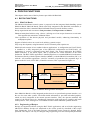
Recipes are edited in a spreadsheet-like interface, where setpoints are assigned to each procedural
element (i.e. procedures, operations and phases) in the recipe.
4.2. EXTENDED CAPABILITY SYSTEM
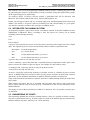
PROCOS contains an extended capability system securing a safe operation of the plant.
During engineering it is possible to define a number of operator profiles. Each of these profiles
contains a positive or negative list of objects on which the operator may or may not operate or
view. When a given operator logs in to PROCOS he will be attached to one of these operator
profiles.
When specifying the capabilities, the engineer can enter explicit names or name masks for the
following types of objects:
Area
Unit
Process object
Picture
Picture actions
System maintenance operations.
4.3. EXTENDED TRENDING CAPABILITIES
PROCOS contains a powerful trending facility, whereby the user on selected workstations may
define a number of TREND windows, each containing up to 8 different process variables.
The variables being trended may either be on-line live data, or historical data collected by the
COLLECT Mapplication.
4.4. ALARM HANDLING
In order to provide the operator with a possibility to overview the general alarm situation in the
plant, each operator station can be equipped with an alarm panel, attached to the normal detailed
alarm window. This alarm panel shows the alarm status for each area defined in the plant, and
indicates overall figures like e.g. number of not acknowledged high priority alarms.
From the alarm panel it is possible to select a specific MIMIC picture engineered to display
selected process details.