1
Setup
Overview
Installation of a server blade requires the following steps:
1.
Install and configure an HP BladeSystem c-Class enclosure.
2.
Install any server blade options.
3.
Install interconnect modules in the enclosure.
4.
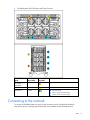
Connect the interconnect modules to the network.
5.
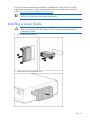
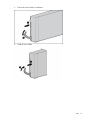
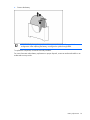
Install a server blade.
6.
Complete the server blade configuration.
For definitions of the acronyms used in this document, refer to "Acronyms and abbreviations" in the server
blade user guide.
Installing an HP BladeSystem c-Class enclosure
Before performing any server blade-specific procedures, install an HP BladeSystem c-Class enclosure.
The most current documentation for server blades and other HP BladeSystem components is available at
the HP website (http://www.hp.com/go/bladesystem/documentation).
Documentation is also available in the following locations:
•
Documentation CD that ships with the enclosure
•
HP Business Support Center website (http://www.hp.com/support)
Installing server blade options
Before installing and initializing the server blade, install any server blade options, such as an additional
processor, hard drive, or mezzanine card.
Installing interconnect modules
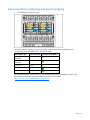
For specific steps to install interconnect modules, see the documentation that ships with the interconnect
module.
Setup 15