1
HEALTH ISSUES
Use this software in a well-lit room, staying a good distance away from the monitor or TV screen to not
overtax your eyes. Take breaks of 10 to 20 minutes every hour, and do not play when you are tired or short
on sleep. Prolonged use or playing too close to the monitor or television screen may cause a decline in
visual acuity.
In rare instances, stimulation from strong light or flashing when staring at a monitor or television screen can
cause temporary muscular convulsions or loss of consciousness for some people. If you experience any of these
symptoms, consult a doctor before playing this game. If you experience any dizziness, nausea, or motion-sickness
while playing this game, stop the game immediately. Consult a doctor when any discomfort continues.
PRODUCT CARE
Handle the game disc with care to prevent scratches or dirt on either side of the disc. Do not bend the disc
or enlarge the centre hole.
Clean the disc with a soft cloth, such as a lens cleaning cloth. Wipe lightly, moving in a radial pattern
outward from the center hole towards the edge. Never clean the disc with paint thinner, benzene, or other
harsh chemicals.
Do not write or attach labels to either side of the disc.
Store the disc in the original case after playing. Do not store the disc in a hot or humid location.
CONTENTS
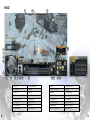
HUD ....................................................................... 2
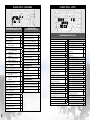
Game Controls.......................................................... 4
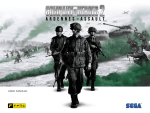
The COMPANY OF HEROES™ 2: THE WESTERN FRONT ARMIES game disc contains software for use on
a personal computer. Please do not play the disc on an ordinary CD player, as this may damage the
headphones or speakers.
Classic Hotkeys: Universal Key Assignments.............. 4
• Also read the manual of your personal computer.
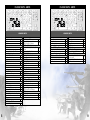
Oberkommando West Buildings............................... 6
• The game disc may not be used for rental business.
• Unauthorized copying of this manual is prohibited.
• Unauthorized copying and reverse engineering of this software is prohibited.
General Hotkeys.................................................... 5
US Army Buildings................................................. 6
Oberkommando West Units.................................... 7
US Army Units...................................................... 8
PEGI ratings and guidance applicable within PEGI markets only.
What is the PEGI System?
The PEGI age-rating system protects minors from games unsuitable for their particular age group.
PLEASE NOTE it is not a guide to gaming difficulty. Comprising two parts, PEGI allows parents and those
purchasing games for children to make an informed choice appropriate to the age of the intended player.
The first part is an age rating:
Warranty................................................................ 10
Customer Support................................................... 11
The second are icons indicating the type of content in the game. Depending on the game, there may be a
number of such icons. The age-rating of the game reflects the intensity of this content. The icons are:
For further information visit http://www.pegi.info and pegionline.eu
1