1
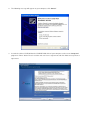
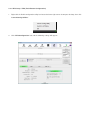
4. Choose the ‘ Install driver and Ralink WLAN Utility’ or ‘Install driver only’. When you choose ‘ Install
driver and Ralink WLAN Utility’, you can choose the configuration tool used to configure the wireless
network card here. It’s recommended to select ‘Ralink Configuration Tool’, which provides fully access
to all function of this wireless network card. If you prefer to use the wireless configuration tool provided by
Windows XP, please select ‘Microsoft Zero Configuration Tool’, and then click ‘Next’.( Note. In Vista no
such selection appear.)