1
Radiocrafts
Embedded Wireless Solutions
RC11xx-RC232
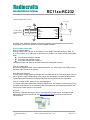
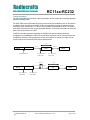
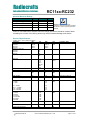
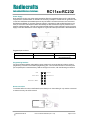
Typical application circuit
2.0 – 3.6 V
Optional
{
To host meter or
RS232/422/485
driver
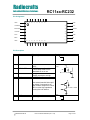
GND
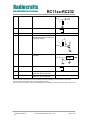
CTS
RTS
CONFIG
TXD
RXD
GND
GND
VCC
RESET
NC
GND
RF
GND
Antenna
NC
See page 19 for additional schematic information regarding recommended Reset and Power
supply filtering, and how to include a firmware upgrade connector.
Quick Product Introduction
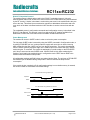
How do I transmit data?
Send your data to the RXD pin on the module. Use the UART format with settings (19200, 8, 1,
N, no flow control). Up to 128 bytes are buffered in the module. The module will transmit the data
when
the max packet length is reached
the unique end character is sent
the modem timeout limit is reached
The packet length, end character and timeout limit are configurable in-circuit.
How do I receive data?
Any received data packet with correct address and check sum will be sent on the TXD pin using
the same UART format as for transmit.
What about the antenna?
In most cases a simple quarter wavelength wire or a PCB track will do. Connect a piece of wire to
the RF pin with length corresponding to the quarter of a wavelength. For space limited products,
contact Radiocrafts and we will recommend the best antenna solution for your application.
How do I change the RF channel or any other parameter?
To change configurable parameters, assert the CONFIG pin, and send the command string using
the same serial interface as for transmitting data. Parameters can be changed permanently and
stored in non-volatile memory in the module.
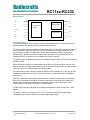
RCTools
RCTools is a powerful and easy to use PC suite that helps you during test, development and
deployment of the RC11XX-RC232. Visit www.radiocrafts.com for a free download and full
documentation.
2008 Radiocrafts AS
RC11xx-RC232 Data Sheet (rev. 1.30)
Page 2 of 22