1
• Place an unknown quantity on the pan. The balance will then compute
the number of parts based on the average piece weight. The display will
show the result in Pcs
• To count another item press [Mode] and continue as before
• Checks will be made to determine that the weight of the reference parts
is large enough for reasonably accurate counting (weight of each piece
must be > 1d)
• To return to normal weighing, press [Esc]
9.4.2 Percent Weighing
Percent weighing will be done by defining a certain weight to be 100%. The
weight to be used can either be entered by the user or taken from a sample
• Press [Mode] and then the [Up] or [Down] key to select Percent
weighing, “PERCENT” will be displayed
• Press [Enter] to enter the function
• Display will show, “PERCENT SAMPLE”
• Press [Enter] to select the sample method or scroll to manually enter
the sample weight as given below
• When “LOAD 100 %“ is shown, add the sample
• Press [Enter] to set this weight to be 100%. The display will show “REF
WT” and the sample weight in the last selected unit. After a while
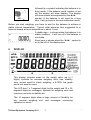
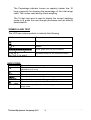
“100%” will be displayed. A message “PERCENT” will be prompted on
the top of the display to indicate that the balance is in the percent
weighing mode
• Remove the sample and “PERCENT 0.00%” will be displayed
• Place an unknown sample to display the percentage weight
• To set another weight as 100%, press [Mode] and continue as before
• To manually enter a value to be set as 100%, press [Up] or [Down] key
when “PERCENT SAMPLE” is shown to select “PERCENT Ent Wt”
• Press [Enter]. Display will show the value in the unit last used in the
weighing mode
© Adam Equipment Company 2011
14