1
CPS1100AVR
Guaranteed Uninterruptible Power System
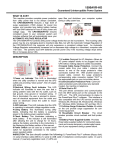
DEFINITIONS FOR ILLUMINATED LED INDICATORS
Power
On
Wiring
Fault
AVR
Using
Battery
Check
Battery
Circuit
Breaker
Alarm
On
Off
Off
Off
Off
Set
Off
On
Off
Flash
Off
Off
Set
Off
ON
Off
On
Off
Off
Set
Off
Off
On/Off
Off
On
Off
Set
Two
Beeps
Off
On/Off
Off
On
Off
Set
Rapid
Beeps
Up
Two
beeps
or
rapid
beeps
Off
Off
Off
On
Off
On/Off
On/Off
On/Fla
sh/Off
On/Off
Off
Set
Long
Beep
Off
Off
Off
On
Off
Up
Long
Beep
On
On/Off
On/Fla
sh/Off
Off
On
Set
None
Off
Off
Off
Off
Off
Set
Off
On/Off
On/Off
On/Fla
sh/Off
Flash
Flash
Set/Up
Off
On/Off
On/Off
On/Fla
sh/Off
Flash
Flash
Set/Up
Three
Beeps
On/Off
On
On/Fla
sh/Off
On/Off
On/Off
Set/Up
None
Sample Systems
Desktop PC with LCD Monitor
62-82
Desktop PC with 15” Monitor
57-70
Desktop PC with 17” Monitor
Desktop PC with 21” Monitor
50-58
40-48
9
Condition
Normal
AVR- AVR is maintaining a consistent 120v
level (±5%)
during a power sag.
AVR- AVR is maintaining a consistent 120v
(±5%)
during a power surge
Utility Failure- The UPS is providing battery
power to the Battery-Power Supplied outlets.
Utility Failure- The UPS is providing battery
power. The rapid beeps indicate the battery
will run out of charge within a few minutes.
Overload- Occurs in the Full-time Surge
Protection Outlets. Turn the UPS off and
unplug at least one piece of equipment from
the UPS. Wait 5 seconds, reset the circuit
breaker and turn the UPS on.
Overload- Occurs in the Battery-power
Supplied Outlets. Turn the UPS off and
unplug at least one piece of equipment from
the UPS. Wait 5 seconds, reset the circuit
breaker and turn the UPS on.
Overload- Occurs in the Battery-power
Supplied Outlets. Turn the UPS off and
unplug at least one piece of equipment from
the UPS. Wait 5 seconds, reset the circuit
breaker and turn the UPS on.
Weak Battery- Recharge the battery for at
least 8 hours. If Check Battery is illuminated
contact CyberPower Systems for battery
replacement information.
Surge Protection Malfunction- Lightning
induced power line surge has damaged the
surge-protect function. Please contact
CyberPower Systems
Scheduled Turn-on- If the two battery
indicators are flashing in rotation, the UPS is
waiting to turn on as configured in the
schedule.
Cold Start Disabled- If the two battery
indicators are flashing at the same time, the
cold-start has been disabled. The UPS will
not start in the absence of AC power.
Electrical Wiring Fault- This indicates a wiring
a problem such as a bad ground, missed
ground or reversed wiring within the AC
outlet. User is advised to disconnect all
electrical equipment from the outlet and have
the outlet checked by an electrician.