1
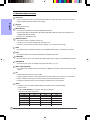
Post Port Frequently Asked Questions
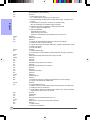
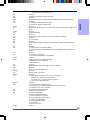
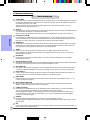
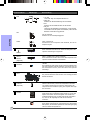
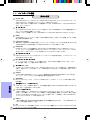
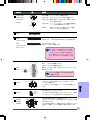
Below is a list of some basic POST Codes, possible problems and solutions. For more detailed
information about POST Codes, refer to Appendix in this manual.
Post Code
FFh or CFh
Problem
Solution
1. BIOS chip inserted incorrectly
1. Reinsert the BIOS chip
2. Incorrect BIOS update version
2. Download the correct BIOS version
update from the manufacturer's
Web site
3. Mainboard problem
4. Add-on card inserted incorrectly
3. Replace mainboard
4. Remove and replace the add-on card
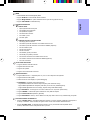
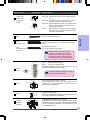
C1h - C5h
2Dh
26h
07h - 12h
1. Memory module inserted incorrectly
1. Reinsert memroy module
2. Memory compatibility problem
2. Replace memory with correct type
3. Memory module damaged
3. Replace memory module
1. Error occured in VGA BIOS
1. Replace VGA card
2. VGA card inserted incorrectly
2. Reinsert the VGA card
Overclock error
Clear CMOS or press the insert key to
power on the system
1. Initial Keyboard controller error
1. Ensure the Keyboard and mouse are
2. RTC error
connected correctly
2. Replace the RTC battery
iii