1
Continued from page 1
import and export options. The
user can export data captured in
the scope to a .CSV file and use
Microsoft Excel to manipulate it.
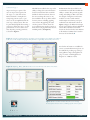
Comparing current traces to past
traces can be accomplished with the
new scope overlay feature. This can
be particularly helpful when tuning a
system as it allows the user to see the
performance of a move before and
after adjusting a tuning parameter,
as shown in Figure 1.
The final feature added to the scope is the
ability to change the source information
for the horizontal axis. Time is still the
default for the horizontal axis, but now
the user can change the source to any
data available in the scope. This is useful
for many reasons, including graphing
vector motion. By graphing the A axis
encoder position on the X axis of the
scope and the B axis encoder position on
the Y axis we can graph all vector motion,
including circles. (See Figure 2).
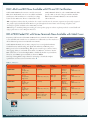
Enhancements have been added to the
watch window as well. These include the
ability to rename data points along with
scaling and adding an offset to the value.
An example of using these new features
would be to create a watch window
with descriptions and units your repair
technicians can understand as shown in
Figure 3. Support for Ethernet interrupts
has also been added to the latest GalilTools
release. More information about this
feature can be found in the “New Features
in the Accelera Command Set” article in
this issue of ServoTrends. ■
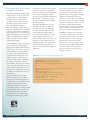
Figure 1: Using the overlay feature the old capture is shown in lighter colors and the new capture in
bold colors. In this example changing the PID parameter’s significantly lowered the position error.
For further information on GalilTools
version 1.3.0.0 enhancements please see
the GalilTools product page at http://
www.galilmc.com/products/galiltools.
php or contact a Galil Applications
Engineer at 1-800-377-6329.
Figure 2: Graphing _RPB vs _RPA allows the user to view 2D moves such as the circle shown.
Figure 3: The new watch window allows the user to change the description and user units to something specific to their system.
Galil Motion Control, Inc.
| 270 Technology Way | Rocklin, CA 95765 USA | 800.377.6329 | 916.626.0101 | 916.626.0102 fax |
www.galilmc.com