1
Using the Input/Output Panel
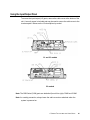
To access the input/output (I/O) ports, remove the cable cover at the bottom of the
unit. A security screw is included and may be used to secure the cable cover to the
touchcomputer. Below are the I/O descriptions by model:
C1 and C3 models
C2 models
Note: The DB9 Serial (COM) ports are defaulted (from left to right) COM5 and COM6
Note: As a safety precaution, always leave the cable cover door attached when the
system is powered on.
C-SERIES TOUCHCOMPUTER USER GUIDE
16