1
Clockwork Computing User Manual
Adding a Tour to a Booking
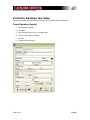
1. Create a booking as normal (i.e. entering Booking Name, Passengers Details on the Pax
Screen)
2. Either go to View->Tour Entry or click the Tour Entry button on the Main tab
3. Hit New
4. Select the Tour using the lookup button, enter the number of Pax in the Qty box, and
adjust price/commission/etc as required.
5. Set the Deposit Type to be either Deposit Paid (you collect only the commission) or Paid
in Full (you collect the net and get invoiced for it later)
6. Hit Save
Page 3 of 4
2/6/2007