1
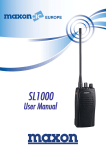
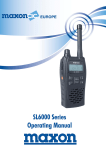
User Manual Page 1 SL1000 SL1000 Table of Contents Table of Contents .................................................................................................................2 Operating Instructions ...........................................................................................................3 About Your SL1000 Radio .............................................................................................3 SL1000 Specification.....................................................................................................3 Safety Information ................................................................................................................4 Unpacking Information ..........................................................................................................5 SL1000 Features ...................................................................................................................6 Description of Radio Components ...........................................................................................6 Installing and Removing the Battery Pack ...............................................................................8 Attaching and Removing the Belt Clip .....................................................................................9 Attaching and Removing the Jack Cover..................................................................................9 Battery Charging and Care ................................................................................................... 10 Status Indicators and Audible Alert Tones ............................................................................. 11 Operation Mode .................................................................................................................. 12 Power Off Mode .................................................................................................................. 12 Power On Mode .................................................................................................................. 12 Cloning .............................................................................................................................. 12 Password ........................................................................................................................... 12 Scanning ............................................................................................................................ 13 Fixed Key ........................................................................................................................... 13 PTT (Press to Talk) .................................................................................................... 13 MONITOR .................................................................................................................. 13 EMG.......................................................................................................................... 13 Service Information ............................................................................................................. 14 CH-SL1000-02 Desktop Charger ........................................................................................... 17 User Statement………………………………………………………….........................................................62 Page 2 English User Manual SL1000 Operating Instructions About Your SL1000 Radio Maxon's SL1000 radio features 16 channels. Operation and functions of these radios are outlined in this manual. We urge you to thoroughly read this manual before operating the radio The application of some of the functions described in this manual is determined by the system you use. Your Maxon Dealer will program your radio so that you have the greatest number of functions possible relative to your needs. SL1000 Specification MODEL SL1000 EQUIPMENT TYPE PMR Hand portable PERFORMANCE SPECIFICATIONS EN 300.086 BAND 440.00~ 470.00MHz CHANNEL SPACING 25 KHz, 12.5 KHz RF OUTPUT POWER 1-5 Watt MODULATION TYPE F3E AUDIO POWER < 500 mW (INT WITH 4 OHM) < 400 mW (EXT WITH 8 OHM) INTERMEDIATE FREQUENCIES 45.1MHz 455KHz CHANNELS 16 Channels FREQUENCY SOURCE SYNTHESIZER POWER SUPPLY Li-ion(1500mA) 7.5VDC Nominal +/- 10% VDC Extreme Page 3 English User Manual SL1000 Safety Information WARNING ¾ DO NOT hold the radio in such a manner that the antenna is next to, or touching, exposed parts of the body while transmitting. ¾ DO NOT allows children to operate transmitter-equipped radio equipment. CAUTION ¾ DO NOT operate the radio near unshielded electrical blasting caps or in an explosive atmosphere unless it is a type especially designed and qualified for such use. ¾ DO NOT press and hold the transmit switch (P-T-T) when not actually wishing to transmit. ¾ NEVER use the radio in an aircraft. ¾ NEVER use the radio near to sensitive medical equipment or in areas where instructed not to do so, e.g. Petrol filling stations. ¾ When used in a vehicle, do not mount the radio unit on or near the Airbag or Airbag activation device. ¾ The use of an accessory not recommended or supplied by Maxon may cause damage to equipment or injury to personnel, and will invalidate warranty. ¾ When using any of the charging accessories, the mains socket-outlet must be installed near the equipment. ¾ The outlet must not be obstructed and must be easily accessible at all times. ¾ Never attempt to disassemble, modify or repair the unit unless the work is carried out by a Maxon approved Dealer. Incorrect assembly, modification or repair may cause irreparable damage to your unit and will invalidate warranty. For service or repair always return your radio to an authorized Maxon Dealer. Page 4 English User Manual Unpacking Information Remove and carefully inspect the contents of your package(s) for the following items: 1. 2. 3. 4. 5. 6. 7. Radio Battery Pack Battery Charger Spring Belt Clip Jack Cover Battery Charger Power Supply User Manual * If any items are missing, please contact your Dealer or Maxon Page 5 SL1000 English User Manual SL1000 Features 5-1 Watt output power 25 KHz, 12.5KHz channel spacing Full scanning Password protect Emergency call CTCSS/DCS/tone signalling Li-ion Battery 2-Tone Decode Busy Channel lockout Time-out timer Priority Channel Edit Description of Radio Components (Please see drawing on page 6) 1. 2. 3. 4. 5. 6. 7. 8. 9. 10. 11. 12. 13. 14. 15. Antenna Channel Selector Switch On/Off – Volume Control Emergency Button Push-To-Talk (PTT) Monitor Button Option Button Battery RX/TX Indicator Speaker Microphone Accessory Connector (EXT Jack) Battery Latch Belt Clip Battery Charge Contacts Page 6 SL1000 English User Manual Page 7 SL1000 English User Manual SL1000 Installing and Removing the Battery Pack To Install: Position the guides of the battery in line with the radio battery guide rails and slide the battery into position until a click is heard. To Remove: Holding the radio in one hand, push and hold the battery latch button located in the upper central part of the battery pack, held as if looking at the back of the unit. Hold the radio firmly and slide the battery in a downward direction whilst pushing the battery latch button. Page 8 English User Manual SL1000 Attaching and Removing the Belt Clip To Install: Install belt clip onto the belt clip holder located on the upper part of the battery, held whilst looking at the back of the unit. Locate the slot on the battery and push belt clip downward until a click is heard. To Remove: Push and hold the release button located at the top of the belt clip and slide the clip off the belt clip holder. Attaching and Removing the Jack Cover To attach accessory socket cover screw as per below drawing, in the case of using an optional audio accessory unscrew cover using a screwdriver, fit accessory and fully tighten locating pin. Page 9 English User Manual SL1000 Battery Charging and Care To ensure peak performance from your radio, the battery pack must be fully charged. Proper care and charging will allow maximum performance and life of your battery pack. CH-SL1000-02 Desktop Charger provides 2 hours charging to one radio and one battery. Before using your SL1000 for the first time a full two hour charge will be required for the best performance. To ensure maximum performance from your radio and battery pack, periodically completely discharge and recharge the battery pack. Page 10 English User Manual SL1000 Status Indicators and Audible Alert Tones Your SL1000 has a sophisticated microprocessor control which provides a series of audible alert tones. Upon initial power up, a quick melody indicates that the self-test of the microprocessor functions has been completed satisfactorily. A series of tones may be sounded with any of the following conditions: Attempt to transmit on a channel set for receive only Attempt to transmit on a channel that is already in use when busy channel lockout has been programmed on the radio* Transmitting time has exceeded time-out timer programmed length* Low battery condition Selecting a channel with no programmed frequency * Indicates a function that is initially programmed into the radio by your Maxon Dealer. NOTE: All audible tones can be programmed for silent operation. Status Normal Scanning Warning Error Page 11 Description Power On - Ready Call Received Correct Call Busy Channel Transmit Transmit not allowed Normal Scan Mode Low Battery Busy Channel Lockout TX Inhibit Time-out-timer LED color N/A Orange Green Orange Red Red Flashing Green Flashing Red Flashing Orange N/A N/A Unlock N/A Audible Tone Melody N/A N/A N/A N/A Two beeps N/A 2 beeps repeated 2 beeps repeated Two beeps Single beep/3 beeps repeated Two beeps English User Manual SL1000 Operation Mode This section provides general descriptions of the operating modes of the SL1000 Radio. Power off Mode The SL1000 shall enter Off mode when the On/Off Volume knob is rotated to the most counterclockwise position, beyond the detent. Upon entering off mode, the radio shall store its current channel (if Power On Channel function is enabled via PC Programmer). Power on Mode The SL1000 shall enter Power-On mode when the On/Off Volume knob is rotated clockwise beyond the detent. Upon entry of the Power-On mode, the radio shall perform the 1 time poweron alert to indicate that it has been turned on. Cloning Frequencies and functions can be programmed from radio to radio by using a cloning cable. Cloning cable 3.5mm to 3.5mm stereo jack plug 1. Connect Cloning cable 3.5mm to 3.5mm stereo jack plug to radios 2. Slave radio Press and hold “Monitor + PTT” buttons together and switch on power. 3. Master radio Press and hold “Emergency + PTT” buttons together and switch on power. Slave radio when switched on with Monitor + PTT” buttons pressed together will give flashing orange LED. Master radio when switched on with Emergency + PTT buttons pressed together will give flashing orange LED. When cloning is complete both radios LED will go solid green. Password If the password function is enabled, (dealer programmable) the user must enter a password for the radio to become operational. At this time you can enter the password code by using the EMG/PTT/MON/OPTION button in the correct sequence. Four button presses are required to enter the code. If the code is not correct, the LED will blink red and there will be a double beep repeated. To disable the password function radio must be reprogrammed by an authorised Maxon dealer. Page 12 English User Manual SL1000 Scanning Scanning is a Dealer programmable feature that allows you to monitor a number of channels. Your Dealer will help you define a scanning mode and your channel "scan list". Normal Channel Scan Once the scan list has been established, initiate scanning by pressing the scan key or holding the monitor button and rotate the channel switch to scan the enabled channels. Then the Green LED flashes to confirm the scanning. If a conversation is detected on any of the channels in the scan list, the radio will stop on that channel and you will be able to hear the conversation. If programmed for normal scan TX, you will be able to transmit on that active channel during the programmable scan delay time. (The scan delay time is the amount of time the radio will stay on that channel once activity has ceased. Dealer programmable, 4-7 seconds is typical). The radio will resume scanning once the scan delay time has expired, and will continue to scan until the channel is changed. The LED will flash green. When in scan mode, if power is switch off and on, the radio reverts back to "scanning" automatically. Nuisance Scan Delete If there are any unwanted signals on any of the channels being scanned, they can be temporarily removed from the scan list. When the scanning feature has locked onto the unwanted signal simply press the monitor button. this will delete that channel from the scan list. When the radio is switched off and back on the channel is restored in the scan channel list. Priority Channel Scan A single channel may be programmed as the "Priority" channel. The radio will constantly monitor this channel while scanning. If a call is detected on the priority channel, the radio will automatically move to, and remain on, the priority channel activity takes precedence over all other conversations. Fixed Key PTT (Press to Talk) Press and Hold to transmit. Release to enter the receive mode. MONITOR Releases the squelch and tone circuit to check whether the channel is busy. OPTION Short pressing: Enable/disable scan Look Back channel edit EMG Transmits EMG ID 5 times and generate warning audio alert for a duration of 7 secs. Page 13 English User Manual SL1000 Dealer programmable features Busy Lockout The busy lock out feature Busy Channel Lockout – ON: Upon PTT being pressed, if carrier is present, the radio will not transmit and an audible alert tone will be heard. Busy Channel Lockout – OFF: Upon PTT being pressed, the radio will transmit regardless of the presence of carrier. Mark Idle Marked Idle enabled: Can only be enabled if Busy Channel Lockout is ON. If the Busy Channel Lockout is on and carrier is detected, the radio permits transmit if the RX squelch option is valid. TX Delay TX Delay is the delay time TX delay time when transmit. Eliminates squelch tails for SAT transmissions by removing the SAT tone for approximately 200mS before the end of the transmission. Increments of 1 second 1-30 seconds Emergency Emergency function is initiated when the upper orange side button is pressed and held for two to three seconds; a pre-programmed sequence is sent, followed by a five seconds of audible tones. The emergency feature can also be programmed to transmit on either a user defined channel or the current channel. Monitor Monitor can be initiated by pressing the middle side button (monitor), the user can override the programmed squelch operation and un-mute the speaker on the selected channel. Not only will activity on that frequency be heard but ‘white noise’ will also be heard. When the user releases the Monitor key, the radio will resume programmed squelch operation. TOT (Time Out Timer) Once the TOT has been enabled, the PTT Timer can be set from 10 – 2000 seconds with 10 second increments, which is the permitted time for a sustained transmission. TOT Penalty The penalty timer restricts transmission for a set programmed time after the PTT timer has expired, to allow a cool off period for the transmitter. The settings are from 1 – 100 seconds in 1 second increments. Hi / Low RF Power If programmed a short press of the lower option key can toggle the transmit output power between High and Low. Each channel can be programmed via the PC programmer to be high or low power. The power can also be changed by the user to high-power output 5 Watts, and a low-power output, 1 Watt. Page 14 English User Manual SL1000 CTCSS/DCS The SL1000 Series radio(s) support 2 kinds of squelch options. A different squelch option can be applied to each channel. Sub Audible Tone (SAT) codes are made up from frequencies which are below 300Hz. These frequencies are lower than the voice audio band. The two most common forms of SAT codes are CTCSS, Continuous Tone Coded Squelch System, and DCS, Digitally Coded Squelch. CTCSS/DCS information may be added to speech during transmission. A receiving radio can then be programmed to behave according to which tones or codes are being sent by a transmitting radio. The SL6000 Series radio(s) are capable of generating all 47 standard CTCSS tones and can also generate the 83 standard DCS codes and 83 inverted DCS codes. CTCSS 47 kinds of TIA/EIA Standard CTCSS Tones can be set up. All tones can be set up using PC Programmer. TX Operation: If PTT key is pressed, the radio transmits programmed CTCSS tone. RX Operation: If a CTCSS Tone is detected, the Radio status is changed from Busy to Correct Call. If the CTCSS Tone is not detected, the radio will stay in Busy mode or change from Correct Call to Busy mode and no audio will pass through the speaker. DCS The radio supports 83 kinds of TIA/EIA Normal/Inverted DCS codes. TX Operation: If PTT key is pressed, the Radio transmits pre-programmed DCS Bit pattern. RX Operation: If DCS Data Stream is detected, the radio status will change from busy mode to correct call. If DCS data stream is not detected, the radio will stay in busy mode or be changed from correct call back to busy mode. English Page 15 English User Manual SL1000 Service Information Service Do not tamper with internal adjustments as this may cause damage to the equipment and will invalidate the warranty. There are no user serviceable items inside the radio. It is recommended that you return your radio to a qualified Maxon dealer for any service or repairs. Recycling/Disposal of Batteries The battery should be recycled at the end of it's useful life. Under various state or local laws, such batteries must be recycled or disposed of properly and cannot be dumped in landfills or incinerators. For further information on how to safely dispose of your used batteries, contact your Maxon Dealer. Maintenance Your SL1000 Radio is designed to be maintenance free. To keep your radio in good working condition: Clean external surfaces with a clean cloth dampened in a solution of dishwasher detergent diluted in water. Apply the solution sparingly to avoid any moisture leaking into cracks and crevices. Do not submerge the radio. Use a non-metallic brush to dislodge stubborn particles, if necessary. Dry the surface thoroughly with a soft, lint free cloth. DO NOT use solvents or spirits for cleaning – they may permanently damage the housing. Clean the battery contacts on the back of the radio with a lint free cloth to remove dirt, grease, or other foreign material that may impede good electrical contact. Limited Warranty Maxon shall have no obligation to make repairs or to cause replacement required which result from normal wear and tear or necessitated in whole or in part by damage, fault or negligence of the user, improper or unauthorized alterations, repairs to the Product, use of the Product in a manner for which it was not designed, or by causes external to the Product. This warranty is void if the serial number is altered, defaced or removed. Maxon's sole obligation hereunder shall be to repair or replace the Product covered in the agreed warranty. Page 16 English User Manual SL1000 CH-SL1000-02 Desktop Charger Product description The CH-SL1000-02 is the standard charger for Maxon's SL1000 two-way radio batteries. The charger has been designed to fully charge only the Li-ion, 1500mAh battery, the front charging slot charges a battery while connected to the radio, the back charging slot charges a battery that has been removed from the radio. For use only with power supply manufacturer: MaxonCIC Model: SL1000 Use only power supplies listed in the user-instructions. Orientation Plug the AC adapter cable into the adapter jack locked on the rear of charger. Plug the AC adapter into an AC outlet. Page 17 English User Manual SL1000 Operating Instructions Remove the charger base and AC adapter from the packaging. Plug the AC adapter cable into the adapter jack located on the rear of the charger. Plug the AC adapter into an AC outlet Your charger is now ready to begin charging Charging starts automatically when the radio/battery is placed into the charger cup. The charging time is dependent upon the charge status of the battery. Lighting color Red Green Blinking orange Blinking red Description During charging Fully charged Extreme cold (under -10°C; 14°F) Extreme heat (over +60°C; 140°F) Error NOTE: If your battery seems to have no capacity even after being fully charged, completely discharge it, then fully charge it again. If the battery still does not retain a charge, new batteries must be replaced. Safety information To reduce the risk of shock or injury, familiarize yourself with the correct and safe operating procedures defined in this manual. Only charge Maxon's batteries in this charger – other battery types may burst causing personal injury or damage to the charger, battery or radio. The CH-SL1000-02 desktop charger is rated for indoor use only. Do not disassemble the charger; incorrect reassembly can cause fire or electric shock. Do not pull output plug with excessive force. Do not use the charger when it is covered by objects which impede heat dispersal. Connect the supplied Maxon adapter only to the voltage supply as specified on it's label. Unplug the AC adapter from the wall outlet before attempting inspection or cleaning of the charger. Do not use solvents such as benzene or paint thinner to clean the charger. MEMO Page 18 English User Manual User Manual SL1000 SL1000 Series This product is marked with in accordance with the Class II product requirement specified in the R&TTE Directive 1999/5/EC. This equipment is intended for use in:Austria, Belgium, Cyprus, Czech Republic, Denmark, Estonia, Finland, France, Germany, Greece, Hungary, Ireland, Italy, Latvia, Lithuania, Luxembourg, Malta, Netherlands, Poland, Portugal, Slovakia, Slovenia, Spain, Sweden, United Kingdom, Iceland, Liechtenstein, Norway, Switzerland, Bulgaria, Romania, Russian & Turkey. and requires authorisation (individual licence) for use. We hereby declare that the above named product is in conformity to all the essential requirements of Directive 1999/5/EC. Con la presente si dichiara che il prodotto sopra menzionato è conforme ai requisiti essenziali della Direttiva 1999/5/CE. Declaramos que el producto mencionado más arriba cumple todos los requisitos esenciales de la Directiva 1999/5/CE. Wir möchten hiermit bekanntgeben, daß das oben genannte Produkt in Übereinstimmung mit allen erforderlichen Bedürfnissen der 1999/5/EC Direktive seht Nous déclarons que le produit référencé ci-dessus satisfait aux exigences R&TTE 1999/5/EC qui lui sont applicables. Page 19 User Manual SL1000 Maxon House, Cleveland Road, Hemel Hempstead, Hertfordshire, United Kingdom, HP2 7EY Tel: + 44 (0) 1442 267 777 Fax: + 44 (0) 1442 215 515 [email protected] www.maxoncic.co.uk Page 1