1
FULL MENU settings - Default setting
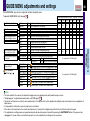
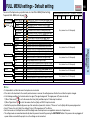
You can set the Input source, projection mode, etc. from FULL MENU [Default setting].
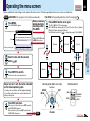
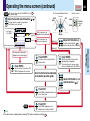
To operate FULL MENU, refer to page 44 .
Input source setting
CONTENTS
The relationship between input source and item
Yes: Adjustable -: Not displayed
Analog RGB(1) Analog RGB(2) Digital RGB Y/PB/PR
Video
S-Video Camera
SET
SET
SET
SET
SET
SET
SET
SET
SET
: COMPUTER IN 1 connector is selectable with the INPUT button.
: Use COMPUTER IN 1 connector as Analog RGB (1) input.
: Use COMPUTER IN 1 connector as Y/PB/PR input.
: COMPUTER IN 2 connector is selectable with the INPUT button.
: Use COMPUTER IN 2 connector as Analog RGB (2) input.
: Use COMPUTER IN 2 connector as Digital RGB input.
: Video input is selectable with the INPUT button.
: S-Video input is selectable with the INPUT button.
: Camera input is selectable with the INPUT button.
Yes (common for all of the inputs)
Standard
Rear
Ceiling
Rear ceiling
SET
SET
SET
SET
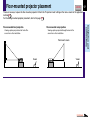
The projector is set to the floor-mounted front projection mode.
The projector is set to the floor-mounted rear projection mode.
The projector is set to the ceiling-mounted front projection mode.
The projector is set to the ceiling-mounted rear projection mode.
Yes (common for all of the inputs)
Logo
Blue
None
SET The TOSHIBA logo is displayed when no signal is input.
SET The entire screen is set to blue when no signal is input.
SET Nothing is displayed when no signal is input.
Yes (common for all of the inputs)
No signal power off
Off
5 min.
SET The power does not turn off automatically even if no signal status continues.
SET The power turns off automatically when no signal status continues for approx. 5 min.
Yes (common for all of the inputs)
Power on
Manual
Auto
SET The power turns on by pressing the ON/STANDBY button.
SET When the power plug is inserted, the power is on.
Yes (common for all of the inputs)
Start-up screen
On
Off
SET The start-up display appears when the power is turned on.
SET The start-up display does not appear when the power is turned on.
Yes (common for all of the inputs)
Projection mode
Background
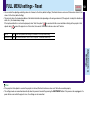
Reset
EXEC. Return the settings of FULL MENU [Default setting] to the factory default values.
Yes (common for all of the inputs)
Notes
• It is impossible to exit from the menu if no input source is selected.
• If the check in the check box for the currently selected source is removed, the setting becomes effective the next time the input is changed.
• In the following conditions, the function to detect no signal (“No signal background”, “No signal power off”) does not activate:
1) When “Video mode” 46 is set to the modes other than [Auto] and Video input or S-Video input is selected.
2) When “Signal format” 46 is set to the modes other than [Auto] and Y/PB/PR input is selected.
• Note that the projector automatically powers up at the restoration of power after a failure, if “Power on” is set to [Auto] with the power plug inserted.
• Even if “Power on” is set to [Auto], the setting of [5 min.] of “No signal power off” is effective.
• Each item can be set at all input sources, but the settings made at one input source are applied in common to all input sources.
• The settings made are memorized automatically when the power is turned off by pressing the ON/STANDBY button. If the power cord is un-plugged or if
a power failure occurs while the projector is on, the settings are not memorized.
Adjustments &
Settings
COMPUTER IN 1
Analog RGB(1)
Y/PB/PR
COMPUTER IN 2
Analog RGB(2)
Digital RGB
VIDEO
S-VIDEO
CAMERA
: On/Off with ENTER
: On/Off with ( ) or ( )
51