1
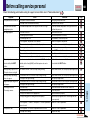
Before calling service personal (continued)
Symptom
The color is faint.
The tint is not good.
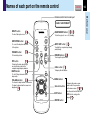
The remote control does not
Cause
• The “Color”, “Tint”, “R-Level”, “G-Level” or “B-Level” adjustments
CONTENTS
Correction
Make the “Picture” adjustments.
69
Page
48
are not correct.
• The lamp life is ending.
Replace the lamp.
66
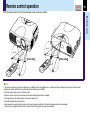
• The remote control is not facing the remote sensor.
Face the remote control transmitter toward the remote
16
work.
sensor on the projector.
• The remote control is too far away.
Operate within about 5 meters.
• There is an obstruction between the remote control and the
Remove the obstacle.
16
–
remote sensor.
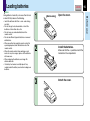
Replace the batteries.
15
Mouse function cannot be used • The USB cable is not properly connected.
Connect the USB cable properly.
from the optional remote
• The computer or OS is not compatible.
The remote control mouse function is not available.
42
–
control unit.
• The batteries are exhausted.
Replace the batteries.
15
Document camera image is
• The lens is dirty.
Clean the lens with a blower or lens cleaner, etc.
65
blurry.
• The picture is out of focus.
Focus the picture by turning the focus ring.
57
• The light is not on.
Turn on the light.
56
• Image is being affected by fluorescent light in the room.
Set the shutter speed on the menu screen.
45
• The batteries are exhausted.
Document camera image
flickers.
Document camera image
• The image’s number of frames is low. This is not a malfunction.
movement is awkward.
Horizontal stripes appear
• The image’s number of frames is low. This is not a malfunction.
when document projected with
the document camera is
moved.
Others