1
Chapter 8
Storing and backing up data
This chapter explains how data is stored, gives general guidance on size of data, and outlines
configurations needed for running analyses on large amounts of data.
8.1
8.1.1
Storing data
Data structure
The data in the Navigation Area is organized into a number of Locations. When the the CLC
workbenches except the CLC Genomics Workbench is started for the first time, there is one
location called CLC_Data (unless your computer administrator has configured the installation
otherwise).
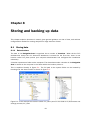
A location represents a folder on the computer: The data shown under a location in the Navigation
Area is stored on the computer in the folder which the location points to.
This is explained visually in figure 8.1. The full path to the system folder can be located by
mousing over the data location as shown in figure 8.2.
Figure 8.1: In this example the location called 'CLC_Data' points to the folder at C:\Documents and
settings\clcuser\CLC_Data.
19