1
TECHNOLOGY BRIEF
Print Head
PD43 supports two USB Host connectors, whereas
PD41/PD42 only supported 1.
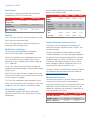
In PD43 the supported resolutions are 203 and 300dpi,
same as in the PD41/PD42 printers. As shown in the table
below, the new 203 and 300dpi print heads are the same
print width as before.
Print Width
PD43
PD41 / PD42
203dpi
104mm
104mm
300dpi
105.7mm
105.7mm
User Interface
The PD42 features a single user interface, a two-line
monochrome LCD with 22 tactile buttons, whereas the
PD41 had a single button with 4 LEDs.
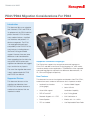
The PD43 supports two interface options: an Icon version
and a graphical color LCD with an eight button keypad.
The print head pressure on PD43 is not adjustable in the
same way as on the PD41/PD42. To increase the print head
pressure on PD43 a separate set of springs must be ordered
as an option and installed into the printer. This may be
needed e.g. for certain thick media.
The Icon version provides multiple intuitive error LEDs
to describe the error state in the printer. It also provides
maintenance icons and a system health indicator.
The LCD version provides an intuitive, multi-language user
interface with functions for displaying status and printer
configuration.
On PD41/PD42 it was possible to loosen two screws on the
print head to adjust the burn line position; this is not possible
on PD43.
Connectivity and Power
The connectivity and power cables on PD43c connect to
the back of the printer, like most printers.
Configuration
The PD43 printer offers more flexibility to configure settings
than the PD41/PD42.
On PD43 the cable connectors are located underneath
the printers and one must turn the printer over to insert
the cables. Thanks to routing channels underneath the
printer this design helps fasten the cable so that it is not
removed by accident.
In the PD43settings can be changed either remotely
(e.g. modern web page or PrintSet 5 for 1:1 device
configuration, or SmartSystems), using a USB thumb
drive or from the LCD front panel.
Users who frequently move the printer around can
purchase a connector extension as an option which
moves the connector to the back of the printer
Print Speed
The PD43 has a higher maximum print speed, 8ips on
203dpi and 6ips on 300dpi, compared to the maximum of
6ips and 4ips respectively on the PD41/PD42.
Sensors
IN PD41/PD42, the Label Taken Sensor does not require
calibration, but on PD43 the sensor must be calibrated
using the LCD or manually configured using the icon
version. Both sensors are facing up.
Communication Interfaces
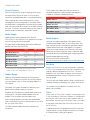
This table shows the communication interfaces available
for each printer.
The label gap sensor on PD41/PD42 adjusts by moving
an arm inside the printer mechanism that moves the
sensor across half the print width and it features a white
marking indicating the sensor position. The PD43 sensor
is easier to adjust and also covers half the media.
PD43
PD41 / PD42
Internal Ethernet (NIC)
Option
Standard
Serial Port
Option
Standard
USB Device
Standard
Standard
USB Host
Standard
Standard
Parallel Port (Centronics)
Option
Opt-Svc
HF/UHF RFID
Opt-Svc
NA
Wireless 802.11 / Bluetooth
Opt-Svc
Opt-Svc
Serviceability/Installation
Bluetooth
Opt-Svc
NA
Tear Bar
In PD42 the LTS feature was standard which is the case
also for PD43c, but in PD43 this is an optional feature.
Opt-Svc: Option, service installable
Opt-Fld: Option, field/user installable
Option: Adapter cable (USB)
On PD43 end users can remove the lower tear bar by
using a Philips screw driver; same as on PD41/PD42.
4