1
MFC710 User's Manual
4.2.4. Work with constant speeds
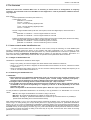
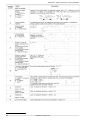
The system can work with one of seven constant speeds. The choice of constant speed is made by digital inputs determined
by parameters 2.30, 2.31 and 2.32 - an example in table 4.2. Sizes of constant speeds are defined by parameters:
par. 2.33 – constant speed number 1 [Hz]
par. 2.34 – constant speed number 2 [Hz]
par. 2.35 – constant speed number 3 [Hz]
par. 2.36 – constant speed number 4 [Hz]
par. 2.37 – constant speed number 5 [Hz]
par. 2.38 – constant speed number 6 [Hz]
par. 2.39 – constant speed number 7 [Hz]
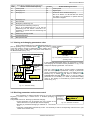
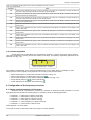
Table 4.2 – suggested configuration of constant speed control
Parameters
Example
Notation
2.30 W1
>5 In.C5
Signal of constant speed selection W1 comes from digital input DI5 (W1 = DI5)
2.31 W2
>6 In.C6
Signal of constant speed selection W2 comes from digital input DI6 (W2 = DI6)
2.32 W3
>0 Sw.Off.
W3 = 0
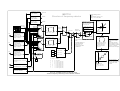
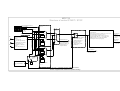
!!! ATTENTION!!! - see structural circuit of frequency referencing-unit - section 4.2.1
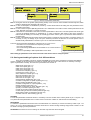
As a result of choice of such parameter configuration it is possible to choice between 3 available constants through
digital inputs DI5 and DI6:
State DI5
State DI6
Effect
Electric drive does not operate with constant speed. At this time another referencing-unit is
operating. (See structural circuit of frequency referencing-unit - section 4.2.1)
0
0
1
0 Constant speed no. 1 (value as par. 2.33)
0
1 Constant speed no. 2 (value as par. 2.34)
1
1 Constant speed no. 3 (value as par. 2.35)
Note 1: Please make sure that DI6 works in digital input mode (fig. 2.6, jumper J5).
Note 2: Digital input DI4 is default using as a source of external reset, so before using DI4 please move a source of
external reset to another digital input DI or just turn it off (par. 3.70).
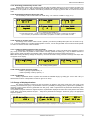
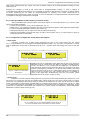
CONTROL STATE display when constant speed referencing-unit is active
looks like it is shown in fig. 4.5 – Referencing-unit: constant frequency
(speed), START through digital input.
A nMot
Ref:Fc
0 rpm
Cont:Di
Fig.4.5.- CONTROL STATE
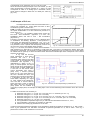
4.2.5. Motopotentiometer
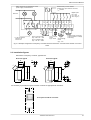
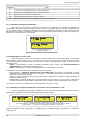
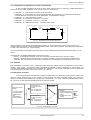
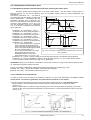
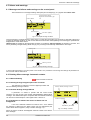
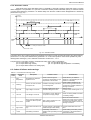
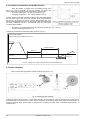
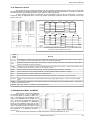
Motopotentiometer is a simple “increase-reduce” device for speed control of motor rotation using two buttons. An
example way of connecting “increase-reduce” buttons to the frequency converter is shown in fig. 4.6a. Fig. 4.6b.
Illustrates action of the device.
In order to set the output frequency
a)
b)
of the converter with help of a motorpotentiometer par. 2.2 (for control A)
DI3
Increase
or 2.3 (for control B) must be set on
f sel.
value "MotPot" (mP).
DI4
Reduce
Attention: Fig. 4.6a corresponds to a
situation when par. 2.20 = “In.C3”
and par. 2.21 = “In.C4”.
24V
Increase
time
Reduce
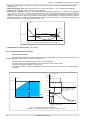
Increase and reduce of drive speed depends on:
- constanta of motor-potentiometer (par. 2.23)
- dynamic of electric drive (par. 1.30 ... 1.36)
Fig. 4.6 - Connection and illustration of a motopotentiometer device operation.
Information "Ref.mP" on the display in CONTROL STATE
mode confirms enabling of the motorpotentiometer’s ref.-unit
Note: Digital input DI3 is default
using as a source of external fail 1
(par. 3.10 = In.C3), so before using
DI3 please move a source of
external fail 1 to another digital input
DI or just turn it off. Similar situation
occurs with digital input DI4. Digital
input DI4 is default using as a source
of external reset, so before using DI4
please move a source of external
reset to another digital input DI or
just turn it off (par. 3.70).
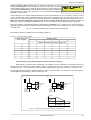
There are four available modes of motopotentiometer operation: 0, 1, 2 and 3. Modes 0, 1 and 2 should be used only
TWERD Power Electronics
27