1
CETerm Scripting Guide
for Version 5.1 or later
Naurtech Terminal Emulation and Web
Browser Smart Clients
for Windows CE Devices
CETerm | CE3270 | CE5250 | CEVT220
NAURTECH SMART CLIENTS FOR W INDOWS CE AND POCKET PC
Copyright Notice
This document may not be reproduced in full, in part or in any form, without prior
written permission of Naurtech Corporation.
Naurtech Corporation makes no warranties with respect to the contents of this
document and specifically disclaims any implied warranties of merchantability or
fitness for any particular purpose. Further, Naurtech Corporation, reserves the
right to revise this publication and referenced software without any obligation to
notify any person or organization of such revision or changes.
Trademarks
CETerm®, CE3270™, CE5250™, CEVT220™ are trademarks of Naurtech
Corporation.
Other product names mentioned in this manual may be trademarks or registered
trademarks of their respective companies and are hereby acknowledged.
Software Version
This document is for Version 5.1 or later of Naurtech Smart Clients.
CETerm Scripting Guide
Page 2
NAURTECH SMART CLIENTS FOR W INDOWS CE AND POCKET PC
Table of Contents
Copyright Notice .............................................................................................................................. 2
Trademarks...................................................................................................................................... 2
Software Version ............................................................................................................................. 2
Table of Contents ............................................................................................................................ 3
Preface ............................................................................................................................................ 6
Assumptions .................................................................................................................................... 6
Conventions used in this Manual..................................................................................................... 6
Additional Documentation................................................................................................................ 7
Online Knowledgebase.................................................................................................................... 7
1.0 Introduction ................................................................................................................................ 8
1.1 Feature Highlights .................................................................................................................. 9
2.0 Getting Started ........................................................................................................................ 11
2.1 JavaScript Engine ................................................................................................................ 11
2.2 Enabling Scripting and Editing Scripts ................................................................................. 12
General Settings..................................................................................................................... 12
Editing Scripts ........................................................................................................................ 12
2.3 CETerm Automation Objects ............................................................................................... 15
2.4 IDA Action Codes................................................................................................................. 15
2.5 OnBarcodeRead Script Event.............................................................................................. 15
2.6 Automated Login .................................................................................................................. 18
2.7 Custom Screen Hot-Spots ................................................................................................... 20
3.0 CETerm Automation Objects................................................................................................... 22
3.1 The CETerm Object ............................................................................................................. 22
Methods.................................................................................................................................. 22
Properties ............................................................................................................................... 26
3.2 The Session Object.............................................................................................................. 26
Methods.................................................................................................................................. 27
Properties ............................................................................................................................... 27
3.3 The Screen Object ............................................................................................................... 27
Methods.................................................................................................................................. 27
Properties ............................................................................................................................... 28
3.4 The Browser Object ............................................................................................................. 28
Methods.................................................................................................................................. 28
Properties ............................................................................................................................... 29
3.5 The Message Object............................................................................................................ 29
Methods.................................................................................................................................. 30
Properties ............................................................................................................................... 30
3.6 The TextInput Object ........................................................................................................... 30
Methods.................................................................................................................................. 30
Properties ............................................................................................................................... 31
3.7 The OS Object ..................................................................................................................... 31
Methods.................................................................................................................................. 31
Properties ............................................................................................................................... 33
3.8 The File Object..................................................................................................................... 34
Methods.................................................................................................................................. 34
Properties ............................................................................................................................... 36
3.9 The Registry Object ............................................................................................................. 37
CETerm Scripting Guide
Page 3
NAURTECH SMART CLIENTS FOR W INDOWS CE AND POCKET PC
Methods.................................................................................................................................. 37
Properties ............................................................................................................................... 39
4.0 CETerm Script Events ............................................................................................................. 40
4.1 The OnBarcodeRead Event................................................................................................. 40
Syntax..................................................................................................................................... 40
Example.................................................................................................................................. 41
4.2 The OnDocumentDone Event.............................................................................................. 41
Syntax..................................................................................................................................... 41
Example.................................................................................................................................. 42
4.3 The OnNavigateError Event................................................................................................. 42
Syntax..................................................................................................................................... 42
Example For Windows CE 5.0 devices .................................................................................. 43
Example For Windows Mobile devices .................................................................................. 44
4.4 The OnNetCheckFailed Event ............................................................................................. 44
Syntax..................................................................................................................................... 44
Example.................................................................................................................................. 44
4.5 The OnSessionConnect Event............................................................................................. 45
Syntax..................................................................................................................................... 45
Example.................................................................................................................................. 45
4.6 The OnSessionDisconnect Event ........................................................................................ 46
Syntax..................................................................................................................................... 46
Example.................................................................................................................................. 46
4.7 The OnSessionDisconnected Event .................................................................................... 47
Syntax..................................................................................................................................... 47
Example.................................................................................................................................. 47
4.8 The OnSessionReceive Event ............................................................................................. 47
Syntax..................................................................................................................................... 47
Example.................................................................................................................................. 48
4.9 The OnSessionSwitch Event ............................................................................................... 48
Syntax..................................................................................................................................... 48
Example.................................................................................................................................. 48
4.10 The OnStylusDown Event.................................................................................................. 49
Syntax..................................................................................................................................... 49
Example.................................................................................................................................. 49
4.11 The OnWakeup Event........................................................................................................ 50
Syntax..................................................................................................................................... 50
Example.................................................................................................................................. 50
5.0 Scripting Techniques and Tips ................................................................................................ 52
5.1 Expect and ExpectMonitor for Automating Tasks................................................................ 52
5.1.1 Expect Script ................................................................................................................. 52
5.1.2 ExpectMonitor Class ..................................................................................................... 53
5.1.3 Automating Tasks with Expect ...................................................................................... 57
5.2 Presenting Visual Feedback During Script Execution ......................................................... 57
5.3 Getting User Input to a Script............................................................................................... 58
5.4 Running an External Program.............................................................................................. 59
5.5 Using Timers to Run Scripts ................................................................................................ 59
5.6 Accessing a File ................................................................................................................... 60
5.7 Accessing the Registry ........................................................................................................ 61
5.8 Writing Efficient Scripts ........................................................................................................ 62
5.8.1 Use Local Variables ...................................................................................................... 62
5.8.2 Encapsulate Code in Functions .................................................................................... 63
5.8.3 Limit Execution Time ..................................................................................................... 63
CETerm Scripting Guide
Page 4
NAURTECH SMART CLIENTS FOR W INDOWS CE AND POCKET PC
5.9 Debugging Scripts................................................................................................................ 64
5.9.1 Show Script Errors ........................................................................................................ 64
5.9.2 OS.Alert() ...................................................................................................................... 65
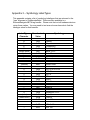
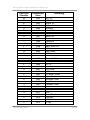
Appendix 1 - IDA Action Codes ..................................................................................................... 66
Appendix 2 - Properties ................................................................................................................. 75
Application Properties ................................................................................................................ 75
Device Properties....................................................................................................................... 75
Session Properties ..................................................................................................................... 76
Scanner Properties .................................................................................................................... 77
Common Symbology Properties ................................................................................................ 78
Codabar Symbology Properties ................................................................................................. 79
Code39 Symbology Properties .................................................................................................. 80
Code 128 Symbology Properties ............................................................................................... 81
UPC-EAN General Symbology Properties................................................................................. 82
Symbology Names ..................................................................................................................... 83
Appendix 3 – Symbology LabelTypes ........................................................................................... 85
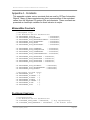
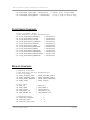
Appendix 4 - Constants ................................................................................................................. 87
MessageBox Constants ............................................................................................................. 87
PlaySound Constants ................................................................................................................ 87
File Attribute Constants.............................................................................................................. 88
Registry Constants..................................................................................................................... 88
Browser Error Constants............................................................................................................ 89
Glossary......................................................................................................................................... 91
Index .............................................................................................................................................. 92
CETerm Scripting Guide
Page 5
NAURTECH SMART CLIENTS FOR W INDOWS CE AND POCKET PC
Preface
All of us at Naurtech Corporation constantly strive to deliver the highest quality
products and services to our customers. We are always looking for ways to
improve our solutions. If you have comments or suggestions, please direct these
to:
Naurtech Corporation
e-mail: [email protected]
Phone: +1 (425) 837.0800
Assumptions
This manual assumes you have a working knowledge of:
•
•
•
•
•
Microsoft Windows user interface metaphor and terminology.
Stylus based touch screen navigation terminology.
Basic programming and scripting concepts.
Dynamic HTML, the browser DOM, and JavaScript.
Basic operations and requirements of the host applications you want to
access with the Naurtech smart client.
Conventions used in this Manual
This manual uses the following typographical conventions:
•
All user actions and interactions with the application are in bold, as in
[Session][Configure]
•
Any precautionary notes or tips are presented as follows
Tip: Text associated with a specific tip
•
•
) represents new version specific information
All text associated with samples is presented as follows.
/*alert*/
OS.Alert("Script done.");
CETerm Scripting Guide
Page 6
NAURTECH SMART CLIENTS FOR W INDOWS CE AND POCKET PC
Additional Documentation
Naurtech Scripting is an integral feature of Naurtech terminal emulation Smart
Clients. Please refer to the User’s Manual for detailed installation and
configuration information. The User’s Manual may be downloaded from the
“Support” section of our website.
Online Knowledgebase
Although we continually strive to keep this manual up to date, you may find our
online support knowledgebase useful for the latest issues, troubleshooting tips
and bug fixes. You can access the support knowledgebase from our website at:
www.naurtech.com t Support t Knowledgebase
CETerm Scripting Guide
Page 7
1.0 Introduction
The Naurtech CETerm Smart Clients provide a robust and flexible environment
for Terminal Emulation and Web based applications on a mobile device. Our
Clients are available for most Windows CE platforms including CE .NET 4.2,
Windows CE 5.0, Windows Mobile 2003, and Windows Mobile 5.
Device tailored versions of our Clients are available for most industrial terminals.
These versions integrate the peripherals on each device, such as the barcode
scanner, magnetic stripe reader, RFID reader and Bluetooth printer. Naurtech
Scripting features provide additional control of these peripherals and simplify
tasks such as data collection, validation, and automation.
All Naurtech Clients include one or more Terminal Emulations (TE) and a Web
Browser for a natural migration path from legacy text based TE applications to
newer Web based applications. We will refer to the clients collectively as
CETerm, although the scripting features apply fully to the single emulation
products CE3270, CE5250, and CEVT220.
Scripting features can help the transition to web applications and add capabilities
to older TE applications. Newer web based applications can be presented in a
familiar single-purpose (locked down) configuration which uses keys, the touch
screen, or both for user interactions. Please see our “Web Browser
Programming Guide” for detailed information on using the Web Browser features.
The Naurtech Scripting features automate and extend our Smart Clients. We
use the industry standard JavaScript language with Microsoft JScript additions.
JavaScript is the language underlying the most capable and complex
functionality available in web applications today. This new class of web
applications is sometimes referred to as “Web 2.0” using Asynchronous
Javascript and XML (AJAX). CETerm brings this mature and rich language to
the TE user to provide more productive TE applications. Scripting can also
interact with web browser sessions to enrich and extend existing web
applications on the mobile device.
Scripts can be as simple as editing barcode data before sending to a host or as
complex as parsing an external XML document, applying an XSLT transformation
and returning the result to the host through the TE session. CETerm Automation
Objects are provided to give scripts access to the state of CETerm, the TE
session, and access to Windows CE operating system functions such as reading
a file.
This guide is intended to describe the steps for writing and running scripts and
the features provided through the CETerm Automation Objects. Please consult
the standard references for details on JavaScript (or JScript) syntax and XML.
You may also need to consult standard references for HTML syntax, the browser
NAURTECH SMART CLIENTS FOR W INDOWS CE AND POCKET PC
Document Object Model (DOM), and other aspects of Dynamic HTML if you are
scripting web browser features. Please refer to the Naurtech User’s Manual for
details on basic usage and configuration of the Naurtech clients.
We hope that our Scripting features will enrich and extend the capabilities of your
TE and browser applications. Explore a little deeper and we think you will be
amazed at the possibilities for building powerful business applications.
1.1 FEATURE HIGHLIGHTS
Following are some of the special features in Naurtech Scripting
•
•
•
•
•
JavaScript. Naurtech uses the industry standard JavaScript scripting
language. This powerful language is familiar to programmers and nonprogrammers world-wide as the core of rich web applications. With JScript,
the Microsoft version of JavaScript, additional features are available such as
the ability to use ActiveX objects in scripts.
On-device Script Editing. Scripts are saved within the CETerm
configuration and can be edited and tested right on the mobile device. Scripts
can be imported and exported via text files on the device as well as loaded
dynamically from files.
Cross Session Scripting. All Naurtech clients allow up to 4 simultaneous
sessions. Scripts can access and control any or all sessions. For example,
you could extract text from one TE session and insert it into a different TE
session or into a Web application.
Automation Objects. CETerm Automation Objects are available to access
and control the state of CETerm, the state of a TE or web browser session,
the mobile device, and the Windows CE Operating System. Together these
objects provide a rich set of features to simplify routine steps or build complex
applications. For example, you can use an automation object to examine the
current screen contents to trigger special actions.
Enriched Web Browser Applications. Naurtech Scripting can interact with
a web browser session to enrich existing web applications that were not
written for a mobile device. For example, key bindings can be added to
activate items in the page and scanned barcode or RFID data can be directed
to input elements.
CETerm Scripting Guide
Page 9
NAURTECH SMART CLIENTS FOR W INDOWS CE AND POCKET PC
•
•
•
•
•
Workflow Automation. Scripts can be used to automate routine tasks. The
task may be a simple login process or a complex set of steps in your host
application.
Event Activated Scripts. There are several events within CETerm that will
run associated scripts. For example, when a barcode is read, the script
“OnBarcodeRead” will execute and will allow arbitrary processing of the
barcode data before it is submitted to the TE or web browser session.
Key, Button, and Menu Activated Scripts. Like most other CETerm
actions, scripts can also be tied to any key combination, a toolbar button, or a
context menu.
Timer Activated Scripts. Scripts can be scheduled to run at a future time or
run periodically.
Host Activated Scripts. Host applications can also invoke scripts using
special commands within the TE data stream.
CETerm Scripting Guide
Page 10
2.0 Getting Started
This section describes some common ways that scripting features can be used
within CETerm. Here we describe the JavaScript engine in CETerm and show
how to load and edit a script. We also show sample scripts which (1) handle
scanner input, (2) auto-login a terminal emulation session, and (3) provide userspecified “hot-spots” on the screen. Only small code “snippets” are shown. For
complete details see the later sections of this manual.
2.1 JAVASCRIPT ENGINE
The CETerm JavaScript engine is a full JavaScript environment running in
CETerm that provides all the power and familiarity of JavaScript for automating
and extending your data collection process. Strictly speaking, CETerm contains
the Microsoft JScript engine, which has additional capabilities, but we will refer to
it as JavaScript.
The CETerm JavaScript engine is separate from the JavaScript engines which
are available in web browser sessions, but the two engines can communicate,
exchange data and send commands. Unlike the web browser engine, the
CETerm engine runs independently of any TE or browser session and can
interact with all sessions. This persistence allows the CETerm engine to
maintain state throughout a data collection process.
The CETerm script engine runs as part of the CETerm user interface and when
processing a script, the device keys and screen may be unresponsive. Think of
the script engine as a virtual user which can examine the screen and send input.
There are several techniques to write asynchronous scripts and to show
feedback to the user and get user input while a script is running.
2.2 ENABLING SCRIPTING AND EDITING SCRIPTS
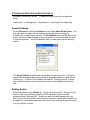
Scripting is disabled by default. To enable scripting, open the configuration
dialog
[Session]->[Configure]->[Options]->[Configure Scripting]
General Settings
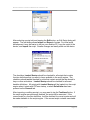
On the General tab, check the Enable box and check Show Script Errors. You
may also want to enable file and registry access permission or program
launching if you need these features. The Re-Initialize button on this tab can be
used if you have made changes to the permissions or your scripts and you wish
to load the changes. The re-initialization does not take place until the dialog is
closed.
The Script Timeout variable limits the duration of script execution. This limit is
useful when developing new scripts and as a safeguard against a script with an
“infinite loop”. A value of 0 will disable the timeout. During execution, a script
can modify the timeout value and reset the timer to allow additional execution
time.
Editing Scripts
Scripts are edited on the Scripts tab. There are 64 script slots. The size of the
script in each slot is limited to about 260,000 characters (about one-half
megabyte under Windows CE). Scripts can also be loaded dynamically from
files. A script slot will usually contain function definitions, which will be loaded into
the engine, or executable statements such as function calls which may be bound
to a key, toolbar, or menu.
NAURTECH SMART CLIENTS FOR W INDOWS CE AND POCKET PC
After selecting a script slot and tapping the Edit button, an Edit Script dialog will
appear. The edit dialog allows Import and Export of scripts. For initial script
development it may be easier to edit on your desktop PC, copy the script to the
device, and Import the script. Smaller changes are easily made on the device.
The checkbox Load at Startup should be checked for all scripts that contain
function definitions that you want to have available in the script engine. The
checkbox should not be checked for slots that contain scripts that are bound to
keys or other activations. Load at Startup should be checked for all event
handler definitions. All scripts with Load at Startup will be loaded into the script
engine when it starts with CETerm startup, or when Re-Initialize has been
pressed on the General tab.
After importing or editing a script, you may want to tap the Test/Load button. If
the script engine was previously enabled, the script will be executed. If the
current script is a function definition, it will be checked for correct syntax and will
be made available to the script engine. If the current script contains executable
CETerm Scripting Guide
Page 13
NAURTECH SMART CLIENTS FOR W INDOWS CE AND POCKET PC
statements or is a function call, it will simulate activating the script. In general,
you do not want to use Test/Load for executable statements.
Remember to tap Test/Load or Re-Initialize (with Load at Startup checked)
after making changes to a script, if you want those changes loaded into the script
engine. Also, Test/Load will not work if you have just checked Enable but not
yet accepted the configuration changes.
The Template button displays a list of script templates which correspond to the
scripting event handlers. Select a template and tap OK to have it replace the
current contents of the script being edited. The template scripts show some of
the ways to use CETerm Automation Objects.
CETerm Scripting Guide
Page 14
2.3 CETERM AUTOMATION OBJECTS
The CETerm Automation Objects provide access to the running CETerm
application, session screens, the Windows CE operating system, and other
features. For example the command
CETerm.PostIDA( "IDA_SESSION_S1", 0 );
within a script would switch CETerm to Session 1 if another session was
currently active. Automation Objects can give access to the browser Document
Object Model (DOM) of connected web sessions and the text on terminal
emulation sessions. The IDA action codes are described briefly in the following
section.
The CETerm Automation Objects are similar to ActiveX controls that are used in
web pages, but they do not require any special creation operations prior to use.
In fact, the same CETerm Automation Objects are accessible from both the
CETerm JavaScript engine and the web browser JavaScript engines.
2.4 IDA ACTION CODES
An IDA Action Code is a special value that is used to invoke a device action,
program action, or emulator action within the Naurtech Smart Client. IDA Action
Codes can invoke special keys under terminal emulation, sound a tone, connect
a session, or show the SIP. There are many IDA codes and these are
documented in Appendix 1 of this manual. Almost any action which can be
invoked by a KeyBar or assigned to a hardware key can be invoked by an IDA
code. IDA codes can be submitted to CETerm in several different ways, under
both scripting and the web browser.
2.5 ONBARCODEREAD SCRIPT EVENT
CETerm generates several script events during operation. If there is a
corresponding event handler defined within the CETerm script engine, then that
handler will be invoked. The "OnBarcodeRead" event is a good example. The
OnBarcodeRead event handler can intercept and pre-process barcode scan data
using the full power of JavaScript before sending the data on to the TE or
browser session.
The OnBarcodeRead handler could do something simple, such as pre-pending
zero digits for short barcodes, or something complex such as splitting an
Automotive Industry Action Group (AIAG) B-10 barcode and putting different
parts into different fields on an IBM 5250 emulation screen.
Here is the OnBarcodeRead template that can be loaded in the script edit dialog
NAURTECH SMART CLIENTS FOR W INDOWS CE AND POCKET PC
/* OnBarcodeRead */
function OnBarcodeRead( session, data, source, type, date, time )
{
// Manipulate barcode data here
// Send barcode to emulator
CETerm.SendText( data, session );
// Return 0 to handle barcode normally
// Return 1 if handled data here
return 1;
}
This handler simply passes the barcode data on to the current session using the
“SendText” method. The return value of 1 tells CETerm not to pass on the
barcode data with the usual wedge technique.
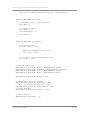
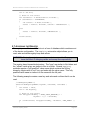
The following OnBarcodeRead handler will prefix 3 zeros to any 8 digit barcode
and pass other barcodes unchanged
/* OnBarcodeRead */
function OnBarcodeRead( session, data, source, type, date, time )
{
// Prefix zeros to short barcodes
if (data.length == 8)
{
data = "000" + data;
}
// Send barcode to emulator
CETerm.SendText( data, session );
// Return 0 to handle barcode normally
// Return 1 if handled data here
return 1;
}
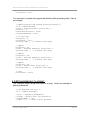
If the OnBarcodeRead handler is defined, it will override any “ScannerNavigate”
handler defined in a web page META tag. The following OnBarcodeRead
handler will pass the scan on to the ScannerNavigate handler for a web browser
in session 2
/* OnBarcodeRead */
function OnBarcodeRead( session, data, source, type, date, time )
{
// Don’t process for browser session
if (session == 2)
{
// Return 0 to handle barcode with ScannerNavigate
return 0;
}
CETerm Scripting Guide
Page 16
NAURTECH SMART CLIENTS FOR W INDOWS CE AND POCKET PC
// Prefix zeros to short barcodes
if (data.length == 8)
{
data = "000" + data;
}
// Send barcode to emulator
CETerm.SendText( data, session );
// Return 1 if handled data here
return 1;
}
The following OnBarcodeRead handler will split any barcode containing an ASCII
Linefeed (LF = 0x0A) character and terminated with an ASCII ENQ (ENQ = 0x05)
into two parts. The first part is put into the current IBM 5250 field and the second
part into the next field and then submitted to the IBM host. This technique is
used to login a user with a Code39 barcode in full-ASCII mode. All other
barcodes are passed on for normal input
/* OnBarcodeRead */
function OnBarcodeRead( session, data, source, type, date, time )
{
// Look for Full-ASCII Code 39 (LF = 0x0A) to mark Field Exit
var lfIndex = data.indexOf( "\x0A" );
if (lfIndex >= 0 )
{
var passwordStart = lfIndex + 1;
// Look for Full-ASCII Code 39 (ENQ = 0x05)
var enqIndex = data.lastIndexOf( "\x05" );
if (enqIndex >= 0)
{
// NOTE: Using substr to extract user
// Send User
CETerm.SendText( data.substr( 0, lfIndex ), session );
// Send field exit to advance cursor
CETerm.SendIDA( "IDA_FIELD_EXIT", session );
// Send Password
// NOTE: Using substring to extract password
CETerm.SendText( data.substring( passwordStart,
enqIndex ), session );
// Submit form
CETerm.SendIDA( "IDA_ENTER", session );
CETerm Scripting Guide
Page 17
NAURTECH SMART CLIENTS FOR W INDOWS CE AND POCKET PC
// All scan data handled here
return 1;
}
}
// Handle scan data in normal way
return 0;
}
The type argument to OnBarcodeRead contains the labeltype of the barcode.
This labeltype is related to the barcode symbology but usually a little more
informative. The values are dependent on the hardware manufacturer but for
most devices are the same as the Symbol LABELTYPE. The type is a small
integer value representing a printable ASCII character (See Appendix 3). The
source argument is the name of the scanner that read the barcode and is
typically unused. The date and time are text strings representing the time of
the read.
2.6 AUTOMATED LOGIN
Automating the host login process is a common task to speed workflow. CETerm
contains a Macro record and playback that is usually used for this task. One
limitation of the Macro feature is that it will only support a single session autoconnecting when CETerm starts. The scripting feature allows much more power
and flexibility for automating the login or any complex or repetitive process.
Most auto-login features are based on a “prompt-and-response” mechanism that
waits for text from the host (the prompt) and then sends some text (the
response). The “expect” script and “ExpectMonitor” class provide the “promptand-response” mechanism within CETerm. The response is usually some simple
text, but with the ExpectMonitor, it can be a script itself. The ExpectMonitor is
also a good example of using script timers to perform long tasks. The full listing
of the “expect” script and “ExpectMonitor” can be found in Section 5.1.
When “expect” is used for auto-login, it is activated within the
“OnSessionConnect” event handler. Here is a simple example of an
OnSessionConnect handler
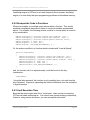
/* OnSessionConnect */
function OnSessionConnect( session )
{
// Set login information
var myusername = "joeuser";
CETerm Scripting Guide
Page 18
NAURTECH SMART CLIENTS FOR W INDOWS CE AND POCKET PC
var mypassword = "secret";
var waittime = 8000;
// Milliseconds waiting for each text
// Only login session 1
if (session == 1)
{
// Look for "login" then "password"
expect( session, waittime, "Login", myusername + "\r",
"Password", mypassword + "\r" );
}
}
The expect arguments are session for the session index, waittime for the
milliseconds waiting for each expected text, followed by pairs of expected text
(prompt) and corresponding action(response). If the action is text, it is simply
sent to the host when appropriate. There can be any number of (expected text,
action) pairs as arguments. The expected text can be plain text or a regular
expression.
For a case-insensitive match of “Login”, an appropriate regular expression could
be /login/i Regular expressions use the slash character as a delimiter
rather than double-quote characters. The ‘i' indicates a case-insensitive match.
A more complex action can contain an anonymous function definition such as
var beepMe = function (session) {CETerm.SendIDA("IDA_BEEP_LOUD", 0);
CETerm.SendText("me\r", session ); }
Combining these changes into the expect call would give
expect( session, waittime, /login/i, beepMe,
"Password", mypassword + "\r" );
You might wonder why the SendIDA call in beepMe has a session index of 0
whereas SendText has the actual session argument. In this case we know that
the beep action is not session specific and does not need to be sent to a specific
session. In general, it is always OK to specify a session and it will be ignored for
actions that do not require a value.
CETerm Scripting Guide
Page 19
NAURTECH SMART CLIENTS FOR W INDOWS CE AND POCKET PC
2.7 CUSTOM SCREEN HOT-SPOTS
A “hot-spot” is an area on a terminal emulation screen that is activated by taping
with your finger or the stylus. CETerm supports several pre-defined hot-spots for
TE sessions. With scripting, it is possible to define custom hot-spot behaviors.
Custom hot-spots use the “OnStylusDown” event handler. Browser sessions do
not support the OnStylusDown event because equivalent behavior can be
implemented in HTML. You may need to disable the pre-defined hot-spots in
CETerm because they will be triggered before a custom hot-spot.
The hot-spot action can depend on the screen contents in an area or simply be
tied to a screen area. The following OnStylusDown handler can be loaded from
the script templates
/* OnStylusDown */
function OnStylusDown( session, row, column )
{
// Look for custom hot-spot
var screen = CETerm.Session( session ).Screen;
var text = screen.GetTextLine( row );
if (text.match( /beep/i ))
{
OS.PlaySound( "default.wav", 0 );
}
}
This hot-spot will play a sound if the line touched contains the word “beep”. The
following hot-spots will activate VT function keys if the user touches in the
specified rows and columns. In this case, the screen can show a box drawn with
VT line drawing characters and text inside each box. With such a display, you
can effectively create large glove-friendly on-screen buttons in TE.
/* OnStylusDown */
function OnStylusDown( session, row, column )
{
// Buttons are on rows "start" through "end"
var buttonrowstart = 9;
var buttonrowend = 13;
var IDA = "IDA_NONE";
// Buttons are "buttonwidth" columns wide
// Leftmost button is #1
var buttonwidth = 5;
var button = Math.floor((column + buttonwidth - 1) /
buttonwidth);
if (row >= buttonrowstart && row <= buttonrowend)
{
switch (button) {
CETerm Scripting Guide
Page 20
NAURTECH SMART CLIENTS FOR W INDOWS CE AND POCKET PC
case
case
case
case
}
1:
2:
3:
4:
IDA
IDA
IDA
IDA
=
=
=
=
"IDA_VT_PF1";
"IDA_VT_PF2";
"IDA_VT_PF3";
"IDA_VT_PF4";
break;
break;
break;
break;
// DEBUG: Uncomment next two lines for testing
//OS.Alert( "row=" + row + " col=" + column +
//
" button=" + button + " IDA=" + IDA );
if (!IDA.match("IDA_NONE"))
{
// Send command
CETerm.PostIDA( IDA, session );
}
}
}
You may have noticed by now the use of PostIDA in some cases and SendIDA
in other cases. SendIDA is a synchronous activation of an action whereas
PostIDA is an asynchronous or deferred activation. In general it is always better
to use PostIDA unless you must wait for the action to complete before
proceeding in the script. The post action is similar to the “PostMessage” function
in Windows programming and the send is similar to the “SendMessage” function.
See the CETerm automation object for more details.
CETerm Scripting Guide
Page 21
3.0 CETerm Automation Objects
This section describes the Automation Objects available to the CETerm script
engine. These objects provide access to the running CETerm application, TE
session screens, the Windows CE operating system, and other features for
developing rich applications.
The automation objects are accessed in a hierarchical manner similar to the
Document Object Model (DOM) of a webpage. The two top-level objects are
CETerm and OS. The CETerm object provides access to application specific
features whereas the OS object provides access to generic Operating System
(OS) features such as files and the device registry.
Automation objects provide some of the same functionality provided by the
Window object in the web browser. For example, the familiar Window methods
alert() and setTimeout() are provided by the OS.Alert() and
CETerm.SetTimeout() methods.
3.1 THE CETERM OBJECT
The CETerm object gives access to CETerm features, settings, and session
state. This section documents the methods and properties of the CETerm object.
Methods
The following methods are available
Method
Action
AbortScript
ClearAllTimers
ClearInterval
ClearTimeout
GetProperty
PlaySound
PlayTone
PostIDA
RunScript
SendIDA
SendText
Session
SetInterval
SetProperty
SetScriptTimeout
SetTimeout
Abort the currently running script
Clear all SetTimeout and SetInterval timers
Clear a recurring interval timer
Clear a one-time timer
Get a property value
Play a tone or wave file on the device (deprecated)
Play a tone on the device (deprecated)
Send a command to a session (asynchronous)
Run a script (called from a web browser only)
Send a command to a session (synchronous)
Send text to a session
Get a session object
Create a recurring interval script execution timer
Set a property value
Set the current script execution timeout
Create a one-time script execution timer
NAURTECH SMART CLIENTS FOR W INDOWS CE AND POCKET PC
AbortScript( )
Stops the currently executing script.
ClearAllTimers( )
Clear all recurring interval timers and one-time timers.
ClearInterval( intervalTimerID )
Clear the specified recurring interval timer.
ClearTimeout( timerID )
Clear the specified one-time timer.
value = GetProperty( propertyName )
Return the named property value. This may be a device property, application
property, or session property. See Appendix 2 for a list of available properties.
Returns the JavaScript “undefined” value if the requested property cannot be
found.
PlaySound( sound ) (deprecated)
Play a tone or wave file on the device. This PlaySound is not the same as the
Windows PlaySound of the OS object. This method will accept a wave file name
but it will also accept a “tone specifier” as a string to support this legacy feature in
the Naurtech Web Browser. New application should use the OS.PlaySound or
OS.PlayTone commands. Use the complete file path if the wave file is not in the
\Windows directory.
If the handheld device contains a programmable tone generator, the sound
parameter may also be a string which defines a sequence of tones to play. The
syntax is given below:
“vvfffddd” – where
vv – is the volume 01-10
fff – is the frequency in 10’s of MHz, 000-999
ddd – is the duration in 10’s of milliseconds, 000-999
CETerm Scripting Guide
Page 23
NAURTECH SMART CLIENTS FOR W INDOWS CE AND POCKET PC
Multiple tone specifications can be concatenated.
PlayTone( volume, frequency, duration ) (deprecated)
Play a tone if supported by the handheld hardware. This method is provided for
backward compatibility within the web browser. New application should use
OS.Playtone() which provides the same functionality.
volume – is the volume 00 -10 (0 is off, 10 is loudest)
frequency – is the frequency in Hz.
duration – is the duration in milliseconds.
PostIDA( IDASymbolicName, session )
PostIDA submits an IDA action command and directs it to the specified session.
Valid session values are 1-4. The special session value of 0 will send the
command to the current session. Some IDA commands act at a global level and
ignore the session variable. See Appendix 1 for IDA Symbolic Names.
The PostIDA command will return before the action executes. In general, the
IDA action will not be applied until after the current script execution ends. We
recommend using PostIDA rather than SendIDA. There are only rare situations
when SendIDA must be used.
status = RunScript( script )
Run the specified script in the CETerm engine. This method must only be used
when the CETerm object is referenced from the web browser script engine. In
general, it is better to use PostIDA with an IDA_SCRIPT_xx action to run a predefined script from the web browser. To execute a script contained in a string
from the CETerm engine use the JavaScript “eval()” method.
SendIDA( IDASymbolicName, session )
SendIDA sends an IDA action command and directs it to the specified session.
Valid session values are 1-4. The special session value of 0 will send the
command to the current session. See Appendix 1 for IDA Symbolic Names.
The SendIDA method will attempt to complete the action before returning. We
recommend using PostIDA rather than SendIDA. There are only rare situations
when SendIDA must be used. For example, SendIDA will be needed if you
need to invoke IBM field actions, such as Field Exit, between sending text to an
IBM session with SendText.
CETerm Scripting Guide
Page 24
NAURTECH SMART CLIENTS FOR W INDOWS CE AND POCKET PC
SendText( text, session )
SendText sends a text string to the specified session. Valid session values are
1-4. The special session value of 0 will send the command to the current
session. This command is synchronous and CETerm will act on each character
before this method returns.
The text string may include IDA symbolic names between backslash characters
‘\’. The IDA codes will be interpolated as the text is sent. For example,
“username\\IDA_FIELD_EXIT\\secretpassword”. Note that each backslash has a
preceding backslash because it has special meaning within a JavaScript string.
Session ( index )
Return the corresponding Session object. Valid index values are 1 to the
MaxSession property value. The object is returned even if the session is not
connected.
intervalTimerID = SetInterval( scriptExpression, delayMillisec )
Set a recurring interval timer to execute the scriptExpression after each delay of
delayMillisec. This method returns an ID that should be saved in a global variable
for later use with ClearInterval if needed. Other scripts may run while waiting for
this timer. The scriptExpression is a string containing the script, but is commonly
a function invocation, such as “myTimerFunction( 3, ‘alert’ );”
Timers are especially useful with complex or long-running scripts. Interval timers
should be used to perform simple update tasks. One-time timers should be used
in preference to interval timers. In general, scripts should perform a short action
and exit. With a complex script such as a state-machine, the state can be
maintained in global variables and the script re-activated periodically to check for
state transitions and perform actions. See the “expect” script and
“ExpectMonitor” class in Section 5.1 for an example of the use of a timer.
status = SetProperty( propertyName, propertyValue )
SetProperty will assign the given value to the named property. See Appendix 2
for a list of available properties. The returned status is 0 for success, non-zero
for failure.
CETerm Scripting Guide
Page 25
NAURTECH SMART CLIENTS FOR W INDOWS CE AND POCKET PC
SetScriptTimeout( millisec )
Set the maximum script execution time. This value may be updated during a
running script. If updated, the new timeout will apply starting at the time of the
change. A value of 0 will disable the timeout.
timeoutTimerID = SetTimeout( scriptExpression, delayMillisec )
Set a one-time timer to execute the scriptExpression after a delay of
delayMillisec. This method returns an ID that should be saved in a global variable
for later use with ClearTimeout if needed. Other scripts may run while waiting for
this timer. The scriptExpression is a string containing the script, but is commonly
a function invocation, such as “myTimerFunction( 3, ‘alert’ );”
Timers are especially useful with complex or long-running scripts. Timers can
also be used to defer an operation which is not possible within an event handler.
One-time timers should be used in preference to interval timers. In general,
scripts should perform a short action and exit. With a complex script such as a
state-machine, the state can be maintained in global variables and the script reactivated periodically to check for state transitions and perform actions. See the
“expect” script and “ExpectMonitor” in Section 5.1 for an example of the use of a
timer.
Properties
The CETerm object has several application level properties.
Property
Description
Values
ActiveSession
MaxSession
Message
TextInput
Current active session. (read only)
Maximum session index. (read only)
Returns message object. (read only)
Return text input object. (read only)
1-4
4
object
object
3.2 THE SESSION OBJECT
The Session object gives access to session state. This section documents the
methods and properties of the Session object.
CETerm Scripting Guide
Page 26
NAURTECH SMART CLIENTS FOR W INDOWS CE AND POCKET PC
Methods
The Session object has no methods.
Properties
The Session object has several read only properties.
Property
Description
Values
Browser
IsConnected
Returns browser object. (read only)
Returns true if session is connected.
(read only)
Returns screen object. (read only)
object
true, false
Screen
object
3.3 THE SCREEN OBJECT
The Screen object gives access to a session terminal emulation screen. This
section documents the methods and properties of the Screen object.
Methods
The following methods are available
Method
Action
GetText
GetTextLine
GetTextRect
Get all text from start location to end location
Get all text on a line
Get a rectangle of text
text = GetText( startRow, startColumn, endRow, endColumn )
Return the requested range of text. Each line will be separated by the
TextLineSeparator property value. If the session is not connected the JavaScript
null value is returned. End coordinates of -1 will use the maximum valid value.
text = GetTextLine( row )
Return the requested row of text. If the session is not connected the JavaScript
null value is returned. The row range is from 1 to the maximum row number.
CETerm Scripting Guide
Page 27
NAURTECH SMART CLIENTS FOR W INDOWS CE AND POCKET PC
text = GetTextRect( startRow, startColumn, endRow, endColumn )
Return the requested rectangle of text. Each line fragment will be separated by
the TextLineSeparator property value. If the session is not connected the
JavaScript null value is returned. End coordinates of -1 will use the maximum
valid value.
Properties
The Screen object has several read only properties.
Property
Description
Rows
Columns
CursorRow
Number of rows in screen. (read only)
Number of columns in screen. (read only)
Current row containing cursor. Setting
this value will change the cursor location.
CursorColumn
Current column containing cursor. Setting
this value will change the cursor location.
TextLineSeparator Text which separates every line in
GetText methods.
Values
1-50
1-132
1 to
Rows
1 to
Columns
Default:
nothing
3.4 THE BROWSER OBJECT
The Browser object gives access to a web browser session. This section
documents the methods and properties of the Browser object.
Methods
The following methods are available
Method
Action
AddMetaItem
Navigate
RunScript
Add a CETerm <META> element to the current web page.
Navigate to specified URL.
Run a script in the web browser JavaScript engine.
CETerm Scripting Guide
Page 28
NAURTECH SMART CLIENTS FOR W INDOWS CE AND POCKET PC
result = AddMetaItem( target, content )
Add a CETerm <META> tag element to the current web page. This is typically
used to add custom <META> elements which define key mappings or other
custom behaviors. See the Naurtech Web Browser Programming Guide for
documentation on custom <META> tags. Returns 0 for success, non-zero for
failure. After adding META elements that change the values of information icons
you may need to use CETerm.PostIDA( “IDA_INFO_REFRESH”, 0 ) to apply the
changes.
result = Navigate( URL )
Navigate the browser session to the specified URL. Returns 0 for success, nonzero for failure.
result = RunScript( script )
Execute the specified script in the browser Javascript engine. Returns 0 for
success, non-zero for failure.
Properties
The following read-only properties are available.
Property
Description
Document
Document object of the current web page. object
The DOM of the page may be examined
and altered via this object. WARNING:
Use a local variable to hold this reference
to minimize memory usage. (read only)
Returns true if document is loaded. (read true,
only)
false
DocLoaded
Values
3.5 THE MESSAGE OBJECT
The Message object provides feedback to the user while a script is running. This
object displays a dialog with a text message, an optional progress bar, and an
optional script cancellation button. The progress value can be set by the script
CETerm Scripting Guide
Page 29
NAURTECH SMART CLIENTS FOR W INDOWS CE AND POCKET PC
as tasks are completed, or it can run at a constant rate to show activity to the
user.
Methods
The Message object has no methods.
Properties
The Message object is controlled through read-write properties. Setting a
property will change the message dialog appearance.
Property
Description
AbortButtonVisible If true, a script abort button is visible.
Taping this button will abort the current
script execution.
IsVisible
If true, message dialog is visible.
Progress
Current progress value in percent.
ProgressRate
Rate of change of progress bar. In units
of percent per second.
ProgressRunning If true, Progress increases at
ProgressRate
ProgressVisible
If true, progress bar is shown
Text
Text of message.
Title
Text in message box title bar.
Timeout
Visibility timeout for dialog. After this
interval, message dialog is closed. A
value of 0 disables this timeout.
Values
true, false
true, false
0 to 100
1 to 100
true, false
true, false
text
text
0 to 9999
3.6 THE TEXTINPUT OBJECT
The TextInput object provides user input in a script. This object displays a
dialog with a text message, an input field, a Cancel button and an OK button.
Methods
The following methods are available
CETerm Scripting Guide
Page 30
NAURTECH SMART CLIENTS FOR W INDOWS CE AND POCKET PC
Method
Action
GetInput
Get input from the user
result = GetInput( )
GetInput displays the user input dialog. Returns 1 for successful input, 0 if input
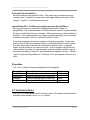
is canceled by the user, and -1 if there was an error. A default response may be
set in the Input property prior to calling GetInput. If no default is desired, be sure
to clear Input prior to calling GetInput.
Properties
The TextInput has the following properties.
Property
Description
Values
Input
Can be pre-set with default response
before calling GetInput. If GetInput
returns 1, contains the user input.
If true, input is shown as * characters.
Text prompt message for user.
Text in message box title bar.
text
PasswordMode
Prompt
Title
true, false
text
text
3.7 THE OS OBJECT
The OS object provides access to operating system resources such as files and
the registry.
Methods
The following methods are available
Method
Action
Alert
Beep
Exec
GetErrorMessage
KillProcess
Show the user a text message. (synchronous)
Play a default beep tone.
Run a separate program.
Get a text error message for a Windows CE error value.
Stop a running process started with Exec.
CETerm Scripting Guide
Page 31
NAURTECH SMART CLIENTS FOR W INDOWS CE AND POCKET PC
MessageBox
PlaySound
PlayTone
Sleep
StopSound
WaitForProcess
Display a standard Windows MessageBox.
Play a wave file on the device.
Play a tone on the device.
Pause the script execution.
Stop an asynchronous playing PlaySound sound.
Wait for the specified process to end.
Alert( message )
Show the user a simple text message and wait for them to press OK.
Beep( )
Sound the default Windows beep tone.
status = Exec( programFile, commandLine )
Start the specified program. Returns 0 for success, non-zero for failure.
Use GetErrorMessage() to convert a non-zero status to a text message. You
should immediately save the property LastExecProcess after a successful Exec
call to obtain the process ID for later use in WaitForProcess or KillProcess.
The programFile should be a fully qualified filename.
text = GetErrorMessage( error )
Returns a descriptive text message for the specified Windows error.
status = KillProcess( processID )
Attempts to stop the specified process. Returns 0 for success, non-zero for
failure. You must obtain the processID from the property LastExecProcess
immediately after a successful Exec call.
result = MessageBox( message, title, flags )
Display a standard Windows message box. The title is displayed in the message
box title bar. The flags are used to specify the icon and buttons that are visible.
Returns a value corresponding to the button pushed to close the dialog. See
Appendix 4 for flag definitions.
CETerm Scripting Guide
Page 32
NAURTECH SMART CLIENTS FOR W INDOWS CE AND POCKET PC
PlaySound( sound, flags )
Play a wave file on the device. This PlaySound is not the same as the
CETerm.PlaySound(). Use the complete file path if the wave file is not in the
\Windows directory. The flags control the way the sound is played. See
Appendix 4 for flag definitions. Returns true on success, false otherwise.
PlayTone( volume, frequency, duration )
Play a tone if supported by the handheld hardware. New applications should use
this method and avoid CETerm.Playtone().
volume – is the volume 00 -10 (0 is off, 10 is loudest)
frequency – is the frequency in Hz.
duration – is the duration in milliseconds.
Sleep( delay )
Delay script execution for specified milliseconds.
result = StopSound( )
Stop any currently playing sound. Returns 0 on success.
status = WaitForProcess( processID, timeout )
Wait for the specified process to exit. Return after timeout milliseconds even if
process is still running. Return 0 if process has exited, non-zero for timeout or
failure. You must obtain the processID from the property LastExecProcess
immediately after a successful Exec call.
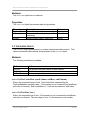
Properties
The OS object has the following properties.
Property
Description
Values
File
Returns the File object. This object
provides access to the Windows file
systems. (read only)
object
CETerm Scripting Guide
Page 33
NAURTECH SMART CLIENTS FOR W INDOWS CE AND POCKET PC
Property
Description
Values
LastError
Returns the last Windows error related to
the OS object.
Returns the process ID of the last
program started via Exec. (read only)
Returns the Registry object. This object
provides access to the Windows registry.
(read only)
Returns the current tick count from
Windows. This provides a millisecond
resolution time source. (read only)
integer
LastExecProcess
Registry
TickCount
unsigned
integer
object
unsigned
integer
3.8 THE FILE OBJECT
The File object provides access to the Windows file system.
Methods
The following methods are available
Method
Action
Copy
CreateDirectory
Delete
GetAttributes
GetOpenFileName
GetSaveFileName
Move
Read
RemoveDirectory
SetAttributes
Write
Create a copy of an existing file.
Create a new directory.
Delete an existing file.
Get the attributes of an existing file.
Select a filename with a file Open dialog.
Select a filename with a file Save dialog
Move or rename a file.
Read file contents.
Remove (delete) an existing directory.
Set the attributes of an existing file.
Write contents to a new or existing file.
status = Copy( existingFile, newFile, overWrite )
Copy an existing file to a new file. If a file already exists with the new file name,
copy will fail unless overWrite is true. Returns true for success, false for failure.
CETerm Scripting Guide
Page 34
NAURTECH SMART CLIENTS FOR W INDOWS CE AND POCKET PC
Use the File properties LastError or LastErrorMessge to get additional error
information.
status = CreateDirectory( newDirectory )
Create a new directory. Returns true for success, false for failure.
Use the File properties LastError or LastErrorMessge to get additional error
information.
status = Delete( filename )
Delete an existing file. Returns true for success, false for failure.
Use the File properties LastError or LastErrorMessge to get additional error
information.
attributes = GetAttributes( filename )
Return the attributes of the file. Use the File properties LastError or
LastErrorMessge to get additional error information. See Appendix 4 for attribute
definitions.
filename = GetOpenFileName( title, filter )
Return the name of a file specified by the user in an Open file dialog. The title of
the dialog should contain descriptive information for the user. For example,
“Please select a datafile.” The filter is list of filter pairs. Each pair represents the
description of a filter and the file selector wildcards. For a JavaScript file it may
look like this: "JScript File (*.js)\x00*.js\x00\x00". Each element of the
pair is followed by "\x00" as a separator character. The last pair has an
additional trailing "\x00". Here is a multiple filter example:
"JScript File (*.js)\x00*.js\x00All Files(*.*)\x00*.*\x00\x00"
filename = GetSaveFileName( title, filter )
Returns the name of a file specified by the user in a Save file dialog. The title of
the dialog should contain descriptive information for the user. For example,
“Save file as:”. The filter is list of filter pairs. Each pair represents the description
of a filter and the file selector wildcards. For a JavaScript file it may look like this:
"JScript File (*.js)\x00*.js\x00\x00". Each element of the pair is followed
by "\x00" as a separator character. The last pair has an additional trailing
"\x00". Here is a multiple filter example:
"JScript File (*.js)\x00*.js\x00All Files(*.*)\x00*.*\x00\x00"
CETerm Scripting Guide
Page 35
NAURTECH SMART CLIENTS FOR W INDOWS CE AND POCKET PC
status = Move( existingFilename, newFileName )
Move or rename an existing file. Returns true for success, false for failure.
Use the File properties LastError or LastErrorMessge to get additional error
information.
contents = Read( filename )
Read entire file and return as contents. The read is an atomic operation which
opens the file, reads all contents and closes the file. The File object does not
support the concept of an “open” file or reading parts of a file. There must be
sufficient memory to hold the entire file contents. There is no error information
returned. Use GetAttributes to validate a filename and ensure read access.
status = RemoveDirectory( directoryname )
Delete an existing directory. Returns true for success, false for failure.
Use the File properties LastError or LastErrorMessge to get additional error
information.
status = SetAttributes( filename, attributes )
Sets the attributes of the file. Returns true for success, false for failure. Use the
File properties LastError or LastErrorMessge to get additional error information.
See Appendix 4 for attribute definitions.
status = Write( filename, contents )
Writes contents to the file. Returns true for success, false for failure. Any current
contents are first deleted. The write is an atomic operation which opens the file,
writes all contents and closes the file. The File object does not support the
concept of an “open” file or writing parts of a file. To append to a file, use Read
to get the current contents and Write the combined current and additional
contents. Use the File properties LastError or LastErrorMessge to get
additional error information.
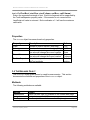
Properties
The File object has the following properties.
CETerm Scripting Guide
Page 36
NAURTECH SMART CLIENTS FOR W INDOWS CE AND POCKET PC
Property
Description
LastError
Returns the last error value associated
with the File object.
LastErrorMessage Returns a text message of the last error
associated with the File object. (read
only)
Values
unsigned
integer
text
3.9 THE REGISTRY OBJECT
The Registry object provides access to the Windows registry. The registry is a
form of database on Windows devices which holds the device configuration. The
registry has a hierarchical structure. The “keys” are similar to file folders and the
“values” inside a key are similar to files in a folder. Several methods require a
“fully qualified” value name which contains the full key hierarchy, begins with a
“root” key, and ends with the value name. This fully qualified value name is
similar to a file name with the full path.
WARNING: Altering the registry can make your device unusable. Be sure you
know the effect of changing values.
Methods
The following methods are available
Method
Action
DeleteKey
DeleteValue
EnumerateKeys
EnumerateValues
FlushKey
GetValueType
ReadValue
ReadValueVBArray
WriteValue
Delete an existing key.
Delete an existing value.
Get all sub-key names of a specified key.
Get all value names of a specified key.
Issue the RegFlushKey command.
Get the data type of a value.
Read a value from a key.
Read a value from a key and return as a Visual Basic array.
Write a value to a key.
CETerm Scripting Guide
Page 37
NAURTECH SMART CLIENTS FOR W INDOWS CE AND POCKET PC
status = DeleteKey( keyname )
Deletes an existing key and all values. Returns 0 for success or non-zero for an
error. Delete will fail if a key has sub-keys.
status = DeleteValue( keyname, valuename )
Deletes the specified value in an existing key. Returns 0 for success or non-zero
for an error.
keylist = EnumerateKeys( keyname )
Return a list of sub-keys of the specified key. See Appendix 4 for key names and
definitions. Each sub-key in the list is separated by the current StringSeparator
property value.
keylist = EnumerateValues( keyname )
Return a list of values of the specified key. See Appendix 4 for key names and
definitions. Each value name in the list is separated by the current
StringSeparator property value.
status = FlushKey( keyname )
Performs a Windows CE “RegFlushKey” on the specified key. Some older
devices use this to trigger a save of the current registry to persistent memory.
Do not use FlushKey unless directed by the device manufacturer. Returns 0 for
success, non-zero for error.
type = GetValueType( valuename )
Gets the data type for the specified value. Use a fully qualified value name that
starts with a root key. Returns 0 for success or non-zero for an error.
data = ReadValue( valuename )
Read the data from the specified value. Use a fully qualified value name that
starts with a root key. Binary values are returned as a list of comma separated
CETerm Scripting Guide
Page 38
NAURTECH SMART CLIENTS FOR W INDOWS CE AND POCKET PC
hexadecimal digits. MULTI_SZ strings are separated with the current
StringSeparator property value.
data = ReadValueVBArray( valuename )
Read the data from the specified value. Return the data as a Visual Basic array.
Use a fully qualified value name that starts with a root key. It is usually best to
use the ReadValue method and split the values using JavaScript. In rare
circumstances a true array may be needed. It is not possible to return a
JavaScript array, but it is easy to convert a Visual Basic array into a JavaScript
array using the VBArray object. For example:
var valuename = "HKLM\\Comm\\PY21BG1\\Parms\\TcpIp\\DhcpDNS";
var vbarray = new VBArray( OS.Registry.ReadValueVBArray( valuename );
var jsarray = vbarray.toarray();
status = WriteValue( valuename, valuedata, datatype )
Write the specified value. Use a fully qualified value name that starts with a root
key. WriteValue will create the containing key if it does not exist. Binary values
are submitted as a list of comma separated hexadecimal digits. MULTI_SZ
strings are separated with the current StringSeparator property value. Returns 0
for success, non-zero for error. See Appendix 4 for root key names and datatype
definitions. Common datatypes are “REG_SZ” for a string and “REG_DWORD”
for a DWORD value.
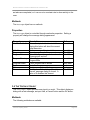
Properties
The Registry object has the following property.
Property
Description
Values
StringSeparator
Text string that separates MULTI_SZ
values. Default: "<|>"
text
CETerm Scripting Guide
Page 39
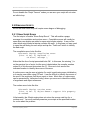
4.0 CETerm Script Events
This section describes the script events within the CETerm script engine. These
events provide ways to trigger event handlers when various conditions occur in
CETerm. The event handlers are arbitrary scripts.
The event model in CETerm uses specific event handler names to bind events to
handlers. If the event handler function (e.g., “OnBarcodeRead”) is defined in the
script engine, it will be executed when the event occurs. There is no special
command required to register or bind the function to the event. Event handlers
can be re-defined at any time. If the handler is no longer needed, the function
can be re-defined as empty.
Event
Fired when…
OnBarcodeRead
OnDocumentDone
OnNavigateError
OnNetCheckFailed
OnSessionConnect
OnSessionDisconnect
OnSessionDisconnected
OnSessionReceive
OnSessionSwitch
OnStylusDown
OnWakeup
Barcode read.
New web page loads.
Web navigation fails.
Fails to complete network check to host.
Session connects to host.
Session disconnects from host.
Session disconnected by host.
TE session receives data from host.
Active session changes.
Stylus tap on screen.
Device resumes after a suspend.
4.1 THE ONBARCODEREAD EVENT
The OnBarcodeRead event is fired when a barcode is successfully read. The
handler can pre-process the data or check other conditions prior to passing it on
to a TE or browser session.
Syntax
function OnBarcodeRead( session, data, source, type, date, time )
session – index of currently active session
data – barcode data
source – source of barcode. Typically a constant scanner name.
type – labeltype of barcode. See Appendix 3 for values.
date – date of barcode read.
time – time of barcode read.
NAURTECH SMART CLIENTS FOR W INDOWS CE AND POCKET PC
Example
Several samples for OnBarcodeRead were given in Section 2.5. Following is an
example that checks the RF connection before submitting the data to the host.
This notifies the user that the barcode was not received by the host and instructs
the user to return to RF coverage.
/* OnBarcodeRead */
function OnBarcodeRead( session, data, source, type, date, time )
{
// Check RF status
var status = CETerm.GetProperty( "device.rf.status" );
if (status <= 0)
{
OS.Alert( "No RF signal detected.\n" +
"Barcode discarded.\n" +
"Return to RF coverage." );
// Discard barcode
return 1;
}
// Send barcode to emulator
CETerm.SendText( data, session );
// Return 1 if handled data here
return 1;
}
4.2 THE ONDOCUMENTDONE EVENT
The OnDocumentDone event is fired when a new webpage has completed
loading into a web browser session. The handler can add META tag definitions,
examine or alter the Document Object Model (DOM), or add JavaScript methods
to the page. This event allows CETerm to enhance a web page for mobile data
collection that was not originally designed for such.
Syntax
function OnDocumentDone( session )
session – index of browser session which completed page load.
CETerm Scripting Guide
Page 41
NAURTECH SMART CLIENTS FOR W INDOWS CE AND POCKET PC
Example
This example shows how several META tags can be added to a web page. We
will add a “PowerOn” handler, a key remapping, and information item tags to
position the RF indicator at a special location. The “PowerOn” handler is often
used to navigate to a specific page, such as a login page, when the device
resumes. The RF indicator tags will restore a specific location, but could be used
to alter the RF indicator location depending on the current page.
/* OnDocumentDone */
function OnDocumentDone( session )
{
var b = CETerm.Session( session ).Browser;
// Do not process the initial about:blank page
if (!b.Document.URL.match("about:blank"))
{
// Add PowerOn META handler
b.AddMetaItem( "PowerOn",
"Javascript:alert(\"My PowerOn\");" );
// Insert new JavaScript function
b.RunScript( "function myf1() {alert(\"F1 Function\");}" );
// Add Key mapping to inserted function
b.AddMetaItem( "OnKey_F1", "Javascript:myf1();" );
// Position RF signal indicator
b.AddMetaItem( "Signal", "x=195" );
b.AddMetaItem( "Signal", "y=100" );
// Update information items for location to take effect
CETerm.PostIDA( "IDA_INFO_REFRESH", session );
}
}
4.3 THE ONNAVIGATEERROR EVENT
The OnNavigateError event is fired if the browser fails to complete a web
navigation. Typically, the error handler will redirect the web browser to a “file:”
URL on the device for error recovery. This event may fire if the device loses RF
coverage during a navigation or the web server crashes. It is a good practice to
use the CETerm “Check Network Before Send” feature to validate RF coverage
prior to submitting the navigation request and use the OnNavigateError for
additional error handling.
Syntax
function OnNavigateError( session, params )
CETerm Scripting Guide
Page 42
NAURTECH SMART CLIENTS FOR W INDOWS CE AND POCKET PC
session – index of browser session which failed to navigate.
params – navigation error parameters, including the error number and URL.
The params argument is formatted as URL parameters and has the form:
error=0x800C0005&url=http://192.168.1.20/application.exe?state=3&scan=0
Everything after url= in the params argument is the URL that failed to
navigate, along with all the parameters of that URL. The error values are
standard Microsoft browser status codes and are defined in Appendix 4.
Example For Windows CE 5.0 devices
This example shows how to redirect a web browser to a static URL on the
device.
/* OnNavigateError */
function OnNavigateError( session, params )
{
// Save params in text 3x where x is session index
// This is required by CE 5.0 devices which do not pass
// parameters to a "file:" URL.
CETerm.SetProperty( "app.usertext.3" + session, params );
// Navigate to static error page
var b = CETerm.Session( session ).Browser;
b.Navigate( "file:///error.htm" );
}
Note the CETerm.SetProperty() call. This method saves the params in
persistent memory for later use by the "error.htm" web page. The reason to do
this is because the parameters are lost by the Windows CE browser when
navigating to a "file:" resource. The error web page can retrieve the params
using:
var property = "app.usertext.3" + external.sessionindex;
var params = external.CETerm.GetProperty( property );
Using the URL, the error page can re-attempt the navigation or decide on other
error recovery. Please note that the "User Text x" is used for several purposes in
CETerm, including key remapping. Be sure that this use does not collide with
other uses in your configuration.
CETerm Scripting Guide
Page 43
NAURTECH SMART CLIENTS FOR W INDOWS CE AND POCKET PC
Example For Windows Mobile devices
Handheld devices using Windows Mobile can use a different technique to pass
on the params URL. For these devices, the parameters of a “file:” URL are
available within the browser. The error parameters can simply be passed on to
the static page without using a “User Text x” variable.
/* OnNavigateError */
function OnNavigateError( session, params )
{
// Navigate to static error page
var b = CETerm.Session( session ).Browser;
b.Navigate( "file:///error.htm?" + params );
}
The error page can access the failed URL parameters using normal techniques
to re-attempt the navigation or decide on other error recovery.
var params = document.location.search;
4.4 THE ONNETCHECKFAILED EVENT
The OnNetCheckFailed event is fired if a “Network Check on Send” fails to
detect the host system and the Network Check Action is
“ida://IDA_SCRIPT_ON_NETCHECKFAILED”. Other Network Check Actions
are possible, including direct naming of an error URL. See the User Manual for
more information. Typically, this error handler will redirect the web browser to a
“file:” URL on the device for error recovery.
Syntax
function OnNetCheckFailed( session, pendingURL )
session – index of browser session attempting navigation.
pendingURL – pending URL for navigation.
The pendingURL is the destination that the user requested but which has been
deferred because the host was not contacted. The event handler can re-try the
navigation.
Example
This example is nearly identical to the OnNavigateError handler except that
there is no error number in the pendingURL. This handler
shows how to redirect a Windows CE web browser to a static URL on the device.
CETerm Scripting Guide
Page 44
NAURTECH SMART CLIENTS FOR W INDOWS CE AND POCKET PC
/* OnNetCheckFailed */
function OnNetCheckFailed ( session, pendingURL )
{
// Save pendingURL in text 3x where x is session index
// This is required by CE 5.0 devices which do not pass
// parameters to a "file:" URL.
CETerm.SetProperty( "app.usertext.3" + session, pendingURL );
// Navigate to static error page
var b = CETerm.Session( session ).Browser;
b.Navigate( "file:///error.htm" );
}
See the OnNavigateError example above for additional details.
4.5 THE ONSESSIONCONNECT EVENT
The OnSessionConnect event is fired when a session initially connects to the
specified host. The handler can be used to initiate an automated login using the
“expect” script and “ExpectMonitor” class.
Syntax
function OnSessionConnect( session )
session – index of session which connected.
Example
An example using OnSessionConnect to start the automated login was shown
above in Section 2.6 and is repeated below. Please refer to Section 2.6 for
details. The “expect” script is discussed in Section 5.1.
/* OnSessionConnect */
function OnSessionConnect( session )
{
// Set login information
var myusername = "joeuser";
var mypassword = "secret";
var waittime = 8000;
// Milliseconds waiting for each text
// Only login session 1
if (session == 1)
CETerm Scripting Guide
Page 45
NAURTECH SMART CLIENTS FOR W INDOWS CE AND POCKET PC
{
// Look for "login" then "password"
expect( session, waittime, "Login", myusername + "\r",
"Password", mypassword + "\r" );
}
}
4.6 THE ONSESSIONDISCONNECT EVENT
The OnSessionDisconnect event is fired when a session is disconnected by a
user action. The handler can be used to switch to another session, exit, or
perform other cleanup tasks.
Syntax
function OnSessionDisconnect( session )
session – index of session which was disconnected by user.
Example
This example will switch to the next connected session when the current session
is disconnected. If there are no other connected sessions, then CETerm will exit.
/* OnSessionDisconnect */
function OnSessionDisconnect( session )
{
// Switch to next connected session
CETerm.SendIDA( "IDA_SESSION_NEXTLIVE", 0 );
if (CETerm.ActiveSession == session)
{
// Still on current session, no others connected.
CETerm.PostIDA( "IDA_PROGRAM_EXIT", 0 );
}
}
CETerm Scripting Guide
Page 46
NAURTECH SMART CLIENTS FOR W INDOWS CE AND POCKET PC
4.7 THE ONSESSIONDISCONNECTED EVENT
The OnSessionDisconnected event is fired when a terminal emulation (TE)
session is disconnected by the remote host. The handler can be used to attempt
to reconnect to the host or perform other cleanup tasks.
Syntax
function OnSessionDisconnected( session )
session – index of session which was disconnected by remote host.
Example
This example will check for RF coverage and attempt to reconnect if RF is
detected.
/* OnSessionDisconnected */
function OnSessionDisconnected( session )
{
// Check RF status
var status = CETerm.GetProperty( "device.rf.status" );
if (status <= 0)
{
OS.Alert( "No RF signal detected.\n" +
"Return to RF coverage and reconnect." );
return;
}
// Attempt to reconnect to host
CETerm.PostIDA( "IDA_SESSION_CONNECT", session );
}
4.8 THE ONSESSIONRECEIVE EVENT
The OnSessionReceive event is fired when a terminal emulation session
receives data from the connected host. The handler can be used to detect
screen content such as an error message and perform a desired action.
Syntax
function OnSessionReceive( session, count )
CETerm Scripting Guide
Page 47
NAURTECH SMART CLIENTS FOR W INDOWS CE AND POCKET PC
session – index of session which received data.
count – count of bytes received.
Example
This example will check the screen content on line 24 looking for an error
message. If found, the error is displayed as a popup message.
/* OnSessionReceive */
function OnSessionReceive( session, count )
{
// Get line of text
var s = CETerm.Session( session ).Screen;
var line = s.GetTextLine( 24 );
// Do a regular expression case-insensitive match
if (line.match( /error/i ))
{
OS.Alert( "Error: " + line );
}
}
4.9 THE ONSESSIONSWITCH EVENT
The OnSessionSwitch event is fired when the active session changes. The
handler can be used to perform a session specific action.
Syntax
function OnSessionSwitch( session, previousSession )
session – index of session which became active.
previousSession – index of session which was previously active.
Example
This example will reposition the battery information item depending on which
browser session is active.
/* OnSessionSwitch */
CETerm Scripting Guide
Page 48
NAURTECH SMART CLIENTS FOR W INDOWS CE AND POCKET PC
function OnSessionSwitch( session, previousSession )
{
var b = CETerm.Session( session ).Browser;
if (b.DocLoaded)
{
var x = (session == 1) ? 195 : 10;
var y = (session == 1) ? 10 : 100;
b.AddMetaItem( "Battery", "x=" + x );
b.AddMetaItem( "Battery", "y=" + y );
CETerm.PostIDA( "IDA_INFO_REFRESH", 0 );
}
}
4.10 THE ONSTYLUSDOWN EVENT
The OnStylusDown event is fired when the user taps a terminal emulation
screen with a stylus or finger. This event is only fired if the tap does not activate
a standard “touch” feature. All touch features can be disabled in the CETerm
configuration. This handler can be used to activate user-defined hot-spots.
Syntax
function OnStylusDown( session, row, column )
session – index of currently active session
row – row of screen tap
column – column of screen tap.
Example
Several samples for OnStylusDown were given in Section 2.7. Following is an
example that starts a barcode scan if the row contains the word “scan”. Not all
hardware devices support a scan trigger by script. If tapping on an IBM screen,
you must tap on an input field in the row, or the focus will not be in an input field
when the scan is sent to the session. Of course the “OnBarcodeRead” handler
could be used to force the scanned data into a preferred input field.
/* OnStylusDown */
function OnStylusDown( session, row, column )
{
var screen = CETerm.Session( session ).Screen;
// Get row of text
var text = screen.GetTextLine( row );
CETerm Scripting Guide
Page 49
NAURTECH SMART CLIENTS FOR W INDOWS CE AND POCKET PC
// Look for "scan" as case-insensitive match
if (text.match( /scan/i ))
{
CETerm.PostIDA( "IDA_SCAN_TRIGGER", 0 );
}
}
4.11 THE ONWAKEUP EVENT
The OnWakeup event is fired when the device resumes after suspending. The
handler can be used to perform any action, such as waiting for RF coverage or
switching to a specific session.
Syntax
function OnWakeup( )
Example
This example will wait for RF coverage to resume and sound a tone when it is
available. While waiting, a “tic” sound will be made periodically to indicate the
check. This sample is more complex than needed, but it illustrates how to use
global variables and timers to periodically check state.
/* RFSoundOnConnect */
// Global control variables
var RFWakeupSoundTimerID = 0;
var RFWakeupSoundContinue = 0;
var RFWakeupSoundInterval = 200;
// milliseconds
var RFWakeupSoundCountMaximum = 50; // 50*200 = 10 seconds
var RFWakeupSoundCount = 0;
function OnWakeup()
{
// Start with wakeup event
RFWakeupSoundStart();
}
// Function to start RF check
function RFWakeupSoundStart()
{
if (!RFWakeupSoundContinue)
CETerm Scripting Guide
Page 50
NAURTECH SMART CLIENTS FOR W INDOWS CE AND POCKET PC
{
RFWakeupSoundContinue = 1;
if (RFWakeupSoundTimerID != 0)
{
// Stop and clear any previous check
CETerm.ClearTimeout( RFWakeupSoundTimerID );
RFWakeupSoundTimerID = 0;
}
RFWakeupSoundCount = 0;
// Schedule first RF check
RFWakeupSoundTimerID = CETerm.SetTimeout(
"RFWakeupSoundOnTimer();",
RFWakeupSoundInterval );
}
}
// Function to check RF and notify user
function RFWakeupSoundOnTimer()
{
RFWakeupSoundTimerID = 0;
RFWakeupSoundCount++;
// Get and check info
var rfStatus = CETerm.GetProperty( "device.rf.status" );
if (rfStatus > 0)
{
// RF detected
// Delayed playsound, increase delay for WEP if needed
CETerm.SetTimeout( "RFWakeupSoundPlay();", 100 );
RFWakeupSoundContinue = 0;
}
else if (RFWakeupSoundCount > RFWakeupSoundCountMaximum)
{
// Failed to get RF, show failure message.
OS.Alert( "Failed to detect RF signal.\n" +
"Return to coverage area." );
RFWakeupSoundContinue = 0;
}
if (RFWakeupSoundContinue)
{
if (!(RFWakeupSoundCount % 5))
{
// Play "tick" sound while check is running.
CETerm.PlaySound( "MenuPop" );
}
// Schedule next RF check
RFWakeupSoundTimerID = CETerm.SetTimeout(
"RFWakeupSoundOnTimer();",
RFWakeupSoundInterval );
CETerm Scripting Guide
Page 51
NAURTECH SMART CLIENTS FOR W INDOWS CE AND POCKET PC
}
}
function RFWakeupSoundPlay()
{
// Select any wave file on device for notification.
CETerm.PlaySound( "infbeg" );
}
5.0 Scripting Techniques and Tips
This section describes ways that scripting can extend the capabilities of CETerm.
Tips for script development are also presented.
5.1 EXPECT AND EXPECTMONITOR FOR AUTOMATING TASKS
The “expect” script and “ExpectMonitor” class provide a general purpose
“prompt-and-response” tool. Using “expect” for automated login was described in
Section 2.6. Here we provide the complete listing of the scripts and discuss
other options for use.
5.1.1 Expect Script
The “expect” script illustrates a couple of powerful JavaScript constructs. Even
though the expect function has 4 defined arguments in the function declaration, it
is possible to pass an unlimited number of arguments. All arguments are
accessible through the special “arguments” variable. This script also shows the
object-oriented aspects of JavaScript by creating a new ExpectMonitor class.
/*
//
//
//
//
//
//
//
//
//
//
//
//
expect */
This script will "expect" a text prompt on the screen and
respond with text or action.
Syntax: expect( session, timeout,
expectedText, response
[,expectedText2, response2] )
session is the session index
timeout is the wait interval for each text in milliseconds
expectedText can be a string or regular expression
Response can be a text response or a function
function expect( session, timeout, expectedText, response )
CETerm Scripting Guide
Page 52
NAURTECH SMART CLIENTS FOR W INDOWS CE AND POCKET PC
{
// Build array from arguments
// This technique will accumulate any
// number of expect/response pairs
var TargetResponseArray = [];
for (var i=2; i < arguments.length; i++)
{
TargetResponseArray.push( arguments[i] );
}
// Create an ExpectMonitor class that manages the actions
var EM = new ExpectMonitor( session, timeout,
TargetResponseArray );
// Set optional ExpectMonitor behaviors
//EM.silent = true;
//EM.OnDone = function (success) { OS.Alert( "Done." ) };
// Start check
EM.Start();
}
5.1.2 ExpectMonitor Class
The “ExpectMonitor” class illustrates the use of a prototype in JavaScript. This
class also manages all instances of itself to restrict the number of objects that
can be created.
/*
//
//
//
//
//
//
//
ExpectMonitor */
ExpectMonitor class
The ExpectMonitor class manages the expect/action
sequence for a session.
Only one ExpectMonitor is allowed per session.
function ExpectMonitor( session, timeout, targetactions )
{
// Validate session
if (session < 1 || session > 4)
{
return null;
}
this.session = session;
this.timeout = timeout;
this.args = targetactions;
CETerm Scripting Guide
Page 53
NAURTECH SMART CLIENTS FOR W INDOWS CE AND POCKET PC
this.state = 0;
this.timer = null;
this.checkCount = 0;
this.totalCheckCount = 0;
this.maxCheckCount = this.timeout / this.checkDelta;
// Abort any existing object
if (ExpectMonitor.Instances[this.session] != null)
{
ExpectMonitor.Instances[this.session].Abort();
}
// Record this instance in the global array
ExpectMonitor.Instances[this.session] = this;
}
function ExpectMonitor_Check()
{
// Clear timer id
this.timer = null;
// If something to check for, check it.
var target = this.args[this.state];
if (target != null)
{
// Get all screen text
var screenText =
CETerm.Session(this.session).Screen.GetText(1,1,-1,-1);
if (screenText != null && screenText.match( target ))
{
// Found match
var action = this.args[this.state + 1];
this.checkCount = 0;
if (action != null)
{
// Check action
if (typeof action == "function")
{
// Run function action
// Pass session number as argument
action( this.session );
}
else if (typeof action == "string")
{
// Send text to session
CETerm.SendText( action, this.session );
}
else if (!this.silent)
{
CETerm Scripting Guide
Page 54
NAURTECH SMART CLIENTS FOR W INDOWS CE AND POCKET PC
OS.Alert("Unknown action type for expect.");
}
}
// Check if another match expected
this.state +=2;
target = this.args[this.state];
if (target != null)
{
// Schedule next check
this.Schedule();
}
else
{
// Done with this expect.
// Run any post-execution actions
if (typeof this.OnDone == "function")
{
this.OnDone( true );
}
}
}
else
{
// No match, schedule again
if (this.checkCount++ < this.maxCheckCount)
{
this.Schedule();
}
else
{
if (!this.silent)
{
OS.Alert( "Expect failed to find text \"" +
target + "\"" );
}
if (typeof this.OnDone == "function")
{
// Done but failed
this.OnDone( false );
}
}
}
}
}
function ExpectMonitor_Schedule()
{
// Schedule next check
var script = "ExpectMonitor.Instances[" +
this.session + "].Check()";
CETerm Scripting Guide
Page 55
NAURTECH SMART CLIENTS FOR W INDOWS CE AND POCKET PC
this.timer = CETerm.SetTimeout( script, this.checkDelta );
}
function ExpectMonitor_Start()
{
// Cleanup first in case restarted
this.Abort();
// Initialize state
this.state = 0;
this.checkCount = 0;
this.Check();
}
function ExpectMonitor_Abort()
{
// Stop any timer
if (this.timer != null)
{
CETerm.ClearTimeout( this.timer );
this.timer = null;
}
// Set state to beyond reasonable range
this.state = 1000;
}
// Method definitions
ExpectMonitor.prototype.Check = ExpectMonitor_Check;
ExpectMonitor.prototype.Schedule = ExpectMonitor_Schedule;
ExpectMonitor.prototype.Start = ExpectMonitor_Start;
ExpectMonitor.prototype.Abort = ExpectMonitor_Abort;
ExpectMonitor.prototype.OnDone = null;
// Check every 200 milliseconds
ExpectMonitor.prototype.checkDelta = 200;
// About 10 seconds for each text check
ExpectMonitor.prototype.maxCheckCount = 50;
// Allow messages
ExpectMonitor.prototype.silent = false;
// Class statics
ExpectMonitor.Instances = [];
CETerm Scripting Guide
Page 56
NAURTECH SMART CLIENTS FOR W INDOWS CE AND POCKET PC
5.1.3 Automating Tasks with Expect
Any routine prompt-and-response task can be automated with “expect”.
Examples may be navigating through a hierarchy of menus or closing an order
for shipping. In any case, you identify text to find on the screen and the user
input to take you to the next screen. Here is a simple menu traversal:
// Traverse menu
expect( CETerm.ActiveSession, 8000,
"3. Applications", "3\r",
"2. Inventory", "2\r",
"2. Put Back", "2\r" );
This script can be entered into any script slot and bound to a key combination for
activation. You must also load the “expect” and “ExpectMonitor” in a script slot
which is marked “Load at Startup” so that the functions are available for use.
5.2 PRESENTING VISUAL FEEDBACK DURING SCRIPT EXECUTION
The Message object can be displayed during script execution when you want to
provide a visual indication of script progress. The Message object is
asynchronous and a script can continue running while it is displayed. This is
unlike the OS.Alert() message which stops script execution and requires user
confirmation. There is only one Message object within CETerm and you can
change the Message properties within any script.
WARNING: You must exercise caution when using the Message box to avoid
leaving it visible after a script is done. You may want to provide a
cleanup script that can be activated by the user to be sure the
message is hidden.
Following is an example of using the Message box. This message will display
itself for 5 seconds and then disappear.
/* Show message for 5 seconds */
var m = CETerm.Message;
m.Text = "Processing data, please wait.";
m.Timeout = 5;
m.AbortButtonVisible = true; // does nothing because script exits
m.Progress = 0;
m.ProgressRunning = true;
m.ProgressVisible = true;
m.ProgressRate = 20;
CETerm Scripting Guide
Page 57
NAURTECH SMART CLIENTS FOR W INDOWS CE AND POCKET PC
m.IsVisible = true;
You may want to update the progress bar directly while processing data. Here is
an example.
/* Update progress and message during processing */
var m = CETerm.Message;
m.Text = "Processing data, please wait.";
m.Timeout = 0;
m.AbortButtonVisible = false;
m.ProgressRunning = false;
// Do some work
m.Progress = 0;
m.IsVisible = true;
OS.Sleep( 2000 ); // Simulate work delay
// Update
m.Progress = 20;
m.Text = "Finding addresses, please wait.";
OS.Sleep( 2000 ); // Simulate work delay
// Update
m.Progress = 50;
m.Text = "Sorting addresses, please wait.";
OS.Sleep( 2000 ); // Simulate work delay
// Update
m.Progress = 90;
m.Text = "Almost done, please wait.";
OS.Sleep( 2000 ); // Simulate work delay
// Done
m.IsVisible = false;
5.3 GETTING USER INPUT TO A SCRIPT
The TextInput object can get user input for a script. Here is an example for
getting a password.
/* Get password from user */
var t = CETerm.TextInput;
t.Title = "Warehouse Management";
t.Prompt = "Please enter your password:";
t.PasswordMode = true;
t.Input = ""; // Clear current password
CETerm Scripting Guide
Page 58
NAURTECH SMART CLIENTS FOR W INDOWS CE AND POCKET PC
var s = t.GetInput();
if (s == 1)
{
OS.Alert( "Password is " + t.Input );
t.Input = ""; // Clear password
}
else
{
OS.Alert( "Failed to get password." );
}
5.4 RUNNING AN EXTERNAL PROGRAM
It is possible to start an external program from the CETerm script engine. You
can wait for the program to finish or allow it to run independently. Usually you
will run a program then return to CETerm when it exits.
Here is an example to start the stylus calibration. Note that the arguments
depend on whether your device is Window CE or Windows Mobile.
/* Stylus Calibration */
// TODO: Uncomment the line for your device
// For Windows CE 5.0 devices
OS.Exec( "\\Windows\\ctlpnl.exe", "cplmain.cpl,9,1" );
// For Windows Mobile 5 devices
//OS.Exec( "\\Windows\\ctlpnl.exe", "cplmain.cpl,7,0" );
5.5 USING TIMERS TO RUN SCRIPTS
Script execution timers are useful for several tasks. They can be used to:
1. Defer an action which is not possible in an event handler.
2. Perform an action periodically.
3. Provide an asynchronous script execution.
4. Split up a long running task.
We have already shown how the timer is used with the ExpectMonitor class and
task automation in Section 5.1. Event handlers should be limited to a small
amount of processing. If more processing is needed, it is best to schedule that
processing with SetTimeout() and allow the event handler to exit.
CETerm Scripting Guide
Page 59
NAURTECH SMART CLIENTS FOR W INDOWS CE AND POCKET PC
The following example will save data from memory to a flash file whenever a
particular URL is loaded.
/* OnDocumentDone */
function OnDocumentDone( session )
{
var b = CETerm.Session( session ).Browser;
if (b.Document.URL.match( /InventorySave/ ))
{
// Resume online inventory, and save cached
// data to file in background.
CETerm.SetTimeout( "BackgroundSave(" + session + ");", 10 );
}
}
/* BackgroundSave */
function BackgroundSave( session )
{
var d = new ActiveXObject( "Microsoft.XMLDOM" );
d.loadXML(
"<?xml version=\"1.0\"?><Books>" +
"<Book QTY=\"10\"><Title>Beginning XML</Title></Book>" +
"<Book QTY=\"2\"><Title>Mastering XML</Title></Book>" +
"</Books>");
if (!OS.File.Write( "\\FlashDisk\\inventory.xml", d.xml ))
{
OS.Alert( "Failed to save inventory." );
}
}
5.6 ACCESSING A FILE
The File automation object provides basic access to the Windows CE filesystem.
It supports whole-file read and write, but does not support the concept of an
“open” file with piecewise read or write. You can also create and delete file
directories.
This example shows how to append to an existing file by using a combination of
read and write.
/* AppendToFile */
function AppendToFile( filename, addedContent )
{
var status = false;
CETerm Scripting Guide
Page 60
NAURTECH SMART CLIENTS FOR W INDOWS CE AND POCKET PC
var F = OS.File;
// Check if file exists
var attributes = F.GetAttributes( filename );
if (attributes != 0xFFFFFFFF)
{
var content = F.Read( filename );
status = F.Write( filename, content + addedContent );
}
else
{
status = F.Write( filename, addedContent );
}
return status;
}
5.7 ACCESSING THE REGISTRY
The registry on a Windows CE device is a form of database which contains most
of the device configuration. The Registry automation object allows you to
read, write and delete registry keys and values.
WARNING: Altering the registry can make your device unusable. Be sure you
know the effect of changing values and accept the responsibility.
The registry has a hierarchical structure. The “keys” are similar to file folders and
the “values” inside a key are similar to files in a folder. Several Registry
methods require a “fully qualified” value name which contains the full key
hierarchy, begins with a “root” key, and ends with the value name. This fully
qualified value name is similar to a file name with the full path.
The following example creates a new key and value and confirms that it can be
read.
/* NewRegistryDWORD */
function NewRegistryDWORD( keyname, valuename, valuedata )
{
var status = false;
var R = OS.Registry;
// Check if file exists
var fullyQualifiedKey = "HKEY_LOCAL_MACHINE\\" +
keyname + "\\" + valuename;
if (!R.WriteValue( fullyQualifiedKey, valuedata, "REG_DWORD" ))
{
CETerm Scripting Guide
Page 61
NAURTECH SMART CLIENTS FOR W INDOWS CE AND POCKET PC
// Check if can read value
var readdata = R.ReadValue( fullyQualifiedKey );
if (readdata == valuedata)
{
status = true;
}
}
if (!status)
{
OS.Alert( "Failed to confirm write of " +
fullyQualifiedKey );
}
return status;
}
NewRegistryDWORD may be used as follows.
// Write a new value
NewRegistryDWORD( "SOFTWARE\\Naurtech\\Test", "TestDword", 510 );
5.8 WRITING EFFICIENT SCRIPTS
Good programming practices should be used when developing scripts for
CETerm. In general, it is important to conserve memory, minimize script
compilations, and limit execution times. Please refer to a JavaScript
programming book for more information.
5.8.1 Use Local Variables
Whenever possible, use local variables within functions and declare them with
the var keyword, like this:
var status;
var message = "hello";
var i, j, k;
If you fail to use the var keyword, then JavaScript automatically creates a global
variable with that name if it has not already been declared outside a function.
JavaScript uses “garbage collection” to reclaim memory no longer in use.
Memory occupied by global variables may never be reclaimed, whereas local
variable memory can be reclaimed after a function call completes. Because the
CETerm Scripting Guide
Page 62
NAURTECH SMART CLIENTS FOR W INDOWS CE AND POCKET PC
JavaScript engine in CETerm is not reset frequently like a browser JavaScript
engine, it is more likely that poor programming practices could exhaust memory.
5.8.2 Encapsulate Code in Functions
Whenever possible, put multiple script actions within a function. This should
minimize compilations and make it easier to use local variables as described
above. For example, the following actions could be in a script which is bound to
a key-combination:
CETerm.SetProperty( "session1.scanner.upca.enabled", true );
CETerm.SetProperty( "session1.scanner.msi.enabled", false );
CETerm.SetProperty( "session1.scanner.pdf417.enabled", false );
CETerm.PlayTone( 8, 2000, 200 );
CETerm.PlayTone( 8, 1500, 200 );
CETerm.PostIDA( "IDA_SCAN_APPLYCONFIG", 0 );
Or, the actions could be in a function which is loaded with “Load at Startup”
function enableUPCA()
{
CETerm.SetProperty( "session1.scanner.upca.enabled", true );
CETerm.SetProperty( "session1.scanner.msi.enabled", false );
CETerm.SetProperty( "session1.scanner.pdf417.enabled", false );
CETerm.PlayTone( 8, 2000, 200 );
CETerm.PlayTone( 8, 1500, 200 );
CETerm.PostIDA( "IDA_SCAN_APPLYCONFIG", 0 );
{
and the function call, in a separate script, could be bound to the keycombination:
enableUPCA();
Using the later approach, the function is only compiled once, not each time the
key is pressed. In general, separating the function definitions from the invocation
is a good practice.
5.8.3 Limit Execution Time
Because the script engine acts like a “virtual user”, when a script is executing,
CETerm will seem unresponsive. You cannot have a script running continuously.
However, using events and timers, you can accomplish most tasks.
CETerm Scripting Guide
Page 63
NAURTECH SMART CLIENTS FOR W INDOWS CE AND POCKET PC
Do not disable the “Script Timeout” unless you are sure your script will not enter
an infinite loop.
5.9 DEBUGGING SCRIPTS
All but the most trivial script will require some degree of debugging.
5.9.1 Show Script Errors
The first step is to enable “Show Script Errors”. This will enable a popup
message for compilation and runtime errors. Compilation errors will usually be
seen when new scripts are added or upon script engine startup. It may not be
clear which script loaded at startup contains the error. In this case you may need
to open the edit dialog for each script and tap the “Test/Load” button to identify
the bad script.
The compilation error looks like this:
Microsoft JScript compilation error
[Line: 15 Col: 8] Expected ‘)’
OS.Alert( message );
Notice that the line of script presented looks OK. In this case, the missing ‘)’ is
on the previous line of script, but the error is detected as the compiler reaches
column 8 of this line and encounters the ‘O’. Be sure to look around the
indicated location to identify the source of the error.
A runtime error may be seen at startup if a script is performing some initialization,
or it may be seen while using CETerm. It can be difficult to identify the source of
the error if the script was fired by an event or timer. Most often, a runtime error
can be prevented by “defensive coding” where you are sure to check the validity
of arguments and object references.
The runtime error looks like this:
Microsoft JScript runtime error
[Line: 14 Col: 9] Object doesn’t support this property
or method.
Unfortunately, the JScript engine does not return the source code line for a
runtime error. You must manually examine your scripts at the specified location
for a clue about the problem.
CETerm Scripting Guide
Page 64
NAURTECH SMART CLIENTS FOR W INDOWS CE AND POCKET PC
5.9.2 OS.Alert()
Because there is no JScript debugger on the Windows CE device, the tried-andtrue debugging tool is “OS.Alert( message )”. Experienced programmers will
recognize this as the “write(6,100)”, “printf” or “MessageBox” technique.
The basic idea is to sprinkle “OS.Alert()” calls through your code to track program
flow and variable values. It can be tedious, but it’s easy to do and easy to
remove the OS.Alert() calls by preceding them with comment characters.
Alternatively, you can define a Debug() method and sprinkle it through your code.
This makes it easier to enable or disable debugging.
var globalDebugLevel = 0;
function Debug( message )
{
if (globalDebugLevel > 0)
{
OS.Alert( message );
}
}
CETerm Scripting Guide
Page 65
Appendix 1 - IDA Action Codes
Many IDA codes apply only to a Terminal Emulation session. Some IDA codes
can only be used in restricted circumstances, such as IDA_URL.
Symbolic Name
Friendly Name
IDA_BEL
IDA_BS
IDA_HT
IDA_TAB
IDA_LF
IDA_VT
IDA_FF
IDA_CR
Bell
Backspace
Horizontal Tab
Tab
Linefeed
Vertical Tab
Form Feed
Carriage Return
Printable ASCII
IDA_SPACE
IDA_EXCLAMATION_MARK
IDA_DOUBLE_QUOTE
IDA_NUMBER_SIGN
IDA_DOLLAR_SIGN
IDA_PERCENT
IDA_AMPERSAND
IDA_SINGLE_QUOTE
IDA_LEFT_PAREN
IDA_RIGHT_PAREN
IDA_ASTERISK
IDA_PLUS
IDA_COMMA
IDA_HYPHEN
IDA_PERIOD
IDA_SLASH
IDA_0
IDA_1
…
IDA_9
<Space>
!
"
#
$
%
&
'
(
)
*
+
,
.
/
0
1
…
9
IDA_COLON
IDA_SEMICOLON
IDA_LESS_THAN
IDA_EQUAL
IDA_GREATER_THAN
IDA_QUESTION_MARK
:
;
<
=
>
?
Description
NAURTECH SMART CLIENTS FOR W INDOWS CE AND POCKET PC
Symbolic Name
Friendly Name
IDA_AT
IDA_A
IDA_B
…
IDA_Z
@
A
B
…
Z
IDA_LEFT_BRACKET
IDA_BACKSLASH
IDA_RIGHT_BRACKET
IDA_CARET
IDA_UNDERSCORE
IDA_BACKTICK
IDA_a
IDA_b
…
IDA_z
[
\
]
^
_
`
a
b
…
z
IDA_LEFT_BRACE
IDA_PIPE
IDA_RIGHT_BRACE
IDA_TILDE
IDA_DEL
{
|
}
~
DEL
C1 ASCII Controls
IDA_IND
IDA_NEL
IDA_HTS
IDA_RI
IDA_SS2
IDA_SS3
IDA_DCS
IDA_PU1
IDA_PU2
IDA_CSI
IDA_ST
IDA_OSC
IDA_PM
IDA_APC
Index
Next Line
Horiz Tab Set
Reverse Index
Single Shift 2
Single Shift 3
Device Ctrl Str
Private Use One
Private Use Two
Ctrl Seq Intro
String Term
OS Command
Private Msg
App Prog Cmd
Description
Internal Actions (TE only)
IDA_UPDATE_CURSOR
CETerm Scripting Guide
Update Cursor
Page 67
NAURTECH SMART CLIENTS FOR W INDOWS CE AND POCKET PC
Symbolic Name
Friendly Name
Description
IDA_INHIBIT_UPDATE
IDA_UNINHIBIT_UPDATE
IDA_UPDATE
IDA_INHIBIT_SEND
IDA_UNINHIBIT_SEND
IDA_SEND_PENDING
Inhibit Update
Uninhibit Update
Update
Inhibit Send
Uninhibit Send
Send Pending Chars
Don’t update display
Allow display update
Force display update
VT buffer characters
VT stop buffering
VT send buffered chars
IDA_PROGRAM_ABOUT
IDA_PROGRAM_EXIT
IDA_PROGRAM_EXITSILENT
IDA_PROGRAM_HELP
Program About
Program Exit
Program Exit Silent
Program Help
Display About dialog
Exit program
Exit program silently
Display Help
IDA_SUSPEND_DEVICE
IDA_BLUETOOTH_DISCOVERY
Suspend Device
Bluetooth Discovery
Enter suspend state
Start discovery
IDA_WARMBOOT
IDA_COLDBOOT
Warm Boot
Cold Boot
Warm boot device
Cold boot device
IDA_MENU_TOPBOTTOM
IDA_MENU_TOGGLEHIDE
IDA_TOOLBAR_TOGGLE
IDA_START_TOGGLEHIDE
IDA_MENUBAR_TOGGLEHIDE
Menu Top/Bot
Menu Toggle
ToolBar Toggle
Start Menu Toggle
MenuBar Toggle
IDA_SESSION_TOGGLECON
Connect/Discon
IDA_SESSION_CONFIGURE
IDA_SESSION_CONNECT
IDA_SESSION_DISCONNECT
IDA_SESSION_NEXT_LIVE
Configure
Connect
Disconnect
Next Live Session
IDA_SESSION_PASSWORD
Password
IDA_SESSION_PREV
Prev Session
IDA_SESSION_NEXT
IDA_SESSION_DISCON_ALL
IDA_SESSION_S1
IDA_SESSION_S2
IDA_SESSION_S3
Next Session
Disconnect All
Session 1
Session 2
Session 3
Toggle menu location
Toggle menu visibility
Toggle toolbar visibility
Toggle Start visibility
Toggle menubar
visibility
Toggle session
connection
Configure session
Connect session
Disconnect session
Switch to next live
session
Session password
dialog
Switch to previous
session
Switch to next session
Disonnect all sessions
Switch to session 1
Switch to session 2
Switch to session 3
Program Actions
CETerm Scripting Guide
Page 68
NAURTECH SMART CLIENTS FOR W INDOWS CE AND POCKET PC
Symbolic Name
Friendly Name
Description
IDA_SESSION_S4
Session 4
Switch to session 4
IDA_TOOLBAND_HIDE
IDA_TOOLBAND_TOGGLEHIDE
IDA_KEYBAR_HIDE
IDA_KEYBAR_TOGGLEHIDE
IDA_KEYBAR_LEFT
Hide ToolBar
Toggle ToolBar
Hide KeyBar
KeyBar Toggle
Prev KeyBar
IDA_KEYBAR_RIGHT
Next KeyBar
Hide full Toolbar
Toggle Toolbar visibility
Hide KeyBar
Toggle KeyBar visibility
Switch to previous
KeyBar
Switch to next KeyBar
IDA_KEYBAR_SEPARATOR
IDA_KEYBAR_NONE
IDA_HSCROLL_HIDE
IDA_HSCROLL_VISIBLE
IDA_HSCROLL_TOGGLEHIDE
IDA_HSCROLL_PLUSON
IDA_HSCROLL_MINUSONE
IDA_HSCROLL_PLUSHALF
IDA_HSCROLL_MINUSHALF
IDA_HSCROLL_PLUSEND
IDA_HSCROLL_MINUSEND
--Separator-(Empty)
HScroll Hide
HScroll Show
HScroll Toggle
HScroll Right One
HScroll Left One
HScroll Right Page
HScroll Left Page
HScroll Right End
HScroll Left End
IDA_VSCROLL_HIDE
IDA_VSCROLL_VISIBLE
IDA_VSCROLL_TOGGLEHIDE
IDA_VSCROLL_PLUSONE
IDA_VSCROLL_MINUSONE
IDA_VSCROLL_PLUSHALF
IDA_VSCROLL_MINUSHALF
IDA_VSCROLL_PLUSEND
IDA_VSCROLL_MINUSEND
VScroll Hide
VScroll Show
VScroll Toggle
VScroll Up One
VScroll Down One
VScroll Up Page
VScroll Down Page
VScroll Up End
VScroll Down End
IDA_FONT_PLUS
IDA_FONT_MINUS
IDA_TOGGLE_FONT_BOLD
IDA_SMARTPAD_OPEN
IDA_SMARTPAD_CLOSE
Font Inc
Font Dec
Font Bold
SmartPad Show
SmartPad Hide
IDA_SMARTPAD_TOGGLEHIDE
IDA_SLEEP_10
IDA_SLEEP_50
SmartPad Toggle
Sleep 10msec
Sleep 50msec
CETerm Scripting Guide
Separator for KeyBar
No action placeholder
Increase font size
Decrease font size
Page 69
NAURTECH SMART CLIENTS FOR W INDOWS CE AND POCKET PC
Symbolic Name
Friendly Name
Description
IDA_SLEEP_200
IDA_SLEEP_1000
IDA_SLEEP_5000
IDA_SLEEP_20000
IDA_SLEEP_100000
Sleep 200msec
Sleep 1sec
Sleep 5sec
Sleep 20sec
Sleep 100sec
IDA_SCAN_RESUME
IDA_SCAN_SUSPEND
IDA_SCAN_TRIGGER
Scan Resume
Scan Suspend
Scan Trigger
Allow scanning
Suspend scanning
Soft trigger scanner
IDA_MACRO_OPEN
IDA_MACRO_CLOSE
IDA_MACRO_TOGGLEHIDE
Macro Show
Macro Hide
Macro Toggle
IDA_MACRO_RECORD
IDA_MACRO_STOP
IDA_MACRO_PLAY
Macro Record
Macro Stop
Macro Play
Show Macro Tool
Hide Macro Tool
Toggle Macro Tool
hiding
Start Macro record
Stop Macro record
Replay Macro
IDA_PRINT_SCREEN
Print Screen
Print current screen
IDA_OIA_HIDE
IDA_OIA_VISIBLE
IDA_OIA_TOGGLEHIDE
OIA Hide
OIA Show
OIA Toggle
Hide IBM OIA bar
Show IBM OIA bar
Toggle OIA bar
visibility
IDA_PF1
IDA_PF2
IDA_PF3
IDA_PF4
…
IDA_PF24
F1
F2
F3
F4
…
F24
(Not VT PF1)
(Not VT PF2)
(Not VT PF3)
(Not VT PF4)
IDA_HOME
IDA_DOWN
IDA_UP
IDA_LEFT
IDA_RIGHT
IDA_ENTER
Home
Down
Up
Left
Right
Enter
General IBM and VT Actions
IBM Actions
CETerm Scripting Guide
Page 70
NAURTECH SMART CLIENTS FOR W INDOWS CE AND POCKET PC
Symbolic Name
Friendly Name
IDA_IBM_HOME
IDA_DELETE
IDA_INSERT_ON
IDA_INSERT_OFF
IDA_INSERT_TOGGLE
IDA_ATTN
IDA_CLEAR
IDA_CURSOR_SELECT
IDA_DUP
IDA_ERASE_EOF
IDA_ERASE_INPUT
IDA_FIELD_MARK
IDA_NEWLINE
IDA_PA1
IDA_PA2
IDA_PA3
IDA_RESET
IDA_SYSREQ
IBM Home
Delete
Insert On
Insert Off
Insert Toggle
Attn
Clear
Cursor Select
DUP
Erase EOF
Erase Input
Field Mark
Newline
PA1
PA2
PA3
Reset
Sys Request
Description
5250 Specific Actions
IDA_FIELD_EXIT
IDA_FIELD_PLUS
IDA_FIELD_MINUS
IDA_FIELD_ADVANCE
IDA_FIELD_BACKSPACE
IDA_FIELD_SUB
IDA_HELP
IDA_ROLL_DOWN
IDA_ROLL_UP
IDA_ROLL_LEFT
IDA_ROLL_RIGHT
Field Exit
Field +
Field Field Advance
Field Backspace
Field SUB
IBM Help
Roll Down
Roll Up
Roll Left
Roll Right
IDA_BACKSPACE
IDA_PRINT
Backspace
IBM Print
VT Actions
IDA_ANSWERBACK
IDA_FIND
IDA_INSERT_HERE
IDA_NEXT
IDA_PREVIOUS
CETerm Scripting Guide
Answerback
Find
Insert Here
Next
Previous
Page 71
NAURTECH SMART CLIENTS FOR W INDOWS CE AND POCKET PC
Symbolic Name
Friendly Name
IDA_REMOVE
IDA_SELECT
IDA_VT_PF1
IDA_VT_PF2
IDA_VT_PF3
IDA_VT_PF4
IDA_VT_COMMA
IDA_NUMPAD_0
IDA_NUMPAD_1
IDA_NUMPAD_2
IDA_NUMPAD_3
IDA_NUMPAD_4
IDA_NUMPAD_5
IDA_NUMPAD_6
IDA_NUMPAD_7
IDA_NUMPAD_8
IDA_NUMPAD_9
IDA_VT_ENTER
IDA_VT_MINUS
IDA_VT_PERIOD
Remove
Select
VT PF1
VT PF2
VT PF3
VT PF4
Numpad Comma
Numpad 0
Numpad 1
Numpad 2
Numpad 3
Numpad 4
Numpad 5
Numpad 6
Numpad 7
Numpad 8
Numpad 9
Numpad Enter
Numpad Minus
Numpad Period
IDA_UDK_F6
UDK F6
IDA_UDK_F7
UDK F7
…
IDA_UDK_F20
…
UDK F20
IDA_VT_HELP
IDA_VT_DO
IDA_ADD
IDA_MULTIPLY
IDA_DIVIDE
VT Help
VT Do
Add
Multiply
Divide
Description
Numpad PF1 key
Numpad PF2 key
Numpad PF3 key
Numpad PF4 key
VT User Defined Key
F6
VT User Defined Key
F7
VT User Defined Key
F20
Custom VT Sequences
IDA_VT_SAP0135
IDA_VT_CSI_M
IDA_VT_CSI_N
IDA_VT_CSI_O
IDA_VT_CSI_P
CETerm Scripting Guide
VT SAP0135
VT CSI M
VT CSI N
VT CSI O
VT CSI P
0x00 0x35
ESC [ M
ESC [ N
Page 72
NAURTECH SMART CLIENTS FOR W INDOWS CE AND POCKET PC
Symbolic Name
Friendly Name
IDA_VT_CSI_Q
IDA_VT_CSI_R
IDA_VT_CSI_S
IDA_VT_CSI_T
VT CSI Q
VT CSI R
VT CSI S
VT CSI T
Description
Windows App Keys
IDA_APPKEY_K1
IDA_APPKEY_K2
…
IDA_APPKEY_K16
App Key 1
App Key 2
…
App Key 16
IDA_SCROLL_UPPERLEFT
IDA_SCROLL_UPPERRGHT
IDA_SCROLL_LOWERLEFT
IDA_SCROLL_LOWERRGHT
IDA_SCROLL_CENTER
IDA_SCROLL_CURSOR_CENTER
IDA_SCROLL_CURSOR_VISIBLE
Scroll Upper Left
Scroll Upper Right
Scroll Lower Left
Scroll Lower Right
Scroll Center
Scroll Cursor Center
Scroll Cursor Visible
IDA_COPYALL
Copy All
IDA_PASTE
Paste
Copy screen to
clipboard
Past clipboard
IDA_USTRING_1
IDA_USTRING_2
…
IDA_USTRING_64
Text 1
Text 2
…
Text 64
Send user text 1
Send user text 2
…
Send user text 64
IDA_SCRIPT_1
IDA_SCRIPT_2
…
IDA_SCRIPT_64
Script 1
Script 2
…
Script 64
Run Script 1
Run Script 2
…
Run Script 64
IDA_SIP_HIDE
IDA_SIP_SHOW
IDA_SIP_TOGGLEHIDE
IDA_SIP_LOCKDOWN
IDA_SIP_UNLOCK
IDA_SIP_UP
IDA_SIP_DOWN
IDA_SIP_FORCEDOWN
SIP Hide
SIP Show
SIP Toggle
SIP Lockdown
SIP Unlock
SIP Up
SIP Down
SIP Forcedown
CETerm Scripting Guide
Page 73
NAURTECH SMART CLIENTS FOR W INDOWS CE AND POCKET PC
Symbolic Name
Friendly Name
IDA_IM_KEYBOARD
IDA_IM_LOCKED
IM Keyboard
IM Locked
Description
HTML Actions
IDA_URL_HOME
IDA_URL_BACK
IDA_URL
URL Home
URL Back
URL
Defines start of URL
Special Actions
IDA_VIBRATE_100
IDA_VIBRATE_200
IDA_VIBRATE_500
IDA_VIBRATE_1000
IDA_VIBRATE_2000
IDA_VIBRATE_5000
Vibrate 100ms
Vibrate 200ms
Vibrate 500ms
Vibrate 1sec
Vibrate 2sec
Vibrate 5sec
IDA_BEEP_OK
IDA_BEEP_WARN
IDA_BEEP_LOUD
Beep
Beep Warn
Beep Loud
IDA_KBD_ALPHA
IDA_KBD_NUMERIC
IDA_KBD_ALPHANUM
IDA_KBD_UPPERALPHA
IDA_KBD_FUNCMODE
IDA_KBD_CYCLEMODE
KeyMode Alpha
KeyMode Numeric
KeyMode AlphaNum
KeyMode Upper
Alpha
Keymode Lower
Alpha
KeyMode Func
KeyMode Cycle
Cycle to next mode
IDA_POPUP_IPADDRESS
IDA_POPUP_MACADDRESS
IDA_POPUP_BATTERY
IDA_POPUP_TIME
IDA_POPUP_SERIALNUMBER
IDA_POPUP_DEVICEID
IDA_POPUP_RFINFO
Show IP Address
Show MAC Address
Show Battery
Show Time
Show Serial #
Show Device ID
Show RF info
IDA_KBD_LOWERALPHA
CETerm Scripting Guide
Page 74
NAURTECH SMART CLIENTS FOR W INDOWS CE AND POCKET PC
Appendix 2 - Properties
The properties listed in this appendix may be accessed via the GetProperty and
SetProperty methods on the CETerm object. Properties marked (RO) are readonly and may not be set with SetProperty. The symbol T/F indicates a true or
false value.
APPLICATION PROPERTIES
Property Name
Description
app.buildid (RO)
app.name (RO)
app.script.NN
app.session.active (RO)
app.usertext.NN
app.version (RO)
Program build identifier
Program name
Script # NN contents, NN is 1-64
Currently active session
User text # NN contents, NN is 1-64
Program version
DEVICE PROPERTIES
Property Name
Description
device.batterystatus (RO)
device.battery.statustext (RO)
device.battery.status (RO)
Current battery status string
device.battery.level (RO)
device.deviceid (RO)
device.ipaddress (RO)
device.macaddress (RO)
device.platformid (RO)
device.presetid (RO)
device.rf.strength (RO)
CETerm Scripting Guide
Current battery status
-1 – unknown, 0 – critical, 1 – warning,
2 – low, 3 – medium, 4 – high, 5 - charging
Current battery strength - 0 – 100
-1 – unknown
Device ID string
IP Address of handheld
MAC Address of handheld
Windows CE Platform ID
Windows CE Preset ID
RF signal strength 0-100,
-2 – not associated with AP,
Page 75
NAURTECH SMART CLIENTS FOR W INDOWS CE AND POCKET PC
Property Name
device.rf.status (RO)
device.serialnumber (RO)
Description
-1 – unknown
RF status
-1 – unknown, 0 – unassociated, 1 – poor,
2 – fair, 3 – good, 4 – very good, 5 – excellent
Device serialnumber
SESSION PROPERTIES
Session properties begin with “sessionX” where X is 1 through 4. For example
“session4.connection.host”. If no ‘X’ value is found, the currently active session
number is used.
Property Name
Description
sessionX.connection.host
sessionX.connection.port
sessionX.connection.type
Session host (or home URL)
TE session port
Session type
3270, 5250, VT220, HTML
sessionX.printer.network.queue Network printing queue
sessionX.printer.serial.port
Serial printing port
CETerm Scripting Guide
Page 76
SCANNER PROPERTIES
Scanner properties are unique for each session. Scanner properties begin with
“sessionX.scanner” where X is 1 through 4. For example
“session4.scanner.enabled”. If no ‘X’ value is found, the currently active session
number is used. We use the name “scanner” for all types of barcode readers,
including laser scanners and imagers. If a hardware vendor is listed, the
property is specific to barcode readers made by that vendor.
NOTE: If you are changing the scanner properties for the currently activesession,
you must call CETerm.PostIDA( “IDA_SCAN_APPLYCONFIG”, 0 ); for
the changes to take effect.
WARNING: Not all properties are applicable to all hardware devices. Different
devices may use different names to refer to the same parameters.
You should look at the settings available in the CETerm configuration
dialogs to determine if the property is appropriate and what values it
may accept.
Property Name
Description
sessionX.scanner.enabled
Scanner is enabled. T/F
sessionX.scanner.aimerenabled Aimer is enabled. T/F
sessionX.scanner.wedgeenabled Allow wedge if scanner disabled in
CETerm (Intermec). T/F
sessionX.scanner.focusnear
Imager focus near if true. T/F
sessionX.scanner.enhanced1d
Improved decode for poor quality barcodes
sessionX.scanner.picklistmode
Decode barcode under cross-hairs. T/F
sessionX.scanner.preamble
Barcode preamble
sessionX.scanner.postamble
Barcode postamble
sessionX.scanner.grid
Barcode grid filter (Intermec) Use
OnBarcodeRead for more features.
sessionX.scanner.beamtimeout
Scan beam timeout, milliseconds
sessionX.scanner.aimertimeout
Aimer timeout, milliseconds
sessionX.scanner.aimmode
Aim mode. none, dot, slab, reticle
sessionX.scanner.redundancy
Linear security/redundancy, 0-5
COMMON SYMBOLOGY PROPERTIES
Symbology properties are unique for each session. Symbology properties begin
with “sessionX.scanner.SSS” where X is 1 through 4 and SSS represents a
symbology name and may be 3 or more characters long. For example
“session4.scanner.upca.enabled”. If no ‘X’ value is found, the currently active
session number is used. See the Symbology Names table below for SSS values.
NOTE: If you are changing the scanner properties for the currently activesession,
you must call CETerm.PostIDA( “IDA_SCAN_APPLYCONFIG”, 0 ); for
the changes to take effect.
WARNING: Not all properties are applicable to all hardware devices or all
symbologies. Different devices may use different names to refer to the
same parameters. You should look at the settings available in the
CETerm configuration dialogs to determine if the property is
appropriate and what values it may accept. This is also true for the
symbologies that a device supports. You may be able to successfully
change a parameter that is not supported on a device.
Last Property Level
Description
enabled
verifycheck
redundancy
reportcheck
reportnumbersystem
reportcountry
reportstartstop
converttoupca
converttoean13
supplemental2
supplemental5
supplementalrequired
supplementalseparator
addendum
minlength
Symbology is enabled. T/F
Require check digit validation. T/F
Scan redundancy flag. T/F (Symbol)
Report the check digit with the data. T/F
Report UPC number system. T/F
Report UPC country code. T/F
Report start/stop digits with barcode data. T/F
Convert barcode output to UPCA. T/F
Convert barcode output to EAN-13. T/F
Enable 2 digit supplemental or add-on barcode. T/F
Enable 5 digit supplemental or add-on barcode. T/F
Require supplemental on UPC. T/F
Insert supplemental separator. T/F
Supplemental mode. none, optional, required
Minimum barcode length. Not supported by all
symbologies. See configuration dialogs for ranges.
Maximum barcode length. Not supported by all
symbologies. See configuration dialogs for ranges.
Strip characters from start of barcode. 0-32
Strip characters from end of barcode. 0-32
Custom symbology ID. 4 character string
maxlength
stripleading
striptrailing
customid
NAURTECH SMART CLIENTS FOR W INDOWS CE AND POCKET PC
CODABAR SYMBOLOGY PROPERTIES
Codabar specific symbology properties are unique for each session. Symbology
properties begin with “sessionX.scanner.codabar” where X is 1 through. For
example “session4.scanner.codabar.clsiediting”. If no ‘X’ value is found, the
currently active session number is used.
NOTE: If you are changing the symbology properties for the currently active
session, you must call “CETerm.PostIDA(
“IDA_SCAN_APPLYCONFIG”, 0 ) for the changes to take effect.
WARNING: Not all properties are applicable to all hardware devices. Different
devices may use different names to refer to the same parameters.
You should look at the settings available in the CETerm configuration
dialogs to determine if the property is appropriate and what values it
may accept.
Last Property Level
Description
clsiediting
notisediting
startstop
CLSI editing is enabled. T/F
NOTIS editing is enabled. T/F
Start/Stop digit modes. Not all modes apply to all
devices. See CETerm configuration for values on a
specific device. discard, none, abcd, dc1-dc4,
lowerabcd, abcd/tn*e, aa, bb, cc, dd, any
CETerm Scripting Guide
Page 79
CODE39 SYMBOLOGY PROPERTIES
Code 39 specific symbology properties are unique for each session. Symbology
properties begin with “sessionX.scanner.code39” where X is 1 through. For
example “session4.scanner.code39.clsiediting”. If no ‘X’ value is found, the
currently active session number is used.
NOTE: If you are changing the symbology properties for the currently active
session, you must call “CETerm.PostIDA(
“IDA_SCAN_APPLYCONFIG”, 0 ) for the changes to take effect.
WARNING: Not all properties are applicable to all hardware devices. Different
devices may use different names to refer to the same parameters.
You should look at the settings available in the CETerm configuration
dialogs to determine if the property is appropriate and what values it
may accept.
Last Property Level
Description
asciimode
Select ASCII mode. Not all modes apply to all
devices. See CETerm configuration for values on a
specific device. base, full, mixedfull
Enable Full-ASCII mode. T/F
Check digit validation mode. 0-255
Report start/stop with barcode. T/F
Convert to Code 32 format. T/F
Report Code 32 prefix with barcode. T/F
Enable concatenation. T/F
Remove AIAG codes. T/F
Allow format error. T/F
fullascii
verifycheck39
reportstartstop
convertocode32
reportcode32prefix
concatenation
stripAIAG
erroraccept
CODE 128 SYMBOLOGY PROPERTIES
Code 128 specific symbology properties are unique for each session.
Symbology properties begin with “sessionX.scanner.code128” where X is 1
through. For example “session4.scanner.code128.ISBT”. If no ‘X’ value is
found, the currently active session number is used.
NOTE: If you are changing the symbology properties for the currently active
session, you must call “CETerm.PostIDA(
“IDA_SCAN_APPLYCONFIG”, 0 ) for the changes to take effect.
WARNING: Not all properties are applicable to all hardware devices. Different
devices may use different names to refer to the same parameters.
You should look at the settings available in the CETerm configuration
dialogs to determine if the property is appropriate and what values it
may accept.
Last Property Level
Description
FNC1char
CIP
ISBT
other
UCCEAN
FNC1 character. 0-255
Enable CIP labels. T/F
Enable ISBT 128 labels. T/F
Enable other 128 labels. T/F
Enable UCCEAN 128 labels. T/F
UPC-EAN GENERAL SYMBOLOGY PROPERTIES
UPC-EAN general symbology properties are unique for each session.
Symbology properties begin with “sessionX.scanner.upc-ean” where X is 1
through. For example “session4.scanner.upc-ean.bookland”. If no ‘X’ value is
found, the currently active session number is used.
NOTE: If you are changing the symbology properties for the currently active
session, you must call “CETerm.PostIDA(
“IDA_SCAN_APPLYCONFIG”, 0 ) for the changes to take effect.
WARNING: Not all properties are applicable to all hardware devices. Different
devices may use different names to refer to the same parameters.
You should look at the settings available in the CETerm configuration
dialogs to determine if the property is appropriate and what values it
may accept.
Last Property Level
Description
bookland
coupon
lineardecode
supplemental2
supplemental5
supplementalretry
randomweightcheckdigit
supplementalmode
securitylevel
Enable Bookland labels. T/F
Enable Coupon labels. T/F
Enable linear decode. T/F
Enable 2 digit supplemental or add-on barcode. T/F
Enable 5 digit supplemental or add-on barcode. T/F
Supplemental decode retry count. 2-10
Enable random weight check digit. T/F
Supplemental mode. none, always, auto
Decode security level. none, all, ambiguous
SYMBOLOGY NAMES
Symbology properties begin with “sessionX.scanner.SSS” where X is 1 through 4
and SSS represents a symbology name and may be 3 or more characters long.
The following table lists all available symbology names.
WARNING: Not all symbologies are applicable to all hardware. Different devices
may use different names to refer to similar symbologies, e.g., upce and
upce0. You should look at the symbologies available in the CETerm
configuration dialogs to determine the correct name.
Symbology Name
Description
ames
auspostal
aztec
bpo
canpostal
chinapostal
codabar
codablock
code11
code16k
code32
code39
code49
code93
code128
composite
couponcode
d2of5
datamatrix
delta
dutchpostal
ean8
ean13
i2of5
iata25
idtag
isbt
japanpostal
koreapostal
label45
m2of5
Ames
Australian Postal
Aztec
British Postal
Canadian Postal
China Postal
Codabar
Codablock
Code 11
Code 16k
Code 32
Code 39
Code 49
Code 93
Code 128
Composite AB and C
Coupon Code
Discrete (standard) 2 of 5
Datamatrix
Delta Code
Dutch Postal
EAN-8
EAN-13
Interleaved 2 of 5
IATA 2 of 5
ID Tag
ISBT
Japan Postal
Korea Postal
Label 45
Matrix 2 of 5
NAURTECH SMART CLIENTS FOR W INDOWS CE AND POCKET PC
Symbology Name
Description
maxicode
mesa
micropdf
msi
pdf
pdf417
pharma39
planet
plessey
posicode
postnet
qrcode
rss
rss14
rssexp
rsslim
rssltd
telepen
tlc39
trioptic39
ukpostal
upca
upce
upce0
upce1
upc-ean
usplanet
uspostnet
usps4cb
Maxicode
Mesa
Micro PDF
MSI
PDF 417
PDF 417
Pharma 39
Planet
Plessey
Posicode
Postnet
QR Code
RSS 14
RSS 14
RSS Expanded
RSS Limited
RSS Limited
Telepen
TLC 39
Trioptic 39
British (UK) Postal
UPC-A
UPC-E
UPC-E0
UPC-E1
UPC-EAN General Settings
US Planet
US Postnet
USPS 4CB
CETerm Scripting Guide
Page 84
Appendix 3 – Symbology LabelTypes
This appendix contains a list of symbology labeltypes that are returned in the
“type” argument of OnBarcodeRead. These are also available to a
ScannerNavigate META tag handler. Please note that not all hardware devices
return these values. You may need to test scan a known barcode to find the
labeltype value for that barcode.
LabelType
Character
Hexadecimal
Value
Symbology
#
&
%
$
‘ (single quote)
(
)
*
+
, (comma)
0x23
0x24
0x25
0x26
0x27
0x28
0x29
0x2A
0x2B
0x2C
Plessey
Telepen
Codablock A
Codablock F
Matrix 2 of 5
Code 49
Code 16K
Ankercode
Aztec
Korea Postal
0
1
2
3
4
5
6
7
8
9
: (colon)
; (semi-colon)
<
0x30
0x31
0x32
0x33
0x34
0x35
0x36
0x37
0x38
0x39
0x3A
0x3B
0x3C
UPC-E or UPC-E0
UPC-E1
UPC-A
MSI
EAN-8
EAN-13
Codabar
Code 39
Discrete 2 of 5
Interleaved 2 of 5
Code 11
Code 93
Code 128
>
?
0x3E
0x3F
IATA 2 of 5
EAN 128
NAURTECH SMART CLIENTS FOR W INDOWS CE AND POCKET PC
LabelType
Character
Hexadecimal
Value
@
A
B
C
D
E
F
G
H
I
J
K
L
M
N
0x40
0x41
0x42
0x43
0x44
0x45
0x46
0x47
0x48
0x49
0x4A
0x4B
0x4C
0x4D
0x4E
PDF 417
ISBT 128
Trioptic 39
Coupon Code
Bookland
Micro PDF
Code 32
Macro PDF
Maxicode
Datamatrix
QR Code
Macro Micro PDF
RSS-14
RSS Limited
RSS Expanded
V
W
X
0x56
0x57
0x58
Composite AB
Composite C
TLC 39
a
b
c
d
e
f
g
0x61
0x62
0x63
0x64
0x65
0x66
0x67
US Postnet
US Planet
UK (British) Postal
Japan Postal
Australian Postal
Dutch Postal
Canadian Postal
p
q
r
s
t
u
0x70
0x71
0x72
0x73
0x74
0x75
Mesa
OCR
China Postal
Posicode
USPS4CB
ID Tag
CETerm Scripting Guide
Symbology
Page 86
NAURTECH SMART CLIENTS FOR W INDOWS CE AND POCKET PC
Appendix 4 - Constants
This appendix contains various constants that are used by CETerm Automation
Objects. Many of these constants are a direct representation of the equivalent
values from the Windows CE system APIs and constants. These constants are
presented as JavaScript variables for direct inclusion in scripts.
MESSAGEBOX CONSTANTS
// MessageBox flags
// See Microsoft SDK for documentation.
var MESSAGEBOX_FLAG_OK
= 0x00000000;
var MESSAGEBOX_FLAG_OKCANCEL
= 0x00000001;
var MESSAGEBOX_FLAG_ABORTRETRYIGNORE = 0x00000002;
var MESSAGEBOX_FLAG_YESNOCANCEL
= 0x00000003;
var MESSAGEBOX_FLAG_YESNO
= 0x00000004;
var MESSAGEBOX_FLAG_RETRYCANCEL
= 0x00000005;
var
var
var
var
MESSAGEBOX_FLAG_ICONERROR
MESSAGEBOX_FLAG_ICONQUESTION
MESSAGEBOX_FLAG_ICONWARNING
MESSAGEBOX_FLAG_ICONINFORMATION
var
var
var
var
MESSAGEBOX_FLAG_DEFBUTTON1
MESSAGEBOX_FLAG_DEFBUTTON2
MESSAGEBOX_FLAG_DEFBUTTON3
MESSAGEBOX_FLAG_DEFBUTTON4
=
=
=
=
=
=
=
=
0x00000010;
0x00000020;
0x00000030;
0x00000040;
0x00000000;
0x00000100;
0x00000200;
0x00000300;
var MESSAGEBOX_FLAG_APPLMODAL
= 0x00000000;
var MESSAGEBOX_FLAG_SETFOREGROUND = 0x00010000;
var MESSAGEBOX_FLAG_TOPMOST
= 0x00040000;
// MessageBox returned values
var MESSAGEBOX_IDOK
= 1;
var MESSAGEBOX_IDCANCEL = 2;
var MESSAGEBOX_IDABORT = 3;
var MESSAGEBOX_IDRETRY = 4;
var MESSAGEBOX_IDIGNORE = 5;
var MESSAGEBOX_IDYES
= 6;
var MESSAGEBOX_IDNO
= 7;
PLAYSOUND CONSTANTS
// PlaySound flags
// See Microsoft SDK for documentation.
var PLAYSOUND_FLAG_ASYNC = 0x00000001; // Play asynchronously
var PLAYSOUND_FLAG_NODEFAULT = 0x00000002; // No default sound
CETerm Scripting Guide
Page 87
NAURTECH SMART CLIENTS FOR W INDOWS CE AND POCKET PC
var PLAYSOUND_FLAG_LOOP = 0x00000008; // Repeat play, needs ASYNC.
var PLAYSOUND_FLAG_NOSTOP = 0x00000010; // Don’t stop current sound
var PLAYSOUND_FLAG_NOWAIT = 0x00002000; // Don’t play if driver busy
FILE ATTRIBUTE CONSTANTS
// File attirbute flags
// See Microsoft SDK for documentation.
var FILE_ATTRIBUTE_READONLY
= 0x00000001;
var FILE_ATTRIBUTE_HIDDEN
= 0x00000002;
var FILE_ATTRIBUTE_SYSTEM
= 0x00000004;
var FILE_ATTRIBUTE_DIRECTORY
= 0x00000010;
var FILE_ATTRIBUTE_ARCHIVE
= 0x00000020;
var FILE_ATTRIBUTE_INROM
= 0x00000040;
var FILE_ATTRIBUTE_ENCRYPTED
= 0x00000040;
var FILE_ATTRIBUTE_NORMAL
= 0x00000080;
var FILE_ATTRIBUTE_TEMPORARY
= 0x00000100;
var FILE_ATTRIBUTE_COMPRESSED
= 0x00000800;
var FILE_ATTRIBUTE_ROMSTATICREF = 0x00001000;
var FILE_ATTRIBUTE_ROMMODULE
= 0x00002000;
REGISTRY CONSTANTS
// Registry constants
// See Microsoft SDK for
// Root key names
var HKEY_CLASSES_ROOT =
var HKEY_CURRENT_USER =
var HKEY_LOCAL_MACHINE =
var HKEY_USERS
=
// Data types
var REG_SZ
var REG_DWORD
var REG_BINARY
var REG_MULTI_SZ
var REG_EXPAND_SZ
// Returned Status
var REGISTRY_SUCCESS
var REGISTRY_FAIL
var REGISTRY_BAD_HIVE
CETerm Scripting Guide
=
=
=
=
=
documentation.
"HKEY_CLASSES_ROOT";
"HKEY_CURRENT_USER";
"HKEY_LOCAL_MACHINE";
"HKEY_USERS";
"REG_SZ";
"REG_DWORD";
"REG_BINARY";
"REG_MULTI_SZ";
"REG_EXPAND_SZ";
= 0;
= -1;
= -2;
Page 88
NAURTECH SMART CLIENTS FOR W INDOWS CE AND POCKET PC
var
var
var
var
var
REGISTRY_BAD_KEYNAME
REGISTRY_BAD_DATATYPE
REGISTRY_BAD_VALUE
REGISTRY_BAD_VALUEFORMAT
REGISTRY_OUTOFMEMORY
=
=
=
=
=
-3;
-4;
-5;
-6;
-7;
BROWSER ERROR CONSTANTS
// Navigate Error HRESULT status codes
// See Microsoft SDK for documentation.
//
// URL string is not valid.
var INET_E_INVALID_URL
= 0x800C0002;
// No session found.
var INET_E_NO_SESSION
= 0x800C0003;
// Unable to connect to server.
var INET_E_CANNOT_CONNECT
= 0x800C0004;
// Requested resource is not found.
var INET_E_RESOURCE_NOT_FOUND
= 0x800C0005;
// Requested object is not found.
var INET_E_OBJECT_NOT_FOUND
= 0x800C0006;
// Requested data is not available.
var INET_E_DATA_NOT_AVAILABLE
= 0x800C0007;
// Failure occurred during download.
var INET_E_DOWNLOAD_FAILURE
= 0x800C0008;
// Authentication required.
var INET_E_AUTHENTICATION_REQUIRED
= 0x800C0009;
// Required media not available or valid.
var INET_E_NO_VALID_MEDIA
= 0x800C000A;
// Connection timed out.
var INET_E_CONNECTION_TIMEOUT
= 0x800C000B;
// Request is invalid.
var INET_E_INVALID_REQUEST
= 0x800C000C;
// Protocol is not recognized.
var INET_E_UNKNOWN_PROTOCOL
= 0x800C000D;
// Failed due to security issue.
var INET_E_SECURITY_PROBLEM
= 0x800C000E;
// Unable to load data from the server.
var INET_E_CANNOT_LOAD_DATA
= 0x800C000F;
// Unable to create an instance of the object.
var INET_E_CANNOT_INSTANTIATE_OBJECT = 0x800C0010;
// Attempt to redirect the navigation failed.
var INET_E_REDIRECT_FAILED
= 0x800C0014;
// Navigation redirected to a directory.
var INET_E_REDIRECT_TO_DIR
= 0x800C0015;
// Unable to lock request with the server.
var INET_E_CANNOT_LOCK_REQUEST
= 0x800C0016;
// Reissue request with extended binding.
var INET_E_USE_EXTEND_BINDING
= 0x800C0017;
// Binding is terminated.
CETerm Scripting Guide
Page 89
NAURTECH SMART CLIENTS FOR W INDOWS CE AND POCKET PC
var INET_E_TERMINATED_BIND
= 0x800C0018;
// Permission to download is declined.
var INET_E_CODE_DOWNLOAD_DECLINED
= 0x800C0100;
// Result is dispatched.
var INET_E_RESULT_DISPATCHED
= 0x800C0200;
// Cannot replace a protected SFP file.
var INET_E_CANNOT_REPLACE_SFP_FILE
= 0x800C0300;
CETerm Scripting Guide
Page 90
Glossary
Automation Objects
Objects internal to CETerm that provide access to device, application, and
session features from the script engine.
CEBrowseX
A Naurtech ActiveX control which provides access to the CETerm Automation
Objects from a Windows Mobile device.
external
This is the name of an internal object in the DOM of the Windows CE 5.0 browser
that gives access to the CETerm Automation Objects.
IDA Action Code
An IDA Action Code defines a special device, application, or emulation action
within the Naurtech Smart Clients. IDA codes can be tied to keys, or KeyBars,
and invoked via META tags or JavaScript. See the Appendix for a list of values.
NAURTECH SMART CLIENTS FOR W INDOWS CE AND POCKET PC
Index
A
AbortScript · 22, 23
AddMetaItem · 28, 29, 42, 49
Alert · 32
B
Beep · 32
Browser object · 28
C
CETerm object · 22, 24, 26, 75
ClearAllTimers · 22, 23
ClearInterval · 22, 23, 25
ClearTimeout · 22, 23, 26, 51, 56
Copy · 34
CreateDirectory · 34, 35
GetInput · 31, 59
GetOpenFileName · 34, 35
GetProperty · 22, 23, 41, 43, 47, 51, 75
GetSaveFileName · 34, 35
GetText · 27, 28, 54
GetTextLine · 20, 27, 48, 49
GetTextRect · 27, 28
GetValueType · 37, 38
I
IDA Action Codes · 15, 66
K
KillProcess · 31, 32
L
Load at Startup · 14, 63
D
M
Delete · 35
DeleteKey · 37, 38
DeleteValue · 37, 38
MessageBox · 32, 65, 87
Move · 36
E
N
Navigate · 29
EnumerateKeys · 37, 38
EnumerateValues · 37, 38
Exec · 31, 32, 33, 34, 59
ExpectMonitor · 18, 25, 26, 45, 52, 53, 54, 55, 56, 57,
59
F
File object · 33, 34, 36, 37
FlushKey · 37, 38
G
GetAttributes · 34, 35, 36, 61
GetErrorMessage · 31, 32
CETerm Scripting Guide
O
OnBarcodeRead · 10, 15, 16, 17, 18, 40, 41, 49, 77, 85
OnDocumentDone · 40, 41, 42, 60
OnNavigateError · 40, 42, 43, 44, 45
OnNetCheckFailed · 40, 44, 45
OnSessionConnect · 18, 40, 45
OnSessionDisconnect · 40, 46
OnSessionDisconnected · 40, 47
OnSessionReceive · 40, 47, 48
OnSessionSwitch · 40, 48, 49
OnStylusDown · 20, 40, 49
OnWakeup · 40, 50
OS object · 22, 23, 31, 33, 34
Page 92
NAURTECH SMART CLIENTS FOR W INDOWS CE AND POCKET PC
P
PlaySound · 20, 22, 23, 32, 33, 51, 52, 87
PlayTone · 22, 23, 24, 32, 33, 63
PostIDA · 24
R
Read · 36
ReadValue · 37, 38, 39, 62
ReadValueVBArray · 37, 39
Registry object · 34, 37, 39
RemoveDirectory · 34, 36
RunScript · 22, 24, 28, 29, 42
SendText · 16, 17, 19, 22, 24, 25, 41, 54
Session object · 25, 26, 27
SetAttributes · 34, 36
SetInterval · 22, 25
SetProperty · 25, 75
SetScriptTimeout · 26
SetTimeout · 22, 26, 51, 56, 59, 60
Sleep · 32, 33, 58, 69, 70
StopSound · 32, 33
T
TextInput · 26, 30, 31, 58
W
S
Screen object · 27, 28
SendIDA · 17, 19, 21, 22, 24, 46
CETerm Scripting Guide
WaitForProcess · 32, 33
Write · 36
WriteValue · 37, 39, 61
Page 93