1
Maintenance
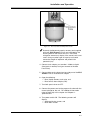
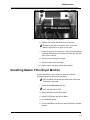
Figure 3-1: Master Filter/Dryer
6. Remove the master filter/dryer from its bracket.
✓ Dispose of the filter according to local, state and
federal regulations that apply in your area.
7
Lightly oil hose seals and install a new master filter/dryer,
matching the direction of FLOW on the filter with the flow
decal on the cabinet.
8. Attach the hose fittings hand tight.
9. Close oil drain valve hand tight.
10. Reset master filter/dryer percentage monitor.
Resetting Master Filter/Dryer Monitor
Use the procedure in this section to reset the automatic
reminder monitor for the master filter/dryer.
✓ This procedure should only be done when the master
filter/dryer is replaced.
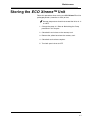
1. Power up the ECO Xtreme™ unit.
✓ Wait until red LED is OFF.
2. Select SET-UP from the Main Menu.
3. Select FILTER from the Set-Up Menu.
4. Press RESET button.
5. Press CONFIRM to reset the master filter/dryer reminder
monitor.
3-3