1
6
B. Learn how to adjust camera settings:
•
•
•
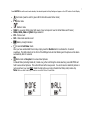
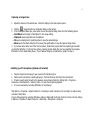
The EZMega Cam has 5 buttons: Power, Mode, Outdoor, Quality and Shutter.
Power on/off button
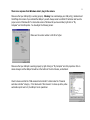
Mode selection button- Press the MODE button to choose the function you wish to use. The chosen function
symbol will blink on the LCD Function Control Display. To Confirm mode selection, simply press the shutter
button once while the symbol is blinking. To Cancel mode selection, press the
Mode selection button to
reach to the setting you want to cancel, the function will blink again, simply press the shutter button once while
the symbol is blinking to cancel selection.
Note: In DSC mode, the camera will enter into standby mode if it has not been operated for 60 seconds. To return to ready mode, just
press the Power ON/Off button.
•
•
•
Outdoor mode button- Use in outdoor environments
Quality mode button- Use to switch between MEGA, SVGA, VGA and QVGA image resolutions, image
resolution under
Video mode is not changeable and will be set to QVGA only.
Shutter button- To confirm mode selection, initiate self-timer and take still pictures.
Picture Count and Quality Matrix (Picture count may vary due to picture quality and memory issues):
The following information is based on built-in 8MB SDRAM Internal Memory Module.
Resolution
Mega
SVGA
VGA
QVGA
Size
1.08 Mega Pixel
800 x 600
640 x 480
320 x 240
Picture Count
12
50
75
Up to 300
LCD Function Control Display