1
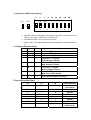
d. Example for DMX Address Setting
1
ON
OFF
2
4
8
16
32
64
128
5
6
7
8
256
ON ON
1
2
3
4
9
1. Switch #1 value=0, #2 value =2, #3 value =4,#4 value =0, #5 value =0, #6
value =0, #7 value =0, #8 value =0, #9 value =0
2. The Address Value = 0+2+4+0+0+0+0+0+0=6
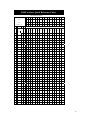
3. Please refer to the DMX Address Chart as attached for the DMX Address
“6”.
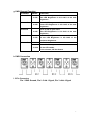
e. Program Selection Chart
#1
#2
#3
Program Selection
0
0
0
Select the 1st program (Red Strobe)
1
0
0
Select the 2nd program (Green Strobe)
0
1
0
Select the 3rd program (Blue Strobe)
1
1
0
Select the 4th t program
(Red and Green, Strobe)
0
0
1
Select the 5th program
(Red, and Blue, Strobe)
1
0
1
Select the 6th program
(Green and Blue, Strobe)
0
1
1
Select the 7th program
(Red, Green, Blue, Strobe)
1
1
1
Select the 8th program (rainbow)
f. Speed Selection Chart
#4
#5
#6
Speed Selection
0
0
0
Speed1
( the fastest)
1
0
0
Speed2
0
1
0
Speed3
1
1
0
Speed4
0
0
1
Speed5
1
0
1
Speed6
0
1
1
Speed7
1
1
1
Speed8
(the slowest)
6