1
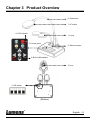
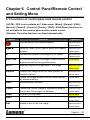
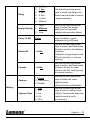
Chapter 6 Control Panel/Remote Control and Setting Menu 6.1 Functions of control panel and remote control <NOTE>: OSD is not available at C-Video mode. [Menu] / [Rotate] / [PAN] / [Source] / [Record] / [Capture] / [Delete] / [PBP] / [Slide Show] functions are not available on the machine panel and the remote control. <Remark> The below functions are listed alphabetically. Name Function Turn on and off the visual presenter. Operation Remote control / Control panel AF Move up, down, left or right to select the needed function. Automatically adjust focal length on an object. Remote control / Control panel Remote control / Camera Head Auto Tune BRT+/- Automatically adjust the image to have the best brightness and focusing performance. Manually adjust the brightness of the image. Control panel Remote control / Control panel Capture Delete Enter Capture the image to the SD card (priority) or internal memory. Delete the image stored in the SD card (priority) or internal memory. Enter/Activate functions. Remote control / Control panel Control panel Remote control / Control panel Freeze Lamp Menu Freeze the current image to temporarily stay on the screen. Press again to defreeze. Turn on / off the lamp. Activate the setting menu function/exit menu. Remote control / Control panel Control panel Remote control / Control panel PAN Switch a part of the live image Remote control / Control panel English - 20