1
English
Positioning your ASUS All-in-one PC
Placing on the desktop
Place your ASUS All-in-one PC on a flat surface such as a table or desk, and pull the stand open
until it snaps in place. Then, tilt the display panel to an angle of between 10 and 35 degrees
from an upright position.
10°
0°
0°
35°
Mounting to the wall
To mount your ASUS All-in-one PC to the wall, purchase the optional wall mount pad (160mm
x 92mm) and a wall mount kit (VESA 75). Install the wall mount pad according to the following
instructions.
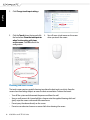
1. Remove the four screws on the stand to
release the stand. Keep the screws for
future use in case you want to reinstall the
stand.
ASUS All-in-one PC ET1611 Series
21