1
the unit should dehumidify, the Drop icon starts to flash. Water will also be consumed
during dehumidifying.
The automatic moisture meter
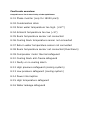
9) Reading function for the temperature sensors
Press the 【S】 key and the sensor will show the temperatures. The number and
temperature of the sensors will show in the spot of the clock.
Pressing the ▲ and ▼ keys will allow users to select the reading of the various sensors.
CLOSING: Press the 【S】 key to close immediately or wait 60 seconds to close
automatically.
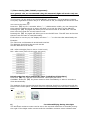
C:01 = Temperature cooling block
C:02 = Temperature drain water
C:03 = Temperature room 2 (only in case of a dual room configuration, now -40
degrees)
C:04 = Blow-out air temperature
C:05 = Intake air temperature
C:06 = Temperature of low-pressure cooling medium for compressor
C:07 = Water leakage sensor
10) Reading function for the error codes
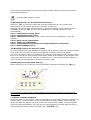
The unit malfunctions if the ON/OFF LED flashes red and green. E:XX will show the actual
error code. If the problem is solved automatically, the error code will disappear.
The error log (alarm history) is located at the bottom in the display of the remote control .
If an error occurs, the error will be continuously visible at the bottom of the display, even
if the error has been solved. This way a malfunction or incorrect setting that is about to
come up can be noticed and/or resolved at an early stage.
Deleting the error log (alarm history)
When resolved, errors in the log can be deleted by pressing and holding the (R) key.
Keep the alarm history clear so that problems can be easily resolved / resolved at an
early stage!
11) Water Leakage safeguard
If there is water on the ground - due for example to an incorrectly mounted coupling or a
blocked sewer - and the water makes contact with the water leakage sensor (the flat
white wire with two blank cores at the end), the unit will stop cooling and the magnetic
valve will close immediately. The unit will only start operating normally after the leak is
repaired and the fault is reset by pressing the 【On/Off】 key.