1
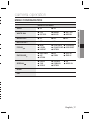
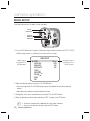
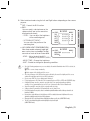
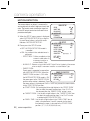
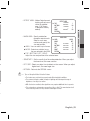
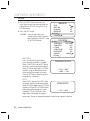
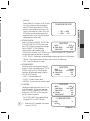
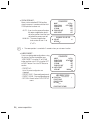
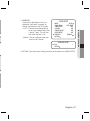
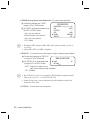
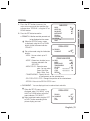
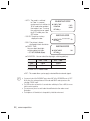
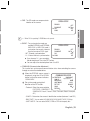
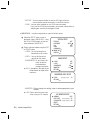
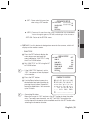
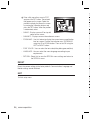
y ZOOM POS INIT : Moves to the controlled ZOOM position when the power is truned on and the initial ZOOM position has been set. - AUTO : If you turn the power off and on, the zoom magnification level is set to the previous level that was set before the power went off. - MANUAL : The zoom magnification level can be set from 1x to 37x/27x. I FOCUS SETUP MODE ZOOM TRACK ZOOM SPEED D-ZOOM 䯝 ZOOM POS INIT USER PRESET AUTO AUTO TRACK FAST OFF OFF OFF ZOOM INIT POS SETUP 䯝 POS INIT RETURN x1 The zoom postion is saved after 5 seconds when you set zoom function. y USER PRESET : Preset user-designated configurations using this feature. Position the indicator over ‘USER PRESET’ using the UP or DOWN button and then set to ‘ON’ using the LEFT or RIGHT button. Press the SET button to confirm. - PRESET NO : Up to 128 preset configuratons are supported. - PRESET SAVE : Save configured preset. - PRESET CLEAR : Clear configured preset. - RETURN : Revert to the FOCUS SETUP menu. FOCUS SETUP MODE ZOOM TRACK ZOOM SPEED D-ZOOM ZOOM POS INIT 䯝 USER PRESET LENS INIT AUTO AUTO TRACK FAST OFF OFF OFF MANUAL USER PRESET SETUP ▶ PRESET NO ÂIIIIIIIIIIIIIIIIIIIIII PRESET SAVE PRESET CLEAR RETURN PRESET NOT DEFINED 26_ camera operation 1