1
Connecting to an AV Device
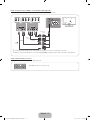
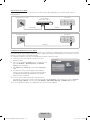
Using an HDMI or an HDMI to DVI Cable: HD connection (up to 1080p)
We recommend using the HDMI connection for the best quality HD picture.
Available devices: DVD player, Blu-ray player, HD cable box, HD STB (Set-Top-Box) satellite receiver
Device
HDMI OUT
HDMI Cable (Not Supplied)
Device
HDMI to DVI Cable (Not Supplied)
DVI OUT
Audio Cable (Not Supplied)
AUDIO OUT
R
R-AUDIO-L
Red
W
White
✎✎HDMI IN 1 (DVI), 2, 3, 4 / PC/DVI AUDIO IN
xx When using an HDMI/DVI cable connection, you must use the HDMI IN 1 (DVI) jack for video. A DVD player,
Blu-ray player, HD cable box, or HD STB satellite receiver may require a DVI-HDMI (DVI to HDMI) cable or DVIHDMI (DVI to HDMI) adapter. You must use the PC/DVI AUDIO IN jack for audio.
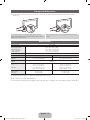
xx Be sure to use an HDMI cable with a thickness of 14 mm or less.
xx The picture may not display normally (if at all) or the audio may not work if you connect an external device that
uses an older version of HDMI mode is connected to the TV. If such a problem occurs, ask the manufacturer
of the external device about the HDMI version and, if out of date, request an upgrade.
xx Be sure to purchase a certified HDMI cable. Otherwise, the picture may not display or a connection error may
occur.
English - 10
[UD5550-ZA]BN68-03372A-00Eng.indb 10
2011-01-20 오후 9:33:51