1
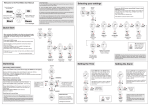
Swimming sets Up to 99 Sets can be recorded in each Swim Session
Recording individual sets
Imagine you want to swim 10 x 100m sets with your
watch. You can record each set within the same
swim session.
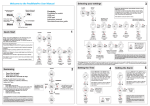
From main CLOCK screen, press Start - swim set 1
Press Start to Pause (a P will appear at the start of the
bottom line and the time for your last set will remain for
3 seconds then reset so you can time your rest period).
Press Start again to Restart- swim set 2.
Press Start to Pause.
Press Start and swim set 3, repeat as required
Hold Start for 2 secs to Stop
You can record whatever combination and distance of
sets you wish. The whole session will be recorded and
the data for each individual set
a P indicates the
watch is PAUSED
Any laps will not
be recorded, rest
time will be shown
Make sure this is
NOT displayed
when swimming
Use Mode to view
Elapsed time and
Actual time whilst
swimming
Use Up to view
Strokes, Distance,
Calories, Efficiency
and Set number
rather than Laps
START BUTTON:
A quick press will START.
A further press will PAUSE.
Another press will RESTART.
A long press will STOP.
PoolMateLive 9