1
Once you have decided on a set of scenarios, open a copy of CP3T. On the initial splash screen, you can
click on links to view this user manual or the CP3T license agreement.3 When you’re ready to get
started, press “Begin Analysis.”
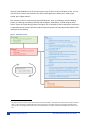
Each scenario in CP3T is constructed using the following four steps: (1) selecting a state and loading
presets, (2) selecting a compliance pathway and setting basic assumptions, (3) calibrating the state
electric system, and (4) analyzing outputs. See Figure 1 for a schematic of the screening tool. Note that it
is expected that each scenario will likely require numerous iterations of input adjustments before CP3T’s
requirements are satisfied.
Figure 1. Schematic of CP3T
3 You may also elect to click the button “Restore typical Excel functionality.” Some basic Excel functionality has been disabled in
CP3T in order to facilitate a guided walkthrough of the screening tool. Clicking this button will reveal the worksheets that
make up CP3T, including the sheets discussed in the following section, and other sheets that feed background data into the
tool.
Synapse Energy Economics, Inc.
Clean Power Plan Planning Tool User Manual
3