1
Installer setup icon,a digital
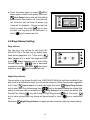
●● Touch
keypad and installation setting will be
showed on screen.
●● Input code number by touching the digital
keypad.According to the left instructions,
8010 and 8011 are used to set the unlock
mode(0 and 1). 8021~8029 are used to set
to cancel
the unlock time (1s~9s) .use
the input,and use
to save the setting.
icon to return last page .
Touch
Installation settings:
[0010]#:Remove all remote control
[0011]#:Add remote control
[8000]#:Set
[8001]#:Set
[8002]#:Set
[8003]#:Set
[8004]#:Set
[8005]#:Set
as
as
as
as
as
as
master unit 0
slaver unit 1
slaver unit 2
slaver unit 3
guard unit
not guard unit
[8010]#:Set lock mode to 0
[8011]#:Set lock mode to 1
[8021]#:Set
[8022]#:Set
[8023]#:Set
[8024]#:Set
[8025]#:Set
[8026]#:Set
[8027]#:Set
[8028]#:Set
[8029]#:Set
the
the
the
the
the
the
the
the
the
lock
lock
lock
lock
lock
lock
lock
lock
lock
time
time
time
time
time
time
time
time
time
of
of
of
of
of
of
of
of
of
1s
2s
3s
4s
5s
6s
7s
8s
9s
Code Number:[----]
4
2
5
3
6
7
8
9
1
0
Cancel
4.5 Screen Setting
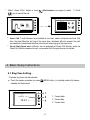
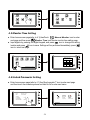
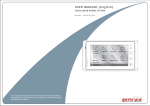
When the Monitor is in monitoring or talking
Adjust icon to enter
state, Press
screen setting page.Touch any item you
want,then touch
to decrease or
increase the value.Settings will be performed
icon to exit out the
immediately. Press
page.
Brightness
color
5
Adjust -
Adjust +
scene
Talk Volume
Adjust Return
4.6 Restore to Default
The restore to default function allows the
user to recover the settings to factory setting.
Note that the restore to default operation will
not change the time setting and the datas on
buit-in memory or SD card.
Door Station Intercom
Call tone
Call tone
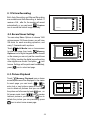
Enter home screen page(refer to 4.1),then
User Setup icon to enter the
touch
setting page,press Restore to default item,
the default settings will be loaded. press
Home icon to return to home screen page.
Ring
Volume
Home
-6-
Night Ring
Volume
DoorBell
Call tone
Clock
Refault to
Default
09/30/2010 Thu.16:41