1
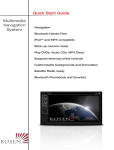
Multimedia
Navigation
System
Quick Start Guide
Toyota
Navigation
Bluetooth Hands-Free
iPod® and MP3 compatible
Back-up camera ready
Play DVDs, Audio CDs, MP3 Discs
Supports steering wheel controls
Customizable backgrounds
Satellite Radio ready
Bluetooth Phonebook and favorites
E N T E R T A I N M E N T
S Y S T E M S
NOTICE OF INTENDED USE
Some features of Rosen Entertainment Systems are not intended for viewing by the driver when the vehicle is in motion,
such as movie playback. When using navigation, minimize the amount of time spent viewing the screen and use voice
prompts as much as possible. Avoid prolonged use of the touch screen controls. Such use might distract the driver or
interfere with the driver’s safe operation of the vehicle, and thus result in serious injury or death. Such use might also
violate state or local laws.
Rosen Entertainment Systems disclaims any liability for
any bodily injury or property damage that might result
from any improper or unintended use.
Copyright © 2012 by Rosen Entertainment Systems. All rights reserved. Except as permitted
under the Copyright Act of 1976, no part of this publication may be reproduced or distributed in
any form or by any means, or stored in a database or retrieval system, without the prior written
permission of Rosen Entertainment Systems.
ABOUT THE REGISTERED TRADEMARKS
This item incorporates copy protection technology that is protected by U.S. patents and other
intellectual property rights of Rovi Corporation. Reverse engineering and disassembly are
prohibited.
iPod® and iPhone® are registered trademarks of Apple, Inc.
NAVIGATION MAPS
Car navigation maps are frequently updated. While the database was judged to be as accurate as possible at the time of its release, a map database can never be 100% accurate.
Road information that is maintained in the map databases, such as turn restrictions or road
names may change over time.
Errors or missing information in the map data are not covered by the Product Warranty. New
and/or updates for the map data are the responsibility of the End-user.
NOTE: Features listed in this manual are subject to change without notice.
For complete Owner’s and Navigation Manuals,
please visit
Rosen Entertainment Systems online at
www.RosenEntertainment.com
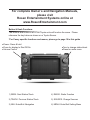
Button & Knob Functions
The buttons and knobs on all of our Toyota units will function the same. Please
reference the key below as shown on a Toyota Sienna.
*For Camry specific functions and menus, please go to page 10 in this guide
●Power: Press & hold
●Press for display to Dim/Off/On
●Volume Control
●Turn to change station/track
●Press for audio menu
1) SEEK: Next Station/Track
4) RADIO: Radio Function
2) TRACK: Previous Station/Track
5) SOURCE: Change Sources
3) NAV: Enter/Exit Navigation
6) MENU: Enter/Exit Setting Menu
The Basics
Screen Organization
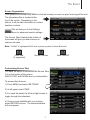
Your system will automatically default to the last screen you were on prior to turning off the unit.
The Information Bar is located at the
top of the screen. Depending on the
source, it will provide information or content
sensitive controls
This will take you to the Settings
Menu for advanced control settings.
The Source Tabs located at the bottom of
the screen will give you direct access to
common sources.
Note: “PHONE” is highlighted BLUE when a phone is paired to Rosen Bluetooth.
Voice Dial (if supported)
Screen Dimmer
Customizing Source Tabs
You have the option to customize the Source Tabs
3-6 on the bottom of the screen.
AM/FM, DISC and PHONE are not customizable.
E
To access the tab menu:
1) Press MENU and select SETTINGS
2) In left panel, select TABS
3) For each tab select the left and right arrows to
toggle through the selections
4) Once you are satisfied with your choices,
press RETURN to save. The customized tabs
will now appear
1
Mute ON/OFF
Radio
Channel Selection
Short touch to seek previous and
next available stations.
Touch to scan. Each station will
play for several seconds.
Push the volume knob for Tuning, push again
to go back to volume. In Tuning mode,
after several seconds it will automatically
go back to volume if it is not used.
Note: This is only for vehicles with one knob.
Touch to select AM1 & 2 and FM1,2 & 3
preset screens.
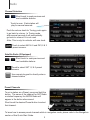
Satellite Radio (If Equipped)
Short touch to seek previous and
next available stations.
Touch to select SAT 1,2 & 3 preset
screens
Use numeric keypad to directly enter a
channel station
Preset Channels
To set a station as a Preset, press and hold the
button. The name of the channel for SAT Radio
or station frequency for AM/FM Radio will
appear in the button when saved.
E
Short touch the desired Preset button to select
that channel.
To learn how to access preset channels while in navigation mode, please refer to the Navigation
section of this Quick Start Guide.
2
iPod
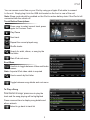
You can access music files on your iPod by using your Apple iPod cable to connect
to the unit. Simply plug it into the USB slot located on the front or rear of the unit.
Note: Sleep mode should be enabled on the iPod to reduce battery drain if the iPod is left
connected with the vehicle off.
Touch Button Descriptions
Press once to restart current track, press
again for Previous Track
Play/Pause
Next track
Repeat the current played song
Shuffle tracks
Search for artist, album, or song by the
first letter
Main iPod root menu
Root Menu
Use this to toggle between Video and Audio
menus
Note: A special iPod video cable is required
Use to search by first letter
Toggle between song details and root menu
To Play a Song
From the list of songs, press once to play the
track and the song playing will be highlighted
Press a second time to display song details and
album artwork.
Select to go back to track list
3
CD/DVD
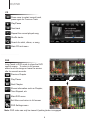
CD
Press once to restart current track,
press again for Previous Track
Play/Pause
Next track
Repeat the current played song
Shuffle tracks
Search for artist, album, or song
Main CD root menu
DVD
E
Long Touch in DVD mode to show the DVD
control screen. To return to full screen,
either touch the image or leave the screen
idle for several seconds.
Previous Chapter
Play/Pause
Next Chapter
Shows information such as Chapter,
Time Elapsed, etc
Main DVD menu
Exit Menu and return to full screen
DVD Settings menu
Note: DVD video can only be viewed if parking brake is engaged.
4
Bluetooth General
Note: This system requires a Bluetooth enabled phone. Bluetooth phones and software vary by
brand and date of manufacture. Some phones or phone functions may not be compatible or may
operate differently with this system during use. Phone compatibility problems are not warrantable
issues.
E
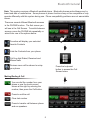
There are several different Bluetooth screens
in the PHONE function. The first screen you
will see is the Call Screen. To switch between
screens, press the PHONE tab repeatedly or
select from one of the options below.
Favorites will display your selected
favorite Contacts
Lists the Contacts from your phone
Call Log lists Dialed, Received and
Missed calls
Devices menu will be shown to setup
your phone
Press the keyboard
button to access the Call
Screen below
Making/Ending A Call
You can dial the number from your
phone or use the touch-screen
shown at the right by entering the
number, then press the Call button.
Press to end the call.
Clear last number
Press to transfer call between phone
and car speakers.
5
Bluetooth Pairing
Pairing Your Phone
ROSEN: Set your phone into discoverable mode.
E
1) Select DEVICES from the Bluetooth menu
2) Press “Add”
3) After several seconds, the unit will display all
devices within range.
4) Select your phone from then list, then “Connect”
6
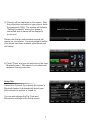
5) “Pairing” will be displayed on the screen. After
the connection succeeds on your phone, enter
the password (1234). The system will indicate
“Pairing Successful” when your phone is
connected and its name will be displayed
on the unit.
Please note that an authorization request will
appear on your phone. You must accept it before
your phone can share contacts, phonebook and
call history.
6) Press “Close” and you will exit back to the main
Bluetooth menu. The name of your phone will
appear in the top menu bar.
Select Auto Connect If you desire the system’s
Bluetooth feature to automatically detect your
phone when the system is turned on.
You can also change the Pin Code and
Microphone settings in the Setup screen.
7
E
Setup Tab
Bluetooth Options
Contacts
While your phone is paired, your contacts will
be displayed. This may take several seconds
to load.
When you select a contact from the list, all
associated numbers will be displayed on the left
screen.
Press to set a number as a Favorite
Press to search your Contacts list using the
alpha keypad
Favorites
You can save up to 5 numbers in the Favorites
folder.
In order to replace a favorite, you will need to
delete the existing number first, as the unit will
not override it.
Call List
The call list can be used to view your dialed,
received and missed calls.
The unit will display as many calls that you can
view from your phone.
You can also quickly access your Contacts and
Favorites from this screen.
To make a call from the list, touch the number
on the screen and it will automatically dial the
number.
Bluetooth Music
You can play the music stored on your phone by
pressing MENU and selecting A2DP.
From your phone, access your music and select
a song to play.
You can use the Previous, Play/Pause, Next
and Stop buttons on the unit to navigate through
your music
Note: Some phones do not support this feature
8
Settings
Press to enter the Settings Menu. To
change system settings, select desired
option.
Note:If an option is unavailable, it will be grayed out.
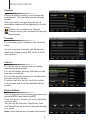
Main
Clock: Set clock to display 12hr, 24hr or OFF
Note: The time displayed is controlled by
GPS. Please refer to the navigation section for
instructions on adjusting the time zone.
Settings Menu Screen
Beep: Turn button beep ON/OFF
OSD: Set display language
TS Calibrate: Calibrate the Touch Screen
Main Screen
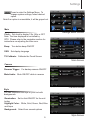
Camera
Reverse Trigger: For backup camera ON/OFF
Mute Audio: Mute ON/OFF while in reverse
Camera Screen
Style
You can customize the style of your unit with
backgrounds
Illumination: Set to Auto/ON/OFF for the unit
button
Highlight Color: White, Gold, Green, Red, Blue
and Aqua
Background: Select from several options
9
Style Screen
Camry Settings
Main
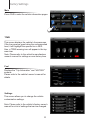
Press CAR to enter the vehicle information pages.
E
TPMS
This screen displays the vehicle’s tire pressures.
If the tire pressure goes below the recommended
level, it will highlight the specific tire in RED.
Also, a TPMS warning icon will appear in the top
menu bar.
Note: Please refer to the vehicle’s manufacturer
owner’s manual for settings on non-factory tires.
Fuel
Displays the “Trip Information” and “HISTORY”
screens.
Please refer to the vehicle’s owner’s manual for
details.
Settings
This screen allows you to change the vehicle
customization settings.
Note: Please refer to the vehicle’s factory owner’s
manual for a list of settings that can be changed.
10
Navigation
Before operating your Rosen Navigation system, please carefully read and
follow the instructions provided in the “Safety Information and Precautions”
located on the inside back cover of this Quick Start Guide.
Entering Navigation
To access navigation, press the NAV button on the left side of the unit.
To exit navigation, you will need to press the same NAV button.
Note: The only way to exit navigation is by selecting the NAV button on the left side of the
unit as pictured above.
Start Up
When the navigation software starts, you will see the reminder warning to use your
navigation software safely and lawfully.
You must accept these conditions to continue
Please refer to the User’s Manual for additional information and warning on proper
use of the Rosen Navigation product.
11
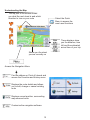
Understanding the Map
The top part of the screen shows
you what the next street is and which
direction to turn on your route
Select the Quick
Menu to access the
most used functions
These displays show
you the distance, time
left and the estimated
arrival time of your trip
Shows you the street
you are currently on
Access the Navigation Menu
Find an address or Point of Interest and
access the Favorites and History menu
Displays the route details and allows
you to edit, change or cancel existing
route
Displays current position, surrounding
map area and route.
Customize the navigation software
12
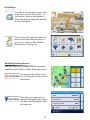
Quick Menu
Located in the top right corner of the
map screen is the Quick Menu. In
this screen, there is a selection of
functions that are frequently needed
during navigation.
You can use this option to search for
places of interest along the way of
your route, such as: Gas Stations,
Restaurants, Parking, etc.
Modifying Existing Routes
You can modify an existing route by accessing
either the Quick Menu or Main Navigation menu
You can use this option to select an alternative route to your
destination.
This option is a good way to
change road types and modes.
You can avoid highways, allow
toll roads, etc.
13
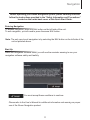
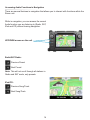
Accessing Audio Functions in Navigation
There are several features in navigation that allows you to interact with functions within the
Rosen unit.
While in navigation, you can access the current
Audio function you are listening to (Radio, SAT,
iPod and CD) without leaving navigation.
UP/DOWN arrows on the unit
Radio/SAT Radio:
Previous Preset
Next Preset
Note: This will not scroll through all stations in
Radio and SAT mode, only presets.
iPod/CD:
Previous Song/Track
Next Song/Track
14
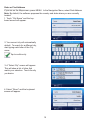
Enter or Find Address
If you are on the Map screen, press MENU. In the Navigation Menu, select Find Address.
Note: By default, the software proposes the country and state where you are currently
located.
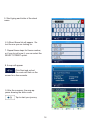
1. Touch “City Name” and the keyboard screen will appear.
2. Your current city will automatically
default. To search for a different city,
start typing each letter of the City
name
Tap to confirm city
3. A “Select City” screen will appear.
This will show a list of cities that
match your selection. Touch the city
you desire.
4. Select “Street” and the keyboard
screen will appear.
15
5. Start typing each letter of the street
name.
6. A Street Name list will appear. Select the one you are looking for.
7. Repeat these steps for House number,
or if you do not know it, you can select the
SELECT STREET option.
8. A map will appear.
Click Next and a short
summary of the route will flash on the
screen for a few seconds.
9. After the summary, the map appears showing the entire route.
Tap to start your journey.
16
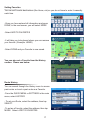
Setting Favorites
You can set Favorite destinations (like Home, etc) so you do not have to enter it manually
each time.
-Once you have entered all information and press
DONE, in the next screen, you will select MORE
-Select ADD TO FAVORITES
-It will take you to keyboard where you can rename
your favorite. (Example: HOME)
-Select DONE and you Favorite is now saved.
Route History
You can search through the History menu to access
past routes or to set a past route as a Favorite.
-From the QUICK MENU or SETTINGS in the main
menu, select HISTORY
- To set as a Route, select the address, then tap
SELECT.
-To set as a Favorite, select the address, then tap
MORE. Select ADD TO FAVORITES.
17
E
You can also set a Favorite from the History
section. Please see below.
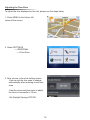
Adjusting the Time Zone
To adjust the time displayed on the unit, please use the steps below.
1. Press MENU in the bottom left
corner of the screen
2. Select SETTINGS
---->REGIONAL
---->Time Zone
3. Now you are in the clock setting screen.
-Use can set the time zone to change
automatically when entering a new time
zone.
-Use the minus and plus icons to adjust
the time in increments of 15 min
-Set Daylight Savings OFF/ON
18
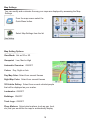
Map Settings
You can modify and customize the way your maps are displayed by accessing the Map
Settings
From the map screen select the
Quick Menu button.
Select Map Settings from the list
Map Setting Options
View Mode: Set as 3D or 2D
Viewpoint: Low, Med or High
Automatic Overview: ON/OFF
Colors: Day, Night or Auto
Day Map Color: Select from several themes
Night Map Color: Select from several themes
3D Vehicle Gallery: Select from several vehicles/people
that will be displayed as your marker
Landmarks: ON/OFF
Buildings: ON/OFF
Track Logs: ON/OFF
Place Markers: Select what markers (such as gas, food,
etc) that you would like the map to automatically display
19
Safety Information and Precautions
WARNING! Please read and follow the following safety precautions.
Failure to follow the instructions below may increase
your risk of collision and personal injury.
The Rosen Navigation software is not a substitute for your personal judgment. The route suggestions should never supersede
any local traffic regulation or your personal judgment and /or knowledge of safe driving practices. Prior to completing any maneuvers suggested by your Rosen Navigation software (for example, a U-turn or a left turn), verify that you can legally and safely
complete the maneuver. Do not follow route suggestions if they direct you to perform an unsafe or illegal maneuver, would place
you in an unsafe situation, or would route you into an area that you consider unsafe.
Do not use the Rosen Navigation software to locate emergency services (such as police, fire stations, hospitals, and clinics).
The database may not include all emergency service providers. Use your own best judgment and ask for directions in these
situations.
If the vehicle is in motion, only a passenger should program the Rosen Navigation software. The driver should not program the
system unless the vehicle is parked in a safe location.
The Rosen Navigation software’s map database provides information on suggested routes without regard to factors that may
affect your driving experience or the time required to arrive at your destination. For example, the system does not reflect road detours, closures or construction, some road characteristics (e.g., road surface, slope or grade, weight or height restrictions, etc.),
temporary traffic congestion, weather conditions, and similar factors.
Vehicle Position
The Rosen Navigation software’s computer considers vehicle speed and heading changes, together with longitude and latitude
information, to accurately determine vehicle heading and position on a digital map.
Map and Information Database
The map database used by your Rosen Navigation software was created using high-resolution aerial and land based data collection.
Car navigation maps are frequently updated. While the database was judged to be as accurate as possible at the time of its
release, a map database can never be 100% accurate. Road information that is maintained in the map databases, such as turn
restrictions or road names may change over time.
Errors or missing information in the map data are not covered by the Product Warranty. New and/or updates for the map data
are the responsibility of the End-user.
End-User License Agreement
Please refer to the Rosen Navigation User’s Manual to review and accept the terms and conditions in the End-User License
before operating this product.
PP1003-TY Rev C
All rights reserved. Copyright 2012 Rosen Entertainment Systems