1
For complete Owner’s and Navigation Manuals,
please visit
Rosen Entertainment Systems online at
www.RosenEntertainment.com
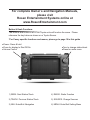
Button & Knob Functions
The buttons and knobs on all of our Toyota units will function the same. Please
reference the key below as shown on a Toyota Sienna.
*For Camry specific functions and menus, please go to page 10 in this guide
●Power: Press & hold
●Press for display to Dim/Off/On
●Volume Control
●Turn to change station/track
●Press for audio menu
1) SEEK: Next Station/Track
4) RADIO: Radio Function
2) TRACK: Previous Station/Track
5) SOURCE: Change Sources
3) NAV: Enter/Exit Navigation
6) MENU: Enter/Exit Setting Menu