1
Troubleshooting
Problem
Labels are not straight
when applied to
container
Gap between front and
back labels not the
same on both sides
Machine carriage sticks
or hangs up while
pushing forward
Label corners/edges
fold over or crease
Labels are not applied
at the same height on
the container
Label stick out at start
position is not
consistent during
operation
Possible solutions
Make sure label is even with edge of separator blade. Lift tension release handle and move backing
paper to straighten labels.
Make sure label machine is square with counter or table. Waste label backing paper should come out
of machine unimpeded and square with edge of counter or table. Do not position label machine on
corner or at angle with table/counter edge.
Make sure containers are placed flush with both rubber container rollers.
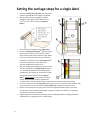
Adjust stop C to reduce or increase the gap. If the first gap is larger than the second gap, move stop C
to the rear of the machine. If the first gap is smaller than the second gap, move stop C to the front of
the machine. Move stop C in small increments. A 1/4 inch difference in gaps is adjusted by an 1/8th
inch movement of the stop.
Do not step on waste label backing paper that may be lying on the floor. Route the waste into a
receptacle or tear off and throw away waste paper frequently.
When applying back label, release the tension release handle before continuing to push the carriage
forward to allow the right carriage cam to return to the up position.
Do not push forward with downward or upward pressure on carriage handle.
Label stickout above the separator blade is too high. Stick out should be no more than an 1/8th of an
inch, or just visible between roller and separator blade. Adjust start position label stickout for
front/single label or stop C for back label. There should be no stickout for back label.
Labels were stored in a hot place. Store label rolls in ambient temperature condition.
Operator is not placing container on upper rollers in consistent position. Butt container up against
bottle position guide each time.
Bottle position guide thumb screws are not tight, changing position during operation. Tighten.
Label guide arms thumb screws are not tight, changing position during operation. Tighten
Readjust stops to ensure proper label stickout.
Tighten stop A/B/C thumb screws to make sure they are not moving at impact with carriage cams.
Operator error. Do not step on waste backing paper that may be lying on the floor. Push carriage all
the way to the stops. Return carriage all the way to the start position.
Progressive error. Slight variations in label spacing on the roll can compound over the course of use.
It may be necessary to periodically adjust label stick out without adjusting stops. Make sure labels
and machine is at room temperature before beginning operation.
Care and maintenance
•
•
•
•
While the Custom Label Applicator is an extremely safe
machine to use, please use caution and keep your fingers
away from the rollers during operation to avoid pinching.
The upper rollers and feed rollers are made of natural
rubber. Do not use petroleum based solvents for cleaning.
If the rollers or other machine parts need to be cleaned, use
mild soap and water and a soft cloth.
Bearings are internally lubricated. Momentum Development
does not recommend the use of any lubrication.
Tips
•
•
•
•
Service and support
Momentum Development, Inc.
PO Box 850
Morton, WA 98356
360-496-0882
[email protected]
Contact us about special labeling requirements and
machine customizations.
www.momentumdevelopment.com
6
•
When finished labeling and removing a roll of labels from the
machine, always leave 18-24 inches of label backing paper at
the beginning of the roll to make rethreading easier and
eliminate label waste.
Some labels are made with a thicker stock and may need
extra tension on the roll of labels near the end of a roll.
Slightly increasing side pressure on the side of the label roll
using the label guide arms, provides additional tension to the
roll for proper label feed.
Push the carriage handle straight forward and pull straight
back – do not apply downward or upward pressure on the
handle while pushing or pulling the carriage.
Labels feed better at room temperature. Too cold and the
labels get stiff. Too hot and the labels and backing paper can
stretch and fold over.
Setting the stops using an empty bottle will make it easier to
see when the labels have completely come off the separator
blade.
One year warranty