1
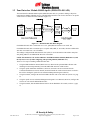
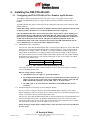
After setting the Panel field to the desired value for the WAPM being linked, click the Start button to
place the PIM-OTD-485-APL into the link mode. Power up or reset the WAPM to initialize the
linking process between the PIM-OTD-485-APL and the WAPM.
NOTE: For proper operation the Panel field must only be set to the range of values for which
the PIM-OTD-485-APL has been configured to emulate (section 2.1).
The Stop button can be used to abort the PIM-OTD-485-APL link mode.
2.4 PIM-OTD-485-APL Alarms
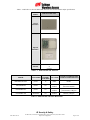
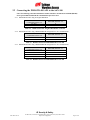
Each WAPM linked to a PIM-OTD-485-APL can report five different types of alarms: low battery,
reader tamper, loss of RF communications, lock motor stall, and PIM tamper. The PIM-OTD-485-APL
reports these alarms using specific APACS alarm addresses as shown in Table 2-7.
Alarm
APACS Alarms
Low Battery
Reader Tamper
Loss of Communications
Lock Motor Stall
PIM Tamper
???????
Cabinet Tamper
No Poll Response
???????
???????
Table 2-7 – Alarms Generated by a PIM-OTD-485-APL
2.5 What Happens if the PIM-OTD-485-APL Loses DC Power
All of the configuration and linking information is stored in non-volatile memory in the PIM-OTD-485APL. Therefore if PIM-OTD-485-APL DC power is lost or cycled, upon restoring DC power, the PIM
will continue operation with the same configuration and linking information. There is no need to reconfigure or re-link.
2.6 Using the PIM-OTD-485-APL Reset Switch
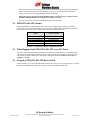
The Reset Switch, S3, is used if the PIM-OTD-485-APL does not seem to be working properly. Pressing
the Reset Switch has the same effect as cycling DC power to the PIM-OTD-485-APL.
IR Security & Safety
P/N: M053-017-A
575 Birch St., Forestville, Connecticut 06010 / (860) 584-9158 / (860) 584-2136 fax
http://www.irsupport.net
Page 10 of 13