1
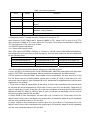
f. Input PROG852(640*480/75Hz) and the eighth level gray-scale of PATTERN signal of VG-849 to
HDMI, repeatedly the b-e course. In the HDMI channel, preset value of offset_R, offset_G and
offset_B to 15, preset value of gain_R, gain_G and gain_B to 25.
3.4 Adjustment for sub-brightness and white balance of YPbPr channel
a. Connect YPbPr signal of VG-849 and VG-848 to YPbPr terminal, input color signal of
PROG973(1080i)PATTERN964. Select AUTOTUNE item, wait for it displays “OK”. NOTE: Don’t
select AUTOTUNE item in other state.
b. Switch YPbPR signal of VG-849 and VG-848 output to the eighth gray-scale signal of
PROG973(1080i)PATTERN964. prset value of offset_R, offset_G and offset_B to 15 and gain-R,
gain-G and gain-B to 25. adjust brightness, let second bright to 3nit at least.
c. Fixed value of offset_B, adjust offset_R and offset_G, let the color coordinate of the second level
be 285 and 293 and its brightness be 4-5nit more or less (it can not 3.5nit at least). Fixed value of
gain_B to 25, adjust gain_R, gain_G and gain_B, let the color coordinate of seventh level be 285
and 293. Adjustment offset_R, offset_G, gain_R and gain_G repeatedly until the value of the two
levels gray-scale be fixed.
d. Input PROG977(720p), PROG978(480p) and PROG968(480i) mode for eighth level gray-scale
signal, let the color coordinate of the second level and the seventh level 285 and 293.
3.5 VIDEO channel adjustment (TV/VIDEO/S-VIDEO)
a. Connect color bar signal of AV (PM5518, NTSC , eight level gray-scale signal) to VIDEO1
terminal, enter factory menu, preset value of offset_R, offset_G and offset_B to 15 and gain-R,
gain-G and gain-B to 25, adjust brightness, let second bright to 3nit at least.
b. Fixed value of offset-B to 15, adjust offset_R and offset_G, let the color coordinate of the second
level be 285 and 293 and its brightness be 4-5nit more or less (it can not 3.5nit at least). Fixed value
of gain_B to 25, adjust gain_R, gain_G and gain_B, let the color coordinate of seventh level be 285
and 293. Adjustment offset_R, offset_G, gain_R and gain_G repeatedly until the value of the two
levels gray-scale be fixed.
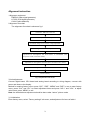
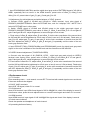
4 Performance check
4.1 TV function
Enter searching menu → auto search, connect RF-TV terminal with central signal source and check
if there are channels be skipped
4.2 AV/S, YpbPr terminals
Input AV/S, HD signal, check if it is normal.
4.3 VGA terminal
Insert VGA terminal, input VGA format signal of 640 X 480@60 Hz, check if the display is normal. If
interference exists, press the auto adjusts button on remote control again and check if it is normal.
4.4 HDMI terminal
Insert HDMI terminal, input signal of 640 X 480@60 Hz signal and check if the display is normal.
4.5 check sound channel
Check the speaker and headphone of each channel.
4.6 presetting before ex-factory
5