1
HP Confidential
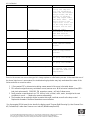
level is not reached.
For this error to
occur, the lamp has
lit, the Calibration
Label and the Document
Origin found, and the
scanner is checking
the lamp output under
the white label. This
error occurs if the
light level is too low
or the lamp stability
criteria are not met.
4
BulbWarmupFromCoarse
5
CalLabelFind
Find cal label
black/white transition
and then find cal
label black squares.
6
DocOriginFind
Find bezel notch.
7
LMWFinalFind
Scanner sets final
LIGHT MONITOR WINDOW
window.
8
CalLabelFindAfterScan
Find cal label after a
scan or copy returnto-home.
9
CalLabelFindPriorToStandby
Find cal label prior
to going into standby.
10
DocOriginFindPriorToStandby Find bezel notch prior
to going into standby.
11
BulbWarmupFromStandby
Bulb failed to warm up
to minimum light level
or meet the stability
requirement.
Errors in the scanner can occur at any point in image capture or initialization process. In the event that one of
the above listed errors is encountered, the troubleshooting tips below may help understand the nature of the
failure and offer a corrective action.
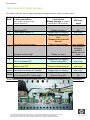
1. * Disconnected FFC or discreet wire cabling causes several of the errors in the table above.
2. FW calibration algorithms may contribute to errors (scanner error #8 & horizontal. stretched lines (BPR –
bad pixel replacement)), 20050421 FW upgrade or newer, will help fix those errors.
3. Faulty scanner components such as CCD, mirrors, bulb, cal label, notch, motor, etc might be the next
contributor to errors. ~ Replace the scanner sub-assembly.
4. The formatter has an analog-to-digital converter that could contribute, as well as the lamp control. ~
Replace the formatter if the above resolutions are not affective.
* for disconnected SSA discreet 4 wire bundle, the display reads "Scanner Bulb Warming Up, then Scanner Error
#5 (CalLabelFind)" rather than Scanner error code #3 (BulbWarmupFromOff).
© 2004 Hewlett-Packard Development Company, L.P. The information contained herein is subject to change without
notice. The only warranties for HP products and services are set forth in the express warranty statements
accompanying such products and services. Nothing herein should be construed as constituting an additional