1
c. 1999
DYNAMELT M ASU Manual 20-28, 20-29 and 20-30
Troubleshooting Page 7-9
Revised 1/99
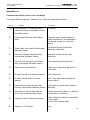
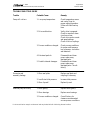
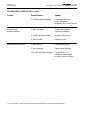
Troubleshooting with the Scanner’s Error Code Display, cont.
Code #
Problem
Correction
81
Scanner is in FAULT mode.
None.
82
Error detected in sequence of fragmented
I/O messages from device (node number
alternately flashes).
Check scan list table entry for slave device
to make sure that input and output data
lengths are correct. Check slave device
configuration.
83
Slave device is returning error responses
when scanner attempts fo communicate
with it (node number alternately flashes).
Check accuracy of scan list table entry.
Check slave device configuration.
84
Scanner is initializing the DeviceNet
channel.
None. This code clears itself once scanner
attempts to initialize all slave devices on
the channel.
85
Data size returned is bigger than expected.
Check accuracy of scan list table entry.
Check slave device configuration.
88
This is not an error. At powerup and reset,
the module dislays all 14 segments of the
node address and status display LEDs.
None.
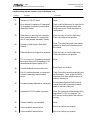
90
User has disabled communication port.
Reconfigure your module.
91
Bus-off condition detected on comm port.
Scanner is detecting communication
errors.
Check DeviceNet connections and physical
media integrity. Check system for failed
slave devices or other possible sources of
network interference.
92
No network power detected on comm port.
Provide network power. Make sure that
scanner drop cable is providing network
power to scanner comm port.
95
Application FLASH update in progress.
None. Do not disconnect the module while
application FLASH is in progress. You
will lose any existing data in the scanner’s
memory.
97
Scanner halted by user command.
None.
98
Unrecoverable firmware failure.
Service or replace your module.
99
Unrecoverable firmware failure.
Service or replace your module.