1
STR-SL5
SECTION 2
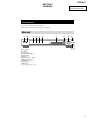
TEST MODE
FACTORY SET MODE
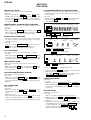
FLUORESCENT INDICATOR TUBE TEST MODE
* All preset contents are reset to the default setting.
* Procedure:
While depressing the VIDEO and the PLII buttons
simultaneously, press the power ?/1 button to turn on the main
power. The message “FACTORY” appears and switch off the set.
Press the power ?/1 button again, and the present contents are
reset to the default values.
* All fluorescent segments are tested. When this test is activated,
all segments turn on at the same time, then each segment turns on
one after another.
* Procedure:
While depressing the DVD and the PLII buttons simultaneously,
press the power ?/1 button to turn on the main power.
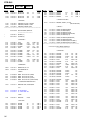
1. All segments turn on.
SP SP A SP B DDDIGITAL EX DDPRO LOGIC II DTS-ES NEO : 6 MPEG-2 AAC MEMORY
OPT COAX MULTI CH IN 12 D.RANGE EQ STEREO MONO RDS SLEEP
MICRO/NORMAL SPEAKER SELECTION MODE
* Either the micro speaker mode or normal speaker mode can be
selected.
* Procedure
While depressing the MUTING button, press the power ?/1
button to turn on the main power. Either the message “MICRO
SP.” or “NORM. SP.” appears. Select the desired mode.
SOUND FIELD CLEAR MODE
* The preset sound field is cleared when this mode is activated.
Use this mode before returning the product to clients upon
completion of repair.
* Procedure:
While depressing the SOUND FIELD button, press the power
?/1 button to turn on the main power. The message
“S. F. CLR” appears and initialization is performed.
L
C
dB
kHz
mft.
MHz
R
SW L F E
SL SSB SR
VIDEO , DVD , TV/SAT and TUNER FM/AM LED turn on.
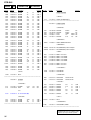
2. Press the VIDEO button, confirm display
SP A SP B
EX
COAX
L
R
SL
SR
II
-ES NEO : 6
1 D.RANGE EQ
-2
MONO
MEMORY
dB
Hz
ft.
VIDEO , and TUNER FM/AM LED turn on.
ALL CLEAR MODE
* The all preset value is cleared when this mode is activated.
* Procedure :
While depressing the VIDEO and the SOUND FIELD buttons
simultaneously, press the power ?/1 button to turn on the main
power. The message “INITIAL” appears and clear all preset value.
FAN CONTROL MODE
* Either the fan auto mode or fan on mode can be selected.
* Procedure:
While depressing the PLII button, press the power ?/1 button.
Either the message “FAN AUTO” or “FAN ON” appears. Select
the desired mode.
SOFTWARE VERSION DISPLAY MODE
* The software version is displayed.
* Procedure:
While depressing the VIDEO and the MUTING buttons
simultaneously, press the power ?/1 button to turn on the main
power. The model name, destination and the software version are
displayed.
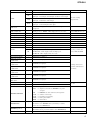
KEY CHECK MODE
* Button check
* Procedure:
While depressing the DVD and the MUTING buttons
simultaneously, press the power ?/1 button to turn on the main
power.
“REST 09” appears.
Every pressing of any button other than ?/1 counts down the
buttons. The buttons which are already counted once are not
counted again. When all buttons are pressed “REST 00” appears.
4
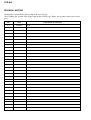
3. Press the VIDEO button, confirm display
DD DIGITAL DD PRO LOGIC DTS
OPT
MULTI CH IN 2
SP
MPEG
STEREO
AAC
RDS SLEEP
C
SW L F E
SSB
k
m
MHz
DVD and TV/SAT LED turn on.
4. Press the VIDEO button, all segments turn off.
5. Every pressing of the VIDEO button turns on each segment and
LED one after another in the same order.
(Not only the VIDEO button, but also the other buttons such as
DVD , TV/SAT , TUNER FM/AM can be used.)
TUNER CHECK MODE
* Tuner check
* Procedure :
While depressing the TUNER FM/AM and the MUTING
buttons simultaneously, press the power ?/1 button to turn on
the main power. TUN CHK appears and the tuner checking is
performed.
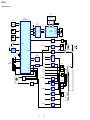
DSP TEST MODE
* DSP tests are performed.
* Procedure :
There are two different methods to enter the test mode.
(1) While depressing the DVD and SOUND FIELD buttons
simultaneously, press the power ?/1 button to turn on the
main power.
(2) When the set is turned on, by using the remote controller, press
Cursor button three times, then press the MAIN MENU button
one time and thenpress the MUTING button one time.
• Select the item by pressing Cursor button ( V or v ).
• Select the function by pressing Cursor button ( B or b ).