1
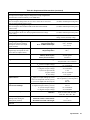
OPERATING &
PROGRAMMING GUIDE
Agilent Model E4356A
Telecommunications
DC Power Supply
Agilent Part No. 5964-8166
Microfiche No. 5964-8167
Printed in Malaysia: September 2004
CERTIFICATION
Agilent Technologies Company certifies that this product met its published specifications at time of shipment from the
factory. Agilent Technologies further certifies that its calibration measurements are traceable to the United States National
Bureau of Standards, to the extent allowed by the Bureau’s calibration facility, and to the calibration facilities of other
International Standards Organization members.
WARRANTY
This Agilent Technologies hardware product is warranted against defects in material and workmanship for a period of three
years from date of delivery. Agilent Technologies software and firmware products, which are designated by Agilent
Technologies for use with a hardware product and when properly installed on that hardware product, are warranted not to
fail to execute their programming instructions due to defects in material and workmanship for a period of 90 days from date
of delivery. During the warranty period Agilent Technologies Company will, at its option, either repair or replace products
which prove to be defective. Agilent Technologies does not warrant that the operation of the software, firmware, or
hardware shall be uninterrupted or error free.
For warranty service, with the exception of warranty options, this product must be returned to a service facility designated
by Agilent Technologies. Customer shall prepay shipping charges by (and shall pay all duty and taxes) for products returned
to Agilent technologies for warranty service. Except for products returned to Customer from another country, Agilent
Technologies shall pay for return of products to Customer.
Warranty services outside the country of initial purchase are included in Agilent Technologies’ product price, only if
Customer pays Agilent Technologies international prices (defined as destination local currency price, or U.S. or Geneva
Export price).
If Agilent Technologies is unable, within a reasonable time to repair or replace any product to condition as warranted, the
Customer shall be entitled to a refund of the purchase price upon return of the product to Agilent Technologies.
LIMITATION OF WARRANTY
The foregoing warranty shall not apply to defects resulting from improper or inadequate maintenance by the Customer,
Customer-supplied software or interfacing, unauthorized modification or misuse, operation outside of the environmental
specifications for the product, or improper site preparation and maintenance. NO OTHER WARRANTY IS EXPRESSED
OR IMPLIED. AGILENT TECHNOLOGIES SPECIFICALLY DISCLAIMS THE IMPLIED WARRANTIES OF
MERCHANTABILITY AND FITNESS FOR A PARTICULAR PURPOSE.
EXCLUSIVE REMEDIES
THE REMEDIES PROVIDED HEREIN ARE THE CUSTOMER’S SOLE AND EXCLUSIVE REMEDIES. AGILENT
TECHNOLOGIES SHALL NOT BE LIABLE FOR ANY DIRECT, INDIRECT, SPECIAL, INCIDENTAL, OR
CONSEQUENTIAL DAMAGES, WHETHER BASED ON CONTRACT, TORT, OR ANY OTHER LEGAL THEORY.
ASSISTANCE
The above statements apply only to the standard product warranty. Warranty options, extended support contracts, product
maintenance agreements and customer assistance agreements are also available. Contact your nearest Agilent
Technologies Sales and Service office for further information on Agilent Technologies’ full line of Support Programs.
2
Safety Summary
The following general safety precautions must be observed during all phases of operation, service, and repair of this
instrument. Failure to comply with these precautions or with specific warnings elsewhere in this manual violates safety
standards of design, manufacture, and intended use of the instrument. Agilent Technologies Company assumes no liability
for the customer’s failure to comply with these requirements.
GENERAL.
This product is a Safety Class 1 instrument (provided with a protective earth terminal).
Any LEDs used in this product are Class 1 LEDs as per IEC 825-l.
This ISM device complies with Canadian ICES-001. Cet appareil ISM est conforme à la norme NMB-001 du Canada.
ENVIRONMENTAL CONDITIONS
With the exceptions noted, all instruments are intended for indoor use in an installation category II, pollution degree 2 environment.
They are designed to operate at a maximum relative humidity of 95% and at altitudes of up to 2000 meters. Refer to the specifications
tables for the ac mains voltage requirements and ambient operating temperature range.
BEFORE APPLYING POWER.
Verify that the product is set to match the available line voltage and the correct fuse is installed.
GROUND THE INSTRUMENT.
To minimize shock hazard, the instrument chassis and cabinet must be connected to an electrical ground. The instrument must be
connected to the ac power supply mains through a three-conductor power cable, with the third wire firmly connected to an electrical
ground (safety ground) at the power outlet. For instruments designed to be hard-wired to the ac power lines (supply mains), connect the
protective earth terminal to a protective conductor before any other connection is made. Any interruption of the protective (grounding)
conductor or disconnection of the protective earth terminal will cause a potential shock hazard that could result in personal injury. If the
instrument is to be energized via an external autotransformer for voltage reduction, be certain that the autotransformer common terminal
is connected to the neutral (earthed pole) of the ac power lines (supply mains).
FUSES.
Only fuses with the required rated current, voltage, and specified type (normal blow, time delay, etc.) should be used. Do not use repaired
fuses or short circuited fuseholders. To do so could cause a shock or fire hazard.
DO NOT OPERATE IN AN EXPLOSIVE ATMOSPHERE.
Do not operate the instrument in the presence of flammable gases or fumes.
KEEP AWAY FROM LIVE CIRCUITS.
Operating personnel must not remove instrument covers. Component replacement and internal adjustments must be made by qualified
service personnel. Do not replace components with power cable connected. Under certain conditions, dangerous voltages may exist even
with the power cable removed. To avoid injuries, always disconnect power, discharge circuits and remove external voltage sources before
touching components.
DO NOT SERVICE OR ADJUST ALONE.
Do not attempt internal service or adjustment unless another person, capable of rendering first aid and resuscitation, is present.
DO NOT EXCEED INPUT RATINGS.
This instrument may be equipped with a line filter to reduce electromagnetic interference and must be connected to a properly grounded
receptacle to minimize electric shock hazard. Operation at line voltages or frequencies in excess of those stated on the data plate may
cause leakage currents in excess of 5.0 mA peak.
DO NOT SUBSTITUTE PARTS OR MODIFY INSTRUMENT.
Because of the danger of introducing additional hazards, do not install substitute parts or perform any unauthorized modification to the
instrument. Return the instrument to an Agilent Technologies Sales and Service Office for service and repair to ensure that safety features
are maintained.
Instruments which appear damaged or defective should be made inoperative and secured against unintended operation until they can be
repaired by qualified service personnel.
3
Safety Symbol - Definitions
Symbol
Description
Direct current
Symbol
Alternating current
Description
Terminal for Line conductor on permanently
installed equipment
Caution, risk of electric shock
Both direct and alternating current
Caution, hot surface
Three-phase alternating current
Caution (refer to accompanying documents)
Earth (ground) terminal
In position of a bi-stable push control
Protective earth (ground) terminal
Out position of a bi-stable push control
Frame or chassis terminal
On (unit)
Terminal for Neutral conductor on
permanently installed equipment
Terminal is at earth potential
(Used for measurement and control
circuits designed to be operated
with one terminal at earth
potential.)
Off (unit)
The WARNING sign denotes a hazard.
It calls attention to a procedure,
practice, or the like, which, if not
correctly performed or adhered to,
could result in personal injury. Do not
proceed beyond a WARNING sign
until the indicated conditions are fully
understood and met.
The CAUTION sign denotes a hazard. It calls
attention to an operating procedure, or the like,
which, if not correctly performed or adhered to, could
result in damage to or destruction of part or all of the
product. Do not proceed beyond a CAUTION sign
until the indicated conditions are fully understood
and met.
Standby (unit)
Units with this symbol are not completely
disconnected from ac mains when this switch is
off. To completely disconnect the unit from ac
mains, either disconnect the power cord or have
a qualified electrician install an external switch.
Acoustic Noise Information
Herstellerbescheinigung
Diese Information steht im Zusammenhang mit den Anforderungen der Maschinenläminformationsverordnung vom 18
Januar 1991. * Schalldruckpegel Lp <70 dB(A) * Am Arbeitsplatz * Normaler Betrieb * Nach EN 27779 (Typprufung).
Manufacturer's Declaration
This statement is provided to comply with the requirements of the German Sound Emission Directive, from 18 January
1991. * Sound Pressure Lp <70 dB(A) *At Operator Position * Normal Operation * According to EN 27779 (Type Test).
Printing History
The edition and current revision of this manual are indicated below. Reprints of this manual containing minor corrections
and updates may have the same printing date. Revised editions are identified by a new printing date. A revised edition
incorporates all new or corrected material since the previous printing date. Changes to the manual occurring between
revisions are covered by change sheets shipped with the manual. In some cases, the changes apply to specific instruments.
Instructions provided on the change sheet will indicate if a particular change applies only to certain instruments.
© Copyright 1999 Agilent Technologies Company
Edition 1 - August, 1999
Updated: March, 2000; Sept. 2004
This document contains proprietary information protected by copyright. All rights are reserved. No part of this document
may be photocopied, reproduced, or translated into another language without the prior consent of Agilent Technologies
Company. The information contained in this document is subject to change without notice.
4
Declaration Page
DECLARATION OF CONFORMITY
According to ISO/IEC Guide 22 and CEN/CENELEC EN 45014
Manufacturer’s Name and Address
Responsible Party
Agilent Technologies, Inc.
550 Clark Drive, Suite 101
Budd Lake, New Jersey 07828
USA
Alternate Manufacturing Site
Agilent Technologies (Malaysia) Sdn. Bhd
Malaysia Manufacturing
Bayan Lepas Free Industrial Zone, PH III
11900 Penang, Malaysia
Declares under sole responsibility that the product as originally delivered
Product Names
Model Numbers
Product Options
a) Single Output 2,000 Watt System dc Power Supplies
b) Single Output 2,000 Watt Manually Controlled dc Power Supplies
c) Single Output 5,000 Watt System dc Power Supplies
d) Single Output 6,500 Watt System dc Power Supplies
a) 6671A, 6672A 6673A, 6674A, 6675A
b) 6571A, 6572A 6573A, 6574A, 6575A
c) 6680A, 6681A, 6682A, 6683A, 6684A
d) 6690A, 6691A, 6692A
e) E4356A
This declaration covers all options and customized products based on the above
products.
Complies with the essential requirements of the Low Voltage Directive 73/23/EEC and the EMC
Directive 89/336/EEC (including 93/68/EEC) and carries the CE Marking accordingly.
EMC Information
As detailed in
Assessed by:
Safety Information
ISM Group 1 Class A Emissions
Electromagnetic Compatibility (EMC), Certificate of Conformance Number
CC/TCF/02/020 based on Technical Construction File (TCF) HPNJ2, dated
June 4, 2002
Celestica Ltd, Appointed Competent Body
Westfields House, West Avenue
Kidsgrove, Stoke-on-Trent
Straffordshire, ST7 1TL
United Kingdom
and Conforms to the following safety standards.
IEC 61010-1:2001 / EN 61010-1:2001
Canada: CSA C22.2 No. 1010.1:1992
UL 61010B-1: 2003
This DoC applies to above-listed products placed on the EU market after:
January 1, 2004
Date
Bill Darcy/ Regulations Manager
For further information, please contact your local Agilent Technologies sales office, agent or distributor, or
Agilent Technologies Deutschland GmbH, Herrenberger Straβe 130, D71034 Böblingen, Germany
Revision: B.00.00
Issue Date: Created on 11/24/2003 3:23
PM
Document No. 6x7y668xA.11.24.doc
To obtain the latest Declaration of Conformity, go to http://regulations.corporate.agilent.com and click on “Declarations of Conformity.”
5
Table of Contents
Safety Summary
Safety Symbol - Definitions
Acoustic Noise Information
Printing History
Declaration Page
Table of Contents
3
4
4
4
5
6
1 - GENERAL INFORMATION
13
Introduction
Safety Considerations
Options
Accessories
Operator Replaceable Parts List
Description
Front Panel Programming
Remote Programming
Analog Programming
Output Characteristic
Output Ranges
Downprogramming
13
13
14
14
14
15
15
15
15
16
16
16
2 - INSTALLATION
Inspection
Damage
Packaging Material
Items Supplied
Location and Temperature
Bench Operation
Rack Mounting
Temperature Performance
Input Power Source
Installing the Power Cord
VXI plug&play Power Products Instrument Drivers
Downloading and Installing the Driver
Accessing Online Help
3 - TURN-ON CHECKOUT
Introduction
Preliminary Checkout
Power-On Checkout
Using the Keypad
Shifted Keys
Backspace Key
Output Checkout
Checking the Voltage Function
Checking the Current Function
Checking The Save And Recall Functions
Determining The GPIB Address
In Case Of Trouble
Line Fuse
Error Messages
Selftest Errors
6
17
17
17
17
17
18
18
18
18
18
18
20
20
20
21
21
21
21
22
22
22
22
22
23
24
24
24
24
25
25
Power-On Error Messages
Checksum Errors.
Runtime Error Messages
25
26
26
4 - USER CONNECTIONS
27
Rear Panel Connections
Load Wire Selection
Analog Connector
Connecting the Power supply to the Load
Output Isolation
Capacitive Loads
Inductive Loads
Battery Charging
Local Voltage Sensing
Remote Voltage Sensing
Setting Up Remote Sense Operation
Connecting the Sense Leads
CV Regulation
Output Rating
Output Noise
OVP Considerations
Stability
Operating Configurations
Connecting One Power supply to a Single Load
Connecting One Power supply To Multiple Loads
Connecting Units in Auto-Parallel
Connecting Units in Series
External Voltage Control
Controller Connections
Stand-Alone Connections
Linked Connections
5 - FRONT PANEL OPERATION
Introduction
Getting Acquainted
Programming The Output
Establishing Initial Conditions
Programming Voltage
Programming Overvoltage Protection
Programming Current
Programming Overcurrent Protection
CV Mode vs. CC Mode
Unregulated Operation
Saving and Recalling Operating States
Turn-On Conditions
Setting The GPIB Address
Types of Power supply GPIB Addresses
Changing the Power supply GPIB Address
6 - REMOTE PROGRAMMING
Prerequisites for Remote Programming
External Documents
SCPI References
GPIB References
GPIB Capabilities of the Power supply
27
27
27
28
28
28
29
29
30
30
30
30
30
30
30
31
31
31
31
32
32
33
34
35
35
35
37
37
37
40
40
40
40
41
42
42
42
43
43
43
43
44
45
45
45
45
45
46
7
Introduction To SCPI
Conventions
Types of SCPI Commands
Traversing the Command Tree
Active Header Path
The Effect of Optional Headers
Moving Among Subsystems
Including Common Commands
SCPI Queries
Value Coupling
Types of SCPI Messages
Structure of a SCPI Message
SCPI Data Formats
Numerical Data
Boolean Data
Character Data
SCPI Command Completion
Programming Examples
Programming Voltage and Current
Programming Protection Circuits
Changing Outputs by Trigger
Saving and Recalling States
Writing to the Display
Programming Status
Detecting Events via SRO
Reading Specific Registers
Programming the Digital I/O Port
System Considerations
Setting the GPIB Address
Changing the Power supply GPIB Address
Assigning the GPIB Address In Programs
DOS Drivers
Types of Drivers
Error Handling
Agilent BASIC Controllers
Sample Program Code
SCPI Confirmed Commands
NON-SCPI Commands
46
46
46
47
47
47
48
48
48
48
49
49
51
51
51
51
52
52
53
53
53
53
54
54
54
54
55
55
55
55
56
57
57
57
57
57
62
62
7 - LANGUAGE DICTIONARY
63
Introduction
Parameters
Related Commands
Order of Presentation
Common Commands
Subsystem Commands
Description Of Common Commands
*CLS
*ESE
*ESR?
*IDN?
*OPC
*OPC?
*OPT?
*RCL
*RST
63
63
63
63
63
63
64
64
65
65
66
66
67
67
68
69
8
*SAV
*SRE
*STB?
*TRG
*TST?
*WAI
Description Of Subsystem Commands
ABOR
Calibration Commands
Current Subsystem
CURR CURR:TRIG
CURR:PROT:STAT
Digital Subsystem
DIG:DATA
Display Subsystem
DISP
DISP:MODE
DISP:TEXT
Initiate Subsystem
INIT INIT:CONT
Measure Subsystem
MEAS:CURR? MEAS:VOLT?
Output Subsystem
OUTP
OUTP:PROT:CLE OUTP:PROT:DEL
OUTP:REL
OUTP:REL:POL
Status Subsystem
STAT:PRES
Status Operation Registers
STAT:OPER?
STAT:OPER:COND?
STAT:OPER:ENAB
STAT:OPER:NTR STAT:OPER:PTR
Status Questionable Registers
STAT:OUES?
STAT:QUES:COND?
STAT:QUES:ENAB
STAT:QUES:NTR STAT:QUES:PTR
System Commands
SYST:ERR?
SYST:LANG
SYST:VERS?
Trigger Subsystem
TRIG
TRIG:SOUR
Voltage Subsystem
VOLT VOLT:TRIG
VOLT:PROT
Command Summary
Programming Parameters
69
70
70
71
71
71
72
72
72
73
73
73
74
74
74
74
75
75
76
76
76
76
77
77
77
78
78
78
78
79
79
79
79
79
80
80
81
81
81
82
82
82
82
83
83
83
83
83
84
85
86
8 - STATUS REPORTING
87
Power supply Status Structure
Operation Status Group
Register Functions
87
87
87
9
Register Commands
Questionable Status Group
Register Functions
Register Commands
Standard Event Status Group
Register Functions
Register Commands
Status Byte Register
The MSS Bit
The RQS Bit
Output Queue
Service Request Enable Register
Inhibit/Fault Indicator
RI (Remote Inhibit)
DFI (Discrete Fault Indicator)
Initial Conditions At Power On
Status Registers
The PON (Power-On) Bit
Status Register Programming Examples
Determining the Cause of a Service Interrupt
Servicing an Operation Status Mode Event
Adding More Operation Events
Servicing Questionable Status Events
Monitoring Both Phases of a Status Transition
87
89
89
89
89
89
89
90
90
90
90
90
90
90
90
90
91
91
91
91
92
92
92
92
A - SPECIFICATIONS
93
B - CALIBRATION
97
Introduction
Equipment Required
General Procedure
Parameters Calibrated
Test Setup
Front Panel Calibration
Entering the Calibration Values
Saving the Calibration Constants
Disabling the Calibration Mode
Changing the Calibration Password
Recovering From Calibration Problems
Calibration Error Messages
Calibration Over The GPIB
Calibration Example
Calibration Language Dictionary
CAL:CURR
CAL:CURR:LEV
CAL:PASS
CAL:SAVE
CAL:STAT
CAL:VOLT
CAL:VOLT:LEV
CAL:VOLT:PROT
BASIC Calibration Program
C - VERIFICATION
Introduction
10
97
97
97
97
97
98
98
98
98
98
100
100
100
100
101
101
101
101
101
102
102
102
102
103
105
105
Test Equipment Required
List of Equipment
Current Monitoring Resistor
Performing The Tests
General Measurement Techniques
Programming the Power supply
Order of Tests
Turn-on Checkout
Voltage Programming and Readback Accuracy
Current Programming and Readback Accuracy
D - ERROR MESSAGES
105
105
105
106
106
106
106
106
106
107
109
Power supply Hardware Error Messages
Calibration Error Messages
System Error Messages
109
109
109
E - LINE VOLTAGE CONVERSION
111
F - DIGITAL PORT FUNCTIONS
113
Digital Connector
Fault/Inhibit Operation
Changing The Port Configuration
Digital I/O Operation
Relay Link Operation
G - COMPATIBILITY LANGUAGE
Introduction
Parallel Polling
113
113
115
116
116
119
119
119
INDEX
123
AGILENT SALES AND SUPPORT OFFICES
131
11
1
General Information
Introduction
The following Getting Started Map will help you find the information you need to complete the specific task that you want
to accomplish. Refer to the table of contents or index of each guide for a complete list of the information contained within.
Table 1-1. Getting Started Map
Task
General information
Capabilities and characteristics
Installing the unit
Location
Line connections
Checking out the unit
Verifying proper operation
Using the front panel
Making Connections
Load connections
Computer connections
Application Information
Using the front panel
Front panel keys
Front panel examples
Using the programming interface
GPIB interface
Programming the unit using SCPI (and COMPatibility) commands
SCPI commands
SCPI programming examples
SCPI language dictionary
Installing the Agilent VXI plug&play instrument driver
Where to find information
Chapter 1
Chapter 2
Chapter 3
Chapter 4
Chapter 5
Chapter 6
Chapters 7 and 8 for SCPI commands.
Appendix G for COMPatibility commands
Chapter 2
NOTE: The driver must be installed on your pc to access the on-line
information. Drivers are available on the web at www.ag.com/go/drivers.
Safety Considerations
This power supply is a Safety Class 1 instrument, which means it has a protective earth terminal. That terminal must be
connected to earth ground through a power source equipped with a 3-wire ground receptacle. Refer to the Safety Summary
page at the beginning of this guide for general safety information. Before installation or operation, check the power supply
and review this guide for safety warnings and instructions. Safety warnings for specific procedures are located at
appropriate places in the guide.
General Information 13
Options
Option
230
200
831
832
834
842
844
908
909
0B3
Table 1-2. List of Options
Description
Input power 230 Vac, nominal
Input power 200 Vac, nominal
Power cord, 12 AWG, UL listed, CSA certified, without plug
Power cord, 4 mm2, harmonized, without plug
Power cord, 10 AWG, UL listed, CSA certified, without plug
Power cord, 4 mm2, harmonized, with IEC 309 32A/220V plug
Power cord, 10 AWG, UL listed, CSA certified, with NEMA L6-30P-30A/250V locking plug
Rack mount kit (Agilent 5062-3977) Support rails (E3663A) are required.
Rack mount kit with handles (Agilent 5062-3983) Support rails (E3663A) are required.
Service addendum
Accessories
Table 1-3. List of Accessories
Description Agilent No.
Agilent No.
GPIB cable (all models)
0.5 meters (1.6 ft)
10833D
1.0 meter (3.3 ft)
10833A
2.0 meters (6.6 ft)
10833B
4.0 meters ( 13 .2 ft)
10833C
Serial link cable 2.0 meters (6.6 ft)
5080-2148
Accessory slide mount kit
1494-0059
Operator Replaceable Parts List
Description
Table 1-4. Operator Replaceable Parts List
Agilent Part
Description
No.
(see Table 1-3) Power cord assembly
(see Table 1-3) Rack mount kit
Resistor, calibration
5040-l700
5040- 1676
Screw, ac input safety cover
5040- 1674
(M4.0 x 60 mm long)
3050-1053
Screw, carrying strap
5041-8801
(M5x0.8x10 mm)
2110-0849
Cable assembly, GPIB
Cable assembly, serial link
Collar, rotary output control
Cover, ac input safety
Cover, dc output
Flatwasher, ac input safety cover
Foot, cabinet
Fuse, power 25A, 250V
(this is an internal fuse).
Knob, rotary output control
Lockwasher, ac input safety cover
Lockwasher, output bus bar, 1/4 spring
0370-1091
2190-0484
3050-1690
Agilent 59510/11A Relay Accessories
Agilent Series 667xA Service Manual
Agilent E4356A Service Addendum
Nut, output bus bar, hex 1/4-20x1/2
Nut, power ground, hex w/lw 3/8x32
Plug, analog connector (7-terminal)
Plug, digital connector (4-terminal)
5957-6382
5961-2583
5964-8170
2950-0084
0590-0305
1252-3698
1252-1488
14 General Information
Screw, output bus bar, 1/4-20x1/2
Screw, outer cover, (M5 x 0.8 mm)
Screw, output sense terminal
(M3x0.5x8mm)
Slide mount kit
Standoff, GPIB
Terminal, crimp, ac power cord
L or N terminal
Gnd terminal
Agilent Part
No.
(see Table 1-2)
(see Table 1-2)
(Appendix B)
0515-0156
0515-1384
2940-0103
0515-0073
0515-0104
(see Table 1-3)
0380-0643
0362-0681
0362-0207
Description
The Agilent E4356A is a unipolar, GPIB programmable power supply, which is programmable locally from the front panel
or remotely via a rear-panel analog control port. Operational features include:
■ Constant voltage (CV) or constant current (CC) output over the rated output range.
■ Built-in overvoltage (OV), overcurrent (OC), and overtemperature (OT) protection.
■ Automatic turn-on selftest.
■ Pushbutton nonvolatile storage and recall of up to 5 operating states.
■ Local or remote sensing of output voltage.
■ Auto-parallel operation for increased total current.
■ Series operation for increased total voltage.
■ Analog input for remote programming of voltage and current.
■ Voltage output for external monitoring of output current.
■ User calibration from the front panel.
Front Panel Programming
The front panel has both rotary (RPG) and keypad controls for setting the output voltage and current. The panel display
provides digital readouts of the output voltage and current. Other front panel controls permit:
■
■
■
■
■
■
■
Enabling or disabling the output.
Setting the overvoltage protection (OVP) trip voltage.
Enabling or disabling the overcurrent protection (OCP) feature.
Saving and recalling operating states.
Setting the GPIB address.
Reading GPIB error message codes.
Calibrating the power supply, including changing the calibration protection password.
Remote Programming
The power supply may be remotely programmed via the GPIB bus and/or from an analog input port. GPIB programming is
with SCPI (Standard Commands for Programmable Instruments) commands that make the power supply programs
compatible with those of other GPIB instruments. (A software Compatibility mode also permits programming in the
command set of the Agilent 6030xA Autoranging Series.) In addition to control functions, SCPI programming permits
writing to the front panel LCD and complete calibration functions. Power supply status registers permit remote monitoring
of the following conditions:
■ Overvoltage, overcurrent, overtemperature, and unregulated states.
■ Operating mode (constant voltage or constant current).
■ State of the RI (remote inhibit) input signal.
■ Power-on status (PON).
■ Status of the output queue (QYE).
■ Pending triggers (WTG).
■ GPIB interface programming errors (CME, DDE, and EXE).
■ Calibration state (enabled or disabled).
The status registers can be programmed to generate an output fault signal (FLT) upon the occurrence of one or more
selected status events.
Analog Programming
The power supply has an analog port for remote programming. The output voltage and/or current of the power supply may
be controlled by individual dc programming voltages applied to this port. The port also provides a monitor output that
supplies a dc voltage proportional to the output current.
General Information 15
Output Characteristic
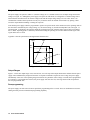
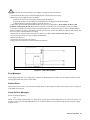
The power supply can operate in either CV (constant voltage) or CC (constant current) over its output voltage and current
ratings (see Figure 1-l). Although the power supply can operate in either mode, it is designed as a constant voltage source.
This means that the unit turns on in constant voltage mode with the output voltage rising to its Vset value. There is no
command for constant current operation. The only way to turn the unit on in constant current mode is by placing a short
across the output and then enabling or turning the output on.
Note that the power supply cannot be programmed to operate in a specific mode. After initial turn-on, the operating mode of
the unit will be determined by the voltage setting (Vs), the current setting (Is), and the load impedance (RL). In Figure 1-1,
operating point 1 is defined by the load line cutting the operating locus in the constant-voltage region. This region defines
the CV mode. Operating point 2 is defined by the load line cutting the operating locus in the constant-current region. This
region defines the CC mode.
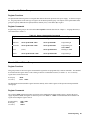
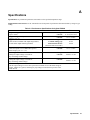
Appendix A lists the specifications and supplemental characteristics.
Vout
RL1
80V
70V
Vs
RL2
Is
26A 30A
Iout
Figure 1-1. Output Characteristic Curve
Output Ranges
Figure 1-1 shows two output ranges: 80V, 26A and 70V, 30A. The step in the output characteristic indicates that the power
supply cannot simultaneously output 80V and 30A. No separate command is required to select a range, the power supply
automatically selects one of the operating ranges based on the last parameter (either voltage or current) that is programmed.
For example, if you program 80V and 30A, the power supply will select the 70V, 30A range based on the last parameter
that was programmed: 30A.
Downprogramming
The power supply can sink current for more rapid down programming in the CV mode. This is an uncharacterized currentsinking area that provides a limited downprogramming capability.
16 General Information
2
Installation
Inspection
Damage
When you receive your power supply, inspect it for any obvious damage that may have occurred during shipment. If there is
damage, notify the shipping carrier and the nearest Agilent Sales and Support Office immediately. Warranty information is
printed in the front of this guide.
Packaging Material
Until you have checked out the power supply save the shipping carton and packing materials in case the power supply has to
be returned to Agilent Technologies. If you return the power supply for service, attach a tag identifying the model number
and the owner. Also include a brief description of the problem.
Items Supplied
In addition to this manual, check that the following items in Table 2-1 are included with your power supply (see Table 1-6
for part numbers):
Power cord
Table 2-1. Items Supplied
Your power supply was shipped with a power cord appropriate for your location. The cord may or may
not be terminated in a power plug (see "Options" in Chapter 1). If the cord is not included, contact your
nearest Agilent Sales and Support Office (see end of this guide ) to obtain the correct cord. These
models also include a power input safety cover with strain relief connector. It is required to secure the
power cord to the power supply.
Analog
connector
A 7-terminal analog plug (see Table 1-4) that connects to the back of the unit. Analog connections are
described in Chapter 4.
Digital
connector
A 4-terminal digital plug (see Table 1-4) that connects to the back of the unit. Digital connections are
described in "Appendix D - Digital Port Functions"
Serial cable
A 2-meter cable (see “Accessories” in Chapter 1) that connects to the control bus (next to the GPIB
connector). This cable is used to serially connect multiple power supplies as described under "Controller
Connections" in Chapter 4.
Output
hardware
Output hardware (screws with nuts and lockwashers) for securing your load wires to the output bus bars
(see Table 1-4).
Guide change
page
If applicable, change sheets may be included with this guide. If there are change sheets, make the
indicated corrections in this guide.
Installation 17
Location and Temperature
Bench Operation
The Table A-2 in Appendix A gives the dimensions of your power supply. The cabinet has plastic feet that are shaped to
ensure self-alignment when stacked with other Agilent System II cabinets. The feet may be removed for rack mounting.
Your power supply must be installed in a location that allows sufficient space at the sides and rear of the cabinet for
adequate air circulation. Minimum clearances are 1 inch (25 mm) along the sides. Do not block the fan exhaust at the rear of
the unit.
Rack Mounting
The power supply can be mounted in a standard l9-inch rack panel or cabinet. Rack mounting kits are available as Option
908 or 909 (with handles). Installation instructions are included with each rack mounting kit.
This power supply requires instrument support rails for non-stationary installations. These are
normally ordered with the cabinet and are not included with the rack mounting kits.
Temperature Performance
A variable-speed fan cools the unit by drawing air through the sides and exhausting it out the back. Using Agilent rack
mount or slides will not impede the flow of air. The temperature performance is as follows:
The unit operates without loss of performance within the temperature range of 0 °C to 45 °C.
Input Power Source
Do not apply power to the power supply until directed to do so in Chapter 3.
Check the line
label on the rear of your unit and verify that the voltage shown there
corresponds to the nominal line voltage of your power source. If it does not, see Appendix E - "Line
Voltage Conversion" for instructions on changing the power supply's line voltage configuration.
Note
This product requires single-phase input voltage.
You can operate your unit from a nominal 200 V or a 230 V single-phase power source, or from the line-to-line voltage of a
208-volt, 3-phase source. The proper source is indicated on the rear
label ( , Figure 2-2). See "AC Input
Ratings" in Table A-2 for the voltage and frequency range for each type of power source.
Note
The power source must be a dedicated line with no other devices drawing current from it.
The line fuse is located inside the power supply. Table 1-4 identifies the replacement fuse. See "In Case of Trouble" in
Chapter 3 for instructions on fuse replacement.
Installing the Power Cord
Installation of the power cord must be done by a qualified electrician and in accordance with local
electrical codes.
18 Installation
The power cord supplied with power supply may or may not include a power plug (see "Options" in Chapter l) at one end of
the cord. Terminating connections and a ground lug are attached to the other end of the cord. See Figure 2-2 and proceed as
follows:
1. If they are not already in place, position the strain relief connector
), safety cover
, rubber boot
, and
.
connector nut on the power cord
to the chassis earth ground stud.
2. Secure the ground wire
3. For single-phase operation, connect the neutral wire
to the N input terminal and the line wire
to the L input
terminal (this line is fused inside the unit).
4. For line-to-line operation from a three-phase source as shown in Figure 2-3, connect one phase to the N input
terminal and another phase to the L input terminal (this line is fused inside the unit).
Note
The N terminal is not internally grounded.
5. Position the safety cover over the power input terminals and tighten the cover screws
.
screws
and strain relief connector
Figure 2-2. Connecting Power Cord
Figure 2-3. Connection to a 3-Phase Line
Installation 19
VXI plug&play Power Products Instrument Drivers
VXI plug&play Power Products instrument drivers for Microsoft Windows 95 and Windows NT are now available on the
Web at http://www.agilent.com/find/drivers. These instrument drivers provide a high-level programming interface to your
Agilent Power Products instrument. VXI plug&play instrument drivers are an alternative to programming your instrument
with SCPI command strings. Because the instrument driver’s function calls work together on top of the VISA I/O library,
a single instrument driver can be used with multiple application environments.
Supported Applications
Agilent VEE
Microsoft Visual BASIC
Microsoft Visual C/C++
Borland C/C++
National Instruments LabVIEW
National Instruments LabWindows/CVI
ñ
ñ
ñ
ñ
ñ
ñ
System Requirements
The VXI plug&play Power Products instrument driver
complies with the following:
ñ
Microsoft Windows 95
ñ
Microsoft Windows NT 4.0
ñ
HP VISA revision F.01.02
ñ
National Instruments VISA 1.1
Downloading and Installing the Driver
NOTE:
1.
2.
3.
4.
5.
6.
Before installing the VXI plug&play instrument driver, make sure that you have one of the supported
applications installed and running on your computer.
Access Agilent Technologies’ Web site at http://www.agilent.com/find/drivers.
Select the instrument for which you need the driver.
Click on the driver, either Windows 95 or Windows NT, and download the executable file to your pc.
Locate the file that you downloaded from the Web. From the Start menu select Run <path>:\agxxxx.exe - where
<path> is the directory path where the file is located, and agxxxx is the instrument driver that you downloaded .
Follow the directions on the screen to install the software. The default installation selections will work in most
cases. The readme.txt file contains product updates or corrections that are not documented in the on-line help. If
you decide to install this file, use any text editor to open and read it.
To use the VXI plug&play instrument driver, follow the directions in the VXI plug&play online help under
“Introduction to Programming”.
Accessing Online Help
A comprehensive online programming reference is provided with the driver. It describes how to get started using the
instrument driver with Agilent VEE, LabVIEW, and LabWindows. It includes complete descriptions of all function calls
as well as example programs in C/C++ and Visual BASIC.
ñ
To access the online help when you have chosen the default Vxipnp start folder, click on the Start button and select
Programs | Vxipnp | Agxxxx Help (32-bit).
- where Agxxxx is the instrument driver.
20 Installation
3
Turn-On Checkout
Introduction
Note This chapter provides a preliminary introduction to the power supply front panel. See Chapter 5 - "Front Panel"
for more details.
Successful tests in this chapter provide a high degree of confidence that the power supply is operating properly. For
verification tests, see Appendix C - "Operation Verification”. Complete performance tests are given in the service manual.
Do not apply ac power to the power supply until told to do so.
Preliminary Checkout
1. Make certain that the front panel switch is off.
2. Examine the Line Voltage Rating or Line And Fuse Rating label (see Chapter 2 - "Installation" )
Verify that the line voltage rating agrees with your power source. If it does not, see Appendix E - "Line Voltage
Conversion".
3. Check the sense wiring as follows:
Remove the output safety cover and examine the output sense terminals. They should be wired for local sensing as
follows:
1. The +LS sense terminal wired to the +S terminal of the analog connector.
2. The –LS sense terminal wired to the –S terminal of the analog connector.
3. If the power supply is not wired for local sensing, make the above connections, using small-capacity wire
(AWG #22 is sufficient).
4. Make sure that there is no load connected to the output terminals or bus bars.
Power-On Checkout
1. Connect the power cord to the power supply .
2. Turn the front panel power switch to ON (1).
3. The power supply undergoes a self-test when you turn it on. If the test is normal, the following sequence appears on
the LCD:
The GPIB address (factory default is 5).
This is then followed by PWR ON INIT for approximately 10 seconds.
4. The display then goes into the meter mode with the Dis annunciator on and all others off. “Meter mode” means that
the VOLTS digits indicate the output voltage and the AMPS digits indicate the output current. These values will be
at or near zero.
5. Verify that the power supply fan is on by placing your hand near the rear grill to feel the air flow. You may also be
able to hear the fan operating.
6. Press
once. The Dis annunciator will go off and the CV annunciator will go on .
Note If the power supply detects an error during self-test, the display will show an error message. Go to “In Case of
Trouble” at the end of this chapter.
Turn-On Checkout 21
Using the Keypad
Shifted Keys
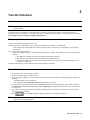
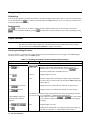
Some of the front panel keys perform two functions, one labeled in black and the other in blue. You access the blue function
key, which is not labeled. When the Shift annunciator is on, you will know you have access
by first pressing the blue
to the key’s shifted (blue) function.
Backspace Key
The
key is an erase key. If you make a mistake entering a number and have not yet entered it (have not pressed
), you can delete the number by pressing
. You may delete as many numbers as you wish by repeatedly pressing
this key.
Output Checkout
Important
When the power supply is turned on, it asserts the state stored in EEPROM memory location 0. For a new
unit, this is the factory default (*RST) state. The following procedures assume that the factory default
state is still in location 0 (Turn-On Conditions in Chapter 5 for details).
Checking the Voltage Function
The tests in Table 3-1 check the basic voltage functions with no load connected to the power supply. The VOLTS display
will show various readings. Ignore the AMPS display.
Table 3-1. Checking the Voltage Functions (Output Terminals Open)
Display
Explanation
Output Terminals Open or Connected to a Voltmeter
If Dis is on, turn it off by pressing
Press
key
VOLT 0.000
Default voltage setting. CV annunciator should be on. (If CC
one or
annunicator is on, increase the current by pressing
more times until CC turns off and CV turns on.)
Procedure
Press
VOLT 40
Program output to 40 volts.
Press
40.00
Enter the voltage. Meter mode displays output voltage. During these
tests, there may be a small (relative to full output) AMPS reading that
will be ignored.
Press
several times
Voltage decreases several millivolts each time you press the key.*
Press
the same
number of times
Voltage increases several millivolts each time you press the key.*
Rotate Voltage control first
counterclockwise and then
clockwise
* The number of millivolts change is determined by the voltage programming resolution
of your power supply (see Appendix A -"Supplemental Characteristics").
Control operates similarly to
and
keys. The control
is rate sensitive. Turning it more quickly causes a more rapid change
in voltage.
Press
40.00
Press
22 Turn-On Checkout
Program output to 40 volts.
Display shows default OVP (overvoltage protection) trip voltage for
your unit (see Appendix A - "Supplemental Characteristics").
Press
OV
30
Program the OVP to 30 volts, which is less than the output voltage.
Press
0.000
OVP voltage entered is less than the output voltage. This causes the
OVP circuit to trip. The output drops to zero, CV turns off, and Prot
turns on.
Press
OV - - - - -
Shows that the power supply shuts down because the OVP circuit has
tripped.
Press
Return display to meter mode (optional step).
Press
0.000
Program the OVP to 45 volts, which is greater than the output voltage.
Note: You cannot clear an OVP trip until you have first removed the
cause of the condition.
Press Prot Clear
)*
(
40.00
The OVP circuit is cleared, restoring the output. Prot turns off and
CV turns on.
*
is the unlabeled blue key.
Checking the Current Function
The tests in Table 3-2 check the basic current functions with a short connected across the power supply output. Do not
program maximum output currents unless the shorting wire is capable of handling the current (see "Supplemental
Characteristics" and Table 4-2). The AMPS display will show various readings. Ignore the VOLTS display.
Table 3-2. Checking the Current Functions (Output Terminals Shorted)
Procedure
Display
Explanation
Turn off the power supply and connect a #14 AWG or larger wire across the output (+) and (–) terminals. If you intend to
test at full-rated output current, use a wire or wires of sufficient size to carry the maximum current of the unit (see
"Supplemental Characteristics" in Chapter l and Table 4-2 in Chapter 4).
Turn on the unit.
Meter mode
Essentially zero output with Dis annunciator on.
Press
VOLT 80.00
Program output to 80 volts.
Press
CURR 1.000
Program output to 1 ampere.
Press
1.000
Dis annunciator turns off, CC annunciator turns on, and AMPS
display shows the programmed current.
*Current decreases several milliamperes each time you press the key.
Press
several times
Press
the same
number of times
Rotate the Current control
counterclockwise and then
clockwise
Press
*Current increases several milliamperes each time you press the key.
*The number of milliamperes is determined by the current programming resolution of the
power supply (see "Supplemental Characteristics" in Chapter 1).
Control operates similarly to the
and
keys. The
control is rate sensitive. Turning it more quickly causes a more rapid
change in current.
You have enabled the overcurrent protection circuit. The circuit then
tripped because of the output short. The CC annunciator turns off and
the OCP and Prot annunciators come on. Output current is near zero.
Turn-On Checkout 23
Press
Dis annunciator turns on.
Press
You have disabled the overcurrent protection circuit. The OCP
annunciator turns off.
Press
(
You have cleared the overcurrent protection circuit. The Prot
annunciator turns off.
)**
Press
Dis turns off and CC turns on. The output current is restored.
If you have a shorting wire of sufficient capacity, you may continue testing up to the maximum rated current of the power
supply (see "Performance Specifications"). When finished, go to the next step.
Dis turns on and output current drops to zero.
Press
Turn off the power supply and remove the short from the output terminals.
Checking The Save And Recall Functions
Agilent E4356A power supplies have five nonvolatile memory storage locations (0 through 4). Proceed as follows:
■
■
■
■
■
Make certain that the output is on (Dis annunciator is off).
Set the voltage output to 5 by pressing
.
Save this value to location 1 by pressing
.
Return the output voltage to 0 by pressing
(This step is based on the fact that a newly shipped power
supply has the *RST parameters stored in location 0 (see "Chapter 5 - Front Panel" for more information).
Press
and notice that the output voltage returns to the value stored in location 1.
Determining The GPIB Address
When the power supply is turned on, the display shows ADDR n, where n is the power supply GPIB address. Any time you
want to see the address, press
.
The display will indicate ADDR 5, which is the factory default. If the address has been changed, then a different number
will appear (see “Setting the GPIB Address” in “Chapter 5 - Front Panel”).
In Case Of Trouble
Line Fuse
If the power supply appears "dead" with a blank display and the fan not running, first check your power source to be certain
line voltage is being supplied to the power supply. If the power source is normal, the power supply line fuse may be
defective. If the unit has a defective fuse, replace it only once. If it fails again, investigate the reason for the failure. Proceed
as follows:
Hazardous voltage can remain inside the power supply even after it has been turned off. Fuse
replacement should be done only by qualified electronics personnel.
24 Turn-On Checkout
The line fuse is located inside the power supply. To change it, proceed as follows:
l. Turn off the front panel power switch and unplug the line cord from the power source.
2. Remove the power supply dustcover as follows:
a. Remove the four screws securing the carrying straps and dustcover.
b. Spread the bottom rear of the dustcover and pull it back to disengage it from the front panel.
c. Slide the dustcover back far enough to expose the line fuse (1).
3. Observe the input rail LED under the RFI shield (see Figure E-3 in Appendix E). If the LED is on, there is still
hazardous voltage inside the unit. Wait until the LED goes out (this may take several minutes) before proceeding.
4. Connect a dc voltmeter across test points TPl and TP2 (Figure E-3). It may be necessary to remove the RFI shield in
order to reach these test points. (The shield is secured by four screws on each side.) When the voltmeter indicates 60 volts
or less, it is safe to work inside the power supply.
5. Replace the fuse with one of the same type (see Table 1-4 in Chapter l). Do not use a slow-blow type fuse.
6. If you removed it in step b, be sure to replace the RFI shield.
7. Replace the dust cover.
8. Connect the line cord to the power source.
9. Turn on the front panel power switch and check the operation.
Power Fuse ô Line Filter í Rear of Power supply
Figure 3-1. Line Fuse Location
Error Messages
Power supply failure may occur during power-on selftest or during operation. In either case, the display may show an error
message that indicates the reason for the failure.
Selftest Errors
When a selftest error occurs, it prevents all front panel operation. The display may show either a power-on error message or
a checksum error message.
Power-On Error Messages
Power-on messages appear as:
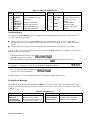
En- - - - - Where "n" is a number listed in Table 3-3. If this occurs, turn the power off and then back on to see if the error persists. It is
possible to recover from the EE CHKSUM error (see "Checksum Errors"). If any other message persists, the power supply
requires service.
Turn-On Checkout 25
Error
No.
El
E2
E3
E4
E5
E6
E7
Table 3-3. Power-On Selftest Errors
Failed Test
Error
Display
No.
Front Panel RAM
E8 SEC RAM
Front Panel ROM checksum
E9 SEC ROM
EEPROM
E10 SEC 5V
Display
FP RAM
FP ROM
EE
CHKSUM
PRI XRAM
PRI IRAM
PRI ROM
GPIB
Primary external RAM
Primary internal RAM
Primary ROM checksum
GPIB R/W to serial poll
Ell
TEMP
E12
DACS
Failed Test
Secondary RAM
Secondary ROM checksum
Secondary 5 V ADC
reading
Secondary ambient
thermistor reading
Secondary VDAC/IDAC
readback
Checksum Errors.
If the display shows EE CHKSUM, the power supply has detected an EEPROM checksum error. A checksum error can
occur due to the following conditions:
■
■
Excessive number of write cycles to an EEPROM (see "Nonvolatile Memory Write Cycles" in "Supplemental
Characteristics" tables). This condition, which would appear only after extended use, is not recoverable and requires
service.
Loss of ac input power during a checksum calculation. This condition, which is very unlikely, is recoverable.
You may be able to recover from a checksum error by writing to the EEPROM while the power supply is in the calibration
mode. To do this, proceed as follows:
1. Enable the calibration mode by pressing
.
2. PASWD will appear on the display.
3. Press the number keys corresponding to the password, followed by
. The Cal annunciator will go on.
Note On new equipment, the calibration password corresponds to the four-digit model number (such as
).
See "Appendix A - Calibration" for more information about the calibration password.
4. Save any operating state (for example, press
5. Turn the power off and then back on.
).
A normal display free of error messages should appear. If not, the power supply requires service.
Runtime Error Messages
Under unusual operating conditions, the VOLT or AMPS display may show +OL or –OL. This indicates that the output
voltage or current is beyond the range of the meter readback circuit. Table 3-4 shows other error messages that may appear
at runtime.
Display
EE WRITE ERR
SBUB FULL
SERIAL DOWN
STK OVERFLOW
Table 3-4. Runtime Errors
Meaning
Display
EEPROM status timeout
UART FRAMING
Message too long for buffer
UART OVERRUN
Failed communication with front
UART PARITY
Front panel stack overflow
26 Turn-On Checkout
Meaning
UART byte framing error
Overfilled UART receive buffer
UART byte parity error panel
4
User Connections
Rear Panel Connections
Make application load connections to the output terminals or bus bars, analog connector, and digital connector as shown on
the rear-panel drawing for your model power supply. Make controller connections (GPIB and serial link) as shown in Figure
4-6 at the end of this chapter.
Load Wire Selection
Fire Hazard To satisfy safety requirements, load wires must be large enough not to overheat when
carrying the maximum short-circuit current of the power supply. If there is more than one load, then
any pair of load wires must be capable of safely carrying the full-rated current of the unit.
Table 4-1 lists the characteristics of AWG (American Wire Gauge) copper wire.
Table 4-1. Stranded Copper Wire Capacity and Resistance
2
1
2
Ampacity
Resistance
AWG
Ampacity
Resistance
No.
(Ω/m)
(Ω/m)
25
0.0103
8
60
0.0025
30
0.0065
6
80
0.0016
40
0.0041
4
105
0.0010
NOTES:
Ampacity is based on 30 °C ambient temperature with conductor rated at 60 °C. For ambient temperature other
than 30 °C, multiply the above ampacities by the following constants:
Temp (°C) Constant
Temp (°C) Constant
21-25 1.08
41-45 0.71
26-30 1.00
46-50 0.58
31-35 0.91
51-55 0.41
36-40 0.82
Resistance is nominal at 75 °C wire temperature.
l
AWG
No.
14
12
10
1.
2.
Analog Connector
This connector, which is on the rear panel, is for connecting remote sense leads, external current monitors, and external
programming sources. The connector accepts wires sizes from AWG 22 to AWG 12.
Insert Wires
ô Tighten Screws
IM Current monitor output.
VP Voltage programming input.
+IP Differential current programming input.
–IP Differential current programming input.
↓P Common for VP and IM signals (referenced to +OUT).
+S + remote sense input.
–S –remote sense input.
Figure 4-1. Rear Panel Analog Connector
User Connections 27
Note It is good engineering practice to twist and shield all signal wires to and from the analog and digital connectors
Digital Connector
This connector, which is on the rear panel, is for connecting fault/inhibit, digital I/O, or relay link signals. The connector
accepts wires sizes from AWG 22 to AWG 12.
Insert Wires
ô Tighten Screws
1
Pin No.
Fault/Inhibit
FUNCTION
Digital I/O
Relay Link
OUT 0
OUT 1
IN/OUT 2
COMMON
RLY SEND
NOT USED
RLY RTN
COMMON
FLT OUTPUT
1
2
FLT OUTPUT
3
INH INPUT
4
INH COMMON
NOTE: Factory default function is FAULT/INHIBIT.
2
Figure 4-2. Rear Panel Digital Connector
Connecting the Power supply to the Load
Output Isolation
The output of the power supply is isolated from earth ground. Either output terminal may be grounded, or an external
voltage source may be connected between either output and ground. However, both output terminals must be kept within
± 240 Vdc of ground. An earth ground terminal is provided on the rear panel for convenience, such as grounding wire
shields.
The earth ground terminal on the rear panel is a low-noise signal ground for convenience only. It is not
designed to function as a safety ground.
Capacitive Loads
In most cases, the power supply will continue to be stable with additional external load capacitors. However, large load
capacitors may cause ringing in the unit’s transient response. It is possible that certain combinations of load capacitance,
equivalent series resistance, and load lead inductance will result in instability. If you need help in solving a stability
problem, contact an Agilent service engineer through your local Sales and Support Office (see end of this guide).
If the power supply output is rapidly programmed into capacitive loads, the unit may momentarily cross into constant
current (CC) mode. This extends the CV programming time and limits the maximum slew rate to the programmed current
divided by the total internal and external capacitance. These momentary crossovers into CC mode will not damage the unit.
28 User Connections
Output Safety Cover
ô Analog Connector
í– Output Bus Bar
÷ – Local Sense Terminal
û + Local Sense Terminal
ø+ Output Bus Bar
ù Signal Common
î Local Sense Jumpers
ü Rear Knockouts
ê Bottom Knockout
Insert screwdriver blade in slot and pry out
Bend along joint and break off
WARNING
DO NOT LEAVE UNCOVERED HOLES IN OUTPUT COVER. IF TOO MANY
KNOCKOUTS HAVE BEEN REMOVED, INSTALL A NEW COVER.
Figure 4-3. Rear Panel Output Connections
Inductive Loads
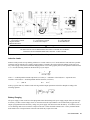
Inductive loads provide no loop stability problems in CV mode. However, in CC mode inductive loads will form a parallel
resonance network with the power supply's output capacitor. Generally, this will not affect the stability of the unit, but it
may cause ringing of the current in the load. Ringing will not occur if the Q (quality factor) of the parallel resonant network
is ≤1.0. Use the following formula to determine the Q of your output.
Q=
1
R int + Re xt
L
C
where: C = model-dependent internal capacitance (see below); L = inductance of the load; Rext = equivalent series
resistance of the load; Rint = model-dependent internal resistance (see below):
C=
7,000 µF
Rint=
14 mΩ
If the Q is greater than 0.5, inductive loads will ring with the output capacitance and will be damped according to the
following equation:
Battery Charging
The power supply's OVP circuit has a downprogrammer FET that discharges the power supply output whenever OVP trips.
If a battery (or other external voltage source) is connected across the output and the OVP is inadvertently triggered or the
output is programmed below the battery voltage, the power supply will sink current from the battery. To avoid this, insert a
reverse blocking diode in series with the ⊕ output of the unit. Connect the diode cathode to the + battery terminal and the
diode anode to the ⊕ output terminal of the unit. The diode may require a heat sink.
User Connections 29
Local Voltage Sensing
Your power supply was shipped set up for local sensing. This means that the unit will sense and regulate its output at the
output terminals, not at the load. Since local sensing does not compensate for voltage drops across screw terminals, bus
bars, or load leads, local sensing should only be used in applications that require low output current or where load regulation
is not critical.
Local sensing is obtained by connecting the +LS sense terminal to the +S analog connector pin and the pin and the –LS
sense terminal to the –S analog connector pin. The power supply is shipped with these connections made.
Note If the sense terminals are left unconnected, the voltage at the bus bars will increase approximately 3 to 5% over the
programmed value. Since it is measured at the sense terminals, the voltage readback will not reflect this increase.
Remote Voltage Sensing
The dashed lines in the wiring diagrams illustrate remote voltage sensing. The remote sense terminals of the power supply
are connected directly to the load rather than to the output terminals. This allows the unit to automatically compensate for
the voltage drop in the load leads as well as to accurately read back the voltage directly across the load.
Setting Up Remote Sense Operation
Remote sensing is obtained by removing the jumpers connecting the +LS sense terminal to the +S analog connector pin and
the –LS sense terminal to the –S analog connector pin. The power supply is shipped with these jumpers connected.
Connecting the Sense Leads
You must connect the positive side of the load to the +S analog connector pin and the negative side of the load to the –S
analog connector pin (see Figure 4-1). Connect the sense leads carefully so that they do not become open-circuited. If sense
leads are left open during operation, the unit will regulate at the output terminals instead of at the load. Remember to bundle
or tie wrap the load leads to minimize inductance and reduce noise pickup.
CV Regulation
The voltage load regulation specification in Table A-1 applies at the output terminals of the power supply. When remote
sensing, this specification must be compensated. Add an increment to the voltage load regulation specification as specified
by “∆mV” in the equation given under Load regulation in Table A-2.
Output Rating
The rated output voltage and current specification in Table A-1 applies at the output terminals of the power supply. With
remote sensing, any voltage dropped in the load leads causes the unit to increase the voltage at the output terminals so it can
maintain the proper voltage at the load. When you attempt to operate at the full-rated output at the load, this forces the
voltage at the output terminals to exceed the unit's rated output. This will not damage the unit, but may trip the OVP
(overvoltage protection) circuit, which senses the voltage at the output bus bars. When operated beyond its rated output, the
unit's performance specifications are not guaranteed, although typical performance may be good. If the excessive demand on
the unit forces it to lose regulation, the Unr annunciator will indicate that the output is unregulated.
Output Noise
Any noise picked up on the sense leads also appears at the output of the power supply and may adversely affect the load
voltage regulation. Be sure to twist the sense leads to minimize external noise pickup and route them parallel and close to
the load leads. In noisy environments, it may be necessary to shield the sense leads. Ground the shield only at the power
supply. Do not use the shield as one of the sense conductors.
30 User Connections
Note The signal ground binding post on the rear panel is a convenient place to ground the sense shield.
OVP Considerations
The OVP circuit senses the voltage near the output terminals and not at the sense terminals. Depending on the voltage drop
between the output terminals and the load, the voltage sensed by the OVP circuit can be significantly higher than actually
being regulated at the load. You must program the OVP trip high enough to compensate for the expected higher voltage at
the output terminals.
Stability
Using remote sensing under unusual combinations of load-lead lengths and large load capacitances may cause your
application to form a low-pass filter that becomes part of the voltage feedback loop. The extra phase shift created by this
filter can degrade the unit’s stability and result in poor transient response. In severe cases, this may cause output oscillations.
To minimize this possibility, keep the load leads as short as possible and tie wrap them together.
In most cases, following the above guidelines will prevent problems associated with load lead inductance. However, if a
large bypass capacitor is required at the load and load-lead length cannot be reduced, then a sense-lead bypass network may
be needed to ensure stability (see Figure 4-4). The voltage rating of the 33 µF capacitors should be about 50% greater than
the anticipated load-lead drop. Addition of the 20-Ω resistors will cause a slight voltage rise at the remote sensing points.
For utmost voltage programming accuracy, the unit should be recalibrated with the DVM at the remote sensing points (see
“Appendix B - Calibration”).
Note If you need help in solving a stability problem with the power supply, contact an Agilent Service Engineer through
your local Agilent Sales and Support Office.
Load Leads
Cl, C2 = 33 µF
ôRemote Sense Points
C3 = Load bypass capacitor
R1, R2 = 20 Ω, 1%
Figure 4-4. Sense Lead Bypass Network
Operating Configurations
Figures 4-5 through Figure 4-8 show the various configurations for connecting to the load. Figure 4-9 shows how to connect
an external voltage source for analog programming.
Connecting One Power supply to a Single Load
Figure 4-5 shows how to connect a single power supply to one load. Keep output load leads close together (small loop area)
to obtain a low inductance and low impedance connection to the load. If you wish to use remote sensing, connect the sense
leads at the load as shown in the figures.
User Connections 31
Load Connection
ôLoad
íAnalog Connector
Connect for remote sensing (optional)
Connect for local sensing (default)
Figure 4-5. Single Load Connection (Remote Sensing Optional)
Connecting One Power supply To Multiple Loads
Figure 4-6 shows how to connect a single power supply to more than one load. When connecting multiple loads to the
power supply with local sensing, connect each load to the output bus bars with separate connecting wires. This minimizes
mutual coupling effects and takes full advantage of the unit’s low output impedance. Keep each pair of load wires as short as
possible and twist or bundle them to reduce lead inductance and noise pickup.
Loads
ôLoad Connection
íAnalog Connector
Connect for remote sensing (optional)
Connect for local sensing (default)
Figure 4-6. Multiple Load Connection (Remote Sensing Optional)
Connecting Units in Auto-Parallel
Figure 4-7 illustrates how power supplies can be connected in auto-parallel for increased current output. You can connect up
to five units of the same model.
Use load leads of a sufficient wire size so that the absolute voltage difference between the + output terminal of the "master"
unit and the + output terminal of the first "slave" unit is kept under 2 V at rated current. This also applies to the voltage
difference between the + output terminals of the first and second slave units. If remote sensing is required, connect the load
to the remote sense terminals of the master unit, as shown by the dashed lines in Figure 4-7.
32 User Connections
Analog Connector
ô Slave Unit
í Master Unit
÷Program only the master. Set slave output and OVP slightly higher than the master to ensure that slave stays in CC mode
û Load
ø Load Connection
Connect for optional remote sensing
Only local sensing permitted
Figure 4-7. Auto-Parallel Connection (Remote Sensing Optional)
Auto-Parallel Programming. Program only the first ("master") unit in the series; the "slave" units automatically track the
master’s output. However, the voltage and OVP settings of the slave units must be set higher than the operating voltage of
the master unit. This ensures that the slave units will operate in CC mode. Functions such as status, voltage readback, and
current readback can still be read back individually for each unit.
If a "slave" unit experiences a desired shutdown condition (such as overtemperature or overcurrent), it will not
automatically shut down all other units. You must first enable remote inhibit (RI) and discrete fault indicator (DFI)
operation. See "Fault/Inhibit Operation" in Appendix F for wiring information and "Questionable Status Group" in Chapter
8 for programming information.
Connecting Units in Series
Floating voltages must not exceed 240 Vdc. No output terminal may be more than 240 V from chassis
ground.
Figure 4-8 shows how power supplies can be connected in series for higher voltage output. Series connections are
straightforward in this case.
Program each power supply independently. If two units are used in the series configuration, program each unit for 50% of
the total output voltage. Set the current limit of each unit to the maximum that the load can handle without damage.
Each power supply has a reverse voltage protection diode across its output. If a reverse voltage is
applied, the unit cannot control the current conducted through this diode. To avoid damaging the
unit, never connect it in such a way that a reverse voltage can force it to conduct current in excess
of the unit’s maximum reverse diode current (see Table A-2).
User Connections 33
Load Connection
ô Analog Connector
÷ Program each unit for full load current and 1/2 the load voltage
í Load
Connect for remote sensing (optional)
WARNING
FLOATING VOLTAGES MUST NOT EXCEED ±240 VDC NO OUTPUT TERMINAL MAY
BE MORE THAN 240 V FROM CHASSIS GROUND.
Figure 4-8. Series Connection (Remote Sensing Optional)
External Voltage Control
The setup shown in Figure 4-9 allows an external dc voltage to program the power supply output. A voltage applied to the
voltage programming input programs the output voltage and a voltage applied to the current programming input programs
the output current. See Figure 4-1 for an explanation of these programming input connections.
Wiring Considerations. The input impedance of the analog input is over 30 kΩ. If the output impedance of your
programming source is not negligible with this, programming errors will result. Larger output impedances result in
proportionally greater errors.
1
2
3
4
Voltage programming source 0 to –4.15V
Differential current programming source 0 to +6.75 V
Differential current programming source 0 to –6.75 V
Current programming source (floating) 0 to 6.75 V
* Maximum Potential between –IP and ↓P is ±15 V
Figure 4-9. Analog Programming Connections
34 User Connections
Programming. Note from Figure 4-1 that you have three options for programming the current. You can use a voltage
source that is positive, negative, or floating with respect to Common P. Do not exceed ±15 V with respect to Common P.
Make certain that the common connection for your voltage programming source is isolated from the
load. Failure to do this may cause damage to the power supply.
The effect of the analog programming source is always summed with the values programmed over the GPIB or from the
front panel. The voltage source can act alone only if you set the other program sources to zero. Keep the total programmed
setting of the unit (the analog input summed with the GPIB or front panel settings) at or under the output ratings specified in
Table A-2. Exceeding the output ratings will not damage the unit, but it may not be able to regulate its output at the higher
levels. If this happens, the Unr annunciator will light to warn you that the output is unregulated.
Controller Connections
Figure 4-10 shows two basic ways of connecting your power supply to a controller. They are "linked" and "stand-alone
configurations.
Stand-Alone Connections
See Figure 4-10A. Each stand-alone power supply has its own GPIB bus address. Stand-alone power supplies may
be connected to the bus in series configuration, star configuration, or a combination of the two. You may connect
from 1 to 15 stand-alone power supplies to a controller GPIB interface.
Linked Connections
See Figure 4-10B. Up to 16 power supplies may be used at a single GPIB primary bus address by making linked
connections. (You cannot use linked connections if you intend to program power supplies with the Compatibility
Language - see the Appendix G.)
The first power supply in a linked connection is a "direct unit" connected to the controller via a GPIB cable. The
direct unit is the only unit connected directly to the bus and has a unique primary bus address.
■ The remaining power supplies are "linked units” connected to the direct unit via a serial-link cable. Each linked unit
has a unique secondary GPIB address and derives its primary address from the direct unit. You may connect from 1
to 15 linked supplies to each direct unit.
■
Note
The power supply is shipped from the factory with its GPIB address set to 5. The power supply primary
and secondary addresses can be changed from the front panel as described in Chapter 6 - "Remote
Programming". For power supply GPIB interface capabilities, see Table 1-5 in Chapter 1 of this guide.
User Connections 35
ô
í
÷
û
ø
ù
A
B
1.
2.
3.
From 1 to 16 direct supplies may be connected to 1 controller GPIB interface.
Tighten connector thumbscrews by hand. Do not use a screwdriver.
Do not stack more than 3 connectors on a GPIB receptacle.
GPIB cable (see Accessories in Chapter 1)
From 1 to 15 linked supplies may be connected to 1 direct unit.
Either receptacle (Jl or J2) may be used as an input or an output.
Serial Link Cable (see Accessories in Chapter 1), 2 meters. 1 is supplied.
Maximum total length of all GPIB cables (including controller) not to exceed 20 meters.
Use caution with individual lengths over 4 meters.
Maximum total length of all serial cables not to exceed 30 meters.
NOTES:
A direct power supply is connected to the controller interface and must have a unique primary GPIB bus address.
The stand-alone configuration uses only direct supplies connected to the controller interface.
The linked configuration uses 1 or more linked power supplies connected to each direct unit. Each linked unit has a
unique secondary GPIB bus address and derives its primary address from the direct unit.
Figure 4-10. Controller Connections
36 User Connections
5
Front Panel Operation
Introduction
This chapter shows you how to operate the front panel. It is assumed that you are familiar with the turn-on checkout
procedure in Chapter 3. That chapter describes how to perform basic power supply functions from the control panel.
operations that you can perform are:
■
■
■
■
■
■
■
■
■
■
Enabling or disabling the power supply output.
Setting the output voltage and current.
Monitoring the output voltage and current.
Setting the overvoltage protection (OVP) trip point.
Enabling the overcurrent protection (OCP) circuit.
Saving operating states in nonvolatile memory.
Recalling operating states from nonvolatile memory.
Setting the power supply GPIB bus address.
Displaying error codes created during remote operation.
Enabling local (front panel) operation.
Note You also can calibrate the power supply from the front panel (see Appendix B).
Getting Acquainted
The front panel is summarized in Figure 5-1 and Table 5-1. Note that the panel is organized as follows:
LCD display (including annunciators)
ô Output VOLTAGE and CURRENT rotary (RPG) knobs
í SYSTEM keypad
÷ FUNCTION keypad
û ENTRY keypad
ø Power (LINE) switch
Some keys have two functions. For example, the System
key can be used either to recall a stored operating state or
to
(store) an operating state. The first operation is shown on the key and the second (shifted) operation is shown in
blue above the key. In order to do a shifted operation, first press the solid blue key, which is unlabeled but shown
throughout this manual as
.
For example, for a recall operation, press the recall key
. For a save operation, press the save key, which is
key is now functioning as
. When you do this, the Shift annunciator will light to remind you that the
the
key. In this chapter, such a shifted operation may be shown simply as
.
Front Panel Operation 37
Figure 5-1. Front Panel Controls and Indicators
Control or
Indicator
Table 5-1. Front Panel Controls and Indicators (See Figure 5-1)
Function or Indication
Display
VOLTS
AMPS
CV
CC
Unr
Dis
OCP
Prot
Err
Cal
Shift
Rmt
Addr
SRQ
Shows present output voltage of the power supply.
Shows present output current of the power supply.
Status Annunciators
The power supply is in constant-voltage mode.
The power supply is in constant-current mode.
The power supply output is unregulated (output is neither CV or CC).
The power supply output is disabled.
The overcurrent protection function is enabled.
A protection circuit has caused the power supply to shut down. (Press
An error has been generated as a result of remote operation. (Press
The power supply is in calibration mode.
The shift key
has been pressed.
The power supply is in the remote mode (controlled over the GPIB).
The power supply is addressed to listen or talk.
The power supply is requesting service from the controller.
to determine the reason.)
to display the error code).
ôOutput Rotary Controls
Voltage
Current
Rotate clockwise to increase output voltage or program setting. Use to rapidly set an approximate output
value (see
and
keys).
Rotate clockwise to increase output current or program setting. Use to rapidly set an approximate current
value (see
and
keys).
38 Front Panel Operation
Table 5-1. Front Panel Controls and Indicators (continued)
í SYSTEM Keys
When the power supply is under remote control, press to enable local operation. This control can be
defeated by a lock-out command over the GPIB
Press to display the power supply’s GPIB address. You can change the address with the ENTRY keys
Use to display error codes generated during remote operation. (Select by pressing
.)
Use to restore a previously saved power supply state. Use ENTRY keys
through
to specify which
location to recall. (Select by pressing
.)
Note: Location 0 may contain the power supply turn-on state. See "Turn-on operation" in this chapter.
Use to save the power supply’s present state to nonvolatile memory. (Select by pressing
.) Use
through
.
ENTRY keys to specify the location where you want to store the state. Use locations
This unlabeled blue key is the Shift key. Press to access the shifted (alternate) key functions.
÷ Function Keys
Press to enable or disable the power supply output. This key toggles between the two states. The disabled
state programs the output to the *RST voltage and current settings.
Press to display the output voltage setting. After pressing
, you may use the ENTRY keys to change
the value.
Press to display the output current setting. After pressing
, you may use the ENTRY keys to change
the value.
Press to display the OV trip voltage setting. After pressing
, you may use the ENTRY keys to change
the value.
When the Prot annunciator is on, press
to see which protection circuit caused the power supply to
shut down. Response can be OC (overcurrent), OT (overtemperature), or OV (overvoltage). If no protection
circuit has tripped, the display will show dashes (- - - -).
Press this key to reset the protection circuit. If the condition that caused the circuit to trip has been
removed, the Prot annunciator will go off.
Press to enable or disable the power supply OCP trip circuit. This key toggles between the two states. which
are indicated by the OCP annunciator.
û ENTRY Keys
-
Press to increment the output voltage in the CV mode, or to increase the voltage setting after you have
pressed the
key. 3
Press to decrement the output voltage in the CV mode, or to decrease the voltage setting after you have
pressed the
key.3
Press to increment the output current in the CC mode, or to increase the current setting after you have
pressed the
key.3
Press to decrement the output current in the CC mode, or to decrease the current setting after you have
pressed the
key.3
Press to select numerical values.
Press to enter a minus sign.
Press to delete the last keypad entry. Use this key to remove one or more incorrect digits before they are
entered.
3
These four entry keys operate in two modes. Press and release for a single minimal change as determined
by the programming resolution (see Table A-2). Press and hold for an increasingly rapid output change.
Press to delete an entire keypad entry and return to the meter mode. Use this key to exit from a value before
it is entered.
Press to enter a value or to accept an existing value and return the display to the meter mode.
The remaining shifted keys are for calibration (see Appendix B - "Calibration").
Front Panel Operation 39
Programming The Output
Important
These instructions show how to program a single power supply. There are special considerations when
you have two or more supplies connected in series or in autoparallel. See "Chapter 4 - User Connections
and Considerations".
The power supply accepts values directly in volts and amperes. Values will be rounded off to the nearest multiple of the
output resolution (see “Programming Resolution" in Table A-2). If you attempt to enter a value not in a valid range, the unit
will either switch to the other range or the entry will be ignored and OUT OF RANGE appears on the display.
Figure 1-1 shows the general response of the E4356A power supply. Unless directed otherwise, always keep the output
voltage and current within the boundaries of its operating line for the specified mode of operation (CV or CC).
Establishing Initial Conditions
. This state was stored in location 0 at the factory. If it
Set the power supply to its *RST state by pressing
has since been changed, you can restore it as directed under “Turn-on Conditions”, later in this chapter. *RST results in the
following operating conditions:
■
■
■
■
■
■
Zero voltage output.
Minimal current output.
Output disabled (Dis annunciator on).
Overcurrent protection off (OCP annunciator off).
Protection circuits cleared (Prot annunciator off).
Overvoltage protection set to maximum.
Programming Voltage
To program the output for 45 volts, proceed as follows:
■
■
■
■
Press
. The display will change from meter mode to indicate VOLTS.
key.
Press
. If you discover a mistake before pressing
, erase the incorrect value with the
The display will return to the meter mode and indicate 0.000 volts.
to enable the output (Dis annunciator turns off). The VOLTS display will indicate 45.00 volts.
Press
Note
The power supply must be programmed for a minimal current in order to increase the output voltage
beyond zero. Normally, there is sufficient idle current to do this. If the power supply does not respond or
the CC annunciator turns on, go to “Programming Current” and set the current to a small value.
Now raise the voltage by pressing
.Note that the voltage increases by a specific increment (depending on the
voltage programming resolution) each time you press the key and increases rapidly as you hold down the key. To lower
the voltage, press
.
■ Try raising and lowering the voltage by rotating the Voltage control clockwise and then counterclockwise. Note how the
output responds as compared to using the Entry keys.
■ Try to program a voltage greater than the VMAX for your unit (see Table A-2). Note that the display shows OUT OF
RANGE.
■
Programming Overvoltage Protection
Overvoltage protection guards the load against voltages that reach a specified value above the programmed output voltage.
40 Front Panel Operation
Setting the OVP Level. Assuming that you have programmed the power supply for 45 volts, you can set the OVP level to
48 volts as follows:
Press
. The display will change from meter mode to indicate 0V, followed by the present OVP value.
Press
.
■ The display will return to the meter mode and indicate the output (45.00 volts).
■ Press
again. The display will now indicate 0V 48.00.
■ Press
to return to the meter mode.
■
■
Checking OVP Operation. Assuming the above operating conditions (voltage programmed to 45 V and OVP
programmed to 48 V), trip the OVP circuit as follows:
Gradually increase the output voltage by pressing
until the OVP circuit trips. This will cause the output
voltage to drop to zero and the Prot annunciator to go on.
■ There now is no power supply output due to an overvoltage condition.
■ To verify this, press
and observe that the display indicates 0V. This shows that the protection circuit tripped
due to an overvoltage condition.
■
Clearing The OVP Condition. With the OVP tripped, return to the meter mode and try to clear the condition by pressing
. Nothing will appear to happen because the OV trip voltage is still below the programmed output voltage. Thus,
as soon as the circuit is cleared, it trips again. You can clear the OV condition by:
■
■
Lowering the output voltage below 48 (the OV setting), or
By raising the OV trip voltage above the output voltage setting.
Try either of these methods. Now when you press
return to normal.
, the Prot annunciator will turn off and the output voltage will
Programming Current
You may program the power supply current without a load, but must have a load in order to draw output current. These tests
assume you have the load connected in accordance with the information in Chapter 4. If you do not have a load on the
power supply, you may connect a short across the output terminals as described in Chapter 3.
The example will program a low current. (You may later increase the output current to the levels you will expect to use.) To
program the output current to 1.3 amperes, proceed as follows:
■
■
■
■
■
■
■
■
■
Disable the output by pressing
. The Dis annunciator will turn on.
Program the voltage by pressing
.
Press
. The display will change from meter mode to indicate AMPS.
Press
. If you discover a mistake before pressing
erase the incorrect value with the backspace
key
.
The display will return to the meter mode and indicate up to 0 . 000.
Press
to enable the output. Dis will turn off and the display will indicate VOLTS 5 . 000 AMPS 1. 300.
Now increase the current by pressing
. Note that the current increases by a specific increment (depending on
the current programming resolution) each time you press the key and increases rapidly as you hold down the key. To
decrease the current, press
.
Try increasing and decreasing the current by rotating the Current knob clockwise and counterclockwise. Note how the
output responds as compared to using the Entry keys.
Disable the output by pressing
. The Dis annunciator will turn on. Now try to program a current greater
than the IMAX for your unit. Note that the display shows OUT OF RANGE.
Front Panel Operation 41
Programming Overcurrent Protection
When enabled, overcurrent protection removes the power supply output whenever it goes into CC operation. This prevents
the unit from indefinitely uniting the full programmed current to the load.
. The OCP annunciator will light and power
Setting The OCP Protection. To activate overcurrent protection, press
supply will continue to operate normally until it is forced into CC operation. If that occurs, the OCP circuit will trip and the
power supply will remove its output.
Checking OCP Operation. The easiest way to check this operation at any specified current is to increase the load current
beyond the programmed current value and, if necessary, decrease the programmed voltage. This will force the power supply
into CC mode (see Figure 1-1). When OCP trips, the Prot annunciator will light and the output will drop to zero.
There is now no power supply output due to an overcurrent condition. To verify this, press
display indicates OC.
and observe that the
Clearing The OCP Condition. With the OCP tripped, return to the meter mode and try to clear the condition by pressing
. Nothing will appear to happen because the reason for the condition has not been removed. Thus, as soon as the
circuit is cleared, it trips again. You can clear the OC condition by:
■
■
Increasing the load resistance to lower the output current below the programmed current value, or
By raising the programmed current to a value above that required by the load.
Clear the fault by either of the above methods. Then clear the OCP circuit by pressing
will go off and the output will be restored to normal.
. The Prot annunciator
If desired, you can also restore the output by disabling the OCP function (press
to turn off the OCP annunciator).
This restores the output but does not clear any condition that may have caused OCP to trip.
Note
Under certain conditions, the OCP circuit may fail to clear because load demand occurs before the power
supply has time to build up the required output current capacity. In such cases, disable the output (press
before clearing the OCP circuit). After OCP is cleared, then enable the power supply
output.
CV Mode vs. CC Mode
Once you program a voltage (VS) and a current (IS) in Figure 1-1, the power supply will try to maintain itself in either CV or
CC mode, depending on the impedance of the load (RL). If the load demands less current than Is, operation will be in CV
mode with the voltage maintained at Vs. The output current will be at some value below Is as determined by VS ÷ RL.
If the current increases beyond IS (see RL2), the unit will switch to CC mode by varying its output voltage to maintain a
constant current value of Is. As more current is demanded, the voltage decreases to maintain the increased current level. If
the load current increases to the maximum output of the power supply, the output voltage will be maintained at a near-zero
level.
Unregulated Operation
If the power supply goes into a mode of operation that is neither CV nor CC, the Unr annunciator will light. An unregulated
condition limits the output current to a value that is safe for the power supply. Some unregulated states occur so briefly that
they do not turn on the Unr annunciator, but they may set the UNR status bit during remote operation . One condition that
can cause a noticeable unregulated state is low ac line voltage.
42 Front Panel Operation
Saving and Recalling Operating States
You can save programming time by storing up to 5 operating states in nonvolatile memory. The front panel programming
parameters that are saved are:
■ Output voltage, Output current, *OVP voltage,
■ OCP state (on or off), Output state (enabled or disabled).
Note
More power supply parameters are saved in remote operation. See Chapter 7.
As an example, set up the following state:
■ Voltage = 45 V Current = 5 A OVP voltage = 48 V.
■ OCP = on (OCP annunciator on) Output = off (Dis annunciator on).
Save the above state to location 1 by pressing
. Now set up the following state:
■ Voltage = 50 V Current = 2.5 A OVP voltage = 55 V.
■ OCP = off (OCP annunciator off) Output = on (Dis annunciator off).
Save the above state to location 2 by pressing
.
Restore the first state by pressing
and verify the parameters. Restore the second state by pressing
. Note how the power supply is automatically programmed each time.
Turn-On Conditions
Whenever you apply power to a new power supply it automatically turns on in a safe reset state with the following
parameters:
off
0
minimum*
maximum
off
*Minimum is the *RST value specified in Table A-2.
It is recommended that you leave the turn-on conditions as programmed. However, you may change them. To do this:
1. Set up the power supply to the state you want when it is turned on.
2. Store that state to location 0.
3. Turn off the power supply.
4. Hold in the
key and turn the power supply back on. The display indicates RCL 0 PWR-ON to verify that the
power supply has configured its turn-on state to that stored in location 0.
5. From now on the unit will always turn on to the state defined in location 0.
To return the power supply to the original factory reset state, hold down the
key when you turn on the unit. The display
indicates RST POWER-ON to verify that the power supply has configured its turn-on state to the original reset state. From
now on it will continue to turn on in that state.
Setting The GPIB Address
Types of Power supply GPIB Addresses
Figure 4-8 in Chapter 4 shows the ways the power supply can be connected to the GPIB bus. You can set up the GPIB
address in one of three ways:
Front Panel Operation 43
1. As a stand-alone unit (the only unit at the address). It has a primary address in the range of 0 to 30. For example: 5 or 7.
2. As the direct unit in a serial link. It is the only unit connected directly to the GPIB bus. The primary address is unique
and can be from 0 to 30. It is entered as an integer followed by a decimal separator. The secondary address always is 0,
which may be added after the primary address. If the secondary address is omitted, it is assumed to be 0. For example: 5.0
or 7.
3. As a linked unit in serial link. It gets its primary address from the direct unit. It has a unique secondary address that can
be from l to 15. It is entered as an integer preceded by a decimal separator. For example: .l or .12
When you enter a secondary address, leading zeros between the decimal separator and the first digit are ignored. For
example, .1, .01, and .001 are accepted as secondary address 1 and displayed as 0.01. Zeros following a digit are not
ignored. Thus, .10 and .010 are both accepted as secondary address 10 and displayed as 0. 10.
Changing the Power supply GPIB Address
Use the
key and numerical keypad for entering addresses. The power supply is shipped with a 5 stand-alone
address as the default. The general procedure for setting an address is:
Action
Press
Press new address keys
Press
Display Shows
Current address
New address replaces numbers on the display
Display returns to meter mode
If you try to enter a forbidden number, ADDR ERROR is displayed.
The following examples show how to set addresses:
To set stand-along primary address 6, press
To set direct unit primary address 6, press
To set linked secondary address 1, press
To set linked secondary address 12, press
Note
.
.
.
.
The power supply display will reset (recall the state in location 0) whenever you change between the
following types of GPIB addresses:
• a stand-alone primary address and a direct primary address.
• a direct primary address and a secondary address.
44 Front Panel Operation
6
Remote Programming
Prerequisites for Remote Programming
This organization of this guide assumes that you know or can learn the following information:
1.
2.
3.
4.
5.
6.
How to program in your controller language (Agilent BASIC, QUICKBASIC, C, etc.).
The basics of the GPIB (IEEE 488).
How to program I/O statements for an IEEE 488 bus instrument. From a programming aspect, the power supply is
simply a bus instrument.
How to format ASCII statements within you I/O programming statements. SCPI commands are nothing more than
ASCII data strings incorporated within those I/O statements.
The basic operating principles of the power supply as explained in “Chapter 5 – Front Panel Operation” of the
Operating Guide.
How to set the GPIB address of the power supply. This cannot be done remotely, but only from the unit’s front panel
(see Chapter 5 – "Setting the GPIB Address”).
External Documents
SCPI References
The following documents will assist you with programming in SCPI:
•
•
•
•
Standard Commands for Programmable Instruments Volume 1, Syntax and Style
Standard Commands for Programmable Instruments Volume 2, Command References
Standard Commands for Programmable Instruments Volume 3, Data Interchange Format
Standard Commands for Programmable Instruments Volume 4, Instrument Classes
To obtain a copy of the above documents, contact: Fred Bode, Executive Director, SCPI Consortium, 8380 Hercules Drive,
Suite P3, Ls Mesa, CA 91942, USA
GPIB References
The most important GPIB documents are your controller programming manuals - Agilent BASIC, GPIB Command Library
for MS DOS, etc. Refer to these for all non-SCPI commands (for example: Local Lockout).
The following are two formal documents concerning the GPIB interface:
•
ANSI/IEEE Std. 488.1-1987 IEEE Standard Digital Interface for Programmable Instrumentation.
Defines the technical details of the GPIB interface. While much of the information is beyond the need
of most programmers, it can serve to clarify terms used in this guide and in related documents.
•
ANSI/IEEE Std. 488.2-1987 IEEE Standard Codes, Formats, Protocols, and Common Commands.
Recommended as a reference only if you intend to do fairly sophisticated programming. Helpful for
finding precise definitions of certain types of SCPI message formats, data types, or common commands.
The above two documents are available from the IEEE (Institute of Electrical and Electronics Engineers), 345 East 47th
Street, New York, NY 10017, USA. The WEB address is www.ieee.org.
Remote Programming
45
GPIB Capabilities of the Power supply
All power supply functions except for setting the GPIB address are programmable over the IEEE 488 bus (also known as
the General Purpose Interface Bus or "GPIB"). The IEEE 488.1 capabilities of the power supply are listed in the
Supplemental Characteristics in Table A-2. The power supply operates from a GPIB address that is set from the front panel
(see System Considerations at the end of this chapter).
Introduction To SCPI
lmportant
Learn the basics of power supply operation (see Chapter 5 - "Front Panel Operation" ) before using SCPI.
SCPI (Standard Commands for Programmable Instruments) is a programming language for controlling instrument functions
over the GPIB (IEEE 488) instrument bus. SCPI is intended to function with standard GPIB hardware and conforms to the
IEEE Standard Digital Interface for Programmable Instrumentation. SCPI is layered on top of the hardware portion of
IEEE 488.2. The same SCPI commands and parameters control the same functions in different classes of instruments. For
example, you would use the same DISPlay command to control the power supply display state and the display state of a
SCPI-compatible multimeter.
Note
HPSL and TMSL (Test and Measurement System Language) were earlier versions of SCPI. If you have
programmed in either, then you probably can go directly to "Chapter 3 - Language Dictionary".
Conventions
The following conventions are used throughout this chapter:
Angle brackets
<>
Vertical bar
|
Square Brackets
[ ]
Braces
{ }
Boldface font
Computer font
Items within angle brackets are parameter abbreviations. For example, <NR1> indicates
a specific form of numerical data.
Vertical bars separate one of two or more alternative parameters. For example, 0|OFF
indicates that you may enter either "0" or"OFF" for the required parameter.
Items within square brackets are optional. The representation [SOURce]:CURRent
means that SOURce may be omitted.
Braces indicate parameters that may be repeated zero or more times. It is used especially
for showing arrays. The notation<A>{<,B>} shows that "A" is a required parameter,
while "B" may be omitted or may be entered one or more times.
Boldface font is used to emphasize syntax in command definitions. TRIGger:DELay
<NRf> shows a command syntax.
Computer font is used to show program text within normal text. TRIGger:DELay .5
represents program text.
Types of SCPI Commands
SCPI has two types of commands, common and subsystem.
Common Commands. Common commands generally are not related to specific operation but to controlling overall power
supply functions, such as reset, status, and synchronization. All common commands consist of a three-letter nmemonic
preceded by an asterisk: *RST *IDN? *SRE 8
46
Remote Programming
Subsystem Commands. Subsystem commands (see Figure 6-1) perform specific power supply functions. They are
organized into an inverted tree structure with the "root" at the top. Some are single commands while others are grouped
under other subsystems.
Figure 6-1. Partial Command Tree
Traversing the Command Tree
Figure 6-1 shows a portion of the subsystem command tree (you can see the complete tree in Figure 7-2). Note the location
of the ROOT node at the top of the tree. The SCPI interface is at this location when:
•
The power supply is powered on.
•
A device clear (DCL) is sent to the power supply.
•
The interface encounters a message terminator.
•
The interface encounters a root specifier.
Active Header Path
In order to properly traverse the command tree, you must understand the concept of the active header path. When the power
supply is turned on (or under any of the other conditions listed above), the active path is at the root. That means the
interface is ready to accept any command at the root level, such as TRIGger or STATus in Figure 6-1. Note that you do
not have to precede either command with a colon; there is an implied colon in front of every root-level command.
If you enter STATUS, the active header path moves one colon to the right. The interface is now ready to accept :
OPERATION, :PRESET, or QUESTIONABLE as the next header. Note that you must include the colon, because it is required
between headers.
If you next enter :OPERATION, the active path again moves one colon to the right. The interface is now ready to accept
:EVENT?, CONDITON?, ENABLE, NTRANSITION, or PTRANSITION as the next header.
If you now enter :ENABLE, you have reached the end of the command string. The active header path remains at :ENABLE.
If you wished, you could have entered :ENABLE 18;PTRANSITION 18 and it would be accepted. The entire message would
be STATUS:OPERATION:ENABLE 18;PTRANSITION 18. The message terminator after PTRANSITION 18 returns the path to the
root.
The Effect of Optional Headers
If a command includes optional headers, the interface assumes they are there. For example, if you enter STATUS:
OPERATION?, the interface recognizes it as STATUS: OPERATION: EVENT?. This returns the active path to the root
(:STATUS). But if you enter STATUS: OPERATION: EVENT?, then the active path remains at :EVENT. This allows you to
send STATUS: OPERATION: EVENT?; CONDITION? in one message. If you tried to send STATUS:OPERATION?;CONDITION?
the command path would send STATUS:OPERATION:EVENT? and then return to :STATUS instead of to :CONDITION.
Remote Programming
47
The optional header SOURCE precedes the current, digital, and voltage subsystems. This effectively makes :CURRENT,
:DIGITAL, and :VOLTAGE root-level commands.
Moving Among Subsystems
In order to combine commands from different subsystems, you need to be able to restore the active path to the root. You do
this with the root specifier (:). For example, you could clear the output protection and check the status of the Operation
Condition register as follows :
OUTPUT:PROTECTION:CLEAR
STATUS:OPERATION:CONDITION?
By using the root specifier, you could do the same thing in one message:
OUTPUT:PROTECTION:CLEAR;:STATUS:OPERATION:CONDITION?
Note The SCPI parser traverses the command tree as described in Appendix A of the IEEE 488.2 standard. The
"Enhanced Tree Walking Implementation" given in that appendix is not implemented in the power supply.
The following message shows how to combine commands from different subsystems as well as within the same subsystem:
VOLTAGE:LEVEL 7;PROTECTION 8;:CURRENT:LEVEL I50;PROTECTION ON
Note the use of the optional header LEVEL to maintain the correct path within the voltage and current subsystems and the
use of the root specifier to move between subsytems.
Including Common Commands
You can combine common commands with system commands in the same message. Treat the common command as a
message unit by separating it with the message unit separator. Common commands do not affect the active header path;
you may insert them anywhere in the message.
VOLT:TRIG 7.5;INIT;*TRG
OUTP OFF;*RCL 2;OUTP ON
SCPI Queries
Observe the following precautions with queries:
•
Remember to set up the proper number of variables for the returned data.
•
Set the program to read back all the results of a query before sending another command to the power supply.
Otherwise, a Query Interrupted error will occur and the unreturned data will be lost.
Value Coupling
Value coupling results when a command directed to send one parameter also changes the value of a second parameter.
There is no direct coupling among any power supply SCPI commands. However, be aware that until they are programmed,
unititialized trigger levels will assume their corresponding immediate levels. For example, if a power supply is powered up
and VOLT:LEV is programmed to 6, then VOLT:LEV:TRIG will also be 6 until you program it to another value. Once
you program VOLT:LEV:TRIG to another value, it will remain at that value regardless of how you subsequently
reprogram VOLT:LEVEL.
48
Remote Programming
Types of SCPI Messages
There are two types of SCPI messages, program and response.
•
A program message consists of one or more properly formatted SCPI commands sent from the controller to the
power supply. The message, which may be sent at any time, requests the power supply to perform some action.
•
A response message consists of data in a specific SCPI format sent from the power supply to the controller. The
power supply sends the message only when commanded by a special program message called a "query."
Structure of a SCPI Message
SCPI messages consist of one or more message units ending in a message terminator. The terminator is not part of the
syntax, but implicit in the way your programming language indicates the end of a line (such as a newline or end-of-line
character).
The following command message (see Figure 6-2) is briefly described here, with more details in subsequent paragraphs.
Figure 6-2. Command Message Structure
The basic parts of the message in Figure 6-1 are:
Message Component
Headers
Header Separator
Data
Data Separator
Message Units
Message Unit Separator
Root Specifier
Query Indicator
Message Terminator
Example
VOLT LEV PROT CURR
The colon in VOLT:LEV
4.5 4.8
The space in VOLT 4. 5 and PROT 4. 8
VOLT:LEV 4.5 PROT 4.8 CURR?
The semicolons in VOLT: LEV 4. 5; and PROT 4. 8;
The colon in PROT 4. 8; : CURR?
The question mark in CURR?
The <NL> (newline) indicator. Terminators are not part of the SCPI syntax.
The Message Unit. The simplest SCPI command is a single message unit consisting of a command header (or keyword)
followed by a message terminator.
ABOR
VOLT?
The message unit may include a parameter after the header. The parameter usually is numeric, but it can be a string:
VOLT 20
VOLT MAX
Remote Programming
49
Headers. Headers (which are sometimes known as "keywords") are instructions recognized by the power supply interface.
Headers may be either in the long form or the short form.
Long Form
The header is completely spelled out, such as VOLTAGE STATUS DELAY.
Short Form
The header has only the first three or four letters, such as VOLT STAT DEL.
Short form headers are constructed according to the following rules:
•
If the header consists of four or fewer letters, use all the letters. (DFI DATA)
•
If the header consists of five or more letters and the fourth letter is not a vowel (a,e,i,o,u), use the first four
letters. (VOLTage STATus)
•
If the header consists of five or more letters and the fourth letter is a vowel (a,e,i,o,u), use the first three
letters. (DELay CLEar)
You must follow the above rules when entering headers. Creating an arbitrary form, such as QUEST for QUESTIONABLE,
will result in an error. The SCPI interface is not sensitive to case. It will recognize any case mixture, such as VOLTAGE,
Voltage, Volt, volt.
Note
Shortform headers result in faster program execution.
Header Convention. In this manual, headers are emphasized with boldface type. The proper short form is shown in
upper-case letters, such as DELay.
Header Separator. If a command has more than one header, you must separate them with a colon. (VOLT:PROT
OUTPut:PROTection:CLEar)
Optional Headers. The use of some headers is optional. Optional headers are shown in brackets, such as
OUTPut[:STATe] ON. However, if you combine two or more message units into a compound message, you may need to
enter the optional header. This is explained under "Traversing the Command Tree."
Query Indicator. Following a header with a question mark turns it into a query (VOLT? VOLT:PROT?). If a query
contains a parameter, place the query indicator at the end of the last header (VOLT:PROT? MAX).
Message Unit Separator. When two or more message units are combined into a compound message, separate the units with
a semicolon (STATus:OPERation?;QUEStionable?).
Important
You can combine message units only at the current path of the command tree (see "Traversing the
Command Tree").
Root Specifier. When it precedes the first header of a message unit, the colon becomes a "root specifier". This indicates
that the command path is at the root or top node of the command tree. Note the difference between root specifiers and
header separators in the following examples:
OUTP:PROT:DEL .1
All colons are header separators
:OUTP:PROT:DEL .1
The first colon is a root specifier
OUTP:PROT:DEL .l;:VOLT 12.5
The third colon is a root specifier
Message Terminator. A terminator informs SCPI that it has reached the end of a message. Three permitted messages
terminators are:
•
Newline (<NL>), which is ASCII decimal 10 or hex 0A.
•
End or identify (<END>)
•
Both of the above (<NL><END>).
In the examples of this manual, there is an assumed message terminator at the end of each message. If the terminator needs
to be shown, it is indicated as <NL> regardless of the actual terminator character.
50
Remote Programming
SCPI Data Formats
All data programmed to or returned from the power supply is ASCII. The data may be numerical or character string.
Numerical Data
Table 6-1 and Table 6-2 summarize the numerical formats.
Symbol
<NR1>
<NR2>
<NR3>
<NRf>
<NRf+>
Class
Current
Amplitude
Time
Table 6-1. Numerical Data Formats
Data Form
Talking Formats
Digits with an implied decimal point assumed at the right of the least-significant
digit. Examples: 273 0273
Digits with an explicit decimal point. Example: 273. .0273
Digits with an explicit decimal point and an exponent. Example: 2.73E+2 273.0E-2
Listening Formats
Extended format that includes <NR1>, <NR2> and <NR3>. Examples: 273 273.
2.73E2
Expanded decimal format that includes <NRf>, MIN and MAX. Examples: 273
273. 2.73E2 MAX. MIN and MAX are the minimum and maximum limit values
that are implicit in the range specification for the parameter.
Table 6-2. Suffixes and Multipliers
Suffix
Unit
Unit with Multiplier
A
V
S
lE3
1E-3
1E-6
Ampere
MA (milliampere)
Volt
MV (millivolt)
second
MS (millisecond)
Common Multipliers
K
kilo
M
milli
U
micro
Boolean Data
Either form {1|0} or {ON|OFF} may be sent with commands. Queries always return 1 or 0.
OUTPut OFF
CURRent:PROTection 1
Character Data
For query statements, character strings may be returned in either of the forms shown in Table 6-3, depending on the length
of the returned string.
Table 6-3. Character Data Formats
Character Response Data. Permits the return of character strings.
<CRD>
Arbitrary ASCII Response Data. Permits the return of undelimited 7-bit ASCII. This data type has
<AARD>
an implied message terminator.
The IEEE 488.2 format for a string parameter requires that the string be enclosed within either single
Note:
(’ ’) or double (" ") quotes. Be certain that your program statements comply with this requirement.
Remote Programming
51
SCPI Command Completion
SCPI commands sent to the power supply are processed either sequentially or in parallel. Sequential commands finish
execution before a subsequent command begins. A parallel command can begin execution while a preexisting command is
still executing (overlapping commands). Commands that affect trigger actions are among the parallel commands.
The *WAI, *OPC, and *OPC? common commands provide different ways of indicating when all transmitted commands,
including any parallel ones, have completed their operations. The syntax and parameters for these commands are described
in Chapter 7 - "Language Dictionary". Some practical considerations for using these commands are as follows:
*WAI
This prevents the power supply from processing subsequent commands until all pending operations
are completed. If something prevents completion of an existing operation, *WAI can place the power
supply and the controller in a "hang- up" condition.
*OPC?
This places a 1 in the Output Queue when all pending operations have completed. Because it
requires your program to read the returned value from the queue before executing the next program
statement, *OPC? could prevent subsequent commands from being executed.
*OPC
This sets the OPC status bit when all pending operations have completed. Since your program can
read this status bit on an interrupt basis, *OPC allows subsequent commands to be executed.
The trigger subsystem must be in the Idle state in order for the status OPC bit to be true. Therefore, as far as triggers are
concerned, OPC is false whenever the trigger subsystem is in the Initiated state. However, OPC is also false if there are any
commands still pending.
Note
For a detailed discussion of *WAI, *OPC and *OPC?, see "Device/Controller Synchronization Techniques"
in ANSI/IEEE Std 488.2.
Programming Examples
The examples given here are generic, without regard to the programming language or type of GPIB interface. Because
SCPI commands are sent as ASCII output strings within the programming language statements, the SCPI syntax is
independent of both programming language and interface.
Note
The examples are followed by sample program code written for three popular types of BASIC-controlled
GPIB interfaces.
Important
The power supply responds simultaneously to both digital and analog progamming inputs. If it is
receiving an input over the GPIB and a corresponding input from the front panel (and/or from the analog
programming port), the power supply output will be the algebraic sum of the inputs.
52
Remote Programming
Programming Voltage and Current
The following statements program both voltage and current and return the actual output from the sense terminals:
OUTP OFF
VOLT 45;CURR 25
VOLT?;CURR?
OUTP ON
MEAS:VOLT?;MEAS:CURR?
Disable the output.
Program the voltage and current.
Read back the programmed levels.
Enable the output.
Read back the outputs from the sense terminals.
Programming Protection Circuits
This example programs the voltage and current, programs an overvoltage protection value, and turns on the overcurrent
protection. It then reads back all the programmed values.
VOLT:LEV 45;PROT 47.5
CURR:LEV 25;PROT:STAT ON
VOLT:LEV?;PROT?;:CURR:LEV?;PROT:STAT?
Program the voltage and overvoltage protection.
Program the current and overcurrent protection.
Read back the programmed values.
Note the required use of the optional LEVel header in the above example (see "The Effect of Optional Headers", given
previously).
Changing Outputs by Trigger
If you do not program pending triggered levels, they default to the programmed (immediate) output levels. The following
statements shows some basic trigger commands.
OUTP OFF
VOLT:LEV:IMM 22;TRIG 25
CURR:LEV:IMM I5;TRIG 25
VOLT:LEV:IMM?;TRIG?;:CURR:LEV:IMM?;TRIG?
OUTP ON
MEAS:VOLT?;CURR?
INIT;TRIG
INIT;*TRG
MEAS:VOLT?;CURR?
Disable the output.
Program the (immediate) voltage level to 22V and the pending
triggered level to 25 V.
Program the (immediate) current level to 15 A and the pending
triggered level to 25 A.
Check all the programmed values.
Enable the output.
Read back the immediate levels from the sense terminals.
Arm the trigger circuit and send a single trigger.
Same as above, except using a common command.
Read back the triggered levels from the sense terminals.
If you need to send two or more triggers, program the trigger circuit for continuous arming.
OUTP OFF
VOLT:LEV:IMM 5O;TRIG 25
INTIT:CONT ON
OUTP ON
TRIG
VOLT:TRIG 50;:TRIG
INTIT:CONT OFF
Disable the output.
Program the (immediate) voltage level to 50 V and the pending
triggered level to 25 V.
Program the trigger circuit for continuous arming.
Enable the output to 50 V.
Trigger the output voltage to 25 V.
Set the pending trigger level to 50 V and trigger the output
voltage back to 50 V.
Remove the continuous triggger arming.
Saving and Recalling States
Remote Programming
53
You can remotely save and recall operating states. See *SAV and *RCL in "Chapter 7 - Language Dictionary" for the
parameters that are saved and recalled.
Note
When you turn the power supply on, it automatically retrieves the state stored in location 0. When a power
supply is delivered, this location contains the factory defaults (see *RST in Chapter 7).
OUTP OFF;VOLT:LEV 65;PROT 68
CURR:LEV 33;PROT:STAT ON
*SAV 2
*RCL 2
Program a desired operating state.
Save this state to location 2.
(Later) recall this same state.
Writing to the Display
You can include messages to the front panel LCD in your programs. The description of DISP:TEXT in "Chapter 7 Language Dictionary" shows the number and types of permitted display characters. In order to write to the display, you
must first change it to text mode as shown in the following example:
DIS:MODE TEXT
RECALLED 2
DIS:MODE NORM
Switch display to text mode.
Write “Recalled 2” to the display.
Return dispaly to its normal mode.
Programming Status
You can use status programming to make your program react to events within the power supply. Chapter 8 explains the
functions and bit configurations of all status registers. Refer to Figure 8-1 in that chapter while examining the examples
given here.
Detecting Events via SRO
Usually you will want the power supply to generate interrupts (assert SRQ) upon particular events. For this you must
selectively enable the appropriate status register bits. The following examples allow the power supply to assert SRQ under
selected conditions.
1.
2.
3.
4.
STAT:OPER:ENAB 1280;PTR 1280;*SRE 128
STAT:OPER:ENAB 1;PTR 1;NTR 1;*SRE 128
STAT:QUES 3;PTR 3;*SRE 128
STAT:OPER:ENAB 1280;PTR 1280;
STAT:QUES 3;PTR 3;*SRE 136
Assert SRQ when the unit switches between CV and CC modes.
Assert SRQ when the unit enters or leaves calibration mode.
Assert SRQ when the unit goes into overvoltage or overcurrent condition.
Assert SRQ under any event occurring in 1. or 3., above.
Reading Specific Registers
You can exercise program control without interrupts by reading specific registers.
Enable only the CV and CC events and read their status.
Enable all conditions of the Operation Status register and read any
events.
STAT:OPER:ENAB?;EVENT?;:STAT:QUES:ENAB?;EVEN?;:*ESE?;*ESR?
Read which events are active and which events are enabled in the
Operation, Questionable, and Standard Event status registers.
STAT:OPER:1280;EVEN?
STAT:OPER:ENAB 1313;PTR 1313;EVEN?
54
Remote Programming
Note
The last query string can be handled without difficulty. However, should you request too many queries,
the system may return a "Query DEADLOCKED” error (-430). In that case, break the long string into
smaller parts.
Programming the Digital I/O Port
Digital control ports 1 and 2 are TTL outputs that can be programmed either high or low. Control port 3 can be
programmed to be either a TTL input or a TTL output. Send a decimal parameter that translates into the desired straight
binary code for these ports. (See DIG:DATA[:VAL] in "Chapter 3 - Language Dictionary" for the port bit configurations.)
DIG:DATA 3
DIG:DATA 7
DIG:DATA?
Set ports 1 and 2 high and make 3 another output port.
Set ports 1 and 2 high and make 3 an input port.
Read back the present port configuration.
System Considerations
The remainder of this chapter addresses some system issues concerning programming. These are power supply addressing
and the use of the following types of GPIB system interfaces:
1.
2.
3.
HP Vectra PC controller with Agilent 82335A GPIB Interface Command Library.
IBM PC controller with National Instruments GPIB-PCII Interface/Handler.
Agilent controller with Agilent BASIC Language System.
Setting the GPIB Address
The power supply address cannot be set remotely; it must be set from the front panel. Once the address is set, you can
assign it inside programs. Figure 4-10 shows the ways the power supply can be connected to the GPIB bus. You can set up
the GPIB address in one of three ways:
1.
2.
3.
As a stand-alone unit (the only unit at the address). It has a primary address in the range of 0 to 30. For example:
5 or 7
As the direct unit in a serial link. It is the only unit connected directly to the GPIB bus. The primary address is unique
and can be from 0 to 30. It is entered as an integer followed by a decimal separator. The secondary address always is
0, which may be added after the primary address. If the secondary address is omitted, it is assumed to be 0. For
example:
5.0 or 7.
As a linked unit in serial link. It gets its primary address from the direct unit. It has a unique secondary address that
can be from 1 to 15. It is entered as an integer preceded by a decimal separator. For example:
.1 or .12
When you enter a secondary address, leading zeros between the decimal separator and the first digit are ignored. For
example, .1, .01, and .001 are accepted as secondary address 1 and displayed as 0.01. Zeros following a digit are not
ignored. Thus, .10 and .010 are both accepted as secondary address 10 and displayed as 0. 10.
Changing the Power supply GPIB Address
Use the
key and numerical keypad for entering addresses. The power supply is shipped with a 5 stand-alone
address as the default. The general procedure for setting an address is:
Action
Press
Press new address keys
Display Shows
Current address
New address replaces numbers on the display
Remote Programming
55
Press
Display returns to meter mode
If you try to enter a forbidden number, ADDR ERROR is displayed.
The following examples show how to set addresses:
To set stand-along primary address 6, press
To set direct unit primary address 6, press
To set linked secondary address 1, press
To set linked secondary address 12, press
Note
The power supply display will reset (recall the state in location 0) whenever you change between the
following types of GPIB addresses:
• A stand-alone primary address and a direct primary address.
• A direct primary address and a secondary address.
Assigning the GPIB Address In Programs
The following examples assume that the GPIB select code is 7, the the power supply is 6, and that the power supply address
will be assigned to the variable @PS.
1000
1010
1010
1020
1030
1030
1040
1050
1090
!Stand-alone address. The power supply will respond if it is set to 6
PS=706
!Statement for Agilent 82335A Interface
ASSIGN @PS TO 706
! Statement for Agilent BASIC Interface
!Direct address. The power supply will respond if it is set to 6. or 6.0
PS-70600
! Statement for Agilent 82335A Interface
ASSIGN @PS TO 70600
! Statement for Agilent BASIC Interface
!Linked address 1. The power supply will respond if it is set to address .1 and is serially connected to a
unit at direct address 6.0
PS=706.01
!Agilent 82335A Interface
ASSIGN @PS TO 706.01
!Agilent BASIC Interface
For systems using the National Instruments DOS driver, the address is specified in the software configuration program
(IBCONFIG.EXE) and assigned a symbolic name. The address then is referenced only by this name within the application
program (see the National Instruments GP-IB documentation).
56
Remote Programming
DOS Drivers
Types of Drivers
The Agilent 82335A and National Instruments GPIB are two popular DOS drivers. Each is briefly described here. See the
software documentation supplied with the driver for more details.
Agilent 82335A Driver. For GW-BASIC programming, the GPIB library is implemented as a series of subroutine calls.
To access these subroutines, your application program must include the header file SETUP.BAS, which is part of the DOS
driver software.
SETUP.BAS starts at program line 5 and can run up to line 999. Your application programs must begin at line 1000.
SETUP.BAS has built-in error checking routines that provide a method to check for GPIB errors during program execution.
You can use the error-trapping code in these routines or write your own code using the same variables as used by
SETUP.BAS.
National Instruments GP-IB Driver. Your program must include the National Instruments header file DECL.BAS.
This contains the initialization code for the interface. Prior to running any applications programs, you must set up the
interface with the configuration program (IBCONF.EXE).
Your application program will not include the power supply symbolic name and GPIB address. These must be specified
during configuration (when you run IBCONF.EXE). Note that the primary address range is from 0 to 30 but any secondary
address must be specified in the address range of 96 to 126. The power supply expects a message termination on EOI or
line feed, so set EOI w/last byte of Write. It is also recommended that you set Disable Auto Serial Polling.
All function calls return the status word IBSTA%, which contains a bit (ERR) that is set if the call results in an error. When
ERR is set, an appropriate code is placed in variable IBERR%. Be sure to check IBSTA% after every function call. If it is
not equal to zero, branch to an error handler that reads IBERR% to extract the specific error.
Error Handling
If there is no error-handling code in your program, undetected errors can cause unpredictable results. This includes
"hanging up" the controller and forcing you to reset the system. Both of the above DOS drivers have routines for detecting
program execution errors.
Important
Use error detection after every call to a subroutine.
Agilent BASIC Controllers
The Agilent BASIC Programming Language provides access to GPIB functions at the operating system level. This makes it
unnecessary to have the header files required in front of DOS applications programs. Also, you do not have to be concerned
about controller "hangups" as long as your program includes a timeout statement. Because the power supply can be
programmed to generate SRQ on errors, your program can use an SRQ service routine for decoding detected errors. The
detectable errors are listed in Table D-1 in Appendix D.
Sample Program Code
The following programs are intended only to show how some of the same power supply functions can be programmed to
each of the three previously mentioned GPIB interfaces. The first two are for the DOS interfaces and the third for the
Agilent BASIC interface.
Remote Programming
57
Programming Some Power supply Functions
SAMPLE FOR POWER SUPPLY AT STAND-ALONE ADDRESS 6. SEQUENCE SETS UP CV MODE OPERATION,
FORCES UNIT TO SWITCH TO CC MODE, AND DETECTS AND REPORTS MODE CHANGE.
**************************************************************************
HP Vectra PC Controller Using Agilent 82335A Interface
**************************************************************************
5
‘ < --------------- Merge SETUP.BAS here -------------------- >
1000
MAX.ELEMENTS=2 : ACTUAL.ELEMENTS=O :MAX.LENGTH=80 :ACT.LENGTH=O
1005
DIM OUTPUTS(2) :CDDES$=SPACE$(40)
1010
ISC=7 :PS=706
1015
‘
1020
'Set up the Power supply Interface for DOS driver
1025
CALL IORESET (ISC)
'Reset the interface
1030
IF PCIB.ERR < > NOERR THEN ERROR PCIB.BASERR
1035
TIMEOUT=3
1040
CALL IOTIMEOUT (ISC, TIMEOUT)
'Set timeout to 3 seconds
1045
IF PCIB.ERR < > NOERR THEN ERROR PCIB.BASERR
1050
CALL IOCLEAR (ISC)
'Clear the interface
1055
IF PCIB.ERR <> NOERR THEN ERROR PCIB.BASERR
1060
CALL IOREMOTE (ISC)
'Set Power supply to remote mode
1065
IF PCIB.ERR <> NOERR THEN ERROR PCIB.BASERR
1070
‘
1075
'Program power supply to CV mode with following voltage and current
1080
CODES$ = "VOLTAGE 78;CURRENT 25"
:GOSUB 2000
1085
‘
1090
'Query power supply outputs & print to screen
1095
CODES$ = "MEASURE:VOLTAGE?;CURRENT?"
:GOSUB 2000 :GOSUB 3000
1100
VOUT = OUTPUTS(I)
1105
IOUT = OUTPUTS(2)
1110
PRINT "The output levels are "VOUT" Volts and "IOUT" Amps"
1115
‘
1120
'Program triggered current level to value insufficient to maintain
1125
'unit within its CV operating characteristic
1130
CODES$ = "CURR:TRIG 1"
:GOSUB 2000
1135
‘
1140
'Set operation status mask to detect mode change from CV to CC
1145
CODES$ = "STAT:OPER:ENAB 1024;PTR 1024"
:GOSUB 2000
1150
‘
1155
'Enable Status Byte OPER summary bit
1160
CODES$ = "*SRE 128"
:GOSUB 2000
1165
‘
1170
'Arm trigger circuit and send trigger to power supply
1175
CODES$ = "INITIATE;TRIGGER"
:GOSUB 2000
1180
‘
1185
'Wait for unit to respond to trigger
1190
FOR I= 1 to 100 :NEXT I
1195
‘
1200
'Poll for interrupt caused by change to CC mode and print to screen
1205
CALL IOSPOLL (PS,RESPONSE)
1210
IF (RESPONSE AND 128)< >128 THEN GOTO 1240
'No OPER event to report
1215
CODES$ = "STATUS:OPER:EVEN?"
:GOSUB 2000 'Query status oper register
58
Remote Programming
Programming Some Power supply Functions (continued)
1220
CALL IOENTER (PS,OEVENT)
1225
IF PCIB.ERR < > NOERR THEN ERROR PCIB.BASERR
1230
IF (OEVENT AND 1024) = 1024 THEN PRINT "Unit switched to CC mode."
1240
’Clear the status circuit
1245
CODES$ = "*CLS" :GOSUB 2000
1260
FOR I = 1 TO 100 :NEXT I
’Wait for unit to clear
1265
‘
1260
'Disable output and save present state in location 2
1265
CODES$ = "OUTPUT OFF;*SAV 2"
1270
END
1275
‘
2000
'Send command to power supply
2005
LENGTH = LEN(CODES$)
2010
CALL IOOUTPUTS (PS,CODES$,LENGTH)
2015
IF PCIB.ERR < > NOERR THEN ERROR PCIB.BASERR
2020
RETURN
2025
‘
3000
'Get data from power supply
3005
CALL IOENTERA (PS,OUTPUTS(1),MAX.ELEMENTS,ACTUAL.ELEMENTS)
3010
IF PCIB.ERR < > NOERR THEN ERROR PCIB.BASERR
3015
RETURN
******************************************************************************************************
IBM Controller Using National Interface
******************************************************************************************************
990
‘ --------------------- Merge DECL.BAS here -----------------------1000
'Power supply Variable = PS% ; Stand-Alone Address = 706
1005
CODES$=SPACE$(50):MODE$=SPACE$(5):OEVENT$=SPACE$(20)
1010
D$=SPACE$(60):OUTPUT$=SPACE$(40):BDNAME$=“PS%"
1015
DIM OUTPUT(2)
1020
‘
1025
'Set up power supply interface for DOS driver
1030
CALL IBFIND(BDNAME$,PS%)
1035
IF PS%<O THEN PRINT "IBFIND Failed."
1040
CALL IBCLR(PS%)
1045
‘
1050
'Program power supply to CV mode with following voltage and current
1055
CODES$ = "VOLTAGE 78;CURRENT 25”
1060
‘
1065
'Query power supply outputs and print to screen
1070
CODES$ = "MEASURE:VOLTAGE?;CURRENT?"
1075
VOUT = OUTPUT(1)
1080
IOUT = OUTPUT(2)
1085
PRINT "The programmed levels are "VOUT" Volts and "IOUT" Amps"
1090
‘
1095
'Program triggered current level to value insufficient to maintain
1100
'unit within its CV operating characteristic
1105
CODES$ = "CURR:TRIG 1"
1110
‘
1115
'Set operation status mask to detect mode change from CV to CC
1120
CODES$ = "STAT:OPER:ENAB 1024;PTR 1024"
1125
‘
’Read back event bit
:GOSUB 2000
'Send command to interface
ISETUP.BAS error trap
:GOSUB 2000
:GOSUB 2000 :GOSUB 3000
:GOSUB 200
:GOSUB 2000
Remote Programming
59
Programming Some Power supply Functions (continued)
1130
1135
1140
1146
1150
1160
1165
1170
1175
1180
1186
1190
1195
1200
1205
1210
1215
1220
1225
1230
1235
1240
1245
1250
1255
1260
1265
2000
2005
2010
2015
1250
1255
1260
1265
2000
2005
2010
2015
2020
2100
2105
2110
2115
2120
3000
3005
3010
3015
3020
3025
60
’Enable Status Byte OPER summary bit
CODES$ = "*SRE 128"
‘
'Arm trigger circuit and send trigger to power supply
CODES$ = "INITIATE;TRIGGER" :GOSUB 2000
'Wait for unit to respond to trigger
FOR I= 1 to 100 :NEXT I
‘
'Poll for interrupt caused by change to CC mode and print to screen
SPOL%=O
CALL IBRSP(PS%,SPOL%)
IF (SPOL% AND 128) = 128 THEN POLL = 1 'Set interrupt flag on OPER bit
IF POLL < > 1 THEN GOTO 1230
"CODES$ = "STAT:OPER:EVEN?" :GOSUB 2000
CALL IBRD(PS%,OEVENT$)
IF IBSTA% <0 THEN GOTO 21OO
OEVENT=VAL(OEVENT$)
IF (OEVENT AND 1024) = 1024 THEN PRINT "Unit switched to CC mode."
‘
'Clear status circuit
CODES$="*CLS" :GOSUB 2000
FOR I=1 TO 50 :NEXT I
‘
'Disable output and save present state to location 2
CODES$ = "OUTPUT OFF;*SAV 2" :GOSUB 2000
END
‘
'Send command to power supply
CALL IBWRT(PS%,CODES$)
IF IBSTAT% < 0 THEN GOTO 2100
RETURN
'Disable output and save present state to location 2
CODES$ = "OUTPUT OFF;*SAV 2" :GOSUB 2000
END
‘
'Send command to power supply
CALL IBWRT(PS%,CODES$)
IF IBSTAT% < 0 THEN GOTO 2100
RETURN
‘
'Error detection routine
PRINT "GPIB error. IBSTAT%. = &H";HEX$(IBSTAT%)
PRINT “
IBERR% = ";IBERR%" in line ";ERL
STOP
‘
'Get data from power supply
CALL IBRD(PS%,OUTPUT$)
IF IBSTA% < 0 THEN GOTO 2100
I=1
'
X=1
C=INSTR(I,OUTPUT$,";")
Remote Programming
:GOSUB 2000
'No interrupt to service
'Query status oper register
'Read back event bit
'Wait for unit to clear
'Error detected
'Error detected
'Parse data string
Programming Some Power supply Functions (continued)
3030
WHILE C< >O
3035
D$=MID$(OUTPUT$,I,C-I)
3040
OUTPUT(X)=VAL(D$)
3045
I=C+1
3050
C=INSTR(I,OUTPUT$,";")
3055
X=X+1
3060
WEND
3065
D$=RIGHT$(OUTPUT$,LEN(OUTPUT$)-(I-1))
3070
OUTPUT(X)=VAL(D$)
3076
OUTPUT$=SPACE$(40)
3080
RETURN
****************************************************************************************************
Controller Using Agilent BASIC
*****************************************************************************************************
1000
!Power supply at stand-alone address = 706
1005
OPTION BASE 1
1010
DIM Codes$[80],Response$[80],Mode$[32]
1015
!
1020
!Program power supply to CV mode with following voltage and current
1026
OUTPUT 706;"VOLTAGE 78;CURRENT 25”
1030
!
1035
!Query power supply outputs and print to screen
1040
OUTPUT 706;"MEASURE:VOLTAGE?;CURRENT?"
1045
ENTER 706;Vout, Iout
1050
PRINT "The output levels are ";Vout;" Volts and ";Iout" Amps"
1055
!
1060
!Program current triggered level to a value insufficient to maintain
1065
!unit within its CV operating characteristic
1070
OUTPUT 706;"CURR:TRIG 1"
1075
!
1080
!Set operation status mask to detect mode change from CV to CC
1085
OUTPUT 706;"STAT:OPER:ENAB 1280;PTR 1280"
1090
!
1095
!Enable Status Byte OPER summary bit
1100
OUTPUT 706;"*SRE 128"
1105
!
1110
!Arm trigger circuit and send trigger to power supply
1115
OUTPUT 706;"INITIATE;TRIGGER"
1130
!Poll for interrupt caused by change to CC mode and print to screen
1135
Response=SPOLL(706)
1140
IF NOT BIT (Response,7) THEN GOTO 1130
1145
OUTPUT 706;"STAT:OPER:EVEN?"
1160
ENTER 706;Oevent
1156
IF BIT(Oevent,10) THEN PRINT "Unit switched to CC mode."
1160
!
1165
!Clear status
1170
OUTPUT 706;"*CLS"
1176
!
1180
!Disable output and save present state in location 2
1185
OUTPUT 706;"OUTPUT OFF;*SAV 2”
1190
END
’Get values
’Clear string
!Query output levels
!No OPER event to report
!Query status operation register
!Read back event bit
Remote Programming
61
SCPI Confirmed Commands1
This power supply conforms to Version 1990.0.
ABOR
CAL[:STAT)
[SOUR]:CURR[:LEV][:IMM][:AMPL]
[SOUR]:CURR[:LEV][:IMMI[:AMPL]
?
(SOUR]:CURR[:LEV]:TRIG[:AMPL]
(SOUR]:CURR[:LEV]:TRIG[:AMPL]?
[SOUR]:CURR:PROT:STAT
[SOUR]:CURR:PROT:STAT?
DISP[:WIND][:STAT]
DISP[:WIND][:STAT]?
DISP[:WIND]:TEXT[:DATA]
DISP[:WIND]:TEXT[:DATA]?
INIT[:IMM]
INIT:CONT
INIT:CONT?
MEAS:CURR[:DC]?
MEAS:VOLT[:DC]?
OUTP[:STAT]
OUTP[:STAT]?
OUTP:PROT:CLE
OUTP:PROT:DEL
OUTP:PROT:DEL?
STAT:OPER[:EVEN]?
STAT:OPER:COND?
TRIG[:STAR]:DEL
TRIG[:STAR]:DEL?
TRIG[:STAR]:SOUR
TRIG[:STAR]:SOUR?
STAT:OPER:ENAB
STAT:OPER:ENAB?
STAT:OPER:NTR
STAT:OPER:NTR?
STAT:OPER:PTR
STAT:OPER:PTR?
STAT:PRES
STAT:QUES[:EVEN]?
STAT:QUES:COND?
STAT:QUES:ENAB
STAT:QUES:ENAB?
SYST:ERR?
SYST:LANG
SYST:LANG?
SYST:VERS?
TRIG[:STAR][:IMM]
[SOUR]:VOLT[:LEV][:IMMI[:AMPL]
[SOUR]:VOLT[:LEV][:IMM][:AMPL]?
[SOUR]:VOLT[:LEV][:TRIG][:AMPL]
[SOUR]:VOLT[:LEV][:TRIG][:AMPL]?
[SOUR]:VOLT:PROT[:LEV]
[SOUR]:VOLT:PROT[:LEV]?
*CLS
*RCL
*ESE
*RST
*ESE? *SAV
*ESR? *SRE
*IDN? *SRE?
*OPC *STB?
*OPC? *TRG
*PSC *TST?
*PSC? *WAI
1
See Appendix B - Calibration, for CAL commands.
NON-SCPI Commands
CAL:CURR[:DATA]
CAL:CURR:LEV
CAL:CURR:MON
CAL:PASS
CAL:SAV
CAL:VOLT[:DATA]
62
CAL:VOLT:LEV
CAL:VOLT:PROT
[SOUR]:DIG:DATA[:VAL]
[SOUR]:DIG:DATA[:VAL]?
DISP[:WIND]:MODE
DISP[:WIND]:MODE?
Remote Programming
OUTP:REL:POL
OUTP:REL:POL?
OUTP:REL[:STAT]
OUTP:REL[:STAT]?
[SOUR]:VOLT:PROT[:AMPL]
[SOUR]:VOLT:PROT[:AMPL]?
7
Language Dictionary
Introduction
This section gives the syntax and parameters for all the IEEE 488.2 SCPI commands and the Common commands used by
the power supply. It is assumed that you are familiar with the material in Chapter 6 - "Remote Programming". That chapter
explains the terms, symbols, and syntactical structures used here and gives an introduction to programming. You should
also be familiar with Chapter 5 - "Front Panel Operation" in order to understand how the power supply functions.
The programming examples are simple applications of SCPI commands. Since SCPI syntax remains the same for all
programming languages, the examples are generic.
Syntax definitions use the long form, but only short form headers (or "keywords") appear in the examples. If you have any
concern that the meaning of a header in your program listing will not be obvious at some later time, then use the long form
to help make your program self-documenting.
Parameters
Most commands require a parameter and all queries will return a parameter. The range for a parameter may vary according
to the model of power supply. Parameters for all current models are listed in Table 7-1 at the end of this chapter.
Related Commands
Where appropriate, related commands or queries are included. These are listed either because they are directly related by
function or because reading about them will clarify or enhance your understanding of the original command or query.
Order of Presentation
The dictionary is organized as follows:
•
IEEE 488.2 common commands, in alphabetical order.
•
Subsystem commands.
Common Commands
Common commands begin with an * and consist of three letters (command) or three letters and a ? (query). Common
commands are defined by the IEEE 488.2 standard to perform some common interface functions. The power supply
responds to the 13 required common commands that control status reporting, synchronization, and internal operations. The
power supply also responds to five optional common commands controlling triggers, power-on conditions, and stored
operating parameters.
Subsystem Commands
Subsystem commands are specific to power supply functions. They can be a single command or a group of commands. The
groups are comprised of commands that extend one or more levels below the root. The description of subsystem commands
follows the listing of the common commands.
Language Dictionary
63
Description Of Common Commands
Figure 7-1 shows the common commands and queries. These commands are listed alphabetically in the dictionary. If a
command has a corresponding query that simply returns the data or status specified by the command, then both command
and query are included under the explanation for the command. If a query does not have a corresponding command or is
functionally different from the command, then the query is listed separately. The description of each common command or
query specifies any status registers affected. In order to make use of this information, you must refer to "Chapter 8 - Status
Reporting", which explains how to read specific register bits and use the information that they return.
Figure 7-1. Common Commands Syntax Diagram
*CLS
Meaning and Type
Clear Status Device Status
Description
This command causes the following actions (see "Chapter 8 - Status Reporting" for descriptions of all registers):
•
Clears the following registers:
•
Standard Event Status.
•
Operation Status Event.
•
Questionable Status Event.
•
Status Byte.
•
Clears the Error Queue.
•
If *CLS immediately follows a program message terminator (<NL>), then the output queue and the MAV bit
are also cleared.
Command Syntax
*CLS
Parameters
(None)
Query Syntax
(None)
64
Language Dictionary
*ESE
Meaning and Type
Event Status Enable Device Status
Description
This command programs the Standard Event Status Enable register bits. The programming determines which events of the
Standard Event Status Event register (see *ESR?) are allowed to set the ESB (Event Summary Bit) of the Status Byte
register. A "1" in the bit position enables the corresponding event. All of the enabled events of the Standard Event Status
Event register are logically ORed to cause the Event Summary Bit (ESB) of the Status Byte register to be set. See "Chapter
4 - Status Reporting" for descriptions of all three registers.
Bit Configuration of Standard Event Status Enable Register
7
6
5
4
3
2
1
0
PON
0
CME
EXE
DDE
QYE
0
OPC
128
64
32
16
8
4
2
1
CME = Command error; DDE = Device-dependent error; EXE = Execution error;
OPC = Operation complete; PON Power-on; QYE = Query error.
Bit Position
Bit Name
Bit Weight
Command Syntax
Parameters
Power On Value
Suffix
Example
Query Syntax
Returned Parameters
Related Commands
*ESE <NRf>
0 to 255
(See *PSC)
(None)
*ESE 129
*ESE?
<NR1>
(Register value)
*ESR? *PSC *STB?
If PSC is programmed to 0, then the *ESE command causes a write cycle to nonvolatile memory. The
nonvolatile memory has a finite maximum number of write cycles (see Table A-2, Supplementary
Characteristics). Programs that repeatedly cause write cycles to nonvolatile memory
can eventually exceed the maximum number of write cycles and may cause the memory to fail.
*ESR?
Meaning and Type
Event Status Register
Device Status
Description
This query reads the Standard Event Status Event register. Reading the register clears it. The bit configuration of this
register is the same as the Standard Event Status Enable register (*ESE). See "Chapter 8 - Status Reporting" for a detailed
explanation of this register.
Query Syntax
*ESR?
Parameters
(None)
Returned Parameters
<NR1>
(Register binary value)
Related Commands
*CLS *ESE *ESE? *OPC
Language Dictionary
65
*IDN?
Meaning and Type
Identification Query System Interface
Description
This query requests the power supply to identify itself. It returns a string composed of four fields separated by commas.
Query Syntax
Returned Parameters
Example
Related Commands
*IDN?
<AARD>
Field
Information
Agilent Technologies Manufacturer
xxxxA
4-digit model number followed by a
letter suffix
nnnnA-nnnnn
10-character serial number or 0
<R>.xx.xx
Revision levels of firmware
Agilent Technologies,6681,0,A.00.01
(None)
*OPC
Meaning and Type
Operation Complete Device Status
Description
This command causes the interface to set the OPC bit (bit 0) of the Standard Event Status register when the power supply
has completed all pending operations. (See *ESE for the bit configuration of the Standard Event Status register.) Pending
operations are complete when:
•
•
•
All commands sent before *OPC have been executed. This includes overlapped commands. Most commands
are sequential and are completed before the next command is executed. Overlapped commands are executed in
parallel with other commands. Commands that affect output voltage, current or state, relays, and trigger actions are
overlapped with subsequent commands sent to the power supply. The *OPC command provides notification that
all overlapped commands have been completed.
Any change in the output level caused by previous commands has been completed (completion of settling
time, relay bounce, etc.)
All triggered actions are completed
*OPC does not prevent processing of subsequent commands but Bit 0 will not be set until all pending operations are
completed.
Command Syntax
Parameters
Related Commands
66
Language Dictionary
*OPC
(None)
*OPC?
*WAI
*OPC?
Meaning and Type
Operation Complete Device Status
Description
This query causes the interface to place an ASCII "1" in the Output Queue when all pending operations are completed.
Pending operations are as defined for the *OPC command. Unlike *OPC, *OPC? prevents processing of all subsequent
commands. *OPC? is intended to be used at the end of a command line so that the application program can then monitor
the bus for data until it receives the "1" from the power module Output Queue.
Do not follow *OPC? with *TRG or GPIB bus triggers. Such triggers sent after *OPC? will be
prevented from executing and will prevent the power supply from accepting further commands. If this
occurs, the only programmable way to restore operation is by sending the power supply a GPIB
DCL (Device Clear) command.
Query Syntax
Returned Parameters
Related Commands
*OPC?
<NR1>
ASCII 1 is placed in the Output Queue when the
power supply has completed operations.
*OPC *TRIG *WAI
*OPT?
Meaning and Type
Option Identification Query
Description
This query requests the power supply to identify any options that are installed. Options are identified by number A. 0
indicates no options are installed.
Query Syntax
Returned Parameters
*OPT?
<AARD>
*PSC
Meaning and Type
Power-on Status Clear
Device Initialization
Description
This command controls the automatic clearing at power turn-on of:
•
•
The Service Request Enable register.
The Standard Event Status Enable register.
If the command parameter = 1, then the above registers are cleared at power turn-on. If the command parameter = 0, then
the above registers are not cleared at power turn-on but are programmed to their last state prior to power turn on. This is the
most common application for *PSC and enables the power module to generate an SRQ (Service Request) at power on.
Language Dictionary
67
Command Syntax
Parameters
Example
Query Syntax
Returned Parameters
Related Commands
*PSC <bool>
0 | 1 | OFF | ON
*PSC 0 *PSC 1
*PSC?
<NR1> 0 | 1
*ESE *SRE
*PSC causes a write cycle to nonvolatile memory. If *PSC is programmed to 0, then the *ESE and
*SRE commands also cause a write cycle to nonvolatile memory. The nonvolatile memory has a finite
number of write cycles (see Table A-2, Supplementary Characteristics). Programs that
repeatedly write to nonvolatile memory can eventually exceed the maximum number of write cycles
and may cause the memory to fail.
*RCL
Meaning and Type
Recall Device State
Recalling a previously stored state may place hazardous voltage at the power supply output.
Description
This command restores the power supply to a state that was previously stored in memory with a *SAV command to the
specified location. The following states are recalled:
CURR[:LEV][:IMM]
CURR:PROT:STAT
DIG:DATA[:VAL]
OUTP[:STAT]
OUTP:PROT:DEL
OUTP:REL[:STAT]
OUTP:REL:POL
VOLT[:LEV][:IMM]
VOLT:PROT[:LEV]
Sending *RCL also does the following:
•
•
•
•
•
•
•
•
Forces an ABORt command before resetting any parameters (this cancels any uncompleted trigger actions).
Disables the calibration function by setting CAL:STATe to OFF.
Sets display functions as follows:
DISP[:WIND][:STATe] to ON.
DISP[:WIND]:MODE to NORMal.
DISP[:WIND]:TEXT to ’ ’.
Sets INIT:CONT to OFF.
Sets TRIG:SOUR to BUS.
At power turn-on, the power supply normally is returned to the factory defined turn-on state (see *RST). However, it also
may turn on to the state stored in location 0 (see Turn-On Condition under "Chapter 5 - Front Panel Operation" of the power
supply Operating Guide).
Command Syntax
Parameters
Example
Query Syntax
Related Commands
68
Language Dictionary
*RCL <NRf>
0|1|2|3
*RCL 3
(None)
*PSC *RST *SAV
*RST
Meaning and Type
Reset Device State
Description
This command resets the power supply to a factory-defined state as defined below. *RST also forces an ABORt command.
Command
State
CAL:STAT OFF
OUTP[:STAT] OFF
CURR[:LEV][:IMM] *
OUTP:PROT:DEL *
CURR[:LEV]:TRIG *
OUTP:REL[:STAT] OFF
CURR:PROT:STAT OFF
OUTP:REL:POL NORM
DIG:DATA 0
TRIG:SOUR BUS
DISP[:WIND]:STAT ON
VOLT[:LEV][:IMM] *
DISP[:WIND]:MODE NORM
VOLT[:LEV][:TRIG] *
DISP[:WIND]:TEXT
VOLT:PROT[:LEV] *
INIT:CONT OFF
* Model-dependent. See Table 7-1.
Command Syntax
Parameters
Query Syntax
Related Commands
*RST
(None)
(None)
*PSC
*SAV
*SAV
Meaning and Type
SAVE Device State
Description
This command stores the present state of the power supply to the specified location in memory. Up to four states can be
stored. Under certain conditions (see "Turn-On Conditions" in "Chapter 5 - Front Panel Operation"), location 0 may hold
the device state that is automatically recalled at power turn-on.
The following power supply parameters are stored by *SAV:
CURR[:LEV][:IMM]
CURR:PROT:STAT
DIG:DATA[:VAL]
Command Syntax
Parameters
Example
Query Syntax
Related Commands
OUTP[:STAT]
OUTP:PROT:DEL
OUTP:REL[:STAT]
OUTP:REL:POL
VOLT[:LEV][:IMM]
VOLT:PROT[:LEV]
*SAV <NRf>
0|1|2|3
SAV 3
(None)
*RCL *RST
The power supply uses nonvolatile memory for recording register states. Programs that repeatedly use
*SAV for recalling states cause frequent write cycles to the memory and can eventually exceed the
maximum number of write cycles for the memory .
Language Dictionary
69
*SRE
Meaning and Type
Service Request Enable
Device Interface
Description
This command sets the condition of the Service Request Enable Register. This register determines which bits from the
Status Byte Register (see *STB for its bit configuration) are allowed to set the Master Status Summary (MSS) bit and the
Request for Service (RQS) summary bit. A 1 in any Service Request Enable Register bit position enables the corresponding
Status Byte Register bit and all such enabled bits then are logically ORed to cause Bit 6 of the Status Byte Register to be set.
See "Chapter 8 - Status Reporting" for more details concerning this process.
When the controller conducts a serial poll in response to SRQ, the RQS bit is cleared, but the MSS bit is not. When *SRE
is cleared (by programming it with 0), the power supply cannot generate an SRQ to the controller.
Command Syntax
Parameters
Default Value
Example
Query Syntax
Returned Parameters
Related Commands
*SRE <NRf>
0-to 255
(See *PSC)
*SRE 20
*SRE?
<NR1> (Register binary value)
*ESE *ESR *PSC
If *PSC is programmed to 0, then the *SRE command causes a write cycle to nonvolatile memory.
The nonvolatile memory has a finite number of write cycles (see Table A-2, Supplementary
Characteristics). Programs that repeatedly write to nonvolatile memory can eventually exceed the
maximum number of write cycles and may cause the memory to fail.
*STB?
Meaning and Type
Status Byte Device Status
Description
This query reads the Status Byte register, which contains the status summary bits and the Output Queue MAV bit. Reading
the Status Byte register does not clear it. The input summary bits are cleared when the appropriate event registers are read
(see "Chapter 8 - Status Reporting" for more information). The MAV bit is cleared at power on or by *CLS.
A serial poll also returns the value of the Status Byte register, except that bit 6 returns. Request for Service (RQS) instead
of Master Status Summary (MSS). A serial poll clears RQS, but not MSS. When MSS is set, it indicates that the power
supply has one or more reasons for requesting service.
Bit Configuration of Status Byte Register
6
5
4
3
2
1
2
ESB
MAV
QUES
MSS
(RQS)
128
64
32
16
8
4
Bit Weight
ESB = Event status byte summary; MAV = Message available.
MSS = Master status summary; OPER = Operation status summary.
QUES = Questionable status summary; RQS = Request for service.
1
Also represents RQS. 2These bits are always zero.
Bit Position
Condition
70
7
OPER
Language Dictionary
1
0
2
2
2
1
Query Syntax
*STB?
Returned Parameters
Related Commands
<NR1>
(None)
(Register binary value)
*TRG
Meaning and Type
Trigger Device Trigger
Description
This command generates a trigger when the trigger subsystem has BUS selected as its source. The command has the same
affect as the Group Execute Trigger (<GET>) command.
Command Syntax
Parameters
Query Syntax
Related Commands
*TRG
(None)
(None)
ABOR CURR:TRIG
<GET>
INIT
TRIG[:IMM] VOLT:TRIG
*TST?
Meaning and Type
Test Device Test
Description
This query causes the power supply to do a self-test and report any errors (see "Selftest Error Messages" in "Chapter 3 Turn-On Checkout").
Query Syntax
Returned Parameters
Related Commands
*TST?
<NR1>
0
Nonzero
(None)
Indicates power supply passed self-test.
Indicates an error code.
*WAI
Meaning and Type
Wait to Continue
Device Status
Description
This command instructs the power supply not to process any further commands until all pending operations are completed.
"Pending operations" are as defined under the *OPC command. *WAI can be aborted only by sending the power supply a
GPIB DCL (Device Clear) command.
Command Syntax
Parameters
Query Syntax
Related Commands
*WAI
(None)
(None)
*OPC *OPC?
Language Dictionary
71
Description Of Subsystem Commands
Figure 7-2 is a tree diagram of the subsystem commands. Commands followed by a question mark (?) take only the query
form. Except as noted in the syntax descriptions, all other commands take both the command and query form. The
commands are listed in alphabetical order and the commands within each subsystem are grouped alphabetically under the
subsystem.
Figure 7-2. Subsystem Commands Tree Diagram
ABOR
This command cancels any trigger actions presently in process. Pending trigger levels are reset equal to their corresponding
immediate values. ABOR also resets the WTG bit in the Operation Condition Status register (see "Chapter 8 - Status
Reporting"). If INIT:CONT ON has been programmed, the trigger subsystem initiates itself immediately after ABORt,
thereby setting WTG. ABOR is executed at power turn on and upon execution of *RCL or RST.
Command Syntax
Parameters
Examples
Query Syntax
Related Commands
Calibration Commands
See Appendix B
72
Language Dictionary
ABORt
(None)
ABOR
(None)
INIT *RST
*TRG
TRIG
Current Subsystem
This subsystem programs the output current of the power supply.
CURR
CURR:TRIG
These commands set the immediate current level or the pending triggered current level of the power supply. The immediate
level is the current programmed for the output terminals. The pending triggered level is a stored current value that is
transferred to the output terminals when a trigger occurs. A pending triggered level is unaffected by subsequent CURR
commands and remains in effect until the trigger subsystem receives a trigger or an ABORt command is given. If there is
no pending CURR:TRIG level, then the query form returns the CURR level. In order for CURR:TRIG to be executed,
the trigger subsystem must be initiated (see INITiate).
Command Syntax
Parameters
Default Suffix
*RST Value
Examples
Query Syntax
Returned Parameters
Related Commands
[SOURce]:CURRent[:LEVel] [:IMMediate][:AMPLitude] <NRf+>
[SOURce][:CURRent[:LEVel]:TRIGgered [:AMPLitude] <NRf+>
Table 7-1
A
Table 7-1
CURR 200 MA
CURRENT:LEVEL 200 MA
CURRENT:LEVEL:IMMEDIATE:AMPLITUDE 2.5
CURR:TRIG 20
CURRENT:LEVEL:TRIGGERED 20
[SOURce]:CURRent[:LEVel] [:IMMediate][:AMPLitude]?
[SOURce]:CURRent[:LEVel] [:IMMediate][:AMPLitude]? MAX
[SOURce]:CURRent[:LEVel] [:IMMediate][:AMPLitude]? MIN
[SOURce]:CURRent[LEVel]:TRIGgered [:AMPLitude]?
[SOURce]:CURRent[LEVel]:TRIGgered [:AMPLitude]? MAX
[SOURce]:CURRent[:LEVel]:TRIGgered [:AMPLitude]? MIN
<NR3> CURR? and CURR:TRIG? return presently programmed immediate and
triggered levels. If not triggered level is programmed, both returned values are the same.
CURR? MAX and CURR? MIN return the maximum and minimum programmable
immediate current levels.
CURR:TRIG? MAX and CURR:TRIG? MIN return the maximum and minimum
programmable triggered current levels.
For CURR
*SAV
*RCL
*RST
For CURR:TRIG
ABOR
CURR *RST
CURR:PROT:STAT
This command enables or disables the power supply overcurrent protection (OCP) function. If the overcurrent protection
function is enabled and the power supply goes into constant-current operation, then the output is disabled and the
Questionable Condition status register OC bit is set (see "Chapter 8 - Status Reporting"). An overcurrent condition can be
cleared with the OUTP:PROT:CLE command after the cause of the condition is removed.
Command Syntax
Parameters
*RST Value
Examples
Query Syntax
Returned Parameters
Related Commands
[SOURce]:CURRent:PROTection:STATe <bool>
0 | 1 | OFF | ON
OFF
CURR:PROT:STAT 0 CURRENT:PROTECTION:STATE OFF
CURR:PROT:STAT 1 CURRENT:PROTECTION:STATE ON
[SOURce]:CURRent:PROTection:STATe?
<NRI> 0 or 1
OUTP:PROT:CLE *RST
Language Dictionary
73
Digital Subsystem
This subsystem programs the control port on the back of the power supply when it is configured for Digital I/O operation.
DIG:DATA
This command sets and reads the power supply digital control port when that port is configured for Digital I/O operation.
Configuring of the port is done via an internal jumper (see Appendix F). The port has three signal pins and a digital ground
pin. Pins 1 and 2 are output pins controlled by bits 0 and 1. Pin 3 is controlled by bit 3 and can be programmed to serve
either as an input or an output. Pin 4 is the digital ground.
Bit position 2 normally serves as an output. To change it to an input, it must first be programmed high. The DIG:DATA?
query returns the last programmed value in bits 0 and 1 and the value read at pin 3 in bit 2. The bits are turned on and off in
straight binary code as follows:
Value
0
1
2
3
Bit
Configuration
0
1
2
0
0
0
1
0
0
0
1
0
1
1
0
1
Lo
Hi
Lo
Hi
Digital I/O Port Programming Chart
Bit
1
Pin Configuration
Configuration
2
3
4
1
2
Value 0
Lo Output
Gnd
4
0
0
1
Lo Output
Gnd
5
1
0
1
Hi
Output
Gnd
6
0
1
1
Hi
Output
Gnd
7
1
1
1
1
Pins 1 and 2 are always outputs
Command Syntax
Parameters
Suffix
*RST Value
Examples
Query Syntax
Returned Parameters
Related Commands
1
Pin Configuration
1
2
3
4
Lo
Lo Input Gnd
Hi
Lo Input Gnd
Lo
Hi Input Gnd
Hi
Hi Input Gn
[SOURce]:DlGital:DATA[:VALuel <NRf>
0 to 7
(None)
0
DIG:DATA 7 DIGITAL:DATA:VALUE 7
[SOURce]:DlGital:DATA?
<NRI> Values from 0 to 7
*RST *RCL *SAV
Display Subsystem
This subsystem controls the state and output of the alphanumeric portion of the display.
DISP
Enables or disables the display. When disabled, the display characters are blank. The annunciators are not affected by this
command.
Command Syntax
Parameters
Suffix
*RST Value
Examples
Query Syntax
Returned Parameters
Related Commands
74
Language Dictionary
DISPlay[:WINDow][:STATe] <bool>
0 | 1 | OFF | ON
(None)
ON
DISP ON DISPLAY:STATE ON
DISPlay[:WINDow][STATe]?
<NR1> 0 or 1
DISP:MODE DISP:TEXT *RST
DISP:MODE
Switches the display between its normal metering mode and a mode in which it displays text sent by the user. The command
uses the character data <CRD> format.
Command Syntax
Parameters
*RST Value
Examples
Query Syntax
Returned Parameters
Related Commands
DISPlay[:WINDow]:MODE NORMalITEXT
<CRD> NORMal | TEXT
NORM
DISP:MODE NORM DISPLAY:MODE NORMAL
DISPLAY:WINDOW:MODE TEXT
DISPlay[:WINDow]:MODE?
<CRD> NORMAL or TEXT
DISP DISP:TEXT *RST
DISP:TEXT
Allows character strings to be sent to display. The characters will be displayed when the display mode is TEXT. The LCD
has the following character set:
LCD Character Set
A through Z (Case-sensitive entry)
uppercase letters
0 through 9
digits
_ | “ $ <> + - / = ? . : ,
punctuation
blank space
A display is capable of showing up to 12 characters. However, the three punctuation characters do not count toward the 12character limit when they are preceded by an alphanumeric character. When punctuation characters are included, then the
maximum number of characters (alphanumeric + punctuation) that can be displayed is 15. If it exceeds the display capacity,
a message will be truncated to fit and no error message will be generated. If any character in the message is not a member
of the above character set, the character will not be rejected but will be displayed as a "starburst" (all 16 segments of the
character will light).
Command Syntax
Parameters
*RST Value
Examples
Query Syntax
Returned Parameters
Related Commands
Note
DISPlay[:WINDow]:TEXT [:DATA] <STR>
(See LCD character set)
‘
‘
DISP:TEXT "DEFAULT_MODE"
DISPLAY:WINDOW:TEXT:DATA ’533.2E-1VOLTS’
DISPlay[:WINDow]:TEXT?
<STR> (Last programmed text string)
DISP DISP:MODE *RST
IEEE Standard Digital Interface for Programmable Instrumentation requires that a string be enclosed in
either single (‘) or double (") quotes.
Language Dictionary
75
Initiate Subsystem
This subsystem enables the trigger system.
INIT
INIT:CONT
When a trigger is enabled with this command, an event on a selected trigger source causes the specified trigging action to
occur. If the trigger subsystem is not enabled, all trigger commands are ignored. If INIT:CONT is OFF, then INIT
enables the trigger subsystem only for a single trigger action. The subsystem must be enabled prior to each subsequent
trigger action. If INIT:CONT is ON, then the trigger subsystem is continuously enabled and INIT is redundant.
Command Syntax
Parameters
*RST Value
Examples
Query Syntax
Returned Parameters
Related Commands
INITiate[:IMMediate]
INITiate:CONTinuous <bool>
For INIT[:IMM] (None)
For INIT:CONT 0|1|OFF|ON
OFF
INIT INITIATE:IMMEDIATE
INIT:CONT 1 INITIATE:CONTINUOUS 1
For INIT[:IMM] (None)
For INIT:CONT INIT:CONT?
<NR1>
0|1
ABOR <GET> *RST TRIG *TRG
Measure Subsystem
This subsystem returns output measurements.
MEAS:CURR?
MEAS:VOLT?
These queries return the voltage and current measured at the power supply’s sense terminals.
Query Syntax
Parameters
Default Suffix
Examples
Returned Parameters
76
Language Dictionary
MEASure:CURRent[:DC]? MEASure:VOLTage[:DC]?
(None)
A for MEAS:CURR?
V for MEAS:VOLT?
MEAS:CURR?
MEAS:VOLT?
MEASURE:VOLTAGE:DC? MV
<NR3>
Output Subsystem
This subsystem controls the power supply’s voltage and current outputs and an optional output relay.
OUTP
This command enables or disables the power supply output. The state of a disabled output is a condition of zero output
voltage and a model-dependent minimum source current (see Table 7-1). The query form returns the output state.
Commandd Syntax
Parameters
Suffix
*RST Value
Examples
Query Syntax
Returned Parameters
Related Commands
OUTPut[:STATe] <bool>
0 | OFF | 1 | ON
(None)
0
OUTP 1 OUTPUT:STATE ON
OUTPut(:STATe]?
<NR1> 0 or 1
*RST *RCL *SAV
OUTP:PROT:CLE
OUTP:PROT:DEL
These output protection commands do the following:
Clears any OV (overvoltage), OC (overcurrent, unless set via external voltage control),OT
OUTP:PROT:CLE
(overtemperature), or RI (remote inhibit) protection features. After this command, the output is
restored to the state it was in before the protection feature occurred.
OUTP:PROT:DEL
Sets the time between the programming of an output change that produces a CV, CC, or
UNREG condition and the recording of that condition by the Status Operation Condition
register. The delay prevents the momentary changes in power supply status that can occur
during reprogramming from being registered as events by the status subsystem. Since the delay
applies to CC status, it also delays the OCP (overcurrent protection) feature. The OVP
(overvoltage protection) feature is not affected by this delay.
Examples
Query Syntax
Returned Parameters
Related Commands
OUTP:PROT:CLE OUTPUT:PROTECTION:CLEAR
OUTPUT:PROTECTION:DELAY 75E-1
OUTP:PROT:DEL MIN OUTPUT:PROT:DELAY MAX
OUTP:PROT:CLE (None)
OUTPut:PROTection:DELay? OUTPut:PROTection:DELay? MIN
OUTPut:PROTection:DELay? MAX
<NR3> OUTP:PROT:DEL? returns value of programmed delay.
OUTP:PROT:DEL? MIN and OUTP:PROT:DEL? MAX return
the minimum and maximum programmable delays.
OUTP:PROT:CLE
(None)
OUTP:PROT:DEL
*RST *RCL *SAV
Language Dictionary
77
OUTP:REL
This command is valid only if the power supply is configured for the optional relay connector. Programming ON closes the
relay contacts; programming OFF opens them. The relay is controlled independently of the output state. If the power
supply is supplying power to a load, that power will appear at the relay contacts during switching. If the power supply is not
configured for the relay option, sending either relay command generates an error.
Command Syntax
Parameters
*RST Value
Examples
Query Syntax
Returned Parameters
Related Commands
OUTPut:RELay[:STATe] <bool>
0 | 1 | OFF | ON
0
OUTP:REL 1 OUTP:REL OFF
OUTPput:RELay?
0 |1
OUTP[:STAT] *RCL *SAV
OUTP:REL:POL
This command is valid only if the power supply is configured for the optional relay connector. Programming NORMal
causes the relay output polarity to be the same as the power supply output. Programming REVerse causes the relay output
polarity to be opposite to that of the power supply output. If OUTP[:STAT] = ON when either relay command is sent, the
power supply output voltage is set to 0 during the time that the relays are changing polarity. If the power supply is not
configured for the relay option, sending either relay command generates an error.
Command Syntax
Parameters
*RST Value
Examples
Query Syntax
Returned Parameters
Related Commands
OUTPut:RELay:POLarity <CRD>
NORMal | REVerse
NORM
OUTP:REL:POL NORM
OUTPput:RELay:POLarity?
NORM | REV
OUTP[:STAT] *RCL *SAV
Status Subsystem
This subsystem programs the power supply status registers. The power supply has three groups of status registers;
Operation, Questionable, and Standard Event. The Standard Event group is programmed with Common commands as
described in "Chapter 8 - Status Reporting". The Operation and Questionable status groups each consist of the Condition,
Enable, and Event registers and the NTR and PTR filters.
STAT:PRES
This command sets all defined bits in the Status Subsystem PTR registers and clears all bits in the subsystem NTR and
Enable registers. STAT:OPER:PTR is set to 1313 and STAT:QUES:PTR is set to 1555.
Command Syntax
Parameters
Examples
Query Syntax
Related Commands
78
Language Dictionary
STATus:PRESet
(None)
STAT:PRES STATUS:PRESET
(None)
(None)
Status Operation Registers
The bit configuration of all Status Operation registers is shown in the following table. See "Chapter 8 - Status Reporting"
for more explanation of these registers.
Bit Configuration of Operation Registers
11
10
9
8
7
6
5
4
3
2
1
0
Bit Position 15-12
NU
NU
CC
NU
CV
NU
NU
WTG NU
NU
NU
NU
CAL
Bit Name
2048 1024 512
256
128
64
32
16
8
4
2
1
Bit Weight
CAL = Interface is computing new calibration constants; CC = The power module is in constant current mode.
CV = The power module is in constant voltage mode; NU = (Not used); WTG = Interface is waiting for a trigger.
STAT:OPER?
This query returns the value of the Operation Event register. The Event register is a read-only register which holds (latches)
all events that are passed by the Operation NTR and/or PTR filter. Reading the Operation Event register clears it.
Query Syntax
Parameters
Returned Parameters
Examples
Related Commands
STATus:OPERtion[:EVENt]?
(None)
<NR1>
(Register Value)
STAT:OPER?
STATUS:OPERATIOBAL:EVENT?
*CLS STAT:OPER:NTR STAT:OPER:PTR
STAT:OPER:COND?
This query returns the value of the Operation Condition register. That is a read-only register which holds the real-time
(unlatched) operational status of the power supply.
Query Syntax
Parameters
Examples
Returned Parameters
Related Commands
STATus:OPERation:CONDition?
(None)
STAT:OPER:COND? STATUS:OPERATION:CONDITION?
<NR1>
(Register value)
(None)
STAT:OPER:ENAB
This command and its query set and read the value of the Operational Enable register. This register is a mask for enabling
specific bits from the Operation Event register to set the operation summary bit (OPER) of the Status Byte register. This bit
(bit 7) is the logical OR of all the Operational Event register bits that are enabled by the Status Operation Enable register.
Command Syntax
Parameters
Suffix
Default Value
Examples
Query Syntax
Returned Parameters
Related Commands
STATus:OPERation:ENABle <NRf>
0 to 32727
(None)
0
STAT:OPER:ENAB 1312 STAT:OPER:ENAB 1
STATUS:OPERATION:ENABLE?
STATus:OPERation:ENABle?
<NR1>
(Register value)
STAT:OPER:EVEN
Language Dictionary
79
STAT:OPER:NTR
STAT:OPER:PTR
These commands set or read the value of the Operation NTR (Negative-Transition) and PTR (Positive-Transition) registers.
These registers serve as polarity filters between the Operation Enable and Operation Event registers to cause the following
actions:
•
•
•
•
When a bit in the Operation NTR register is set to 1, then a 1-to-0 transition of the corresponding bit in the
Operation Condition register causes that bit in the Operation Event register to be set.
When a bit of the Operation PTR register is set to 1, then a 0-to-1 transition of the corresponding bit in the
Operation Condition register causes that bit in the Operation Event register to be set.
If the same bits in both NTR and PTR registers are set to 1, then any transition of that bit at the Operation
Condition register sets the corresponding bit in the Operation Event register.
If the same bits in both NTR and PTR registers are set to 0, then no transition of that bit at the Operation
Condition register can set the corresponding bit in the Operation Event register.
Note
Setting a bit in the value of the PTR or NTR filter can of itself generate positive or negative events in the
corresponding Operation Event register.
Command Syntax
Parameters
Suffix
Default Value
Examples
Query Syntax
Returned Parameters
Related Commands
STATus:OPERtion:NTRansition <NRf>
STATus:OPERtion:PTRansition <NRf>
0 to 32727
(None)
0
STAT:OPER:NTR 32 STAT:OPER:PTR 1312
STAT:OPER:NTR? STAT:OPER:PTR?
<NR1>
(Register value)
STAT:OPER:ENAB
Status Questionable Registers
Bit Configuration of Questionable Registers
10
9
8
7
6
5
4
3
2
Bit Position 15-11
NU
UNR RI
NU
NU
NU
NU
OT
NU
NU
Condition
1024 512
256
128
64
32
16
8
4
Bit Weight
NU = (Not used); OC = Overcurrent protection circuit has tripped.
OT = Overtemperature status condition exists; OV = Overvoltage protection circuit has tripped.
RI = Remote inhibit is active; UNR = Power supply output is unregulated.
Note: See "Chapter 4 - Status Reporting" for more explanation of these registers.
1
OC
2
0
OV
1
STAT:OUES?
This query returns the value of the Questionable Event register. The Event register is a read-only register which holds
(latches) all events that are passed by the Questionable NTR and/or PTR filter. Reading the Questionable Event register
clears it.
Query Syntax
STATus:QUEStionable[:EVENt]?
Parameters
(None)
Returned Parameters
<NR1>
(Register Value)
Examples
STAT:QUES?
STATUS:QUESTIONABLE:EVENT?
Related Commands
*CLS STAT:QUES:ENAB STAT:QUES:NTR
STAT:QUES:PTR
80
Language Dictionary
STAT:QUES:COND?
This query returns the value of the Questionable Condition register. That is a read-only register which holds the real-time
(unlatched) questionable status of the power supply.
Query Syntax
Parameters
Examples
Returned Parameters
Related Commands
STATus:QUEStionable:CONDition?
(None)
STAT:QUES:COND? STATUS:QUESTIONABLE:CONDITION?
<NR1>
(Register value)
(None)
STAT:QUES:ENAB
This command and its query set and read the value of the Questionable Enable register. This register is a mask for enabling
specific bits from the Questionable Event register to set the questionable summary bit (QUES) of the Status Byte register.
This bit (bit 3) is the logical OR of all the Questionable Event register bits that are enabled by the Questionable Status
Enable register.
Command Syntax
STATus:QUEStionable:ENABle <NRf>
Parameters
0 to 32727
Suffix
(None)
Default Value
0
Examples
STAT:QUES:ENAB 20 STAT:QUES:ENAB 16
Query Syntax
STATus:QUEStionable:ENABle?
Returned Parameters
<NR1>
(Register value)
Related Commands
STAT:QUES?
STAT:QUES:NTR
STAT:QUES:PTR
These commands allow you to set or read the value of the Questionable NTR (Negative-Transition) and PTR (PositiveTransition) registers. These registers serve as polarity filters between the Questionable Enable and Questionable Event
registers to cause the following actions:
•
•
•
•
Note
When a bit of the Questionable NTR register is set to 1, then a 1-to-0 transition of the corresponding bit of the
Questionable Condition register causes that bit in the Questionable Event register to be set.
When a bit of the Questionable PTR register is set to 1, then a 0-to-1 transition of the corresponding bit in the
Questionable Condition register causes that bit in the Questionable Event register to be set.
If the same bits in both NTR and PTR registers are set to 1, then any transition of that bit at the Questionable
Condition register sets the corresponding bit in the Questionable Event register.
If the same bits in both NTR and PTR registers are set to 0, then no transition of that bit at the Questionable
Condition register can set the corresponding bit in the Questionable Event register.
Setting a bit in the PTR or NTR filter can of itself generate positive or negative events in the
corresponding Questionable Event register.
Command Syntax
Parameters
Suffix
Default Value
Examples
Query Syntax
Returned Parameters
Related Commands
STATus:QUEStionable:NTRansition <NRf>
STATus:QUEStionable:PTRansition <NRf>
0 to 32727
(None)
0
STAT:QUES:NTR 16 STATUS:QUESTIONABLE:PTR 512
STAT:QUES:NTR? STAT:QUES:PTR?
<NR1> (Register value)
STAT:QUES:ENAB
Language Dictionary
81
System Commands
System commands query error messages and software versions, and program system language functions.
SYST:ERR?
This query returns the next error number followed by its corresponding error message string from the remote programming
error queue. The queue is a FIFO (first-in, first-out) buffer that stores errors as they occur. As it is read, each error is
removed from the queue. When all errors have been read, the query returns 0,NO ERROR. If more errors are accumulated
than the queue can hold, the last error in the queue will be -350,TOO MANY ERRORS (see Appendix D for other error codes).
key to read errors from the queue. Errors generated at the front panel are
You can use the power supply front panel
not put into the queue but appear immediately on the display.
Query Syntax
Parameters
Returned Parameters
Examples
Related Commands
SYSTem:ERRor?
(None)
<NRI>,<SRD>
SYST:ERR? SYSTEM:ERROR?
(None)
SYST:LANG
This command switches the interface between its SCPI (TMSL) command language and its compatibility language. The
compatability language is provided for emulation of older power supply systems and is described in Appendix G. Sending
the command causes:
•
The alternate language to become active and to be stored in nonvolatile memory.
•
The power supply to reset to the state stored in Location 0.
If the power supply is shut off, it will resume operation in the last-selected language when power is restored.
Command Syntax
Parameters
Default Value
Examples
Query Syntax
Returned Parameters
Related Commands
SYSTem:LANGuage <string>
Syntax is the same, regardless of the present language.
TMSL | COMPatibility
Note: Parameter TMSL must be used in place of SCPI.
TMSL or last selected language.
SYST:LANG TMSL SYSTEM:LANGUAGE COMPATIBILITY
SYSTem:LANGuage?
<CRD>
TMSL | COMP
(None)
SYST:VERS?
This query returns the SCPI version number to which the power supply complies. The returned value is of the form
YYYY.V, where YYYY represents the year and V is the revision number for that year.
Query Syntax
Parameters
Returned Parameters
Examples
Related Commands
82
Language Dictionary
SYSTem:VERSion?
(none)
<NR2>
SYST:VERS? SYSTEM:VERSION?
(None)
Trigger Subsystem
This subsystem controls remote triggering of the power supply.
TRIG
When the trigger subsystem is enabled, TRIG generates a trigger signal. The trigger will then:
1.
2.
3.
Initiate a pending level change as specified by CURR[:LEV]:TRIG or VOLT[:LEV]:TRIG.
Clear the WTG bit in the Status Operation Condition register.
If INIT:CONT has been given, the trigger subsystem is immediately re-enabled for subsequent triggers. As soon as it
is cleared, the WTG bit is again set to 1.
Command Syntax
Parameters
Examples
Query Syntax
Related Commands
TRIGger[:IMMediate]
(None)
TRIG TRIGGER:IMMEDIATE
(None)
ABOR CURR:TRIG INIT
*TRG
VOLT:TRIG
TRIG:SOUR
This command selects the trigger source. Since the power supply has no other trigger source than the GPIB bus, this
command need not be used. It is included in the command set to provide programming compatibility with other instruments
(such as the Agilent Electronic Load family) that may have more than one trigger source.
Command Syntax
Parameters
*RST Value
Examples
Query Syntax
Returned Parameters
Related Commands
TRIGer:SOURce <CRD>
BUS
BUS
TRIG:SOUR BUS TRIGGER:SOURCE BUS
TRIGger:SOURce?
BUS
*RST *TRG TRIG[:IMM]
Voltage Subsystem
This subsystem programs the output voltage of the power supply.
VOLT
VOLT:TRIG
These commands set the immediate voltage level or the pending triggered voltage level of the power supply. The immediate
level is the voltage programmed for the output terminals. The pending triggered level is a stored voltage value that is
transferred to the output terminals when a trigger occurs. A pending triggered level is unaffected by subsequent VOLT
commands and remains in effect until the trigger subsystem receives a trigger or an ABORt command is given. If there is
no pending VOLT:TRIG level, then the query form returns the VOLT level. In order for VOLT:TRIG to be executed,
the trigger subsystem must be initiated (see INITiate).
Language Dictionary
83
Command Syntax
Parameters
Default Suffix
*RST Value
Examples
Query Syntax
MAX
Returned Parameters
Related Commands
[SOURce]:VOLTage[:LEVel][:IMMediate][AMPLitude] <NRf+>
[SOURce][:VOLTage[:LEVel]:TRIGgered[:AMPLitude] <NRf+>
Table 7-1
V
Table 7-1
VOLT 200 MA
VOLTAGE:LEVEL 200 MA
VOLTAGE:LEVEL:IMMEDIATE:AMPLITUDE 2.5
VOLT:TRIG 20
VOLTAGE:LEVEL:TRIGGERED 20
[SOURce]:VOLTage[:LEVel][:IMMediate][:AMPLitude]?
[SOURce]:VOLTage[:LEVel][:IMMediate][:AMPLitude]?
[SOURce]:VOLTage[:LEVel][:IMMediate][:AMPLitude]? MIN
[SOURce]:VOLTage[LEVel]:TRIGgered[:AMPLitude]?
[SOURce]:VOLTage[LEVel]:TRIGgered[:AMPLitude]? MAX
[SOURce]:VOLTage[:LEVel]:TRIGgered[:AMPLitude]? MIN
<NR3> VOLT? and VOLT:TRIG? return presently programmed
immediate and triggered levels. If not triggered level is programmed,
both returned values are the same.
VOLT? MAX and VOLT? MIN return the maximum and
minimum programmable immediate voltage levels.
VOLT:TRIG? MAX and VOLT:TRIG? MIN return the
maximum and minimum programmable triggered voltage levels.
For VOLT *SAV *RCL
*RST
For VOLT:TRIG
ABOR VOLT *RST
VOLT:PROT
This command sets the overvoltage protection (OVP) level of the power supply. If the output voltage exceeds the OVP
level, then the power supply output is disabled and the Questionable Condition status register OV bit is set (see "Chapter 8 Status Reporting"). An overvoltage condition can be cleared with the OUTP:PROT:CLE command after the condition
that caused the OVP trip is removed. The OVP always trips with zero delay and is unaffected by the OUTP:PROT:DEL
command.
Command Syntax
*Alternate Syntax
Parameters
Default Suffix
*RST Value
Examples
[SOURce]:VOLTage:PROTection[:LEVel] <NRf+>
[SOURce]:VOLTage:PROTection:AMPLitude <NRf+>
Table 7-1
V
MAX
VOLT:PROT 21.5
VOLT:PROT:LEV MAX
VOLTAGE:PROTECTION:LEVEL 145E-1
Query Syntax
[SOURce]:VOLTage:PROTection[:LEVel]?
[SOURce]:VOLTage:PROTection [:LEVel]? MIN
[SOURce]:VOLTage:PROTection [:LEVel]? MAX
Returned Parameters
<NR3> VOLT:PROT? returns presently programmed OVP level.
VOLT:PROT? MAX and VOLT:PROT? MIN return the
maximum and minimum programmable OVP levels.
Related Commands
OUTP:PROT:CLE *RST *SAV *RCL
* Available to accommodate earlier power supply programs.
84
Language Dictionary
Command Summary
This summary lists all power supply subsystem commands in alphabetical order, followed by all common commands in
alphabetical order. See Table 7-1 for the command parameters accepted by the power supply.
Command Summary
Command
Parameters
Subsystem Commands
MEAS:CURR[:DC]?
MEAS:VOLT[:DC]?
OUTP[:STAT]
OUTP[:STAT]?
OUTP:PROT:CLE
OUTP:PROT:DEL
OUTP:PROT:DEL?
OUTP:REL[:STAT]
OUTP:REL[:STAT]?
OUTP:REL:POL
OUTP:REL:POL?
STAT:OPER:COND?
STAT:OPER:ENAB
STAT:OPER:ENAB?
STAT:OPER[:EVEN]?
STAT:OPER:NTR
STAT:OPER:NTR?
STAT:OPER:PTR
STAT:OPER:PTR?
STAT:PRES
STAT:QUES:COND?
STAT:QUES:ENAB
STAT:QUES:ENAB?
STAT:QUES[:EVEN]?
SYST:ERR?
SYST:LANG
SYST:LANG?
SYST:VERS?
TRIG[:IMM]
TRIG:SOUR
TRIG:SOUR?
[SOUR]:VOLT[:LEV][:IMM][:AMPL]
(SOUR]:VOLT[:LEV][:IMM][:AMPL]?
[SOUR]:VOLT[:LEV]:TRIG[:AMPL]
(SOUR]:VOLT[:LEV]:TRIG[:AMPL]?
[SOUR]:VOLT:PROT[:LEV]
[SOUR]:VOLT:PROT[:LEV]?
(none)
(none)
0 | l | OFF|ON
(none)
(none)
0 to 32.767|MIN|MAX
(none) |MIN|MAX
0 | l 2OFF|ON+
(none)
NORM|REV
(none)
(none)
<NRf>
(none)
(none)
<NRf>
(none)
<NRf>
(none)
(none)
(none)
<NRf>
(none)
(none)
(none)
TMSLICOMP
(none)
(none)
(none)
BUS
(n one)
<NRf+>[suffix]
(none) |MIN|MAX
<NRf+>[suffix]
(none) |MIN|MAX
<NRf+>[suffix]
<NRf+>[suffix]
Language Dictionary
85
Command Summary
Command
Parameters
Subsystem Commands
(none)
ABOR
(See Appendix A in the Operating Manual)
CAL
<NRf+>[suffix]
[SOUR]:CURR[:LEV][:IMM][:AMPL]
(none) |MIN|MAX
[SOUR]:CURR[:LEV][:IMM][:AMPL]?
<NRf+>[suffix]
[SOUR]:CURR[:LEV]:TRIG[:AMPL]
(none) |MIN|MAX
[SOUR]:CURR[:LEV]:TRIG[:AMPL]?
0 |l | ON|OFF
[SOUR]:CURR:PROT:STAT
(none)
(SOUR]:CURR:PROT:STAT?
<NRf>
[SOUR]:DIG:DATA[:VAL]
(none)
[SOUR]:DIG:DATA[:VAL]?
NORM|TEXT
DISP[WIND]:MODE
(none)
DISP(WIND]:MODE?
DISP[:WIND][:STAT]
0 |l | OFF|ON
(none)
DISP[:WIND][:STAT]?
<STR>
DISP[:WIND]:TEXT[:DATA]
(none)
DISP[:WIND]:TEXT[:DATA]?
(none)
INIT[:IMM)
INIT:CONT
0 | l | OFF|ON
(none)
INIT:CONT?
Command
*CLS
*ESE
*ESE?
*ESR?
*IDN?
*OPC
Parameters
(None)
<NRf>
(None)
(None)
(None)
(None)
Common Commands
Command
Parameters
(None)
*OPC?
<bool>
*PSC
(None)
*PSC?
*RCL
<NRf>
(None)
*RST
*SAV
<NRf>
Command
*SRE
*SRE?
*STB?
*TRG
*TST?
*WAI
Parameters
<NRf>
(None)
(None)
(None)
(None)
(None)
Programming Parameters
Table 7-1 list the programming parameters. For programming accuracy and resolution, refer to Appendix A.
Table 7-1. Power supply Programming Parameters (see note)
Parameter
CURR[:LEV] MAX and CURR[:LEV]:TRIG MAX
30.71 A
(Programming range is 0 to MAX)
*RST Current Value
0.14 A
OUTP:PROT:DEL
0 to 32.727 s (MAX)
*RST Value
200 ms
VOLT[:LEV] MAX and VOLT[:LEV]:TRIG MAX
81.9 V
(Programming range is 0 to MAX)
*RST Voltage Value
0V
VOLT:PROT MAX
96.0 V
(Programming range is 0 to MAX)
*RST OVP value
MAX
86
Language Dictionary
8
Status Reporting
Power supply Status Structure
Figure 8-1 shows the status register structure of the power supply. The Standard Event, Status Byte, and Service Request
Enable registers and the Output Queue perform standard GPIB functions as defined in the IEEE 488.2 Standard Digital
Interface for Programmable Instrumentation. The Operation Status and Questionable Status registers implement status
functions specific to the power supply. Table 8-2 and Figure 8-1 show the bit configuration of each status register.
Operation Status Group
Register Functions
The Operation Status registers record signals that occur during normal operation. The group consists of the following
registers:
•
•
•
•
A Condition register that holds real-time status of the circuits being monitored. It is a read-only register.
A PTR/NTR (positive transistion/negative transition) Filter that functions as described under
STAT:OPER:NTR|PTR COMMANDS in "Chapter 3 - Language Dictionary". This is a read/write register.
An Event register that latches any condition that is passed through the PTR or NTR filters. Reading the Event
register clears it.
An Enable register that functions as described under STAT:OPER:ENAB in "Chapter 3 - Language
Dictionary". This is a read/write register.
The outputs of the Operation Status group are logically-ORed into the OPER(ation) summary bit (7) of the Status Byte
register.
Register Commands
Commands that access this group are derived from the STAT:OPER commands described in Chapter 7 - "Language
Dictionary" and summarized in Table 8-1.
Table 8-1. Status Operation Commands
Query
STAT:OPER:COND?
Register
Condition
Command
(None)
Cleared By
Cannot be cleared
PTR Filter
STAT:OPER:PTR <NRf>
STAT:OPER:PTR?
Programming 0
NTR Filter
STAT:OPER:NTR <NRf>
STAT:OPER:NTR?
Event
(None)
STAT:OPER:EVEN?
Programming 0 or
STAT:PRES
Reading or *CLS
Enable
STAT:OPER:ENAB <NRf>
STAT:OPER:ENAB?
Programming 0
Status Reporting 87
Bit
Signal
0
CAL
5
8
WTG
CV
10
CC
Table 8-2. Bit Configurations of Status Registers
Meaning
Bit Signal
Meaning
Operation Status Group
Standard Event Status Group
The interface is computing new
calibration constants.
The interface is waiting for a trigger.
The power module is in constant
voltage mode.
The power module is in constant
current mode.
0
OPC
Operation complete.
2
3
QYE
DDE
Query error.
Device-dependent error.
4
5
7
EXE
CME
PON
Execution error.
Command error.
Power on.
Status Byte and Service Request
Enable Registers
3
QUES
Questionable status summary bit.
4
MAV
Message Available summary bit.
5
ESB
Event Status summary bit.
6
MSS
RQS
OPER
Master Status summary bit.
Request Service bit.
Operation status summary bit.
Questionable Status Group
0
OV
1
OC
4
OT
9
RI
10
UNR
The power module overvoltage
protection circuit has tripped.
The power module overcurrent
protection circuit has tripped.
The power module has an
overtemperature condition.
The power module remote inhibit state
is active.
The power module output is
unregulated.
7
Figure 8-1. Power supply Status Model
88 Status Reporting
Questionable Status Group
Register Functions
The Questionable Status registers record signals that indicate abnormal operation of the power supply. As shown in Figure
8-1, the group consists of the same type of registers as the Status Operation group. The outputs of the Questionable Status
group are logically-ORed into the QUES(tionable) summary bit (3) of the Status Byte register.
Register Commands
Programming for this group is derived from the STAT:QUES commands described in "Chapter 7 - Language Dictionary"
and summarized in Table 8-3.
Table 8-3. Status :Questionable Commands
Query
Cleared By
Cannot be cleared
STAT:QUES:COND?
Register
Condition
Command
(None)
PTR Filter
STAT:QUES:PTR <NRf>
STAT:QUES:PTR?
Programming 0
NTR Filter
STAT:QUES:NTR <NRf>
STAT:QUES:NTR?
Event
(None)
STAT:QUES:EVEN?
Programming 0 or
STAT:PRES
Reading or *CLS
Enable
STAT:QUES:ENAB <NRf>
STAT:QUES:ENAB?
Programming 0
Standard Event Status Group
Register Functions
This group consists of an Event register and an Enable register that are programmed by common commands. The Standard
Event Status Event register latches events relating to interface communication status (see Table 8-1). It is a read-only
register that is cleared when read.
Read query
Cleared by
*ESR!
*CLS *ESR?
The Standard Event Status Enable register functions similarly to the enable registers of the Operation and Questionable
status groups.
Register Commands
The common *ESE command programs specific bits in the Standard Event Status Enable register. Because the power
supply implements *PSC, the register is cleared at power on if *PSC = 1. *ESR? reads the Standard Event Status Event
register and reading the register clears it.
Programmed by
Read query
Cleared by
*ESE <NRf>
*ESE?
*ESE 0
Status Reporting 89
Status Byte Register
This register summarizes the information from all other status groups as defined in the "IEEE 488.2 Standard Digital
Interface for Programmable Instrumentation" standard. The bit configuration is shown in Table 8-1. The register can be
read either by a serial poll or by *STB?. Both methods return the same data, except for bit 6. Sending *STB? returns MSS
in bit 6, while poring the register returns RQS in bit 6.
The MSS Bit
This is a real-time (unlatched) summary of all Status Byte register bits that are enabled by the Service Request Enable
register. MSS is set whenever the power supply has at least one reason (and possibly more) for requesting service. Sending
*STB? reads the MSS in bit position 6 of the response. No bits of the Status Byte register are cleared by reading it.
The RQS Bit
Whenever the power supply requests service, it sets the SRQ interrupt line true and latches RQS into bit 6 of the Status Byte
register. When the controller services the interrupt, RQS is cleared inside the register and returned in bit position 6 of the
response. The remaining bits of the Status Byte register are not disturbed.
Output Queue
The Output Queue is a first-in, first-out (FIFO) data register that stores power supply-to-controller messages until the
controller reads them. Whenever the queue holds one or more bytes, it sets the MAV bit (4) of the Status Byte register. If
too many unread error messages are accumulated in the queue, a system error message is generated (see Table 9-1 in
"Chapter 9 - Error Messages"). The Output Queue is cleared at power on and by *CLS.
Service Request Enable Register
This register is a mask that determines which bits from the Status Byte register will be ORed to generate a service request
(SRQ). The register is programmed with the *SRE common command. When the register is cleared, no service requests
can be generated to the controller.
Inhibit/Fault Indicator
The remote inhibit (INH) and discrete fault (FLT) indicators are implemented through their respective INH and FLT
connections on the rear panel. Refer to Appendix F for more information.
RI (Remote Inhibit)
Whenever a remote inhibit signal is received at the digital port (see Appendix F - "Digital Port Functions" ), the power
supply will receive an RI event at the Questionable Status register. By programming the status subsystem, you may use RI
to generate a service request (SRQ) to the controller and/or to create a DFI output at the digital port. By using RI/DFI in
this way, you can chain the power supplies to create a serial shutdown in response to the INH input.
DFI (Discrete Fault Indicator)
Whenever a fault is detected in the power supply, it is capable of generating a FLT signal at the digital port (see Appendix F
- "Digital Port Functions" ). The source for the DFI signal can be any Questionable, Operation, or Standard Event status
event (see Figure 8-1).
90 Status Reporting
Initial Conditions At Power On
Status Registers
When the power supply is turned on, a sequence of commands initializes the status registers. For the factory-default *RST
power-on state, Table 8-4 shows the register states and corresponding power-on commands.
Table 8-4. Default Power On Register States
Register
Condition
Caused By
Operation PTR; Questionable PTR
All bits = 1
STAT:PRE
Operation NTR; Questionable NTR
All bits = 0
STAT:PRE
Operation Event; Questionable Event
All bits = 0
*CLS
Operation Enable; Questionable Enable
All bits = 0
STAT:PRE
1
Standard Event Status Enable
All bits = 0
*ESE 0
Status Byte
All bits = 0
*CLS
Status Request Enable
All bits = 01
*SRE 0
Output Queue
Cleared
*CLS
1
If PSC=1. If PSC = 0, then the last previous state before turn on is recalled. The value of PSC is
stored in nonvolatile memory.
The PON (Power-On) Bit
The PON bit in the Standard Event register is set whenever the power supply is turned on. The most common use for PON
is to generate an SRQ at power on following an unexpected loss of power. To do this, bit 7 of the Standard Event Enable
register must be set so that a power-on event registers in the ESB (Standard Event Summary Bit). Also, bit 5 of the Service
Request Enable register must be set to permit an SRQ to be generated. The commands to accomplish these two conditions
are:
*ESE 128
*SRE 32
If *PSC is programmed to 0, the contents of the Standard Event Enable and Service RequestEnable registers are saved in
nonvolatile memory and recalled at power on. This allows a PON event to generate SRQ at power on. Programming *PSC
to 1 prevents these registers from being saved and they are cleared at power on. This prevents a PON event from generating
SRQ at power on.
Status Register Programming Examples
Note
These examples are generic SCPI commands. See "Chapter 6 - Remote Programming" for information
about encoding the commands as language strings.
Determining the Cause of a Service Interrupt
You can determine the reason for an SRQ by the following actions:
•
Use a serial poll or the *STB? query to determine which summary bits are active.
•
Read the corresponding Event register for each summary bit to determine which events caused the summary
bit to be set. When an Event register is read, it is cleared. This also clears the corresponding summary bit.
•
The interrupt will recur until the specific condition that caused each event is removed. If this is not possible,
the event may be disabled by programming the corresponding bit of the status group Enable register or NTR|PTR
filter. A faster way to prevent the interrupt is to disable the service request by programming the appropriate bit of
the Service Request Enable register.
Status Reporting 91
Servicing an Operation Status Mode Event
This example assumes you want a service request generated whenever the power supply switches to the CC (constant
current) mode. From Figure 8-1, note that the required path is for a condition at bit 10 (CC) of the Operation Status register
to set bit 6 (RQS) of the Status Byte register. The required register programming is shown in Table 8-5.
Table 8-5. Generating RQS from the CC Event
Register
Operation PTR
Command
STAT:OPER:PTR 1024
Operation Enable
STAT:OPER:ENAB 1024
Service Request Enable
*SRE 128
Operation Condition
STAT:OPER:EVEN?
Comment
Allows a positive transition at the CC input (bit 10) to be
latched into the Status Event register. 1
Allows the latched CC event to be summed into the OPER
summary bit.
Enables the OPER summary bit from the Status Byte register to
generate RQS.
When you service the request, read the event register to
determine that bit 10 (CC) is set and to clear the register for the
next event.
1
All bits of the PTR registers bits are set to 1 at power on or in response to STAT:PRES.
Adding More Operation Events
To add the CV (constant voltage) event to this example, it is only necessary to add the decimal values for bit 8 (value 64) to
the programming commands of the Operation Status group. The commands to do this are:
STAT:OPER:PTR 1280;ENAB 1280
It is not necessary to change any other registers, since the programming for the operation summary bit (OPER) path has
already been done.
Servicing Questionable Status Events
To add OC (overcurrent) and OT (overtemperature) events, program Questionable Status group bits 1 and 4.
STAT:QUES:PTR 18;ENAB 18
Next, you must program the Service Request Enable register to recognize both the questionable (QUES) and the operational
(OPER) summary bits.
*SRE 136
Now when there is a service request, read back both the operational and the questionable event registers.
STAT:OPER:EVEN?;QUES:EVEN?
Monitoring Both Phases of a Status Transition
You can monitor a status signal for both its positive and negative transitions. For example, to generate RQS when the
power supply either enters the CC (constant current) condition or leaves that condition, program the Operational Status
PTR/NTR filter as follows:
STAT:OPER:PTR 1024;NTR 1024
STAT:OPER:ENAB 1024;*SRE 128
The PTR filter will cause the OPER summary bit to set RQS when CC occurs. When the controller subsequently reads the
event register (STAT: OPER: EVEN?), the register is cleared. When CC subsequently goes false, the NTR filter causes the
OPER summary bit to again set RQS.
92 Status Reporting
A
Specifications
Specifications are performance parameters warranted over the specified temperature range.
Supplemental Characteristics are not warranted but are descriptions of performance determined either by design or type
testing.
Table A-1. Performance Specifications for Agilent E4356A
Parameter
Value
Output Ratings
Voltage:
0 - 80 V (0 to 26A)
Current:
0 - 30 A (0 to 70 V)
(@ 0 to 45°C)
Programming Accuracy
Voltage:
0.04% + 80 mV
Current:
0.l % + 25 mA
(@ 25 °C ± 5 °C)
Ripple & Noise
Constant Voltage rms:
2 mV
(from 20 Hz to 20 MHz with outputs ungrounded,
Constant Voltage p-p:
16 mV
or with either output terminal grounded)
Constant Current rms:
25 mA
(measured with 60 cm leads )
Readback Accuracy
Voltage:
0.05% + 120 mV
(from front panel or over GPIB with respect to
Current:
0.l % + 35 mA
actual output @ 25 °C ± 5 °C)
Load Regulation
Voltage:
0.002% + 3 mV
(change in output voltage or current for
Current:
0.005% + 2 mA
any load change within ratings)
Line Regulation
Voltage:
0.002% + 3 mV
(change in output voltage or current for
Current:
0.005% + 2 mA
any line change within ratings)
Transient Response Time
< 900 µs
(for the output voltage to recover to its previous level within 0.1% of the rated voltage or
20 mV, whichever is greater, following any step change in load current up to 50% of the
rated current)
Specifications 93
Table A-2. Supplemental Characteristics for Agilent E4356A
Parameter
Value
Output Programming Range
Voltage:
81.9 V
Current:
30.71 A
Overvoltage Protection:
96 V
Typical Programming Resolution
Voltage:
20 mV
Current:
7.5 mA
Overvoltage Protection:
150 mV
Accuracy
Overvoltage Protection (OVP):
1.5 V
Analog Programming (VP):
( @ 25 °C ± 5 °C)
± 0.3%
Analog Programming (IP):
± 7%
Current Monitor (+IM):
± 7%
Voltage:
0.02% + 2.5 mV
Drift Temperature Stability
(following a 30-minute warmup, change
Current:
0.02% + 10 mA
in output over eight hours under constant
line, load, and ambient temperature)
Temperature Coefficients
Voltage:
50 ppm + 1.6 mV
(change per °C after 30-minute warmup)
Current:
75 ppm + 4 mA
Voltage Readback
60 ppm + 1.6 mV
85 ppm + 5 mA
±Current Readback:
Overvoltage Protection (OVP):
200 ppm + 18 mV
Analog Programming (VP):
60 ppm + 0.7 mV
275 ppm +5 mA
Analog Programming (±IP):
50 ppm + 0.6 mA
Current Monitor (+IM):
Typical Common Mode Noise Current
rms
500 µA
(referenced to signal ground binding post)
p-p
4 mA
3800 VA; 2600 W,
Maximum Input VA and Power
with full load:
with no load:
100 W
174-220 Vac
AC Input Ranges
200 Vac1 nominal:
(selectable via internal switching
230 Vac nominal:
191-250 Vac
- see Appendix F)
Frequency:
47-63 Hz
1
Below 185 Vac, derate output voltage linearly to 75.3 V
Output Terminal Isolation
±240 Vdc
(maximum, from chassis ground)
19 A rms (25 A fuse)
Maximum AC Line Current Ratings
200 Vac nominal:
230 Vac nominal:
19 A rms (25 A fuse)
With ac input power applied and the dc output reverse biased by an
Maximum Reverse Bias Current:
external power supply, the unit will continuously withstand without
damage a current equal to its output current rating (see Table A-1).
Remote Sensing Capability
Voltage Drop Per Lead: Up to 1/2 of rated output voltage.
Load Voltage: Subtract voltage drop in load leads
from specified output voltage rating.
Degradation
due
to
load
lead
Load Regulation (∆mV)
drop in – output: ∆mV = Vdrop(Rsense– )/10
Degradation due to load lead
drop in + output: ∆mV = Vdrop(Rsense +)/10 +
2Vdrop(Vrating)/(Vrating + 10V)
where
Rsense – = resistance of – sense lead
Rsense + = resistance of + sense lead
94 Specifications
Table A-2. Supplemental Characteristics (continued)
Parameter
Value
20 ms
Command Processing Time
(Average time for output voltage to change after receipt of digital data
when the unit is connected directly to the GPIB Bus):
100 ms/200 ms
Output Voltage Rise Time/Fall Time
(time for output to change from 90 % to 10% or from 10% to 90% of its
(excludes command processing time)
total excursion with full resistive load)
200 ms/475 ms
Full-load Programming Speed Up Time/Down Time
(time for output to settle within 4 LSBs of the final value with full
(excludes command processing time)
resistive load)
650 ms
No-load Programming Discharge Time
(time for output to fall to 0.5V when programmed from full voltage
(excludes command processing time)
to zero volts)
Monotonicity:
Output is monotonic over entire rated
voltage, current, and temp. range.
Auto-Parallel Configuration:
Up to 3 units
0 to –4.15 V
VP Input Signal:
Analog Programming (IP&VP)
(signal source must be isolated;
VP Input Impedance:
60 kΩ, nominal
VP input is referenced to output
IP to –IP Differential Input:
0 to +6.75 V
signal common)
–0.25 to –8.08 V
Current Monitor Output (+IM)
IM Output Signal:
(signal range corresponds to from
Output Impedance:
490 Ω
0% to 100% of output current)
5 ( 0 through 4)
Nonvolatile Savable States
Memory Locations:
Memory Write Cycles:
40,000, typical
Factory Prestored State:
Location 0
Digital Port Characteristics
Maximum ratings:
16.5 Vdc between terminals 1 & 2;
3&4; and from 1 or 2 to chassis.
1.25 mA maximum
Iol (low-level output current)
FLT/INH Terminals 1 & 2
Vol (low-level output voltage)
0.5 V maximum
0.8 V maximum
Vil (low-level input voltage)
FLT/INH Terminals 3 & 4
2.0 V minimum
Vih (high-level input voltage)
1 mA
Iil (low-level input current)
tw (pulse width)
100 µs, minimum
td (time delay)
4 ms, typical
Ioh (high-level output leakage @ 16.5V) 100 µA (ports 0,1); 12.5 mA (port 2)
Digital OUT Port 0,1,2 Ioh (high-level output leakage @ 5.25V) 100 µA (ports 0,1); 250 µA (port 2)
Open Collector:
Iol (low-level output sink current @ 0.5V)
4 mA
Iol (low-level output sink current @ lV)
250 mA
1.25 mA
Iil (low-level input current @ 0.4 V)
Digital IN Port 2 Iih (high-level input current @ 5.25 V)
Internal 4.64 k Pullup:
250 µA
Vil (low-level input voltage)
0.8 V maximum
Vih (high-level input voltage)
2.0 V minimum
SCPI (default); Compatibility
GPIB Interface Capabilities
Languages:
Interface:
AH1, C0, DC1, DT1, E1, LE4,
PP0, RL1, SH1, SR1, TE6
16
Serial Link Capabilities
Maximum number of units:
(multiple units sharing one
Maximum number of linked units:
15
GPIB primary address)
Maximum total chain cable length:
30 m (100 ft)
1 year
Recommended Calibration
Interval:
Specifications 95
Safety Compliance
RFI Suppression
Dimensions
Weight
Table A-2. Supplemental Characteristics (continued)
CSA 22.2 No.231,IEC 348
Complies with:
Designed to comply with:
UL 1244
Complies with:
CISPR-ll, Group 1, Class B
425.5 mm (16.75 in)
Width:
Height (with removable feet):
145.1 mm (5.71 in)
Depth (with safety cover):
640 mm (25.2 in)
27.7 kg (61 lb)
Net:
Shipping:
31.4 kg (69 lb)
Output Impedance Curves (Typical):
96 Specifications
B
Calibration
Introduction
The power supply may be calibrated either from the front panel or from a controller over the GPIB. The procedures given
here apply to all models.
Important
These instructions do not include verification procedures. If you need to perform verification as a
prerequisite to or as part of your calibration procedure, see “Appendix B - Verification”.
Equipment Required
The equipment listed in Table B-1, or equivalent, is required for calibration.
Equipment
Voltmeter
Table B-1. Equipment Required For Calibration
Characteristics
Recommended Model
Dc accuracy 0.005%, 6 digits
Agilent 3456A or 3458A
Shunt resistor
100 A, 0.001 Ω, 0.04%, 100 W
Guildline 9230/100
GPIB Controller
For Calibration over the GPIB
HP Vectra (or IBM compatible) with
GPIB Interface, or Agilent BASIC
series
General Procedure
Because the power supply output must be enabled during calibration, voltages or currents
hazardous to personnel and/or damaging to equipment can appear at the output terminals.
Parameters Calibrated
The following parameters may be calibrated:
• Output voltage.
• Output voltage readback.
• Overvoltage protection (OVP).
• Output current.
• Output current readback.
You do not have to do a complete calibration each time. If appropriate, you may calibrate only the voltage or current and
proceed to "Saving the Calibration Constants".
Test Setup
Figure B-1 shows the test setups required for voltage and current calibration for each power supply series.
Calibration 97
Front Panel Calibration
Eight shifted keys and the Entry keypad are used for calibration functions (see Chapter 5 for explanations of shifted keys
and the Entry keypad). The following procedures assume you understand how to operate front panel keys.
Entering the Calibration Values
Follow the steps in Table B-2 for entering calibration values.
Saving the Calibration Constants
Storing calibration constants overwrites the existing ones in nonvolatile memory. If you are not
absolutely sure you want to permanently store the new constants, omit this step. The power supply
calibration will then remain unchanged.
To replace any existing calibration constants with ones you have just entered, press
CAL SAVED then appears on the display.
.
Disabling the Calibration Mode
. The display will return to meter mode with the Cal annunciator off.
To disable the calibration mode, press
Changing the Calibration Password
The factory default password is the model number of your unit, such as E4356A. You can change the calibration password
only when the power supply is in the calibration mode (which requires you to enter the existing password). Proceed as
follows:
.
1. Press
2. Enter the new password from the keypad. (You can use up to six integers and an optional decimal point.) If you want
to operate without requiring any password, change the password to 0 (zero).
3. AGAIN will appear on the display. Enter the password a second time.
4. When OK is displayed, the new password has been accepted.
Figure B-1. Calibration Test Setup
98 Calibration
Table B-2. Typical Front Panel Calibration Procedure
Action
Enabling the Calibration Mode
1. Begin calibration by pressing
.
2. Enter calibration password from Entry keypad.
If password is correct the Cal annunciator will come on.
If password is incorrect, an error occurs 2.
Note: The initial (factory-default) password is the model number of the power supply,
but it can be changed (see "Changing the Password").
Entering Voltage Calibration Values
1. Make certain the DVM is the only load on the power supply.
.
2. Select the first calibration point by pressing
If the power supply is not in CV mode, an error occurs3
3. Read the DVM and use the Entry keypad to enter the first voltage value.
again.
4. Select the second calibration point by pressing
5. Read the DVM and use the Entry keypad to enter the second voltage value.
Note: If one of the entered values is not within acceptable range, an error occurs.
The power supply is now holding the new voltage calibration constants in RAM.
Calibrating the OVP Trip Point
1. Make certain the voltage has been calibrated and there is no load on the power supply.
.
2. Select OVP calibration by pressing
3. Wait for the power supply to compute the OVP calibration constant.
If the unit goes unregulated or into CC mode during OVP calibration, an error occurs.
If the computed constant is out of acceptable range, an error occurs.
The power supply is now holding the new OVP calibration constant in RAM.
Entering Current Calibration Values
1. Make certain appropriate shunt resistor (see Table A-l) is the only load on the power supply.
.
2. Select the first calibration point by pressing
If the power supply is not in CC mode, an error occurs.4
3. Wait for DVM reading to stabilize. Then read DVM and compute the first current value
(DVM reading ÷ shunt resistance).
4. Use Entry keypad to enter the first current value.
again.
5. Select second calibration point by pressing
6. Wait for DVM reading to stabilize. Then read DVM and compute the second
current value (DVM reading ÷ shunt resistance).
7. Use Entry keypad to enter the second current value.
Note: If the entered value is not within acceptable range, an error occurs.
Wait for the power supply to compute the new current calibration constants, which will be
stored in RAM.
Display Response
PASWDl
PASSWD ERROR
(Meter mode)
VRDG1
WRONG MODE
(Meter mode)
VRDG2
(Meter mode)
CAL ERROR
(Meter mode)
OVPCAL
CAL COMPLETE
NOT CV MODE
DOES NOT CAL
(Meter mode)
IRDG1
WRONG MODE
(Meter mode)
(Meter mode)
IRDG2
(Meter mode)
(Meter mode)
CAL ERROR
CAL COMPLETE
Notes:
If CAL DENIED appears, then an internal jumper has been set to prevent the calibration from being changed. (See the
Service Manual.)
2.
If the active password is lost, the calibration function can be recovered by moving an internal jumper that defeats
password protection. However, this also will change all calibration constants to their factory-default values. (For more
information, see the Service Manual.)
3.
Program the output current to 10% of its rated output
4.
Program the output voltage to l0% of its rated output
1.
Calibration 99
Recovering From Calibration Problems
You can encounter serious calibration problems if you cannot determine a calibration password that has been changed or the
power supply is severely out of calibration. There are jumpers inside the power supply that permit the calibration password
to be defeated and allow the original factory calibration constants to be restored. These jumpers are explained in the Service
Manual.
Calibration Error Messages
Error messages that can occur during calibration are shown in Table A-3.
Error
No.
1
2
3
4
5
Table B-3. GPIB Calibration Error Messages
Meaning
Error
Meaning
No.
CAL jumper prevents calibration1
6
Wrong CAL command sequence
CAL password is incorrect
7
Incorrect state (CV/CC) for this command
CAL mode is not enabled
Incorrect computed readback constants
1
Incorrect computed programming
This is a hardware disable. See the power supply
constants
Service Manual.
Calibration Over The GPIB
You can calibrate the power supply by using SCPI commands within your controller programming statements. Be sure you
are familiar with calibration from the front panel before you calibrate from a controller. The SCPI calibration commands are
related to the front panel calibration controls as follows:
Front Panel
Command
Corresponding SCPI
Command
Front Panel
Command
Corresponding SCPI
Command
CAL:STAT {ON|1},<password>
CAL:CURR:LEV {MIN|MAX}
CAL:CURR[:DATA] <NRf>
CAL:STAT {OFF|0}
CAL:CURR:MON<newline>
CAL:CURR:DATA <NRf>
CAL:PASS <NRf>
CAL:SAVE
CAL:VOLT:LEV {MIN|MAX}
CAL:VOLT[:DATA] <Nrf>
CAL:VOLT:PROT
Calibration Example
A sample calibration program is given at the end of this appendix. If your system is Agilent BASIC, you can use the
program with very little modification. Otherwise, use it as a guide for writing your own program.
100 Calibration
Calibration Language Dictionary
The calibration commands are listed in alphabetical order. The format for each command follows that shown in Chapter 7.
Calibration error messages that can occur during GPIB calibration are shown in Table B-3.
CAL:CURR
This command is used to calibrate the output current. The command enters current value that you obtain from an external
meter. (If you are entering the current value, allow time for the DVM to stabilize.) You must first select a calibration level
(CAL:CURR:LEV) for the value being entered. Two successive values (one for each end of the calibration range) must be
selected and entered. The power supply then computes new current calibration constants. These constants are not stored in
nonvolatile memory until saved with the CAL:SAVE command.
Command Syntax
Parameters
Default Suffix
Examples
Query Syntax
Related Commands
CALibrate:CURRent[:DATA] <NRf>
(See applicable Output Ratings specification in "Chapter 1- General Information")
A
CAL: CURR 32 . 33 A CAL: CURR: DATA 5 . 00
(None)
CAL:SAVE CAL:STAT
CAL:CURR:LEV
This command sets the power supply to a calibration point that is then entered with CAL:CURR[:DATA]. During
calibration, two points must be entered and the low-end point (MIN) must be selected and entered first.
Command Syntax
Parameters
Examples
Query Syntax
Related Commands
CALibrate:CURRent:LEVel {MIN|MAX}
{<CRD>|MINimum|MAXimum}
CAL: CURR: LEV MIN CAL: CURR: LEV MAX
(None)
CAL:CURR[:DATA] CAL:STAT
CAL:PASS
This command enters a new calibration password. The command is active only when the power supply is already in the
calibration mode. Unless it is changed subsequently to shipment, the password is the power supply’s four-digit model
number. If the password is set to 0, password protection is removed and CAL:STAT ON is unrestricted. A new password is
automatically stored in nonvolatile memory and does not have to be stored with the CAL:SAVE command.
Command Syntax
Parameters
Examples
Query Syntax
Related Commands
CALibrate:PASScode <NRf>
<NRf>
CAL:PASS 4356
CAL:PASS 09.1993
(None)
CAL:STAT
CAL:SAVE
This command saves any new calibration constants (after a current or voltage calibration procedure has been completed) in
nonvolatile memory.
Command Syntax:
Parameters
Examples
Query Syntax
Related Commands
CALibrate:SAVE
(None)
CAL: SAVE
(None)
CAL:CURR CAL:VOLT
CAL:STAT
Calibration 101
CAL:STAT
This command enables and disables the calibration mode. The calibration mode must be enabled before the power supply
will accept any other calibration commands. The first parameter specifies the enabled or disabled state. The second
parameter is the password. It is required if the calibration mode is being enabled and the existing password is not 0. If the
second parameter is not entered or is incorrect, an error is generated and the calibration mode remains disabled. The query
statement returns only the state, not the password. Note that whenever the calibration mode is changed from enabled to
disabled, any new calibration constants are lost unless they have been stored with CAL:SAVE.
Command Syntax:
Parameters
*RST Value
Examples
Query Syntax
Returned Parameters
Related Commands
CALibrate:STATe <bool> [,<NRf>]
{0 | OFF} | {1 | ON} [,<NRf>]
OFF
CAL:STAT 1,4356 CAL:STAT OFF
CALibrate:STATe?
{0 | 1 }
CAL:PASS CAL:SAVE
CAL:VOLT
This command is used to calibrate the output voltage. The command enters voltage value that you obtain from an external
meter. (If you are entering the voltage value, allow time for the DVM to stabilize.) You must first select a calibration level
(CAL:VOLT:LEV) for the value being entered. Two successive values (one for each end of the calibration range) must be
selected and entered. The power supply then computes new voltage calibration constants. These constants are not stored in
nonvolatile memory until saved with the CAL:SAVE command.
Command Syntax
Parameters
Default Suffix
Examples
Query Syntax
Related Commands
CALibrate:VOLTage[:DATA] <NRf>
(See applicable Output Ratings in "Chapter 1- General Information")
A
CAL: VOLT 322 . 5 MV CAL: VOLT: DATA 3 . 225
(None)
CAL:SAVE CAL:STAT
CAL:VOLT:LEV
This command sets the power supply to a calibration point that is then entered with CAL:VOLT[:DATA]. During
calibration, two points must be entered and the low-end point (MIN) must be selected and entered first.
Command Syntax
Parameters
Examples
Query Syntax
Related Commands
CALibrate:VOLTage:DATA {MIN|MAX}
{ < CRD > | MINimum | MAXimum}
CAL: VOLT: LEV MIN
CAL: VOLT: LEV MAX
(None)
CAL:VOLT[:DATA]
CAL:STAT
CAL:VOLT:PROT
This command calibrates the overvoltage protection (OV) circuit. It takes several seconds to complete. The output voltage
must be calibrated before this procedure is performed. Also, the power supply output must be enabled and operating in the
constant voltage (CV) mode. If present, the optional relay accessory must either be disconnected or set to the off (open)
state. The power supply automatically performs the calibration and stores the new OV constant in nonvolatile memory.
Command Syntax:
Parameters
Example
Query Syntax
Related Commands
102 Calibration
CALibrate:VOLTage:PROTection
(None)
CAL: VOLT: PROT
(None)
CAL:STAT
BASIC Calibration Program
The following program can be run on any controller operating under Agilent BASIC. The assumed power supply address is
5 and calibration password is 4356. If required, change these parameters in the appropriate statements.
10
! Agilent BASIC Calibration Program
20
!
30
DIM Resp$ [255],Err_msg$[255]
40
!
50 Volt_cal: !
Voltage DAC calibration
60
Err_found=0
70
PRINT TABXY(5,10),"CONNECT INSTRUMENTS AS SHOWN IN FIG. A -1(1). Then Press Continue"
80
PAUSE
90
CLEAR SCREEN
100
!
110
! Assign power supply GPIB address
120
!
130
ASSIGN @Ps TO 705
140
!
150
! Initialize power supply
160
!
170
OUTPUT @Ps;"*RST;OUTPUT ON"
180
!
190
! Password is optional - only required if set to non-zero value
200
! Default password is the four-digit model number
210
!
220
! LINE 240 PASSWORD MUST BE EDITED FOR MODEL OTHER THAN 6680
230
!
240
OUTPUT @Ps;"CAL:STATE ON, 4356"
250
1
260
OUTPUT @Ps;"CAL:VOLTAGE:LEVEL MIN"
270
INPUT "ENTER VOLTAGE MEASUREMENT FROM EXTERNAL VOLTMETER",Volt_read
280
OUTPUT @Ps;"CAL:VOLTAGE ";Volt_read
290
OUTPUT @Ps;"CAL:VOLTAGE:LEVEL MAX"
300
INPUT "ENTER VOLTAGE MEASUREMENT FROM EXTERNAL VOLTMETER",Volt_read
310
OUTPUT @Ps;"CAL:VOLTAGE ";Volt_read
320
!
330
! Calibrate overvoltage protection circuit
340
!
350
OUTPUT @Ps;"CAL:VOLTAGE:PROTECTION"
360
!
370
GOSUB Save_cal
380
IF Err_found THEN
390
INPUT "ERRORS have occurred, REPEAT VOLTAGE CALIBRATION ( Y 0R N )?",Resp$
400
IF TRIM$(UPC$(Resp$[1,1] ) )="Y" THEN GOTO Volt_cal
410
END IF
420
IF Err_found THEN
430
PRINT "VOLTAGE CALIBRATION NOT SAVED"
440
ELSE
450
PRINT "VOLTAGE CALIBRATION COMPLETE"
460
END IF
470
!
Calibration 103
Figure B-2. BASIC Calibration Program (continued)
Imon DAC and Current DAC calibration
480 Current_cal: !
490
Err_found=0
500
PRINT TABXY(5,10),"CONNECT INSTRUMENTS AS SHOWN IN FIG. A -1(2). Then Press Continue"
510
PAUSE
520
CLEAR SCREEN
540
Password is optional - only required if set to non-zero value
550
Default password is four-digit model number
560
!
570
! LINE 590 PASSWORD MUST BE EDITED FOR MODEL OTHER THAN E4356A
580
!
590
OUTPUT @Ps;"CAL:STATE ON, 4356"
600
OUTPUT @Ps;"VOLT:LEV 2"
610
! Refer to Table A-1 for correct shunt value for model being calibrated
620
!
630
INPUT "ENTER VALUE 0F CURRENT SHUNT BEING USED",Shunt_val
680
OUTPUT @Ps;"CAL:CURRENT:LEVEL MIN"
690
INPUT "ENTER VOLTAGE MEASUREMENT FROM EXTERNAL VOLTMETER",Volt_read
700
Current=Volt_read/Shunt_val
710
OUTPUT @Ps;"CAL:CURRENT ";Current
720
OUTPUT @Ps;"CAL:CURRENT:LEVEL MAX"
730
INPUT "ENTER VOLTAGE MEASUREMENT FROM EXTERNAL VOLTMETER",Volt_read
740
Current=Volt_read/Shunt_val
750
OUTPUT @Ps;"CAL:CURRENT ";Current
760
GOSUB Save_cal
770
IF Err_found THEN
780
INPUT "ERRORS have occurred, REPEAT CURRENT CALIBRATION ( Y 0R N )?",Resp$
790
IF TRIM$(UPC$(Resp$[l,1] ))="Y" THEN GOTO Volt_cal
800
END IF
810
IF Err_found THEN
820
PRINT "CURRENT CALIBRATION NOT SAVED"
830
ELSE
840
PRINT "CURRENT CALIBRATION COMPLETE"
850
END IF
860
STOP
870 Save_cal: ! SAVE CALIBRATION
880
REPEAT
890
OUTPUT @Ps;"SYSTEM:ERROR?"
900
ENTER @Ps;Err_num,Err_msg$
910
IF Err_num< >0 THEN
920
PRINT "ERROR: ";Err_msg$
930
Err_found=1
940
END IF
950
UNTIL Err_num=0
960
IF NOT Err_found THEN
970
INPUT "SAVE CALIBRATION CONSTANTS ( Y 0R N )?",Resp$
980
IF TRIM$(UPC$(Resp$[l,1] ))="Y" THEN
990
OUTPUT @Ps;"CAL:SAVE"
1000
END IF
1010
END IF
1020
OUTPUT @Ps;"CAL:STATE OFF"
1030
RETURN
1040
END
104 Calibration
C
Verification
Introduction
This appendix provides operation verification test procedures. The tests do not check all the operating parameters, but
verify that the power supply is performing properly. The required test equipment and acceptable test results are specified in
tables at the end of this appendix.
Note Performance Tests, which check all the specifications of the power supply, are given in the Service Manual.
Test Equipment Required
List of Equipment
The following equipment is required to perform the tests:
Equipment
Digital Voltmeter
Table C-1. Equipment Required for Verification Tests
Characteristics
Recommended Model
Resolution: 10 nV @ 1 V
Agilent 3458A
Readout: 8 1/2 digits
Accuracy: 20 ppm
Current Monitor Resistor
l00 A, 0.001 Ω, 0.04%, 100 W
Guildline 9230/100
Current Monitoring Resistor
The 4-terminal current-monitoring resistor listed in Table B-1 is required to eliminate output current measurement error
caused by voltage drops in leads and connections. The specified resistors have special current-monitoring terminals inside
the load connection terminals. Connect the digital voltmeter directly to these current-monitoring terminals.
Figure C-1. Verification Test Setup
Verification
105
Performing The Tests
General Measurement Techniques
Figure C-1 shows the setup for the tests. Be certain to use load leads of sufficient wire gauge to carry the output current (see
Table 8-1). To avoid noise pickup, use coaxial cable or shielded pairs for the test leads.
Programming the Power supply
Appendix A lists the programming voltage and current ranges. Enter the appropriate values from the front panel. The
programming procedures assume you know how to operate the power supply from the front panel (see "Chapter 5 - Front
Panel Operation").
Order of Tests
Perform the following tests for operation verification. Test 1 must be done first, followed by Tests 2 and 3 in any order.
1 Turn-on Checkout
2 Voltage Programming and Readback Accuracy
3 Current Programming and Readback Accuracy
Turn-on Checkout
Perform the Turn-on Checkout as directed in "Chapter 3 - Turn-on Checkout".
Note The power supply must pass turn-on selftest before you can proceed with these tests.
Voltage Programming and Readback Accuracy
This test verifies that the voltage programming, GPIB readback, and front panel display functions are within specifications.
Figure C-1(1) shows the setup for the tests. Measure the dc output voltage directly at the sense connections of the output
terminals or bus bars. Connect the output as shown.
1
Table C-2. Voltage Programming and Readback Accuracy Tests
Action
Normal Result
Turn off the power supply and connect a DVM across the sense
terminals (see Figure C-1(1)).
2
Turn on the power supply with no load and program the output
for 0 volts and maximum programmable current.
CV annunciator on. Output current near 0.
3
Record voltage readings at DVM and on front panel display.
(Subtract or add the specified readback limit to the actual
output values).
Readings within Low Voltage limits (see applicable
test table).
4
Program voltage to full scale.
5
Record voltage readings of DVM and on front panel display.
(Subtract or add the specified readback limit to the actual
output values)
106
Verification
Readings within High Voltage limits (see applicable
test table).
Current Programming and Readback Accuracy
This test verifies that the current programming and readback are within specification. Connect the appropriate current
monitoring resistor (see Table C-1) as shown in Figure C-1(2). The accuracy of the resistor must be as specified in the table.
Table C-3. Current Programming and Readback Accuracy Test
Action
Normal Result
1
Turn off the power supply and connect the current monitoring
resistor as shown in Figure C-1(2). Be certain to use wire of
sufficient size to carry the maximum rated current of the
unit (see Table 7-1 in Chapter 7).
2
Connect a DVM across the resistor at the monitoring
terminals.
3
Turn on the power supply and program the output for 5V, 0A.
4
Disable the output (
5
Enable the output
6
Observe the DVM voltage reading. Divide this by the
resistance of the current monitor resistor. Record the result as
the Low Current value in applicable test table.
Value within Low Current limits (see applicable test
table).
7
Record the front panel display readback
Value within specified readback limits (see
applicable test table).
8
Program output current to full scale.
9
Repeat Steps 6 and 7.
10
Disable the output (
11
Remove the short from across the load.
Test Description
Low Voltage (0 V) Vout
Front Panel Display Readback
High Voltage ( 80 V) Vout
Front Panel Display Readback
Low Current (0 A) Iout
Front Panel Display Readback
High Current (30 A) Iout
Front Panel Display Readback
)
or OUTP ON).
Both current readings within specified High Current
and readback limits (see applicable test table).
).
Table C-4. Operation Verification Test Parameters
Minimum Spec
Results *
Maximum Spec
Voltage Programming and Readback
-80 mV
____________ mV
Vout -120 mV
____________ mV
79.888 V
_____________V
Vout -160 mV
____________ mV
Current Programming and Readback
-25 mA
____________ mA
Iout -35 mA
____________ mA
29.945 A
____________ A
Iout -65 mA
____________ mA
Measurement
Uncertainty
+ 80 mV
Vout +120 mV
80.112 V
Vout +160 mV
2.2 µV
2.2 µV
1 mV
1 mV
+25 mA
Iout +35 mA
30.055 A
Iout +65 mA
21 µA
21 µA
15 mA
15 mA
* Enter your test results in this column.
Verification
107
D
Error Messages
Power supply Hardware Error Messages
Front panel error messages resulting from selftest errors or runtime failures are described in “Chapter 3 - Turn-On
Checkout”.
Calibration Error Messages
Front panel error messages resulting from calibration errors are described in Appendix B.
System Error Messages
System error messages are obtained remotely with the SYST:ERR? query or by pressing the front panel
key. The
error number is the value placed in the error queue. SYST:ERR? returns the error number into a variable and combines the
number and the error message into a string. Table D-1 lists the system errors that are associated with SCPI syntax errors
and with interface problems. Information inside the brackets is not part of the standard error message, but is included for
clarification. When system errors occur, the Standard Event Status register (see "Chapter 8 - Status Reporting") records
them as follows:
Bit Set
5
4
Error
Number
-100
-101
-102
-103
-104
-105
-108
-109
-112
-113
-121
-123
-124
-128
-131
-138
Error Code
-100 thru -199
-200 thru -299
Standard Event Status Register Error Bits
Error Type
Bit Set
Error Code
Command
-300 thru -399
3
Execution
-400 thru -499
2
Error Type
Device-dependent
Query
Table D-1. Summary of System Error Messages
Error String [Description/Explanation/Examples]
Command error [generic command error]
Invalid character
Syntax error [unrecognized command or data type]
Invalid separator [illegal character encountered in place of separator]
Data type error [e.g., “numeric or string expected, got block date”]
GET not allowed [ <GET> inside a program message]
Parameter not allowed [too many parameters]
Missing parameter [too few parameters]
Program mnemonic too long [maximum 12 characters]
Undefined header [syntactical correct but not defined for this device]
Invalid character in number [e.g. alpha in decimal data, etc.]
Exponent too large [ numeric overflow; exponent magnitude >32000]
Too many digits [number too long; more than 255 digits received]
Numeric data not allowed [numeric data not accepted where positioned]
Invalid suffix [unrecognized suffix, or suffix not appropriate]
Suffix not allowed [numeric element does not allow suffixes]
Error Messages 109
Error
Number
-141
-144
-148
-150
-151
-158
-160
-161
-168
-220
-221
-222
-223
-240
-241
-310
-313
-330
-350
-400
-410
-420
-430
-440
Table D-1. Summary of System Error Messages (continued)
Error String [Description/Explanation/Examples]
Invalid character data [bad character, or unrecognized]
Character data too long [maximum length is 12 characters]
Character data not allowed [character data not accepted where positioned]
String data error [generic string error]
Invalid string data [e.g., END received before close quote]
String data not allowed [string data not accepted where positioned]
Block data error [generic data block error]
Invalid block data [e.g., END received before length satisfied]
Block data not allowed [block data not accepted where positioned]
Parameter error
Settings conflict [uncoupled parameters]
Data out of range [e.g., outside the range of this device]
Too much data [out of memory; block, string, or expression too long]
Hardware error [device-dependent]
Hardware missing [device-dependent]
System error [device-dependent]
Calibration memory lost [out of calibration due to memory failure]
Self-test failed [more specific data after “;”]
Queue overflow [errors lost due to too many errors in queue]
Query error [generic query error]
Query INTERRUPTED [query followed by DAB or GET before response complete]
Query UNTERMINATED [addressed to talk, incomplete programming message received]
Query DEADLOCKED [too many queries in command string]
Query UNTERMINATED [query received after query for indefinite response]
110 Error Messages
E
Line Voltage Conversion
SHOCK HAZARD. Hazardous voltage can remain inside the power supply even after it has been
turned off. This procedure should only be done by qualified electronics service personnel.
Line voltage conversion is accomplished by setting a line voltage select switch. Proceed as follows:
1. Turn off the ac power and disconnect the power cord from the power source.
2. Remove the four screws securing the carrying straps and dustcover.
3. Spread the bottom rear of the dustcover and pull it back to disengage it from the front panel.
4. Slide the dustcover back far enough to expose the line select switch (see Figure E-1).
5. Observe the input rail LED under the RFI shield. If the LED is on, there is still hazardous voltage inside the unit.
Wait until the LED goes out (this may take several minutes) before proceeding.
6. Connect a dc voltmeter across test points TP1 and TP2. (It may be necessary to remove the RFI shield in order to reach
these test points. The shield is secured by four screws on each side.) When the voltmeter indicates 60 volts or less, it is
safe to work inside the power supply.
7. Locate the line selector switch and slide it to the desired position.
8. If you removed it in step 6, be sure to replace the RFI shield.
9. Replace the dustcover.
Figure E-1. Line Select Switch
Line Voltage Conversion 111
F
Digital Port Functions
Digital Connector
A 4-pin connector and a quick-disconnect mating plug are provided for digital input and output signals (see Figure F-l for
wiring connections, and Table A-2 for electrical characteristics). This digital port can be configured to provide either
Fault/Inhibit or Digital I/O functions.
Note
Consistent with good engineering practice, twist and shield all signal wires to and from the digital
connector.
Figure F-1. Digital Port Connector
Fault/Inhibit Operation
As shipped from the factory, the digital port is configured to provide a fault indicator (FLT) output and a remote (INH)
input. Unplug the mating plug to make the connections. After you have finished making all connections, plug the wired plug
back into the connector.
FLT Output
(pins 1 and 2)
Used to indicate that a fault has occurred in power supply. Pins 1 and 2 are the open collector
output of an optocoupler, with pin 1 the collector and pin 2 the emitter. When a fault has
occurred, pin 1 is driven low with respect to pin 2 (negative-true).
INH Input (pin 3)
Used to shut down the power supply output. Pin 3 is a high impedance input. The unit shuts
down when this input is driven low (negative-true). This can be done by shorting pin 3 to pin 4.
INH Common (pin 4)
Provides the common connection for the INH input.
Three examples are provided to show how to use the FLT/INH circuits of your power supply. Use twisted wire connections
to reduce or prevent EM in all cases. If shielded wire is used, connect only one end of the shield to the chassis signal ground
binding post to prevent ground loops.
In Figure F-2, the INH input is connected to a switch that shorts pin 3 to pin 4 whenever it is necessary to externally disable
the output of the unit. This will activate the remote inhibit (RI) fault protection circuit, causing the front panel Prot
annunciator to come on. It also sets the RI event bit in the unit’s Questionable Status Event register (see "Chapter 8 - Status
Reporting" ). To re-enable the unit after it has been disabled by the INH input, first open the connection between pins 3 and
4. Then clear the protection circuit either from the front panel (see "Chapter 5 - Front Panel Operation" in this guide) or
over the GPIB (see the Programming Guide).
Digital Port Functions 113
GPIB
Figure F-2. Example of Inhibit Input
In Figure F-3A, the FLT output is connected to a relay driver circuit that energizes a relay whenever a fault condition occurs
in the power supply. The relay can be used to physically disconnect the output of the power supply from the load. The FLT
output is generated by the logical ORing of the power supply’s Operation, Questionable, and Event status summary bits (see
"Chapter 8 - Status Reporting” in the Programming Guide). You can cause one or more events to activate the FLT output by
enabling the appropriate events in these status registers. The fault condition is cleared by first removing the cause of the
fault and then reading the appropriate status event register(s).
In Figure F-3B, the FLT output of one unit is connected to the INH input of another unit. Although only two supplies are
shown, it is possible to chain other supplies with this arrangement. A fault condition in any one of the power supplies will
disable all of them without intervention either by the controller or external circuitry. The controller can be made aware of
the fault via a service request (SRQ) generated by the Questionable Status summary bit (see "Chapter 8 - Status Reporting"
in the Programming Guide).
Note
The INH input cannot be used to disable outputs set from the external voltage programming port.
GPIB
GPIB
GPIB
Figure F-3. Examples of FLT Outputs
114
Digital Port Functions
Changing The Port Configuration
As shipped from the factory, the digital port is configured for FLT/INH operation. You can change the configuration of the
port to operate as a general-purpose digital input/output port to control your custom circuitry as shown in Figure F-4. To
change the port configuration, you must move a jumper on the GPIB board.
Shock Hazard. Hazardous voltage can remain inside the power supply even after it has been turned off.
This procedure should only be done by qualified electronics service personnel.
Proceed as follows:
1. Turn off the power supply and disconnect the power cord from the power source.
2. Remove the four screws that secure the two carrying straps and outer cover.
3. Spread the bottom rear of the cover and pull it back to disengage it from the front panel.
4. Slide the outer cover back to expose the top of the GPIB board.
5. Refer to Figure F-4 and use needle-nose pliers to move the jumper to the Digital I/O position.
6. Replace the outer cover, and secure the carrying straps.
7. Make the necessary wire connections to the digital connector.
Figure F-4. Digital Port Configuration Jumper
Digital Port Functions 115
Digital I/O Operation
The digital port can be configured (see Figure F-4) to provide a digital input/output to be used with custom digital interface
circuits or relay circuits. Some examples are shown Figure F-5. See Figure F-1 for the pin assignments of the mating plug
and Appendix A for the electrical characteristics of the port. See DIG:DATA[:VAL] in “Chapter 7 - Language
Dictionary" for information on programming the port. The digital port pins are as follows:
OUT 0 (pin 1)
This port can only be used as an open-collector output. It is assigned a bit weight of 1.
OUT 1 (pin 2)
This port can only be used as an open-collector output. It is assigned a bit weight of 2.
IN/OUT 2 (pin 3)
This port can be programmed to be either an input, or an open-collector output with an internal
4.6 k pull-up to 5 V.
Common (pin 4)
This pin is the common connection for the Digital I/O ports.
+16.5 V Max.
External pull-up to 5 V
required for pins 1 & 2.
Digital Output
Ports 0,1, 2
Coil Current
0.25 A Max.
4 3 2 1
NOTE: Connectors
are removable
Relay Driver
Ports 0,1,2
4 3 2 1
INH
FLT
Supply contains
internal clamp diodes
for inductive flyback.
Digital Intput
Port 2
. . . .
+
-
TTL, AS,
CMOS, HC
4 3 2 1
+
A) Relay Circuits
B) Digital Interface Circuits
Figure F-5. Digital l/O Port Applications
Relay Link Operation
The digital port can be configured to provide relay control outputs for the Agilent 59510A or 59511A Relay Accessory.
Refer to Figure F-1 for the pin assignments of the mating plug.
Not used with units that output more than 50 amps.
RLY SEND (pin 1)
(pin 2 is not used)
RLY RTN (pin 3)
Provides the serial data to control the relays in the Relay Accessory.
Common (pin 4)
Common connection for the RLY SEND and RLY RTN lines.
116
Receives the data readback that indicates the status of the relays in the Relay Accessory.
Digital Port Functions
Figure F-6 shows how to connect your power supply to an Agilent 59510A or 59511A Relay Accessory when the digital
port is configured for relay link operation. An error will be generated if you attempt to program the relay box without first
configuring the digital port for relay link operation . For more information about programming the relay, refer to
OUTP:REL[:STAT] in Chapter 7. For more information about the Relay Accessory, refer to its manual (see Table 1-4).
Figure F-6. Relay Link Connections
Digital Port Functions 117
G
Compatibility Language
Introduction
This power supply is programatically compatible with the Agilent 603xA Series AutoRanging Power Supplies (ARPS).
This means that you can program this power supply over the GPIB using the ARPS commands. Software that you have
written for the autoranging power supplies can also be adapted to program this power supply.
Note
The Agilent E4356A Power supply’s serial link is not supported by ARPS commands. You can use only a
GPIB primary address for the power supply.
To switch from SCPI commands to ARPS commands (and vice versa), use the SYST:LANG command. This command is
documented in Chapter 7.
Table G-1 summarizes the ARPS commands that program the supplies. You will need to refer to the Series 603xA power
supply manual (see Table 1-4) for complete information on the ARPS commands. Some of the ARPS commands are
similax to SCPI commands, but others are unique to ARPS. For example, the ARPS FOLD commands have no function
with the Agilent E4356A power supplies. Similarly, there are some SCPI commands that have no ARPS function.
Parallel Polling
When programmed for parallel polling and Compatibilty Language, power supplies operating under the Agilent BASIC
system can "hang up" the GPIB when the system is turned on. This can occur under the following conditions:
• The controller uses CS80 Protocol for an external disk drive (for example, the Agilent 9133D).
• The external disk drive and the power supply have the same select code and that code is 7 or less.
• The external disk drive and power supply addresses are binary complements of each other (e.g., 0 & 7, 1 & 6, etc.)
When the system is turned on, the power supply accesses the GPIB before the controller and prevents it from accessing the
external disk drive. The solution is to change one of the GPIB addresses, or to ensure that the power supply is not turned on
until after the controller has completed its selftest and has control of the GPIB.
Compatibility Language 119
Table G-1. ARPS Commands
1
ARPS Command
Description
These commands program output voltage. See Table 7-1 for the
programming ranges of these commands.
Initial condition: 0 V
These commands program output current. See Table 7-1 for the
programming ranges for these commands.
Initial condition: 0 A
These commands read voltage or current settings.
VSET x
VSET xV
VSET xMV
ISET x
ISET xA
ISET xMA
VSET?
ISET?
VOLT?
IOUT?
OVP x
OVP xV
OVP xMV
These commands measure and read output voltage or current.
NOTE: OVP commands do not work with Agilent 603xA
supplies. These commands program the overvoltage protection.
The OVP setting is programmed in either volts or millivolts. See
Table 7-1 for the programming ranges of these commands.
Initial condition: 10% above rated output.
This command reads the OVP setting.
These commands program an upper limit (soft limit) to the voltage
programming value that the power supply will accept. The
programming ranges are the same as those used for VSET.
OVP?
VMAX x
VMAX xV
VMAX
xMV
IMAX x
IMAX xA
IMAX
xMA
VMAX?
IMAX?
DLY x
DLY xS
DLY xMS
DLY?
OUT OFF
OUT 0
OUT ON
OUT 1
FOLD OFF
FOLD CC
FOLD 2
FOLD 0
FOLD CV
FOLD 1
FOLD CC
FOLD 2
FOLD?
1
Similar SCPI
Command
VOLT
CURR
VOLT?
CURR?
MEAS:VOLT?
MEAS:CURR?
VOLT:PROT
VOLT:PROT?
(None)
These commands program an upper limit (soft limit) to the current
programming value that the power supply will accept. The
programming ranges are the same as those used for ISET.
(None)
These commands read the soft voltage or current limits.
(None)
These commands program the delay time before a new output
voltage or current is implemented or an RST, OUT ON, or CLR
command is received. During the delay the CV, CC, and CR
conditions cannot be reported as faults, and foldback protection is
disabled.
This command reads the delay time setting.
These commands enable or disable the power supply output. The
disabled state programs the output to relatively low voltage and
current values. The unit will be able to implement commands even
while the output is disabled.
Initial condition: OUT ON
These commands enable or disable Foldback protection.
Foldback protection disables the power supply output if the power
supply switches to whichever mode (CV or CC) is defined as the
fold (error) condition. Note that foldback protection is disabled
during the DELAY period.
Initial condition: FOLD OFF
OUTP:PROT:DEL
OUTP:PROT:DEL?
OUTP:STAT OFF
OUTP:STAT 0
OUTP:STAT ON
OUTP:STAT 1
(None)
This command reads the Foldback setting.
(None)
x = any digit (within range) MA = milliampere MV = millivolt MS = millisecond.
120 Compatibility Language
1
ARPS Command
RST
HOLD OFF
HOLD 0
HOLD ON
HOLD 1
Table G-1. ARPS Commands (continued)
Description
This command resets the power supply if the output is disabled by
the overvoltage, remote inhibit, or foldback protection circuits.
The power supply resets to the parameters stored for the power-on
state. Note that the settings can be changed while the unit is
disabled.
These commands determine if certain newly received
commands are immediately acted on by the power supply
or are acted on later while the unit continues to operate with
previously received values. HOLD ON can be used to
synchronize power supply actions with the actions of other GPIB
devices. (See the TRG command.) Initial condition: HOLD OFF
Similar SCPI
Command
OUTP:PROT:CLE
VOLT:TRIG
CURR:TRIG
HOLD?
This command reads the HOLD setting.
VOLT:TRIG?
CURR:TRIG?
T
TRG
These commands cause the power supply to act on commands that
have been previously sent, but are being held (pending). The unit
continues to operate with previously received values until a trigger
command is received (see HOLD command.) The device trigger
interface message performs the same function.
INIT ON;TRIG
INIT ON;*TRG
STO RCL
These commands cause the power supply to store and recall power
supply states, except for output on/off. Each state includes:
voltage (lst and 2nd rank), current (lst and 2nd rank), soft voltage
and current limit, delay time, service request on/off, foldback (lst
and 2nd rank), mask (lst and 2nd rank), and hold.
Initial condition: Each register is initiated to the turn-on values.
*SAV
*RCL
STS?
This command reads the contents of the status register, which
maintains the present status of the power supply.
STAT:OPER:COND?
STAT:QUES:COND?
*ESE?
ASTS?
This command reads the contents of the accumulated status
register, which stores any bit condition entered in the status
register since the accumulated status register was last read,
regardless of whether the condition still exists.
STAT:OPER?
STAT:QUES?
*ESE?
UNMASK
mnemonics
UNMASK
xxx
These commands determine the conditions that will set bits in the
fault register, allowing the operator to define the conditions that
will be reported as faults. Fault conditions can be enabled by
sending a string of status register mnemonics after the UNMASK
command. The mnemonics must be separated by commas, and
may be sent in any order, but must correspond to the condition that
will be enabled. Fault conditions can also be enabled by sending
the decimal equivalent of the total bit weight of all conditions to be
enabled. UNMASK NONE disables all conditions from setting
bits in the fault register. Initial condition: UNMASK NONE
STAT:OPER:ENAB
STAT:QUES:ENAB
*ESE
Compatibility Language 121
Table G-1. ARPS Commands (continued)
Description
1
ARPS Command
Similar SCPI
Command
STAT:OPER:ENAB?
STAT:QUES:ENAB?
ESE
UNMASK?
This command reads which bits in the status register have been
enabled as fault conditions. The decimal equivalent of the total bit
weight of all enabled bits is returned.
FAULT?
This command reads which bits have been set in the fault register.
A bit is set in the fault register when the corresponding bit in the
status register changes from inactive to active AND the
corresponding bit in the mask register has been enabled. The fault
register is reset only after it has been read. The decimal equivalent
of the total bit weight of all enabled bits is returned.
STAT:OPER?
STAT:QUES?
*ESE
SRQ OFF
SRQ 0
SR*Q ON
SRQ 1
These commands enable or disable the power supply’s ability to
request service from the controller for fault conditions. UNMASK
defines which conditions are defined as faults.
Initial condition: SRQ OFF
*SRE
SRQ?
CLR
This command reads the SRQ setting.
This command initializes the power supply to the power-on state.
It also resets the PON bit in the serial poll register. The command
performs the same function as the Device Clear (DCL) interface
message.
*SRE?
*RST
ERR?
This command determines the type of programming error detected
by the unit. A remote programming error sets the ERR bit in the
status register, which can be enabled by UNMASK to request
service.
SYST:ERR?
TEST?
This command causes the power supply to run selftest and report
any detected failures.
*TST?
ID?
This command causes the power supply to report its model number
and any options that affect the unit’s output.
*IDN?
SYST:LANG
This command causes the alternate language to become active and
to be stored in nonvolatile memory. In this case, the commands are
equivalent. After being shut off, the power supply will resume in
the last-selected language when power is restored. The parameter
must be either COMP or TMSL, not SCPI.
SYST:LANG
122 Compatibility Language
Index
—<—
<bool>, 51
<NR1>, 51
<NR2>, 51
<NR3>, 51
<NRf+>, 51
<NRf>, 51
—A—
AARD, 51
accessories, 14
active header
path, 47
airflow, 18
analog
connector, 17
analog connector, 27
annunciators
Addr, 38
AMPS, 38
Cal, 38
CC, 38
CV, 38
Dis, 38
Err, 38
OCP, 38
Prot, 38
Rmt, 38
Shift, 38
SRQ, 38
Unr, 38, 42
VOLTS, 38
Arps commands, 122
auto-parallel connections, 32
auto-parallel programming, 33
AWG wire size, 27
—B—
battery charging, 29
—C—
cables, 14
calibration
equipment, 99
example, 105
GPIB, 102
password, 100, 102
procedure, 101
saving, 100
setup, 99
calibration commands
CAL CURR, 103
CAL CURR LEV, 103
CAL PASS, 103
CAL SAVE, 103
CAL STAT, 104
CAL VOLT, 104
CAL VOLT LEV, 104
CAL VOLT PROT, 104
calibration errors, 102
capacitive loads, 28
cc mode, 16, 42
character strings, 51
characteristics, 96
output, 16
checkout
in case of trouble, 24
output current, 23
output voltage, 22
power-on, 21
preliminary, 21
replacing fuse, 25
save and recall, 24
checksum errors, 26
combine commands
common commands, 48
root specifier, 48
command completion, 52
command summary, 85
common command syntax, 64
common commands
*CLS, 64
*ESE, 65
*ESR?, 65
*IDN?, 66
*OPC, 66
*OPC?, 67
*OPT?, 67
*PSC, 67
*RCL, 68
*RST, 69
*SAV, 69
*SRE, 70
*STB?, 70
*TRG, 71
*TST?, 71
*WAI, 71
Compatibility language, 121
connection
+LS, 30
-LS, 30
sense leads, 30
connections
auto-parallel, 32
controller, 35
external voltage control, 34
multiple load, 32
output, 29
series, 33
single load, 31
Index 123
connector
analog, 27
digital, 28
controller connections, 35
linked, 35
stand-alone, 35
conventions, 46
CRD, 51
current monitor resistor, 107
current programming, 41, 53
current sinking, 16
cv mode, 16, 42
Ouptut On/Off, 39
OV, 39
Prot Clear, 39
Protect, 39
Voltage, 39
fuse
location, 25
replacing, 25
—G—
ground, earth, 13
guide, user’s, 13
—D—
damage, 17
description, 15
detecting SRQ events, 54
DFI descrete fault indicator, 90
digital connector, 17, 28, 115
digital I/O, 28
digital I/O programming, 55
digital port configuration, 117
dimensions, 18
direct unit, 35, 43, 55
display
text, 54
DOS drivers, 57
downprogramming, 16
—E—
entry keys
←(backspace), 39
↑Current, 39
↑Voltage, 39
0 - 9, 39
equivalent series resistance, 29
error handling, 57
error messages
calibration, 102
checksum, 26
power-on, 25
runtime, 26
selftest, 25
system, 111
example programs, 57
external voltage control, 34
—H—
header, 49
long form, 49
short form, 49
history, 5
GPIB
capabilities, 46
command library for MS DOS, 45
controller programming, 45
references, 45
GPIB address, 24, 43, 55
assigning in programs, 56
changing, 44, 55
—I—
IM, 27
IN/OUT 2, 118
inductive loads, 29
INH common, 115
INH indicator, 90
INH input, 115
initial conditions, 40
input
connections, 18
power, 14
rating, 18
inspection, 17
installation
VXIplug&play, 20
IP-, 27
IP+, 27
—L—
—F—
fan, 18
fault/inhibit, 28
FLT indicator, 90
FLT output, 115
front panel, 37
annunciators, 38
function keys
Current, 39
OCP, 39
124 Index
language dictionary, 63
line connections
3-phase, 18
line fuse, 18
line select switch, 113
line voltage conversion, 113
linked connections, 35
linked unit, 35, 43, 55
load, battery, 29
load, capacitive, 28
load, inductive, 29
local voltage sensing, 30
location, 18
—M—
master unit, 32
message terminator, 50
message unit
separator, 50
moving among subsystems, 48
multiple load connections, 32
multipliers, 51
—N—
NTR filter, 92
numerical data format, 51
—Q—
—O—
OCP
checking, 42
clearing, 42
programming, 42, 53
setting, 42
operating curve, 40
operation status group, 87
optional headers
effect, 47
options, 14
ouptut queue, 90
OUT 0, 118
OUT 1, 118
output
rating, 16
output connections, 29
output impedance, 98
output isolation, 28
OVP
checking, 41
clearing, 41
programming, 40, 53
settting, 41
queries, 48
query indicator, 50
questionable status group, 89
—R—
rack mount kit, 14
rack mounting, 18
reading status registers, 54
recalling states, 43, 54
relay link, 28
remote voltage sensing, 30
CV regulation, 30
output noise, 30
output rating, 30
OVP considerations, 31
stability, 31
repacking, 17
replaceable parts, 14
reverse protection diode, 33
RI remote inhibit, 90
RLY RTN, 118
RLY SEND, 118
root specifier, 50
runtime errors, 26
—P—
P com, 27
parallel polling, 121
parts list, 14
power cord, 17
installing, 18
power receptacle, 13
power-on, 43
register states, 91
power-on errors, 25
status registers, 91
primary address, 44, 55
print date, 5
program examples, 57
programming
analog, 16
auto-parallel, 33
current, 41, 53
digital I/O, 55
external voltage, 34
front panel, 15
overcurrent protection (OCP), 42, 53
overvoltage protection (OVP), 40, 53
parameters, 86
remote, 15
service request, 92
status, 54
triggers, 53
voltage, 40, 53
PTR filter, 92
—S—
S-, 27
S+, 27
safety
symbol, 4
warning, 3
safety class, 13
safety warning, 13
saving states, 43, 54
SCPI
command completion, 52
command tree, 46
common commands, 46
conformance, 62
Index 125
data format, 51
header path, 47
message structure, 49
message types, 49
message unit, 49
multiple commands, 47
non-conformance, 62
program message, 49
queries, 48
references, 45
response message, 49
subsystem commands, 46, 72
secondary address, 44, 55
selftest errors, 25
serial cable, 17
series connections, 33
service request, 91
programming, 92
service request enable register, 90
servicing status events, 92
shift function, 37, 38
single load connections, 31
slave unit, 32
specifications, 95
SRQ events
detecting, 54
SRQ service request, 91
stand-alone connections, 35
standard event status group, 89
status bit
CAL, 88
CC, 88
CME, 88
CV, 88
DDE, 88
ESB, 88
EXE, 88
MAV, 88
MSS, 88, 90
OC, 88
OPC, 88
OPER, 88
OT, 88
OV, 88
PON, 88, 91
QUES, 88
QYE, 88
RI, 88
RQS, 88, 90
UNR, 88
WTG, 88
status byte register, 90
status registers, 87
configuration, 88
subsystem commands
ABOR, 72
CURR PROT STAT, 73
CURR, CURR TRIG, 73
DIG DATA, 74
DISP, 74
DISP MODE, 75
126 Index
DISP TEXT, 75
INIT, INIT CONT, 76
MEAS CURR, MEAS VOLT, 76
OUTP, 77
OUTP PROT CLE, OUTP PROT DEL, 77
OUTP REL, 78
OUTP REL POL, 78
STAT OPER COND?, 79
STAT OPER ENAB, 79
STAT OPER NTR, STAT OPER PTR, 80
STAT OPER?, 79
STAT PRES, 78
STAT QUES COND?, 81
STAT QUES ENAB, 81
STAT QUES NTR, STAT QUES PTR, 81
STAT QUES?, 80
SYS ERR?, 82
SYS LANG, 82
SYS VERS?, 82
TRIG, 83
TRIG SOUR, 83
VOLT PROT, 84
VOLT, VOLT TRIG, 83
suffixes, 51
support rails, 18
system errors, 111
system keys
(shift), 39
Address, 39, 44, 55
Error, 39
Local, 39
Recall, 39
Save, 39
—T—
temperature range, 18
trigger
continuous, 53
initiate, 53
single, 53
triggering the output, 53
turn-on conditions, 43
types of SCPI commands, 46
—U—
unregulated operation, 42
—V—
value coupling, 48
verification
current programming, 109
current readback, 109
equipment, 107
test record, 110
test setup, 107
voltage programming, 108
voltage readback, 108
voltage programming, 40, 53
voltage sensing, local, 30
voltage sensing, remote, 30
VP, 27
VXIplug&play, 13, 20
—W—
warranty, 2
wire capacity, 27
wire resistance, 27
wire size, 27
writing to the display, 54
Index 127
Agilent Sales and Support Offices
For more information, call your local Agilent sales office listed in your telephone directory or an Agilent regional office
listed below for location of your nearest sales/support office.
United States of America:
Agilent Technologies Company
Test and Measurement Organization
5301 Stevens Creek Blvd
Bldg 51L-5C
Santa Clara, CA 95052-8059
(800) 452 4844
Asia Pacific:
Agilent Technologies Asia Pacific Ltd.
17-21/F Shell Tower, Time Square
1 Matheson Street, Causeway Bay,
Hong Kong
(852) 2599 7070
Australia/New Zealand:
Agilent Technologies Australia Ltd.
31-41 Joseph Street
Blackburn, Victoria 3130
Australia
131 347 ext. 2902
Canada:
Agilent Technologies Canada Ltd.
5150 Spectrum Way
Mississauga, Ontario L4W 5Gl
(905) 206 4725
Europe:
Agilent Technologies
European Marketing Centre
P.O. Box 999
1180 AZ Amstelveen
The Netherlands
Japan:
Yokogawa Agilent Technologies Ltd.
Measurement Assistance Center
9-1, Takakura-Cho, Hachioji-Shi,
Tokyo, 192, Japan
(81) 426 48 3860
Latin America:
Agilent Technologies
Latin American Region Headquarters
5200 Blue Lagoon Drive
9th Floor
Miami, Florida 33126
U.S.A.
(305) 267 4245/4220
Manual Updates
The following updates have been made to this manual since the print revision indicated on the title page.
3/01/00
All references to HP have been changed to Agilent.
All references to HP-IB have been changed to GPIB.
9/17/04
The declarations page has been updated.
5/13/09
A URL has been added to the declarations pages to obtain the latest declaration of conformity.
Option 841 has been removed from page 14 as it is no longer available.
Corrections have been made to Figure F-5.