1
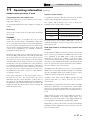
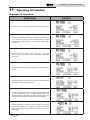
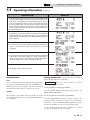
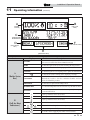
Installation & Operation Manual 11 Operating information (continued) OPERATION DISPLAY 8. If the space heating call for heat is active, and the tank thermostat or sensor starts a DHW call for heat, the boiler will switch to the DHW mode. If programmed for normal DHW operation (not as a zone), the DHW pump will turn on first, then the boiler pump will turn off 2 seconds later. This will divert the boiler’s outlet water from the heating system and send it to the tank coil instead. The control will then modulate to maintain the outlet temperature to the DHW boiler set point. 9. If the boiler is not part of a Cascade, and both the space heating and DHW calls for heat remain active long enough, the boiler will switch back and forth between the two heating modes until one of them is satisfied. 10. Once both calls for heat are satisfied, the control will turn off the burner. The blower will continue to run during a 10 second postpurge. 11. Any pumps that are running will continue to run for their respective pump delay times before turning off, unless programmed to remain on continuously. A 60 second anti-cycle period will start, which will delay any new call for heat until it times out. 12. In Standby, ready to start a new cycle. Access modes User Saving parameters (reference the Parameter Table in the Knight Wall Mount Service Manual) NOTICE Please note that the brackets ([]) denote screen status. The user can adjust space heating and tank target temperatures by pressing the NAVIGATION dial when “SETPOINTS” is flashing at the bottom of the display. The date and time, and the temperature units can also be changed (see page 63). To save parameters and exit programming: Installer Press the RIGHT SELECT [SAVE] key and then press the RIGHT SELECT [HOME] key. Most parameters are available only to the installer, accessible by entering the installer password, see the Knight Wall Mount Service Manual. To enter a parameter and continue programming: Press the RIGHT SELECT [SAVE] key 1 time to return to the parameter listings; press again to return to the menu listings. Remember to press the RIGHT SELECT [HOME] key when finished programming in order to save the changes made. See the Knight Wall Mount Service Manual for a detailed description of parameters and access modes. 69