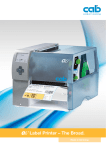
1
Technical details
6
3
1
4
2
5
7
1
ig graphic display
B
White backlight for optimum readability.
2
avigator pad
N
With illuminated lettering for interactive menu navigation.
3
F memory card
C
Slot for CF memory card for storage of label formats, fonts,
texts, graphics, programs or databases.
4
SB slot
U
Additional USB slot for service keys, keyboard, scanner
or USB memory.
5
ower switch
P
Attached to the front for easier handling.
6
olid metal cover
S
Made of die-cast aluminum with antibacterial coating.
All casings are made of stainless steel.
7
ibbon rewinder and unwinder
R
The three-part tightening axles enable fast and easy
ribbon exchange. Narrow ribbons can be fixed in any
position.
8
ibbon saver
R
Used for labels that are only to be partially printed. During
label feed the printhead is lifted in the blank area and the
ribbon is stopped.
9
ack-feed
B
Once a label has been dispensed, the next one can be
fed back behind the print line to ensure it can be printed
right to the edge and to prevent the liner from leaking
adhesive during a longer pause. With very sensitive
materials and to avoid ribbon folds, the printhead can be
raised during this process.
10
abel sensor
L
The gap or reflective sensor ensures the label is positioned
precisely and identifies the end of the material – independent
of gaps.
11
imple material replacement
S
The label material is inserted edgewise up to the end
position. The printhead and pressure roller are locked with
locking levers.
12
djustment of the print layout
A
The pressure can be adjusted easily by moving the
plungers.
13
ast printhead exchange
F
The printhead can be exchanged and adjusted easily
using the Allen key, which is ready to hand at the machine.
14
emoving the print roller
R
The print roller can be easily removed for cleaning or
replacement.
12
8 + 13
14
11
10
9
3