1
ADInstruments
PowerLab SP
Owner’s Guide
for PowerLab/4SP, PowerLab/8SP, and PowerLab/16SP models
Input 1
Output 1
PowerLab/4 SP
Input 2
Input 3
Input 4
ADInstruments
Trigger
Power
Output 2
Status
PowerLab/8 SP
Output 1
Input 1
Input 2
Input 3
Input 4
Output 2
Input 5
Input 6
Input 7
Input 8
ADInstruments
Trigger
Power
PowerLab/16 SP
Status
Output 1
Input 1
Input 2
Input 3
Input 4
Input 5
Input 6
Input 7
Input 8
Output 2
Input 9
Input 10
Input 11
Input 12
Input 13
Input 14
Input 15
Input 16
ADInstruments
Trigger
Power
Status
MacLab® System
PowerLab® System
This document was, as far as possible, accurate at
the time of printing. Changes may have been made
to the software and hardware it describes since
then, though: ADInstruments reserves the right to
alter specifications as required. Late-breaking
information may be supplied separately.
Trademarks of ADInstruments
MacLab, PowerChrom, and PowerLab are registered
trademarks of ADInstruments Pty Ltd. E-Corder
and the names of specific recording units, such as
PowerLab/16SP, are trademarks of ADInstruments
Pty Ltd. Chart, EChem, Histogram, Keeper, Peaks,
Scope, Translate, UpdateMaker, and UpdateUser
(application programs) are trademarks of
ADInstruments Pty Ltd.
Other Trademarks
Product: PowerLab/4SP (ML750); PowerLab/8SP
(ML785); PowerLab/16SP (ML795)
Hardware: Michael Macknight, Boris Schlensky,
Tim Spencer, Graham Milliken, Indulus Kradzins.
Documentation by staff of ADInstruments
Document Number: U-ML003S-OG-002E
Copyright © September 2001
ADInstruments Pty Ltd
Unit 6, 4 Gladstone Rd
Castle Hill, NSW 2154
Australia
Web:
http://www.adinstruments.com
E-mail: [email protected]
All rights reserved. No part of this document may
be reproduced by any means without the prior
written permission of ADInstruments Pty Ltd.
Apple, the Apple logo, Mac, Macintosh, and
PowerBook are registered trademarks of Apple
Computer, Inc. Power Macintosh, iMac, and
System 7 are trademarks of Apple Computer, Inc.
PowerPC is a trademark of International Business
Machines Corporation.
Pentium is a registered trademark of the Intel
Corporation.
Windows and Windows 95 are registered
trademarks of Microsoft Corporation. Windows
NT is a trademark of Microsoft Corporation.
All other trademarks are the properties of their
respective owners.
ii
PowerLab Owner’s Guide
Contents
Contents
A Technical Aspects
iii
Safety Notes
1 Overview
v
1
How to Use this Guide 2
First, Check Your PowerLab! 2
The PowerLab System 3
Computer Requirements 3
The Application Programs 4
ADInstruments Front-Ends 5
The PowerLab 5
The Front Panel 5
The Back Panel 9
2 Setting Up
15
Self-Test 16
The USB Connection 17
Connecting the PowerLab Using USB 18
USB Connection Rules 19
The SCSI Connection 20
SCSI Connection Rules 20
Setting the SCSI ID Number 22
SCSI Termination Rules 23
Connecting the PowerLab: Macintosh 23
Connecting the PowerLab: Windows 24
SCSI Strikes Back 26
27
How Does it Work? 27
The Analog Inputs 31
PowerLab Accuracy 33
The External Trigger 33
The Analog Output 34
Connections 35
USB Port 35
SCSI Port 35
I2C Expansion Port 36
Digital Input and Output Ports 37
Pod Connectors 37
B Troubleshooting
39
Problems: Macintosh 39
Problems: Windows 42
C Specifications
47
PowerLab/4sp Specifications 47
PowerLab/8sp Specifications 50
PowerLab/16sp Specifications 53
Glossary
Index
57
61
Licensing & Warranty Agreement
PowerLab Owner’s Guide
63
iii
iv
PowerLab Owner’s Guide
!
Safety Notes
Product Intention
PowerLab systems have been designed only for use in teaching and
research applications. They are not intended for clinical or critical lifecare use and should never be used for these purposes, nor for the
prevention, diagnosis, curing, treatment, or alleviation of disease,
injury, or handicap.
Applicable Safety Standards
When used with insulated transducers or ADInstruments isolated
front-ends, PowerLab systems are safe for human connection. The
ML132 Bio Amp, ML135 Dual Bio Amp, ML408 Dual Bio
Amp/Stimulator, ML116 GSR Amp, ML117 BP Amp and ML180 frontends conform to international safety requirements. Specifically, these
requirements are IEC601-1 and its addenda (Table S–1), and various
harmonised standards worldwide (UL2601.1 in the USA, and
AS/NZS3200.1 in Australia and New Zealand). In accordance with
European standards they also comply with the electromagnetic
compatibility requirements under EN60601-1, which encompasses the
EMC directive. Further information is available on request.
Table S–1
Applicable safety standards
met by ADInstruments
isolated front-ends
PowerLab Owner’s Guide
EC Standard No.
International Standard — Medical electrical equipment
IEC601-1:1988
General requirements for safety
IEC601-1-1:1992
Safety requirements for medical electrical systems
IEC601-1-2:1993
Electromagnetic compatibility
v
General Safety Instructions
•
Since the PowerLab is used in conjunction with a computer
(which has much higher leakage currents) the subject must be at
least 1.83 metres (6 feet) away from any of the equipment, to
avoid contact with the computer. The Bio Amp or BP Amp cable
provides enough distance. Alternatively, an isolation transformer
can be used to supply power to both the PowerLab and the
computer.
•
The PowerLab /4SP, PowerLab /8SP and PowerLab /16SP should
always be fitted with the recommended fuses for safe operation.
Specific information on fuse types and replacement is given in a
later chapter.
•
The PowerLab /4SP, PowerLab /8SP and PowerLab /16SP are
classified as Class I medical equipment, which means that
protection against electric shock in the event of a fault relies on a
direct connection through the power cable to your building’s
earth conductor. The power cable supplied with your PowerLab
provides the required ground connection to the power outlet. If
your building does not have power outlet sockets with a good
ground connection, then you may use the ground connection on
the rear of the PowerLab to provide the equipotential connection
to the building’s earth conductor. A ground connection is an
essential part of this equipment’s safety. Never use the PowerLab
without a ground connection.
Safety Symbol Explanation
Every ADInstruments device designed for connection to humans,
including the Bio Amp, BP Amp, GSR Amp and Stimulus Isolator,
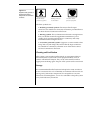
carries one or more of three safety symbols, as shown in Figure S–1.
These symbols appear next to those input and output connectors that
can be directly connected to human subjects.
vi
PowerLab Owner’s Guide
!
Figure S–1
Equipment safety symbols on
ADInstruments devices
designed for safe connection
to humans
BF symbol: Bodyprotected equipment
Warning symbol: see
documentation
CF symbol: Cardiacprotected equipment
The three symbols are:
• BF (body protected) symbol. This means that the input
connectors are suitable for connection to humans provided there is
no direct electrical connection to the heart.
• Warning symbol. The exclamation mark inside a triangle means
that you should consult the supplied documentation (you’re
reading it) for operating information or cautionary and safety
information before using the device.
• CF (cardiac protected) symbol. (Appears on some models of Bio
Amp, and every BP Amp.) This means that the input connectors
are suitable for connection to humans even when there is direct
electrical connection to the heart.
Cleaning and Sterilisation
This system is not supplied with materials or components likely to
need sterilisation. If you need to clean peripherals likely to be in
contact with different subjects, they can be cold-sterilised with an
appropriate sterilising agent. No part of the system can be autoclaved.
Storage
It is recommended that the hardware be kept below 40 °C and above
0 °C in a moisture-free or low-humidity environment when not in use
(storage only). Electronic components are susceptible to corrosive
substances and atmospheres, so it is also advisable to keep the system
away from laboratory chemicals.
Safety Notes
vii
Preventative Inspection and Maintenance
Both PowerLab systems and ADInstruments front-ends are
maintenance free and do not require periodic calibration or
adjustment to ensure medical safety. Internal diagnostic software
performs system checks during power up and will report errors if a
significant problem is found.
There is no need to open the instrument for inspection or
maintenance, and doing so within the warranty period will void the
warranty.
If you so wish, your PowerLab system can be periodically checked for
basic medical safety by using an appropriate medical safety testing
device. Tests such as earth leakage, earth bond, insulation resistance,
patient leakage and auxiliary currents and power cable integrity can
all be performed on the PowerLab system without having to remove
the covers. You should follow the instructions for the testing device if
performing such tests.
If the PowerLab system is found not to comply with such testing you
should contact your PowerLab dealer to arrange for the equipment to
be checked and serviced. You should not attempt to service the device
yourself.
viii
PowerLab Owner’s Guide
1
C H A P T E R
O N E
Overview
Your PowerLab recording unit, together with a range of specialised
application programs, provides a versatile data recording and
analysis system when used with a Windows or Macintosh computer.
This chapter provides an overview of the PowerLab system and
describes the basic features, connectors, and indicators of the SP
series PowerLabs: the PowerLab/4SP, PowerLab/8SP, and
PowerLab/16SP.
PowerLab Owner’s Guide
1
How to Use this Guide
This owner’s guide describes how to set up and begin using your
PowerLab recording unit. The chapters provide an overview of the
PowerLab system (the combined software and hardware package),
and a more detailed look at the features of your recording unit and its
connection to your computer. The appendixes provide technical
information about the recording unit, and solutions to problems. At
the end of this guide is a glossary of hardware terms, an index, and
warranty information.
The specifications and diagrams included in the appendixes are there
to help the more technically minded to understand what the
PowerLab can and cannot do, but this is not a service manual: only an
authorised ADInstruments distributor should attempt repairs. If you
modify the recording unit yourself, you void any rights you have
under warranty.
The user’s guides for the Chart and Scope application programs
provide detailed information on the software side of the PowerLab
system and its uses in acquiring, storing, and analysing data. Read
them after you have connected the PowerLab to your computer.
First, Check Your PowerLab!
Please do not attempt to connect the PowerLab to a power outlet or
computer or turn it on until you have read the first two chapters of
this owner’s guide, and have checked it as described below.
1. Check that all items in the accompanying packing list are
included in the box.
2. Check that there are no obvious signs of external damage to the
PowerLab.
3. Check that there are no obvious signs of internal damage, such as
rattling. Pick the PowerLab up, tilt it gently from side to side, and
listen for anything that appears to be loose.
4. Check that the correct voltage for your country is shown on the
back of the unit. Your PowerLab should be delivered with the
2
PowerLab Owner’s Guide
appropriate mains power voltage set, at either 100–120 volts or
220–240 volts. The setting is indicated at the right of the back
panel of the unit, beneath the power switch.
Figure 1–1
The voltage rating on the back
panel of the PowerLab
Check the voltage rating
beneath the power switch
If anything is missing, or the PowerLab seems to be damaged in any
way, or if no voltage, or the wrong voltage, is shown on the back
panel of the unit, contact your authorised ADInstruments distributor
immediately, and describe the problem. Arrangements can be made
to replace or repair the PowerLab. (Up-to-date contact addresses are
available in the software — see Appendix B in one of the software
user’s guides for details.)
The PowerLab System
The PowerLab system is an integrated system of hardware and
software designed to record, display, and analyse experimental data.
The hardware consists of the PowerLab recording unit and possible
ancillary devices (front-ends); the software consists of the application
programs (such as Chart and Scope) that run on the computer to
which the PowerLab is connected.
Your SP series PowerLab has considerable computing power of its
own and performs many tasks that are necessary during data
recording. Once the PowerLab transfers the data to the computer, the
data are available for display, manipulation, printing, storage, and
retrieval. The PowerLab/4SP has four inputs for recording external
signals, the PowerLab/8SP has eight, and the PowerLab/16SP has 16.
Computer Requirements
Computer requirements for both Windows and Macintosh depend on
whether you connect your /4SP, /8SP or /16SP PowerLab unit to your
computer using a SCSI or a USB interface. SCSI allows faster transfer
rates, but is less straightforward to use.
Windows
Chapter 1 — Overview
•
A computer with a Pentium processor or better
•
32 MB free RAM (48 MB for Windows NT or 2000)
3
•
Windows 95, 98, Me, NT 4.0, 2000 or later Windows operating
system
•
Additional requirements for USB: A USB interface on your
computer (this may be added via a card if necessary); Microsoft
Windows 98, Me, 2000, or later (Windows 95 and NT will not
work with USB).
•
Additional requirements for SCSI: An appropriate SCSI card
and cable (we recommend that you use a card and cable supplied
by ADInstruments — others may be suitable, but you should seek
technical advice if in doubt); a software component called ASPI
(ASPI will already be on your computer unless you are using
Windows NT or 2000, in which case you can install it using the
installer located on the PowerLab Installer CD).
Macintosh
These requirements assume you are using the latest version of Chart.
An older version of Chart is available for use with older Macintosh
computers.
•
A Power Macintosh computer (or computer with a PowerPC
microprocessor)
•
32 MB free RAM (64 MB recommended)
•
Mac OS 8.6 or later (Mac OS 9.0 or later recommended)
•
Additional requirement for USB: A USB interface on your
computer (this may be added via a card if necessary)
•
Additional requirement for SCSI: Either built-in SCSI or an
appropriate SCSI card and cable (we recommend that you use a
card and cable supplied by ADInstruments — others may be
suitable, but you should seek technical advice if in doubt).
The Application Programs
Two main application programs and their documentation are
provided with each PowerLab. Scope emulates a two-channel storage
oscilloscope. Chart emulates a multi-channel chart recorder (up to 16
4
PowerLab Owner’s Guide
channels, depending on the PowerLab model). Both provide many
other powerful features in addition, including computed functions,
triggering options, software-controlled stimulus generation, and
automated recording and analysis. Their user’s guides describe them
in full; the Getting Started with PowerLab manual gives summaries.
You must install the software to use your PowerLab. Installation
instructions are included in the user’s guides for the software.
ADInstruments Front-Ends
Front-ends are optional ancillary devices that can be connected to the
PowerLab to extend the system’s capabilities. They afford additional
signal conditioning and other features, and extend the types of
experiments you can conduct and the data you can record. For
instance, the Bio Amp is available if you need to perform electrically
isolated measurements of biological signals (PowerLabs should never
be connected to humans directly, unless it is through connections
marked as safe). A PowerLab can have as many front-ends connected
to it as it has analog inputs, roughly speaking. Front-ends are easily
added to or transferred between PowerLabs. They are automatically
recognised by the PowerLab system and seamlessly integrated into its
programs, operating under full software control.
Your ADInstruments distributor will have full information on
available front-ends and their uses and specifications, and will be
happy to discuss your requirements.
The PowerLab
It is a good idea to get familiar with some of the external features of
your PowerLab before connecting it to a power source. The rest of
this chapter discusses the different features, connectors, and
indicators of the PowerLab/4SP, PowerLab/8SP, and PowerLab/16SP.
The Front Panel
The front panel of your PowerLab provides most of the connectors for
interfacing with external signals, and indicators for various functions.
This section describes each of the front panel features.
Chapter 1 — Overview
5
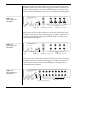
The PowerLab/4SP has three indicators at the left of the front panel,
one BNC connector for the external trigger, two BNC connectors for
output, and four BNC connectors (marked Input 1 to Input 4), with
four alternative Pod (DIN) connectors, for recording external signals.
Input 1
Output 1
PowerLab/4 SP
Figure 1–2
The front panel of the
PowerLab/4SP
Input 2
Input 3
Input 4
ADInstruments
Trigger
Power
Power
light
Output 2
Status
Trigger
Status light
Trigger light
Analog output connectors
Analog input connectors
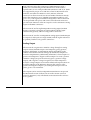
The PowerLab/8SP has three indicators at the left of the front panel,
one BNC connector for the external trigger, two BNC connectors for
output, and eight BNC connectors (marked Input 1 to Input 8), for
recording external signals.
PowerLab/8 SP
Figure 1–3
The front panel of the
PowerLab/8SP
Output 1
Input 1
Input 2
Input 3
Input 4
Output 2
Input 5
Input 6
Input 7
Input 8
ADInstruments
Trigger
Power
Power
light
Status
Trigger
Status light
Trigger light
Analog output connectors
Analog input connectors
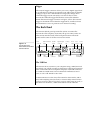
The PowerLab/16SP has three indicators at the left of the front panel,
one BNC connector for the external trigger, two BNC connectors for
output, and 16 BNC connectors (marked Input 1 to Input 16), for
recording external signals.
Figure 1–4
The front panel of the
PowerLab/16SP
PowerLab/16 SP
Output 1
Input 1
Input 2
Input 3
Input 4
Input 5
Input 6
Input 7
Input 8
Output 2
Input 9
Input 10
Input 11
Input 12
Input 13
Input 14
Input 15
Input 16
ADInstruments
Trigger
Power
Status
Power Status Trigger Trigger
light light light
Analog output connectors
6
Analog input connectors
PowerLab Owner’s Guide
Power and Status Indicators
The Power indicator on the front panel is a green light, which simply
shows that the PowerLab is getting power. The indicator next to it,
the Status indicator, provides a visual indication of what the
PowerLab is doing, and will flash different patterns and colours
depending on the state of the PowerLab.
Status Indicator
Table 1–1
Status indicator states (don’t
worry too much about these)
Meaning
Off
Idle and not yet initialised by the software.
Yellow flashes
When the PowerLab is powered up, the indicator flashes yellow a
number of times equal to the SCSI ID. For example, 4 yellow flashes
would indicate a SCSI ID number of 4.
Green constant
Idle, initialised, and waiting for a command from the computer.
Yellow constant
Sampling, or communicating with the computer.
Yellow flash then
one or more red
flashes
This indicates that the PowerLab has detected an internal fault during
the power-up test. The number of red flashes after the yellow flash
indicates the type of error that has been detected. This display will
keep repeating until the power to the PowerLab is turned off.
Analog Inputs
▲ Caution
PowerLab inputs and
outputs are not electrically
isolated. Human subjects
must not be connected
directly to the PowerLab.
If such measurements are
to be made, an isolated
front-end must be used,
such as the Bio Amp.
Chapter 1 — Overview
The analog inputs used to record external signals can handle signals
from ±10 V down to the microvolt (µV) range without the need for
additional external amplification. Each PowerLab analog input has an
independently programmable gain amplifier with its own filtering,
and AC/DC coupling. You can set up each input independently to
suit your requirements using the software. Note that applying more
than ±15 V to the analog inputs can damage the circuitry.
The PowerLab/4SP has four independent analog inputs (marked
Input 1 to Input 4), each with alternative connectors. The top BNC
connector can be used for single-ended input, and the 8-pin DIN Pod
connector below can be used for either single-ended or differential
input. Single-ended inputs record the difference between signal and
ground, and differential ones record the difference between positive
and negative input signals. Do not attempt to record from both the
BNC and Pod connectors for an input at the same time, or the signals
will compete.
7
Pod connectors allow the connection of ADInstruments Pods —
small, low-cost units that provide alternatives to front-ends for
specific tasks, for use with precalibrated transducers and so on. (Pods
are supported by Scope v3.6.3 and later, Chart for Macintosh v3.6.3
and later, and Chart for Windows v3.4.7 and later.) The Pod
connectors on the PowerLab/4SP do not handle transducers directly
unless the transducers are so labelled (unsuitable transducers will
give a very weak signal). Transducers designed for direct connection
can be provided with power and control, since the Pod connectors
provide some functions of the I2C output as well as alternative analog
inputs to the BNC connectors.
The PowerLab/8SP has eight independent analog inputs (marked
Input 1 to Input 8). All inputs are single-ended (with the signal
referenced to ground), and have only positive connectors.
The PowerLab/16SP has 16 independent analog inputs (marked Input
1 to Input 16). All inputs are single-ended (with the signal referenced
to ground), and have only positive connectors.
Analog Output
The PowerLab can generate a stimulus voltage through its analog
output sockets (marked Output 1 and Output 2), giving positive,
negative, differential, or independent stimuli, depending on the
sockets used and the software settings. By default, the outputs are
used for complementary (differential) stimulation, where Output 1 is
positive and Output 2 is negative. When Output 1 is used, a positive
stimulus voltage (set up in the software) gives a positive voltage
output, and a negative voltage a negative one. When Output 2 is
used, the voltage outputs are inverted. When both output sockets are
used, the stimulus is the difference between the voltages at the
positive and negative outputs: you could generate up to a 20-volt
pulse, given a ±10 V stimulus.
The outputs can be used for independent stimulation in Scope and
the Macintosh version of Chart, but not in the current version of
Chart for Windows (v3.4). The details are discussed in the software
user’s guides.
8
PowerLab Owner’s Guide
Trigger
The external trigger connector allows you to use a digital signal level
to synchronise recording to an external event. This input can handle
voltages of up to ±12 V. The threshold voltage (the voltage above
which the trigger circuit activates) is 2.9 volts for the SP series
PowerLabs. When the trigger threshold is crossed, the indicator
beside the external trigger connector will glow yellow. The external
trigger is described in more detail in Appendix A, and the software
documentation covers its practical use in normal recording.
The Back Panel
The PowerLab back panel provides the sockets to connect the
PowerLab to the computer, front-ends, the power outlet, and so on.
This section describes each of the back panel features. The back
panels are the same for all the SP series PowerLabs.
Figure 1–5
The back panel of the
PowerLab/4SP , PowerLab/8SP ,
and PowerLab/16SP
SCSI
connector
SCSI termination SCSI ID
switch
switch
Not intended for human connection
unless connections marked ap p rop riately
Digital Output
connector
Cooling
fan
Power Fuse
Power
socket holder switch
No user-serviceab le p arts inside.
Refer servicing to qualified service p ersonnel.
SCSI ID
Digital Outp ut
I 2 C Outp ut
Digital Inp ut
OFF
Serial
number
Termination
USB
connector
Rated V oltage:
220-250 V A .C.
50/60 Hz 30 V A
Do not ob struct fan outlet
ON
Serial No:
Made b y A DInstruments Pty Ltd, Castle Hill, A ustralia
I2C
connector
Digital Input
connector
Earth
Fuse Rating:
400 mA - 250 V
(Slow Blow)
Device rating
information
The USB Port
The PowerLab can connect to your computer using a USB (universal
serial bus) port, which provides an alternative to the SCSI connection.
This works with USB 1.1-compliant computers with USB connectors
or a USB card. USB needs a Power Macintosh with Mac OS 8.5 or
later, or a PC with Windows 98 or later.
A USB connection is a bit slower than SCSI for data transfer, and so
may limit sampling rates (in Chart) or increase delay times between
sweeps (in Scope), but it is less fussy. You can safely turn on or off, or
disconnect or reconnect, a USB-connected PowerLab while the
Chapter 1 — Overview
9
computer remains on (this is not the case with SCSI). The application
program (Chart or Scope) should not be on while this occurs, though.
Please read the details on USB in Chapter 2 of this guide before
connecting your PowerLab to your computer using USB.
The SCSI Port
The PowerLab can connect to your computer using a SCSI port,
which provides an alternative to the USB connection. (SCSI is an
acronym for small computer system interface, and is pronounced
‘scuzzy’ — which shows that engineers have no taste in acronyms).
SCSI provides fast data transfer, but requires that specific rules be
followed in order for it to work correctly: it is the most complex
aspect of setting up a PowerLab system. Please read the details on
SCSI in Chapter 2 of this guide before connecting your PowerLab to
your computer using SCSI.
Each PowerLab has a single 25-pin connector for connecting SCSI
cables, so it has to be used at the end of a SCSI chain. It is terminated
internally, but the termination can be switched on and off using the
SCSI Termination switch beside the SCSI connector (it should be on).
The SCSI ID Switch
The SCSI ID switch is there if you need to change the SCSI ID number
of your PowerLab. The PowerLab is factory-set to an identification
number of 4. The SCSI ID can be changed simply by pressing the
control buttons while the PowerLab is turned off. The new ID takes
effect when the PowerLab starts up again. Only some numbers are
valid: they depend on the type of computer, whether it has built-in
SCSI or a SCSI card, and the number of built-in and peripheral SCSI
devices in the SCSI chain. This is discussed in the next chapter.
I2C Output
The I2C output is a special port designed to connect to front-ends
made by ADInstruments. It supplies power and communications. A
PowerLab can have as many front-ends connected to it as it has
analog inputs, roughly speaking. Note. You should not attempt to run
other external devices from the I2C port: it is designed for use only
with ADInstruments front-ends. Only 50 mA maximum current can
10
PowerLab Owner’s Guide
be provided through this bus, so it should not be used for third-party
devices drawing more current.
Digital Input and Output Ports
The digital input and output connectors let you monitor and control
external devices respectively with the PowerLab. These recording
automation and control features are available in the Macintosh
version of Chart, but not in the current version of Chart for Windows
(v3.4), or in Scope.
The digital input monitors state changes: you can have a predefined
comment automatically inserted during recording when a digital
input changes to a particular state. The eight lines of the connector
allow monitoring of up to eight devices. The digital output can turn
on and off external devices, for example, pumps, relays, and indicator
lights, or can signal to some other device. The eight lines of the
connector allow control of up to eight devices.
Technical details of the digital input and output connectors are given
later in this guide: please refer to the descriptions before attempting
to connect equipment to them. More information on the use of digital
inputs and outputs is given in the user’s guide for the software.
Ground Connection
A special earthing (grounding) stud has been provided on the rear of
the PowerLab. This is an equipotential bonding connection post
compatible with the DIN 42801 standard. If the ground connector
post is used, the power cord ground connection should not be used: a
power cord with no ground connection should be used instead.
The ground connector post on the rear panel is used as a primary
earth connection (equipotential connection point) in situations that
require this type of connection, or if there is no ground provided via
the power cord. Safety standards in laboratories and similar
environments may require additional grounding protection when
connecting equipment to human subjects. In such cases, an
equipotential connection may be used for all linked equipment to
prevent ground loops, and power cords with no ground connections
should be available.
Chapter 1 — Overview
11
Power Connections
The power switch on the back right of the PowerLab turns the
PowerLab on and off; the 3-pin IEC power socket is used to connect
your PowerLab to a 3-pin earthed (grounded) power cable.
Figure 1–6
The power switch, fuse holder,
and power socket
Power
switch
Fuse
holder
Power
socket
Fuse Replacement
The fuse holder is located beside the power socket, and can only be
opened when the power cable is removed. To check the fuses, remove
the power cable from the PowerLab, and lever the fuse holder out
using the tab at its left, which is recessed in the power socket. The
fuse holder contains two ‘slow-blow’ fuses, which protect your
PowerLab from power surges.
Figure 1–7
To change fuses in the
PowerLab, remove blown
ones from the fuse holder
and slide new ones into place
in the empty sockets
Fuses
Fuse
holder
Replacement fuses must be of the correct type, as specified below for
100–120 volts or 220–240 volts operation:
•
12
100–120 V
1 Amp (5 × 20 mm) slow blow
(voltage rating 120 or 250 V)
PowerLab Owner’s Guide
•
220–240 V
400 mA (5 × 20 mm) slow blow
(voltage rating 250 V only)
The correct voltage for your country is shown on the back of the
PowerLab, by the power switch (see Figure 1–1, page 3).
Cooling Fan
The SP series PowerLabs can generate a fair amount of heat, so all of
them are fitted with a cooling fan. The cooling fan is visible in the rear
panel of the PowerLab. It maintains sufficient airflow in the enclosure
to keep the circuitry within operating tolerances. The fan outlet must
be kept unobstructed, and far enough from walls or other devices (at
least three inches, 8 cm) so as to not impede ventilation.
It is also important to make sure that the air inlets underneath the
PowerLab are unobstructed. Blocking the grilles may result in the
PowerLab heating up enough internally to affect the performance of
the system and reduce reliability.
Chapter 1 — Overview
13
14
PowerLab Owner’s Guide
2
C H A P T E R
T W O
Setting Up
This chapter starts with the PowerLab’s internal self-test, then looks
at the USB connection. It also looks at the SCSI connection in some
detail, including connection and termination rules, and setting the
SCSI ID number. It discusses how to connect up your PowerLab to a
Windows or Macintosh computer.
PowerLab Owner’s Guide
15
Self-Test
Now that you are familiar with some of the features of your
PowerLab, you should check that it is working properly before you
connect it to your computer.
The PowerLab performs a diagnostic self-test each time it is switched
on, whether or not it is connected to a computer. To test that your
PowerLab is functioning properly when you turn it on, follow the
instructions below, and observe the effects.
1. Connect the PowerLab to a power outlet using the power cable
that came with your unit. Turn the power on at the wall.
2. Turn on the power switch located on the rear of the unit.
The Power indicator on the front panel should glow green while
the PowerLab is on (see Figure 1–2, Figure 1–3, and Figure 1–4).
The Status indicator should flash yellow a number of times equal
to the SCSI ID of the PowerLab (see Table 1–1). If the internal
diagnostic check finds no problems, the Status indicator turns off
(showing that the PowerLab is idle; it only goes green when the
software is running).
If the indicators perform as described above, then your PowerLab has
successfully performed its internal self-test, and it can be safely
connected to your computer. If your PowerLab would not
successfully complete its self-test, something is wrong. If the Power
indicator does not glow green when the power switch is turned on,
then either the fuse has blown or there is a problem with the power
cable or PowerLab itself.
If an error is detected during the self-test, the Status indicator will
flash yellow and then a certain number of red flashes depending on
the fault. Flashing lights are used when the problem is one that
prevents the PowerLab communicating with the computer (such as a
hardware fault), and so cannot be shown in the software. The error
pattern will continue to be displayed, allowing you to take note of the
type of error that occurred. The number of red flashes indicates the
probable problem area. If the pattern is simply an alternating red
16
PowerLab Owner’s Guide
flash and yellow flash, then the SCSI ID has been set to the numbers 0
or 7, which cannot be used for an SP series PowerLab. Switch off your
PowerLab, change the SCSI ID for the PowerLab using the control on
its back panel, wait about five seconds, and then switch it back on.
If the error pattern is not simple alternating red and yellow flashes,
then something may be wrong with the hardware itself. The pattern
of red flashes indicates the likely problem area to ADInstruments
technicians. Take note of pattern, switch off your PowerLab, wait
about five seconds, and then switch it back on. If it still continues to
flash the pattern, then the PowerLab needs repair. Contact your
authorised ADInstruments distributor as soon as possible. Do not
attempt to repair the PowerLab yourself. If your PowerLab has
successfully performed its internal self-test, read on to find out how
to connect it to your computer.
The USB Connection
This section is essential reading before trying to use your PowerLab
with USB. The PowerLab is fitted with a USB (universal serial bus)
port, which provides an alternative to the SCSI connection. This
works with USB 1.1-compliant computers with USB connectors or a
USB card. On a PC, USB requires Windows 98, Me, 2000 or later (95 or
NT 4 won’t do). On a Macintosh, USB needs a Power Macintosh with
Mac OS 8.5 or later (but note that the latest PowerLab software
requires Mac OS 8.6).
USB devices are connected in a tree-like structure, with the host, the
computer, forming the root of the tree, and hubs allowing multiple
devices to connect to them, like the branches of the tree.
Figure 2–1
A USB tree: up to 126 devices
can be linked to the computer
Up to 126
linked USB
devices
Computer: root hub for the USB tree
Chapter 2 — Setting Up
17
A hub is simply a device that lets you extend the USB tree. It connects
to a USB device such as the computer, and multiple USB devices
(including other hubs) can connect to it in turn. It provides power for
those attached devices that need it. Up to five hubs can be connected
between the computer and the furthest USB device. As many as 127
devices can be connected on one tree, counting the computer. The
cable between any USB devices (including hubs) must allow a signal
to be transmitted in a certain time; in practical terms this means it
must be no more than 5 metres (16 feet) in length. Thus, no device can
be more than 30 metres (98 feet) from the computer.
USB is more tolerant than SCSI. It lets one plug in and remove
devices while the computer is on. It re-enumerates (provides
addresses for) devices as they are connected and disconnected, rather
than requiring fixed ID numbers. It has only one pair of connector
types, unlike SCSI, and does not need termination as SCSI does.
USB still has some restrictions. A USB connection is a bit slower than
SCSI for data transfer, and so may limit sampling rates (in Chart) or
increase delay times between sweeps (in Scope). Since all the devices
on a USB tree have a common communication pathway, if you have
many devices with a lot of information to transfer, they compete for
time. Using a video camera and a scanner at the same time as a
PowerLab may limit the sampling rates considerably.
USB has two sorts of cables, which it should not be possible to
interchange. Low-speed cables are cheaper, and suitable for mice and
so on. They are either captive (one end is permanently fixed to the
device) or use a custom connection, not a standard USB one. All
detachable USB cables are high speed, with fully shielded twistedpair cables, and standard USB connections: a narrow rectangular A
plug at one end and a squarer B plug with a bevelled top at the other.
All devices that can act as hubs have high-speed connections. The
PowerLab needs a high-speed connection, and is provided with a
suitable cable.
Connecting the PowerLab Using USB
Use the USB cable supplied with your PowerLab to connect the USB
port on its back panel to the USB port on the computer, or to an active
USB hub connected to the computer. USB ports and cables should be
marked with a trident-like icon (some non-standard ones might have
18
PowerLab Owner’s Guide
the letters ‘USB’ instead). USB cables are directional, and can only be
connected one way: the narrow rectangular A plug connects to a hub
(including the computer), and the squarer B plug with the bevelled
top connects to a USB device, such as the PowerLab. Connecting
Macintosh or Windows computers should be much the same in this
case: just look for the icons. If the connection is to a USB card installed
in the computer, there might not be any icons on the card. The narrow
rectangular sockets for the USB A plug are distinctive, though. Any
USB icons on the plugs should be on top.
Figure 2–2
Connecting a PowerLab to a
computer with USB
PowerLab
connection
USB icon
Computer or
hub connection
B plug
A plug
USB cable
USB Connection Rules
1. Cable length should be less than 5 metres (16 feet) between devices.
Devices include USB hubs. There are a maximum of five hubs on
any branch, so the maximum distance between the computer and
the Powerlab is 30 metres (98 feet). Do not use extension cables,
use hubs between approved high-speed cables.
Chapter 2 — Setting Up
19
2. Never attempt to make your own USB cable, or modify one.
USB is sensitive to cable impedances and cable lengths. Only use
a certified USB cable from a reliable supplier, never a cheap brand
or ‘something the workshop whipped up’. Your PowerLab is
supplied with the proper USB cable. If you need additional USB
cables, you should buy high-speed cables (fully shielded, twistedpair, and with standard USB connections) for reliable results.
3. Don’t disconnect the PowerLab while a program is using it.
Disconnecting a PowerLab while it is sampling is a bad idea and
may cause problems in some circumstances. It is better to be safe
than sorry, and not even disconnect a PowerLab while Chart or
Scope is open. Stop sampling and quit the program first before
disconnecting a PowerLab from USB.
You can safely turn on or off, or disconnect or reconnect, a USBconnected PowerLab while the computer remains on as long as the
application program (Chart or Scope) is off when you do it.
The SCSI Connection
This section is essential reading before trying to use your PowerLab
with SCSI. The user’s guide for your computer may have a section on
connecting SCSI devices, in which case you should read that as well.
The PowerLab is fitted with a SCSI port, which provides an
alternative to the USB connection. SCSI (small computer system
interface) is simply a communication standard for connecting a single
chain of SCSI devices together on a common high-speed bus
(information-carrying pathway). A SCSI connection can easily handle
the 4 megabytes per second maximum data transfer rate of the
PowerLab, although the speed of your computer may limit this. The
PowerLab must be placed at the end of the SCSI chain (if it is the only
device, then connected directly to the SCSI port of, or to an installed
SCSI card in, the computer).
SCSI Connection Rules
1. Never alter the SCSI chain while any SCSI devices are on.
Disconnecting a SCSI device while there is SCSI hard disk activity
20
PowerLab Owner’s Guide
Up to 6 or 7 linked SCSI devices, each with a unique ID
Figure 2–3
A SCSI chain: up to six (or
seven) devices can be linked
to the computer
…
Computer: reserves SCSI ID #7 for a SCSI card
host adapter, or #0 and #7 if SCSI is built in
The last SCSI device
must be terminated
may cause data loss or electrical damage. Switch all devices off,
including the computer, before adding or removing SCSI devices.
2. Each SCSI device must have its own unique SCSI ID number.
No two SCSI devices can have the same SCSI ID number or
malfunctions may result. SCSI ID numbers are discussed later.
3. Total cable length should be less than 6 metres (20 feet).
The SCSI circuits can only transmit data reliably over short
lengths of cable. The total length of the chain is important,
including short lengths of cable inside the computer and other
SCSI devices. Internal cabling can be from 10 to 30 cm (4 inches to
1 foot), depending on the device.
4. The SCSI chain must be terminated correctly.
Failure to terminate the chain properly can result in intermittent
communication, no communication, or failure of the computer to
boot up. The correct way of terminating is discussed later.
5. Turn SCSI devices on and off in the right sequence.
Turn on all external SCSI devices before the computer: this
ensures that the SCSI bus is stable before your computer tries to
use it. Turn off the computer before turning off other devices. This
prevents external SCSI devices from ‘hanging’ the SCSI bus and
preventing further access. Never operate with some devices in a
chain turned off, as this degrades performance and signal quality.
6. Avoid mixing cable types, brands, and styles.
A common source of trouble is mixing poor-quality SCSI cables
with approved high-quality SCSI cables. Different cable types or
brands may have different types of construction, impedance, and
wire placement, and this can result in problems when they are
Chapter 2 — Setting Up
21
used together. Also, whenever possible, avoid using cable joiners
and junctions to extend cable lengths.
Figure 2–4
The SCSI ID switch
7. Never attempt to make your own SCSI cable, or modify one.
SCSI is sensitive to cable impedances and cable lengths. Only use
an approved SCSI cable from a reliable supplier, never ‘something
the workshop whipped up’. If you need additional SCSI cables,
you should buy cables that are double-shielded (foil and braid),
with twisted pairs and shielded connector hoods for the most
reliable results. ADInstruments sells approved SCSI cables
Setting the SCSI ID Number
4
Your PowerLab was set to a SCSI ID number of 4 at the factory before
shipping. To change its SCSI ID, turn off the PowerLab, and all other
connected devices in the SCSI chain, before changing the SCSI ID
number. The SCSI ID switch is located on the back panel of the
PowerLab. A small panel with push buttons above and below it
displays the SCSI ID number. Press the [–] button above the indicator
to decrease it or the [+] button below the indicator to increase it.
Do not set the SCSI ID to numbers already used by other SCSI devices
in the chain. The maximum number of devices within the same SCSI
chain is eight. Each device in the chain must have a unique SCSI
identification number assigned to it. The numbers range from 0 to 7,
with 7 the highest priority device. A computer with built-in SCSI
usually reserves the values 0 and 7. On the Macintosh, 7 is used for
the computer and 0 may be used for an internal SCSI hard disk (an
internal SCSI CD, if there is one, usually takes ID 3, as well). On a PC,
SCSI ID number 7 is usually reserved by a SCSI card host adapter or
built-in SCSI controller, and SCSI ID number 0 is used by an internal
SCSI hard disk, if there is one. To prevent most problems, therefore,
the numbers 0 or 7 cannot be used for an SP series PowerLab.
Externally connected devices should have readable SCSI ID switches
you can check, although some may have ID switches that are difficult
to see or read. Internally connected devices should be described in the
manual that came with your computer. If you are unsure about the
SCSI devices connected to a Macintosh computer, you can use tools
such as SCSIProbe (a free utility available from the Internet and user
groups), which lists all SCSI devices attached, what they are, and
which SCSI ID they use. If you are unsure about the SCSI devices
22
PowerLab Owner’s Guide
connected to a Windows computer (particularly internal ones), your
PC technical support person or IS manager may be able to help.
To confirm that you have set the right SCSI ID number, turn on the
PowerLab and watch to see if the Status indicator flashes yellow a
number of times equal to its SCSI ID number.
SCSI Termination Rules
Terminating the SCSI bus is essential to preserve the integrity of the
high-speed signals present on the bus. Termination helps keep these
signals free from noise and prevents unwanted signal reflections up
and down the bus. Without correct termination, the SCSI signals
could be swamped by reflections from previous signals, resulting in a
jumble of meaningless electronic noise. The way in which you
terminate the SCSI chain will depend on the number of SCSI devices
you wish to connect to your computer along with the PowerLab. The
SCSI connection between your PowerLab and computer is a very
good way to provide safe and reliable high-speed data transfer,
provided that you follow the rules for proper termination.
A SCSI chain is correctly terminated by placing terminators at each
end of the chain. The computer is terminated internally, so forming
one end of the chain. (A SCSI host adapter will be terminated: if the
SCSI controller and internal SCSI hard disk are both terminated, you
may have to alter things — see the documentation that came with the
card or computer.) The PowerLab should be at the other end of the
chain, with its SCSI termination switch on.
Connecting the PowerLab: Macintosh
Those Macintosh computers without USB (and even some with USB)
should have SCSI built in or available through a card. Not all SCSI
cards are suitable, especially high-end ones (ultra-wide SCSI and the
like). SCSI cards and cables with which the PowerLab should work
reliably are sold by ADInstruments. Make sure that you have the
correct, 25-pin to 25-pin SCSI cable to connect up your PowerLab.
(Most PowerBooks and Duo Docks have a special space-saving
square 29-pin SCSI connector, which requires another connector or
adapter. This can be purchased separately from your Apple dealer.)
Chapter 2 — Setting Up
23
If the PowerLab is the only SCSI device to connect to the computer,
then simply connect the two together with the correct SCSI cable, and
turn the SCSI termination switch on. If you wish to use multiple SCSI
devices with the computer, the first and last devices in the chain
should be terminated. The PowerLab must be at the end of the chain,
since it has only one SCSI connector, and its internal terminator must
be switched on.
Macintosh or Macintosh-compatible
PowerLab/4SP, PowerLab/8SP, PowerLab/16SP
Figure 2–5
Connecting a PowerLab to
the computer (look for the
SCSI icon if the back panel is
different)
SCSI icon
Termination
Switch
25-pin connector
SCSI cable
Connecting the PowerLab: Windows
Most modern PC computers should have SCSI available through a
card (some have it built in). Not all SCSI cards are suitable, especially
high-end ones (ultra-wide SCSI and the like). ADInstruments sells
SCSI cards and cables with which the PowerLab should work reliably.
(It may not be possible to find a cable to fit all connections, though.)
Make sure that you have the correct SCSI cable to connect up your
PowerLab. It requires a 25-pin D-style connector for the PowerLab. If
you have a portable computer with a PC card SCSI adapter, then the
card probably needs the specific cable that came with that particular
card. You may have to purchase separately a cable adapter to connect
the end of your SCSI cable to the 25-pin connector for the PowerLab.
24
PowerLab Owner’s Guide
The card should have full instructions on installation with it. The
SCSI adapter card will usually be terminated, and at one end of the
chain (this is always the case for PC card SCSI adapters), although if
the computer has built-in SCSI, you may have an internal SCSI device
in your PC that is terminated, with the host adapter in the middle of
the chain. If there is a problem with cables, or you are unsure about
any devices, such as a hard disk, connected to your computer on SCSI
internally, your PC technical support person or IS manager should be
able to help you.
If the PowerLab is the only SCSI device to connect to the computer,
then simply connect the two together with the correct SCSI cable, and
turn the SCSI termination switch on. If you wish to use multiple SCSI
devices with the computer, the first and last devices in the chain
should be terminated. The PowerLab must be at the end of the chain,
since it has only one SCSI connector, and its internal terminator must
be switched on.
PC computer
Figure 2–6
Connecting a PowerLab to
the computer (25-pin
connector shown)
PowerLab/4SP, PowerLab/8SP, PowerLab/16SP
SCSI card
25-pin connector
Termination
Switch
SCSI cable
SCSI Cards with Windows NT or Older Computers
Windows 95 and 98 both come with a number of generic SCSI drivers
already installed that should work with most cards, including any
that ADInstruments supplies. Windows NT may not have the right
Chapter 2 — Setting Up
25
SCSI driver available, so the driver might have to be installed
manually, perhaps from the original NT system CD. The SCSI card
should have instructions on the driver it needs and how to install it.
Older, pre-PCI computers require a special ISA or ISO bus SCSI card.
Such a card should come with its own manual, and may take some
effort to set up. It will probably require assistance from a PC technical
support person.
SCSI Strikes Back
Not following the SCSI device connection and termination protocols
can lead to more problems than you might think. The possible
dangers include loss of data, intermittent communications,
corruption of data on a SCSI hard disk, failure of the computer to
boot from a SCSI drive, and failure of the computer to recognise SCSI
devices connected to it. Such problems are very unlikely, however, if
you follow the rules.
26
PowerLab Owner’s Guide
A
A P P E N D I X
A
Technical Aspects
This appendix describes some of the important technical aspects of
the PowerLab/4SP, PowerLab/8SP, and PowerLab/16SP, to give some
insight into how they work. You do not need to know the material
here to use your PowerLab. It is likely to be of especial interest to the
technically minded, indicating what the PowerLab can and cannot
do, and its suitability for particular purposes. You should not use it as
a service manual: remember that user modification of the PowerLab
voids your rights under warranty.
How Does it Work?
The PowerLab is essentially a smart peripheral device specifically
designed to perform the various functions needed for data
acquisition, signal conditioning, and pre-processing. It contains its
own microprocessor, memory, and specialised analog amplifiers for
signal conditioning. The block diagrams in Figure A–1, Figure A–2,
and Figure A–3 show the essential elements of each PowerLab.
All sampling, output, and communication functions are controlled by
an internal 32-bit, 68340 microprocessor running at 16 MHz (16
million cycles per second). This CPU (central processing unit) has
access to 512 kilobytes of RAM (random access memory) for data
storage and buffering prior to transmission to the computer. The
PowerLab makes use of FIFO (first in, first out) memory devices,
which provide a temporary storage area for both analog input and
analog output signals. These storage areas help increase the
processing capacity of the hardware by relieving the load on the
PowerLab microprocessor.
PowerLab Owner’s Guide
27
The PowerLab can use SCSI or USB, whether built-in or via a card, to
communicate with the computer. SCSI (small computer system
interface) provides data transfer rates of up to 4 MB per second on
fast computers. The lower-speed USB (universal serial bus) provides
data transfer rates of up to 500 kB per second.
Figure A–1
Block diagram of the
PowerLab/4SP
The PowerLab has four (PowerLab/4SP), eight (PowerLab/8SP), or 16
(PowerLab/16SP) analog inputs, used to record external signals. The
outputs of their input amplifiers are multiplexed to a 16-bit ADC
A
A
A
A
A
A
A
A
AAAAAAAAAAAA
A
A
AA
AA
AA
SCSI Port
I 2C Port
USB Port
I2 C
Controller
USB
Controller
Digital Input
Digital Output
ROM
SCSI
Controller
POWER
MC68340
RAM
SUPPLY
LATCH
CPU
LATCH
FIFO
LATCH
FIFO
SAMPLING
50/60 Hz
Mains Sync
FIFO
LATCH
16 BIT ADC
CONTROL
Multiplexer
LOGIC
DAC
DAC
Pod
Control
Analog Output
28
External Trigger
Analog Input
PowerLab Owner’s Guide
(analog-to-digital converter). The ADC can sample at up to 200,000
samples per second. The CPU assembles groups of samples into
blocks and then transmits them to the computer, where the
application program receives, records, and displays the data.
Sampled data from the ADC are stored in FIFOs until the CPU is
ready to read them. The FIFOs let the CPU know when they are
getting full, at which point it will read all of their data very quickly.
This frees the CPU from the need to read every sample from the ADC
as it is ready, so that it can perform other tasks.
The external trigger input (marked ‘Trigger’ on the front panel) is
connected to a comparator circuit that triggers when the input
AA
SCSI PORT
Figure A–2
Block diagram of the
PowerLab/8SP
I2C Port
USB Port
I2C
Controller
USB
Controller
Digital Output
Digital Input
ROM
SCSI
Controller
MC68340
CPU
POWER
SUPPLY
LATCH
RAM
50/60Hz
LATCH
MAINS
SYNC
LATCH
SYSTEM GLUE
& REAL-TIME
CLOCK
FIFO
SAMPLING
CONTROL
GLUE
FIFO
FIFO
LATCH
16-BIT ADC
Multiplexer
DAC
DAC
Analog
AnalogOutput
Output
Appendix A — Technical Aspects
External
Trigger
Ext Trigger
Analog
Input
Analog
Input
Channels
29
voltage exceeds 2.9 volts. This signal is fed to circuitry that notifies
the CPU that an external trigger event has been detected. The CPU
then carries out the task for which the trigger is being used (such as
pre-triggering or post-triggering). When the trigger threshold is
crossed, the indicator beside the trigger connector glows yellow.
Two 14-bit DACs (digital-to-analog converters) are used to control the
analog outputs of the PowerLab (marked ‘Output 1’ and ‘Output 2’
on the front panel). The DACs produce waveforms under software
control that are fed through an attenuation network to produce
different full-scale ranges. The signals are then buffered by a power
AA
SCSI PORT
Figure A–3
Block diagram of the
PowerLab/16SP
I2C Port
USB Port
I2C
Controller
USB
Controller
Digital Output
Digital Input
ROM
SCSI
Controller
MC68340
CPU
POWER
SUPPLY
LATCH
RAM
50/60Hz
LATCH
MAINS
SYNC
LATCH
SYSTEM GLUE
& REAL-TIME
CLOCK
FIFO
SAMPLING
CONTROL
GLUE
FIFO
FIFO
LATCH
16-BIT ADC
Multiplexer
DAC
DAC
Analog Output
Analog Output
30
External Trigger
Ext Trigger
Analog Input
Analog Input Channels
PowerLab Owner’s Guide
▲ Caution
PowerLab inputs and
outputs are not electrically
isolated. Human subjects
must not be connected
directly to the PowerLab.
If such measurements are
to be made, an isolated
front-end must be used,
such as the Bio Amp.
amplifier to give them the capability to drive heavier loads. The
PowerLab can store stimulation data in FIFOs, so that it can stimulate
at a frequency independent of the analog input sampling rate. The
FIFOs also allow the generation of much faster stimuli and
continuous waveforms, with little or no load on the CPU.
The PowerLab is also fitted with an I2C front-end expansion port.
This 9-pin port supplies both power and control to ADInstruments
front-ends using a 4-wire serial bus (two wires for standard I2C and
two control lines).
The digital input and output connectors provide a means of using the
PowerLab to monitor and to control external devices respectively. The
digital input monitors state changes: the eight lines of the connector
allow monitoring of up to eight devices. The digital output can turn
on and off external devices or can signal to some other device. The
eight lines of the connector allow control of up to eight devices. These
recording automation and control features are available in the
Macintosh version of Chart, but not in the current version of Chart for
Windows (v3.4), or in Scope.
The PowerLab uses an IEC601-1 compliant linear power supply, not a
switching power supply, which makes it a little heavier, but a lot
quieter electrically. It is important to note that the PowerLab has a
limited amount of power available for external devices. Because of
these power restrictions, you should not use the PowerLab as a
power source for external devices other than front-ends produced by
ADInstruments.
The Analog Inputs
▲ Caution
Applying more than ±15 V
to the input can damage
the channel input circuits.
PowerLab input amplifiers have been designed with a considerable
amount of computer-controlled gain (up to × 5000). Thus it is possible
to record a variety of signals without any external pre-amplification.
Each analog input is a separate DC amplifier, with programmable
gain able to be set independently (the gain is set through the software
range control: the less the range, the more the gain). The input
amplifiers of the PowerLab/8SP and PowerLab/16SP are singleended, but can be set by the software to be either positive or negative
(inverting or non-inverting). The PowerLab/4SP input amplifiers can
be set by the software to be either single-ended — positive or
negative — or differential. In the differential setting, the amplifier
Appendix A — Technical Aspects
31
measures the difference between the positive and negative inputs of a
Pod connector, irrespective of ground. Differential signals can only be
recorded using the Pod connectors on the PowerLab/4SP; the BNC
analog inputs on the PowerLabs are all single-ended.
It is important to note that the PowerLab grounds the inputs to
amplifiers not in use. It also grounds each amplifier and measures the
DC offset voltage when the gain is changed. In this way, the software
corrects for any DC drift or offset in the circuits that may develop
over time or between readings. The operation of the input amplifiers
is illustrated by the block diagrams below.
Channel control bus
BNC Analog input
AC/DC
coupling
control
1 MΩ
Gain
control
Instrument
amplifier
50 Hz lowpass filter
Channel control bus
Analog input
BNC
Figure A–5
Block/schematic diagram of
the input amplifier circuitry for
dual BNC and Pod inputs
Grounding
and input
selection
To multiplexer
Figure A–4
Block/schematic diagram of
the input amplifier circuitry for
BNC-only inputs
AC/DC
coupling
control
Grounding
and input
selection
Gain
control
Instrument
amplifier
50 Hz lowpass filter
To multiplexer
Pod Input
1 MΩ
1 MΩ
The input amplifiers can be set to pass both DC and AC signals, or to
pass only AC signals without passing DC signals. Input impedance is
one megohm (1 MΩ).
32
PowerLab Owner’s Guide
Each input produces either a filtered or an unfiltered signal. Each
input is fitted with a software-selectable low-pass filter (a fourthorder anti-aliasing filter), which can be set at a range of frequencies
from 20 kHz down to 1 kHz. The unfiltered signal has an effective
bandwidth of 45 kHz (within the Nyquist frequency when sampling
at 100,000 samples per second).
PowerLab Accuracy
Your PowerLab was calibrated at the factory to an accuracy of better
than 0.1%. Some ‘zero drift’ or ‘gain drift’ can occur with time. This
can affect the accuracy of measurements, especially at the highest
input gains. The unit can be recalibrated, but in most circumstances
this is not necessary in its lifetime. There are several reasons for this.
DC drift compensation. Each time that recording is started manually
or by triggering or the gain is changed (that is, very often in most
cases), the input to the amplifier is grounded and any DC due to the
amplifier’s drift with temperature and age is measured. The
measured voltage is removed from the readings for that input
through software correction, in a process transparent to the user.
Calibration facilities. It is recommended and sound practice to
calibrate a measuring system from the transducer to the output. After
applying two known values to a transducer (say at 20% and 80% of
full scale) and recording the signal, you can use the units conversion
feature of ADInstruments applications to convert and display
transducer readings in the appropriate units. This will compensate for
any minor inaccuracies in amplifier gain and transducer calibration.
The External Trigger
The external trigger provides a digital input for synchronising
sampling to external devices. The external trigger input represents
1 TTL (transistor–transistor logic) load. The input is off for input
voltages between –12 V and the external trigger level, and on
between that and +12 V. The input will be overloaded if the voltage is
outside the range –12 V to +12 V. The external trigger level is 2.9 V ±
0.25V; once on, the trigger turns off at 1.8 V ± 0.25V, giving a
hysteresis voltage of 1.1 V. When the external trigger input is on, the
indicator beside it is on.
Appendix A — Technical Aspects
33
The PowerLab has an optically isolated external trigger input, thus
there is no direct connection between the external trigger ground and
the ground of the device connected to it. This removes ground noise
and current problems, and improves static discharge immunity. In
order for the external trigger to work, though, a voltage must be
applied between the outer ring and the inner pin on the connector.
Applying a voltage to the centre pin won’t result in triggering (as it
could on earlier PowerLabs). The equivalent circuit of the external
trigger is basically an LED (light-emitting diode) in series with a
resistor, thus the device driving the external trigger must be capable
of supplying at least 1 mA of current to cause the optocoupler to
work. (The second diode shown below protects the optocoupler.)
Centre pin of BNC
Optocoupler
1500 Ω resistor
Figure A–6
The equivalent circuit of the
external trigger input
Outside ring
of BNC
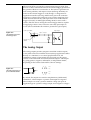
The Analog Output
The analog outputs provide computer-controlled variable outputs
(±10 V) that can be used with the Chart and Scope applications either
directly as a stimulator, or to control peripheral devices. All
stimulation voltage is generated by the PowerLab via the output
sockets on the front of the PowerLab (marked Output 1 and Output
2), giving positive, negative, differential, or independent stimuli,
depending on the sockets used and the software settings.
+10 V
Figure A–7
The analog output stage, set
up for a differential stimulus
From DAC
+
Ground
–
–10 V
+10 V
–10 V
By default, the outputs are used for complementary (differential)
stimulation, where Output 1 is positive and Output 2 is negative.
When Output 1 is used, a positive stimulus voltage (set up in an
application) gives a positive voltage output, and a negative voltage a
34
PowerLab Owner’s Guide
negative one. When Output 2 is used, the voltage outputs are
inverted. When both output sockets are used, the stimulus is the
difference between the voltages at the positive and negative outputs:
you could generate up to a 20-volt pulse, given a ±10 V stimulus.
The outputs can be used for independent stimulation in Scope and
the Macintosh version of Chart, but not in the current version of
Chart for Windows (v3.4). The details are discussed in the software
user’s guides.
Connections
This section of the appendix contains ‘pinout’ and electrical details of
some of the connectors fitted to the PowerLab. You should read it
carefully before attempting to connect cables other than those
supplied with the unit to the PowerLab. Using cables that are wired
incorrectly can cause internal damage to the PowerLab and will void
your rights under warranty.
USB Port
The PowerLab is fitted with a USB (universal serial bus) port, which
provides an alternative to the SCSI connection. This works with
computers with USB connectors or a USB card. USB needs a Power
Macintosh with Mac OS 8.5 or later, or a PC with Windows 98 or later.
Figure A–8
The USB connector
Your PowerLab is supplied with a proper high-speed USB cable. If
you need additional USB cables, you should buy high-speed cables
(fully shielded, twisted-pair, and with standard USB connections) for
reliable results.
SCSI Port
The PowerLab uses a single 25-pin D-type female connector for the
SCSI port. If you are using a Macintosh, you probably need a 25-pin
Appendix A — Technical Aspects
35
to 25-pin cable. If you are using a Windows PC, the connection at the
other end of the cable depends on your set-up.
Figure A–9
The 25-pin SCSI connector
SCSI is sensitive to cable impedances and connection lengths. The
incorrect wiring of a SCSI cable can result in damage to the SCSI
circuitry, or random SCSI activities being performed. You should,
therefore, use only approved SCSI cables such as the ones available
from ADInstruments, and never attempt to make your own.
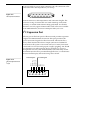
I2C Expansion Port
The I2C port on the back panel of the PowerLab provides expansion
support for ADInstruments front-ends. This port provides both
power and control signals for these front-ends. The I2C bus has a
daisy-chain structure that allows simple connection of additional
front-ends to the system. A PowerLab can have as many front-ends
connected to it as it has analog inputs, roughly speaking. You should
not attempt to run other external devices from the I2C port: it is
designed for use only with ADInstruments front-ends. Only 50 mA
maximum current can be provided through this bus, so it should not
be used for third-party devices drawing more current.
Front-end power
DGND
UNREG–20 V
UNREG+10 V
UNREG+20 V
SCL
DSC
SDA
DSD
INT
Figure A–10
The pin assignments for the
I2C port
I2C control signals
5
1
9
36
6
PowerLab Owner’s Guide
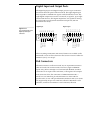
Digital Input and Output Ports
The digital input port and digital output port are 15-pin connectors
situated on the back panel of the PowerLab. The eight digital input
lines respond to standard TTL signals with a threshold of 2.2 V. The
eight digital output lines can turn on and off, or signal to, up to eight
external TTL devices. The digital output lines are capable of driving
five TTL loads overall (50 mA maximum load per line; 250 mA
maximum total load).
IN 1
IN 2
IN 3
IN 4
IN 5
IN 6
IN 7
IN 8
8
15
GROUND
EVENT (2) OUT
EVENT (2) IN
EVENT (1) IN
9
8
1
15
9
OUTEVT 1 OUT
OUTEVT 2 OUT
OUTEVT 1 IN
OUTEVT 2 IN
1
GROUND
Figure A–11
The pin assignments for the
digital input and output
connectors
OUT 1
OUT 2
OUT 3
OUT 4
OUT 5
OUT 6
OUT 7
OUT 8
Digital output
Digital input
These recording automation and control features are available in the
Macintosh version of Chart, but not in the current version of Chart for
Windows (v3.4), or in Scope.
Pod Connectors
The Pod connectors on the PowerLab/4SP are 8-pin DIN connectors.
(The PowerLab/8SP and PowerLab/16SP have single-ended BNC
inputs only.) Do not attempt to record from both the BNC and Pod
connectors for an input at the same time, or the signals will compete.
Pod connectors allow the connection of ADInstruments Pods —
small, low-cost units that provide alternatives to front-ends for
specific tasks, for use with precalibrated transducers and so on. (Pods
are supported by Scope v3.6.3 and later, Chart for Macintosh v3.6.3
and later, and Chart for Windows v3.4.7 and later.) The Pod
Appendix A — Technical Aspects
37
connectors on the PowerLab/4SP do not handle transducers directly
unless the transducers are so labelled (unsuitable transducers will
give a very weak signal). Transducers designed for direct connection
can be provided with power and control, since the Pod connectors
provide some functions of the I2C output as well as alternative analog
inputs to the BNC connectors.
Input (–)
Figure A–12
The pin assignments for the
Pod connector
Negative 5 V
SCL
SDA
Positive 5 V
Input (+)
Analog Ground
Input (+) ref.
Digital Ground
38
PowerLab Owner’s Guide
B
A P P E N D I X
B
Troubleshooting
This appendix describes most of the common problems that can occur
with your PowerLab recording unit. It covers how these problems are
caused, and what you can do to alleviate them. If the solutions here
do not work, your software guide may contain remedies for possible
software problems. If none of the solutions here or in the software
guide appears to help, then consult your ADInstruments distributor.
Problems: Macintosh
Nearly all the problems that users encounter are connection problems
and SCSI problems. Improper connections can result in a loss of all or
some of a signal. SCSI difficulties can cause data loss, failure of the
computer to recognise that SCSI devices are attached to it, and
difficulties using other SCSI devices. Incompatible SCSI adapter cards
and cables may also cause problems. Obviously, the SCSI problems
will not apply if you use USB.
The PowerLab Status indicator light flashes yellow then red when
the PowerLab is turned on
▼ Refer
Self-Test, p. 16
If the pattern is simply an alternating red flash and yellow flash, then
the SCSI ID has been set to the numbers 0 or 7, which cannot be used
by an SP series PowerLab. Only 1 to 6 are valid SCSI ID numbers.
•
PowerLab Owner’s Guide
Switch off your PowerLab and any other connected devices,
change the SCSI ID for the PowerLab using the control on the
back panel, wait about five seconds, and then switch it back on.
Check any other connected SCSI devices as well at the same time.
39
An internal problem has been discovered by the diagnostic self-test
(this is performed by the PowerLab each time it powers up).
•
Turn everything off, and then after at least five seconds turn the
PowerLab back on again. This should clear a temporary problem.
If not, then the PowerLab may need repair. Take note of the
flashing pattern, and consult your ADInstruments distributor.
The computer refuses to boot with the PowerLab connected, or the
computer can’t find the PowerLab
The PowerLab is off or the power is switched off at the wall, the
power cable is not connected firmly, or a fuse has blown.
•
Check switches, power connections, and fuses.
A poor connection between PowerLab and computer, or bad cable.
•
Ensure that the cable is firmly attached at both ends and try
again. If there is still a problem, try a new cable.
SCSI problems: two SCSI devices on the bus have the same SCSI ID,
or termination is incorrect or unsuitable.
•
Check that each device has a unique ID number and that the SCSI
chain is terminated correctly. (As a last resort, if the PowerLab is
the only connected SCSI device, try leaving it unterminated.)
The SCSI adapter card is incompatible with the computer or the
PowerLab or both. We cannot guarantee that the PowerLab will work
reliably with a card we did not supply.
•
Try another card, preferably one we supplied.
The PowerLab has an internal problem or has ‘hung’.
•
Turn everything off, and then after at least five seconds turn the
PowerLab back on again. Turn on the computer and try using the
software again.
The PowerLab is connected via USB and the computer does not
properly support USB.
40
PowerLab Owner’s Guide
•
USB needs a Power Macintosh with Mac OS 8.5 or later; it simply
will not work with earlier hardware, such as a 68K Macintosh, or
earlier operating systems, such as System 7: use SCSI with these.
The computer hangs up while recording, or there is data loss
A poor connection between PowerLab and computer, or bad cable.
•
Ensure that the cable is firmly attached at both ends and try
again. If there is still a problem, try a new cable.
SCSI problems: two SCSI devices on the bus have the same SCSI ID,
or termination is incorrect or unsuitable.
•
Check that each device has a unique ID number and that the SCSI
chain is terminated correctly. (As a last resort, if the PowerLab is
the only connected SCSI device, try leaving it unterminated.)
The PowerLab doesn’t work or the program crashes after a short time
A poor connection between PowerLab and computer, or bad cable.
•
Ensure that the cable is firmly attached at both ends and try
again. If there is still a problem, try a new cable.
SCSI problems: two SCSI devices on the bus have the same SCSI ID,
or termination is incorrect or unsuitable.
•
Check that each device has a unique ID number and that the SCSI
chain is terminated correctly. (As a last resort, if the PowerLab is
the only connected SCSI device, try leaving it unterminated.)
The SCSI adapter card is incompatible with the computer or the
PowerLab or both. We cannot guarantee that the PowerLab will work
reliably with a card we did not supply.
•
Try another card, preferably one we supplied.
Partitioning problems on the hard disk (while rare, this can happen
even with new disks).
•
Appendix B — Troubleshooting
Use disk-checking utility applications to check the SCSI driver
and root directory on the hard disk. Partitioning programs may
41
also have effective low-level disk checking. The programs will
probably fix the problems, or otherwise indicate what needs to be
done (such as reinstalling the SCSI driver), and their manuals
should explain the technical details involved.
The PowerBook computer stops working normally, and instead
shows a diamond with its SCSI ID number on screen
The PowerBook is acting as a SCSI hard disk. This means that the
wrong (30-pin) connector and cable were used to connect it to the
PowerLab. You need a different (29-pin) cable and connector to make
a normal SCSI connection to peripherals.
•
Use the correct cable to connect your PowerBook to the PowerLab
(the cable should be available from your Apple dealer).
Signals seem weak or interacting on the PowerLab/4SP
You may be using both the BNC connector and the Pod connector for
an input at the same time, with resultant signal competition.
•
Make certain that you use only one of the alternative connectors
(BNC or Pod) for an input when recording.
Problems: Windows
Most problems that users encounter are connection problems and
SCSI problems. Improper connections can result in a loss of all or
some of a signal. SCSI difficulties can cause data loss, failure of the
computer to recognise that SCSI devices are attached to it, and
difficulties using other SCSI devices. Incompatible SCSI adapter cards
and cables may also cause problems. Obviously, the SCSI problems
will not apply if you use USB.
The PowerLab Status indicator light flashes yellow then red when
the PowerLab is turned on
If the pattern is simply an alternating red flash and yellow flash, then
the SCSI ID has been set to the numbers 0 or 7, which cannot be used
by an SP series PowerLab. Only 1 to 6 are valid SCSI ID numbers.
42
PowerLab Owner’s Guide
•
▼ Refer
Self-Test, p. 16
Switch off your PowerLab and any other connected devices,
change the SCSI ID for the PowerLab using the control on the
back panel, wait about five seconds, and then switch it back on.
Check any other connected SCSI devices as well at the same time.
An internal problem has been discovered by the diagnostic self-test
(this is performed by the PowerLab each time it powers up).
•
Turn everything off, and then after at least five seconds turn the
PowerLab back on again. This should clear a temporary problem.
If not, then the PowerLab may need repair. Take note of the
flashing pattern, and consult your ADInstruments distributor.
When Windows starts up, it doesn’t recognise the PowerLab
This should happen only the first time PowerLab hardware is
connected to the computer. Windows may bring up the New
Hardware wizard, and ask if you want to install a driver.
•
Leave the wizard on its default settings and click the OK button.
Insert the CD, or Disk 1 of the provided installation disks. The
PowerLab setup information file should be selected in the dialog
box that appears. Click the OK button, and continue.
There is an alert about ASPI when the software starts up
ADInstruments software needs ASPI (advanced SCSI programming
interface) to communicate with the PowerLab. An alert appears if it
can’t be found. ASPI is present by default in Windows 95 or later
(although it could have been removed), but not in Windows NT 4. A
version suitable for most SCSI cards supplied by ADInstruments is
provided on the software CD. Other SCSI cards should come with
instructions on what to do.
•
Install the appropriate version of ASPI on the computer, or ask
your PC technical support person or IS manager to do it.
The computer refuses to boot with the PowerLab connected
The SCSI adapter card is incompatible with the computer or the
PowerLab or both. We cannot guarantee that the PowerLab will work
Appendix B — Troubleshooting
43
reliably with a card we did not supply, and some computers and SCSI
adapter cards just won’t work together.
•
Try another card, preferably one we supplied. Ask your PC
technical support person or IS manager to check compatibility.
A poor connection between PowerLab and computer, or bad cable.
•
Ensure that the cable is firmly attached at both ends and try
again. If there is still a problem, try a new cable.
SCSI problems: two SCSI devices on the bus have the same SCSI ID,
or termination is incorrect or unsuitable.
•
Check that each device has a unique ID number and that the SCSI
chain is terminated correctly. (As a last resort, if the PowerLab is
the only connected SCSI device, try leaving it unterminated.)
The computer is running off a SCSI hard drive, and the PowerLab has
an internal problem or has ‘hung’.
•
Turn everything off, and then after at least five seconds turn the
PowerLab back on again. Turn on the computer and try using the
software again.
The computer can’t find the PowerLab
The PowerLab is off or the power is switched off at the wall, the
power cable is not connected firmly, or a fuse has blown.
•
Check switches, power connections, and fuses.
A poor connection between PowerLab and computer, or bad cable.
•
Ensure that the cable is firmly attached at both ends and try
again. If there is still a problem, try a new cable.
SCSI problems: two SCSI devices on the bus have the same SCSI ID,
or termination is incorrect or unsuitable.
44
PowerLab Owner’s Guide
•
Check that each device has a unique ID number and that the SCSI
chain is terminated correctly. (As a last resort, if the PowerLab is
the only connected SCSI device, try leaving it unterminated.)
The PowerLab has an internal problem or has ‘hung’.
•
Turn everything off, and then turn the PowerLab back on again
after at least five seconds. Turn on the computer and try using the
software again.
Windows NT may not have the right SCSI driver available (it does
not have many already installed, as do Windows 95 and 98).
•
The driver might have to be installed manually, perhaps from the
original NT system CD. The SCSI card should have instructions
on the driver it needs and how to perform the installation.
The PowerLab is connected via USB and the computer does not
properly support USB.
•
USB needs a USB 1.1-compliant PC with Windows 98, Me, 2000 or
later; it simply will not work with earlier operating systems, such
as Windows 95 or Windows NT 4: use SCSI with these.
The computer hangs up while recording, or there is data loss
A poor connection between PowerLab and computer, or bad cable.
•
Ensure that the cable is firmly attached at both ends and try
again. If there is still a problem, try a new cable.
SCSI problems: two SCSI devices on the bus have the same SCSI ID,
or termination is incorrect or unsuitable.
•
Check that each device has a unique ID number and that the SCSI
chain is terminated correctly. (As a last resort, if the PowerLab is
the only connected SCSI device, try leaving it unterminated.)
The PowerLab doesn’t work or the program crashes after a short time
The SCSI adapter card is incompatible with the computer or the
PowerLab or both. We cannot guarantee that the PowerLab will work
Appendix B — Troubleshooting
45
reliably with a card we did not supply, and some computers and SCSI
adapter cards just won’t work together.
•
Try another card, preferably one we supplied. Ask your PC
technical support person or IS manager to check compatibility.
A poor connection between PowerLab and computer, or bad cable.
•
Ensure that the cable is firmly attached at both ends and try
again. If there is still a problem, try a new cable.
SCSI problems: two SCSI devices on the bus have the same SCSI ID,
or termination is incorrect or unsuitable.
•
Check that each device has a unique ID number and that the SCSI
chain is terminated correctly. (As a last resort, if the PowerLab is
the only connected SCSI device, try leaving it unterminated.)
Signals seem weak or interacting on the PowerLab/4SP
You may be using both the BNC connector and the Pod connector for
an input at the same time, with resultant signal competition.
•
46
Make certain that you use only one of the alternative connectors
(BNC or Pod) for an input when recording.
PowerLab Owner’s Guide
C
A P P E N D I X
C
Specifications
PowerLab/4SP Specifications
Input
Number of inputs:
4
Input configuration:
Single-ended or differential (the latter only
through the Pod connectors)
Amplification ranges:
±2 mV to ±10 V full scale in 12 steps
± 10 V
±5V
±2V
±1V
± 0.5 V
± 0.2 V
± 0.1 V
± 50 mV
± 20 mV
± 10 mV
± 5 mV
± 2 mV
PowerLab Owner’s Guide
Maximum input voltage:
±15 volts
Input impedance:
≈ 1 MΩ || 47 pF @ DC
Low-pass filtering:
1, 2, 5, 10, or 20 kHz (software-selectable)
AC coupling:
DC or 0.1 Hz (software-selectable)
Frequency response (–3 dB):
20 kHz @ ±10 V full scale, all ranges
47
DC drift:
Software-corrected
CMRR (differential):
96 dB @ 50 Hz (typical)
Input crosstalk:
–110 dB typical
Input noise:
< 1 µVrms referred to input
Pod connectors:
Combine power, I2C and single-ended or
differential analog input signals on one
connector, support Pods, particular
transducers, etc.
Supply voltage:
Maximum current:
Communications:
Signal input:
Connector type:
±5 V regulated
50 mA per pod port
2-wire I2C
Positive and negative analog inputs
8-pin DIN.
Sampling
ADC resolution:
16 bits (150 µV resolution at 10 V range)
Linearity error:
±1 LSB (from 0 °C to 70 °C)
Maximum sampling rates:
200 kHz on one channel;
100 kHz on two channels;
40 kHz on three or four channels.
Available sampling rates:
200 kHz down to 0.003 Hz using Chart
200 kHz down to 2 Hz using Scope
200 kHz to 1 Hz using Chart for Windows
Sampling on USB rather than SCSI may
limit the maximum sampling rates.
Output Amplifier
48
Number of outputs:
2
Output configuration:
Single-ended or differential
Output resolution:
14 bits (0.6 mV resolution at 10 V range)
Maximum output current:
±25 mA
Output impedance:
0.1 Ω typical
Slew rate:
10 V/µs
Settling time:
2 µs (to 0.01% of FSR for LSB change)
PowerLab Owner’s Guide
Linearity error:
±1 LSB (from 0 °C to 70 °C)
Output ranges:
±200 mV to ±10 V full scale in six steps
± 10 V
±5V
±2V
±1V
± 500 mV
± 200 mV
External Trigger
Trigger threshold:
+2.9 V (TTL compatible)
Hysteresis:
1.1 V (turns off at +1.8 V)
Input load:
1 TTL load
Maximum input voltage:
±12 V
Minimum pulse width:
5 µs
Microprocessor and Data Communication
Processor:
16 MHz 68340
Memory:
512 K RAM
Data communication:
SCSI (up to 4 megabytes/s, maximum,
dependent on computer)
USB (up to 500 kilobytes/s, maximum
dependent on setup)
Expansion Ports
I2C expansion port:
Power and control bus for front-end units.
Supports up to 16 front-ends, but limited to
the PowerLab’s free connectors. Interface
communications rate of up to 10,000 bits/s.
Digital output:
8 independent lines, TTL output level
(50 mA maximum load per line; 250 mA
maximum total load)
Digital input:
8 independent lines, TTL input level,
threshold 2.2 V
Appendix C — Specifications
49
Physical Configuration
Dimensions (w × h × d):
300 mm × 60 mm × 300 mm
(11.8" × 2.4" × 11.8")
Weight:
4.5 kg (9 lb 13 oz)
Operating voltage:
220–240 V or 110–120 V (internally set)
Nominal power needs:
12.5 VA (no front-ends attached)
Maximum power needs:
18 VA (full complement of front-ends)
Replacement fuses:
100–120 V: 1 Amp (5 × 20 mm) slow blow
(voltage rating 120 or 250 V)
220–240 V: 400 mA (5 × 20 mm) slow blow
(voltage rating 250 V only)
Operating temperature range:
0 to 35 °C, 0 to 90% humidity (noncondensing)
PowerLab/8SP Specifications
Input
Number of inputs:
8
Input configuration:
Single-ended
Amplification ranges:
±2 mV to ±10 V full scale in 12 steps
± 10 V
±5V
±2V
±1V
± 0.5 V
± 0.2 V
± 0.1 V
± 50 mV
± 20 mV
± 10 mV
± 5 mV
± 2 mV
50
Maximum input voltage:
±15 volts
Input impedance:
≈ 1 MΩ || 47 pF @ DC
PowerLab Owner’s Guide
Low-pass filtering:
1, 2, 5, 10, or 20 kHz (software-selectable)
AC coupling:
DC or 0.1 Hz (software-selectable)
Frequency response (–3 dB):
20 kHz @ ±10 V full scale, all gain ranges
DC drift:
Software-corrected
CMRR (differential):
96 dB @ 50 Hz (typical)
Input crosstalk:
–110 dB typical
Input noise:
< 1 µVrms referred to input
Sampling
ADC resolution:
16 bits (150 µV resolution at 10 V range)
Linearity error:
±1 LSB (from 0 °C to 70 °C)
Maximum sampling rates:
200 kHz on one channel;
100 kHz on two channels;
40 kHz on three or four channels;
20 kHz on five to eight channels.
Available sampling rates:
200 kHz down to 0.003 Hz using Chart
200 kHz down to 2 Hz using Scope
200 kHz to 1 Hz using Chart for Windows
Sampling on USB rather than SCSI may
limit the maximum sampling rates.
Output Amplifier
Number of outputs:
2
Output configuration:
Single-ended or differential
Output resolution:
14 bits (0.6 mV resolution at 10 V range)
Maximum output current:
±25 mA
Output impedance:
0.1 Ω typical
Slew rate:
10 V/µs
Settling time:
2 µs (to 0.01% of FSR for LSB change)
Linearity error:
±1 LSB (from 0 °C to 70 °C)
Appendix C — Specifications
51
Output ranges:
±200 mV to ±10 V full scale in six steps
± 10 V
±5V
±2V
±1V
± 500 mV
± 200 mV
External Trigger
Trigger threshold:
+2.9 V (TTL compatible)
Hysteresis:
1.1 V (turns off at +1.8 V)
Input load:
1 TTL load
Maximum input voltage:
±12 V
Minimum pulse width:
5 µs
Microprocessor and Data Communication
Processor:
16 MHz 68340
Memory:
512 K RAM
Data communication:
SCSI (up to 4 megabytes/s, maximum,
dependent on computer)
USB (up to 500 kilobytes/s, maximum
dependent on setup)
Expansion Ports
52
I2C expansion port:
Power and control bus for front-end units.
Supports up to 16 front-ends, but limited to
the PowerLab’s free connectors. Interface
communications rate of up to 10,000 bits/s.
Digital output:
8 independent lines, TTL output level
(50 mA maximum load per line; 250 mA
maximum total load)
Digital input:
8 independent lines, TTL input level,
threshold 2.2 V
PowerLab Owner’s Guide
Physical Configuration
Dimensions (w × h × d):
300 mm × 60 mm × 300 mm
(11.8" × 2.4" × 11.8")
Weight:
4.8 kg (10 lb 8 oz)
Operating voltage:
220–240 V or 110–120 V (internally set)
Nominal power needs:
17 VA (no front-ends attached)
Maximum power needs:
30 VA (full complement of front-ends)
Replacement fuses:
100–120 V: 1 Amp (5 × 20 mm) slow blow
(voltage rating 120 or 250 V)
220–240 V: 400 mA (5 × 20 mm) slow blow
(voltage rating 250 V only)
Operating temperature range:
0 to 35 °C, 0 to 90% humidity (noncondensing)
PowerLab/16SP Specifications
Input
Number of inputs:
16
Input configuration:
Single-ended
Amplification ranges:
±2 mV to ±10 V full scale in 12 steps
± 10 V
±5V
±2V
±1V
± 0.5 V
± 0.2 V
± 0.1 V
± 50 mV
± 20 mV
± 10 mV
± 5 mV
± 2 mV
Maximum input voltage:
±15 volts
Input impedance:
≈ 1 MΩ || 47 pF @ DC
Appendix C — Specifications
53
Low-pass filtering:
1, 2, 5, 10, or 20 kHz (software-selectable)
AC coupling:
DC or 0.1 Hz (software-selectable)
Frequency response (–3 dB):
20 kHz @ ±10 V full scale, all gain ranges
DC drift:
Software-corrected
CMRR (differential):
96 dB @ 50 Hz (typical)
Input crosstalk:
–110 dB typical
Input noise:
< 1 µVrms referred to input
Sampling
ADC resolution:
16 bits (150 µV resolution at 10 V range)
Linearity error:
±1 LSB (from 0 °C to 70 °C)
Maximum sampling rates:
200 kHz on one channel;
100 kHz on two channels;
40 kHz on three or four channels;
20 kHz on five to eight channels;
10 kHz on nine to sixteen channels.
Available sampling rates:
200 kHz down to 0.003 Hz using Chart
200 kHz down to 2 Hz using Scope
200 kHz to 1 Hz using Chart for Windows
Sampling on USB rather than SCSI may
limit the maximum sampling rates.
Output Amplifier
54
Number of outputs:
2
Output configuration:
Single-ended or differential
Output resolution:
14 bits (0.6 mV resolution at 10 V range)
Maximum output current:
±25 mA
Output impedance:
0.1 Ω typical
Slew rate:
10 V/µs
Settling time:
2 µs (to 0.01% of FSR for LSB change)
Linearity error:
±1 LSB (from 0 °C to 70 °C)
PowerLab Owner’s Guide
Output ranges:
±200 mV to ±10 V full scale in six steps
± 10 V
±5V
±2V
±1V
± 500 mV
± 200 mV
External Trigger
Trigger threshold:
+2.9 V (TTL compatible)
Hysteresis:
1.1 V (turns off at +1.8 V)
Input load:
1 TTL load
Maximum input voltage:
±12 V
Minimum pulse width:
5 µs
Microprocessor and Data Communication
Processor:
16 MHz 68340
Memory:
512 K RAM
Data communication:
SCSI (up to 4 megabytes/s, maximum,
dependent on computer)
USB (up to 500 kilobytes/s, maximum
dependent on setup)
Expansion Ports
I2C expansion port:
Power and control bus for front-end units.
Supports up to 16 front-ends, but limited to
the PowerLab’s free connectors. Interface
communications rate of up to 10,000 bits/s.
Digital output:
8 independent lines, TTL output level
(50 mA maximum load per line; 250 mA
maximum total load)
Digital input:
8 independent lines, TTL input level,
threshold 2.2 V
Appendix C — Specifications
55
Physical Configuration
Dimensions (w × h × d):
300 mm × 60 mm × 300 mm
(11.8" × 2.4" × 11.8")
Weight:
5 kg (10 lb 10 oz)
Operating voltage:
220–240 V or 110–120 V (internally set)
Nominal power needs:
25 VA (no front-ends attached)
Maximum power needs:
35 VA (full complement of front-ends)
Replacement fuses:
100–120 V: 1 Amp (5 × 20 mm) slow blow
(voltage rating 120 or 250 V)
220–240 V: 400 mA (5 × 20 mm) slow blow
(voltage rating 250 V only)
Operating temperature range:
0 to 35 °C, 0 to 90% humidity (noncondensing)
ADInstruments reserves the right to alter these specifications at any time.
56
PowerLab Owner’s Guide
Glossary
This covers terms used in this owner’s guide,
those for ADInstruments front-ends, and the
user’s guides for ADInstruments software.
General and specific computer terminology
should be covered in the material that came
with your computer, or in a recent dictionary.
AC coupling. A filter option. When AC
coupling is chosen, a 0.1 Hz high-pass filter
before the first amplification stage removes
DC and frequency components below 0.1 Hz.
This removes slowly changing baselines.
ADC (analog-to-digital converter). A device
that converts analog information into some
corresponding digital voltage or current.
amplitude. The maximum vertical distance of
a periodic wave from the zero or mean
position about which the wave oscillates.
analog. Varying smoothly and continuously
over a range. An analog signal varies
continuously over time, rather than changing
in discrete steps.
analog input. This refers to the connectors on
the front of the PowerLab marked ‘Input’.
These inputs are designed to accept up to ±10
PowerLab Owner’s Guide
volts. Inputs can be either single-sided or
differential (the latter only in the case of the
Pod connectors).
analog output. This refers to the connectors
on the front of the PowerLab marked
‘Output’. The analog output provides a
software-controlled variable output (±10 V)
that can be used with applications either
directly as a stimulator, or to control
peripheral devices.
analysis. When the PowerLab is not
physically connected to the computer, then
ADInstruments software can be used to
analyse and manipulate existing files if the
analysis option is chosen.
BNC. A sort of cable or connector; a BNC-toBNC cable connects two BNC connectors.
bridge transducer. A type of transducer using
a Wheatstone bridge circuit. In its basic form,
the bridge consists of four two-terminal
elements (usually strain gauges) connected to
form a quadrilateral. An excitation source is
connected across one diagonal, and the
transducer output is taken across the other.
57
bus. A data-carrying electrical pathway.
Chart. An application supplied with a
PowerLab that emulates a multi-channel
chart recorder, with other powerful options.
(Macintosh and Windows versions differ.)
connector. A plug, socket, jack, or port used
to connect one electronic device to another
(via a cable): a PowerLab to a computer, say.
CPU (central processing unit). A hardware
device that performs logical and arithmetical
operations on data as specified in the
instructions: the heart of most computers.
DAC (digital-to-analog converter). A device
that converts digital information into some
corresponding analog voltage or current.
DC offset. The amount of DC (direct current)
voltage present at the output of an amplifier
when zero voltage is applied to the input; or
the amount of DC voltage present in a
transducer in its equilibrium state.
differential input. Input using both positive
and negative inputs on a PowerLab. The
recorded signal is the difference between the
positive and negative input voltages: if both
were fed exactly the same signal, zero would
result. Can reduce the noise from long leads.
digital. Varying discretely. A digital signal
changes to discrete values rather than
varying continuously. A digital time display
might read 2:57 instead of using the positions
of a pair of hands on a clock face.
DIN (Deutsche Industrie Norm). A sort of
cable or connector; there are various sorts
with different numbers of pins.
58
envelope form. The overall shape of a signal,
outlined by the minimum and maximum
recorded values. Often used to display
quickly changing signals.
excitation voltage. The voltage supplied to a
bridge circuit from which the transducer
output signal is derived. Manipulating the
transducer changes the measurement
elements of the bridge circuit, producing a
change in its output voltage.
external trigger. Refers to the connector on
the front of the PowerLab marked ‘Trigger’.
This input lets recording be started from an
external source. The trigger level (the voltage
necessary to have an effect) depends on the
hardware and cannot be changed.
filter. An electronic device or a program that
alters data in accordance with specific
criteria. Filters in the PowerLab can be used
to reduce or to eliminate electronic noise or
drift from data readings.
frequency. The number of complete cycles
per second of a waveform. Frequency is
usually expressed in hertz, Hz (cycles per
second), kilohertz, kHz (thousands of cycles
per second), or megahertz, MHz (millions of
cycles per second).
frequency response. The bandwidth in
which a circuit passes a signal without too
much attenuation. A low-pass filter’s
frequency response is the frequency where
the output voltage becomes 0.707 (1/√2) of
the input voltage or has been attenuated by 3
decibels. If a low-pass filter has a frequency
response of 200 Hz, say, then the signal is
effectively unattenuated up to 150 Hz, and is
0.707 of the original value at 200 Hz.
PowerLab Owner’s Guide
front-end. An ancillary device that extends
PowerLab capabilities, providing additional
signal conditioning and features for
specialised work. Front-ends are recognised
automatically by the PowerLab system and
seamlessly integrated into its applications,
operating under full software control.
gain. The amount of amplification of a signal.
half-bridge transducer. A bridge transducer
only using half of the full-bridge circuit. It
consists of two elements of equal value with
an excitation voltage applied across them.
The output of the transducer is taken at the
junction of the two elements.
Macintosh. A family of Apple computers
with built-in graphics and an elegant user
interface. Of the Mac OS (operating system)
versions, System 7 is needed and System 7.6
recommended normally; a Power Macintosh
and Mac OS 8.5 or later are needed for USB.
MacLab. An earlier name for the PowerLab,
before it became cross-platform.
Peaks. A simple chromatography analysis
package. It reads acquired data from
Macintosh Chart, Scope, or text files.
(Available for Macintosh only.)
hertz (Hz). The unit of frequency of vibration
or oscillation, defined as the number of cycles
per second. The PowerLab’s maximum
sampling rate can be up to 100 kHz for E
series and 200 kHz for SP and ST PowerLabs.
Pod connector. A special 8-pin DIN connector
on some PowerLabs giving differential or
single-sided connections for some analog
inputs (Inputs 1 to 4 on the PowerLab/4SP).
Pods can connect to them, and they can also
provide power and control for some types of
transducers.
high-pass filter (HPF). A filter that passes
high-frequency signals, but filters low ones,
by blocking DC voltages and attenuating
frequencies below a certain frequency, called
the cutoff, or –3 dB, frequency.
Pods. Small, low-cost units that connect to
the Pod connectors on the PowerLab. They
give alternatives to front-ends for specific
tasks, for use with precalibrated transducers
and so on.
I2C. The I2C (eye-squared-sea) connection is
used by the PowerLab to control front-ends.
It provides power and communications using
a 4-wire serial bus (two wires for standard
I2C and two control lines).
port. A socket in a computer where you plug
in a cable for connection to a network or a
peripheral device. Also, any connection for
transferring data, for instance between the
CPU and main memory.
IEC. International Electrotechnical Commission.
PowerChrom. A versatile, flexible, and
powerful chromatography program for use
with a PowerChrom recording unit.
(Available for Macintosh only.)
low-pass filter (LPF). A filter that passes lowfrequency signals and DC voltages, but filters
high ones, by attenuating frequencies above a
certain frequency, called the cutoff, or –3 dB,
frequency.
Glossary
PowerChrom System. The system consists of
a PowerChrom recording unit and the
59
PowerChrom program. It provides generalpurpose manual or automatic recording and
analysis of chromatographic peaks.
TChart. A simplified version of the Chart
program once used for teaching. Its manual
of experiments is now available for Chart.
PowerLab. The PowerLab hardware unit is a
self-contained data acquisition hardware unit
that connects to a Windows or Macintosh
computer. When used in conjunction with
programs such as Chart and Scope, it
functions as a versatile laboratory instrument.
terminator. A device used in a SCSI chain to
maintain signal integrity. Some models of
PowerLab have them built in.
PowerLab system. The system consists of a
hardware unit and applications software (and
possibly ancillary devices). It provides a
multi-purpose data recording, display, and
analysis environment for experimental data.
range. In Chart and Scope, the range is the
greatest positive and negative voltage that
can be displayed, usually from ±2 mV to ±10
V, in 12 steps. (Range is inversely proportional to gain, the extent of amplification.)
Scope. An application supplied with a
PowerLab that emulates a two-channel
storage oscilloscope, with added powerful
options. (Macintosh and Windows versions
are very similar.)
SCSI (small computer system interface). A
connection protocol that provides a computer
with fast access to peripheral devices, but has
to be set up carefully. SCSI devices can be
linked together in a chain, and require
termination to prevent signal loss.
serial. A connection protocol for sending
information sequentially, one bit at a time,
over a single wire. (The PowerLab/800 has a
slow serial connection, for use with early
Macintosh computers.)
60
transducer. A physical device that converts a
mechanical, thermal, or electrical stimulus
into a proportional electrical output. For
example, there are common transducers to
measure force, displacement, temperature,
pressure, and similar parameters.
trigger. A signal such as a voltage pulse, used
to determine when sampling will begin.
Sampling can be made to begin when the
trigger level is reached, after it, or even prior
to it. See also external trigger.
TTL (transistor-transistor logic). A family of
integrated circuits with bipolar circuit logic,
used in computers and related devices. TTL is
also a standard for interconnecting such ICs,
defining the voltages used to represent
logical zeroes and ones (binary 0 and 1).
USB (universal serial bus). A relatively new
low-to-medium speed connection protocol,
for linking multiple peripherals from mice to
printers. (Available on new PowerLabs, such
as the SP series PowerLabs.)
waveform. The shape of a wave; a graph of a
wave’s amplitude over time.
Windows. An operating system for PCs with
a graphical user interface. Chart for Windows
and Scope for Windows require Windows 95
or NT 4 or later. Windows 98, Me, 2000 or
later is needed for USB.
PowerLab Owner’s Guide
Index
A
ADC (analog-to-digital converter) 28
ADInstruments contacts ii
analog input 7–8
analog output 8, 30, 34–35
analog-to-digital converter 29
ASPI 4, 43
contacting ADInstruments ii
cooling fan 13
D
B
DAC (digital-to-analog converter) 30
DC drift 32
digital input 31, 37
digital output 31, 37
digital-to-analog converter 30
back panel 9–13
Body protected symbol vii
E
C
equipotential connection 11
error patterns 16–17
external trigger 9, 29–30, 33
calibration 33
Cardiac protected symbol vii
changing fuses 12
Chart 4–5
checking the PowerLab 2
computer requirements
Macintosh 4
Windows 3
connections
ground 11
I2C 31, 36
Macintosh 23–24
Pod 7–8, 37–38
portable computers 24
PowerBook 23
PowerLab to computer 17–26
safe, to humans 5, 7, 31
safety v–viii
SCSI 20–26, 36
USB 17–20, 35
Windows 24–26
PowerLab Owner’s Guide
F
fan 13
FIFO devices 27, 29
front panel 5–9
front-ends 5
fuse holder 12
fuses, changing 12
G
ground connection 11
I
I2C port 8, 10, 36, 38
installation problems 43
M
Macintosh PowerBook 23
maintenance viii
61
N
New Hardware wizard 43
P
Pod connection 7–8, 37–38
Pods 8
portable computers 24
Power indicator 7
power switch 12
PowerLab
accuracy 33
back panel 9–13
calibration 33
connectors 35–38
front panel 5–9
input amplifiers 31
power supply 31
safety v–viii, 5, 7, 31
self-test 16–17
user modification 27
voltage rating 3
PowerLab system 3
problems and solutions
Macintosh 39–42
Windows 42–46
R
replacing fuses 12
S
self-test 16–17
Status indicator 7, 23
storage vii
T
technical specifications
PowerLab/16sp 53–56
PowerLab/4sp 47–50
PowerLab/8sp 50–53
termination rules for SCSI 23
transistor–transistor logic 33
trigger 9
Trigger indicator 9
TTL (transistor–transistor logic) 33
U
USB
cables 20
connection 17–20, 35
connection rules 19–20
port 9
user modification 27
V
vent holes 13
voltage rating 2–3
W
Warning Symbol vii
safety v–viii, 5, 7, 31
Scope 4–5
SCSI
cables 21, 22, 23
card 23–26, 43
chain 22
connection 20–26, 36
connection rules ??–20, 20–22
ID number 21, 22
multiple devices 24, 25
port 10, 35
problems 39–46
termination rules 23
SCSI ID switch 10, 22
SCSIProbe 22
62
PowerLab Owner’s Guide
Licensing & Warranty Agreement
Extent
This Agreement is between ADInstruments Pty
Ltd [‘ADI’] and the purchaser [‘the Purchaser’] of
any ADI product — software, hardware, or both —
and covers all obligations and liabilities on the
part of ADI, the Purchaser, and other users of the
product. The Purchaser (or any user) accepts the
terms of this Agreement by using the product. Any
changes to this Agreement must be recorded in
writing and have ADI’s and the Purchaser’s
consent.
Copyright and Trademarks
ADI develops proprietary computer software and
hardware, including MacLab®, PowerChrom®, and
PowerLab® units. All ADI software, hardware, and
documentation is protected by copyright, and may
not be reproduced or altered in any way, nor may
products be derived from or based on it. ADI
retains the exclusive ownership of the trademarks
and registered trademarks represented by its
company name, logo, and product names.
Responsibilities
The Purchaser and any others using any ADI
product agree to use it in a sensible manner for
purposes for which it is suited, and agree to take
responsibility for their actions and the results of
their actions.
PowerLab Owner’s Guide
If problems arise with an ADI product, ADI will
make all reasonable efforts to fix them. This service
may incur a charge, depending on the nature of
the problems, and is subject to the other conditions
in this Agreement.
Limitations
ADI products are produced to high standards, and
should perform substantially as described in the
supplied documentation. There is a limited
hardware warranty, and technical support is
provided for all products.
Nevertheless, since ADI products could be affected
by external factors (for instance, the computer
system on which they run), absolute performance
and reliability cannot be guaranteed. No warranty,
either express or implied or statutory, other than
that contained in this Agreement, is made in
respect to ADI products. The Purchaser therefore
assumes all risks as to the performance and
reliability of the products, and the results gained
using them. ADI is not responsible for any
problems with the computer system not directly
related to ADI products.
No claim for damages of any sort arising from the
use or misuse of ADI products can be made
against ADI or its agents or employees.
63
Hardware Warranty
Technical Support
ADI warrants that the hardware purchased by the
Purchaser shall be free of defects in material and
workmanship for one year from its date of
purchase. If there is such a defect, ADI will repair
or replace the equipment as appropriate, and the
duration of the warranty shall be extended by the
length of time needed for repair or replacement.
Once a customer registration form has been filled
out and sent in, the Purchaser is entitled to free
technical support for any ADI product for one year
from its date of purchase. (A customer registration
form should be included with each product: if for
some reason you cannot find one, contact ADI for
another.) This involves help and advice concerning
installation, operation, particular uses, and
problems with ADI products. Services not directly
related to ADI products may incur a charge.
To obtain service under this warranty, the
Purchaser must notify ADI of the defect before the
warranty expires. Unless other arrangements are
made, ADI will provide an RMA (Return
Merchandise Authority) number, and a service
centre address to which the Purchaser must ship
the defective product at his or her own expense.
The product should be packed safely (preferably in
its original packaging) and have the RMA number
on the shipping label, beneath the address. ADI
will pay return shipping.
Jurisdiction
This Agreement shall be governed by the laws of
New South Wales in Australia, and any
proceedings concerning it shall be heard and
resolved by the Supreme Court of New South
Wales in Australia.
This warranty applies only to hardware used
normally and within its operating specifications. It
does not cover hardware modified in any way,
subjected to unusual physical, electrical, or
environmental stress, used with incorrectly wired
or substandard connectors or cables, or with the
original identification marks altered.
Software License
The Purchaser has the non-exclusive right to use
the supplied ADI software. (The Purchaser’s
employees or students, for instance, are entitled to
use it, provided they adhere to this Agreement.)
The Purchaser can make as many backup copies of
ADI software as is reasonable. Each separate
purchase of a software program, however, licenses
it to be used on only one computer at any given
time. Although multiple copies of a purchased
program may exist, two or more copies must not
be used simultaneously. Site licenses (multipleuser licenses) are treated as if five copies of a
program were purchased separately, even if only
one CD or set of disks is provided.
64
PowerLab Owner’s Guide