1
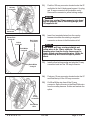
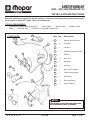
Rear Wipe Switch
Overlay Harness
Connectors
36)
Route two switch connectors and Orange wire
from the overlay harness inside of I/P to the
switch plate and HVAC unit.
37)
Remove two block-off plugs from the switch plate
and install the HBL switch (Item 11) and rear
wipe switch (Item 12).
38)
Plug and lock 6-way and 4-way connectors from
the overlay harness into the switches.
39)
Center splice and tape Orange wire from the
overlay harness to tan wire (located in cavity #4
of 5-way HVAC connector.) This wire controls the
lights in the wiper and defroster switches.
HBL Switch
HVAC
Control Unit
2000 Model Year Vehicle:
Orange Wire
5-Way Connector
2000 Model Year Vehicle
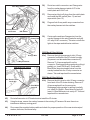
41a) Remove the right (passenger’s side) 10-way
connector from back of the I/P cluster housing.
(Squeeze in on tabs and slide connector off).
Remove 3" of tape wrap back from the
connector. Disengage locking wedge by pulling it
partially out. Insert Dk. Blue/Lt. Green and Lt.
Blue/White (large terminaled) wires from the
overlay harness into the 10-way connector as
shown. Trim and tape back the unused wires.
2001 Model Year Vehicle:
Dk. Blue/Lt. Green
Cavity #4
Lt. Blue/White
Cavity #3
41b) Remove the left (driver’s side) 16-way connector
from back of the I/P cluster housing. Remove 3"
of tape wrap back from the connector.
Disengage locking wedge by pulling it partially
out. Insert Dk. Blue/Lt. Green wire into cavity #1.
Insert Lt. Blue/White wire into cavity #7. Trim and
tape back the unused wires.
42)
Re-install connector to I/P bracket and re-install the I/P cluster.
43)
Using tie straps, secure the overlay harness to the existing I/P harness. Be sure there is no
interference with any moving parts.
44)
Re-connect the negative battery cable and check for proper operation of the rear window wiper/
washer, defroster, and dome lamp.
K 6 8 5 8 3 7 3
11/21/00
Page 6 of 6