1
Revised September 27, 2005
Lexmark™ T640, T642, and T644
4061-xx0
• Table of Contents
• Start Diagnostics
• Safety and Notices
• Trademarks
• Index
Lexmark and Lexmark with diamond design are
trademarks of Lexmark International, Inc., registered
in the United States and/or other countries.
4061-xx0
Table of contents
Laser notices . . . . . . . . . . . . . . . . . . . . . . . . . . . . . . . . . . . . . . . . . . . . . . . . . . . . . . . . . . xi
Safety information . . . . . . . . . . . . . . . . . . . . . . . . . . . . . . . . . . . . . . . . . . . . . . . . . . . . xvii
Preface . . . . . . . . . . . . . . . . . . . . . . . . . . . . . . . . . . . . . . . . . . . . . . . . . . . . . . . . . . . . . . xx
Definitions . . . . . . . . . . . . . . . . . . . . . . . . . . . . . . . . . . . . . . . . . . . . . . . . . . . . . . . . . . . . . . . . . . . . . . . . . v-xx
General information . . . . . . . . . . . . . . . . . . . . . . . . . . . . . . . . . . . . . . . . . . . . . . . . . . . 1-1
Maintenance approach . . . . . . . . . . . . . . . . . . . . . . . . . . . . . . . . . . . . . . . . . . . . . . . . . . . . . . . . . . . . . . . 1-1
Options . . . . . . . . . . . . . . . . . . . . . . . . . . . . . . . . . . . . . . . . . . . . . . . . . . . . . . . . . . . . . . . . . . . . . . . . . . . . 1-1
Configured models . . . . . . . . . . . . . . . . . . . . . . . . . . . . . . . . . . . . . . . . . . . . . . . . . . . . . . . . . . . . . . . . 1-2
Specifications . . . . . . . . . . . . . . . . . . . . . . . . . . . . . . . . . . . . . . . . . . . . . . . . . . . . . . . . . . . . . . . . . . . . . . . 1-3
Resolution . . . . . . . . . . . . . . . . . . . . . . . . . . . . . . . . . . . . . . . . . . . . . . . . . . . . . . . . . . . . . . . . . . . . . . 1-3
Data streams . . . . . . . . . . . . . . . . . . . . . . . . . . . . . . . . . . . . . . . . . . . . . . . . . . . . . . . . . . . . . . . . . . . . 1-3
Print speed and performance print speed . . . . . . . . . . . . . . . . . . . . . . . . . . . . . . . . . . . . . . . . . . . . . . 1-3
Performance. . . . . . . . . . . . . . . . . . . . . . . . . . . . . . . . . . . . . . . . . . . . . . . . . . . . . . . . . . . . . . . . . 1-3
Time to first print . . . . . . . . . . . . . . . . . . . . . . . . . . . . . . . . . . . . . . . . . . . . . . . . . . . . . . . . . . . . . 1-3
Memory configuration . . . . . . . . . . . . . . . . . . . . . . . . . . . . . . . . . . . . . . . . . . . . . . . . . . . . . . . . . . . . . 1-4
Operating clearances . . . . . . . . . . . . . . . . . . . . . . . . . . . . . . . . . . . . . . . . . . . . . . . . . . . . . . . . . . . . . . 1-4
Dimensions . . . . . . . . . . . . . . . . . . . . . . . . . . . . . . . . . . . . . . . . . . . . . . . . . . . . . . . . . . . . . . . . . . . . . 1-5
Power requirements . . . . . . . . . . . . . . . . . . . . . . . . . . . . . . . . . . . . . . . . . . . . . . . . . . . . . . . . . . . . . . . 1-6
Electrical specifications . . . . . . . . . . . . . . . . . . . . . . . . . . . . . . . . . . . . . . . . . . . . . . . . . . . . . . . . . . . . 1-6
Environment . . . . . . . . . . . . . . . . . . . . . . . . . . . . . . . . . . . . . . . . . . . . . . . . . . . . . . . . . . . . . . . . . . . . . 1-7
Acoustics . . . . . . . . . . . . . . . . . . . . . . . . . . . . . . . . . . . . . . . . . . . . . . . . . . . . . . . . . . . . . . . . . . . . . . . 1-7
Media specifications . . . . . . . . . . . . . . . . . . . . . . . . . . . . . . . . . . . . . . . . . . . . . . . . . . . . . . . . . . . . . . . . . 1-8
Paper and specialty media guidelines . . . . . . . . . . . . . . . . . . . . . . . . . . . . . . . . . . . . . . . . . . . . . . . . . 1-8
Supported print media . . . . . . . . . . . . . . . . . . . . . . . . . . . . . . . . . . . . . . . . . . . . . . . . . . . . . . . . . . . . . 1-8
Selecting print media . . . . . . . . . . . . . . . . . . . . . . . . . . . . . . . . . . . . . . . . . . . . . . . . . . . . . . . . . . . . . 1-15
Paper . . . . . . . . . . . . . . . . . . . . . . . . . . . . . . . . . . . . . . . . . . . . . . . . . . . . . . . . . . . . . . . . . . . . . 1-15
Paper characteristics . . . . . . . . . . . . . . . . . . . . . . . . . . . . . . . . . . . . . . . . . . . . . . . . . . . . . . . . . 1-15
Weight . . . . . . . . . . . . . . . . . . . . . . . . . . . . . . . . . . . . . . . . . . . . . . . . . . . . . . . . . . . . . . . . . . . . 1-15
Unacceptable paper . . . . . . . . . . . . . . . . . . . . . . . . . . . . . . . . . . . . . . . . . . . . . . . . . . . . . . . . . . 1-15
Transparencies . . . . . . . . . . . . . . . . . . . . . . . . . . . . . . . . . . . . . . . . . . . . . . . . . . . . . . . . . . . . . 1-16
Selecting transparencies . . . . . . . . . . . . . . . . . . . . . . . . . . . . . . . . . . . . . . . . . . . . . . . . . . . . . . 1-16
Envelopes . . . . . . . . . . . . . . . . . . . . . . . . . . . . . . . . . . . . . . . . . . . . . . . . . . . . . . . . . . . . . . . . . 1-16
Labels. . . . . . . . . . . . . . . . . . . . . . . . . . . . . . . . . . . . . . . . . . . . . . . . . . . . . . . . . . . . . . . . . . . . . 1-17
Card stock . . . . . . . . . . . . . . . . . . . . . . . . . . . . . . . . . . . . . . . . . . . . . . . . . . . . . . . . . . . . . . . . . 1-18
Storing print media . . . . . . . . . . . . . . . . . . . . . . . . . . . . . . . . . . . . . . . . . . . . . . . . . . . . . . . . . . . . . . . 1-18
Avoiding jams . . . . . . . . . . . . . . . . . . . . . . . . . . . . . . . . . . . . . . . . . . . . . . . . . . . . . . . . . . . . . . . . . . 1-19
Print area . . . . . . . . . . . . . . . . . . . . . . . . . . . . . . . . . . . . . . . . . . . . . . . . . . . . . . . . . . . . . . . . . . . . . . 1-19
Tools required . . . . . . . . . . . . . . . . . . . . . . . . . . . . . . . . . . . . . . . . . . . . . . . . . . . . . . . . . . . . . . . . . . . . . 1-19
Acronyms . . . . . . . . . . . . . . . . . . . . . . . . . . . . . . . . . . . . . . . . . . . . . . . . . . . . . . . . . . . . . . . . . . . . . . . . . 1-20
Diagnostic information . . . . . . . . . . . . . . . . . . . . . . . . . . . . . . . . . . . . . . . . . . . . . . . . . 2-1
Start . . . . . . . . . . . . . . . . . . . . . . . . . . . . . . . . . . . . . . . . . . . . . . . . . . . . . . . . . . . . . . . . . . . . . . . . . . . . . . .
Symptom tables . . . . . . . . . . . . . . . . . . . . . . . . . . . . . . . . . . . . . . . . . . . . . . . . . . . . . . . . . . . . . .
Service errors (9xx.xx’s). . . . . . . . . . . . . . . . . . . . . . . . . . . . . . . . . . . . . . . . . . . . . . . . . . . . . . . .
User status and attendance messages . . . . . . . . . . . . . . . . . . . . . . . . . . . . . . . . . . . . . . . . . . . .
Additional information. . . . . . . . . . . . . . . . . . . . . . . . . . . . . . . . . . . . . . . . . . . . . . . . . . . . . . . . . .
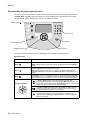
Understanding the printer operator panel . . . . . . . . . . . . . . . . . . . . . . . . . . . . . . . . . . . . . . . . . . . . . .
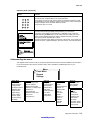
Understanding the menus . . . . . . . . . . . . . . . . . . . . . . . . . . . . . . . . . . . . . . . . . . . . . . . . . . . . . . . . . .
2-1
2-1
2-1
2-1
2-1
2-2
2-3
Table of contents
manuals4you.com
iii
4061-xx0
Power-On Self Test (POST) sequence . . . . . . . . . . . . . . . . . . . . . . . . . . . . . . . . . . . . . . . . . . . . . . . . . . . .2-4
Symptom tables . . . . . . . . . . . . . . . . . . . . . . . . . . . . . . . . . . . . . . . . . . . . . . . . . . . . . . . . . . . . . . . . . . . . . . 2-5
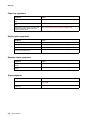
Base printer symptoms . . . . . . . . . . . . . . . . . . . . . . . . . . . . . . . . . . . . . . . . . . . . . . . . . . . . . . . . . . . . . 2-5
High-capacity feeder (2000-sheet) symptoms . . . . . . . . . . . . . . . . . . . . . . . . . . . . . . . . . . . . . . . . . . .2-5
Paper tray symptoms . . . . . . . . . . . . . . . . . . . . . . . . . . . . . . . . . . . . . . . . . . . . . . . . . . . . . . . . . . . . . . 2-6
Duplex option symptoms . . . . . . . . . . . . . . . . . . . . . . . . . . . . . . . . . . . . . . . . . . . . . . . . . . . . . . . . . . . . 2-6
Envelope feeder symptoms . . . . . . . . . . . . . . . . . . . . . . . . . . . . . . . . . . . . . . . . . . . . . . . . . . . . . . . . . 2-6
Output expander . . . . . . . . . . . . . . . . . . . . . . . . . . . . . . . . . . . . . . . . . . . . . . . . . . . . . . . . . . . . . . . . . . 2-6
StapleSmart finisher . . . . . . . . . . . . . . . . . . . . . . . . . . . . . . . . . . . . . . . . . . . . . . . . . . . . . . . . . . . . . . . 2-7
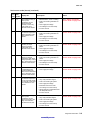
Messages and error codes . . . . . . . . . . . . . . . . . . . . . . . . . . . . . . . . . . . . . . . . . . . . . . . . . . . . . . . . . . . . . 2-8
Service error codes . . . . . . . . . . . . . . . . . . . . . . . . . . . . . . . . . . . . . . . . . . . . . . . . . . . . . . . . . . . . . . . . 2-8
User status displays . . . . . . . . . . . . . . . . . . . . . . . . . . . . . . . . . . . . . . . . . . . . . . . . . . . . . . . . . . . . . . 2-31
User attendance messages . . . . . . . . . . . . . . . . . . . . . . . . . . . . . . . . . . . . . . . . . . . . . . . . . . . . . . . . 2-32
User line 2 link messages . . . . . . . . . . . . . . . . . . . . . . . . . . . . . . . . . . . . . . . . . . . . . . . . . . . . . . 2-43
Check device connection messages . . . . . . . . . . . . . . . . . . . . . . . . . . . . . . . . . . . . . . . . . . . . . . 2-43
User attendance messages—paper jams and paper handling errors (2xx.xx) . . . . . . . . . . . . . . . . . . 2-44
Service checks . . . . . . . . . . . . . . . . . . . . . . . . . . . . . . . . . . . . . . . . . . . . . . . . . . . . . . . . . . . . . . . . . . . . . .2-72
5-Bin mailbox service check . . . . . . . . . . . . . . . . . . . . . . . . . . . . . . . . . . . . . . . . . . . . . . . . . . . . . . . .2-72
900.xx Error code service check . . . . . . . . . . . . . . . . . . . . . . . . . . . . . . . . . . . . . . . . . . . . . . . . . . . . . 2-75
927.xx Fan service check . . . . . . . . . . . . . . . . . . . . . . . . . . . . . . . . . . . . . . . . . . . . . . . . . . . . . . . . . . 2-76
Main fan. . . . . . . . . . . . . . . . . . . . . . . . . . . . . . . . . . . . . . . . . . . . . . . . . . . . . . . . . . . . . . . . . . . . 2-76
Cartridge fan service check. . . . . . . . . . . . . . . . . . . . . . . . . . . . . . . . . . . . . . . . . . . . . . . . . . . . . 2-76
950.00 through 950.29 EPROM mismatch failure . . . . . . . . . . . . . . . . . . . . . . . . . . . . . . . . . . . . . . . 2-77
950.30 through 950.60 EPROM mismatch failure . . . . . . . . . . . . . . . . . . . . . . . . . . . . . . . . . . . . . . . 2-78
Charge roll service check . . . . . . . . . . . . . . . . . . . . . . . . . . . . . . . . . . . . . . . . . . . . . . . . . . . . . . . . . .2-79
Cover closed switch/cable service check . . . . . . . . . . . . . . . . . . . . . . . . . . . . . . . . . . . . . . . . . . . . . . 2-80
Dead machine service check . . . . . . . . . . . . . . . . . . . . . . . . . . . . . . . . . . . . . . . . . . . . . . . . . . . . . . . 2-80
Duplex option service check . . . . . . . . . . . . . . . . . . . . . . . . . . . . . . . . . . . . . . . . . . . . . . . . . . . . . . . .2-82
Envelope feeder service check . . . . . . . . . . . . . . . . . . . . . . . . . . . . . . . . . . . . . . . . . . . . . . . . . . . . . . 2-84
Fuser service checks . . . . . . . . . . . . . . . . . . . . . . . . . . . . . . . . . . . . . . . . . . . . . . . . . . . . . . . . . . . . . 2-87
920.xx—Cold fuser service check . . . . . . . . . . . . . . . . . . . . . . . . . . . . . . . . . . . . . . . . . . . . . . . . 2-87
922.xx—Cold fuser check . . . . . . . . . . . . . . . . . . . . . . . . . . . . . . . . . . . . . . . . . . . . . . . . . . . . . . 2-89
923.xx—Hot fuser service check. . . . . . . . . . . . . . . . . . . . . . . . . . . . . . . . . . . . . . . . . . . . . . . . . 2-90
924.xx—Hot fuser service check. . . . . . . . . . . . . . . . . . . . . . . . . . . . . . . . . . . . . . . . . . . . . . . . . 2-91
925.xx—Hot fuser service check. . . . . . . . . . . . . . . . . . . . . . . . . . . . . . . . . . . . . . . . . . . . . . . . . 2-91
Fuser exit sensor service check . . . . . . . . . . . . . . . . . . . . . . . . . . . . . . . . . . . . . . . . . . . . . . . . . . . . .2-92
Fuser narrow media sensor service check . . . . . . . . . . . . . . . . . . . . . . . . . . . . . . . . . . . . . . . . . . . . .2-93
Fuser solenoid service check . . . . . . . . . . . . . . . . . . . . . . . . . . . . . . . . . . . . . . . . . . . . . . . . . . . . . . . 2-94
High-capacity feeder input tray service check . . . . . . . . . . . . . . . . . . . . . . . . . . . . . . . . . . . . . . . . . .2-95
High-capacity output stacker service check . . . . . . . . . . . . . . . . . . . . . . . . . . . . . . . . . . . . . . . . . . . 2-100
Input sensor service check . . . . . . . . . . . . . . . . . . . . . . . . . . . . . . . . . . . . . . . . . . . . . . . . . . . . . . . . 2-102
Input tray(s) service check . . . . . . . . . . . . . . . . . . . . . . . . . . . . . . . . . . . . . . . . . . . . . . . . . . . . . . . . 2-102
Interconnect card service check . . . . . . . . . . . . . . . . . . . . . . . . . . . . . . . . . . . . . . . . . . . . . . . . . . . . 2-104
Main drive service check . . . . . . . . . . . . . . . . . . . . . . . . . . . . . . . . . . . . . . . . . . . . . . . . . . . . . . . . . . 2-105
Operator panel service check . . . . . . . . . . . . . . . . . . . . . . . . . . . . . . . . . . . . . . . . . . . . . . . . . . . . . . 2-106
One or more operator panel buttons fail . . . . . . . . . . . . . . . . . . . . . . . . . . . . . . . . . . . . . . . . . . 2-106
No buttons work . . . . . . . . . . . . . . . . . . . . . . . . . . . . . . . . . . . . . . . . . . . . . . . . . . . . . . . . . . . . 2-106
Operator panel display . . . . . . . . . . . . . . . . . . . . . . . . . . . . . . . . . . . . . . . . . . . . . . . . . . . . . . . 2-107
Options service check . . . . . . . . . . . . . . . . . . . . . . . . . . . . . . . . . . . . . . . . . . . . . . . . . . . . . . . . . . . . 2-108
Flash Memory Option(s) . . . . . . . . . . . . . . . . . . . . . . . . . . . . . . . . . . . . . . . . . . . . . . . . . . . . . . 2-108
DRAM Memory Option(s) . . . . . . . . . . . . . . . . . . . . . . . . . . . . . . . . . . . . . . . . . . . . . . . . . . . . . 2-108
Hard Disk Option . . . . . . . . . . . . . . . . . . . . . . . . . . . . . . . . . . . . . . . . . . . . . . . . . . . . . . . . . . . . 2-108
Output bin sensor standard tray service check . . . . . . . . . . . . . . . . . . . . . . . . . . . . . . . . . . . . . . . . . 2-109
Output expander service check . . . . . . . . . . . . . . . . . . . . . . . . . . . . . . . . . . . . . . . . . . . . . . . . . . . .2-110
Paper feed service check . . . . . . . . . . . . . . . . . . . . . . . . . . . . . . . . . . . . . . . . . . . . . . . . . . . . . . . . .2-112
Paper size sensing service check . . . . . . . . . . . . . . . . . . . . . . . . . . . . . . . . . . . . . . . . . . . . . . . . . . . 2-113
Parallel port service check . . . . . . . . . . . . . . . . . . . . . . . . . . . . . . . . . . . . . . . . . . . . . . . . . . . . . . . . 2-116
Print quality service check . . . . . . . . . . . . . . . . . . . . . . . . . . . . . . . . . . . . . . . . . . . . . . . . . . . . . . . . 2-116
iv Service Manual
4061-xx0
Printhead service check . . . . . . . . . . . . . . . . . . . . . . . . . . . . . . . . . . . . . . . . . . . . . . . . . . . . . . . . . .
Signature button assembly service check . . . . . . . . . . . . . . . . . . . . . . . . . . . . . . . . . . . . . . . . . . . .
StapleSmart finisher service check . . . . . . . . . . . . . . . . . . . . . . . . . . . . . . . . . . . . . . . . . . . . . . . . .
System board service check . . . . . . . . . . . . . . . . . . . . . . . . . . . . . . . . . . . . . . . . . . . . . . . . . . . . . .
Toner sensor service check . . . . . . . . . . . . . . . . . . . . . . . . . . . . . . . . . . . . . . . . . . . . . . . . . . . . . . .
Transfer roll service check . . . . . . . . . . . . . . . . . . . . . . . . . . . . . . . . . . . . . . . . . . . . . . . . . . . . . . . .
2-122
2-122
2-123
2-126
2-127
2-128
Diagnostic aids . . . . . . . . . . . . . . . . . . . . . . . . . . . . . . . . . . . . . . . . . . . . . . . . . . . . . . . 3-1
Accessing service menus . . . . . . . . . . . . . . . . . . . . . . . . . . . . . . . . . . . . . . . . . . . . . . . . . . . . . . . . . . . . . 3-1
Diagnostics mode . . . . . . . . . . . . . . . . . . . . . . . . . . . . . . . . . . . . . . . . . . . . . . . . . . . . . . . . . . . . . . . . . . . 3-2
Entering Diagnostics mode . . . . . . . . . . . . . . . . . . . . . . . . . . . . . . . . . . . . . . . . . . . . . . . . . . . . . . . . . 3-2
Available tests . . . . . . . . . . . . . . . . . . . . . . . . . . . . . . . . . . . . . . . . . . . . . . . . . . . . . . . . . . . . . . . . . . . 3-2
Exiting Diagnostics mode . . . . . . . . . . . . . . . . . . . . . . . . . . . . . . . . . . . . . . . . . . . . . . . . . . . . . . . . . . 3-4
REGISTRATION . . . . . . . . . . . . . . . . . . . . . . . . . . . . . . . . . . . . . . . . . . . . . . . . . . . . . . . . . . . . . . . . . 3-4
Quick Test . . . . . . . . . . . . . . . . . . . . . . . . . . . . . . . . . . . . . . . . . . . . . . . . . . . . . . . . . . . . . . . . . . 3-5
PRINT TESTS . . . . . . . . . . . . . . . . . . . . . . . . . . . . . . . . . . . . . . . . . . . . . . . . . . . . . . . . . . . . . . . . . . . 3-6
Input source tests. . . . . . . . . . . . . . . . . . . . . . . . . . . . . . . . . . . . . . . . . . . . . . . . . . . . . . . . . . . . . 3-6
Print quality pages (Prt Quality Pgs) . . . . . . . . . . . . . . . . . . . . . . . . . . . . . . . . . . . . . . . . . . . . . . 3-6
HARDWARE TESTS . . . . . . . . . . . . . . . . . . . . . . . . . . . . . . . . . . . . . . . . . . . . . . . . . . . . . . . . . . . . . . 3-7
Panel Test . . . . . . . . . . . . . . . . . . . . . . . . . . . . . . . . . . . . . . . . . . . . . . . . . . . . . . . . . . . . . . . . . . 3-7
Button Test. . . . . . . . . . . . . . . . . . . . . . . . . . . . . . . . . . . . . . . . . . . . . . . . . . . . . . . . . . . . . . . . . . 3-7
DRAM Test. . . . . . . . . . . . . . . . . . . . . . . . . . . . . . . . . . . . . . . . . . . . . . . . . . . . . . . . . . . . . . . . . . 3-7
CACHE Test. . . . . . . . . . . . . . . . . . . . . . . . . . . . . . . . . . . . . . . . . . . . . . . . . . . . . . . . . . . . . . . . . 3-8
Parallel Wrap tests . . . . . . . . . . . . . . . . . . . . . . . . . . . . . . . . . . . . . . . . . . . . . . . . . . . . . . . . . . . . 3-8
Serial Wrap tests . . . . . . . . . . . . . . . . . . . . . . . . . . . . . . . . . . . . . . . . . . . . . . . . . . . . . . . . . . . . . 3-9
DUPLEX TESTS . . . . . . . . . . . . . . . . . . . . . . . . . . . . . . . . . . . . . . . . . . . . . . . . . . . . . . . . . . . . . . . . . 3-9
Quick Test (duplex) . . . . . . . . . . . . . . . . . . . . . . . . . . . . . . . . . . . . . . . . . . . . . . . . . . . . . . . . . . . 3-9
Top Margin (duplex) . . . . . . . . . . . . . . . . . . . . . . . . . . . . . . . . . . . . . . . . . . . . . . . . . . . . . . . . . . 3-10
Sensor Test (duplex) . . . . . . . . . . . . . . . . . . . . . . . . . . . . . . . . . . . . . . . . . . . . . . . . . . . . . . . . . 3-10
Motor Test (duplex) . . . . . . . . . . . . . . . . . . . . . . . . . . . . . . . . . . . . . . . . . . . . . . . . . . . . . . . . . . 3-11
Duplex Feed 1 . . . . . . . . . . . . . . . . . . . . . . . . . . . . . . . . . . . . . . . . . . . . . . . . . . . . . . . . . . . . . . 3-12
Duplex Feed 2 . . . . . . . . . . . . . . . . . . . . . . . . . . . . . . . . . . . . . . . . . . . . . . . . . . . . . . . . . . . . . . 3-12
INPUT TRAY TESTS . . . . . . . . . . . . . . . . . . . . . . . . . . . . . . . . . . . . . . . . . . . . . . . . . . . . . . . . . . . . . 3-13
Feed Tests (input tray) . . . . . . . . . . . . . . . . . . . . . . . . . . . . . . . . . . . . . . . . . . . . . . . . . . . . . . . . 3-13
Sensor Test (input tray) . . . . . . . . . . . . . . . . . . . . . . . . . . . . . . . . . . . . . . . . . . . . . . . . . . . . . . . 3-13
OUTPUT BIN TESTS . . . . . . . . . . . . . . . . . . . . . . . . . . . . . . . . . . . . . . . . . . . . . . . . . . . . . . . . . . . . 3-14
Feed Tests (output bins) . . . . . . . . . . . . . . . . . . . . . . . . . . . . . . . . . . . . . . . . . . . . . . . . . . . . . . 3-14
Feed To All Bins. . . . . . . . . . . . . . . . . . . . . . . . . . . . . . . . . . . . . . . . . . . . . . . . . . . . . . . . . . . . . 3-14
Sensor Test (standard output bin) . . . . . . . . . . . . . . . . . . . . . . . . . . . . . . . . . . . . . . . . . . . . . . . 3-15
Sensor Test (Output Expander) . . . . . . . . . . . . . . . . . . . . . . . . . . . . . . . . . . . . . . . . . . . . . . . . . 3-15
Sensor Test (high capacity output stacker) . . . . . . . . . . . . . . . . . . . . . . . . . . . . . . . . . . . . . . . . 3-16
Sensor Tests (5-bin mailbox) . . . . . . . . . . . . . . . . . . . . . . . . . . . . . . . . . . . . . . . . . . . . . . . . . . . 3-16
Diverter Test. . . . . . . . . . . . . . . . . . . . . . . . . . . . . . . . . . . . . . . . . . . . . . . . . . . . . . . . . . . . . . . . 3-16
FINISHER TESTS . . . . . . . . . . . . . . . . . . . . . . . . . . . . . . . . . . . . . . . . . . . . . . . . . . . . . . . . . . . . . . . 3-17
Staple Test . . . . . . . . . . . . . . . . . . . . . . . . . . . . . . . . . . . . . . . . . . . . . . . . . . . . . . . . . . . . . . . . . 3-17
Feed Tests (finisher) . . . . . . . . . . . . . . . . . . . . . . . . . . . . . . . . . . . . . . . . . . . . . . . . . . . . . . . . . 3-17
Sensor Test (finisher). . . . . . . . . . . . . . . . . . . . . . . . . . . . . . . . . . . . . . . . . . . . . . . . . . . . . . . . . 3-17
BASE SENSOR TEST . . . . . . . . . . . . . . . . . . . . . . . . . . . . . . . . . . . . . . . . . . . . . . . . . . . . . . . . . . . . 3-18
DEVICE TESTS . . . . . . . . . . . . . . . . . . . . . . . . . . . . . . . . . . . . . . . . . . . . . . . . . . . . . . . . . . . . . . . . . 3-18
Quick Disk Test . . . . . . . . . . . . . . . . . . . . . . . . . . . . . . . . . . . . . . . . . . . . . . . . . . . . . . . . . . . . . 3-18
Disk Test/Clean . . . . . . . . . . . . . . . . . . . . . . . . . . . . . . . . . . . . . . . . . . . . . . . . . . . . . . . . . . . . . 3-19
Flash Test . . . . . . . . . . . . . . . . . . . . . . . . . . . . . . . . . . . . . . . . . . . . . . . . . . . . . . . . . . . . . . . . . 3-19
PRINTER SETUP . . . . . . . . . . . . . . . . . . . . . . . . . . . . . . . . . . . . . . . . . . . . . . . . . . . . . . . . . . . . . . . 3-20
Defaults . . . . . . . . . . . . . . . . . . . . . . . . . . . . . . . . . . . . . . . . . . . . . . . . . . . . . . . . . . . . . . . . . . . 3-20
Page Count . . . . . . . . . . . . . . . . . . . . . . . . . . . . . . . . . . . . . . . . . . . . . . . . . . . . . . . . . . . . . . . . 3-20
Perm Page Count (permanent page count) . . . . . . . . . . . . . . . . . . . . . . . . . . . . . . . . . . . . . . . . 3-20
Serial Number . . . . . . . . . . . . . . . . . . . . . . . . . . . . . . . . . . . . . . . . . . . . . . . . . . . . . . . . . . . . . . 3-20
Table of contents
manuals4you.com
v
manuals4you.com
4061-xx0
Envelope Enhance . . . . . . . . . . . . . . . . . . . . . . . . . . . . . . . . . . . . . . . . . . . . . . . . . . . . . . . . . . .3-20
Engine Setting 1 through 4 . . . . . . . . . . . . . . . . . . . . . . . . . . . . . . . . . . . . . . . . . . . . . . . . . . . . .3-20
Model Name . . . . . . . . . . . . . . . . . . . . . . . . . . . . . . . . . . . . . . . . . . . . . . . . . . . . . . . . . . . . . . . .3-20
Configuration ID . . . . . . . . . . . . . . . . . . . . . . . . . . . . . . . . . . . . . . . . . . . . . . . . . . . . . . . . . . . . . 3-21
Edge to Edge. . . . . . . . . . . . . . . . . . . . . . . . . . . . . . . . . . . . . . . . . . . . . . . . . . . . . . . . . . . . . . . . 3-21
Parallel strobe adjustment (Par x Strobe Adj) . . . . . . . . . . . . . . . . . . . . . . . . . . . . . . . . . . . . . . .3-21
EP SETUP . . . . . . . . . . . . . . . . . . . . . . . . . . . . . . . . . . . . . . . . . . . . . . . . . . . . . . . . . . . . . . . . . . . . . 3-22
EP Defaults . . . . . . . . . . . . . . . . . . . . . . . . . . . . . . . . . . . . . . . . . . . . . . . . . . . . . . . . . . . . . . . . . 3-22
Fuser Temperature (Fuser Temp). . . . . . . . . . . . . . . . . . . . . . . . . . . . . . . . . . . . . . . . . . . . . . . . 3-22
Fuser Page Count . . . . . . . . . . . . . . . . . . . . . . . . . . . . . . . . . . . . . . . . . . . . . . . . . . . . . . . . . . . . 3-22
Warm Up Time . . . . . . . . . . . . . . . . . . . . . . . . . . . . . . . . . . . . . . . . . . . . . . . . . . . . . . . . . . . . . .3-22
Transfer . . . . . . . . . . . . . . . . . . . . . . . . . . . . . . . . . . . . . . . . . . . . . . . . . . . . . . . . . . . . . . . . . . . . 3-22
Print Contrast . . . . . . . . . . . . . . . . . . . . . . . . . . . . . . . . . . . . . . . . . . . . . . . . . . . . . . . . . . . . . . . 3-22
Charge Roll . . . . . . . . . . . . . . . . . . . . . . . . . . . . . . . . . . . . . . . . . . . . . . . . . . . . . . . . . . . . . . . . . 3-22
Gap Adjust. . . . . . . . . . . . . . . . . . . . . . . . . . . . . . . . . . . . . . . . . . . . . . . . . . . . . . . . . . . . . . . . . . 3-22
EVENT LOG . . . . . . . . . . . . . . . . . . . . . . . . . . . . . . . . . . . . . . . . . . . . . . . . . . . . . . . . . . . . . . . . . . . . 3-23
Display Log . . . . . . . . . . . . . . . . . . . . . . . . . . . . . . . . . . . . . . . . . . . . . . . . . . . . . . . . . . . . . . . . . 3-23
Print Log . . . . . . . . . . . . . . . . . . . . . . . . . . . . . . . . . . . . . . . . . . . . . . . . . . . . . . . . . . . . . . . . . . . 3-23
Clear Log. . . . . . . . . . . . . . . . . . . . . . . . . . . . . . . . . . . . . . . . . . . . . . . . . . . . . . . . . . . . . . . . . . . 3-24
EXIT DIAGNOSTICS . . . . . . . . . . . . . . . . . . . . . . . . . . . . . . . . . . . . . . . . . . . . . . . . . . . . . . . . . . . . . 3-24
Configuration menu (CONFIG MENU) . . . . . . . . . . . . . . . . . . . . . . . . . . . . . . . . . . . . . . . . . . . . . . . . . . .3-25
Entering Configuration Menu . . . . . . . . . . . . . . . . . . . . . . . . . . . . . . . . . . . . . . . . . . . . . . . . . . . . . . . 3-25
Available menus . . . . . . . . . . . . . . . . . . . . . . . . . . . . . . . . . . . . . . . . . . . . . . . . . . . . . . . . . . . . . . . . . 3-25
Maintenance page count (Maint Cnt Value) . . . . . . . . . . . . . . . . . . . . . . . . . . . . . . . . . . . . . . . . . . . . 3-25
Maintenance page counter reset (Reset Maint Cnt) . . . . . . . . . . . . . . . . . . . . . . . . . . . . . . . . . . . . . . 3-26
Print quality pages (Prt Quality Pgs) . . . . . . . . . . . . . . . . . . . . . . . . . . . . . . . . . . . . . . . . . . . . . . . . . . 3-26
SIZE SENSING . . . . . . . . . . . . . . . . . . . . . . . . . . . . . . . . . . . . . . . . . . . . . . . . . . . . . . . . . . . . . . . . . . 3-27
Panel Menus . . . . . . . . . . . . . . . . . . . . . . . . . . . . . . . . . . . . . . . . . . . . . . . . . . . . . . . . . . . . . . . . . . . . 3-27
PPDS Emulation . . . . . . . . . . . . . . . . . . . . . . . . . . . . . . . . . . . . . . . . . . . . . . . . . . . . . . . . . . . . . . . . . 3-27
Download Emuls . . . . . . . . . . . . . . . . . . . . . . . . . . . . . . . . . . . . . . . . . . . . . . . . . . . . . . . . . . . . . . . . . 3-27
Demo Mode . . . . . . . . . . . . . . . . . . . . . . . . . . . . . . . . . . . . . . . . . . . . . . . . . . . . . . . . . . . . . . . . . . . . 3-27
Factory Defaults . . . . . . . . . . . . . . . . . . . . . . . . . . . . . . . . . . . . . . . . . . . . . . . . . . . . . . . . . . . . . . . . . 3-28
Energy Conserve . . . . . . . . . . . . . . . . . . . . . . . . . . . . . . . . . . . . . . . . . . . . . . . . . . . . . . . . . . . . . . . .3-28
EVENT LOG . . . . . . . . . . . . . . . . . . . . . . . . . . . . . . . . . . . . . . . . . . . . . . . . . . . . . . . . . . . . . . . . . . . . 3-28
Paper Prompts . . . . . . . . . . . . . . . . . . . . . . . . . . . . . . . . . . . . . . . . . . . . . . . . . . . . . . . . . . . . . . . . . .3-28
Env Prompts . . . . . . . . . . . . . . . . . . . . . . . . . . . . . . . . . . . . . . . . . . . . . . . . . . . . . . . . . . . . . . . . . . . . 3-28
Jobs On Disk . . . . . . . . . . . . . . . . . . . . . . . . . . . . . . . . . . . . . . . . . . . . . . . . . . . . . . . . . . . . . . . . . . . . 3-28
Disk Encryption . . . . . . . . . . . . . . . . . . . . . . . . . . . . . . . . . . . . . . . . . . . . . . . . . . . . . . . . . . . . . . . . . . 3-28
Font Sharpening . . . . . . . . . . . . . . . . . . . . . . . . . . . . . . . . . . . . . . . . . . . . . . . . . . . . . . . . . . . . . . . . . 3-29
LCD Brightness . . . . . . . . . . . . . . . . . . . . . . . . . . . . . . . . . . . . . . . . . . . . . . . . . . . . . . . . . . . . . . . . . . 3-29
LCD Contrast . . . . . . . . . . . . . . . . . . . . . . . . . . . . . . . . . . . . . . . . . . . . . . . . . . . . . . . . . . . . . . . . . . . 3-29
Exit Config Menu . . . . . . . . . . . . . . . . . . . . . . . . . . . . . . . . . . . . . . . . . . . . . . . . . . . . . . . . . . . . . . . . . 3-29
Additional useful menu locations . . . . . . . . . . . . . . . . . . . . . . . . . . . . . . . . . . . . . . . . . . . . . . . . . . . . . . 3-29
Hex Trace . . . . . . . . . . . . . . . . . . . . . . . . . . . . . . . . . . . . . . . . . . . . . . . . . . . . . . . . . . . . . . . . . . . . . .3-29
Menu settings page . . . . . . . . . . . . . . . . . . . . . . . . . . . . . . . . . . . . . . . . . . . . . . . . . . . . . . . . . . . . . . . 3-30
Printing menu settings page . . . . . . . . . . . . . . . . . . . . . . . . . . . . . . . . . . . . . . . . . . . . . . . . . . . . . . . .3-30
Theory . . . . . . . . . . . . . . . . . . . . . . . . . . . . . . . . . . . . . . . . . . . . . . . . . . . . . . . . . . . . . . . . . . . . . . . . . . . . . 3-31
Autocompensator operation . . . . . . . . . . . . . . . . . . . . . . . . . . . . . . . . . . . . . . . . . . . . . . . . . . . . . . . . 3-31
Autoconnect system, paper tray options, envelope feeder—electrical . . . . . . . . . . . . . . . . . . . . . . . .3-32
Autoconnect cabling and connectors . . . . . . . . . . . . . . . . . . . . . . . . . . . . . . . . . . . . . . . . . . . . .3-32
Duplex Option . . . . . . . . . . . . . . . . . . . . . . . . . . . . . . . . . . . . . . . . . . . . . . . . . . . . . . . . . . . . . . . 3-32
Option microcode . . . . . . . . . . . . . . . . . . . . . . . . . . . . . . . . . . . . . . . . . . . . . . . . . . . . . . . . . . . .3-32
Print quality troubleshooting . . . . . . . . . . . . . . . . . . . . . . . . . . . . . . . . . . . . . . . . . . . . . . . . . . . . . . . . . . 3-33
Paper feed jams . . . . . . . . . . . . . . . . . . . . . . . . . . . . . . . . . . . . . . . . . . . . . . . . . . . . . . . . . . . . . . . . . . . . . 3-37
Access doors and trays . . . . . . . . . . . . . . . . . . . . . . . . . . . . . . . . . . . . . . . . . . . . . . . . . . . . . . . . . . . . 3-37
Clearing printer jams . . . . . . . . . . . . . . . . . . . . . . . . . . . . . . . . . . . . . . . . . . . . . . . . . . . . . . . . . . . . . .3-37
250 Paper Jam Check MP Feeder . . . . . . . . . . . . . . . . . . . . . . . . . . . . . . . . . . . . . . . . . . . . . . .3-38
260 Paper Jam Check Env Feeder . . . . . . . . . . . . . . . . . . . . . . . . . . . . . . . . . . . . . . . . . . . . . . . 3-39
vi Service Manual
4061-xx0
23x and 24x jams . . . . . . . . . . . . . . . . . . . . . . . . . . . . . . . . . . . . . . . . . . . . . . . . . . . . . . . . . . . .
200 and 201 Paper Jam Remove Cartridge. . . . . . . . . . . . . . . . . . . . . . . . . . . . . . . . . . . . . . . .
202 Paper Jam Open Rear Door . . . . . . . . . . . . . . . . . . . . . . . . . . . . . . . . . . . . . . . . . . . . . . . .
23x Paper Jam Open Duplex Rear Door . . . . . . . . . . . . . . . . . . . . . . . . . . . . . . . . . . . . . . . . . .
270 and 280 Paper Jams . . . . . . . . . . . . . . . . . . . . . . . . . . . . . . . . . . . . . . . . . . . . . . . . . . . . . .
27x Paper Jam Check Bin x. . . . . . . . . . . . . . . . . . . . . . . . . . . . . . . . . . . . . . . . . . . . . . . . . . . .
28x Paper Jam Check Finisher . . . . . . . . . . . . . . . . . . . . . . . . . . . . . . . . . . . . . . . . . . . . . . . . .
Clearing staple jams . . . . . . . . . . . . . . . . . . . . . . . . . . . . . . . . . . . . . . . . . . . . . . . . . . . . . . . . . . . . .
3-40
3-41
3-43
3-44
3-45
3-45
3-46
3-48
Repair information . . . . . . . . . . . . . . . . . . . . . . . . . . . . . . . . . . . . . . . . . . . . . . . . . . . . 4-1
Handling ESD-sensitive parts . . . . . . . . . . . . . . . . . . . . . . . . . . . . . . . . . . . . . . . . . . . . . . . . . . . . . . . . . . 4-1
Adjustment procedures . . . . . . . . . . . . . . . . . . . . . . . . . . . . . . . . . . . . . . . . . . . . . . . . . . . . . . . . . . . . . . . 4-2
Fuser solenoid adjustment . . . . . . . . . . . . . . . . . . . . . . . . . . . . . . . . . . . . . . . . . . . . . . . . . . . . . . . . . . 4-2
Gap adjustment . . . . . . . . . . . . . . . . . . . . . . . . . . . . . . . . . . . . . . . . . . . . . . . . . . . . . . . . . . . . . . . . . . 4-2
Printhead assembly adjustment . . . . . . . . . . . . . . . . . . . . . . . . . . . . . . . . . . . . . . . . . . . . . . . . . . . . . . 4-2
Paper alignment assembly adjustment . . . . . . . . . . . . . . . . . . . . . . . . . . . . . . . . . . . . . . . . . . . . . . . . 4-3
Removal procedures . . . . . . . . . . . . . . . . . . . . . . . . . . . . . . . . . . . . . . . . . . . . . . . . . . . . . . . . . . . . . . . . . 4-4
Covers removals . . . . . . . . . . . . . . . . . . . . . . . . . . . . . . . . . . . . . . . . . . . . . . . . . . . . . . . . . . . . . . . . . 4-4
Fuser wiper cover assembly removal. . . . . . . . . . . . . . . . . . . . . . . . . . . . . . . . . . . . . . . . . . . . . . 4-4
Redrive cap cover removal . . . . . . . . . . . . . . . . . . . . . . . . . . . . . . . . . . . . . . . . . . . . . . . . . . . . . 4-5
Paper support removal. . . . . . . . . . . . . . . . . . . . . . . . . . . . . . . . . . . . . . . . . . . . . . . . . . . . . . . . . 4-5
Left door removal . . . . . . . . . . . . . . . . . . . . . . . . . . . . . . . . . . . . . . . . . . . . . . . . . . . . . . . . . . . . . 4-6
Redrive door. . . . . . . . . . . . . . . . . . . . . . . . . . . . . . . . . . . . . . . . . . . . . . . . . . . . . . . . . . . . . . . . . 4-7
Right cover removal . . . . . . . . . . . . . . . . . . . . . . . . . . . . . . . . . . . . . . . . . . . . . . . . . . . . . . . . . . . 4-8
Upper front cover removal . . . . . . . . . . . . . . . . . . . . . . . . . . . . . . . . . . . . . . . . . . . . . . . . . . . . . 4-11
Upper front cover latch removal . . . . . . . . . . . . . . . . . . . . . . . . . . . . . . . . . . . . . . . . . . . . . . . . . 4-13
Upper front cover outer bezel removal. . . . . . . . . . . . . . . . . . . . . . . . . . . . . . . . . . . . . . . . . . . . 4-14
Multipurpose feeder/lower front cover assembly removal . . . . . . . . . . . . . . . . . . . . . . . . . . . . . 4-15
Left cover handle holder removal. . . . . . . . . . . . . . . . . . . . . . . . . . . . . . . . . . . . . . . . . . . . . . . . 4-16
Right cover handle holder removal . . . . . . . . . . . . . . . . . . . . . . . . . . . . . . . . . . . . . . . . . . . . . . 4-16
Left and right frame extensions . . . . . . . . . . . . . . . . . . . . . . . . . . . . . . . . . . . . . . . . . . . . . . . . . 4-17
Pass thru plate . . . . . . . . . . . . . . . . . . . . . . . . . . . . . . . . . . . . . . . . . . . . . . . . . . . . . . . . . . . . . . 4-18
Laser cover removal. . . . . . . . . . . . . . . . . . . . . . . . . . . . . . . . . . . . . . . . . . . . . . . . . . . . . . . . . . 4-19
Bevel gear removal . . . . . . . . . . . . . . . . . . . . . . . . . . . . . . . . . . . . . . . . . . . . . . . . . . . . . . . . . . . . . . 4-21
Cartridge duct removal . . . . . . . . . . . . . . . . . . . . . . . . . . . . . . . . . . . . . . . . . . . . . . . . . . . . . . . . . . . 4-23
Developer drive assembly removal . . . . . . . . . . . . . . . . . . . . . . . . . . . . . . . . . . . . . . . . . . . . . . . . . . 4-24
Developer drive coupler kit removal . . . . . . . . . . . . . . . . . . . . . . . . . . . . . . . . . . . . . . . . . . . . . . . . . 4-25
ESD cover removal . . . . . . . . . . . . . . . . . . . . . . . . . . . . . . . . . . . . . . . . . . . . . . . . . . . . . . . . . . . . . . 4-25
Fuser assembly removal . . . . . . . . . . . . . . . . . . . . . . . . . . . . . . . . . . . . . . . . . . . . . . . . . . . . . . . . . . 4-26
Fuser exit sensor removal . . . . . . . . . . . . . . . . . . . . . . . . . . . . . . . . . . . . . . . . . . . . . . . . . . . . . . . . . 4-28
Fuser exit sensor flag and spring removal . . . . . . . . . . . . . . . . . . . . . . . . . . . . . . . . . . . . . . . . . . . . . 4-30
Fuser lamp removal . . . . . . . . . . . . . . . . . . . . . . . . . . . . . . . . . . . . . . . . . . . . . . . . . . . . . . . . . . . . . . 4-32
Fuser narrow media sensor removal . . . . . . . . . . . . . . . . . . . . . . . . . . . . . . . . . . . . . . . . . . . . . . . . . 4-34
Fuser narrow media flag and spring removal . . . . . . . . . . . . . . . . . . . . . . . . . . . . . . . . . . . . . . . . . . 4-36
Fuser to LVPS AC cable removal . . . . . . . . . . . . . . . . . . . . . . . . . . . . . . . . . . . . . . . . . . . . . . . . . . . 4-38
Fuser top cover removal . . . . . . . . . . . . . . . . . . . . . . . . . . . . . . . . . . . . . . . . . . . . . . . . . . . . . . . . . . 4-41
Fuser transfer plate removal . . . . . . . . . . . . . . . . . . . . . . . . . . . . . . . . . . . . . . . . . . . . . . . . . . . . . . . 4-43
Gear release link removal . . . . . . . . . . . . . . . . . . . . . . . . . . . . . . . . . . . . . . . . . . . . . . . . . . . . . . . . . 4-44
High voltage power supply removal . . . . . . . . . . . . . . . . . . . . . . . . . . . . . . . . . . . . . . . . . . . . . . . . . . 4-45
Inner paper deflector assembly removal . . . . . . . . . . . . . . . . . . . . . . . . . . . . . . . . . . . . . . . . . . . . . . 4-47
Input sensor removal . . . . . . . . . . . . . . . . . . . . . . . . . . . . . . . . . . . . . . . . . . . . . . . . . . . . . . . . . . . . . 4-48
Integrated tray autocompensator assembly removal . . . . . . . . . . . . . . . . . . . . . . . . . . . . . . . . . . . . . 4-49
Integrated tray autocompensator pick roll assembly removal . . . . . . . . . . . . . . . . . . . . . . . . . . . . . . 4-51
Interconnect card assembly removal . . . . . . . . . . . . . . . . . . . . . . . . . . . . . . . . . . . . . . . . . . . . . . . . . 4-53
Low voltage power supply removal . . . . . . . . . . . . . . . . . . . . . . . . . . . . . . . . . . . . . . . . . . . . . . . . . . 4-54
Main fan removal . . . . . . . . . . . . . . . . . . . . . . . . . . . . . . . . . . . . . . . . . . . . . . . . . . . . . . . . . . . . . . . . 4-56
Main drive assembly removal . . . . . . . . . . . . . . . . . . . . . . . . . . . . . . . . . . . . . . . . . . . . . . . . . . . . . . 4-57
MPF arm assembly removal . . . . . . . . . . . . . . . . . . . . . . . . . . . . . . . . . . . . . . . . . . . . . . . . . . . . . . . 4-60
Table of contents
manuals4you.com
vii
4061-xx0
MPF lower paper deflector . . . . . . . . . . . . . . . . . . . . . . . . . . . . . . . . . . . . . . . . . . . . . . . . . . . . . . . . . 4-61
MPF pick tire removal . . . . . . . . . . . . . . . . . . . . . . . . . . . . . . . . . . . . . . . . . . . . . . . . . . . . . . . . . . . . . 4-62
MPF solenoid assembly removal . . . . . . . . . . . . . . . . . . . . . . . . . . . . . . . . . . . . . . . . . . . . . . . . . . . . 4-62
Operator panel board removal . . . . . . . . . . . . . . . . . . . . . . . . . . . . . . . . . . . . . . . . . . . . . . . . . . . . . . 4-66
Operator panel buttons removal . . . . . . . . . . . . . . . . . . . . . . . . . . . . . . . . . . . . . . . . . . . . . . . . . . . . .4-67
Outer shield removal . . . . . . . . . . . . . . . . . . . . . . . . . . . . . . . . . . . . . . . . . . . . . . . . . . . . . . . . . . . . . .4-67
Paper alignment assembly removal . . . . . . . . . . . . . . . . . . . . . . . . . . . . . . . . . . . . . . . . . . . . . . . . . . 4-68
Paper bin full sensor flag removal . . . . . . . . . . . . . . . . . . . . . . . . . . . . . . . . . . . . . . . . . . . . . . . . . . . . 4-70
Paper size sensing board removal . . . . . . . . . . . . . . . . . . . . . . . . . . . . . . . . . . . . . . . . . . . . . . . . . . . 4-71
Power takeoff shaft and spring removal . . . . . . . . . . . . . . . . . . . . . . . . . . . . . . . . . . . . . . . . . . . . . . .4-72
Printhead removal . . . . . . . . . . . . . . . . . . . . . . . . . . . . . . . . . . . . . . . . . . . . . . . . . . . . . . . . . . . . . . . . 4-73
Redrive assembly removal . . . . . . . . . . . . . . . . . . . . . . . . . . . . . . . . . . . . . . . . . . . . . . . . . . . . . . . . . 4-74
Signature button contact assembly removal . . . . . . . . . . . . . . . . . . . . . . . . . . . . . . . . . . . . . . . . . . . . 4-75
System board and inner shield removal . . . . . . . . . . . . . . . . . . . . . . . . . . . . . . . . . . . . . . . . . . . . . . .4-76
Toner sensor removal . . . . . . . . . . . . . . . . . . . . . . . . . . . . . . . . . . . . . . . . . . . . . . . . . . . . . . . . . . . . . 4-77
Transfer roll assembly removal . . . . . . . . . . . . . . . . . . . . . . . . . . . . . . . . . . . . . . . . . . . . . . . . . . . . . . 4-77
Upper front cover hinge assembly removal . . . . . . . . . . . . . . . . . . . . . . . . . . . . . . . . . . . . . . . . . . . . 4-78
Upper paper deflector assembly removal . . . . . . . . . . . . . . . . . . . . . . . . . . . . . . . . . . . . . . . . . . . . . . 4-79
USB board assembly removal . . . . . . . . . . . . . . . . . . . . . . . . . . . . . . . . . . . . . . . . . . . . . . . . . . . . . . 4-80
Connector locations and connections . . . . . . . . . . . . . . . . . . . . . . . . . . . . . . . . . . . . 5-1
Connections . . . . . . . . . . . . . . . . . . . . . . . . . . . . . . . . . . . . . . . . . . . . . . . . . . . . . . . . . . . . . . . . . . . . . . . . . 5-1
System board . . . . . . . . . . . . . . . . . . . . . . . . . . . . . . . . . . . . . . . . . . . . . . . . . . . . . . . . . . . . . . . . . . . . 5-1
Autoconnect . . . . . . . . . . . . . . . . . . . . . . . . . . . . . . . . . . . . . . . . . . . . . . . . . . . . . . . . . . . . . . . . . . . . . 5-6
Fuser Board . . . . . . . . . . . . . . . . . . . . . . . . . . . . . . . . . . . . . . . . . . . . . . . . . . . . . . . . . . . . . . . . . . . . . 5-7
High-capacity output stacker board . . . . . . . . . . . . . . . . . . . . . . . . . . . . . . . . . . . . . . . . . . . . . . . . . . . 5-8
High voltage power supply . . . . . . . . . . . . . . . . . . . . . . . . . . . . . . . . . . . . . . . . . . . . . . . . . . . . . . . . . . 5-9
Interconnect card . . . . . . . . . . . . . . . . . . . . . . . . . . . . . . . . . . . . . . . . . . . . . . . . . . . . . . . . . . . . . . . . . 5-9
Low voltage power supply . . . . . . . . . . . . . . . . . . . . . . . . . . . . . . . . . . . . . . . . . . . . . . . . . . . . . . . . . . 5-10
Output expander control board . . . . . . . . . . . . . . . . . . . . . . . . . . . . . . . . . . . . . . . . . . . . . . . . . . . . . . 5-11
StapleSmart finisher . . . . . . . . . . . . . . . . . . . . . . . . . . . . . . . . . . . . . . . . . . . . . . . . . . . . . . . . . . . . . . 5-12
Preventive maintenance . . . . . . . . . . . . . . . . . . . . . . . . . . . . . . . . . . . . . . . . . . . . . . . 6-1
Safety inspection guide . . . . . . . . . . . . . . . . . . . . . . . . . . . . . . . . . . . . . . . . . . . . . . . . . . . . . . . . . . . . . . . 6-1
Lubrication specifications . . . . . . . . . . . . . . . . . . . . . . . . . . . . . . . . . . . . . . . . . . . . . . . . . . . . . . . . . . . . . 6-1
Scheduled maintenance . . . . . . . . . . . . . . . . . . . . . . . . . . . . . . . . . . . . . . . . . . . . . . . . . . . . . . . . . . . . . . .6-1
Maintenance kit . . . . . . . . . . . . . . . . . . . . . . . . . . . . . . . . . . . . . . . . . . . . . . . . . . . . . . . . . . . . . . . . . . . 6-1
Parts catalog . . . . . . . . . . . . . . . . . . . . . . . . . . . . . . . . . . . . . . . . . . . . . . . . . . . . . . . . . 7-1
How to use this parts catalog . . . . . . . . . . . . . . . . . . . . . . . . . . . . . . . . . . . . . . . . . . . . . . . . . . . . . . . . . . . 7-1
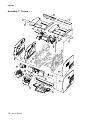
Assembly 1: Covers . . . . . . . . . . . . . . . . . . . . . . . . . . . . . . . . . . . . . . . . . . . . . . . . . . . . . . . . . . . . . . . . 7-2
Assembly 2: Frame 1 . . . . . . . . . . . . . . . . . . . . . . . . . . . . . . . . . . . . . . . . . . . . . . . . . . . . . . . . . . . . . . . 7-4
Assembly 3: Frame 2 . . . . . . . . . . . . . . . . . . . . . . . . . . . . . . . . . . . . . . . . . . . . . . . . . . . . . . . . . . . . . . . 7-6
Assembly 4: Frame 3 . . . . . . . . . . . . . . . . . . . . . . . . . . . . . . . . . . . . . . . . . . . . . . . . . . . . . . . . . . . . . . . 7-8
Assembly 5: Printhead . . . . . . . . . . . . . . . . . . . . . . . . . . . . . . . . . . . . . . . . . . . . . . . . . . . . . . . . . . . . . 7-10
Assembly 6: Paper feed—autocompensator . . . . . . . . . . . . . . . . . . . . . . . . . . . . . . . . . . . . . . . . . . . 7-12
Assembly 7: Paper feed—multipurpose feeder . . . . . . . . . . . . . . . . . . . . . . . . . . . . . . . . . . . . . . . . . 7-14
Assembly 8: Paper feed—alignment . . . . . . . . . . . . . . . . . . . . . . . . . . . . . . . . . . . . . . . . . . . . . . . . . . 7-16
Assembly 9: Integrated 250-sheet paper tray . . . . . . . . . . . . . . . . . . . . . . . . . . . . . . . . . . . . . . . . . . 7-18
Assembly 10: Integrated 500-sheet paper tray . . . . . . . . . . . . . . . . . . . . . . . . . . . . . . . . . . . . . . . . . 7-20
Assembly 11: Drives—Main drive and developer drive . . . . . . . . . . . . . . . . . . . . . . . . . . . . . . . . . . 7-22
Assembly 12: Hot roll fuser . . . . . . . . . . . . . . . . . . . . . . . . . . . . . . . . . . . . . . . . . . . . . . . . . . . . . . . . . 7-24
Assembly 13: Transfer/charging . . . . . . . . . . . . . . . . . . . . . . . . . . . . . . . . . . . . . . . . . . . . . . . . . . . . 7-26
Assembly 14: Electronics—power supplies . . . . . . . . . . . . . . . . . . . . . . . . . . . . . . . . . . . . . . . . . . . . 7-28
viii Service Manual
4061-xx0
Assembly 15:
Assembly 16:
Assembly 17:
Assembly 18:
Assembly 19:
Assembly 20:
Assembly 21:
Assembly 22:
Assembly 23:
Assembly 24:
Assembly 25:
Assembly 26:
Assembly 27:
Assembly 28:
Assembly 29:
Assembly 30:
Assembly 31:
Assembly 32:
Assembly 33:
Assembly 34:
Assembly 35:
Assembly 36:
Assembly 37:
Assembly 38:
Assembly 39:
Assembly 40:
Assembly 41:
Assembly 42:
Assembly 43:
Assembly 44:
Electronics—card assemblies . . . . . . . . . . . . . . . . . . . . . . . . . . . . . . . . . . . . . . . . . . .
Electronics—shields . . . . . . . . . . . . . . . . . . . . . . . . . . . . . . . . . . . . . . . . . . . . . . . . . . .
Cabling diagrams 1 . . . . . . . . . . . . . . . . . . . . . . . . . . . . . . . . . . . . . . . . . . . . . . . . . . . .
Cabling diagrams 2 . . . . . . . . . . . . . . . . . . . . . . . . . . . . . . . . . . . . . . . . . . . . . . . . . . . .
Cabling diagrams 3 . . . . . . . . . . . . . . . . . . . . . . . . . . . . . . . . . . . . . . . . . . . . . . . . . . . .
Cabling diagrams 4 . . . . . . . . . . . . . . . . . . . . . . . . . . . . . . . . . . . . . . . . . . . . . . . . . . . .
Cabling diagrams 5 . . . . . . . . . . . . . . . . . . . . . . . . . . . . . . . . . . . . . . . . . . . . . . . . . . . .
Optional 250-sheet paper drawer . . . . . . . . . . . . . . . . . . . . . . . . . . . . . . . . . . . . . . . . .
Optional 250-sheet paper tray . . . . . . . . . . . . . . . . . . . . . . . . . . . . . . . . . . . . . . . . . . .
Optional 500-sheet paper drawer . . . . . . . . . . . . . . . . . . . . . . . . . . . . . . . . . . . . . . . . .
Optional 500-sheet paper tray . . . . . . . . . . . . . . . . . . . . . . . . . . . . . . . . . . . . . . . . . . .
Duplex option . . . . . . . . . . . . . . . . . . . . . . . . . . . . . . . . . . . . . . . . . . . . . . . . . . . . . . . . .
Envelope feeder . . . . . . . . . . . . . . . . . . . . . . . . . . . . . . . . . . . . . . . . . . . . . . . . . . . . . . .
Output expander 1 . . . . . . . . . . . . . . . . . . . . . . . . . . . . . . . . . . . . . . . . . . . . . . . . . . . . .
Output expander 2 . . . . . . . . . . . . . . . . . . . . . . . . . . . . . . . . . . . . . . . . . . . . . . . . . . . . .
High-capacity output expander 1 . . . . . . . . . . . . . . . . . . . . . . . . . . . . . . . . . . . . . . . . .
High-capacity output expander 2 . . . . . . . . . . . . . . . . . . . . . . . . . . . . . . . . . . . . . . . . .
High-capacity output expander 3 . . . . . . . . . . . . . . . . . . . . . . . . . . . . . . . . . . . . . . . . .
5-bin mailbox 1 . . . . . . . . . . . . . . . . . . . . . . . . . . . . . . . . . . . . . . . . . . . . . . . . . . . . . . .
5-bin mailbox 2 . . . . . . . . . . . . . . . . . . . . . . . . . . . . . . . . . . . . . . . . . . . . . . . . . . . . . . .
High-capacity feeder 1 . . . . . . . . . . . . . . . . . . . . . . . . . . . . . . . . . . . . . . . . . . . . . . . . .
High-capacity feeder 2 . . . . . . . . . . . . . . . . . . . . . . . . . . . . . . . . . . . . . . . . . . . . . . . . .
High-capacity feeder 4 . . . . . . . . . . . . . . . . . . . . . . . . . . . . . . . . . . . . . . . . . . . . . . . . .
High-capacity feeder 5 . . . . . . . . . . . . . . . . . . . . . . . . . . . . . . . . . . . . . . . . . . . . . . . . .
Kiosk—vertical and horizontal paper adapters . . . . . . . . . . . . . . . . . . . . . . . . . . . . .
StapleSmart finisher I . . . . . . . . . . . . . . . . . . . . . . . . . . . . . . . . . . . . . . . . . . . . . . . . . .
StapleSmart finisher 2 . . . . . . . . . . . . . . . . . . . . . . . . . . . . . . . . . . . . . . . . . . . . . . . . . .
StapleSmart finisher 3 . . . . . . . . . . . . . . . . . . . . . . . . . . . . . . . . . . . . . . . . . . . . . . . . . .
StapleSmart finisher 4 . . . . . . . . . . . . . . . . . . . . . . . . . . . . . . . . . . . . . . . . . . . . . . . . . .
Options . . . . . . . . . . . . . . . . . . . . . . . . . . . . . . . . . . . . . . . . . . . . . . . . . . . . . . . . . . . . . .
7-30
7-32
7-34
7-35
7-36
7-38
7-40
7-42
7-43
7-44
7-45
7-46
7-47
7-48
7-49
7-50
7-51
7-52
7-54
7-56
7-58
7-60
7-62
7-63
7-64
7-65
7-66
7-67
7-68
7-69
Appendix A—Options and features . . . . . . . . . . . . . . . . . . . . . . . . . . . . . . . . . . . . . . A-1
Installing input options. . . . . . . . . . . . . . . . . . . . . . . . . . . . . . . . . . . . . . . . . . . . . . . . . . . . . . . . . . . . . . . . A-1
Order of installation . . . . . . . . . . . . . . . . . . . . . . . . . . . . . . . . . . . . . . . . . . . . . . . . . . . . . . . . . . . . . . . A-1
Installing a 250-sheet or 500-sheet drawer . . . . . . . . . . . . . . . . . . . . . . . . . . . . . . . . . . . . . . . . . . . . A-1
Installing a duplex unit . . . . . . . . . . . . . . . . . . . . . . . . . . . . . . . . . . . . . . . . . . . . . . . . . . . . . . . . . . . . A-3
Installing memory or option cards . . . . . . . . . . . . . . . . . . . . . . . . . . . . . . . . . . . . . . . . . . . . . . . . . . . . . . A-4
Accessing the printer system board . . . . . . . . . . . . . . . . . . . . . . . . . . . . . . . . . . . . . . . . . . . . . . . . . . . . . A-5
Removing or installing a memory card . . . . . . . . . . . . . . . . . . . . . . . . . . . . . . . . . . . . . . . . . . . . . . . . . . . A-7
Removal . . . . . . . . . . . . . . . . . . . . . . . . . . . . . . . . . . . . . . . . . . . . . . . . . . . . . . . . . . . . . . . . . . . . . . . A-7
Installation . . . . . . . . . . . . . . . . . . . . . . . . . . . . . . . . . . . . . . . . . . . . . . . . . . . . . . . . . . . . . . . . . . . . . . A-8
Removing or installing a flash memory or firmware card . . . . . . . . . . . . . . . . . . . . . . . . . . . . . . . . . . . . A-8
Removal . . . . . . . . . . . . . . . . . . . . . . . . . . . . . . . . . . . . . . . . . . . . . . . . . . . . . . . . . . . . . . . . . . . . . . . A-8
Installation . . . . . . . . . . . . . . . . . . . . . . . . . . . . . . . . . . . . . . . . . . . . . . . . . . . . . . . . . . . . . . . . . . . . . . A-9
Installing an option card. . . . . . . . . . . . . . . . . . . . . . . . . . . . . . . . . . . . . . . . . . . . . . . . . . . . . . . . . . . . . . A-10
Replacing the shield . . . . . . . . . . . . . . . . . . . . . . . . . . . . . . . . . . . . . . . . . . . . . . . . . . . . . . . . . . . . . . . . . A-11
Printing and using features . . . . . . . . . . . . . . . . . . . . . . . . . . . . . . . . . . . . . . . . . . . . . . . . . . . . . . . . . . . A-11
Canceling a print job . . . . . . . . . . . . . . . . . . . . . . . . . . . . . . . . . . . . . . . . . . . . . . . . . . . . . . . . . . . . . A-11
Printing the menu settings page . . . . . . . . . . . . . . . . . . . . . . . . . . . . . . . . . . . . . . . . . . . . . . . . . . . . A-13
Printing a network setup page . . . . . . . . . . . . . . . . . . . . . . . . . . . . . . . . . . . . . . . . . . . . . . . . . . . . . A-13
Printing a font sample list . . . . . . . . . . . . . . . . . . . . . . . . . . . . . . . . . . . . . . . . . . . . . . . . . . . . . . . . . A-14
Table of contents
manuals4you.com
ix
4061-xx0
Printing a directory list . . . . . . . . . . . . . . . . . . . . . . . . . . . . . . . . . . . . . . . . . . . . . . . . . . . . . . . . . . .
Printing confidential and held jobs . . . . . . . . . . . . . . . . . . . . . . . . . . . . . . . . . . . . . . . . . . . . . . . . . .
Linking trays . . . . . . . . . . . . . . . . . . . . . . . . . . . . . . . . . . . . . . . . . . . . . . . . . . . . . . . . . . . . . . . . . . . . . . .
Identifying and linking output bins . . . . . . . . . . . . . . . . . . . . . . . . . . . . . . . . . . . . . . . . . . . . . . . . . .
Linking output bins . . . . . . . . . . . . . . . . . . . . . . . . . . . . . . . . . . . . . . . . . . . . . . . . . . . . . . . . . . . . . .
A-14
A-14
A-17
A-18
A-20
Index . . . . . . . . . . . . . . . . . . . . . . . . . . . . . . . . . . . . . . . . . . . . . . . . . . . . . . . . . . . . . . . .I-1
Part number index . . . . . . . . . . . . . . . . . . . . . . . . . . . . . . . . . . . . . . . . . . . . . . . . . . . . .I-9
x Service Manual
4061-xx0
Laser notices
Laser notice
The printer is certified in the U.S. to conform to the requirements of DHHS 21 CFR Subchapter J for Class I (1)
laser products, and elsewhere is certified as a Class I laser product conforming to the requirements of IEC
60825-1.
Class I laser products are not considered to be hazardous. The printer contains internally a Class IIIb (3b) laser
that is nominally a 5 milliwatt gallium arsenide laser operating in the wavelength region of 770-795 nanometers.
The laser system and printer are designed so there is never any human access to laser radiation above a Class
I level during normal operation, user maintenance, or prescribed service condition.
Laser
Der Drucker erfüllt gemäß amtlicher Bestätigung der USA die Anforderungen der Bestimmung DHHS
(Department of Health and Human Services) 21 CFR Teil J für Laserprodukte der Klasse I (1). In anderen
Ländern gilt der Drucker als Laserprodukt der Klasse I, der die Anforderungen der IEC (International
Electrotechnical Commission) 60825-1 gemäß amtlicher Bestätigung erfüllt.
Laserprodukte der Klasse I gelten als unschädlich. Im Inneren des Druckers befindet sich ein Laser der Klasse
IIIb (3b), bei dem es sich um einen Galliumarsenlaser mit 5 Milliwatt handelt, der Wellen der Länge 770-795
Nanometer ausstrahlt. Das Lasersystem und der Drucker sind so konzipiert, daß im Normalbetrieb, bei der
Wartung durch den Benutzer oder bei ordnungsgemäßer Wartung durch den Kundendienst Laserbestrahlung,
die die Klasse I übersteigen würde, Menschen keinesfalls erreicht.
Avis relatif à l’utilisation de laser
Pour les Etats-Unis : cette imprimante est certifiée conforme aux provisions DHHS 21 CFR alinéa J concernant
les produits laser de Classe I (1). Pour les autres pays : cette imprimante répond aux normes IEC 60825-1
relatives aux produits laser de Classe I.
Les produits laser de Classe I sont considérés comme des produits non dangereux. Cette imprimante est
équipée d’un laser de Classe IIIb (3b) (arséniure de gallium d’une puissance nominale de 5 milliwatts) émettant
sur des longueurs d’onde comprises entre 770 et 795 nanomètres. L’imprimante et son système laser sont
conçus pour impossible, dans des conditions normales d’utilisation, d’entretien par l’utilisateur ou de révision,
l’exposition à des rayonnements laser supérieurs à des rayonnements de Classe I .
Laser notices
manuals4you.com
xi
4061-xx0
Avvertenze sui prodotti laser
Questa stampante è certificata negli Stati Uniti per essere conforme ai requisiti del DHHS 21 CFR Sottocapitolo
J per i prodotti laser di classe 1 ed è certificata negli altri Paesi come prodotto laser di classe 1 conforme ai
requisiti della norma CEI 60825-1.
I prodotti laser di classe non sono considerati pericolosi. La stampante contiene al suo interno un laser di classe
IIIb (3b) all’arseniuro di gallio della potenza di 5mW che opera sulla lunghezza d’onda compresa tra 770 e 795
nanometri. Il sistema laser e la stampante sono stati progettati in modo tale che le persone a contatto con la
stampante, durante il normale funzionamento, le operazioni di servizio o quelle di assistenza tecnica, non
ricevano radiazioni laser superiori al livello della classe 1.
Avisos sobre el láser
Se certifica que, en los EE.UU., esta impresora cumple los requisitos para los productos láser de Clase I (1)
establecidos en el subcapítulo J de la norma CFR 21 del DHHS (Departamento de Sanidad y Servicios) y, en
los demás países, reúne todas las condiciones expuestas en la norma IEC 60825-1 para productos láser de
Clase I (1).
Los productos láser de Clase I no se consideran peligrosos. La impresora contiene en su interior un láser de
Clase IIIb (3b) de arseniuro de galio de funcionamiento nominal a 5 milivatios en una longitud de onda de 770 a
795 nanómetros. El sistema láser y la impresora están diseñados de forma que ninguna persona pueda verse
afectada por ningún tipo de radiación láser superior al nivel de la Clase I durante su uso normal, el
mantenimiento realizado por el usuario o cualquier otra situación de servicio técnico.
Declaração sobre Laser
A impressora está certificada nos E.U.A. em conformidade com os requisitos da regulamentação DHHS 21 CFR
Subcapítulo J para a Classe I (1) de produtos laser. Em outros locais, está certificada como um produto laser da
Classe I, em conformidade com os requisitos da norma IEC 60825-1.
Os produtos laser da Classe I não são considerados perigosos. Internamente, a impressora contém um produto
laser da Classe IIIb (3b), designado laser de arseneto de potássio, de 5 milliwatts ,operando numa faixa de
comprimento de onda entre 770 e 795 nanómetros. O sistema e a impressora laser foram concebidos de forma
a nunca existir qualquer possiblidade de acesso humano a radiação laser superior a um nível de Classe I
durante a operação normal, a manutenção feita pelo utilizador ou condições de assistência prescritas.
.com
4you
s
l
a
u
n
a
m
xii
Service Manual
4061-xx0
Laserinformatie
De printer voldoet aan de eisen die gesteld worden aan een laserprodukt van klasse I. Voor de Verenigde Staten
zijn deze eisen vastgelegd in DHHS 21 CFR Subchapter J, voor andere landen in IEC 60825-1.
Laserprodukten van klasse I worden niet als ongevaarlijk aangemerkt. De printer is voorzien van een laser van
klasse IIIb (3b), dat wil zeggen een gallium arsenide-laser van 5 milliwatt met een golflengte van 770-795
nanometer. Het lasergedeelte en de printer zijn zo ontworpen dat bij normaal gebruik, bij onderhoud of reparatie
conform de voorschriften, nooit blootstelling mogelijk is aan laserstraling boven een niveau zoals
voorgeschreven is voor klasse 1.
Lasermeddelelse
Printeren er godkendt som et Klasse I-laserprodukt, i overenstemmelse med kravene i IEC 60825-1.
Klasse I-laserprodukter betragtes ikke som farlige. Printeren indeholder internt en Klasse IIIB (3b)-laser, der
nominelt er en 5 milliwatt galliumarsenid laser, som arbejder på bølgelængdeområdet 770-795 nanometer.
Lasersystemet og printeren er udformet således, at mennesker aldrig udsættes for en laserstråling over Klasse
I-niveau ved normal drift, brugervedligeholdelse eller obligatoriske servicebetingelser.
Huomautus laserlaitteesta
Tämä kirjoitin on Yhdysvalloissa luokan I (1) laserlaitteiden DHHS 21 CFR Subchapter J -määrityksen mukainen
ja muualla luokan I laserlaitteiden IEC 60825-1 -määrityksen mukainen.
Luokan I laserlaitteiden ei katsota olevan vaarallisia käyttäjälle. Kirjoittimessa on sisäinen luokan IIIb (3b) 5
milliwatin galliumarsenidilaser, joka toimii aaltoalueella 770 - 795 nanometriä. Laserjärjestelmä ja kirjoitin on
suunniteltu siten, että käyttäjä ei altistu luokan I määrityksiä voimakkaammalle säteilylle kirjoittimen normaalin
toiminnan, käyttäjän tekemien huoltotoimien tai muiden huoltotoimien yhteydessä.
VARO! Avattaessa ja suojalukitus ohitettaessa olet alttiina näkymättömälle lasersäteilylle. Älä katso
säteeseen.
VARNING! Osynlig laserstrålning när denna del är öppnad och spärren är urkopplad.
Betrakta ej strålen.
Laser notices
manuals4you.com
xiii
4061-xx0
Laser-notis
Denna skrivare är i USA certifierad att motsvara kraven i DHHS 21 CFR, underparagraf J för laserprodukter av
Klass I (1). I andra länder uppfyller skrivaren kraven för laserprodukter av Klass I enligt kraven i IEC 60825-1.
Laserprodukter i Klass I anses ej hälsovådliga. Skrivaren har en inbyggd laser av Klass IIIb (3b) som består av
en laserenhet av gallium-arsenid på 5 milliwatt som arbetar i våglängdsområdet 770-795 nanometer.
Lasersystemet och skrivaren är utformade så att det aldrig finns risk för att någon person utsätts för
laserstrålning över Klass I-nivå vid normal användning, underhåll som utförs av användaren eller annan
föreskriven serviceåtgärd.
Laser-melding
Skriveren er godkjent i USA etter kravene i DHHS 21 CFR, underkapittel J, for klasse I (1) laserprodukter, og er
i andre land godkjent som et Klasse I-laserprodukt i samsvar med kravene i IEC 60825-1.
Klasse I-laserprodukter er ikke å betrakte som farlige. Skriveren inneholder internt en klasse IIIb (3b)-laser, som
består av en gallium-arsenlaserenhet som avgir stråling i bølgelengdeområdet 770-795 nanometer.
Lasersystemet og skriveren er utformet slik at personer aldri utsettes for laserstråling ut over klasse I-nivå under
vanlig bruk, vedlikehold som utføres av brukeren, eller foreskrevne serviceoperasjoner.
Avís sobre el Làser
Segons ha estat certificat als Estats Units, aquesta impressora compleix els requisits de DHHS 21 CFR, apartat
J, pels productes làser de classe I (1), i segons ha estat certificat en altres llocs, és un producte làser de classe
I que compleix els requisits d’IEC 60825-1.
Els productes làser de classe I no es consideren perillosos. Aquesta impressora conté un làser de classe IIIb
(3b) d’arseniür de gal.li, nominalment de 5 mil.liwats, i funciona a la regió de longitud d’ona de 770-795
nanòmetres. El sistema làser i la impressora han sigut concebuts de manera que mai hi hagi exposició a la
radiació làser per sobre d’un nivell de classe I durant una operació normal, durant les tasques de manteniment
d’usuari ni durant els serveis que satisfacin les condicions prescrites.
xiv
Service Manual
4061-xx0
Japanese Laser Notice
Laser notices
manuals4you.com
xv
4061-xx0
Korean Laser Notice
xvi
Service Manual
4061-xx0
Safety information
• The safety of this product is based on testing and approvals of the original design and specific
•
•
•
components. The manufacturer is not responsible for safety in the event of use of unauthorized
replacement parts.
The maintenance information for this product has been prepared for use by a professional
service person and is not intended to be used by others.
There may be an increased risk of electric shock and personal injury during disassembly and
servicing of this product. Professional service personnel should understand this and take
necessary precautions.
CAUTION: When you see this symbol, there is a danger from hazardous voltage in the
area of the product where you are working. Unplug the product before you begin, or use
caution if the product must receive power in order to perform the task.
Consignes de sécurité
• La sécurité de ce produit repose sur des tests et des
•
•
•
agréations portant sur sa conception d'origine et sur des composants particuliers. Le fabricant
n'assume aucune responsabilité concernant la sécurité en cas d'utilisation de pièces de
rechange non agréées.
Les consignes d'entretien et de réparation de ce produit s'adressent uniquement à un personnel
de maintenance qualifié.
Le démontage et l'entretien de ce produit pouvant présenter certains risques électriques, le
personnel d'entretien qualifié devra prendre toutes les précautions nécessaires.
ATTENTION : Ce symbole indique la présence d'une tension dangereuse dans la partie
du produit sur laquelle vous travaillez. Débranchez le produit avant de commencer ou
faites preuve de vigilance si l'exécution de la tâche exige que le produit reste sous
tension.
Norme di sicurezza
• La sicurezza del prodotto si basa sui test e sull'approvazione del progetto originale e dei
•
•
•
componenti specifici. Il produttore non è responsabile per la sicurezza in caso di sostituzione
non autorizzata delle parti.
Le informazioni riguardanti la manutenzione di questo prodotto sono indirizzate soltanto al
personale di assistenza autorizzato.
Durante lo smontaggio e la manutenzione di questo prodotto,
il rischio di subire scosse elettriche e danni alla persona è più elevato. Il personale di assistenza
autorizzato deve, quindi, adottare le precauzioni necessarie.
ATTENZIONE: Questo simbolo indica la presenza di tensione pericolosa nell'area del
prodotto. Scollegare il prodotto prima di iniziare o usare cautela se il prodotto deve
essere alimentato per eseguire l'intervento.
Safety information
manuals4you.com
xvii
4061-xx0
Sicherheitshinweise
• Die Sicherheit dieses Produkts basiert auf Tests und Zulassungen des ursprünglichen Modells
•
•
•
und bestimmter Bauteile. Bei Verwendung nicht genehmigter Ersatzteile wird vom Hersteller
keine Verantwortung oder Haftung für die Sicherheit übernommen.
Die Wartungsinformationen für dieses Produkt sind ausschließlich für die Verwendung durch
einen Wartungsfachmann bestimmt.
Während des Auseinandernehmens und der Wartung des Geräts besteht ein zusätzliches
Risiko eines elektrischen Schlags und körperlicher Verletzung. Das zuständige Fachpersonal
sollte entsprechende Vorsichtsmaßnahmen treffen.
ACHTUNG: Dieses Symbol weist auf eine gefährliche elektrische Spannung hin, die in
diesem Bereich des Produkts auftreten kann. Ziehen Sie vor den Arbeiten am Gerät
den Netzstecker des Geräts, bzw. arbeiten Sie mit großer Vorsicht, wenn das Produkt
für die Ausführung der Arbeiten an den Strom angeschlossen sein muß.
Pautas de Seguridad
• La seguridad de este producto se basa en pruebas y aprobaciones del diseño original y
•
•
•
componentes específicos. El fabricante no es responsable de la seguridad en caso de uso de
piezas de repuesto no autorizadas.
La información sobre el mantenimiento de este producto está dirigida exclusivamente al
personal cualificado de mantenimiento.
Existe mayor riesgo de descarga eléctrica y de daños personales durante el desmontaje y la
reparación de la máquina. El personal cualificado debe ser consciente de este peligro y tomar
las precauciones necesarias.
PRECAUCIÓN: este símbolo indica que el voltaje de la parte del equipo con la que está
trabajando es peligroso. Antes de empezar, desenchufe el equipo o tenga cuidado si,
para trabajar con él, debe conectarlo.
Informações de Segurança
• A segurança deste produto baseia-se em testes e aprovações do modelo original e de
•
•
•
xviii
componentes específicos. O fabricante não é responsável pela segunrança, no caso de uso de
peças de substituição não autorizadas.
As informações de segurança relativas a este produto destinam-se a profissionais destes
serviços e não devem ser utilizadas por outras pessoas.
Risco de choques eléctricos e ferimentos graves durante a desmontagem e manutenção deste
produto. Os profissionais destes serviços devem estar avisados deste facto e tomar os
cuidados necessários.
CUIDADO: Quando vir este símbolo, existe a possível presença de uma potencial
tensão perigosa na zona do produto em que está a trabalhar. Antes de começar,
desligue o produto da tomada eléctrica ou seja cuidadoso caso o produto tenha de
estar ligado à corrente eléctrica para realizar a tarefa necessária.
Service Manual
4061-xx0
Informació de Seguretat
• La seguretat d'aquest producte es basa en l'avaluació i aprovació del disseny original i els
•
•
•
components específics.
El fabricant no es fa responsable de les qüestions de
seguretat si s'utilitzen peces de recanvi no autoritzades.
La informació pel manteniment d’aquest producte està orientada exclusivament a professionals
i no està destinada
a ningú que no ho sigui.
El risc de xoc elèctric i de danys personals pot augmentar durant el procés de desmuntatge i de
servei d’aquest producte. El personal professional ha d’estar-ne assabentat i prendre
les mesures convenients.
PRECAUCIÓ: aquest símbol indica que el voltatge de la part de l'equip amb la qual
esteu treballant és perillós. Abans de començar, desendolleu l'equip o extremeu les
precaucions si, per treballar amb l'equip, l'heu de connectar.
Safety information
manuals4you.com
xix
4061-xx0
Preface
This manual contains maintenance procedures for service personnel. It is divided into the following
chapters:
1. General information contains a general description of the printer and the maintenance
2.
3.
4.
5.
6.
7.
approach used to repair it. Special tools and test equipment are listed in this chapter, as well as
general environmental and safety instructions.
Diagnostic information contains an error indicator table, symptom tables, and service checks
used to isolate failing field replaceable units (FRUs).
Diagnostic aids contains tests and checks used to locate or repeat symptoms of printer
problems.
Repair information provides instructions for making printer adjustments and removing and
installing FRUs.
Connector locations uses illustrations to identify the connector locations and test points on the
printer.
Preventive maintenance contains the lubrication specifications and recommendations to
prevent problems.
Parts catalog contains illustrations and part numbers for individual FRUs.
Definitions
Note: A note provides additional information.
Warning: A warning identifies something that might damage the product hardware or software.
CAUTION: A caution identifies something that might cause a servicer harm.
CAUTION: When you see this symbol, there is a danger from hazardous voltage in the
area of the product where you are working. Unplug the product before you begin, or use
caution if the product must receive power in order to perform the task.
xx
Service Manual
4061-xx0
1. General information
The Lexmark™ T64x laser printers are letter quality page printers designed to attach to IBM-compatible
personal computers and to most computer networks.
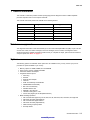
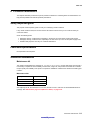
The Lexmark T64x laser printers are available in the following models:
Model name
Configuration
Machine type
Lexmark T640
Non-network
4061-000
Lexmark T640n
Network
4061-010
Lexmark T642
Non-network
4061-200
Lexmark T642n
Network
4061-210
Lexmark T644
Non-network
4061-400
Lexmark T644n
Network
4060-410
Maintenance approach
The diagnostic information in this manual leads you to the correct field replaceable unit (FRU) or part. Use the
service error codes, user status messages, user error messages, service checks, and diagnostic aids to
determine the printer problem and repair the failure. After you complete the repair, perform tests as needed to
verify the repair. See “Start” on page 2-1.
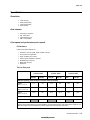
Options
The following options are available. Some options are not available in every country. Contact your point of
purchase for options available in your country.
•
•
•
•
•
Memory options of 128MB, 256MB, and 512 SDRAM
Flash memory options of 32MB and 64MB
Hard disk—20GB+ with adapter
Integrated network options
– Token-ring
– Ethernet
– External serial adapter
– ThinPrint
– IPDS card assembly and SCS/TNe
– PRESCRIBE card assembly
– Bar code card assembly
– Parallel interface card
– MarkNet™ Print Servers
– Lexmark PrintCryption™ card
– Forms card (single-byte and Simplified Chinese)
Media handling operations
– 250- and 500-sheet paper trays of A4, letter, A5, B5, Executive, folio, statement, and legal size
– 250-sheet universally adjustable tray
– 250- and 500-sheet paper drawers
– 400-sheet universally adjustable tray
– 2000-sheet high-capacity feeder
– Envelope feeder
General information
manuals4you.com
1-1
4061-xx0
–
–
–
–
–
–
–
–
•
•
Duplex option—250-sheet (For Lexmark T640 and Lexmark T640n)
Duplex option—500-sheet (For Lexmark T642, Lexmark T642n, Lexmark T644, and Lexmark T644n)
Output expander
High-capacity output stacker
StapleSmart™ Finisher
5-bin Mailbox
Vertical Kiosk Presenter
Horizontal Kiosk Presenter
Application solutions—Lexmark Document Solutions
DBCS font cards
– Simplified Chinese
– Traditional Chinese
– Japanese
– Korean
Configured models
The following illustrations show a standard network and fully configured printer. If you attach print media
handling options to the printer, it may look more like the fully configured model.
5-Bin Mailbox*
StapleSmart Finisher*
Standard output bin
Envelope feeder*
Operator panel
Tray 1
(integrated tray
or standard tray)
Multipurpose feeder
Tray 1
(integrated tray
or standard tray)
Duplex unit*
Tray 2*
(250 or 500 sheets)
Tray 3*
(250 or 500 sheets)
Tray 4*
(250 or 500 sheets)
Tray 5*
(2000-sheet drawer)
The standard tray holds 250 sheets for the T111 and 500 sheets for the T112.
CAUTION: Floor-mounted configurations require additional furniture. You must use either a printer stand or
printer base if you are using a 2000-sheet drawer, a duplex unit and an input option, or more than one input
option. If you purchased a multifunction printer (MFP) that scans, copies, and faxes, you may need additional
furniture. Refer to www.lexmark.com/multifunctionprinters for more information.
1-2 Service Manual
4061-xx0
Specifications
Resolution
•
•
•
•
1200 1200 dpi
2400 Image Quality
1200 Image Quality
600 x 600 dpi
Data streams
•
•
•
•
PostScript 3 emulation
PCL 6 emulation
PPDS migration tool
PDF v1.5 emulation
Print speed and performance print speed
Performance
Performance speed depends on:
•
•
•
•
•
•
•
Interface to the host (USB, serial, parallel, network)
Host system and application
Page complexity and content
Printer options installed or selected
Available printer memory
Media size and type
Resolution
Time to first print
Lexmark T640,
Lexmark T640n
1200 dpi
600 dpi
Lexmark T642,
Lexmark T642n
1200 dpi
600 dpi
Lexmark T644,
Lexmark T644n
1200
600 dpi
Simplex printing from Ready on full-size media (seconds)
Letter
8.5 in. x 11 in.
11.7
6.0
12.1
8.5
12.1
8.5
A4
8.3 in. x 11.7 in.
17.0
11.4
22.7
13.0
22.7
13.0
Legal
8.5 in. x 14 in.
14.5
12.1
24.3
24.3
24.3
13.5
Simplex printing from Power Saver on full-size media (seconds)
Simplex Letter
25.3
28.2
28.2
The test job consists of the character “A” followed by a form-feed (single page job). The first copy time is
defined as the elapsed time from pressing Enter on the PC keyboard to the page exiting to the output bin. All
tests pick paper from the indicated tray, and the page exits into the primary output bin.
General information
manuals4you.com
1-3
4061-xx0
Memory configuration
64
64
Optional memory (MB)
64
128
128
Lexmark T644n
Lexmark T644
Lexmark T642n
Lexmark T642
Lexmark T640
Memory type
Standard DRAM (MB)
Lexmark T640n
Models
128
128, 256, and 512MB available
(100 pin DDR SDRAM unbuffered
DIMMs)
Maximum (MB)
576
576
576
Optional flash memory
32 and 64 MB available
640
640
640
Note: One firmware card and one flash memory card are supported. Either slot supports both card types.
Depending upon the options and features used, additional memory may be required to optimize performance.
Available memory options
Optional 128MB, 256MB, and 512MB SDRAM DIMMs are available from Lexmark. The memory options are
168-pin synchronous DRAM DIMMs.
Flash memory options include 32MB and 64MB.
Operating clearances
Printer side
Measurement
Left and right side
12 in. (30.48 cm)
Front
20 in. (50.8 cm)
Rear
12 in. (30.48 cm)
Top*
54 in. (137.16 cm)
* Allow clearance above the printer front door clearance and for adding
options, such as additional input drawers, output expander, high-capacity
output stacker, or StapleSmart finisher.
1-4 Service Manual
4061-xx0
Dimensions
Description
Height
Width
Depth
Weight
Lexmark T640 (base printer)
13.6 in.
(345 mm)
16.6 in.
(421 mm)
19.6 in.
(498 mm)
38.0 lb
(17.0kg)
Lexmark T642 (base printer)
16.0 in.
(406 mm)
17.2 in.
(436 mm)
20.2 in.
(513 mm)
51.6 lb
(23.1 kg)
Lexmark T644 (base printer)
16 in.
(406 mm)
17.2 in.
(436 mm)
20.2 in.
(513 mm)
51.6 lb
(23.1 kg)
Duplex 250-page option
2.13 in.
(54 mm)
15.6 in.
(398 mm)
23.4 in.
(595 mm)
11.1 lb
(5.03 kg)
Duplex 500-page option
2.13 in.
(54 mm)
15.6 in.
(398 mm)
24.1 in.
(595 mm)
11.3 lb
(5.1 kg)
250-Sheet drawer
3.5 in.
(90 mm)
15.6 in.
(398 mm)
19.5 in.
(495 mm)
6 lb
(2.7 kg)
500-Sheet drawer
5.3 in.
(134 mm)
15.6 in.
(398 mm)
20.5 in.
(520 mm)
7 lb
(3.2 kg)
2,000-Sheet drawer
11.8 in.
(300 mm)
15.6 in.
(398 mm)
19.5 in.
(495 mm)
31 lb
(14.1 kg)
Output Expander
6.8 in.
(173.2 mm)
15.6 in.
(398 mm)
14.9 in.
(374 mm)
7.0 lb
(3.2 kg)
5-Bin Mailbox
13.1 in.
(332 mm)
15.7 in.
(399 mm)
12.2 in.
(310 mm)
7.9 lb
(3.6 kg)
High-capacity output stacker
11.4 in.
(290 mm)
15.7 in.
(399 mm)
18 in.
(457 mm)
10 lb
(4.5 kg)
StapleSmart finisher
9.0 in.
(228.6 mm)
17.6 in.
(447.7 mm)
19.5 in.
(495.3 mm)
13 lb
(5.9 kg)
Printer
Options
Envelope option (closed position)
*
*
7.72 in.
(196 mm)
4 lb
(1.8 kg)
Envelope option (support fully
extended)
*
*
12.28 in.
(312 mm)
4 lb
(1.8 kg)
Printer cabinet
31.8 in.
(808 mm)
30.4 in.
(772 mm)
23.2 in.
(594 mm)
76 lb
(34.5 kg)
Printer cabinet stand
31.8 in.
(808 mm)
34.8 in.
(883 mm)
23.2 in.
(594 mm)
83 lb
(37.6 kg)
* Envelope option fits within height and width of printer.
General information
manuals4you.com
1-5
4061-xx0
Power requirements
Average nominal power requirements for the base printer configuration (110 volt). Power levels are shown in
watts (W). Maximum current is given in Amperes (A).
Printing states
Off (all models)
Lexmark T640
Lexmark T640n
Lexmark T642
Lexmark T642n
Lexmark T644
Lexmark T644n
.05 W
.05 W
.05 W
Power Saver on
20 W
20 W
20 W
Power Saver off
90 W
95 W
95 W
Continuous printing
675 W
830 W
830 W
100 V
7.8 A
8.9 A
8.9 A
120 V
7.2 A
8.0 A
8.0 A
230 V
3.4 A
4.1 A
4.1 A
Idle—average power
Printing—maximum current
Electrical specifications
Low voltage model
• 100 to 127 V ac at 50 to 60 Hz nominal
• 90 to 137 V ac, extreme
High voltage model
• 220 to 240 V ac at 50 to 60 Hz nominal (not available in all countries)
• 190 to 259 V ac, extreme
Notes:
• Using a 220 to 110 power converter with the 110 volt printer is not recommended.
• All models are ENERGY STAR qualified.
• The default timeout to power saver is 30 minutes for all models.
1-6 Service Manual
4061-xx0
Environment
Printer temperature and humidity
• Operating
– Temperature: 16 to 32° C (60° to 90° F)
– Relative humidity: 8 to 80%
– Altitude: 10,000 ft. (0 to 3,048 meters)
• Storage and shipping environment (packaged)
– Temperature: -40° to 43° C (-40° to 110° F)
– Relative humidity: 5% to 95%
– Altitude: equivalent to 10,300 meters (0 to 34,000 feet)
• Storage environment (unpacked)
– Temperature: 0° to 40° C (32° to 104° F)
– Relative humidity: 5% to 80%
Acoustics
All measurements are made in accordance with ISO 7779 and conform with ISO 9296.
1 Meter average
sound pressure
Declared sound
power
Model
Status
Lexmark T640(n)
Idle (standby mode)
30 dBA
4.0 Bels
Simplex printing
53 dBA
6.7 Bels
Duplex printing
55 dBA
N/M Bels
Idle (standby mode)
32 dBA
4.7 Bels
Simplex printing
54 dBA
6.8 Bels
Duplex printing
57 dBA
N/M Bels
Idle (standby mode)
30 dBA
4.5
Simplex printing
55
7.0
Duplex printing
58
N/M
Lexmark T642(n)
Lexmark T644(n)
Note: Measurements apply to 300 dpi, 600 dpi, and 1200 dpi printing.
General information
manuals4you.com
1-7
4061-xx0
Media specifications
Paper and specialty media guidelines
Print media is paper, card stock, transparencies, labels, and envelopes. This printer provides high quality
printing on a variety of print media. You must consider a number of things concerning print media before you
print, including:
•
•
•
•
Supported print media
Selecting print media
Storing print media
Avoiding jams
For more details about the types of paper and specialty media your printer supports, refer to the Card Stock &
Label Guide available on our Lexmark Web site at www.lexmark.com.
We recommend that you try a limited sample of any paper or specialty media you are considering using with the
printer before purchasing large quantities.
Supported print media
The following tables provide information on standard and optional sources for both input and output trays and
bins.
•
•
•
•
•
Print media sizes
Print media weights
Media weights supported in optional output bins
Media sizes supported in the finisher
Media weights supported in the finisher
Note: If you use a print media size not listed, select the next larger size.
2000-sheet drawer (option)
Duplex unit (option)
Standard output bin
Output expander (option)
5-bin mailbox (option)
High-capacity
output stacker (option)
StapleSmart output bin
StapleSmart Finisher
✓
✓
✓
✓
✓
✓
✓
✓
✓
✓
✓
✓
A5
148 x 210 mm
(5.83 x 8.27 in.)
✓
✓
✓
✓
✓
✓
✓
✓
✓
✓
✓
JIS B5
182 x 257 mm
(7.17 x 10.1 in.)
✓
✓
✓
✓
✓
✓
✓
✓
✓
✓
✓
✓
Letter
215.9 x 279.4 mm
(8.5 x 11 in.)
✓
✓
✓
✓
✓
✓
✓
✓
✓
✓
✓
✓
✓
Legal
215.9 x 355.6 mm
(8.5 x 14 in.)
✓
✓
✓
✓
✓
✓
✓
✓
✓
✓
✓
✓
✓
1-8 Service Manual
Envelope feeder (option)
Multipurpose feeder
✓
400 UAT (option)
250-sheet drawer (option)
210 x 297 mm
(8.27 x 11.7 in.)
Dimensions
(UAT — universally
adjustable tray)
500-sheet drawer (option)
500-sheet tray
A4
Print media
size
(✓— indicates
support)
250 UAT (option)
250-sheet tray
Print media sizes
4061-xx0
Folio1
216 x 330 mm
(8.5 x 13 in.)
✓
✓
✓
✓
✓
Statement1
139.7 x 215.9 mm
(5.5 x 8.5 in.)
✓
✓
✓
✓
Universal2, 3
139.7 x 210 mm to
215.9 x 355.6 mm
(5.5 x 8.27 in. to 8.5 x 14
in.)
✓
✓
✓
✓
✓
✓
✓
✓
✓
✓
✓
✓
✓
✓
✓
✓
✓
✓
✓
✓
✓
✓
✓
Envelope feeder (option)
✓
✓
148 x 182 mm to
215.9 x 355.6 mm
(5.83 x 7.17 in. to 8.5 x 14
in.)
76.2 x 177.8 mm to 215.9
x 355.6 mm
(3 x 7 in. to 8.5 x 14 in.)
✓
✓
69.85 x 127 mm to
215.9 x 355.6 mm
(2.75 x 5 in. to 8.5 x 14
in.)
76.2 x 127 mm to 215.9 x
355.6 mm4
(3 x 5 in. to 8.5 x 14 in.)
StapleSmart Finisher
✓
StapleSmart output bin
✓
High-capacity
output stacker (option)
✓
5-bin mailbox (option)
✓
Output expander (option)
2000-sheet drawer (option)
✓
Standard output bin
Multipurpose feeder
✓
Duplex unit (option)
250-sheet drawer (option)
184.2 x 266.7 mm
(7.25 x 10.5 in.)
400 UAT (option)
500-sheet tray
Executive
500-sheet drawer (option)
Dimensions
(UAT — universally
adjustable tray)
250 UAT (option)
Print media
size
(✓— indicates
support)
250-sheet tray
Print media sizes (continued)
✓
✓
7 ¾ Envelope
98.4 x 190.5 mm
(3.875 x 7.5 in.)
✓
✓
✓
✓
✓
9 Envelope
98.4 x 225.4 mm
(3.875 x 8.9 in.)
✓
✓
✓
✓
✓
10 Envelope
104.8 x 241.3 mm
(4.12 x 9.5 in.)
✓
✓
✓
✓
✓
DL Envelope
110 x 220 mm
(4.33 x 8.66 in.)
✓
✓
✓
✓
✓
C5 Envelope
162 x 229 mm
(6.38 x 9.01 in.)
✓
✓
✓
✓
✓
B5 Envelope
176 x 250 mm
(6.93 x 9.84 in.)
✓
✓
✓
✓
✓
General information
manuals4you.com
1-9
4061-xx0
StapleSmart Finisher
StapleSmart output bin
✓
High-capacity
output stacker (option)
✓
5-bin mailbox (option)
Output expander (option)
✓
Standard output bin
Duplex unit (option)
Envelope feeder (option)
2000-sheet drawer (option)
Multipurpose feeder
400 UAT (option)
500-sheet drawer (option)
250 UAT (option)
250-sheet drawer (option)
✓
98.4 x 162 mm
to 176 x 250 mm
(3.87 x 6.38 in.
to 6.93 x 9.84 in.)
Other
Envelope1
1 This
Dimensions
(UAT — universally
adjustable tray)
250-sheet tray
Print media
size
(✓— indicates
support)
500-sheet tray
Print media sizes (continued)
✓
size does not appear in the Paper Size menu until Tray Size Sensing is turned off.
2
This size setting formats the page for 215.9 x 355.6 mm (8.5 x 14 in.) unless the size is specified by the software
application.
3
No universal support for the following options: 2000-sheet drawer, Envelope Feeder, 5-bin mailbox.
4
3.5 in. setting not supported if other options are installed above the 250 universally adjustable tray.
Print media
250-sheet tray
500-sheet tray
250-sheet drawer (option)
250 UAT (option)
500-sheet drawer (option)
400 UAT (option)
Multipurpose feeder
2000-sheet drawer
Print media types
Paper
✓
✓
✓
✓
✓
✓
✓
✓
Card stock
✓
✓
✓
✓
✓
✓
✓
✓
✓
✓
✓
✓
✓
✓
✓
✓
✓
labels1
High-capacity
output stacker
Standard
Offset
Stapled
Envelope feeder
5-bin mailbox
✓
Output expander
Vinyl labels
Standard output bin
1, 2
Duplex unit
Transparencies
StapleSmart
Finisher
✓
✓
✓
✓
✓
✓
✓
✓
✓
✓
✓
✓
✓
✓
✓
✓
✓
✓
✓
✓
✓
✓
✓
✓
✓
✓
✓
Polyester label1
✓
✓
✓
✓
✓
✓
✓
Dual-web and integrated label1
✓
✓
✓
✓
✓
✓
✓
Paper
1 Printing
label applications on the printer requires a special label fuser cleaner which prevents duplexing. The label fuser
cleaner is included with a special label cartridge for label applications.
2
Vinyl labels may require a special media tray.
1-10 Service Manual
4061-xx0
Print media weights
Print media weight
Print media
Type
Integrated tray and
optional
500-sheet drawer
Multipurpose
feeder and
optional
250-sheet drawer
Paper
Xerographic or
business paper
60 to 176 g/m2 grain
long (16 to 47 lb
bond)
60 to 135 g/m2 grain
long (16 to 36 lb
bond)
Card stock—
maximum
(grain long)1
Index Bristol
163 g/m2 (90 lb)
120 g/m2 (67 lb)
2
Tag
163 g/m (100 lb)
Cover
176 g/m2 (65 lb)
135 g/m (50 lb)
Index Bristol
199 g/m2 (110 lb)
163 g/m2 (90 lb)
Tag
203 g/m2 (125 lb)
163 g/m2 (100 lb)
Cover
216 g/m2 (80 lb)
176 g/m2 (65 lb)
Transparencies
Laser printer
138 to 146 g/m2
(37 to 39 lb bond)
138 to 146 g/m2
(37 to 39 lb bond)
Labels—maximum2
Paper
180 g/m2
(48 lb bond)
163 g/m2
(43 lb bond)
Dual-web paper 180 g/m2
(48 lb bond)
163 g/m2
(43 lb bond)
Polyester
220 g/m2
(59 lb bond)
220 g/m2
(59 lb bond)
Vinyl5
300 g/m2
(92 lb liner)
260 g/m2
(78 lb liner)
Pressuresensitive area
(must enter the
printer first)
140 to 135 g/m2
140 to 135 g/m2
Paper base
(grain long)
75 to 135 g/m2
(20 to 36 lb bond)
75 to 135 g/m2
(20 to 36 lb bond)
Sulfite, woodfree or up to
100% cotton
bonds
Not recommended
60 to 105 g/m2
(16 to 28 lb
bond)3, 4
Card stock—
maximum
(grain short)1
Integrated forms
Envelopes
100% cotton content
maximum
weight—24 lb
1
120
g/m2
Envelope
feeder
200-Sheet
drawer
n/a
60 to 135 g/m2
(16 to 36 lb
bond)
n/a
(74 lb)
2
60 to 105 g/m2
(16 to 28 lb
bond)3
Grain short is preferred for papers over 135 g/m2.
2
Printing label applications on your printer requires a special label fuser cleaner which prevents duplexing.
3
28 lb envelopes are limited to 25% cotton content.
4
Includes envelopes fed from the multipurpose feeder only.
5
Information on whether your vinyl label converter has passed the Lexmark’s criteria is available at www.lexmark.com.
General information
manuals4you.com
1-11
4061-xx0
Media weights supported in optional output bins
Print media weight—optional output bins
Print media
Type
5-bin mailbox
Output expander
High-capacity
output stacker
Paper
(grain long)
Xerographic or
business paper
60 to 90 g/m2
(16 to 24 lb bond)
60 to 176 g/m2
(16 to 47 lb bond)
60 to 176 g/m 2
(16 to 47 lb bond)
Card stock—
maximum (grain
long)
Index Bristol
Not
recommended
163 g/m2 (90 lb)
163 g/m2
(90 lb)
Tag
163 g/m2 (100 lb)
163 g/m2
(100 lb)
Cover
176 g/m2 (65 lb)
176 g/m2
(65 lb)
Index Bristol
199 g/m2 (110 lb)
199 g/m2
(110 lb)
Tag
203 g/m2 (125 lb)
203 g/m2
(125 lb)
Cover
216 g/m2 (80 lb)
216 g/m2
(80 lb)
Transparencies
Laser printer
138 to 146 g/m2
(37 to 39 lb bond)
138 to 146 g/m 2
(37 to 39 lb bond)
Labels—
maximum
Paper
180 g/m2
(48 lb bond)
180 g/m2
(48 lb bond)
Dual-web
paper
180 g/m2
(48 lb bond)
180 g/m2
(48 lb bond)
Polyester
220 g/m2
(59 lb bond)
220 g/m2
(59 lb bond)
Vinyl5
300 g/m2
(92 lb liner)
300 g/m2
(92 lb liner)
Pressure
sensitive area
(must enter the
printer first)
140 to 175 g/m2
(up to 47 lb bond)
140 to 175 g/m 2
(up to 47 lb bond)
Paper base
(grain long)
75 to 135 g/m2
(20 to 36 lb bond)
75 to 135 g/m 2
(20 to 36 lb bond)
Sulfite, woodfree or up to
100% cotton
bond
60 to 105 g/m2
(16 to 28 lb bond)
60 to 105 g/m 2
(16 to 28 lb bond)
Card stock—
maximum (grain
short)
Integrated forms
Envelopes
1
Finisher
See “Media
weights
supported in
the finisher” on
page 1-14.
Not
recommended
Grain short is preferred for papers over 135 g/m2.
2
Printing label applications on your printer requires a special label fuser cleaner which prevents duplexing.
3
28 lb envelopes are limited to 25% cotton content.
4
Includes envelopes fed from the multipurpose feeder only.
5
Information on whether your vinyl label converter has passed the Lexmark’s criteria is available at www.lexmark.com.
1-12 Service Manual
4061-xx0
Media sizes supported in the finisher
Finisher output support
Dimensions
Size
Standard 1
Offset
✓
Stapled
✓
✓
✓
✓
✓
215.9 x 355.6 mm
(8.5 x 14 in.)
✓
✓
✓
Executive
184.2 x 266.7 mm
(7.25 x 10.5 in.)
✓
Folio2
216 x 330 mm
(8.5 x 13 in.)
✓
✓
✓
Statement2
139.7 x 215.9 mm
(5.5 x 8.5 in.)
7 ¾ Envelope
98.4 x 190.5 mm
(3.875 x 7.5 in.)
9 Envelope
98.4 x 225.4 mm
(3.875 x 8.9 in.)
10 Envelope
104.8 x 241.3 mm
(4.12 x 9.5 in.)
DL Envelope
110 x 220 mm
(4.33 x 8.66 in.)
C5 Envelope
162 x 229 mm
(6.38 x 9.01 in.)
✓
B5 Envelope
176 x 250 mm
(6.93 x 9.84 in.)
✓
Other Envelope
98.4 x 162 mm
to 176 x 250 mm
(3.87 x 6.38 in.
to 6.93 x 9.84 in.)
A4
210 x 297 mm
(8.27 x 11.7 in.)
A5
148 x 210 mm
(5.83 x 8.27 in.)
JIS B5
182 x 257 mm
(7.17 x 10.1 in.)
✓
Letter
215.9 x 279.4 mm
(8.5 x 11 in.)
Legal
1
Paper passes to the finisher bin without being stapled or offset.
2
This size does not appear in the Paper Size menu until Tray Size Sensing is turned off.
General information
manuals4you.com
1-13
4061-xx0
Media weights supported in the finisher
Finisher media weight
Print media
Type
Standard *
Offset
Stapled
Paper
Xerographic or
business paper
60 to 176 g/m2
(16 to 47 lb bond)
60 to 90 g/m 2
(16 to 24 lb bond)
60 to 90 g/m2
(16 to 24 lb bond)
Card stock—
maximum (grain
long)
Index Bristol
163 g/m2
(90 lb bond)
163 g/m2
(90 lb bond)
Not recommended
Tag
163 g/m2
(100 lb bond)
163 g/m2
(100 lb bond)
Cover
176 g/m2
(65 lb bond)
176 g/m2
(65 lb bond)
Index Bristol
199 g/m2
(110 lb bond)
199 g/m2
(110 lb bond)
Tag
203 g/m2
(125 lb bond)
203 g/m2
(125 lb bond)
Cover
216 g/m2
(80 lb bond)
216 g/m2
(80 lb bond)
Transparencies
Laser printer
138 to 146 g/m 2
(37 to 39 lb bond)
138 to 146 g/m 2
37 to 39 lb bond)
Not recommended
Integrated forms
Pressure sensitive
area
140 to 175 g/m 2
(up to 47 lb bond)
Not recommended
Not recommended
Paper base (grain
long)
75 to 135 g/m2
(20 to 36 lb bond)
Paper
180 g/m2
(48 lb bond)
Not recommended
Not recommended
Dual-web paper
180 g/m2
(48 lb bond)
Polyester
220 g/m2
(59 lb bond)
Vinyl
300 g/m2
(92 lb bond)
Sulfite, wood-free or
up to 100% cotton
bond
60 to 105 g/m2
(16 to 28 lb bond)
Not recommended
Not recommended
Card stock—
maximum (grain
short)
Labels — upper
limit
Envelopes
1-14 Service Manual
Not recommended
4061-xx0
Selecting print media
Selecting the appropriate print media for your printer helps you avoid printing problems. The following sections
contain guidelines for choosing the correct print media for your printer.
•
•
•
•
•
Paper
Transparencies
Envelopes
Labels
Card stock
Paper
For the best print quality, use 75 g/m2 (20 lb) xerographic, grain long paper. Try a sample of any paper you are
considering using with the printer before buying large quantities.
When loading paper, note the recommended print side on the paper package, and load paper accordingly.
Paper characteristics
The following paper characteristics affect print quality and reliability. We recommend that you follow these
guidelines when evaluating new paper stock.
For detailed information, refer to the Card Stock & Label Guide located on the Lexmark Web site at
www.lexmark.com.
The laser printing process heats paper to high temperatures of 225°C (437°F) for Magnetic Ink Character
Recognition (MICR) applications, and 205°C (401°F) for non-MICR applications. Use only paper able to
withstand these temperatures without discoloring, bleeding, or releasing hazardous emissions. Check with the
manufacturer or vendor to determine whether the paper you have chosen is acceptable for laser printers.
Weight
The printer can automatically feed paper weights from 60 to 176 g/m2 (16 to 47 lb bond) grain long in the
integrated and optional 500–sheet trays and paper weights from 60 to 135 g/m2 (16 to 36 lb bond) grain long in
the multipurpose feeder and optional 250–sheet trays. Paper lighter than 60 g/m2 (16 lb) might not be stiff
enough to feed properly, causing jams. For best performance, use 75 g/m2 (20 lb bond) grain long paper. When
using paper narrower than 182 x 257 mm (7.2 x 10.1 in.), make sure the weight is greater than or equal to 90 g/
m2 (24 lb bond).
Unacceptable paper
The following papers are not recommended for use with the printer:
• Chemically treated papers used to make copies without carbon paper, also known as carbonless papers,
carbonless copy paper (CCP), or no carbon required (NCR) paper
• Preprinted papers with chemicals that may contaminate the printer
• Preprinted papers that can be affected by the temperature in the printer fuser
• Preprinted papers that require a registration (the precise print location on the page) greater than ±0.09 in.,
such as optical character recognition (OCR) forms
• In some cases, you can adjust registration with your software application to successfully print on these
•
•
•
•
•
forms.
Coated papers (erasable bond), synthetic papers, thermal papers
Rough-edged, rough or heavily textured surface papers or curled papers
Recycled papers containing more than 25% post-consumer waste that do not meet DIN 19 309
Recycled paper having a weight less than 60 g/m2 (16 lb)
Multiple-part forms or documents
General information
manuals4you.com
1-15
4061-xx0
Transparencies
You can feed transparencies from the standard tray (250-sheet tray for the T111 or 500-sheet tray for the T112),
optional 250- or 500-sheet trays, or the multipurpose feeder. Try a sample of any transparencies you are
considering using with the printer before buying large quantities.
When printing on transparencies:
• Be sure to set the Paper Type to Transparency from the printer driver or the Local Printer Setup Utility to
avoid damaging your printer.
• Use transparencies designed specifically for laser printers. Transparencies must be able to withstand
temperatures of 225°C (437°F) without melting, discoloring, offsetting or releasing hazardous emissions.
• To prevent print quality problems, avoid getting fingerprints on the transparencies.
• Before loading transparencies, fan the stack to prevent sheets from sticking together.
Selecting transparencies
The printer can print directly on transparencies designed for use in laser printers. Print quality and durability
depend on the transparency used. Always print samples on the transparencies you are considering before
buying large quantities.
The Paper Type setting should be set to Transparency to help prevent jams. Check with the manufacturer or
vendor to determine whether your transparencies are compatible with laser printers that heat transparencies to
225°C (437°F). Use only transparencies that are able to withstand these temperatures without melting,
discoloring, offsetting, or releasing hazardous emissions. For detailed information, refer to the Card Stock &
Label Guide, which is available on the Lexmark Web site at www.lexmark.com.
Transparencies can be fed automatically from the multipurpose feeder and all standard and optional trays,
except the 2000-sheet drawer.
Be careful when you handle transparencies. Fingerprints on the surface of the transparency cause poor print
quality.
Envelopes
You can load up to 10 envelopes in the multipurpose feeder and 85 envelopes in the envelope feeder. Try a
sample of any envelopes you are considering using with the printer before buying large quantities.
When printing on envelopes:
• To achieve the best possible print quality, use only high-quality envelopes that are designed for use in laser
printers.
• Set the Paper Size/Type in the Paper Menu to MP Feeder, Manual Env, or Env Feeder depending on the
•
•
source you are using, set the paper type to Envelope, and select the correct envelope size from the
operator panel, the printer driver, in the Local Printer Setup Utility, or from MarkVision™.
For best performance, use envelopes made from 75 g/m2 (20 lb bond) paper. You can use up to 105 g/m2
(28 lb bond) weight for the multipurpose feeder or 105 g/m2 (28 lb bond) weight for the envelope feeder as
long as the cotton content is 25% or less. Envelopes with 100% cotton content must not exceed 90 g/m2
(24 lb bond) weight.
Use only new, undamaged envelopes.
1-16 Service Manual
4061-xx0
• For best performance and to minimize jams, do not use envelopes that:
– Have excessive curl or twist.
– Are stuck together or damaged in any way.
– Contain windows, holes, perforations, cutouts or embossing.
– Use metal clasps, string ties, or metal folding bars.
– Have an interlocking design.
– Have postage stamps attached.
– Have any exposed adhesive when the flap is in the sealed or closed position.
– Have nicked edges or bent corners.
– Have rough, cockle, or laid finishes.
• Use envelopes that can withstand temperatures of 225°C (437°F) without sealing, excessive curling,
•
•
wrinkling, or releasing hazardous emissions. If you have any doubts about the envelopes you are
considering using, check with the envelope supplier.
Load only one size of envelope at a time in the envelope feeder.
A combination of high humidity (over 60%) and the high printing temperatures may seal the envelopes.
Labels
• Your printer can print on many labels designed for use with laser printers. These labels are supplied in
•
•
letter size, A4 size, and legal size sheets. Label adhesives, face sheet (printable stock), and topcoats must
be able to withstand temperatures of 225°C (437°F) and pressure of 25 pounds per square inch (psi).
Try a sample of any labels you are considering using with the printer before purchasing a large quantity.
For detailed information on label printing, characteristics, and design, refer to the Card Stock & Label
Guide available on the Lexmark Web site at www.lexmark.com/publications.
Note: Labels are one of the most difficult print media for laser printers. All printer models require a special fuser
cleaner for label applications to optimize feed reliability.
After printing approximately 10,000 pages of labels (or each time you replace the print cartridge), complete the
following steps to maintain printer feeding reliability:
1. Print five sheets of paper.
2. Wait approximately five seconds.
3. Print five more sheets of paper.
When printing on labels:
• Set the Paper Size/Type menu item to Labels in the Paper Menu. You can set the Paper Size/Type from the
printer operator panel, the printer driver, the Local Printer Setup Utility, or from MarkVision.
• Feed vinyl labels from the standard 250- or 500-sheet trays, or the optional 250- or 500-sheet drawers. For
•
•
•
•
•
•
•
•
vinyl labels, you must set the Paper Type to Labels, the Labels Texture to Smooth, and the Label Weight to
Heavy.
Do not load labels with paper or transparencies in the same source; mixing print media can cause feeding
problems.
Do not use label sheets with a slick backing material.
Use full label sheets. Partial sheets may cause labels to peel off during printing, resulting in a jam. Partial
sheets also contaminate your printer and your cartridge with adhesive, and could void your printer and
cartridge warranties.
Use labels that can withstand temperatures of 225°C (437°F) without sealing, excessive curling, wrinkling,
or releasing hazardous emissions.
Do not print within 1 mm (0.04 in.) of the edge of the label, of the perforations, or between die-cuts of the
label.
Do not use label sheets that have adhesive to the edge of the sheet. We recommend zone coating of the
adhesive at least 1 mm (0.04 in.) away from edges. Adhesive material contaminates your printer and could
void your warranty.
If zone coating of the adhesive is not possible, a 3 mm (0.125 in.) strip should be removed on the leading
and driver edge, and a non-oozing adhesive should be used.
Remove a 3 mm (0.125 in.) strip from the leading edge to prevent labels from peeling inside the printer.
General information
manuals4you.com
1-17
4061-xx0
• Portrait orientation is preferred, especially when printing bar codes.
• Do not use labels that have exposed adhesive.
Card stock
Card stock is single ply, and has a large array of properties, such as the moisture content, thickness, and texture,
that can significantly affect print quality. See “Supported print media” on page 1-8 for information on the
preferred weight and for the grain direction of print media.
Try a sample of any card stock you are considering using with the printer before purchasing a large quantity.
After printing approximately 10,000 pages of card stock (or each time you replace the print cartridge), complete
the following steps to maintain printer feeding reliability:
1. Print five sheets of paper.
2. Wait approximately five seconds.
3. Print five more sheets of paper.
When printing on card stock:
• Set the Paper Type menu item in the Paper Menu to Card Stock from the operator panel, from the printer
driver, in the Local Printer Setup Utility, or from MarkVision.
• Be aware that preprinting, perforation, and creasing can significantly affect the print quality and cause print
media handling or jamming problems.
• Avoid using card stock that may release hazardous emissions when heated.
• Do not use preprinted card stock manufactured with chemicals that may contaminate the printer.
Preprinting introduces semi-liquid and volatile components into the printer.
• We recommend the use of grain short card stock.
Storing print media
Use the following guidelines to avoid paper feeding problems and uneven print quality.
• Store paper in an environment where the temperature is approximately 21°C (70°F) and the relative
humidity is 40%.
• Store cartons of paper on a pallet or shelf rather than directly on the floor.
• If you store individual packages of paper out of the original carton, make sure they rest on a flat surface so
the edges do not buckle or curl.
• Do not place anything on top of paper packages.
• Store paper in its original wrapper until you load it into the printer.
1-18 Service Manual
4061-xx0
Avoiding jams
Use appropriate print media (paper, transparencies, labels, and card stock) to help ensure trouble-free printing.
See “Supported print media” on page 1-8 for more information.
Note: Try a limited sample of any print media you are considering using with the printer before purchasing large
quantities.
By selecting the appropriate print media and loading it properly, you can avoid most jams.
The following hints can help you avoid jams:
• Use only recommended print media.
• Do not overload the print media sources. Make sure the stack height does not exceed the maximum height
indicated by the stack line on the labels in the sources.
• Do not load wrinkled, creased, damp, or curled print media.
• Flex, fan, and straighten print media before you load it. If jams do occur with print media, try feeding one
•
•
•
•
•
•
•
sheet at a time through the multipurpose feeder.
Do not use print media that you have cut or trimmed yourself.
Do not mix print media sizes, weights, or types in the same print media source.
Make sure the recommended print side is loaded in the source according to your simplex or duplex needs.
Keep print media stored in an acceptable environment. See “Storing print media” on page 1-18.
Do not remove trays during a print job.
Push all trays in firmly after loading them.
Make sure the guides in the trays are properly positioned for the size of print media you have loaded. Make
sure the guides are not placed too tightly against the stack of print media.
Print area
The printable area is limited to within 4.2 mm (0.167 in.) of all edges of the media. Any information placed
outside this specified printable area does not print.
Tools required
Flat-blade screwdrivers, various sizes
Phillips screwdrivers, various sizes
7/32 inch (5.5 mm) open-end wrench
7.0 mm nut driver
Needlenose pliers
Diagonal side cutters
Spring hook
Feeler gauges
Analog or digital multimeter
Parallel wrap plug 1319128
Twinax/serial debug cable 1381963
Flash light (optional)
General information
manuals4you.com
1-19
4061-xx0
Acronyms
BLDC
CRU
CSU
DIMM
DRAM
DVM
EDO
EEPROM
EP
EPROM
ESD
FRU
GB
HCIT
HVPS
ITC
LASER
LCD
LED
LVPS
MPF
MROM
MS
NVRAM
OEM
OPT
PC
pel
POR
POST
PP
PWM
RIP
ROM
SDRAM
SIMM
SRAM
UAT
UPR
V ac
V dc
VOM
1-20 Service Manual
Brushless DC motor
Customer Replaceable Unit
Customer setup
Dual Inline Memory Module
Dynamic Random Access Memory
Digital multimeter
Enhanced Data Out
Electrically Erasable Programable Read-Only Memory
Electrophotographic process
Erasable Programmable Read-Only Memory
Electrostatic Discharge
Field Replaceable Unit
Gigabyte
High-capacity Input Tray
High Voltage Power Supply
Internal Tray Card
Light Amplification by Stimulated Emission of Radiation
Liquid Crystal Display
Light-Emitting Diode
Low Voltage Power Supply
Multipurpose feeder
Masked Read Only Memory
Microswitch
Nonvolatile Random Access Memory
Original Equipment Manufacturer
Optical Sensor
Photoconductor
Picture element
Power-On Reset
Power-On Self Test
Parts Packet
Pulse Width Modulation
Raster Imaging Processor
Read Only Memory
Synchronous Dynamic Random Access Memory
Single Inline Memory Module
Static Random Access Memory
Universally Adjustable Tray)
Used Parts Return
Volts alternating current
Volts direct current
Volt Ohmmeter
4061-xx0
2. Diagnostic information
Start
CAUTION: Remove the power cord from the printer or wall outlet before you connect or
disconnect any cable or electronic board or assembly for personal safety and to prevent damage
to the printer. Use the handholds on the side of the printer. Make sure your fingers are not under
the printer when you lift or set the printer down.
Use the service error code, user status message, user error message, symptom table, service checks, and
diagnostic aids in this chapter to determine the corrective action necessary to repair a malfunctioning printer.
They will lead you to solutions or service checks, including use of various tests.
Symptom tables
If your machine completes the “Power-On Self Test (POST) sequence” on page 2-4 without an error, and you
have a symptom, go to “Symptom tables” on page 2-5. Locate your symptom, and take the appropriate action.
The following tables are available:
•
•
•
•
•
•
•
“Base printer symptoms” on page 2-5
“High-capacity feeder (2000-sheet) symptoms” on page 2-5
“Paper tray symptoms” on page 2-6
“Duplex option symptoms” on page 2-6
“Envelope feeder symptoms” on page 2-6
“Output expander” on page 2-6
“StapleSmart finisher” on page 2-7
Service errors (9xx.xx’s)
If a service error code appears while you are working on the machine, go to “Service error codes” on
page 2-8, and take the indicated action for that error.
Service error codes are indicated by a three-digit error code followed by a period and additional numbers in the
format XXX.YY. In most cases, five digits are shown.
User status and attendance messages
• User status messages provide the user with information on the current status of the printer. Ready displays
•
on the first line of the display unless invoked, and then Power Saver displays. If a user status message is
displayed, go to “User status displays” on page 2-31.
User attendance messages are indicated by a two or three-digit error code that provides the user with
information that explains a problem with a print cartridge, paper jam, option, port, and so on. If a user error
message displays, go to “User attendance messages” on page 2-32 and “User attendance
messages—paper jams and paper handling errors (2xx.xx)” on page 2-44.
Additional information
•
•
•
•
•
•
•
•
“Power-On Self Test (POST) sequence” on page 2-4
“Understanding the printer operator panel” on page 2-2
“Understanding the menus” on page 2-3
“Diagnostics mode” on page 3-2
“Configuration menu (CONFIG MENU)” on page 3-25
“Theory” on page 3-31
“Paper feed jams” on page 3-37
“Parts catalog” on page 7-1
Diagnostic information
manuals4you.com
2-1
4061-xx0
Understanding the printer operator panel
The operator panel on your printer is a 4-line back-lit gray scale display that can show both graphics and text.
The Back, Menu, and Stop buttons are located to the left of the display, the navigation buttons are located
below the display, and the numeric pad is located to the right of the display.
Display panel
Numeric pad
USB port
Indicator light
Navigation buttons
Select button
The use of the buttons and the layout of the display panel are described in the following table.
Operator panel
Button
Function
Back
Press the Back button to return to the last screen you viewed.
Note: Changes made on the screen will not be applied if you press the Back
button.
Menu
Press the Menu button to open the menu index.
Note: The printer must be in the Ready state to access the menu index. A
message indicating the menus are unavailable will appear if the printer is not
ready.
Stop
Press Stop to stop the mechanical operation of the printer. After pressing Stop,
the message Stopping is displayed. When the printer has stopped, the status
line in the operator panel will show Stopped, and a list of options will appear.
Navigation buttons
The Up or Down buttons are used to move up and down lists.
When navigating through a list using the Up or Down button, the cursor
moves one line at a time. Pressing the Down button at the bottom of the
screen changes the screen to the next whole page.
The Left or Right buttons are used to move within a screen such as
moving from one menu index item to another. They are also used to
scroll through text that will not fit on the screen.
The Select button is used to initiate action on a selection. Press Select
when the cursor appears next to the selection you want such as
following a link, submitting a configuration item, or when you want to
start or cancel a job.
2-2 Service Manual
4061-xx0
Operator panel (continued)
Button
Function
Numeric pad
The numeric pad consists of numbers, a pound '#' sign, and a backspace button.
The 5 button has a raised bump for non-visual orientation.
The numbers are used to enter numeric values for items like quantities or PINs.
The backspace is used to delete the number to the left of the cursor. Pressing the
backspace multiple times will delete additional entries.
The pound '#' sign is not used.
Display panel
The display panel shows messages and graphics describing the current state of
the printer and indicating possible printer problems you must resolve.
The top line of the display is the header line. If applicable, it will contain the
graphic indicating the Back button can be used. It will also display the current
status, and the Supplies (Warnings) status. If multiple warnings are present,
each warning will be separated by a comma.
The other three lines of the display are the body of the screen. This is where you
view printer status, supplies messages, show-me screens, and make selections.
Understanding the menus
The diagram shows the menu index on the operator panel and the menus and items available under each menu.
For more information about menus and menu items, refer to the Menus and Messages book on your
Publications CD.
Menu
Paper Menu
Reports
Settings
Paper Menu
Default Source
Paper Size/Type
Configure MP
Envelope Enhance
Substitute Size
Paper Texture
Paper Weight
Paper Loading
Custom Types
Universal Setup
Bin Setup
Reports
Menu Settings Page
Device Statistics
Network Setup Page
Network <x> Setup Page
Profiles List
Print Quick Ref
NetWare Setup Page
Print Fonts
Print Directory
Settings
Setup Menu
Finishing Menu
Quality Menu
Utilities Menu
PDF Menu
PostScript Menu
PCL Menu
HTML Menu
Image Menu
Network/Ports
IPv6
TCP/IP
Standard Network
Network <x>
Standard USB
USB <x>
Front USB
Parallel
Parallel <x>
Serial <x>
NetWare
AppleTalk
LexLink
Security
Max Invalid PIN
Job Expiration
Encrypt Disk
Help
Print All
Print Quality
Printing Guide
Supplies Guide
Media Guide
Menu Map
Information Guide
Connection Guide
Moving Guide
Diagnostic information
manuals4you.com
2-3
4061-xx0
Power-On Self Test (POST) sequence
When you turn the printer on, it performs a Power-On Self Test. Check for correct POST functioning of the base
printer by observing the following:
1.
2.
3.
4.
5.
6.
7.
The LED turns comes on.
The operator panel turns on.
A partial row of pixels are displayed.
The operator panel display clears.
Another row of pixels appears.
The operator panel display clears again.
The operator panel displays system information. For example:
*128MB
449MH
8. The fuser lamp turns on. The fuser takes longer to warm up from a cold start than a warm start.
9. The operator panel LED starts blinking.
10. A clock face appears on the display.
11.
12.
13.
14.
15.
If present, the following errors or messages may display:
• Close Door or Insert Cartridge display if the upper front cover is open or the print cartridge is
missing.
• Any cartridge errors, such as Defective Cartridge, Prebate Violation, or Missing
Cartridge.
Ready appears on the display.
The main fan turns on.
The main drive motor turns on.
The developer drive assembly drives the developer shaft in the toner cartridge.
The exit rollers turn.
2-4 Service Manual
4061-xx0
Symptom tables
Base printer symptoms
Symptom
Action
Dead machine
Go to “Dead machine service check” on page 2-80.
Operator panel—one or more buttons do
not work.
Go to “One or more operator panel buttons fail” on
page 2-106.
Operator panel—none of the buttons work.
Go to “No buttons work” on page 2-106.
Operator panel—display is blank. Printer
sounds 5 beeps.
Go to “Operator panel display” on page 2-107.
Operator panel—display is blank.
Go to “Operator panel display” on page 2-107
Operator panel continuously displays all
diamonds and does not complete POST.
Go to “Operator panel service check” on page 2-106.
Paper feed problems—base printer or
integrated 500-sheet paper tray
Go to “Paper feed service check” on page 2-112.
Paper jams at exit of redrive assembly—
duplex option not installed.
Go to “Paper feed service check” on page 2-112.
Paper jams at exit of redrive assembly—
duplex option installed.
Go to “Duplex option service check” on page 2-82.
Fuser solenoid fails to operate.
Go to “Fuser solenoid service check” on page 2-94.
Print quality—black page
Go to “Print quality—all black page” on page 2-116.
Print quality—blank page
Go to “Print quality—blank page” on page 2-117.
Print quality—light print
Go to “Print quality—light print” on page 2-121.
Print quality—background
Go to “Print quality—background” on page 2-118.
Print quality—residual image
Go to “Print quality—residual image” on page 2-120.
Print quality—skew
Go to “Paper feed service check” on page 2-112.
Print quality—banding
Go to “Print quality—banding” on page 2-119.
Print quality—random marks
Go to “Print quality—random marks” on page 2-117.
Print quality—toner on backside of printed
page.
Go to “Print quality—toner on backside of printed page” on
page 2-121.
Print quality—vertical black bands on edge
of copy.
Go to “Print quality—black bands on outer edges of the
page” on page 2-120.
Unable to clear a 32-Unsupported Print
Cartridge user error message.
Go to “Signature button assembly service check” on
page 2-122.
High-capacity feeder (2000-sheet) symptoms
Symptom
Action
The printer does not recognize the highcapacity feeder installed.
Go to “High-capacity feeder input tray service check” on
page 2-95.
Paper feed problem with the high-capacity
feeder.
Go to “High-capacity feeder input tray service check” on
page 2-95.
Diagnostic information
manuals4you.com
2-5
4061-xx0
Paper tray symptoms
Symptom
Action
Paper feed problem with 250-Sheet Paper
Tray.
Go to “Input tray(s) service check” on page 2-102.
Paper feed problem with 500-Sheet Paper
Tray.
Go to “Input tray(s) service check” on page 2-102.
Media fails to pass through from the lower
attached Paper Tray option to the next
higher mounted option.
Go to “Input tray(s) service check” on page 2-102.
Duplex option symptoms
Symptom
Action
Paper feed problem with Duplex.
Go to “Duplex option service check” on page 2-82.
Paper jams at Paper Removal Tray.
Go to “Duplex option service check” on page 2-82.
Paper skews in the Duplex Option.
Go to “Duplex option service check” on page 2-82.
Paper fails to pass from lower option
through the Duplex Option.
Go to “Duplex option service check” on page 2-82.
Envelope feeder symptoms
Symptom
Action
Envelopes do not feed from the envelope
feeder.
Go to “Envelope feeder service check” on page 2-84.
Envelopes do not feed properly into base
printer.
Go to “Envelope feeder service check” on page 2-84.
Output expander
Symptom
Action
Printer does not display Output Bin Full.
Go to “Output bin sensor standard tray service check” on
page 2-109.
Paper does not feed all the way into the
output tray.
Go to “Output expander service check” on page 2-110.
2-6 Service Manual
4061-xx0
StapleSmart finisher
Symptom
Action
Finisher does not staple.
Go to “StapleSmart finisher service check” on page 2-123.
Printer does not recognize StapleSmart
Finisher Option as being installed.
Go to “StapleSmart finisher service check” on page 2-123.
Close Top Cover displayed. Unable to clear
or reset message (POST incomplete).
Go to “StapleSmart finisher service check” on page 2-123.
Close Finisher Side Cover displayed.
Unable to clear or reset message (POST
incomplete).
Go to “StapleSmart finisher service check” on page 2-123.
Paper feeds into finisher option output tray.
Paper is not stapled and paper does not
align with the right side.
Go to “StapleSmart finisher service check” on page 2-123.
Paper feeds into finisher option. Paper
aligns with the right side. The stapler does
not staple.
Go to “StapleSmart finisher service check” on page 2-123.
Paper is transported into the output tray but
is not stapled.
Go to “StapleSmart finisher service check” on page 2-123.
Stapled sheets are not transported to the
output tray.
Go to “StapleSmart finisher service check” on page 2-123.
Diagnostic information
manuals4you.com
2-7
4061-xx0
Messages and error codes
Service error codes
Service error codes are generally non-recoverable except in an intermittent condition when you can POR the
printer to temporarily recover from the error condition.
Service error codes (9xx.xx)
Error
code
Sub
codes
Display text
900
.xx
RIP Software
901
.xx
Engine flash error
Indicates that the flash which the system
board code is programmed into is bad.
Replace the system board.
Replace the system board.
See“System board and inner
shield removal” on page 4-76.
902
.xx
Engine software error
These errors indicate an unrecoverable
system software error.
Replace the system board. See
“System board and inner
shield removal” on page 4-76.
903
.xx
Paperport link driver
error
These errors indicate an unrecoverable
system software error.
Replace the system board. See
“System board and inner
shield removal” on page 4-76.
904
.xx
Interface violation by
RIP
These errors indicate an unrecoverable
system software error.
Replace the system board. See
“System board and inner
shield removal” on page 4-76.
905
.xx
Interface violation by
Paperport device
These errors indicate an unrecoverable
system software error.
Replace the system board. See
“System board and inner
shield removal” on page 4-76.
906
.xx
RIP interface driver error
These errors indicate an unrecoverable
system software error.
Replace the system board. See
“System board and inner
shield removal” on page 4-76.
910
.xx
DC pick motor
acceleration stall
(autocompensator
motor).
• Check autocompensator cable
connectors
• Check autocompensator for binds
Go to “Paper feed service
check” on page 2-112.
911
.00
DC pick motor excessive
PWM
• Check system board
• Check autocompensator motor
Go to “Paper feed service
check” on page 2-112.
912
.00
DC pick motor
underspeed error
• Check system board
• Check autocompensator
Go to “Paper feed service
check” on page 2-112.
913
.00
DC pick motor
overspeed error
• Check system board
• Check autocompensator
Go to “Paper feed service
check” on page 2-112.
914
.00
DC pick motor no
encoder feedback
917
.00
Problem with transfer—
transfer servo start error.
2-8 Service Manual
Description
Action
Go to “900.xx Error code
service check” on page 2-75.
Check autocompensator assembly
• Check HVPS
• Check system board
• Check HVPS/input sensor/toner
sensor cable.
Go to “Paper feed service
check” on page 2-112.
Go to “Transfer roll service
check” on page 2-128.
4061-xx0
Service error codes (9xx.xx) (continued)
Error
code
Sub
codes
920
.01
Hot roll took too long to
heat up after
transitioning to new
enhanced mode
(standby control only.
Fuser page count
between 0 and 99,999.
• Bad thermistor, circuit or cabling.
• Fuser not receiving sufficient AC
power.
• Poor supply line voltage.
• Low wattage or incorrect lamp.
• Incorrect hot roll.
Go to “920.xx—Cold fuser
service check” on page 2-87.
920
.02
Hot roll fell too far below
the desired temperature
while in standby. Fuser
page between 0 and
99,999.
• Bad thermistor, circuit or cabling.
• Fuser not receiving sufficient AC
power.
• Poor supply line voltage.
• Low wattage or incorrect lamp.
• Incorrect hot roll.
Go to “920.xx—Cold fuser
service check” on page 2-87.
920
.03
Hot roll too cool when
checking for slope
change in standby.
Fuser page count
between 0 and 99,999.
• Bad thermistor, circuit or cabling.
• Fuser not receiving sufficient AC
power.
• Poor supply line voltage.
• Low wattage or incorrect lamp.
• Incorrect hot roll.
Go to “920.xx—Cold fuser
service check” on page 2-87.
920
.04
Hot roll too cool when
heating to desired
temperature after slope
change (standby control
only). Fuser page count
between 0 and 99,999.
• Bad thermistor, circuit or cabling.
• Fuser not receiving sufficient AC
power.
• Poor supply line voltage.
• Low wattage or incorrect lamp.
• Incorrect hot roll.
Go to “920.xx—Cold fuser
service check” on page 2-87.
920
.06
Fuser is not increasing
in temperature even
though the lamp has
been on for an extended
time. Fuser page count
between 0 and 99,999.
• Fuser is not receiving AC power.
• Poor supply line voltage.
Go to “920.xx—Cold fuser
service check” on page 2-87.
920.
.07
Fuser has been below
the desired temperature
for too long while media
is in the nip. Fuser page
count between 0 and
99,999.
•
•
•
•
•
•
•
Bad thermistor, circuit, or cabling.
Very noisy thermistor signal.
Fuser not receiving AC power.
Poor supply line voltage.
Excessive load on the fuser.
Low voltage or incorrect lamp.
Abrupt change in temperature that
has disrupted control.
• Incorrect hot roll.
Go to “920.xx—Cold fuser
service check” on page 2-87.
920
.11
Hot roll took too long to
heat up after
transitioning to new
enhanced mode. Fuser
page count between
100,000 and 199,999.
•
•
•
•
•
•
Go to “920.xx—Cold fuser
service check” on page 2-87.
Display text
Description
Bad thermistor, circuit, or cabling.
Very noisy thermistor signal.
Fuser not receiving AC power.
Poor supply line voltage.
Low voltage or incorrect lamp.
Incorrect hot roll.
Action
Diagnostic information
manuals4you.com
2-9
4061-xx0
Service error codes (9xx.xx) (continued)
Error
code
Sub
codes
920
.12
Hot roll fell too far below
the desired temperature
while printing. Fuser
page count between
100,000 and 199,999.
•
•
•
•
•
•
Bad thermistor, circuit, or cabling.
Noisy thermistor signal.
Fuser not receiving AC power.
Poor supply line voltage.
Low voltage or incorrect lamp.
Incorrect hot roll.
Go to “920.xx—Cold fuser
service check” on page 2-87.
920
.13
Hot roll too cool while
checking for slope
change. Fuser page
count between 100,000
and 199,999.
•
•
•
•
•
•
Bad thermistor, circuit, or cabling.
Noisy thermistor signal.
Fuser not receiving AC power.
Poor supply line voltage.
Low voltage or incorrect lamp.
Incorrect hot roll.
Go to “920.xx—Cold fuser
service check” on page 2-87.
920
.14
Hot roll too cool when
heating to desired
temperature after slope
change. Fuser page
count between 100,000
and 199,999.
•
•
•
•
•
•
Bad thermistor, circuit, or cabling.
Noisy thermistor signal.
Fuser not receiving AC power.
Poor supply line voltage.
Low voltage or incorrect lamp.
Incorrect hot roll.
Go to “920.xx—Cold fuser
service check” on page 2-87.
920
.16
Fuser is not increasing
in temperature even
though the lamp has
been on for an extended
time. Fuser page count
between 100,000 and
199,999.
• Fuser is not receiving AC power.
• Poor supply line voltage.
Go to “920.xx—Cold fuser
service check” on page 2-87.
920
.17
Fuser has been below
the desired temperature
for too long while the
media is in the nip.
Fuser page count
between 100,000 and
199,999.
•
•
•
•
•
•
•
•
Bad thermistor, circuit, or cabling.
Very noisy thermistor signal.
Fuser not receiving AC power.
Poor supply line voltage.
Excessive load on the fuser.
Low voltage or incorrect lamp.
Incorrect hot roll.
Abrupt change in temperature that
has disrupted control.
Go to “920.xx—Cold fuser
service check” on page 2-87.
920
.21
Hot roll took too long to
heat up after
transitioning to new
enhanced mode. Fuser
page count between
200,000 and 299,999.
•
•
•
•
•
Bad thermistor, circuit, or cabling.
Fuser not receiving AC power.
Poor supply line voltage.
Low voltage or incorrect lamp.
Incorrect hot roll.
Go to “920.xx—Cold fuser
service check” on page 2-87.
Display text
2-10 Service Manual
Description
Action
4061-xx0
Service error codes (9xx.xx) (continued)
Error
code
Sub
codes
920
.22
Hot roll fell too far below
the desired temperature
while printing. Fuser
page count between
200,000 and 299,999.
•
•
•
•
•
•
Bad thermistor, circuit, or cabling.
Noisy thermistor signal.
Fuser not receiving AC power.
Poor supply line voltage.
Low voltage or incorrect lamp.
Incorrect hot roll.
Go to “920.xx—Cold fuser
service check” on page 2-87.
920
.23
Hot roll too cool while
checking for slope
change. Fuser page
count between 200,000
and 299,999.
•
•
•
•
•
•
Bad thermistor, circuit, or cabling.
Noisy thermistor signal.
Fuser not receiving AC power.
Poor supply line voltage.
Low voltage or incorrect lamp.
Incorrect hot roll.
Go to “920.xx—Cold fuser
service check” on page 2-87.
920
.24
Hot roll too cool when
heating to desired
temperature after slope
change. Fuser page
count between 200,000
and 299,999.
•
•
•
•
•
•
Bad thermistor, circuit, or cabling.
Noisy thermistor signal.
Fuser not receiving AC power.
Poor supply line voltage.
Low voltage or incorrect lamp.
Incorrect hot roll.
Go to “920.xx—Cold fuser
service check” on page 2-87.
920
.26
Fuser is not increasing
in temperature even
though the lamp has
been on for an extended
tim. Fuser page count
between 200,000 and
299,999.
• Fuser is not receiving AC power.
• Poor supply line voltage.
Go to “920.xx—Cold fuser
service check” on page 2-87.
920
.27
Fuser has been below
the desired temperature
for too long while media
is in the nip. Fuser page
count between 200,000
and 299,999.
•
•
•
•
•
•
•
•
Bad thermistor, circuit, or cabling.
Very noisy thermistor signal.
Fuser not receiving AC power.
Poor supply line voltage.
Excessive load on the fuser.
Low voltage or incorrect lamp.
Incorrect hot roll.
Abrupt change in temperature that
has disrupted control.
Go to “920.xx—Cold fuser
service check” on page 2-87.
920
.31
Under temperature
during steady state
control. Fuser page
count between 300,000
and 399,999.
•
•
•
•
•
Bad thermistor, circuit, or cabling.
Fuser not receiving AC power.
Poor supply line voltage.
Low voltage or incorrect lamp.
Incorrect hot roll.
Go to “920.xx—Cold fuser
service check” on page 2-87.
Display text
Description
Action
Diagnostic information
manuals4you.com
2-11
4061-xx0
Service error codes (9xx.xx) (continued)
Error
code
Sub
codes
920
.32
Hot roll fell too far below
desired temperature
while printing. Fuser
page count between
300,000 and 399,999.
•
•
•
•
•
•
Bad thermistor, circuit, or cabling.
Noisy thermistor signal.
Fuser not receiving AC power.
Poor supply line voltage.
Low voltage or incorrect lamp.
Incorrect hot roll.
Go to “920.xx—Cold fuser
service check” on page 2-87.
920
.33
Hot roll too cool while
checking for slope
change. Fuser page
count between 300,000
and 399,999.
•
•
•
•
•
•
Bad thermistor, circuit, or cabling.
Noisy thermistor signal.
Fuser not receiving AC power.
Poor supply line voltage.
Low voltage or incorrect lamp.
Incorrect hot roll.
Go to “920.xx—Cold fuser
service check” on page 2-87.
920
.34
Hot roll too cool when
heating to desired
temperature after slope
change. Fuser page
count between 300,000
and 399,999.
•
•
•
•
•
•
Bad thermistor, circuit, or cabling.
Noisy thermistor signal.
Fuser not receiving AC power.
Poor supply line voltage.
Low voltage or incorrect lamp.
Incorrect hot roll.
Go to “920.xx—Cold fuser
service check” on page 2-87.
920
.36
Fuser is not increasing
in temperature even
though the lamp has
been on for an extended
time. Fuser page count
between 300,000 and
399,999.
• Fuser is not receiving AC power.
• Poor supply line voltage.
Go to “920.xx—Cold fuser
service check” on page 2-87.
920
.37
Fuser has been below
the desired temperature
for too long while media
is in the nip. Fuser page
count between 300,000
and 399,999.
•
•
•
•
•
•
•
•
Bad thermistor, circuit, or cabling.
Very noisy thermistor signal.
Fuser not receiving AC power.
Poor supply line voltage.
Excessive load on the fuser.
Low voltage or incorrect lamp.
Incorrect hot roll.
Abrupt change in temperatures that
has disrupted control.
Go to “920.xx—Cold fuser
service check” on page 2-87.
920
.41
Hot roll took too long to
heat up after
transitioning to new
enhanced mode. Fuser
page count between
400,000 and 499,999.
•
•
•
•
•
Bad thermistor, circuit, or cabling.
Fuser not receiving AC power.
Poor supply line voltage.
Low voltage or incorrect lamp.
Incorrect hot roll.
Go to “920.xx—Cold fuser
service check” on page 2-87.
Display text
2-12 Service Manual
Description
Action
4061-xx0
Service error codes (9xx.xx) (continued)
Error
code
Sub
codes
920
.42
Hot roll fell too far below
the desired temperature
while printing. Fuser
page count between
400,000 and 499,999.
•
•
•
•
•
•
Bad thermistor, circuit, or cabling.
Noisy thermistor signal.
Fuser not receiving AC power.
Poor supply line voltage.
Low voltage or incorrect lamp.
Incorrect hot roll.
Go to “920.xx—Cold fuser
service check” on page 2-87.
920
.43
Hot roll too cool while
chickens for slope
change. Fuser page
count between 400,000
and 499,999.
•
•
•
•
•
•
Bad thermistor, circuit, or cabling.
Noisy thermistor signal.
Fuser not receiving AC power.
Poor supply line voltage.
Low voltage or incorrect lamp.
Incorrect hot roll.
Go to “920.xx—Cold fuser
service check” on page 2-87.
920
.44
Hot roll too cool when
heating to desired
temperature after slop
change. Fuser page
count between 400,000
and 499,999
•
•
•
•
•
•
Bad thermistor, circuit, or cabling.
Noisy thermistor signal.
Fuser not receiving AC power.
Poor supply line voltage.
Low voltage or incorrect lamp.
Incorrect hot roll.
Go to “920.xx—Cold fuser
service check” on page 2-87.
920
.46
Fuser is not increasing
in temperature even
though the lamp has
been on for an extended
time. Fuser page count
between 400,000 and
499,999.
• Fuser is not receiving AC power.
• Poor supply line voltage.
Go to “920.xx—Cold fuser
service check” on page 2-87.
920
.47
Fuser has been below
the desired temperature
for too long while media
is in the nip. Fuser page
count between 400,000
and 499,999.
•
•
•
•
•
•
•
•
Bad thermistor, circuit, or cabling.
Very noisy thermistor signal.
Fuser not receiving AC power.
Poor supply line voltage.
Excessive load on the fuser.
Low voltage or incorrect lamp.
Incorrect hot roll.
Abrupt change in temperatures that
has disrupted control.
Go to “920.xx—Cold fuser
service check” on page 2-87.
920
.51
Hot roll took too long to
heat up after
transitioning to new
enhanced mode. Fuser
page count more than
500,000.
•
•
•
•
•
Bad thermistor, circuit, or cabling.
Fuser not receiving AC power.
Poor supply line voltage.
Low voltage or incorrect lamp.
Incorrect hot roll.
Go to “920.xx—Cold fuser
service check” on page 2-87.
Display text
Description
Action
Diagnostic information
manuals4you.com
2-13
4061-xx0
Service error codes (9xx.xx) (continued)
Error
code
Sub
codes
92
.52
Hot roll fell too far below
desired temperature
while printing. Fuser
page count more than
500,000.
•
•
•
•
•
•
Bad thermistor, circuit, or cabling.
Noisy thermistor signal.
Fuser not receiving AC power.
Poor supply line voltage.
Low voltage or incorrect lamp.
Incorrect hot roll.
Go to “920.xx—Cold fuser
service check” on page 2-87.
920
.53
Hot roll too cool while
checking for slope
change. Fuser page
count more than
500,000.
•
•
•
•
•
•
Bad thermistor, circuit, or cabling.
Noisy thermistor signal.
Fuser not receiving AC power.
Poor supply line voltage.
Low voltage or incorrect lamp.
Incorrect hot roll.
Go to “920.xx—Cold fuser
service check” on page 2-87.
920
.54
Hot roll too cool when
heating to desired
temperature after slope
change. Fuser page
count more than
500,000.
•
•
•
•
•
•
Bad thermistor, circuit, or cabling.
Noisy thermistor signal.
Fuser not receiving AC power.
Poor supply line voltage.
Low voltage or incorrect lamp.
Incorrect hot roll.
Go to “920.xx—Cold fuser
service check” on page 2-87.
920
.56
Fuser is not increasing
in temperature even
though the lamp has
been on for an extended
time. Fuser count more
than 500,000.
• Fuser is not receiving AC power.
• Poor supply line voltage.
Go to “920.xx—Cold fuser
service check” on page 2-87.
920
.57
Fuser has been below
the desired temperature
for too long while media
is in the nip. Fuser page
count more than
500,000.
•
•
•
•
•
•
•
•
Bad thermistor, circuit, or cabling.
Very noisy thermistor signal.
Fuser not receiving AC power.
Poor supply line voltage.
Excessive load on the fuser.
Low voltage or incorrect lamp.
Incorrect hot roll.
Abrupt change in temperatures that
has disrupted control.
Go to “920.xx—Cold fuser
service check” on page 2-87.
920
.91
Hot roll took too long to
heat up after
transitioning to new
enhanced mode. Fuser
page count not
available.
•
•
•
•
•
Bad thermistor, circuit, or cabling.
Fuser not receiving AC power.
Poor supply line voltage.
Low voltage or incorrect lamp.
Incorrect hot roll.
Go to “920.xx—Cold fuser
service check” on page 2-87.
Display text
2-14 Service Manual
Description
Action
4061-xx0
Service error codes (9xx.xx) (continued)
Error
code
Sub
codes
920
.92
Hot roll fell too far below
desired temperature
while printing. Fuser
page count not
available.
•
•
•
•
•
•
•
Bad thermistor, circuit, or cabling.
Noisy thermistor signal.
Fuser not receiving AC power.
Poor supply line voltage.
Excessive load on the fuser.
Low voltage or incorrect lamp.
Incorrect hot roll.
Go to “920.xx—Cold fuser
service check” on page 2-87.
920
.93
Hot roll too cool while
checking for slope
change. Fuser page
count not available.
•
•
•
•
•
•
•
Bad thermistor, circuit, or cabling.
Noisy thermistor signal.
Fuser not receiving AC power.
Poor supply line voltage.
Excessive load on the fuser.
Low voltage or incorrect lamp.
Incorrect hot roll.
Go to “920.xx—Cold fuser
service check” on page 2-87.
920
.94
Hot roll too cool when
heating to desired
temperature after slope
change. Fuser page
count not available.
•
•
•
•
•
•
•
Bad thermistor, circuit, or cabling.
Noisy thermistor signal.
Fuser not receiving AC power.
Poor supply line voltage.
Excessive load on the fuser.
Low voltage or incorrect lamp.
Incorrect hot roll.
Go to “920.xx—Cold fuser
service check” on page 2-87.
920
.96
Fuser is not increasing
in temperature even
though the lamp has
been on for an extended
time. Fuser page count
not available.
• Fuser is not receiving AC power.
• Poor supply line voltage.
Go to “920.xx—Cold fuser
service check” on page 2-87.
920
.97
Fuser has been below
the desired temperature
for too long while media
is in the nip. Fuser page
count not available.
•
•
•
•
•
•
•
Go to “920.xx—Cold fuser
service check” on page 2-87.
922
.02
Hot roll took too long to
reach the beginning
lamp detection
temperature. Fuser
page count between 0
and 99,999.
• Low wattage or incorrect lamp.
• Bad thermistor, circuit, or cabling.
• Fuser not receiving sufficient AC
power.
• Poor supply line voltage.
Display text
Description
Bad thermistor, circuit, or cabling.
Very noisy thermistor signal.
Fuser not receiving AC power.
Poor supply line voltage.
Excessive load on the fuser.
Low voltage or incorrect lamp.
Abrupt change in temperatures that
has disrupted control.
Action
Go to “922.xx—Cold fuser
check” on page 2-89.
Diagnostic information
manuals4you.com
2-15
4061-xx0
Service error codes (9xx.xx) (continued)
Error
code
Sub
codes
922
.03
Hot roll reached final
lamp detection
temperature but took
longer than largest time
in lookup table. Fuser
page count between 0
and 99,999.
• Low wattage or incorrect lamp.
• Bad thermistor, circuit, or cabling.
• Fuser not receiving sufficient AC
power.
• Poor supply line voltage.
Go to “922.xx—Cold fuser
check” on page 2-89.
922
.04
Hot roll timed out in
trying to reach the final
lamp detection
temperature. Fuser
page count between 0
and 99,999.
• Low wattage or incorrect lamp.
• Bad thermistor, circuit, or cabling.
• Fuser not receiving sufficient AC
power.
• Poor supply line voltage.
Go to “922.xx—Cold fuser
check” on page 2-89.
922
.06
Hot roll did not reach
operating temperature in
time (new enhanced
control). Fuser page
count between 0 and
99,999.
• Low wattage or incorrect lamp.
• Bad thermistor, circuit, or cabling.
• Fuser not receiving sufficient AC
power.
• Poor supply line voltage.
Go to “922.xx—Cold fuser
check” on page 2-89.
922
.07
Fuser has taken too long
to reach desired
temperature after
increasing interrupt gap.
Fuser page count
between 0 and 99,999.
• Low wattage or incorrect lamp.
• Bad thermistor, circuit, or cabling.
• Fuser not receiving sufficient AC
power.
• Poor supply line voltage.
Go to “922.xx—Cold fuser
check” on page 2-89.
922
.12
Hot roll took too long to
reach the beginning
lamp detection
temperature. Fuser
page count between
100,000 and 199,999.
• Low wattage or incorrect lamp.
• Bad thermistor, circuit, or cabling.
• Fuser not receiving sufficient AC
power.
• Poor supply line voltage.
Go to “922.xx—Cold fuser
check” on page 2-89.
922
.13
Hot roll reached final
lamp detection
temperature but took
longer than largest time
in lookup table. Fuser
page count between
100,000 and 199,999.
• Low wattage or incorrect lamp.
• Bad thermistor, circuit, or cabling.
• Fuser not receiving sufficient AC
power.
• Poor supply line voltage.
Go to “922.xx—Cold fuser
check” on page 2-89.
922
.14
Hot roll timed out in
trying to reach the final
lamp detection
temperature. Fuser
page count between
100,000 and 199,999.
• Low wattage or incorrect lamp.
• Bad thermistor, circuit, or cabling.
• Fuser not receiving sufficient AC
power.
• Poor supply line voltage.
Go to “922.xx—Cold fuser
check” on page 2-89.
922
.15
After hot roll lamp
detection, did not roll
over to steady state
control in time. Fuser
page count between
100,000 and 199,999.
Display text
2-16 Service Manual
Description
The control code has been lost.
Action
Go to “922.xx—Cold fuser
check” on page 2-89.
4061-xx0
Service error codes (9xx.xx) (continued)
Error
code
Sub
codes
922
.16
Hot roll did not reach
operating temperature in
time (new enhanced
control). Fuser page
count between 100,000
and 199,999.
• Low wattage or incorrect lamp.
• Bad thermistor, circuit, or cabling.
• Fuser not receiving sufficient AC
power.
• Poor supply line voltage.
Go to “922.xx—Cold fuser
check” on page 2-89.
922
.17
Fuser has taken too long
to reach desired
temperature after
increasing interpage
gap. Fuser page count
between 100,000 and
199,999.
• Low wattage or incorrect lamp.
• Bad thermistor, circuit, or cabling.
• Fuser not receiving sufficient AC
power.
• Poor supply line voltage.
Go to “922.xx—Cold fuser
check” on page 2-89.
922
.22
Hot roll took too long to
reach the beginning
lamp detection
temperature. Fuser
page count between
200,000 and 299,999.
• Low wattage or incorrect lamp.
• Bad thermistor, circuit, or cabling.
• Fuser not receiving sufficient AC
power.
• Poor supply line voltage.
Go to “922.xx—Cold fuser
check” on page 2-89.
922
.23
Hot roll reached final
lamp detection
temperature but took
longer than largest time
in lookup table. Fuser
page count between
200,000 and 299,999.
• Low wattage or incorrect lamp.
• Bad thermistor, circuit, or cabling.
• Fuser not receiving sufficient AC
power.
• Poor supply line voltage.
Go to “922.xx—Cold fuser
check” on page 2-89.
922
.24
Hot roll timed out in
trying to reach the final
lamp detection
temperature. Fuser
page count between
200,000 and 299,999.
• Low wattage or incorrect lamp.
• Bad thermistor, circuit, or cabling.
• Fuser not receiving sufficient AC
power.
• Poor supply line voltage.
Go to “922.xx—Cold fuser
check” on page 2-89.
922
.25
After hot roll lamp
detection, did not roll
over to steady state
control in time. Fuser
page count between
200,000 and 299,999.
922
.26
Hot roll did not reach
operating temperature in
time (new enhanced
control). Fuser page
count between 200,000
and 299,999.
• Low wattage or incorrect lamp.
• Bad thermistor, circuit, or cabling.
• Fuser not receiving sufficient AC
power.
• Poor supply line voltage.
Go to “922.xx—Cold fuser
check” on page 2-89.
922
.27
Fuser has taken too long
to reach desired
temperature after
increasing interpage
gap. Fuser page count
between 200,000 and
299,999.
• Low wattage or incorrect lamp.
• Bad thermistor, circuit, or cabling.
• Fuser not receiving sufficient AC
power.
• Poor supply line voltage.
Go to “922.xx—Cold fuser
check” on page 2-89.
Display text
Description
The control code has been lost.
Action
Go to “922.xx—Cold fuser
check” on page 2-89.
Diagnostic information
manuals4you.com
2-17
4061-xx0
Service error codes (9xx.xx) (continued)
Error
code
Sub
codes
922
.32
Hot roll took too long to
reach the beginning
lamp detection
temperature. Fuser
page count between
300,000 and 399,999.
• Low wattage or incorrect lamp.
• Bad thermistor, circuit, or cabling.
• Fuser not receiving sufficient AC
power.
• Poor supply line voltage.
Go to “922.xx—Cold fuser
check” on page 2-89.
922
.33
Hot roll reached final
lamp detection
temperature but took
longer than largest time
in lookup table. Fuser
page count between
300,000 and 399,999.
• Low wattage or incorrect lamp.
• Bad thermistor, circuit, or cabling.
• Fuser not receiving sufficient AC
power.
• Poor supply line voltage.
Go to “922.xx—Cold fuser
check” on page 2-89.
922
.34
Hot roll timed out in
trying to reach the final
lamp detection
temperature. Fuser
page count between
300,000 and 399,999.
• Low wattage or incorrect lamp.
• Bad thermistor, circuit, or cabling.
• Fuser not receiving sufficient AC
power.
• Poor supply line voltage.
Go to “922.xx—Cold fuser
check” on page 2-89.
922
.35
After hot roll lamp
detection, did not roll
over to steady state
control in time. Fuser
page count between
300,000 and 399,999.
922
.36
Hot roll did not reach
operating temperature in
time (new enhanced
control). Fuser page
count between 300,000
and 399,999.
• Low wattage or incorrect lamp.
• Bad thermistor, circuit, or cabling.
• Fuser not receiving sufficient AC
power.
• Poor supply line voltage.
Go to “922.xx—Cold fuser
check” on page 2-89.
922
.37
Fuser has taken too long
to reach desired
temperature after
increasing interpage
gap. Fuser page count
between 300,000 and
399,999.
• Low wattage or incorrect lamp.
• Bad thermistor, circuit, or cabling.
• Fuser not receiving sufficient AC
power.
• Poor supply line voltage.
Go to “922.xx—Cold fuser
check” on page 2-89.
922
.42
Hot roll took too long to
reach the beginning
lamp detection
temperature. Fuser
page count between
400,000 and 499,999.
• Low wattage or incorrect lamp.
• Bad thermistor, circuit, or cabling.
• Fuser not receiving sufficient AC
power.
• Poor supply line voltage.
Go to “922.xx—Cold fuser
check” on page 2-89.
922
.43
Hot roll reached final
lamp detection
temperature but took
longer than largest time
in lookup table. Fuser
page count between
400,000 and 499,999.
• Low wattage or incorrect lamp.
• Bad thermistor, circuit, or cabling.
• Fuser not receiving sufficient AC
power.
• Poor supply line voltage.
Go to “922.xx—Cold fuser
check” on page 2-89.
Display text
2-18 Service Manual
Description
The control code has been lost.
Action
Go to “922.xx—Cold fuser
check” on page 2-89.
4061-xx0
Service error codes (9xx.xx) (continued)
Error
code
Sub
codes
922
.44
Hot roll timed out in
trying to reach the final
lamp detection
temperature. Fuser
page count between
400,000 and 499,999.
922
.45
After hot roll lamp
detection, did not roll
over to steady state
control in time. Fuser
page count between
400,000 and 499,999.
922
.46
Hot roll did not reach
operating temperature in
time (new enhanced
control). Fuser page
count between 400,000
and 499,999.
• Low wattage or incorrect lamp.
• Bad thermistor, circuit, or cabling.
• Fuser not receiving sufficient AC
power.
• Poor supply line voltage.
Go to “922.xx—Cold fuser
check” on page 2-89.
922
.47
Fuser has taken too long
to reach desired
temperature after
increasing interpage
gap. Fuser page count
between 400,000 and
499,999.
•
•
•
•
Low wattage or incorrect lamp.
Bad thermistor, circuit, or cabling.
Excessive load on the fuser.
Fuser not receiving sufficient AC
power.
• Poor supply line voltage.
Go to “922.xx—Cold fuser
check” on page 2-89.
922
.52
Hot roll took too long to
reach the beginning
lamp detection
temperature. Fuser
page count stopped at
500,000 to preserve
data.
• Low wattage or incorrect lamp.
• Bad thermistor, circuit, or cabling.
• Fuser not receiving sufficient AC
power.
• Poor supply line voltage.
Go to “922.xx—Cold fuser
check” on page 2-89.
922
.53
Hot roll reached final
lamp detection
temperature but took
longer than largest time
in lookup table. Fuser
page count stopped at
500,000 to preserve
data.
• Low wattage or incorrect lamp.
• Bad thermistor, circuit, or cabling.
• Fuser not receiving sufficient AC
power.
• Poor supply line voltage.
Go to “922.xx—Cold fuser
check” on page 2-89.
922
.54
Hot roll timed out in
trying to reach the final
lamp detection
temperature. Fuser
page count stopped at
500,000 to preserve
data.
• Low wattage or incorrect lamp.
• Bad thermistor, circuit, or cabling.
• Fuser not receiving sufficient AC
power.
• Poor supply line voltage.
Go to “922.xx—Cold fuser
check” on page 2-89.
922
.55
After hot roll lamp
detection, did not roll
over to steady state
control in time. Fuser
page count stopped at
500,000 to preserve
data.
Display text
Description
• Low wattage or incorrect lamp.
• Bad thermistor, circuit, or cabling.
• Fuser not receiving sufficient AC
power.
• Poor supply line voltage.
The control code has been lost.
The control code has been lost.
Action
Go to “922.xx—Cold fuser
check” on page 2-89.
Go to “922.xx—Cold fuser
check” on page 2-89.
Go to “922.xx—Cold fuser
check” on page 2-89.
Diagnostic information
manuals4you.com
2-19
4061-xx0
Service error codes (9xx.xx) (continued)
Error
code
Sub
codes
922
.56
Hot roll did not reach
operating temperature in
time (new enhanced
control). Fuser page
count stopped at
500,000 to preserve
data.
• Low wattage or incorrect lamp.
• Bad thermistor, circuit, or cabling.
• Fuser not receiving sufficient AC
power.
• Poor supply line voltage.
Go to “922.xx—Cold fuser
check” on page 2-89.
922
.57
Fuser has taken too long
to reach desired
temperature after
increasing interpage
gap. Fuser page count
stopped at 500,000 to
preserve data.
• Low wattage or incorrect lamp.
• Excessive load on the fuser.
• Fuser not receiving sufficient AC
power.
• Poor supply line voltage.
Go to “922.xx—Cold fuser
check” on page 2-89.
922
.92
Hot roll took too long to
reach the beginning
lamp detection
temperature. Fuser
page count not
available.
• Low wattage or incorrect lamp.
• Bad thermistor, circuit, or cabling.
• Fuser not receiving sufficient AC
power.
• Poor supply line voltage.
Go to “922.xx—Cold fuser
check” on page 2-89.
922
.93
Hot roll reached ‘final
lamp detection
temperature’ but took
longer than largest time
in lookup table. Fuser
page count not
available.
• Low wattage or incorrect lamp.
• Bad thermistor, circuit, or cabling.
• Fuser not receiving sufficient AC
power.
• Poor supply line voltage.
Go to “922.xx—Cold fuser
check” on page 2-89.
922
.94
Hot roll timed out in
trying to reach the final
lamp detection
temperature. Fuser
page count not
available.
• Low wattage or incorrect lamp.
• Bad thermistor, circuit, or cabling.
• Fuser not receiving sufficient AC
power.
• Poor supply line voltage.
Go to “922.xx—Cold fuser
check” on page 2-89.
922
.95
After hot roll lamp
detection, did not roll
over to steady state
control in time. Fuser
page count not
available.
922
.96
Hot roll did not reach
operating temperature in
time (new enhanced
control). Fuser page
count not available.
• Low wattage or incorrect lamp.
• Bad thermistor, circuit, or cabling.
• Fuser not receiving sufficient AC
power.
• Poor supply line voltage.
Go to “922.xx—Cold fuser
check” on page 2-89.
922
.97
Fuser has taken too long
to reach desired
temperature after
increasing interpage
gap. Fuser page count
not available.
• Low wattage or incorrect lamp.
• Excessive load on the fuser.
• Fuser not receiving sufficient AC
power.
• Poor supply line voltage.
Go to “922.xx—Cold fuser
check” on page 2-89.
Display text
2-20 Service Manual
Description
Control code has been lost.
Action
Go to “922.xx—Cold fuser
check” on page 2-89.
4061-xx0
Service error codes (9xx.xx) (continued)
Error
code
Sub
codes
923
.01
Fuser over temperature.
Fuser page count
between 0 and 99,999.
• Short in the thermistor circuit.
• Noisy thermistor signal
• Fuser is actually overheating due to
hardware faults.
Go to “923.xx—Hot fuser
service check” on page 2-90.
923
.11
Fuser over temperature.
Fuser page count
between 100,000 and
199,999.
• Short in the thermistor circuit.
• Noisy thermistor signal
• Fuser is actually overheating due to
hardware faults.
Go to “923.xx—Hot fuser
service check” on page 2-90.
923
.21
Fuser over temperature.
Fuser page count
between 200,000 and
299,999.
• Short in the thermistor circuit.
• Noisy thermistor signal
• Fuser is actually overheating due to
hardware faults.
Go to “923.xx—Hot fuser
service check” on page 2-90.
923
.31
Fuser over temperature.
Fuser page count
between 300,000 and
399,999.
• Short in the thermistor circuit.
• Noisy thermistor signal
• Fuser is actually overheating due to
hardware faults.
Go to “923.xx—Hot fuser
service check” on page 2-90.
923
.41
Fuser over temperature.
Fuser page count
between 400,000 and
499,999.
• Short in the thermistor circuit.
• Noisy thermistor signal
• Fuser is actually overheating due to
hardware faults.
Go to “923.xx—Hot fuser
service check” on page 2-90.
923
.51
Fuser over temperature.
Fuser page count
stopped at 500,000 to
preserve data.
• Short in the thermistor circuit.
• Noisy thermistor signal
• Fuser is actually overheating due to
hardware faults.
Go to “923.xx—Hot fuser
service check” on page 2-90.
923
.91
Fuser over temperature.
Fuser page count not
available.
• Short in the thermistor circuit.
• Noisy thermistor signal
• Fuser is actually overheating due to
hardware faults.
Go to “923.xx—Hot fuser
service check” on page 2-90.
924
.01
Open thermistor check
failure. Fuser page
count between 0 and
99,999.
• Noisy thermistor signal.
• Intermittent connection.
• Thermistor cable not connected or
thermistor actually open.
Go to “924.xx—Hot fuser
service check” on page 2-91.
924
.11
Open thermistor check
failure. Fuser page
count between 100,000
and 199,999.
• Noisy thermistor signal.
• Intermittent connection.
• Thermistor cable not connected or
thermistor actually open.
Go to “924.xx—Hot fuser
service check” on page 2-91.
924
.21
Open thermistor check
failure. Fuser page
count between 200,000
and 299,999.
• Noisy thermistor signal.
• Intermittent connection.
• Thermistor cable not connected or
thermistor actually open.
Go to “924.xx—Hot fuser
service check” on page 2-91.
924
.31
Open thermistor check
failure. Fuser page
count between 300,000
and 399,999.
• Noisy thermistor signal.
• Intermittent connection.
• Thermistor cable not connected or
thermistor actually open.
Go to “924.xx—Hot fuser
service check” on page 2-91.
Display text
Description
Action
Diagnostic information
manuals4you.com
2-21
4061-xx0
Service error codes (9xx.xx) (continued)
Error
code
Sub
codes
924
.41
Open thermistor check
failure. Fuser page
count between 400,000
and 499,999.
• Noisy thermistor signal.
• Intermittent connection.
• Thermistor cable not connected or
thermistor actually open.
Go to “924.xx—Hot fuser
service check” on page 2-91.
924
.51
Open thermistor check
failure. Fuser page
count over 500,000.
• Noisy thermistor signal.
• Intermittent connection.
• Thermistor cable not connected or
thermistor actually open.
Go to “924.xx—Hot fuser
service check” on page 2-91.
924
.91
Open thermistor check
failure. Fuser page
count not available.
• Noisy thermistor signal.
• Intermittent connection.
• Thermistor cable not connected or
thermistor actually open.
Go to “924.xx—Hot fuser
service check” on page 2-91.
925
.01
Lamp detection
performed and found
error. Fuser page count
between 0 and 99,999.
• 115 V lamp in 220 V printer.
• Lamp has excessive wattage.
Go to “925.xx—Hot fuser
service check” on page 2-91.
925
.02
Too hot to do lamp
detection and NVRAM
bit indicates previous
wrong lamp detected.
Fuser page count
between 0 and 99,999.
Attempting to POR machine after
receiving a 925.01.
Go to “925.xx—Hot fuser
service check” on page 2-91.
925
.11
Lamp detection
performed and found
error. Fuser page count
between 100,000 and
199,999.
• 115 V lamp in 220 V printer.
• Lamp has excessive wattage.
Go to “925.xx—Hot fuser
service check” on page 2-91.
925
.12
Too hot to do lamp
detection and NVRAM
bit indicates previous
wrong lamp detected.
Fuser page count
between 100,000 and
199,999.
Attempting to POR machine after
receiving a 925.01.
Go to “925.xx—Hot fuser
service check” on page 2-91.
925
.21
Lamp detection
performed and found
error. Fuser page count
between 200,000 and
299,999.
• 115 V lamp in 220 V printer.
• Lamp has excessive wattage.
Go to “925.xx—Hot fuser
service check” on page 2-91.
925
.22
Too hot to do lamp
detection and NVRAM
bit indicates previous
wrong lamp detected.
Fuser page count
between 200,000 and
299,999.
Attempting to POR machine after
receiving a 925.01.
Go to “925.xx—Hot fuser
service check” on page 2-91.
925
.31
Lamp detection
performed and found
error. Fuser page count
between 300,000 and
399,999.
• 115 V lamp in 220 V printer.
• Lamp has excessive wattage.
Go to “925.xx—Hot fuser
service check” on page 2-91.
Display text
2-22 Service Manual
Description
Action
4061-xx0
Service error codes (9xx.xx) (continued)
Error
code
Sub
codes
925
Display text
Description
Action
.32
Too hot to do lamp
detection and NVRAM
bit indicates previous
wrong lamp detected.
Fuser page count
between 300,000 and
399,999.
Attempting to POR machine after
receiving a 925.01.
Go to “925.xx—Hot fuser
service check” on page 2-91.
925
.41
Lamp detection
performed and found
error. Fuser page count
between 400,000 and
499,999.
• 115 V lamp in 220 V printer.
• Lamp has excessive wattage.
Go to “925.xx—Hot fuser
service check” on page 2-91.
925
.42
Too hot to do lamp
detection and NVRAM
bit indicates previous
wrong lamp detected.
Fuser page count
between 400,000 and
499,999.
Attempting to POR machine after
receiving a 925.01.
Go to “925.xx—Hot fuser
service check” on page 2-91.
925
.51
Lamp detection
performed and found
error. Fuser page count
stopped at 500,000 to
preserve data.
• 115 V lamp in 220 V printer.
• Lamp has excessive wattage.
Go to “925.xx—Hot fuser
service check” on page 2-91.
925
.52
Too hot to do lamp
detection and NVRAM
bit indicates previous
wrong lamp detected.
Fuser page count
stopped at 500,000 to
preserve data.
Attempting to POR machine after
receiving a 925.01.
Go to “925.xx—Hot fuser
service check” on page 2-91.
925
.91
Lamp detection
performed and found
error. Writes to the fuser
information chip have
been disabled due to a
previous write failure.
• 115 V lamp in 220 V printer.
• Lamp has excessive wattage.
Go to “925.xx—Hot fuser
service check” on page 2-91.
925
.92
Too hot to do lamp
detection and NVRAM
bit indicates previous
wrong lamp detected.
Writes to the fuser
information chip have
been disabled due to a
previous write failure.
Attempting to POR machine after
receiving a 925.01.
Go to “925.xx—Hot fuser
service check” on page 2-91.
927
.00
Service fan error.
• Loose connector.
• External blockage of the fan,
preventing it from turning.
• Bad fan.
Go to “Main fan” on
page 2-76.
927
.01
Main fan stalled.
• External blockage of fan
• Fan may not turn due to internal fan
problem.
Go to “Main fan” on
page 2-76.
Diagnostic information
manuals4you.com
2-23
4061-xx0
Service error codes (9xx.xx) (continued)
Error
code
Sub
codes
Display text
927
.02
Cartridge fan stalled.
• Loose connector.
• External blockage of the fan,
preventing it from turning.
• Bad fan.
Go to “Cartridge fan service
check” on page 2-76.
927
.03
Main fan took too long to
ramp up.
• Loose connector.
• External blockage of the fan,
preventing it from turning.
• Bad fan.
Go to “Main fan” on
page 2-76.
927
.04
Main fan underspeed or
stalled during speed
adjustment state.
• Corrupted feedback signal.
• Fan input voltage may be too low.
Go to “Main fan” on
page 2-76.
927
.05
Main fan overspeed
during speed
adjustment state.
• Corrupted feedback signal.
• Fan input voltage may be too low.
Go to “Main fan” on
page 2-76.
927
.06
Main fan capture data is
invalid and speed
control is at maximum in
fan control idle state.
Corrupted or non-existent feedback
signal.
Go to “Main fan” on
page 2-76.
927
.07
Main fan capture data is
invalid and speed
control is at maximum in
fan control adjustment
state.
Corrupted feedback signal.
Go to “Main fan” on
page 2-76.
929
.00
Toner sensor error—a
problem has been
detected with the toner
sensor.
• Check the toner sensor
• Check cable
• Check system board
Go to “Toner sensor service
check” on page 2-127.
929
.66
An error has been
detected. No home
windows has been
detected.
• Check toner cartridge.
• Check toner sensor
Go to “Toner sensor service
check” on page 2-127.
929
.67
No toner sensor
transition.
• Check toner sensor
• Check toner cartridge
Go to “Toner sensor service
check” on page 2-127.
930
.00
An incorrect printhead
has been detected
932
.00
Printhead lost HSYNC.
• Check printhead
• Check cables and connections
• Check system board
Go to “Printhead service
check” on page 2-122.
933
.00
Mirror motor locked, no
first HSYNC received.
• Check printhead
• Check cables and connectors
• Check system board.
Go to “Printhead service
check” on page 2-122.
934
.00
Mirror motor lost lock
• Check printhead
• Check cables and connections
• Check system board
Go to “Printhead service
check” on page 2-122.
2-24 Service Manual
Description
Check the printhead
Action
Go to “Printhead service
check” on page 2-122.
4061-xx0
Service error codes (9xx.xx) (continued)
Error
code
Sub
codes
936
.00
Mirror moor not up to
speed
• Check printhead
• Check system board
Go to “Printhead service
check” on page 2-122.
936
.10
No hall effect detected
at motor start. Motor is
type 0.
• Check cable connections
• Defective motor
• Severe gear blinds in gearbox
assembly
• System board
Go to “Main drive service
check” on page 2-105.
936
.11
No hall effect detected
at motor start. Motor is
type 1.
• Check cable connections
• Defective motor
• Severe gear binds in gearbox
assembly.
• System board
Go to “Main drive service
check” on page 2-105.
936
.20
Failed to stop within
timeout, motor is type 0.
• Defective motor
• Defective system board
Go to “Main drive service
check” on page 2-105.
936
.21
Failed to stop within
timeout, motor is type 1.
• Defective motor
• Defective system board
Go to “Main drive service
check” on page 2-105.
936
.30
No lock detected at
motor start for motor ID.
Motor is type 0.
•
•
•
•
Check for paper jams
Gear binds
Defective motor
Check motor cable and connections
Go to “Main drive service
check” on page 2-105.
936
.31
No lock detected at
motor start for motor ID.
Motor is type 1.
•
•
•
•
Check for paper jams
Gear binds
Defective motor
Check motor cable and connections
Go to “Main drive service
check” on page 2-105.
936
.60
No lock detected at
normal motor start.
Motor is type 0.
•
•
•
•
Check for paper jams
Gear binds
Defective motor
Check motor cable and connections
Go to “Main drive service
check” on page 2-105.
936
.61
No lock detected at
normal motor start.
Motor is type 1.
•
•
•
•
•
Check for paper jams
Gear binds
Defective motor.
Defective motor cable
Cable connections
Go to “Main drive service
check” on page 2-105.
936
.9
Stall detected during
speed control. Motor is
type 0.
•
•
•
•
Defective cable
Check cable connections
Defective motor
Paper jams
Go to “Main drive service
check” on page 2-105.
936
.91
Stall detected during
speed control. Motor is
type 1.
•
•
•
•
Defective cable
Check cable connections
Defective motor
Paper jams
Go to “Main drive service
check” on page 2-105.
Display text
Description
Action
Diagnostic information
manuals4you.com
2-25
4061-xx0
Service error codes (9xx.xx) (continued)
Error
code
Sub
codes
937
.4
Overspeed detected
during speed control.
Motor is type 0.
• Faulty motor sensor
• Faulty system board
Go to “Main drive service
check” on page 2-105.
937
.41
Overspeed detected
during speed control.
Motor is type 1.
• Faulty motor sensor
• Faulty system board
Go to “Main drive service
check” on page 2-105.
937
.5
Overspeed detected
during position control.
Motor is type 0.
• Faulty motor sensor
• Faulty system board
Go to “Main drive service
check” on page 2-105.
937
.51
Overspeed detected
during position control.
Motor is type 1.
• Faulty motor sensor
• Faulty system board
Go to “Main drive service
check” on page 2-105.
937
.7
Loss of lock detected by
higher level code. Motor
is type 0.
• Defective motor cable
• Defective main drive motor
• Paper jams
Go to “Main drive service
check” on page 2-105.
937
.71
Loss of lock detected by
higher level code. Motor
is type 1.
• Defective motor cable
• Defective main drive motor
• Paper jams
Go to “Main drive service
check” on page 2-105.
937
.80
Driver over temperature
detection. Motor is
type 0.
• Excessive gear loading in gearbox
assembly
Go to“Main drive service
check” on page 2-105.
939
.00
RIP–engine
communications lost.
940
.00
LVPS zero-crossing test
failed.
• Incorrect LVPS installed
• Noisy AC power source
• LVPS to system board cable loose
Check to make sure the correct
LVPS assembly has been
installed. If the correct supply is
installed, check to make sure
the LVPS to system board cable
is installed correctly. If correct,
replace the LVPS assembly.
See “Low voltage power
supply removal” on
page 4-54.
947
.00
PQET RAM test
incomplete,
PQET RAM test did not
complete,
PQET RAM test failed
MARCH0
PQET RAM test failed
MARCH1
PQET RAM test busy
failure
PQET failed to pass RAM tests on the
system board
Replace the system board. See
“System board and inner
shield removal” on page 4-76.
948
.00
Pel clock check failed
System board
Replace the system board. See
“System board and inner
shield removal” on page 4-76.
Display text
2-26 Service Manual
Description
System board
Action
POR the printer several times, if
the error code continues to be
displayed, replace the system
board. See “System board
and inner shield removal” on
page 4-76.
4061-xx0
Service error codes (9xx.xx) (continued)
Error
code
Sub
codes
949
Display text
Description
Action
.00
Delay line calibration
failure
System board
Replace the system board. See
“System board and inner
shield removal” on page 4-76.
950
.00
NVRAM mismatch
951
.00
Go to “950.00 through 950.29
EPROM mismatch failure” on
page 2-77. or go to “950.30
through 950.60 EPROM
mismatch failure” on
page 2-78.
Replace the system board. See
“System board and inner
shield removal” on page 4-76.
Warning: When replacing any
one of the following
components:
• Operator panel assembly
(or upper front cover)
• System board assembly
• Interconnect card assembly
Only replace one component at
a time. Replace the required
component and perform a POR
before replacing a second
component listed above. If this
procedure is not followed, the
printer will be rendered
inoperable. Never replace two
or more of the components
listed above without a POR
after installing each one or the
printer will be rendered
inoperable.
Warning: Never install and
remove components listed
above as a method of
troubleshooting components.
Once a component has been
installed in a printer, it can not
be used in another printer. It
must be returned to the
manufacturer.
952
.00
NV failure:n
CRC error has occurred. This is
recoverable.
Perform POR to clear the error.
Diagnostic information
manuals4you.com
2-27
4061-xx0
Service error codes (9xx.xx) (continued)
Error
code
Sub
codes
953
.00
Display text
Description
Action
Replace the operator panel
board or upper front cover. See
“Upper front cover removal”
on page 4-11 or “Upper front
cover removal” on page 4-11.
Warning: When replacing any
one of the following
components:
• Operator panel assembly
(or upper front cover)
• System board assembly
• Interconnect card assembly
Only replace one component at
a time. Replace the required
component and perform a POR
before replacing a second
component listed above. If this
procedure is not followed, the
printer will be rendered
inoperable. Never replace two
or more of the components
listed above without a POR
after installing each one or the
printer will be rendered
inoperable.
Warning: Never install and
remove components listed
above as a method of
troubleshooting components.
Once a component has been
installed in a printer, it can not
be used in another printer. It
must be returned to the
manufacturer.
2-28 Service Manual
4061-xx0
Service error codes (9xx.xx) (continued)
Error
code
Sub
codes
954
.00
Display text
Description
Action
Replace the interconnect card.
See “Interconnect card
assembly removal” on
page 4-53.
Warning: When replacing any
one of the following
components:
• Operator panel assembly
(or upper front cover)
• System board assembly
• Interconnect card assembly
Only replace one component at
a time. Replace the required
component and perform a POR
before replacing a second
component listed above. If this
procedure is not followed, the
printer will be rendered
inoperable. Never replace two
or more of the components
listed above without a POR
after installing each one or the
printer will be rendered
inoperable.
Warning: Never install and
remove components listed
above as a method of
troubleshooting components.
Once a component has been
installed in a printer, it can not
be used in another printer. It
must be returned to the
manufacturer.
955
.00
Code CRC
CRC failure or ECC code failure on the
system board.
Replace the system board. See
“System board and inner
shield removal” on page 4-76.
956
.00
System board
This error indicates a system board
processor failure.
Replace the system board. See
“System board and inner
shield removal” on page 4-76.
957
.00
System board
This error indicates a system board
processor failure.
Replace the system board. See
“System board and inner
shield removal” on page 4-76.
958
.00
Nand failure
Printer has performed more than 100
“shift and replace” operations as a result
of EC bit corrections.
Replace the system board. See
“System board and inner
shield removal” on page 4-76.
Diagnostic information
manuals4you.com
2-29
4061-xx0
Service error codes (9xx.xx) (continued)
Error
code
Sub
codes
980
Display text
Description
Action
.00
Unreliable comma to
Paperport device
The engine is experiencing unreliable
communications to the specified device.
981
.00
Interface protocol
violation by engine
The engine protocol violation detected by
the specified device.
Service errors 980 thru 984
<device> can be one of the
following: system board, duplex,
tray x (1, 2, 3, 4, or 5), envelope
feeder or output bin.
982
.xx
Paperport
communication error
Communications error detected by the
specified device.
983
.00
Invalid command
received by device
Invalid command received by the
specified device.
984
.00
Invalid command
parameter received by
device
Invalid command parameter received by
the specified device.
990
.00
General device
equipment check
Indicates an equipment check condition
has occurred in the specified device, but
the device is unable to identify the exact
component failure.
991
.00
Device system card
failed basic assurance
test
The specified device has detected an
equipment check in its system card.
2-30 Service Manual
Service errors 980 thru 984
<device> can be one of the
following: system board, duplex,
tray x (1, 2, 3, 4, or 5), envelope
feeder or output bin.
4061-xx0
User status displays
Warning messages (second lines)
These second line warnings apply to the user status displays (see “User status displays” on page 2-31). For
example,
Ready
<warning>
If none of the conditions exist that are listed in the following table, line two is blank. If any of the messages in the
table are displayed, the following actions can be taken:
• Press
•
to take the printer offline and access the Ready Menu group. The
buttons are not active if
Menu Lockout is turned on.
Press
to take the printer offline. The Not Ready message displays. No additional data is processed
from the host computer. Press
to return the printer to the Ready state.
User status displays
Error
code
Sub
code
Display text
Description/action
Toner Low
If the toner cartridge is low, then Toner Low displays. The Toner Low
condition clears whenever the upper front door is opened, and Toner Low
displays again if the condition exists after the upper front door is closed.
Tray x Missing
If any of the input trays equipped with tray present sensing are missing, then
Tray x Missing displays (where x designates which tray (1 through 5) is
missing. If multiple trays are missing, they are prioritized in this order: Tray 1,
2..., then Tray 5. Tray x Missing status clears whenever Tray x is reinserted.
If the Tray 1 Missing message does not clear when tray 1 is inserted, go to
“Parallel port service check” on page 2-116. If Tray 2 through 5 Missing
message does not clear by inserting the tray, go to “Input tray(s) service
check” on page 2-102.
Tray x Empty
If any of the input trays are empty, then Tray x Empty displays, where x
designates which tray (Tray 1 through 5) is empty. If multiple trays are empty,
then they are prioritized in this order: Tray 5, Tray 4,...Tray 1.
Note: Tray x Empty status clears whenever Tray x is removed. When
Tray x is reinserted, it is examined and the appropriate status, if any,
displays.
Empty status is not displayed for the Envelope Feeder or Multipurpose
Feeder.
Tray x Low
If any of the input trays are low, then Tray x Low displays, where x
designates which tray (1 through 5) is low. If multiple trays are low, they are
prioritized in the following order: Tray 5, 4, 3, 2, and 1.
Note: Tray x Low clears whenever tray x is empty, or tray x is removed. When
tray x is reinserted, it is examined and the appropriate status, if any, displays.
The printer cannot detect when the envelope feeder or multipurpose feeder
are low.
Diagnostic information
manuals4you.com
2-31
4061-xx0
User attendance messages
User attendance messages
Error
code
Sub
code
Primary message
Description/action
Change Cartridge
Invalid Refill
Select one of the following actions:
• Remove the toner cartridge and install a new cartridge.
• Press and hold
and press
to display debug data for the engine
and cartridge code.
Note: This message may help diagnose a potential printer problem.
Change <input source>
<Custom Type name>
This message displays when the user should change the media installed in
one of the input options.
• <input source>=Tray 1, Tray 2, Tray 3, Tray 4, Tray 5, MPF Feeder,
Envelope Feeder.
• <Custom Type name>=Custom 1 through Custom 6 using the
MarkVision™ utility. When the printer is prompting for one of the custom
types which has been named by the user, then only the custom type
name is displayed on line 2. The name may be truncated to fit the display.
Change <input source>
<custom string>
This message displays when the user should change the media installed in
one of the input options.
• <input source>=Tray 1, Tray 2, Tray 3, Tray 4, Tray 5, MPF Feeder,
Envelope Feeder.
• <custom string>= a user definable name.
Change <input source>
<size>
This message displays when the user should change the media installed in
one of the input options:
• <input source>=Tray 1, Tray 2, Tray 3, Tray 4, Tray 5, MPF Feeder,
Envelope Feeder.
• <size>=letter, legal, B5, A4, Executive, Universal, A5, B4, A3, 11x17,
Folio, or Statement. For envelopes, <size>=7¾ Envelope, 9 Envelope,
10 Envelope, DL Envelope, C5 Envelope, B5 Envelope, or other
Envelope.
Change <input source>
<type><size>
This message displays when the user should change the media installed in
one of the input options.
• <input source>=Tray 1, Tray 2, Tray 3, Tray 4, Tray 5, MPF Feeder,
Envelope Feeder.
• <type>=Bond, Card stock, Colored, Envelope, Labels, Ltrhead, Plain,
Preprint, or Transparency.
• <size>=letter, legal, B5, A4, Executive, Universal, A5, B4, A3, 11x17,
Folio, or Statement. For envelopes, <size>=7¾ Envelope, 9 Envelope,
10 Envelope, DL Envelope, C5 Envelope, B5 Envelope, or other
Envelope.
2-32 Service Manual
4061-xx0
User attendance messages (continued)
Error
code
Sub
code
Primary message
Description/action
Check Duplex
Connection
This messages displays for the following conditions:
• The duplex option may have been removed from the printer, possibly to
clear a paper jam or to remove the option.
• The duplex option may be attached to the printer but a communications
problem may prevent the printer from detection. For example, there may
be a poor connection or a hardware failure.
The following actions may be taken:
• If the option was temporarily removed or not connected properly, reattach
or reconnect it.
• Press
to execute a configuration change which notifies the printer the
option has been hot unplugged (removed with the power on).
Note: This action is not available if the printer is in Diagnostics Mode or
running diagnostics.
• If the device is experiencing a hardware problem, turn the printer off and
on. If the message continues to be displayed, go to “Duplex option
service check” on page 2-82.
Check Tray x
Connection
Tray x=Tray 2, Tray 3, Tray 4, or Tray 5
This messages displays for the following conditions:
• The specified device may have been removed from the printer, possibly
to clear a paper jam or to uninstall the option.
• The option may be attached to the printer but a communications problem
may prevent the printer from detecting the option. For example, there
may be a poor connection or a hardware failure.
The following actions may be taken:
• If the option was temporarily removed or not connected properly, reattach
or reconnect it.
• Press
to execute a configuration change which notifies the printer the
option has been hot unplugged (removed with the power on).
Note: This action is not available if the printer is in Diagnostics Mode or
running diagnostics.
• If the device is experiencing a hardware problem, turn the printer off and
on. If the message continues to be displayed, go to “Input tray(s)
service check” on page 2-102.
Close Finisher Side
Door
Close the finisher side door. If the message does not clear automatically
when the door is closed, go to “StapleSmart finisher service check” on
page 2-123.
Close Finisher Top
Cover
Close the finisher top cover. If the message does not clear automatically
when the cover is closed, go to “StapleSmart finisher service check” on
page 2-123.
Delete All Jobs
Go/Stop?
When the user has selected the Print and Hold Delete All Jobs selection, this
message is displayed. The following actions may be taken:
• Press
to confirm the selection. All jobs are deleted.
• Press
or
to cancel the delete operation.
Diagnostic information
manuals4you.com
2-33
4061-xx0
User attendance messages (continued)
Error
code
Sub
code
Primary message
Description/action
Disk Corrupted
Reformat?
The printer has detected there are errors on the hard disk that cannot be
corrected. The disk cannot be used until it is reformatted.
Warning: All data on the disk will be lost if you format the disk.
The following actions can be taken:
• Power off and remove the disk. The disk will not be formatted.
• Press
Empty Box M
to format the disk. All data is lost when you format the disk.
This message is displayed when the hole punch alarm is on and the printer
informed by the code the hole punch box M is full. The following actions may
be taken:
• Empty the hole punch box.
• Press
to ignore the message. The Box M Full appears on line 2 of
the display and the job is printed without hole punching. The message
remains until the box is emptied.
If this message continues to be displayed when the box has been emptied,
go to “StapleSmart finisher service check” on page 2-123.
Insert Box M
This message is displayed when the hole punch box is missing or installed
incorrectly. The message is displayed during any of the following times,
regardless of the hole punch alarm setting:
• At POST
• After the finisher side door has been closed
• Before the first page of a job requesting hole punch. The message
displays once per job.
The following actions can be taken:
• Install the hole punch box.
• Press
to ignore the message. The Box M Missing message
appears on the status line. A job that is set for hole punching will not be
punched. The message continues to display on all subsequent jobs that
request hole punching.
If this message cannot be cleared after inserting the box, go to
“StapleSmart finisher service check” on page 2-123.
Insert Cartridge or Close
Door
This message displays when the printer front door is open or the print
cartridge is missing.
If this message cannot be cleared, go to “Cover closed switch/cable
service check” on page 2-80.
Insert Staple Cartridge
This message displays when the staple cartridge is missing or installed
incorrectly. The message appears, regardless of the Staple Alarm setting, at
the following times:
• At POR
• After the Stapler Door has been closed.
The following actions can be taken:
• Install the stapler cartridge.
• Press
to clear the message. The printer handles stapled jobs as if
the staple cartridge were installed, but empty. The Staples Empty
message appears on the status line and the Load Staples may display.
2-34 Service Manual
4061-xx0
User attendance messages (continued)
Error
code
Sub
code
Primary message
Description/action
Insert <tray>
<tray>=Tray 1, Tray 2, Tray 3, Tray 4, or Tray 5.
The printer detects a tray needs to be inserted. The printer does not continue
until it detects the tray is inserted.
Note: This situation usually occurs when the tray is refilled during a job. To
refill a tray during a printing session, press
and wait for pages to reach
the output bin before refilling the tray.
The following actions may be taken:
• Insert the requested tray.
• Press
until Busy/Waiting displays. The following selections are
available:
- Cancel Job
- Reset Printer
- Reset Active Bin
If the message cannot be cleared, go to “Paper size sensing service
check” on page 2-113 or “Input tray(s) service check” on page 2-102.
Install Bin x
or Cancel Job
Bin x=Bin 1, Bin 2, or Bin 3.
This message is displayed when a paper handling option has been hot
unplugged. The printer requires the reinstallation of the option to print a page
which has been formatted by the interpreter before the option was removed.
The following actions may be taken:
• Install the option.
• Press
until Busy/Waiting displays. Select one of the following:
- Cancel Job
- Reset Printer
- Reset Active Bin
If the message cannot be cleared, go to “Input tray(s) service check” on
page 2-102.
Install Duplex
or Cancel Job
This message is displayed when a duplex option has been hot unplugged.
The printer requires the reinstallation of the option to print a page which has
been formatted by the interpreter before the option was removed.
The following actions may be taken:
• Install the duplex option.
• Press
until Busy/Waiting displays. Select one of the following:
- Cancel Job
- Reset Printer
- Reset Active Bin
If the message cannot be cleared, go to “Duplex option service check” on
page 2-82.
Diagnostic information
manuals4you.com
2-35
4061-xx0
User attendance messages (continued)
Error
code
Sub
code
Primary message
Description/action
Install Env Feed
or Cancel Job
This message is displayed when the envelope feeder has been hot
unplugged. The printer requires the reinstallation of the feeder to print a
page which has been formatted by the interpreter before the feeder was
removed.
The following actions may be taken:
• Install the envelope feeder.
• Press
until Busy/Waiting displays. Select one of the following:
- Cancel Job
- Reset Printer
- Reset Active Bin
If the message cannot be cleared, go to “Envelope feeder service check”
on page 2-84.
Install Tray x
or Cancel Job
Tray x=Tray 2, Tray 3, Tray 4, Tray 5.
This message is displayed when a paper handling option has been hot
unplugged. The printer requires the reinstallation of the option to print a page
which has been formatted by the interpreter before the option was removed.
The following actions may be taken:
• Install the option.
• Press
until Busy/Waiting displays. Select one of the following:
- Cancel Job
- Reset Printer
- Reset Active Bin
If the message cannot be cleared, go to “Input tray(s) service check” on
page 2-102.
Load Staples
This message displays when the Staples Empty Alarm is activated and one
of the following occurs:
• There are no staples in the stapler.
• The maximum number of staples have been fired after the engine has
reported that the staple cartridge is low.
• The printer does not detect the staple cartridge is present.
The following actions may be taken:
• Install a new staple cartridge to clear this message and select Start or
Continue to resume printing the staple job.
• Choose to ignore the Load Staples message for this print job by pressing
. The printer starts or resumes printing, but does not staple the rest of
the job.
• Press
until Busy/Waiting displays. The following actions may be
available:
- Cancel Job
- Reset Printer
- Reset Active Bin
Priming Failed
Retry. Go/Stop?
2-36 Service Manual
This message displays when an error has occurred during the staple priming
operation. This message not only notifies the user that a specific error
interfered with the priming, but allows the user to request the process begin
again.
The following actions are available:
• Press
to restart the priming operation.
• Press
or
to cancel the priming operation.
4061-xx0
User attendance messages (continued)
Error
code
Sub
code
Primary message
Description/action
Reattach
Bins x–y
Bins x–y=Bins 1 to 5, Bins 2 to 6, or Bins 6 to 10
This messages displays for the following conditions:
• The specified output bins may have been removed from the printer,
possibly to clear a paper jam or to remove the option.
• The option(s) may be attached to the printer but a communications
problem may prevent the printer from detecting the option. For example,
there may be a poor connection or a hardware failure.
The following actions may be taken:
• If the option was temporarily removed or not connected properly, reattach
or reconnect it.
• Press
to execute a configuration change which notifies the printer the
option has been hot unplugged (removed with the power on).
Note: This action is not available if the printer is in Diagnostics Mode or
running diagnostics.
• If the device is experiencing a hardware problem, turn the printer off and
on. If the message continues to be displayed, go to “Input tray(s)
service check” on page 2-102.
Reattach
Envelope Feeder
This messages displays for the following conditions:
• The feeder may have been removed from the printer, possibly to clear a
paper jam or to remove the option.
• The feeder may be attached to the printer but a communications problem
may prevent the printer from detecting the option. For example, there
may be a poor connection or a hardware failure.
The following actions may be taken:
• If the option was temporarily removed or not connected properly, reattach
or reconnect it.
• Press
to execute a configuration change which notifies the printer the
option has been hot unplugged (removed with the power on).
Note: This action is not available if the printer is in Diagnostics Mode or
running diagnostics.
• If the device is experiencing a hardware problem, turn the printer off and
on. If the message continues to be displayed, go to “Envelope feeder
service check” on page 2-84.
Reattach
Output Bin x
Bin x=Bin 1, Bin 2, or Bin 3
This messages displays for the following conditions:
• The specified output bin may have been removed from the printer,
possibly to clear a paper jam or to remove the option.
• The option may be attached to the printer but a communications problem
may prevent the printer from detecting the option. For example, there
may be a poor connection or a hardware failure.
The following actions may be taken:
• If the option was temporarily removed or not connected properly, reattach
or reconnect it.
• Press
to execute a configuration change which notifies the printer the
option has been hot unplugged (removed with the power on).
Note: This action is not available if the printer is in Diagnostics Mode or
running diagnostics.
• If the device is experiencing a hardware problem, turn the printer off and
on. If the message continues to be displayed, go to“Output expander
service check” on page 2-110.
Diagnostic information
manuals4you.com
2-37
4061-xx0
User attendance messages (continued)
Error
code
Sub
code
Primary message
Description/action
31
.xx
Defective Print Cartridge
Error code 31 displays when the top front cover is closed and a defective
print cartridge is detected. It may take the printer 10-20 seconds to
determine if the print cartridge is defective. Depending on the setting of the
Machine Class ID the printer may be allowed to print pages during this 10-20
second interval. If pages are allowed to print, they are not reprinted once a
good print cartridge is inserted.
Note: This error indicates the printer was able to read the cartridge ID, but
the ID did not pass the verification test. To pass the verification test, the ID
read from the print cartridge must match the ID from the last “good” print
cartridge or the same ID must be read from the print cartridge twice. The last
“good” print cartridge ID is stored in NVRAM.
32
.xx
Unsupported Print
Cartridge
Error 32 displays when the top cover is closed and an unsupported print
cartridge is detected. It may take the printer 10-20 seconds to determine if
the print cartridge is supported. Depending on the setting of the Machine
Class ID the printer may be allowed to print pages during this 10-20 second
interval. If pages are allowed to print, then they are not reprinted once a good
print cartridge is inserted. If this does not fix the problem, go to “Signature
button assembly service check” on page 2-122.
34
.xx
Short Paper
The printer determines the paper length is too short to print the formatted
data. This occurs when the printer does not know the actual paper size
loaded in the tray. For auto-size sensing trays, this error occurs if the paper
stop is in the incorrect position. Make sure the Paper Size setting is correct
for the size paper that is being used.
36
.xx
Resolution Reduced
The resolution of the page has been reduced from 600 dpi to 300 dpi to
prevent a Memory Full error. This message can only occur if the Resolution
Reduction setting is turned on.
Note: 1200 dpi pages are not resolution reduced. If a 1200 dpi job runs out
of memory, a Memory Full error displays.
37
.xx
Insufficient Collation
Area
This message displays when the printer memory is insufficient to perform the
Flash Memory Defragment operation.
Note: This message is posted prior to the actual start of the defragment
operation. The printer code determines if enough printer memory is available
to complete the defragment operation. The user should not be concerned
with losing resources stored in the flash option.
The following actions may be taken:
• Press
to clear the message. To perform the defragment operation:
- Delete fonts, macros, and other data in RAM.
- Install additional printer memory.
• Press
until Busy/Waiting appears. The following actions are
available:
- Cancel Job
- Reset Printer
- Reset Active Bin
2-38 Service Manual
4061-xx0
User attendance messages (continued)
Error
code
Sub
code
Primary message
Description/action
37
.xx
Insufficient Memory
This message displays when the printer memory used to restore the Print
and Hold jobs from the disk and found that some or all of the jobs could not
be restored. The printer ran out of memory while attempting to restore the
jobs.
• Press
to clear the message. Some of the Print and Hold jobs on the
disk will not be restored. They remain on the disk, but cannot be
accessed.
• Press
until Busy/Waiting appears. The following functions may be
available:
- Cancel Job
- Reset Printer
- Reset Active Bin
38
.xx
Memory Full
This message displays when the printer is processing an incoming job and
there is insufficient memory available to continue processing the job. The
following actions may be taken:
• Press
to clear the message. Perform the defragment operation:
- Perform the defragment operation
- Delete fonts, macros, and other data in RAM
- Install additional memory
• Press
to display Busy/Waiting. The following functions may be
available:
- Cancel Job
- Reset Printer
- Reset Active Bin
39
.xx
Complex Page
This message displays when the page is too complex to print. The following
actions may be taken:
• Press
to clear the message and continue the job. Some data loss
may occur. Simplify the print job and reprint, if necessary.
• Press
until Busy/Waiting appears. The following selections are
possible:
- Cancel Job
- Reset Printer
- Reset Active Bin
50
.xx
PPDS Font Error
This message displays when the PPDS interpreter has encountered a font
error.
Note: This error may only occur when the printer is formatting PPDS print
data.
The following actions may be taken:
• Press
to clear the message and continue processing the job.
• Press
until Busy/Waiting appears. The following are available:
- Cancel Job
- Reset Printer
- Reset Active Bin
51
.xx
Defective Flash
This message displays when the printer detects a defective flash. This error
may occur at power on, or during flash format and write operations. Press
to clear the message. The flash is marked as bad and normal operation
continues. Flash operations are not allowed until the problem is resolved.
Diagnostic information
manuals4you.com
2-39
4061-xx0
manuals4you.com
User attendance messages (continued)
Error
code
Sub
code
Primary message
Description/action
52
.xx
Flash Full
This message displays when there is not enough free space in the flash
memory to hold the resources that have been requested to be written to
flash.
53
.xx
Unformatted Flash
This message displays when the printer detects an unformatted flash at
power on. Press
to clear the message. The flash is marked as bad and
normal operation continues. Flash operations are not allowed until the flash
is formatted.
54
.xx
Standard Network
Software Error
This error displays when a network port is detected, but the printer cannot
establish communications with it.
54
.xx
Network x
Software Error
This error displays when a network port is detected, but the printer cannot
establish communications with it.
55
.xx
Unsupported option in
Slot x
An unsupported option is installed in the specified solutions port. Power off
the printer and remove the unsupported option in the specified slot.
55
.xx
Unsupported Flash in
Slot x
An unsupported flash option is installed in the solutions port. Power off the
printer and remove the unsupported flash option in the specified slot.
56
.xx
Standard Serial
Disabled
This error displays when data is sent to the printer across the standard serial
port, but the port has been disabled.
56
.xx
Serial Port x Disabled
This error displays when data is sent to the printer across an optional parallel
port, but the port has been disabled. Once this message displays, reporting
of further errors is suppressed until the menus are entered, or the printer is
reset.
56
.xx
Standard USB Port
Disabled
Displayed when status is requested over the USB port, but the port has been
disabled. Once the error has been displayed for the first time, reporting of
further errors is suppressed until the menus are entered or the printer is
reset.
The following actions may be taken:
• Press
to clear the message. The printer discards any data received
on the USB port.
• Press
until Busy/Waiting appears. The following are available:
- Reset Printer
- Reset Active Bin
56
.xx
Standard USB Port x
Disabled
Displayed when status is requested over the USB port indicated, but the port
has been disabled. Once the error has been displayed for the first time,
reporting of further errors is suppressed until the menus are entered or the
printer is reset.
The following actions may be taken:
• Press
to clear the message. The printer discards any data received
on the USB port.
• Press
until Busy/Waiting appears. The following are available:
- Reset Printer
- Reset Active Bin
2-40 Service Manual
4061-xx0
User attendance messages (continued)
Error
code
Sub
code
56
.xx
Primary message
Description/action
Standard Parallel Port
Disabled
This error is displayed when data is sent to the printer across the parallel
port, but the parallel port has been disabled. Once this message is
displayed, reporting of further errors is suppressed until the menus are
entered, or the printer is reset. The following actions may be taken:
• Press
to clear the message. The printer discards any data received
on the parallel port.
• Press
until Busy/Waiting appears. The following are available:
- Reset Printer
- Reset Active Bin
56
.xx
Parallel Port x Disabled
This error is displayed when data is sent to the printer across the parallel
port, but the parallel port indicated has been disabled. Once this message is
displayed, reporting of further errors is suppressed until the menus are
entered, or the printer is reset. The following actions may be taken:
• Press
to clear the message. The printer discards any data received
on the parallel port.
• Press
until Busy/Waiting appears. The following are available:
- Reset Printer
- Reset Active Bin
57
.xx
Configuration Change
The printer has attempted to restore the Print and Hold jobs from the disk
and found that some or all of the jobs could not be restored. The printer
could not restore jobs from the disk because the configuration of the printer
has changed. This message alternates with the secondary message, Held
jobs may not be restored.
Some configuration changes that may cause this condition are:
• Code version change
• Paper handling option is removed
• Disk has been moved to a different model printer.
Press
to clear the message. Some of the Print and Hold jobs stored on
the disk will not be restored. They remain on the disk, but cannot be
accessed.
58
.xx
Too Many Trays
Attached
This error code displays when too many input trays are attached to the
printer.
58
.xx
Too Many Disks
Installed
This error displays when too many disks are attached to the printer.
59
.xx
Incompatible Output
Bin x
An incompatible output bin is installed. For Output Bin x, x=1, 2, or 3.
Remove the incompatible output bin and press
to clear the message.
Note: If the user installed the incompatible device to satisfy a Check Device
Connections/reattach message, the user should reinstall an associated
compatible option or hot unplug the option.
59
.xx
Incompatible Envelope
Feeder
An incompatible envelope feeder is installed.
Remove the incompatible feeder and press
to clear the message.
Note: If the user installed the incompatible device to satisfy a Check Device
Connections/reattach message, the user should reinstall an associated
compatible option or hot unplug the option.
Diagnostic information
manuals4you.com
2-41
4061-xx0
User attendance messages (continued)
Error
code
Sub
code
Primary message
Description/action
59
.xx
Incompatible Tray x
An incompatible tray is installed. For Tray x, x= 2, 3, 4, or 5.
Remove the incompatible tray and press
to clear the message.
Note: If the user installed the incompatible device to satisfy a Check Device
Connections/reattach message, the user should reinstall an associated
compatible option or hot unplug the option.
59
.xx
Incompatible Duplex
An incompatible duplex option is installed.
Remove the incompatible duplex option and press
to clear the message.
Note: If the user installed the incompatible device to satisfy a Check Device
Connections/reattach message, the user should reinstall an associated
compatible option or hot unplug the option.
59
.xx
Defective Disk
This error code displays when the printer detects a defective disk. This error
may occur at power on or during disk format and write operations. While this
message displays, press
to clear the message. The disk is marked
defective and normal printer operations continue. Disk operations are not
allowed with a defective disk. The Format Disk menu is not shown.
62
.xx
Disk Full
This error code displays when there is not enough free space on the disk to
hold the resources that have been requested to be written to the disk. This
message displays for both resource and PostScript Disk operators when the
disk is full.
63
.xx
Unformatted Disk
This error code displays when the printer detects an unformatted disk at
power on. Press
to clear the message. The disk is marked as bad and
normal operation continues. Disk operations are not allowed until the disk is
formatted.
64
.xx
Unsupported Disk
Format
The printer detects an unsupported disk format at POR.
Press
to clear the message. The disk is marked as bad and normal
operation continues. Further disk operations are not allowed until the disk is
formatted.
80
.xx
Scheduled Maintenance
The operator panel displays this message at each 300K page count interval.
It is necessary to replace the fuser assembly, transfer roller, charge roll, and
pick rolls at this interval to maintain the print quality and reliability of the
printer. The parts are available as a maintenance kit. For more information,
go to “Scheduled maintenance” on page 6-1.
81
.xx
Engine Code CRC
Failure
This error displays when the microcode to be programmed in the engine
flash code module has failed a CRC check. Press
to clear the message.
The microcode data is discarded and must be re-transmitted from the host
computer.
.88
.xx
Toner Low
This message displays when toner low occurs and the toner low alarm is
activated. Press
to clear this message.
1565
.xx
Emul Error
Load Emul Option
This message appears when the IPDS emulation version contained in the
SIMM does not function with the printer code. This message automatically
clears in 30 seconds, and the IPDS emulation is disabled. No other printer
functions are affected. The correct IPDS emulation must be downloaded.
2-42 Service Manual
4061-xx0
User line 2 link messages
If the printer is locked on a particular link, the link indication displays. If the printer is ready to process any link, no
messages display. Link messages are listed in the following table.
User message
Explanation
Parallel
Standard Parallel Port, if available.
Serial
Standard Serial Port, if available.
Serial x
Serial Port is attached to PCI connector x, where x=1, 2, or 3.
Network x
Network card x is attached to PCI connector x, where x=1, 2, or 3.
LocalTalk x
LocalTalk Card x is attached to PCI connector x, where x=1, 2, or 3.
Infrared
Standard Infrared port, if available.
Infrared x
Infrared Port x is attached to PCI connector x, x=1, 2, or 3.
Check device connection messages
The messages in the following table display when the printer loses communications with one of the following
devices.
User status message
Explanation
Check Env Feeder
Connection
Check envelope feeder connection.
Check Tray x Connection
Check tray x, where x=1, 2, 3, 4, or 5.
Check Duplex
Connection
Check duplex option connection.
The messages in the following table can occur in two ways. The specified device could have been removed from
the printer, for instance to clear a paper jam. Otherwise, the device can still be attached to the printer, but is
experiencing a communications problem, not fully connected, or having a hardware failure.
If the device is temporarily removed or not connected properly, then the user is advised to reattach it. When the
option is recognized, the printer automatically clears the error and continues. If the option is experiencing a
hardware problem, turn the printer off and back on. If the error occurs again, the user is advised to turn the
printer off, remove the option, and call for service.
User status message
Explanation
Turn Printer OFF to
Enable Option
A printer option, Input Tray, or Envelope Feeder has been attached while the printer
is powered on. To use the option, the printer must first be powered off and back on
again. Data loss results if print jobs are active when the printer is power cycled. If a
print job is active, then remove the option and finish the job. The printer
automatically clears the message once the option is removed. Once the job is
complete, turn off the printer and attach the option again.
Insert Duplex Front
Cover
The duplex front access cover is not installed.
Close Duplex Rear Door
The duplex rear door is open.
Diagnostic information
manuals4you.com
2-43
4061-xx0
User attendance messages—paper jams and paper handling errors (2xx.xx)
When the printer jams, the appropriate jam message will be displayed on the printer operator panel. If you select
Show Areas on the operator panel, you can view one or more images to help you clear the jam.
23<x> Paper Jam,
3 pages jammed
Continue
Show Areas
Show Areas
Show Duplex
Show Rear Door
Show Finisher
1. Open
manual
feed door.
User attendance messages—paper jams and paper handling errors (2xx.xx)
Error
code
Sub
codes
200
.00
Paper jam around input
sensor.
• Multi-sheet feed that is shingled.
• Tray size sensing wrong size
• Paper jam leaving page over sensor
• Fan media and stack flat in
tray or multipurpose feeder.
• Check for anything in the
paper path that might cause
the paper to jam.
• If clearing a paper jam does
not fix the problem, go to
“Input sensor service
check” on page 2-102.
200
.01
Input sensor covered too
long.
• Multi-sheet feed that is shingled.
• Tray size sensing wrong size.
• Paper jam leaving page over sensor.
• Fan media and stack flat in
tray or MPF.
• Check for anything in the
paper path that might cause
the paper to jam.
• If clearing a paper jam does
not fix the problem, go to
“Input sensor service
check” on page 2-102.
200
.02
Input sensor covered too
long.
• Multi-sheet feed that is shingled.
• Tray size sensing wrong size.
• Paper jam leaving page over sensor.
• Fan media and stack flat in
tray or MPF.
• Check for anything in the
paper path that might cause
the paper to jam.
• If clearing a paper jam does
not fix the problem, go to
“Input sensor service
check” on page 2-102.
200
.04
Input sensor covered too
quickly
• Paper pre-staged in path.
• Wrong configuration ID causes
engine to assume 500-sheet paper
path on 250-sheet model.
• Bouncy input sensor.
• Check MPF and friction pad.
• Fan media and stack flat in
tray or MPF.
• Use different media.
• Check config ID.
200
.06
Imaged page not
expected page.
200
.07
Option tray never picked
a page.
Description
2-44 Service Manual
Possible causes
Bouncy pass thru sensor.
Action
Perform a sensor test to check
the sensor for the tray. See
“Sensor Test (input tray)” on
page 3-13.
Go to “Input sensor service
check” on page 2-102.
4061-xx0
User attendance messages—paper jams and paper handling errors (2xx.xx)
Error
code
Sub
codes
200
.08
Input sensor covered too
quickly
200
.09
Did not receive proper
motor feedback to start
laser servo.
200
.10
Printhead motor not
locked when page
crosses input sensor
• Printhead lock signal not working.
• Printhead control not working.
Go to “Printhead service
check” on page 2-122.
200
.11
Printhead motor fell out
of lock after page arrives
at input sensor
• Paper pre-staged in path.
• Lock signal went away.
Go to “Printhead service
check” on page 2-122.
200
.13
Input sensor covered
during warm-up
sequence.
Page still covering input sensor.
Go to “Input sensor service
check” on page 2-102.
200
.16
Main drive motor error
possibly due to
mechanical load.
Main drive motor not working.
Go to “Main drive service
check” on page 2-105.
200
.32
Detected cover switch
bounce.
• Upper cover not fully closed.
• Cover switch not functioning
correctly.
201
.00
Page did not reach exit
sensor. Fuser page
count between 0 and
99,999.
• Page jammed on fuser input guide.
• Page did not enter or exit fuser nip
cleanly.
• Exit sensor not functioning correctly.
201
.01
Main drive motor
identification failed.
Fuser page count
between 0 and 99,999.
Description
Possible causes
• Paper pre-staged in path.
• Bouncy input sensor.
Motor connections
Main drive motor not working.
Action
• Check MPF and friction pad.
• Fan media and stack flat in
tray or MPF.
• Use different media.
Check the main drive motor
cable connections.
If no problem is found with
motor connections, go to “Main
drive service check” on
page 2-105.
Go to “Cover closed switch/
cable service check” on
page 2-80.
• Check fuser entry guide for
toner build up.
• Check fuser for wear or
contamination. If problem is
found, replace the fuser
assembly. See “Fuser
assembly removal” on
page 4-26.
• The fuser exit sensor may
not be functioning properly.
Go to “Fuser exit sensor
service check” on
page 2-92.
Check motor connections to
motor and system board. If no
problem is found, go to “Main
drive service check” on
page 2-105.
Diagnostic information
manuals4you.com
2-45
4061-xx0
User attendance messages—paper jams and paper handling errors (2xx.xx)
Error
code
Sub
codes
201
.02
Page did not reach exit
sensor. Fuser page
count between 0 and
99,999.
• Page jammed on fuser input guide.
• Page did not enter or exit fuser nip
cleanly.
• Exit sensor not functioning correctly.
• Check fuser entry guide for
toner build up.
• Check the fuser for wear or
contamination. If a problem
is found, replace the fuser
assembly. See “Fuser
assembly removal” on
page 4-26.
• If no problem with wear or
contamination is found, go
to “Fuser exit sensor
service check” on
page 2-92
201
.04
Expected wide page not
detected by narrow
media sensor, possible
accordion jam. Fuser
page count between 0
and 99,999.
• Page did not enter or exit fuser nip
cleanly.
• Narrow media sensor not functioning
correctly.
• Actual page is narrow when wide
page was expected.
• If label media, ensure front
edge meets 1/16 inch
requirement.
• Check the fuser for wear or
contamination. If found,
replace the fuser assembly.
See “Fuser assembly
removal” on page 4-26.
• If media is narrow, then turn
off first sheet detection
(engine settings 3 = 16). In
Diagnostics mode, select
PRINTER SETUP and
Engine Setting 3.
• The fuser narrow media
sensor may not be
operating properly. Go to
“Fuser narrow media
sensor service check” on
page 2-93.
201
.10
Page did not reach exit
sensor. Fuser page
count between 100,000
and 199,999.
• Page jammed on fuser input guide.
• Page did not enter or exit fuser nip
cleanly.
• Exit sensor not functioning correctly.
• Check fuser entry guide for
toner build up.
• Check fuser for wear or
contamination. If a problem
is found, replace the fuser
assembly. See “Fuser
assembly removal” on
page 4-26.
• The fuser exit sensor may
not be functioning properly.
Go to “Fuser exit sensor
service check” on
page 2-92.
201
.11
Main drive motor
identification failed.
Fuser page count
between 100,000 and
199,999.
Description
2-46 Service Manual
Possible causes
Main drive motor not working.
Action
• Check motor to system
board connections.
• Replace the main drive
motor. “Main drive
assembly removal” on
page 4-57.
4061-xx0
User attendance messages—paper jams and paper handling errors (2xx.xx)
Error
code
Sub
codes
201
.12
Page did not reach exit
sensor. Fuser page
count between 100,000
and 199,999.
• Page jammed on fuser input guide.
• Page did not enter or exit fuser nip
cleanly.
• Exit sensor not functioning correctly.
• Check fuser entry guide for
toner build up.
• Check fuser for wear or
contamination. if a problem
is found, replace the fuser
assembly. See “Fuser
assembly removal” on
page 4-26.
• The fuser exit sensor may
not be functioning correctly.
Go to “Fuser exit sensor
service check” on
page 2-92.
201
.14
Expected wide page not
detected by narrow
media sensor, possible
accordion jam. Fuser
page count between
100,000 and 199,999.
• Page did not enter or exit fuser nip
cleanly.
• Narrow media sensor not functioning
correctly.
• Actual page is narrow when wide
page was expected.
• If label media, ensure front
edge meets 1/8 inch
requirement.
• Check fuser for wear or
contamination. If a problem
is found, replace the fuser
assembly. See “Fuser
assembly removal” on
page 4-26.
• If media is narrow, then turn
off first sheet detection
(engine settings 3 = 16). In
Diagnostics mode, select
PRINTER SETUP and
Engine Setting 3.
• The fuser narrow media
sensor may not be
operating properly. Go to
“Fuser narrow media
sensor service check” on
page 2-93.
201
.20
Page did not reach exit
sensor. Fuser page
count between 200,000
and 299,999.
• Page jammed on fuser input guide.
• Page did not enter or exit fuser nip
cleanly.
• Exit sensor not functioning correctly.
• Check fuser entry guide for
toner build up.
• Check fuser for wear or
contamination. If a problem
is found, replace the fuser
assembly. See “Fuser
assembly removal” on
page 4-26.
• The fuser exit sensor may
not be functioning properly.
Go to “Fuser exit sensor
service check” on
page 2-92.
201
.21
Main drive motor
identification failed.
Fuser page count
between 200,000 and
299,999.
Description
Possible causes
Main drive motor not working.
Action
Check motor connections to
motor and system board. If no
problem is found, go to “Main
drive service check” on
page 2-105.
Diagnostic information
manuals4you.com
2-47
4061-xx0
User attendance messages—paper jams and paper handling errors (2xx.xx)
Error
code
Sub
codes
201
.22
Page did not reach exit
sensor. Fuser page
count between 200,000
and 299,999.
• Page jammed on fuser input guide.
• Page did not enter or exit fuser nip
cleanly.
• Exit sensor not functioning correctly.
• Check fuser entry guide for
toner build up.
• Check fuser for wear or
contamination. If a problem
is found, replace the fuser
assembly. See “Fuser
assembly removal” on
page 4-26.
• The fuser exit sensor may
not be functioning properly.
Go to “Fuser exit sensor
service check” on
page 2-92.
201
.24
Expected wide page not
detected by narrow
media sensor, possible
accordion jam. Fuser
page count between
200,000 and 299,999
• Page did not enter or exit fuser nip
cleanly.
• Narrow media sensor not functioning
correctly.
• Actual page is narrow when wide
page was expected.
• If label media, ensure front
edge meets 1/8 inch
requirement.
• Check fuser for wear or
contamination. If problem is
found, replace the fuser
assembly. See “Fuser
assembly removal” on
page 4-26.
• If media is narrow, then turn
off first sheet detection
(engine settings 3 = 16). In
Diagnostics mode, select
PRINTER SETUP and
Engine Setting 3.
• The fuser narrow media
sensor may not be
functioning properly. Go to
“Fuser narrow media
sensor service check” on
page 2-93.
201
.30
Page did not reach exit
sensor. Fuser page
count between 300,000
and 399,999
• Page jammed on fuser input guide.
• Page did not enter or exit fuser nip
cleanly.
• Exit sensor not functioning correctly.
• Check the fuser entry guide
for toner build up.
• Check fuser for wear or
contamination. If a problem
is found, replace the fuser
assembly. See “Fuser
assembly removal” on
page 4-26.
• The fuser exit sensor may
not be functioning properly.
Go to “Fuser exit sensor
service check” on
page 2-92.
201
.31
Main drive motor
identification failed.
Fuser page count
between 300,000 and
399,999.
Description
2-48 Service Manual
Possible causes
Main drive motor not working.
Action
Check the motor connections to
motor and system board. If no
problem is found, go to “Main
drive service check” on
page 2-105.
4061-xx0
User attendance messages—paper jams and paper handling errors (2xx.xx)
Error
code
Sub
codes
201
.32
Page did not reach exit
sensor. Fuser page
count between 300,000
and 399,999.
• Page jammed on fuser input guide.
• Page did not enter or exit fuser nip
cleanly.
• Exit sensor not functioning correctly.
• Check the fuser entry guide
for toner build up.
• Check the fuser for wear or
contamination. If a problem
is found, replace the fuser
assembly. See “Fuser
assembly removal” on
page 4-26.
• The fuser exit sensor may
not be functioning properly.
Go to “Fuser exit sensor
service check” on
page 2-92.
201
.34
Expected wide page not
detected by narrow
media sensor, possible
accordion jam. Fuser
page count between
300,000 and 399,999.
• Page did not enter or exit fuser nip
cleanly.
• Narrow media sensor not functioning
correctly.
• Actual page is narrow when wide
page was expected.
• If label media, ensure front
edge meets 1/8 inch
requirement.
• Check the fuser for wear or
contamination. If a problem
is found, replace the fuser
assembly. See“Fuser
assembly removal” on
page 4-26.
• If media is narrow, then turn
off first sheet detection
(engine settings 3 = 16). In
Diagnostics mode, select
PRINTER SETUP and
Engine Setting 3.
• The fuser narrow media
sensor may not be
functioning properly. Go to
“Fuser narrow media
sensor service check” on
page 2-93.
201
.40
Page did not reach exit
sensor. Fuser page
count between 400,000
and 499,999.
• Page jammed on fuser input guide.
• Page did not enter or exit fuser nip
cleanly.
• Exit sensor not functioning correctly.
• Check fuser entry guide for
toner build up.
• Check the fuser for wear or
contamination. If a problem
is found, replace the fuser
assembly. See “Fuser
assembly removal” on
page 4-26.
• The fuser exit sensor may
not be functioning properly.
Go to “Fuser exit sensor
service check” on
page 2-92.
201
.41
Main drive motor
identification failed.
Fuser page count
between 400,000 and
499,999.
Description
Possible causes
Main drive motor not working.
Action
Check the motor connections to
motor and system board. If no
problem is found, go to “Main
drive service check” on
page 2-105.
Diagnostic information
manuals4you.com
2-49
4061-xx0
User attendance messages—paper jams and paper handling errors (2xx.xx)
Error
code
Sub
codes
201
.42
Page did not reach exit
sensor. Fuser page
count between 400,000
and 499,999.
• Page jammed on fuser input guide.
• Page did not enter or exit fuser nip
cleanly.
• Exit sensor not functioning correctly.
• Check the fuser entry guide
for toner build up.
• Check the fuser for wear or
contamination. If a problem
is found, replace the fuser
assembly. See “Fuser
assembly removal” on
page 4-26.
• The fuser exit sensor may
not be functioning properly.
Go to “Fuser exit sensor
service check” on
page 2-92.
201
.44
Expected wide page not
detected by narrow
media sensor, possible
accordion jam. Fuser
page count between
400,000 and 499,999.
• Page did not enter or exit fuser nip
cleanly.
• Narrow media sensor not functioning
correctly.
• Actual page is narrow when wide
page was expected.
• If label media, ensure front
edge meets 1/8 inch
requirement.
• Check the fuser for wear or
contamination. If a problem
is found, replace the fuser
assembly. See “Fuser
assembly removal” on
page 4-26.
• If media is narrow, then turn
off first sheet detection
(engine settings 3 = 16). In
Diagnostics mode, select
PRINTER SETUP and
Engine Setting 3.
• The fuser narrow media
sensor may not be
functioning properly. Go to
“Fuser narrow media
sensor service check” on
page 2-93.
201
.50
Page did not reach exit
sensor. Fuser page
count stopped at
500,000 to preserve
data.
• Page jammed on fuser input guide.
• Page did not enter or exit fuser nip
cleanly.
• Exit sensor not functioning correctly.
• Check the fuser entry guide
for toner build up.
• Check the fuser for wear or
contamination. If a problem
is found, replace the fuser
assembly. See “Fuser
assembly removal” on
page 4-26.
• The fuser exit sensor may
not be functioning properly.
Go to “Fuser exit sensor
service check” on
page 2-92.
201
.51
Main drive motor
identification failed.
Fuser page count
stopped at 500,000 to
preserve data.
Description
2-50 Service Manual
Possible causes
Main drive motor not working.
Action
Check the connections to the
motor and system board. If not
problem is found, go to “Main
drive service check” on
page 2-105.
4061-xx0
User attendance messages—paper jams and paper handling errors (2xx.xx)
Error
code
Sub
codes
201
.52
Page did not reach exit
sensor. Fuser page
count stopped at
500,000 to preserve
data.
• Page jammed on fuser input guide.
• Page did not enter or exit fuser nip
cleanly.
• Exit sensor is not functioning
correctly.
• Check the fuser entry guide
for toner build up.
• Check the fuser for wear or
contamination. If a problem
is found, replace the fuser
assembly. See “Fuser
assembly removal” on
page 4-26.
• The fuser exit sensor may
not be functioning properly.
Go to “Fuser exit sensor
service check” on
page 2-92.
201
.54
Expected wide page not
detected by narrow
media sensor, possible
accordion jam. Fuser
page count stopped at
500,000 to preserve
data.
• Page did not enter or exit fuser nip
cleanly.
• Narrow media sensor not functioning
correctly.
• Actual page is narrow when wide
page was expected.
• If label media, ensure front
edge meets 1/8 inch
requirement.
• Check the fuser for wear or
contamination. If a problem
is found, replace the fuser
assembly. See “Fuser
assembly removal” on
page 4-26.
• If media is narrow, then turn
off first sheet detection
(engine settings 3 = 16). In
Diagnostics mode, select
PRINTER SETUP and
Engine Setting 3.
• The fuser narrow media
sensor may not be
functioning properly. Go to
“Fuser narrow media
sensor service check” on
page 2-93.
201
.90
Page did not reach exit
sensor. Fuser page
count is not available.
• Page jammed on fuser input guide.
• Page did not enter or exit fuser nip
cleanly.
• Exit sensor not functioning correctly.
• Check the fuser entry guide
for toner build up.
• Check the fuser for wear or
contamination. If a problem
is found, replace the fuser
assembly. See “Fuser
assembly removal” on
page 4-26.
• The fuser exit sensor may
not be functioning properly.
Go to “Fuser exit sensor
service check” on
page 2-92.
201
.91
Main drive motor
identification failed.
Fuser page count is not
available.
Description
Possible causes
Main drive motor not working.
Action
Check the connections to the
motor and system board. If not
problem is found, go to “Main
drive service check” on
page 2-105.
Diagnostic information
manuals4you.com
2-51
4061-xx0
User attendance messages—paper jams and paper handling errors (2xx.xx)
Error
code
Sub
codes
201
.92
Page did not reach exit
sensor. Fuser page
count is not available.
• Page jammed on fuser input guide.
• Page did not enter or exit fuser nip
cleanly.
• Exit sensor not functioning correctly.
• Check the fuser entry guide
for toner build up.
• Check the fuser for wear or
contamination. If a problem
is found, replace the fuser
assembly. See “Fuser
assembly removal” on
page 4-26.
• The fuser exit sensor may
not be functioning properly.
Go to “Fuser exit sensor
service check” on
page 2-92.
201
.94
Expected wide page not
detected by narrow
media sensor, possible
accordion jam. Fuser
page count is not
available.
• Page did not enter or exit fuser nip
cleanly.
• Narrow media sensor not functioning
correctly.
• Actual page is narrow when wide
page was expected.
• If label media, ensure front
edge meets 1/8 inch
requirement.
• Check the fuser for wear or
contamination. If a problem
is found, replace the fuser
assembly. See “Fuser
assembly removal” on
page 4-26.
• If media is narrow, then turn
off first sheet detection
(engine settings 3 = 16). In
Diagnostics mode, select
PRINTER SETUP and
Engine Setting 3.
• The fuser narrow media
sensor may not be
functioning properly. Go to
“Fuser narrow media
sensor service check” on
page 2-93.
Description
Possible causes
Action
m
o
o
c
.
u
a
y
4
s
l
u
an
m
2-52 Service Manual
4061-xx0
User attendance messages—paper jams and paper handling errors (2xx.xx)
Error
code
Sub
codes
202
202
Description
Possible causes
Action
.00
Paper jam at fuser exit
or redrive area. Fuser
page count between 0
and 99,999.
Page may be jammed in fuser exit or
redrive area.
• Make sure the redrive door
is complete closed.
• Check the fuser for any
signs of wear or
contamination. If any are
found, replace the fuser
assembly. See “Fuser
assembly removal” on
page 4-26.
• Turn media over to reduce
+W curl.
• Check upper redrive
diverter and diverter spring
for any signs of damage, a
loose spring, or binding
parts. Repair the redrive as
necessary.
• Check any installed output
option(s) that may be
installed for correct
installation and alignment.
• The fuser exit sensor may
not be functioning properly.
Go to “Fuser exit sensor
service check” on
page 2-92.
.01
Page did not cleanly exit
fuser or redrive area.
Fuser page count
between 0 and 99,999.
Page may be jammed in fuser exit or
redrive area.
• Make sure the redrive door
is complete closed.
• Check the fuser for any
signs of wear or
contamination. If any are
found, replace the fuser
assembly. See “Fuser
assembly removal” on
page 4-26.
• Turn media over to reduce
+W curl.
• Check upper redrive
diverter and diverter spring
for any signs of damage, a
loose spring, or binding
parts. Repair the redrive as
necessary.
• Check any installed output
options(s) that may be
installed for correct
installation and alignment.
• The fuser exit sensor may
not be functioning properly.
Go to “Fuser exit sensor
service check” on
page 2-92.
Diagnostic information
manuals4you.com
2-53
4061-xx0
User attendance messages—paper jams and paper handling errors (2xx.xx)
Error
code
Sub
codes
202
Description
Possible causes
.02
Exit sensor covered too
long. Fuser page count
between 0 and 99,999.
Page may be jammed in fuser exit or
redrive area.
202
.03
Page is covering narrow
media sensor during
warm up. Fuser page
count between 0 and
99,999.
If page is not visible from front or rear of
machine, partial piece of page may be
torn off in fuser covering narrow media
sensor. Narrow media sensor or flag may
be dislodged/damaged.
Check the fuser for any signs of
a piece of media stuck in the
fuser.
202
.04
Exit sensor bounced.
Fuser page count
between 0 and 99,999.
Exit sensor assembly.
Go to “Fuser exit sensor
service check” on page 2-92.
202
.06
Page is covering exit
sensor during warm up.
Fuser page count
between 0 and 99,999.
Something is keeping the exit sensor in a
covered position. A page may not have
been cleared from a prior jam.
Check the fuser and area
around the fuser assembly for
any signs of debris or pieces of
paper or media.
2-54 Service Manual
Action
• Make sure the redrive door
is complete closed.
• Check the fuser for any
signs of wear or
contamination. If any are
found, replace the fuser
assembly. See “Fuser
assembly removal” on
page 4-26.
• Turn media over to reduce
+W curl.
• Check upper redrive
diverter and diverter spring
for any signs of damage, a
loose spring, or binding
parts. Repair the redrive as
necessary.
• Check any installed output
options(s) that may be
installed for correct
installation and alignment.
• The fuser exit sensor may
not be functioning properly.
Go to “Fuser exit sensor
service check” on
page 2-92.
4061-xx0
User attendance messages—paper jams and paper handling errors (2xx.xx)
Error
code
Sub
codes
202
202
Description
Possible causes
Action
.10
Paper jam around fuser
or redrive area. Fuser
page count between
100,000 and 199,999.
Page may be jammed in fuser exit or
redrive area.
• Make sure the redrive door
is complete closed.
• Check the fuser for any
signs of wear or
contamination. If any are
found, replace the fuser
assembly. See “Fuser
assembly removal” on
page 4-26.
• Turn media over to reduce
+W curl.
• Check upper redrive
diverter and diverter spring
for any signs of damage, a
loose spring, or binding
parts. Repair the redrive as
necessary.
• Check any installed output
options(s) that may be
installed for correct
installation and alignment.
• The fuser exit sensor may
not be functioning properly.
Go to “Fuser exit sensor
service check” on
page 2-92.
.11
Page did not cleanly exit
fuser or redrive area.
Fuser page count
between 100,000 and
199,999.
Page may be jammed in fuser exit or
redrive area.
• Make sure the redrive door
is complete closed.
• Check the fuser for any
signs of wear or
contamination. If any are
found, replace the fuser
assembly. See “Fuser
assembly removal” on
page 4-26.
• Turn media over to reduce
+W curl.
• Check upper redrive
diverter and diverter spring
for any signs of damage, a
loose spring, or binding
parts. Repair the redrive as
necessary.
• Check any installed output
options(s) that may be
installed for correct
installation and alignment.
• The fuser exit sensor may
not be functioning properly.
Go to “Fuser exit sensor
service check” on
page 2-92.
Diagnostic information
manuals4you.com
2-55
4061-xx0
User attendance messages—paper jams and paper handling errors (2xx.xx)
Error
code
Sub
codes
202
Description
Possible causes
.12
Exit sensor covered too
long. Fuser page count
between 100,000 and
199,999.
Page may be jammed in fuser exit or
redrive area.
202
.13
Page is covering narrow
media sensor during
warm up. Fuser page
count between 100,000
and 199,999.
202
.14
Exit sensor bounced.
Fuser page count
between 100,000 and
199,999.
Exit sensor assembly.
Go to “Fuser exit sensor
service check” on page 2-92.
202
.16
Page is covering exit
sensor during warm up.
Fuser page count
between 100,000 and
199,999.
Something is keeping the exit sensor in a
covered position. A page may not have
been cleared from a prior jam.
Check the fuser and area
around the fuser assembly for
any signs of debris or pieces of
paper or media.
2-56 Service Manual
• If page is not visible from front or rear
of the machine, partial piece may be
torn off in the fuser covering the
narrow media sensor.
• The narrow media sensor or flag may
be dislodged or damaged.
Action
• Make sure the redrive door
is complete closed.
• Check the fuser for any
signs of wear or
contamination. If any are
found, replace the fuser
assembly. See “Fuser
assembly removal” on
page 4-26.
• Turn media over to reduce
+W curl.
• Check upper redrive
diverter and diverter spring
for any signs of damage, a
loose spring, or binding
parts. Repair the redrive as
necessary.
• Check any installed output
options(s) that may be
installed for correct
installation and alignment.
• The fuser exit sensor may
not be functioning properly.
Go to “Fuser exit sensor
service check” on
page 2-92.
Check the fuser and area
around the fuser assembly for
any signs of debris or pieces of
paper or media.
4061-xx0
User attendance messages—paper jams and paper handling errors (2xx.xx)
Error
code
Sub
codes
202
202
Description
Possible causes
Action
.20
Paper jam around fuser
exit or redrive area.
Fuser page count
between 200,000 and
299,999.
Paper may be jammed in fuser exit or
redrive area.
• Make sure the redrive door
is complete closed.
• Check the fuser for any
signs of wear or
contamination. If any are
found, replace the fuser
assembly. See “Fuser
assembly removal” on
page 4-26.
• Turn media over to reduce
+W curl.
• Check upper redrive
diverter and diverter spring
for any signs of damage, a
loose spring, or binding
parts. Repair the redrive as
necessary.
• Check any installed output
options(s) that may be
installed for correct
installation and alignment.
• The fuser exit sensor may
not be functioning properly.
Go to “Fuser exit sensor
service check” on
page 2-92.
.21
Page did not cleanly exit
fuser or redrive area.
Fuser page count
between 200,000 and
299,999.
Page may be jammed in fuser exit or
redrive area.
• Make sure the redrive door
is complete closed.
• Check the fuser for any
signs of wear or
contamination. If any are
found, replace the fuser
assembly. See “Fuser
assembly removal” on
page 4-26.
• Turn media over to reduce
+W curl.
• Check upper redrive
diverter and diverter spring
for any signs of damage, a
loose spring, or binding
parts. Repair the redrive as
necessary.
• Check any installed output
options(s) that may be
installed for correct
installation and alignment.
• The fuser exit sensor may
not be functioning properly.
Go to “Fuser exit sensor
service check” on
page 2-92.
Diagnostic information
manuals4you.com
2-57
4061-xx0
User attendance messages—paper jams and paper handling errors (2xx.xx)
Error
code
Sub
codes
202
Description
Possible causes
.22
Exit sensor covered too
long. Fuser page count
between 200,000 and
299,999.
Page may be jammed in fuser exit or
redrive area.
202
.23
Page is covering narrow
media sensor during
warm up. Fuser page
count between 200,000
and 299,999.
202
.24
Exit sensor may have
bounced. Fuser page
count between 200,000
and 299,999.
Exit sensor assembly
Go to “Fuser exit sensor
service check” on page 2-92.
202
.26
Page is covering the exit
sensor during warm up.
Fuser page count
between 200,000 and
299,999.
Something is keeping the exit sensor
covered. A page may not have been
cleared from a prior jam.
Check the fuser and area
around the fuser assembly for
any signs of debris or pieces of
paper or media.
2-58 Service Manual
• If page is not visible from front or rear
of the printer, a partial piece of page
may be torn off in the fuser covering
the narrow media sensor.
• The narrow media sensor or flag may
be dislodged or damaged.
Action
• Make sure the redrive door
is complete closed.
• Check the fuser for any
signs of wear or
contamination. If any are
found, replace the fuser
assembly. See “Fuser
assembly removal” on
page 4-26.
• Turn media over to reduce
+W curl.
• Check upper redrive
diverter and diverter spring
for any signs of damage, a
loose spring, or binding
parts. Repair the redrive as
necessary.
• Check any installed output
options(s) that may be
installed for correct
installation and alignment.
• The fuser exit sensor may
not be functioning properly.
Go to “Fuser exit sensor
service check” on
page 2-92.
Check the fuser and area
around the fuser assembly for
any signs of debris or pieces of
paper or media.
4061-xx0
User attendance messages—paper jams and paper handling errors (2xx.xx)
Error
code
Sub
codes
202
202
Description
Possible causes
Action
.30
Paper jam around the
fuser exit or redrive
area. Fuser page count
between 300,000 and
399,999.
Page may be jammed in fuser exit or
redrive area.
• Make sure the redrive door
is complete closed.
• Check the fuser for any
signs of wear or
contamination. If any are
found, replace the fuser
assembly. See “Fuser
assembly removal” on
page 4-26.
• Turn media over to reduce
+W curl.
• Check upper redrive
diverter and diverter spring
for any signs of damage, a
loose spring, or binding
parts. Repair the redrive as
necessary.
• Check any installed output
options(s) that may be
installed for correct
installation and alignment.
• The fuser exit sensor may
not be functioning properly.
Go to “Fuser exit sensor
service check” on
page 2-92.
.31
Page did not cleanly exit
fuser or redrive area.
Fuser page count
between 300,000 and
399,999.
Page may be jammed in fuser exit or
redrive area.
• Make sure the redrive door
is complete closed.
• Check the fuser for any
signs of wear or
contamination. If any are
found, replace the fuser
assembly. See “Fuser
assembly removal” on
page 4-26.
• Turn media over to reduce
+W curl.
• Check upper redrive
diverter and diverter spring
for any signs of damage, a
loose spring, or binding
parts. Repair the redrive as
necessary.
• Check any installed output
options(s) that may be
installed for correct
installation and alignment.
• The fuser exit sensor may
not be functioning properly.
Go to “Fuser exit sensor
service check” on
page 2-92.
Diagnostic information
manuals4you.com
2-59
4061-xx0
User attendance messages—paper jams and paper handling errors (2xx.xx)
Error
code
Sub
codes
202
Description
Possible causes
.32
Exit sensor covered too
long. Fuser page count
between 300,000 and
399,999.
Page may be jammed in fuser exit or
redrive area.
202
.33
Page is covering the
narrow media sensor
during warm up. Fuser
page count between
300,000 and 399,999.
202
.34
Exit sensor may have
bounced. Fuser page
count between 300,000
and 399,999.
Exit sensor assembly.
Go to “Fuser exit sensor
service check” on page 2-92.
202
.36
Page is covering the exit
sensor during warm up.
Fuser page count
between 300,000 and
399,999.
Something is keeping the exit sensor
covered. A page may not have been
cleared from a prior jam.
Check the fuser and area
around the fuser assembly for
any signs of debris or pieces of
paper or media.
2-60 Service Manual
• If page is not visible from front or rear
of the printer, a partial piece of a
page may be torn off in the fuser
covering the narrow media sensor.
• The narrow media sensor or flag may
be dislodged or damaged.
Action
• Make sure the redrive door
is complete closed.
• Check the fuser for any
signs of wear or
contamination. If any are
found, replace the fuser
assembly. See “Fuser
assembly removal” on
page 4-26.
• Turn media over to reduce
+W curl.
• Check upper redrive
diverter and diverter spring
for any signs of damage, a
loose spring, or binding
parts. Repair the redrive as
necessary.
• Check any installed output
options(s) that may be
installed for correct
installation and alignment.
• The fuser exit sensor may
not be functioning properly.
Go to “Fuser exit sensor
service check” on
page 2-92.
Check the fuser and area
around the fuser assembly for
any signs of debris or pieces of
paper or media.
4061-xx0
User attendance messages—paper jams and paper handling errors (2xx.xx)
Error
code
Sub
codes
202
202
Description
Possible causes
Action
.40
Paper jam around the
fuser exit or redrive
area. Fuser page count
between 400,000 and
499,999.
Page may be jammed in fuser exit or
redrive.
• Make sure the redrive door
is complete closed.
• Check the fuser for any
signs of wear or
contamination. If any are
found, replace the fuser
assembly. See “Fuser
assembly removal” on
page 4-26.
• Turn media over to reduce
+W curl.
• Check upper redrive
diverter and diverter spring
for any signs of damage, a
loose spring, or binding
parts. Repair the redrive as
necessary.
• Check any installed output
options(s) that may be
installed for correct
installation and alignment.
• The fuser exit sensor may
not be functioning properly.
Go to “Fuser exit sensor
service check” on
page 2-92.
.41
Page did not cleanly exit
fuser or redrive area.
Fuser page count
between 400,000 and
499,999.
Page may be jammed in fuser exit or
redrive area.
• Make sure the redrive door
is complete closed.
• Check the fuser for any
signs of wear or
contamination. If any are
found, replace the fuser
assembly. See “Fuser
assembly removal” on
page 4-26.
• Turn media over to reduce
+W curl.
• Check upper redrive
diverter and diverter spring
for any signs of damage, a
loose spring, or binding
parts. Repair the redrive as
necessary.
• Check any installed output
options(s) that may be
installed for correct
installation and alignment.
• The fuser exit sensor may
not be functioning properly.
Go to “Fuser exit sensor
service check” on
page 2-92.
Diagnostic information
manuals4you.com
2-61
4061-xx0
User attendance messages—paper jams and paper handling errors (2xx.xx)
Error
code
Sub
codes
202
Description
Possible causes
.42
Exit sensor covered too
long. Fuser page count
between 400,000 and
499,999.
Page may be jammed in fuser exit or
redrive area.
202
.43
Page is covering narrow
media sensor during
warm up. Fuser page
count between 400,000
and 499,999.
202
.44
Exit sensor may have
bounced. Fuser page
count between 400,000
and 499,999.
Exit sensor assembly
Go to “Fuser exit sensor
service check” on page 2-92.
202
.46
Page is covering the exit
sensor during warm up.
Fuser page count
between 400,000 and
499,999.
Something is keeping the exit sensor in a
covered position. A page may not have
been cleared from a prior jam.
Check the fuser and area
around the fuser assembly for
any signs of debris or pieces of
paper or media.
2-62 Service Manual
• If page is not visible from front or rear
of the printer, a partial piece of a
page may be torn off in the fuser
covering the narrow media sensor.
• The narrow media sensor or flag may
be dislodged or damaged.
Action
• Make sure the redrive door
is complete closed.
• Check the fuser for any
signs of wear or
contamination. If any are
found, replace the fuser
assembly. See “Fuser
assembly removal” on
page 4-26.
• Turn media over to reduce
+W curl.
• Check upper redrive
diverter and diverter spring
for any signs of damage, a
loose spring, or binding
parts. Repair the redrive as
necessary.
• Check any installed output
options(s) that may be
installed for correct
installation and alignment.
• The fuser exit sensor may
not be functioning properly.
Go to “Fuser exit sensor
service check” on
page 2-92.
Check the fuser and area
around the fuser assembly for
any signs of debris or pieces of
paper or media.
4061-xx0
User attendance messages—paper jams and paper handling errors (2xx.xx)
Error
code
Sub
codes
202
202
Description
Possible causes
Action
.50
Paper jam around the
fuser exit or redrive
area. Fuser page count
stopped at 500,000 to
preserve data
Page may be jammed in the fuser exit or
redrive area.
• Make sure the redrive door
is complete closed.
• Check the fuser for any
signs of wear or
contamination. If any are
found, replace the fuser
assembly. See “Fuser
assembly removal” on
page 4-26.
• Turn media over to reduce
+W curl.
• Check upper redrive
diverter and diverter spring
for any signs of damage, a
loose spring, or binding
parts. Repair the redrive as
necessary.
• Check any installed output
options(s) that may be
installed for correct
installation and alignment.
• The fuser exit sensor may
not be functioning properly.
Go to “Fuser exit sensor
service check” on
page 2-92.
.51
Page did not cleanly exit
fuser or redrive area.
Fuser page count
stopped at 500,000 to
preserve data.
Page may be jammed in fuser exit or
redrive area.
• Make sure the redrive door
is complete closed.
• Check the fuser for any
signs of wear or
contamination. If any are
found, replace the fuser
assembly. See “Fuser
assembly removal” on
page 4-26.
• Turn media over to reduce
+W curl.
• Check upper redrive
diverter and diverter spring
for any signs of damage, a
loose spring, or binding
parts. Repair the redrive as
necessary.
• Check any installed output
options(s) that may be
installed for correct
installation and alignment.
• The fuser exit sensor may
not be functioning properly.
Go to “Fuser exit sensor
service check” on
page 2-92.
Diagnostic information
manuals4you.com
2-63
4061-xx0
User attendance messages—paper jams and paper handling errors (2xx.xx)
Error
code
Sub
codes
202
Description
Possible causes
.52
Exit sensor covered too
long. Fuser page count
stopped at 500,000 to
preserve data.
Page may be jammed in fuser exit or
redrive area.
202
.53
Page is covering narrow
media sensor during
warm up. Fuser page
count stopped at
500,000 to preserve
data.
202
.54
Exit sensor may have
bounced. Fuser page
count stopped at
500,000 to preserve
data.
Exit sensor assembly.
Go to “Fuser exit sensor
service check” on page 2-92.
202
.56
Page is covering the exit
sensor during warm
up.Fuser page count
stopped at 500,000 to
preserve data.
Something is keeping the exit sensor in a
covered position. A page may not have
been cleared from a prior jam.
Check the fuser and area
around the fuser assembly for
any signs of debris or pieces of
paper or media.
2-64 Service Manual
• If page is not visible from front or rear
of the printer, a partial piece of a
page may be torn off in the fuser
covering the narrow media sensor.
• The narrow media sensor or flag may
be dislodged or damaged.
Action
• Make sure the redrive door
is complete closed.
• Check the fuser for any
signs of wear or
contamination. If any are
found, replace the fuser
assembly. See “Fuser
assembly removal” on
page 4-26.
• Turn media over to reduce
+W curl.
• Check upper redrive
diverter and diverter spring
for any signs of damage, a
loose spring, or binding
parts. Repair the redrive as
necessary.
• Check any installed output
options(s) that may be
installed for correct
installation and alignment.
• The fuser exit sensor may
not be functioning properly.
Go to “Fuser exit sensor
service check” on
page 2-92.
Check the fuser and area
around the fuser assembly for
any signs of debris or pieces of
paper or media.
4061-xx0
User attendance messages—paper jams and paper handling errors (2xx.xx)
Error
code
Sub
codes
202
202
Description
Possible causes
Action
.90
Paper jam around the
exit or redrive area.
Fuser page count is not
available.
Page may be jammed in fuser exit or
redrive area.
• Make sure the redrive door
is complete closed.
• Check the fuser for any
signs of wear or
contamination. If any are
found, replace the fuser
assembly. See “Fuser
assembly removal” on
page 4-26.
• Turn media over to reduce
+W curl.
• Check upper redrive
diverter and diverter spring
for any signs of damage, a
loose spring, or binding
parts. Repair the redrive as
necessary.
• Check any installed output
options(s) that may be
installed for correct
installation and alignment.
• The fuser exit sensor may
not be functioning properly.
Go to “Fuser exit sensor
service check” on
page 2-92.
.91
Page did not cleanly exit
fuser or redrive area.
Fuser page count is not
available.
Page may be jammed in the fuser exit or
redrive area.
• Make sure the redrive door
is complete closed.
• Check the fuser for any
signs of wear or
contamination. If any are
found, replace the fuser
assembly. See “Fuser
assembly removal” on
page 4-26.
• Turn media over to reduce
+W curl.
• Check upper redrive
diverter and diverter spring
for any signs of damage, a
loose spring, or binding
parts. Repair the redrive as
necessary.
• Check any installed output
options(s) that may be
installed for correct
installation and alignment.
• The fuser exit sensor may
not be functioning properly.
Go to “Fuser exit sensor
service check” on
page 2-92.
Diagnostic information
manuals4you.com
2-65
4061-xx0
User attendance messages—paper jams and paper handling errors (2xx.xx)
Error
code
Sub
codes
202
Description
Possible causes
.92
Exit sensor covered too
long. Fuser page count
is not available.
Page may be jammed in the fuser exit or
redrive area.
• Make sure the redrive door
is complete closed.
• Check the fuser for any
signs of wear or
contamination. If any are
found, replace the fuser
assembly. See “Fuser
assembly removal” on
page 4-26.
• Turn media over to reduce
+W curl.
• Check upper redrive
diverter and diverter spring
for any signs of damage, a
loose spring, or binding
parts. Repair the redrive as
necessary.
• Check any installed output
options(s) that may be
installed for correct
installation and alignment.
• The fuser exit sensor may
not be functioning properly.
Go to “Fuser exit sensor
service check” on
page 2-92.
202
.93
Page is covering narrow
media sensor during
warm up. Fuser count is
not available.
• If page is not visible from front or rear
of the printer, a partial piece of a
page may be torn off in the fuser
covering the narrow media sensor.
• The narrow media sensor or flag may
be dislodged or damaged.
Check the fuser and area
around the fuser assembly for
any signs of debris or pieces of
paper or media.
202
.94
Exit sensor may have
bounced. Fuser page
count is not available.
Exit sensor assembly.
Go to “Fuser exit sensor
service check” on page 2-92.
202
.96
Page is covering the exit
sensor during warm up.
Fuser page count is not
available.
Something is keeping the exit sensor in a
covered position. A page may not have
been cleared from a prior jam.
Check the fuser and area
around the fuser assembly for
any signs of debris or pieces of
paper or media.
2-66 Service Manual
Action
4061-xx0
User attendance messages—paper jams and paper handling errors (2xx.xx)
Error
code
Sub
codes
231
.00
Paper did not arrive at
the duplex input sensor
but did leave the printer
exit sensor.
• Duplex rear door not fully latched.
• Printer diverter not functioning
correctly.
• Duplex feed system not working
correctly.
• Printer and duplex not aligned.
• Make sure the duplex
assembly rear door is
properly latched.
• Check upper redrive
diverter and diverter spring
for any signs of damage, a
loose spring, or binding
parts. Repair the redrive as
necessary.
• Check duplex unit for
correct installation and
alignment to the printer.
• If available, try another
duplex unit. If none is
available, go to “231.xx
Jam displays on the
operator panel” on
page 2-83.
232
.00
Paper did not clear the
duplex input sensor but
did leave the printer exit
sensor.
• Duplex rear door not fully latched.
• Printer diverter not functioning
correctly.
• Duplex feed system not working
correctly.
• Printer and duplex not aligned.
• Make sure the duplex
assembly rear door is
properly latched.
• Check upper redrive
diverter and diverter spring
for any signs of damage, a
loose spring, or binding
parts. Repair the redrive as
necessary.
• Check duplex unit for
correct installation and
alignment to the printer.
• If available, try another
duplex option. If none is
available, go to “232.xx
Jam displays on the
operator panel” on
page 2-83.
233
.00
Paper failed to make
duplex doublefeed
sensor during
turnaround.
• Duplex rear door not fully latched.
• Duplex feed system not working
correctly.
• Make sure the duplex
assembly rear door is
properly latched.
• If available, try another
duplex option. If none is
available, go to “233.xx
Jam displayed on operator
panel” on page 2-83.
234
.00
Paper did not arrive at
duplex exit sensor.
• Duplex rear door not fully latched.
• Duplex feed system not working
correctly.
• Severely skewed media coming from
the printer.
Description
Possible causes
Action
Check the media coming from
the printer to the duplex option
is not damaged or skewed. If
the media is not damaged or
skewed, try another duplex
option, if available. If not
available, replace the duplex
option.
Diagnostic information
manuals4you.com
2-67
4061-xx0
User attendance messages—paper jams and paper handling errors (2xx.xx)
Error
code
Sub
codes
235.
Description
Possible causes
00
Paper reached the
duplex exit sensor but
another sheet is still
detected over the
doublefeed sensor.
Double feed separated in duplex.
236
00
Paper did not leave the
duplex exit sensor.
• Duplex jam access tray is not fully
latched.
• Printer PTO not driving duplex feed
rolls.
• Duplex feed system not working
correctly.
• Make sure the duplex jam
access tray is installed
correctly
• Make sure the power takeoff
shaft and spring are
correctly installed and
operating properly.
• Try the duplex option again.
If it fails try another duplex
option, if available. If
another one is not available,
replace the duplex option.
237
.00
Paper did not reach the
printer input sensor from
the duplex unit.
• Duplex jam access tray is not fully
latched.
• Printer PTO not driving the duplex
feed folls.Duplex feed system not
working correctly.
• Make sure the duplex jam
access tray is installed
correctly
• Make sure the power takeoff
shaft and spring are
correctly installed and
operating properly.
• Try the duplex option again.
If it fails try another duplex
option, if available. If
another one is not available,
replace the duplex option.
237
.07
Duplex paper jam. There
may be other jams in the
paper path.
• Duplex jam access tray is not fully
latched.
• Printer PTO not driving duplex feed
rolls.
• Duplex feed system not working
correctly.
• Make sure the duplex jam
access tray is installed
correctly
• Make sure the power takeoff
shaft and spring are
correctly installed and
operating properly.
• Try the duplex option again.
If it fails try another duplex
option, if available. If
another one is not available,
replace the duplex option.
2-68 Service Manual
Action
• Remove the two sheets
from the duplex option and
see if the duplex fails again.
Remove the sheets if it fails
again.
• Run the duplex Feed 1 and
Feed 2 Tests to see if they
pass. See “Duplex Feed 1
and “Duplex Feed 2” on
page 3-12. If the tests fail
after several attempts,
replace the duplex option. If
the tests pass, retry to feed
from the printer through the
duplex option. If the problem
is still present, replace the
duplex option.
4061-xx0
User attendance messages—paper jams and paper handling errors (2xx.xx)
Error
code
Sub
codes
238
.00
Paper is covering one of
the duplex sensors
during a reset.
• Media left in the duplex and
Continue selected.
• Sensor is having mechanical or
electrical problems.
• Remove any sheets from
the duplex option.
• Try the duplex option again.
If it fails, try another duplex
option, if available. If one is
not available, replace the
duplex option.
238
.01
Duplex input sensor
covered.
• Media left in the duplex and
Continue selected.
• Sensor is having mechanical or
electrical problems.
• Remove any sheets from
the duplex option.
• Try the duplex option again.
If it fails, try another duplex
option, if available. If one is
not available, replace the
duplex option.
238
.02
Duplex exit sensor
covered.
• Media left in the duplex and
Continue selected.
• Sensor is having mechanical or
electrical problems.
• Remove any sheets from
the duplex option.
• Try the duplex option again.
If it fails, try another duplex
option, if available. If one is
not available, replace the
duplex option.
238
.03
Duplex input and exit
sensors covered.
• Media left in the duplex and
Continue selected.
• Sensor is having mechanical or
electrical problems.
• Remove any sheets from
the duplex option.
• Try the duplex option again.
If it fails, try another duplex
option, if available. If one is
not available, replace the
duplex option.
238
.04
Duplex doublefeed
sensor covered.
• Media left in the duplex and
Continue selected.
• Sensor is having mechanical or
electrical problems.
• Remove any sheets from
the duplex option.
• Try the duplex option again.
If it fails, try another duplex
option, if available. If one is
not available, replace the
duplex option.
238
.05
Duplex doublefeed
sensor covered.
• Media left in the duplex and
Continue selected.
• Sensor is having mechanical or
electrical problems.
• Remove any sheets from
the duplex option.
• Try the duplex option again.
If it fails, try another duplex
option, if available. If one is
not available, replace the
duplex option.
238
.06
Duplex doublefeed and
exit sensors covered.
• Media left in the duplex and
Continue selected.
• Sensor is having mechanical or
electrical problems.
• Remove any sheets from
the duplex option.
• Try the duplex option again.
If it fails, try another duplex
option, if available. If one is
not available, replace the
duplex option.
Description
Possible causes
Action
Diagnostic information
manuals4you.com
2-69
4061-xx0
User attendance messages—paper jams and paper handling errors (2xx.xx)
Error
code
Sub
codes
238
.07
Duplex doublefeed,
input, and exit sensors
are covered.
• Media left in the duplex and
Continue selected.
• Sensor is having mechanical or
electrical problems.
239
.00
Feed error in duplex
unit.
• Mechanical feed error due to belt
slipping.
• Timing error due to feed system.
Replace the duplex option.
239
.01
Jam declared by a smart
device. Immediate stop.
• Mechanical feed error due to belt
slipping.
• Timing error due to feed system.
Replace the duplex option.
239
.02
Jam declared by a smart
device. Homing allowed
stop.
• Mechanical feed error due to belt
slipping.
• Timing error due to feed system.
Replace the duplex option.
239
.03
Duplex did not send
device Controls
response.
• Mechanical feed error due to belt
slipping.
• Timing error due to feed system.
Replace the duplex option.
239
.04
Duplex did not send
Input Device Ready
response.
• Mechanical feed error due to belt
slipping.
• Timing error due to feed system.
Replace the duplex option.
239
.05
Duplex did not send
Page In Output Device
response.
• Mechanical feed error due to belt
slipping.
• Timing error due to feed system.
Replace the duplex option.
239
.06
Failed the last page of a
staple job.
• Mechanical feed error due to belt
slipping.
• Timing error due to feed system.
Replace the duplex option.
239
.07
Engine never sent
Select OUtput Device to
the duplex unit because
the page leaving the
duplex never sent Select
Input Device.
• Mechanical feed error due to belt
slipping.
• Timing error due to feed system.
Replace the duplex option.
239
.08
Engine never saw Input
Source Read on a page
to be picked from the
duplex unit that is
waiting on a page to
pass the input sensor.
• Mechanical feed error due to belt
slipping.
• Timing error due to feed system.
Replace the duplex option.
239
.11
Sheet picked from
duplex never made it to
the input sensor. Slow or
delayed feed from the
duplex unit.
• Mechanical feed error due to belt
slipping.
• Timing error due to feed system.
• Input sensor not working correctly.
Check duplex sensor cables for
correct installation. If no
problem is found with the
cables, replace the duplex
option.
Description
2-70 Service Manual
Possible causes
Action
• Remove any sheets from
the duplex option.
• Try the duplex option again.
If it fails, try another duplex
option, if available. If one is
not available, replace the
duplex option.
4061-xx0
User attendance messages—paper jams and paper handling errors (2xx.xx)
Error
code
Sub
codes
241
Description
Possible causes
Action
.10
Page was not properly
picked from tray 1.
Failure to feed possible causes include:
• Edge locking
• Worn or contaminated pick tires
• Overfilling of tray past the fill line.
Fan media.
Turn media over.
Reduce amount of media
loaded in tray 1.
Replace pick tires. “Integrated
tray autocompensator pick
roll assembly removal” on
page 4-51.
241
.11
Page was not properly
picked from tray 1.
Failure to feed possible causes include:
• Edge locking
• Worn or contaminated pick tires
• Overfilling of tray past the fill line.
Fan media.
Turn media over.
Reduce amount of media
loaded in tray 1.
Replace pick tires. “Integrated
tray autocompensator pick
roll assembly removal” on
page 4-51.
241
.12
Page was not properly
picked from tray 1.
Failure to feed possible causes include:
• Edge locking
• Worn or contaminated pick tires
• Overfilling of tray past the fill line.
Fan media.
Turn media over.
Reduce amount of media
loaded in tray 1.
Replace pick tires. “Integrated
tray autocompensator pick
roll assembly removal” on
page 4-51.
Diagnostic information
manuals4you.com
2-71
4061-xx0
Service checks
Anytime the system board is replaced, the Configuration ID must be reset in NVRAM. Go to “Configuration ID”
on page 3-21.
Review the following information before performing any service checks.
• Paper feed problems (especially paper jams): Go to “Display Log” on page 3-23 and check the printer
event log for indications of repetitive entries that help to isolate a problem to a particular area of the printer
or option.
Paper feed problems with error message: Use the “Sub error codes for 9xx and 2xx error codes” on
page 2-8 to help diagnose the problem.
Print quality problems: Go to “Print quality pages (Prt Quality Pgs)” on page 3-6 and print a test page to
help diagnose problems before changing any settings or working on the printer.
Use the resident diagnostics test provided to help isolate a problem before taking the machine apart or
removing any options.
•
•
•
5-Bin mailbox service check
Service tip: The majority of the mechanical components can be observed during operation by removing the left
and right side covers.
Make sure the option(s) are correctly installed and the machine is configured correctly before attempting to
service the unit.
Problems with excessive static electricity buildup
1
FRU
Action
Front cover assembly
Check the front cover assembly to make sure the ESD brush ground
lead is firmly attached to the 5-Bin mailbox frame. Also check to
make sure the ESD brush is not loose or damaged.
The printer does not recognize one or more output options as installed
Service tip: If more than a single output option is installed, check each one to see if the printer recognizes any
single option as being installed. If the printer recognizes any of the output options then the base printer
autoconnect system is operating correctly and the problem is in the unrecognized option. Continue with this
service check or go to the service check for the failing output option.
FRU
Action
1
5-Bin mailbox option
Check the autoconnects, cables, and connectors of the option for any
signs of loose or damaged parts.
2
Mechanical linkage
assembly
Remove the left and right side covers and check the two
autoconnects for damage, especially the connector pins. Remove the
output option and check the voltages on the standard output bin
autoconnect located on the top left rear of the printer. Go to
“Autoconnect” on page 5-6. If the voltages are correct, reinstall the
output option noting the position of the toroid on the autoconnect
cable of the lower autoconnect. Check the voltages on each of the
autoconnects. If the toroid was moved, make sure to move it back to
its original position on the cable. If the voltages are correct, replace
the control board. If the voltages are incorrect, replace the failing
autoconnect assembly.
2-72 Service Manual
4061-xx0
271.xx Paper Jam—Check Bin 1
1
displays
FRU
Action
Bottom pass thru sensor
flag assembly
Control board
Check the flag for correct operation, binding, broken parts, or
interference from the sensor cable. If incorrect, repair as necessary. If
correct, make sure the bottom pass thru sensor is correctly
connected to J5 on the control board. Disconnect the pass thru
sensor cable and check the voltage at J5-3. The voltage measures
approximately +5 V dc. If incorrect, check the voltage at J5-2. The
voltage measures approximately 0 V dc. If incorrect, replace the
sensor assembly. If this does not fix the problem, replace the control
board.
274.xx Paper Jam—Check Bin 4
displays
Service tip: When a 274.xx Paper Jam Check Bin 4 message displays, a problem exists with the top pass thru
sensor assembly or the control board.
1
FRU
Action
Top pass thru sensor flag
assembly
Control board
Check the flag for correct operation, binding, broken parts or
interference from the sensor cable. If incorrect, repair as necessary. If
correct check to make sure the top pass thru sensor is correctly
connected to J11 on the control board. Disconnect the pass thru
sensor cable and check the voltage at J11-3 The voltage measures
approximately +5 V dc. If incorrect, check the voltage at J11-2. The
voltage measures approximately 0 V dc. If incorrect, replace the
sensor assembly. If this does not fix the problem, replace the lower
control board.
Ready Bin x Full
displays—May be able to clear message and feed paper into bin
selected
1
FRU
Action
Bin x sensor
Bin x sensor cable
Bin x sensor flag
Control board
Check the sensor and sensor cable for the bin that is displaying the
message to make sure the sensor is seated correctly in the side of
the tray and the cable is connected to the sensor and the control
board. Check the flag for binding and proper operation. If correct,
replace the bin x sensor. If this does not fix the problem, replace the
control board.
Note: This sensor is in a normally open position with the flag out of
the sensor slot.
Bin x is Full—message
1
that bin x is full does not display
FRU
Action
Bin x sensor
Bin x sensor cable
Bin x sensor flag
Bin x sensor flag
Control board
Check the sensor flag for binds, broken or missing parts. If correct,
check the bin sensor for correct installation in the side of the tray. If
the bin sensor is installed correctly, check the sensor cable for correct
installation to the sensor and control board. If correct, replace the
bin x sensor. If this does not fix the problem, replace the control
board.
Diagnostic information
manuals4you.com
2-73
4061-xx0
Ready—Bin x Full
1
displays and paper feeds into bin x
FRU
Action
Bin x sensor
Bin x sensor control board
Check the sensor flag for binds. Make sure the sensor flag is not in
an up position. If the sensor flag is operating correctly, replace the bin
x sensor. If this does not fix the problem, replace the control board.
271.xx Paper Jam - Check Bin 1
displays—paper does not feed into the bin selected
FRU
Action
1
Deflector
Deflector spring
Deflector cover
Deflector cover spring
Shaft assemblies
Check all the bin parts for missing or loose springs, binds in the
deflector or deflector cover, broken or binding shaft assemblies, or
broken gear teeth. If incorrect, repair as necessary.
2
Bin x solenoid assembly
Control board
Check the solenoid for any binds. Make sure the solenoid is
contacting the latch correctly. If incorrect, repair as necessary. If the
solenoid appears to be operating mechanically, check the resistance
of the solenoid. It measures between 30 and 50 ohms. If incorrect,
replace the failing solenoid assembly. If correct, replace the control
board.
3
Mechanical linkage
Motor assembly
If the DC motor is functioning properly, check the gears, clutch, and
other linkage parts for correct operation and wear, broken gear teeth,
or damaged parts. If incorrect, replace the mechanical linkage
assembly/DC motor assembly.
990.xx Service Error displays
FRU
Action
1
Mechanical linkage
DC motor assembly
Check the DC motor cable connector to be sure it is correctly
installed at J2 on the control board. If correct, disconnect J2 from the
control board and check the resistance of the motor on the cable
connector. J2-1 to J2-2 measures between 115 and 135 ohms. Also
check J2-1 and J2-4 to the motor case for shorts. If either the
resistance is incorrect or a short is found, replace the mechanical
linkage/DC motor assembly.
Note: If the DC motor is shorted, it may also be necessary to replace
the control board.
2
Control board
Disconnect the motor cable J2 from the control board and check the
voltages at J2 on the board.
Warning: Use caution not to short adjacent pins on the connector as
damage to the board could result.
Pin
Measured (motor idle)
J2-1
+24 V dc
J2-2
+24 V dc
J2-5
+5 V dc
J2-6
+5 V dc
If any of the voltages are incorrect, replace the control board. If
correct, replace the mechanical linkage/ DC motor assembly.
2-74 Service Manual
4061-xx0
900.xx Error code service check
FRU
Action
1
Printer POR
Turn the printer off and on several times. If Error Code 900 continues
to display, go to step 2.
2
System board
Turn the machine off and on several times, waiting a few minutes
between power on and power off.
If Error Code 900 continues to display, go to step 3.
3
Factory defaults
Restore factory defaults. See “Factory Defaults” on page 3-28.
This resets the non-critical areas of the user NVRAM. If Error Code
900 continues to display, go to step 4.
4
Sub error codes
With Error Code 900 displayed, press
and
. Record the
complete list of Sub Error Codes on the display. Check the “Base
printer sub error codes” on page 2-9. If none of the Sub Error
Codes are listed, then call your next level of support or call Lexmark.
Diagnostic information
manuals4you.com
2-75
4061-xx0
927.xx Fan service check
927.xx can be used for the main fan or the cartridge fan.
• Main fan—927.00, 927.01, and 927.03 through 927.07.
• Cartridge fan—927.02
Main fan
Service tip: The main fan runs at full speed at the end of POR or when the printer is printing. It will only run half
speed when the printer is in the Ready state and not printing.
FRU
Action
1
Main fan
Check the main fan to make sure it is plugged into J4 on the system
board. If the fan cable id correctly connected to J4, check the cable
and the cable connector for any signs of damage. If damaged,
replace the main fan assembly. See “Main fan removal” on
page 4-56. If undamaged, go to step 2.
2
Main fan
Turn the printer off and check the main fan for any signs of blockage
of the fan blades. If there is any sign of blockage, remove the
blockage.
3
Main fan blades turn during
POR, then stop. Fan will not
run when trying to print.
Main fan
System board
Measure the voltage at J4-1 on the system board. The voltage should
measure approximately +2.5 V dc. If incorrect, replace the main fan.
See “Main fan removal” on page 4-56.
If that does not fix the problem, replace the system board. See
“System board and inner shield removal” on page 4-76.
4
Main fan blades do not turn
Measure the voltage at J4-3. The voltage should measure +14.4 V dc
with the fan running full and approximately 7.0 V dc when running
half speed. If incorrect, replace the main fan. See “Main fan
removal” on page 4-56. If this does not fix the problem, replace the
system board. See “System board and inner shield removal” on
page 4-76.
Cartridge fan service check
Error code 927.02 indicates a problem with the cartridge fan.
FRU
Action
1
Cartridge fan
Check to make sure the cartridge is plugged into J5 on the system
board. If properly plugged in, go to step 2.
2
Cartridge fan
Check for any signs of blockage in the fan. If any is found, remove
and retry the printer. If no problem is found, go to step 3.
3
Cartridge fan
System board
Replace the following FRUs in the order shown:
• Cartridge fan.
• System board. See “System board and inner shield removal”
on page 4-76.
2-76 Service Manual
4061-xx0
950.00 through 950.29 EPROM mismatch failure
Warning:
When replacing any one of the following components:
• Operator panel assembly (or upper front cover)
• System board assembly
• Interconnect card assembly
Only replace one component at a time. Replace the required component and perform a POR before replacing a
second component listed above. If this procedure is not followed, the printer will be rendered inoperable. Never
replace two or more of the components listed above without a POR after installing each one or the printer will be
rendered inoperable.
Warning:
Never install and remove components listed above as a method of troubleshooting components.
Once a component has been installed in a printer, it can not be used in another printer. It must be
returned to the manufacturer.
This error code indicates a mismatch between the operator panel board and the interconnect card.
FRU
Action
1
Interconnect card
If the interconnect card been recently replaced, go to step 3. If the
card has not been replaced go to step 2.
2
operator panel board
If the operator panel board has been recently replaced, go to step 4.
If the operator panel board has not been replaced, contact your next
level of support.
3
Interconnect card
Replace the current interconnect card assembly with the original
interconnect card assembly. See “Interconnect card assembly
removal” on page 4-53.
If the error remains, go to step 5.
4
operator panel board
Replace the current operator panel board with the original operator
panel board. See “Operator panel board removal” on page 4-66.
If the error persists, go to step 6.
5
Interconnect card
Replace the original interconnect card assembly with a new and not
previously installed interconnect card assembly. If the error remains,
contact your next level of support.
6
Operator panel
Replace the original operator panel board with a new and not
previously installed interconnect card assembly. If the error remains,
contact your next level of support.
Diagnostic information
manuals4you.com
2-77
4061-xx0
950.30 through 950.60 EPROM mismatch failure
Warning:
When replacing any one of the following components:
• Operator panel assembly (or upper front cover)
• System board assembly
• Interconnect card assembly
Only replace one component at a time. Replace the required component and perform a POR before replacing a
second component listed above. If this procedure is not followed, the printer will be rendered inoperable. Never
replace two or more of the components listed above without a POR after installing each one or the printer will be
rendered inoperable.
Warning:
Never install and remove components listed above as a method of troubleshooting components.
Once a component has been installed in a printer, it can not be used in another printer. It must be
returned to the manufacturer.
Note: Before proceeding with this service check, make sure you have the correct system board installed in the
printer. The system board has a label with an board ID and barcode. Use the first eight numbers to identify the
board with the part number in the table below:
Model
Board bar code
Corresponds to P/N…
4061-000 (non-network)
Q0016021
40X0140
4061-010 (network)
Q0016001
40X0141
4061-200 (non-network)
Q0016022
40X0142
4061-210 (network)
Q0016002
40X0143
4061-400 (non-network)
Q0016023
40X0144
4061-410 (network)
Q0016003
40X0145
This error code indicates a mismatch between the system board and the interconnect card.
FRU
Action
1
Interconnect card assembly
If the interconnect card assembly has been recently replaced, go to
step 3. If the interconnect card assembly has not been recently
replaced, contact the next level of support.
2
System board
If the system board has been recently replaced, go to step 4. If the
system board has not been replaced, contact the next level of
support.
3
Interconnect card assembly
Replace the current interconnect card assembly with the original
interconnect card assembly. “Interconnect card assembly
removal” on page 4-53.
If the error remains, go to step 5.
2-78 Service Manual
4061-xx0
FRU
Action
4
System board
Replace the current system board with the original system board.
See “System board and inner shield removal” on page 4-76.
If the error remains, go to step 6.
5
Interconnect card assembly
Replace the original interconnect card assembly with a new and not
previously installed interconnect card assembly. If the problem
remains, contact the next level of support.
6
System board
Replace the original system board with a new and not previously
installed system board. If the problem remains, contact the next level
of support.
Charge roll service check
Service tip: Close and evenly spaced repetitive marks 47.19 mm (1.86 in.) apart, or spots on the page can be
caused by a damaged or contaminated dual charge roll.
Service tip: Make sure the right charge roll arm bushing is correctly installed and operates correctly.
To remove the charge roll:
1. Wrap a piece of plain white paper around the charge roll to prevent contamination or damage.
2. Carefully remove the roll by pressing outward and to the right on the charge roll link arm and remove the
charge roll from the right side charge roll bearing.
3. Remove the charge roll from the left side charge roll bearing and remove the roll from the printer. Leave the
paper wrapped around the charge roll until it is reinstalled.
FRU
Action
1
Charge roll assembly
Check the charge roll for correct installation, toner buildup, marks,
cuts, or other signs of contamination or damage. Replace as
necessary.
2
Left side charge roll link
Check the left side charge roll link assembly for correct assembly
operation. Check for damage to the arm or bearing assembly.
3
Right side charge roll link
Right charge roll bushing
Check the right side charge roll link assembly for correct assembly
operation. If incorrect, replace the charge roll link assembly with the
charge roll link assembly kit. If correct, check the right charge roll link
assembly bearing for signs of wear or contamination. Excessive
contamination could cause intermittent charging of the charge roll. If
incorrect, replace the link assembly. Check for continuity of the right
link assembly from the bearing to the charge roll high voltage contact
on the right side frame. If incorrect, replace the link assembly.
Make sure the charge roll bushing is installed and operating correctly.
Note: The screw that attaches the charge roll lead to the contact
must be secure.
Diagnostic information
manuals4you.com
2-79
4061-xx0
Cover closed switch/cable service check
FRU
Action
1
Toner cartridge
Make sure the toner cartridge is correctly installed and that the right
and left cartridge tracks are not loose or broken. Make sure the cover
closed switch activation tab on the toner cartridge is not broken and
that the tab correctly activates the cover closed switch spring.
2
Cover closed switch/cable
assembly
Check the cover closed switch for proper mechanical operation. If
incorrect, repair as necessary. Disconnect the cover closed switch
cable from J8 at the system board and measure the voltage at J8-3. It
measures approximately +5 V dc. If the voltage is incorrect, replace
the system board. If the voltage is correct, check the voltage at J8-1.
If the voltage measures greater than +1.0 V dc, replace the system
board. If the voltage is correct, check the continuity between J8-1 and
J8-3 on the cable. If no change in continuity occurs as the switch is
activated, replace the cover open switch/cable assembly. If the
continuity changes as the switch is activated, replace the system
board.
Cover closed switch table
J8
Switch status
Pin number
Cover open
Cover closed
Pin 1-3
Open
Closed
Pin 1-2
Closed
Open
Dead machine service check
A dead machine is a condition where the display is blank, the LED on the operator panel is off, no fans turn, no
motors turn, and the fuser lamp does not come on.
If a high-capacity input tray is installed, remove the option and check the base printer for correct operation. If the
base printer operates correctly, go to “High-capacity feeder input tray service check” on page 2-95. If the
base printer continues to not operate correctly, remove any other attached paper handling options.
Warning:
Observe all necessary ESD precautions when removing and handling the system board or any
installed option cards or assemblies. See “Handling ESD-sensitive parts” on page 4-1.
CAUTION: When you see this symbol, there is a danger from hazardous voltage in the area of the
printer where you are working. Unplug the printer before you begin, or use caution if the printer must
receive power in order to perform the task.
Remove any input and output paper handling options from the printer.
FRU
Action
1
Line voltage
Check the AC line voltage. If the line voltage is incorrect, inform the
customer.
2
AC line cord
Unplug the line cord from the wall outlet and check the line cord for
damage, such as, a damaged plug, or cut or damaged cord. If
incorrect, replace the cord. If incorrect, check the continuity of the line
cord and replace if necessary. If the cord is correct, go to step 3.
2-80 Service Manual
4061-xx0
3
FRU
Action
+5 V dc test point on the
system board
Check for approximately +5 V dc at the +5 V test point on the system
board.
Note: Use care not to short adjacent voltage test points.
If the voltage is correct, replace the system board assembly. If the
voltage is incorrect, go to step 4.
4
System board
Check to make sure the LVPS cable is correctly installed at J27 on
the system board. If not, reseat and recheck the voltage at the
+5 V dc test point on the system board.
If test point does not measure +5 V dc, go to step 5.
5
LVPS
Unplug the AC line cord from the LVPS and disconnect the LVPS
cable to the system board. Reconnect the AC line cord and measure
the voltage on CN2-1 on the LVPS. The voltage should measure
approximately +5 V dc.
If the voltage is correct, go to step 6. If the voltage is incorrect,
replace the LVPS assembly. See “Low voltage power supply
removal” on page 4-54
6
Features or option installed
on the interconnect card
assembly
Warning: Observe all the ESD precautions and turn the printer off
before any feature or option cards are removed or replaced.
Remove one option/feature at a time to help isolate the failing part.
Replace the faulty part.
7
LVPS fuse F1 (primary
power)
Unplug the AC line cord, remove the LVPS from the printer, and
check the continuity of fuse F1. See “Low voltage power supply
removal” on page 4-54.
If continuity is correct, replace the LVPS assembly.
If the voltage is incorrect, replace the LVPS assembly.
8
Loads connected to the
system board
Turn the printer off and disconnect each cable connected to the
system board and each option installed on the system board until the
problem is located.
Warning: When removing any card installed on the system board
observe all ESD precautions when handling these options.
Diagnostic information
manuals4you.com
2-81
4061-xx0
Duplex option service check
Messages displayed when a 23x Duplex Paper Jam displays.
23x Paper Jam
Leave Job
Check Duplex
in Finisher
Primary message
Secondary message
If sheets have been accumulated to be stapled or offset when the jam is detected, the printer alternately flashes
the primary and secondary messages to indicate that all accumulated sheets should not be removed during the
jam clearance procedure. Obviously, if no sheets have accumulated for stapling, then no message flashing
occurs and the primary message is used.
When the secondary message is posted, if accumulated sheets are removed during jam clearance, the printer
does not reprint the removed sheets. Furthermore, after the printer resumes printing and the print job is
completed, the portion of the job printed after the jam is not stapled.
Duplex paper jams
23x.xx jam code
Jam location
231.xx
Media did not arrive at the duplex input sensor, but did leave the fuser exit
sensor.
232.xx
Media did not clear the duplex input sensor, but did leave the printer fuser exit
sensor.
233.xx
Media failed to make the duplex double feed sensor during turnaround.
234.xx
Media did not arrive at the duplex exit sensor.
235.xx
A piece of media is over the duplex double feed sensor.
236.xx
Media did not leave the duplex exit sensor.
237.xx
A duplexed sheet did not reach the printer input sensor.
238.xx r
A piece of media is over the duplex sensors during a reset.
Duplex does not recognize that the option is installed, or other options below the
duplex are installed
1
FRU
Action
Autoconnect cables/
connections
Check the top and bottom autoconnect connectors for signs of
damage. If damaged, replace the duplex option. If not damaged,
check the cables are correctly connected to the duplex system board
at J9, J10, J11, and J12. If no problem is found, replace the duplex
option.
Note: Before proceeding with the following service checks, verify the media used in the duplex option meets
specification and is not dog-eared or damaged in any way. See “Media specifications” on page 1-8.
2-82 Service Manual
4061-xx0
231.xx Jam
displays on the operator panel
FRU
Action
1
Fuser exit sensor
Check the sheet of media is leaving the exit sensor in the fuser and
feeding properly into the duplex option. Check the duplex link for
correct operation and any signs of damage. If the problem is prior to
the duplex input sensor and in the base machine, repair as
necessary. If the jam occurs in the duplex option prior to the duplex
input sensor, go to step 2.
2
Duplex input sensor
If the paper does not reach the duplex input sensor, make sure the
sensor is connected to the duplex system board. If correct, check for
any paper or other objects that might cause a paper jam. If none are
found, replace the duplex option assembly.
232.xx Jam
1
FRU
Action
Duplex input sensor
If the paper reaches the duplex input sensor, but does not clear the
sensor, make sure the sensor is connected to the duplex system
board. If connected correctly, check for correct operation of the
sensor. If a problem is found and cannot be corrected, replace the
duplex option assembly. If no problem is found, check for a piece of
paper or other object in the paper path that might cause a paper jam
over the input sensor. If no problem is found, replace the duplex
option assembly.
233.xx Jam
1
displays on the operator panel
displayed on operator panel
FRU
Action
Duplex double feed sensor
If a sheet of paper fails to reach the double feed sensor during
turnaround, check for any signs of paper or other objects that might
cause the paper to jam. If no problem is found, replace the duplex
option assembly.
Diagnostic information
manuals4you.com
2-83
4061-xx0
Envelope feeder service check
Service tip: Check the envelope feeder paper path for any debris, pieces of envelope and so on. If any other
options are installed make sure they are operating normally. If only the envelope feeder is failing to operate
correctly, continue with this service check, otherwise verify the interconnect card is functioning properly.
Service tip: The envelope feeder receives its +5 V dc operating voltage from the +24 V dc bulk at J1-7. If
+24 V dc is not present at J1-7, tray 1 is the only tray that is recognized.
Note: If a 260 Paper Jam Check Envelope message displays, check the “Sub error codes for 9xx and 2xx
error codes” on page 2-8.
Printer does not recognize the envelope feeder as an attached input option
FRU
Action
1
Envelope feeder
Make sure the envelope feeder is correctly installed and mated to the
autoconnect at the front of the printer.
2
Front autoconnect on
printer
Check the connector for signs of damage to the connector or
contacts. If you find damage, replace the damaged cable/connector
assembly. Remove the envelope feeder and check the voltages at the
autoconnect on the front of the printer. If incorrect, check the
interconnect card. If correct, reinstall the envelope feeder and
continue with step 3.
3
Autoconnect on the
envelope feeder
Check for damage to the connector or contacts. If you find damage,
replace the damaged cable/connector assembly. Disconnect the
autoconnect cable at J1 on the envelope system board and measure
the following voltages:
• J1-3 measures +5 V dc
• J1-5 measures +5 V dc
• J1-7 measures +24 V dc
If any of the voltages are incorrect, replace the autoconnect cable/
connector. If the voltages are correct, replace the envelope system
board.
Operator panel displays 260.xx Paper Jam immediately when envelope feed is
requested—POST incomplete
1
FRU
Action
Pass thru sensor
Check for any debris or pieces of envelope over the pass thru sensor.
Check for correct installation of the pass thru sensor flag. Make sure
the sensor cable is attached to the envelope system board. Perform
an envelope feeder sensor test to check both the sensor and sensor
flag.
Note: It may be necessary to use a small tool to actuate the sensor
flag because it is located under the front cover. Be careful not to
damage the flag.
If the test fails, check the flag for damage or binds. If incorrect,
replace the flag. If the flag is operating correctly, check the voltage at
J3-3. The voltage measures approximately +5 V dc. If incorrect,
replace the envelope system board. If correct, check the voltage at
J3-2. The voltage changes from 0 to +5 V dc when the flag is moved
in and out of the sensor. If incorrect, replace the sensor assembly. If
this does not fix the problem, replace the envelope system board.
2-84 Service Manual
4061-xx0
Operator panel displays 260.xx Paper Jam after attempted feed but before envelopes
are put in the hopper OR the operator panel continues to display Load Envelopes after
envelopes are placed in the hopper
Service tip: The kick rolls rotate during the attempted feed cycles.
1
FRU
Action
Envelope out hopper
sensor flag
Check the envelope out sensor flag for damage, correct installation
and operation.
If incorrect, repair or replace the envelope feeder option.
990.xx Service Error, envelopes fail to feed from the hopper
1
FRU
Action
DC feed motor assembly
Check the motor and motor cable for loose wires or poor
connections. Make sure the motor cable is connected to the envelope
system board.
If correct, replace the envelope feeder option.
260.xx Paper Jam displays, unable to clear and envelopes fail to feed from the
hopper—Kick rolls are not rotating
1
FRU
Action
Clutch latch assembly
Check the clutch latch assembly to make sure it moves freely.
If correct, replace the envelope feeder option.
260.xx Paper Jam displays, unable to clear and envelopes fail to feed from the hopper
Kick rolls are rotating.
Check the deflector gap adjustment before continuing this service check.
FRU
Action
1
Deflector gap adjustment
Check the deflector gap adjustment. The adjustment may be too
narrow.
2
Weight assembly
Check the weight assembly to make sure it moves up and down
freely without any binds. Make sure the weight assembly rests on all
the rear kick rollers when the hopper is empty. If the weight assembly
is damaged or does not operate properly, replace the envelope
feeder assembly.
3
Envelope edge guide
Check the envelope edge guide to make sure it is not warped or set
too close to the envelopes in the hopper. If the edge guide is
damaged or does not operate properly, replace the envelope feeder
option.
Diagnostic information
manuals4you.com
2-85
4061-xx0
260.xx Paper Jam displays, envelope stops in feeder paper path
FRU
Action
1
Kick rolls/feed rolls/drive
rolls
Check all the rolls for oil, grease, or other contamination. If you find a
problem, clean the rolls. If this does not correct the problem, replace
the envelope feeder.
2
Deflector gap adjustment
Check the deflector gap adjustment. The adjustment may be too
narrow. If the adjustment is correct, replace the envelope feeder
option.
Envelope feeder multifeeds or may not display a 260.xx Paper Jam message
FRU
Action
1
Envelopes
Check the envelopes being used in the feeder. Check for signs of the
envelopes being stuck together or signs of glue. Make sure the flaps
are not interleaved.
If the envelopes meet the guidelines and are properly loaded, go to
step 2.
2
Deflector
Check the deflector gap adjustment. The adjustment may be too
wide.
If the deflector gap adjustment is correct, go to step 3. If not, replace
the envelope feeder option.
3
Restraint roll bias spring
Check for a missing, broken or incorrectly installed restraint roll bias
spring. If incorrect, replace the envelope feeder option.
260.xx Paper Jam displays, an envelope stopped in the paper path of the feeder
and an envelope also stopped in the base printer paper path
1
FRU
Action
Latch lever
Make sure the tip of the latch lever is centered in the opening in the
floor of the paper path. The latch lever may not be detented on the
latch. If no problem is found and the problem persists, replace the
envelope feeder option.
2-86 Service Manual
4061-xx0
Fuser service checks
920.xx—Cold fuser service check
Error codes 920.x and 922.xx may display for a cold fuser failure.
Some 920.xx error codes may be cleared by turning the printer on and off and allowing it to complete POR.
CAUTION: There is a danger from hazardous voltage in the area of the printer where you are
working. Unplug the printer before you begin, or use caution if the printer must receive power in
order to perform the task.
Service tip: Some 920.xx errors can be caused by multiple sheets of paper being fed up to the fuser.
Service tip: Set the Fuser Temperature to NORMAL before starting this service check. In Diagnostics mode,
select EP SETUP, and Fuser Temp.
Service tip: It may take several minutes for the error codes 920.xx and 922.xx to be displayed after the printer is
turned on.
FRU
Action
1
Fuser lamp
Fuser lamp AC cable
Observe the lamp through the left near side of the printer. It may be
necessary to remove the redrive assembly to observe the lamp
turning on and off. If the lamp does not come on do the following:
• If not previously removed, remove the redrive assembly. See
“Redrive assembly removal” on page 4-74.
• Remove the fuser assembly. See “Fuser assembly removal” on
page 4-26.
• Make sure the correct type of lamp is installed (voltage and
wattage).
• Verify that the fuser to fuser lamp cable is installed correctly to the
fuser top cover assembly. If incorrect, install correctly; if correct,
go to step 2.
2
AC line voltage
CAUTION: When taking measurements for AC power, observe all
safety precautions.
Check the AC line voltage to make sure it is within operating
specification. If incorrect, inform the customer; if correct, go to step 3.
3
LVPS
CAUTION: When taking measurements for AC power, observe all
safety precautions.
Unplug the AC line cord from the printer and pull the LVPS out far
enough to access CN1 on the LVPS board (see “Low voltage power
supply removal” on page 4-54). Disconnect the LVPS to fuser AC
cable, plug in the line cord, turn the printer on and measure the
voltage between CN1-1 and CN1-3 on the connector (see the
connector locations at “Low voltage power supply” on page 5-10).
If incorrect, replace the LVPS assembly (see “Low voltage power
supply removal” on page 4-54); if correct, go to step 4.
4
Fuser lamp
Fuser top cover assembly
Fuser connect cable (fuser
to fuser lamp cable)
Check continuity of the fuser to fuser AC cable, fuser top cover
assembly, and fuser lamp by checking the continuity between the two
pins on the fuser lamp AC cable connector:
• If there is continuity, go to step 5.
• If there is no continuity, check the continuity of the fuser to fuser
lamp AC cable. If incorrect, replace the lamp, if incorrect, replace
the fuser top cover assembly.
Note: If the fuser lamp is replaced, allow the fuser assembly to cool
or a 925.xx error may be displayed.
Diagnostic information
manuals4you.com
2-87
4061-xx0
FRU
Action
5
LVPS
LVPS to fuser AC cable
CAUTION: When taking measurements for AC power, observe all
safety precautions.
Check the AC line voltage between the pins on the fuser end of the
LPVS to fuser AC cable. If the voltage is correct, unplug the AC
power cord from the LVPS cable. If the voltage is correct, unplug the
AC power cord from the LVPS, pull the LVPS out far enough to be
able to check the voltage between CN-1 and CN1-3 on the LVPS
board. Plug in the power cord, turn the printer on and check the
voltage. If correct, replace the LVPS to fuser AC cable; if incorrect,
replace the LVPS assembly.
Note: If the fuses in the LVPS are blown, the LVPS assembly must be
replaced.
6
Fuser top cover assembly
(thermistor, thermistor
cable)
Fuser to system board DC
cable
Check to make sure that the thermistor is installed correctly to J5 on
the fuser control card. If installed correctly check the cable for any
signs of damage. If any problems are found, replace the fuser top
cover assembly. If no problem is found, check the fuser to system
board DC cable for correct installation at J1 on the fuser control card.
If no problem is found, check the fuser to system board cable for
correct installation at J10 on the system board.
7
Error code 920.06
displayed
LVPS
System board
System board to LVPS
cable
Carefully check the installation of the LVPS to system board cable to
J27 on the system board and to CN2 on the LVPS. If the cable is not
seated or installed properly, reseat the cable and retry the printer. If
the cable is installed correctly, replace the following FRUs in the order
shown:
• LVPS assembly. See “Low voltage power supply removal” on
page 4-54.
• System board assembly. See “System board and inner shield
removal” on page 4-76.
• LVPS to system board cable.
8
Fuser assembly
If no problem is found up to this point, then replace the following in
the order shown:
• Fuser assembly. See “Fuser assembly removal” on page 4-26.
• System board assembly. See “System board and inner shield
removal” on page 4-76.
• LVPS. See “Low voltage power supply removal” on
page 4-54.
2-88 Service Manual
4061-xx0
922.xx—Cold fuser check
Error codes 920.xx and 922.xx may display for a cold fuser failure.
Some 920.xx error codes may be cleared by turning the printer on and off and allowing it to complete POR.
CAUTION: There is a danger from hazardous voltage in the area of the printer where you are
working. Unplug the printer before you begin, or use caution if the printer must receive power in
order to perform the task.
Service tip: Set the Fuser Temperature to NORMAL before starting this service check. In Diagnostics mode,
select EP SETUP, and Fuser Temp.
FRU
Action
1
Fuser lamp
Remove the fuser assembly and check to make sure the correct fuser
lamp has been installed. If the correct lamp has been installed, go to
step 2.
Note: If the fuser lamp is replaced, allow the fuser assembly to cool
or a 925.xx error code could be displayed.
2
AC line voltage
CAUTION: When taking measurements for AC power, observe all
safety precautions.
Check the AC line voltage to make sure it is within operating
specification. If incorrect, inform the customer; if correct, go to step 3.
3
LVPS
CAUTION: When taking measurements for AC power, observe all
safety precautions.
Unplug the AC line cord from the printer and pull the LVPS out far
enough to access CN1 on the LVPS board (see “Low voltage power
supply removal” on page 4-54). Disconnect the LVPS to fuser AC
cable, plug in the line cord, turn the printer on and measure the
voltage between CN1-1 and CN1-3 on the connector (see the
connector locations at “Low voltage power supply removal” on
page 4-54).
If incorrect, replace the LVPS assembly (see “Low voltage power
supply removal” on page 4-54); if correct, go to step 4.
4
LVPS
LVPS fuser AC cable
CAUTION: When taking measurements for AC power, observe all
safety precautions.
Disconnect the AC line cord from the printer. Disconnect the LVPS to
fuser cable from the fuser to fuser lamp cable. Plug the AC line cord
into the printer and check the AC line voltage between the pins on the
fuser end of the LVPS to fuser AC cable. If the voltage is correct,
unplug the AC power cord from the LVPS cable and pull the LVPS out
far enough to be able to check the voltage between CN-1 and CN-3
on the LVPS board. Plug in the power cord, turn the printer on and
check the voltage. If correct, replace the LVPS to fuser AC cable; if
incorrect, replace the LVPS assembly. See “Low voltage power
supply removal” on page 4-54.
Note: If the fuses in the LVPS are blown, the LVPS assembly must be
replaced.
5
Fuser top cover assembly
(thermistor, thermistor
cable)
Fuser to system board DC
cable
Check to make sure that the thermistor is installed correctly to J5 on
the fuser control card. If installed correctly check the cable for any
signs of damage. If any problems are found, replace the fuser top
cover assembly.“Fuser narrow media sensor removal” on
page 4-34.
If no problem is found, check the fuser to system board DC cable for
correct installation at J1 on the fuser control card. If no problem is
found, check the fuser to system board cable for correct installation at
J10 on the system board. If no problem is found, go to step 6.
Diagnostic information
manuals4you.com
2-89
4061-xx0
6
FRU
Action
Fuser assembly
If no problem is found up to this point, then replace the following in
the order shown:
• Fuser assembly. See “Fuser assembly removal” on page 4-26.
• System board assembly. See “System board and inner shield
removal” on page 4-76.
• LVPS. See “Low voltage power supply removal” on
page 4-54.
923.xx—Hot fuser service check
Error Code 923.xx, 924.xx, and 925.xx may display for a hot fuser failure.
CAUTION: .The fuser may be hot, use caution before removing or servicing.
CAUTION: There is a danger from hazardous voltage in the area of the printer where you are
working. Unplug the printer before you begin, or use caution if the printer must receive power in
order to perform the task.
Service tip: Set the Fuser Temperature to NORMAL before starting this service check. In Diagnostics mode, In
Diagnostics mode, select EP SETUP, and Fuser Temp.
FRU
Action
1
Fuser assembly
Check for any signs of overheating in the fuser assembly. Check the
hot roll, hot roll bearings, and the area around the thermistor for any
signs of excessive heat. If a problem is found, replace the thermistor.
If no problem is found, go to step 2.
2
Fuser top cover assembly
(thermistor)
Turn the printer off and disconnect the fuser to system board cable
from J10 on the system board. Check the resistance between pins
J10-3 and J10-4. The resistance should be greater than 100K ohms.
If correct, go to step 3; if incorrect, disconnect the thermistor cable
from J5 on the fuser board and measure the resistance between the
two pins on the thermistor cable. If incorrect, replace the fuser top
cover assembly (see “Fuser narrow media sensor removal” on
page 4-34); if correct, replace the fuser to system board cable.
3
System board
Fuser top cover assembly
Check the voltage on J10-3 ground on the system board. The voltage
should measure approximately +3.3 V dc. If the voltage is correct,
replace the fuser top cover assembly. See “Fuser narrow media
sensor removal” on page 4-34. If incorrect, replace the system
board. See “System board and inner shield removal” on
page 4-76.
2-90 Service Manual
4061-xx0
924.xx—Hot fuser service check
Error Code 923.xx, 924.xx, and 925.xx may display for a hot fuser failure.
CAUTION: .The fuser may be hot, use caution before removing or servicing.
CAUTION: There is a danger from hazardous voltage in the area of the printer where you are
working. Unplug the printer before you begin, or use caution if the printer must receive power in
order to perform the task.
Service tip: Set the Fuser Temperature to NORMAL before starting this service check. In Diagnostics mode, In
Diagnostics mode, select EP SETUP, and Fuser Temp.
FRU
Action
1
Fuser assembly
Fuser to system board
cable
Check the thermistor cable for correct installation to J5 on the fuser
card. If installed correctly, check for correct installation of J10 on the
system board. If all cables are installed correctly, go to step 2.
2
Fuser top cover assembly
(thermistor/thermistor cable
assembly)
Turn the printer off and disconnect the thermistor cable from J5 on
the fuser board. Measure the resistance between the two pins on the
thermistor cable, if the resistance measures infinity (open circuit),
replace the fuser top cover assembly.
3
Fuser to system board
cable.
System board
Fuser assembly
Reconnect the thermistor cable to J5 on the fuser board. Disconnect
the fuser to system board cable from J10 on the system board and
measure the resistance between J10-3 and J10-4 on the cable. If the
resistance measures infinity (open circuit) check the continuity of pins
3 and 4 of the cable. If correct, replace the fuser assembly. See
“Fuser assembly removal” on page 4-26. If incorrect, replace the
fuser to system board cable.
Note: If the error code still displays, replace the system board. See
“System board and inner shield removal” on page 4-76.
925.xx—Hot fuser service check
Error Code 923.xx, 924.xx, and 925.xx may display for a hot fuser failure.
CAUTION: .The fuser may be hot, use caution before removing or servicing.
CAUTION: There is a danger from hazardous voltage in the area of the printer where you are
working. Unplug the printer before you begin, or use caution if the printer must receive power in
order to perform the task.
Service tip: Set the Fuser Temperature to NORMAL before starting this service check. In Diagnostics mode, In
Diagnostics mode, select EP SETUP, and Fuser Temp.
FRU
Action
1
Fuser lamp
If the fuser is 220 V machine a 115 V fuser may be installed.
If the printer is not a 115 V model, then go to step 2.
If the printer is a 220 V model, then check to make sure that the
correct lamp is installed.
Note: If the fuser lamp is replaced, allow the fuser to cool or a 925.xx
error could be displayed.
2
AC power source
Check the AC power source to make sure it meets specifications. If
the AC power source does not meet specifications, inform the
customer. If it meets specifications, go to step 3.
Diagnostic information
manuals4you.com
2-91
4061-xx0
3
FRU
Action
Fuser lamp
Turn the printer off and allow the fuser assembly to cool. After the
fuser assembly cools down, turn the printer on. If you receive the
same error code, replace the fuser lamp. See “Fuser lamp removal”
on page 4-32.
Note: If the fuser lamp is replaced, allow the fuser to cool or a 925.xx
error could be displayed.
Fuser exit sensor service check
If any of the following codes are displayed, there is a potential problem in the area of the exit sensor: 201.00,
201.02, 201.10, 201.12, 201.22, 201.30, 201.32, 201.40, 201.41, 201.42, 201.50, 201.52, 201.92, 202.00,
202.02, 202.04, 202.10, 202.11, 202.12, 202.14, 202.20, 202.21, 202,22, 202.24. 202.30, 202.31, 202.32,
202.34, 202.40, 202.41, 202.42, 202.44, 202,50, 202.51, 202.52, 202.54, 202.90, 202.91, 202.92, and 202.94.
Fuser exit and fuser narrow media sensor status chart
Printer not printing— no media
over sensors
Printer printing—media over
sensor(s), non-narrow media fed
through the printer
Printer printing—narrow media
fed through the printer
Exit sensor open
Exit sensor closed
Exit sensor closed
Narrow media sensor open
Narrow media sensor closed
Narrow media sensor open
FRU
Action
1
Fuser exit sensor (exit
sensor test)
Enter the Diagnostic mode, select BASE SENSOR TEST, select the
Exit Sensor to test for proper operation. If the exit sensor fails the
test, go to step 2. If the exit sensor passes, go to step 5.
2
Fuser exit sensor cable
Check the fuser exit sensor cable for correct installation or for any
signs of damage to the cable or connectors. If no problem is found,
go to step 3. If a problem with the installation is found, install the
cable correctly. If damage to the cable or connectors is found, replace
the cable.
3
Fuser exit sensor flag
Make sure the sensor flag is not binding and is operating properly. If
the sensor is operating properly, go to step 4. If it is not operating
properly, repair or replace the sensor assembly. See “Fuser exit
sensor removal” on page 4-28.
4
Fuser assembly
Fuser exit sensor cable
Fuser board
Fuser to system board
cable
System board
Check the continuity of the fuser exit sensor cable. If incorrect,
replace the cable; if correct check the continuity of the fuser to
system board cable. If incorrect, replace the cable; in correct, replace
the following FRUs in the order shown:
• Fuser board.
• Fuser assembly. See “Fuser assembly removal” on page 4-26.
• System board. See “System board and inner shield removal”
on page 4-76.
5
2-92 Service Manual
With the redrive assembly removed from the printer, enter the
Diagnostics mode and run the print test from tray 1 (for example,
select PRINT TESTS, Tray 1, and Continuous) and observe the
media as it passes over the exit and narrow media sensors. Check
that the sensor flags are operating correctly. If the sensor flags and
hardware are operating incorrectly, repair or replace the failing
sensor assembly. If no problem is found, check the fuser for any signs
of media in the fuser or any signs of toner or other contamination. If a
problem is found, clean or remove the debris or contamination.
4061-xx0
Fuser narrow media sensor service check
If any of the following error codes are displayed, a problem may exist in the area of the narrow media sensor
assembly: 201.04, 201.14, 201.24, 201.34, 201.44, 201.54, and 201.94.
Fuser exit and fuser narrow media sensor status check
Printer not printing— no media
over sensors
Printer printing—media over
sensor(s), non-narrow media fed
through the printer
Printer printing—narrow media
fed through the printer
Exit sensor open
Exit sensor closed
Exit sensor closed
Narrow media sensor open
Narrow media sensor closed
Narrow media sensor open
FRU
Action
1
Fuser narrow media sensor
(sensor test)
Enter the Diagnostics mode, select BASE SENSOR TEST, and
select the NM Sensor to test it for proper operation. If the narrow
media sensor fails the test, go to step 2; if the narrow media sensor
does not pass the test, go to step 5.
2
Fuser narrow media sensor
cable
Check the fuser narrow media sensor cable for correct installation or
any signs of damage to the cable or to the connectors. If no problem
is found, go to step 3;. If a problem with the installation is found,
install the cable correctly. If damage to the cable or the connectors is
found, replace the cable.
3
Fuser narrow media sensor
flag
Make sure the sensor flag is not binding and is operating properly. If
the sensor is operating properly, go to step 4. If the sensor is not
operation properly, repair or replace the sensor assembly. See
“Fuser narrow media sensor removal” on page 4-34.
4
Fuser assembly
Fuser narrow media sensor
cable
Fuser board
Fuser to system board
cable
System board
Check the continuity of the fuser narrow media sensor cable. If
incorrect, replace the cable; if correct, check the continuity of the
fuser to system board cable. If incorrect, replace the cable; if correct,
replace the following FRUs in the order shown:
• Fuser board
• Fuser assembly. See “Fuser assembly removal” on page 4-26.
• System board. See “System board and inner shield removal”
on page 4-76.
5
With the redrive assembly removed from the printer, enter
Diagnostics mode and run the printer test from tray 1 and observe
the media as it passes over the exit sensor. Check to see that the
sensor flag is operating correctly. If the sensor flag and hardware are
operating incorrectly, repair or replace the failing sensor assembly. If
no problem is found, check the fuser for any signs of media in the
fuser or any signs of toner or other contamination. If a problem is
found, clean or remove the debris or contamination.
Diagnostic information
manuals4you.com
2-93
4061-xx0
Fuser solenoid service check
CAUTION: There is a danger from hazardous voltage in the area of the printer where you are
working. Unplug the printer before you begin, or use caution if the printer must receive power in
order to perform the task.
Service tip: Try changing the envelope enhance level setting. A different setting may correct the problem.
Note: Check the fuser envelope conditioner solenoid adjustment as described in the adjustment section “Fuser
solenoid adjustment” on page 4-2.
1
FRU
Action
Fuser envelope conditioner
solenoid
Observe the operation of the fuser solenoid by removing the redrive
assembly. Check for proper mechanical operation of the solenoid and
associated hardware, link, and so on. If correct, check the resistance
of the solenoid between J4-1 and J4-2 on the fuser control board.
1
1
J2
J4
1
1
J1
J6
J5
1
The resistance measures between 5 ohms and 10 ohms. If incorrect,
replace the fuser assembly. If correct, go to step 2.
2
System board
Measure the voltage at the +50 V dc test point on the system board.
The voltage should measure approximately +50 V dc. If incorrect, go
to step 3. If incorrect, go to step 4.
3
LVPS
Measure the voltage at CN2-18 on the LVPS. The voltage should
measure approximately +50 V dc. If incorrect, replace the LVPS
assembly. If correct, replace the system board. If this does not fix the
problem, replace the interconnect card assembly.
4
Fuser board to system
board cable
Make sure the cable is connected properly to the system board and
fuser control board. Reconnect the cable, if necessary. If the cable is
connected correctly, go to step 5.
5
Fuser assembly
If no problems were found in steps 1 through 4, replace the fuser
assembly. See “Fuser assembly removal” on page 4-26.
2-94 Service Manual
4061-xx0
High-capacity feeder input tray service check
Note: Voltage measurements in the high-capacity feeder input tray service checks must be made with the highcapacity feeder attached to the base printer to obtain accurate results.
Service tip: Be sure the paper size switch is set to the correct paper size setting and the rear paper guides are in
the correct locations for the size of paper installed in the high-capacity feeder tray.
Service tip: Check the other paper sources to be sure they are operating correctly.
The base printer indicates a dead machine condition when the high-capacity input
tray is installed
1
FRU
Action
AC line cord
AC jumper (HCIT to printer)
AC input and output
receptacles
AC wiring harness
If the base printer works normally using the AC line cord from the AC
wall outlet and does not work when using the AC jumper from the
HCIT, check the AC jumper cord. If defective, replace the cord. If not
defective, check the AC input and output receptacles and wiring
harness in the HCIT. Repair or replace the receptacles or AC wiring
harness as required.
Note: Make sure the ground wire is installed correctly from the AC
wiring harness to the frame of the HCIT and the nut and lock washer
are tightened.
The base printer does not recognize that the high-capacity input tray is installed
FRU
Action
1
high-capacity feeder
autoconnect mechanical
check
Check the high-capacity feeder input tray to make sure it is mounted
correctly and is not pushed down into the frame assembly or
damaged. Be sure the high-capacity feeder input tray autoconnect is
properly connected to the high-capacity feeder tray option board
assembly.
2
Base printer or option
mounted above
Check the option or base printer autoconnect for signs of damage.
Repair the high-capacity option autoconnect as necessary.
3
LVPS
Option system board
Check the voltages at J11-2 and J11-4. The voltage measures
+24 V dc, If the voltage is correct, replace the high-capacity system
board assembly. If the voltage is incorrect, check the continuity of the
AC input cable to the LVPS. If correct, replace the LVPS assembly. If
incorrect, replace the AC cable to the input of the LVPS.
Diagnostic information
manuals4you.com
2-95
4061-xx0
4
FRU
Action
High-capacity feeder option
control board
Check the voltage on J8-1 (green). The voltage measures +24 V dc.
If incorrect, check the autoconnect system for any problems.
+24 V dc must come from the base printer through the autoconnect
system to the high-capacity input for the high-capacity feeder to be
recognized. If the voltage is correct, check the voltages at J11-3(red)
and J11-4(red). The voltages measure +24 V dc. If correct, replace
the high-capacity feeder option system board. If incorrect, disconnect
J8 from the system board and measure the voltages again. If
incorrect, check the LVPS cable and the AC internal wiring from the
input appliance receptacle. If incorrect, replace as necessary. If
correct, replace the LVPS. If the voltages are correct, check the
stepper motor for shorts from the motor housing to each pin on the
motor connector. If you find a short between any pin and the motor
housing, replace the motor assembly. If no shorts are found, replace
the high-capacity feeder option control board.
Check the voltage at J9-1 (light blue). The voltage measures
approximately +24 V dc. If incorrect, disconnect the cable at J9 and
check the voltage again. If the voltage continues to be incorrect,
replace the high-capacity feeder option system board. If the voltage
measures correctly, check the cable. If the cable is damaged, replace
as necessary. If no problem is found with the cable, replace the highcapacity feeder option control board.
24x.xx Paper Jam
displays, paper jammed over the pass thru sensor
Where x=the printer displays the value of x for the paper tray where the error occurs. For example: 242.xx is a
Paper Jam Tray 2
FRU
Action
1
Pass thru sensor and flag
assembly
The tray x option system board did not detect a piece of paper
actuating the pass thru sensor. Remove any jammed sheets of paper
from the printer and check the pass thru sensor and flag for proper
operation by running the appropriate Tray Sensor Test from the
diagnostics menu. If the test fails, check the sensor for correct
installation and the flag for proper operation. Also check the sensor
cable to make sure it is correctly connected to the option system
board. If incorrect, replace the tray x option pass thru sensor
assembly.
2
Power takeoff shaft and
spring, bevel gear, feed roll
gear, drive roll assembly,
wear plate, drive shaft
bearings, and skewed
backup roller
Check these parts for signs of broken or damaged parts,
contamination on the drive rollers or wear plate and wear or damage
to the drive shaft bearings. Check the drive roll assembly and skewed
backup roller for wear, slick spots, material buildup, and oil or grease
on the rollers. Also check for proper operation of the paper aligning
assembly. Repair or replace parts as necessary.
Tray x Paper Low
1
displays when tray x is full or has adequate paper in the tray
FRU
Action
Paper low switch
Paper low switch cable
High-capacity feeder Input
system board
Run the sensor diagnostics for tray x (x=the number that represents
the high-capacity input tray). If the test fails, disconnect the paper low
switch cable from J3 on the high-capacity system board. Short pins 1
and 2 together while observing the sensor test on the display. If the
display does not change, replace the high-capacity feeder system
board. If the display changes check the continuity of the switch. If
incorrect, replace the switch. If correct, replace the switch cable.
2-96 Service Manual
4061-xx0
Tray x Empty
displays when there is paper in the high-capacity feeder input tray
FRU
Action
1
Paper out sensor flag
2
Paper out sensor
(on option system board)
Check the paper out sensor flag for correct operation and installation.
If correct, replace the high-capacity feeder system board. (The paper
out sensor is mounted on the high-capacity feeder system board.)
The elevator tray fails to stop at the correct position and continues to drive into the
bottom frame
FRU
Action
1
Lower limit switch
Lower limit switch cable
Check continuity of the lower limit switch. If incorrect, replace the
switch. If correct, check the switch cable. If incorrect, replace the
cable. If correct, replace the high-capacity feeder option control
board.
2
High-capacity feeder
control board
Disconnect the lower limit switch cable and check the voltage at J2-1
(orange). The voltage measures approximately +5 V dc. If incorrect,
replace the high-capacity feeder option control board.
The elevator tray down button does not operate. The tray moves to the upper position
Service tip: Open the high-capacity feeder front door and check the black rubber bumper attached to the door
switch spring. Be sure the rubber button is centered and not touching the sides of the hole or the switch will not
function properly.
1
FRU
Action
Lower limit switch
Lower limit switch cable
High-capacity feeder
control board
Check the lower limit switch to make sure it is not closed (normally
open). If incorrect, replace the switch. Check the lower limit switch
cable for a short between pins 1 and 2. If incorrect, replace the cable.
If correct, replace the high-capacity feeder control board.
Paper from the high-capacity feeder input tray does not reach the pass thru sensor
Service tip: Be sure the paper in tray is within specifications.
FRU
Action
1
Autocompensator
assembly
Check the autocompensator pick arm rollers for sign of glazing, toner
or other buildup. Replace as necessary.
2
Wear strips
Check the wear strips for glazing or contamination. Replace as
required. It is advisable to replace all four wear strips at the same
time.
Diagnostic information
manuals4you.com
2-97
4061-xx0
The elevator tray does not move up or down; the printer recognizes that the option is
installed
1
FRU
Action
DC drive motor highcapacity feeder option
system board
Be sure the motor cable is correctly installed at J1 on the board.
Check the cables, damaged or loose wires. Disconnect the motor.
Check for a short between each pin and the motor housing. If a
problem is found, replace the motor assembly. If no problem is found,
measure the resistance between the following pins on the motor
cable connector:
Pins 1 (brown) and pin 2 (Yellow)
The resistance measures between approximately 7.5 and 10.5 ohms.
If incorrect, replace the motor assembly. If correct, replace the highcapacity feeder option system board.
The elevator moves in one direction only
1
FRU
Action
DC drive motor assembly
high-capacity feeder
system board
Check the voltages at J1 on the high-capacity system board. The
voltages measure approximately as follows:
Pin
Color
Voltage
Static (motor not running)
J1-1
Brown
0 V dc
J1-2
Yellow
0 V dc
Motor running forward
J1-1
Brown
0 V dc
J1-2
Yellow
+24 V dc
Motor running in reverse
J1-1
Brown
+24 V dc
J1-2
Yellow
0 V dc
If any of the voltages are incorrect, disconnect the motor and
measure the resistance between J-1 and J-2. The resistance
measures between 7.5 and 10.5 ohms. If incorrect, replace the
motor. If correct, replace the system board.
2-98 Service Manual
4061-xx0
Paper size switch not selecting paper size that is selected
1
FRU
Action
Paper size switch
High-capacity feeder option
control board
Check for continuity between the common pin (J5-1) and the pin of
the paper size selected.
Pin
Color
J5-1
Black
Paper size
Common lead
J5-2
Blue
B5
J5-3
Green
Executive
J5-4
Yellow
A4
J5-5
Orange
Letter
J5-6
Red
Legal
J5-7
Brown
A5
If any position does not measure continuity when selected, replace
the paper size switch assembly. If the switch assembly is operating
correctly, replace the high-capacity feeder option control board.
24x.xx Paper Jam Check Tray x
displays when tray x is empty; tray x does not display
FRU
Action
1
High-capacity feeder option
control board
Check the voltages on the board at J4-1(red) and J4-3 (blue). The
voltages measure approximately +5 V dc. If incorrect, disconnect J4
from the board and measure the voltages again. If incorrect, replace
the high-capacity feeder option control board.
2
Elevator top optical sensor
cable
Elevator top optical sensor
Check the continuity of the sensor cable. If incorrect, replace the
cable. If correct, replace the top optical sensor assembly.
Tray x Empty displays; tray does not respond to loading paper; no response from the
front door switch
FRU
Action
1
High-capacity feeder option
control board
Check the voltage on the board at J4-2 (green). The voltage
measures approximately +5 V dc. If incorrect, disconnect the cable at
J4 and check the voltage again. If incorrect, replace the high-capacity
feeder option control board.
2
Elevator top optical sensor
cable
Elevator top optical sensor
Check the continuity of the sensor cable. If incorrect, replace the
cable. If correct, replace the top optical sensor assembly.
Diagnostic information
manuals4you.com
2-99
4061-xx0
displays when the high-capacity feeder input tray is full or has
adequate paper in the tray
Tray x Paper Low
1
FRU
Action
Paper low switch
Paper low switch cable
High-capacity feeder option
control board
Run the sensor diagnostics for tray x (x=the number that represents
the high-capacity input tray).
If the test fails, check the voltage at J3-1 (gray). The voltage
measures approximately +24 V dc. If incorrect, disconnect the paper
low switch cable from J3 and measure the voltage again on J3-1. If
incorrect, replace the high-capacity feeder option control board. If
correct, check the cable for a short between pins 1 and 2 on the
cable. If incorrect, replace the cable. If correct, check the switch for a
bent or deformed actuator lever or defective switch. If incorrect,
replace the switch.
Excessive noise or vibration
FRU
Action
1
DC motor assembly
Make sure all the motor plate mounting screws are tight.
2
Idler pulley
DC motor assembly
Make sure the idler pulley is not binding on the pulley shaft. Check
the pulley for wear. Check the idler pulley shaft on the motor
mounting plate for damage or contamination.
3
Drive pulley
Check the drive pulley for wear, binds or damage to the pulley or
pulley shaft. Make sure the pulley turns freely on the pulley shaft.
4
Motor drive belt
tray drive belt
Check the DC motor drive belt for damage. Make sure the belt is
tracking correctly on the drive pulley, idler pulley, and motor pulley.
Check the tray drive belt for damage. Make sure the belt is tracking
correctly on the lower section of the drive pulley and lead screw
pulleys.
High-capacity output stacker service check
Service tip: The majority of the mechanical components can be observed during operation by removing the left,
right, and front covers. The high-capacity output stacker option functions without the covers installed.
Determine which paper path stacker assembly is not functioning properly.
Make sure the option(s) are installed correctly and the machine is configured correctly before attempting to
service the high-capacity output stacker option.
See “High-capacity output stacker board” on page 5-8 to identify the correct jumper locations at J6 for the
upper and lower units.
Problems with excessive static electricity buildup
1
FRU
Action
Front Cover Assembly
Check the front cover assembly to make sure the ESD brush ground
lead is firmly attached to the high-capacity option. Also check to
make sure the ESD brush is not loose or damaged.
2-100 Service Manual
4061-xx0
The printer does not recognize one or more output options as installed
Service tip: If more than a single output option is installed, check each one to see if the printer recognizes any
single option as installed. If the printer recognizes any of the output options, the base printer autoconnect
system is operating correctly. The problem is in the unrecognized option. Continue with this service check or go
to the service check for the failing output option.
FRU
Action
1
High-capacity stacker
feeder
Check the autoconnects, cables, and connectors of the option for any
signs of loose or damaged parts.
2
High-capacity output
stacker/mechanical linkage
assembly
Remove the left and right side covers and check all four
autoconnects for damage, especially the connector pins. Remove the
output option and check the voltages on the standard output bin
autoconnect located on the top left rear of the printer. Go to
“Autoconnect” on page 5-6. If the voltages are correct, reinstall the
output option and note the positions of the toroids on the autoconnect
cables on the upper and lower assemblies, and check the voltages on
the autoconnects. If all voltages are correct and the lower assembly
is failing, replace the lower control board. Otherwise, replace the
High-capacity output stacker option.
202.xx Paper Jam Open Rear Door displays and a sheet of paper is jammed prior to the
pass thru sensor flag or 202.xx Paper Jam Open Rear Door displays, a sheet of paper
feeds out to the standard bin even though bin x is selected and paper exits half way
out of the redrive assembly
Service tip: For this type of problem check the “Base printer sub error codes” on page 2-9. They can help
isolate the problem. A 202 paper jam message can also occur prior to the high-capacity output stacker pass thru
sensors.
1
FRU
Action
Lower Pass Thru Sensor/
Flag Assembly
Check the flag for correct operation, binding, broken parts, or
interference from the sensor cable. If incorrect, repair as necessary.
If correct, check to make sure the lower pass thru sensor is correctly
connected to J3 on the lower control board. Disconnect the pass thru
sensor cable and check the voltage at J3-3. The voltage measures
approximately +5 V dc. If incorrect, check the voltage at J3-2. The
voltage measures approximately 0 V dc. If incorrect, replace the
sensor assembly. If this does not fix the problem, replace the highcapacity output stacker option.
Remove Paper - Output Bin x Full
1
displays; you may not be able to clear the message
FRU
Action
Dual output bin sensor flag
(upper assembly)
Check the flag for correct operation, binding, broken parts, or
interference from the sensor cable. If incorrect, repair as necessary.
Diagnostic information
manuals4you.com
2-101
4061-xx0
271.xx Paper Jam - Check Bin x, POST incomplete
1
FRU
Action
Upper pass thru sensor flag
assembly
Upper control board
Check the flag for correct operation, binding, broken parts, or
interference from the sensor cable. If incorrect, repair as necessary. If
correct, make sure the lower pass thru sensor is correctly connected
to J3 on the lower control board. Disconnect the pass thru sensor
cable and check the voltage at J3-3. The voltage measures
approximately +5 V dc. If incorrect, check the voltage at J3-2. The
voltage measures approximately 0 V dc. If incorrect, replace the
sensor assembly. If this does not fix the problem, replace the highcapacity output stacker option.
Input sensor service check
manuals4you.com
Service tip: Run the Base Sensor Test. Check the input sensor for proper operation. The display changes from
open to closed as the sensor flag is manually moved in and out of the sensor.
FRU
Action
1
Input sensor flag
Check the input sensor flag for damage and proper operation. If a
problem is found, repair as necessary.
2
System board
Check for approximately +5 V dc at J15-10 on the system board. If
incorrect, replace the system board.
3
Input sensor cable
Check the continuity of the input sensor cable section of the front
wiring harness. If incorrect, replace the harness. If correct, replace
the input sensor assembly.
Input tray(s) service check
Optional 250-sheet and 500-sheet trays
Service tip: Try all the other input paper sources to make sure they are properly feeding paper.
For 990 Error Code- Service Tray x, x= displays the number of the tray that has a problem or needs service.
1
FRU
Action
Tray x Option system board
or compensator assembly
or autoconnect cable
Check the autoconnect cables and connectors for damage. If the
cables, connectors, and connections are good, replace the FRUs in
the following order:
• Autocompensator assembly option
• Replace the option.
2-102 Service Manual
4061-xx0
24x.xx Paper Jam
displays, paper jammed over the pass thru sensor
(The printer displays the value of x for the paper tray where the error occurs. Example: 241 is a Paper Jam
Tray 1)
FRU
Action
1
Pass thru sensor and flag
assembly
The tray x option system board did not detect a piece of paper
actuating the pass thru sensor. Remove any jammed sheets of paper
from the printer and check the pass thru sensor and flag for proper
operation by running the appropriate Tray Sensor Test from the
diagnostics menu. If the test fails, check the sensor for correct
installation and the flag for proper operation. Also check the sensor
cable to make sure it is correctly connected to the option system
board. If incorrect, replace the tray x option pass thru sensor
assembly.
2
Power takeoff shaft and
spring, bevel gear, feed roll
gear, drive roll assembly,
wear plate, drive shaft
bearings, and skewed
backup roller
Check these parts for broken or damaged parts, contamination on
the drive rollers or wear plate, and wear or damage to the drive shaft
bearings. Check the drive roll assembly and skewed backup roller for
signs of wear, slick spots, material buildup, and oil or grease on the
rollers. Also check for proper operation of the paper aligning
assembly. Repair or replace parts as necessary.
Tray x Low
1
displays when tray x is full or has adequate paper in the tray
FRU
Action
Paper low sensor assembly
Paper low sensor flag tray x
option system board
Run the Tray x Sensor Test and check the sensor for proper
operation. If incorrect, check the following:
• Paper low sensor flag for smooth and correct operation.
• Paper low sensor for correct installation on the autocompensator
housing.
• Paper low sensor cable for signs of cuts, pinched wiring, or other
damage especially at connector J26 on the system board.
If no problem is found, replace the paper low sensor assembly. If this
does not correct the problem, replace the option system board.
Tray x Empty
displays when tray x has paper in the tray
FRU
Action
1
Paper out sensor flag
2
Paper out sensor (on option
system board)
Check the paper out sensor flag for correct operation and installation.
If correct, replace the option system board. (The paper out sensor is
mounted on the system board).
Printer does not recognize Tray x is installed
1
FRU
Action
Autoconnect cables
Tray x system board
Check the autoconnect from the printer or option above tray x. Check
for cuts, pinched wiring, or damage to the contacts in the connector.
Check the autoconnect cable(s) for correct installation at the tray x
system board. If correct, replace the tray option.
Diagnostic information
manuals4you.com
2-103
4061-xx0
Paper from Tray x does not reach the pass thru sensor
Service tip: Check the media in tray x to make sure it is within specifications. Some types of labels, foil material,
and slick papers can cause misfeeds and slippage of the rollers.
1
FRU
Action
Autocompensator
assembly
Check the autocompensator pick arm rollers for any sign of glazing,
toner or other buildup. Clean or replace as necessary.
Interconnect card service check
Warning:
When replacing any one of the following components:
• Operator panel assembly (or upper front cover)
• System board assembly
• Interconnect card assembly
Only replace one component at a time. Replace the required component and perform a POR before replacing a
second component listed above. If this procedure is not followed, the printer will be rendered inoperable. Never
replace two or more of the components listed above without a POR after installing each one or the printer will be
rendered inoperable.
Warning:
Never install and remove components listed above as a method of troubleshooting components.
Once a component has been installed in a printer, it can not be used in another printer. It must be
returned to the manufacturer.
2-104 Service Manual
4061-xx0
Main drive service check
Service tip: Excessive gear or main drive assembly noise is usually caused by a defective motor assembly or
system board.
Warning:
Whenever the gearbox assembly is removed from the machine it must be handled very carefully. Do
not allow any of the gears to come in contact with any metal or other hard surface to avoid gear
damage. It is also very important not to let any dirt, paper, staples, or other material come intact
with the grease in the gearbox assembly.
FRU
Action
1
Main drive assembly
(excessive noise or
vibration)
Remove the controller board and run a Diagnostic Print Test in the
continuous mode. Check the main drive assembly for any excessive
noise or vibration. Determine if the noise is in the main drive, toner
cartridge, fuser, or main drive gearbox. Look for any loose or worn
parts in the developer drive assembly, main drive gearbox, or fuser.
Repair as necessary.
2
Main drive motor assembly
(excessive noise, gears
ratcheting and so on)
A service error code 936 - Transport Motor may be displayed. Check
the voltage at J20-6 on the system board. It measures approximately
+5 V dc when the motor is not running and goes to 0 V dc when the
motor is running. If incorrect, replace the system board. If this does
not fix the problem, replace the main drive motor.
3
Main drive motor cable
Check the continuity of the main drive motor cable. If incorrect,
replace the cable.
4
Motor gear does not turn,
no 936 error code or
201.xx Paper Jam user
message displays.
Check the voltages at J20 on the system board.
Pin
Voltage
Static
J20-11
When main drive
motor is running
+24 V dc
J20-8
+5 V dc
0 V dc
J20-7
+5 V dc
0 V dc
J20-6
+5 V dc
+2.5 V dc
J20-5
+5 V dc
0 V dc
J20-4
+5 V dc
+5 V dc
J20-1
+5 V dc
0 V dc
If the voltage is incorrect, replace the FRUs in the following order:
• Main drive motor assembly
• System board
Diagnostic information
manuals4you.com
2-105
4061-xx0
Operator panel service check
Note: The operator panel board is a separate FRU and is also part of the upper front cover FRU
Warning:
When replacing any one of the following components:
• Operator panel assembly (or upper front cover)
• System board assembly
• Interconnect card assembly
Only replace one component at a time. Replace the required component and perform a POR before replacing a
second component listed above. If this procedure is not followed, the printer will be rendered inoperable. Never
replace two or more of the components listed above without a POR after installing each one or the printer will be
rendered inoperable.
Warning:
Never install and remove components listed above as a method of troubleshooting components.
Once a component has been installed in a printer, it can not be used in another printer. It must be
returned to the manufacturer.
Before continuing with this service check perform the “Button Test” on page 3-7.
One or more operator panel buttons fail
FRU
Action
1
Operator panel buttons kit
Operator panel board
If any button fails the Button Test, check the failing button or buttons
and associated parts. Repair using the button kit. See “Operator
panel buttons removal” on page 4-67. If the problem remains,
replace the operator panel board (see “Operator panel board
removal” on page 4-66. If a 950.xx error code is displayed after
replacing the operator panel, go to “950.00 through 950.29 EPROM
mismatch failure” on page 2-77.
2
System board
Operator panel board
Upper front cover hinge
assembly
Disconnect the operator panel cable from J13 on the system board
and measure the voltage at J13-5. The voltage should measure
approximately +3.3 V dc. If incorrect, replace the system board. See
“System board and inner shield removal” on page 4-76. If
correct, replace the operator panel board. See “Operator panel
board removal” on page 4-66. If this does not fix the problem,
check the operator panel cable. If a problem is found, replace the
upper front cover hinge assembly. See “Upper front cover hinge
assembly removal” on page 4-78.
No buttons work
1
FRU
Action
Operator panel board
If none of the buttons work, replace the operator panel board (see
“Operator panel board removal” on page 4-66. If a 950.xx error
code is displayed after replacing the operator panel, go to “950.00
through 950.29 EPROM mismatch failure” on page 2-77.
2-106 Service Manual
4061-xx0
Operator panel display
Service tip: The printer has detected a problem with the system board, the operator panel cable (part of the
upper front cover hinge assembly), or the operator panel board if POST does not complete, the printer emits 5
beeps, and stops in a continuous pattern until the printer is turned off.
Note: If the operator panel is operating properly except for a pel or a few pels missing or broken, run the “Panel
Test” on page 3-7 from the hardware tests before continuing with this service check.
FRU
Action
1
Operator panel cable
Check for proper installation of the cable at the system board (J13)
and at the operator panel. Check the continuity of the operator panel
cable. If incorrect, replace the upper front cover hinge assembly. See
“Upper front cover hinge assembly removal” on page 4-78.
2
Operator panel display
blank, 5 beeps, LED off
Check for correct installation of the operator panel cable at J13 on
the system board. If incorrect, reinstall the cable properly. If correct,
measure the voltage at J13-2 on the system board. The voltage
should measure approximately +5 V dc. If incorrect, replace the
system board. “System board and inner shield removal” on
page 4-76. If correct, check continuity of the operator panel cable. If
the continuity is incorrect, replace the upper front hinge assembly. If
the continuity is correct, replace the operator panel board. See
“Operator panel board removal” on page 4-66.
3
Operator panel display
blank, 5 beeps, LED on
Check for ground between J13-4 and ground. If correct, replace the
operator panel board. See “Operator panel board removal” on
page 4-66. If incorrect, check the operator panel cable. If the cable is
incorrect, replace the upper front cover hinge assembly. See “Upper
front cover hinge assembly removal” on page 4-78. If the correct,
replace the system board. See “System board and inner shield
removal” on page 4-76.
4
Operator panel all
diamonds, no beeps
Make sure a card is not plugged in backward. This condition causes
the printer to fail POST, displaying all diamonds on the operator panel
with no beeps.
5
Operator panel all
diamonds, 5 beeps
Check the voltage at Pin J13-1 and J13-3. The voltage measures
approximately +3.3 V dc. If incorrect, replace the FRUs in the
following order:
• Operator panel board (see “Operator panel board removal” on
page 4-66) or the Upper front cover (see “Upper front cover
removal” on page 4-11).
• System board. See “System board and inner shield removal”
on page 4-76.
• Upper front cover hinge assembly. See “Upper front cover
hinge assembly removal” on page 4-78.
Diagnostic information
manuals4you.com
2-107
4061-xx0
Options service check
Service tip: When you have a problem with any of the options installed in the options slots on the interconnect
card, switch the non operating option to one of the other option slots to isolate the failure.
Flash Memory Option(s)
Run a copy of the test page and check to see if the option you are checking is listed. The printer does not
recognize the option being installed if the option is not listed. Make sure the memory card is installed correctly
and is not broken or damaged. If the memory card is correctly installed and not broken or damaged then run the
“Flash Test” on page 3-19. If the test fails, replace the Flash card. If the problem continues, replace the
controller board.
DRAM Memory Option(s)
This service check is the same as the flash memory option service check with the following exception:
Run the “DRAM Test” on page 3-7 from the menu if the SDRAM Memory card is correctly installed and not
broken or damaged. If the test fails, replace the SDRAM card. If the problem continues, replace the controller
board.
Hard Disk Option
Service tip: These printers support one hard disk option. Make sure only one hard disk option is installed.
Make sure the fixed disk and the fixed disk board are correctly installed. Run the “Quick Disk Test” on
page 3-18 from the Device Test on the Diagnostics menu when a problem is suspected either with the hard disk
system board or with the hard disk.
Note: The Quick Disk Test is a non-destructive test and indicates Pass or Fail. If the test fails, replace the hard
disk. If a problem still exists, replace the hard disk board.
The “Disk Test/Clean” on page 3-19 is used to help restore the disk if the disk contains bad data and is
unusable. This test is divided into a cleaning and a verifying or testing section.
Warning:
This can be a very lengthy test depending on the disk size. This test leaves the hard disk
unformatted. The servicer or user must reformat the disk using the Format Disk Menu operation.
This is a destructive type of test. All the data on the disk is destroyed and should not be performed
on a known good disk.
Error Code 976.xx - Network Card x (x=Network card 1, 2, or 3)
A 976 error code indicates an unrecoverable software error in network card x. Verify that network card x is
correctly installed in the socket on the interconnect card and is properly grounded. If you find no problem,
contact your next level of support before replacing the network card.
Error Code 977.xx - Network Card x
A 977 error displays when the RIP software detects that a network card is installed in slot x on the interconnect
card but cannot establish communications with the network card.
2-108 Service Manual
4061-xx0
Output bin sensor standard tray service check
Service tip: If the output bin standard tray fills up and the bin full sensor fails to post the Remove Paper Standard
Bin message:
1.
2.
3.
4.
5.
Enter the Diagnostics Mode.
Select Output Bin Tests.
Select Sensor Tests.
Select Standard Bin.
Check the sensor and flag for proper operation.
If you find no problem with the sensor and flag, continue with the service check.
Service tip: Be sure the flag is correctly installed. The output bin sensor is a normally closed sensor with the
sensor flag down. Therefore, unless the flag is in the up position or out of the sensor slot, a Remove Paper
Standard Bin message does not display.
FRU
Action
1
System board
Printer fails to display
Remove Paper
Standard Bin message.
Output Bin Sensor Test
fails.
Check the voltage at J6-1. It measures +5 V dc when the flag is in the
sensor, and 0 V dc when the flag is out of the sensor. If the voltage
does not change, replace the sensor cable assembly. If this does not
fix the problem, replace the system board.
2
Output bin sensor flag
Make sure the correct flag is installed. Check the flag for damage or
improper operation. If incorrect, replace the flag.
Note: A broken or improper operating sensor flag causes a Remove
Paper Standard Bin message to display before POST completes
and cannot be cleared.
Diagnostic information
manuals4you.com
2-109
4061-xx0
Output expander service check
Service tip: The majority of the mechanical components can be observed during operation by removing the left,
right, and system board covers. The output expander functions without the covers installed.
Make sure the option is correctly installed before attempting to service the unit. No jumpers should be installed
at connector J6 on the output expander board.
Problems with excessive static electricity buildup
1
FRU
Action
Output expander control
board cover
Check the output expander control board cover to make sure the
ESD brush ground lead is firmly attached to the output expander
frame. Also make sure the ESD brush is not loose.
Printer does not recognize one or more output expander options as being installed
Service tip: If more than a single output expander option is installed, check each one to see if the printer
recognizes any single option as being installed. If the printer recognizes any of the output expander options then
the base printer autoconnect system is operating correctly and the problem is in the unrecognized expander
option.
FRU
Action
1
Output expander option
Make sure the output expander option is the only option that is not
recognized by the base printer. If the output expander is the only
option not recognized by the printer, continue with step 2. If not,
check the autoconnects of the options not recognized and the
interconnect card and cable connections.
2
Output expander assembly
mechanical linkage
Check the autoconnects for damage, especially the connector pins.
Remove the left and right side covers. Remove the front control board
cover. Check the cables at J1A, J1B, J2A and J2B on the control
board to make sure they are attached securely and correctly.
Remove the output expander and check the voltages on the output
bin autoconnect located on the top left rear of the printer. Go to
“Autoconnect” on page 5-6. If the voltages are correct and the
problem persists, replace the output expander option.
202.xx Paper Jam Open Rear Door message displays; a sheet of paper is jammed prior
to the pass thru sensor flag
202.xx Paper Jam Open Rear Door message displays; a sheet of paper feeds out to the
standard bin even though bin x is selected; paper exits half way out of the redrive
Service tip: For this type of problem check the sub error codes. They can help isolate the problem. 202 Paper
Jam messages can also occur prior to the output expander pass thru sensor.
FRU
Action
1
Output expander drive belt
Pulley drive belt
Idler pulley belt tension
spring
Check to ensure the output expander drive belt is correctly installed
on the drive pulley and belt idler pulley. Check the belt tension spring
to make sure it is not loose or broken. Repair as necessary.
2
Mechanical linkage
DC motor assembly
If the DC motor is functioning properly check the gears, clutch, and
other linkage parts for correct operation and wear, broken gear teeth,
or damaged parts. If incorrect, replace the output expander option.
2-110 Service Manual
4061-xx0
Remove Paper—Output Bin x
1
displays, POST incomplete, unable to clear the message
FRU
Action
Dual output bin sensor flag
Check the flag for correct operation, binding, broken parts, or
interference from the sensor cable, If incorrect, repair as necessary.
or replace the output expander option.
271.xx Paper Jam—Check Bin x,
1
POST incomplete
FRU
Action
Pass thru sensor and flag
assembly
Control board
Check the sensor flag for proper operation. If correct, check to make
sure the pass thru sensor cable is correctly connected to J3 on the
control board. Disconnect the pass thru sensor cable from J3 on the
control board and check the voltage at J3-3. The voltage measures
approximately +5 V dc. If incorrect, replace the control board. If
correct, check the voltage at J3-2. The voltage measures
approximately 0 V dc. If incorrect, replace the sensor assembly. If this
does not fix the problem, replace the output expander option.
271.xx Paper jam - Check Bin x, POST complete, first sheet of paper feeds into output
bin x
Note: Before performing the following checks, run the Output Bin X Sensor Test and check for the failing sensor.
Sensor Test:
NF = Near Full (Upper part of sensor assembly)
F = Full (Lower part of sensor assembly)
P = Pass Thru Sensor
990 Service - Bin x
If displayed, replace the output expander option.
No indication that bin x is full or no indication that bin x is near full
1
FRU
Action
Dual output bin x sensor
assembly
Output expander control
board
Check for correct installation of the sensor cable at J5 on the output
expander control board. If either the Bin Full (F) or Bin Near Full (NF)
fail the sensor test then check the voltage at J5-3 and J5-4. The
voltage measures approximately +5 V dc. If the voltage is incorrect,
replace the output expander option. If correct, replace the sensor
assembly.
Diagnostic information
manuals4you.com
2-111
4061-xx0
Paper feed service check
If you have a 936 Transport Motor Error go to “Main drive service check” on page 2-105.
FRU
Action
1
Alignment assembly
Check to ensure the alignment assembly is correctly attached to the
left side frame and the mounting screws are tight. Check the
alignment assembly for worn rollers, contaminated rollers, or binds.
Replace the alignment assembly if any problem is found.
2
Inner deflector
Check the inner paper deflector for correct installation. If the deflector
is bowed or not fitting correctly, replace the deflector.
Autocompensator fails to feed paper. Failures occur randomly throughout the stack
of paper
FRU
Action
1
Pass thru sensor
Check the pass thru sensor for correct installation and operation.
2
Autocompensator
assembly
The autocompensator pick roll shaft assembly is not providing
enough torque if the pick rollers are not picking the paper correctly.
Replace the autocompensator assembly.
3
Wear strips in tray x
problem is found.
Check the wear strips for excessive wear, scratches, or rough spots.
Replace the wear strips if a problem is found.
Paper feed failures occur only near the top of the stack of paper
The most common cause of this problem is paper curl. Remove the paper from tray x and check for the natural
curvature in the paper. Reinstall the paper in the correct manner. If the problem persists, it may be necessary to
reduce the stack height. Replace both pick rolls if the paper appears to be flat in the tray but there is still a
problem.
Failures occur mainly near the bottom of the stack of paper
The autocompensator pick arm may not be coming down far enough to allow the pick rolls to properly contact
the paper. Also the autocompensator motor may be failing. If this problem continues replace the
autocompensator assembly.
Double feeding paper
Note: If double feeding paper occurs mostly from the bottom of the stack, check for missing or damaged
restraint pads in the tray.
FRU
Action
1
Paper
Paper is usually the primary cause of a double feeding paper
problem. Flex the paper before placing the paper in the tray. Edgewelded paper is the most common cause of double feeding. Loading
the paper in the tray in different locations and directions and using
rough paper and short grain paper also causes double feeding.
2
Autocompensator
Make sure the counterbalance spring is not missing, loose, or broken
at the top of the autocompensator arm assembly. If you find a
problem, replace the autocompensator assembly.
2-112 Service Manual
4061-xx0
Paper fails to feed from the multipurpose tray
The pick roll should make one complete revolution and stop with the flat side down. If the pick roll turns but
does not pick paper, check the roll for signs of wear, oil or grease on the surface of the pick roll or slick
spots. If you find a problem, replace the pick roll assembly. Check to ensure the media that is being fed
through the multipurpose tray assembly meets recommended paper specifications.
Paper size sensing service check
Before proceeding, check for the correct paper size loaded in the tray and that the tray has been set to accept
the size paper loaded in the tray.
SW2
CN1
1
SW1
SW0
Paper size sensing switch chart
ITC
CN1 pin
Signal
ITC
switch
1
PSIZE2
SW1
2
Ground
Ground
3
PSIZE1
SW0
4
PSIZE3
SW2
Paper tray size selection (X is activated)
Letter
X
Legal
A4
Exec
X
B5
System
board
J34 pin
A5
X
1
2
X
X
X
X
X
3
X
Diagnostic information
manuals4you.com
4
2-113
4061-xx0
Tray 1 not recognized as being installed; unable to clear Tray 1 Missing message
1
FRU
Action
Tray 1
Check Tray 1 for damaged or broken autosize fingers. Check for
anything that would prevent the autosize fingers from activating the
paper activate springs and ITC switches.
LGL
A4
LTR
EXEC
B5
A5
2
S
W
1
S
W
0
S
W
If a problem is found, repair or replace the tray assembly. If no
problem is found, go to step 2.
2
Integrated card/
autocompensator cable
Check for correct installation of the cable at J26 on the system board.
If installed correctly, go to step 3. If incorrectly installed, install and
recheck the printer.
3
System board
Check the continuity between J26-2 on the system board and
ground. It should measure approximately 0 ohms.
2-114 Service Manual
4061-xx0
The printer does not recognize the paper size selected
FRU
Action
1
Back restraint
Side restraint
Snap-in plate
Autosize slider
Autosize finger
Check all the paper size parts for damage or broken parts. make sure
the parts operate correctly. If a problem is found, repair as necessary.
If no problem is found, go to step 2.
2
Switch activate spring
Paper size sending board
Make sure the switch activate spring is not bent or broken. Replace
the spring if damaged. If the spring is not damaged, go to step 3.
3
System board
ITC cable
Set the tray for the paper size that is not recognized and install the
tray in the printer. Select the paper size and corresponding paper
switch from table, below.
Pin Signal
J26
1
PSIZE2
Static
tray out
(V dc)
+3.3
Static with paper tray in and set to: (V dc)
Letter
0
Legal
A4
Exec
B5
A5
0
+3.3
+3.3
0
+3.3
2
Ground
0
0
0
0
0
0
0
3
PSIZE1
+3.3
+3.3
+3.3
0
0
0
+3.3
4
PSIZE3
+3.3
0
+3.3
+3.3
0
+3.3
0
+3.3
+3.3
+3.3
+3.3
5
N/A
6
N/A
7
N/A
8
+3.3
+3.3
+3.3
+3.3
9
N/A
10
N/A
If the voltage on J26 does not change, go to step 4. If the voltage
changes, recheck the printer. If Tray 1Missing is still displayed,
replace the system board assembly.
4
System board
Ground the appropriate pin on connector J26 on the system board.
Tray 1 Missing should not be displayed. If it is not displayed, go
to step 5. If it still displays, replace the system board assembly.
5
Autocomp cable
Check continuity of the autocomp cable. If correct, replace the ITC
assembly. If incorrect, replace the autocomp cable.
Diagnostic information
manuals4you.com
2-115
4061-xx0
Parallel port service check
Run the “Parallel Wrap tests” on page 3-8.
Note: The Parallel Wrap Test is designed to check the parallel port hardware by using a wrap plug (P/N
1319128) and invoking the Parallel Diagnostic Test. This test helps isolate the printer from the parallel cable and
host. The test provides failure information on the display for approximately three seconds. If the test indicates
that a problem is detected, replace the controller board.
Print quality service check
Service tip: Before troubleshooting any print quality problems do the following:
•
•
•
•
•
•
•
Install another print cartridge if available before proceeding with the service checks.
Use Tray 1 to test for print quality of the base printer.
Replace the charge roll if it is damaged or contaminated.
Replace the transfer roll if it is damaged or contaminated.
Make sure the fuser assembly is installed correctly.
Verify proper paper type, texture, and weight settings for the media being used.
Test the printer using plain paper (20 lb).
Select the following menu settings as indicated. Be sure and note the original settings so you can return the
printer to the original customer printer setup.
•
•
•
•
•
•
Print Resolution: Set to 300 dpi (print quality problems should be checked at different resolution settings).
Print Darkness: Set to NORMAL.
Toner Saver: Set to OFF.
PQET: Set to OFF.
Fuser Temperature: Set to NORMAL.
Test the printer using plain paper (20 lb).
An incorrect printer driver for the installed software can cause problems. Incorrect characters could print, and the
copy may not fit the page correctly.
Measure all voltages from the connector to printer ground. All voltages measured during the print cycle are
measured with the controller board removed while running the print test.
Print quality—all black page
Service tip: An all black page is generally caused by a problem in the high voltage system or an incorrect high
voltage in the printing process resulting in toner development on the entire photoconductor drum.
FRU
Action
1
High voltage contacts
Check the high voltage contacts on the right side frame to ensure
they fit securely and are not pitted, contaminated, or damaged. If
incorrect, replace the contact with one from the HV contact kit.
Screws and plastic blocks are included to attach the contacts to the
right side frame in the HV contact kit.
2
Charge roll conductive
bushing
Make sure the charge roll bushing is correctly installed in the right
charge roll arm.
3
HVPS
Check the voltages on J15-1 thru J15-8. If incorrect, replace the
system board.
2-116 Service Manual
4061-xx0
4
FRU
Action
HVPS cable
(part of front
harness cable)
System board
Check the continuity of the HVPS cable. If incorrect, replace the
cable assembly. If correct, replace the system board.
Print quality—blank page
FRU
Action
1
Print cartridge
Check the print cartridge for damage, especially the PC drum contact
on the cartridge.
2
High voltage contact
Check the PC drum contact on the right side frame for damage, PC
drum contact wear or contamination. If the contact is bent or
damaged, replace the contact.
Note: Inspect the HVPS PC drum contact on the board for damage
or contamination.
3
HVPS
Check the fuse on the HVPS. If open, replace the HVPS. Check the
voltages at J22 on the system board. Measure the following voltages
from connector J22 to printer ground:
• Printer Idle
J15-5 measures +24 V dc
• Printer Printing
J15-5 measures +24 V dc
If the voltages at J10-5 are incorrect, replace the system board.
4
Front cable harness HVPS
section
Check the front cable harness at J15 on the system board and at
CN1 on the HVPS to make sure the harness is connected properly. If
connected properly, check the continuity of the cable harness. If there
is no continuity, replace the front cable harness.
5
Printhead assembly
Generally a 93x service error is posted if the printhead assembly fails
and the printer does not give a blank copy symptom.
The printhead used in the printer does not have a mechanical shutter
as previous laser printers. The printer is interlocked through the front
top cover interlock switch.
Print quality—random marks
Service tip: The primary cause of random marks is due to loose material moving around inside the printer and
attaching to the photoconductor, charge roll, or transfer roll.
1
Symptom
Action
Random marks
Check the print cartridge for loose or foreign material that might be
on the photoconductor. Check the transfer roll and charge roll for any
pieces of material that are stuck to the rolls.
Diagnostic information
manuals4you.com
2-117
4061-xx0
Print quality—blurred or fuzzy print
Blurred of fuzzy print is usually caused by a problem in the main drive gearbox assembly, alignment assembly,
any feed roller, or in the transfer roll bearings or transfer roll. Check the gearbox assembly for correct operation.
Check the transfer roll for binds or a contaminated shaft or bearings.
Blurred print can also be caused by incorrect feeding from one of the input paper sources, paper trays, duplex
option, or envelope feeder.
Check the high voltage contacts to ensure they are not bent, corroded, or damaged. Replace as necessary.
Print quality—background
Service tip: Some background problems can be caused by rough papers, non-Lexmark toner cartridges or if the
media texture is set to the rough setting.
Some slick or coated papers may also cause background problems. Some problems occur with printers that run
a large amount of graphics in a humid environment. The customer may try to improve the print quality by
increasing the transfer setting.
Check the charge roll to make sure it is not at the end of life.
FRU
Action
1
Printhead
The printhead on this printer cannot be cleaned. Try another
printhead if all other attempts fail to correct a background problem.
2
Transfer roll assembly
Check the high voltage contact from the HVPS to the transfer roll.
Check the transfer arm assembly right side bearing for
contamination, pitting, or a loose cable to the bearing. If any
problems are found, replace the defective part. Check the transfer roll
shaft for contamination, wear, or pitting on the ends of the shaft that
go into the bearings. If a problem is found, clean the ends of the shaft
or replace the transfer roll assembly.
3
High voltage contacts
Check the high voltage contacts on the right side frame to ensure
they are clean and not bent, deformed, or pitted. If incorrect, replace
the contact.
m
o
o
c
.
u
a
y
4
s
l
u
an
m
2-118 Service Manual
4061-xx0
4
FRU
Action
System board HVPS
connector
Check the following voltages at J15 on the system board. Measure
the voltages from J15 to printer ground.
Pin J15
Voltage (approximate)
Printer idle
J15-1
0 V dc
J15-2
+4 V dc
J15-4
0 V dc
Printer printing
J15-1
0 V dc to +5 V dc
J15-2
0 V dc to +4 V dc
J15-4
0 V dc to +1.9 V dc
If J15-1 voltage is incorrect, check the continuity of the front harness
cable (J15-1 line). If there is no continuity, replace the harness cable.
If there is continuity, replace the HVPS. If this does not correct the
problem, replace the system board.
If J15-2 voltage is incorrect or if the voltage remains at 0 V dc, check
the continuity of the front harness cable (J15-2 line). If there is no
continuity, replace the harness cable. If there is continuity, replace the
HVPS. If this does not correct the problem, replace the system board.
If J15-4 voltage is incorrect, check the front harness cable (J15-3
line). If there is not continuity, replace the harness cable. If correct,
replace the system board. If this does not correct the problem,
replace the HVPS.
Print quality—banding
Service tip: Banding is difficult to detect, except on a page with a uniform gray or a large amount of graphics
printed on the page. Banding is primarily due to a variation in the speed of the paper as it feeds through the
printer, especially in the development and transfer process. Inspect the alignment assembly, main drive
assembly, and all other paper feed components for signs of wear, dirt, binds, or damage, especially the drive
gears. Banding appears as light or dark horizontal lines on a uniformly gray page.
Banding can also be caused by a defective charge roll brush contact or HVPS. Check the charge roll contact for
damage and for proper connection to the HVPS and print cartridge.
Diagnostic information
manuals4you.com
2-119
4061-xx0
Print quality—black bands on outer edges of the page
This print quality problem appears as vertical black bands on one or both sides of the copy and can be wide,
narrow, light, or dark.
FRU
Action
1
Charge roll counterbalance
springs
If the problem is just on one side of the page, check the charge roll
counterbalance spring on that side. You can check to see if enough
force is being applied to the charge roll by applying slight downward
pressure with your finger to the charge roll link arm that the spring is
attached to while you run a print test sample. See if the problem
changes or goes away. If this fixes or changes the problem, then
check the springs and charge roll link arm assemblies for binds or
defective parts. Replace as necessary.
2
Charge roll assembly
Charge roll link arm
Check the charge roll for toner buildup or other contamination on the
outer edges that correspond to the bands on the page. Check the
charge links and arms for proper operation, binds or incorrectly
mounted counterbalance springs. Repair or replace as necessary.
3
HVPS
Check the following voltages at J15-8 on the system board:
• Printer Idle
J15-8 measures 0 V dc
• Printer Printing Test Page
J15-8 voltage changes from 0 V dc to +4 V dc
If the voltage does not vary, check the continuity of line J15-8 in the
front cable harness. If there is no continuity, replace the cable
harness. If there is continuity, replace the HVPS. If this does not
correct the problem, replace the system board.
Turn the printer off, and check the resistance between J15-7 and
printer ground. The resistance measures approximately 0 ohms. If
incorrect, make sure the system board is mounted correctly and
securely grounded. If correct, replace the system board.
Print quality—residual image
Service tip: Install a new print cartridge if available before doing this service check. Residual image can be
caused by the photoconductor, cleaning blade, and other parts inside the print cartridge.
1
FRU
Action
Hot roll fuser assembly
Check the fuser assembly for toner contamination. The hot roll
especially might cause toner to be retained and deposited on the
page.
2-120 Service Manual
4061-xx0
Print quality—light print
Service tip: Check the toner saver and print darkness settings first if the print is light.
FRU
Action
1
Transfer roll
Check the right end of the transfer roll shaft for signs of wear or
contamination. If incorrect, replace the transfer roll.
2
Right side transfer roll arm
assembly
HVPS
Check the right side transfer roll arm assembly bearing for wear or
contamination. Also make sure the transfer cable is firmly attached to
the bearing. If incorrect, replace the right side transfer arm assembly.
Check the connection of the transfer roll assembly cable to the
transformer on the HVPS board. Check the continuity of the cable
from the bearing to the spade terminal on the cable. If incorrect,
replace the right side transfer arm assembly. If correct, replace the
HVPS.
3
Printhead
A contaminated printhead may be the cause of light print. If no other
cause is found, install a new printhead.
Print quality—toner on backside of printed page
Service tip: This is generally caused by loose toner in the machine in the paper path being carried through the
printer on the backside of the paper.
FRU
Action
1
Hot roll fuser assembly
Toner is being carried out on the backside of the media. This problem
is generally caused by a toner buildup on the fuser hot roll or backup
roll. Check the fuser hot roll and backup roll for any noticeable
buildup of toner. Repair as necessary.
2
Transfer roll transfer plate
assembly
Check the transfer roll for toner buildup or loose toner around the
area of the transfer plate assembly. Clean the area and run another
copy. If the problem continues, replace the FRUs in the following
order:
• HVPS
• System board
Diagnostic information
manuals4you.com
2-121
4061-xx0
Printhead service check
CAUTION: The printhead is not a serviceable FRU. Do not disassemble the printhead.
The printhead assembly does not contain any service replaceable parts or components. If service error code
930.xx displays, the wrong printhead is installed in the printer. See “Printhead” on page 7-10.
Note: A 201.xx paper jam may also indicate a failing printhead. The paper may have jammed prior to or at the
input sensor. Print the event log and see if 201 or 931 errors are logged.
Service error code
Explanation
1
Error code 931.xx
No first HYSNC Signal
Error Code 932
Lost HYSNC
These errors usually indicate a failure in the HYSNC signal to the
printhead. Check the continuity of the cables connected to J2 and J4
on the system board. If incorrect, replace the defective cable. The
voltage at J4-1 measures approximately +5 V dc. If incorrect, replace
the system board. The voltage at J2-7 measures approximately
+24 V dc. If incorrect, replace the system board. If correct, replace
the printhead assembly.
2
Error Code 934.xx
Mirror motor lost lock Error
Code 935
Mirror motor unable to
reach operating speed
These error codes indicate a problem with the mirror motor circuit in
the printhead assembly or the mirror motor cable to the system board
cable or system board assembly. The voltage at J5-2 measures
approximately +24 V dc. If incorrect, replace the system board. If
correct, replace the FRUs in the following order:
• System board
• Printhead assembly
Signature button assembly service check
Note: If you are unable to clear a 32.xx-Unsupported Cartridge User Error message, be sure a
Lexmark T64x print cartridge is correctly installed in the printer. The cartridge is easily identified by the contact
board on the right side rear of the cartridge. Install another print cartridge before attempting to troubleshoot the
printer. Make sure the signature button cable is properly connected to J14 on the system board. Check the print
cartridge for damage or improper installation of the chip. Also, be sure there is proper contact between the chip
on the cartridge and the signature button contact assembly.
Service tip: An intermittent 32.xx-Unsupported Cartridge User Error message can be caused by poor
contact between the signature button cartridge contacts in the upper front cover and the chip. Also check for
proper seating of the signature button cartridge cable to the system board.
1
FRU
Action
Signature button contact
assembly
System board
Check the voltage on the signature button cartridge contact. The
voltage measures approximately +3.8 V dc when not writing data to
the system board. If data is being written, the voltage measures
approximately 0 V dc. If incorrect, disconnect the cable from J19 on
the system board, and check the voltage on J19-1. The voltage
measures approximately +5 V dc.
• If incorrect, replace the system board.
• If correct, replace the signature button cartridge contact
assembly.
2-122 Service Manual
4061-xx0
StapleSmart finisher service check
Note: When removing the stapler mechanism from the option, first remove the staple supply cartridge.
Note: When replacing staples in the supply cartridge, discard any old staples in the cartridge, and replace with
a fresh strip.
Problems with static electricity buildup
1
FRU
Action
Top cover
Make sure the brush is attached to the top cover assembly, the
ground clips are installed, and the brush is grounded.
Printer does not recognize StapleSmart finisher option as being installed
FRU
Action
1
StapleSmart finisher option
Ensure that the StapleSmart finisher is the only option that is not
recognized by the base printer. If the finisher is the only option not
recognized by the printer, continue with step 2. If not, check the
autoconnects of the options not recognized and the interconnect card
and cable connectors.
2
Stapler motor/drive
assembly
stapler card assembly
Check the autoconnects for signs of damage, especially the
connector pins. Remove the right side cover, and check the cables at
J1A, J1B (bottom autoconnect), J14A, J14B (top autoconnect) to the
stapler card assembly to make sure they are attached securely.
Check the voltages at the printer top autoconnect. If incorrect,
remove the finisher option, and go to “Autoconnect” on page 5-6. If
voltages are correct, reinstall the finisher option, and check the
voltages at J1A and J1B on the connector. If correct, replace the
stapler card assembly. If incorrect, replace the stapler option.
Close Finisher Top Cover
displayed—unable to clear or reset message (POST
incomplete)
FRU
Action
1
Top cover assembly
Check the top cover assembly to ensure that it is actuating the top
cover switch and the cover is opening and closing correctly.
2
Top cover switch stapler
card assembly
Check continuity of the stapler top cover open switch. If incorrect,
replace the switch assembly. If correct, replace the stapler card
assembly.
Close Finisher Side Door
displayed—unable to clear or reset message (POST
incomplete)
1
FRU
Action
Side cover door
Check the stapler access door for any signs of damage or broken
parts. Make sure the door correctly actuates the stapler side access
door switch. If this does not fix the problem, replace the stapler
option.
Diagnostic information
manuals4you.com
2-123
4061-xx0
POST incomplete—stapler cycles several times
1
FRU
Action
Stapler assembly
Replace the stapler assembly.
Note: When replacing the stapler assembly, observe the location of
the ground lead from the stapler assembly and the finisher frame.
Make sure the ground lead is correctly reattached.
990.xx Service Error Code—Check Bin x
displayed—POST incomplete
• “Step1—During POST the stapler option does not try to home” on page 2-124.
• “Step 2—During POST the stapler option tries to home” on page 2-124.
Step1—During POST the stapler option does not try to home
Replace the stapler option.
Step 2—During POST the stapler option tries to home
Replace the stapler option.
281.xx Paper Jam—paper
feeds partway into the standard bin even if finisher is
selected
Note: When a 900.xx Service Error is displayed during POST, the failure is usually in the stapler gearbox
assembly or stapler cartridge.
Replace the stapler option.
281.xx Paper Jam—The
paper may jam at the upper deflector
Replace the stapler option.
281.xx Paper Jam—paper
jams into stapler output bin
Replace the stapler option.
282.xx Staple Jam—Check Stapler
1
displays
FRU
Action
Stapler assembly
Check the stapler assembly for broken or damaged parts.
2-124 Service Manual
4061-xx0
POST incomplete—Insert Stapler Cartridge displays (cartridge holder is installed
and cannot clear message)
When this failure occurs, the following may also occur in the order shown:
• Insert Staple Cartridge displayed.
The stapler assembly may cycle or fire a few times.
• 282.xx Stapler Jam displayed.
The stapler assembly may try to cycle or fire.
• 990.xx Service - Check Bin 1 displayed.
FRU
Action
1
Stapler cartridge holder
Stapler assembly
Before proceeding with the service check, gently try to remove the
stapler cartridge holder from the stapler assembly. If the holder is
jammed in the stapler assembly:
1. Turn the printer off, and remove the right side cover. Use care
when removing the cover, as the right side door switch and cable
assembly are easily damaged. Do not allow the right side cover to
hang by the switch and cable assembly.
2. Disconnect the 10 pin cable from the stapler assembly.
3. Hold the stapler assembly with one hand while removing the
three screws from the assembly. The assembly is heavy and easy
to drop.
4. Check the stapler assembly for damaged or broken parts. Check
the flag and spring assembly on the front of the stapler assembly
to see if the flag or spring are broken or missing. If any problem is
found, replace the stapler assembly. If no problem is found,
continue with step 5.
5. Carefully cycle the large gear on the side of the stapler assembly,
and try to free the cartridge holder assembly. Note: Look for
staples jammed at the throat of the cartridge holder, and remove
any that are found. Gently try to remove the cartridge holder from
the stapler assembly. It may be necessary to manually cycle the
large gear on the side of the stapler assembly to release the
cartridge holder.
6. Reinstall the stapler assembly with a new stapler cartridge holder
and staples. Run the Finisher Feed Test to check the option. If the
problem continues, go to step 2.
2
Stapler to stapler board
(J3) cable
Check the continuity of the cable. If a problem is found, replace the
stapler option.
283.xx Staple Jam—Check Stapler
displays
FRU
Action
1
Staple cartridge holder
Check the staple cartridge holder for any signs of damage and for
any jammed staples in the cartridge. Replace the staple cartridge
holder if damaged. If staples are jammed in the cartridge, replace the
old strip of staples with a new strip, and try the finisher feed test from
the diagnostic menu.
2
Staple unit
Remove the staple cartridge holder from the staple unit, and remove
the staple unit. Check for any staples that might be in the staple unit
mechanism. Check for correct operation and for any signs of
damage.
Diagnostic information
manuals4you.com
2-125
4061-xx0
Paper feeds into finisher option output tray—Paper is not stapled—Paper does not
align with the right side
Replace the stapler option.
Misalignment of sheets to be stapled
FRU
Action
1
Left side bail assembly
Check the left side bail assembly for any signs of binding, missing, or
broken parts.
2
Stapler gearbox assembly
Check the stapler gearbox assembly for correct operation. If the
problem is found, replace the stapler option.
Sheets are transported into output tray but not stapled
Replace the stapler option.
Stapled sheets are not transported to the output tray
Replace the stapler option.
POST incomplete—stapler cycles several times
1
FRU
Action
Stapler assembly
Replace the stapler assembly.
Note: When replacing the stapler assembly, observe the location of
the ground lead from the stapler assembly and the finisher frame,
and make sure the ground lead is correctly reattached.
(Flag or spring off stapler unit)
Will also happen when pin 7 of J3 is open.
System board service check
Warning:
When replacing any one of the following components:
• Operator panel assembly (or upper front cover)
• System board assembly
• Interconnect card assembly
Only replace one component at a time. Replace the required component and perform a POR before replacing a
second component listed above. If this procedure is not followed, the printer will be rendered inoperable. Never
replace two or more of the components listed above without a POR after installing each one or the printer will be
rendered inoperable.
Warning:
Never install and remove components listed above as a method of troubleshooting components.
Once a component has been installed in a printer, it can not be used in another printer. It must be
returned to the manufacturer.
2-126 Service Manual
4061-xx0
Toner sensor service check
Service tip: Check the print darkness menu setting before checking the toner sensor.
This service check is intended to be used when a 929.xx Service Error displays.
FRU
Action
1
Developer drive assembly
Incorrect operation of the developer drive assembly can cause the
printer to display a 929.xx error code (Toner Sensor). Check the
developer drive assembly for correct installation or, any sign of worn,
loose, or broken parts.
2
Front harness cable
Check the toner sensor portion of the front harness cable to make
sure it is properly seated into the toner sensor. If correct at both the
sensor and system board (J15), check the continuity of the cable. If
incorrect, replace the cable.
3
Toner sensor
The toner sensor cable is part of the front harness and part of
connector J15 on the system board. Check the voltage at J15-11. It
reads approximately +5 V dc. If incorrect, replace the system board.
If correct, check the voltage at J15-12. It reads approximately +5 V dc
with the system board removed from the printer. If incorrect, replace
the system board. If correct, replace the toner sensor assembly. A
bad ground connection between J15-13 on the system board and
pin 3 on the toner sensor results in a 929 service error.
Diagnostic information
manuals4you.com
2-127
4061-xx0
Transfer roll service check
Service tip: The transfer roll is 51.02 mm (2.009 inch) circumference. Any print quality problems such as lines
that are spaced 51.02 mm apart indicate you should check the transfer roll for damage and check for toner or
foreign material buildup.
Service tip: The transfer roll assembly is part of the maintenance kit and is replaced when an 80 Scheduled
Maintenance displays. Ask the customer if they have replaced the transfer roll recently.
CAUTION: Make sure the printer is unplugged before making any checks on the transfer roll or
associated parts for personal safety and to prevent damage to the printer.
FRU
Action
1
Transfer roll assembly
Check the transfer roll for toner buildup, surface damage to the roll,
oil, or other contaminants on the surface of the roll. Replace the
transfer roll as necessary.
2
Left transfer arm assembly
Check the left transfer roll arm assembly to make sure it is fastened
and locked in the down position. If the arm is not locked down, make
sure the arm is not broken and locks into the EP frame correctly.
Check the left transfer arm assembly spring for proper operation.
3
Right transfer arm
assembly
Check the right transfer arm assembly to make sure it is fastened and
locked in the down position. If the arm is not locked down, make sure
the arm is not broken and locks into the EP frame correctly. Check
the right transfer arm assembly spring for proper operation. For any
background problems, ensure the contact to the HVPS board is
correct and that there is approximately 0 ohms resistance between
the transfer roll shaft and the HVPS contact. If correct, go to “Print
quality—background” on page 2-118.
4
HVPS—917 Error code
Check the voltage at J15-3. The voltage changes from +24 V dc with
the printer idle to 0 V dc when the printer runs the print test. If the
voltage is incorrect, check the continuity of line J15-3 in the front
cable harness to the HVPS. If there is no continuity, replace the cable
harness. If there is continuity, replace the HVPS. If the problem
continues, replace the system board.
2-128 Service Manual
4061-xx0
3. Diagnostic aids
This chapter explains the tests and procedures to identify printer failures and verify repairs have corrected the
problem.
Accessing service menus
There are different test menus that can be accessed during POR to identify problems with the printer.
Diagnostics Mode
1. Turn off the printer.
2. Press and hold
and
.
The Diagnostics Mode group contains the settings
and operations used while manufacturing and
servicing the printer.
See “Diagnostics mode” on page 3-2 for more
information.
3. Turn on the printer.
4. Release the buttons when
Performing Self Test
displays.
Configuration Menu
1. Turn off the printer.
2. Press and hold
and
.
The Configuration Menu group contains a set of
menus, settings, and operations which are
infrequently required by a user. Generally, the
options made available in this menu group are
used to configure a printer for operation.
See “Configuration menu (CONFIG MENU)” on
page 3-25 for more information.
3. Turn on the printer.
4. Release the buttons when
Performing Self Test
displays.
Flash system code
mode
1. Turn off the printer.
2. Press and hold
,
and
.
,
3. Turn on the printer.
4. Release the buttons when
Performing Self Test
displays.
To run the printer diagnostic tests described in this chapter, you must put the printer in Diagnostic Mode.
Diagnostic aids
manuals4you.com
3-1
4061-xx0
Diagnostics mode
Entering Diagnostics mode
1. Press and hold
and
.
2. Turn on the printer.
3. Release the buttons when Performing Self Test displays.
Available tests
The tests display on the operator panel in the order shown:
Diagnostics mode tests
REGISTRATION
See “REGISTRATION” on page 3-4
Bottom Margin
Top Margin
Left Margin
Right Margin
Quick Test
See “Quick Test” on page 3-5
PRINT TESTS
Tray 1
See “Input source tests” on page 3-6
Tray 2 (if installed)
Tray 3 (if installed)
Tray 4 (if installed)
Tray 5 (if installed)
MP Feeder
Env Feeder (if installed)
Prt Quality Pgs
See “Print quality pages (Prt Quality Pgs)” on page 3-6
HARDWARE TESTS
Panel Test
See “Panel Test” on page 3-7
Button Test
See “Button Test” on page 3-7
DRAM Test
See “DRAM Test” on page 3-7
CACHE Test
Parallel Wrap
See “Parallel Wrap tests” on page 3-8
Parallel 1 Wrap (if installed)
Parallel 2 Wrap (if installed)
Serial 1 Wrap (if installed)
Serial 2 Wrap (if installed)
3-2 Service Manual
See “Serial Wrap tests” on page 3-9
4061-xx0
Diagnostics mode tests (continued)
DUPLEX TESTS (if installed)
Quick Test
See “Quick Test (duplex)” on page 3-9
Top Margin
See “Top Margin (duplex)” on page 3-10
Sensor Test
See “Sensor Test (duplex)” on page 3-10
Motor Test
See “Motor Test (duplex)” on page 3-11
Duplex Feed 1
See “Duplex Feed 1” on page 3-12
Duplex Feed 2
See “Duplex Feed 2” on page 3-12
INPUT TRAY TESTS
Feed Tests
See “Feed Tests (input tray)” on page 3-13
Sensor Test
See “Sensor Test (input tray)” on page 3-13
OUTPUT BIN TESTS
Feed Tests
See “Feed Tests (output bins)” on page 3-14
Feed To All Bins
See “Feed To All Bins” on page 3-14
Sensor Test
See “Sensor Test (standard output bin)” on page 3-15
Diverter Test (if 5-bin
installed)
See “Diverter Test” on page 3-16
FINISHER TESTS (if installed)
Staple Test
See “Staple Test” on page 3-17
Feed Tests
See “Feed Tests (finisher)” on page 3-17
Sensor Test
See “Sensor Test (finisher)” on page 3-17
BASE SENSOR TEST
See “BASE SENSOR TEST” on page 3-18
Toner
Input
Output
DEVICE TESTS
Quick Disk Test (if installed)
See “Quick Disk Test” on page 3-18
Disk Test/Clean (if installed)
See “Disk Test/Clean” on page 3-19
Flash Test (if installed)
See “Flash Test” on page 3-19
PRINTER SETUP
Defaults
See “Defaults” on page 3-20
Page Count
See “Page Count” on page 3-20
Perm Page Count
See “Perm Page Count (permanent page count)” on page 3-20
Serial Number
See “Serial Number” on page 3-20
Envelope Enhance
See “Envelope Enhance” on page 3-20
Engine Setting 1 through 4
See “Engine Setting 1 through 4” on page 3-20
Model Name
See “Model Name” on page 3-20
Configuration ID
See “Configuration ID” on page 3-21
Edge to Edge
See “Edge to Edge” on page 3-21
Par S Strobe Adj
See “Parallel strobe adjustment (Par x Strobe Adj)” on page 3-21
Par x Strobe Adj (if additional
parallel options are installed)
Diagnostic aids
manuals4you.com
3-3
4061-xx0
Diagnostics mode tests (continued)
EP SETUP
EP Defaults
See “EP Defaults” on page 3-22
Fuser Temp
See “Fuser Temperature (Fuser Temp)” on page 3-22
Fuser Page Count
See “Fuser Page Count” on page 3-22
Warm Up Time
See “Warm Up Time” on page 3-22
Transfer
See “Transfer” on page 3-22
Print Contrast
See “Print Contrast” on page 3-22
Charge Roll
See “Charge Roll” on page 3-22
Gap Adjust
See “Gap Adjust” on page 3-22
EVENT LOG
Display Log
See “Display Log” on page 3-23
Print Log
See “Print Log” on page 3-23
Clear Log
See “Clear Log” on page 3-24
EXIT DIAGNOSTICS
Exiting Diagnostics mode
Select Exit Diagnostics to exit the Diagnostics mode. Resetting the Printer displays, the printer
performs a POR, and returns to normal mode.
REGISTRATION
Print registration makes sure the printing is printed properly aligned on the page.
The settings available are:
Bottom Margin
Top Margin
Left Margin
Right Margin
Quick Test
To set print registration:
1. Select REGISTRATION from the DIAGNOSTICS menu.
2. Select Quick Test, and press
.
To print the Quick Test page:
a. Press
b. Press
until the
appears next to Quick Test.
.
The message Quick Test Printing… appears on the display.
Retain this page to determine the changes you need to make to the margins settings.
3-4 Service Manual
4061-xx0
3. Use
or
to select the margin setting you need to change, and press
.
The Top margin sign/value pair blinks. This indicates it is the margin value being changed.
T=xxx*
L=xxx*
4. Use
to decrease or
B=xxx*
R=xxx*
to increase the offset values, and press
to confirm the value.
The message Submitting selection displays, and the original REGISTRATION screen appears with
the
beside the previously selected margin setting.
The print registration range is:
Variable Description
Value
Direction of change
B=
Bottom margin
-20 to +20 Each increment causes
approximately 0.55 mm shift in the
bottom margin.
A positive change compresses the
image so it appears to move down
the page and a negative change
moves the image up.
T=
Top margin
-25 to +25 Each increment causes
approximately 4 pels shift (at 600
dpi).
A positive change moves the image
down the page and increases the
top margin. A negative change
moves the image up and decreases
the top margin.
L=
Left margin
-25 to +25
A positive change moves the image
to the right, and a negative change
moves the image to the left. No
compression occurs.
R=
Right margin
-10 to +10
A positive change moves the image
to the right, and a negative change
moves the image to the left.
5. Continue changing the settings by repeating steps 2 through 4.
6. Print another copy of the Quick Test to verify your changes.
7. To exit REGISTRATION, press Back (
).
Quick Test
The Quick Test contains the following information:
•
•
•
•
Print registration settings
Alignment diamonds at the top and bottom
Horizontal lines to check for skew
General printer information, including current page count, installed memory, serial number, and code level.
To print the Quick Test page:
Note: Print the Quick Test Page on letter or A4 paper.
1. Select REGISTRATION from DIAGNOSTICS.
2. Press
until the
appears next to Quick Test.
The message Quick Test Printing… appears on the display.
Once the Quick Test Page completes printing, the Registration screen displays again.
Diagnostic aids
manuals4you.com
3-5
4061-xx0
PRINT TESTS
Input source tests
The purpose of the diagnostic Print Tests is to verify that the printer can print on media from each of the installed
input options. The contents of the Print Test Page varies depending on the media installed in the selected input
source.
Check each Test Page from each source to assist in print quality and paper feed problems.
To run the Print Test Page:
1. Select PRINT TESTS from the Diagnostics menu.
2. Select the media source.
Tray 1
Tray 2 (if installed)
Tray 3 (if installed)
Tray 4 (if installed)
Tray 5 (if installed)
Multipurpose Feeder (if installed)
Envelope Feeder (if installed)
3. Select Single or Continuous.
• If Single is selected, a single page is printed.
• If Continuous is selected, printing continues until Stop (
)is pressed to cancel the test.
If a source is selected that contains envelopes, an envelope test pattern is printed. If Continuous is
selected, the test pattern is printed only on the first envelope.
Note: The Print Test Page always prints on one side of the paper, regardless of the duplex setting or the
presence of a duplex option.
Press Back (
) to return to PRINT TESTS.
Print quality pages (Prt Quality Pgs)
The purpose of this diagnostic function is to allow printing of the print quality test pages with the toner cartridge
lockout function disabled. The print quality pages consist of three pages. Page one contains a mixture of
graphics and text. Pages two and three only contain graphics. If duplex is turned on, the pages are duplexed.
The Print Quality Test pages are printed in English and must always be printed on letter, legal, or A4 paper.
To run the Print Quality Test Pages, select Prt Quality Pgs from PRINT TESTS. The message Printing
Quality Test Pages is displayed.
Note: The print quality test pages can also be printed from the Configuration menu (CONFIG MENU), however
a cartridge must be installed with a machine class ID matching the machine class ID stored in NVRAM.
Additional diagnostic information may be printed on the pages when printing from DIAGNOSTICS.
The following is included in the DIAGNOSTICS version of the print quality pages:
• Values from EP SETUP in DIAGNOSTICS, including:
Fuser temperature, warm up time, transfer, print contrast, and charge roll settings.
• Contents of the EVENT LOG from DIAGNOSTICS.
• Configuration information, including printer serial number, controller code level, engine code level, operator
•
panel code level, font versions, and cartridge information.
Default values for the QUALITY MENU settings used to print the pages.
3-6 Service Manual
4061-xx0
HARDWARE TESTS
Select the following Hardware Tests from this menu:
•
•
•
•
•
•
Panel Test
Button Test
DRAM Test
ROM Memory Test
Parallel Wrap (if available)
Serial Wrap (if available)
Panel Test
This test automatically toggles each pixel of the operator panel through every contrast level beginning with the
darkest and on to the brightest. This test continues until you press Stop (
).
Button Test
The Button Test verifies the operation of the buttons on the operator panel. When you select Button Test, a
diagram of the operator panel appears on the panel. When you press a button on the operator panel, an X
appears on the corresponding diagram. When you release the button, an X disappears. Pressing Back (
Stop (
) or
) cancels the test.
DRAM Test
The purpose of this test is to check the validity of DRAM memory, both standard and optional. The test writes
patterns of data to DRAM to verify that each bit in memory can be set and read correctly.
To run the DRAM Test:
1. Select DRAM Test from the menu.
The message DRAM Test Testing… displays. Then the message Resetting Printer appears, and
the power indicator light blinks red.
2. Turn the printer off and on. While the DRAM test executes, the power indicator blinks green.
The following type of message appears:
DRAM Test
P:######
xxx MB
F:####
• xxx represents the installed DRAM size.
• P:###### represents the number of times the memory test has passed and finished successfully.
Initially 000000 displays with the maximum pass count being 999,999.
• F:##### represents the number of times the memory test has failed and finished with errors. Initially
0000 displays with the maximum fail count being 99,999. Initially only four digits appear, but additional
digits appear as needed.
Each time a test is completed, the number of pass and failures is incremented. If the test fails, the message
Failure displays for approximately three seconds, and the failure count increases by one.
The test continues until all standard and optional DRAM is tested. Once the maximum pass count or fail count is
reached, the test is stopped, the power indicator is turned on solid, and the final results display.
To stop the test before completion, press
.
Diagnostic aids
manuals4you.com
3-7
4061-xx0
CACHE Test
This test is used to verify the printer processor cache.
To run the CACHE Test:
1. Select CACHE TEST from HARDWARE TESTS.
The message CACHE Test Testing… displays. Then the message Resetting Printer appears.
2. The printer automatically performs a Power On Reset (POR). While the CACHE test executes, the power
indicator blinks green.
The following type of message appears:
CACHE Test x100
P:######
F:####
• P:###### represents the number of times the cache has passed and finished successfully. Initially
000000 displays with the maximum pass count being 999,999.
• F:##### represents the number of times the cache has failed and finished with errors. Initially 0000
displays with the maximum fail count being 99,999. Initially only four digits appear, but additional
digits appear as needed.
Each time a test is completed, the number of passes and failures is incremented. If the test fails, the
message Failure displays for approximately three seconds, and the failure count increases by one.
The test continues until all of the printer processor’s cache has been tested. Once the maximum pass count or
fail count is reached, the test is stopped, the power indicator is turned on solid, and the final results display.
To stop this test before completion, turn the printer off.
Parallel Wrap tests
This test is used with a wrap plug to check operation of the parallel port hardware. Each parallel signal is tested.
Use Parallel Wrap for the standard parallel port, Parallel 1 Wrap if a parallel port is available by PCI slot 1, or
Parallel 2 Wrap if a parallel port is available by PCI slot 2.
To run the Parallel Wrap tests:
1. Disconnect the parallel interface cable, and install the wrap plug (P/N 1319128).
2. Select Parallel Wrap, Parallel 1 Wrap, or Parallel 2 Wrap from the HARDWARE TESTS menu.
The power indicator blinks green indicating the test is in progress. The test runs continuously until a
maximum number of tests is reached.
Parallel Wrap
P:######
F:####
• P:###### represents the number of times the memory test has passed and finished successfully.
Initially 000000 displays with the maximum pass count being 999,999.
• F:##### represents the number of times the memory test has failed and finished with errors. Initially
0000 displays with the maximum fail count being 999,999. Initially only four digits appear, but
additional digits appear as needed.
Each time the test finishes, the screen updates. If the test passes, the pass counter increases by 1,
however if the test fails, a message displays for approximately three seconds. Once the maximum count is
reached, the test stops. The power indicator goes on solid, and the final results display.
To stop the test before completion, press Stop (
3-8 Service Manual
).
4061-xx0
Serial Wrap tests
The serial wrap tests are used to check the operation of the serial port hardware using a wrap plug. Use Serial 1
Wrap if a serial port is available through PCI slot 1 and Serial 2 Wrap if the serial port is available through PCI
slot 2.
To perform the Serial Wrap tests:
1. Disconnect the serial interface cable, and install the serial wrap plug.
2. Select Serial 1 Wrap or Serial 2 Wrap from HARDWARE TESTS.
The power indicator blinks green indicating the test is in progress. The test runs continuously until a
maximum number of tests is reached.
Serial Wrap…
P:######
F:####
• P:###### represents the number of times the memory test has passed and finished successfully.
Initially 000000 displays with the maximum pass count being 999,999.
• F:##### represents the number of times the memory test has failed and finished with errors. Initially
0000 displays with the maximum fail count being 999,999. Initially only four digits appear, but
additional digits appear as needed.
Each time the test finishes, the screen updates. If the test passes, the pass counter increases by 1,
however if the test fails, a message displays for approximately three seconds. Once the maximum count is
reached, the test stops. The power indicator goes on solid, and the final results display.
To stop the test before completion, press Stop (
).The message Serial Wrap x Test Canceled
displays, and the printer returns to the HARDWARE TESTS menu.
DUPLEX TESTS
Quick Test (duplex)
This test prints a duplex version of the Quick Test that can be used to verify that the correct placement of the top
margin on the back side of a duplex page. You can run one duplexed page (Single), or continue printing
duplexed pages (Continuous) until Stop (
Margin (duplex)” on page 3-10.
) is pressed. For information about changing the margin, see “Top
Note: Before you set the duplex top margin, be sure to set the registration. See “REGISTRATION” on
page 3-4.
The paper you choose to print the page on should be either Letter or A4.
To run the Quick Test (duplex):
1. Select Quick Test from DUPLEX TESTS.
2. Select Single or Continuous.
• The single Duplex Quick test cannot be canceled.
• The printer attempts to print the Quick Test Page from the default paper source. If the default paper
source only supports envelopes, then the page is printed from Tray 1.
• Check the Quick Test Page for the correct offset between the placement of the first scan line on the
front and back side of a duplexed sheet.
The single test stops automatically when a single duplex sheet is printed, and the continuous test continues until
you press Stop (
).
Diagnostic aids
manuals4you.com
3-9
4061-xx0
Top Margin (duplex)
This setting controls the offset between the first scan line on the front of the duplex page and the first scan line
on the back of the page. Therefore, be sure to set the top margin in REGISTRATION before setting the duplex
top margin. See “REGISTRATION” on page 3-4.
To set the Top Margin (duplex):
1. Print the Quick Test (duplex):
a. Select Quick Test from DUPLEX TESTS.
b. Select Single.
c. Hold the page to the light to see the whether the top margin of the backside aligns with the top margin
of the frontside.
2. Select Top Margin from DUPLEX TESTS.
3. Use
or
to select the margin setting you need to change.
• Each increment shifts the duplex top margin by 1/100 of an inch.
• The Top Margin (duplex) range is -20 to +20, and the default value is 0.
• An increase moves the top margin down and widens the top margin. A decrease moves the top
margin upward and narrows the top margin.
4. Press
.
5. Print the Quick Test (duplex) again to verify the adjustment. Repeat if necessary.
Sensor Test (duplex)
This test is used to determine whether or not the duplex sensors and switches are working correctly. The test
allows you to actuate the duplex input sensor located in the back part of the duplex unit and the duplex exit
sensor located in the return paper path.
1. Select Sensor Test from DUPLEX TESTS.
The message Sensor Test Testing displays.
2. Manually actuate each of the duplex sensors. When the sensor/switch is closed, CL (closed) displays, and
when the sensor/switch is open, OP (open) displays.
• Duplex input sensor
• Duplex exit sensor
3. Press Back (
3-10 Service Manual
) or Stop (
) to exit the test.
4061-xx0
Motor Test (duplex)
This test lets you test the duplex option paper feed drive system, and verify that the power and velocity values
are acceptable. The duplex runs the DC motor at high speed and low speed, taking an average of the power
(PWM) required for each speed and calculating the KE value.
To run the Motor Test (duplex):
1. Select Motor Test from DUPLEX TESTS.
The power indicator light blinks, and the message Motor Test Testing displays.
2. When the motor stops, the results are displayed.
DUPLEX MOTOR AA BB CC DD EE FF
• AA—00 indicates success, and any other value indicates failure.
• BB—average PWM for the high speed portion of the test. The results should be in the range of 20
through 3F inclusively (hex)
• CC—average PWM for the low speed portion of the test The results should be in the range of 3A
through 5D inclusively (hex)
• DD—minimum PWM for the low speed portion of the test. The results should be in the range of 11
through 1F inclusively (hex)
• Ignore bytes EE and FF.
If the test fails, remove the drive belt from the duplex DC motor, and run the motor test again. For the duplex DC
motor to pass the test, the following results must display:
•
•
•
•
AA = 00
BB = in the range of 29 through 3E inclusively (hex)
CC = in the range of 35 through 51 inclusively (hex)
DD = in the range of 0C through 13 inclusively (hex)
For the duplex drive system to pass the test, the following results must display:
•
•
•
•
AA = 00
BB = in the range of 29 through 3F inclusively (hex)
CC = in the range of 3A through 5D inclusively (hex)
DD = in the range of 11 through 1F inclusively (hex)
3. Press Back (
) or Stop (
) to exit the test.
Diagnostic aids
manuals4you.com
3-11
4061-xx0
Duplex Feed 1
This test feeds a blank sheet of paper to the duplex paper stop position 1. This test can be run using any of the
supported paper sizes.
To run the Duplex Feed 1 Test:
1. Select Duplex Feed 1 from DUPLEX TESTS.
The power indicator blinks while the paper is feeding, and the message Duplex Feed 1 Feeding…
displays.
The message Duplex Feed 1 Clear Paper displays when the paper reaches paper stop position 1,
and the power indicator turns on solid.
2. Remove the media from the duplex unit, and clear the message on the operator panel by pressing
Back (
) or Stop (
).
Duplex Feed 2
This test feeds a blank sheet of paper to the duplex paper stop position 2. This test can be run using any of the
supported paper sizes.
To run the Duplex Feed 2 Test:
1. Select Duplex Feed 2 from DUPLEX TESTS.
The power indicator blinks while the paper is feeding, and the message Duplex Feed 2 Feeding…
displays.
The message Duplex Feed 2 Clear Paper displays when the paper reaches the duplex paper stop
position 2, and the power indicator turns on solid.
2. Remove the media from the duplex unit, and clear the message on the operator panel by pressing
Back (
3-12 Service Manual
) or Stop (
).
4061-xx0
INPUT TRAY TESTS
Feed Tests (input tray)
This test lets the servicer observe the paper path as media is feeding through the printer. A blank sheet of paper
feeds through the printer as the laser turns off during this test. The only way to observe the paper path is to open
the lower front door that is used to access the envelope or multipurpose feeder. The paper is placed in the output
bin.
To run the Input Tray Feed Tests:
1. Select Feed Tests from INPUT TRAY TESTS.
2. Select the input source from the sources displayed on the Feed Tests menu. All installed sources are listed.
3. Select either Single or Continuous.
• Single—feeds one sheet of media from the selected source.
• Continuous—media continues feeding from the selected source until Stop (
) is pressed.
Sensor Test (input tray)
This test is used to determine if the input tray sensors are working correctly. To run the Input Tray Sensor Test:
1. Select the Sensor Test from INPUT TRAY TESTS.
2. Select the input source from the sources displayed on the Sensor Test menu. All installed sources are
listed.
3. Select the sensor to test. Various sources have different combinations of sensors. See the table below:
Tray sensor support by source
passThru
(Input tray pass thru
sensor)
Empty
(Input tray empty
sensor)
Low
(Input tray paper low
sensor)
Tray 1
✓
✓
Tray 2
✓
✓
✓
Tray 3
✓
✓
✓
Tray 4
✓
✓
✓
Tray 5
✓
✓
✓
Multipurpose tray
✓
Envelope feeder
✓
Source
✓
[sensor selected]=OP displays.
• Empty—Input tray empty sensor
• Low—Input tray paper low sensor
• passThru—Input tray pass thru sensor
4. Once this message displays, the servicer can manually actuate each sensor. The tray empty sensor can be
actuated by hand, however a sheet of paper can be used to cover the pass thru sensor. When the sensor is
closed, Closed displays; when the sensor is open, Open displays.
5. Press Back (
) or Stop (
) to exit the test.
Diagnostic aids
manuals4you.com
3-13
4061-xx0
OUTPUT BIN TESTS
Feed Tests (output bins)
Use these tests to verify that media can be fed to a specific output bin. Media is fed from the default input source
to the selected output bin. No information is printed on the media fed to the output bin because the printhead is
not engaged during this test. These tests can use any media size or envelope supported by the printer.
Note: If the Configure Bins printer setting is Link rather than Mailbox, the printer selects its own internal bin
linking regardless of which output bin is selected for the feed test.
To run the Feed Tests for the output bins:
1. Select Feed Tests from the OUTPUT BIN TESTS.
2. Select the output bin you want the paper to exit into. The standard bin as well as any output option bin
installed on the printer is shown on the menu. (The output bins are displayed in the order installed on the
printer.)
3. Select either Single or Continuous.
• Single—feeds one sheet of media from the selected source.
• Continuous—media continues feeding from the selected source until Stop (
Press Back (
) is pressed.
) to return to OUTPUT BIN TESTS.
Feed To All Bins
This test can be used to verify that the printer can feed media to the standard bin or any installed output options.
No information will be printed on the test pages, as the printhead is not engaged during the feed test. The media
feeds from the default paper source.
To run the Feed To All Bins Test:
Select Feed To All Bins from OUTPUT BIN TESTS.
The printer feeds a separate piece of media to the standard bin first, then it feeds a separate piece of media to
each output bin installed in the following order:
Order sheets
are fed
Order sheets
are fed
Output bins
Order sheets
are fed
1
Standard bin
9
Bin #8
17
Bin #5
2
Bin #1
10
Bin #9,
18
Bin #4
3
Bin #2
11
Bin #10
19
Bin #3
4
Bin #3
12
Bin #10
20
Bin #2
5
Bin #4
13
Bin #9
21
Bin #1
6
Bin #5
14
Bin #8
22
Standard bin
7
Bin #6
15
Bin #7
8
Bin #7
16
Bin #6
The test is continuous until Stop (
Press Back (
3-14 Service Manual
) is pressed.
) to return to OUTPUT BIN TESTS.
Output bins
Output bins
4061-xx0
Sensor Test (standard output bin)
This test is used to verify if the standard bin sensor is working correctly.
To run the Sensor Test for the standard bin:
1. Select Sensor Test from OUTPUT BIN TESTS.
2. Select Standard Bin from Sensor Tests.
3. Select NearFull or Full sensor to test.
The following screen is displayed:
Standard Bin x
Full=Open NearFull=Open
• Full—Bin full sensor
• NearFull—Bin near full sensor
4. Manually actuate the bin sensor by moving the flag in and out of the sensor. The display indicates Open
when the flag is out of the sensor and Closed when the flag is in the sensor.
5. Press Back (
) or Stop (
) to exit the test.
Sensor Test (Output Expander)
This test is used to determine whether or not the output bin sensor is working correctly for the output expander,
if installed.
1. Select Sensor Test from OUTPUT BIN TESTS.
2. Select Output Bin x (x=number of the output option to be tested) from Sensor Tests.
The following screen is displayed:
Output Bin x
passThru=Open
Full=Open NearFull=Open
• passThru—Pass thru sensor
• Full—Bin full sensor
• NearFull—Bin near full sensor
3. Manually actuate each of the output expander sensors, and the display by each sensor toggles from Open
to Closed.
4. Press Back (
) or Stop (
) to exit the test.
Diagnostic aids
manuals4you.com
3-15
4061-xx0
Sensor Test (high capacity output stacker)
1. Select Sensor Test from OUTPUT BIN TESTS.
2. Select Output Bin x (x=number of the output option to be tested).
The following screen is displayed:
HC Bin x
•
•
•
•
TP=OPpassThru=Open
Full=Open NearFull=Open
TP—High-capacity top position sensor
passThru—High-capacity pass thru sensor
Full—High-capacity bin full sensor (lower part of dual sensor)
NearFull—High-capacity bin near full sensor (upper part of dual sensor)
3. Manually actuate each of the sensors of the high-capacity stacker, and the display by each sensor toggles
from Open to Closed.
4. Press Back (
) or Stop (
) to exit the test.
Sensor Tests (5-bin mailbox)
1. Select Sensor Tests from OUTPUT BIN TESTS.
2. Select Output Bin x (x=number of the output option to be tested).
The following screen is displayed:
Output Bin x
P1=OP P2=OP L=NL
• passThru—5-bin mailbox pass thru sensor shows Open or Closed
• mailboxEmpty—5-bin mailbox empty sensor shows Normal for a normal level, NearFull for nearly
full, and Full for full.
3. Manually actuate each of the sensors of the 5-bin mailbox,. The pass thru sensor will indicate Open or
Closed and the empty sensor (mailboxEmpty) indicates Normal, NearFull, or Full.
4. Press Back (
) or Stop (
) to exit the test.
Diverter Test
This test verifies the functioning of each of the 5-bin mailbox output media diverters. If more than one 5-bin
mailbox is installed, all installed diverters or tested.
To run the Diverter Test, select Diverter Test from the OUTPUT BIN TESTS. The test runs once and stops.
3-16 Service Manual
4061-xx0
FINISHER TESTS
Staple Test
This test verifies the staple mechanism by sending eight sheets of media from the printers default paper source
and stapling the sheets.
To run the Staple Test:
1. Select Staple Test from FINISHER TESTS.
2. Select the output bin and press
.
While the test runs the power indicator blinks and the message Staple Test Running… displays.
During the test, no buttons are active and the test cannot be cancelled until the test is complete.
Feed Tests (finisher)
This test is used to verify whether or not media can be fed to a finisher output bin. Eight sheets of blank paper
are fed from the default paper source and fed to the finisher output bins.
Note: This test can be run using any of the paper sizes supported by the printer.
To run the Feed Test, select Feed Tests from FINISHER TESTS. While the feed test runs, the power indicator
blinks, and the message Feed Test Running… displays.
During the test, no buttons are active, and the test cannot be stopped until the test is completed.
Sensor Test (finisher)
This test can be used to verify whether or not the finisher sensors are working correctly.
To run the Finisher Sensor Test:
1. Select Sensor Test from FINISHER TESTS.
2. Select one of the four tests to perform:. Each of the tests displays the individual sensors that can be
manually actuated, and the display shows Open or Closed.
• Staple Sensors
Cartridge Present sensor
Staple Low sensor
Self-priming sensor
Home signal sensor
• Cover and Door
Finisher top cover sensor
Side door sensor
• Pass and Media
Finisher pass thru
Media sensor
• Bin Level
Finisher bin empty
Bin full sensor
Bin near full
3. Press Back (
) or Stop (
) to exit the test.
Diagnostic aids
manuals4you.com
3-17
4061-xx0
BASE SENSOR TEST
This test is used to determine if the sensors located inside the printer are working correctly.
To run the Base Sensor Test:
1. Select BASE SENSOR TEST from the DIAGNOSTICS menu.
The following sensors are listed:
•
•
•
•
•
Exit—Exit sensor
Front Door—Front door sensor
Input—Input sensor
NarrowMedia—Output (exit) sensor
Toner Level—Toner level sensor (remove the cartridge and replace to actuate the sensor)
2. Manually actuate the sensors to verify that each sensor switches from Open to Closed.
3. Press Back (
) or Stop (
) to exit the test.
DEVICE TESTS
Quick Disk Test
This test performs a non-destructive read/write on one block per track on the disk. The test reads one block on
each track, saves the data, and proceeds to write and read four test patterns to the bytes in the block. If the block
is good, the saved data is written back to the disk.
To run the Quick Disk Test:
1. Select Quick Disk Test from DEVICE TESTS.
The power indicator blinks while the test is in progress, and quick Disk Test Testing… displays.
• Quick Disk Test/Test Passed message displays if the test passes, and the power indicator
turns on solid.
• Quick Disk Test/Test Failed message displays if the test failed, and the power indicator turns
on solid.
2. Press Back (
3-18 Service Manual
) or Stop (
) to return to the Device Tests menu.
4061-xx0
Disk Test/Clean
Warning: This test destroys all data on the disk and should not be attempted on a good disk. Also note that this
test may run approximately 1½ hours depending on the disk size.
To run the Disk Test/Clean Test:
1. Select Disk Test/Clean from the Device Tests menu.
Files will be lost/Go or Stop? message displays to warn the user that all contents on the disk
will be lost.
2. To exit the test immediately and return to the Device Tests menu, press Back (
continue with the test, press
) or Stop (
). To
.
If
is selected, the following screen displays and updates periodically indicating the percentage of test
completed.
Formatting Disk
0%
1/1
DO NOT POWER OFF
The power indicator blinks during the test.
Note: The test can NOT be canceled.
3. Once the test is complete, the power indicator turns on solid, and either the message Disk Test/Clean
Test Passed or Disk Test/Clean Failed appears. If the message indicates failure, the disk is
unusable.
Flash Test
This test verifies the functioning of the flash device by writing and reading data on the flash to test the flash.
Warning: This test destroys all data on the flash because the flash is unformatted at the end of the test. To
reformat the flash, the servicer or the user must use FORMAT FLASH from the UTILITIES MENU.
To run the Flash Test:
1. Select Flash Test from DEVICE TESTS.
The message Files will be lost/Go or Stop? displays to warn the user that all contents on the
flash device will be lost.
2. To exit the test immediately and return to the Device Tests menu, press Back (
continue with the test, press
) or Stop (
). To
.
The power indicator blinks while the test is running, and the message Flash Test Testing… displays.
Once the test is complete, the power indicator turns on solid, and either the message Flash Test Test
Passed or Flash Test Test Failed displays.
3. Press Back (
) or Stop (
) to return to DEVICE TESTS.
Diagnostic aids
manuals4you.com
3-19
4061-xx0
PRINTER SETUP
Defaults
US/Non-US defaults changes whether the printer uses the US factory defaults or the non-US factory defaults.
The settings affected include paper size, envelope size, PCL symbol set, code pages, and units of measure.
Warning: Changing this setting resets the printer to factory defaults, and data may be lost. It cannot be undone.
Page Count
The page count can only be viewed and cannot be changed.
To view the page count:
1. Select Page Count from PRINTER SETUP.
2. Press Back (
) to return to PRINTER SETUP.
Perm Page Count (permanent page count)
The permanent page count can only be viewed and cannot be changed.
To view the permanent page count:
1. Select Perm Page Count from PRINTER SETUP.
2. Press Back (
) to return to PRINTER SETUP.
Serial Number
The serial number can only be viewed and cannot be changed.
To view the serial number:
1. Select Serial number from PRINTER SETUP.
2. Press Back (
) to return to PRINTER SETUP.
Envelope Enhance
This setting affects the level of the fuser solenoid.
To set Envelop Enhance:
1. Select Envelope Enhance from PRINTER SETUP.
2. Select Low, Medium, or High. The default is Medium.
3. Press Back (
) to return to PRINTER SETUP.
Engine Setting 1 through 4
Warning: Do not change these settings unless requested to do so by your next level of support.
Model Name
The model name can only be viewed and cannot be changed.
3-20 Service Manual
4061-xx0
Configuration ID
The two configuration IDs are used to communicate information about certain areas of the printer that cannot be
determined using hardware sensors. The configuration IDs are originally set at the factory when the printer is
manufactured, however the servicer may need to reset Configuration ID 1 or Configuration ID 2 whenever you
replace the system board. The IDs consist of eight hexadecimal characters, including 0 through 9 and A
through F.
Note: When the printer detects a Configuration ID that is not defined or invalid, the following occurs:
• The default standard model Configuration ID is used instead.
• Configuration ID is the only function available in DIAGNOSTICS.
• Unless the menu is in DIAGNOSTICS, Check Config ID displays.
To set the configuration ID:
1. Select Printer Setup from the Diagnostic mode.
2. Select Configuration ID from the Printer Setup menu.
Submitting Selection displays, followed by the value for Configuration ID 1.
3. Enter the Configuration ID 1.
• To select a digit or character to change, press
or
until the digit or character is underlined.
• To change a digit or character, press
to increase or
to decrease the value.
• When the last digit is changed, press
to validate the Configuration ID 1.
If Invalid ID appears, the entry is discarded, and the previous Configuration ID 1 is displayed on
the screen.
If the process is successful, Submitting Selection appears on the display, followed by the
current value for Confirguration ID 2.
4. Repeat the steps for entering the Configuration ID, and press
.
If the Configuration ID 2 is validated, Submitting Selection appears, and a check (
to Printer Setup.
) appears next
5. Restart the printer.
Edge to Edge
When this setting is On, the text and graphics are shifted to the physical edges of the paper for all margins.
When the setting is Off, the normal margins are restored.
Parallel strobe adjustment (Par x Strobe Adj)
This setting adjusts the amount of time the strobe is sampled in order to determine if the valid data is available
on the parallel port. The range of values are from -4 to 6, and the default is 0 for Par S Strobe Adj,
Par 1 Strobe Adj, and Par 2 Strobe Adj. After adjustment of 1 increment, the strobe samples 50 ns longer.
Diagnostic aids
manuals4you.com
3-21
4061-xx0
EP SETUP
EP Defaults
This setting is used to restore each printer setting listed in EP SETUP to its factory default value. Sometimes this
is used to help correct print quality problems.
To restore EP Defaults:
1. Select EP Defaults from EP SETUP.
2. Select Restore to reset the values to the factory settings, and select Do Not Restore to exit without
changing the settings.
Fuser Temperature (Fuser Temp)
This adjustment can be used to help solve some customer problems with paper curl on low grade papers and
problems with letterheads on some types of media.
The fuser temperature can be adjusted to: Normal, Lower, Lowest. The default is Normal.
Fuser Page Count
The fuser page count can only be viewed and cannot be changed.
To view the Fuser Page Count:
1. Select Fuser Page Count from EP SETUP.
2. Press Back (
) to return to PRINTER SETUP.
Warm Up Time
You can change the amount of time the printer warms up before allowing pages to print by changing this setting
from 0 to 5. The factory sets the warm up at 0 or no warm up time. This time period lets the backup roll heat up
and helps reduce curl in some environments.
Transfer
The transfer can be adjusted to Low, Medium, or High. The default setting is Medium.
Print Contrast
The print contrast setting controls the developer voltage offset.
The print contrast can be adjusted to Low, Medium, or High. The default setting is Medium.
Charge Roll
The charge roll can be adjusted to Low, Medium, or High. The default setting is Medium.
Gap Adjust
The setting adjusts the minimum gap between sheets. Increasing this value may reduce curl of some printed
media and eliminate some output bin stacking problems. However, increasing this value also results in slower
overall performance, measured in pages per minute. The range of values is 0 to 255, and the default value is 0.
3-22 Service Manual
4061-xx0
EVENT LOG
Display Log
The event log provides a history of printer errors. It contains the 12 most recent errors that have occurred on the
printer. The most recent error displays in position 1, and the oldest error displays in position 12 (if 12 errors have
occurred). If an error occurs after the log is full, the oldest error is discarded. Identical errors in consecutive
positions in the log are entered, so there may be repetitions. All 2xx and 9xx error messages are stored in the
event log.
To view the event log:
1. Select Display Log from EVENT LOG.
Up to three error codes display at a time. Press
2. Press Back (
or
to view additional error codes.
) to return to the EVENT LOG menu.
Print Log
Additional diagnostic information is available when you print the event log from DIAGNOSTICS rather than
CONFIG MENU.
The Event Log printed from DIAGNOSTICS includes:
•
•
•
•
Detailed printer information, including code versions
Time and date stamps
Page counts for most errors
Additional debug information in some cases
The printed event log can be faxed to Lexmark or your next level of support for verification or diagnosis.
Diagnostic aids
manuals4you.com
3-23
4061-xx0
To print the event log:
Select Print Log from EVENT LOG.
Press Back (
) to return to EVENT LOG.
Clear Log
Use Clear Log to remove the current information in the Event Log. This affects both the viewed log and the
printed log information.
1. Select Clear Log from the Event Log menu.
2. Select YES to clear the Event Log or NO to exit the Clear Log menu. If YES is selected, Deleting EVENT
LOG displays on the screen.
Press Back (
) to return to EVENT LOG.
EXIT DIAGNOSTICS
This selection exits Diagnostics mode, and Resetting the Printer displays. The printer performs a POR,
and the printer returns to normal mode.
3-24 Service Manual
4061-xx0
Configuration menu (CONFIG MENU)
Entering Configuration Menu
1. Turn off the printer.
2. Press and hold
and
.
3. Turn on the printer.
4. Release the buttons when Performing Self Test displays.
The message CONFIG MENU displays on the top line of the operator panel.
Available menus
Maint Cnt Value
See “Maintenance page count (Maint Cnt Value)” on page 3-25
Reset Maint Cnt
See “Maintenance page counter reset (Reset Maint Cnt)” on
page 3-26
Prt Quality Pgs
See “Print quality pages (Prt Quality Pgs)” on page 3-26
SIZE SENSING
See “SIZE SENSING” on page 3-27
Panel Menus
See “Panel Menus” on page 3-27
PPDS Emulation
See “PPDS Emulation” on page 3-27
Download Emuls
See “Download Emuls” on page 3-27
Demo Mode
See “Demo Mode” on page 3-27
Factory Defaults
See “Factory Defaults” on page 3-28
Energy Conserve
See “Energy Conserve” on page 3-28
EVENT LOG (print log only)
See “EVENT LOG” on page 3-28
Paper Prompts
See “Paper Prompts” on page 3-28
Env Prompts
See “Env Prompts” on page 3-28
Jobs On Disk
See “Jobs On Disk” on page 3-28
Disk Encryption
See “Disk Encryption” on page 3-28
Font Sharpening
See “Font Sharpening” on page 3-29
LCD Brightness
See “LCD Brightness” on page 3-29
LCD Contrast
See “LCD Contrast” on page 3-29
Exit Config Menu
Some menus are not available, depending on the configuration of the printer.
Maintenance page count (Maint Cnt Value)
The current value for the maintenance page counter is displayed. This counter tracks printer usage. A print job
containing a single page increments the counter by one and a duplex page by two. At 300,000, the customer is
reminded that the printer requires scheduled maintenance. This counter is reset by the servicer after a 80
Scheduled Maintenance message displays and a maintenance kit is installed. See “Maintenance kit” on
page 6-1 for the part number.
Diagnostic aids
manuals4you.com
3-25
4061-xx0
To view the maintenance page count:
1. Select Maint Cnt Value from CONFIG MENU.
2. Press
Press Back (
to view the value.
) to return to the main Configuration menu.
Maintenance page counter reset (Reset Maint Cnt)
After scheduled maintenance, the servicer needs to reset the page counter.
To reset the maintenance page count to zero:
Select Reset Maintenance Count from the Configuration menu.
The message Reset Maint Cnt=Reset displays momentarily. When the reset operation is complete, the
menu returns to the Printer Setup Reset Maintenance Count screen.
Print quality pages (Prt Quality Pgs)
The print quality test pages can be printed from either the Diagnostics mode or Configuration Menu (CONFIG
MENU). When printed from the Diagnostic mode, additional information is included, and the print cartridge
lockout is bypassed. See “Print quality pages (Prt Quality Pgs)” on page 3-6. Additional configuration
information may be included on the print quality pages which is not included on the print menu page.
To print the Print Quality Test Pages, select Prt Quality Pgs from CONFIG MENU. The message Printing
Quality Test Pages is displayed.
The following is printed:
• Settings from EP SETUP from DIAGNOSTICS:
Fuser temperature, warm up time, transfer, print contrast, and charge roll settings.
• Contents of the EVENT LOG from DIAGNOSTICS.
• Printer configuration information:
Printer serial number, controller code level, engine code level, operator panel code level, smart option code
levels, font versions, and so on.
Values for the QUALITY MENU settings used to print the pages.
The print quality test consists of four pages. Page one contains a mixture of graphics and text. Pages two and
three only contain graphics. Page four is blank. If duplex is turned on, the pages are duplexed. The Print Quality
Test pages are printed in English and must always be printed on letter, legal, or A4 paper.
3-26 Service Manual
4061-xx0
SIZE SENSING
This setting controls whether the printer automatically registers the size of paper installed in an input source with
size sensing.
Paper source
Size sensing
✓
Tray 1 (integrated)
Multipurpose feeder
250-sheet drawer
✓
500-sheet drawer
✓
2000-sheet drawer
✓
250-sheet duplex
500-sheet duplex
Envelope feeder
When the setting is Auto, every input option equipped with size sensing hardware automatically registers what
size media it contains. When the setting is Off, the media size detected by hardware is ignored. The media size
can be set by the operator panel or the data stream.
To change the size sensing setting:
1. Select SIZE SENSING from the Configuration menu.
2. Select Auto or Off, and press
Press Back (
.
) to exit.
Panel Menus
Settings are Disable and Enable. The default is Enable.
PPDS Emulation
This menu item allows the user to enable or disable PPDS emulation data stream. When this setting is enabled,
the following settings are also changed:
• SmartSwitch settings for each port are turned off.
• The printer language is changed to PPDS Emulation.
Users can still switch languages on the operator panel and through the PJL data stream.
Download Emuls
Demo Mode
There is a built-in demonstration mode. The settings allow you to Deactivate to turn off the demo mode and
Activate to turn it on. While Demo Mode is set, the printer will start in Demo Mode until you change the setting.
Warning: While Demo Mode is set to Activate, only demonstration files can print, and files received across the
network or from the host computer are ignored.
Diagnostic aids
manuals4you.com
3-27
4061-xx0
Factory Defaults
This setting enables a user to restore all the printer settings to the original factory settings. Selections are
Restore Base and Restore Network. Network does not appear unless you have a network printer. The
following settings are not changed:
• Display language
• Settings in the NETWORK/PORTS MENU group.
Energy Conserve
This menu controls what values appear on the Power Saver menu. If Off is selected in Energy Conserve menu,
then Disabled appears in the Power Saver menu and Power Saver can be turned off. If On is set in Energy
Conserve, the Power Saver feature cannot be disabled.
EVENT LOG
The event log provides a history of printer errors. The event log can only be printed in CONFIG MENU.
Additional options are available in DIAGNOSTICS. See “EVENT LOG” on page 3-23.
To print the event log:
1. Select Print Log from EVENT LOG.
2. Press Back (
) or Stop (
) to return to EVENT LOG.
Note: An event log printed from the CONFIG MENU will not contain debug information or secondary codes for
900 service errors. However, the event log printed from DIAGNOSTICS mode does include this information.
Paper Prompts
When a tray is out of the indicated paper size, a prompt is sent to the user to load paper in a tray. This setting
controls the tray the user is directed to fill. Selections are Auto (default), MP Feeder, and Manual Paper.
Env Prompts
This setting controls the tray the user is directed to refill when specific envelope size is out. The selections are
Auto (default), MP Feeder, and Manual Env.
Jobs On Disk
If the hard disk is installed, Jobs On Disk allows the user to delete buffered jobs saved on the disk. The values
are Delete and Do Not Delete.
Disk Encryption
If a hard disk is installed, Disk Encryption selects whether the data on the disk is encrypted or not. The values
are Disable and Enable.
Warning: Whenever this value is changed, data on the hard disk is erased.
3-28 Service Manual
4061-xx0
Font Sharpening
This setting allows a user to set a text point size below which the high frequency screens are used when printing
font data. For example, at the default 24, all text in font sizes 24 and less will use the high frequency screens.
The values for this setting range from 0 to 150, and the default value is 24. This setting affects PostScript, PCL,
and XL.
To change the value, select Font Sharpening from the CONFIG MENU, and use
to increase the value. Select
to decrease the value and
to accept the value.
LCD Brightness
This setting allows the user to increase or decrease the brightness of the operator panel LCD. When the value is
increased, the backlight shines brighter, and when the value is decreased, the backlight is dimmer. The operator
panel responds immediately to the changes. Use
to decrease the value and
to increase the value. The
values range from 1 to 10, and 5 is the default value.
LCD Contrast
When this setting is selected, the operator panel displays a gray bar with a slider representing the values. As the
values are decreased, the bar appears darker, and when the values are increased, the bar appears lighter.
Changes to this setting immediately change the operator panel. The range of values is between 1 and 10, and
the default value is 5.
Exit Config Menu
Press
to exit the CONFIG MENU. The message Resetting the Printer displays, and the printer
performs a POR and restarts in normal mode.
Additional useful menu locations
User menus are available from the Ready state by pressing Menu (
).
Hex Trace
To turn Hex Trace on:
1. Press Menu (
) to display Menus.
2. Press
until the
3. Press
.
4. Press
until the
5. Press
.
6. Press
until the
7. Press
.
8. Press
again to select Activate, or press Back (
appears next to Settings.
appears next to Utilities Menu.
appears next to Hex Trace.
) to return to Utilities Menu without activating Hex
Trace.
Diagnostic aids
manuals4you.com
3-29
4061-xx0
Menu settings page
You can print a menu settings page to review the default printer settings and to verify your printer options are
installed correctly.
1. Press Menu (
) to display Menus.
2. Press
until the
3. Press
.
4. Press
until the
5. Press
.
appears next to Reports.
appears next to Menu Settings Page.
The message Printing Menus Settings appears on the display.
The printer returns to the Ready state after the menu settings page prints.
Printing menu settings page
Note: This test page must be printed on letter, legal, or A4 paper.
To print the Menu Settings Page:
1. Select the TESTS MENU.
2. Select Print Menus from the TESTS MENU.
manuals4you.com
The page contains the following information:
• A list of all the printer settings contained in the operator panel menus and their values.
• A list of the installed options and features such as RAM memory cards, optional input paper trays,
envelope feeder, duplex option, output bins, flash, or disk.
• Printer information such as serial number, page count, installed RAM, engine code level, RIP code level,
envelope feeder code level, tray 1–5 code levels, output bin 1–3 code levels, operator panel code levels,
font ROM version, and SRAM availability.
3-30 Service Manual
4061-xx0
Theory
Autocompensator operation
The autocompensator is a paper pick device that generates its own normal force. This force generation is
inherent in the fundamental design of the pick arm. If light media is used, it picks very gently. If a heavy media is
used, it picks very aggressively. No customer adjustments are necessary, therefore no special trays are needed
for card stock or labels. The gearing in the arm is designed so the input torque from the motor produces a
movement about the pivot of the arm. This movement produces a downward force at the pick rolls. The friction
between the pick roll and the paper produces a frictional locking condition. If the paper is physically held and not
allowed to feed, then the motor stalls. Slippage between the roll and the paper is theoretically impossible. When
the motor is energized, the pick rolls are driven down into the stack, increasing the normal force and drive force
until the bending strength of the paper is overcome and the paper bends and moves up the dam.
Once this critical threshold is achieved, the normal force remains at a level just high enough to reliably feed the
paper. Rather than having a fixed spring force for feeding all weights of paper like the D-roll, this device has its
own mechanical logic for producing only enough pick energy to feed a single sheet of paper regardless of its
stiffness. High normal force is one of the most significant contributors to double feeding paper. The pick arm is
counterbalanced by an extension spring located on the pick arm to reduce weight in the rest state. This spring is
factory set to exert no more than ten to fifteen grams on the stack. This is as light as can be realistically set and
always guarantee there is some force to start the autocompensating phenomena. This spring is not to be
considered an adjustment for feeding problems unless it is obvious that the pick arm cannot fall all the way down
to the bottom of the tray or has come loose. Poor gear efficiency can cause the arm to generate higher than
normal forces. If the pick assembly is noisy, replacement may be required. The arm must pivot freely through its
full range of motion. On 500-sheet trays, there are wrap springs located on the pivot arbors of the arm. These
springs help prevent the arm from bouncing. If the arm appears to be binding or sticky near the bottom of the
tray, these springs may be the problem. Reducing the tension on the counterbalance spring may be used as a
temporary fix to get additional weight at the bottom, until the pick assembly can be replaced. However, the
counterbalance spring is not to be considered an adjustment for feeding problems.
Diagnostic aids
manuals4you.com
3-31
4061-xx0
Autoconnect system, paper tray options, envelope feeder—electrical
Autoconnect cabling and connectors
The printer options make electrical connection automatically, requiring no external cables when the option is
mechanically installed under the printer. Communication between the option and the base printer stops when
you remove an option. The printer no longer recognizes the option and deletes associated messages. Each
installed option below the base printer provides an electrical autoconnect to the option attached below it. We do
not recommend to attach or “Hot Plug” any options with the base printer power turned on.
Duplex Option
The duplex option interface is a six pin autoconnector that provides a +24 V dc, +24 V dc return, serial interface
transmit signal, serial interface receive signal, and two ground pins. The duplex option receives the +24 V dc
from the base printer for the duplex motors and also converts the voltage to +5 V dc for duplex electronics.
Duplex chassis grounding is provided from the printer to the duplex option through a ground spring attached to
the frame and base of the printer. The ground connection is automatically made when the option is installed
below the printer.
The paper input sensor is located in the rear of the duplex option under the input paper guide. The paper exit
sensor is located on the left frame assembly.
Option microcode
The options are “Smart Options” or options that have a system board. The option system board has a
microprocessor that controls the option mechanism. A software architecture is provided that controls the option
and communicates information such as paper path status, sensor status, motor status, and so on to the base
printer.
3-32 Service Manual
4061-xx0
Print quality troubleshooting
To help isolate print quality problems, print the “Print defects guide” and check for repeating defects. If repeating
defects are not appearing, print the Print Quality Test Pages.
1. Turn the printer off.
2. Hold down
and
, and turn the printer on.
3. Press
until Prt Quality Pgs is selected, and then press
4.
.
The pages are formatted. The Printing Quality Test Pages message appears, then the pages
print. The message remains on the operator panel until all the pages print.
After the Print Quality Test Pages print, to exit the Config Menu:
Press
until Exit Config Menu is selected, and then press
.
The messages Resetting Printer and Performing Self Test appear, and the printer returns to
Ready.
If another type of print quality problem exists, see the Troubleshooting chapter in the User’s Guide on the
publications CD.
Problem
Print is too light.
Action
• The toner may be low. To utilize the remaining toner, remove the
cartridge by gripping the handles with both hands. With the
cartridge arrows pointing downward, firmly shake the print
cartridge side-to-side and front-to-back several times to
•
•
•
•
•
•
Toner smears or print comes off
the page.
Toner appears on the back of the
printed page.
redistribute the toner. Reinstall the cartridge and then press
.
Repeat this procedure multiple times until the print remains
faded. When the print remains faded replace the print cartridge.
Change the Toner Darkness setting in the Quality menu.
Change the Brightness setting in the Quality menu.
Change the Contrast setting in the Quality menu.
If you are printing on an uneven print surface, change the Paper
Weight and Paper Texture settings in the Paper menu.
Verify the correct print media is being used.
Verify you are using the correct printer drivers.
• If you are printing on an uneven print surface, change the Paper
Weight and Paper Texture settings in the Paper menu.
• Verify the print media is within the printer specifications. See
“Media specifications” on page 1-8 for more details.
Toner is on the transfer roll. To help prevent this, do not load print
media that is smaller than the page size of the job to be printed.
Open and close the printer top front cover to run the printer setup
cycle and clean the transfer roll.
Diagnostic aids
manuals4you.com
3-33
4061-xx0
Problem
Action
Toner fog or background shading
appears on the page.
• Check the print cartridge to make sure it is installed correctly.
• The Toner Darkness setting may be too dark. Change the Toner
Darkness setting in the Quality Menu.
• Replace the charge rolls.
• Replace the print cartridge.
Entire page is white.
• Make sure the packaging material is removed from the print
cartridge.
• Check the print cartridge to be sure it is installed correctly.
• The toner may be low. To utilize the remaining toner, remove the
cartridge by gripping the handles with both hands. With the
cartridge arrows pointing downward, firmly shake the print
cartridge side-to-side and front-to-back several times to
.
redistribute the toner. Reinstall the cartridge and then press
Repeat this procedure multiple times until the print remains
faded. When the print remains faded replace the print cartridge.
Streaks appear on the page.
• The toner may be low. To utilize the remaining toner, remove the
cartridge by gripping the handles with both hands. With the
cartridge arrows pointing downward, firmly shake the print
cartridge side-to-side and front-to-back several times to
.
redistribute the toner. Reinstall the cartridge and then press
Repeat this procedure multiple times until the print remains
faded. When the print remains faded replace the print cartridge.
• If you are using preprinted forms, make sure the ink can
withstand temperatures of 230°C (446°F).
Printing is too dark.
3-34 Service Manual
• Change the Toner Darkness setting in the Quality menu.
• Change the Brightness setting in the Quality menu.
• Change the Contrast setting in the Quality menu.
Note: Macintosh computer users should make sure the job lines per
inch (lpi) setting is not set too high in the software application.
4061-xx0
Problem
Action
Characters have jagged or uneven
edges.
• Change the Print Resolution setting in the Quality menu to 600
dpi, 1200 Image Q, 1200 dpi, or 2400 Image Q.
• Enable Enhance Fine Lines.
See the tables on page “Quality menu operator panel options” on
page 3-36 for more settings information.
• If you are using downloaded fonts, verify the fonts are supported
by the printer, the host computer, and the software application.
• Verify the print media type and print tray type settings match.
• Verify you are using the correct printer drivers.
Part or all of the page is printed in
black.
Check the print cartridge to see if it is installed correctly.
The job prints, but the top and side
margins are incorrect.
• Make sure the Paper Size setting in the Paper menu is correct.
• Make sure the margins are set correctly in your software
application.
Ghost images appear.
•
•
•
•
Some of the print is cut off on the
sides, top, or bottom of the media.
Make sure the Paper Type setting in the Paper menu is correct.
Replace the charge rolls.
Replace the print cartridge.
Replace the photoconductor kit.
Move the guides in the tray to the proper positions for the size loaded.
Print is skewed or inappropriately
slanted.
Transparency print quality is poor.
• Use only transparencies recommended by the printer
manufacturer.
• Make sure the Paper Type setting in the Paper menu is set to
Transparency.
Diagnostic aids
manuals4you.com
3-35
4061-xx0
The quality menu operator panel options can be adjusted to help improve print quality.
Quality menu operator panel options
Menu selection
Purpose
Values
Print Resolution
To select printed output resolution
600 dpi (default setting)
1200 Image Q
1200 dpi
2400 Image Q
Toner Darkness
Lightens or darkens printed output
and alters toner consumption
1–10
8 is the default setting.
Select a lower number to lighten the
printed output or save toner.
Brightness
Adjusts the gray value of printed
graphics and pictures
-6 – +6
0 is the default setting.
Contrast
Adjusts the contrast of printed
graphics and pictures
0–5
0 is the default setting.
In addition, the Enhance Fine Lines and Gray Correction options can be enabled to improve print quality. These
settings are available on the driver and on the printer Embedded Web Server (EWS) interface. For more
information about these options, see the driver Help.
Enhance Fine Lines and Gray Correction options
Driver option
Purpose
Values†
Enhance Fine Lines
A selection to enable a print mode
preferable for certain files
containing fine line detail, such as
architectural drawings, maps,
electronic circuit diagrams, and flow
charts
On
In the driver, enable the check box.
Off*
In the driver, disable the check box.
Automatically adjusts the contrast
enhancement applied to images
Auto
In the driver, enable the check box.
Off*
In the driver, disable the check box.
Improves edge definition of text
when printing gray-filled text.
On*
In the driver, enable the check box.
Off
In the driver, disable the check box.
Gray Correction
High Frequency Text
Screening
†
Values marked by an asterisk (*) are the factory default settings.
3-36 Service Manual
4061-xx0
Paper feed jams
Access doors and trays
The following illustration shows the path that print media travels through the printer. The path varies depending
on the input source (trays, multipurpose feeder, envelope feeder) and output bins (finisher, stacker, expander,
mailbox) you are using.
27X Paper Jam
28X Paper Jam
202 Paper
Jam
23X Paper
Jam
200 Paper
Jam
201 Paper
Jam
201 Paper
Jam
200 Paper
Jam
202 Paper
Jam
260 Paper
Jam
23X Paper
Jam
260 Paper Jam
250 Paper Jam
250 Paper
Jam
23X Paper Jam
23X Paper
Jam
24X Paper Jam
24X Paper
Jam
Clearing printer jams
Although there are several places a jam can occur, clearing the paper path is fairly easy depending on the jam
message or messages displayed on the operator panel.
Paper jams can occur in three areas: the front of the printer, inside the printer, and at the rear of the printer. Jams
in the front of the printer occur in the input options or the duplex tray. Jams inside the printer occur in two
locations and require the removal of the print cartridge. Jams can also occur at the rear of the printer or in one of
the output options.
Note: The following clearing jam instructions may seem out of sequence. However, they have been grouped to
help you quickly clear the print path.
Diagnostic aids
manuals4you.com
3-37
4061-xx0
250 Paper Jam Check MP Feeder
1. Remove the paper from the multipurpose feeder.
2. Flex, fan, and restack the media, and place it into the multipurpose feeder.
3. Load the print media.
4. Slide the side guide toward the inside of the tray until it lightly rests against the edge of the media.
5. Press
3-38 Service Manual
.
4061-xx0
260 Paper Jam Check Env Feeder
The envelope feeder feeds envelopes from the bottom of the stack; the bottom envelope will be the one that is
jammed.
1. Lift the envelope weight.
2. Remove all envelopes.
If the jammed envelope has entered the printer and cannot be pulled out, remove the envelope feeder.
a. Lift the envelope feeder up out of the printer, and then set it aside.
b. Remove the envelope from the printer.
c.
If you cannot remove the envelope, the print cartridge will have to be removed. See “200 and 201
Paper Jam Remove Cartridge” on page 3-41 for more information.
Reinstall the envelope feeder. Make sure it snaps into place.
3. Flex and stack the envelopes.
4. Load the envelope feeder.
5. Adjust the guide.
6. Lower the envelope weight.
7. Press
.
Diagnostic aids
manuals4you.com
3-39
4061-xx0
23x and 24x jams
Paper jams in these areas can occur on the incline surface of a tray or across more than one tray. To clear these
areas:
1. Open the printer paper tray, and remove any jammed media.
2. Open the duplex tray.
To remove the media, pull up.
3. Open any optional trays beginning at the top, and remove any jammed media.
Pull the print media either up or down. If it does not pull easily one way, try the other way.
3-40 Service Manual
4061-xx0
4. If you have an optional 2000-sheet feeder, open the front door, press the elevator button (A) to lower the
tray, remove the jam, and make sure the stack of print media is neat and aligned.
A
5. Press
.
200 and 201 Paper Jam Remove Cartridge
1. Push the release latch, and lower the multipurpose feeder.
2. Push the release latch, and open the top front cover.
CAUTION: The inside of the printer is hot.
3. Lift and pull the print cartridge out of the printer.
Warning: Do not touch the photoconductor drum on the underside of the cartridge. Use the cartridge
handle whenever you are holding the cartridge.
Diagnostic aids
manuals4you.com
3-41
4061-xx0
4. Place the print cartridge aside.
Note: Do not leave the cartridge exposed to light for extended periods.
Note: The print media may be covered with unfused toner, which can stain garments and skin.
5. Pull the print media up and toward you.
Warning: If the print media does not move immediately when you pull, stop pulling. You need to access
the print media from the printer rear door.
6. Reinstall the toner cartridge.
7. Close the top front cover.
8. Close the multipurpose feeder.
9. Press
3-42 Service Manual
.
4061-xx0
202 Paper Jam Open Rear Door
1. If the paper is exiting the printer, pull the media straight out, and press
. Otherwise continue with step 2.
2. Open the printer rear door.
3. Remove the jammed media.
4. Close the rear door.
5. Press
.
Diagnostic aids
manuals4you.com
3-43
4061-xx0
23x Paper Jam Open Duplex Rear Door
1. Open the duplex rear door.
2. Remove the jammed media.
Depending on the media location, pull the media either up or down.
3. Close the duplex rear door. Make sure it snaps into place.
4. Press
3-44 Service Manual
.
4061-xx0
270 and 280 Paper Jams
Paper jams in this group have been divided into 27x and 28x groups. If you have an output expander, highcapacity output stacker, or the 5-bin mailbox, see “27x Paper Jam Check Bin x”. If you have a finisher, see
“28x Paper Jam Check Finisher”.
27x Paper Jam Check Bin x
To clear a jam in the output expander, high-capacity output stacker, or the 5-bin mailbox:
1. If the paper is exiting into the bin or finisher, pull the media straight out, and press
. Otherwise continue
with step 2.
2. Push the output bin rear door latches in toward the center. The rear doors will open and drop down.
Note: If you only have one output option, you may only have one rear door.
Diagnostic aids
manuals4you.com
3-45
4061-xx0
3. Remove the jammed media.
4. Close the output bin rear doors, and make sure all doors are secure.
5. Press
.
28x Paper Jam Check Finisher
To clear a jam in the finisher:
1. Push the finisher rear door latches in toward the center. The rear door will open and drop down.
2. Remove the jammed media.
3. Close the rear door, and make sure the door is secure.
3-46 Service Manual
4061-xx0
4. Lift the front edge of the finisher output bin cover until it locks into position.
5. Remove the stack of print media.
6. Close the finisher output bin cover.
7. Press
.
Diagnostic aids
manuals4you.com
3-47
4061-xx0
Clearing staple jams
A 28x Stapler Jam message indicates staples are jammed in the stapler. This requires removing the staple
cartridge holder from the printer.
1. Lift the front edge of the finisher output bin cover until it locks into position.
2. Remove the print media.
3. Press the latch to open the stapler access door.
4. Firmly pull the colored tab to remove the staple cartridge holder from the stapler.
5. Use the metal tab to lift the staple guard, and then pull out the sheet of staples.
Discard the entire sheet.
6. Remove any loose staples from the staple guard.
7. Look through the clear covering on the bottom of the cartridge holder to make sure no staples are jammed
in the entry throat.
3-48 Service Manual
4061-xx0
8. Press down on the staple guard until it snaps securely into place.
9. Push the cartridge holder firmly into the stapler until the cartridge holder clicks into place.
10. Close the stapler access door.
11. Close the finisher output bin cover.
Diagnostic aids
manuals4you.com
3-49
4061-xx0
3-50 Service Manual
4061-xx0
4. Repair information
Warning:
Read the following before handling electronic parts.
Handling ESD-sensitive parts
Many electronic products use parts that are known to be sensitive to electrostatic discharge (ESD). To prevent
damage to ESD-sensitive parts, follow the instructions below in addition to all the usual precautions, such as
turning off power before removing logic boards:
• Keep the ESD-sensitive part in its original shipping container (a special “ESD bag”) until you are ready to
install the part into the machine.
• Make the least-possible movements with your body to prevent an increase of static electricity from clothing
fibers, carpets, and furniture.
• Put the ESD wrist strap on your wrist. Connect the wrist band to the system ground point. This discharges
any static electricity in your body to the machine.
• Hold the ESD-sensitive part by its edge connector shroud (cover); do not touch its pins. If you are removing
a pluggable module, use the correct tool.
• Do not place the ESD-sensitive part on the machine cover or on a metal table; if you need to put down the
ESD-sensitive part for any reason, first put it into its special bag.
• Machine covers and metal tables are electrical grounds. They increase the risk of damage because they
•
•
•
make a discharge path from your body through the ESD-sensitive part. (Large metal objects can be
discharge paths without being grounded.)
Prevent ESD-sensitive parts from being accidentally touched by other personnel. Install machine covers
when you are not working on the machine, and do not put unprotected ESD-sensitive parts on a table.
If possible, keep all ESD-sensitive parts in a grounded metal cabinet (case).
Be extra careful in working with ESD-sensitive parts when cold-weather heating is used, because low
humidity increases static electricity.
Repair information
manuals4you.com
4-1
4061-xx0
Adjustment procedures
Fuser solenoid adjustment
Perform the fuser solenoid adjustment whenever you replace the fuser solenoid. Adjust the fuser solenoid while
installed in the printer. Adjust the screw on the eccentric mounted on the solenoid housing to provide an air gap
between the rear of the solenoid stator and the solenoid armature. The solenoid air gap for all models is 4.5 mm
± 0.1 mm.
Gap adjustment
The gap adjustment allows you to increase the minimum gap between sheets of paper as they are fed through
the printer. This adjustment reduces the printer overall performance, such as pages per minute, but can help in
reducing the amount of curl of some printed media, thus improving media stacking in the output bin.
1.
2.
3.
4.
Enter the Diagnostic Mode.
Select Ep Setup from the Diagnostic Menu.
Select Gap Adjust.
The range of the GAP adjustment is 0 to 255. Adjust the gap setting by using
to select the value. If
GAP=0 displays, it indicates a factory setting to minimum gap. Select a value and run several copies of the
media that displays a curl problem. It may take several tries before improvement is noticed.
Note: This setting has no effect when duplexing.
Printhead assembly adjustment
Do the printhead assembly adjustment whenever you remove or replace the printhead assembly or loosen the
mounting screws.
Install the new printhead with the three mounting screws centered in the slots in the printhead frame assembly.
Leave the screws loose enough to allow the printhead assembly to move from side to side within the slots. It is
necessary to perform a registration adjustment before locking down the three printhead mounting screws.
To perform the registration adjustment:
1.
2.
3.
4.
5.
Turn the printer off.
Press and hold
and
.
Turn the printer on, and release the buttons when Performing Self Test displays.
Select Registration from the menu.
Select Quick Test Page. The test page should only be printed on letter or A4 paper from Tray 1. The Quick
Test Page consists of alignment diamonds, horizontal lines that can be used for skew adjustment, page
count setting, printer serial number code levels, and print registration settings.
6. Check the Quick Test Page for any sign of skew by checking the diamonds at the top left and top right of
the test page for equal distance from the top of the page. If necessary, adjust the left or right printhead
mounting screws and check the skew again by running another Quick Test Page. This procedure may take
two or three attempts before you get satisfactory results.
7. When you have the correct adjustment, gently tighten the printhead mounting screws, being careful not to
move the printhead assembly.
4-2 Service Manual
4061-xx0
Paper alignment assembly adjustment
Do the alignment assembly adjustment whenever you replace the alignment assembly. Always print a copy of the
Quick Test Page before making any adjustments to the alignment assembly reference adjustment screw. When
replacing the alignment assembly, it is necessary to back the reference adjustment screw out far enough to
remove the old assembly and install the new one.
• If you are replacing the alignment assembly, go to step A.
• If you are only adjusting the reference adjustment screw, go to step B.
Step A
Print a copy of the Quick Test Page and check the margin adjustments printed on the test page. These settings
should be within the range specified in “REGISTRATION” on page 3-4.
Do the reference adjustment if you are sure the margins are set correctly.
1. Loosen the locknut on the inside rear of the alignment assembly.
2. Remove the two screws holding the alignment assembly to the left side frame.
3. Back the reference adjustment screw out far enough to allow the alignment assembly to be removed from
the printer. It is not necessary to completely remove the screw.
4. Install the new alignment assembly. Turn the reference screw clockwise with a 7 mm nut driver until it
touches the back of the reference plate, and tighten the nut with a 5.5 mm wrench.
The reference adjustment screw can be adjusted without loosening the nut. Turn the screw clockwise a few turns
and print a copy of the Quick Test Page as you check the diamonds on the left margin. Continue adjusting the
screw as you check the results of each adjustment on a new test page until you obtain the results you want.
Step B
Print a copy of the Quick Test Page, and check the margin adjustments printed on the test page. These settings
should be within the range specified in “REGISTRATION” on page 3-4. The reference screw can be adjusted
without loosening the locknut. Turn the screw a few turns, and print a copy of the Quick Test Page as you check
the diamonds on the left margin. Continue adjusting the screw as you check the results of each adjustment on a
new test page until you obtain the results you want.
Repair information
manuals4you.com
4-3
4061-xx0
Removal procedures
CAUTION: Remove the power cord from the printer or wall outlet before you connect or
disconnect any cable or electronic board or assembly for personal safety and to prevent damage
to the printer.
CAUTION: Use the handholds on the side of the printer. Make sure your fingers are not under the printer when
you lift or set the printer down.
Note: Some removal procedures require removing cable ties. You must replace cable ties during reassembly to
avoid pinching wires, obstructing the paper path, or restricting mechanical movement.
Covers removals
Fuser wiper cover assembly removal
1. Squeeze the two latches together, and pull up.
2. Remove the fuser wiper cover assembly.
4-4 Service Manual
4061-xx0
Redrive cap cover removal
1. Pull up on the right side of the redrive cap cover to remove.
2. Remove the redrive cap cover.
Paper support removal
1. Raise the paper support, and lift to release the latches.
2. Remove the paper support.
Repair information
manuals4you.com
4-5
4061-xx0
Left door removal
1. Open the upper and lower front covers.
2. Press the two left door latch buttons (A), and open the left door.
3. Release the top hinge from the latch.
4-6 Service Manual
4061-xx0
4. Lift the door to release the bottom from the pin (B), and remove the door.
Redrive door
1. With the redrive door partially open, lift and free the left side.
2. Remove the redrive door.
Repair information
manuals4you.com
4-7
4061-xx0
Right cover removal
1.
2.
3.
4.
Remove the redrive cap. See“Redrive cap cover removal” on page 4-5.
Open the upper and lower front covers.
Remove the print cartridge.
Remove the right front cover mounting screw (A).
5. Remove the redrive door. See “Redrive door” on page 4-7.
6. Remove the two screws (B).
4-8 Service Manual
4061-xx0
7. Remove the right rear cover mounting screw (C).
8. Press the two latches to remove the redrive assembly.
Repair information
manuals4you.com
4-9
4061-xx0
9. Press the latch (D) firmly to release the front of the right cover.
10. Pull up and out on the right cover to release the three cover retainers (E) at the bottom.
Note: When replacing the right side cover, make sure the three cover retainers are correctly located in the
appropriate slots in the right side frame.
4-10 Service Manual
4061-xx0
Upper front cover removal
Warning:
When replacing any one of the following components:
• Operator panel assembly (or upper front cover)
• System board assembly
• Interconnect card assembly
Only replace one component at a time. Replace the required component and perform a POR before replacing a
second component listed above. If this procedure is not followed, the printer will be rendered inoperable. Never
replace two or more of the components listed above without a POR after installing each one or the printer will be
rendered inoperable.
Warning:
1.
2.
3.
4.
Never install and remove components listed above as a method of troubleshooting components.
Once a component has been installed in a printer, it can not be used in another printer. It must be
returned to the manufacturer.
Open the lower front cover.
Open the upper front cover.
Remove the screw (A) holding the upper front cover outer bezel to the hinge.
Remove the two screws (B) that hold the upper front cover to the hinge assembly.
5. Lift the upper front cover, and pull forward to release the four tabs holding the upper front cover.
Repair information
manuals4you.com
4-11
4061-xx0
6. Disconnect the cables.
Note: It may be necessary to remove the operator panel cable from the cable clip (C) to be able to
disconnect the cable from the operator panel.
7. Remove the upper front cover.
Note: If you are replacing the upper front cover, remove the upper front cover outer bezel and upper front
cover latch. Otherwise, carefully set the upper front cover aside to avoid scratching the bezel or loosening
the latch and spring.
Note: When removing the upper front cover outer bezel, use care not to lose or drop the clear plastic inner
bezel.
Installation notes:
• Lift the paper support before installing the upper front cover.
• Make sure the operator panel cable is in the cable clip (C), if removed.
4-12 Service Manual
4061-xx0
Upper front cover latch removal
1. Remove the upper front cover.
2. Remove the screw (A) holding the latch and spring to the upper front cover.
Installation note: The spring (B) is installed as shown.
Repair information
manuals4you.com
4-13
4061-xx0
Upper front cover outer bezel removal
1. Open the lower front cover.
2. Open the upper front cover.
3. Remove the two small upper front cover outer bezel mounting screws (A).
4. Pull up to remove the outer bezel.
Note: If available, place a soft, clean cloth on the open lower front cover. The clear inner bezel (B) is not
connected and may fall. The cloth may prevent scratches on the bezel.
4-14 Service Manual
4061-xx0
Multipurpose feeder/lower front cover assembly removal
1. Open the multipurpose tray to a position that allows the left and right tray hinge slots (A) to align with the
D-shape mounting posts (B). Pull upward on each tray hinge to remove the tray from the two mounting
posts.
Warning:
Be careful not to break or stress the hinges.
2. Remove the multipurpose tray/lower front cover assembly.
Repair information
manuals4you.com
4-15
4061-xx0
Left cover handle holder removal
1.
2.
3.
4.
Open the left side cover.
Remove the outer system board shield. See “Outer shield removal” on page 4-67.
Remove the two screws (A) holding the top of the left handle holder in place.
Use the tab (B) to lift out the left handle holder.
Right cover handle holder removal
1. Remove the right side cover. See “Right cover removal” on page 4-8.
2. Remove the two screws (A) holding the top of the right handle holder in place.
3. Lift out the right handle holder.
4-16 Service Manual
4061-xx0
Left and right frame extensions
1.
2.
3.
4.
Remove the toner cartridge.
Turn the printer on its back.
Remove the two screws (A) holding the right frame extension.
Remove the two screws (B) securing the left frame extension.
Repair information
manuals4you.com
4-17
4061-xx0
Pass thru plate
1. Remove the redrive assembly. See “Redrive assembly removal” on page 4-74.
2. Remove the screw (A) securing the pass thru plate.
3. Carefully remove the plate until it is loose.
4. Remove the fuser to system board DC cable (B) secured through the plate.
Note: Note the routing of the fuser card to system board DC cable.
4-18 Service Manual
4061-xx0
Laser cover removal
1.
2.
3.
4.
5.
6.
Remove the left door. See “Left door removal” on page 4-6.
Remove the right cover. See “Right cover removal” on page 4-8.
Remove the paper support. See “Paper support removal” on page 4-5.
Remove the redrive cap. See “Redrive cap cover removal” on page 4-5.
Press the fuser wiper cover latch, and remove the cover.
Remove the screw (A) at the rear of the printer and the larger screw (B) at the front on the right side.
7. Remove the two mounting screws (C) from the left side.
A
Repair information
manuals4you.com
4-19
4061-xx0
8. Remove the paper bin full sensor flag from the mounting bracket. See “Paper bin full sensor flag
removal” on page 4-70.
9. Unlatch the front right and front left cover posts, and remove the cover.
4-20 Service Manual
4061-xx0
Bevel gear removal
1.
2.
3.
4.
Open the left door.
Remove the inner shield.
Remove the gear guard.
Remove the power takeoff shaft and spring (A) through the bottom of the printer.
5. Place your thumb on the top of the gear, and press firmly down and away.
Note: You need to exert firm pressure to snap the bevel gear out.
Repair information
manuals4you.com
4-21
4061-xx0
Installation
1. Remove any washer that may be present (A) and discard.
2. Lubricate areas (A) that engage the journal (B) with grease from the provided packet.
3. Place the new washer (C) on the bevel gear shaft.
4. Insert the bottom portion and press or pull into position.
Note: You should hear two distinct snaps. If you only hear one, the bevel gear is only partially engaged
and you should continue to press until the second snap is heard. Very firm pressure is required.
CAUTION: Do not brace your hands below the bevel gear itself. When the gear double-snaps into place, it
may pinch your hand.
5. Install the power takeoff shaft and spring.
6. Install the gear guard.
7. Install the inner shield.
4-22 Service Manual
4061-xx0
Cartridge duct removal
1. Open the left door.
2. Disconnect the printhead laser cable from J2 on the system board.
3. Remove the three screws securing the cartridge duct (A).
Note: It may be necessary to pull the main fan cable (B) up and out of the way to remove the duct.
4. Reconnect the printhead laser cable.
Note: Be sure to reposition the main fan cable if you moved it out of the way when removing the duct.
Repair information
manuals4you.com
4-23
4061-xx0
Developer drive assembly removal
1. Remove the system board and inner shield. See “System board and inner shield removal” on
page 4-76.
2. Remove the two short screws (A) and the one long screw (B) securing the developer drive assembly.
3. Remove the developer drive assembly.
4. Remove the developer drive coupler kit. See “Developer drive coupler kit removal” on page 4-25.
Installation
1. Place the developer coupler into the main motor drive shaft.
2. Place the developer drive shaft on the developer drive.
3. Align the developer drive shaft with the coupler.
4. Be sure to replace the screws in the same positions.
4-24 Service Manual
4061-xx0
Developer drive coupler kit removal
1. Remove the developer drive. See “Developer drive assembly removal” on page 4-24.
2. Remove the shaft drive and coupler.
ESD cover removal
1. Open the multipurpose tray, and remove the tray from the two mounting posts. See “Multipurpose feeder/
lower front cover assembly removal” on page 4-15.
2. Carefully lift the latch on the left (A), and remove the ESD cover.
Note: Be careful not to stress the hinge on the right (B).
Repair information
manuals4you.com
4-25
4061-xx0
Fuser assembly removal
CAUTION: Unplug the printer before you begin.
1. Remove the fuser wick assembly cover. See “Fuser wiper cover assembly removal” on page 4-4.
2. Remove the redrive assembly. See “Redrive assembly removal” on page 4-74.
3. Remove the fuser mounting screws (A).
4. Disconnect the fuser to LVPS AC cable (B) from the fuser lamp connector (C).
4-26 Service Manual
4061-xx0
5. Disconnect the fuser to system board DC cable (D) from the fuser board.
Note: Be sure to observe the routing of the LVPS to fuser lamp AC and the DC cable.
6. Pull the cables free and remove the fuser.
Installation notes
1. When you reinstall the fuser, be sure to route the fuser to LVPS AC cable (A) through the channel (B) on
the right side frame above the LVPS, under the clip (C) over the LVPS, and through the notch in the
frame (D).
2. Route the fuser lamp cable through the opening in the fuser (E).
Repair information
manuals4you.com
4-27
4061-xx0
3. Connect the fuser to LVPS AC cable to the fuser lamp connector (F) at the LVPS.
Note: Be sure to connect the fuser to system board DC cable after replacing the LVPS.
manuals4you.com
Fuser exit sensor removal
1.
2.
3.
4.
Remove the fuser. See “Fuser assembly removal” on page 4-26.
Disconnect the fuser exit cable (A) from the fuser control board.
Remove the screw (B) securing the cover containing the fuser exit sensor, flag, and spring.
Release the two clips (C) holding the sensor in the bracket.
5. Unplug the fuser exit sensor cable from the sensor.
4-28 Service Manual
4061-xx0
Installation
1. Move the fuser exit sensor flag out of the way to clip the sensor securely into the cover.
2. Connect the fuser exit sensor cable.
3. Snap the bottom fastener of the sensor cover into place in the lower exit guide, and use a small flat bladed
screwdriver to ease the sensor cover into the clips.
4. Replace the screw securing the sensor cover.
Note: Make sure the flag moves properly.
Repair information
manuals4you.com
4-29
4061-xx0
Fuser exit sensor flag and spring removal
1. Remove the fuser exit sensor. See “Fuser exit sensor removal” on page 4-28.
2. Note the position of the spring (A) in relation to the flag (B).
3. Carefully ease the right arm (C) until the fuser exit sensor cover releases the flag and spring.
Spring replacement
1. Place the spring on the left pin (A).
2. Set the tang (B) on the flag.
4-30 Service Manual
4061-xx0
3. Rotate the bent end (C) of the spring to add tension, place the pins between the sensor cover arms, and
rest the bent end against the sensor cover frame.
Note: After replacing the sensor, flag, and spring, make sure the flag moves freely and returns.
Repair information
manuals4you.com
4-31
4061-xx0
Fuser lamp removal
CAUTION: The fuser and the fuser lamp may be hot. You may need to allow them to cool before handling
them.
1. Remove the fuser assembly. See “Fuser assembly removal” on page 4-26.
2. Disconnect the fuser lamp AC cable from the right side of the top cover assembly.
3. Remove the two screws (A) from the right side fuser lamp contact cover.
Warning:
Take care when removing the screw, as the lamp is under spring tension. When the contact is
released, damage to the lamp or contact may occur.
A(202)
4. Remove the left lamp contact assembly.
4-32 Service Manual
4061-xx0
5. Remove the fuser lamp.
Warning:
The lamp is under spring tension, and care must be used when removing the lamp from the
fuser. Grip the lamp by the ceramic end piece, and remove it from the fuser assembly. Be
careful not to touch the glass, as skin oils and acids can reduce the life of the lamp.
Use the following table to identify and install the correct lamp.
Description
P/N
Fuser Lamp 115 V
40X0122
Fuser Lamp 220 V
40X0123
Repair information
manuals4you.com
4-33
4061-xx0
Fuser narrow media sensor removal
1. Remove the redrive assembly. See “Redrive assembly removal” on page 4-74.
2. Remove the screw (A) securing the narrow media sensor cover to the fuser.
3. With a thumbnail, release the catches (B) holding the sensor cover to the lower exit guide (C) in place.
Note: You may need to move the narrow media flag out of the way to remove the sensor.
4. Disconnect the fuser narrow media cable at the sensor.
5. Release the catches holding the sensor in the cover.
Note: Hold the narrow media flag out of the way to remove the sensor from the cover.
4-34 Service Manual
4061-xx0
Replacement
1. Move the narrow media flag out of the way to clip the sensor securely into the cover.
2. Connect the fuser narrow media cable.
3. Snap the bottom fastener of the sensor cover into place in the lower exit guide, and rock the cover up until
the top fastener snaps securely.
4. Replace the screw securing the sensor cover.
Repair information
manuals4you.com
4-35
4061-xx0
Fuser narrow media flag and spring removal
1. Remove the fuser narrow media sensor. See “Fuser narrow media sensor removal” on page 4-34.
2. Note the position of the spring (A) in relation to the flag (B).
3. Carefully ease the right arm (C) of the sensor cover just far enough apart to release the flag and spring.
Spring replacement
1. Place the spring on the left pin (A).
2. Set the tang (B) on the flag.
4-36 Service Manual
4061-xx0
3. Rotate the bent end (C) of the spring to add tension, place the pins between the sensor cover arms, and
rest the bent end against the sensor cover frame.
A
Note: After replacing the sensor, flag, and spring, make sure the flag moves properly.
Repair information
manuals4you.com
4-37
4061-xx0
Fuser to LVPS AC cable removal
CAUTION: Unplug the printer before you begin.
1.
2.
3.
4.
Remove the fuser wick assembly cover. See “Fuser wiper cover assembly removal” on page 4-4.
Remove the redrive assembly. See “Redrive assembly removal” on page 4-74.
Remove the right side cover. See “Right cover removal” on page 4-8.
Disconnect the fuser to LVPS AC cable (A) from the fuser lamp connector on the fuser, and remove the
cable through the cable retainer (B) and the lower rectangular opening (C) in the fuser frame.
5. Remove the pass thru plate. See “Pass thru plate” on page 4-18.
6. Disconnect the LVPS to system board DC cable (D) from the LVPS.
4-38 Service Manual
4061-xx0
7. Pull the LVPS assembly far enough out from the right side of the printer to disconnect the fuser to LVPS
AC cable from the LVPS (E).
Note: The LVPS assembly may be difficult to remove from the printer. Do not use excessive force in the
removal.
8. Remove the fuser to LVPS AC cable.
Installation
1. Plug in the fuser to LVPS AC cable (A) into the LVPS.
2. Route the cable through the channel (B) on the right side frame above the LVPS, under the clip (C) over the
LVPS, and through the notch in the frame (D).
Repair information
manuals4you.com
4-39
4061-xx0
3. Route the cable through the lower rectangular opening (E).
4. Connect the fuser to LVPS AC cable to the fuser lamp connector (F).
Note: Be sure to connect the fuser to system board DC cable after replacing the LVPS.
4-40 Service Manual
4061-xx0
Fuser top cover removal
CAUTION: Unplug the printer before you begin.
1. Remove the fuser assembly. See “Fuser assembly removal” on page 4-26.
2. Note the thermistor cable routing (A) and disconnect the thermistor cable at the fuser control board.
3. Disconnect the AC fuser lamp cable (B) from the top right side of the fuser cover.
Repair information
manuals4you.com
4-41
4061-xx0
4. Carefully remove the two screws (C) from the right side of the fuser lamp contact cover (D).
5. Release the latch (E) and remove the cover.
6. Remove the screw (F) on the left side and the screw (G) on the right side that attach the fuser upper cover
assembly to the fuser frame.
7. Remove screw (H) that attaches the side fuser lamp contact to the fuser top cover.
F
G
H
.com
4you
s
l
a
u
n
a
m
4-42 Service Manual
4061-xx0
8. Remove the fuser cover.
Fuser transfer plate removal
1.
2.
3.
4.
Remove the upper paper deflector. See “Upper paper deflector assembly removal” on page 4-79.
Remove the transfer roll. See “Transfer roll assembly removal” on page 4-77.
Remove the inner paper deflector. See “Inner paper deflector assembly removal” on page 4-47.
Lift the left side of the fuser transfer plate (A), and move the plate to the left to clear the right side from its
mounting.
5. Remove the screw that attaches the transfer plate ground wire to the center pan.
6. Remove the fuser transfer plate.
7. Remove the screw that attaches the deflector cable to the transfer plate.
Repair information
manuals4you.com
4-43
4061-xx0
Gear release link removal
1. Remove the system board and inner shield. See “System board and inner shield removal” on
page 4-76.
2. Remove the developer drive.
3. Disconnect the gear release link (A) from the hole in charge roll link (B).
Note: Lift the upper front cover to make it easier to remove the link.
4. Rotate the link to disconnect the link from the main drive assembly.
5. Remove the gear release link.
4-44 Service Manual
4061-xx0
High voltage power supply removal
CAUTION: There is a danger from hazardous voltage in the area of the printer where you are
working. Unplug the printer before you begin, or use caution if the printer must receive power in
order to perform the task.
1. Remove the inner paper deflector. See “Inner paper deflector assembly removal” on page 4-47.
2. Remove the right side cover. See “Right cover removal” on page 4-8.
3. Disconnect the HVPS cable from the HVPS at connector (A).
A
4. Disconnect the transfer roll cable (B) from the HVPS board.
Warning:
Use care when disconnecting the cable from the transformer on the HVPS. The cable and
connector can be easily damaged.
Repair information
manuals4you.com
4-45
4061-xx0
5. Remove the HVPS mounting screws (C).
6. Slide the HVPS to the left to release the mounting tab from the center pan, and remove the HVPS.
4-46 Service Manual
4061-xx0
Inner paper deflector assembly removal
1. Remove the paper tray.
2. Remove the upper paper deflector assembly. See “Upper paper deflector assembly removal” on
page 4-79.
3. Remove the MPF lower deflector assembly. See “MPF lower paper deflector” on page 4-61.
4. Place the printer on its side.
5. Gently pry the inner paper deflector from the left and right mounting posts (A) located on the bottom of the
printer, and remove the deflector.
A
6. Disengage the two latches (B) on the upper part of the deflector from the upper edge of the frame (C), and
lift to remove.
C
B
C
Repair information
manuals4you.com
4-47
4061-xx0
Input sensor removal
1. Remove the upper paper deflector. “Upper paper deflector assembly removal” on page 4-79.
2. Loosen the MPF lower front cover. See “Multipurpose feeder/lower front cover assembly removal” on
page 4-15.
3. Remove the inner paper deflector.“Inner paper deflector assembly removal” on page 4-47.
4. Disconnect the input sensor cable (A) from the input sensor (B).
5. Release the input sensor from its mounting, and remove.
4-48 Service Manual
4061-xx0
Integrated tray autocompensator assembly removal
1.
2.
3.
4.
5.
Remove the paper tray.
Remove the left door. See “Left door removal” on page 4-6.
Remove the outer shield. See “Outer shield removal” on page 4-67.
Place the printer on its back.
Disconnect the autocompensator motor cable (A) from the system board (J24).
Repair information
manuals4you.com
4-49
4061-xx0
6. Locate the integrated tray autocompensator assembly (B) on the bottom of the printer, and disconnect the
autocompensator arm bias spring (C).
Note: When you remove the spring, note the larger loop attaches to the side frame.
7. Remove the C-clip (D) that rests against the right side frame from the autocompensator pivot shaft.
8. Disconnect the autocompensator sensor cable (E) from the assembly.
9. Remove the autocompensator assembly mounting screw (F).
10. Slide the shaft to the right, and push the shaft from the outside of the frame.
11. Remove the integrated tray autocompensator assembly.
4-50 Service Manual
4061-xx0
Integrated tray autocompensator pick roll assembly removal
1. Remove the integrated tray, and look underneath the printer for the autocompensator arm. Pull the arm
down.
2. Press on the end of the tab (A) and pull the pick roll off the arm. Repeat this step for the pick roll on the
other side. Next, gently release the autocompensator arm. Discard the used pick rolls.
Repair information
manuals4you.com
4-51
4061-xx0
Installation
1. Remove the new pick rolls from their packaging.
2. Pull the autocompensator arm down. Locate the recessed area on the pick roll, and align it with the tab on
the arm. There are two arrows on each pick roll. Make sure the bottom arrow faces you as you align the
recessed area with the tab.
3. Push the pick roll onto the arm with the tab aligned. Repeat this step on the other side to install the other
pick roll.
4. Gently release the autocompensator arm. Insert, integrated tray.
4-52 Service Manual
4061-xx0
Interconnect card assembly removal
CAUTION: Unplug the printer before you begin.
Warning:
When replacing any one of the following components:
• Operator panel assembly (or upper front cover)
• System board assembly
• Interconnect card assembly
Only replace one component at a time. Replace the required component and perform a POR before replacing a
second component listed above. If this procedure is not followed, the printer will be rendered inoperable. Never
replace two or more of the components listed above without a POR after installing each one or the printer will be
rendered inoperable.
Warning:
Never install and remove components listed above as a method of troubleshooting components.
Once a component has been installed in a printer, it can not be used in another printer. It must be
returned to the manufacturer.
Warning:
Observe all ESD precautions while handling ESD-sensitive parts. See “Handling ESD-sensitive
parts” on page 4-1.
Note: Any time the interconnect card assembly is replaced, the Configuration ID must be reset in NVRAM on
the new interconnect card. Go to “Configuration ID” on page 3-21.
1. Remove any feature or option cards from the interconnect card.
2. Remove the two screws securing the interconnect card.
3. Remove the interconnect card assembly.
Repair information
manuals4you.com
4-53
4061-xx0
Low voltage power supply removal
CAUTION: Unplug the printer before you begin.
1.
2.
3.
4.
5.
Remove the redrive assembly. See “Redrive assembly removal” on page 4-74.
Remove the right side cover. See “Right cover removal” on page 4-8.
Remove the pass thru plate. See “Pass thru plate” on page 4-18.
Remove the LVPS mounting screws (A) from the rear of the center pan.
Disconnect the LVPS to system board cable.
The cable is difficult to disconnect. There are catches (B) that firmly hold latches on the LVPS card
connector (C).
4-54 Service Manual
4061-xx0
6. Pull the LVPS assembly far enough out from the right side of the printer to disconnect the fuser to LVPS
AC lamp cable (D).
Warning:
The LVPS assembly may be difficult to remove from the printer. Do not use excessive force in
the removal.
7. Remove the low voltage power supply.
Repair information
manuals4you.com
4-55
4061-xx0
Main fan removal
1. Open the left side cover.
2. Remove the outer shield. See “Outer shield removal” on page 4-67.
3. Remove the two screws (A) securing the main fan cap.
4. Remove the main fan cap.
5. Clip the cable tie (B).
Note: Be careful not to damage any of the cables. Note the location of the cable tie for later replacement.
6. Disconnect the main fan to the system board (C) at J4.
7. Remove the main fan.
4-56 Service Manual
4061-xx0
Installation note: The fan has an orientation marking (D). Be sure to install the fan with the arrow pointing up.
Main drive assembly removal
1. Remove the system board and inner shield. See “System board and inner shield removal” on
page 4-76.
2. Remove the screw securing the gear guard (A).
3. Remove the power take off shaft and spring. See “Power takeoff shaft and spring removal” on
page 4-72.
4. Remove the developer drive assembly. See “Developer drive assembly removal” on page 4-24.
Repair information
manuals4you.com
4-57
4061-xx0
5. Lift and remove the cables from the cable hooks (B).
6. Remove the ground cable screw (C).
7. Remove the main drive assembly mounting screws (D).
4-58 Service Manual
4061-xx0
8. Disconnect the gear release link (E) from the hole in the charge roll link (F).
Note: Lift the upper front cover to make it easier to remove the link.
9. Disconnect the main drive motor cable from the main drive assembly.
10. Remove the main drive assembly.
Warning:
Whenever the main drive assembly is removed from the printer it must be handled very carefully.
Do not allow any of the gears to come in contact with any metal or other hard surface to avoid gear
damage. It is also very important not to let any dirt, paper, staples, or other material come in contact
with the grease in the gears.
Note: Be sure the main drive assembly gear shaft aligns with the hub on the left side frame when reinstalling
the main drive assembly.
Repair information
manuals4you.com
4-59
4061-xx0
MPF arm assembly removal
1. Open the left door.
2. Remove the MPF lower front cover. See “Multipurpose feeder/lower front cover assembly removal” on
page 4-15.
3.
4.
5.
6.
7.
Remove the MPF lower paper deflector. See “MPF lower paper deflector” on page 4-61.
Remove the upper paper deflector. See “Upper paper deflector assembly removal” on page 4-79.
Remove the inner paper deflector. See “Inner paper deflector assembly removal” on page 4-47.
Remove the MPF solenoid assembly. See “MPF solenoid assembly removal” on page 4-62.
Remove the C-clip (A).
8. Remove the washer, and set it aside.
9. Remove the MPF arm assembly.
4-60 Service Manual
4061-xx0
Installation note:
Note the order of C-clips bushing, and washer when you reinstall.
MPF lower paper deflector
1. Remove the MPF lower cover.
2. Remove the four screws securing the MPF lower paper deflector.
3. Remove the defector.
Repair information
manuals4you.com
4-61
4061-xx0
MPF pick tire removal
1. Remove the upper paper deflector. See “Upper paper deflector assembly removal” on page 4-79.
2. Release the pick roll retaining tab (A), and slide the pick roll off the shaft.
A
MPF solenoid assembly removal
1. Open the left door.
2. Remove the MPF lower front cover. See “Multipurpose feeder/lower front cover assembly removal” on
page 4-15.
3. Remove the MPF lower paper deflector. See “MPF lower paper deflector” on page 4-61.
4. Remove the upper paper deflector. See “Upper paper deflector assembly removal” on page 4-79.
5. Remove the C-clip (A) on the left side.
4-62 Service Manual
4061-xx0
6. Press the clips on the end of the shaft to remove the MPF tires (B).
7. Remove the C-clip (C) on the shaft.
C
B
8. Remove the bushing (D).
Note: The bushing fits into a detent (E) in the frame of the MPF arm assembly.
Repair information
manuals4you.com
4-63
4061-xx0
9.
Loosen the paper alignment screws (F).
F
10. Remove the C-clip securing the MPF solenoid assembly on the shaft.
Note: This C-clip is very difficult to locate and remove.
11. Pull the shaft assembly (G) to the right until the left end of the shaft is clear of the frame, and slide the MPF
solenoid assembly from the shaft.
4-64 Service Manual
4061-xx0
Installation note:
Be careful not to lose the washer (H) that is between the MPF solenoid assembly and the C-clip. It belongs to the
MPF arm assembly.
H
Repair information
manuals4you.com
4-65
4061-xx0
Operator panel board removal
Warning:
When replacing any one of the following components:
• Operator panel assembly (or upper front cover)
• System board assembly
• Interconnect card assembly
Only replace one component at a time. Replace the required component and perform a POR before replacing a
second component listed above. If this procedure is not followed, the printer will be rendered inoperable. Never
replace two or more of the components listed above without a POR after installing each one or the printer will be
rendered inoperable.
Warning:
Never install and remove components listed above as a method of troubleshooting components.
Once a component has been installed in a printer, it can not be used in another printer. It must be
returned to the manufacturer.
manuals4you.com
1. Remove the upper front cover. See “Upper front cover removal” on page 4-11.
2. Remove the seven screws (A), and remove the operator panel board.
Warning:
4-66 Service Manual
When the operator panel is removed, some of the parts underneath are free to fall away from the
upper front cover.
4061-xx0
Operator panel buttons removal
The operator panel and navigation buttons are in a single kit.
1. Remove the operator panel board. See “Operator panel board removal” on page 4-66.
2. Remove the functional rubber sheet (A) and the rubber dome sheet (B).
3. The navigation buttons and the select button can be removed by releasing the clips (C) on the back of the
upper front cover.
Outer shield removal
1. Remove the left door. See “Left door removal” on page 4-6.
2. Loosen the outer shield mounting screws (A), and remove the shield by sliding up.
A(202)
A(202)
Repair information
manuals4you.com
4-67
4061-xx0
Paper alignment assembly removal
1. Remove the upper paper deflector assembly. See “Upper paper deflector assembly removal” on
page 4-79.
2. Remove the inner paper deflector assembly. See “Inner paper deflector assembly removal” on
page 4-47.
3. Release the input paper sensor from its mounting, and remove.
4. Remove the left door.
5. Remove the paper alignment assembly mounting screws (A).
4-68 Service Manual
4061-xx0
6. Locate the paper alignment assembly reference adjustment screw (B) through the left frame, and remove
the screw.
B
7. Remove the paper alignment assembly.
Note: Do the “Paper alignment assembly adjustment” on page 4-3 when you reinstall the assembly.
Repair information
manuals4you.com
4-69
4061-xx0
Paper bin full sensor flag removal
1.
2.
3.
4.
Remove the left door. See “Left door removal” on page 4-6.
Remove the redrive cap. See “Redrive assembly removal” on page 4-74.
Remove the fuser wiper cover assembly. See “Fuser wiper cover assembly removal” on page 4-4
Remove the mounting screws (A) from the left side.
A
5. Lift the left corner of the laser cover assembly cover to access the flag.
6. Use your thumb to bend the paper full flag assembly slightly to unlatch it from the mounting bracket.
4-70 Service Manual
4061-xx0
Paper size sensing board removal
1. Remove the system board and inner shield. See “System board and inner shield removal” on
page 4-76.
2. Remove the paper size sensing board mounting screw (A).
3. Disconnect the paper size sensing board cable (B) from the board.
4. Remove the paper size sensing board from the latch (C).
C
A
B
5. Remove the paper size sensing board.
Repair information
manuals4you.com
4-71
4061-xx0
Power takeoff shaft and spring removal
Remove the power takeoff shaft and spring (A) through the bottom of the printer.
4-72 Service Manual
4061-xx0
Printhead removal
CAUTION: The laser scanning unit is not a serviceable FRU. Replace the entire unit when service is required.
1. Remove the laser cover. See “Laser cover removal” on page 4-19.
2. Disconnect the printhead cable (A) from the printhead assembly.
3. Remove the three printhead mounting screws (B), and remove the printhead.
Note: Do the “Printhead assembly adjustment” on page 4-2 whenever you remove or replace the printhead
assembly or loosen the mounting screws.
Repair information
manuals4you.com
4-73
4061-xx0
Redrive assembly removal
1.
2.
3.
4.
Remove the redrive door assembly.
Remove the redrive exit cover.
Remove the redrive assembly mounting screws (A).
Release the redrive assembly mounting latches (B), and remove the redrive assembly.
4-74 Service Manual
4061-xx0
Signature button contact assembly removal
1.
2.
3.
4.
5.
6.
Remove the print cartridge.
Remove the left side door. See “Left door removal” on page 4-6.
Remove the right cover. See “Right cover removal” on page 4-8.
Remove outer system board shield. See “Outer shield removal” on page 4-67.
Disconnect signature button cable from connector J14 on the system board.
On models 200/210/400/410, remove the two screws (A) securing the blower duct.
7. Remove the signature button contact assembly mounting screw (B).
8. Remove the assembly signature button contact assembly.
Note: Be sure to route the cable in the same location, as shown (C), when replacing the assembly.
Repair information
manuals4you.com
4-75
4061-xx0
System board and inner shield removal
Warning:
When replacing any one of the following components:
• Operator panel assembly (or upper front cover)
• System board assembly
• Interconnect card assembly
Only replace one component at a time. Replace the required component and perform a POR before replacing a
second component listed above. If this procedure is not followed, the printer will be rendered inoperable. Never
replace two or more of the components listed above without a POR after installing each one or the printer will be
rendered inoperable.
Warning:
Never install and remove components listed above as a method of troubleshooting components.
Once a component has been installed in a printer, it can not be used in another printer. It must be
returned to the manufacturer.
Warning:
Observe all ESD precautions while handling ESD-sensitive parts. See “Handling ESD-sensitive
parts” on page 4-1.
1. Remove the outer shield. See “Outer shield removal” on page 4-67.
2. Disconnect all cables from the system board.
Note: Sometimes cables may be difficult to remove. Be careful not to damage the connectors.
3. Remove all features and options from the interconnect card.
4. Depending on your printer model, remove the two small USB port mounting screws (A), the two parallel
port mounting screws (B), and the ethernet port mounting screw (C).
Note: You may not have all these screws in every model.
5. Remove the system board mounting screws, including the screw in the upper left corner (C), the two small
screws in the center top and bottom (D), and the three screws (E) (on the lower left and top and bottom
right).
C
B
A
F
D
6. Remove the system board and inner shield.
4-76 Service Manual
E
F
4061-xx0
Toner sensor removal
1. Remove the right side cover. See “Right cover removal” on page 4-8.
2. Remove the toner sensor mounting screw (A).
3. Disconnect the toner sensor cable, and remove the toner sensor.
Transfer roll assembly removal
Warning:
Be careful when handling the transfer roll. Wrap a piece of plain white paper around the charge roll
to prevent contamination or damage.
1. Open the upper front cover, and remove the print cartridge.
2. Unsnap the transfer roll assembly from the left pivot arm.
3. Lift the transfer roll assembly toward the left, and remove it from the printer.
Repair information
manuals4you.com
4-77
4061-xx0
Upper front cover hinge assembly removal
1. Remove the upper front cover. See “Upper front cover removal” on page 4-11.
2. Remove the laser cover assembly. See “Laser cover removal” on page 4-19.
3. Remove the C-clips (A) from the upper front cover hinge assembly left and right hinge pins, and remove the
pins. Note the pin orientation and the C-clip location on the inside of each hinge.
4.
5.
6.
7.
8.
Detach the two springs (B) from the upper front cover hinges.
Detach spring (C) from the left side of the hinge assembly.
Remove the cover closed switch assembly.
Disconnect the operator panel cable from the operator panel board.
Raise the upper front cover hinge assembly to a position that lets you lift the left pivot arm from the
mounting bracket (D).
C
D
B
A
B
9. Lift the left pivot arm from the bracket, and move the upper cover hinge assembly toward the left to clear
the right upper cover pivot arm from the mounting bracket.
10. Remove the upper front cover hinge assembly.
4-78 Service Manual
4061-xx0
Upper paper deflector assembly removal
1. Either lift the ESD cover out of the way or remove it. See “ESD cover removal” on page 4-25.
Note: The tabs holding the ESD cover are easily stressed or broken.
2. Lift the left side to release the small tab (A) on the left and the MPF flag (B) and slide the upper paper
deflector assembly to the right to unlatch the hooks (C) on the right.
Note: Be careful not to put too much stress on the small tab (A) on the right.
3. Lift to remove the upper paper deflector assembly.
Installation note: Make sure the MPF flag (B) is in place.
Repair information
manuals4you.com
4-79
4061-xx0
USB board assembly removal
1. Remove the upper front cover.
2. Disconnect the USB cable from the USB board assembly.
3. Remove the screw (A) securing the USB board assembly.
4-80 Service Manual
4061-xx0
5. Connector locations and connections
Connections
System board
Connector locations and connections
manuals4you.com
5-1
4061-xx0
System board (see “System board” on page 5-1)
Connector
Pin no.
Signal
J1 Interconnect card
J2 Printhead (laser cable)
J3 Printhead (HSYNC)/mirror motor
1
Video Level 2+
2
Video3*
3
Ground
4
+5PHead
5
LPOW
6
LADJ*
7
LPOW FB
8
LENA*
1
Ground
2
HSYNC CN*
3
HSYNC ID
4
+5 V dc
5
6
7
8
9
10
11
12
J4 Main fan
J5 Cartridge fan
J6 Hopper full (output bin sensor)
J7 USB port
1
FANSTALL
2
Ground
3
MAINFAN
1
CARTFANSTAIL
2
Ground
3
CARTFAN
1
HOP FULL*
2
Ground
3
HOP LED
1
2
3
4
5
6
7
5-2
Service Manual
4061-xx0
System board (see “System board” on page 5-1)
Connector
Pin no.
J8 Cover closed switch
J10 Fuser DC
J13 Operator panel
J14 Signature button
J15 HVPS
input sensor
Cartridge toner wheel sensor
Signal
1
Cov Closed
2
Ground
3
+5V dc
1
NARMEDIA*
2
Ground
3
THERM
4
Ground
5
THUMP
6
+5V dc
7
THUMPRET
8
EXIT SNS*
9
+3.3 V dc
10
I2C CLK L5
11
I2C DAT L5
1
I2C DAT
2
+5 V dc
3
I2C CLK
4
Ground
5
PANEL INT
6
+3.3 V dc
7
Ground
1
SM Cart
2
Ground
1
ATSERVO
2
TXENABLE
3
XFR
4
24 V dc switched
5
CHARGE
6
Ground
7
DEV
8
Ground
9
INPUTSENSX
10
+5 V dc switched
11
+5 V dc
12
TONER WHEELX
13
Ground
Connector locations and connections
manuals4you.com
5-3
4061-xx0
System board (see “System board” on page 5-1)
Connector
J16 Ethernet port
Pin no.
Signal
1
2
3
4
5
6
7
8
9
10
11
12
13
J17 Parallel port
J18 Front/bottom options
J20 Transport motor
J21 Autoconnect—top
J23 MPF pick solenoid
J24 Autocomp motor
J25 Autoconnect—bottom/front
5-4
Service Manual
1
Ground
2
+24 V dc OTC OPT
1
BLDC_HALL 0
2
BLDC_HALL 1
3
BLDC_HALL 2
4
BLDC FG
5
Ground
6
+5 V dc switched
7
BLDC WIND
8
BLDC WIND 1
9
BLDC WIND 2
1
Ground
2
+5 V dc fused
3
Ground
4
+24 V dc PTC OPT
1
MPFPick*
2
+24V dc
1
+24 V dc
2
AUTOCOMP*
1
Ground
2
+24VPTCOPT
4061-xx0
System board (see “System board” on page 5-1)
Connector
Pin no.
J26 Paper size sensor/autocomp motor
J27 LVPS
J28 MPF paper out
J29 Top options
Signal
1
PSIZE2
2
Ground
3
PSIZE1
4
PSIZE3
5
Ground
6
TRAY1 POUT
7
TRAY1 PLOW*
8
+3.3V dc
9
ENCODER
10
+5V dc
1
+5 V dc
2
+5 V dc
3
+5 V dc
4
Ground
5
Ground
6
Ground
7
Ground
8
Ground
9
Ground
10
Ground
11
+24 V dc RAW
12
Ground
13
+24 V dc RAW
14
+24 V dc RAW
15
ZEROXING R+
16
+24 V dc RAW
17
HEAT
18
HEAT
19
Ground
20
L FAN DRV*
1
MPF POUT
2
Ground
3
MPF LED
1
RXD1R
2
Ground
3
TXD1BR
4
Ground
Connector locations and connections
manuals4you.com
5-5
4061-xx0
System board (see “System board” on page 5-1)
Connector
Pin no.
J30 USB host–back
Signal
1
2
3
4
5
6
7
USB host—front connection
Printhead fan
1
+5 V USBICN
2
USB DI–
3
USB DI+
4
Ground
5
Ground
1
+24V dc
2
PH FAN*
Autoconnect
Connector
Pin no.
Bottom autoconnect
Front autoconnect
5-6
Service Manual
1
+24 V dc
2
0 V dc
3
+5 V dc
4
0 V dc
5
0 V dc
6
0 V dc
1
0 V dc
2
0 V dc
3
0 V dc
4
+5 V dc
5
0 V dc
6
+24 V dc
Signal (static)
4061-xx0
Connector
Pin no.
Top autoconnect
Signal (static)
1
0 V dc
2
+5 V dc
3
0 V dc
4
0 V dc
5
0 V dc
6
+5 V dc
7
0 V dc
8
+24 V dc
Fuser Board
Fuser Board (not a FRU)
Connectors
J1—System board
J2—Narrow media sensor
J3—N/A
-
J4—Solenoid
-
J5—Exit sensor
-
-
-
J6—Thermistor
Connector locations and connections
manuals4you.com
5-7
4061-xx0
High-capacity output stacker board
Connector
Pin no.
J1A
Autoconnect
1
+24 V dc
2
Ground
3
+5 V dc
1
Prtxdin
2
Ground
3
prtrxd
4
Ground
5
N/C
1
+24 V dc
2
Ground
3
+5 V dc
1
prtxdout
2
Ground
3
prtrxd
4
Ground
1
Ground
2
Paper Present
3
RVsnsr
1
mtrout1
2
mtrout2
3
Ground
4
Ground
5
tach +
6
+5 V dc
1
Ground
2
Ground
3
binful
4
binful
5
RVsnsr
1
Upper unit
2
Upper/Lower Unit
3
Lower Unit
J1B
1
J2A
Autoconnect
J6
S
M
J2B
J3 Pass thru
sensor
J4 DC motor
J5 Bin full/near
full dual sensor
J6 connector jumper locations
High-capacity
stacker board
Pin 1
Pin 2
Pin 3
Upper unit board
X
X
Not used
Lower unit board
Not used
X
X
5-8
Service Manual
J6 Jumper
connector
Signal
4061-xx0
High voltage power supply
Connector
CN no.
-& 'U %
-&
-& 'HY
-&
-& 7$5
-&
-& 3&'
-&
7
-& &KJ
-&
CN1 System board
Signal
1
Developer PWM
2
+24 V dc Return
3
Charge PWM
4
+24 V dc IN
5
TX PWM
6
TX Enable
7
TX CUR PWM
8
SVRO OUT
&1
Interconnect card
Connector
Connector
Pin no.
J1
1
J2
1
Signal
Connector locations and connections
manuals4you.com
5-9
4061-xx0
Low voltage power supply
CN pin
no.
Connector
CN1 Fuser lamp AC
&1
Signal
1
AC fuser lamp
2
Not used
3
AC fuser lamp
1
+5 V dc
2
+5 V dc
3
Ground
4
Ground
5
Ground
6
Ground
7
+24 V dc
8
+24 V dc
9
Heat on
10
+5 V dc
11
+5 V dc
12
Ground
13
Ground
14
Ground
15
Ground
16
+24 V dc
17
ZC Out*
18
+42 V dc
&1
CN2 DC output
5-10
Service Manual
4061-xx0
Output expander control board
*"
Pin no.
J1A
Autoconnect
1
+24 V dc
2
Ground
3
+5 V dc
1
Prtxdin
2
Ground
3
prtrxd
4
Ground
5
N/C
1
+24 V dc
2
Ground
3
+5 V dc
1
prtxdout
2
Ground
3
prtrxd
4
Ground
1
Ground
2
Paper Present
3
RVsnsr
1
mtrout1
2
mtrout2
3
Ground
4
Ground
5
tach +
6
+5 V dc
1
Ground
2
Ground
3
binful
4
binful
5
RVsnsr
1
Not used
2
Not used
3
Not used
#2
#2
5
Connector
1
* * *
J1B
5
#
5
*!
#
5
#
*!
#
*
#2
*
Signal
5
9
-
5
3
J2A
Autoconnect
J2B
J3 Pass thru
sensor
J4 DC motor
J5 Bin full/near
full dual sensor
J6 Jumper
connector
Connector locations and connections
manuals4you.com
5-11
4061-xx0
StapleSmart finisher
Staple card assembly
Pin no.
J1A Bottom
autoconnect
1
+24 V dc
2
Ground
3
+5 V in
1
rtxdin
2
Ground
3
prtrxd
4
Ground
5
Ground
1
fdmtr1
2
fdmtr2
3
Ground
4
Ground
5
tachft
6
5Vptt
1
stpmtr-
2
stpmtr-
3
stpmtr+
4
stpmtr+
5
crtprsnt-
6
stplow+
7
‘stpphomo-
8
Ground
9
5Vstpl
10
stprimed-
1
+24 V dc
2
accmtr-
3
Ground
4
Ground
5
tacha+
6
5Vptt
1
Sol1-
2
+24 V dc
1
Ground
2
pfrinstp+
3
5Vsnsr2
-
Connector
-%
J1B Bottom
autoconnect
-$
-
J2 Feed motor
-
-
-
-
J3 Stepper
motor
-
-
-
-$
-
-%
-
-
J4 Accessory
connector
J5 Solenoid
J6 Stapler
5-12
Service Manual
Signal
4061-xx0
Connector
Staple card assembly (continued)
J7 Right side
sensor board
-
-%
-$
J8 Solenoid
-
J9 Bin empty
sensor
-
J10 Left side
sensor board
-
-
J12 Pass thru
sensor
-
-
-
J13 Cover open
switch
-
J14A
-$
-
-%
-
-
J14B
J15 Stapler
door open
Pin no.
Signal
1
Ground
2
Bottom
3
Top
4
Ground
1
Sol2-
2
+24 V dc
1
Ground
2
bnempty-
3
5Vsnsr2
1
Ground
2
full+
3
NRFull+
4
Ground
1
Ground
2
psthruint
3
5Vptt
1
+5V dc
2
Ground
3
cvropin-
1
+24V dc
2
Ground
3
5V in
1
prtxdout
2
Ground
3
prtrxd
4
Ground
5
Ground
1
Dooropin-
2
Ground
3
5Vswitch
Connector locations and connections
manuals4you.com
5-13
4061-xx0
5-14
Service Manual
4061-xx0
6. Preventive maintenance
This chapter describes procedures for printer preventive maintenance. Following these recommendations can
help prevent problems and maintain optimum performance.
Safety inspection guide
The purpose of this inspection guide is to aid you in identifying unsafe conditions.
If any unsafe conditions exist, find out how serious the hazard could be and if you can continue before you
correct the hazard.
Check the following items:
• Damaged, missing, or altered parts, especially in the area of the on/off switch and the power supply.
• Damaged, missing, or altered covers, especially in the area of the top cover and the power supply cover.
• Possible safety exposure from any non-Lexmark attachments.
Lubrication specifications
No requirements for this printer.
Scheduled maintenance
Maintenance kit
The operator panel displays the message 80 Scheduled Maintenance at each 300K page count interval. It
is necessary to replace the fuser assembly, transfer roller, charge roll, and pick tires at this interval to maintain
the print quality and reliability of the printer. The parts are available as a maintenance kit with the following part
numbers:
Maintenance kits
Description
Part number
115 V Maintenance kit
56P4240
220 V Maintenance kit
56P4241
100 V Maintenance kit
56P4242
After replacing the kit, the maintenance count must be reset to zero to clear the “80 Scheduled Maintenance”
message. See “Maintenance page count (Maint Cnt Value)” on page 3-25.
Preventive maintenance
manuals4you.com
6-1
4061-xx0
6-2 Service Manual
4061-xx0
7. Parts catalog
How to use this parts catalog
The following legend is used in the parts catalog:
AsmIndex
Part
number
Units/mach
- OR Units/option
Units/
kit or
pkg
Description
• Asm-index: identifies the assembly and the item in the diagram. For example, 3-1 indicates Assembly 3
•
•
•
•
•
•
and the item number 1.
Part number: identifies the unique number that identifies this FRU.
Units/mach: refers to the number of units actually used in the base machine or product.
Units/option: refers to the number of units used in the option and does not include the base machine.
Units/kit or pkg: refers to the number of units packaged together and identified by the part number.
NS: (Not shown) in the Asm-Index column indicates that the part is procurable but is not pictured in the
illustration.
PP: (Parts Packet) in the parts description column indicates the part is contained in a parts packet.
Model information used in the parts catalog.
Model name
Configuration
Machine type
Parts catalog
Lexmark T640
Non-network
4061-000
000
Lexmark T640n
Network
4061-010
010
Lexmark T642
Non-network
4061-200
200
Lexmark T642n
Network
4061-210
210
Lexmark T644
Non-network
4061-400
400
Lexmark T644n
Network
4060-410
410
Parts catalog
manuals4you.com
7-1
4061-xx0
Assembly 1: Covers
7-2 Service Manual
4061-xx0
Assembly 1: Covers
AsmIndex
Part
number
Units/
mach
Units/ kit
or pkg
Description
1—1
40X0001
1
1
Fuser wiper cover assembly
2
40X0002
1
1
Redrive cap cover assembly
3
40X0003
1
1
Laser cover assembly—250-sheet output, 000/010
3
40X0004
1
1
Laser cover assembly—500-sheet output, 200/210/400/410
4
40X0050
2
1
Counterbalance spring
5
40X0005
1
1
Paper support
6
40X0006
1
1
Upper front cover hinge assembly, includes:
•
•
•
•
•
•
USB cable (1)
Cover open switch and cable (1)
Left cable cover (1)
Right cable cover (1)
Left hinge spring (1)
Right hinge spring (1)
7
40X0007
1
1
Right side cover—250-sheet output, 000/010
7
40X0008
1
1
Right side cover—500-sheet output, 200/210/400/410
8
40X0011
1
1
Upper cover latch/spring
9
40X0017
1
1
Lower front cover assembly
10
40X0151
1
1
USB board assembly
11
40X0010
1
1
Upper front cover assembly with Lexmark logo, including
•
•
•
•
•
•
•
•
•
•
•
Operator panel board (1)
Stop button (1)
Menu button (1)
Back button (1)
LED cap (1)
Navigation buttons (4)
Number pad buttons (1)
Navigation select button (1)
Number pad rubber dome sheet (1)
USB board (1)
Functional rubber sheet (1)
12
40X0014
1
1
Operator panel outer bezel with Lexmark logo, T640
12
40X0233
1
1
Operator panel outer bezel with Lexmark logo T642
12
40X0234
1
1
Operator panel outer bezel with Lexmark logo T644
13
40X0013
1
1
Clear LCD bezel
14
40X0235
1
1
Kit, upper front panel button, including:
•
•
•
•
•
•
•
•
•
Stop button (1)
Menu button (1)
Back button (1)
LED cap (1)
Navigation buttons (4)
Number pad buttons (1)
Navigation select button (1)
Number pad rubber dome sheet (1)
Functional rubber sheet (1)
15
40X0195
1
1
Operator panel board assembly
16
40X0009
1
1
TLI/ID/serial number label—blank
17
40X0020
1
1
Left side door cover, 250-sheet—1-slot, 000/010
17
40X0023
1
1
Left side door cover, 500-sheet—2-slot, 200/210/400/410
5
10
Parts packet (cable ties) (PP 40X0174)
NS
Parts catalog
manuals4you.com
7-3
4061-xx0
Assembly 2: Frame 1
7-4 Service Manual
4061-xx0
Assembly 2: Frame 1
AsmIndex
Part
number
Units/
mach
Units/ kit
or pkg
Description
1
40X0065
4
1
Frame extension, nut plate, 200/210/400/410
2
40X0225
1
1
Right side hand holder
3
4
4
Parts packet (PP 40X0165)
4
40X0024
1
1
Right frame extension, 200/210/400/410
5
40X0026
1
1
Right side frame ground contact
6
40X0025
1
1
Left frame extension, 200/210/400/410
7
40X0060
1
1
External ground clip
8
40X0331
1
1
Left side hand holder
9
40X0285
1
1
Frame clip
Parts catalog
manuals4you.com
7-5
4061-xx0
Assembly 3: Frame 2
7-6 Service Manual
4061-xx0
Assembly 3: Frame 2
AsmIndex
Part
number
Units/
mach
Units/ kit
or pkg
Description
3—1
40X0027
1
1
Upper redrive deflector
2
40X0028
1
1
Upper diverter spring
3
40X0029
1
1
Redrive assembly—250-sheet in/250 out, 000/010
3
40X0030
1
1
Redrive assembly—500-sheet in/500 out, 200/210/400/410
4
40X0032
1
1
Transfer deflector
5
40X0044
1
1
Gear guard
3
Parts packet (PP 40X0165)
40X0048
1
1
Paper switch activate spring
6
7
8
40X0046
1
1
Paper size sensing board assembly
9
40X0049
1
1
Gear release link
10
40X0053
1
1
Main fan with cable—250-sheet output
10
40X0054
1
1
Main fan with cable—500-sheet output
11
40X0212
1
1
Main fan duct, 200/210/400/410
12
40X0211
1
1
Main fan duct, 000/010
13
40X0052
1
1
Standard bin level sensor bracket
14
40X0051
1
1
Standard bin level sensor
15
40X0264
1
1
Standard bin level sensor cable
16
40X0057
1
1
Output paper level flag, 000/010
16
40X0058
1
1
Output paper level flag, 200/210/400/410
17
40X0210
1
1
Main fan cap
18
40X0056
1
1
Redrive door assembly 250 sheet 000/010
18
40X0232
1
1
Redrive door assembly 500 sheet 200/210/400/410
19
40X0059
1
1
Extension guide
Parts catalog
manuals4you.com
7-7
4061-xx0
Assembly 4: Frame 3
7-8 Service Manual
4061-xx0
Assembly 4: Frame 3
AsmIndex
Part
number
Units/
mach
Units/ kit
or pkg
Description
4—1
40X0249
1
1
EP DC fan assembly, 200/210/400/410
2
40X0208
1
1
Blower duct, 200/210/400/410
3
1
1
Parts packet (PP 40X0165)
3
1
1
Parts packet (PP 40X0165)
4
40X0034
1
1
Signature button sensor assembly
5
40X0035
1
1
EP DC fan assembly, 000/010
6
40X0033
4
1
Machine mounting pad
7
40X0223
1
1
HVPS/input sensor/toner sensor cable assembly
8
40X0036
1
1
Toner sensor assembly
9
40X0306
1
1
High voltage contact kit, including:
•
•
•
•
•
10
40X0213
1
1
Charge roll contact (1)
Doc/TAR/Dev contact (3)
PC drum contact (1)
Screw (5)
Screw block (4)
Tray bias assembly
11
40X0021
2
1
Cartridge holddown assembly
12
40X0040
1
1
Upper paper feed deflector
13
40X0041
1
1
Inner paper feed deflector, 000/010
13
40X0042
1
1
Inner paper feed deflector, 200/210/400/410
14
40X0039
2
1
Developer support roller
15
40X0043
1
1
Input sensor
16
40X0209
1
1
Gear #60 MPF shield
17
40X0045
1
1
ESD shield with label
18
40X0207
1
1
EP duct
Parts catalog
manuals4you.com
7-9
4061-xx0
Assembly 5: Printhead
7-10 Service Manual
4061-xx0
Assembly 5: Printhead
AsmIndex
4—1
Part
number
40X0061
Units/
mach
Units/ kit
or pkg
1
1
2
3
Description
Laser cable assembly
Parts packet (printhead mounting screw) (PP 40X0165)
40X0062
1
1
Printhead assembly (includes all cables)
CAUTION:The printhead is not a serviceable FRU. Do not disassemble the
printhead.
Parts catalog
manuals4you.com
7-11
4061-xx0
Assembly 6: Paper feed—autocompensator
7-12 Service Manual
4061-xx0
Assembly 6: Paper feed—autocompensator
AsmIndex
Part
number
Units/
mach
Units/ kit
or pkg
Description
6—1
40X0066
1
1
Pick arm assembly—500-sheet, 200/210/400/410
1
40X0067
1
1
Pick arm assembly—250-sheet, 000/010
2
40X0068
1
1
Parts packet, bellcrank assembly—250-sheet tray, 000/010
• Bellcrank (1)
• Spring (1)
2
40X0069
1
1
Parts packet, bellcrank assembly for—500-sheet tray, 200/210/400/410
• Bellcrank (1)
• Spring (1)
3
40X0070
2
2
Pick roll assembly
4
40X0071
1
1
Paper out flag—250-sheet tray, 000/010
4
40X0072
1
1
Paper out flag—500-sheet tray, 200/210/400/410
5
40X0073
1
1
Paper low/out sensor card assembly
40X0074
1
1
6
7
Parts packet (hanger) (PP 40X0165)
Paper size/autocompensator cable
Parts catalog
manuals4you.com
7-13
4061-xx0
Assembly 7: Paper feed—multipurpose feeder
7-14 Service Manual
4061-xx0
Assembly 7: Paper feed—multipurpose feeder
AsmIndex
Part
number
Units/
mach
Units/ kit
or pkg
Description
7—1
40X0079
1
1
Multipurpose feeder lower deflector assembly
2
40X0310
1
1
Multipurpose feeder pick arm assembly with solenoid
3
40X0076
1
1
Pick roll assembly
4
40X0077
1
1
Multipurpose feeder paper out flag
5
Parts packet (lower deflector mounting screw, 8 mm) (PP 40X0165)
5
Parts packet (lower deflector mounting screw, 12 mm) (PP 40X0165)
5
NS
1
Parts packet (frame mounting screw) (PP 40X0165)
Parts packet (pick roll shaft clip) (PP 40X0165)
Parts catalog
manuals4you.com
7-15
4061-xx0
Assembly 8: Paper feed—alignment
7-16 Service Manual
4061-xx0
Assembly 8: Paper feed—alignment
AsmIndex
8—1
Part
number
40X0084
Units/
mach
Units/ kit
or pkg
1
1
2
Description
Paper feed alignment assembly paper feed
Parts packet (clip ref ground mounting screw) (PP 40X0165)
3
40X0085
4
40X0086
1
1
Reference ground clip
Parts packet (reference adjust)
• Screw, paper reference adjust (1)
• Washer, paper reference adjust (1)
• Nut, paper reference adjust (1)
NS
Parts packet (alignment asm mounting screw) (PP 40X0165)
Parts catalog
manuals4you.com
7-17
4061-xx0
Assembly 9: Integrated 250-sheet paper tray
7-18 Service Manual
4061-xx0
Assembly 9: Integrated 250-sheet paper tray
AsmIndex
Part
number
Units/
mach
Units/ kit
or pkg
Description
9—1
40X0087
1
1
Integrated 250-sheet tray
2
40X0092
1
1
Side restraint—250-sheet tray
3
40X0093
4
1
Wear strips
4
40X0263
1
1
Pass thru plate—250-sheet tray
5
40X0094
1
1
Wear plate—250-sheet tray
6
40X0105
2
1
Restraint pad
7
40X0090
1
1
Back restraint—250-sheet tray
Parts catalog
manuals4you.com
7-19
4061-xx0
Assembly 10: Integrated 500-sheet paper tray
manuals4you.com
7-20 Service Manual
4061-xx0
Assembly 10: Integrated 500-sheet paper tray
AsmIndex
Part
number
Units/
mach
Units/ kit
or pkg
Description
10—1
40X0098
1
1
Tray assembly—500-sheet tray
2
40X0099
1
1
Side restraint
3
40X0182
4
1
Wear strip
4
40X0103
1
1
Pass thru plate—500-sheet tray
5
40X0183
1
1
Wear plate—500-sheet tray
6
40X0105
2
1
Restraint pad
7
40X0106
1
1
Back restraint
Parts catalog
manuals4you.com
7-21
4061-xx0
Assembly 11: Drives—Main drive and developer drive
7-22 Service Manual
4061-xx0
Assembly 11: Drives—Main drive and developer drive
AsmIndex
Part
number
Units/
mach
Units/ kit
or pkg
Description
11—1
40X0107
1
1
Gearbox with motor
2
40X0110
1
1
Power takeoff shaft—250-sheet, 000/010
2
40X0111
1
1
Power takeoff shaft—500-sheet, 200/210/400/410
3
40X0112
1
1
Power takeoff shaft spring
4
40X0113
1
1
Bevel gear with grease packet and washer
• Bevel gear (1)
• Instruction sheet (1)
• Grease packet (1)
5
40X0114
6
40X0115
1
1
Developer drive assembly
Parts packet, developer drive
• Developer drive shaft (1)
• shaft, coupler gear #55 (1)
7
3
Parts packet (developer drive ground screw) (PP 40X0165)
NS
4
Parts packet (gearbox mounting screw) (PP 40X0165)
Parts catalog
manuals4you.com
7-23
4061-xx0
Assembly 12: Hot roll fuser
2EA
RV
IE W
& RON
T
VIEW
7-24 Service Manual
4061-xx0
Assembly 12: Hot roll fuser
AsmIndex
Part
number
Units/
mach
Units/ kit
or pkg
Description
12—1
40X2592
1
1
Fuser assembly w/115 V lamp
1
40X2591
1
1
Fuser assembly w/100 V lamp
1
40X2590
1
1
Fuser assembly w/220 V lamp
2
40X0120
1
1
Fuser wiper cavity cover
3
40X0122
1
1
Fuser lamp, 115V
3
40X0123
1
1
Fuser lamp, 220V
4
40X0121
1
Fuser cover assembly kit, including:
• Thermistor (1)
• Thermostat (1)
• Left and right fuser lamp contact assemblies (1)
5
6
Parts packet (fuser mounting screw) (PP 40X0227)
40X0239
1
Exit sensor flag/spring kit, including:
• Spring (1)
• Flag (1)
7
40X0236
1
1
8
Exit/narrow media sensor cover
Parts packet (PP 40X0165)
9
40X0125
1
1
Exit sensor
10
40X0230
1
1
Exit sensor cable
11
40X0238
1
Narrow media flag/spring kit, including:
1
1
• Spring
• Flag
12
40X0124
1
1
Narrow media sensor
13
40X0229
1
1
Narrow media sensor cable
NS
40X0226
1
1
Fuser AC to fuser lamp cable
Parts catalog
manuals4you.com
7-25
4061-xx0
Assembly 13: Transfer/charging
7-26 Service Manual
4061-xx0
Assembly 13: Transfer/charging
AsmIndex
Part
number
13—1
40X0126
2
40X0127
Units/
mach
Units/ kit
or pkg
Description
1
Parts kit, charge roll link asm, left side
1
2
Charge roll assembly, dual
3
40X0129
1
Parts kit, right side charge roll link assembly
4
40X0130
1
1
Transfer roll assembly
5
40X0131
1
1
Transfer roll assembly right arm
6
40X0132
1
1
Transfer roll right spring
7
40X0133
1
1
Transfer pivot shaft
8
40X0134
1
1
Transfer roll left spring
9
40X0135
1
1
Transfer roll left arm
NS
1
Parts packet (charge roll screw) (PP 40X0165)
NS
1
Parts packet (C-clip, pivot shaft) (PP 40X0165)
Parts catalog
manuals4you.com
7-27
4061-xx0
Assembly 14: Electronics—power supplies
7-28 Service Manual
4061-xx0
Assembly 14: Electronics—power supplies
AsmIndex
Part
number
Units/
mach
Units/ kit
or pkg
Description
14—1
56P4232
1
1
LVPS—115 V ac, 000/010
1
56P4233
1
1
LVPS—115 V ac, 200/210/400/410
1
56P4234
1
1
LVPS—220 V ac, 000/010
1
56P4238
1
1
LVPS—220 V ac, 200/210/400/410
2
40X0260
1
1
Power cord set (8 ft right angle, 13 amp)—United States, Canada,
Caribbean countries, Colombia, Costa Rica, Dominican Republic, El
Salvador, Equator, Guatemala, Honduras, Mexico, Nicaragua, Panama,
Puerto Rico, Saudi Arabia, Venezuela, and Virgin Islands
2
40X0256
1
1
Power cord set (8 ft right angle)—Bolivia and Peru
2
40X0255
1
1
Power cord set (8 ft right angle)—Argentina
2
40X0257
1
1
Power cord set (8 ft right angle)—Chile, Uruguay
2
40X0258
1
1
Power cord set (8 ft right angle)—Arabic, Austria, Belgium, Bluemark, CIS,
Czechoslovakia, Denmark, Finland, France, Germany, Greece, Hungary,
Ireland, Italy, Medmark, (1 and 2), Netherlands, Norway, Paraguay, Poland,
Portugal, Russia, Slavic countries, Spain, Sweden, Turkey, and UK.
2
40X0293
1
1
Power cord set (8 ft right angle)—Arabic, Austria, Belgium, Bluemark, CIS,
Czechoslovakia, Finland, France, Germany, Greece, Hungary, Ireland, Italy,
Medmark, (1 and 2), Netherlands, Poland, Portugal, Russia, Slavic
countries, Spain, Turkey, and UK.
2
40X0259
1
1
Power cord set (6 ft right angle)—Brazil
2
40X0301
1
1
Power cord set (8 ft straight)—AS/NZS
2
40X0271
1
1
Power cord set (8 ft straight)—Hong Kong
2
40X0302
1
1
Power cord set (8 ft right angle)—Japan
2
40X0280
1
1
Power cord set (6 ft straight)—Korea
2
40X0303
1
1
Power cord set (8 ft straight)—PRC
2
40X0281
1
1
Power cord set (6 ft right angle)—Taiwan
2
40X0294
1
1
Power cord set (8 ft right angle)—Denmark, Norway, and Sweden
2
40X0295
1
1
Power cord set (8 ft right angle)—Israel
2
40X0304
1
1
Power cord set (8 ft right angle)—Botswana, Lesotho, Namibia, Pakistan,
and South Africa
2
40X0305
1
1
Power cord set (8 ft right angle)—Switzerland
3
56P4239
1
1
4
5
1
40X0223
1
High voltage power supply
Parts packet (PP 40X0165)
1
Front cable harness (HVPS/input sensor/toner sensor)
Parts catalog
manuals4you.com
7-29
4061-xx0
Assembly 15: Electronics—card assemblies
m
u
o
.c
s
l
ua
Note:
an
m
7-30 Service Manual
o
4y
4061-xx0
Assembly 15: Electronics—card assemblies
AsmIndex
Part
number
Units/
mach
Units/ kit
or pkg
Description
15—1
40X0146
1
1
Interconnect card assembly (2 slot), 200/210/400/410
2
40X0147
1
1
Interconnect card assembly (1 slot), 000/010
3
56P4355
1
1
System board assembly (non-network), 000 (Board ID Q0016034)
3
56P4357
1
1
System board assembly (non-network), 200 (Board ID Q0016035)
3
56P4359
1
1
System board assembly (non-network), 400 (Board ID Q0016036)
4
56P4356
1
1
System board assembly (network), 010 (Board ID Q0016031)
4
56P4358
1
1
System board assembly (network), 210 (Board ID Q0016032)
4
56P4360
1
1
System board assembly (network), 410 (Board ID Q0016033)
5
40X0198
1
1
Bar code card assembly
5
40X0248
1
1
IPDS and SC5/TNe card assembly
5
40X0199
1
1
PrintCryption card assembly
5
40X0265
1
1
PRESCRIBE card assembly
Note: The system board has a label with an board ID and barcode. Use the first eight numbers to identify the
board with the part number in the table above:
Parts catalog
manuals4you.com
7-31
4061-xx0
Assembly 16: Electronics—shields
7-32 Service Manual
4061-xx0
Assembly 16: Electronics—shields
AsmIndex
16—1
Part
number
40X0150
Units/
mach
Units/ kit
or pkg
1
1
Description
Outer shield—2 slot, 200/210/400/410
2
Parts packet (INA cover mounting screw) (PP 40X0165)
2
Parts packet (outer shield mounting screw) (PP 40X0165)
2
Parts packet (inner shield mounting screw) (PP 40X0165)
3
40X0149
1
1
Inner shield assembly—2 slot, 200/210/400/410
4
40X0153
1
1
INA flat cover (blank)
5
40X0152
1
1
Ethernet shield (blank), 000/200/400
6
40X0154
1
1
Inner shield assembly—1 slot. 000/010
7
40X0222
1
1
Outer shield—1 slot, 000/010
Parts catalog
manuals4you.com
7-33
4061-xx0
Assembly 17: Cabling diagrams 1
AsmIndex
Part
number
Units/
mach
Units/ kit
or pkg
Description
17—1
40X0223
1
1
HVPS/input sensor/toner sensor cable assembly
2
40X0160
1
1
MPF sensor cable
3
40X0264
1
1
Output bin sensor cable
7-34 Service Manual
4061-xx0
Assembly 18: Cabling diagrams 2
AsmIndex
Part
number
Units/
mach
Units/ kit
or pkg
1
1
Description
18—1
40X0061
Laser printhead cable assembly
2
40X0074
1
1
Autocompensator motor cable
3
40X0046
1
1
Paper size sensing board/Tray 1 autocompensator paper out/low cable
Parts catalog
manuals4you.com
7-35
4061-xx0
Assembly 19: Cabling diagrams 3
7-36 Service Manual
4061-xx0
Assembly 19: Cabling diagrams 3
AsmIndex
Part
number
Units/
mach
Units/ kit
or pkg
Description
19—1
40X0034
1
1
Signature button contact assembly with cable
2
40X0156
1
1
Bottom/front autoconnect cable assembly
3
40X0223
1
1
HVPS/input sensor/toner sensor cable assembly
4
40X0157
1
1
Top autoconnect cable assembly
5
40X0224
1
1
LVPS to system board cable assembly
Parts catalog
manuals4you.com
7-37
4061-xx0
Assembly 20: Cabling diagrams 4
7-38 Service Manual
4061-xx0
Assembly 20: Cabling diagrams 4
AsmIndex
20—1
Part
number
40X0006
Units/
mach
Units/ kit
or pkg
1
1
Description
Upper front cover hinge assembly, includes:
• USB cable (A) (1)
• Operator panel cable (B) (1)
• Cover open switch/cable (C) (1)
2
40X0162
1
1
System board to fuser board cable assembly
3
40X0163
1
1
Fuser AC lamp to LVPS cable assembly
4
40X0226
1
1
Fuser connector (fuser AC to fuser lamp)
Parts catalog
manuals4you.com
7-39
4061-xx0
Assembly 21: Cabling diagrams 5
7-40 Service Manual
4061-xx0
Assembly 21: Cabling diagrams 5
AsmIndex
Part
number
Units/
mach
Units/ kit
or pkg
Description
21—1
40X0083
1
1
Frame assembly with solenoid and cable
2
40X0159
1
1
Main drive motor cable assembly
3
40X0035
1
1
EP fan with cable—250 sheet, 000/010
3
40X0249
1
1
EP fan with cable—500 sheet, 200/210/400/410
4
40X0053
1
1
Main fan, 250 sheet
4
40X0054
1
1
Main fan, 500 sheet
Parts catalog
manuals4you.com
7-41
4061-xx0
Assembly 22: Optional 250-sheet paper drawer
AsmIndex
Units/
option
Units/ kit
or pkg
56P4103
1
1
1
1
Parts packet, screw (switch spring) (PP 99A0263)
3
99A0063
1
1
Switch activate spring
4
56P4129
22—1
Part
number
2
5
5
Description
250-sheet paper drawer, complete assembly
1
1
Paper out arm—250-sheet
3
3
Parts packet, screw (auto comp mounting) (PP 99A0263)
4
4
Parts packet (PP 99A0263)
6
56P4126
1
1
Pick arm assembly
7
56P1228
1
1
Bellcrank—250-sheet paper tray
8
99A1929
2
1
Bellcrank spring—250-sheet paper tray
9
99A0070
2
2
Pick roll assembly
10
56P4128
1
1
Bin low sensor with cable
11
56P4127
1
1
Option pass thru sensor
12
99A0272
1
1
Drive shaft—250-sheet
13
99A0275
1
1
Power takeoff spring
14
56P4133
1
1
Stud assembly
7-42 Service Manual
4061-xx0
Assembly 23: Optional 250-sheet paper tray
AsmIndex
Part
number
Units/
option
Units/ kit
or pkg
Description
23—1
56P4122
1
1
Tray assembly, option—250-sheet
2
56P4130
1
1
Side restraint—250-sheet tray
3
56P1279
1
4
Wear strips
4
56P4230
1
1
Plate—250 sheet pass thru
5
99A0121
1
1
Plate—250-sheet tray wear
6
99A0120
1
2
Restraint pad
7
56P4131
1
1
Back restraint—250-sheet tray
Parts catalog
manuals4you.com
7-43
4061-xx0
Assembly 24: Optional 500-sheet paper drawer
AsmIndex
24—1
Part
number
Units/
option
56P4104
2
Units/ kit
or pkg
Description
1
1
Drawer assembly, complete—500-sheet
3
3
Parts packet (auto comp mounting screw) (PP 99A0263)
3
56P4139
1
1
Pick arm assembly—500 sheet
4
56P1228
1
1
Bellcrank spring arm
5
56P2540
1
1
Bellcrank spring—500-sheet option tray
6
99A0070
1
2
Pick roll assembly
7
56P4127
1
1
Option pass thru sensor
8
99A0275
1
1
Power takeoff spring
9
99A0447
1
1
Drive shaft—500-sheet
10
56P4128
1
1
Bin low sensor with cable
11
56P4143
1
1
Base assembly, 500-sheet
12
56P4145
1
1
Paper out arm—500-sheet drawer
13
99A0063
1
1
Switch activate spring
1
1
Parts packet (screw) (PP 99A0263)
14
7-44 Service Manual
4061-xx0
Assembly 25: Optional 500-sheet paper tray
AsmIndex
Part
number
Units/
option
Units/ kit
or pkg
Description
25—1
56P4150
1
1
Complete tray assembly—500-sheet
2
56P4137
1
1
Side restraint—500-sheet tray
3
99A0292
1
4
Wear strips
4
56P4196
1
1
Pass thru plate
5
99A0120
1
2
Restraint pad
6
56P4195
1
1
Wear plate—500 sheet
7
56P4147
1
1
Back restraint—500-sheet tray
Parts catalog
manuals4you.com
7-45
4061-xx0
Assembly 26: Duplex option
AsmIndex
Part
number
Units/
option
Units/ kit
or pkg
Description
26—1
56P4100
1
1
Duplex assembly.—250-sheet
1
56P4102
1
1
Duplex assembly—500-sheet
7-46 Service Manual
4061-xx0
Assembly 27: Envelope feeder
AsmIndex
Part
number
Units/
option
Units/ kit
or pkg
Description
27—1
56P4107
1
1
Complete envelope option
2
56P4229
1
1
Slide out support
Parts catalog
manuals4you.com
7-47
4061-xx0
Assembly 28: Output expander 1
AsmIndex
Part
number
28—1
56P4111
2
99A0104
Units/
option
Units/ kit
or pkg
1
1
3
Description
Complete output expander assembly
1
1
Upper diverter spring
1
11
Parts packet (PP 99A0263)
4
56P4198
1
1
Output expander tray
5
56P4163
1
1
Left side cover
6
56P4197
1
1
Bin full dual sensor upper stacker assembly
7-48 Service Manual
4061-xx0
Assembly 29: Output expander 2
AsmIndex
Part
number
Units/
option
Units/ kit
or pkg
Description
29—1
56P4206
1
1
Rear access door assembly
2
56P4235
1
1
Right side cover
3
4
Parts packet, screw (PP 99A0263)
56P4194
1
1
Output expander pass thru sensor
Parts catalog
manuals4you.com
7-49
4061-xx0
Assembly 30: High-capacity output expander 1
AsmIndex
30—1
Part
number
Units/
option
56P4112
Units/ kit
or pkg
1
Description
Complete high-capacity output expander
2
56P4206
2
1
Rear access door assembly
3
56P4211
4
1
Rear door latch
4
56P4204
1
1
Right cover
6
56P4205
1
1
Front cover
7
56P4207
1
1
Output tray assembly
8
56P4203
1
1
Left cover
NS
56P4208
1
1
Tray sensing switch assembly
7-50 Service Manual
4061-xx0
Assembly 31: High-capacity output expander 2
AsmIndex
Part
number
Units/
option
Units/ kit
or pkg
Description
31—1
99A0104
2
1
Upper diverter spring
2
99A0415
1
1
Swing arm spring
31
Parts packet (PP 99A0263)
4
56P4212
1
1
Bin full dual sensor upper stacker assembly flag
5
56P4197
1
1
Bin full dual sensor upper stacker assembly
NS
56P4210
2
1
Output spring
3
Parts catalog
manuals4you.com
7-51
4061-xx0
Assembly 32: High-capacity output expander 3
7-52 Service Manual
4061-xx0
Assembly 32: High-capacity output expander 3
AsmIndex
32—1
Part
number
56P4194
Units/
option
Units/ kit
or pkg
2
1
Description
Stacker pass thru sensor
Parts catalog
manuals4you.com
7-53
4061-xx0
Assembly 33: 5-bin mailbox 1
7-54 Service Manual
4061-xx0
Assembly 33: 5-bin mailbox 1
AsmIndex
Part
number
Units/
option
33—1
56P4110
1
2
56P4176
1
Units/ kit
or pkg
Description
Complete 5-bin mailbox option
1
Redrive cap cover
3
56P4180
1
1
Wire cover
4
56P4181
1
1
Top bin cover
5
99A1785
2
2
Rear access door latch
6
99A0104
1
1
Upper diverter spring
7
56P4183
1
1
Rear access door
8
56P4178
1
1
Right side cover
9
56P4190
2
1
5-bin mailbox pass thru sensor
10
56P4182
5
1
Paper cap tray
11
56P4191
1
1
5-bin mailbox assembly kit
1
1
5-bin mailbox assembly kit, order 56P4191
12
13
56P4186
5
1
Bin full flag
14
56P4188
5
1
Dual paper height sensor
56P4179
1
1
15
16
Parts packet (board mounting screw) (PP 99A0263)
Left side cover
Parts catalog
manuals4you.com
7-55
4061-xx0
Assembly 34: 5-bin mailbox 2
7-56 Service Manual
4061-xx0
Assembly 34 (cont.): 5-bin mailbox 2
AsmIndex
Part
number
Units/
option
34—1
2
56P4185
4
Units/ kit
or pkg
Description
12
Parts packet (board mounting screw) (PP 99A0263)
1
Diverter solenoid
Parts catalog
manuals4you.com
7-57
4061-xx0
Assembly 35: High-capacity feeder 1
7-58 Service Manual
4061-xx0
Assembly 35: High capacity feeder 1
AsmIndex
Part
number
Units/
option
Units/ kit
or pkg
Description
35—1
56P4105
1
1
Complete option assembly (letter)
1
56P4106
1
1
Complete option assembly (A4)
2
99A1818
1
1
Wear dimple strip
3
99A0681
4
1
Wear strip
4
56P4155
1
1
Front door assembly
5
56P4157
1
2
Door hinge
6
4
1
Parts packet (6-32 hinge mounting nut) (PP 99A0676)
7
4
1
Parts packet (hinge mounting flat washer) (PP 99A0677)
4
1
Parts packet (hinge mounting star washer) (PP 99A0677)
1
1
2000-sheet option control card assembly
10
4
4
Parts packet (card asm. mounting) (PP 99A0675)
11
4
4
Parts packet (card asm. mounting screw) (PP 99A0675)
2
2
Door magnet
8
9
11
56P4142
99A0658
Parts catalog
manuals4you.com
7-59
4061-xx0
Assembly 36: High-capacity feeder 2
7-60 Service Manual
4061-xx0
Assembly 36: High-capacity feeder 2
AsmIndex
36—1
Part
number
99A0654
Units/
option
Units/ kit
or pkg
1
1
2
Description
Paper low switch
Parts packet (nuts) (PP 99A0676)
3
99A1808
1
1
AC external jumper cord
4
99A0667
1
1
Power supply board
Parts catalog
manuals4you.com
7-61
4061-xx0
Assembly 37: High-capacity feeder 4
AsmIndex
Part
number
Units/
option
Units/ kit
or pkg
Description
37—1
99A0275
1
1
Power takeoff spring
2
99A0272
1
1
Drive shaft—250-sheet
7-62 Service Manual
4061-xx0
Assembly 38: High-capacity feeder 5
AsmIndex
Part
number
38—1
Units/
option
Units/ kit
or pkg
3
Description
Parts packet (auto comp assembly mounting screw) (PP 99A0263)
2
56P4162
1
1
Pick arm assembly—2000-sheet
3
99A0070
2
2
Pick roll assembly
4
56P4127
1
1
Option pass thru sensor
Parts catalog
manuals4you.com
7-63
4061-xx0
Assembly 39: Kiosk—vertical and horizontal paper adapters
AsmIndex
Part
number
Units/
option
Units/ kit
or pkg
Description
39—1
56P4108
1
Complete vertical kiosk option
2
56P4109
1
Complete horizontal kiosk option
7-64 Service Manual
4061-xx0
Assembly 40: StapleSmart finisher I
AsmIndex
Part
number
40—1
56P4117
2
56P4221
3
99A1785
4
5
Units/
option
Units/ kit
or pkg
Description
1
Complete option
1
1
Rear access door
2
1
Rear access door latch
56P2114
1
1
Right base assembly cover
56P2116
1
1
Stapler access cover
6
56P2115
1
1
Stapler access door switch assembly
7
56P4222
1
1
Output assembly tray
7
99A2542
1
1
Output tray
8
56P4223
1
1
Stapler bin empty sensor
9
56P4224
1
1
Stapler bin empty sensor cover
10
56P4219
1
1
Stacking bail kit
11
56P4213
1
1
Left base assembly cover
12
56P4218
1
1
Top assembly cover
Parts catalog
manuals4you.com
7-65
4061-xx0
Assembly 41: StapleSmart finisher 2
AsmIndex
41—1
Part
number
Units/
option
Units/ kit
or pkg
1
1
56P4225
7-66 Service Manual
Description
Stapler assembly
4061-xx0
Assembly 42: StapleSmart finisher 3
AsmIndex
Part
number
Units/
option
Units/ kit
or pkg
Description
42—1
56P4226
1
1
Switch assembly, top cover open
2
99A0104
1
1
Spring, upper diverter
Parts catalog
manuals4you.com
7-67
4061-xx0
Assembly 43: StapleSmart finisher 4
AsmIndex
43—1
Part
number
Units/
option
Units/ kit
or pkg
1
1
56P4228
7-68 Service Manual
Description
StapleSmart wheels maintenance kit
4061-xx0
Assembly 44: Options
AsmIndex
Part
number
Units/
option
Units/ kit
or pkg
Description
NS
40X1508
1
1
128MB memory option
NS
40X1509
1
1
256MB memory option
NS
40X1510
1
1
512MB memory option
NS
40X1564
1
1
32MB Flash card
NS
40X1565
1
1
64MB Flash card
NS
40X0198
1
1
Bar code card assembly
NS
40X0248
1
1
Cx/Tx card assembly
NS
40X0268
1
1
IPDS/SCS card assembly
NS
40X0199
1
NS
40X0292
1
PrintCryption card assembly
1
Hard disk with adapter—20+GB
NS
40X0252
1
1
9-pin to 9-pin cable assembly
NS
40X0250
1
1
9-pin to Twinax cable
NS
40X0251
1
1
9-pin to Coax (BNC) cable
NS
40X0265
1
1
PRESCRIBE card assembly
NS
40X0171
1
1
Cartridge shipping package, empty
NS
40X1375
1
1
MarkNet 8000 Fast Ethernet
NS
40X1376
1
1
MarkNet 8020 Gigabit Ethernet
NS
40X1377
1
1
MarkNet 8030 Fiber Ethernet
NS
40X1378
1
1
MarkNet 8050 wireless, US
NS
40X1562
1
1
MarkNet 8050 wireless, non-US
NS
40X0200
1
1
ThinPrint card assembly
NS
40X0291
1
1
Parallel 1284-B interface card
NS
40X0290
1
1
RS232C serial interface card
NS
56P4116
1
1
Universal adjustable tray assembly—400-sheet
NS
40X0266
1
1
Single-byte forms card assembly
NS
40X0267
1
1
Double-byte forms card assembly
NS
40X1513
1
1
Simplified Chinese font card
NS
40X1514
1
1
Traditional Chinese font card
NS
40X1515
1
1
Korean font card
NS
40X1512
1
1
Japanese font card
NS
40X0179
1
1
Nyogel 744 grease packet
NS
7375084
1
1
Relocation kit—250/250-sheet printer
NS
7375085
1
1
Relocation kit—500/500-sheet printer
Parts catalog
manuals4you.com
7-69
4061-xx0
7-70 Service Manual
4061-xx0
Appendix A—Options and features
A
CAUTION: If you are installing memory or option cards sometime after setting up the printer, turn the printer off
and unplug the power cord before continuing.
Installing input options
Order of installation
Floor-mounted configurations require additional furniture. You must use either a printer stand or printer base if
you are using a 2000-sheet drawer, a duplex unit and an input option, or more than one input option. If you
purchased an MFP that scans, copies, and faxes, you may need additional furniture. More information is
available on our Lexmark Web site at www.lexmark.com/multifunction printers.
Install the printer and any options you have purchased in the following order:
CAUTION: If you are installing options after setting up the printer, turn the printer off and unplug the power cord
before continuing.
•
•
•
•
•
Printer stand or printer base
2000-sheet drawer
250-sheet or 500-sheet drawer
Duplex unit
Printer
CAUTION: The printer requires two people to lift it safely.
For information on installing a printer stand, printer base, or 2000-sheet drawer, see the instructions included
with the option.
Installing a 250-sheet or 500-sheet drawer
Optional drawers attach under the printer and optional duplex unit. The printer automatically recognizes any
drawer that is installed.
A drawer consists of a tray and a support unit. The 250-sheet drawer and the 500-sheet drawer are installed the
same way.
1. Remove the tray from the support unit. Remove all packing material and tape from both the support unit
and the tray.
Decals
Appendix A—Options and features
manuals4you.com
A-1
4061-xx0
2. Place the support unit on top of any previously installed drawers, or the table or printer cabinet where you
plan to use the printer.
The tab (A), round peg (B), and square holes (C) on top of any drawer help you position the support unit so
the edges are aligned properly. Make sure the support unit is securely in place.
A
B
3. Attach another optional drawer, a duplex unit, or the printer.
You can attach a label to the trays to indicate the tray number.
A-2 Service Manual
C
4061-xx0
Installing a duplex unit
The duplex unit attaches under the printer, below the standard tray and above any drawers.
Note: Two optional duplex units are available. The 250-sheet duplex unit only works with printers that have a
250-sheet standard tray, and the 500-sheet duplex unit only works with printers that have a 500-sheet standard
tray. Make sure you have the appropriate duplex unit for the tray size installed in the printer.
1. Place the duplex unit on top of any installed drawers or the table or printer cabinet where you plan to use
the printer.
The tab (A), round peg (B), and square holes (C) on top of any drawer help you position the duplex unit so
the edges are aligned properly. Make sure it is securely in place.
A
B
C
Appendix A—Options and features
manuals4you.com
A-3
4061-xx0
Installing memory or option cards
CAUTION: If you are installing memory or option cards sometime after setting up the printer, turn the printer off
and unplug the power cord before continuing.
You can customize the printer memory capacity and connectivity by adding optional cards. The instructions in
this section help you install any of the following options:
• Memory cards
– Printer memory
– Flash memory
• Firmware cards
– Bar Code
– IPDS and SCS/TNe
– PrintCryption
• Other options
– Printer hard disk
– RS-232 serial interface card
– Parallel 1284-C interface card
– MarkNet N8000 series internal print servers (also called internal network adapters or INAs)
A-4 Service Manual
4061-xx0
Accessing the printer system board
You must access the printer system board to install printer memory, flash memory, a firmware card, or an option
card.
Note: Use a Phillips screwdriver to remove the system board access cover.
1. Push the release latch, and lower the multipurpose feeder.
2. Push the release latch, and open the top front cover.
3. Press both side door latches, and open the side door.
4. Loosen, but do not remove, the six screws (A) on the shield.
A
Appendix A—Options and features
manuals4you.com
A-5
4061-xx0
5. Slide the shield to the right, and then remove it.
6. Set the shield aside.
Use the illustration to locate the connector for the card you want to install.
Option card connectors
Firmware card connector
Memory card connector
A-6 Service Manual
4061-xx0
Removing or installing a memory card
Removal
1. Remove the system board access cover. (See “Accessing the printer system board” on page A-5.)
Warning: Printer memory cards are easily damaged by static electricity. Touch something metal such as
the printer frame before you touch a memory card.
2. Push the latches away from the card on both ends of the memory card connector.
The memory card moves out of the connector as the latches open.
3. Pull the memory card out of the connector.
Avoid touching the connection points along the edge of the card.
4. Place the card into the original packaging.
If you do not have the original packaging, wrap the card in paper, and store it in a box.
5. Close both latches.
Appendix A—Options and features
manuals4you.com
A-7
4061-xx0
Installation
Note: Printer memory cards designed for other printers may not work with the printer.
1. Remove the system board access cover. (See “Accessing the printer system board” on page A-5.)
Warning: Printer memory cards are easily damaged by static electricity. Touch something metal such as
the printer frame before you touch a memory card.
2. Push open the latches (A) on both ends of the memory card connector.
3. Unpack the memory card.
Avoid touching the connection points along the edge of the card. Save the packaging.
4. Align the notches on the bottom of the card (B) with the notches on the connector (C).
5. Push the memory card firmly into the connector until the latches on either end of the connector snap into
place.
It may require some force to fully seat the card.
6. Make sure each latch fits over the notch on the end of the card.
manuals4you.com
C
A
B
A
Removing or installing a flash memory or firmware card
Removal
1. Remove the system board access cover. (See “Accessing the printer system board” on page A-5.)
Note: If an option card has been installed, you may need to remove the option card before removing the
flash memory or firmware card.
2. Squeeze the flash memory or firmware card locking clips.
3. Pull the card out.
Avoid touching the metal pins on the bottom of the card.
4. Place the flash memory or firmware card in its original packaging.
If you do not have the original packaging, wrap the flash memory or firmware card in paper, and store it in
a box.
5. If you removed an option card to access the flash memory or firmware card, reinstall the option card. (See
“Installing an option card” on page A-10.)
A-8 Service Manual
4061-xx0
Installation
Note: Flash memory or firmware cards designed for other printers may not work with the printer.
1. Remove the system board access cover. (See “Accessing the printer system board” on page A-5.)
Note: If an option card has been installed, you may need to remove the option card before installing the
flash memory or firmware card.
2. Unpack the flash memory or firmware card.
3. Holding the flash memory or firmware card (A) by the locking clips, align the plastic pins on the card with
the holes on the system board.
4. Push the flash memory or firmware card firmly into place, and release the locking clips.
The entire length of the connector (B) on the flash memory or firmware card must touch the system board
and be locked into the connector.
Be careful not to damage the connectors.
A
B
Appendix A—Options and features
manuals4you.com
A-9
4061-xx0
Installing an option card
The printer has two connectors that support the following option cards:
•
•
•
•
•
Hard disk with adapter card
MarkNet N8000 series internal print server
RS-232 Serial Interface Card
Parallel 1284-B Interface Card
Coax/Twinax Adapter for SCS
Warning: Option cards are easily damaged by static electricity. Touch something metal such as the printer
frame before you touch an option card.
1. Locate the card connectors on the system board.
2. Remove the screw (A) and the cover plate (B), and save them.
If you are installing a tall card, install it in connector 1. If you are installing two short cards on a model with
multiple connectors, use connector 1 first, and then use connector 2.
3. Unpack the card. Save the packaging materials.
4. Align the connection points on the card with the connector on the system board, and push the card firmly
into the system board connector.
5. Insert the screw saved from the cover plate (or the extra screw shipped with the card).
6. Tighten the screw to secure the card.
A
A-10 Service Manual
B
4061-xx0
Replacing the shield
After you have installed options on the printer system board, follow these steps to reattach the shield and close
the doors.
1. Align the keyholes on the shield with the screws on the frame.
2. Slide the shield down onto the screws.
3. Tighten the six screws (A).
A
4. Close the side door.
5. Close the top front cover.
6. Close the multipurpose feeder.
Printing and using features
Canceling a print job
There are several methods for canceling a print job.
• Canceling a job from the printer operator panel. See “Canceling a job from the printer operator panel”
on page A-12
• Canceling a job from a computer running Windows. See “Canceling a job from a computer running
•
Windows” on page A-12.
– Canceling a job from the taskbar.
– Canceling a job from the desktop
Canceling a job from a Macintosh computer. See “Canceling a job from a Macintosh computer” on
page A-12.
– Canceling a print job from a computer running Mac OS 9.
– Canceling a job from a computer running Mac OS X.
Appendix A—Options and features
manuals4you.com
A-11
4061-xx0
Canceling a job from the printer operator panel
If the job is formatting or already printing, and Cancel a Job appears on the first line of the display:
1. Press
.
A list of jobs appears.
2. Press
until
appears next to the job requiring cancellation, and then press
.
The message Canceling <filename> appears.
Note: Once a print job is sent, to easily cancel the job, press
until
Cancel a job appears, and then press
. The Stopped screen appears. Press
.
Canceling a job from a computer running Windows
Canceling a job from the taskbar
When you send a job to print, a small printer icon appears in the right corner of the taskbar.
1. Double-click the printer icon.
A list of print jobs appears in the printer window.
2. Select the job you want to cancel.
3. Press the Delete key on the keyboard.
Canceling a job from the desktop
1. Minimize all programs to reveal the desktop.
2. Double-click the My Computer icon.
Note: If you do not have the My Computer icon, you can access the printers folder by selecting Start >
Settings > Control Panel, and then go to step 4.
3. Double-click the Printers icon.
A list of available printers appears.
4. Double-click the printer you selected when you sent the job.
A list of print jobs appears in the printer window.
5. Select the job you want to cancel.
6. Press the Delete key on the keyboard.
Canceling a job from a Macintosh computer
Canceling a print job from a computer running Mac OS 9
When you send a job to print, the printer icon for your selected printer appears on the desktop.
1. Double-click the printer icon on your desktop.
A list of print jobs appears in the printer window.
2. Select the print job you want to cancel.
3. Click the trash can button.
A-12 Service Manual
4061-xx0
Canceling a job from a computer running Mac OS X
When you send a job to print, the printer icon for your selected printer appears in the dock.
1. Open Applications > Utilities, and then double-click Print Center or Printer Setup.
2. Double-click the printer you are printing to.
3. In the printer window, select the print job you want to cancel.
4. Press Delete.
Printing the menu settings page
You can print a menu settings page to review the default printer settings and to verify the printer options are
installed correctly.
1. Make sure the printer is on.
2. Press
on the operator panel.
3. Press
until the
appears next to Reports, and then press
4. Press
until the
appears next to Menu Settings Page, and then press
.
.
The printer returns to Ready after the page prints.
Printing a network setup page
If the printer is attached to a network, print a network setup page on the printer to verify the network connection.
This page also provides important information to configure the printer for network printing.
1. Make sure the printer is on.
2. Press
on the operator panel.
3. Press
until
Reports appears, and then press
4. Press
until
Network Setup Page appears, and then press
.
.
Note: If an optional MarkNet™ N8000 series internal print server is installed, Print Net1 Setup
appears on the display.
5. Check the first section on the network setup page, and confirm that Status is “Connected.”
If Status is “Not Connected,” the LAN drop may not be active, or the network cable may be malfunctioning.
Consult a system support person for a solution, and print another network setup page to verify the printer is
connected to the network.
Appendix A—Options and features
manuals4you.com
A-13
4061-xx0
Printing a font sample list
To print samples of the fonts currently available for the printer:
1. Make sure the printer is on and the Ready message appears.
2. Press
on the operator panel.
3. Press
until the
appears next to Reports, and then press
4. Press
until the
appears next to Print Fonts, and then press
5. Press
until the
appears next to PCL Fonts, PostScript Fonts, or PPDS Fonts, and then
press
.
.
.
The printer returns to Ready after the page prints.
Printing a directory list
A directory listing shows the resources stored in flash memory or on the hard disk. To print a listing:
1. Make sure the printer is on and the Ready message appears.
2. Press
on the operator panel.
3. Press
until the
appears next to Reports, and then press
4. Press
until the
appears next to Print Directory, and then press
.
.
The printer returns to Ready after the page prints.
Printing confidential and held jobs
The term held job refers to any type of print job that can be initiated by the user at the printer. This includes a
confidential job, a verify print job, a reserve print job, a repeat print job, a bookmark, a profile, or a file on a USB
flash memory device. When sending a job to the printer, you can specify in the driver that you want the printer to
hold the job in memory. Once your job is stored in printer memory, go to the printer, and use the printer operator
panel to specify what you want to do with your print job.
All confidential and held jobs have a user name associated with them. To access confidential or held jobs, you
must first select the type of job (confidential or held), and then select your user name from the user name list.
Once you select your user name, you can print all your confidential jobs or select an individual print job. You can
then choose the number of copies for the print job, or you can delete the print job.
Printing a confidential job
When you send a confidential job to the printer, you must enter a personal identification number (PIN) from the
driver. The PIN must be four digits using the numbers 0–9. The job is held in printer memory until you enter the
same four-digit PIN from the operator panel and choose to print or delete the job. This ensures the job does not
print until you are there to retrieve it. No one else using the printer can print the job without the PIN.
Windows
1. From a word processor, spreadsheet, browser, or other application, select File > Print.
2. Click Properties. (If there is no Properties button, click Setup, and then click Properties.)
3. Depending on the operating system, you may have to click the Other Options tab, and then click Print
and Hold.
Note: If you have difficulty finding Print and Hold > Confidential Print, click Help, see the topic Confidential
Print or Print and Hold, and then follow the driver instructions.
A-14 Service Manual
4061-xx0
4. Enter a User Name and PIN.
5. Send your job to the printer.
Go to the printer when you are ready to retrieve your confidential print job, and follow the <color>At the printer
steps.
Macintosh
1. From a word processor, spreadsheet, browser, or other application, select File > Print.
2. In the Copies & Pages or General pop-up menu, select Job Routing.
a. When using Mac OS 9, if Job Routing is not a choice on the pop-up menu, select Plug-in
Preferences > Print Time Filters.
b. Turn down the disclosure triangle to the left of Print Time Filters, and select Job Routing.
c. In the pop-up menu, select Job Routing.
3. In the radio group, select Confidential Print.
4. Enter a User Name and PIN.
5. Send your job to the printer.
Go to the printer when you are ready to retrieve your confidential print job, and follow the <color>At the printer
steps.
At the printer
1. Press
until the
appears next to Held jobs, and then press
2. Press
until the
appears next to your user name, and then press
3. Press
until the
appears next to Confidential jobs, and then press
.
.
.
4. Enter your PIN.
For more information, see “Entering a personal identification number (PIN)” on page A-15.
5. Press
until the
appears next to the job you want to print, and then press
.
Note: After your job prints, it is deleted from printer memory.
Entering a personal identification number (PIN)
After you select your user name and Confidential Job, the Enter PIN screen appears.
1. Use the numeric pad to the right of the display to enter the four-digit PIN associated with your confidential
job.
Note: As you enter the PIN, asterisks appear on the display to ensure confidentiality.
If you enter an invalid PIN, the Invalid PIN screen appears.
Press
2. Press
to reenter the PIN, or press
until the
until the
appears next to Cancel, and then press
appears next to the job you want to print, and then press
.
.
Note: After your job prints, it is deleted from printer memory.
Appendix A—Options and features
manuals4you.com
A-15
4061-xx0
Printing and deleting held jobs
Held jobs (Verify Print, Reserve Print, or Repeat Print) are printed or deleted from the printer operator panel and
do not require a PIN number.
Verify Print
If you send a Verify Print job, the printer prints one copy and holds the remaining copies you requested in printer
memory. Use Verify Print to examine the first copy to see if it is satisfactory before printing the remaining copies.
Once all copies are printed, the Verify Print job is automatically deleted from printer memory.
Reserve Print
If you send a Reserve Print job, the printer does not print the job immediately. It stores the job in memory so you
can print the job later. The job is held in memory until you delete it from the Held Jobs menu. Reserve Print jobs
may be deleted if the printer requires extra memory to process additional held jobs.
Repeat Print
If you send a Repeat Print job, the printer prints all requested copies of the job and stores the job in memory so
you can print additional copies later. You can print additional copies as long as the job remains stored in
memory.
Note: Repeat Print jobs are automatically deleted from printer memory when the printer requires extra memory
to process additional held jobs.
Windows
1. From a word processor, spreadsheet, browser, or other application, select File > Print.
2. Click Properties. (If there is no Properties button, click Setup, and then click Properties.)
3. Depending on the operating system, you may have to click the Other Options tab, and then click Print and
Hold.
Note: If you have difficulty finding Print and Hold > Held Jobs, click Help, and see the topic Held Jobs or
Print and Hold, then follow the driver instructions.
4. Select the type of held job you want, and then send your job to the printer.
Go to the printer when you are ready to retrieve your confidential print job, and follow the <color>At the printer
steps.
Macintosh
1. From a word processor, spreadsheet, browser, or other application, select File > Print.
2. In the Copies & Pages or General pop-up menu, select Job Routing.
a. When using Mac OS 9, if Job Routing is not a choice on the pop-up menu, select Plug-in
b.
c.
Preferences > Print Time Filters.
Turn down the disclosure triangle to the left of Print Time Filters, and select Job Routing.
In the pop-up menu, select Job Routing.
3. In the radio group, select the type of held job you want, enter a user name, and then send your job to the
printer.
Go to the printer when you are ready to retrieve your confidential print job, and follow the <color>At the
printer steps.
A-16 Service Manual
4061-xx0
At the printer
1. Press
until the
appears next to Held jobs, and then press
2. Press
until the
appears next to your user name, and then press
3. Press
until the
appears next to the type of action you want to perform, and then press
Print All
Delete All
Print A Job
Delete A Job
.
.
.
Print Copies
If you selected Print A Job, Delete A Job, or Print Copies, press
want, and then press
until the
appears next to the job you
.
The job will print or be deleted according to the type of print job and action you selected.
Linking trays
Tray linking enables the automatic linking feature for trays when you load the same size and type of print media
in multiple sources. The printer automatically links the trays; when one tray is empty, print media feeds from the
next linked tray.
For example, if you have the same size and type of print media loaded in tray 2 and tray 4, the printer selects
print media from tray 2 until it becomes empty, and then the printer automatically feeds print media from the next
linked tray—tray 4.
By linking all trays (standard and optional), you effectively create a single source with a capacity of up to 4,100
sheets.
Make sure you load the same size and type of print media in each tray in order to link the trays.
Set the paper size and type for each tray, to set the paper type or size:
1. Press
on the operator panel.
2. Press
until the
appears next to Paper Menu, and then press
3. Press
until the
appears next to Paper Size/Type, and then press
4. Press
until the
appears next to Tray <x> Size/Type, and then press
5. Press
until the
appears next to the paper size you loaded, and then press
6. Press
until the
appears next to Tray <x> Size/Type, and then press
7. Press
until the
appears next to the paper type you loaded, and then press
.
.
.
.
.
.
The printer returns to Ready.
To disable tray linking, set the Paper Type to a unique value in each one of the trays. If all the trays do not have
the same type of print media when they are linked, you could mistakenly print a job on the wrong paper type.
Appendix A—Options and features
manuals4you.com
A-17
4061-xx0
Identifying and linking output bins
There is one standard output bin on all printer models. Depending on the model you selected, your output bin
capacity is 250 or 500 sheets. If you need additional output capacity, there are several optional output bins
available for your printer.
If you have multiple output bins, you can link them into a single output source. Linking output bins lets the printer
automatically switch output to the next available bin.
Output bins available
The following table provides information on standard and optional output bin capability and connectivity.
Note: Not all output bins support every paper and envelope size.
Output bins
Each bin accommodates
Output
bin name
Print media
Printer
Models
Standard
bin
• 250 sheets
(75 g/m2) of plain
paper
• 150 transparencies
• 100 labels
• 25 envelopes
(75 g/m2)
T640
Standard
bin
• 500 sheets
(75 g/m2) of plain
paper
• 300 transparencies
• 200 labels
• 50 envelopes
(75 g/m2)
T642
T644
Finisher
Sheets of 75 g/m2 of plain
paper (maximum number
of stapled jobs is 40)
T640
T642
T644
Highcapacity
output
stacker
How many
can be
installed on
the printer
N/A—one is
standard on
the printer
and located
on top of the
printer
Any of the
options in
combinations
as follows in
this column
T640
T642
T644
1
1 output
expander
or 1 5-bin
mailbox *
T640
T642
T644
1
1 output
expander *
500 sheets
750 sheets
750 sheets
• 1850 sheets
(75 g/m2) of plain
paper
• Envelopes (capacity
will vary, depending
on the media weight.)
A-18 Service Manual
Bin is
allowed to
connect with
Illustration of output bin
4061-xx0
Output bins (continued)
Each bin accommodates
Output
bin name
Output
expander
5-bin
mailbox
Print media
• 650 sheets
(75 g/m2) of plain
paper
• 50 envelopes
(75 g/m2)
120 sheets
(75 g/m2) of plain paper
for each of the five bins
for a total of 600 for all
bins
Printer
Models
How many
can be
installed on
the printer
Bin is
allowed to
connect with
T640
T642
T644
3
1 5-bin
mailbox, 1
high-capacity
output stacker,
or 1 finisher *
T642
T644
2
1 output
expander or
1 finisher *
Illustration of output bin
* See the Setup Guide for information on how to install options in relation to each other.
Appendix A—Options and features
manuals4you.com
A-19
4061-xx0
Linking output bins
Linking output bins lets you create a single output source so the printer can automatically switch output to the
next available bin. You can also set the output type for media such as card stock or envelope sizes that cannot
be sent to an optional output bin. For more information on the values available to configure your output bins,
refer to the Menus and Messages Guide.
Note: The bin sequence for linking always starts with the Standard Bin and proceeds from the Bin nearest to the
floor to the Bin farthest from the floor.
To link output bins:
1. Press
on the operator panel.
2. Press
until the
3. Press
.
4. Press
until the
5. Press
.
6. Press
until the
7. Press
.
8. Press
until the
9. Press
.
appears next to Paper Menu.
appears next to Bin Setup.
appears next to Configure Bins.
appears next to Link.
The printer returns to the Ready state.
.com
4you
s
l
a
u
n
a
m
A-20 Service Manual
4061-xx0
Index
upper front cover including buttons 7-3
upper front panel button kit 7-3
Numerics
1565 Emul Error Load Emul Option 2-42
250-sheet paper drawer, option 7-42
250-sheet paper tray, integrated 7-18
250-sheet paper tray, option
parts catalog 7-43
service check 2-102
2xx paper jam and paper handing errors 2-44
500-sheet paper drawer, option 7-44
500-sheet paper tray, option
parts catalog 7-45
service check 2-102
5-bin mailbox
output sensor test 3-16
parts catalog 7-54, 7-56
service check 2-72
80 scheduled maintenance 6-1
900.xx error code service check 2-75
927.xx fan service check 2-76
950.00 through 950.29 EPROM mismatch failure 2-77
950.30 through 950.60 EPROM mismatch failure 2-78
9xx Service error codes 2-8
A
acronyms 1-20
adjustments
fuser solenoid 4-2
gap adjustment 4-2
paper alignment assembly 4-3
printhead assembly 4-2
alignment assembly
adjustment 4-3
parts catalog 7-16
removal 4-68
autocompensator, integrated tray
parts catalog 7-12
pick roll installation 4-52
removal 4-49
autoconnect connections, top 5-6
automatic size sensing 8-17
automatic tray linking 8-17
B
bevel gear
installation 4-22
removal 4-21
bezel, operator panel 4-14
blower duct 7-9
Button Test 3-7
buttons
accessing service menus 3-1
Button Test 3-7
description function 2-2
operator panel button removal 4-67
C
cable diagrams 7-34 , 7-35 , 7-36, 7-38, 7-40
CACHE Test 3-8
canceling a print job 8-11
Card Stock & Label Guide 1-8
card stock, guidelines 1-18
cartridge duct, removal 4-23
characteristics, print media 1-15
code update 3-1
confidential jobs 8-14
entering a PIN 8-14
sending 8-14
Configuration ID 3-21
configuration menu
accessing 3-1, 3-25
available menus 3-25
Demo Mode 3-27
Disk Encryption 3-28
Download Emuls 3-27
Energy Conserve 3-28
Env Prompts 3-28
EVENT LOG 3-28
Factory Defaults 3-28
Font Sharpening 3-29
Jobs On Disk 3-28
LCD Brightness 3-29
LCD Contrast 3-29
Maint Cnt Value 3-25
Panel Menus 3-27
Paper Prompts 3-28
PPDS Emulation 3-27
Prt Quality Pgs 3-26
Reset Maint Cnt 3-26
SIZE SENSING 3-27
configurations, models 1-2
connector locations
autoconnect - top 5-6
high voltage power supply (HVPS) 5-9
high-capacity output stacker board 5-8
interconnect card 5-9
low voltage power supply (LVPS) 5-10
output expander 5-11
StapleSmart finisher 5-12
system board 5-1
cover closed switch 2-80
covers
parts catalog 7-2
removals 4-4
Index
manuals4you.com
I-1
4061-xx0
D
defaults
EP defaults 3-22
factory defaults 3-28
US/Non-US defaults 3-20
deflector
inner paper deflector assembly 4-47
MPF lower paper deflector 4-61
upper paper deflector assembly 4-79
developer drive assembly
parts 7-22
removal 4-24
developer drive coupler kit 4-25
diagnostics mode 3-2
accessing 3-1
available tests 3-2
BASE SENSOR TEST 3-18
DEVICE TESTS
Disk Test/Clean 3-19
Flash Test 3-19
Quick Disk Test 3-18
DUPLEX TESTS
Duplex Feed 1 3-12
Duplex Feed 2 3-12
Motor Test 3-11
Quick Test 3-9
Sensor Test 3-10
Top Margin 3-10
EP SETUP
Charge Roll 3-22
EP Defaults 3-22
Fuser Page Count 3-22
Fuser Temp 3-22
Gap Adjust 3-22
Print Contrast 3-22
Transfer 3-22
Warm Up Time 3-22
EVENT LOG
Clear Log 3-24
Display Log 3-23
Print Log 3-23
exiting 3-4
FINISHER TESTS
Feed Test 3-17
Sensor Test 3-17
Staple Test 3-17
HARDWARE TESTS
Button Test 3-7
CACHE Test 3-8
DRAM Test 3-7
Panel Test 3-7
parallel wrap tests 3-8
serial wrap tests 3-9
INPUT TRAY TESTS
Feed Test 3-13
Sensor Test 3-13
I-2 Service Manual
OUTPUT BIN TESTS
Diverter Test 3-16
Feed Test 3-14
Feed to All Bins 3-14
Sensor Tests 3-15
PRINT TESTS
input source 3-6
Prt Quality Pgs 3-6
PRINTER SETUP
Configuration ID 3-21
Defaults 3-20
Edge to Edge 3-21
engine settings 3-20
Envelope Enhance 3-20
Model Name 3-20
Page Count 3-20
Par x Strobe Adj 3-21
Perm Page Count 3-20
Serial Number 3-20
REGISTRATION 3-4
Diverter Test 3-16
DRAM Test 3-7
duplex option
parts catalog 7-46
service check 2-82
duplex tests
Duplex Feed 1 3-12
Duplex Feed 2 3-12
Motor Test 3-11
Quick Test 3-9
Sensor Test 3-10
Top Margin 3-10
E
envelope feeder
parts catalog 7-47
service check 2-84
envelopes guidelines 1-16
EP duct
parts catalog 7-9
EPROM mismatch failure 2-77, 2-78
error codes 2-8
ESD cover 4-25
ESD-sensitive parts 4-1
event log
clear log (diagnostics mode) 3-24
display log (diagnostics mode) 3-23
print log (configuration menu) 3-28
print log (diagnostics mode) 3-23
F
fans
EP fan 7-9, 7-41
main fan 2-76, 4-56 , 7-7 , 7-41
finisher
locations 5-12
parts catalog 7-65, 7-66, 7-67, 7-68
service check 2-123
4061-xx0
finisher tests
Feed Tests 3-17
Sensor Test 3-17
flag
fuser exit sensor flag and spring 4-30
fuser narrow media flag and spring 4-36
paper bin full sensor 4-70
Flash Test 3-19
frame extensions 4-17
frames, parts catalog 7-4, 7-6, 7-8
functional rubber sheet 7-3
fuser
connectors 5-7
installation 4-27
parts catalog 7-24
removals 4-26
service check 2-87
fuser board 5-7
fuser cover 4-41
fuser exit sensor
flag and spring removal 4-30
parts catalog 7-25
removal 4-28
service check 2-92
fuser lamp
parts catalog 7-25
removal 4-32
fuser narrow media sensor
flag and spring 4-36
flag and spring parts catalog 7-25
flag and spring removal 4-36
parts catalog 7-25
service check 2-93
fuser solenoid
adjustment 4-2
service check 2-94
fuser to LVPS AC cable removal 4-38
fuser transfer plate removal 4-43
fuser wiper cover assembly
parts catalog 7-3
removal 4-4
G
gap adjustment 3-22 , 4-2
gear release link removal 4-44
guidelines for media 1-15
H
handle
left cover 4-16 , 7-5
right cover 4-16 , 7-5
held jobs
confidential jobs 8-14
entering a PIN 8-14
high voltage power supply (HVPS)
connectors 5-9
parts catalog 7-28
removal 4-45
Index
manuals4you.com
I-3
4061-xx0
high-capacity feeder
locations 5-8
parts catalog 7-58, 7-60, 7-62, 7-63
service check 2-95
high-capacity output expander
parts catalog 7-50, 7-51
high-capacity output stacker
output sensor tests 3-16
service check 2-100
I
inner paper deflector removal 4-47
inner shield
parts catalog 7-32
removal 4-76
input sensor removal 4-48
input sensor tray tests 3-13
input source tests 3-6
input tray feed test 3-13
installation
bevel gear 4-22
fuser assembly 4-27
fuser exit sensor 4-29
fuser exit sensor spring 4-30
fuser narrow media sensor 4-35
fuser narrow media spring replacement 4-36
pick roll assembly (integrated tray autocompensator)
4-52
integrated forms 1-11, 1-14
integrated tray autocompensator assembly
parts catalog 7-12
removal 4-49
interconnect card
connectors 5-9
parts catalog 7-30
removal 4-53
service check 2-104
IPDS emulation
user message 2-42
K
kiosks, vertical and horizontal paper adapters 7-64
L
labels, guidelines 1-17
lamp, fuser 4-32
laser cover removal 4-19
left cover handle holder removal 4-16
left door removal 4-6
linking 8-17
trays 8-17
linking output bins 8-20
low voltage power supply (LVPS)
connectors 5-10
parts catalog 7-28
removal 4-54
lower front cover assembly removal 4-15
lower paper deflector, MPF 4-61
lubrication specifications 6-1
I-4 Service Manual
M
Macintosh 8-11, 8-12 , 8-15 , 8-16
main drive assembly
parts catalog 7-22
removal 4-57
service check 2-105
main fan removal 4-56
maintenance
ESD-sensitive parts 4-1
lubrication 6-1
maintenance kit 6-1
preventive 6-1
safety inspection guide 6-1
maintenance approach 1-1
maintenance kits 6-1
menus
accessing service menus 3-1
description 2-3
printing menu page 3-30
messages
check device connection messages 2-43
service error codes 2-8
user attendance messages 2-32
user line 2 link messages 2-43
user status displays 2-31
warning messages (user status displays) 2-31
Model Name 3-20
models 1-1, 1-2, 7-1
MPF arm assembly 4-60
MPF lower paper deflector 4-61
MPF solenoid assembly 4-62
multipurpose feeder
parts catalog 7-14
removal 4-15
N
narrow media sensor
See fuser narrow media sensor
navigation buttons 2-2
network setup page 8-13
number pad rubber dome sheet 7-3
numeric pad 2-3
O
operator panel 8-13
board 4-66
Button Test 3-7
buttons 2-106 , 4-67, 7-3
description 2-2
display 2-107
LCD Brightness 3-29
LCD Contrast 3-29
Panel Test 3-7
parts catalog 7-2
service check 2-106
upper front cover 4-11 , 7-3
upper front cover bezel 4-14
4061-xx0
options
descriptions 1-1
parts catalog 7-69
service checks 2-108
outer shield
parts catalog 7-32
removal 4-67
output bin sensor tests
5-bin mailbox 3-16
high-capacity output stacker 3-16
output expander 3-15
standard bin 3-15
output bins, identifying 8-18
output expander
output sensor test 3-15
parts catalog 7-48, 7-49
service check 2-110
output expander control board 5-11
P
packaging 7-69
page count
Fuser Page Count 3-22
Page Count 3-20
permanent page count 3-20
Panel Test 3-7
paper and media specifications 1-8
paper bin full sensor flag 4-70
paper deflector assembly
inner 4-47
upper 4-79
paper feed jams
200 and 201 Paper Jam Remove Cartridge 3-41
202 Paper Jam Open Rear Door 3-43
23x and 24x jams 3-40
23x Paper Jam Open Duplex Rear Door 3-44
250 Paper Jam Check MP Feeder 3-38
260 Paper Jam Check Env Feeder 3-39
270 and 280 Paper Jams 3-45
27x Paper Jam Check Bin x 3-45
28x Paper Jam Check Finisher 3-46
access doors and trays 3-37
clearing 3-37
paper jam error codes 2-44
paper size sensing board 2-113, 4-71
paper support removal 4-5
parallel wrap tests 3-8
part number index 2-9
parts catalog
250-sheet paper drawer, option 7-42
250-sheet paper tray, option 7-43
500-sheet paper drawer, option 7-44
500-sheet paper tray, option 7-45
5-bin mailbox 7-54, 7-56
cabling 7-34, 7-35, 7-36 , 7-38 , 7-40
covers 7-2
drives—main drive and developer drive 7-22
duplex option 7-46
electronics
card assemblies 7-30
power supplies 7-28
shields 7-32
envelope feeder 7-47
frame 7-4, 7-6, 7-8
high-capacity feeder 7-58, 7-60, 7-62, 7-63
high-capacity output expander 7-50, 7-51
hot roll fuser 7-24
integrated paper tray—250-sheet 7-18
integrated paper tray—500-sheet 7-20
kiosk, vertical and horizontal paper adapters 7-64
optional 250-sheet paper drawer 7-42
optional 250-sheet paper tray 7-43
options 7-69
output expander 7-48, 7-49
paper feed
alignment 7-16
autocompensator 7-12
multipurpose feeder 7-14
printhead 7-10
StapleSmart finisher 7-65, 7-66, 7-67, 7-68
transfer⁄ charging 7-26
pass thru plate 4-18
pick rolls, integrated tray autocompensator 4-51
pick tire
integrated tray autocompensator pick roll 4-51
MPF 4-62
PIN
entering at the printer 8-15
entering from the driver 8-14
for confidential jobs 8-14
power takeoff shaft and spring 4-72
power-on self test (POST) 2-4
preventive maintenance 6-1
print media
avoiding jams 1-19
card stock 1-18
characteristics 1-15
envelopes 1-16
guidelines 1-15
labels 1-17
sizes 1-8
storing 1-18
types 1-10
unsatisfactory types 1-15
weight 1-11
print quality
service check 2-116
troubleshooting 3-33
print quality pages 3-6, 3-26
print registration 3-4
printhead
adjustment 4-2
parts catalog 7-10
removal 4-73
service check 2-122
printing
identifying output bins 8-18
linking output bins 8-20
Index
manuals4you.com
I-5
4061-xx0
Q
quality pages 3-6, 3-26
Quick Disk Test 3-18
Quick Test 3-5 , 3-9
R
redrive assembly
parts catalog 7-6
removal 4-74
redrive cap cover removal 4-5
redrive door 4-7
REGISTRATION 3-4
registration 3-4
relocation kit 7-69
removals
bevel gear 4-21
cartridge duct 4-23
covers 4-4
fuser wiper cover assembly 4-4
laser cover 4-19
left and right frame extensions 4-17
left cover handle holder 4-16
left door 4-6
paper support removal 4-5
pass thru plate 4-18
redrive cap cover 4-5
redrive door 4-7
right cover handle holder 4-16
right cover removal 4-8
upper front cover 4-11
upper front cover latch 4-13
upper front cover outer bezel 4-14
developer drive assembly 4-24
developer drive coupler kit 4-25
ESD cover 4-25
fuser 4-26
fuser cover removal 4-41
fuser exit sensor 4-28
fuser exit sensor flag and spring 4-30
fuser lamp 4-32
fuser narrow media flag and spring 4-36
fuser narrow media sensor 4-34
fuser to LVPS AC cable 4-38
fuser transfer plate 4-43
gear release link 4-44
high voltage power supply 4-45
inner paper deflector assembly 4-47
inner shield 4-76
input sensor 4-48
integrated tray autocompensator assembly 4-49
integrated tray autocompensator pick roll assembly
4-51
interconnect card assembly 4-53
low voltage power supply (LVPS) 4-54
lower front cover assembly 4-15
lower paper deflector 4-61
main drive assembly 4-57
main fan 4-56
MPF arm assembly 4-60
I-6 Service Manual
MPF pick tire removal 4-62
MPF solenoid assembly 4-62
MPF⁄ lower front cover assembly 4-15
operator panel board removal 4-66
operator panel buttons 4-67
outer shield 4-67
paper alignment assembly 4-68
paper bin full sensor flag 4-70
paper size sensing board 4-71
power takeoff shaft and spring 4-72
printhead 4-73
redrive assembly 4-74
signature button contact assembly 4-75
system board 4-76
toner sensor 4-77
transfer roll assembly 4-77
upper front cover hinge assembly 4-78
upper paper deflector assembly 4-79
USB board assembly 4-80
repeat print 8-16
reserve print 8-16
right cover handle holder removal 4-16
right cover removal 4-8
S
safety information xvii
safety inspection guide 6-1
scheduled maintenance 6-1
sensors
fuser exit sensor 4-28
fuser narrow media sensor 4-34
input 4-48
output bin sensor, integrated paper tray 2-109
paper bin full 4-70
paper size sensing board 4-71
toner 4-77
serial number 3-20
serial wrap tests 3-9
service checks
5-bin mailbox 2-72
900.xx error code 2-75
927.xx fan 2-76
950.00 through 950.29 EPROM mismatch failure 2-77
charge roll 2-79
cover closed switch/cable 2-80
cover open switch/cable 2-80
dead machine 2-80
duplex option 2-82
envelope feeder 2-84
fuser 2-87
fuser exit sensor 2-92
fuser narrow media sensor 2-93
fuser solenoid 2-94
high-capacity feeder input tray 2-95
high-capacity output stacker 2-100
input sensor 2-102
input tray, optional 2-102
interconnect card 2-104
main drive 2-105
4061-xx0
main fan 2-76
operator panel 2-106
options 2-108
output bin sensor 2-109
output expander 2-110
paper feed 2-112
paper size sensing board 2-113
parallel port 2-116
print quality 2-116
printhead 2-122
signature button assembly 2-122
StapleSmart finisher 2-123
system board 2-126
toner sensor 2-127
transfer roll 2-128
service error codes 2-8
shield
inner shield 4-76
outer 4-67
signature button contact assembly
removal 4-75
specifications
acoustics 1-7
dimensions 1-5
electrical 1-6
environment 1-7
media 1-8
memory configuration 1-4
operating clearances 1-4
power requirements 1-6
print media 1-15
resolution 1-3
speed and performance 1-3
StapleSmart finisher
locations 5-12
parts catalog 7-65, 7-66, 7-67, 7-68
service check 2-123
start 2-1
strobe adjustment 3-21
switch, cover closed 2-80
symptoms
base printer 2-5
duplex option 2-6
envelope feeder 2-6
high-capacity feeder 2-5
output expander option 2-6
paper trays 2-6
StapleSmart finisher 2-7
system board
connectors 5-1
parts catalog 7-30
removal 4-76
service check 2-126
system code 3-1
T
theory of operation
autocompensator 3-31
autoconnect cabling and connectors 3-32
duplex unit 3-32
option microcode 3-32
toner sensor removal 4-77
tools 1-19
Top Margin
duplex 3-10
simplex (front side) 3-4
transfer roll assembly
parts catalog 7-26
removal 4-77
service check 2-128
transparencies 1-16
tray linking 8-17
U
unique tools 1-19
unsatisfactory papers 1-15
upper front cover
parts catalog 7-2
removal 4-11
upper front cover hinge assembly removal 4-78
upper front cover latch removal 4-13
upper paper deflector 4-79
user attendance messages 2-32
user line 2 link messages 2-43
user status displays 2-31
V
verify print 8-16
W
warm up time 3-22
warning messages (user status displays) 2-31
wiper cover 4-4
wrap tests 3-8
Index
manuals4you.com
I-7
4061-xx0
I-8 Service Manual
4061-xx0
Part number index
P/N
Description
Page
1319128
1319128
40X0001
40X0002
40X0003
40X0004
40X0005
40X0006
40X0007
40X0008
40X0009
40X0010
40X0011
40X0013
40X0015
40X0017
40X0020
40X0021
40X0023
40X0024
40X0025
40X0026
40X0027
40X0028
40X0029
40X0030
40X0032
40X0033
40X0034
40X0034
40X0035
40X0035
40X0036
40X0039
40X0040
40X0041
40X0042
40X0043
40X0044
40X0045
40X0046
40X0046
40X0048
40X0049
40X0050
40X0051
40X0052
40X0053
40X0053
Parallel warp plug - - - - - - - - - - - - - - - - - - - - - - - - - - - - - - - - - - - - - - - - - - - - - - - - - - - - - - - - - - - - - - 3-8
Parallel wrap plug - - - - - - - - - - - - - - - - - - - - - - - - - - - - - - - - - - - - - - - - - - - - - - - - - - - - - - - - - - - - 2-116
Fuser wiper cover assembly - - - - - - - - - - - - - - - - - - - - - - - - - - - - - - - - - - - - - - - - - - - - - - - - - - - - - - - 7-3
Redrive cap cover assembly - - - - - - - - - - - - - - - - - - - - - - - - - - - - - - - - - - - - - - - - - - - - - - - - - - - - - - 7-3
Laser cover assembly, 250-sheet output, 000/010 - - - - - - - - - - - - - - - - - - - - - - - - - - - - - - - - - - - - - - - 7-3
Laser cover assembly, 500-sheet output, 200/210/400/410 - - - - - - - - - - - - - - - - - - - - - - - - - - - - - - - - - 7-3
Paper support - - - - - - - - - - - - - - - - - - - - - - - - - - - - - - - - - - - - - - - - - - - - - - - - - - - - - - - - - - - - - - - - - 7-3
Upper front cover hinge assembly - - - - - - - - - - - - - - - - - - - - - - - - - - - - - - - - - - - - - - - - - - - - - -7-3, 7-39
Right side cover, 250-sheet output, 000/01 - - - - - - - - - - - - - - - - - - - - - - - - - - - - - - - - - - - - - - - - - - - - 7-3
Right side cover, 500-sheet output, 200/210/400/410 - - - - - - - - - - - - - - - - - - - - - - - - - - - - - - - - - - - - - 7-3
TLI/ID/serial number label—blank - - - - - - - - - - - - - - - - - - - - - - - - - - - - - - - - - - - - - - - - - - - - - - - - - - - 7-3
Upper front cover assembly with Lexmark logo - - - - - - - - - - - - - - - - - - - - - - - - - - - - - - - - - - - - - - - - - 7-3
Upper cover latch/spring - - - - - - - - - - - - - - - - - - - - - - - - - - - - - - - - - - - - - - - - - - - - - - - - - - - - - - - - - 7-3
Clear LCD bezel - - - - - - - - - - - - - - - - - - - - - - - - - - - - - - - - - - - - - - - - - - - - - - - - - - - - - - - - - - - - - - - 7-3
Operator panel outer bezel with Lexmark logo, T640 - - - - - - - - - - - - - - - - - - - - - - - - - - - - - - - - - - - - - 7-3
Lower front cover assembly - - - - - - - - - - - - - - - - - - - - - - - - - - - - - - - - - - - - - - - - - - - - - - - - - - - - - - - 7-3
Cover, left side door, 250 1-slot, 000/010 - - - - - - - - - - - - - - - - - - - - - - - - - - - - - - - - - - - - - - - - - - - - - 7-3
Cartridge holddown spring - - - - - - - - - - - - - - - - - - - - - - - - - - - - - - - - - - - - - - - - - - - - - - - - - - - - - - - - 7-9
Cover, left side door, 500 2-slot, 200/210/400/410 - - - - - - - - - - - - - - - - - - - - - - - - - - - - - - - - - - - - - - - 7-3
Right frame extension, 200/210/400/410 - - - - - - - - - - - - - - - - - - - - - - - - - - - - - - - - - - - - - - - - - - - - - - 7-5
Left frame extension, 200/210/400/410 - - - - - - - - - - - - - - - - - - - - - - - - - - - - - - - - - - - - - - - - - - - - - - - 7-5
Contact, RSF ground - - - - - - - - - - - - - - - - - - - - - - - - - - - - - - - - - - - - - - - - - - - - - - - - - - - - - - - - - - - - 7-5
Upper redrive deflector - - - - - - - - - - - - - - - - - - - - - - - - - - - - - - - - - - - - - - - - - - - - - - - - - - - - - - - - - - 7-7
Upper diverter spring - - - - - - - - - - - - - - - - - - - - - - - - - - - - - - - - - - - - - - - - - - - - - - - - - - - - - - - - - - - - 7-7
Redrive assembly, 250 in/250 out, 000/010 - - - - - - - - - - - - - - - - - - - - - - - - - - - - - - - - - - - - - - - - - - - - 7-7
Redrive assembly, 500 in/500 out, 200/210/400/410 - - - - - - - - - - - - - - - - - - - - - - - - - - - - - - - - - - - - - 7-7
Transfer deflector - - - - - - - - - - - - - - - - - - - - - - - - - - - - - - - - - - - - - - - - - - - - - - - - - - - - - - - - - - - - - - 7-7
Machine mounting pad - - - - - - - - - - - - - - - - - - - - - - - - - - - - - - - - - - - - - - - - - - - - - - - - - - - - - - - - - - 7-9
Signature button contact assembly with cable - - - - - - - - - - - - - - - - - - - - - - - - - - - - - - - - - - - - - - - - - 7-37
Signature button sensor assembly - - - - - - - - - - - - - - - - - - - - - - - - - - - - - - - - - - - - - - - - - - - - - - - - - - 7-9
EP DC fan assembly, 000/010 - - - - - - - - - - - - - - - - - - - - - - - - - - - - - - - - - - - - - - - - - - - - - - - - - - - - - 7-9
EP fan with cable—250 sheet, 000/010 - - - - - - - - - - - - - - - - - - - - - - - - - - - - - - - - - - - - - - - - - - - - - - 7-41
Toner sensor assembly - - - - - - - - - - - - - - - - - - - - - - - - - - - - - - - - - - - - - - - - - - - - - - - - - - - - - - - - - - 7-9
Developer support roller - - - - - - - - - - - - - - - - - - - - - - - - - - - - - - - - - - - - - - - - - - - - - - - - - - - - - - - - - 7-9
Upper paper feed deflector - - - - - - - - - - - - - - - - - - - - - - - - - - - - - - - - - - - - - - - - - - - - - - - - - - - - - - - 7-9
Inner paper feed deflector, 000/010 - - - - - - - - - - - - - - - - - - - - - - - - - - - - - - - - - - - - - - - - - - - - - - - - - 7-9
Inner paper feed deflector, 200/210/400/410 - - - - - - - - - - - - - - - - - - - - - - - - - - - - - - - - - - - - - - - - - - - 7-9
Input sensor - - - - - - - - - - - - - - - - - - - - - - - - - - - - - - - - - - - - - - - - - - - - - - - - - - - - - - - - - - - - - - - - - - 7-9
Gear guard - - - - - - - - - - - - - - - - - - - - - - - - - - - - - - - - - - - - - - - - - - - - - - - - - - - - - - - - - - - - - - - - - - - 7-7
ESD shield with label - - - - - - - - - - - - - - - - - - - - - - - - - - - - - - - - - - - - - - - - - - - - - - - - - - - - - - - - - - - - 7-9
Paper size sensing board assembly - - - - - - - - - - - - - - - - - - - - - - - - - - - - - - - - - - - - - - - - - - - - - - - - - 7-7
Paper size sensing board/Tray 1 autocompensator paper out/low cable - - - - - - - - - - - - - - - - - - - - - - - 7-35
Paper switch activate spring - - - - - - - - - - - - - - - - - - - - - - - - - - - - - - - - - - - - - - - - - - - - - - - - - - - - - - - 7-7
Gear release link - - - - - - - - - - - - - - - - - - - - - - - - - - - - - - - - - - - - - - - - - - - - - - - - - - - - - - - - - - - - - - - 7-7
Counterbalance spring - - - - - - - - - - - - - - - - - - - - - - - - - - - - - - - - - - - - - - - - - - - - - - - - - - - - - - - - - - 7-3
Standard bin level sensor - - - - - - - - - - - - - - - - - - - - - - - - - - - - - - - - - - - - - - - - - - - - - - - - - - - - - - - - 7-7
Standard bin level sensor bracket - - - - - - - - - - - - - - - - - - - - - - - - - - - - - - - - - - - - - - - - - - - - - - - - - - - 7-7
Main fan with cable—250-sheet output - - - - - - - - - - - - - - - - - - - - - - - - - - - - - - - - - - - - - - - - - - - - - - - 7-7
Main fan, 250 sheet - - - - - - - - - - - - - - - - - - - - - - - - - - - - - - - - - - - - - - - - - - - - - - - - - - - - - - - - - - - - 7-41
Part number index
manuals4you.com
I-9
4061-xx0
40X0054
40X0054
40X0056
40X0057
40X0058
40X0059
40X0060
40X0061
40X0061
40X0062
40X0065
40X0066
40X0067
40X0068
40X0069
40X0070
40X0071
40X0072
40X0073
40X0074
40X0074
40X0076
40X0077
40X0079
40X0083
40X0084
40X0085
40X0086
40X0087
40X0090
40X0092
40X0093
40X0094
40X0098
40X0099
40X0103
40X0105
40X0106
40X0107
40X0110
40X0111
40X0112
40X0113
40X0114
40X0115
40X0120
40X0121
40X0122
40X0123
40X0124
40X0125
40X0126
40X0127
40X0129
40X0130
40X0131
40X0132
Main fan with cable, 500-sheet output - - - - - - - - - - - - - - - - - - - - - - - - - - - - - - - - - - - - - - - - - - - - - - - - 7-7
Main fan, 500 sheet - - - - - - - - - - - - - - - - - - - - - - - - - - - - - - - - - - - - - - - - - - - - - - - - - - - - - - - - - - - - 7-41
Redrive door assembly 250 sheet 000/010 - - - - - - - - - - - - - - - - - - - - - - - - - - - - - - - - - - - - - - - - - - - - 7-7
Output paper level flag, 000/010 - - - - - - - - - - - - - - - - - - - - - - - - - - - - - - - - - - - - - - - - - - - - - - - - - - - - 7-7
Output paper level flag, 200/210/400/410 - - - - - - - - - - - - - - - - - - - - - - - - - - - - - - - - - - - - - - - - - - - - - - 7-7
Extension guide - - - - - - - - - - - - - - - - - - - - - - - - - - - - - - - - - - - - - - - - - - - - - - - - - - - - - - - - - - - - - - - - 7-7
External ground clip - - - - - - - - - - - - - - - - - - - - - - - - - - - - - - - - - - - - - - - - - - - - - - - - - - - - - - - - - - - - - 7-5
Laser cable assembly - - - - - - - - - - - - - - - - - - - - - - - - - - - - - - - - - - - - - - - - - - - - - - - - - - - - - - - - - - 7-11
Laser printhead cable assembly - - - - - - - - - - - - - - - - - - - - - - - - - - - - - - - - - - - - - - - - - - - - - - - - - - - 7-35
Printhead assembly (includes all cables) - - - - - - - - - - - - - - - - - - - - - - - - - - - - - - - - - - - - - - - - - - - - - 7-11
Frame extension, nut plate, 200/210/400/410 - - - - - - - - - - - - - - - - - - - - - - - - - - - - - - - - - - - - - - - - - - - 7-5
Pick arm assembly—500-sheet, 200/210/400/410 - - - - - - - - - - - - - - - - - - - - - - - - - - - - - - - - - - - - - - 7-13
Pick arm assembly—250-sheet, 000/010 - - - - - - - - - - - - - - - - - - - - - - - - - - - - - - - - - - - - - - - - - - - - - 7-13
Parts packet, bellcrank assembly—250-sheet tray, 000/010 - - - - - - - - - - - - - - - - - - - - - - - - - - - - - - - 7-13
Parts packet, bellcrank assembly for—500-sheet tray, 200/210/400/410 - - - - - - - - - - - - - - - - - - - - - - - 7-13
Pick roll assembly - - - - - - - - - - - - - - - - - - - - - - - - - - - - - - - - - - - - - - - - - - - - - - - - - - - - - - - - - - - - - 7-13
Paper out flag—250-sheet tray, 000/010 - - - - - - - - - - - - - - - - - - - - - - - - - - - - - - - - - - - - - - - - - - - - - 7-13
Paper out flag—500-sheet tray, 200/210/400/410 - - - - - - - - - - - - - - - - - - - - - - - - - - - - - - - - - - - - - - - 7-13
Paper low/out sensor card assembly - - - - - - - - - - - - - - - - - - - - - - - - - - - - - - - - - - - - - - - - - - - - - - - - 7-13
Autocompensator motor cable - - - - - - - - - - - - - - - - - - - - - - - - - - - - - - - - - - - - - - - - - - - - - - - - - - - - 7-35
Paper size/autocompensator cable - - - - - - - - - - - - - - - - - - - - - - - - - - - - - - - - - - - - - - - - - - - - - - - - - 7-13
Pick roll assembly - - - - - - - - - - - - - - - - - - - - - - - - - - - - - - - - - - - - - - - - - - - - - - - - - - - - - - - - - - - - - 7-15
Multipurpose feeder paper out flag - - - - - - - - - - - - - - - - - - - - - - - - - - - - - - - - - - - - - - - - - - - - - - - - - 7-15
Multipurpose feeder lower deflector assembly - - - - - - - - - - - - - - - - - - - - - - - - - - - - - - - - - - - - - - - - - 7-15
Frame assembly with solenoid and cable - - - - - - - - - - - - - - - - - - - - - - - - - - - - - - - - - - - - - - - - - - - - - 7-41
Paper feed alignment assembly paper feed - - - - - - - - - - - - - - - - - - - - - - - - - - - - - - - - - - - - - - - - - - - 7-17
Reference ground clip - - - - - - - - - - - - - - - - - - - - - - - - - - - - - - - - - - - - - - - - - - - - - - - - - - - - - - - - - - 7-17
Parts packet (reference adjust) - - - - - - - - - - - - - - - - - - - - - - - - - - - - - - - - - - - - - - - - - - - - - - - - - - - - 7-17
Integrated 250-sheet tray - - - - - - - - - - - - - - - - - - - - - - - - - - - - - - - - - - - - - - - - - - - - - - - - - - - - - - - - 7-19
Back restraint—250-sheet tray - - - - - - - - - - - - - - - - - - - - - - - - - - - - - - - - - - - - - - - - - - - - - - - - - - - - 7-19
Side restraint—250-sheet tray - - - - - - - - - - - - - - - - - - - - - - - - - - - - - - - - - - - - - - - - - - - - - - - - - - - - 7-19
Wear strips - - - - - - - - - - - - - - - - - - - - - - - - - - - - - - - - - - - - - - - - - - - - - - - - - - - - - - - - - - - - - - - - - - 7-19
Wear plate—250-sheet tray - - - - - - - - - - - - - - - - - - - - - - - - - - - - - - - - - - - - - - - - - - - - - - - - - - - - - - 7-19
Tray assembly—500-sheet tray - - - - - - - - - - - - - - - - - - - - - - - - - - - - - - - - - - - - - - - - - - - - - - - - - - - 7-21
Side restraint - - - - - - - - - - - - - - - - - - - - - - - - - - - - - - - - - - - - - - - - - - - - - - - - - - - - - - - - - - - - - - - - - 7-21
Pass thru plate—500-sheet tray - - - - - - - - - - - - - - - - - - - - - - - - - - - - - - - - - - - - - - - - - - - - - - - - - - - 7-21
Restraint pad - - - - - - - - - - - - - - - - - - - - - - - - - - - - - - - - - - - - - - - - - - - - - - - - - - - - - - - - - - - - 7-19, 7-21
Back restraint - - - - - - - - - - - - - - - - - - - - - - - - - - - - - - - - - - - - - - - - - - - - - - - - - - - - - - - - - - - - - - - - 7-21
Gearbox with motor - - - - - - - - - - - - - - - - - - - - - - - - - - - - - - - - - - - - - - - - - - - - - - - - - - - - - - - - - - - - 7-23
Power takeoff shaft—250-sheet, 000/010 - - - - - - - - - - - - - - - - - - - - - - - - - - - - - - - - - - - - - - - - - - - - 7-23
Power takeoff shaft—500-sheet, 200/210/400/410 - - - - - - - - - - - - - - - - - - - - - - - - - - - - - - - - - - - - - - 7-23
Power takeoff shaft spring - - - - - - - - - - - - - - - - - - - - - - - - - - - - - - - - - - - - - - - - - - - - - - - - - - - - - - - 7-23
Bevel gear with grease packet and washer - - - - - - - - - - - - - - - - - - - - - - - - - - - - - - - - - - - - - - - - - - - 7-23
Developer drive assembly - - - - - - - - - - - - - - - - - - - - - - - - - - - - - - - - - - - - - - - - - - - - - - - - - - - - - - - 7-23
Parts packet, developer drive - - - - - - - - - - - - - - - - - - - - - - - - - - - - - - - - - - - - - - - - - - - - - - - - - - - - - 7-23
Fuser wiper cavity cover - - - - - - - - - - - - - - - - - - - - - - - - - - - - - - - - - - - - - - - - - - - - - - - - - - - - - - - - - 7-25
Fuser cover assembly kit - - - - - - - - - - - - - - - - - - - - - - - - - - - - - - - - - - - - - - - - - - - - - - - - - - - - - - - - 7-25
Fuser lamp, 115V - - - - - - - - - - - - - - - - - - - - - - - - - - - - - - - - - - - - - - - - - - - - - - - - - - - - - - - - - - - - - 7-25
Fuser lamp, 220V - - - - - - - - - - - - - - - - - - - - - - - - - - - - - - - - - - - - - - - - - - - - - - - - - - - - - - - - - - - - - 7-25
Narrow media sensor - - - - - - - - - - - - - - - - - - - - - - - - - - - - - - - - - - - - - - - - - - - - - - - - - - - - - - - - - - - 7-25
Exit sensor - - - - - - - - - - - - - - - - - - - - - - - - - - - - - - - - - - - - - - - - - - - - - - - - - - - - - - - - - - - - - - - - - - 7-25
Parts kit, charge roll link asm, left side - - - - - - - - - - - - - - - - - - - - - - - - - - - - - - - - - - - - - - - - - - - - - - - 7-27
Charge roll assembly - - - - - - - - - - - - - - - - - - - - - - - - - - - - - - - - - - - - - - - - - - - - - - - - - - - - - - - - - - - 7-27
Parts kit, right side charge roll link assembly - - - - - - - - - - - - - - - - - - - - - - - - - - - - - - - - - - - - - - - - - - 7-27
Transfer roll assembly - - - - - - - - - - - - - - - - - - - - - - - - - - - - - - - - - - - - - - - - - - - - - - - - - - - - - - - - - - 7-27
Transfer roll assembly right arm - - - - - - - - - - - - - - - - - - - - - - - - - - - - - - - - - - - - - - - - - - - - - - - - - - - 7-27
Transfer roll right spring - - - - - - - - - - - - - - - - - - - - - - - - - - - - - - - - - - - - - - - - - - - - - - - - - - - - - - - - - 7-27
I-10 Service Manual
4061-xx0
40X0133
40X0134
40X0135
40X0146
40X0147
40X0149
40X0150
40X0151
40X0152
40X0153
40X0154
40X0156
40X0157
40X0159
40X0160
40X0162
40X0163
40X0165
40X0165
40X0165
40X0165
40X0165
40X0165
40X0165
40X0165
40X0165
40X0165
40X0165
40X0165
40X0165
40X0165
40X0165
40X0165
40X0171
40X0174
40X0179
40X0182
40X0183
40X0195
40X0198
40X0199
40X0200
40X0207
40X0208
40X0209
40X0210
40X0211
40X0212
40X0213
40X0222
40X0223
40X0223
40X0224
40X0225
40X0226
40X0227
40X0229
Transfer pivot shaft - - - - - - - - - - - - - - - - - - - - - - - - - - - - - - - - - - - - - - - - - - - - - - - - - - - - - - - - - - - - 7-27
Transfer roll left spring - - - - - - - - - - - - - - - - - - - - - - - - - - - - - - - - - - - - - - - - - - - - - - - - - - - - - - - - - - 7-27
Transfer roll left arm - - - - - - - - - - - - - - - - - - - - - - - - - - - - - - - - - - - - - - - - - - - - - - - - - - - - - - - - - - - 7-27
Interconnect card assembly (2 slot), 200/210/400/410 - - - - - - - - - - - - - - - - - - - - - - - - - - - - - - - - - - - 7-31
Interconnect card assembly (1 slot), 000/010 - - - - - - - - - - - - - - - - - - - - - - - - - - - - - - - - - - - - - - - - - - 7-31
Inner shield assembly—2 slot, 200/210/400/410 - - - - - - - - - - - - - - - - - - - - - - - - - - - - - - - - - - - - - - - 7-33
Outer shield—2 slot, 200/210/400/410 - - - - - - - - - - - - - - - - - - - - - - - - - - - - - - - - - - - - - - - - - - - - - - 7-33
USB board assembly - - - - - - - - - - - - - - - - - - - - - - - - - - - - - - - - - - - - - - - - - - - - - - - - - - - - - - - - - - - - 7-3
Ethernet shield (blank), 000/200/400 - - - - - - - - - - - - - - - - - - - - - - - - - - - - - - - - - - - - - - - - - - - - - - - - 7-33
INA flat cover (blank) - - - - - - - - - - - - - - - - - - - - - - - - - - - - - - - - - - - - - - - - - - - - - - - - - - - - - - - - - - - 7-33
Inner shield assembly—1 slot. 000/010 - - - - - - - - - - - - - - - - - - - - - - - - - - - - - - - - - - - - - - - - - - - - - - 7-33
Bottom/front autoconnect cable assembly - - - - - - - - - - - - - - - - - - - - - - - - - - - - - - - - - - - - - - - - - - - - 7-37
Top autoconnect cable assembly - - - - - - - - - - - - - - - - - - - - - - - - - - - - - - - - - - - - - - - - - - - - - - - - - - 7-37
Main drive motor cable assembly - - - - - - - - - - - - - - - - - - - - - - - - - - - - - - - - - - - - - - - - - - - - - - - - - - 7-41
MPF sensor cable - - - - - - - - - - - - - - - - - - - - - - - - - - - - - - - - - - - - - - - - - - - - - - - - - - - - - - - - - - - - - 7-34
System board to fuser board cable assembly - - - - - - - - - - - - - - - - - - - - - - - - - - - - - - - - - - - - - - - - - - 7-39
Fuser AC lamp to LVPS cable assembly - - - - - - - - - - - - - - - - - - - - - - - - - - - - - - - - - - - - - - - - - - - - - 7-39
Parts packet - - - - - - - - - - - - - - - - - - - - - - - - - - - - - - - - - - - - - - - - - - - - - - - - - - 7-5, 7-7, 7-9, 7-25, 7-29
Parts packet (alignment asm mounting screw) - - - - - - - - - - - - - - - - - - - - - - - - - - - - - - - - - - - - - - - - - 7-17
Parts packet (C-clip, pivot shaft) - - - - - - - - - - - - - - - - - - - - - - - - - - - - - - - - - - - - - - - - - - - - - - - - - - - 7-27
Parts packet (charge roll screw) - - - - - - - - - - - - - - - - - - - - - - - - - - - - - - - - - - - - - - - - - - - - - - - - - - - 7-27
Parts packet (clip ref ground mounting screw) - - - - - - - - - - - - - - - - - - - - - - - - - - - - - - - - - - - - - - - - - 7-17
Parts packet (developer drive ground screw) - - - - - - - - - - - - - - - - - - - - - - - - - - - - - - - - - - - - - - - - - - 7-23
Parts packet (frame mounting screw) - - - - - - - - - - - - - - - - - - - - - - - - - - - - - - - - - - - - - - - - - - - - - - - 7-15
Parts packet (gearbox mounting screw) - - - - - - - - - - - - - - - - - - - - - - - - - - - - - - - - - - - - - - - - - - - - - 7-23
Parts packet (hanger) - - - - - - - - - - - - - - - - - - - - - - - - - - - - - - - - - - - - - - - - - - - - - - - - - - - - - - - - - - 7-13
Parts packet (INA cover mounting screw) - - - - - - - - - - - - - - - - - - - - - - - - - - - - - - - - - - - - - - - - - - - - 7-33
Parts packet (inner shield mounting screw) - - - - - - - - - - - - - - - - - - - - - - - - - - - - - - - - - - - - - - - - - - - 7-33
Parts packet (lower deflector mounting screw, 12 mm) - - - - - - - - - - - - - - - - - - - - - - - - - - - - - - - - - - - 7-15
Parts packet (lower deflector mounting screw, 8 mm) - - - - - - - - - - - - - - - - - - - - - - - - - - - - - - - - - - - - 7-15
Parts packet (outer shield mounting screw) - - - - - - - - - - - - - - - - - - - - - - - - - - - - - - - - - - - - - - - - - - - 7-33
Parts packet (pick roll shaft clip) - - - - - - - - - - - - - - - - - - - - - - - - - - - - - - - - - - - - - - - - - - - - - - - - - - - 7-15
Parts packet (printhead mounting screw) - - - - - - - - - - - - - - - - - - - - - - - - - - - - - - - - - - - - - - - - - - - - - 7-11
Cartridge shipping package, empty - - - - - - - - - - - - - - - - - - - - - - - - - - - - - - - - - - - - - - - - - - - - - - - - - 7-69
Parts packet (cable ties) - - - - - - - - - - - - - - - - - - - - - - - - - - - - - - - - - - - - - - - - - - - - - - - - - - - - - - - - - 7-3
Nyogel 744 grease packet - - - - - - - - - - - - - - - - - - - - - - - - - - - - - - - - - - - - - - - - - - - - - - - - - - - - - - - 7-69
Wear strip - - - - - - - - - - - - - - - - - - - - - - - - - - - - - - - - - - - - - - - - - - - - - - - - - - - - - - - - - - - - - - - - - - 7-21
Plate, 500-sheet tray wear - - - - - - - - - - - - - - - - - - - - - - - - - - - - - - - - - - - - - - - - - - - - - - - - - - - - - - - 7-21
Operator panel board assembly - - - - - - - - - - - - - - - - - - - - - - - - - - - - - - - - - - - - - - - - - - - - - - - - - - - - 7-3
Bar code card assembly - - - - - - - - - - - - - - - - - - - - - - - - - - - - - - - - - - - - - - - - - - - - - - - - - - - -7-31, 7-69
PrintCryption card assembly - - - - - - - - - - - - - - - - - - - - - - - - - - - - - - - - - - - - - - - - - - - - - - - - -7-31, 7-69
Thinprint card assembly - - - - - - - - - - - - - - - - - - - - - - - - - - - - - - - - - - - - - - - - - - - - - - - - - - - - - - - - - 7-69
EP duct - - - - - - - - - - - - - - - - - - - - - - - - - - - - - - - - - - - - - - - - - - - - - - - - - - - - - - - - - - - - - - - - - - - - - 7-9
Blower duct, 200/210/400/410 - - - - - - - - - - - - - - - - - - - - - - - - - - - - - - - - - - - - - - - - - - - - - - - - - - - - - 7-9
Gear #60 MPF shield - - - - - - - - - - - - - - - - - - - - - - - - - - - - - - - - - - - - - - - - - - - - - - - - - - - - - - - - - - - 7-9
Main fan cap - - - - - - - - - - - - - - - - - - - - - - - - - - - - - - - - - - - - - - - - - - - - - - - - - - - - - - - - - - - - - - - - - - 7-7
Main fan duct, 000/010 - - - - - - - - - - - - - - - - - - - - - - - - - - - - - - - - - - - - - - - - - - - - - - - - - - - - - - - - - - 7-7
Main fan duct, 200/210/400/410 - - - - - - - - - - - - - - - - - - - - - - - - - - - - - - - - - - - - - - - - - - - - - - - - - - - - 7-7
Tray bias assembly - - - - - - - - - - - - - - - - - - - - - - - - - - - - - - - - - - - - - - - - - - - - - - - - - - - - - - - - - - - - - 7-9
Outer shield—1 slot, 000/010 - - - - - - - - - - - - - - - - - - - - - - - - - - - - - - - - - - - - - - - - - - - - - - - - - - - - - 7-33
HPVS/input sensor/toner sensor cable assembly - - - - - - - - - - - - - - - - - - - - - - - - - - - - - - - 7-9, 7-29, 7-34
HVPS/input sensor/toner sensor cable assembly - - - - - - - - - - - - - - - - - - - - - - - - - - - - - - - - - - - - - - - 7-37
LVPS to system board cable assembly - - - - - - - - - - - - - - - - - - - - - - - - - - - - - - - - - - - - - - - - - - - - - - 7-37
Right side hand holder - - - - - - - - - - - - - - - - - - - - - - - - - - - - - - - - - - - - - - - - - - - - - - - - - - - - - - - - - - - 7-5
Fuser AC to fuser lamp cable - - - - - - - - - - - - - - - - - - - - - - - - - - - - - - - - - - - - - - - - - - - - - - - - -7-25, 7-39
Parts packet (fuser mounting screw - - - - - - - - - - - - - - - - - - - - - - - - - - - - - - - - - - - - - - - - - - - - - - - - 7-25
Narrow media sensor cable - - - - - - - - - - - - - - - - - - - - - - - - - - - - - - - - - - - - - - - - - - - - - - - - - - - - - - 7-25
Part number index
manuals4you.com
I-11
4061-xx0
40X0230
40X0232
40X0233
40X0234
40X0235
40X0236
40X0238
40X0239
40X0248
40X0248
40X0249
40X0249
40X0250
40X0251
40X0252
40X0255
40X0256
40X0257
40X0258
40X0259
40X0260
40X0263
40X0264
40X0264
40X0265
40X0266
40X0267
40X0268
40X0271
40X0281
40X0285
40X0290
40X0291
40X0292
40X0293
40X0294
40X0295
40X0301
40X0302
40X0303
40X0304
40X0305
40X0306
40X0310
40X0331
40X1375
40X1376
40X1377
40X1378
40X1508
40X1509
40X1510
40X1512
40X1513
40X1514
40X1515
40X1562
Exit sensor cable - - - - - - - - - - - - - - - - - - - - - - - - - - - - - - - - - - - - - - - - - - - - - - - - - - - - - - - - - - - - - - 7-25
Redrive door assembly 500 sheet 200/210/400/410 - - - - - - - - - - - - - - - - - - - - - - - - - - - - - - - - - - - - - - 7-7
Operator panel outer bezel with Lexmark logo T642 - - - - - - - - - - - - - - - - - - - - - - - - - - - - - - - - - - - - - - 7-3
Operator panel outer bezel with Lexmark logo T644 - - - - - - - - - - - - - - - - - - - - - - - - - - - - - - - - - - - - - - 7-3
Kit, upper front panel button - - - - - - - - - - - - - - - - - - - - - - - - - - - - - - - - - - - - - - - - - - - - - - - - - - - - - - - 7-3
Exit/narrow media sensor cover - - - - - - - - - - - - - - - - - - - - - - - - - - - - - - - - - - - - - - - - - - - - - - - - - - - 7-25
Narrow media flag/spring kit - - - - - - - - - - - - - - - - - - - - - - - - - - - - - - - - - - - - - - - - - - - - - - - - - - - - - - 7-25
Exit sensor flag/spring kit - - - - - - - - - - - - - - - - - - - - - - - - - - - - - - - - - - - - - - - - - - - - - - - - - - - - - - - - 7-25
Cx/Tx card assembly - - - - - - - - - - - - - - - - - - - - - - - - - - - - - - - - - - - - - - - - - - - - - - - - - - - - - - - - - - - 7-69
IPDS and SC5/TNe card assembly - - - - - - - - - - - - - - - - - - - - - - - - - - - - - - - - - - - - - - - - - - - - - - - - - 7-31
EP DC fan assembly, 200/210/400/410 - - - - - - - - - - - - - - - - - - - - - - - - - - - - - - - - - - - - - - - - - - - - - - - 7-9
EP fan with cable—500 sheet, 200/210/400/410 - - - - - - - - - - - - - - - - - - - - - - - - - - - - - - - - - - - - - - - - 7-41
9-pin to Twinax cable - - - - - - - - - - - - - - - - - - - - - - - - - - - - - - - - - - - - - - - - - - - - - - - - - - - - - - - - - - - 7-69
9-pin to Coax (BNC) cable - - - - - - - - - - - - - - - - - - - - - - - - - - - - - - - - - - - - - - - - - - - - - - - - - - - - - - - 7-69
9-pin to 9-pin cable assembly - - - - - - - - - - - - - - - - - - - - - - - - - - - - - - - - - - - - - - - - - - - - - - - - - - - - - 7-69
Power cord set (8 ft right angle)—Argentina - - - - - - - - - - - - - - - - - - - - - - - - - - - - - - - - - - - - - - - - - - - 7-29
Power cord set (8 ft right angle)—Bolivia and Peru - - - - - - - - - - - - - - - - - - - - - - - - - - - - - - - - - - - - - - 7-29
Power cord set (8 ft right angle)—Chile, Uruguay - - - - - - - - - - - - - - - - - - - - - - - - - - - - - - - - - - - - - - - 7-29
Power cord set (8 ft right angle) - - - - - - - - - - - - - - - - - - - - - - - - - - - - - - - - - - - - - - - - - - - - - - - - - - - 7-29
Power cord set (6 ft right angle)—Brazil - - - - - - - - - - - - - - - - - - - - - - - - - - - - - - - - - - - - - - - - - - - - - - 7-29
Power cord set (8 ft right angle, 13 amp)—United States - - - - - - - - - - - - - - - - - - - - - - - - - - - - - - - - - - 7-29
Pass thru plate—250-sheet tray - - - - - - - - - - - - - - - - - - - - - - - - - - - - - - - - - - - - - - - - - - - - - - - - - - - 7-19
Output bin sensor cable - - - - - - - - - - - - - - - - - - - - - - - - - - - - - - - - - - - - - - - - - - - - - - - - - - - - - - - - - 7-34
Standard bin level sensor cable - - - - - - - - - - - - - - - - - - - - - - - - - - - - - - - - - - - - - - - - - - - - - - - - - - - - 7-7
PRESCRIBE card assembly - - - - - - - - - - - - - - - - - - - - - - - - - - - - - - - - - - - - - - - - - - - - - - - - - 7-31, 7-69
Single-byte forms card assembly - - - - - - - - - - - - - - - - - - - - - - - - - - - - - - - - - - - - - - - - - - - - - - - - - - 7-69
Double-byte forms card assembly - - - - - - - - - - - - - - - - - - - - - - - - - - - - - - - - - - - - - - - - - - - - - - - - - - 7-69
IPDS/SCS card assembly - - - - - - - - - - - - - - - - - - - - - - - - - - - - - - - - - - - - - - - - - - - - - - - - - - - - - - - - 7-69
Power cord set—Hong Kong - - - - - - - - - - - - - - - - - - - - - - - - - - - - - - - - - - - - - - - - - - - - - - - - - - - - - 7-29
Power cord set—Taiwan - - - - - - - - - - - - - - - - - - - - - - - - - - - - - - - - - - - - - - - - - - - - - - - - - - - - - - - - 7-29
Frame clip - - - - - - - - - - - - - - - - - - - - - - - - - - - - - - - - - - - - - - - - - - - - - - - - - - - - - - - - - - - - - - - - - - - - 7-5
RS232C serial interface card - - - - - - - - - - - - - - - - - - - - - - - - - - - - - - - - - - - - - - - - - - - - - - - - - - - - - 7-69
Parallel 1284-B interface card - - - - - - - - - - - - - - - - - - - - - - - - - - - - - - - - - - - - - - - - - - - - - - - - - - - - - 7-69
Hard disk with adapter—20+GB - - - - - - - - - - - - - - - - - - - - - - - - - - - - - - - - - - - - - - - - - - - - - - - - - - - 7-69
Power cord set (8 ft right angle) - - - - - - - - - - - - - - - - - - - - - - - - - - - - - - - - - - - - - - - - - - - - - - - - - - - 7-29
Power cord set—Denmark, Norway, and Sweden - - - - - - - - - - - - - - - - - - - - - - - - - - - - - - - - - - - - - - - 7-29
Power cord set—Israel - - - - - - - - - - - - - - - - - - - - - - - - - - - - - - - - - - - - - - - - - - - - - - - - - - - - - - - - - - 7-29
Power cord set—AS/NZ - - - - - - - - - - - - - - - - - - - - - - - - - - - - - - - - - - - - - - - - - - - - - - - - - - - - - - - - - 7-29
Power cord set—Japan - - - - - - - - - - - - - - - - - - - - - - - - - - - - - - - - - - - - - - - - - - - - - - - - - - - - - - - - - 7-29
Power cord set—PRC - - - - - - - - - - - - - - - - - - - - - - - - - - - - - - - - - - - - - - - - - - - - - - - - - - - - - - - - - - 7-29
Power cord set—Botswana, Lesotho, Namibia, Pakistan, and South Africa - - - - - - - - - - - - - - - - - - - - - 7-29
Power cord set—Switzerland - - - - - - - - - - - - - - - - - - - - - - - - - - - - - - - - - - - - - - - - - - - - - - - - - - - - - 7-29
High voltage contact kit - - - - - - - - - - - - - - - - - - - - - - - - - - - - - - - - - - - - - - - - - - - - - - - - - - - - - - - - - - 7-9
Multipurpose feeder pick arm assembly with solenoid - - - - - - - - - - - - - - - - - - - - - - - - - - - - - - - - - - - - 7-15
Left side hand holder - - - - - - - - - - - - - - - - - - - - - - - - - - - - - - - - - - - - - - - - - - - - - - - - - - - - - - - - - - - - 7-5
MarkNet 8000 Fast Ethernet - - - - - - - - - - - - - - - - - - - - - - - - - - - - - - - - - - - - - - - - - - - - - - - - - - - - - - 7-69
MarkNet 8020 Gigabit Ethernet - - - - - - - - - - - - - - - - - - - - - - - - - - - - - - - - - - - - - - - - - - - - - - - - - - - - 7-69
MarkNet 8030 Fiber Ethernet - - - - - - - - - - - - - - - - - - - - - - - - - - - - - - - - - - - - - - - - - - - - - - - - - - - - - 7-69
MarkNet 8050 wireless, US - - - - - - - - - - - - - - - - - - - - - - - - - - - - - - - - - - - - - - - - - - - - - - - - - - - - - - 7-69
128MB memory option - - - - - - - - - - - - - - - - - - - - - - - - - - - - - - - - - - - - - - - - - - - - - - - - - - - - - - - - - - 7-69
256MB memory option - - - - - - - - - - - - - - - - - - - - - - - - - - - - - - - - - - - - - - - - - - - - - - - - - - - - - - - - - - 7-69
512MB memory option - - - - - - - - - - - - - - - - - - - - - - - - - - - - - - - - - - - - - - - - - - - - - - - - - - - - - - - - - - 7-69
Japanese font card - - - - - - - - - - - - - - - - - - - - - - - - - - - - - - - - - - - - - - - - - - - - - - - - - - - - - - - - - - - - 7-69
Simplified Chinese font card - - - - - - - - - - - - - - - - - - - - - - - - - - - - - - - - - - - - - - - - - - - - - - - - - - - - - - 7-69
Traditional Chinese font card - - - - - - - - - - - - - - - - - - - - - - - - - - - - - - - - - - - - - - - - - - - - - - - - - - - - - 7-69
Korean font card - - - - - - - - - - - - - - - - - - - - - - - - - - - - - - - - - - - - - - - - - - - - - - - - - - - - - - - - - - - - - - 7-69
MarkNet 8050 wireless, non-US - - - - - - - - - - - - - - - - - - - - - - - - - - - - - - - - - - - - - - - - - - - - - - - - - - - 7-69
I-12 Service Manual
4061-xx0
40X1564
40X1565
40X2590
40X2591
40X2592
56P1228
56P1228
56P1279
56P2114
56P2115
56P2116
56P2540
56P4100
56P4102
56P4103
56P4104
56P4105
56P4106
56P4107
56P4108
56P4109
56P4110
56P4111
56P4112
56P4116
56P4117
56P4122
56P4126
56P4127
56P4128
56P4129
56P4130
56P4131
32MB Flash card - - - - - - - - - - - - - - - - - - - - - - - - - - - - - - - - - - - - - - - - - - - - - - - - - - - - - - - - - - - - - 64MB Flash card - - - - - - - - - - - - - - - - - - - - - - - - - - - - - - - - - - - - - - - - - - - - - - - - - - - - - - - - - - - - - Fuser assembly w/220 V lamp - - - - - - - - - - - - - - - - - - - - - - - - - - - - - - - - - - - - - - - - - - - - - - - - - - - Fuser assembly w/100 V lamp - - - - - - - - - - - - - - - - - - - - - - - - - - - - - - - - - - - - - - - - - - - - - - - - - - - Fuser assembly w/115 V lamp - - - - - - - - - - - - - - - - - - - - - - - - - - - - - - - - - - - - - - - - - - - - - - - - - - - Bellcrank spring arm - - - - - - - - - - - - - - - - - - - - - - - - - - - - - - - - - - - - - - - - - - - - - - - - - - - - - - - - - - Bellcrank—250-sheet paper tray - - - - - - - - - - - - - - - - - - - - - - - - - - - - - - - - - - - - - - - - - - - - - - - - - Wear strips - - - - - - - - - - - - - - - - - - - - - - - - - - - - - - - - - - - - - - - - - - - - - - - - - - - - - - - - - - - - - - - - - Right base assembly cover - - - - - - - - - - - - - - - - - - - - - - - - - - - - - - - - - - - - - - - - - - - - - - - - - - - - - Stapler access door switch assembly - - - - - - - - - - - - - - - - - - - - - - - - - - - - - - - - - - - - - - - - - - - - - - Stapler access cover - - - - - - - - - - - - - - - - - - - - - - - - - - - - - - - - - - - - - - - - - - - - - - - - - - - - - - - - - - Bellcrank spring—500-sheet option tray - - - - - - - - - - - - - - - - - - - - - - - - - - - - - - - - - - - - - - - - - - - - Duplex assembly.—250-sheet - - - - - - - - - - - - - - - - - - - - - - - - - - - - - - - - - - - - - - - - - - - - - - - - - - - Duplex assembly—500-sheet - - - - - - - - - - - - - - - - - - - - - - - - - - - - - - - - - - - - - - - - - - - - - - - - - - - - 250-sheet paper drawer, complete assembly - - - - - - - - - - - - - - - - - - - - - - - - - - - - - - - - - - - - - - - - - Drawer assembly, complete—500-sheet - - - - - - - - - - - - - - - - - - - - - - - - - - - - - - - - - - - - - - - - - - - - Complete option assembly (letter) - - - - - - - - - - - - - - - - - - - - - - - - - - - - - - - - - - - - - - - - - - - - - - - - Complete option assembly (A4) - - - - - - - - - - - - - - - - - - - - - - - - - - - - - - - - - - - - - - - - - - - - - - - - - - Complete envelope option - - - - - - - - - - - - - - - - - - - - - - - - - - - - - - - - - - - - - - - - - - - - - - - - - - - - - - Complete vertical kiosk option - - - - - - - - - - - - - - - - - - - - - - - - - - - - - - - - - - - - - - - - - - - - - - - - - - - Complete horizontal kiosk option - - - - - - - - - - - - - - - - - - - - - - - - - - - - - - - - - - - - - - - - - - - - - - - - - Complete 5-bin mailbox option - - - - - - - - - - - - - - - - - - - - - - - - - - - - - - - - - - - - - - - - - - - - - - - - - - - Complete output expander assembly - - - - - - - - - - - - - - - - - - - - - - - - - - - - - - - - - - - - - - - - - - - - - - Complete high-capacity output expander - - - - - - - - - - - - - - - - - - - - - - - - - - - - - - - - - - - - - - - - - - - - Universal adjustable tray assembly—400-sheet - - - - - - - - - - - - - - - - - - - - - - - - - - - - - - - - - - - - - - - Complete StapleSmart option - - - - - - - - - - - - - - - - - - - - - - - - - - - - - - - - - - - - - - - - - - - - - - - - - - - - Tray assembly, option—250-sheet - - - - - - - - - - - - - - - - - - - - - - - - - - - - - - - - - - - - - - - - - - - - - - - - Pick arm assembly - - - - - - - - - - - - - - - - - - - - - - - - - - - - - - - - - - - - - - - - - - - - - - - - - - - - - - - - - - - Option pass thru sensor - - - - - - - - - - - - - - - - - - - - - - - - - - - - - - - - - - - - - - - - - - - - - - - - 7-42, 7-44,
Bin low sensor with cable - - - - - - - - - - - - - - - - - - - - - - - - - - - - - - - - - - - - - - - - - - - - - - - - - - - -7-42,
Paper out arm—250-sheet - - - - - - - - - - - - - - - - - - - - - - - - - - - - - - - - - - - - - - - - - - - - - - - - - - - - - - Side restraint—250-sheet tray - - - - - - - - - - - - - - - - - - - - - - - - - - - - - - - - - - - - - - - - - - - - - - - - - - - Back restraint—250-sheet tray - - - - - - - - - - - - - - - - - - - - - - - - - - - - - - - - - - - - - - - - - - - - - - - - - - - -
7-69
7-69
7-25
7-25
7-25
7-44
7-42
7-43
7-65
7-65
7-65
7-44
7-46
7-46
7-42
7-44
7-59
7-59
7-47
7-64
7-64
7-55
7-48
7-50
7-69
7-65
7-43
7-42
7-63
7-44
7-42
7-43
7-43
56P4133
56P4137
56P4139
56P4142
56P4143
56P4145
56P4147
56P4150
56P4155
56P4157
56P4162
56P4163
56P4176
56P4178
56P4179
56P4180
56P4181
56P4182
56P4183
56P4185
56P4186
56P4188
56P4190
Stud assembly - - - - - - - - - - - - - - - - - - - - - - - - - - - - - - - - - - - - - - - - - - - - - - - - - - - - - - - - - - - - - - Side restraint—500-sheet tray - - - - - - - - - - - - - - - - - - - - - - - - - - - - - - - - - - - - - - - - - - - - - - - - - - - Pick arm assembly—500 sheet - - - - - - - - - - - - - - - - - - - - - - - - - - - - - - - - - - - - - - - - - - - - - - - - - - 2000-sheet option control card assembly - - - - - - - - - - - - - - - - - - - - - - - - - - - - - - - - - - - - - - - - - - - Base assembly, 500-sheet - - - - - - - - - - - - - - - - - - - - - - - - - - - - - - - - - - - - - - - - - - - - - - - - - - - - - - Paper out arm—500-sheet drawer - - - - - - - - - - - - - - - - - - - - - - - - - - - - - - - - - - - - - - - - - - - - - - - - Back restraint—500-sheet tray - - - - - - - - - - - - - - - - - - - - - - - - - - - - - - - - - - - - - - - - - - - - - - - - - - - Complete tray assembly—500-sheet - - - - - - - - - - - - - - - - - - - - - - - - - - - - - - - - - - - - - - - - - - - - - - Front door assembly - - - - - - - - - - - - - - - - - - - - - - - - - - - - - - - - - - - - - - - - - - - - - - - - - - - - - - - - - - Door hinge - - - - - - - - - - - - - - - - - - - - - - - - - - - - - - - - - - - - - - - - - - - - - - - - - - - - - - - - - - - - - - - - - Pick arm assembly—2000-sheet - - - - - - - - - - - - - - - - - - - - - - - - - - - - - - - - - - - - - - - - - - - - - - - - - Left side cover - - - - - - - - - - - - - - - - - - - - - - - - - - - - - - - - - - - - - - - - - - - - - - - - - - - - - - - - - - - - - - Redrive cap cover - - - - - - - - - - - - - - - - - - - - - - - - - - - - - - - - - - - - - - - - - - - - - - - - - - - - - - - - - - - - Right side cover - - - - - - - - - - - - - - - - - - - - - - - - - - - - - - - - - - - - - - - - - - - - - - - - - - - - - - - - - - - - - Left side cover - - - - - - - - - - - - - - - - - - - - - - - - - - - - - - - - - - - - - - - - - - - - - - - - - - - - - - - - - - - - - - Wire cover - - - - - - - - - - - - - - - - - - - - - - - - - - - - - - - - - - - - - - - - - - - - - - - - - - - - - - - - - - - - - - - - - Top bin cover - - - - - - - - - - - - - - - - - - - - - - - - - - - - - - - - - - - - - - - - - - - - - - - - - - - - - - - - - - - - - - - Paper cap tray - - - - - - - - - - - - - - - - - - - - - - - - - - - - - - - - - - - - - - - - - - - - - - - - - - - - - - - - - - - - - - Rear access door - - - - - - - - - - - - - - - - - - - - - - - - - - - - - - - - - - - - - - - - - - - - - - - - - - - - - - - - - - - - Diverter solenoid - - - - - - - - - - - - - - - - - - - - - - - - - - - - - - - - - - - - - - - - - - - - - - - - - - - - - - - - - - - - - Bin full flag - - - - - - - - - - - - - - - - - - - - - - - - - - - - - - - - - - - - - - - - - - - - - - - - - - - - - - - - - - - - - - - - - Dual paper height sensor - - - - - - - - - - - - - - - - - - - - - - - - - - - - - - - - - - - - - - - - - - - - - - - - - - - - - - - 5-bin mailbox pass thru sensor - - - - - - - - - - - - - - - - - - - - - - - - - - - - - - - - - - - - - - - - - - - - - - - - - - - -
7-42
7-45
7-44
7-59
7-44
7-44
7-45
7-45
7-59
7-59
7-63
7-48
7-55
7-55
7-55
7-55
7-55
7-55
7-55
7-57
7-55
7-55
7-55
Part number index
manuals4you.com
I-13
4061-xx0
56P4191
56P4194
56P4194
56P4195
56P4196
56P4197
56P4198
56P4203
56P4204
56P4205
56P4206
56P4207
56P4208
56P4210
56P4211
56P4212
56P4213
56P4218
56P4219
56P4221
56P4222
56P4223
56P4224
56P4225
56P4226
56P4228
56P4229
56P4230
56P4232
56P4233
56P4234
56P4235
56P4238
56P4239
56P4240
56P4241
56P4242
56P4355
56P4356
56P4357
56P4358
56P4359
56P4360
7375084
7375085
99A0063
99A0070
99A0104
99A0104
99A0120
99A0121
99A0263
99A0263
99A0263
99A0263
99A0263
99A0263
5-bin mailbox assembly kit - - - - - - - - - - - - - - - - - - - - - - - - - - - - - - - - - - - - - - - - - - - - - - - - - - - - - - - 7-55
Output expander pass thru sensor - - - - - - - - - - - - - - - - - - - - - - - - - - - - - - - - - - - - - - - - - - - - - - - - - 7-49
Stacker pass thru sensor - - - - - - - - - - - - - - - - - - - - - - - - - - - - - - - - - - - - - - - - - - - - - - - - - - - - - - - - 7-53
Wear plate—500 sheet - - - - - - - - - - - - - - - - - - - - - - - - - - - - - - - - - - - - - - - - - - - - - - - - - - - - - - - - - 7-45
Pass thru plate - - - - - - - - - - - - - - - - - - - - - - - - - - - - - - - - - - - - - - - - - - - - - - - - - - - - - - - - - - - - - - - 7-45
Bin full dual sensor upper stacker assembly - - - - - - - - - - - - - - - - - - - - - - - - - - - - - - - - - - - - - - 7-48, 7-51
Output expander tray - - - - - - - - - - - - - - - - - - - - - - - - - - - - - - - - - - - - - - - - - - - - - - - - - - - - - - - - - - - 7-48
Left cover - - - - - - - - - - - - - - - - - - - - - - - - - - - - - - - - - - - - - - - - - - - - - - - - - - - - - - - - - - - - - - - - - - - 7-50
Right cover - - - - - - - - - - - - - - - - - - - - - - - - - - - - - - - - - - - - - - - - - - - - - - - - - - - - - - - - - - - - - - - - - - 7-50
Front cover - - - - - - - - - - - - - - - - - - - - - - - - - - - - - - - - - - - - - - - - - - - - - - - - - - - - - - - - - - - - - - - - - - 7-50
Rear access door assembly - - - - - - - - - - - - - - - - - - - - - - - - - - - - - - - - - - - - - - - - - - - - - - - - - 7-49, 7-50
Output tray assembly - - - - - - - - - - - - - - - - - - - - - - - - - - - - - - - - - - - - - - - - - - - - - - - - - - - - - - - - - - - 7-50
Tray sensing switch assembly - - - - - - - - - - - - - - - - - - - - - - - - - - - - - - - - - - - - - - - - - - - - - - - - - - - - 7-50
Output spring - - - - - - - - - - - - - - - - - - - - - - - - - - - - - - - - - - - - - - - - - - - - - - - - - - - - - - - - - - - - - - - - 7-51
Rear door latch - - - - - - - - - - - - - - - - - - - - - - - - - - - - - - - - - - - - - - - - - - - - - - - - - - - - - - - - - - - - - - - 7-50
Bin full dual sensor upper stacker assembly flag - - - - - - - - - - - - - - - - - - - - - - - - - - - - - - - - - - - - - - - - 7-51
Left base assembly cover - - - - - - - - - - - - - - - - - - - - - - - - - - - - - - - - - - - - - - - - - - - - - - - - - - - - - - - - 7-65
Top assembly cover - - - - - - - - - - - - - - - - - - - - - - - - - - - - - - - - - - - - - - - - - - - - - - - - - - - - - - - - - - - - 7-65
Stacking bail kit - - - - - - - - - - - - - - - - - - - - - - - - - - - - - - - - - - - - - - - - - - - - - - - - - - - - - - - - - - - - - - - 7-65
Rear access door - - - - - - - - - - - - - - - - - - - - - - - - - - - - - - - - - - - - - - - - - - - - - - - - - - - - - - - - - - - - - 7-65
Output assembly tray - - - - - - - - - - - - - - - - - - - - - - - - - - - - - - - - - - - - - - - - - - - - - - - - - - - - - - - - - - - 7-65
Stapler bin empty sensor - - - - - - - - - - - - - - - - - - - - - - - - - - - - - - - - - - - - - - - - - - - - - - - - - - - - - - - - 7-65
Stapler bin empty sensor cover - - - - - - - - - - - - - - - - - - - - - - - - - - - - - - - - - - - - - - - - - - - - - - - - - - - - 7-65
Stapler assembly - - - - - - - - - - - - - - - - - - - - - - - - - - - - - - - - - - - - - - - - - - - - - - - - - - - - - - - - - - - - - - 7-66
Switch assembly, top cover open - - - - - - - - - - - - - - - - - - - - - - - - - - - - - - - - - - - - - - - - - - - - - - - - - - 7-67
StapleSmart wheels maintenance kit - - - - - - - - - - - - - - - - - - - - - - - - - - - - - - - - - - - - - - - - - - - - - - - - 7-68
Slide out support - - - - - - - - - - - - - - - - - - - - - - - - - - - - - - - - - - - - - - - - - - - - - - - - - - - - - - - - - - - - - - 7-47
Plate—250 sheet pass thru - - - - - - - - - - - - - - - - - - - - - - - - - - - - - - - - - - - - - - - - - - - - - - - - - - - - - - 7-43
LVPS—115 V ac, 000/010 - - - - - - - - - - - - - - - - - - - - - - - - - - - - - - - - - - - - - - - - - - - - - - - - - - - - - - - 7-29
LVPS—115 V ac, 200/210/400/410 - - - - - - - - - - - - - - - - - - - - - - - - - - - - - - - - - - - - - - - - - - - - - - - - - 7-29
LVPS—220 V ac, 000/010 - - - - - - - - - - - - - - - - - - - - - - - - - - - - - - - - - - - - - - - - - - - - - - - - - - - - - - - 7-29
Right side cover - - - - - - - - - - - - - - - - - - - - - - - - - - - - - - - - - - - - - - - - - - - - - - - - - - - - - - - - - - - - - - - 7-49
LVPS—220 V ac, 200/210/400/410 - - - - - - - - - - - - - - - - - - - - - - - - - - - - - - - - - - - - - - - - - - - - - - - - - 7-29
High voltage power supply - - - - - - - - - - - - - - - - - - - - - - - - - - - - - - - - - - - - - - - - - - - - - - - - - - - - - - - 7-29
115 V Maintenance kit - - - - - - - - - - - - - - - - - - - - - - - - - - - - - - - - - - - - - - - - - - - - - - - - - - - - - - - - - - - 6-1
220 V Maintenance kit - - - - - - - - - - - - - - - - - - - - - - - - - - - - - - - - - - - - - - - - - - - - - - - - - - - - - - - - - - - 6-1
100 V Maintenance kit - - - - - - - - - - - - - - - - - - - - - - - - - - - - - - - - - - - - - - - - - - - - - - - - - - - - - - - - - - - 6-1
System board assembly (non-network), 000 (Board ID Q0016034) - - - - - - - - - - - - - - - - - - - - - - - - - - 7-31
System board assembly (network), 010 (Board ID Q0016031) - - - - - - - - - - - - - - - - - - - - - - - - - - - - - - 7-31
System board assembly (non-network), 200 (Board ID Q0016035) - - - - - - - - - - - - - - - - - - - - - - - - - - 7-31
System board assembly (network), 210 (Board ID Q0016032) - - - - - - - - - - - - - - - - - - - - - - - - - - - - - - 7-31
System board assembly (non-network), 400 (Board ID Q0016036) - - - - - - - - - - - - - - - - - - - - - - - - - - 7-31
System board assembly (network), 410 (Board ID Q0016033) - - - - - - - - - - - - - - - - - - - - - - - - - - - - - - 7-31
Relocation kit—250/250-sheet printer - - - - - - - - - - - - - - - - - - - - - - - - - - - - - - - - - - - - - - - - - - - - - - - 7-69
Relocation kit—500/500-sheet printer - - - - - - - - - - - - - - - - - - - - - - - - - - - - - - - - - - - - - - - - - - - - - - - 7-69
Switch activate spring - - - - - - - - - - - - - - - - - - - - - - - - - - - - - - - - - - - - - - - - - - - - - - - - - - - - - 7-42, 7-44
Pick roll assembly - - - - - - - - - - - - - - - - - - - - - - - - - - - - - - - - - - - - - - - - - - - - - - - - - - - - 7-42, 7-44, 7-63
Spring, upper diverter - - - - - - - - - - - - - - - - - - - - - - - - - - - - - - - - - - - - - - - - - - - - - - - - - - - - - - - - - - 7-67
Upper diverter spring - - - - - - - - - - - - - - - - - - - - - - - - - - - - - - - - - - - - - - - - - - - - - - - - - - 7-48, 7-51, 7-55
Restraint pad - - - - - - - - - - - - - - - - - - - - - - - - - - - - - - - - - - - - - - - - - - - - - - - - - - - - - - - - - - - - 7-43, 7-45
Plate—250-sheet tray wear - - - - - - - - - - - - - - - - - - - - - - - - - - - - - - - - - - - - - - - - - - - - - - - - - - - - - - 7-43
Parts packet - - - - - - - - - - - - - - - - - - - - - - - - - - - - - - - - - - - - - - - - - - - - - - - - - - - - - - - - 7-42, 7-48, 7-51
Parts packet (auto comp assembly mounting screw) - - - - - - - - - - - - - - - - - - - - - - - - - - - - - - - - - - - - - 7-63
Parts packet (auto comp mounting screw) - - - - - - - - - - - - - - - - - - - - - - - - - - - - - - - - - - - - - - - - - - - - 7-44
Parts packet (board mounting screw) - - - - - - - - - - - - - - - - - - - - - - - - - - - - - - - - - - - - - - - - - - 7-55, 7-57
Parts packet (screw) - - - - - - - - - - - - - - - - - - - - - - - - - - - - - - - - - - - - - - - - - - - - - - - - - - - - - - - - - - - 7-44
Parts packet, screw (auto comp mounting) - - - - - - - - - - - - - - - - - - - - - - - - - - - - - - - - - - - - - - - - - - - - 7-42
I-14 Service Manual
4061-xx0
99A0263
99A0263
99A0272
99A0275
99A0292
99A0415
99A0447
99A0654
99A0658
99A0667
99A0675
99A0675
99A0676
99A0676
99A0677
99A0677
99A0681
99A1785
99A1808
99A1818
99A1929
99A2542
Parts packet, screw (switch spring) - - - - - - - - - - - - - - - - - - - - - - - - - - - - - - - - - - - - - - - - - - - - - - - - Screw - - - - - - - - - - - - - - - - - - - - - - - - - - - - - - - - - - - - - - - - - - - - - - - - - - - - - - - - - - - - - - - - - - - - Drive shaft—250-sheet - - - - - - - - - - - - - - - - - - - - - - - - - - - - - - - - - - - - - - - - - - - - - - - - - - - - -7-42,
Power takeoff spring - - - - - - - - - - - - - - - - - - - - - - - - - - - - - - - - - - - - - - - - - - - - - - - - - - 7-42, 7-44,
Wear strips - - - - - - - - - - - - - - - - - - - - - - - - - - - - - - - - - - - - - - - - - - - - - - - - - - - - - - - - - - - - - - - - - Swing arm spring - - - - - - - - - - - - - - - - - - - - - - - - - - - - - - - - - - - - - - - - - - - - - - - - - - - - - - - - - - - - Drive shaft—500-sheet - - - - - - - - - - - - - - - - - - - - - - - - - - - - - - - - - - - - - - - - - - - - - - - - - - - - - - - - Paper low switch - - - - - - - - - - - - - - - - - - - - - - - - - - - - - - - - - - - - - - - - - - - - - - - - - - - - - - - - - - - - - Door magnet - - - - - - - - - - - - - - - - - - - - - - - - - - - - - - - - - - - - - - - - - - - - - - - - - - - - - - - - - - - - - - - Power supply board - - - - - - - - - - - - - - - - - - - - - - - - - - - - - - - - - - - - - - - - - - - - - - - - - - - - - - - - - - Parts packet (card asm. mounting screw) - - - - - - - - - - - - - - - - - - - - - - - - - - - - - - - - - - - - - - - - - - - Parts packet (card asm. mounting) - - - - - - - - - - - - - - - - - - - - - - - - - - - - - - - - - - - - - - - - - - - - - - - - Parts packet (6-32 hinge mounting nut) - - - - - - - - - - - - - - - - - - - - - - - - - - - - - - - - - - - - - - - - - - - - - Parts packet (nuts) - - - - - - - - - - - - - - - - - - - - - - - - - - - - - - - - - - - - - - - - - - - - - - - - - - - - - - - - - - - Parts packet (hinge mounting flat washer) - - - - - - - - - - - - - - - - - - - - - - - - - - - - - - - - - - - - - - - - - - - Parts packet (hinge mounting star washer) - - - - - - - - - - - - - - - - - - - - - - - - - - - - - - - - - - - - - - - - - - Wear strip - - - - - - - - - - - - - - - - - - - - - - - - - - - - - - - - - - - - - - - - - - - - - - - - - - - - - - - - - - - - - - - - - Rear access door latch - - - - - - - - - - - - - - - - - - - - - - - - - - - - - - - - - - - - - - - - - - - - - - - - - - - - -7-55,
AC external jumper cord - - - - - - - - - - - - - - - - - - - - - - - - - - - - - - - - - - - - - - - - - - - - - - - - - - - - - - - Wear dimple strip - - - - - - - - - - - - - - - - - - - - - - - - - - - - - - - - - - - - - - - - - - - - - - - - - - - - - - - - - - - - Bellcrank spring—250-sheet paper tray - - - - - - - - - - - - - - - - - - - - - - - - - - - - - - - - - - - - - - - - - - - - - Output tray - - - - - - - - - - - - - - - - - - - - - - - - - - - - - - - - - - - - - - - - - - - - - - - - - - - - - - - - - - - - - - - - - -
Part number index
manuals4you.com
7-42
7-49
7-62
7-62
7-45
7-51
7-44
7-61
7-59
7-61
7-59
7-59
7-59
7-61
7-59
7-59
7-59
7-65
7-61
7-59
7-42
7-65
I-15
manuals4you.com
4061-xx0
I-16 Service Manual
Print defects guide
Page 1 of 1
Print defects guide
Match a set of repeating defects on a print job to the marks on one of the vertical lines. The line that best
matches the defects on the print job indicates which particular part may be causing the defect.
For example, the distance between these two marks represents
a repeating defect that occurs every 28.3 mm (1.11 in.), which
means the charge rollers may need to be replaced.
Note: If the defect appears on the printed side of a single-sided print
job, replace the toner cartridge before replacing the fuser.
Replace the toner cartridge
47.8 mm
(1.88 in.)
96.8 mm
(3.81 in.)
Replace the
transfer roller
51.7 mm
(2.04 in.)
Replace the
charge rollers
28.3 mm
(1.11 in.)
manuals4you.com
Replace the fuser
88.0 mm
(3.46 in.)
95.2 mm
(3.75 in.)
Lexmark T64x (4061) Wiring diagram
5
4
3
2
1
Printhead
7
5 6
3 4
1 2
Cover Closed
Switch
Cartridge
Fan
Main Fan
13 12 11 10 9 8 7 6 5 4 3 2 1
Toroid
1
2
3
Toroid
Autoconnect
Top
1
2
3
4
8
7
6
5
3 2 1
3
2
1
3 2 1
STD Bin
Sensor
Toroid
11
10
9
8
7
6
5
4
3
2
1
3 2 1
3 2 1
3 2 1
J2
J3
J4
J5
3
2
1
3
2
1
HOP LED
Gnd
HOP FULL* CN
11
10
9
8
7
6
5
4
3
2
1
11
10
9
8
7
6
5
4
3
2
1
12C DAT LS
12C CLK LS
3.3VDC
ExitSens*
Thumpret
+5VSW
Thump
GND
Therm CN
GND
NarrowMedia*
7
6
5
4
3
2
1
7
6
5
4
3
2
1
GND
+3.3VDC
PANEL INT
GND
12C CLK
+5VDC
12C DAT
J1
1
2
3
1 2 3 4 5
COV CLOSE
GND
+5VDC
J8
J9
J7
1
2
3
J14
F2
2
1
2
1
J15
4
3
2
1
GND
TXD1BR
GND
RXDIR
4 3 2 1
GND
CN2
4
3
2
1
J20
J19
J21
4 3 2 1
J28
1 2 3 4 5 6 7 8 9 10
1 2
1 2 3
1 2 3 4 5 6 7 8 9 10
1 2
1 2 3
J26
J23
J27
Ethernet
J16
AUTOCOMP
+24VDC
2
4
6
8
10
12
14
16
18
20
2
1
Gnd
SM Cart
2
1
13
12
11
10
9
8
7
6
5
4
3
2
1
13
12
11
10
9
8
7
6
5
4
3
2
1
9
8
7
6
5
4
3
2
1
9
8
7
6
5
4
3
2
1
2
1
1
3
5
7
9
11
13
15
17
19
2
1
2
4
6
8
10
12
14
16
18
20
13
12
11
Cartridge
Sensor
Input
Sensor
T102
JC1
JC2
10 9
8
7
6
5
4
3
2
1
BLDC WIND 2
V C2 1
V C2 0
+5VDC FUSED
GND
BLDC FG
BLDC HALL 2
BLDC HALL 1
BLDC HALL 0
Chg
PCD
JC3
JC4
Dev
JC1 JC5
JC6
TAR
JC7
JC8
Dr.B
JC9
JC10
HVPS
GND
+24VDC PTC OPT
+5VDC
GND
GND
GND
GND
GND
+24VDC RAW
+24VDC RAW
HEAT
L FAN DRV*
Signature
Button
2
1
GND
TONER WHEEL CN
+5.5VDC -SW
+5VDC SW
INSENSOR*
GND
DEV B
GND
CHARGE B
+24VDC -SW
XFR B
TX ENB B
ATSERVO
1
3
5
7
9
11
13
15
17
19
To Transfer Roll
1 2 3 4 5 6 7 8 9
+5VDC
+5VDC
GND
GND
GND
+24VDC RAW
+24VDC RAW
ZEROXING R*
HEAT
GND
Main Drive
Motor
To J25 [4]
2 1
MPFPick*
+24VDC
PSIZE2
GND
PSIZE1
PSIZE3
GND
TRAY1 PLO(* CN
TRAY1 POUT CN
+5VCD SWITCHED
AC ENCODE CN
+5VDC
To J25 [3]
GND
MPF LED
MPF POUT ON
2
1
MPT
Solenoid
3
2
1
MPF
Sensor
To J18 [1]
9 10
SW2
SW1
Paper
Size
SW0 Switches
CN1
1
3
5
7
9
11
13
15
17
19
Auto
Compensator
Motor
2
4
6
8
10
12
14
16
18
20
4
3
2
1
J18
LVPS
4
3
2
1
+5VDC FUSED
GND
+24VDC
GND
TXD1BR
GND
RXDIR
J22
J17
4
3
2
1
1 2 3 4 5 6 7 8
Paper Low/Out
Sensor
Auto Compensator
Motor Encoder
1
2
3
6
5
4
To J25 [4]
To J18 [2]
To J25 [3]
Autoconnect
Bottom
1
2
3
6
5
4
To J25 [1]
250V
OP Panel
To J25 [2]
2
7
6
5
4
3
2
1
To J25 [1]
2
5
2
5 4 3 2 1
To J18 [1]
1
Fuser
Lamp
1
USB Board
To J25 [2]
1
+50V
+25V
5V
3.3V
GND
J24
F1
250V
CN1
1
J13
Power
Switch
DC2
JT2
DC1
J25
AC Inlet
+5 V USB1 CN
USB P1USB P1+
GND
GND
1 2 3 4 5
Fuser
To J18 [2]
3 2 1
J6
MAINFAN
GND
+5VDC
12 11 10 9 8 7 6 5 4 3 2 1
12 11 10 9 8 7 6 5 4 3 2 1
J10
GND
GND
GND
GND
MM START* CN
MM LOCKR*
MM MM REF R
GND
+5VDC
HSYNC ID CN
HSYNC CN*
GND
13 12 11 10 9 8 7 6 5 4 3 2 1
13 12 11 10 9 8 7 6 5 4 3 2 1
LENA
LPOW FB
LADJ* CN
GND
LPOW
+5PHead
GND
VIDEO 0+ CN
VIDEO 0- CN
LADJ2* CN
GND
VIDEO 1+ CN
VIDEO 1- CN
USB Device Port
CARTFAN
GND
CFANSTALL CN
Toroid
Autoconnect
Front