1
6. FUNCTIONS OF THE CONTROL PANEL
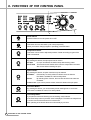
Power Switch
Press this buton to turn the power ON or OFF.
Start/Hold
This button is use to start wash cycle or stop temporarily.
When you want to change program in operating, press this button.
Temperature Button
This button can be used to adjust temperature of water according to types of the
load to be washed.
Spin Speed Button
By pressing this button, the spin speed can be chosen.
No Spin
If no spin is selected, the washer stops after draining water.
Rinse Hold This function leaves clothes in the machine suspended in the water
after a rinse without entering into spin.
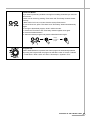
Option Button
By pressing this button, all option functions may be selected.
Pre-Wash
If the laundry is heavily soiled, Pre-Wash course is effective.
Pre-Wash is available in Cotton and Synthetic.
Rinse+
By selecting Rise+ function, the rinse time and the rinse water are
increased.
Crease Care If you want to prevent crease, select this button with spin speed.
Time Save Button
By pressing this button, you can decrease pre-set washing time to 10 minutes.
Time save is available in Cotton, Eco and Synthetic.
Time Delay Button
If you want to reserve the finishing time of washing, use this button.
If the Time Delay button is pressed, "2:00" is displayed. The maximum delayed time
is 12:00 hours and the minimum time is 2:00 hours.
Each pressing of the button advances on time delay by one hour.
22
FUNCTIONS OF THE CONTROL PANEL