1
Link to CSC Belt Tensioning Video:
http://www.californiasidecar.com/support.html
Setting up the Sonic Tension Meter:
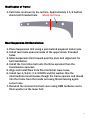
1. Turn power on, Push Select then 1.
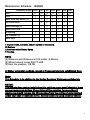
2. Using the charts below in Front and Rear belt tensioning push Mass
then the numbers, Width and so on.
3. For the Rear belt push Select then 2. Reverse belt can be number 3
and so on.
Using the Sonic Tension Meter:
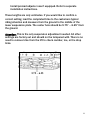
1. The microphone placement over the belt is critical.
a. The microphone should be in the middle of the belt width-wise.
b. The microphone should be equally in-between the two
Sprockets.
c. The microphone should be between ¼ and ½ an inch above or
below the Belt.
2. Turn the Sonic Tension Meter on.
3. Ensure that the correct setting is displayed on the LCD screen.
4. Push MEASURE then gently tap the Belt with a wrench while
holding the microphone in the correct position. A measurement in
Lbs. of single span tension should display. If not continue tightening
the Belt until a reading is displayed.
5. In noisy environments the Sonic Tension Meter may display errant
numbers. If so use in a quieter area.
6. Always take at least THREE readings of the Belt tension and
average the THREE readings to determine the actual tension of the
Belt.
13