1
Trip Computer
FUEL USED (Trip Fuel Used): This shows the
accumulated fuel used since the last reset.
There are five trip computer displays which may be
stepped through by pushing the MODE button.
The information will appear in the following order:
AVG SPEED (Average Speed): This shows the
average speed since the last reset.
AVG ECON (Average Fuel Economy): This shows the
average fuel economy since the last reset.
INST ECON (Instantaneous Fuel Economy): This
shows fuel economy for the most recent second
of driving.
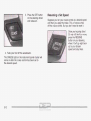
Resetting the Trip Computer
Press and hold the RESET button for at least three
seconds. The reset is acknowledged with all segments
of the display lit briefly and a chime. A reset can
only be done in AVG ECON, FUEL USED and AVG
SPEED displays. Each setting must be reset individually.
RANGE (Trip Range): This shows the estimated
distance that can be traveled with the remaining fuel.
The fuel economy used tocalculate range is based
on the last few hours of driving. When in a low
fuel condition, LO is displayed.
3-51