1
PARTS REPLACEMENT (CONT'D)
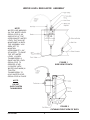
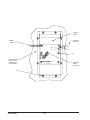
Replace Heater
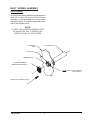
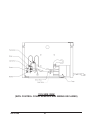
1. From inside control housing, remove 2 nuts and disconnect
wires from heater leads.
2. Remove two hex nuts from heater ends using a 13/16"
socket and remove heater.
3. Reverse above procedure to install new heater.
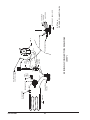
Replace "HI LIMIT"
Thermostat
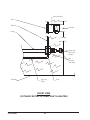
1. Remove four leads from thermostat terminals.
2. Remove two screws from thermostat bracket and remove
bracket.
3. Carefully tilt bath on its side.
4. Remove eight screws from bottom plate and remove plate.
5. Remove insulation from bottom of pan and between pan
and control panel wall.
6. Loosen two nuts from thermostat bulb bracket.
7. Carefully remove thermostat from control housing by sliding
bulb through hole in control panel wall.
8. Reverse above procedure to install new Hi Limit thermostat.
Use extreme care when installing new thermostat. A sharp
bend in the thermostat capillary will crimp off flow of
hydraulic fluid.
Replace Power Supply
Board
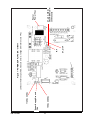
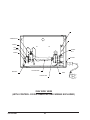
1. Remove connectors J101, J102, J103, and J105 from board.
Use extra care when removing J102 so as not to bend
connector pins.
2. Remove five nuts from board and then remove it.
3. Reverse above procedure to install new power supply board.
Replace CPU or
Display/Keyboard
Board
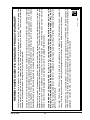
See note on the
following page **
1. Remove connectors J302 and J303 from CPU board.
2. Remove connector J102 from power supply board. Use
extreme care when removing J102 so as not to bend
connector pins.
3. Remove four nuts from CPU board and remove CPU board
and Keyboard/Display board.
4. Remove J201 from CPU board. Use extreme care when
removing J301 so as not to bend connector pins. Remove
board.
5. Reverse above procedure to install new board.
P/N: 3177890
16