1
Installation Instructions
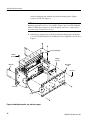
3. Mount the instrument in the rack:
WARNING. To prevent the instrument from tipping or dropping onto the installers, two or more people should install this instrument into the rack cabinet.
After completing the installation procedure, the installers should verify that the
instrument and rack cabinet will not tip forward while the instrument is in the
extended position.
a. Install the instrument:
H
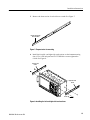
Working from the front of the rack, slide the inner track of each
slide-out track assembly until it extends out the front of the rack.
Continue to slide them out until they lock.
H
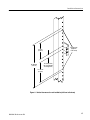
Insert the left and right tracks that extend from the rear of the
instrument into the ends of the tracks just extended. Make sure the
tracks mounted on the instrument slip inside the inner tracks
extended earlier.
H
Slide the instrument backwards until it stops.
H
Push to release the button latches, located on the outside of each
track, and continue to slide the instrument all the way into the
cabinet.
b. Level the rackmounted instrument:
RM4000 Rackmount Kit
H
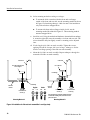
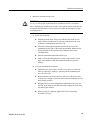
Tighten the four screws that were left loose at the rear of the rack
when you did step 2, substep c, and then pull the instrument part
way out of the rack.
H
Be sure that the four screws that were left loose at the front of the
rack are loose enough to allow the slide-out track assemblies to seek
their normal positions.
H
Retighten the four screws and push the instrument all the way into
the rack. If the tracks do not slide smoothly, readjust the level using
the method just detailed.
H
When leveling is completed, tighten the 10-32 screws using
28 inch-lb of torque.
19