1
NX-200
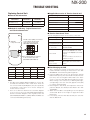
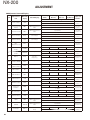
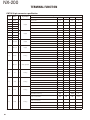
ADJUSTMENT
Condition
Item
10. Single
Tone
Deviation
adjust *4
[Narrow]
Panel tuning mode
PC test mode
1) Adj item: [An TONE] 1) Adj item: [Single
Adjust: [✳✳✳✳]
Tone Deviation
Deviation meter
(Analog Narrow)]
LPF: 15kHz
Deviation meter
HPF: OFF
LPF: 15kHz
PTT: ON
HPF: OFF
Press [ ] key to store
PTT: Press
the adjustment value.
[Transmit] button.
Press [Apply]
button to store the
adjustment value.
[Wide]
1) Adj item: [Aw TONE] 1) Adj item: [Single
Adjust: [✳✳✳✳]
Tone Deviation
PTT: ON
(Analog Wide)]
Press [ ] key to store
PTT: Press
the adjustment value.
[Transmit] button.
Press [Apply]
button to store the
adjustment value.
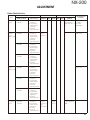
11. MSK
Deviation
adjust *4
1) Adj item: [An MSK] 1) Adj item: [MSK DeviaAdjust: [✳✳✳✳]
tion (Analog Narrow)]
Deviation meter
Deviation meter
LPF: 15kHz
LPF: 15kHz
HPF: OFF
HPF: OFF
PTT: ON
PTT: Press
Press [ ] key to store
[Transmit] button.
the adjustment value.
Press [Apply]
button to store the
adjustment value.
[Narrow]
[Wide]
1) Adj item: [Aw MSK] 1) Adj item: [MSK DeviAdjust: [✳✳✳✳]
ation (Analog Wide)]
PTT: ON
PTT: Press
Press [ ] key to store
[Transmit] button.
the adjustment value.
Press [Apply]
button to store the
adjustment value.
12. CWID
Deviation
adjust *4
1) Adj item: [Nv CWID] 1) Adj item: [CW ID
Adjust: [✳✳✳✳]
Deviation (NXDN
Deviation meter
Very Narrow)]
LPF: 15kHz
Deviation meter
HPF: OFF
LPF: 15kHz
PTT: ON
HPF: OFF
Press [ ] key to store
PTT: Press
the adjustment value.
[Transmit] button.
Press [Apply]
button to store the
adjustment value.
[Very
Narrow]
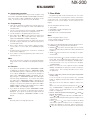
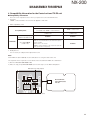
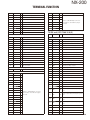
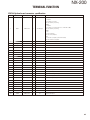
Measurement
Testequipment
Unit
Deviation Panel
meter
Oscilloscope
Terminal
ANT
Adjustment
Unit
Parts
Panel
[Panel
tuning
mode]
[ ],
[ ]
Method
Write the value as
followings.
513 (Reference
value)
Specifications /
Remarks
1.50kHz±0.05kHz
[PC test
mode]
[ ],[ ]
3.00kHz±0.05kHz
Write the value as
followings.
513 (Reference
value)
1.50kHz±0.05kHz
3.00kHz±0.05kHz
Write the value as
followings.
376 (Reference
value)
1.10kHz±0.10kHz
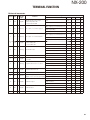
*4: Refer to the “Necessary Deviation adjustment item for each signaling and mode” table on pages 52 and 53.
13. VOX1
adjust
1) Adj item: [VOX1]
Adjust: [✳✳✳]
AG: 1kHz/45mV at
MIC terminal
1) Adj item: [VOX1]
AG: 1kHz/45mV at
MIC terminal
14. VOX10
adjust
1) Adj item: [VOX10]
Adjust: [✳✳✳]
AG: 1kHz/3mV at
MIC terminal
1) Adj item: [VOX10]
AG: 1kHz/3mV at
MIC terminal
AG
Panel
Universal
connector
[Panel tuning mode]
After apply signal
from AG, press [ ]
key to store the
adjustment value.
[PC test mode]
After apply signal
from AG, press
[Apply] button to
store the adjustment value.
51